VB450 - Measuring equipment Extech - Free user manual and instructions
Find the device manual for free VB450 Extech in PDF.


| Product Type | Vibration Meter |
| Brand | Extech |
| Model | VB450 |
| Category | Measuring Equipment |
| Display | 4-digit LCD with symbols |
| Measurement Range (Acceleration) | 0.1 to 199.9 m/s² |
| Measurement Range (Velocity) | 0.1 to 199.9 mm/s |
| Measurement Range (Displacement) | 0.001 to 1.999 mm |
| Frequency | 10 Hz to 1 kHz |
| Accuracy | ±(5% + 2 digits) |
| Power Supply | 9V battery (6LR61) |
| Dimensions | 176 x 69 x 33 mm |
| Weight | 260 g (with battery) |
| Operating Temperature | 0 to 50°C |
| Supplied Accessories | Piezoelectric sensor, cable, battery, carrying case |
| Main Functions | Measurement of acceleration, velocity, displacement; RMS, Peak, Peak-Peak values; data hold; auto power off; low battery indicator |
| Maintenance and Cleaning | Clean with a soft, dry cloth; do not use solvents |
| Safety | Indoor use only; avoid shocks; comply with environmental conditions |
| Spare Parts and Repairability | Sensor, cable and battery available; repair by manufacturer after authorization |
| Warranty | 1 year (sensors and cables: 6 months) |
| General Information | Annual calibration recommended; after-sales service by FLIR Systems; NIST certificate available |
Frequently Asked Questions - VB450 Extech
User questions about VB450 Extech
0 question about this device. Answer the ones you know or ask your own.
Ask a new question about this device
Download the instructions for your Measuring equipment in PDF format for free! Find your manual VB450 - Extech and take your electronic device back in hand. On this page are published all the documents necessary for the use of your device. VB450 by Extech.
USER MANUAL VB450 Extech
Thank you for selecng the Extech Instruments Model VB450.
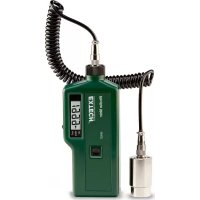
The VB450 is a portable vibraon meter consisting of an acceleraon sensor and a digital measurement display circuit. It can be used to measure vibraon displacement, speed (or intensity) and acceleraon of mechanical equipment.
Equipment such as fans, pumps, compressors, motors, etc. can be tested.
This device is shipped fully tested and calibrated and, with proper use, will provide years of reliable service. Please visit our website (www.extech.com) to check for the latest version of this User Guide, Product Updates, Product Registraon, and Customer Support.
Safety Notes
Warning: Use extreme care when using this vibraon meter to test mechanical devices. Damage to meter and injury to persons can occur if this meter is used in a manner not specified in this User Guide or if nominal, preparatory safety measures are not taken. Please refer to, and follow, the safety directives below.
- Do not take measurements on devices where the range is known to be, or expected to be, outside the specied measurement range of this device.
- Do not use this instrument if its housing appears cracked, chipped, or otherwise damaged.
- Do not use this instrument if the sensor or its cable appears damaged or compromised in any way.
○ Replace the baery as soon as the low baery symbol appears on the meter display.
○ Remove the baery if the device is to be stored for > 60 days. - Never dispose of baeries in a re. Baeries may explode or leak.
- Do not aempt to charge the 9V baery. The supplied 9V baery is not rechargeable. This meter was not designed to use rechargeable baeries.
- If the meter operates abnormally, stop tesng and have the unit serviced before further use.
- Never use the meter in a wet environment or in an atmosphere of combustible or explosive gas.
- Do not open the meter housing; there are no user-serviceable parts. Contact Extech Instruments directly or contact point-of-sale personnel for service inquiries.
- Protect the meter's LCD from shock or vibraon; allow only the magnet and sensor to touch the devices under test.
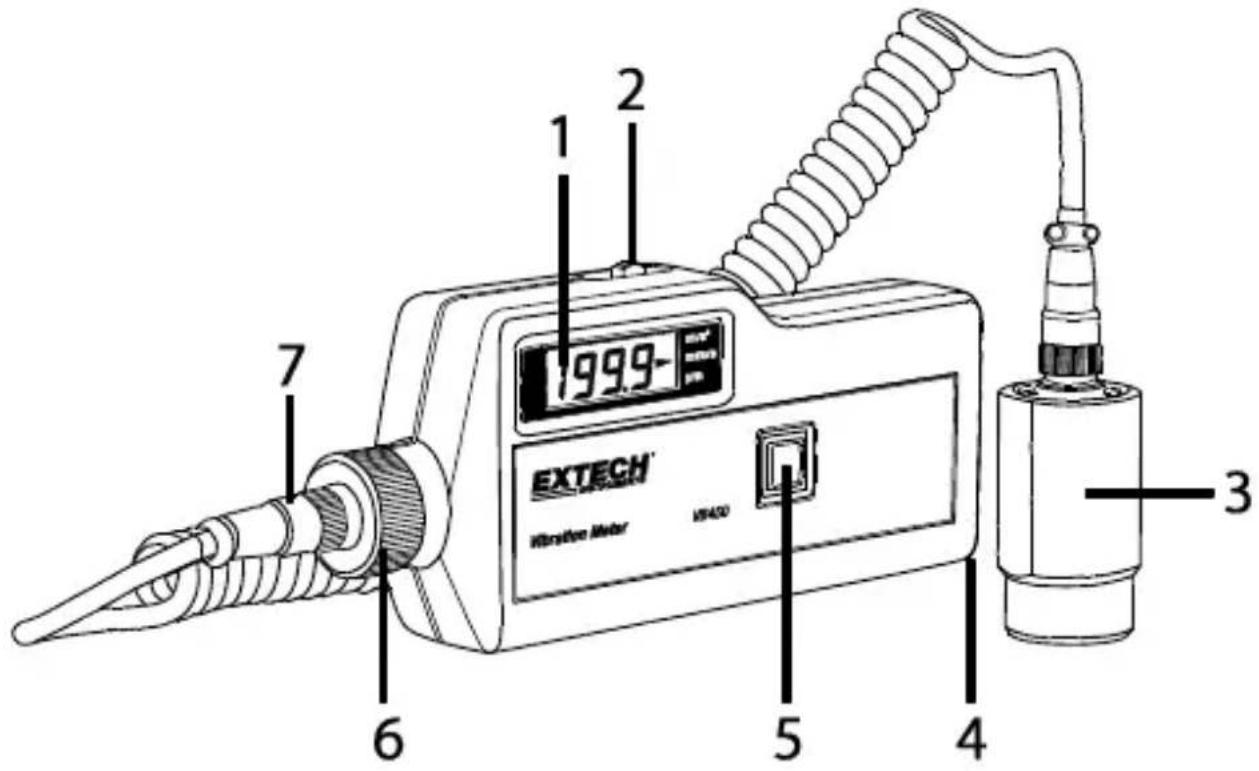
Meter Descripon
- LCD Display
- Three-posion switch (selects measurement units)
- Sensor and magnet
- Lanyard
- Power and Data Hold buon
- Service access nut (do not loosen; for service use only)
- Sensor secure nut (turn counter-clockwise to loosen)
Baery Compartment on rear of meter
Baery Installaon and Replacement
Remove the rear baery compartment door by sliding in the direcon of the arrow. Install or replace 9V baery (observe polarity) and replace the cover.
During operaon, if the symbol appears in the display the baery needs to be replaced.
Selecng units of measure
Press and hold the power buon. The display will illuminate and an arrow will indicate the units selected. Slide the funcon switch on the top of the meter to select the units desired.
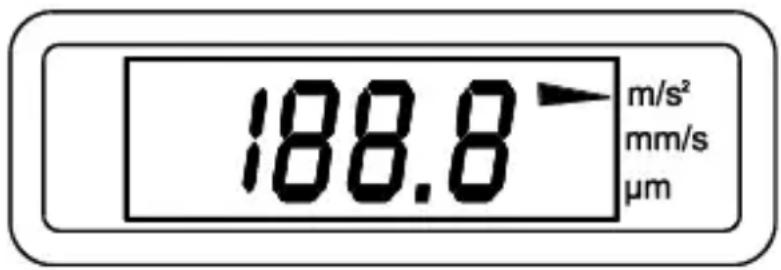
| m/s^2 | Acceleron | Meters per second squared | PEAK |
| mm/s | Velocity | Millimeters per second squared | RMS |
| μm | Displacement | micrometers | Peak to Peak |
Measurements
Aach the sensor to the device to be measured with the magnet or hold the sensor for nonferrous materials. Press and hold the power buon to display the results. Release the power buon to freeze the results in the display. Aer 60 seconds the meter will automacally shut o.
General Specicaons
Display 3 12 digit LCD (0\~1999)
Sensor Accelerometer (magnec base)
Cable Length 7.9" (0.2m) coiled cable
Low baery indicaon symbol

Power supply 9V Baery
Baery life Approx. 20 hours (alkaline)
Operang conditions 32 to 104
^ F (0 to 40°C) <90% RH
Storage conditions 32 to 104
^ F (0 to 40°C) <80% RH
Dimensions 7.3 x 2.7 x 1.2" (185 x 68 x 30mm)
Weight 10.6 oz. (300g) including baery
Safety Standards GB 4793, 1-2007
For indoor use only
Range and Accuracy
| Funcon | Acceleraon(Peak) | Velocity(RMS) | Displacement(Peak to Peak) |
| Range | 0.1 to 199.9m/s ^2 | 0.1 to 199.9mm/s | 1 to 199.9μm |
| Frequency Response | 10 to 1500Hz | 10 to 1500Hz | 10 to 500Hz |
| Accuracy | 0 to 2.0m/s ^2 ±(10%+ 1 digit)>2.0m/s ^2 ±(5%+ 1 digit) | 0 to 2.0m/s±(10%+ 1d)>2.0m/s±(5%+ 1d) | 0 to 2.0μm±(10%+ 1 digit)>2μm±(5%+ 1 digit) |
Warranty
FLIR Systems, Inc. warrants this Extech Instruments brand device to be free of defects in parts and workmanship for one year from date of shipment (a six month limited warranty applies to sensors and cables). If it should become necessary to return the instrument for service during or beyond the warranty period, contact the Customer Service Department for authorizaon. Visit the website www.extech.com for contact informaon. A Return Authorizaon (RA) number must be issued before any product is returned. The sender is responsible for shipping charges, freight, insurance and proper packaging to prevent damage in transit. This warranty does not apply to defects resulting from acon of the user such as misuse, improper wiring, operaon outside of specicaon, improper maintenance or repair, or unauthorized modicaon. FLIR Systems, Inc. specially disclaims any implied warranes or merchantability or tness for a specic purpose and will not be liable for any direct, indirect, incidental or consequential damages. FLIR's total liability is limited to repair or replacement of the product. The warranty set forth above is inclusive and no other warranty, whether written or oral, is expressed or implied.
Calibraon, Repair, and Customer Care Services
FLIR Systems, Inc. oers repair and calibraon services for the Extech Instruments products we sell. NIST cercaon for most products is also provided. Call the Customer Service Department for informaon on calibraon services available for this product. Annual calibraons should be performed to verify meter performance and accuracy. Technical support and general customer service is also provided, refer to the contact informaon provided below.
Support Lines: U.S. (877) 439-8324
Internaonal: +1 (603) 324-7800
Technical Support: Opon 3; E-mail: support@extech.com
Repair & Returns: Opon 4; E-mail: repair@extech.com
Product specicaons are subject to change without noce
Please visit our website for the most up-to-date informaon
www.extech.com
FLIR Commercial Systems, Inc., 9 Townsend West, Nashua, NH 03063
USA
ISO 9001 Cered
Copyright © 2015 FLIR Systems, Inc.
All rights reserved including the right of reproducon in whole or in part in any form
www.extech.com
Garane
Copyright © 2015 FLIR Systems, Inc.
Copyright © 2015 FLIR Systems, Inc.