475040 - Measuring equipment Extech - Free user manual and instructions
Find the device manual for free 475040 Extech in PDF.


User questions about 475040 Extech
0 question about this device. Answer the ones you know or ask your own.
Ask a new question about this device
Download the instructions for your Measuring equipment in PDF format for free! Find your manual 475040 - Extech and take your electronic device back in hand. On this page are published all the documents necessary for the use of your device. 475040 by Extech.
USER MANUAL 475040 Extech
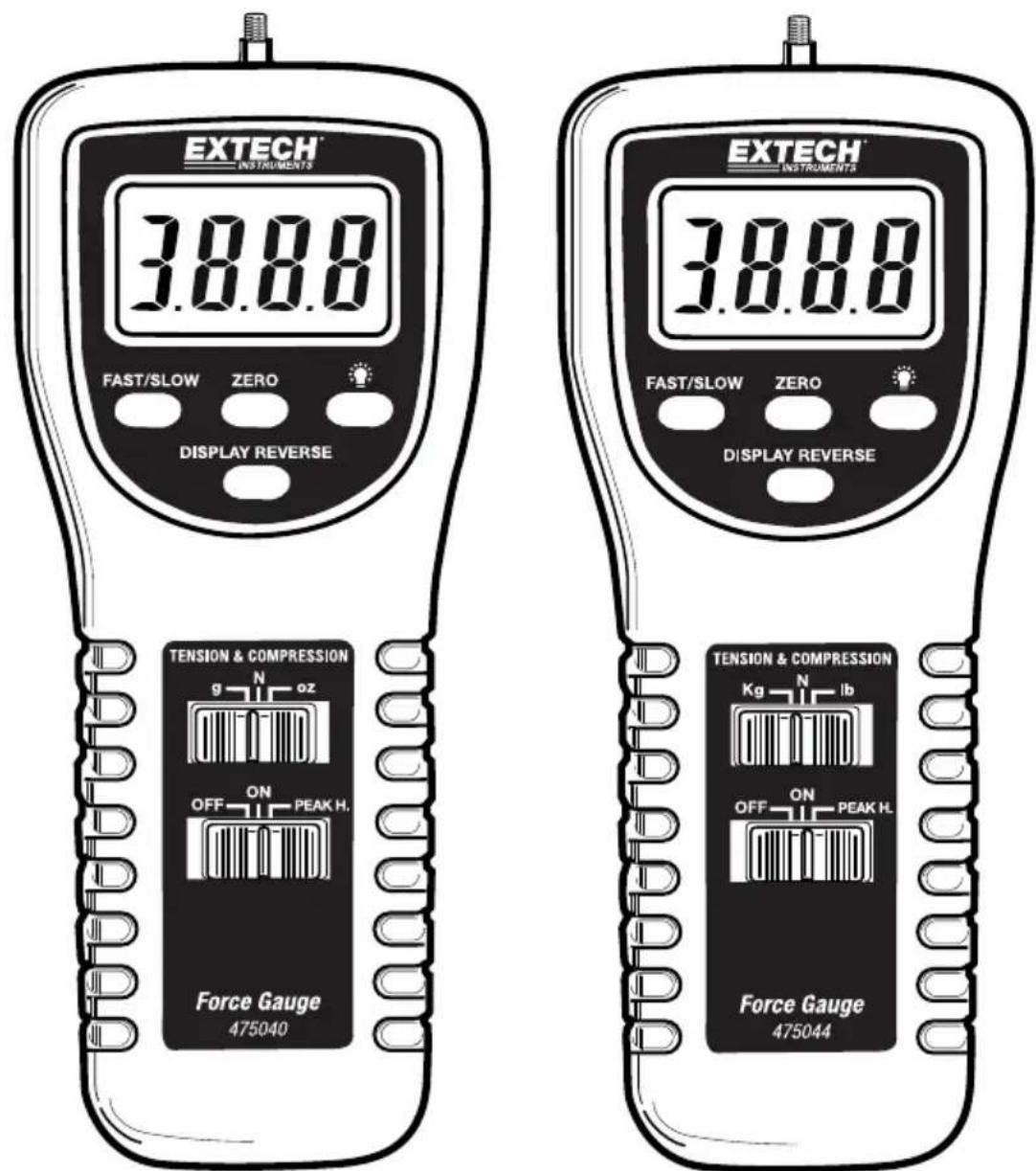
Models 475040 and 475044
text_image
EXTECH INSTRUMENTS 38.8.0 FAST/SLOW ZERO DISPLAY REVERSE EXTECH INSTRUMENTS 38.8.0 FAST/SLOW ZERO DISPLAY REVERSE TENSION & COMPRESSION g N oz OFF ON PEAK H. Force Gauge 475040 TENSION & COMPRESSION Kg N lb OFF ON PEAK H. Force Gauge 475044Introduction
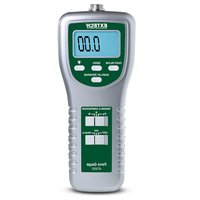
Thank you for selecting the Extech Digital Force Gauge. This professional meter, with proper care, will provide years of safe reliable service. This device measures Tension or Compression (Push or Pull) to 5kg (475040) or 20kg (475044). The reversible display indicates readings in grams, ounces, or Newtons. This meter offers Peak Hold and a Zero function. Please visit the Extech Instruments website (www.extech.com) to check for the latest version of this User Guide.
Meter Description
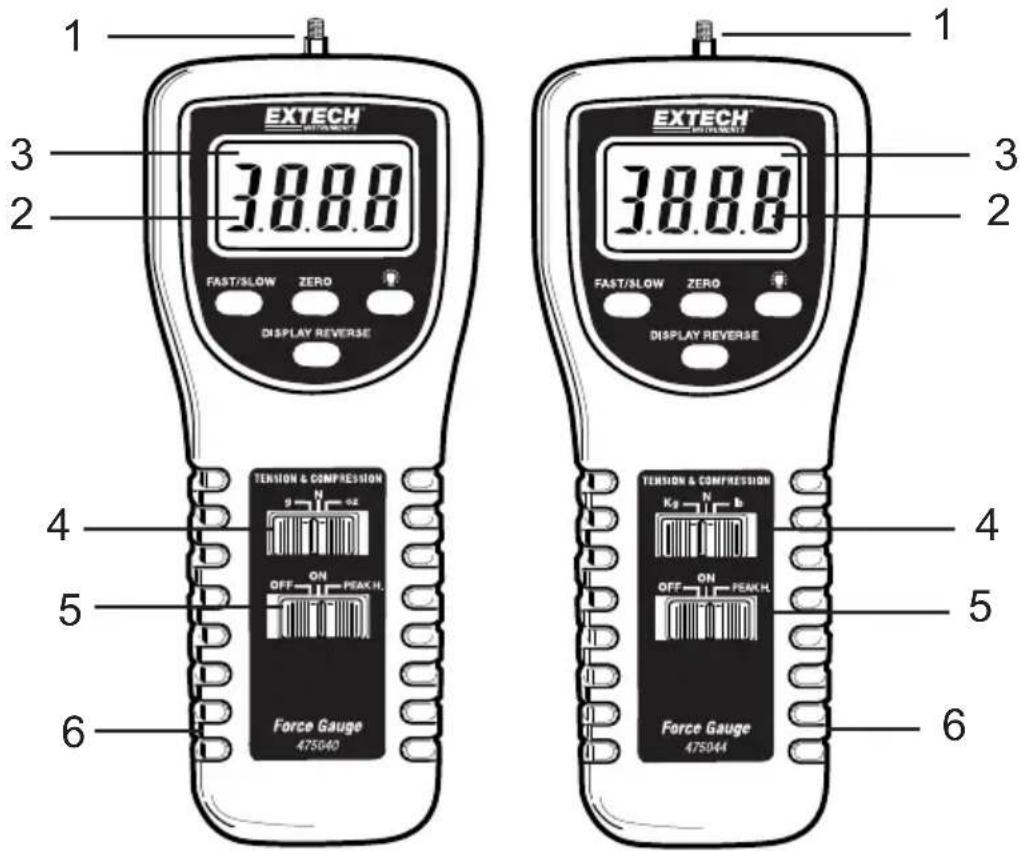
FRONT DESCRIPTION
- Universal sensing head
- LCD Display
- Fast response indicator
- Units select switch
- OFF/ON/PEAK HOLD button
- Battery compartment cover (on rear)
text_image
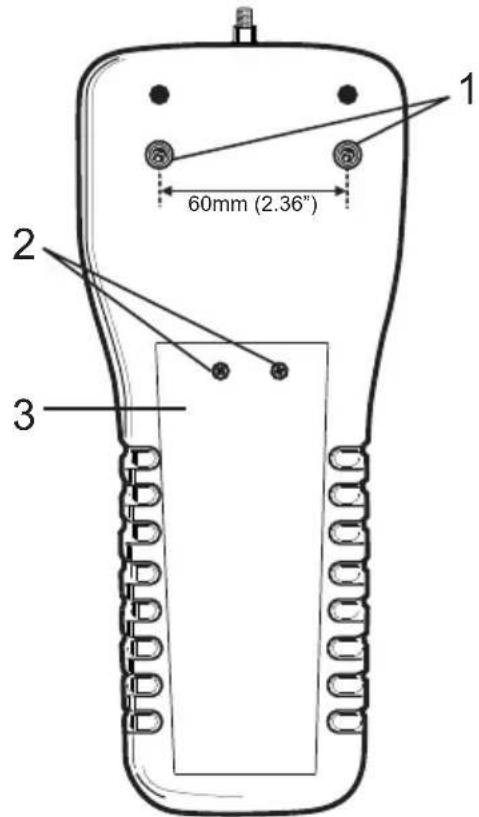
1 EXTECH 3.8.8.0 FAST/SLOW ZERO DISPLAY REVERSE 2 3 1 EXTECH 3.8.8.0 FAST/SLOW ZERO DISPLAY REVERSE 2 4 5 6 TENSION & COMPRESSION OFF ON PEAK H. Force Gauge 475040 TENSION & COMPRESSION Kg N b OFF ON PEAK H. Force Gauge 475044 4 5 6METER BACK AND MOUNTING SCREW DESCRIPTION
- Mounting screws:
Hex head (#4 Allen wrench) with a thread size of metric (ISO) M5 x 0.8. The spacing between screws is 60.0 mm (2.36")
- Battery compartment access screws
- Battery compartment
text_image
1 60mm (2.36") 2 3Operation
Preparation for Measurement
- The 475044 or 474040 automatically determine TENSION or COMPRESSION (Push or Pull) force during use. Compression displays as a negative value and Tension displays as a positive value.
- Select units of measure (grams/kilograms, ounces/pounds, or Newtons) via the units select button.
- Attach the desired adapter (tension - hook; compression.- flat, cone or chisel head) to the Universal Sensing Head.
- Select FAST or SLOW response. The FAST setting permits the capture of fast measurement changes and the SLOW setting provides an averaged reading display.
- Zero the display before each measurement via the Zero button.
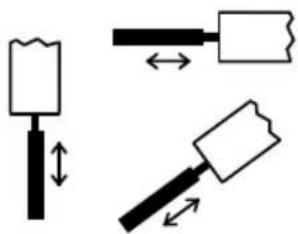
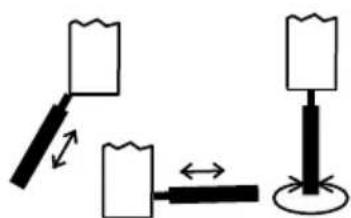
Note: The sensing head with adapter must be in line with the object being measured. Avoid rotating the sensing head. Refer to the figure below.
Figure 1 — Correct and Incorrect Angles of Measurement
natural_image
Three schematic diagrams of a hammer tool with different movement arrows, no text or symbols presentAcceptable
natural_image
Simple diagram showing a lever and lever mechanism with no text or symbolsNot Acceptable
Normal Measurement Mode
- Slide the POWER switch to the ON position.
- Zero the meter before each measurement.
- Touch the adapter to the object being measured in a straight line. Refer to Fig.1.
- Begin measurement by applying force (Push or Pull). Read the LCD display.
- After completing the measurement, the display will indicate "0.00" if the position and angle of the Force Gauge have not changed.
- If the position or angle of the Force Gauge changes during a measurement, the display may show one of the following:
a) The display over-ranges because the initial force of the transducer decreases due to a change in the position or angle of the Gauge after measurement.
b) The display indicates any value such as "12", "25", etc. This occurs because the initial force of the transducer increases due to a change in the position or angle of the Gauge after measurement.
Note: Be sure to press "ZERO" before taking any new measurements.
Mounting
For best results, mount the Digital Force Gauge to a test stand. Mounting holes are provided on the rear of the meter.
Battery Replacement
The low battery indication appears as a "LO" on the display when battery voltage is less than 6.8V. To replace the battery:
- Remove the two screws from the battery compartment cover.
- Lift off the battery cover.
- Replace with 6 x 1.5V AA (UM-3) batteries. Observe polarity carefully.
- Replace compartment cover and screws.
Battery Safety Reminders
- Please dispose of batteries responsibly; always observe local, state, and federal regulations with regard to battery disposal.
• Never dispose of batteries in a fire. Batteries may explode or leak. - Never mix battery types. Always install new batteries of the same type.
Specifications
| 475044 | 475040 | |
| Range 44 lbs, 20kg,196 Newtons | 176oz, 5000g, 49 Newtons | |
| Accuracy (23°C) ±(0.5%rdg + 2 digits) ± (0.4%rdg + 1 digit) | ||
| Resolution 0.01lbs, 0.01kg, 0.05 Newtons 0.05oz, 1g, 0.01 Newtons | ||
| Overload Capacity 30kg 10kg | ||
| Circuit Custom LSI microprocessor circuit | ||
| Zero adjust Button for Peak Hold and normal display zero | ||
| Display 5 digits, 16 mm (0.63") LCD display | ||
| Update Rate | Fast mode 0.2 secs; Slow mode 0.6 secs. | |
| Over-range Indicator | Displays “----” | |
| Zero Control | Maximum capacity | |
| Full Scale Deflection: 5000g | Approx. 2mm max. | |
| Full Scale Deflection: 20kg | Approx. 0.4mm max. | |
| Transducer type Load cell | ||
| Peak Hold | Freezes Max reading on display | |
| Operating Temperature | 0 °C to 50 °C (32 °F to 122 °F). | |
| Operating RH | Max. 80% RH. | |
| Power Supply | 6x 1.5V AA (UM-3) size battery or DC 9V adapter (not included) | |
| Weight | 480g / 1.1 lbs. | |
| Size | 215 x 90 x 45 mm (8.5 x 3.5 x 1.8") | |
| Mounting Holes | Located on rear of gauge | |
| Accessories | Tension adapter (hook), compression adapters (flat, cone, and chisel), 5" extension rod, 6 x 1.5V AA batteries, case | |
Warranty
FLIR Systems, Inc. warrants this Extech Instruments brand device to be free of defects in parts and workmanship for one year from date of shipment (a six month limited warranty applies to sensors and cables). If it should become necessary to return the instrument for service during or beyond the warranty period, contact the Customer Service Department for authorization. Visit the website www.extech.com for contact information. A Return Authorization (RA) number must be issued before any product is returned. The sender is responsible for shipping charges, freight, insurance and proper packaging to prevent damage in transit. This warranty does not apply to defects resulting from action of the user such as misuse, improper wiring, operation outside of specification, improper maintenance or repair, or unauthorized modification. FLIR Systems, Inc. specifically disclaims any implied warranties or merchantability or fitness for a specific purpose and will not be liable for any direct, indirect, incidental or consequential damages. FLIR's total liability is limited to repair or replacement of the product. The warranty set forth above is inclusive and no other warranty, whether written or oral, is expressed or implied.
Calibration, Repair, and Customer Care Services
FLIR Systems, Inc. offers repair and calibration services for the Extech Instruments products we sell. NIST certification for most products is also provided. Call the Customer Service Department for information on calibration services available for this product. Annual calibrations should be performed to verify meter performance and accuracy. Technical support and general customer service is also provided, refer to the contact information provided below.
Support Lines: U.S. (877) 439-8324; International: +1 (603) 324-7800
Technical Support: Option 3; E-mail: support@extech.com
Repair & Returns: Option 4; E-mail: repair@extech.com
Product specifications are subject to change without notice
Please visit our website for the most up-to-date information
www.extech.com
FLIR Commercial Systems, Inc., 9 Townsend West, Nashua, NH 03063 USA
ISO 9001 Certified
Copyright © 2014 FLIR Systems, Inc.
All rights reserved including the right of reproduction in whole or in part in any form
www.extech.com
Garantie
Copyright © 2014 FLIR Systems, Inc.
Copyright © 2014 FLIR Systems, Inc.