
DE2000 - Router table DEWALT - Free user manual and instructions
Find the device manual for free DE2000 DEWALT in PDF.


User questions about DE2000 DEWALT
0 question about this device. Answer the ones you know or ask your own.
Ask a new question about this device
Download the instructions for your Router table in PDF format for free! Find your manual DE2000 - DEWALT and take your electronic device back in hand. On this page are published all the documents necessary for the use of your device. DE2000 by DEWALT.
USER MANUAL DE2000 DEWALT
A2
DE2000
A3
D
E
H
|
J
K
M1
M2
M3
natural_image
Pure mechanical diagram showing a pipe connection with a valve and base, no text or symbols present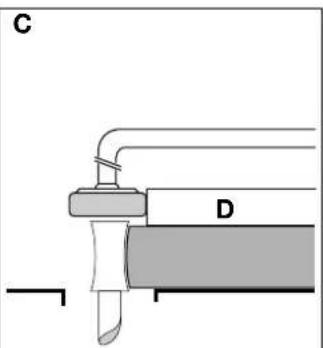
natural_image
Pure mechanical diagram showing a valve or actuator assembly without any text, numbers, or symbolsM4
HÅNDOVERFRÅESERBORD DE2000
Tillykke!
Elu MH85 DeWALT DW62 Metabo KsE 1668s-Signal
Elu MH151 DeWALT DW65 Metabo Ks 1468 S
Elu MH165 DeWALT DW86 Metabo Ks 1255 S
Elu MH265 Bosch GKS 65
Elu MH286 Bosch GKS 66 CE
Elu MOF96 DeWALT DW613
Elu OF97 DEWALT DW625E
Elu MOF131 DeWALT DW620
Elu MOF177 DEWALT DW621
| A | B | C | D | |
| Elu MH151 12-23 24-39 41-45 - | ||||
| Elu MH165 9-18 18-30 30-40 41-47 | ||||
| Elu MH265 8-15 18-24 26-33 38-45 | ||||
| Elu MH85 9-18 21-30 31-39 - | ||||
| Elu MH286 7-13 18-29 27-35 40-45 | ||||
| DEWALT DW62 3-11 19-31 34-45 - | ||||
| DEWALT DW65 8-15 18-24 26-33 38-45 | ||||
| DEWALT DW86 7-13 18-29 27-35 40-45 | ||||
| DEWALT DW351 12-23 24-39 41-45 - | ||||
| DEWALT DW365 9-18 18-30 30-40 41-47 | ||||
| Bosch GKS 65 8-21 21-32 33-41 45 | ||||
| Bosch GKS 66 CE | 8-21 21-32 33-41 45 | |||
| Metabo KsE 1668s-Signal | 19-36 38-45 - - | |||
| Metabo Ks 1468 S | 19-36 38-45 | |||
| Metabo Ks 1266 S | 19-36 38-45 | |||
Elu MH85 DeWALT DW62 Metabo KsE 1668s-Signal
Elu MH151 DeWALT DW65 Metabo Ks 1468 S
Elu MH165 DEWALT DW86 Metabo Ks 1255 S
Elu MH265 Bosch GKS 65
Elu MH286 Bosch GKS 66 CE
Elu MOF96 DEWALT DW613
Elu OF97 DeWALT DW625E
Elu MOF131 DEWALT DW620
Elu MOF177 DeWALT DW621
| A | B | C | D | |
| Elu MH151 12-23 24-39 41-45 - | ||||
| Elu MH165 9-18 18-30 30-40 41-47 | ||||
| Elu MH265 8-15 18-24 26-33 38-45 | ||||
| Elu MH85 9-18 21-30 31-39 - | ||||
| Elu MH286 7-13 18-29 27-35 40-45 | ||||
| D-WALT DW62 3-11 19-31 34-45 - | ||||
| D-WALT DW65 8-15 18-24 26-33 38-45 | ||||
| D-WALT DW86 7-13 18-29 27-35 40-45 | ||||
| D-WALT DW351 12-23 24-39 41-45 - | ||||
| D-WALT DW365 9-18 18-30 30-40 41-47 | ||||
| Bosch GKS 65 8-21 21-32 33-41 45 | ||||
| Bosch GKS 66 CE 8-21 21-32 33-41 45 | ||||
| Metabo KsE 1668s-Signal | 19-36 38-45 - - | |||
| Metabo Ks 1468 S | 19-36 38-45 | |||
| Metabo Ks 1266 S | 19-36 38-45 | |||
You have chosen a DeWALT product. Years of experience, thorough product development and innovation make DeWALT one of the most reliable partners for professional Power Tool users.
Table of contents
| Technical data en - 1 | |
| Manufacturer's Declaration en - 1 | |
| Safety instructions en - 1 | |
| Package contents en - 2 | |
| Description en - 2 | |
| Electrical safety en - 2 | |
| Mains plug replacement (U.K. & Ireland only) en - 2 | |
| Using an extension cable en - 2 | |
| Assembly and adjustment en - 3 | |
| General en - 3 | |
| DE2011 (option) en - 3 | |
| DE2000 en - 5 | |
| Instructions for use en - 5 | |
| DE2011 (option) en - 6 | |
| DE2000 en - 6 | |
| Optional accessories en - 7 | |
| DE2011 (option) en - 7 | |
| DE2000 en - 7 | |
| Maintenance | en - 8 |
| Guarantee | en - 8 |
Technical data
| DE2000 | ||
| Voltage | V | 230 |
| ON/OFF-switch | no-volt release | |
| Dimensions (w x d) | mm | 770 x 600 |
| height, without legs | mm | 350 |
| height, with legs | mm | 860 |
| Loss of cutting depth due to the table thickness | mm | 8 |
| Weight | kg | 23 |
| Fuses: | ||
| Europe | 230 V tools | 16 Amperes, mains |
| U.K. & Ireland | 230 V tools | 13 Amperes, in plugs |
The following symbols are used throughout this manual:

Denotes risk of personal injury, loss of life or damage to the tool in case of non-observance of the instructions in this manual.

Denotes risk of electric shock.

Refer to the instruction manual of your Power Tool.
Manufacturer's Declaration

DE2000
DeWALT declares that the attachment mentioned above has been designed in compliance with 89/392/EEC & 73/23/EEC.
This attachment must not be put into service until it has been established that the Power Tool to be connected to this attachment is in compliance with 89/392/EEC (identified by the CE-marking on the Power Tool).
Director Engineering and Product Development Horst Großmann
Observe the safety regulations in the instruction manual of the Power Tool to be fitted to this Combi-Table. Read the following safety instructions before attempting to operate this product.
Keep these instructions in a safe place!
The attention of UK users is drawn to the "woodworking machines regulations 1974" and any subsequent amendments.
General
• Always mount the Combi-Table in conformity with the present instructions.
- Keep children away.
- Dress properly. Do not wear loose clothing or jewellery. They can be caught in moving parts. Preferably wear rubber gloves and non-slip footwear when working outdoors. Wear protective hair covering to keep long hair out of the way.
- Do not use the Combi-Table outdoors in the rain or in a damp environment.
- The Combi-Table must be level and stable at all times.
- Keep the work top clear of foreign objects.
- Use the Combi-Table with the Power Tools and accessories specified in this manual only.
- Secure the Power Tool carefully.
• Work with closed hands.
- Remove any nails, staples and other metal parts from the workpiece.
- Use sharp and undamaged accessories only.
- Before operation, inspect the Combi-Table, the Power Tool, the cable and the plug carefully for signs of damage. Have any damage repaired by an authorized DeWALT repair agent before using the tool or Combi-Table.
- Keep the Combi-Table clean and in good condition for better and safer performance. Follow the instructions for maintenance. Keep all controls dry, clean and free from oil and grease.
- As woodworking produces dust and woodchips, the use of dust extraction equipment is recommended. Proper dust extraction is especially important if beech or oak dust is produced.
- This Combi-Table is in accordance with the relevant safety regulations. To avoid danger, it must only be repaired by qualified technicians.
- Ensure that the width of the sawing gap is sufficient to take the saw blade being used.
- When cutting narrow workpieces (width less than 120 mm) longitudinally, use a rip fence guide along the longitudinal edge and a push stick.
- When sawing with the workpiece clamped tight, use devices to prevent the workpiece kicking back.
- When sawing circular sections of wood use a device to hold the workpiece steady on both sides of the saw blade to prevent slipping.
- Ensure that pieces of wood sawn off the workpiece cannot be caught up by the teeth of the saw blade and thrown in the air.
- Do not remove the riving knife.
- Do not saw firewood.
- Do not reach around behind the saw blade.
Using circular saws in a fixed position
Using routers in a fixed position
- Fit a lightweight mask over your nose and mouth, when routing for a lengthy period.
- Use protective goggles when routing particle board.
• After work, release the router carriage to protect the cutter.
Package contents
The package contains:
1 Aluminium frame with no-volt release switch
4 Legs
DE2000
1 Router mounting plate
3 Fixing screws
1 Router fence with dust spout
1 Cutter guard
4 Cutting inserts (router)
1 Instruction manual
1 Exploded drawing
- Check for damage to the tool, parts or accessories which may have occurred during transport.
• Take the time to thoroughly read and understand this manual prior to operation.
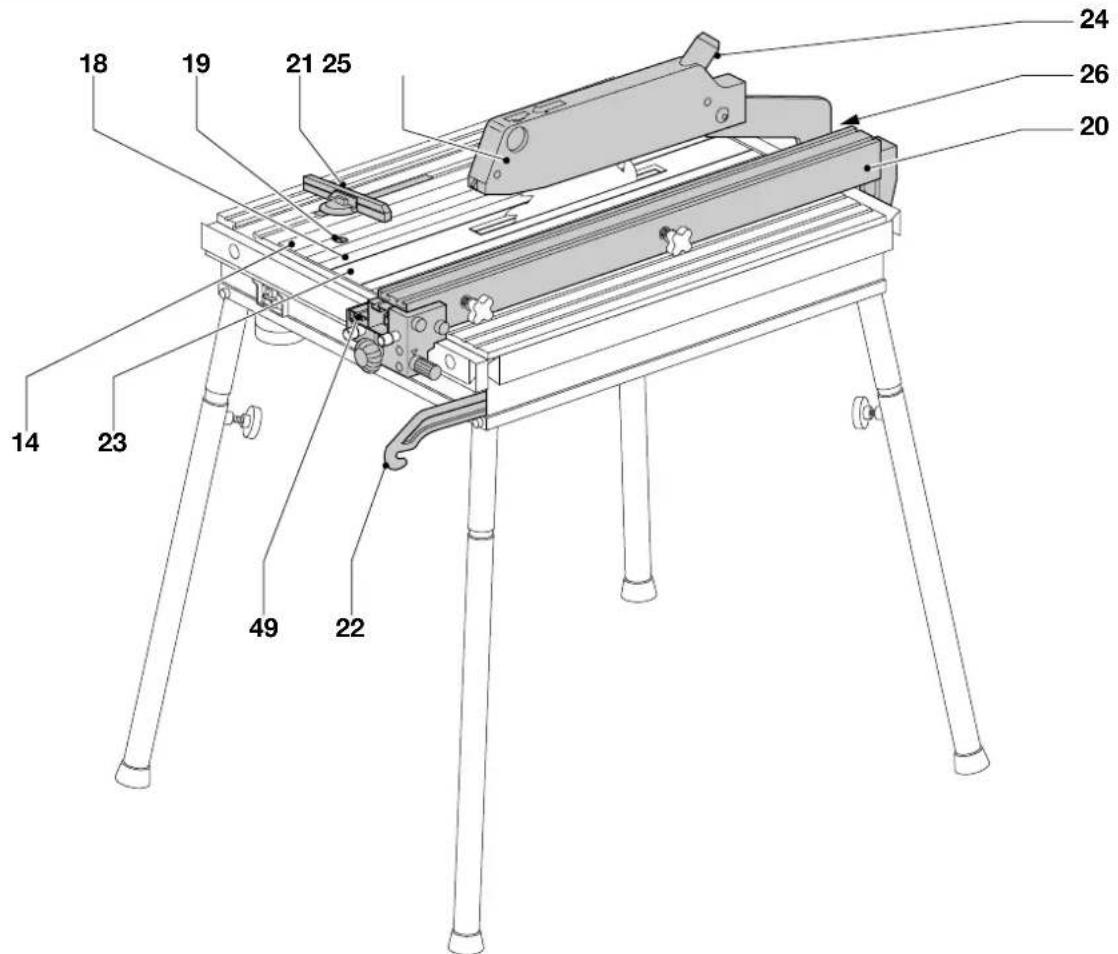
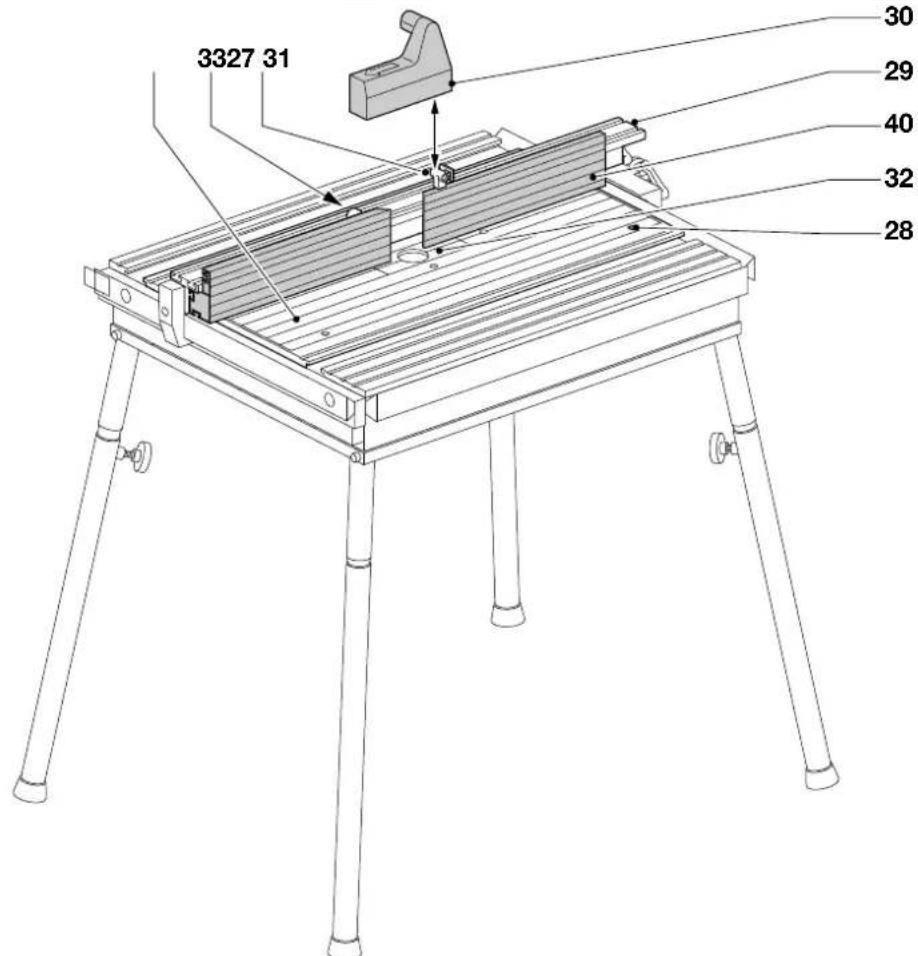
Description (fig. A1 - A3)
Your stable and rigid DE2000/DE2011 Combi-Table has been designed to extend the versatility of your router or circular saw, enabling them to be used in a stationary mode.
Fig. A1 - Combi-Table
1 No-volt release switch
2 Socket
3 Fine adjustment clamp
4 Fine adjuster
5 Locking screw (front)
6 Locking screw (back)
7 Star knob
8 Leg
9 Thumbscrew
10 Scale
11-14 Slide rail
15-16 Dovetail grooves
17 Push stick holder
Fig. A2 - DE2011 (option)
18 Saw mounting plate
19 Fixing screws
20 Parallel rip fence with profile (49)
21 Sliding mitre fence
22 Push stick
23 Cutting insert
24 Dust spout
25 Adjustable saw blade guard
26 Dust guard holder
Fig. A3 - DE2000
27 Router mounting plate
28 Fixing screws
29 Router fence with faces (40)
30 Transparent cutter guard
31 Cutter guard bracket
32 Cutting insert
33 Dust spout
We recommend the following saws for use with the DE2011 (option):
Elu MH85 DeWALT DW62 Metabo KsE 1668s-Signal
Elu MH151 D EWALT DW65 Metabo Ks 1468 S
Elu MH165 D EWALT DW86 Metabo Ks 1255 S
Elu MH265 Bosch GKS 65
Elu MH286 Bosch GKS 66 CE
We recommend the following Routers for use with the DE2000 Router Table (all models: construction year from 1990):
Elu MOF96 DEWALT DW613
Elu OF97 DeWALT DW625E
Elu MOF131 DeWALT DW620
Elu MOF177 DEWALT DW621
With the optional mounting kit (DE2010), the DeWALT Router Table DE2000 also accepts most of the common routers in the market and older models.

Do not mount any Power Tools not specified in this list.
Mains plug replacement (U.K. & Ireland only)
- Should your mains plug need replacing and you are competent to do this, proceed as instructed below. If you are in doubt, contact an authorized D=WALT repair agent or a qualified electrician.
- Disconnect the plug from the supply.
- Cut off the plug and dispose of it safely; a plug with bared copper conductors is dangerous if engaged in a live socket outlet.
- Only fit 13 Amperes BS1363A approved plugs fitted with the correctly rated fuse (1).
- The cable wire colours, or a letter, will be marked at the connection points of most good quality plugs. Attach the wires to their respective points in the plug (see below). Brown is for Live (L) (2) and Blue is for Neutral (N) (4).
- Before replacing the top cover of the mains plug ensure that the cable restraint (3) is holding the outer sheath of the cable firmly and that the two leads are correctly fixed at the terminal screws.
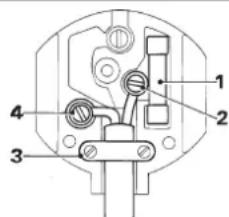

Never use a light socket.
Never connect the live (L) or neutral (N) wires to the earth pin marked E or 12
For 115 V units with a power rating exceeding 1500 W, we recommend to fit a plug to BS4343 standard.
Using an extension cable
If an extension cable is required, use an approved extension cable suitable for the power input of this tool (see technical data). The minimum conductor size is 1.5 mm ^2 . When using a cable reel, always unwind the cable completely.
Also refer to the table below.
| Conductor size (mm2) Cable rating (Amperes) | |
| 0.75 6 | |
| 1.00 10 | |
| 1.50 15 | |
| 2.50 20 | |
| 4.00 25 | |
| Cable length (m) | |
| 7.5 15 25 30 45 60 | |
| Voltage Amperes Cable rating (Amperes) | |
| 115 0 - 2.0 6 6 6 6 6 10 | |
| 2.1 - 3.4 6 6 6 6 15 15 | |
| 3.5 - 5.0 6 6 10 15 20 20 | |
| 5.1 - 7.0 10 10 15 20 20 25 | |
| 7.1 - 12.0 15 15 20 25 25 | |
| 12.1 - 20.0 20 20 25 -- | |
| 230 0 - 2.0 6 6 6 6 6 6 6 6 6 6 6 6 6 6 6 6 6 6 6 6 6 6 6 6 6 6 6 6 6 6 6 6 6 6 6 6 6 6 6 6 6 6 6 6 6 6 6 6 6 6 8 8 8 8 8 8 8 8 8 8 8 8 8 8 8 8 8 8 8 8 8 8 8 8 8 8 8 8 8 8 8 8 8 8 8 8 8 8 8 8 8 8 8 8 8 8 8 8 8 8 9 9 9 9 9 9 9 9 9 9 9 9 9 9 9 9 9 9 9 9 9 9 9 9 9 9 9 9 9 9 9 9 9 9 9 9 9 9 9 9 9 9 9 9 9 9 9 9 9 9 10 10 10 10 10 10 10 10 10 10 10 10 10 10 10 10 10 10 10 10 10 10 10 10 10 10 10 10 10 10 10 10 10 10 | |
| 2.1 - 3.4 6 6 6 6 6 6 6 6 6 6 6 6 6 6 6 6 6 6 6 6 6 6 6 6 6 6 6 6 6 6 6 6 6 6 6 6 6 6 6 6 6 6 6 6 6 6 6 6 6 10 15 15 15 15 15 15 15 15 15 15 15 15 15 15 15 15 15 15 15 15 15 15 15 15 15 15 15 15 15 15 15 15 15 15 | |
| 5.1 - 7.0 10 10 10 10 10 10 10 10 10 10 10 10 10 10 10 10 10 10 10 10 10 10 10 10 10 10 10 10 10 10 10 10 15 15 15 15 15 15 15 15 15 15 15 15 15 15 15 15 15 15 15 15 15 15 15 15 15 15 15 15 15 15 15 15 | |
| 7.1 - 12.0 15 15 15 15 15 15 15 15 15 15 15 15 15 15 15 15 15 15 15 15 15 15 15 15 15 15 15 15 15 15 15 15 16 16 16 16 16 16 16 16 16 16 16 16 16 16 16 16 16 16 16 16 16 16 16 16 16 16 16 16 16 16 16 16 16 16 | |
| 12.1 - 20.0 20 20 20 20 20 20 20 20 20 20 20 20 20 20 20 20 20 20 20 20 20 20 20 20 20 20 20 20 20 20 | |
Assembly and adjustment

Prior to assembly and adjustment always unplug the Combi-Table.
General
Mounting the legs (fig. A1)
The Combi-Table can be used with or without the legs (8). When mounting a router without using the legs, check that there is sufficient space to release the router carriage.
- Put the table on its side.
- Loosen the four wing nuts (9) and insert the legs. Turn the wing nuts to the inside and tighten them.
- Turn the table over and adjust the legs to level the table. Tighten the wing nuts securely.
- Secure the switch lock (Velcro) supplied with the Combi-Table to one of the leg wing nuts using the strap.
Mounting the fences and accessories (fig. A1 - A3)
Your Combi-Table is provided with slide rails and dovetailed grooves which accept the accessories.
- Slide the fences into the appropriate slide rails or grooves in the table top: For the parallel rip fence (DE2011) or router fence (DE2000), use slide rails (11) and (12).
For the mitre fence, use groove (16). - DE2011 - Slide the saw blade guard (25) onto the saw table using the slide rail (12) and tighten the dust guard holder (26).
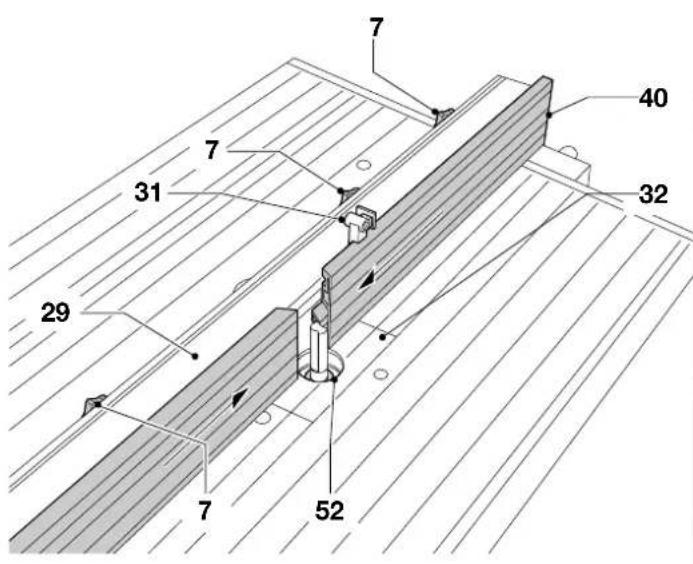
- DE2000 - Slide the cutter guard bracket (31) into the groove in the rear face of the router fence (29) and place the cutter guard (30) on top.

Each time you move the faces on the parallel fence, make sure that the cutter guard is correctly positioned over the cutter.
Adjusting the parallel rip fence (20) or router fence (29) (fig. A1 - A3)
To allow optimum efficiency of the fine adjuster (4), the fine adjustment clamp (3) must be centred in its slot.
- Slacken the fine adjustment clamp (3) and the locking screws (5) and (6).
- Slide the fence to the required position.
For accurate cuts:
- Lock the fine adjustment clamp (3).
- Use the fine adjuster (4) to position the fence accurately. Each graduation of the knob corresponds to a change of 0.1 mm.
- First lock the front screw (5) and then the back screw (6).
- Check the distance from fence to saw or cutter.

- Never make any cuts without locking the screws (5 & 6).
- The best way to move the parallel fence is to do it one-handed from the front.

DE2011 (option)
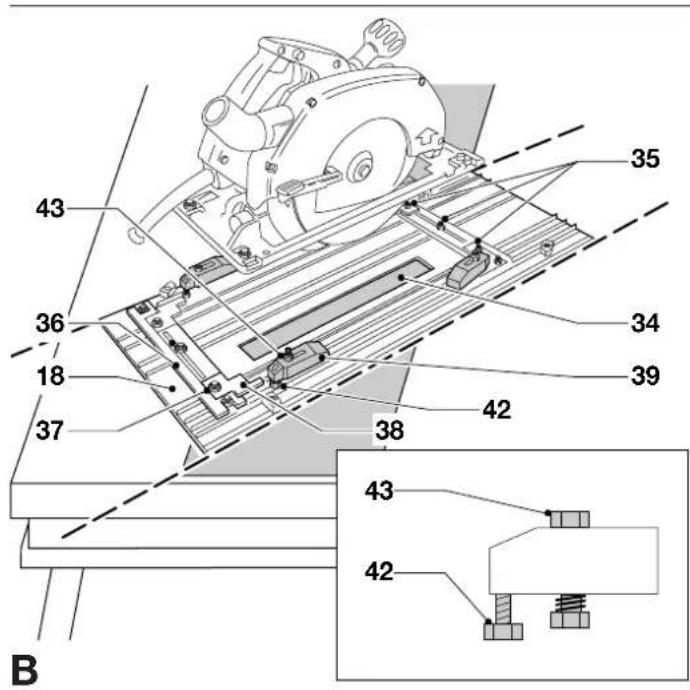
Mounting the circular saw (fig. A2 & B)
The fixing screws (19) are equipped with a locking lip.

Do not slacken the fixing screws more than two turns.
- Slacken the four fixing screws (19) in the saw mounting plate (18) and remove the mounting plate.
- Place the mounting plate upside down on the table top.
- Slacken the nuts (35 & 37) and slide the mounting profile (36) away.
- Open the lower guard of your saw and insert the saw blade into the slot (34).
- Position your saw as accurately as possible in the middle of the slot (34), side to side and front to back.
- Lock the ON/OFF-switch of the saw using the Velcro switch lock.

For optimal securing of the circular saw, both horizontal and vertical movements must be eliminated.
To eliminate horizontal movements
- Clamp the saw shoe using the mounting profile (36) and the four brackets (38) and tighten all the nuts (35 & 37) finger-tight.
To eliminate vertical movement
The clamps (39) firmly press your saw onto the mounting plate.
The correct adjustment of the clamps is a matter of experience.
Proceed as follows:
- Loosen the nut (59) to release the spring tension of the clamp.
• To adjust the clamp height, use bolt (58). - Lock the clamps using the nuts (59). Do not overtighten. At this stage, the saw must simply not come off the mounting plate when turning it over.
- Keep the rear end of the clamps within the dotted line as shown.
- Turn the saw mounting plate (18) over leading the cord into the table. Make sure the mounting plate is flush with the worktop and tighten the four fixing screws (19).
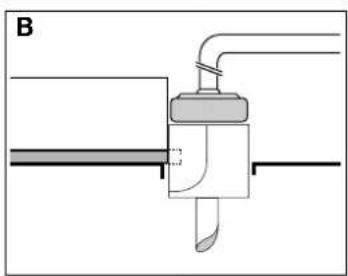
Adjusting the circular saw (the saw blade) (fig. A2, B & C)
When using the same saw all the time in the Combi-Table, this adjustment only needs to be done once.

For high precision cuts, always adjust the saw to the parallel fence, never to the lines on the table top.
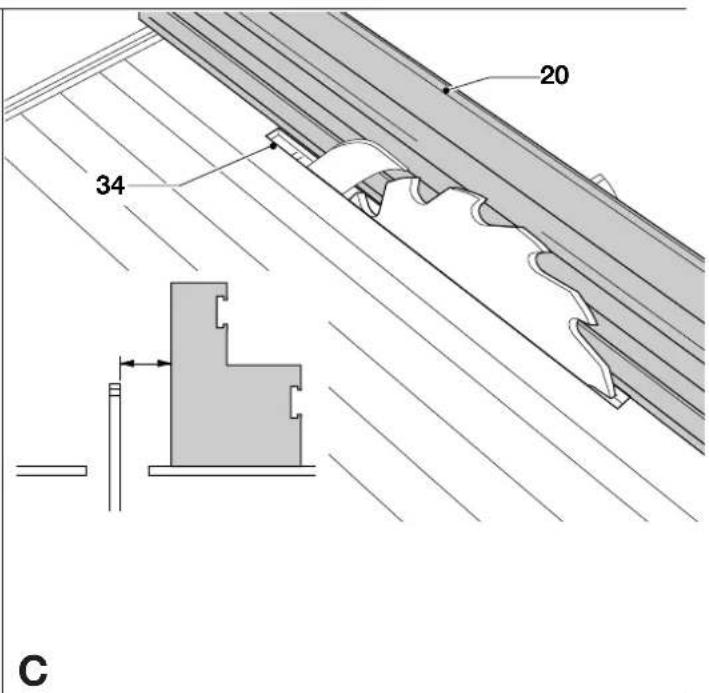
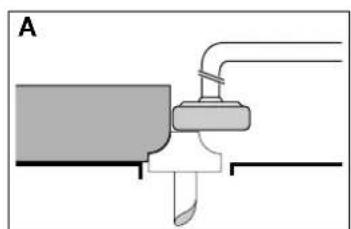
- Slide the parallel rip fence (20) to the outer edge of the slot (34) in the cutting insert. Adjust the fence as described above.
- Measure the distance from the saw blade to the fence at both ends of the saw blade (Refer to drawing C).
• The distance should be the same at both ends.
If not, adjust as follows:
- Slightly slacken the nuts (59) of the spring-loaded clamps and the nuts (37) of the brackets (38).
- To adjust the blade, slightly move the saw.
- Check again.
- Tighten all nuts securely.

- Check that the blade is at right angles to the table surface using a set square. (If adjustment is required, refer to the instruction manual of the saw).
- For adjustment of the riving knife, also refer to the instruction manual of your circular saw.

Rotate the blade manually to check that the blade does not scratch the cutting insert or the saw blade guard.
The zero on the scale should coincide with the edge of the saw blade. If required, adjust the scale.
- Loosen the two screws which hold the scale and adjust the scale in the slots.
Removing your circular saw (fig. A2 & B)
- Slacken the four fixing screws (19) in the saw mounting plate (18) and turn the mounting plate with circular saw upside down.

Do not slacken the fixing screws more than two turns.
- Slacken the clamps (39) only.
- Lift your circular saw away without changing the adjustment.
Depth of cut adjustment

For depth of cut adjustment, refer to the instruction manual of your saw. Bear in mind that the maximum cutting depth is reduced by approx. 10 mm when the circular saw is used as a stationary tool.

For optimum results, allow the saw blade to protrude from the workpiece by about 3 mm.
Bevel adjustment (fig. D)
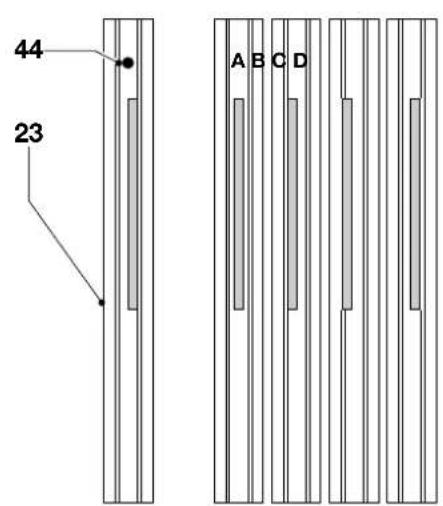
To make bevel cuts with the Combi-Table, the cutting insert needs to be replaced. Your DE2011 is supplied with 1 standard cutting insert and 4 bevel cutting inserts to suit various bevel angles. The inserts are marked A, B, C and D. The table below shows which insert to use for your saw at specific bevel angles.
Cutting insert, angles in degrees
| A | B | C | D | |
| Elu MH151 12-23 24-39 41-45 - | ||||
| Elu MH165 9-18 18-30 30-40 41-47 | ||||
| Elu MH265 8-15 18-24 26-33 38-45 | ||||
| Elu MH85 9-18 21-30 31-39 - | ||||
| Elu MH286 7-13 18-29 27-35 40-45 | ||||
| DEWALT DW62 3-11 19-31 34-45 - | ||||
| DEWALT DW65 8-15 18-24 26-33 38-45 | ||||
| DEWALT DW86 7-13 18-29 27-35 40-45 | ||||
| DEWALT DW351 12-23 24-39 41-45 - | ||||
| DEWALT DW365 9-18 18-30 30-40 41-47 | ||||
| Bosch GKS 65 8-21 21-32 33-41 45 | ||||
| Bosch GKS 66 CE 8-21 21-32 33-41 45 | ||||
| Metabo KsE 1668s-Signal 19-36 38-45 - - | ||||
| Metabo Ks 1468 S | 19-36 38-45 | |||
| Metabo Ks 1266 S | 19-36 38-45 | |||
For DW365 and Elu MH165 only
To make mitre cuts with the DW365/MH165, the attached plastic support is required. The maximum depth of cut is reduced to 47 mm.
Due to the construction of the DW365/MH165, you cannot release the depth of cut of the saw down to zero, which is necessary to replace the standard cutting insert (23) to the appropriate bevel cutting insert. With the mounted plastic support you can change the inserts without any problem.
- Remove the mounting profile (36) and one of the clamps (39) underneath the saw mounting plate.
- Slide two of the plastic supports into each of the grooves near the slot (34) facing the high edges to the outside of the mounting plate.
- Mount the clamp (39) and the profile (36) back to the plate.
- To hold the DW365/MH165 properly, you need to turn the metal brackets (38) to the other side. Unscrew the nuts (37) and turn the brackets around.
Attention:
You must swap the left brackets with the right ones.
- Open the lower guard of the DW365/MH165 and insert the saw blade into the slot (34) by placing the saw onto the plastic supports.
- To get the parallel adjustment of the saw blade to the slot (34), place the edge under the saw base-plate against the edge of the support. (additional adjustment of the saw is not required).

- Place the brackets (38) and the mounting profile (36) as described in the instruction manual.
-
Place and adjust the clamps (39) as described in the instruction manual.
-
Tighten all nuts securely.
- Set the depth of cut of your saw to 0 mm.
- Loosen the screw (44) and pull out the cutting insert (23).
- Slide the new cutting insert into the saw mounting plate and tighten the screw (44).

Adjust the bevel angle of your saw.
- Move the saw blade up through the slot in the new cutting insert and adjust the depth of cut.

- Never use the saw table without the appropriate cutting insert.
- Rotate the blade manually to check that the blade does not scratch the cutting insert or the saw blade guard.
Mounting and adjusting the saw blade guard (fig. F)
Assembling the saw blade guard
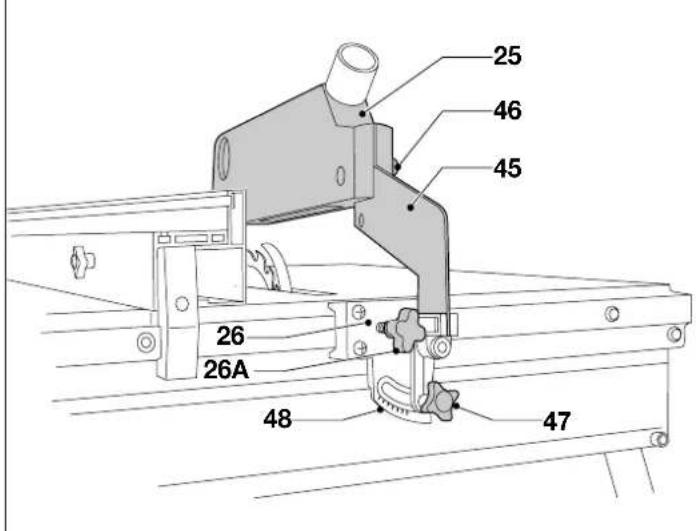
- Mount the guard (25) to the bracket (45) using the wing nut (46). The saw blade, the riving knife and the saw blade guard (25) must be in line.
• To adjust the guard, release the star knob (47).
Bevelling the saw blade guard
- To move the saw blade guard, loosen star knob (26A), and slide the bracket (26) to the appropriate position.
Height adjustment
The height of the saw blade guard must be adjusted to the cutting depth.
- Loosen the wing nut (46), adjust the saw blade guard (25) using one of the holes in the saw blade guard and tighten the wing nut (46).

- Check that the tip of the saw blade guard rests on the saw table.
- Check that the guard can move up and down freely.
Reversible parallel rip fence profile (fig. E)
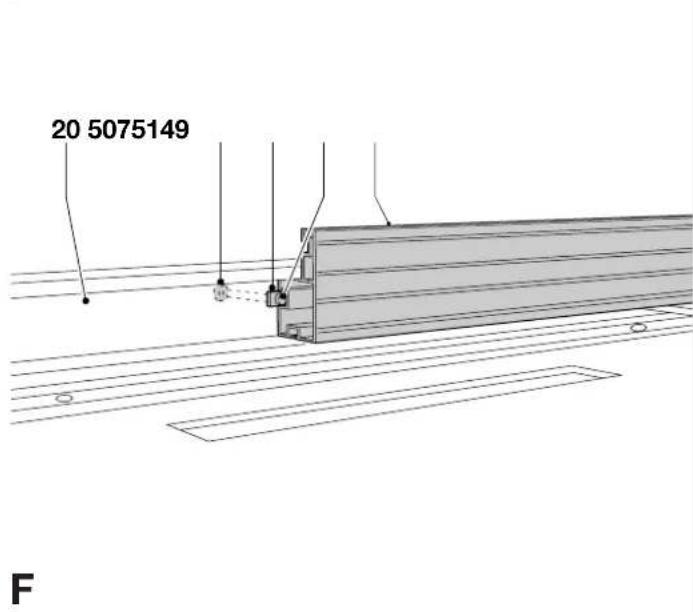
The profile (49) in the parallel rip fence (20) can be used in two positions.
To turn the face into the appropriate position, proceed as follows:
- Loosen the star knobs (7).
- Pull out the profile (49) and install it as required. The backing plates (50) of the star knobs (7) engage in the slide rail (51).
- Tighten the star knobs (7).

DE2000
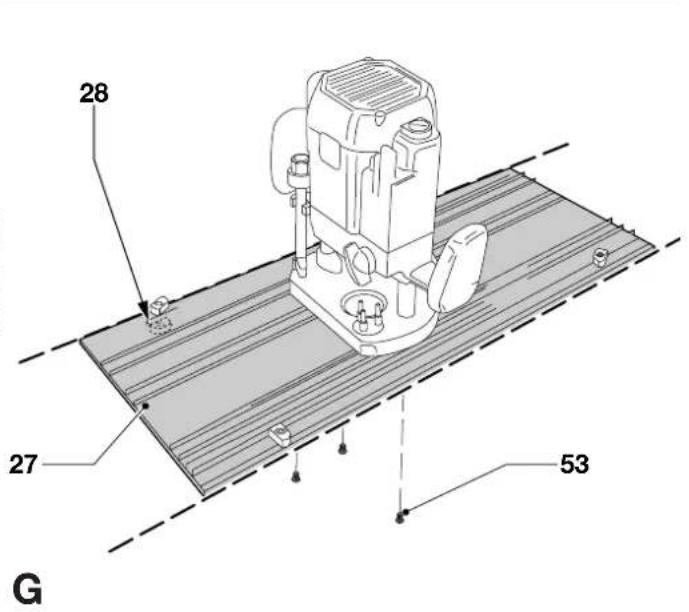
Mounting the DEWALT router (fig. G)
The fixing screws (28) are equipped with a locking lip.

Do not slacken the fixing screws more than two turns.
- Slacken the four fixing screws in the router mounting plate (27) and remove the mounting plate.
- Place the router mounting plate (27) upside down on the table top.
- Place the router on the mounting plate (27) aligning the screw holes in the router base with the holes in the mounting plate.
- Tighten the screws (53) securely.
For Elu MOF96, DeWALT DW613: use two of the longer screws; for Elu OF97, DeWALT DW620 & DW621 use the two short screws; for Elu MOF131, Elu MOF177 & DeWALT DW625E: 3 screws.
- Lock the router in ON position.
- Turn the router mounting plate over leading the cord into the table. Make sure the mounting plate is flush with the table top and tighten the four fixing screws (28).
Depth of cut adjustment
• Install an appropriate cutter.
- Depress the router to the required depth of cut.

For depth of cut adjustment, refer to the instruction manual of your router.
- Always secure your router using the fine adjustment device. It is not sufficient to use the carriage lock.
- Not all routers are equipped with a fine adjustment device. Consult your dealer for further information.
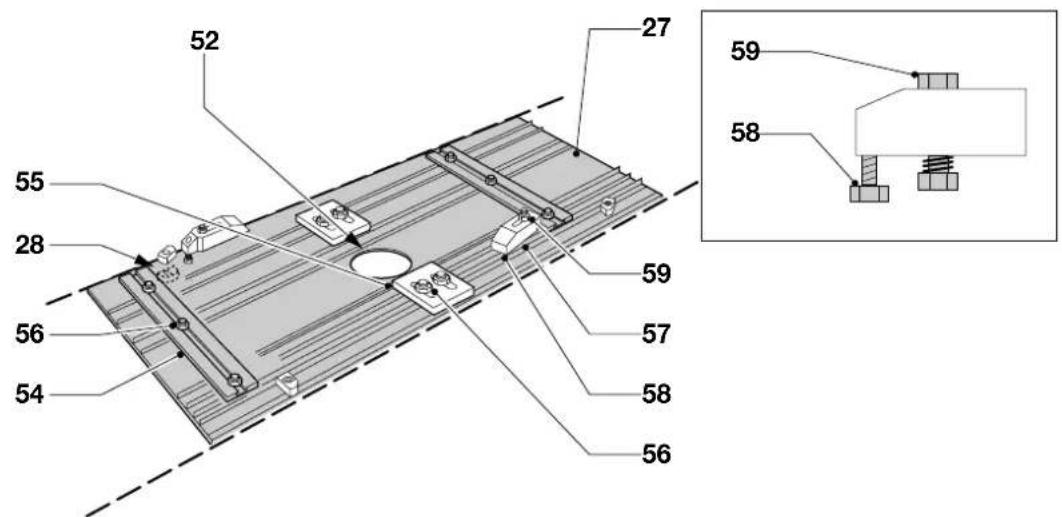
Mounting the router and centring the cutter with DE2010 (fig. G & H)
When using the DE2000 in combination with a D=WALT Router, it is not necessary to centre the cutter, as the fixing screws are used. When using routers of a different brand, the optional mounting kit DE2010 is required.
The following routers can be used with the mounting device DE2010:
Elu routers (construction year before 1990)
BOSCH GOF900ACE FESTO OF900 HITACHI M8V
| GOF1300ACE OF900E M12V |
| GOF1700ACE OF2000 MAKITA 3612B |
| OF2000E |
| METABO OF1028 |
| OFE1229 Signal |
| OFE1812 |
- Place the router mounting plate (27) upside down on a table top.
- Place the router on the mounting plate with the spindle in the centre of the cutter hole (52).
• Install the mounting kit DE2010 as shown in figure H.
To eliminate horizontal movements
- Clamp the router base using the mounting profiles (54) and centring blocks (55) and tighten the nuts (56).
To eliminate vertical movement
The clamps (57) accurately secure your router in place. The correct adjustment of the clamps is a matter of experience. Proceed as follows:
• To adjust the clamp height, use bolt (58).
- Lock the clamps using the nuts (59).
- Keep the rear end of the clamps within the dotted line as shown.
- Turn the router mounting plate (27) over leading the cord into the table and tighten the four fixing screws (28).
Adjusting the router/cutter
When using the same router all the time in the Combi-Table, this adjustment needs to be done only once.
- Mount an appropriate cutter and plunge the router to its maximum cutting depth.
- Measure the distance between the shank/cutting edge and the edge of the cutter hole (52) at various positions.
- The distance should be the same at all positions. If not, adjust as follows:
- Slightly slacken the nuts of the spring loaded clamps (57) and the nuts of the profiles (54) and centring blocks (55).
- Adjust the router.
- Check again.
- Tighten all nuts securely.
Adjusting the router fence (fig. 1)
The router fence (29) is equipped with two faces (40).
- Loosen the star knobs (7) on the router fence (29).
- Slide the two faces as close to the cutter as possible.
- Tighten the star knobs (7).

Each time you move the faces on the parallel fence, make sure that the cutter guard is correctly positioned over the cutter.
Adjusting the cutter guard (fig. A3)
The cutter guard (30) hinges in the bracket (31) which in turn slides in the face (40).
- Slide the cutter guard to the required position. Make sure it cannot be caught by the cutter.
Changing the cutting inserts (fig. A3)
Your DE2000 Combi-Table is supplied with four different cutting inserts (32) to suit different cutter diameters.
The standard diameters are: 12, 22, 32 and 42 mm.
Always use the cutting insert with a cutter hole one size larger than your cutter.

Lower the cutter.
- Loosen the screw (44) and pull out the cutting insert (32).
- Slide the new cutting insert into the mounting plate and tighten the screw (44).
Instructions for use

• Always observe the safety instructions and applicable regulations.
- Whenever possible, use a push stick.
Prior to operation:
- Check that the Power Tool is mounted as described above.
- Check that all guards and fences are in perfect working order and that they are mounted correctly.
- Connect a dust extraction set in compliance with the relevant regulations on dust extraction levels.
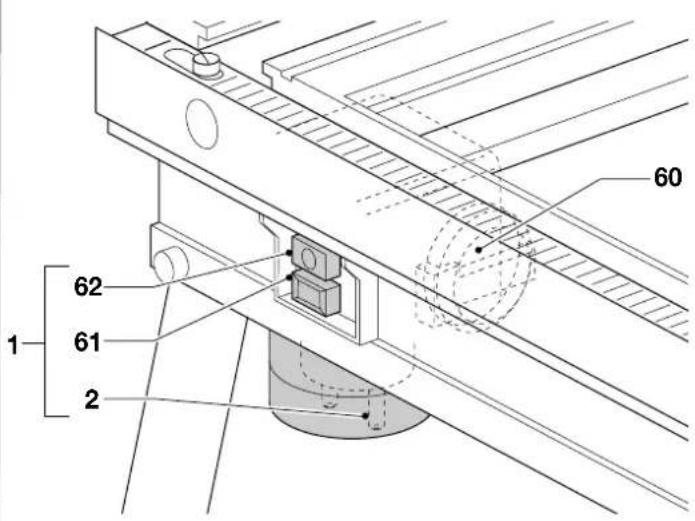
Switching ON and OFF (fig. J)
- Lock the Power Tool in ON-position.
- Lift the cover (60) of the no-volt release switch (1) and plug in the Power Tool.
- Connect the Combi-Table to the mains by plugging an extension cable into the socket (2).

The ON/OFF-switch of your Combi-Table is a no-volt release switch (1). Should the power be shut OFF for some reason, the switch has to be deliberately reactivated.
- Press the green ON button (62) of the no-volt release switch (1) to start the Power Tool.
- To switch OFF, press the red OFF button (61) of the no-volt release switch (1). Always switch OFF the tool when work is finished and before unplugging.

DE2011 (option)
Basic saw cuts
Vertical ripping (fig. A1 & A2)
- Set the blade of your circular saw to 0^ .
- Set the blade height of your circular saw as described in the instruction manual of your saw.
- Mount the parallel rip fence (20) onto the table, to the right of the blade.
- Depending on the height and width of the workpiece, use the fence height that allows optimum access between fence and blade.
- Slide the parallel rip fence (20) across the blade and position it using the scale (10) at the front of the table. The scrap or off-cut is guided to the left of the blade. Use the fine adjustment for accurate cutting as described in the section "Adjusting the parallel fence".
- Switch the Combi-Table ON.
- Slowly feed the workpiece underneath the front of the guard, keeping it firmly pressed against the rip fence. Allow the teeth to cut and do not force the workpiece through the blade. The blade speed should be kept constant.
- When ripping small workpieces (< 120 mm), always use the push stick (22).
- When not in use, keep the push stick (22) in its holder (17).
- When the cut is completed, switch the Combi-Table OFF immediately.
Bevel ripping
- Set the blade to the required bevel angle as described in the section "Bevel adjustment".

Make sure that the appropriate cutting insert is used and that the blade does not scratch the cutting insert.
- Set the saw blade guard in line to the new position of the saw blade.
- Bevel the saw blade guard. Refer to the section "Bevelling the saw blade guard" and to fig. F.
- Make sure that the saw blade runs in the middle of the saw blade guard.
• Proceed as for vertical ripping.
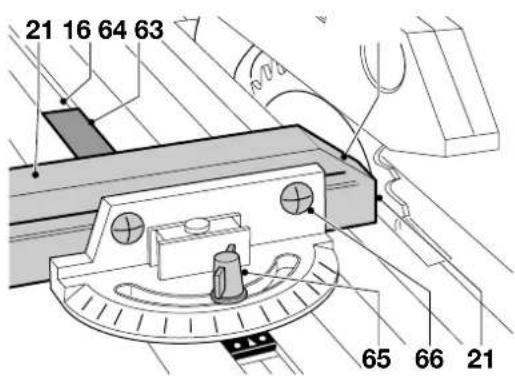
Straight and mitre cross-cutting (fig. A2 & K)
- Remove the parallel rip fence (20).
- To mount the sliding mitre fence (21), insert the long end of the slider bar (64) into the groove (16). For a straight or mitre cross-cut, loosen the wing nut (65) and rotate the fence to set the angle required (0^ - 45^) .
- Tighten the wing nut (65) securely.
- Loosen the two fence locking screws (66) and slide the slanting edge (63) of the fence towards the blade until it just clears the blade when the assembly is slid to the rear.
- Tighten the fence locking screws.
- Pull the assembly to the front and place the wood to be cut against the profile (21) of the fence.
- Switch the Combi-Table ON, hold the wood firmly and slide the assembly along the groove to take the wood into the blade.
- When the cut is completed, switch the Combi-Table OFF immediately.
Bevel cross-cut
- Set the blade to the required bevel angle as described in the section "Bevel adjustment".

Make sure that the appropriate cutting insert is used and that the blade does not scratch the cutting insert.
- Adjust the circular saw to the correct height.
- Set the mitre fence to 0^ .
• Proceed as for straight and mitre cross-cutting.
Compound mitre
A compound mitre cut is a combination of a bevel cut and a mitre cut.
- Proceed as for bevel cross-cuts, setting the mitre fence to the required mitre angle.
Cutting round workpieces
- When cutting round workpieces, use a device (not provided) to prevent rotation of the workpiece on either side of the blade.

Do not use the DE2000 in combination with DE2011 for cutting firewood.

DE2000
Direction of feed

• Always feed the material against the direction of rotation.
• Always feed from the front panel (switch end).
Edge trimming (rebating) and profile cutting (fig. A3 & I)
- Install the appropriate cutter and set the router to the appropriate depth of cut using the fine height adjustment of the router.
- Check that the appropriate cutting insert (32) is mounted.
- Mount the router fence (29) onto the table and slide it to the middle of the cutter.
- Loosen the star knobs (7), position the faces (40) as close to the bit as possible and tighten the star knobs.

The side of the material which will be trimmed must be guided along the router fence.
- Use the fine adjuster for positioning the router fence in relation to the expected width of cut.
- Slide the cutter guard (30) to the correct position.
- Press the workpiece against the fence and the table top. When using the optional down hold guards (DE2007 & DE2008), install them as described in the section "Horizontal down hold guard (DE2007) and vertical down hold guard (DE2008) (fig. M2)".
-
Switch the Combi-Table ON.
-
Feed the material at an even speed and make the cut in one smooth pass. The correct feed speed is a matter of experience: too low speed will produce burn marks on the wood, whereas too high speed will overload your router.
- When the cut is completed, switch the Combi-Table OFF immediately.
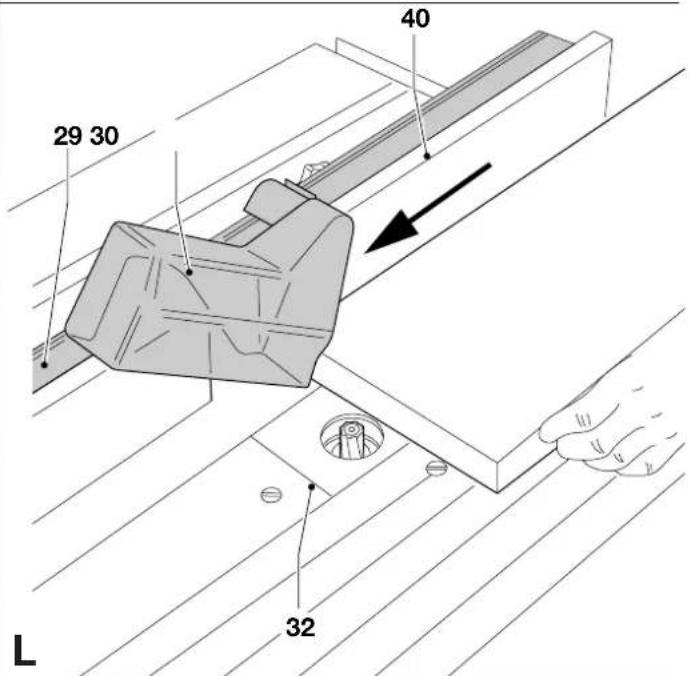
Cutting grooves (fig. L)
• Install the appropriate cutter.
- Check that the appropriate cutting insert is mounted.
- Mount the router fence (29) onto the table and slide it to the required position.
- Slide the faces (40) towards each other to close the gap.
- Proceed as for edge trimming and profile cutting.
Optional accessories (fig. M1 - M4)

DE2011 (option)
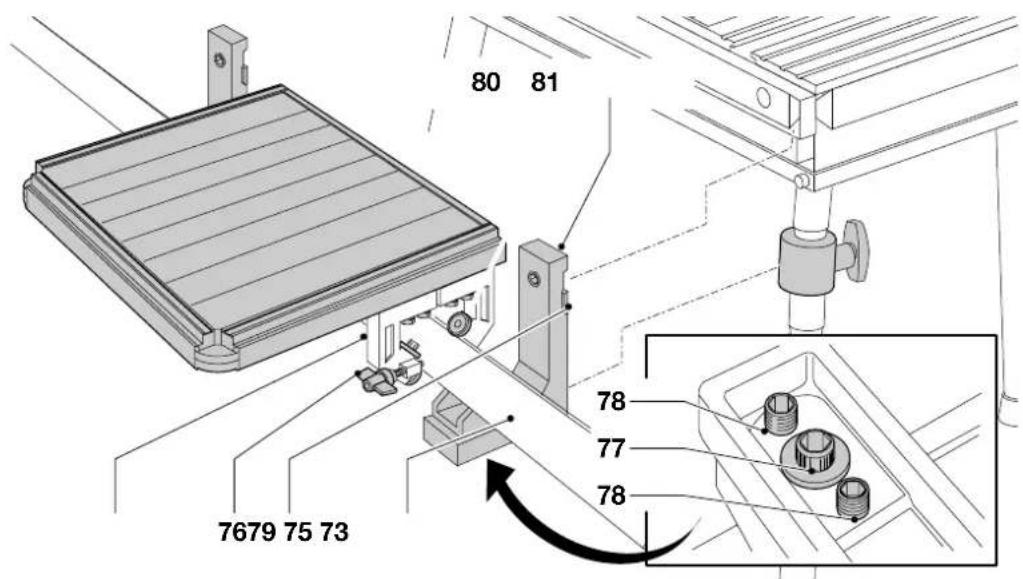
Sliding table DE2001 (fig. M1)
The metal spacer bars, the two bolts and the two washers included in the sliding table packaging are not needed for the Combi-Table.
This attachment fits to the left-hand side of the Combi-Table and allows accurate cross-cutting of workpieces up to 720 mm wide.
There are two cast brackets (72) to support the table rail (73) and to mount the sliding table to the Combi-Table. The top half of the dovetail is cast into the brackets whereas the other half of the dovetail are two metal wedges, held in place by Allen screws (74).
It is recommended to use the optional fence DE2002 together with the sliding table.
Mounting the sliding table
- Loosen the two Allen screws (74), holding the wedges (75).
- Ensure that the table is locked tightly with the table locking knob (76).
- Slide the cast brackets (72) onto the slide rail (14 in fig. A1) and position the front and rear brackets to allow the front edge of the front bracket and the rear edge of the rear bracket to rest against the sleeves. The front edge of the front bracket should now be in line with the front edge of the table.
- Ensure that the two metal wedges (75) engage securely in the underside of the dovetail.
- Tighten the Allen screws (74).
- With a straight edge, check that the extension table is flat and level with the Combi-Table.
- If adjustment is required, loosen the Allen screw (77) in the centre of the three screws located under the bracket (72). This screw secures the rail to the bracket (refer to the inset in fig. M1).
- To raise or lower the table, screw in or out the two grub screws (78).
- To tilt the table, screw in or out these two grub screws as necessary.
- When the adjustment to the table is satisfactory, tighten the centre Allen screw (77) in each bracket securely.
If the table is not absolutely parallel edge to edge to the Combi-Table, or if the distance between the two needs altering, the table can be adjusted by loosening the bolts (80) and moving the brackets (79) towards or away from the rail. This adjustment is also required if any play develops between the bearings (81) and the table rail.
Sawing with the sliding table
- When using the optional fence (DE2002), position it at the front of the table ensuring that the end of the fence does not foul the blade.
- Hold the wood to be cut up against the fence.
- Ensure that the table locking knob (76) is loose.
- Switch ON and push the table slowly to the rear, thus passing the wood through the blade.

DE2000
Conversion kit "Saw" DE2011
The conversion kit "Saw" converts your DE2000 Combi-Table into a complete Saw table.
The conversion kit contains:
1 Saw mounting plate incl. mounting device
1 Parallel rip fence
1 Mitre fence
4 Cutting inserts (saw)
1 Saw blade guard with bracket
1 Push stick
1 Mounting device for DW365
1 Switch lock

For installation and applications, read the DE2011 sections in this instruction manual.
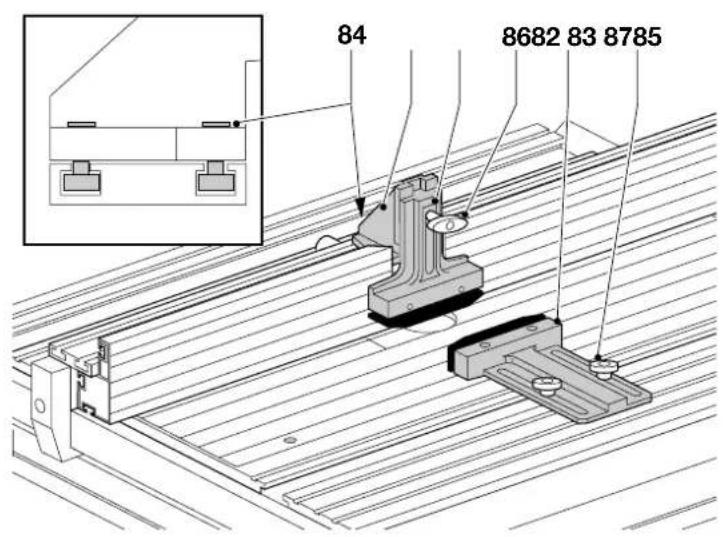
Horizontal down hold guard (DE2007) and vertical down hold guard (DE2008) (fig. M2)
The down hold guards (82 & 83) are very useful for professional routing. A down hold guard ensures constant pressure to the workpiece against the table top and the fence.
Assembling and mounting the vertical down hold guard
- Loosen the three Allen screws (84) on the down hold bracket (85).
- Slide the bracket onto the router fence (29 in fig. A3) up to the dust spout (33 in fig. A3).
- Mount the down hold guard (82) onto the bracket (85).
- Tighten the three Allen screws (84) securely.
- The down hold bracket can be left on the router fence, also when using the cutter guard.
- Loosen the screw (86) and remove the down hold guard.
Mounting the horizontal down hold guard
- Loosen the knobs (87).
- Slide the horizontal down hold guard (83) in the groove (15 in fig. A1).
- Position the horizontal down hold guard where the cutter contacts the workpiece.
- Tighten the knobs (87).
Using the down hold guards
- Without turning the machine ON, feed the workpiece until it touches the cutter.
- Press the positioned down hold guards onto the workpiece until the internal spring presses the material against the table and the fence.
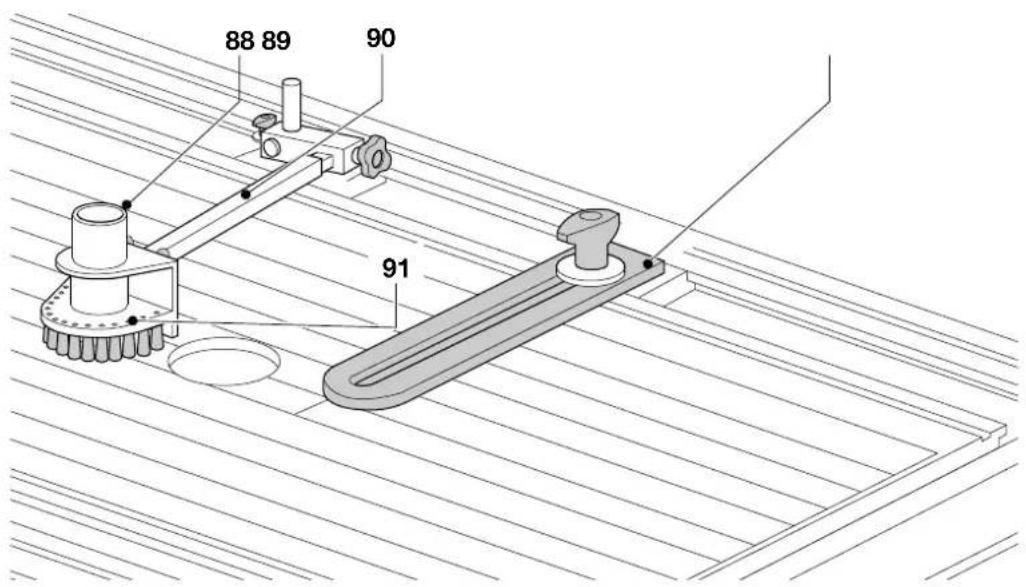
Copy follower (DE2009) (fig. M3 & M4)
The copy follower (88) allows the user to work without the router fence (freehand routing).
The copy set contains:
1 Copy follower with guard and brushes
1 Thrust block (89)
Mounting the copy follower
- Remove the router fence.
- Slide the arm (90) of the copy follower (88) and the thrust block (89) into the right-hand groove (15 in fig. A1).
- Put the ball bearing guide (91) in the correct position on top of the cutter. Refer to fig. M4.
- Tighten all knobs securely.
The thrust block (89) ensures your workpiece is always guided to the correct side of the cutter.
When edge moulding
- Mount the copy follower bearing off-centre to the cutter.
- Make the cut where the widest part of the cutter is exposed.
- Set the tip of the thrust block at a tangent to the cutting point.
- Ensure that the arm and the thrust block knobs are fully tightened.
- With the router OFF, move your workpiece in the desired manner, to make sure that all points can be moulded as required.
- Switch the Combi-Table ON and proceed in the usual way.
Using templates
- Position the ball bearing over the cutter, making sure the centre of the two are in line.
- Prepare a template. The difference between bearing and cutter diameter corresponds to the difference between workpiece and template dimensions.
- Secure the template to the workpiece using double-sided tape.
- With the router OFF, move your workpiece in the desired manner, to make sure that all points can be moulded as required.
For the correct position of the ball bearing (91), refer to fig. M4:
• A Edge moulding with bearing off-centre.
- B Trimming facing material flush to edge of workpiece with a trimming cutter.
• C Edge moulding following template contour.
Mounting the dust extraction set (DE2005) (fig. A2 - A3)
The dust extraction set has two hoses: one is to be connected to the Power Tool and the other one to the dust spout on the Combi-Table (DE2011: on the saw blade guard [25]; DE2000: on the router fence [29]).
A dust hose support (DE2006) is available as an option.
- Slide the dust extraction hose over the dust spout (24 or 33).
Consult your dealer for further information on the appropriate accessories.
Maintenance
Your D=WALT attachment has been designed to operate over a long period of time with a minimum of maintenance. Continuous satisfactory operation depends upon proper tool care and regular cleaning.
- Replace the cutting insert when worn out.

Cleaning
Regularly clean the attachment with a soft cloth.

Unwanted products and the environment
Take your attachment to an authorized DeWALT repair agent where it will be disposed of in an environmentally safe way.
GUARANTEE
• 30 DAY NO RISK SATISFACTION GUARANTEE •
If you are not completely satisfied with the performance of your DeWALT tool, simply return it within 30 days, complete as purchased, to a participating Dealer, or an authorized DeWALT repair agent, for a full refund or exchange. Proof of purchase must be produced.
• ONE YEAR FREE SERVICE CONTRACT •
If you need maintenance or service for your DEWALT tool, in the 12 months following purchase, it will be undertaken free of charge at an authorized DEWALT repair agent. Proof of purchase must be produced. Includes labour and spare parts for the attachments. Excludes accessories.
• ONE YEAR FULL WARRANTY •
If your DeWALT product becomes defective due to faulty materials or workmanship within 12 months from the date of purchase, we guarantee to replace all defective parts free of charge or, at our discretion, replace the unit free of charge provided that:
• The product has not been misused.
• Repairs have not been attempted by unauthorized persons.
• Proof of purchase date is produced.
This guarantee is offered as an extra benefit and is additional to consumers statutory rights.
For the location of your nearest authorized DEWALT repair agent, please use the appropriate telephone number on the back of this manual.
Director Engineering and Product Development Horst Großmann
Elu MH85 DeWALT DW62 Metabo KsE 1668s-Signal
Elu MH151 DeWALT DW65 Metabo Ks 1468 S
Elu MH165 DeWALT DW86 Metabo Ks 1255 S
Elu MH265 Bosch GKS 65
Elu MH286 Bosch GKS 66 CE
Elu MOF96 DeWALT DW613
Elu OF97 DeWALT DW625E
Elu MOF131 DeWALT DW620
Elu MOF177 DEWALT DW621
| A | B | C | D | |
| Elu MH151 12-23 24-39 41-45 - | ||||
| Elu MH165 9-18 18-30 30-40 41-47 | ||||
| Elu MH265 8-15 18-24 26-33 38-45 | ||||
| Elu MH85 9-18 21-30 31-39 - | ||||
| Elu MH286 7-13 18-29 27-35 40-45 | ||||
| DeWALT DW62 3-11 19-31 34-45 - | ||||
| DeWALT DW65 8-15 18-24 26-33 38-45 | ||||
| DeWALT DW86 7-13 18-29 27-35 40-45 | ||||
| DeWALT DW351 12-23 24-39 41-45 - | ||||
| DeWALT DW365 9-18 18-30 30-40 41-47 | ||||
| Bosch GKS 65 8-21 21-32 33-41 45 | ||||
| Bosch GKS 66 CE 8-21 21-32 33-41 45 | ||||
| Metabo KsE 1668s-Signal 19-36 38-45 - - | ||||
| Metabo Ks 1468 S 19-36 38-45 | ||||
| Metabo Ks 1266 S 19-36 38-45 | ||||
L'emballage contient:
Elu MH85 DeWALT DW62 Metabo KsE 1668s-Signal
Elu MH151 DeWALT DW65 Metabo Ks 1468 S
Elu MH165 DEWALT DW86 Metabo Ks 1255 S
Elu MH265 Bosch GKS 65
Elu MH286 Bosch GKS 66 CE
Elu MOF96 DeWALT DW613
Elu OF97 DeWALT DW625E
Elu MOF131 DeWALT DW620
Elu MOF177 DeWALT DW621
| A | B | C | D | |
| Elu MH151 12-23 24-39 41-45 - | ||||
| Elu MH165 9-18 18-30 30-40 41-47 | ||||
| Elu MH265 8-15 18-24 26-33 38-45 | ||||
| Elu MH85 9-18 21-30 31-39 - | ||||
| Elu MH286 7-13 18-29 27-35 40-45 | ||||
| DeWALT DW62 3-11 19-31 34-45 - | ||||
| DeWALT DW65 8-15 18-24 26-33 38-45 | ||||
| DeWALT DW86 7-13 18-29 27-35 40-45 | ||||
| DeWALT DW351 12-23 24-39 41-45 - | ||||
| DeWALT DW365 9-18 18-30 30-40 41-47 | ||||
| Bosch GKS 65 8-21 21-32 33-41 45 | ||||
| Bosch GKS 66 CE 8-21 21-32 33-41 45 | ||||
| Metabo KsE 1668s-Signal 19-36 38-45 - - | ||||
| Metabo Ks 1468 S 19-36 38-45 | ||||
| Metabo Ks 1266 S 19-36 38-45 | ||||
Elu MH85 DeWALT DW62 Metabo KsE 1668s-Signal
Elu MH151 DeWALT DW65 Metabo Ks 1468 S
Elu MH165 DeWALT DW86 Metabo Ks 1255 S
Elu MH265 Bosch GKS 65
Elu MH286 Bosch GKS 66 CE
Elu MOF96 DeWALT DW613
Elu OF97 DeWALT DW625E
Elu MOF131 DeWALT DW620
Elu MOF177 DEWALT DW621
| A | B | C | D | |
| Elu MH151 12-23 24-39 41-45 - | ||||
| Elu MH165 9-18 18-30 30-40 41-47 | ||||
| Elu MH265 8-15 18-24 26-33 38-45 | ||||
| Elu MH85 9-18 21-30 31-39 - | ||||
| Elu MH286 7-13 18-29 27-35 40-45 | ||||
| DEWALT DW62 3-11 19-31 34-45 - | ||||
| DEWALT DW65 8-15 18-24 26-33 38-45 | ||||
| DEWALT DW86 7-13 18-29 27-35 40-45 | ||||
| DEWALT DW351 12-23 24-39 41-45 - | ||||
| DEWALT DW365 9-18 18-30 30-40 41-47 | ||||
| Bosch GKS 65 8-21 21-32 33-41 45 | ||||
| Bosch GKS 66 CE 8-21 21-32 33-41 45 | ||||
| Metabo KsE 1668s-Signal 19-36 38-45 - - | ||||
| Metabo Ks 1468 S 19-36 38-45 | ||||
| Metabo Ks 1266 S 19-36 38-45 | ||||
Solo per DW365/Elu MH165
Director Engineering and Product Development Horst Großmann

DeWALT, Richard-Klinger-Straße 40, D-65510, Idstein, Duitsland
Elu MH151 DeWALT DW65 Metabo Ks 1468 S
Elu MH165 DeWALT DW86 Metabo Ks 1255 S
Elu MH265 Bosch GKS 65
Elu MH286 Bosch GKS 66 CE
Elu MOF96 DEWALT DW613
Elu OF97 DeWALT DW625E
Elu MOF131 DEWALT DW620
Elu MOF177 DeWALT DW621
| A | B | C | D | |
| Elu MH151 12-23 24-39 41-45 - | ||||
| Elu MH165 9-18 18-30 30-40 41-47 | ||||
| Elu MH265 8-15 18-24 26-33 38-45 | ||||
| Elu MH85 9-18 21-30 31-39 - | ||||
| Elu MH286 7-13 18-29 27-35 40-45 | ||||
| DeWALT DW62 3-11 19-31 34-45 - | ||||
| DeWALT DW65 8-15 18-24 26-33 38-45 | ||||
| DeWALT DW86 7-13 18-29 27-35 40-45 | ||||
| DeWALT DW351 12-23 24-39 41-45 - | ||||
| DeWALT DW365 9-18 18-30 30-40 41-47 | ||||
| Bosch GKS 65 8-21 21-32 33-41 45 | ||||
| Bosch GKS 66 CE 8-21 21-32 33-41 45 | ||||
| Metabo KsE 1668s-Signal 19-36 38-45 - - | ||||
| Metabo Ks 1468 S | 19-36 38-45 | |||
| Metabo Ks 1266 S | 19-36 38-45 | |||
Director Engineering and Product Development Horst Großmann
DeWALT, Richard-Klinger-Straße 40, D-65510, Idstein, Tyskland
Sikkerhetsforskrifter
Elu MH85 DeWALT DW62 Metabo KsE 1668s-Signal
Elu MH151 DeWALT DW65 Metabo Ks 1468 S
Elu MH165 DeWALT DW86 Metabo Ks 1255 S
Elu MH265 Bosch GKS 65
Elu MH286 Bosch GKS 66 CE
Elu MOF96 DEWALT DW613
Elu OF97 DeWALT DW625E
Elu MOF131 DEWALT DW620
Elu MOF177 DeWALT DW621
| A | B | C | D | |
| Elu MH151 12-23 24-39 41-45 - | ||||
| Elu MH165 9-18 18-30 30-40 41-47 | ||||
| Elu MH265 8-15 18-24 26-33 38-45 | ||||
| Elu MH85 9-18 21-30 31-39 - | ||||
| Elu MH286 7-13 18-29 27-35 40-45 | ||||
| DEWALT DW62 3-11 19-31 34-45 - | ||||
| DEWALT DW65 8-15 18-24 26-33 38-45 | ||||
| DEWALT DW86 7-13 18-29 27-35 40-45 | ||||
| DEWALT DW351 12-23 24-39 41-45 - | ||||
| DEWALT DW365 9-18 18-30 30-40 41-47 | ||||
| Bosch GKS 65 8-21 21-32 33-41 45 | ||||
| Bosch GKS 66 CE 8-21 21-32 33-41 45 | ||||
| Metabo KsE 1668s-Signal 19-36 38-45 - - | ||||
| Metabo Ks 1468 S | 19-36 38-45 | |||
| Metabo Ks 1266 S | 19-36 38-45 | |||
Kun for DW365/Elu MH165
Director Engineering and Product Development Horst Großmann
DEWALT, Richard-Klinger-Straße 40, D-65510, Idstein, Alemanha
Elu MH85 DeWALT DW62 Metabo KsE 1668s-Signal
Elu MH151 DeWALT DW65 Metabo Ks 1468 S
Elu MH165 DeWALT DW86 Metabo Ks 1255 S
Elu MH265 Bosch GKS 65
Elu MH286 Bosch GKS 66 CE
Elu MOF96 DeWALT DW613
Elu OF97E DeWALT DW625E
Elu MOF131 DeWALT DW620
Elu MOF177 DeWALT DW621
Montar as pernas (fig. A1)
| A | B | C | D | |
| Elu MH151 12-23 24-39 41-45 - | ||||
| Elu MH165 9-18 18-30 30-40 41-47 | ||||
| Elu MH265 8-15 18-24 26-33 38-45 | ||||
| Elu MH85 9-18 21-30 31-39 - | ||||
| Elu MH286 7-13 18-29 27-35 40-45 | ||||
| DEWALT DW62 3-11 19-31 34-45 - | ||||
| DEWALT DW65 8-15 18-24 26-33 38-45 | ||||
| DEWALT DW86 7-13 18-29 27-35 40-45 | ||||
| DEWALT DW351 12-23 24-39 41-45 - | ||||
| DEWALT DW365 9-18 18-30 30-40 41-47 | ||||
| Bosch GKS 65 8-21 21-32 33-41 45 | ||||
| Bosch GKS 66 CE 8-21 21-32 33-41 45 | ||||
| Metabo KsE 1668s-Signal 19-36 38-45 - - | ||||
| Metabo Ks 1468 S | 19-36 38-45 | |||
| Metabo Ks 1266 S | 19-36 38-45 | |||
Director Engineering and Product Development Horst Großmann
Elu MH85 D EWALT DW62 Metabo KsE 1668s-Signal
Elu MH151 D EWALT DW65 Metabo Ks 1468 S
Elu MH165 DeWALT DW86 Metabo Ks 1255 S
Elu MH265 Bosch GKS 65
Elu MH286 Bosch GKS 66 CE
Elu MOF96 DEWALT DW613
Elu OF97 DeWALT DW625E
Elu MOF131 DEWALT DW620
Elu MOF177 DeWALT DW621
| A | B | C | D | |
| Elu MH151 12-23 24-39 41-45 - | ||||
| Elu MH165 9-18 18-30 30-40 41-47 | ||||
| Elu MH265 8-15 18-24 26-33 38-45 | ||||
| Elu MH85 9-18 21-30 31-39 - | ||||
| Elu MH286 7-13 18-29 27-35 40-45 | ||||
| DEWALT DW62 3-11 19-31 34-45 - | ||||
| DEWALT DW65 8-15 18-24 26-33 38-45 | ||||
| DEWALT DW86 7-13 18-29 27-35 40-45 | ||||
| DEWALT DW351 12-23 24-39 41-45 - | ||||
| DEWALT DW365 9-18 18-30 30-40 41-47 | ||||
| Bosch GKS 65 8-21 21-32 33-41 45 | ||||
| Bosch GKS 66 CE | 8-21 21-32 33-41 45 | |||
| Metabo KsE 1668s-Signal | 19-36 38-45 -- | |||
| Metabo Ks 1468 S | 19-36 38-45 | |||
| Metabo Ks 1266 S | 19-36 38-45 | |||
Director Engineering and Product Development Horst Großmann
Elu MH85 DeWALT DW62 Metabo KsE 1668s-Signal
Elu MH151 DeWALT DW65 Metabo Ks 1468 S
Elu MH165 DeWALT DW86 Metabo Ks 1255 S
Elu MH265 Bosch GKS 65
Elu MH286 Bosch GKS 66 CE
Elu MOF96 DEWALT DW613
Elu OF97 DeWALT DW625E
Elu MOF131 DEWALT DW620
Elu MOF177 DEWALT DW621
| A | B | C | D | |
| Elu MH151 12-23 24-39 41-45 - | ||||
| Elu MH165 9-18 18-30 30-40 41-47 | ||||
| Elu MH265 8-15 18-24 26-33 38-45 | ||||
| Elu MH85 9-18 21-30 31-39 - | ||||
| Elu MH286 7-13 18-29 27-35 40-45 | ||||
| DEWALT DW62 3-11 19-31 34-45 - | ||||
| DEWALT DW65 8-15 18-24 26-33 38-45 | ||||
| DEWALT DW86 7-13 18-29 27-35 40-45 | ||||
| DEWALT DW351 12-23 24-39 41-45 - | ||||
| DEWALT DW365 9-18 18-30 30-40 41-47 | ||||
| Bosch GKS 65 8-21 21-32 33-41 45 | ||||
| Bosch GKS 66 CE 8-21 21-32 33-41 45 | ||||
| Metabo KsE 1668s-Signal 19-36 38-45 - - | ||||
| Metabo Ks 1468 S | 19-36 38-45 | |||
| Metabo Ks 1266 S | 19-36 38-45 | |||
Elu MH85 DeWALT DW62 Metabo KsE 1668s-Signal
Elu MH151 DeWALT DW65 Metabo Ks 1468 S
Elu MH165 DeWALT DW86 Metabo Ks 1255 S
Elu MH265 Bosch GKS 65
Elu MH286 Bosch GKS 66 CE
Elu MOF96 DeWALT DW613
Elu OF97 DeWALT DW625E
Elu MOF131 DEWALT DW620
Elu MOF177 DEWALT DW621
| A | B | C | D | |
| Elu MH151 12-23 24-39 41-45 - | ||||
| Elu MH165 9-18 18-30 30-40 41-47 | ||||
| Elu MH265 8-15 18-24 26-33 38-45 | ||||
| Elu MH85 9-18 21-30 31-39 - | ||||
| Elu MH286 7-13 18-29 27-35 40-45 | ||||
| DEWALT DW62 3-11 19-31 34-45 - | ||||
| DEWALT DW65 8-15 18-24 26-33 38-45 | ||||
| DEWALT DW86 7-13 18-29 27-35 40-45 | ||||
| DEWALT DW351 12-23 24-39 41-45 - | ||||
| DEWALT DW365 9-18 18-30 30-40 41-47 | ||||
| Bosch GKS 65 8-21 21-32 33-41 45 | ||||
| Bosch GKS 66 CE 8-21 21-32 33-41 45 | ||||
| Metabo KsE 1668s-Signal | 19-36 38-45 - - | |||
| Metabo Ks 1468 S | 19-36 38-45 | |||
| Metabo Ks 1266 S | 19-36 38-45 | |||