
SS-8395 - Speakers Sogo - Free user manual and instructions
Find the device manual for free SS-8395 Sogo in PDF.
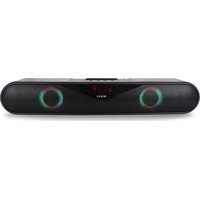


| Product Type | Bluetooth Speaker |
| Brand | Sogo |
| Model | SS-8395 |
| Dimensions (L x W x H) | 40 x 7.5 x 7 cm |
| Power Supply | DC 5V (micro USB port) |
| Battery | Li-ion 1200 mAh, 3.7 V |
| Battery Life | 3 to 4 hours |
| Charging Time | 2 to 3 hours |
| Bluetooth Version | 5.0 |
| Bluetooth Range | 10 meters |
| Output Power | 2 x 5 W |
| Sound Sensitivity | ≥ 80 dB |
| Harmonic Distortion | ≤ 10% |
| Frequency Response | 100 Hz - 180 Hz |
| Maximum USB/TF Capacity | 32 GB |
| Playback Modes | Bluetooth, FM, USB, TF, Mic |
| LED Lighting | Yes (multicolor, multiple modes) |
| Inputs | Micro USB (charging), USB, TF, Microphone |
| Included Accessories | USB cable, user manual |
| Safety Instructions | Do not immerse, avoid water, hot surfaces, repairs by a professional |
| Maintenance | Clean with a soft dry cloth |
| Reparability | Do not open, refer to an authorized service center |
| Country of Origin | China (P.R.C.) |
| Importer | Sanysan Appliances S.L., Valencia, Spain |
| After-Sales Service | www.sogosat.com / sogosat@sogosat.com |
Frequently Asked Questions - SS-8395 Sogo
User questions about SS-8395 Sogo
0 question about this device. Answer the ones you know or ask your own.
Ask a new question about this device
Download the instructions for your Speakers in PDF format for free! Find your manual SS-8395 - Sogo and take your electronic device back in hand. On this page are published all the documents necessary for the use of your device. SS-8395 by Sogo.
USER MANUAL SS-8395 Sogo
BLUETOOTH MULTIFUNCTION SOUND BAR
IMPORTANT
IMPORTANT
• Always read the instruction book carefully before using. - This manual can be downloaded from our web page www.sogo.es - Keep these instructions for future reference.
SAFETY INSTRUCTIONS FOR THE USER
- Do not place or operate the Bluetooth speaker near water sources.
- Never immerse the speaker or the charging cable in water or any other liquid. In the event of the speaker falling in water, take it to an authorized service agent for repair before reusing.
- Do not place or operate the speaker on or near hot surfaces (e.g., stove plates) or open flames.
- In case of speaker malfunction, or if it has been damaged in any manner, return it to the nearest authorized service facility for examination, repair or adjustment.
- In case of hardware problems, do not attempt to repair the product yourself. Repairs should only be
carried out by qualified technicians.
- Never use accessories that are not recommended by the manufacturer.
- The use of accessories not recommended or sold by the appliance manufacturer may result in fire, electric shock or irreparable damage to the product.
- Do not use the speaker for any other purpose than described in this manual.
- Do not leave the speaker charging longer than recommended by the manufacturer, as this may damage the battery or the speaker itself.
- Do not use the speaker while charging, as this may damage the speaker.
- Keep the speaker away from direct sunlight, fire, or other high-voltage equipment.
WARNING: The device may get warm during charging. Always ensure the speaker is turned off when you plug and unplug the device. If the device is not turned off, you might damage the speaker or injure yourself.
Technical Specifications:
| Output power 2 x 5W | |
| Driver unit size 40 x 7.5 x 7 cm | |
| Sound sensibility ≥80dB | |
| Distortion ≤10% | |
| Frequency response 100Hz-180Hz | |
| Bluetooth version V5.0 | |
| Bluetooth range 10 metres | |
| Bluetooth pairing name SOGO SS-8395 | |
| USB & TF max. memory supported | 32 GB |
| Battery capacity Built-in 1200mAh3.7V | |
| Battery type Li-ion | |
| Charging indicator Yes | |
| Input power DC 5V | |
| Working time 3 – 4 hrs | |
| Charging time 2 – 3 hrs | |
| Charging port | Micro USB |
| Input | Microphone |
| Slots | USB and TF card (Micro SD) |
| Connections | Bluetooth; Radio FM |
PACKAGE INCLUDES:
Bluetooth Speaker
1 x USB to Micro USB cable
1 x User Manual
INSTRUCTIONS: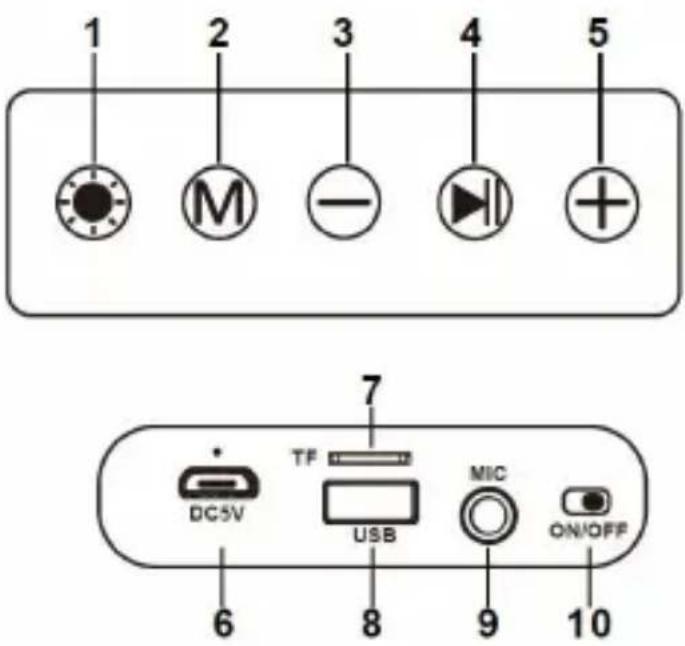
1. RGB LED Light button:
To turn on the LED light function, press the button for a few seconds or longer than the regular time (long press), and the speaker will turn on with the LED lights.
To change the LED light functions: This speaker has multiple LED light combinations. To change to a different LED light mode, press the button and it will start changing the modes. Keep pressing until you find your desired LED light function.
Note: Press the LED light button smoothly or for a short span of time to change the LED light functions.
2. Mode button:
This button helps to change the speaker mode. When turned on, the speaker automatically enters the default mode, which is Bluetooth mode. To change to any other available modes like FM, TF card, and USB mode, keep pressing until you find the desired mode.
3. “-” Sign button {Previous Song (Short Press)/Reduce Volume Button (Long Press)}: In
Bluetooth mode: With the help of the “-” button, you can reduce the volume as well as change the song to the previous songs from the playlist. Press the button and it starts to play the previous song, and if you keep pressing it, it will keep changing the songs backwards. In order to decrease the volume, press the button for a longer time or hold it in the pressed position for a little longer (long press).
In FM mode: This button can be used to change the FM channel in this mode.
4. Play/Pause button:
In Bluetooth mode: While the speaker is in Bluetooth mode, this button is used to play and pause the music.
In FM mode: While the speaker is in FM mode, this button helps to search the FM channels. Press this button for 2 seconds and the speaker automatically starts the process of auto-searching FM channels. Once you find the FM channels of your choice, you can save them by pressing the same button. So with the help of this button, you can save various channels.
5. “+” Sign { Next Song (Short Press) / Volume up (Long Press) }:
In Bluetooth mode: With the help of the “+” button, you can increase the volume as well as change the song to the next songs from the playlist. Press the button and it starts to play the next
song, and if you keep pressing it, it will keep changing the songs. In order to increase the volume, press the button for a longer time or hold it in the pressed position for a little longer (long press).
In FM mode: This button can be used to change the FM channel in this mode.
6. Micro USB charging port:
This slot is used to charge the speaker. To charge it, insert the Micro USB end of the charging cable and connect the other USB side to the computer USB slot or USB wall adapter.
7. TF/Micro SD card slot:
This device has a TF/Micro SD card slot. Simply insert the Micro SD card into the corresponding slot and the speaker automatically starts to play the playlist (in case MP3 files are stored).
8. USB drive port:
This device has a USB drive slot. Simply insert the USB drive into the corresponding slot and the speaker will automatically start playing the playlist (if MP3 files are stored).
9. Microphone port
This port is for using the speaker with a microphone. Insert the microphone and you can use it as a loudspeaker.
10. ON/OFF button
This button is located on the back of the speaker to switch it on and off.
MOBILE STAND
You can use this speaker as a mobile holder while in use. To use it as a mobile holder, pull out the antenna a little and place the mobile in a horizontal position between the antenna and the slot provided behind the buttons.
CHARGING
This speaker comes with a USB charging cable to charge the speaker via an integrated rechargeable battery. Before first use, make sure the unit is fully charged.
The battery cannot be removed or replaced, so to ensure optimal performance, always charge the battery before use.
To charge the Bluetooth speaker, connect the Micro USB end of the charging cable to the USB port on the back of the speaker. Connect the other end of the cable to your computer's USB port or an AC adapter (not included, but you can use your mobile charging adapter as well, or you can buy an adapter with 5V output).
The LED indicator will turn red while charging. Once fully charged, the red LED light will turn off. Charging may take up to 4 hours.
Note: Make sure to switch off the speaker and do not use it while charging, as this leads to longer charging time. Also avoid using the speaker while charging, as it can reduce battery life.
PAIRING
Hold the power button to turn the speaker on. When the device is turned on, it automatically enters Bluetooth mode and a voice prompt will indicate that the speaker is ready for use.
Activate the Bluetooth mode on your mobile phone, laptop, or smart TV and search for nearby Bluetooth devices. Connect to the device using the Bluetooth pairing code: SOGO SS-8395, which appears on your device. Once connected, you will hear another voice prompt confirming that your device has been successfully connected to the speaker and is ready to use.
If your device asks for a password, use "0000" or "1234" to complete the pairing process.
Note: Once your device is connected to the speaker, it will automatically connect to the speaker every time you turn on Bluetooth.
FM MODE:
Switch the mode button to enter FM radio mode. In case of signal problems, extend the speaker's antenna to enhance the signal. Press and hold to search for FM stations. This button helps search for FM channels. Press this button for 2 seconds and the speaker will automatically start the process of auto-searching FM channels. Once you find FM channels of your choice, you can store them by pressing the same button. With the help of this button, you can store various channels.
MICRO SD AND USB MODE:
Insert the Micro SD card or USB drive into their corresponding slots. Music will play automatically if there are MP3 files stored.
Press and hold the "+" and "-" buttons for volume control. With these buttons, you can increase or decrease the volume.
The same "+" and "-" buttons can be used for track selection.
NOTE: The compatibility for Micro SD and USB drive is a maximum of 32GB.
MICROPHONE MODE:
Insert the microphone (not included) into the Mic hole to use the speaker as a loudspeaker.
Sleep Mode:
This device will enter 'sleep mode' if it is not used or connected within 15 minutes after being switched on. To reactivate the speaker once it enters sleep mode, press the power button again.
DISPOSAL OF BATTERY-OPERATED UNITS
Do not dispose of battery-operated units as normal rubbish; always recycle them in a proper manner and in accordance with local municipal laws. You can recycle them by taking them to government-authorized disposal centers or specialized bins, which you can find in any nearby large supermarkets, electronics or electro-domestic products stores, or malls that have these types of facilities available.
IMPORTANT
4. Play/Pause button:
IMPORTANT
IMPORTANT























































| 1 | 2 |
























































| 1 | 2 |

DECLARATION OF CONFORMITY
This device complies with the Electromagnetic Compatibility Directive 2014/35/CE and Directive 2015/863 UE on the restriction of the use of certain hazardous substances in electrical and electronic equipment.
DECLARATION OF CONFORMITY
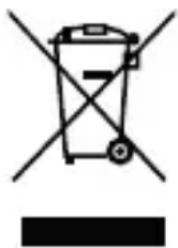
This symbol means that in case you wish to dispose of the product once its working life has ended, take it to an authorized waste agent for the selective collection of waste electrical and electronic equipment (WEEE).

Imported by:
Sahysan Appliances S.L, NIF: B98753056,
C/ Barcas 2, 2
Product made in P.R.C. – Designed by
SOGO based on the European Quality Standards
Customer Service: www.sogosat.com / sogosat@sogosat.com / 0034 902 222 161
- IMPORTANT
- SAFETY INSTRUCTIONS FOR THE USER
- PACKAGE INCLUDES
- RGB LED LIGHT BUTTON
- MODE BUTTON
- SIGN BUTTON {PREVIOUS SONG (SHORT PRESS)/REDUCE VOLUME BUTTON (LONG PRESS)}: IN
- PLAY/PAUSE BUTTON
- SIGN { NEXT SONG (SHORT PRESS) / VOLUME UP (LONG PRESS) }
- MICRO USB CHARGING PORT
- TF/MICRO SD CARD SLOT
- USB DRIVE PORT
- MICROPHONE PORT
- ON/OFF BUTTON
- MOBILE STAND
- CHARGING
- PAIRING
- FM MODE
- MICRO SD AND USB MODE
- MICROPHONE MODE
- SLEEP MODE
- DISPOSAL OF BATTERY-OPERATED UNITS
- DECLARATION OF CONFORMITY
- IMPORTED BY
Brand : Sogo
Model : SS-8395
Category : Speakers