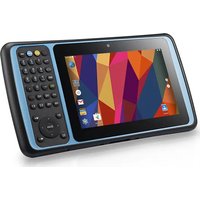
TB128 - Tablet Unitech - Free user manual and instructions
Find the device manual for free TB128 Unitech in PDF.


| Brand | Unitech |
| Model | TB128 |
| Product Type | Tablet |
| Display | 7-inch LCD touchscreen |
| Front camera | 2 megapixels |
| Rear camera | 8 megapixels with autofocus and LED flash |
| Keyboard | Physical 37-key keyboard (alphabetic, numeric, F1-F10 function keys, Android keys) |
| Barcode scanner | Integrated, triggered by dedicated key |
| Ports | Micro USB, DC-IN, 3.5mm headphone jack, docking station connector |
| Connectivity | Wi-Fi, Bluetooth (assumed), SIM slot (micro-SIM) |
| Expandable storage | microSD card slot (up to 32 GB estimated) |
| Battery | Rechargeable lithium-ion, removable, battery life not specified |
| Power supply | 5V power adapter (via DC-IN) or docking station |
| Operating system | Android (version not specified) |
| LED indicators | Blue (notifications), red (charging), green (fully charged) |
| Included accessories | Battery, hand strap, USB cable, power adapter, quick start guide, QR code card |
| Optional accessories | Docking station |
| Battery safety | Do not disassemble, crush, puncture, short-circuit, burn, or immerse. Dispose of according to local regulations. |
| Maintenance | Clean with a soft, dry cloth. Do not use abrasive products. |
| Spare parts / repairability | Removable battery, battery cover with screws, SIM/SD card accessible after removing battery. For repair, contact a Unitech representative. |
Frequently Asked Questions - TB128 Unitech
User questions about TB128 Unitech
0 question about this device. Answer the ones you know or ask your own.
Ask a new question about this device
Download the instructions for your Tablet in PDF format for free! Find your manual TB128 - Unitech and take your electronic device back in hand. On this page are published all the documents necessary for the use of your device. TB128 by Unitech.
USER MANUAL TB128 Unitech
7" Rugged Tablet Computer
- TB128 -
natural_image
Illustration of a remote control device with a screen, keypad, and control buttons (no text or symbols visible)User's Manual
Version 1.0
Table of Contents
Deutsch....1
Espanol 11
Francais 21
日本語 31
Türkçe 41
繁體中文....51
簡體中文....61
English....71
1 Paket
natural_image
3D diagram of a device casing with labeled components and a circular component, showing no text or symbols.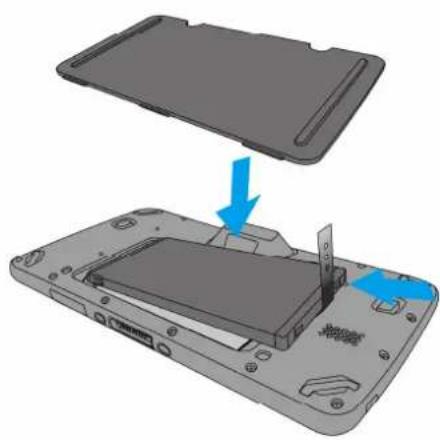
natural_image
3D diagram of a smartphone showing the internal structure and battery compartment, with no visible text or symbols.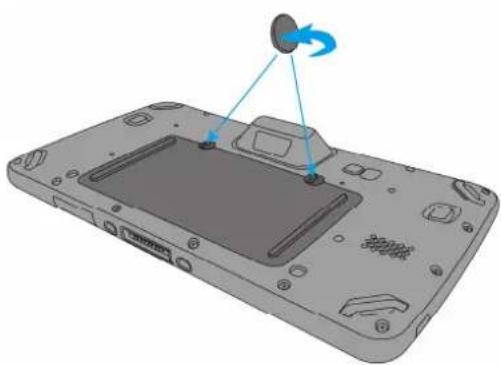
natural_image
3D diagram of a device's internal components with a blue arrow indicating rotation (no text or symbols)natural_image
Illustration of a handheld electronic device with an attached cable and a blue arrow pointing to the ports (no text or symbols present)natural_image
Illustration of two electrical wall connectors with two socket slots, one showing a fuse and the other a switch (no text or symbols)natural_image
Close-up of a gray electronic device with two small buttons on top (no visible text or symbols)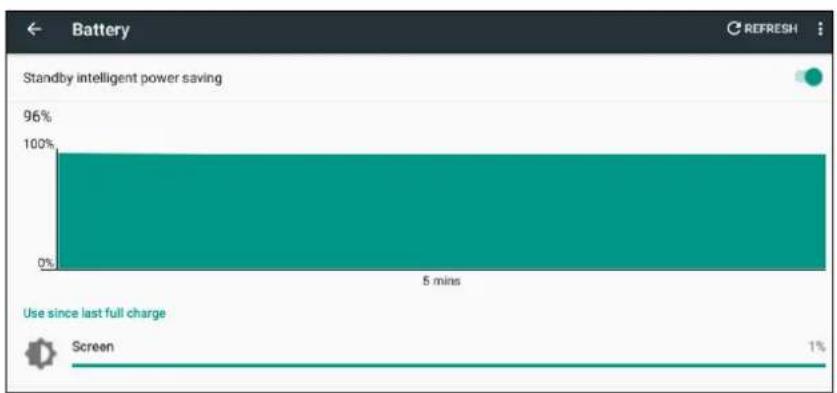
bar
| Time (mins) | Value | |-------------|-------| | 5 | 96% | | 5 | 0% | | 5 | 1% |natural_image
3D rendering of a device's front panel with a circular component and blue arrows indicating motion (no text or symbols)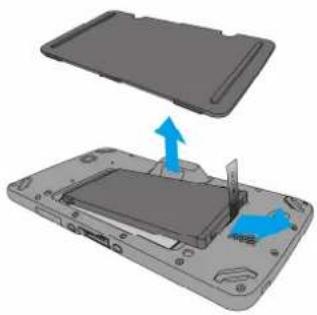
natural_image
3D diagram of a device showing an open lid and internal components with blue arrows indicating movement (no text or symbols)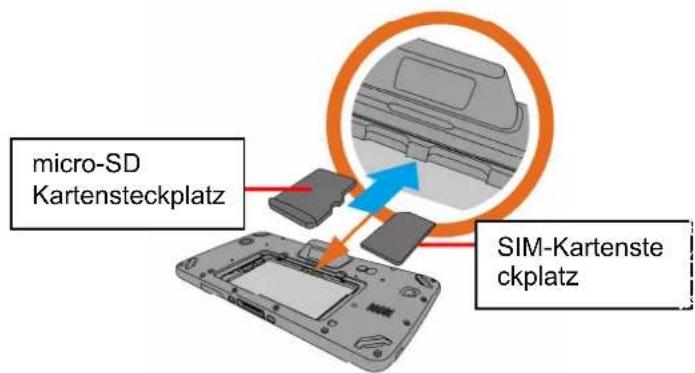
natural_image
3D diagram of a smartphone showing the internal structure and a blue arrow indicating a component (no text or symbols present)natural_image
3D diagram of a device's internal components with a blue arrow indicating rotation (no text or symbols present)natural_image
3D diagram of a device casing with labeled components and a circular component, showing no text or symbols.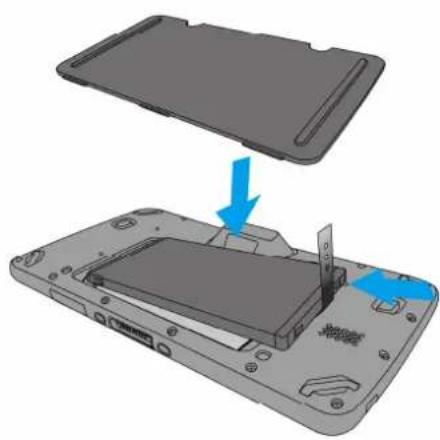
natural_image
3D diagram of a smartphone showing the internal structure and battery compartment, with no text or symbols present.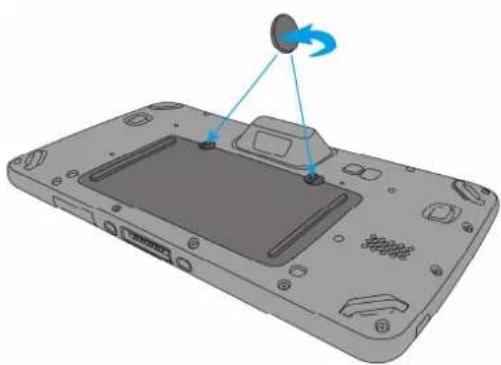
natural_image
3D diagram of a device's internal components with a blue arrow indicating rotation (no text or symbols)natural_image
Illustration of a handheld electronic device with an attached cable and ports, showing no text or symbols.natural_image
Illustration of two electrical socket devices, one with two slots and the other a plug inserted into a housing (no text or symbols)natural_image
Close-up of a dark gray electronic device with two small indicator lights on top (no text or symbols visible)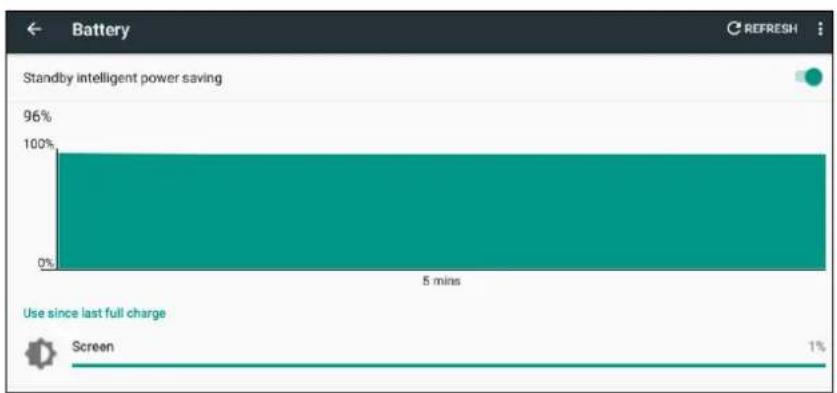
bar
| Time | Percentage | | ---- | ---------- | | 5 mins | 96% | | 5 mins | 0% | | 5 mins | 1% |Usando la tarjeta SIM/SD
natural_image
3D rendering of a device casing with a screen and a sensor emitting motion (no text or symbols visible)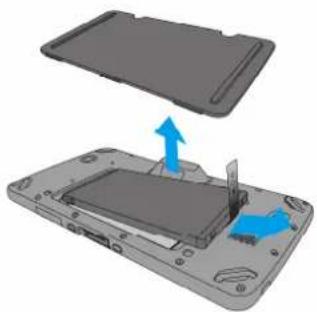
natural_image
3D diagram of a device showing an open lid and internal components with blue arrows indicating movement (no text or symbols)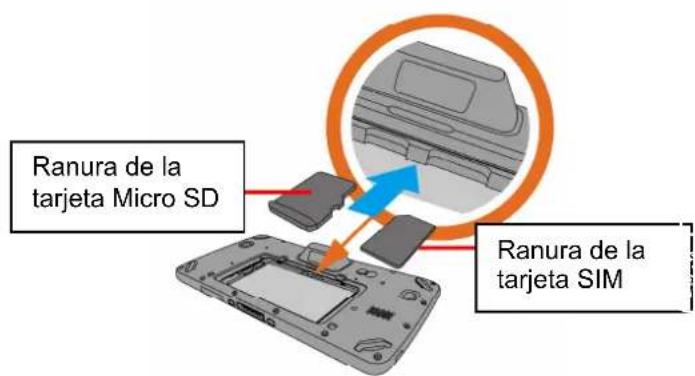
natural_image
3D diagram of a smartphone showing the internal structure and battery compartment, with no visible text or symbols.natural_image
3D diagram of a device with labeled components and a blue arrow indicating rotation (no text or symbols present)natural_image
3D diagram of a device's front panel with a circular component and blue directional arrows indicating motion (no text or symbols)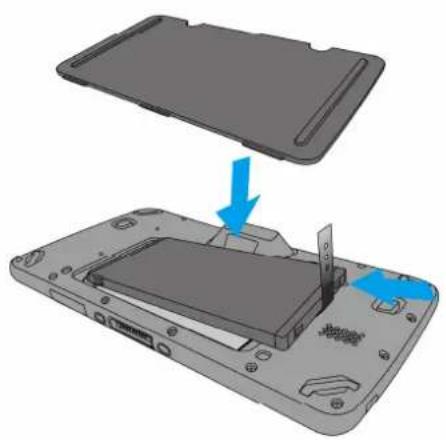
natural_image
3D diagram of a device showing a partially open rear panel with a blue arrow indicating a process or transformation (no text or symbols present)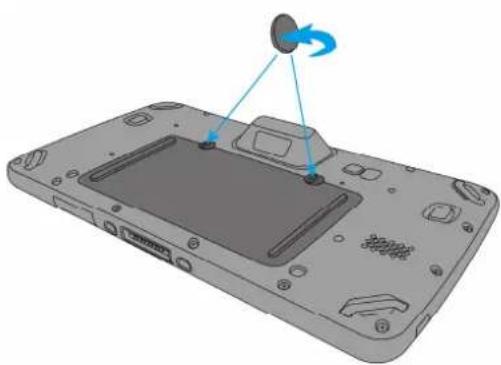
natural_image
3D diagram of a device with a circular component and blue directional arrows indicating motion (no text or symbols)natural_image
Illustration of a handheld electronic device with an attached cable and a blue arrow pointing to the ports (no text or symbols present)natural_image
Illustration of two electrical wall connectors, one with two side outlets and the other a separate device with a plug (no text or symbols)natural_image
Close-up of a computer monitor with two indicator lights (no text or symbols visible)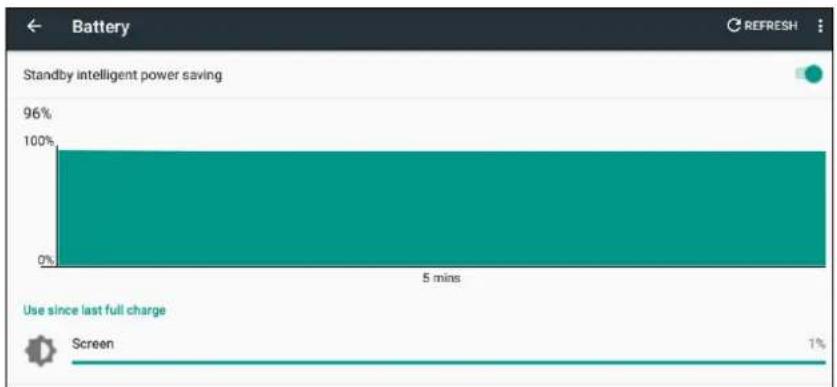
bar
Battery Standby intelligent power saving | Timeframe | Power Saving (%) | | :--- | :--- | | 5 mins | 96 | | Screen | 1 |natural_image
3D rendering of a device casing with a screen and a sensor emitting motion (no text or symbols visible)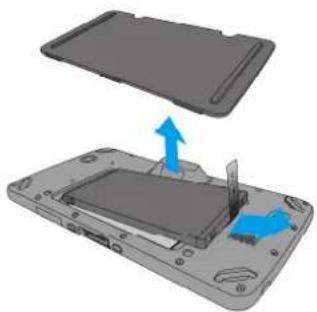
natural_image
3D diagram of a device showing an open lid and internal components with blue arrows indicating movement (no text or symbols)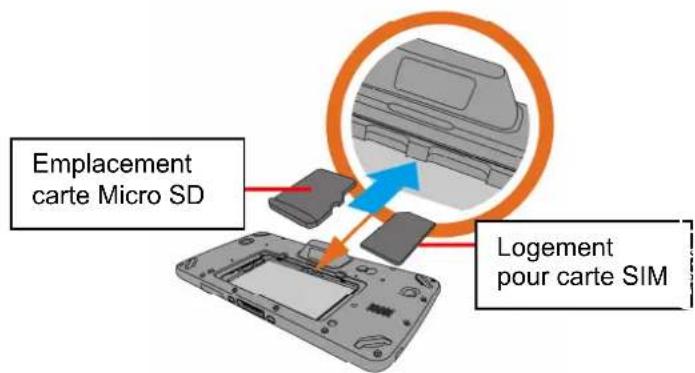
natural_image
3D diagram of a smartphone showing the internal structure and battery compartment, with no visible text or symbols.natural_image
3D diagram of a device with labeled components and a blue arrow indicating rotation (no text or symbols present)natural_image
3D diagram of a device's internal components with a circular component and blue directional arrows indicating motion (no text or symbols)natural_image
3D diagram of a device showing a partially open rear panel with a blue arrow indicating a process or transformation (no text or symbols present)natural_image
3D diagram of a device's internal components with a blue arrow indicating rotation (no text or symbols)natural_image
Illustration of a handheld electronic device with a blue arrow pointing to the right button (no text or symbols present)natural_image
Illustration of two electrical wall connectors: one with two side outlets and the other a multi-pin device (no text or symbols)本体の初回起動方法
natural_image
Close-up of a computer monitor with two indicator lights on the top (no text or symbols visible)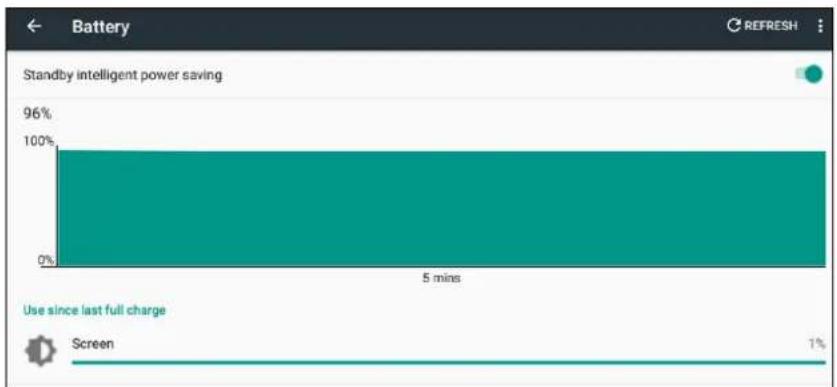
bar
Battery | Category | Value (%) | |---|---| | Standby intelligent power saving | 96 | | Use since last full charge | 1 | | Screen | 1 |SD/SIM カードの使い方
natural_image
3D rendering of a device casing with a screen and a sensor emitting motion (no text or symbols visible)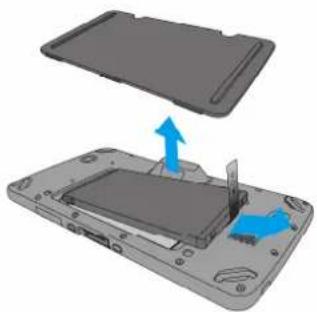
natural_image
3D diagram of a device showing an open lid and internal components with blue arrows indicating movement (no text or symbols)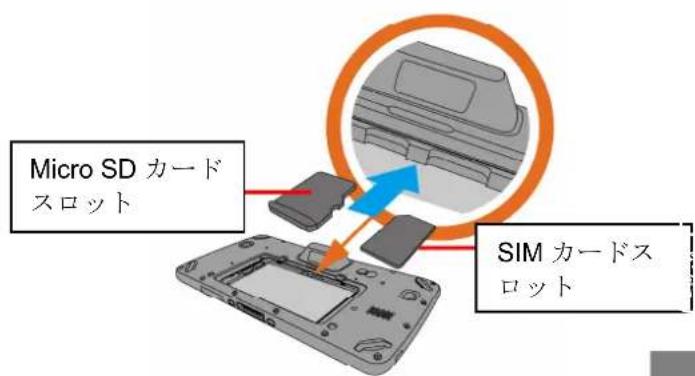
natural_image
3D diagram of a smartphone showing the internal structure and battery compartment, with no visible text or symbols.natural_image
3D rendering of a device's front panel with a circular button and blue directional arrows indicating motion (no text or symbols)SD/SIM カードの取り外し
natural_image
3D diagram of a device's internal components with a circular component and directional arrows indicating motion (no text or symbols)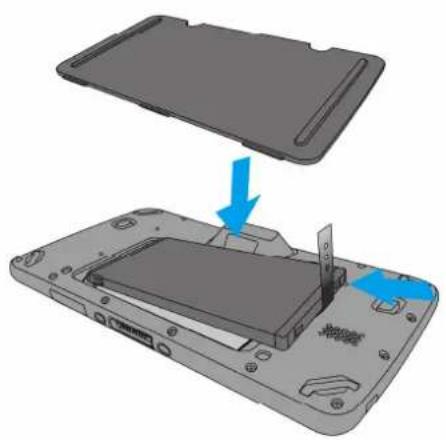
natural_image
3D diagram of a device showing a partially open rear panel with a blue arrow indicating a process or transformation (no text or symbols present)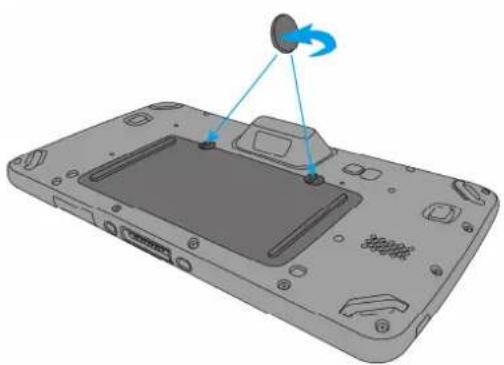
natural_image
3D diagram of a device casing with a circular component and blue directional arrows indicating motion (no text or symbols)natural_image
Illustration of a handheld electronic device with an attached cable and a blue arrow pointing to the ports (no text or symbols present)natural_image
Illustration of two electrical wall connectors, one with two socket slots and the other a plug-in shool (no text or symbols)natural_image
Close-up of a computer monitor with two control buttons (no visible text or symbols)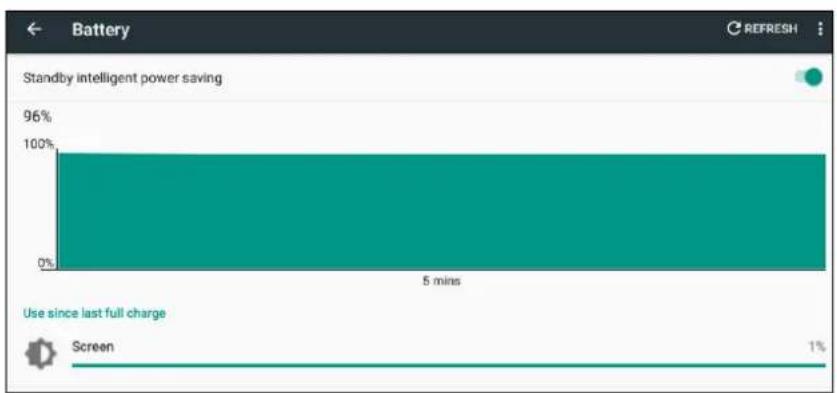
bar
| Time (mins) | Percentage | |-------------|----------| | 5 | 96% | | 5 | 0% | | 5 | 1% |natural_image
3D rendering of a device's front panel with a circular component and blue arrows indicating motion (no text or symbols)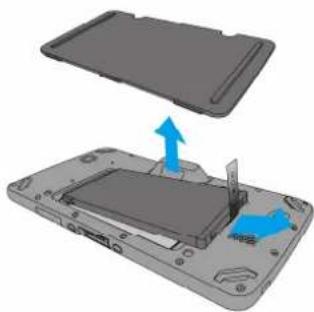
natural_image
3D diagram of a device showing an open lid and internal components with blue arrows indicating movement (no text or symbols)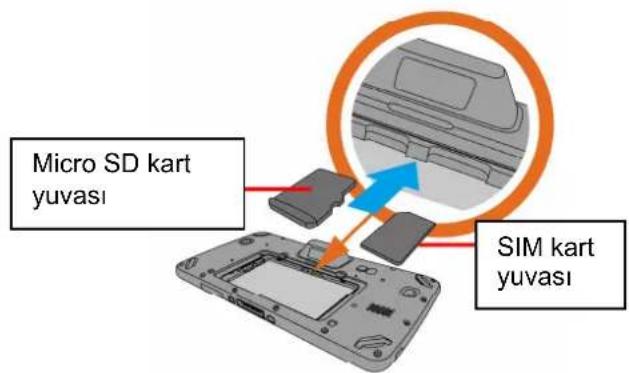
natural_image
3D diagram of a smartphone showing the internal structure and battery compartment, with no visible text or symbols.natural_image
3D diagram of a device's internal components with a circular component and blue arrows indicating rotation (no text or symbols)natural_image
3D diagram of a device with a screen and antenna, showing a blue circular component being lifted by a blue arrow (no text or symbols)- 取下背蓋並拿出電池。
natural_image
3D diagram of a smartphone showing the internal structure and battery compartment, with no text or symbols present.- 依順時針方向鎖上電池蓋上的兩顆螺絲。
natural_image
3D rendering of a device's front panel with a speaker and sound waves, no text or symbols presentnatural_image
Illustration of a handheld electronic device with an attached cable and a blue arrow pointing to the ports (no text or symbols present)natural_image
Illustration of two electrical wall connectors with two socket switches (no text or symbols)第一次使用設備
natural_image
Close-up of a gray electronic device with two indicator lights on top (no visible text or symbols)natural_image
3D diagram of a smartphone showing the internal structure and battery compartment, with no text or symbols present.- 依順時針方向鎖上電池蓋上的兩顆螺絲。
natural_image
3D rendering of a handheld device with a screen and sensor array (no text or symbols visible)卸載 MicroSD卡或SIM卡
natural_image
3D diagram of a device with a screen and antenna, showing a blue circular component being lifted by a blue arrow (no text or symbols)- 把电池放回电池仓,然后装上后盖。
natural_image
3D diagram of a smartphone showing the internal structure and battery compartment, with no text or symbols present.- 拧紧(顺时针旋转)电池盖上的两颗螺钉。
natural_image
3D diagram of a device with a screen and two blue arrows pointing to a component (no text or symbols)natural_image
Illustration of a handheld electronic device with an attached USB port and cable, showing no text or symbols.natural_image
Illustration of two electrical wall connectors with two socket switches, one showing a fuse and the other a plug (no text or symbols)第一次使用设备
natural_image
Close-up of a gray electronic device front panel with two indicator lights (no text or symbols visible)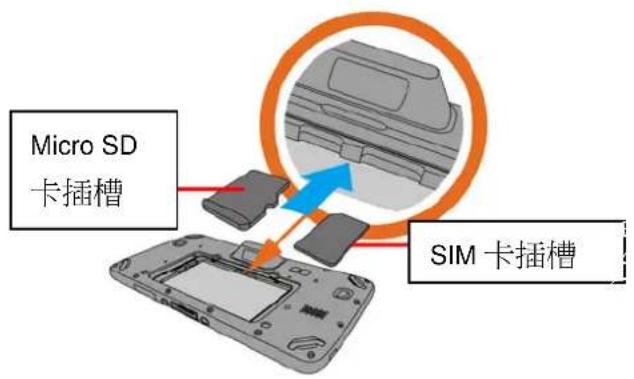
natural_image
3D diagram of a smartphone showing the internal structure and battery compartment, with no text or symbols present.- 拧紧(顺时针旋转)电池盖上的两颗螺钉。
natural_image
3D rendering of a handheld device with a screen and sensor array (no text or symbols visible)取出Micro SD/SIM 卡
Please make sure the following contents are in the TB128 gift box. If something is missing or damaged, please contact your unitech representative.
The standard package contents
TB128
Battery
■ Hand Strap
■ USB cable (Standard USB to Micro USB)
■ Power Adapter
■ Regulatory Compliance Statements
■ Quick start Guide
■ QR code card
Optional accessories
■ Desk Dock Cradle
2 Product Detail
TB128 Overview
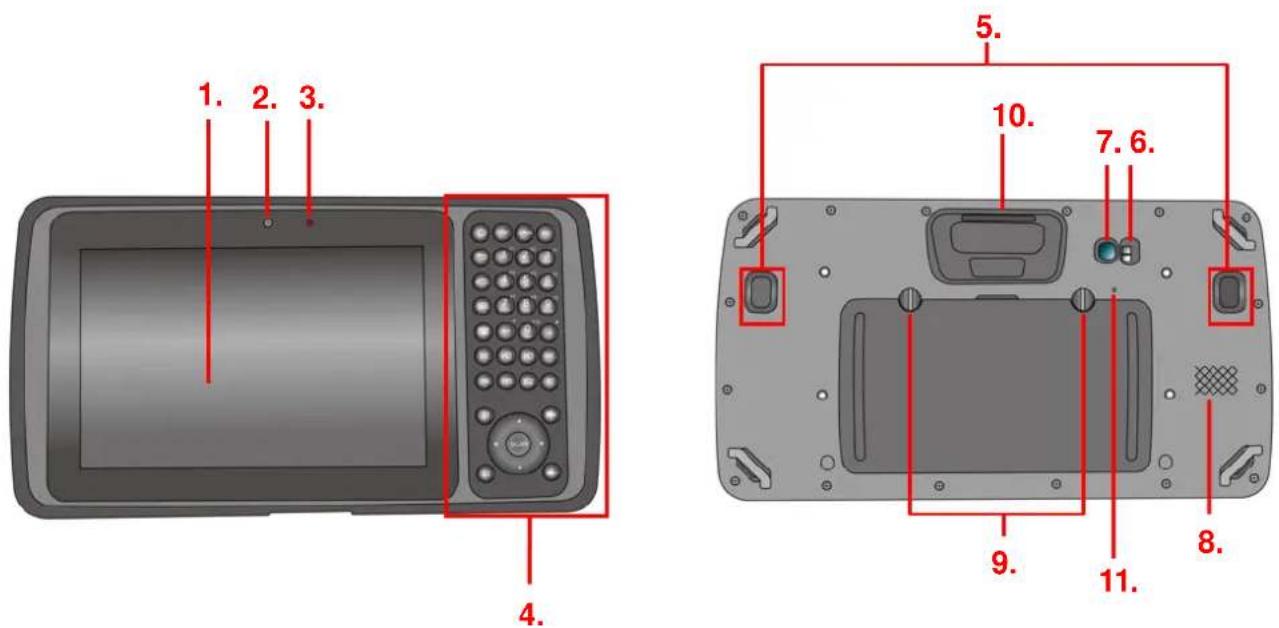
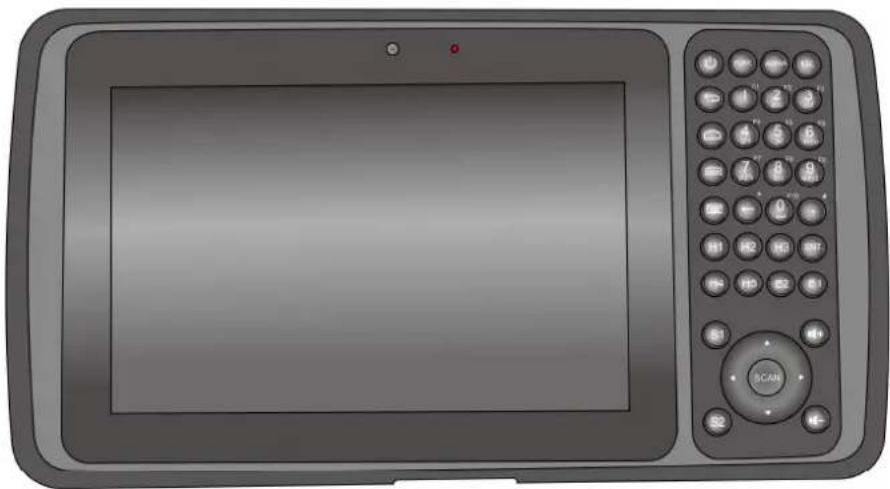
| 1. 7" LCD touchscreen 7. 8M pixels rear camera with AF | |
| 2. 2M pixels front camera | 8. Speaker |
| 3. LED indicator 9. Mounting screw for battery cover | |
| 4. Physical keyboard (37 keys) 10. Bar code Scan Engine | |
| 5. Trigger button 11. Reset button | |
| 6. LED flashlight | |
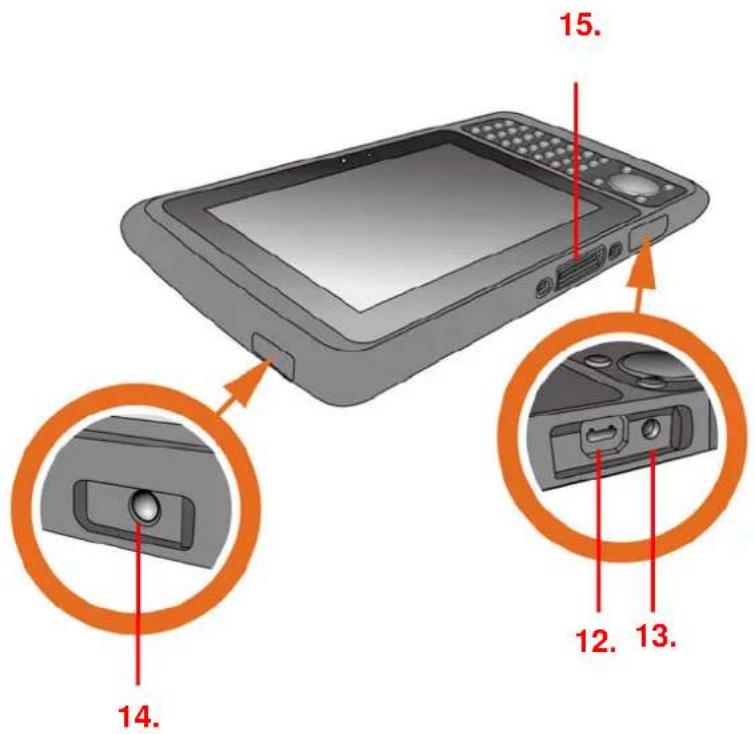
| 12. Micro USB port 14. Earphone jack | |
| 13. DC-IN port 15. Cradle connector |
Physical keyboard overview
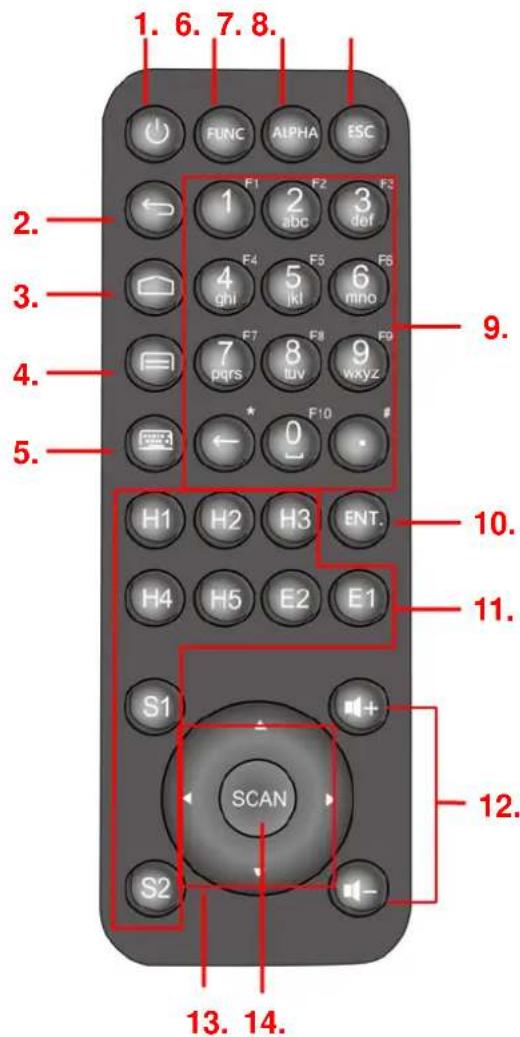
| 1. Power on/off key 8. Escape key | |
| 2. Android BACK key 9. Alpha/Numeric keys | |
| 3. Android HOME key 10. Enter key | |
| 4. Android APP List key 11. H.E.S. keys (programmable) | |
| 5. Soft keypad on/off key 12. Volume up/down keys | |
| 6. Function keys to enter F1-F10 13. 4 directional keys | |
| 7. Alpha key 14. Scan key | |
3 Getting Started
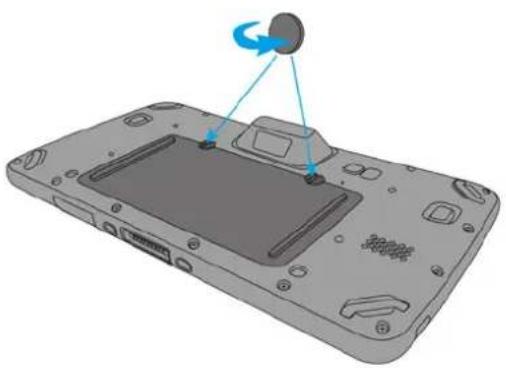
Installing the Battery
-
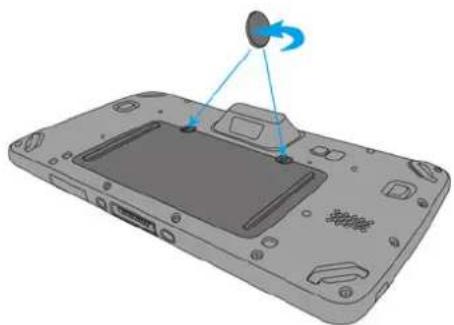
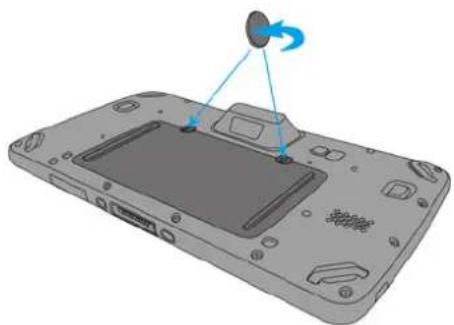
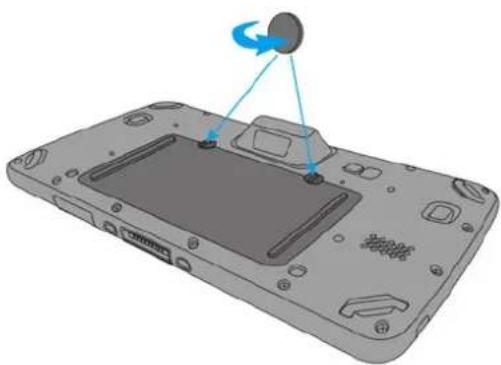
Using a proper tool (ex. a coin) to loosen the two screws on the battery cover by turning counterclockwise.
-
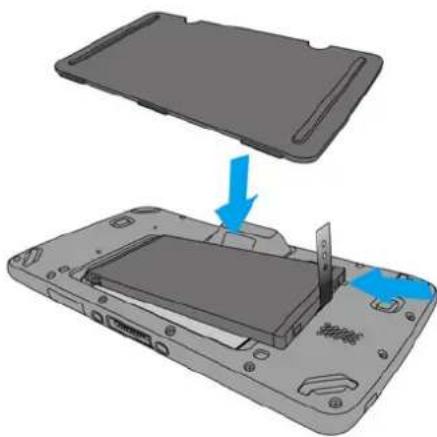
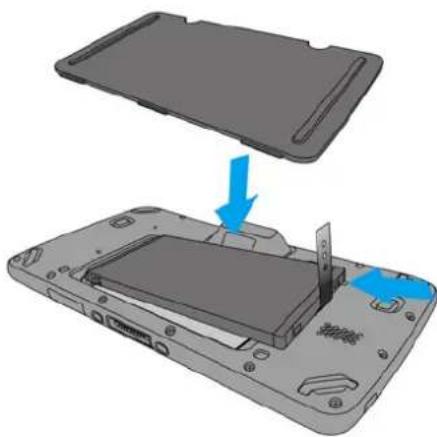
Put battery into battery compartment and put back cover.
-
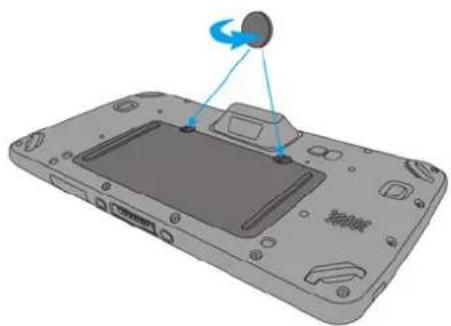
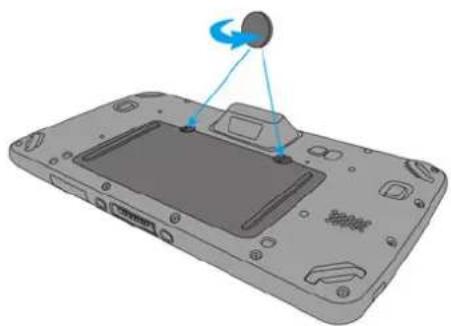
Lock the two screws on the battery cover by turning clockwise.
natural_image
3D diagram of a device's internal components with a circular component and blue arrows indicating rotation (no text or symbols)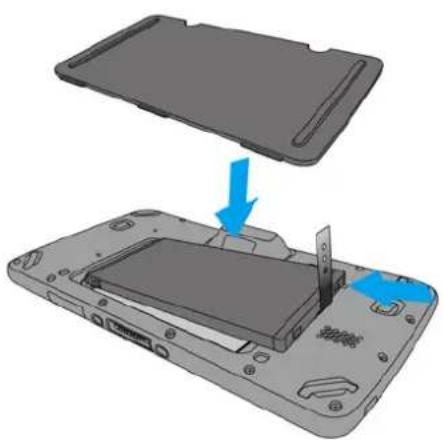
natural_image
3D diagram of a device showing a lid being inserted into a battery casing, with blue arrows indicating the process (no text or symbols present)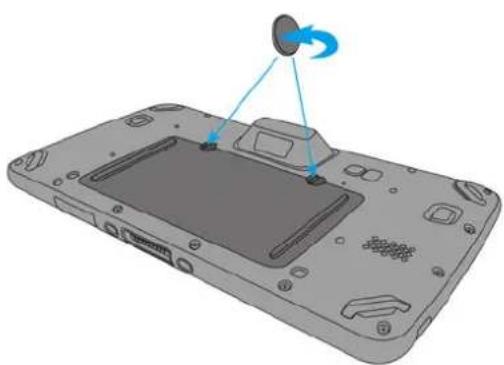
natural_image
3D diagram of a device with a scroll wheel and blue directional arrows indicating motion (no text or symbols)NOTE: After installing the battery, make sure the battery cover is securely closed, or you may be unable to turn ON the terminal.
WARNING! There is a risk of fire and burns if the battery pack is handled improperly. DO NOT disassemble, crush, puncture, short external contacts, or dispose the battery pack in fire or water. DO NOT attempt to open or service the battery pack. Dispose of used batteries according to local recycling guidelines in your area.
Charging the Battery
Connect TB128 to the charger, it will be charged automatically.
- Plug the power adapter into the DC-IN port at the bottom.
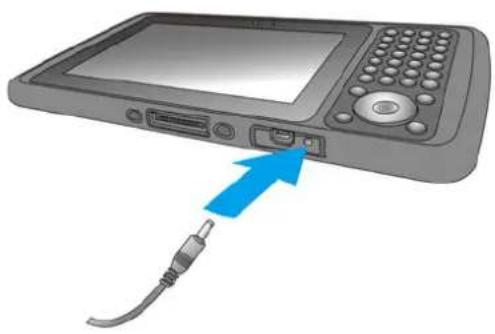
natural_image
Illustration of a portable electronic device with a blue arrow pointing to the ports and cable (no text or symbols)- Plug the power adapter into a wall outlet. If needed, attach a plug converter onto the power adapter.
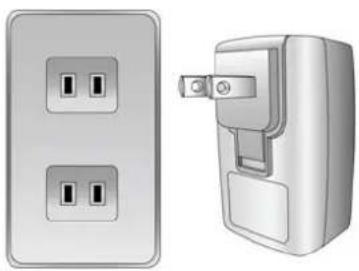
natural_image
Illustration of two electrical wall connectors with two socket switches, one showing a fuse and the other a switch (no text or symbols)Turning on the terminal for the first time
After you have initially charged your device for about 24 hours, the device is ready to be used. You can now start up your device. You can then set up the languages, WiFi setting, and date and time.
Power-On Button
Turn ON your device by pressing the power button 📄 on the physical keyboard.
Checking the LED status
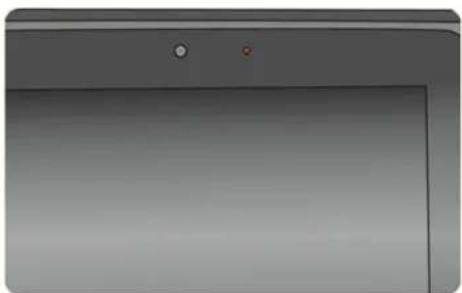
natural_image
Close-up of a gray electronic device front panel with two small buttons and a blank screen (no text or symbols visible)| Status LED Description | ||
| Message Blue light blinks | Message received | |
| Power | Lights Red | The battery is charging.The battery level is between low and full. |
| Solid Green light | Fully charged | |
| Good Read | ||
Checking the Battery Status
To check the battery level and to access the battery usage menu
- From your Home screen, tap

- Find and tap Settings.
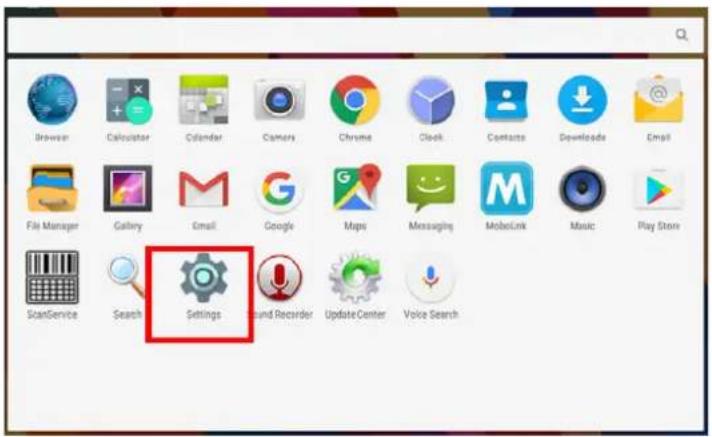
- Find and tap

battery.
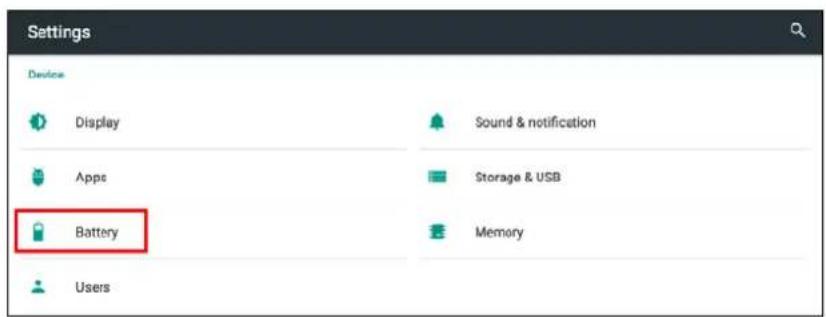
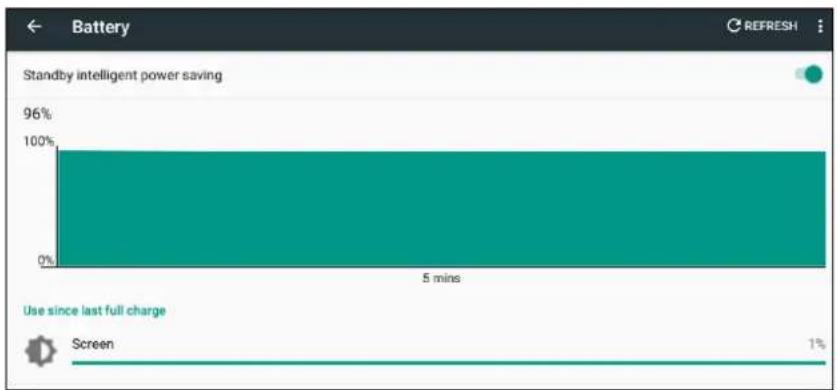
bar
| Category | Value (%) | |---|---| | Standby intelligent power saving | 96 | | Use since last full charge | 1 | | Screen | 1 |Using the SD/SIM Card
The TB128 has SD/SIM card slots inside the battery compartment.
Inserting a SD/SIM Card
-
Using a proper tool (ex. a coin) to loosen the two screws on the battery cover by turning counterclockwise.
-
Remove the back cover and pull the battery out.
-
Now you can access the micro SD card slot and SIM card slot.
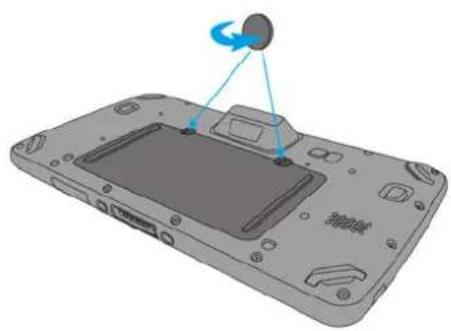
natural_image
3D rendering of a device with a screen and a sensor, showing no text or symbols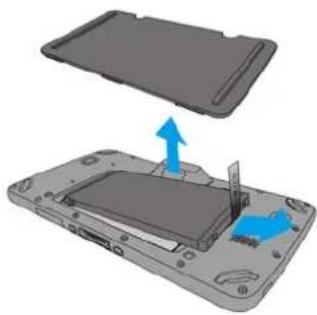
natural_image
3D diagram of a device showing an open rear panel with a blue arrow indicating a component, no text or symbols present.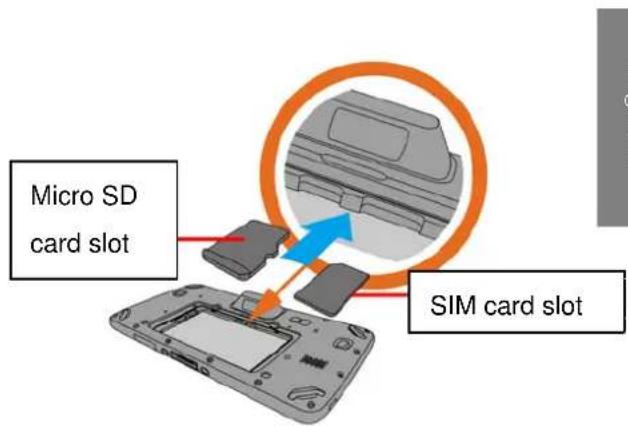
- Put battery into battery compartment and put back cover.
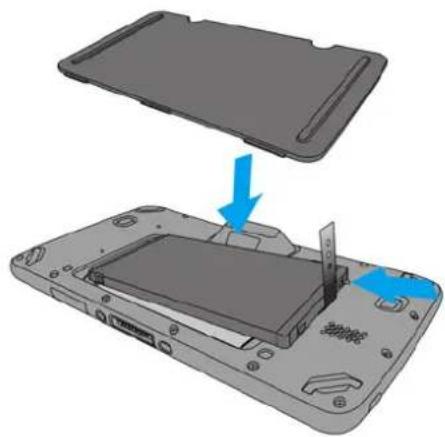
natural_image
3D diagram of a smartphone showing the internal structure and battery compartment, with no text or symbols present.- Using a proper tool (ex. a coin) to Lock the two screws on the battery cover by turning clockwise.
natural_image
3D diagram of a device's front panel with a circular button and blue directional arrows indicating motion (no text or symbols)Removing the SD/SIM Card
- Using a proper tool (ex. a coin) to loosen the two screws on the battery cover by turning counterclockwise.
- Remove the battery cover and the main battery.
- Press the card in and release. The card pops out.
- Remove the card from the slot.
- Put the battery back into the battery cover.
- Replace the battery cover.
- To tighten the two screws on the battery cover by turning clockwise.

- 7" Rugged Tablet Computer
- User's Manual
- Table of Contents
- Paket
- Usando la tarjeta SIM/SD
- 本体の初回起動方法
- SD/SIM カードの使い方
- SD/SIM カードの取り外し
- 第一次使用設備
- 卸載 MicroSD卡或SIM卡
- 第一次使用设备
- 取出Micro SD/SIM 卡
- The standard package contents
- Optional accessories
- Product Detail
- Getting Started
- Installing the Battery
- Charging the Battery
- Turning on the terminal for the first time
- Power-On Button
- Checking the LED status
- Checking the Battery Status
- Using the SD/SIM Card
- Inserting a SD/SIM Card
- Removing the SD/SIM Card
Brand : Unitech
Model : TB128
Category : Tablet