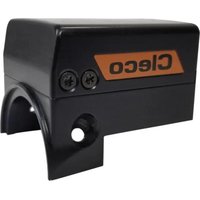
NeoTek T55-3000021 - Industrial production tool Cleco - Free user manual and instructions
Find the device manual for free NeoTek T55-3000021 Cleco in PDF.


| Product type | Gyroscopic accessory for industrial production tools |
| Brand | Cleco |
| Model | NeoTek T55-3000021 |
| Main function | Angular correction of hand tools without support during angle-controlled tightening |
| Tool compatibility | NeoTek series 30, 50, 70 (angle head, in-line, pistol) |
| Required software configuration | Bootloader S169353-101 or later; controller S168813-1.9 or later; measurement board S168025-510 or later; TIM 3.4 |
| Protection rating | IP40 |
| Ambient temperature | 0 °C to 45 °C |
| Storage temperature | -25 °C to 70 °C |
| Humidity | 10 % to 90 %, non-condensing |
| Operating environment | Indoor only, ESD workstation recommended |
| LED indications | Fixed green: measurement successful; Fixed red: failure; Fixed white: update; Fixed yellow: measurement in progress; Flashing green: bootloader active |
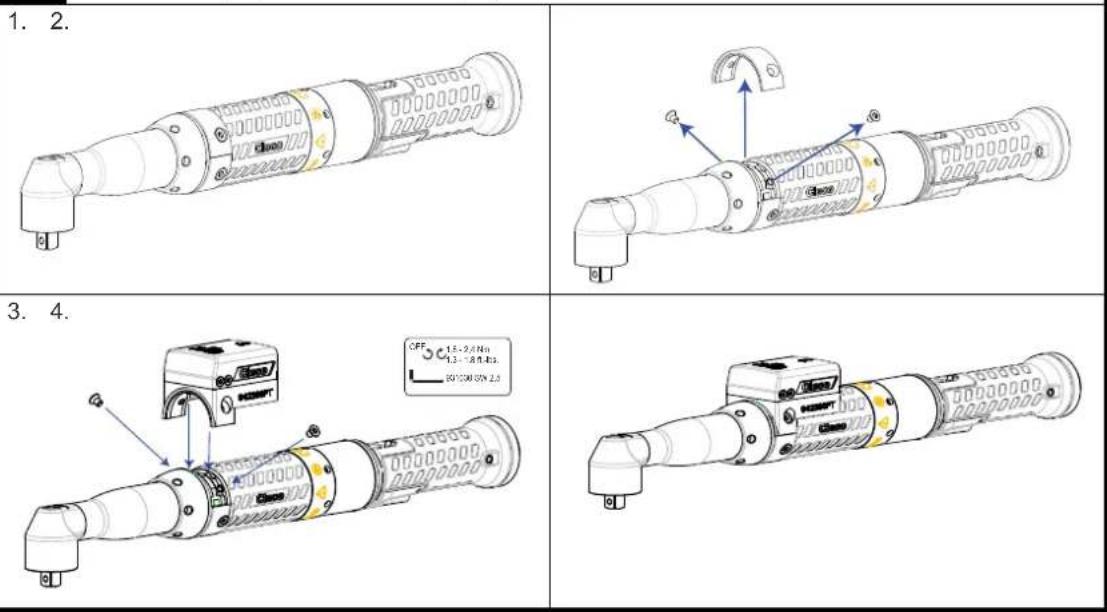
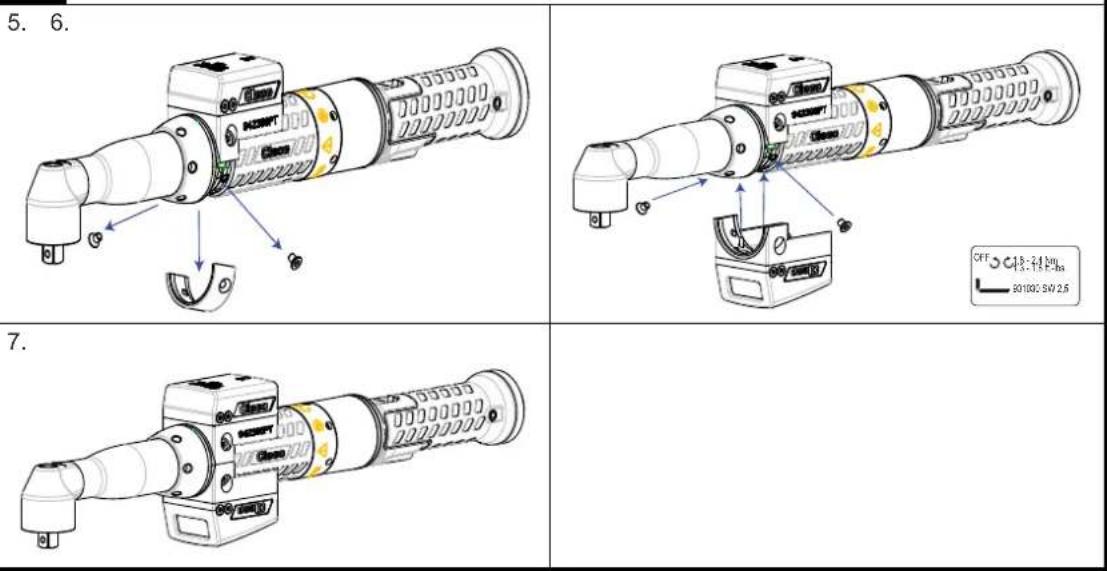
| Installation | Mounting on the tool (see figures 01-04 of the manual); possibility to add a second accessory |
| Software activation | Via the control software (see software documentation) |
| Cleaning | Do not use acidic cleaner or acetone; remove the suspension before cleaning |
| Repair | Replace the accessory if defective; send the tool for repair if TIM defective |
| Associated references | 942396PT94, 3684PT943685, T55-3000020, T55-3000021 |
Frequently Asked Questions - NeoTek T55-3000021 Cleco
User questions about NeoTek T55-3000021 Cleco
0 question about this device. Answer the ones you know or ask your own.
Ask a new question about this device
Download the instructions for your Industrial production tool in PDF format for free! Find your manual NeoTek T55-3000021 - Cleco and take your electronic device back in hand. On this page are published all the documents necessary for the use of your device. NeoTek T55-3000021 by Cleco.
USER MANUAL NeoTek T55-3000021 Cleco
Copyright © Apex Tool Group, 2019
No part of this document may be reproduced in any way or in any form, in whole or in part, or in a natural or machine-readable language, or transmitted on electronic, mechanical, optical, or other media, without the express permission of the Apex Tool Group.
Disclaimer
Apex Tool Group reserves the right to modify, supplement, or improve this document or the product without prior notice.
Trademark
Cleco is a registered trademark of Apex Brands, Inc.
Apex Tool Group GmbH
Industriestraße 1
73463 Westhausen
Germany
01 30/50/70ESN(...), 30/50/70EAN(...)
02 30/50/70ESN(...), 30/50/70EAN(...)
| 03 30/50EPN(...) | |
1. 2.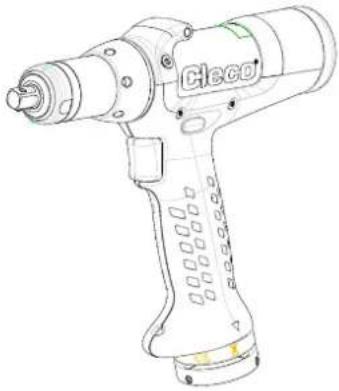 | 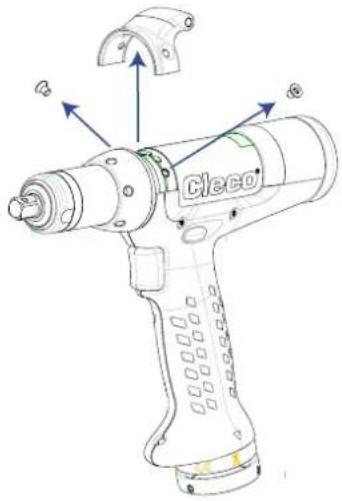 |
3. 4. | 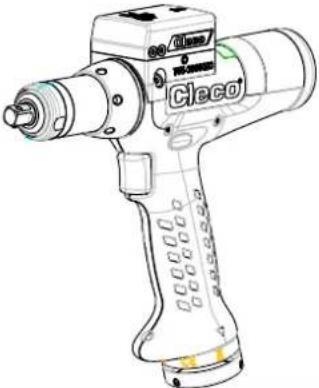 |
| 04 | 30/50EPN(...) | |
| 5. | 6.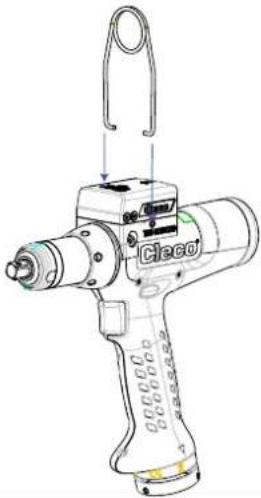 | 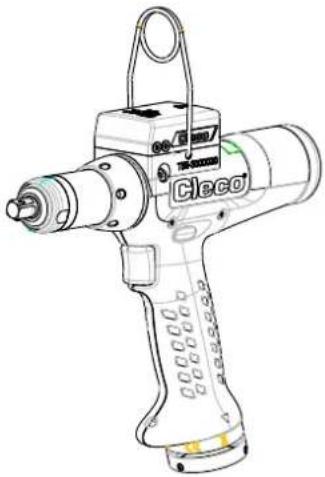 |
Contents
EN
1 Product description.... 9
2 Use 9
3 Installation 9
4 Activating accessories.... 9
5 LED signals 10
6 Ambient conditions.... 10
7 Troubleshooting.... 10
8 Cleaning instructions ....11
DE
As an accessory for NeoTek tools, the Gyroscope allows the angular correction of handheld tools without support.
Until now, a support has been needed for angle-controlled sequences. As a result, any change in the reference angle during final tightening, e.g., because of an evasive movement by the worker, should be avoided. The gyroscope makes such a support unnecessary.
2 Use
| Gyroscope Order No. | 942396PT 94 | 3684PT 943685 | PT T55- | 3000020 | T55-3000021 |
| Requirements | |||||
| NeoTek tool 30 Series... | 50 Series... 70 | Series... 30 Ser | ies... 50 Series... | ||
| Angle head, inline | Angle head, inline | Angle head, inline | Pistol Pistol | ||
| Software requirements | Bootloader: S169353-101 or laterController: e.g., S168813-1.9 or laterMeasurement card: S168025-510 or laterTIM (Tool Interface Module): 3.4 | ||||

Note
Note the order of the software updates:
- Perform controller software update.
- Perform measurement card firmware update.
- Perform TIM firmware update.
- Perform firmware update for accessories.
3 Installation

Note
Before installing, take the tool out of operation or switch off the controller.
30/50/70ESN(...), 30/50/70EAN(...)
- First accessory: see Figure 01, Page 3
• Second accessory (optional): see Figure 02, Page 3
30/50EPN(...)
- First accessory: see Figure 03, Page 4
- Pistol suspension bail (optional): see Figure 04, Page 4
4 Activating accessories
For additional settings, see the particular software documentation for the controller.
5 LED signals
| LED color Explanation | |
| Continuously green Measurement was successful. | |
| Flashing green Bootloader | active. Waiting for application.If the LED does not stop flashing after 5-10 seconds, the application is defective, see 7 Troubleshooting, Page 10. |
| Continuously red Measurement has failed. See Troubleshooting. | |
| Continuously white Software update is running. | |
| Continuously yellow Measurement is running. | |
6 Ambient conditions
• EMC Limit Class A (electromagnetic immunity for industrial areas)
- Only for use indoors
- Recommendation: ESD workstation on installation
| Feature Data | |
| Ambient temperature 0 °C | ... 45 °C |
| Storage temperature -25 °C | ... 70 °C |
| Humidity | 10% ... 90%, non-condensing |
| Protection ClassDIN EN 60529 | IP40 |
7 Troubleshooting
| Problem | Possible cause | Measure |
| Accessory does not work | Accessory not activated by software | ► See Troubleshooting |
| Accessory not properly installed | ► Check installation | |
| Accessory defective | ► Replace accessory | |
| Tool defective | ► Replace tool | |
| Wrong software on TIM | ► Perform software update with correct software | |
| Wrong software on STMD-H | ► Perform software update with correct software | |
| TIM defective | ► Send tool for repair | |
| Application is not loaded | Measurement card software is not recognized | ► Use correct measurement card software |
| No application on the tool | ► Perform software update with correct software | |
| CAN bus communication not possible | ► Make sure the tool is installed correctly ► Make sure the correct TIM soft-ware is used |
8 Cleaning instructions
▶ Do not use acidic cleaners or acetone. These can dissolve the plastic.
▶ Remove suspension bail.
Please note that all locations may not service all products.
Contact the nearest Cleco® Sales & Service Center for the appropriate facility to handle your service requirements.

Sales Center
Service Center
NORTH AMERICA | SOUTH AMERICA-
DETROIT, MICHIGAN
Apex Tool Group
2630 Superior Court
Auburn Hills, MI 48236
Staffordshire B78 2ER
United Kingdom
Phone: +44 1827 8727 71
Fax: +44 1827 8741 28
FRANCE
Apex Tool Group SAS
25 Avenue Maurice Chevalier - ZI
77330 Ozoir-La-Ferrière
France
Phone: +33 1 64 43 22 00
Fax: +33 1 64 43 17 17
GERMANY
Apex Tool Group GmbH
Industriestraße 1
73463 Westhausen
Germany
Phone: +49 (0) 73 63 81 0
Fax: +49 (0) 73 63 81 222
HUNGARY
Apex Tool Group
Hungária Kft.
Platánfa u. 2
9027 Györ
Hungary
Phone: +36 96 66 1383
Fax: +36 96 66 1135
ASIA PACIFIC
AUSTRALIA
Apex Tool Group
519 Nurigong Street, Albury
NSW 2640
Australia
Phone: +61 2 6058 0300
CHINA
Apex Power Tool Trading
(Shanghai) Co., Ltd.
2nd Floor, Area C
177 Bi Bo Road
Pu Dong New Area, Shanghai
China 201203 P.R.C.
Phone: +86 21 60880320
Fax: +86 21 60880298
INDIA
Apex Power Tool India
Private Limited
Gala No. 1, Plot No. 5
S. No. 234, 235 & 245
Indialand Global
Industrial Park
Taluka-Mulsi, Phase I
Hinjawadi, Pune 411057
Maharashtra, India
Phone: +91 020 66761111
JAPAN
Apex Tool Group Japan
Korin-Kaikan 5F,
3-6-23 Shibakoen, Minato-Ku,
Tokyo 105-0011, JAPAN
Phone: +81-3-6450-1840
Fax: +81-3-6450-1841
KOREA
Apex Tool Group Korea
1503, Hibrand Living Bldg.,
215 Yangjae-dong,
Seocho-gu, Seoul 137-924,
Korea
Phone: +82-2-2155-0250
Fax: +82-2-2155-0252
Cleco®
Production Tools
Apex Tool Group, LLC
Brand : Cleco
Model : NeoTek T55-3000021
Category : Industrial production tool