
DE 110iH - Vacuum Cleaner HUSQVARNA - Free user manual and instructions
Find the device manual for free DE 110iH HUSQVARNA in PDF.


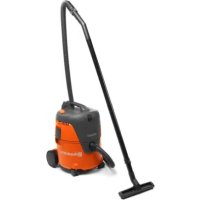
| Product type | Industrial battery vacuum cleaner |
| Brand | Husqvarna |
| Model | DE 110iH |
| Application | Professional, dry material collection (dust class H) |
| Power supply | 36 V Lithium-ion battery (BLi200 / BLi300) |
| Maximum power | 900 W |
| Dimensions (L × W × H) | 670 × 400 × 1000 mm |
| Weight | 26 kg |
| Collection system | Longopac (continuous bag) |
| Main filter | HEPA 13 (1.2 m² surface area) |
| Pre-filter | 1.4 m² surface, washable with water |
| Filter cleaning | Jet Pulse (purge) |
| Max air flow rate | 215 m³/h (127 cfm) |
| Max vacuum pressure | 17 kPa (68 in H₂O) |
| Sound level (power) | 83.6 dB(A) |
| Sound level (pressure) | 68.3 dB(A) |
| Protection class | IP44 |
| Connectivity | Integrated Bluetooth® (Husqvarna Fleet Services) |
| Included accessories | Antistatic hose, floor brush, nozzle, Longopac |
| Safety | Wheel brake, emergency stop, recommended respiratory protection |
| Spare parts | HEPA filters, pre-filters, Longopac, hoses, batteries, chargers |
Frequently Asked Questions - DE 110iH HUSQVARNA
User questions about DE 110iH HUSQVARNA
0 question about this device. Answer the ones you know or ask your own.
Ask a new question about this device
Download the instructions for your Vacuum Cleaner in PDF format for free! Find your manual DE 110iH - HUSQVARNA and take your electronic device back in hand. On this page are published all the documents necessary for the use of your device. DE 110iH by HUSQVARNA.
USER MANUAL DE 110iH HUSQVARNA
natural_image
Line drawing of a vehicle with a forklift (no text or symbols)DE 110i H, DE 120 H PACE
EN Operator's manual 2-31
Transportation, storage and disposal.... 24
Technical data.... 27
Accessories.... 28
Declaration of Conformity.... 29
Registered trademarks.... 31
Introduction
Product description
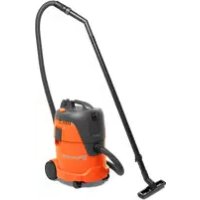
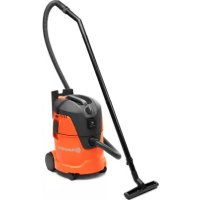
The product is a battery dust extractor. Dust-laden air goes through the suction hose into the inlet valve. The product separates the dust particles from the air. The particles fall into the plastic bag at the bottom of the product.
Intended use

WARNING: Do not collect ignition sources, hot particles, liquids, explosive
material and unstable or pyrophoric particles.
The product is for professional operations only. The product is used to collect and remove dry material from machines and devices. The material can be dangerous and harmful to health, refer to the dust class H in EN 60335-2-69.
Do not use the product for other tasks. Only use the product with accessories that are approved by the manufacturer.
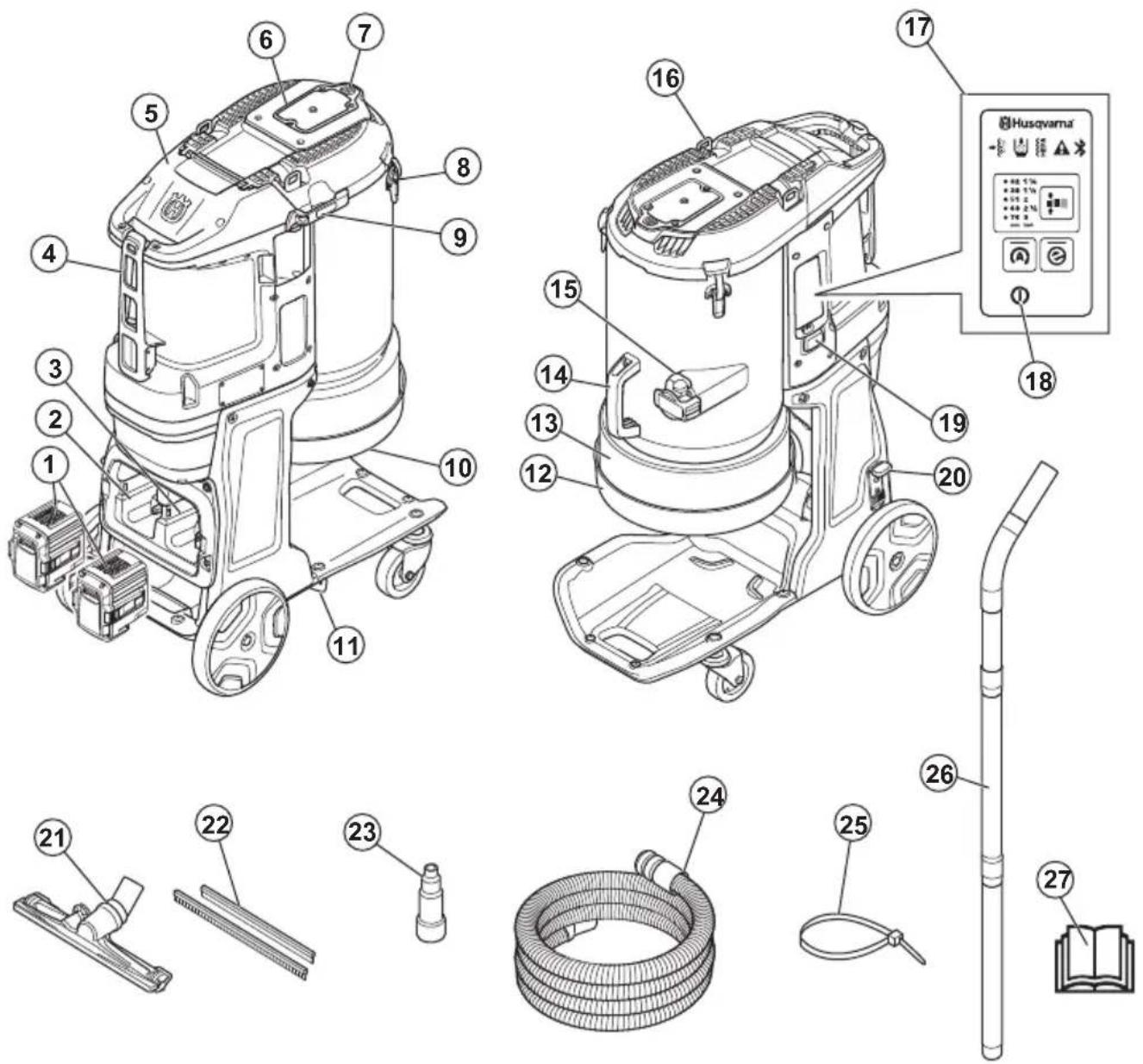
- Battery (Accessory)
- Storage for spare battery
- Battery holder
- Fastener for dust extraction hose
- HEPA filter cover
- Prefilter cover
- Filter purge button
- Cover lock
- Handle pipe toggle fastener
- Dust release rubber cone
- Handle pipe bracket
- Longopac holder
- Longopac
- Handle
-
Hose lock
-
Lift eye
- Control panel, refer to Functions of the control panel on page 12
- On/Off
- Hour meter
- Wheel brake
- Floor nozzle
- Rubber strips
- Hose nozzle (DE 110i H)
- Dust extraction hose
- Cable tie
- Handle pipe
- Operator's manual
Symbols on the product

WARNING: This product can be dangerous and cause serious injury or death to the operator or others. Be careful and use the product correctly.

Read the manual carefully and make sure that you understand the instructions before you use the product.
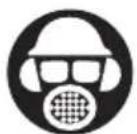
Use hearing protection, eye protection and respiratory protection. Refer to Personal protective equipment on page 9.

Do not use metal hooks, chains or other lifting equipment with rough edges that can cause damage to the lifting eye. Only use soft lifting straps.
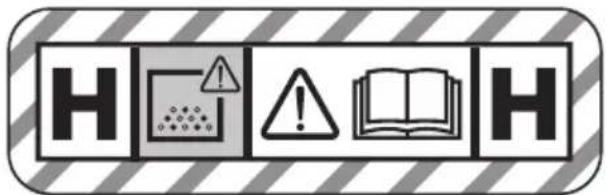
This device is H-classified, certified by a third party according to IEC-60335-2-69, EN-60335-2-69 Annex AA.
This device contains harmful dust. Empty and maintenance operations, including the removal of the dust collection containers, may only be carried out by experts who wear appropriate protective equipment. Never operate the dust extractor without the complete filtration system.
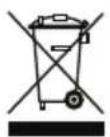
The product is not domestic waste. Recycle it at an approved disposal location for electrical and electronic equipment.
If the product features Bluetooth® wireless technology. The Bluetooth® symbol will be marked on the product name label. Refer to Bluetooth® wireless technology on page 11.
Note: Other symbols/decals on the product refer to special certification requirements for some markets.
Symbols on the battery and/or on the battery charger
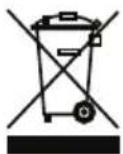
The product or package of the product is not domestic waste.

Recycle the product at an applicable disposal location for electrical and electronic equipment.

Do not put the battery in water.

Keep the battery away from sunlight, heat or open flame.

The product has protection against splashing water.

Functional grounding.
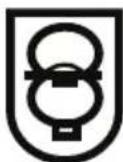
Fail-safe transformer.

Use and keep the battery charger indoors only.

Double insulation.
Embedded connectivity
The cloud asset management solution Husqvarna Fleet Services™ gives the fleet manager an overview of all products that are connected via either embedded or aftermarket sensors. The position of the gateway or smartphone can be used to indicate the location of connected products. The sensors record data like runtime, service intervals and more. For more information about the cloud asset management solution Husqvarna Fleet Services™, download the iOS or Android app Husqvarna Fleet
Services at https://apps.apple.com/se/app/husqvarna-fleet-services/id1334672726 or https://play.google.com/store/apps/details?id=com.husqvarna.hfsmobile&hl=en. Speak to your Husqvarna sale representative for more information.
Some types of this product are connected via the embedded Husqvarna Fleet Services™ sensor that has the Bluetooth Low Energy (BLE) function. For more information regarding how to use it, refer to To use embedded connectivity with fleet on page 11. For information about the BLE technology radio spectrum, refer to Embedded connectivity on page 27.
Type plate
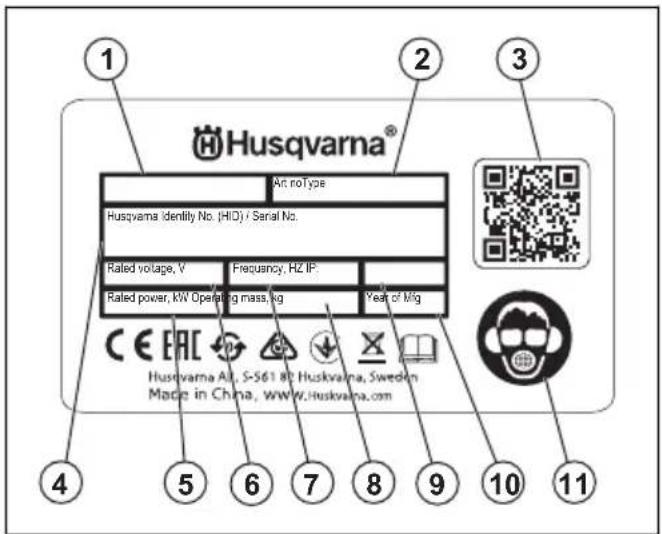
- Model
- Article number
- Scannable code
- Serial number
- Rated power
- Rated voltage
- Frequency
- Weight
- IP class
- Production year
- Personal protective equipment
Product liability
As referred to in the product liability laws, we are not liable for damages that our product causes if:
• the product is incorrectly repaired.
• the product is repaired with parts that are not from the manufacturer or not approved by the manufacturer.
• the product has an accessory that is not from the manufacturer or not approved by the manufacturer.
- the product is not repaired at an approved service center or by an approved authority.
Safety
Safety definitions
Warnings, cautions and notes are used to point out specially important parts of the manual.

WARNING: Used if there is a risk of injury or death for the operator or bystanders if the instructions in the manual are not obeyed.

CAUTION: Used if there is a risk of damage to the product, other materials or the adjacent area if the instructions in the manual are not obeyed.
Note: Used to give more information that is necessary in a given situation.
General safety instructions

WARNING: Read the warning instructions that follow before you use the product.

WARNING: PACE products contain hazardous voltages inside the enclosure. In order to avoid electric shock: Do not attempt to open the product. Do not operate a damaged product. Do not connect a PACE battery to a damaged product. If the product becomes damaged during use, remove the PACE battery from the product, and contact your Husqvarna Service center.
- This product is a dangerous tool if you are not careful or if you use the product incorrectly. This product can cause serious injury or death to the operator or others. Before you use the product, you must read and understand the contents of this operator's manual.
-
Do not let a person (including children) with reduced physical, sensory or mental capabilities use the product, unless they have been given supervision or instruction concerning use of the product by a person responsible for their safety.
• Make sure that you have experience and knowledge about the product before use.
• Make sure that all controls are off before you disconnect the battery. -
Comply with all applicable laws and regulations.
- The operator and the employer of the operator must know and prevent the risks during operation of the product.
- Do not let a person operate the product unless they read and understand the contents of the operator's manual.
- Do not operate the product unless you receive training before use. Make sure that all operators receive training.
- Do not let a child operate the product.
- Only let approved persons operate the product.
- The operator is responsible for accidents that occur to other persons or their property.
- Do not use the product if you are tired, ill, or under the influence of alcohol, drugs or medicine.
• Always be careful and use your common sense. - This product produces an electromagnetic field during operation. This field can under some circumstances interfere with active or passive medical implants. To decrease the risk of serious injury or death, we recommend persons with medical implants to speak to their physician and the medical implant manufacturer before operating this product.
- Keep the product clean. Make sure that you can clearly read signs and decals.
- Do not use the product if it is defective.
- Do not do modifications to this product or the battery pack.
- Do not operate the product if it is possible that other persons have done modifications to the product.
- Do not operate the product without necessary filters.
- Save all warnings and instructions.
Battery safety

WARNING: Read the warning instructions that follow before you use the product.

WARNING: A damaged battery can cause an explosion and cause injury. If the battery has a deformation or is damaged, speak to an approved Husqvarna service agent.
- Only use the BLi batteries that we recommend for your product. The batteries are software encrypted.
- Use only original batteries for this product. There is a risk of explosion if the batteries are replaced with a battery of incorrect type. Speak to your dealer for more information.
-
Use BLi batteries that are rechargeable as a power supply for the related Husqvarna products only. To prevent injury, do not use the battery as a power supply for other devices.
-
Risk of electrical shock. Do not connect the battery terminals to keys, screws or other metal. This can cause a short circuit of the battery.
- If the battery leaks, do not let the liquid touch your body, clothes or the product. If you touch the liquid, clean the area with a large quantity of water and get medical aid.
- Use protective glasses when you are near batteries. If you get liquid in your eyes, do not rub but flush with water for a minimum of 15 minutes. Get medical aid.
- Do not use batteries that are non-rechargeable.
- Do not do modifications to the battery.
- Do not put objects into the air slots of the battery.
- Keep the battery away from sunlight, heat or open flame. The battery can cause an explosion and cause burns and/or chemical burns.
- Keep the battery away from rain and wet conditions.
- Keep the battery away from microwaves and high pressure.
- Do not try to disassemble or break the battery.
- Use the battery only when the ambient temperature is between -10ircC / 14ircF and 40ircC / 104ircF .
- Do not clean the battery or the battery charger with water. Refer to To do a check of the battery and the battery holder on page 18.
- Do not use a damaged battery.
- Keep batteries in storage away from metal objects such as nails, screws or jewelry.
- Keep the battery away from children.
- Attach the battery correctly. An incorrectly attached battery can cause a short circuit of the battery.
Battery charger safety

WARNING: Read all safety warnings and all instructions. Failure to follow the warnings and instructions may result in electrical shock, fire and/or serious injury.
- Risk of electrical shock or short circuit if the safety instructions are not obeyed.
- Do not use other battery chargers than the one supplied for your product. Only use Husqvarna QC or Husqvarna PACE chargers when you charge Husqvarna replacement batteries BLi or PACE.
- Do not try to disassemble the battery charger.
- Do not use a damaged battery charger.
- Do not lift the battery charger by the power cord. To disconnect the battery charger from a mains socket, pull out the plug. Do not pull the power cord.
- Keep all cables and extension leads away from water, oil and sharp edges. Make sure that the cable is not caught between doors, fences or equivalent.
- Do not use the battery charger near flammable materials or materials that can cause corrosion. Make sure that the battery charger is not covered.
Pull out the plug to the battery charger if there is smoke or fire.
- Only charge the battery indoors in a location with good airflow and away from sunlight. Do not charge the battery outdoors. Do not charge the battery in wet conditions.
- Only use the battery charger where the temperature is between 5ircC / 41ircF and 40ircC / 104ircF . Use the charger in an environment which has a good airflow, dry and free from dust.
- Do not put objects into the air slots of the battery charger.
- Do not connect the battery charger terminals to metal objects as this can short circuit the battery charger.
- Do not charge non-rechargeable batteries in the battery charger or use them in the machine.
- Use approved mains sockets that are not damaged.
Work area safety
- Keep work area clean and well lit. Cluttered or dark areas invite accidents.
- Do not operate the product in explosive atmospheres, such as in the presence of flammable liquids, gases or dust. The product create sparks which may ignite the dust or fumes.
- Keep children and bystanders away while operating the product. Distractions can cause you to lose control.
Electrical safety

WARNING: Do not expose the appliance to rain or wet conditions. Water entering a an electric appliance will increase the risk of electric shock.
- The plug on the supply cord of the appliance must match the outlet. Do not change the plug in any way. Do not use adapter plugs with earthed (grounded) appliances. Unmodified plugs and matching outlets reduce risk of electric shock.
- Insert the plug in a suitable earthed/grounded power outlet which has been correctly and safely installed and is in compliance with local regulations. If you are in doubt about the effectiveness of the power outlet's earth/ground connection, have it checked by a qualified specialist.
- Avoid body contact with earthed or grounded surfaces, such as pipes, radiators, cookers, stoves and refrigerators. There is an increased risk of electric shock if your body is earthed or grounded.
- Check to ensure that the supply cord does not lie in a puddle of water.
-
Check the appliance's supply cord at regular intervals and have it replaced by the manufacturer or his agent if damage is found. Check extension cords at regular intervals and replace them if found to be damaged.
-
Do not touch the supply cord or extension cord if they are damaged while working. Disconnect the supply cord plug from the power outlet. Damaged supply cords or extension cords present a risk of electric shock.
- Do not abuse the cord. Never use the cord for carrying, pulling or unplugging the appliance. Keep the cord away from heat, oil, sharp edges or moving parts. Damaged or entangled cords increase the risk of electric shock.
- When operating an electric appliance outdoors, use only extension cords of a type suitable for outdoor use. Use of an extension cord suitable for outdoor use reduces the risk of electric shock.
- In the event of an interruption in the electric supply, switch the appliance off and unplug it from the power outlet.
- Never operate the appliance when it is dirty or wet. Dust (especially dust from conductive materials) or dampness adhering to the surface of the appliance may, under unfavorable conditions, lead to electric shock. Dirty or dusty appliances should thus be checked by an approved service agent at regular intervals, especially if used frequently for working on conductive materials.
- If operating an appliance in a damp location is unavoidable, use a residual current device (RCD) protected supply. Use of a RCD reduces the risk of electric shock.
- Do periodic electrical safety tests on the product. Refer to local regulations for the correct procedure.
Personal safety
- Stay alert, watch what you are doing and use common sense when operating the product. Do not use the product while you are tired or under the influence of drugs, alcohol or medication. A moment of inattention while operating the product may result in serious personal injury.
- Use personal protective equipment. Always wear eye protection. Protective equipment such as dust mask, non-skid safety shoes, hard hat or hearing protection used for appropriate conditions will reduce personal injuries.
- Prevent unintentional starting. Ensure the switch is in the off-position before connecting to power source and/or battery pack, picking up or carrying the product. Carrying the product with your finger on the switch or energizing the product that have the switch on invites accidents.
- Remove any adjusting key or wrench before turning the product on. A wrench or a key left attached to a rotating part of the product may result in personal injury.
- Do not overreach. Keep proper footing and balance at all times. This enables better control of the product in unexpected situations.
- Dress properly. Do not wear loose clothing or jewellery. Keep your hair and clothing away from
moving parts. Loose clothes, jewellery or long hair can be caught in moving parts.
- If devices are provided for the connection of dust extraction and collection facilities, ensure these are connected and properly used. Use of dust collection can reduce dust-related hazards.
- Do not let familiarity gained from frequent use of tools allow you to become complacent and ignore tool safety principles. A careless action can cause severe injury within a fraction of a second.
Product use and care
- Do not force the product. Use the correct product for your application. The correct product will do the job better and safer at the rate for which it was designed.
- Do not use the product if the switch does not turn it on and off. Any product that cannot be controlled with the switch is dangerous and must be repaired.
- Disconnect the plug from the power source and/or remove the battery pack, if detachable, from the product before making any adjustments, changing accessories, or storing the product. Such preventive safety measures reduce the risk of starting the product accidentally.
- Store idle the product out of the reach of children and do not allow persons unfamiliar with the product or these instructions to operate the product. The product is dangerous in the hands of untrained users.
- Maintain the product and accessories. Check for misalignment or binding of moving parts, breakage of parts and any other condition that may affect the power tool's operation. If damaged, have the product repaired before use. Many accidents are caused by poorly maintained power tools.
- Keep cutting tools sharp and clean. Properly maintained cutting tools with sharp cutting edges are less likely to bind and are easier to control.
- Use the product, accessories and tool bits etc. in accordance with these instructions, taking into account the working conditions and the work to be performed. Use of the product for operations different from those intended could result in a hazardous situation.
- Keep handles and grasping surfaces dry, clean and free from oil and grease. Slippery handles and grasping surfaces do not allow for safe handling and control of the tool in unexpected situations.
Battery tool use and care
- Recharge only with the charger specified by the manufacturer. A charger that is suitable for one type of battery pack may create a risk of fire when used with another battery pack.
- Use products only with specifically designated battery packs. Use of any other battery packs may create a risk of injury and fire.
- When battery pack is not in use, keep it away from other metal objects, like paper clips, coins, keys, nails, screws or other small metal objects, that can make a connection from one terminal to another. Shorting the battery terminals together may cause burns or a fire.
- Under abusive conditions, liquid may be ejected from the battery; avoid contact. If contact accidentally occurs, flush with water. If liquid contacts eyes, additionally seek medical help. Liquid ejected from the battery may cause irritations or burns.
- Do not use a battery pack or tool that is damaged or modified. Damaged or modified batteries may exhibit unpredictable behavior resulting in fire, explosion or risk of injury.
- Do not expose a battery pack or tool to fire or excessive temperature. Exposure to fire or temperature above 130ircC / 265ircF may cause explosion.
- Follow all charging instructions and do not charge the battery pack or tool outside the temperature range specified in the instructions. Charging improperly or at temperatures outside the specified range may damage the battery and increase the risk of fire.
Service
- Let only approved service center do servicing with approved replacement parts. This will keep the product safe.
- Do not do servicing or open battery packs. Only approved service center must do servicing of battery packs.
- Refer to Maintenance schedule on page 17 for more information.
Safety instructions for assembly

WARNING: Read the warning instructions that follow before you assemble the product.
- Unauthorized modifications and/or accessories may lead to serious injury or death to the user or others.
- Use only attachments as described in this manual. Use only manufacturers recommended attachments.
- Make sure that the assembly area is firm, so the product does not tip over. Risk of personal and material injury.
- Be careful, the toggle fasteners can cause damage to the operator when assembling the product.
Safety instructions for operation

WARNING: Read the warning instructions that follow before you use the product.
- If the product does not operate correctly, hits the ground, is damaged, left outdoors or falls into water, stop the product. Let an approved service agent repair the product.
- Make sure that the motor and all controls are off before you disconnect the battery pack.
- Disconnect the battery from the product, when the product is not used, before you do servicing or before you go away from the product.
- Do not operate the product unless you can get aid if an accident occurs.
- Know the controls and the correct operation of the product before use.
- Do not operate the product at temperatures below -10ircC .
- Do not operate the product where there is a risk of explosion or in areas where there is flammable liquids or materials.
- Do not put objects into openings.
- Do not operate if an opening is blocked. Remove dust, lint, hair or other material that can decrease the air flow.
- Do not operate the product with wet hands.
- Keep hair, loose clothing and all body parts away from openings and moving parts.
- Operate the product very carefully on stairs to prevent damage and injury if the product falls.
- Always lock the transport wheels if you do work on an rough surface.
- Look out for persons, objects and situations that can prevent safe operation of the product.
- Make sure that you always can stop the motor quickly in an emergency.
- If the product does not operate correctly, stop the product.
- Do not operate the product without a Longopac and the filters installed. Replace the Longopac bag and the filters as given in this manual.
- Always remove the battery pack before you go away from the product.
- If the product has unusual vibration or noise level, stop the product immediately and remove the battery pack. Examine the product for damages. Unusual vibration is usually a warning of damage. Repair the damages or let an approved service agent do the repair.
• Always use approved accessories. Speak to your Husqvarna representative for more information.
Personal protective equipment

WARNING: Read the warning instructions that follow before you use the product.
• Always use approved personal protective equipment when you operate the product. Personal protective equipment cannot fully prevent injury but it
decreases the degree of injury if an accident does occur. Let your dealer help you select the correct personal protective equipment.
- Regularly do a check of the condition of the personal protective equipment.
- Use an approved protective helmet.
- Use approved hearing protection.
- Use approved respiratory protection with class P2 or higher.
- Use approved eye protection.
- Use protective gloves.
- Use protective shoes.
Safety instructions for maintenance

WARNING: Read the warning instructions that follow before you do maintenance on the product.
- Remove the battery before you do maintenance, other checks or assemble the product.
- The operator must only do the maintenance and servicing shown in this operator's manual. Turn to your servicing dealer for maintenance and servicing of a larger extension.
- Do not clean the battery or the battery charger with water. Strong detergent can cause damage to the plastic.
- If you do not do maintenance, it decreases the life cycle of the product and increases the risk of accidents.
- Special training is necessary for all servicing and repair work, especially for the safety devices on the product. If not all checks in this operator's manual are approved after you have done maintenance, turn to your servicing dealer. We guarantee that there are professional repairs and servicing available for your product.
- Only use original spare parts.
Safety devices on the product

WARNING: Read the warning instructions that follow before you use the product.
- Never use a product that has faulty safety equipment! If your product fails any checks contact your service agent to get it repaired.
- Do not use the product if protective plates, protective covers, safety switches or other protective devices are not attached or are defective.
Always use common sense

WARNING: Under no circumstances should you modify the original design of the product without approval from the
manufacturer. Always use original spare parts. Unauthorized modifications and/or accessories may lead to serious injury or death to the user or others.

WARNING: The use of products such as cutters, grinders, drills, that sand or form material can generate dust and vapours which may contain hazardous chemicals. Check the nature of the material you intend to process and use an appropriate breathing mask.
It is not possible to cover every conceivable situation you can face when using the product. Always exercise care and use your common sense. Avoid all situations which you consider to be beyond your capability. If you still feel uncertain about operating procedures after
reading these instructions, you should consult an expert before continuing.
Do not hesitate to contact your Husqvarna representative if you have any more questions about the use of the product. We will willingly be of service and provide you with advice as well as help you to use your product both efficiently and safely.
Let your Husqvarna dealer check the product regularly and make essential adjustments and repairs.
Husqvarna AB has a policy of continuous product development. Husqvarna reserves the right to modify the design and appearance of products without prior notice and without further obligation introduce design modifications.
All information and all data in the operator's manual were applicable at the time the operator's manual was sent to print.
Operation
To do before you operate the product
Note: The operation conditions are 800 m/2625 ft maximum altitude, temperature between -10°C/14°F to +40°C/104°F and humidity 85%.
Note: Read the operator's manual of the attached equipment carefully. If specified requirements or settings are given for the dust extractor, make sure that you obey these.
- Read the operator's manual carefully and make sure that you understand the instructions.
- Do the daily maintenance. Refer to Maintenance schedule on page 17.
- Make sure that the work area is clean and bright.
- Use personal protective equipment. Refer to Personal protective equipment on page 9.
- Make sure that the product is installed correctly.
- Make sure that the battery is fully charged.
To attach the dust extraction hose

WARNING: Use an antistatic hose to prevent antistatic effects.
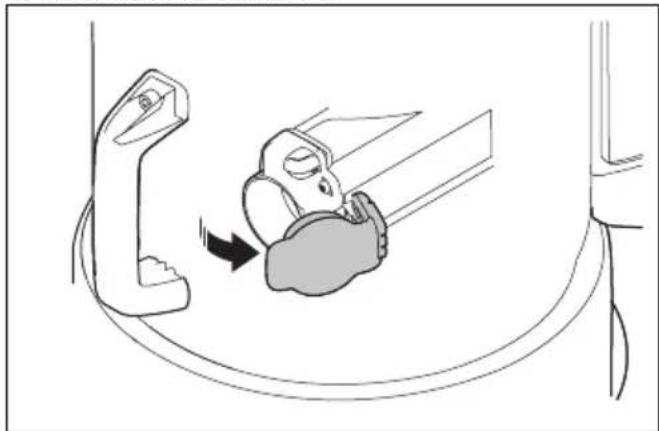
- Open the hose connector.
natural_image
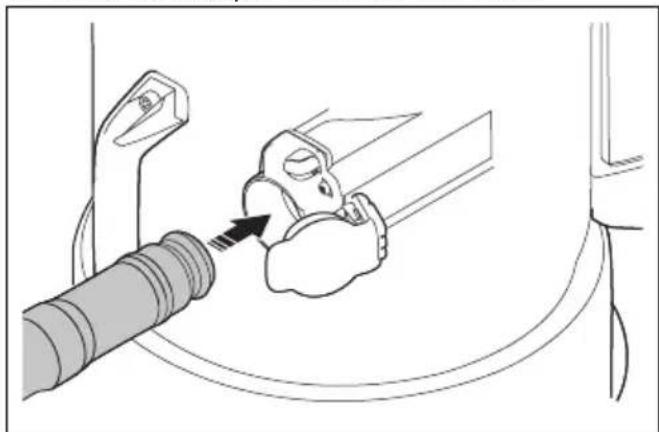
Diagram showing a car seatbelt mechanism with a lightning bolt indicating the angle (no text or symbols present)- Put the hose adapter in the hose connector.
natural_image
Diagram showing a car seatbelt being inserted into a seatbelt, with no text or symbols present.- Push the hose adapter until you hear a click to get it in correct position.
To remove the dust extraction hose
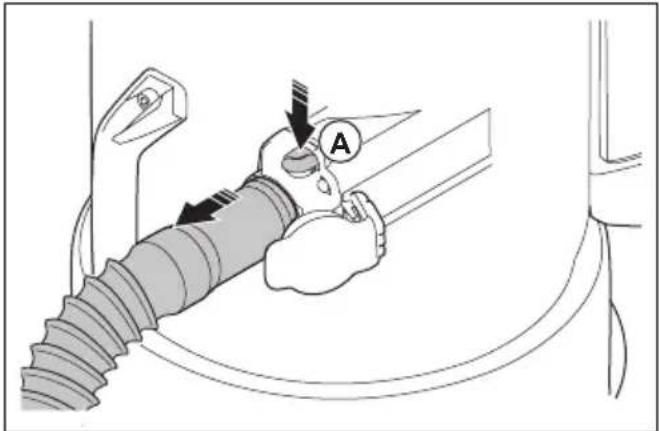
- Push the hose lock button (A) and pull the dust extraction hose.
To attach and adjust the floor nozzle
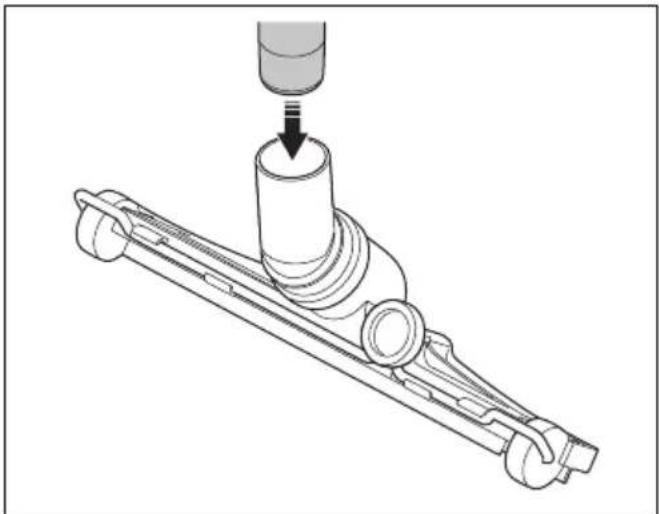
- Put the end of the handle fully into the shaft of the floor nozzle.
natural_image
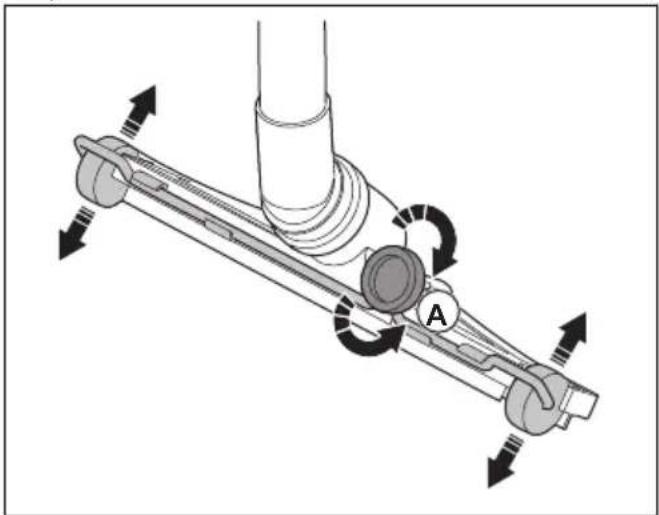
Mechanical assembly diagram showing a cylindrical component inserted into a bracket with a downward arrow indicating force (no text or symbols present)- Turn the knob (A) at the rear of the floor nozzle to adjust the floor nozzle wheels. Different surfaces and different types of dust and materials make it necessary to adjust the wheels to get the best performance.
natural_image
Mechanical assembly diagram showing a lever mechanism with rotating components and directional arrows (no text or symbols)Bluetooth® wireless technology
Products with built-in Bluetooth® wireless technology can connect to mobile devices and enables additional functions from Husqvarna Connect.
The symbol for Bluetooth® wireless technology comes on when your mobile device is connected to the product.

To use embedded connectivity with fleet
Note: This part is applicable only for products supplied with embedded connectivity.
Note: Radio transmission by the Bluetooth® function will be enabled on the first time of connection to a power outlet, and stay on after that.
- Download the Husqvarna Fleet Services iOS or Android app Husqvarna Fleet Services.
- Go to Husqvarna Fleet Services website https://fleetservices.husqvarna.com for more information.
To connect the battery charger
- Connect the battery charger to the voltage and frequency that is specified on the rating plate.
- Put the plug in a grounded socket outlet. The LED on the battery charger flashes green one time.
Note: The battery does not charge if the battery temperature is more than 50 °C/122 °F. If the temperature is more than 50 °C/122 °F, the battery charger makes the battery become cool before the battery charges.
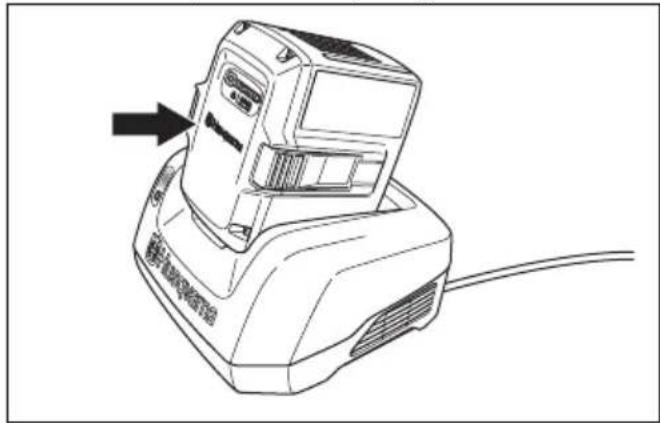
To connect the battery to the battery charger
Note: Charge the battery if it is the first time that you use it. A new battery is only 30% charged.
-
Make sure that the battery is dry.
-
Put the battery in the battery charger.
natural_image
Line drawing of a cylindrical electronic device with a cable, showing no text or symbols on the body or background.- Make sure that the green charging light on the battery charger comes on. That means that the battery is connected correctly to the battery charger.
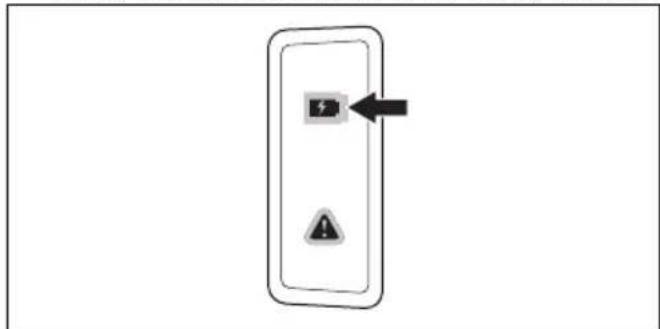
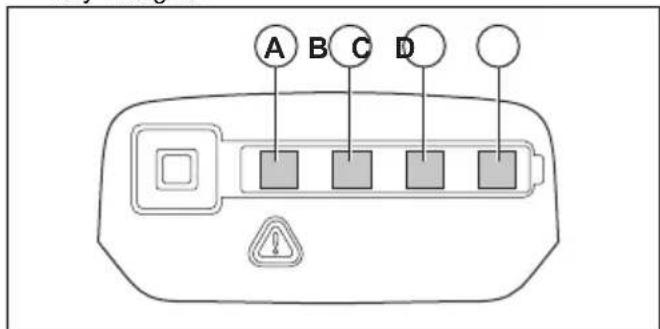
- When all LEDs on the battery come on, the battery is fully charged.
-
To disconnect the battery charger from the mains socket, pull the plug. Do not pull the cable.
-
Remove the battery from the battery charger.
Note: Refer to the battery and battery charger manuals for more information.
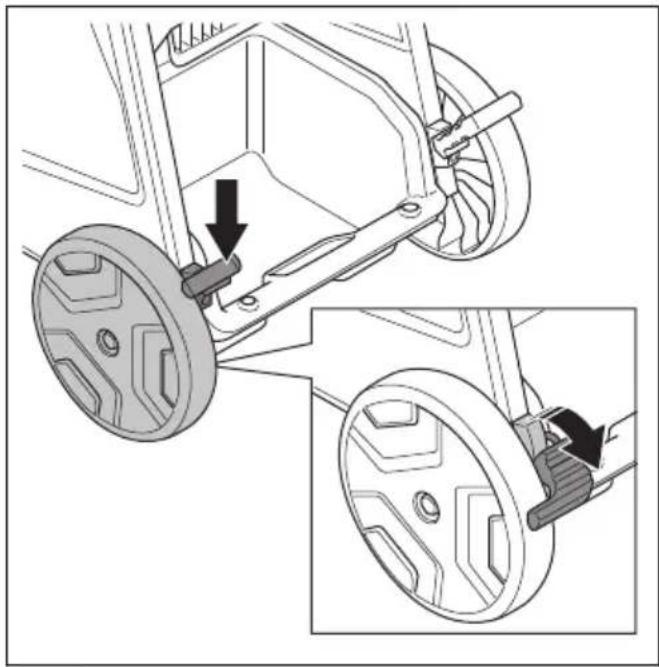
To lock and unlock the transport wheels
For operation on a surface with a slope it is necessary to lock the transport wheels.

WARNING: Wheels and bearings must be clean and without dust for safe operations. Refer to Maintenance schedule on page 17.
- Hold the product in a stationary and safe position.
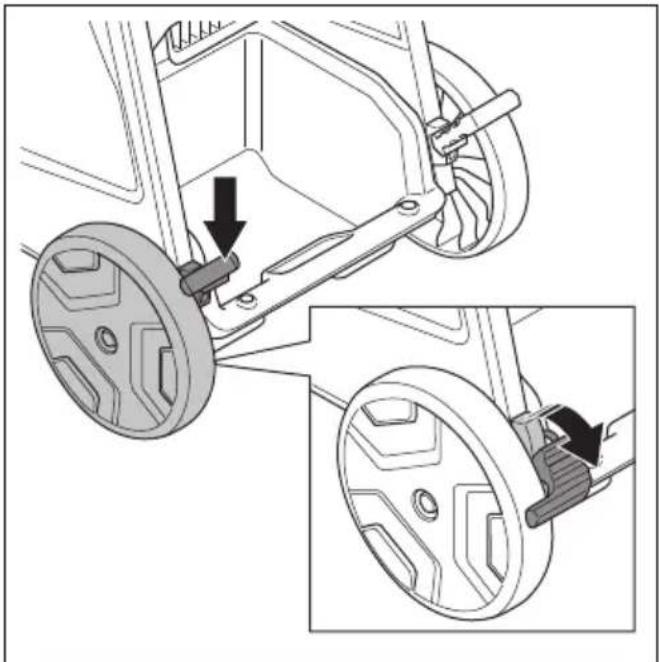
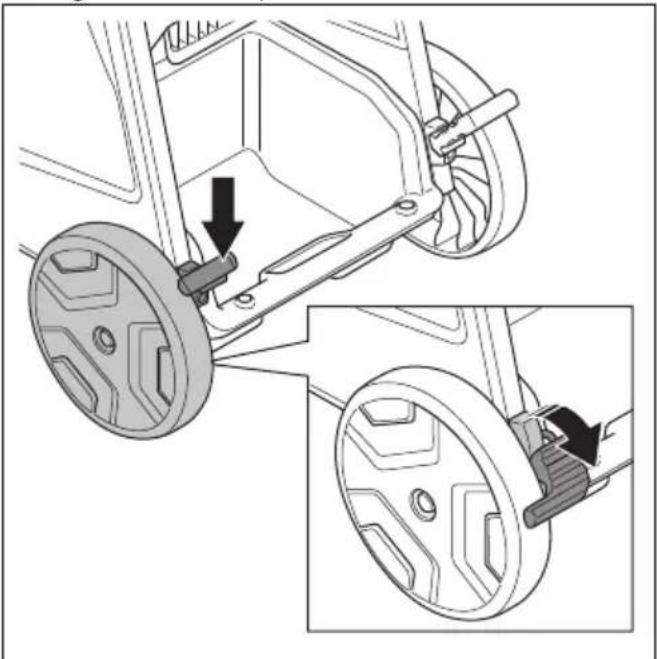
- Push down the wheel brake on each side to lock the wheels.
natural_image
Mechanical assembly diagram showing two views of a vehicle wheel assembly with adjustment arrows (no text or symbols)Note: DE110i H has only 1 wheel brake.
- Pull up the wheel brakes to unlock the wheels.
Functions of the control panel
The control panel controls and monitors important functions and setups of the product. Refer to Warnings on the control panel on page 22 to find solutions for the warnings.
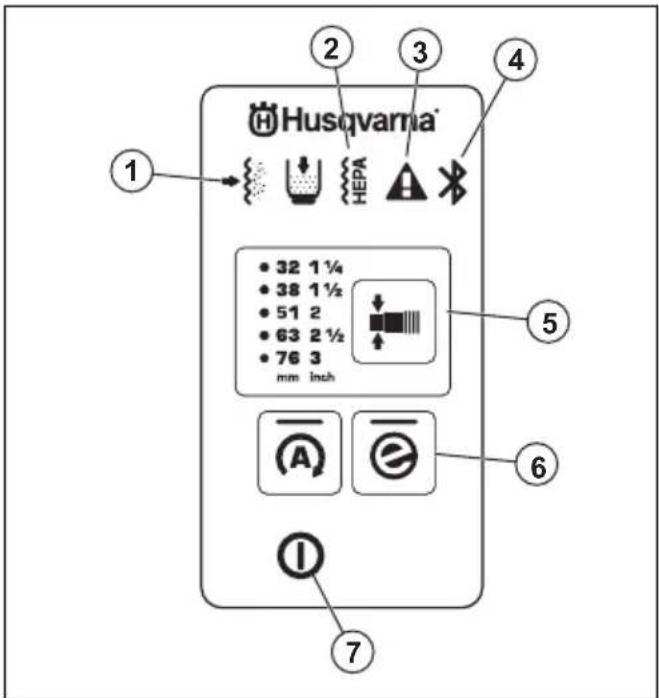
-
The prefilter is clogged. Refer to To remove dust particles from the prefilter during operation on page 15.
-
The HEPA filter is clogged, damaged or missing. Refer to Warnings on the control panel on page 22.
- Warning. Refer to Warnings on the control panel on page 22.
- Bluetooth ® connection. Refer to To use embedded connectivity with fleet on page 11.
- Diameter change function for hose, refer to To select the hose nozzle diameter on page 13
- e-Flow button, refer to e-Flow function on page 13
- On/Off button
e-Flow function
The product has an e-Flow function. This function automatically adjusts the airflow to the workload for optimal performance. The product always starts with the last settings used.
Refer to Functions of the control panel on page 12 to engage or disengage the function.
Airflow warning system
The airflow in the suction hose must be more than 20 m/s (66 ft/s).
For the minimum airflow with the selected hose diameter refer to the table.
| DE 110i H | DE 120 H PACE | ||
| in.(mm) CFM (m 3 /h) | in.(mm) CFM (m 3 /h) | ||
| 1 (27) 24 (41) 1 12 (38) | 48 (82) | ||
| 1 14 (32) 34 (58) 1 23 (42) | 59 (100) | ||
| 1 12 (38) 48 (82) 2 (51) 87 (147) | |||
| 1 23 (42) 59 (100) 2 1/2 (63) 132 (224) | |||
| 2 (51) 87 (147) 3 (76) 192 (327) | |||
Note: If the airflow is less than 20 m/s (66 ft/s), the sound alarm and the warning symbol comes on. Refer to Warnings on the control panel on page 22.
To select the hose nozzle diameter
Note: If you do not select the correct hose diameter, the airflow warning system will come on.
When you start the product, the last selected hose diameter is automatically selected.
- Push the button to select the correct hose diameter. The green LED tells which diameter you have selected.
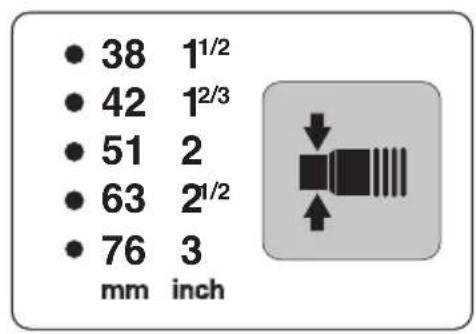
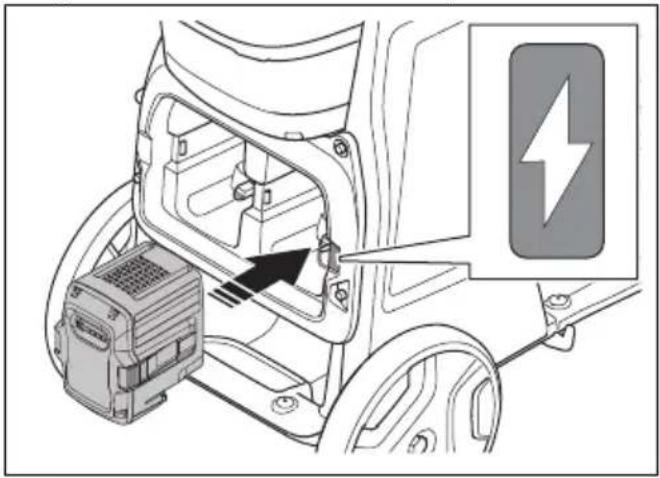
To install and remove the battery
- Put the battery in the battery holder. The electricity symbol shows which holder is energized.
natural_image
Diagram of an electric vehicle battery pack with a lightning bolt symbol indicating charging (no text or labels present)
CAUTION: Make sure that the battery is installed correctly into the battery holder. If the battery does not move easily into the battery holder, the position is not correct.
- Remove a blocked battery by pushing through the access holes.
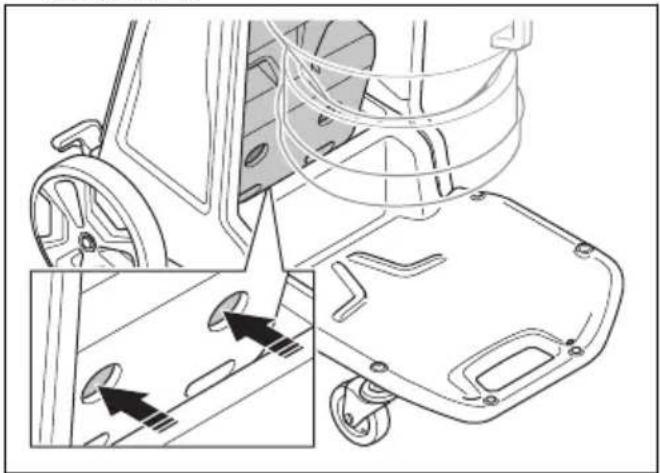
natural_image
Technical line drawing of a mechanical device with wheels and a basket, showing internal components and alignment arrows (no text or symbols)- Push on the lower part of the battery until you hear a click.
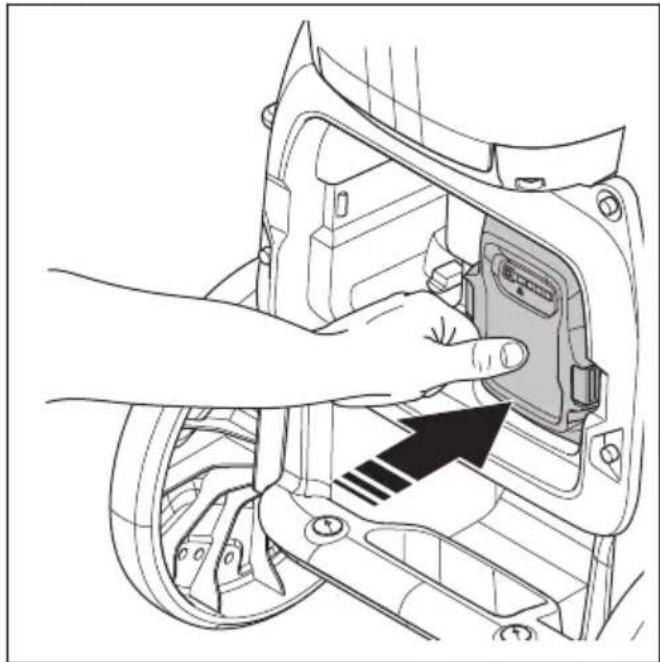
natural_image
Diagram of a hand inserting a device into a vehicle's wheel (no text or symbols visible)- Examine the battery lock indicator for correct battery installation. This only applies for DE 120 H PACE.
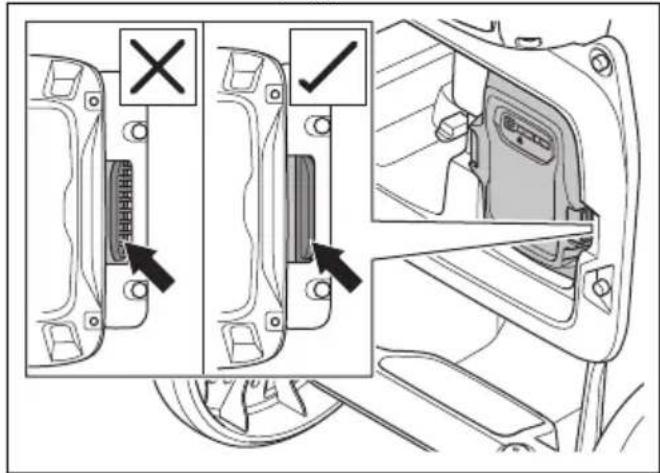
- Push the battery release buttons (A) and remove the battery (B) from the battery holder to prevent accidental start.
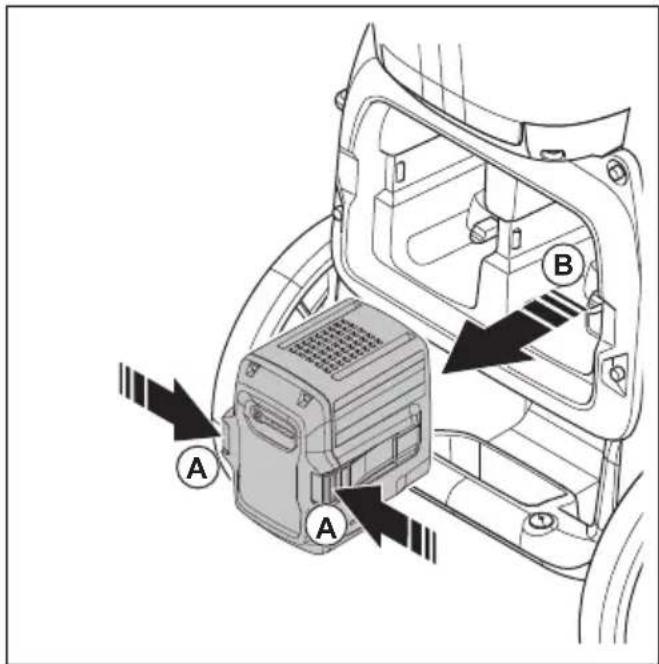
To start and stop
Note: The suction is not at full capacity directly at start, the suction operates fully after 5 seconds.
- Install the battery. Refer to To install and remove the battery on page 13.
- Push the On/Off button to start the product.
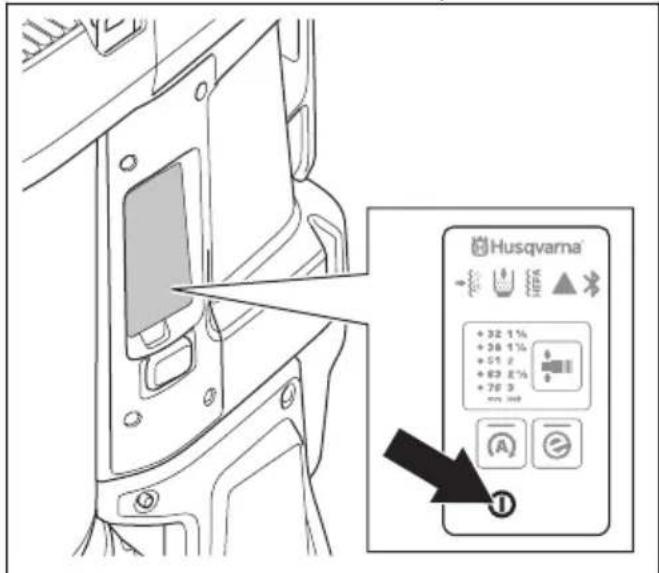
- Select correct hose diameter. Refer to To select the hose nozzle diameter on page 13.
- To stop the product, push and hold the On/Off button until the green LED light goes off.
- Remove the battery from the battery holder. Refer to To install and remove the battery on page 13.
Hour meter
The hour meter shows the total operation time of the product in hours.
To remove dust particles from the prefilter during operation
The filter purge procedure cleans the prefilter from unwanted material. Do the procedure in these situations:
- Before a work stop or at the end of each work day. If the product is off for a while, it gives the dust more time to fall down. This makes the filter purge procedure more powerful.
- When the suction is not sufficient.
- Before installation of a new Longopac bag.
-
When the prefilter clogged alarm goes off.
-
Stop the product and let the dust fall down into the Longopac bag.
- Start the product. Refer to To start and stop on page 14.
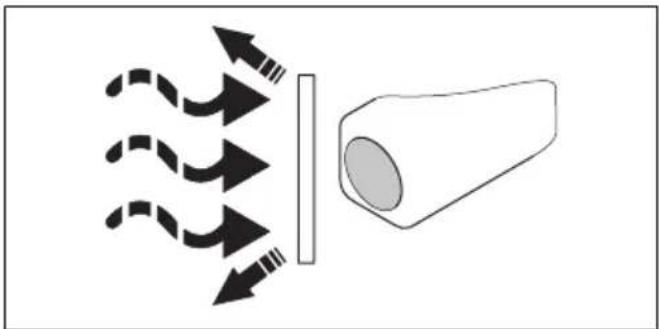
- Close the air flow that moves through the air intake with the air intake plug or the intake valve to make vacuum.
natural_image
Diagram showing light rays passing through a lens and interacting with a conical object (no text or symbols)- Wait 5 seconds until vacuum is made, then push the filter purge button. Do this step 3 to 5 times. It is important to let the product make vacuum between each button push.
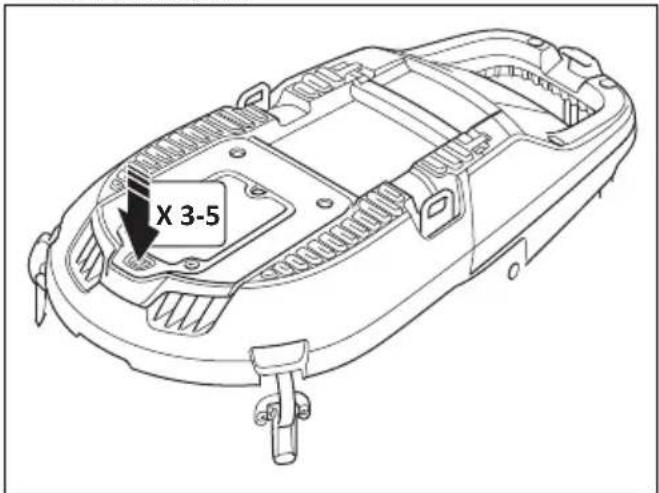
If the suction is not sufficient after this procedure, it is necessary to clean the prefilter with water. Refer to To clean the prefilter with water on page 19.
To install a new Longopac bag cassette

CAUTION: Clean the prefilter before you install a new Longopac cassette. Refer to To clean the prefilter with water on page 19.
- Put the Longopac cassette around the inner edge of the Longopac holder.
- Remove the 4 straps after you put the Longopac in the holder.
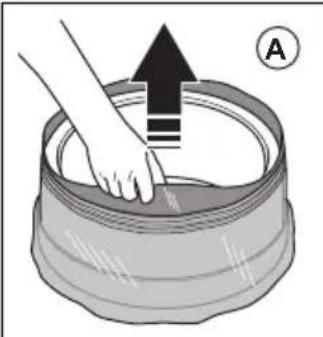
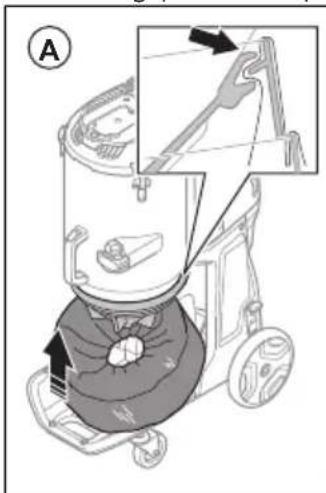
- Pull the inner layer of the Longopac cassette up (A) and fold it into the holder (B).
natural_image
Illustration of a hand pressing down on a cylindrical container with an upward arrow and circled symbol (no text or symbols present)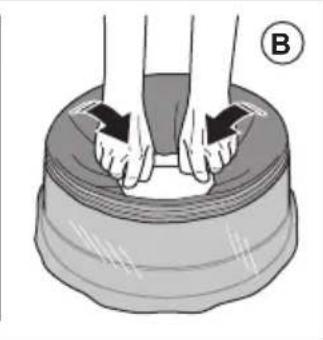
natural_image
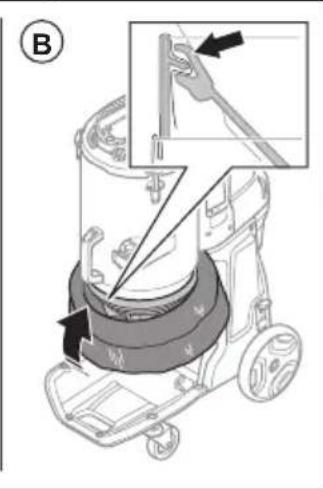
Illustration of hands performing a rolling motion on a curved surface, labeled with circled number B (no text or symbols on the diagram itself)- Attach the Longopac holder to the rear part of the container (A). Then attach the Longopac holder to the sides and to the front of the container (B). Push the Longopac holder up until you hear a solid click.
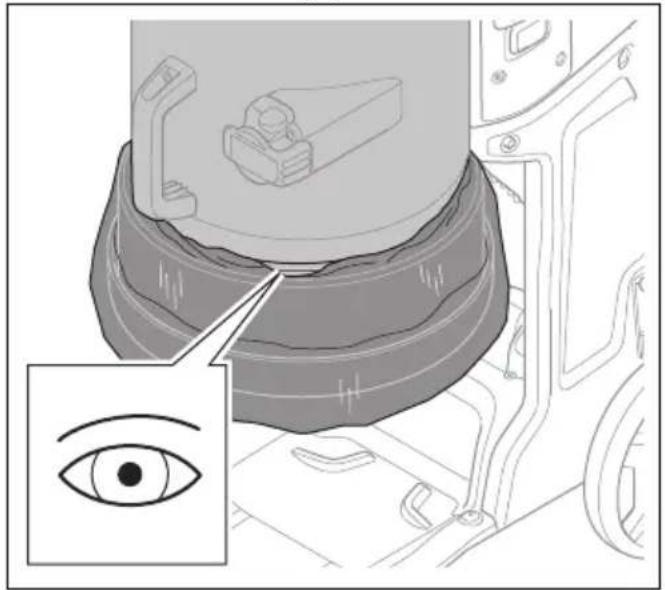
- Make sure that the Longopac is sealed.
natural_image
Medical illustration showing a surgical procedure on an eye with magnified inset (no text or symbols)- Pull the outer layer of the Longopac cassette down.
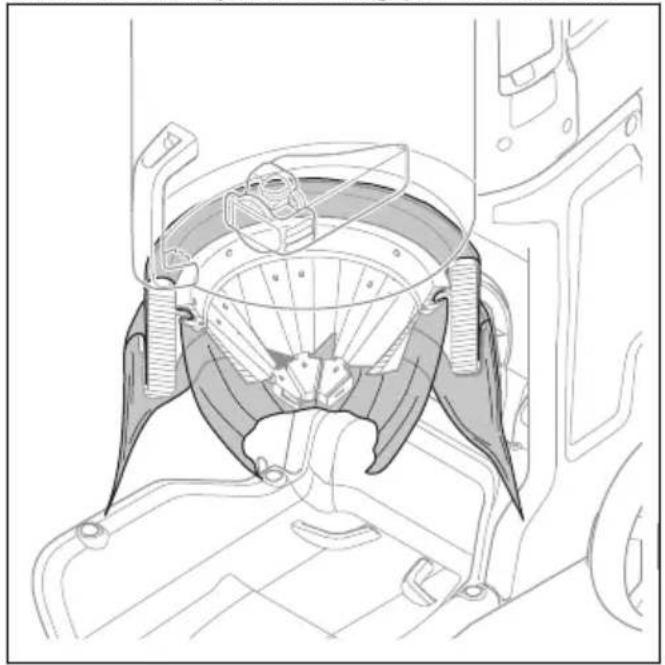
natural_image
Technical line drawing of a mechanical assembly with no visible text or symbols- Close the bottom of the Longopac with a cable tie.
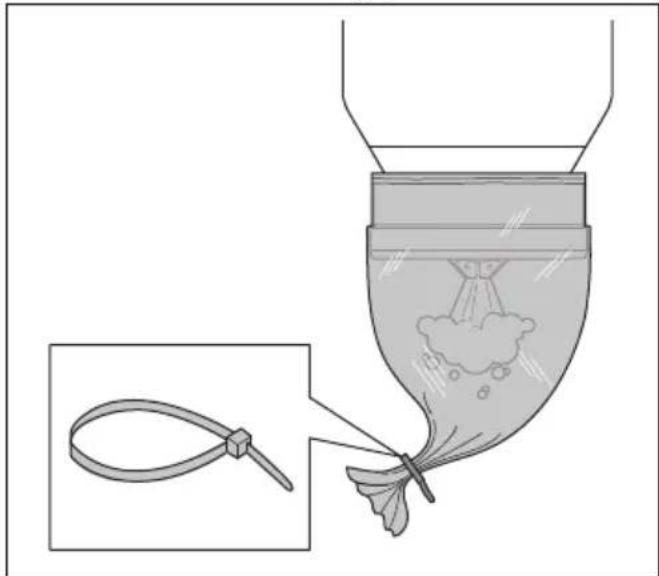
natural_image
Diagram showing a funnel pouring liquid into a jar with a magnified inset of the handle (no text or symbols)To discard a full Longopac bag and prepare a new Longopac bag

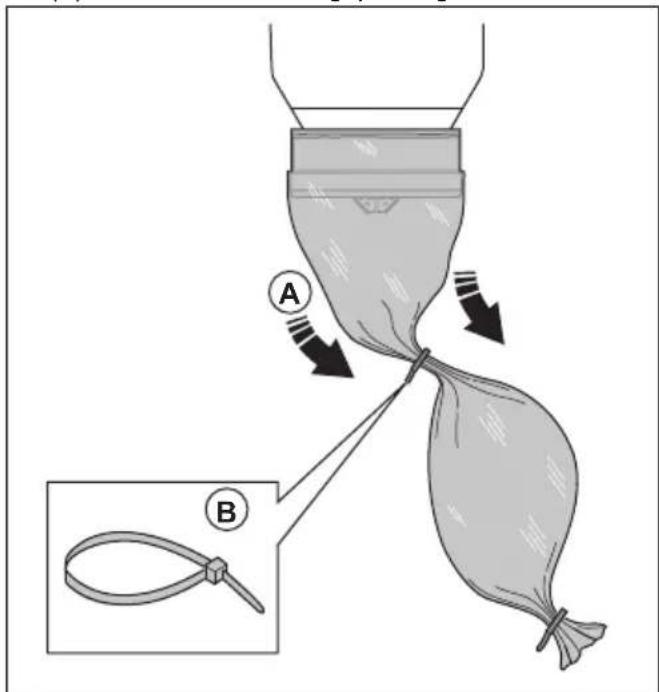
WARNING: Lift the Longopac bag with caution, a full Longopac bag can be heavy. Make sure that the cable ties are closed correctly before you lift the Longopac bag.
- Pull out the Longopac bag (A) and attach a cable tie (B) to close the new Longopac bag.
-
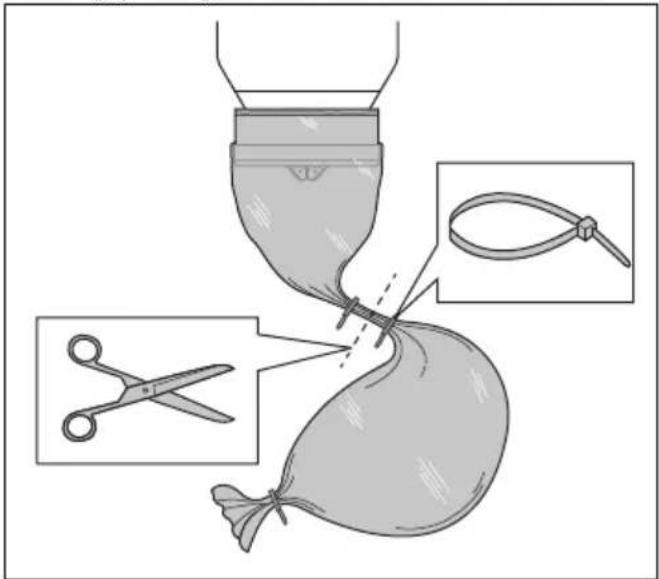
Shake down the dust in the used Longopac bag.
-
Attach a cable tie 10 cm/3.9 in. below the first cable tie to close the used Longopac bag. Cut off the Longopac bag between the cable ties.
- If the remaining part of the Longopac bag cassette is too small to prepare a new Longopac bag, install a new Longopac bag cassette. Refer to To install a new Longopac bag cassette on page 15.
- Obey local regulations for disposal of the full Longopac bag.
To do after completed work
- Do the filter purge procedure. Refer to To remove dust particles from the prefilter during operation on page 15.
- Stop the product, refer to To start and stop on page 14.
- Discard the Longopac bag. Refer to To discard a full Longopac bag and prepare a new Longopac bag on page 16.
- Clean the product. Refer to To clean the product on page 19.
- Prepare the product for transportation. Refer to To move the product long distances on page 24.
Maintenance
Introduction

WARNING: Read and understand the safety chapter before you do maintenance work on the product.

WARNING: Remove the battery before you do maintenance on the product.

WARNING: Failure to do maintenance correctly can decrease the product life cycle and increase the risk of accidents.
All servicing and/or repair work must also be done by a professional. Turn to your servicing dealer for more information.

WARNING: Make sure that you obey all local regulations to dispose the dangerous dust correctly, before and during maintenance.
Maintenance schedule
The maintenance intervals are calculated from daily use of the product. The intervals change if the product is not used daily.
| Maintenance | Before each use | Daily Weekly | When suction is low | Each 12 months or 600 h | Each 24 months or 2000 h | |
| Do the filter purge procedure. Refer to To remove dust particles from the prefil-ter during operation on page 15. | X | |||||
| Look for signs of wear or damage of the dust release rubber cone. | X | |||||
| Look for signs of wear, damage or loose connections of the controls before the unit is connected. | X | |||||
| Do a check of the hose and the hose connectors. | X | |||||
| Look for signs of wear or damage of the plastic parts. | X | |||||
| Maintenance | Before each use | Daily Weekly | When suction is low | Each 12 months or 600 h | Each 24 months or 2000 h | |
| Do a check of the lifting eyes. X | ||||||
| Make sure that the Longopac is correct and that it is correctly attached. Refer to To install a new Longopac bag cassette on page 15. | X | |||||
| Do a check of the filter purge function. X | ||||||
| Do a check of the wheels. Look for damage and bad connections. | X | |||||
| Do a check of the filter seals X | ||||||
| Do the filter purge procedure. If the suction continues to be not sufficient, clean the prefilter with water. Refer to To clean the prefilter with water on page 19. | X | |||||
| Replace the cleaned prefilter if the suction continues to be not sufficient. Refer to To replace the prefilter on page 20. | X | X | ||||
| Replace the HEPA filter. X X | ||||||
| Replace the dust release rubber cone. X | ||||||
| Replace filter cleaning rubber parts. X | ||||||
To do a check of the control panel
-
Push and hold the On/Off button until the green LED comes on. Refer to Functions of the control panel on page 12.
-
Push and hold the On/Off button until the green LED goes off.
To do a check of the battery charger
- Make sure that the battery charger and the power supply cord is not damaged. Look for cracks and other damages.
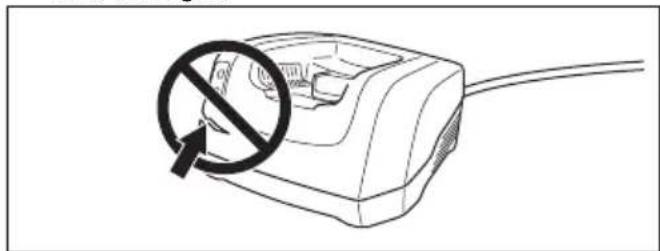
natural_image
Line drawing of a plug with a circular symbol indicating no prohibition (no text or labels)To do a check of the battery and the battery holder

CAUTION: Do not clean the battery or the battery charger with water.
- Clean the battery and the battery holder with a soft brush.
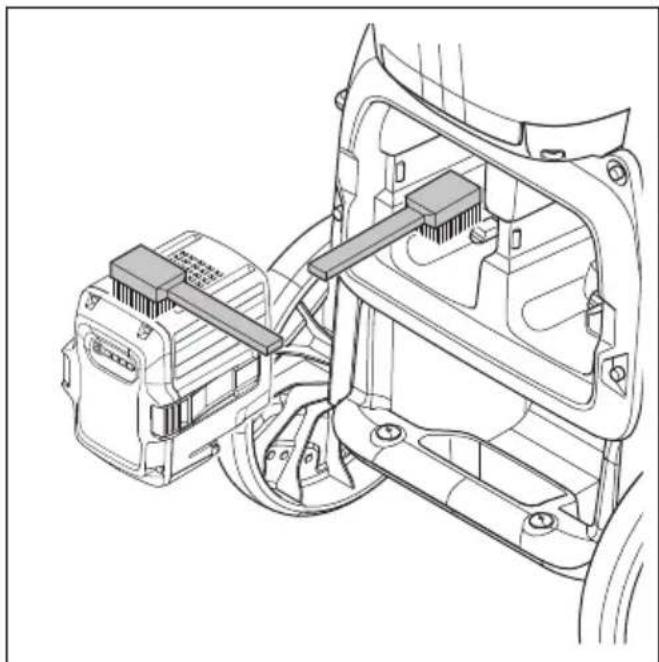
natural_image
Technical line drawing of an automotive electrical connector assembly (no text or symbols)-
Clean the cooling slots and battery connectors.
-
Make sure that the battery is not damaged and there are no other defects, such as cracks.
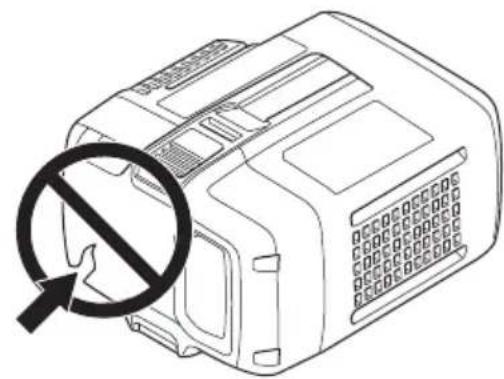
natural_image
Line drawing of a device with a prohibition symbol overlay (no text or symbols present)To clean the product
Operation can cause contamination on all parts of the product and all used equipment. Thus it is necessary to clean all parts of the product and all used equipment fully and carefully.

WARNING: Disconnect the product from the power supply.

WARNING: Clean the product before it is moved from the work area. Remaining dust on the product can go into the air and cause a health risk.
- Use personal protective equipment. Refer to Personal protective equipment on page 9.
- Do not clean the product with a high-pressure washer or compressed air.
- Clean the external surface with a moist cloth.
- Do not use water on electrical components.
- Clean the filters as given in To clean the prefilter with water on page 19 and To replace the HEPA filter on page 20.
• After servicing, put discarded parts in plastic bags. Refer to local regulations for the correct procedure. - If you use water to clean the product, remove the prefilter and the Longopac before you clean. Also make sure that no water goes into the HEPA filter.
To clean the prefilter with water

CAUTION: Do not use a high-pressure washer or compressed air to clean the prefilter. Do not hit the prefilter with force to clean it.

CAUTION: Do not let it dry in full sunlight. The seals will dry out.
Note: To clean the with water will gradually decrease the efficiency of the filter.
- Loosen the cover locks (A) and open the prefilter cover (B).
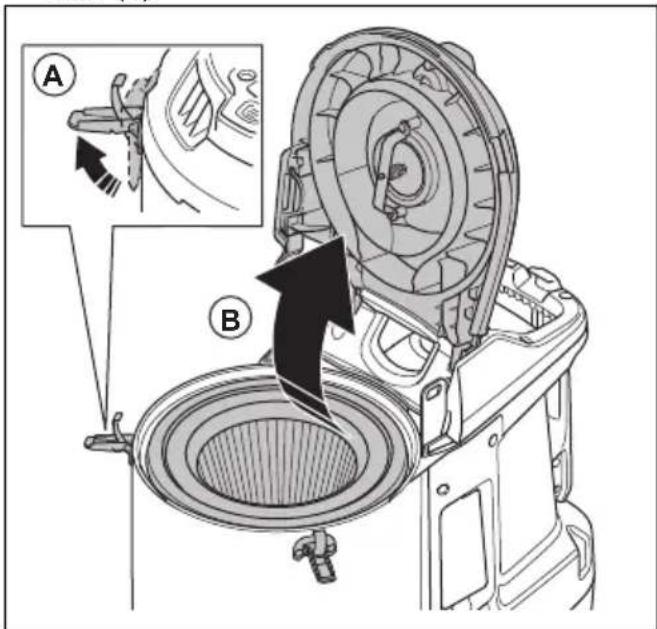
- Remove the prefilter.
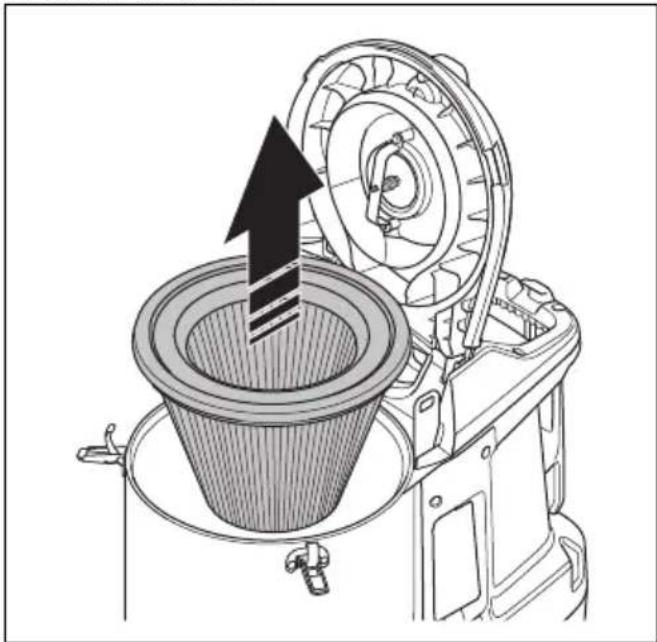
natural_image
Technical illustration of a mechanical device with a conical component inserted into a housing, showing internal components and motion direction (no text or symbols)- Clean the prefilter with running water from the inner surface of the prefilter.
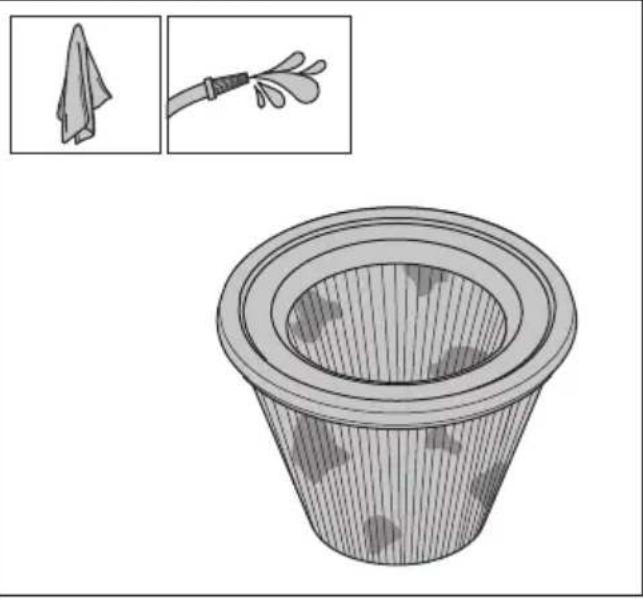
natural_image
Illustration of a filter with mesh structure and magnified inset showing a cloth cleaning tool (no text or symbols)
CAUTION: The water pressure must not be higher than 4 bars.

CAUTION: Do not hit or drag items across the filter surface as this will do damage to the filter.
- Let the prefilter dry fully.

CAUTION: The prefilter must be 100% dry before you install it into the housing.
- Install the prefilter, close the prefilter cover and tighten the cover locks.
If the prefilter cannot be fully cleaned or if it is damaged, it must be replaced. Refer to To replace the prefilter on page 20.
Filter replacement

WARNING: Use personal protective equipment. Refer to Personal protective equipment on page 9. Dangerous dust can release into the air during filter replacement.

WARNING: Stop the product and disconnect the power supply before filter replacement.
To replace the prefilter
-
Remove the prefilter. Refer to To clean the prefilter with water on page 19.
-
Put the prefilter carefully in a plastic bag.
-
Discard the plastic bag correctly. Refer to local regulations.
-
Install the new prefilter.
If the suction is not sufficient when a new prefilter is installed, it is necessary to replace the HEPA filter. Refer to To replace the HEPA filter on page 20.
To replace the HEPA filter
The HEPA filter cannot be cleaned. It is always necessary to replace it with a new HEPA filter. Only use HusqvarnaHEPA filters.

WARNING: Only an approved service center or an approved authority is permitted to replace the HEPA filter.

WARNING: Always use personal protective equipment, refer to Personal protective equipment on page 9.

WARNING: The particles in the HEPA filter are dangerous to your health.

WARNING: Make sure that there are no holes in the HEPA filter. A damaged HEPA filter is a health risk.

WARNING: Do not install a used HEPA filter. If you install a used HEPA filter, leakage and decreased filtration efficiency can occur.

CAUTION: Do not touch the inner surface of the HEPA filter. This can cause damage to the HEPA filter.
- Loosen the 6 screws and remove the HEPA filter cover.
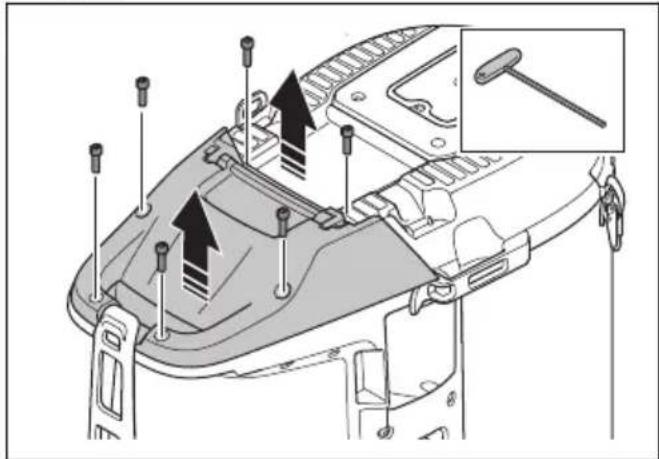
- Attach the dust cap (A) and pull out the HEPA filter. Put it into a clean plastic bag (C).

-
Discard the plastic bag correctly. Refer to local regulations.
-
Install a new HEPA filter. Make sure that the HEPA filter is pushed to the end position.
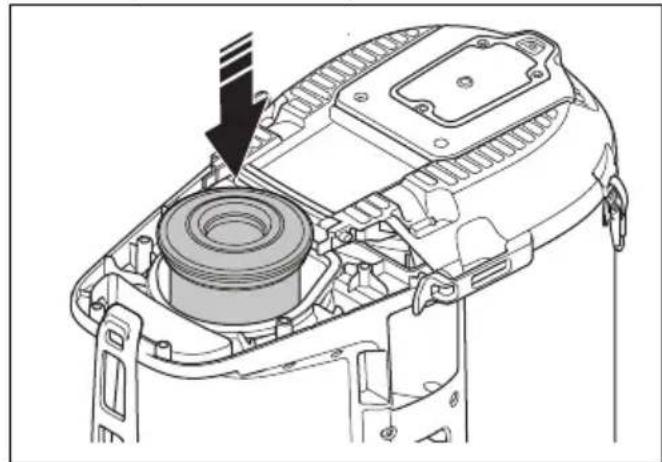
natural_image
Technical line drawing of a mechanical device showing internal components and a directional arrow (no text or symbols)- Install the HEPA filter cover and tighten the 6 screws.
Troubleshooting
Troubleshooting schedule
| Problem Cause Solution | ||
| The motor stops immediately after start or does not start. | There is no power. Connect the battery to the product. | |
| There is a fault with the battery. Do a check of the battery or replace the battery if necessary. Let an approved service agent repair the product. | ||
| The green LED flashes on the battery. Low battery voltage. Charge the battery. | ||
| The HEPA filter is damaged or not installed. Replace or install the HEPA filter. | ||
| There is a short circuit in the product. Let an approved service agent repair the product. | ||
| Too high voltage in power supply. Make sure that correct power supply is used. | ||
| Too high ambient temperature. Make sure that the ambient temperature is in specified range when you use the product. | ||
| Fan is broken or disconnected. Let an approved service agent repair the product. | ||
| The motor is on but there is no suction. | The dust extraction hose is not connected correctly. | Connect the dust extraction hose. |
| The dust extraction hose is blocked. Clean the dust extraction hose. | ||
| There is no Longopac. Install a Longopac cassette. | ||
| The Longopac is not closed down with a cable tie. | Attach a cable tie. | |
| The suction is not sufficient. Too low voltage in power supply. Make sure that correct power supply is used. | ||
Warnings on the control panel

CAUTION: Do not operate the product if the red light comes on. If the initial solution does not remove the error, speak with an
approved service agent before you operate the product again.
| Symbol Signal Cause Solution | |||
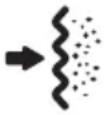 | Buzzer signal and the red light comes on. | The prefilter is clogged. Do a filter | purge procedure, refer to To remove dust particles from the prefilter during operation on page 15. |
| Incorrect hose is connected or selected in the control panel. | Attach correct hose or select the correct hose dimension on the control panel, refer to To select the hose nozzle diameter on page 13. | ||
| The hose is damaged or compressed. | Replace the hose. | ||
| The hose is clogged. | Clear the hose. | ||
| The red light flashes. | The main vacuum hose is disconnected. | Let an approved service agent repair the product. | |
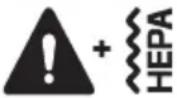 | Red light comes on. | The HEPA filter is missing, full or damaged. | Do a check of the HEPA filter, replace if necessary. Refer to To replace the HEPA filter on page 20. |
 | Red light flash-es. | Battery error. Let an approved service agent repair the product. | |
| Red light comes on. | Wire communication not detected. | Let an approved service agent repair the product. | |
| The control unit is damaged. Let an approved service agent repair the product. | |||
| Wrong battery is used. Use correct battery. | |||
| Warning. Look at the operation record of your Husq-varna fleet app or speak to an approved service agent. | |||
 | Yellow light comes on. | The HEPA filter is almost full. Replace the HEPA filter if necessary. | |
| Red light comes on. | The HEPA filter is full. Replace the HEPA filter. | ||
Error codes
| Error code | Error Description | Probable cause(s) Action(s) | ||
| 2 | HEPA filter missing. | Product shuts down/does not start.+ Warning light on HMI.+ HEPA symbol on HMI. | HEPA filter is missing or damaged. | Assemble or replace the HEPA filter. |
| 3 | Low supply voltage. | Low performance (low air flow/vacuum). | Too low voltage in grid/power supply. | Make sure correct grid/power supply is used. |
| 4 | High supply voltage. | Product shuts down/does not start.+ Warning diode light on HMI. | Too high voltage in grid/power supply. | Make sure correct grid/power supply is used. |
| Wrong battery used. Use | correct battery. | |||
| 5 | Main Pressure Sensor Error. | Prefilter light flashes red. | Vacuum hose is disconnected or blocked. | Speak to an approved service agent. |
| Control unit is damaged. | ||||
| 6 | PCBA temperature too high. | Product shuts down/does not start.+ Warning diode light on HMI. | Too high ambient temperature. | Do not use the product outside specified temperature range. |
| 7 Fan malfunction. | Product shuts down/does not start.+ Warning diode light on HMI. | Fan is damaged or disconnected. | Speak to an approved service agent. | |
| Control unit is damaged. | ||||
| 9 | One wire communication not detected. | Product shuts down/ does not start.+ Warning diode light on HMI. | Cable disconnected or damaged. | Speak to an approved service agent. |
Transportation, storage and disposal
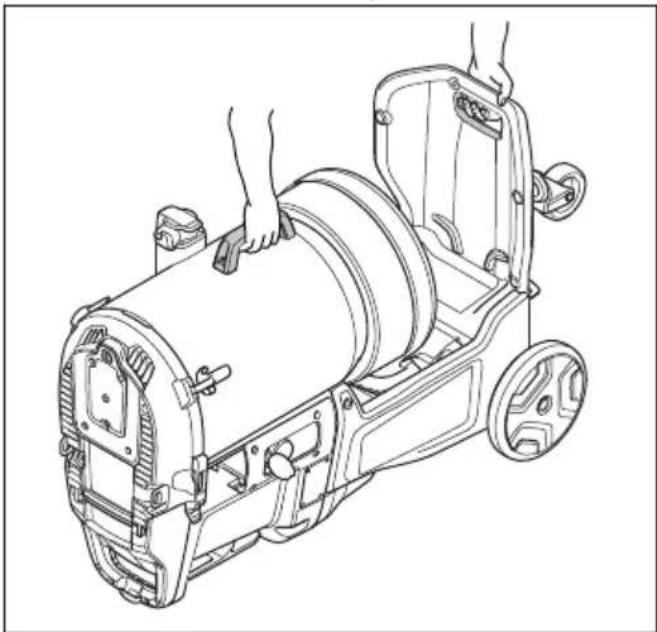
To move the product short distances
Make sure that the intake valve is closed. Make sure that the dust caps are on the hoses.
- Put the product down on the ground.
natural_image
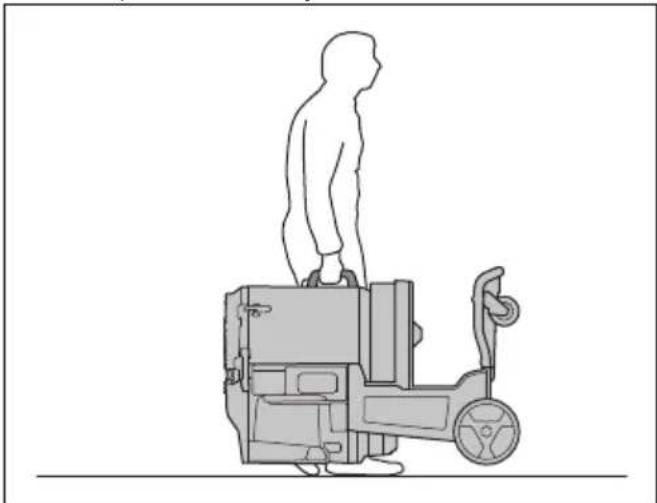
Line drawing of a mechanical device with hands operating it, no text or symbols present- Lift the product manually.
natural_image
Line drawing of a person standing on a vehicle chassis with a steering wheel (no text or symbols)- If 2 persons lift the product, make sure to use the 2 lifting points.
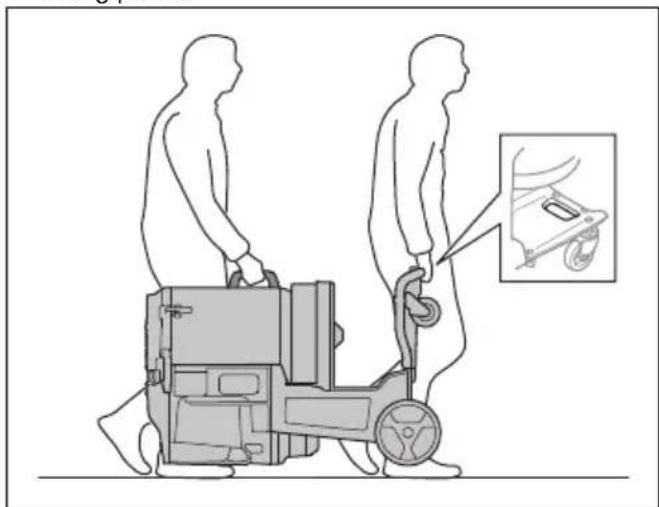
natural_image
Illustration of two human figures pushing a wheeled cart with an inset showing a small object (no text or symbols present)To move the product long distances
Make sure to use a closed vehicle during transportation of the product.
Make sure that the intake valve is closed. Make sure that the dust caps are on the hoses.
-
Make sure that the Longopac is installed on the product.
-
Make sure that the Longopac bag is empty.
-
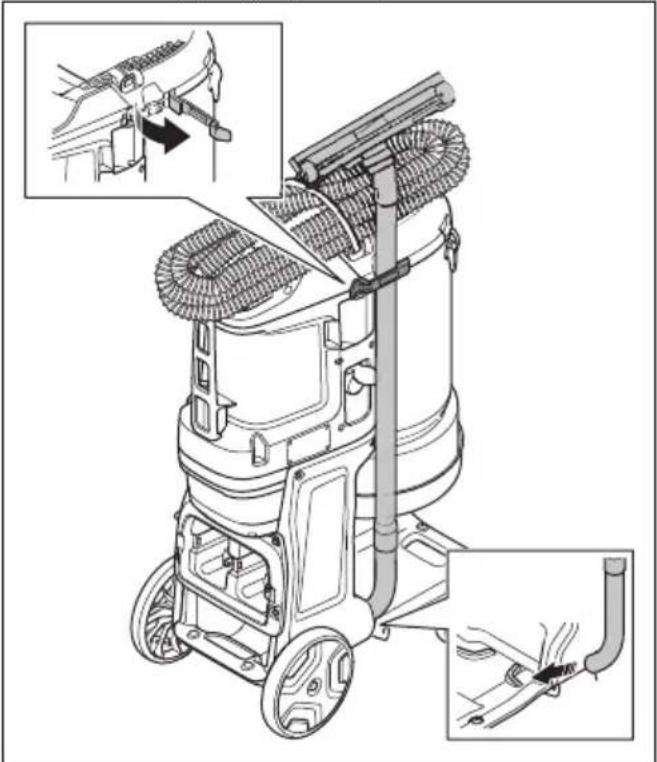
Attach the power cord, the dust extraction hose and the handle pipe tightly to the product.
- Lock the transport wheels.
natural_image
Mechanical assembly diagram showing two views of a vehicle's wheel components with arrows indicating motion direction (no text or symbols present)-
Lift the product, refer to To lift the product on page 25.
-
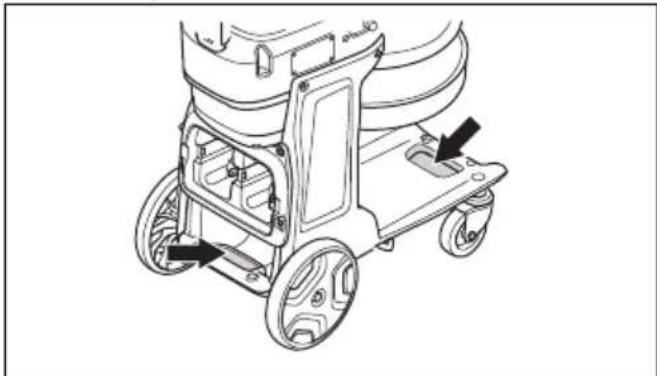
Attach the product safely to the transportation vehicle to prevent damage and accidents. Use the tie-down points.
natural_image
Technical line drawing of a mechanical cart with wheels and mounting brackets (no text or symbols)To lift the product

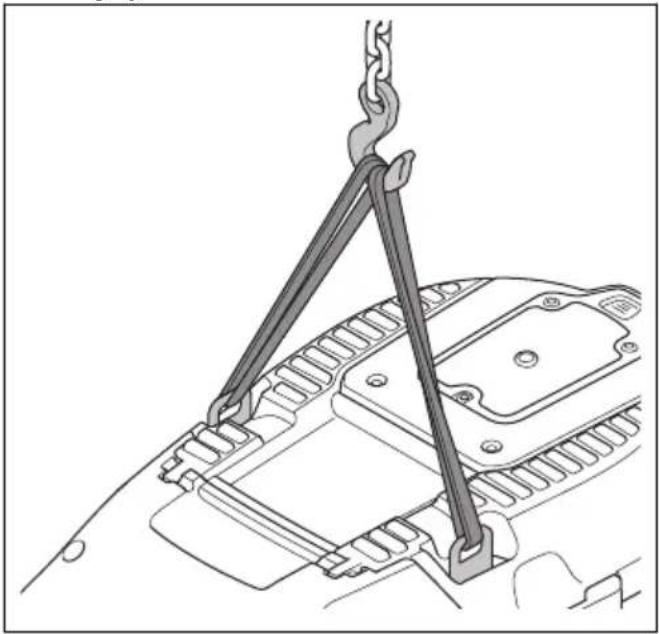
WARNING: Make sure that the lifting equipment and the lifting straps have the correct specification to lift the product safely. The type plate on the product shows the product weight, refer to Type plate on page 5.

WARNING: Get aid if you are not sure about how to lift heavy equipment.

WARNING: Do not lift the product with dust in the tank or in the bag. Do not lift the product with added weight in or on the product.

WARNING: Do not lift the product with batteries installed.
-
Do the filter purge procedure before you lift the product. Refer to To remove dust particles from the prefilter during operation on page 15.
-
To lift the product safely, put straps through the lifting eyes.
natural_image
Technical line drawing of a mechanical lifting device with crane hook (no text or symbols)
WARNING: Do not use metal hooks, chains or other lifting equipment with rough edges that can cause damage to the lifting eye. Only soft lifting straps are permitted.
Storage of the product

CAUTION: Put the product in an indoor storage away from outdoor elements.
- Keep the product in storage where the ambient temperature is between -10ircC / 14ircF and 40ircC / 104ircF .
- Before storage, do the filter purge procedure and discard the Longopac with collected material.
- Disconnect the product from the power source.
- Put the product in a dry and frost-free area.
- Put the product in a locked area. Do not let children or not approved persons near the product.
Disposal of the product
- Obey the local recycling requirements and applicable regulations.
- When the product no longer is used, send it to a Husqvarna dealer or discard it at a recycling location.
Technical data
Technical data
| Data DE 110i H DE 120 H PACE | ||
| Power source Battery Battery | ||
| Rated voltage, V 36 94 | ||
| Maximum power, W 900 2200 | ||
| Maximum current, A 20 17 | ||
| Maximum airflow, cfm / m3/h 127 / 215 259 / 450 | ||
| Maximum vacuum, psi / kPa / in. H2O 2.5 / 17 / 68 2.9 / 22 / 88 | ||
| Auxiliary outlet No | ||
| Prefilter area, ft2 / m2 | 15.4 / 1.4 29.5 / 2.7 | |
| Filter efficiency HEPA HEPA 13 | ||
| Total HEPA area, ft2 / m2HEPA 13 12.7 / 1.2 | 25.4 / 2.4 | |
| Dust collection system, type | Longopac | |
| Filter cleaning mechanism | Jet Pulse | |
| Dimensions L×W×H, in. / mm | 26.4×15.7×39.4 / 670×400×1000 | 32.1×21.3×44.3 / 815×542×1125 |
| Weight, lbs / kg | 57 / 26 | 90 / 41 |
| Sound power level LWA measured, dB(A)1 | 83.6 97.3 | |
| Sound pressure level LPA at the operators ear, dB(A)2 | 68.3 83.8 | |
| Vibration level ah m/s23 | ≤2.5 | |
| Protection class | IP44 | |
Embedded connectivity
Note: This part is applicable only for products supplied with embedded connectivity.
| BLE technology radio spectrum | |
| Frequency bands for the tool, GHz | 2.402-2.480 |
| Maximum radio-frequency power transmitted, dBm/mW | 4/2.5 |
Accessories
Approved batteries for the product
| Product DE 110i H DE | 120 H PACE | |||
| Battery BLi 200 BLi 30 | 100-B380X PACE 100-B750X PACE | |||
| Type Lithium-ion Lithium | m-ion Lithium-ion Lithium-ion | |||
| Battery capacity, Ah 5. | 2 9.4 4 8 | |||
| Nominal voltage, V 36 | 36 94 94 | |||
| Weight, kg / lb 1.3 / 2.9 | 1.9 / 4.2 3.1 / 6.1 | 5.1 / 11.4 | ||
Approved battery chargers for the product
| Product | DE 110i H DE 120 H PACE | |||
| Battery charger | QC 330 | QC 500 | 100-C900X PACE | 100-C1800X PACE |
| Mains voltage, V | 100-240 | 100-240 | 100-240 | 100-240 |
| Frequency, Hz | 50-60 | 50-60 | 50-60 | 50-60 |
| Power, W | 330 | 500 | 900 | 1800 |
Declaration of Conformity
EU Declaration of Conformity
We, Husqvarna AB, SE 561 82 Huskvarna, Sweden, tel: +46 36 146500, declare on our sole responsibility that the product:
| Description Dust Extractor | |
| Brand HUSQVARNA | |
| Type / Model DE 110i H, DE 120 H | PACE |
| Identification Serial numbers dating from 2023 and onwards | |
complies fully with the following EU directives and regulations:
| Directive/Regulation Description | |
| 2006/42/EC "relating to machinery" | |
| 2014/53/EU "relating to radio equipment" | |
| 2011/65/EU "relating to restriction of hazardous substances" |
and that following standards and/or technical specifications are applied;
EN ISO 12100:2010
EN 60335-2-69:2012
EN IEC 55014-1:2021
EN IEC 55014-2:2021
ETSI EN 300 328 V2.2.2
EN IEC 63000:2018
Partille, 2023-07-24
Martin Huber
R&D Director, Concrete Surfaces & Floors
Husqvarna AB, Construction Division
Responsible for technical documentation
UK Declaration of Conformity
We, Husqvarna AB, SE 561 82 Huskvarna, SWEDEN,
Tel: +46 36 146500 declare on our sole responsibility
that the product:
| Description Dust Extractor | |
| Brand HUSQVARNA | |
| Type/Model DE 110i H, DE 120 H | PACE |
| Identification Serial numbers dating from 2023 and onwards | |
complies fully with the following UK regulations:
| Description |
| The Supply of Machinery (Safety) Regulations 2008 |
| The Radio Equipment Regulations 2017 |
| The Restriction of the Use of Certain Hazardous Substances in Electrical and Electronic Equipment Regulations 2012 |
and that the following standards and/or technical specifications are applied;
EN ISO 12100:2010
EN 60335-2-69:2012
EN IEC 55014-1:2021
EN IEC 55014-2:2021
ETSI EN 300 328 V2.2.2
EN IEC 63000:2018
Partille, 2023-07-24
UK Importer:
Husqvarna UK Ltd
Preston Road, Co. Durham
DL5 6UP
Martin Huber
R&D Director, Concrete Surfaces & Floors
Husqvarna AB, Construction Division
Responsible for technical documentation

Registered trademarks
The Bluetooth® word mark and logos are registered trademarks owned by Bluetooth SIG, inc. and any use of such marks by Husqvarna is under license.
Inhalt
natural_image
Diagram showing a mechanical component being adjusted to a circular base, with no visible text or symbols.natural_image
Diagram of a car seatbelting a vehicle, showing the cable being inserted into a seatbelt (no text or symbols present)natural_image
Mechanical assembly diagram showing a cylindrical component being inserted into a bracket (no text or symbols)natural_image
Mechanical assembly diagram showing a lever mechanism with rotating components and directional arrows (no text or symbols)natural_image
Line drawing of a handheld electronic device with a black arrow pointing to its top component (no text or symbols present)natural_image
Mechanical assembly diagram showing two views of a vehicle's wheel frame with adjustment arrows (no text or symbols)natural_image
Diagram of an electric vehicle battery pack with a lightning bolt symbol (no text or labels)
natural_image
Technical line drawing of a mechanical device with wheels and a basket, showing a close-up of the component (no text or symbols)natural_image
Diagram of a hand pressing down on a car interior panel with an arrow indicating the motion (no text or symbols present)Starten und stoppen
natural_image
Diagram showing light rays passing through a lens and interacting with a conical object (no text or symbols)natural_image
Illustration of two hands performing a physical maneuver inside a cylindrical container, labeled A and B (no text or symbols on the diagrams)natural_image
Illustration of a car interior with an eye highlighted, showing mechanical components and structural details (no text or symbols)natural_image
Technical line drawing of a mechanical assembly with no visible text or symbolsnatural_image
Illustration of a bird in a fishbowl being lifted by a string, with an inset showing the same object (no text or symbols present)natural_image
Line drawing of a plug with a circular symbol indicating no prohibition (no text or labels)natural_image
Technical line drawing of an automotive electrical panel assembly (no text or symbols)natural_image
Line drawing of a device with a circular symbol and a diagonal line, no text or symbols presentnatural_image
Technical illustration of a mechanical device with a conical component inserted into a housing, showing internal components and an upward arrow (no text or symbols)natural_image
Two-step illustration showing a cloth and a hose with droplets (no text or symbols)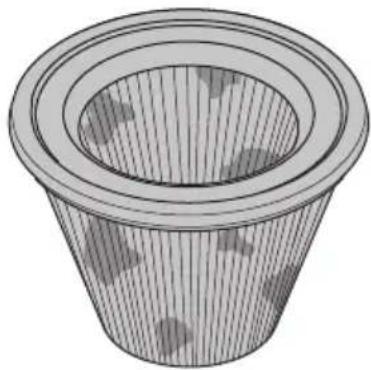
natural_image
3D wireframe illustration of a conical container filled with material, showing internal structure and no text or symbols.
natural_image
Technical line drawing of a mechanical device showing internal components and a circular component with an arrow indicating direction (no text or symbols present)natural_image
Line drawing of a mechanical device with hands operating it, no text or symbols presentnatural_image
Line drawing of a person standing on a vehicle chassis with a steering wheel (no text or symbols)natural_image
Illustration of two human figures pushing a wheelchair with a device, showing a close-up inset of the wheel (no text or symbols)natural_image
Mechanical assembly diagram showing two views of a vehicle wheel with levers and wheels, no text or symbols presentnatural_image
Technical line drawing of a mechanical cart with wheels and mounting brackets (no text or symbols)natural_image
Technical line drawing of a mechanical lifting device with a crane hook (no text or symbols)
R&D Director, Concrete Surfaces & Floors
Husqvarna AB, Construction Division
natural_image
Diagram showing a mechanical component being inserted into a housing, with no visible text or symbols.natural_image
Diagram showing a car seatbelt being inserted into a seatbelt, with no text or symbols present.natural_image
Technical line drawing of a mechanical assembly with a cylindrical component inserted into a bracket (no text or symbols)natural_image
Mechanical assembly diagram showing a lever mechanism with rotating components and directional arrows (no text or symbols)Bluetooth® technologie sans fil
natural_image
Line drawing of a portable electronic device with a cable, no text or symbols presentnatural_image
Mechanical assembly diagram showing two views of a vehicle's wheel components with arrows indicating motion direction (no text or labels)natural_image
Diagram of an electric vehicle battery pack with a lightning bolt symbol indicating charging (no text or labels present)
natural_image
Technical line drawing of a car interior with wheels and a steering wheel, showing mechanical components and directional arrows (no text or symbols)natural_image
Line drawing of a hand pressing down on a mechanical component with an arrow indicating motion (no text or symbols)natural_image
Diagram showing light rays passing through a lens and interacting with a conical object (no text or symbols)natural_image
Illustration of a car interior with an eye highlighted, showing mechanical components and structural details (no text or symbols)natural_image
Technical line drawing of a mechanical assembly with no visible text or symbolsnatural_image
Illustration of a funnel pouring liquid into a container with a magnified inset showing the same process (no text or symbols)natural_image
Line drawing of a plug with a circular symbol indicating no prohibition (no text or labels)natural_image
Technical line drawing of an automotive electrical panel assembly (no text or symbols)natural_image
Line drawing of a device with a prohibition symbol overlay (no text or symbols present)natural_image
Technical line drawing of a mechanical device with a conical component inserted into a housing (no text or symbols)natural_image
Two-step illustration showing a cloth towel and a hose with liquid droplets (no text or symbols)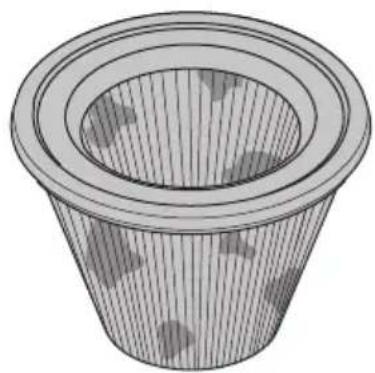
natural_image
3D wireframe illustration of a conical container filled with material, showing internal structure and surface texture (no text or symbols)
natural_image
Technical line drawing of a mechanical device showing internal components and a directional arrow (no text or symbols)natural_image
Line drawing of a mechanical device with hands operating it, no text or symbols presentnatural_image
Line drawing of a person standing on a vehicle chassis with a steering wheel (no text or symbols)natural_image
Illustration of two people pushing a wheeled cart with an inset showing a small object (no text or symbols present)natural_image
Technical line drawing of a cleaning or dust removal machine with labeled components and assembly steps (no text or symbols present)natural_image
Mechanical assembly diagram showing two views of a vehicle's wheel components with arrows indicating motion direction (no text or symbols)natural_image
Technical line drawing of a wheeled cart with wheels and a door, showing no text or symbolsnatural_image
Technical line drawing of a mechanical lifting device with crane hook (no text or symbols)
Husqvarna AB, division Construction
Responsable de la documentation technique
Marques déposées
WAARSCHUWING: Lees alle
natural_image
Diagram showing a car seatbelt mechanism with a lightning bolt indicating clockwise motion (no text or symbols)natural_image
Diagram showing a car's seatbelt being inserted into a vehicle, with no text or symbols present.natural_image
Mechanical assembly diagram showing a cylindrical component being inserted into a bracket (no text or symbols)natural_image
Mechanical assembly diagram showing a lever mechanism with rotating components and directional arrows (no text or symbols)DraadlozeBluetooth®-technologie
natural_image
Line drawing of a battery pack with a cable, showing no text or symbolsnatural_image
Mechanical assembly diagram showing two views of a vehicle chassis with wheels and adjustment arrows (no text or symbols)natural_image
Diagram of an electric vehicle battery pack with a lightning bolt symbol indicating charging (no text or labels present)
natural_image
Technical line drawing of a mechanical device with wheels and a basket, showing internal components and alignment arrows (no text or symbols)natural_image
Illustration of a hand inserting a component into a vehicle chassis (no text or symbols visible)Starten en stoppen
natural_image
Diagram showing airflow around a pipe with arrows indicating direction, next to a conical structure (no text or symbols)natural_image
Illustration of two hands performing a physical maneuver inside a cylindrical tank, labeled A and B (no text or symbols on the diagram itself)natural_image
Illustration of a car interior with an eye highlighted, showing mechanical components and a magnified inset (no text or symbols)natural_image
Technical line drawing of a mechanical assembly with no visible text or symbolsnatural_image
Diagram showing a funnel pouring liquid into a container with a magnified inset of the handle (no text or symbols)natural_image
Line drawing of a plug with a circular symbol indicating no prohibition (no text or labels)natural_image
Technical line drawing of an automotive electrical panel assembly (no text or symbols)natural_image
Line drawing of a microwave oven with a prohibition symbol overlay (no text or labels)Product reinigen
natural_image
Technical illustration of a mechanical device with a conical component inserted into a housing, showing internal components and motion direction (no text or symbols)natural_image
Illustration of a conical filter with internal blades and a close-up inset showing the tip and blade (no text or symbols)
natural_image
Line drawing of a mechanical device with hands operating it, no text or symbols presentnatural_image
Line drawing of a person standing on a wheeled cart with a wheel, no text or symbols presentnatural_image
Illustration of two human figures pushing a wheeled cart with a magnified inset showing the wheel (no text or symbols)- Vergrendel de transportwielen.
natural_image
Mechanical assembly diagram showing two views of a vehicle wheel with adjustment arrows (no text or symbols)natural_image
Technical line drawing of a wheeled cart with wheels and a handle, showing no text or symbolsnatural_image
Technical line drawing of a mechanical lifting device with a crane hook (no text or symbols)
Maximale stroom, A 20 17
Maximale luchtstroom, cfm / m³/h 127 / 215 259/450
Maximale vacuum, psi / kPa / inc. H2O 2,5 / 17 / 68 2,9 / 22 / 88
Extra contactdoos Nee
Voorfilteroppervlakte, ft 2/m2 15,4 / 1,4 29,5 / 2,7
Type Lithium-ion Lithium-ion Lithium-ion Lithium-ion
Husqvarna AB, Construction Division
Original instructions
Originalanweisungen
- Introduction
- Product description
- Intended use
- Symbols on the product
- Symbols on the battery and/or on the battery charger
- Embedded connectivity
- Product liability
- Safety
- Safety definitions
- General safety instructions
- Battery safety
- Battery charger safety
- Work area safety
- Electrical safety
- Personal safety
- Product use and care
- Battery tool use and care
- Service
- Safety instructions for assembly
- Safety instructions for operation
- Personal protective equipment
- Safety instructions for maintenance
- Safety devices on the product
- Always use common sense
- Operation
- To do before you operate the product
- To attach the dust extraction hose
- To remove the dust extraction hose
- To attach and adjust the floor nozzle
- Bluetooth® wireless technology
- To use embedded connectivity with fleet
- To connect the battery charger
- To connect the battery to the battery charger
- To lock and unlock the transport wheels
- Functions of the control panel
- e-Flow function
- Airflow warning system
- To select the hose nozzle diameter
- To install and remove the battery
- To start and stop
- Hour meter
- To remove dust particles from the prefilter during operation
- To install a new Longopac bag cassette
- To discard a full Longopac bag and prepare a new Longopac bag
- To do after completed work
- Maintenance
- Maintenance schedule
- To do a check of the control panel
- To do a check of the battery charger
- To do a check of the battery and the battery holder
- To clean the product
- To clean the prefilter with water
- Filter replacement
- To replace the prefilter
- To replace the HEPA filter
- Troubleshooting
- Warnings on the control panel
- Transportation, storage and disposal
- To move the product short distances
- To move the product long distances
- To lift the product
- Storage of the product
- Disposal of the product
- Technical data
- Accessories
- Declaration of Conformity
- EU Declaration of Conformity
- UK Declaration of Conformity
- Registered trademarks
- Inhalt
- Starten und stoppen
- Bluetooth® technologie sans fil
- Marques déposées
- WAARSCHUWING: Lees alle
- DraadlozeBluetooth®-technologie
- Starten en stoppen
- Product reinigen
Brand : HUSQVARNA
Model : DE 110iH
Category : Vacuum Cleaner