40-B140X - Rechargeable Battery HUSQVARNA - Free user manual and instructions
Find the device manual for free 40-B140X HUSQVARNA in PDF.

 FR
FR
 BG
BG
 CS
CS
 DA
DA
 DE
DE
 EL
EL
 EN
EN
 ES
ES
 ET
ET
 FI
FI
 HU
HU
 IT
IT
 JA
JA
 KO
KO
 LT
LT
 LV
LV
 NL
NL
 PL
PL
 PT
PT
 RO
RO
 RU
RU
 SK
SK
 SL
SL
 SV
SV
 TR
TR
 UK
UK
 VI
VI
 ZH
ZH
User questions about 40-B140X HUSQVARNA
0 question about this device. Answer the ones you know or ask your own.
Ask a new question about this device
Download the instructions for your Rechargeable Battery in PDF format for free! Find your manual 40-B140X - HUSQVARNA and take your electronic device back in hand. On this page are published all the documents necessary for the use of your device. 40-B140X by HUSQVARNA.
USER MANUAL 40-B140X HUSQVARNA
EN Operator's manual 2-10
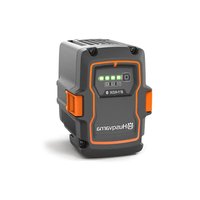
- Battery
- Battery charger (accessory)
- Charging and error indicator on charger
- Battery indicator button
- Error indicator on battery
- Battery temperature indicator
- Bluetooth ^® indicator (if applicable)
- Charging indicators for the state of charge
Symbols on the product

Be careful and use the product correctly. This product can cause serious injury or death to the operator or others.

Read the operator's manual carefully and make sure that you understand the instructions before you use this product.

Protected against splashing water.

The product agrees with the applicable EC directives.

This product conforms to the applicable UK regulations.

Recycle the product at an applicable disposal location for electrical and electronic equipment.
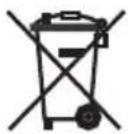
The product or package of the product is not domestic waste.

Do not submerge the battery in water.

If the product features Bluetooth® wireless technology. The Bluetooth® symbol will be marked on the product name label. Refer to Bluetooth® wireless technology on page 5.
Note: Other symbols/decals on the product refer to certification requirements for some commercial areas.
Safety definitions
Warnings, cautions and notes are used to point out specially important parts of the manual.

WARNING: Used if there is a risk of injury or death for the operator or bystanders if the instructions in the manual are not obeyed.

CAUTION: Used if there is a risk of damage to the product, other materials or the adjacent area if the instructions in the manual are not obeyed.
Note: Used to give more information that is necessary in a given situation.
Important safety instructions

WARNING: Read all safety warnings and all instructions. Failure to obey the warnings and instructions may result in electrical shock, fire and/or serious injury.
Note: Save all warnings and instructions.
- Only use Husqvarna approved battery chargers to charge Husqvarna original batteries. The batteries are software encrypted.
- Use Husqvarna approved batteries that are rechargeable as a power supply for the related Husqvarna products only. To prevent injury, do not use the battery as a power supply for other devices.
- Do not try to disassemble or repair the battery. All repairs is to be done by an approved dealer only.
- Keep the battery away from sunlight, heat or open flame. The battery can cause burns and/or chemical burns.
- Do not use a defective or damaged battery or battery charger.
- Do not cause mechanical shock to the battery.
- Keep the battery away from children.
- Keep the battery clean and dry.
- Clean the battery terminals with a clean dry cloth if they become dirty.
- Do not keep the battery in the battery charger when it is fully charged.
- Remove the battery from the product when you do not use it and during transportation.
- Keep batteries in storage away from metal objects such as nails, screws or jewelry.
Operation
- Push the battery indicator button to start the battery before use.
- The battery must be charged before you use it for the first time. Always use a Husqvarna approved battery charger. Refer to Approved battery chargers on page 9.
- Use the battery only when the ambient temperature is between -10^ (14°F) and 40^ (104°F).
- Decrease the workload and/or speed when the battery temperature indicator is flashing.
Note: Heavy workload when the battery temperature is less than 0^ C ( 32^ F) can cause a temporary battery error.
- Use the battery charger only when the ambient temperature is between 5^ (41°F) and 40^ (104°F).
- The battery will not charge if the battery temperature is more than 50^ (122°F).
- Push the battery indicator button to get information of the state of charge of the battery.
Husqvarna Connect
Husqvarna Connect is a free app for your mobile device. The Husqvarna Connect app gives extended functions for your Husqvarna product.
- Extended product information.
• Information about, and help with, product parts and servicing.
For more information about Husqvarna Connect, refer to www.husqvarna.com.
Note: Husqvarna Connect app is not available for download in all markets. Speak to your servicing dealer for more information.
To start to use Husqvarna Connect
- Download the Husqvarna Connect app on your mobile device.
- Register in the Husqvarna Connect app.
- Follow the instruction steps in the Husqvarna Connect app to connect and register the product.
Note: Husqvarna Connect app is not available for download in all markets. Speak to your servicing dealer for more information.
Husqvarna Fleet Services™
Husqvarna Fleet Services ^™ is a cloud solution that gives the commercial fleet manager an overview of all products. Husqvarna Fleet Services ^™ is available as a web service and as an app. For more information about Husqvarna Fleet Services ^™ , refer to www.husqvarna.com.
Note: Husqvarna Fleet Services™ cloud solution is not available in all markets.
To connect to the product with Husqvarna Fleet Services ^TM
- Download the Husqvarna Fleet Services ™ app to your mobile device.
- Log on to the Husqvarna Fleet Services™ app.
- Follow the instructions about how to pair the product with Husqvarna Fleet Services™.
Bluetooth® wireless technology
Products with built-in Bluetooth ^® wireless technology can connect to mobile devices and enables additional functions.
The symbol for Bluetooth ^® wireless technology comes on when your mobile device is connected to the product.

Update firmware over the air (for batteries with built-in Bluetooth®)
Batteries with Bluetooth® download and install new firmware automatically.
- The download starts when new firmware is available and the battery is connected to Husqvarna Connect or Husqvarna Fleet Services™.
- The Bluetooth ^ indicator shows when the battery is connected while the battery display is active.
- Firmware download takes 10-15 minutes. If the download stops or fails, the battery will try to download the firmware again.
- Firmware installation starts when the download is complete and the battery is not in use or charging.
- The LED indicators for state of charge pulse during the firmware installation. Firmware installation takes 10-15 seconds.
To charge the battery
Charge the battery before the first time of operation. A new battery is charged 30%. Push the battery indicator button to get information of the state of charge of the battery.

CAUTION: Only charge the battery when the ambient temperature is between 5°C (41°F) and 40°C (114°F).

CAUTION: Use the battery only when the ambient temperature is between -10^ ( 14^ ) and 40^ ( 104^ ).
Note: The battery will not charge if the battery temperature is more than 50^ C ( 122^ F).
- Put the battery in the battery charger. When the charging indicator on the battery charger comes on, the battery is connected correctly to the battery charger.
- The battery is fully charged when all the charging indicators on the battery are on.
- Remove the battery from the battery charger.
Battery charging status
A Husqvarna Li-ion battery can be charged or used at all charging levels.
| Charging indicators Battery status (state of charge) | |
| 4 charging indicators are on The battery is 76% – 100% charged. | |
| 3 charging indicators are on The battery is 51% – 75% charged. | |
| 2 charging indicators are on The battery is 26% – 50% charged. | |
| 1 charging indicator is on The battery is 11% – 25% charged. | |
| 1 charging indicator flashes The battery is 0% – 10% charged. |
Troubleshooting
Symptoms Cause Action
The battery error indicator flashes. The battery is empty. Charge the battery.
| Heavy workload in combination with very low battery temperature. | Make the battery warm. For example, move it indoors or operate at low speed until the battery is warm. | |
| The battery does not operate. The operating range of the battery is at its limit. | Remove the battery from the product. Wait 5 minutes. Push the battery indicator button. | |
| The battery temperature indicator is ON. | The battery is too cold or too hot to use. | Keep the battery in an ambient temperature between -10°C (14°F) and 40°C (104°F). When the battery has the correct temperature, it can be used again. |
| The battery temperature indicator flashes. | The battery is near its temperature limits. | Decrease the speed and/or workload. Keep the battery in the preferred temperature between +10°C (50°F) and +30°C (86°F) for optimal performance. |
| The battery temperature indicator is ON while the battery is in the charger. | Temperature deviation, the battery is too cold or too hot to charge. | Let the battery cool down or move it indoors to warm it up. When the battery has the correct temperature, it can be used again. |
Symptoms Cause Action
The battery error indicator comes on. The battery has a critical error. Speak to your Husqvarna servicing dealer.
Transport and storage
- The supplied Li-ion batteries obey the Dangerous Goods Legislation requirements.
- Obey the special requirement on package and labels for commercial transportations, also those from third parties and forwarding agents.
- Speak to a person with special training in dangerous material before you send the product. Obey all applicable national regulations.
- Use tape on the contacts when you put the battery in a package. Put the battery in the package tightly to prevent damage and accidents.
- Do not keep the battery in an area where static electricity can occur. Do not keep the battery in a metal box.
- Put the battery in a dry, frost free and clean space with correct temperature.
- Put the battery in storage where the temperature is between 5^ (41 °F) and 25^ (77 °F). Keep the battery away from sunlight.
- Charge the battery 30% to 50% before you put it in storage for long periods.
- Clean the battery before you put it in storage.
Disposal
The symbol means that the product is not domestic waste. Recycle it through your local collection system for electrical and electronic equipment.
This contributes to proper end of life waste management. Contact local authorities, domestic waste services, your dealer or retailer for information. Incorrect disposal may have potential negative effects on the environment and human health, due to the potential presence of hazardous substances.
Note: The symbol shows on the product or package of the product.
Registered trademarks
The Bluetooth ^® word mark and logos are registered trademarks owned by and any use of such marks by Husqvarna is under license.
Technical data
For technical data, refer to the rating plate on the battery.
Approved battery chargers
Table 1: Approved battery chargers for 40-B140X, 40-B220X, 40-B330X
| Battery charger QC330 | QC500 40-C500X 40-C750X 40-C1000X4 | |||
| Output voltage, V 36 36 | 36 36 36 | |||
| Input voltage, V 100–240 | 100–240 100–240 100–240 100–240 | |||
| Frequency, Hz 50–60 50 | 60–60 50–60 50–60 50–60 | |||
| Power, W 330 500 500 | 750 1000 | 1 |
Table 2: Approved battery chargers for 40-B540X
| Battery charger 40-C500X 40-C750X 40-C1000X4 | |||
| Output voltage, V | 36 | 36 | 36 |
| Input voltage, V | 100–240 | 100–240 | 100–240 |
| Frequency, Hz | 50–60 | 50–60 | 50–60 |
The maximum power when charging only one battery is 600 W.
| Battery charger 40-C500X 40-C750X 40-C1000X4 | |||
| Power, W 500 750 1000 | 2 |
The maximum power when charging only one battery is 600 W.
- Baterija
- Punjač baterije (dodatna oprema)
- Indikator punjenja i pogreške na punjaču
- Gumb indikatora baterije
- Indikator pogreške na bateriji
- Indikator temperature baterije
- Bluetooth ® indikator (ako je primjenjivo)
- Indikator punjenja za stanje napunjenosti
Simboli na proizvodu

Budite oprezni i pravilno upotrebljavajte ovaj proizvod. Ovaj proizvod može izazvati teške ozljede ili smrt rukovatelja ili drugih osoba.

WAARSCHUWING: Lees alle
- Batteri
- Batterilader (tilbehør)
- Indikator for lading og ladefeil på laderen
- Batteriindikatorknapp
- Feilindikator på batteri
- Temperaturindikator for batteri
- Bluetooth ®-indikator (hvis aktuelt)
- Ladeindikatorer for ladestatusen
- Bateria
- Carregador de bateria (acessório)
- Indicador de carregamento e de erro no carregador
- Botão indicador da bateria
- Indicador de erro da bateria
- Indicador de temperatura da bateria
- Indicador Bluetooth ^ (se aplicável)
- Indicadores de carregamento do estado de carga
Símbolos no produto

- Akumulátor
- Nabíjačka (príslušenstvo)
- Indikátor nabíjania a chýb na nabíjačke
- Tlačidlo indikátora stavu akumulátora
- Indikátor chyby na akumulátore
- Indikátor teploty batérie
- Indikátor Bluetooth ® (ak je k dispozícii)
- Indikátory nabíjania ukazujúce stav nabitia
Symboly na výrobku

Tescilli ticari markalar
Original instructions
Оригинални инструкции
Původní pokyny