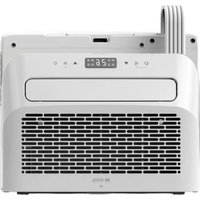
BC5CSKL - Air Conditioning Be Cool - Free user manual and instructions
Find the device manual for free BC5CSKL Be Cool in PDF.


| Product type | Air conditioning for caravan or motorhome |
| Brand | Be Cool |
| Model | BC5CSKL |
| Cooling capacity | 5000 BTU/h (1465 W) |
| Maximum power consumption | 560 W |
| Input voltage | 220 - 240 V, 50 Hz |
| Refrigerant | R290 (130 g) - flammable |
| Energy efficiency (EER) | 2.6 |
| Energy efficiency class | A |
| Airflow | 280 - 330 m³/h |
| Noise level (sound power) | 63 dB(A) |
| Weight | 22.5 kg |
| Indoor unit dimensions | 454 x 298 x 170 mm |
| Outdoor unit dimensions | 445 x 205 x 353 mm |
| Dehumidification rate | 0.5 L/h |
| Main functions | Cooling, ventilation, dehumidification, timer, sleep mode, oscillation |
| Connectivity | Wi-Fi 2.4 GHz (Smart Life app, compatible with Alexa/Google Home) |
| Warranty | 2 years (valid in Austria) |
| Maintenance and cleaning | Unplug before cleaning; clean the air filter every week; use a damp cloth with mild detergent |
| Safety | Use on grounded outlet; do not use extension cord; store and transport upright; do not block air inlets/outlets |
| Spare parts and repairability | Contact authorized after-sales service; do not open yourself; repairs by certified professionals for R290 |
Frequently Asked Questions - BC5CSKL Be Cool
User questions about BC5CSKL Be Cool
0 question about this device. Answer the ones you know or ask your own.
Ask a new question about this device
Download the instructions for your Air Conditioning in PDF format for free! Find your manual BC5CSKL - Be Cool and take your electronic device back in hand. On this page are published all the documents necessary for the use of your device. BC5CSKL by Be Cool.
USER MANUAL BC5CSKL Be Cool
natural_image
Front view of a white electric heater with digital display and ventilation grille (no visible text or symbols)HERZLICHEN GLÜCKWUNSCH!
natural_image
Technical line drawing of two mechanical components with mounting holes and shafts (no text or symbols)natural_image
Technical line drawing of a mechanical device before and after assembly (no text or symbols)natural_image
Line drawings of two household appliances: a front-mounted air conditioner unit and a computer monitor unit (no text or symbols)natural_image
Line drawing of a portable air conditioner unit with cooling fins and heat exchangers (no text or symbols)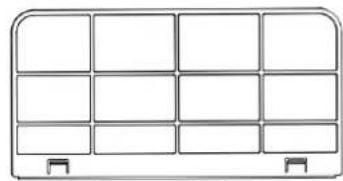
natural_image
Pure diagram of a 3x4 grid layout with no text, numbers, or symbolsScan QR code
Registrierung
natural_image
Plain light blue rectangular shape with no visible text, symbols, or features.Register

natural_image
Blank white image with no visible text, symbols, or discernible subject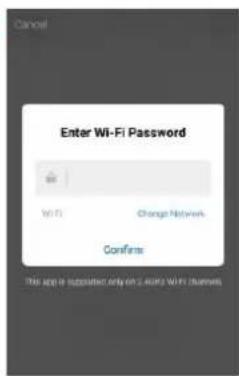
works with the Google Assistant
BE COOL
VEUILLEZ LIRE ATTENTIVEMENT LE MODE D'EMPLOI AVANT DE COMMENCER L'ASSEMBLAGE, L'INSTALLATION, LE FONCTIONNEMENT OU L'ENTRETIEN. PROTÉGEZ-VOUS ET PROTÉGEZ LES AUTRES EN RESPECTANT LES CONSIGNES DE SÉCURITÉ. LE NON-RESPECT DES INSTRUCTIONS PEUT ENTRAÎNER DES BLESSURES ET/OU DES DOMMAGES MATÉRIELS ET/OU ANNULER LA GARANTIE !
natural_image
Two identical line drawings of a mechanical device with no visible text, numbers, or symbols.natural_image
Technical line drawing of a mechanical device before and after assembly (no text or symbols)natural_image
Line drawings of two household appliances: a front-mounted air conditioner unit and a computer monitor (no text or symbols)ENTRETIEN ET NETTOYAGE
natural_image
Line drawing of a portable air conditioner unit with coiled heat exchanger (no text or symbols)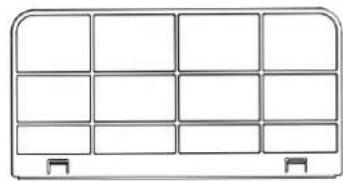
natural_image
Pure diagram of a 3x4 grid layout with no text, numbers, or symbolsScan QR code
Inscription

BE COOL
natural_image
Front view of a white industrial air conditioner unit with digital display and ventilation grille (no visible text or symbols)CONGRATULAZIONI! GRAZIE PER AVER SCELTO UN PRODOTTO BE COOL.

LEGGERE ATTENTAMENTE LE ISTRUZIONI PER L'USO PRIMA DI INIZIARE IL MONTAGGIO, L'INSTALLAZIONE, IL FUNZIONAMENTO O LA MANUTENZIONE. PROTEGGERE SE STESSI E GLI ALTRI SEGUENDO LE ISTRUZIONI DI SICUREZZA. LA MANCATA OSSERVANZA DELLE ISTRUZIONI PUÒ CAUSARE LESIONI PERSONALI E/O DANNI MATERIALI E/O INVALIDARE LA GARANZIA!
natural_image
Two identical line drawings of a mechanical device with no visible text, numbers, or symbols.natural_image
Technical line drawing of a mechanical device before and after assembly (no text or symbols)natural_image
Line drawings of two household appliances: a front-mounted air conditioner unit and a computer monitor (no text or symbols)natural_image
Line drawing of a portable air conditioner unit with coiled heat exchanger (no text or symbols)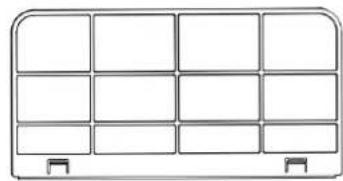
natural_image
Pure diagram of a 3x4 grid layout with no text, numbers, or symbolsScan QR code
Registrazione
Se non avete ancora
Register
WORKS WITH amazon alexa

BE COOL
Caravan airconditioner BC5CSKL
natural_image
White industrial air conditioner unit with digital display and ventilation grille (no visible text or symbols)GEFELICITEERD! BEDANKT VOOR HET KIEZEN VAN EEN PRODUCT VAN BE COOL.

LEES DE BEDIENINGSINSTRUCTIES ZORGVULDIG DOOR VOORDAT U BEGINT MET DE MONTAGE, INSTALLATIE, BEDIENING OF HET ONDERHOUD. BESCHERM UZELF EN ANDEREN DOOR DE VEILIGHEIDSINSTRUCTIES OP TE VOLGEN. HET NIET OPVOLGEN VAN DE INSTRUCTIES KAN LEIDEN TOT PERSOONLIJK LETSEL EN/OF MATERIËLE SCHADE EN/OF HET VERVALLEN VAN DE GARANTIE!
natural_image
Two identical line drawings of a mechanical device with no visible text, numbers, or symbols.natural_image
Technical line drawing of a mechanical device before and after assembly (no text or symbols)natural_image
Line drawings of two electronic devices: a front-mounted air conditioner unit and a computer monitor unit (no text or symbols)ONDERHOUD EN REINIGING
natural_image
Line drawing of a portable air conditioner unit with cooling fins and ventilation slots (no text or symbols)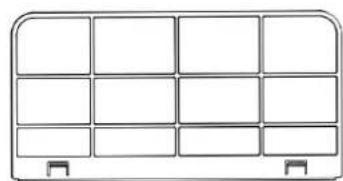
natural_image
Simple line drawing of a 3x4 grid layout with rounded corners and two side connectors at the bottom (no text or symbols)Scan QR code
Registratie
Als u nog geen

BE COOL
natural_image
Front view of a white BE COOL air conditioner unit with digital display and ventilation grille (no visible text or symbols on main body)GRATULÁLUNK! KÖSZÖNJÜK, HOGY A BE COOL TERMÉKÉT VÁLASZTOTTA.


natural_image
Two identical line drawings of a mechanical device with no visible text, numbers, or symbols.natural_image
Technical line drawing of a mechanical device before and after assembly (no text or symbols)natural_image
Line drawings of two electronic devices: a front-mounted air conditioner unit and a computer monitor unit (no text or symbols)natural_image
Line drawing of a portable air conditioner unit with cooling fins and ventilation slots (no text or symbols)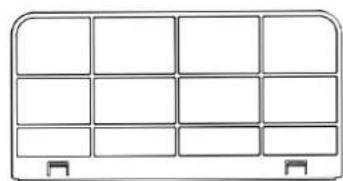
natural_image
Simple line drawing of a 3x4 grid layout with no text, numbers, or symbolsScan QR code
Regisztráció

WORKS WITH amazon alexa

BE COOL
natural_image
Front view of a white BE COOL air conditioner unit with digital display and ventilation grille (no visible text or symbols on main body)GRATULUJEME!
DĚKUJEME, ŽE JSTE SI VYBRALI PRODUKT OD SPOLEČNOSTI BE COOL.

PŘED ZAHÁJENÍM MONTÁŽE, INSTALACE, PROVOZU NEBO ÚDRŽBY SI POZORNĚ PŘEČTĚTE NÁVOD K OBSLUZE. DODRŽOVÁNÍM BEZPEČNOSTNÍCH POKYNŮ CHRAŇTE SEBE I OSTATNÍ. NĚDODRŽENÍ POKYNŮ MŮŽE MÍT ZA NÁSLEDEK ZRANĚNÍ OSOB A/NEBO POŠKOZENÍ MAJETKU A/NEBO ZTRÁTU ZÁRUKY!
1. Instalace a provoz
natural_image
Two identical mechanical components with cylindrical heads and mounting brackets, no visible text or symbols.natural_image
Technical line drawing of a mechanical device before and after assembly (no text or symbols)natural_image
Line drawing of a portable air conditioner unit with cooling fan and front panel (no text or symbols)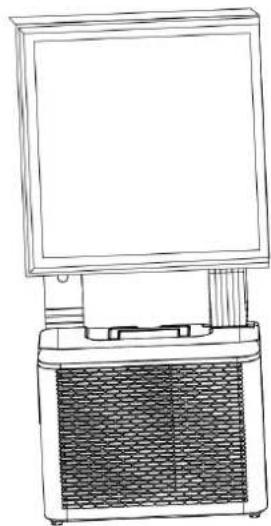
natural_image
Line drawing of a portable electronic device with a front-mounted screen and a mesh chamber (no text or symbols)ÚDRŽBA A ČIŠTĚNÍ
natural_image
Line drawing of a portable air conditioner unit with coiled heat exchanger (no text or symbols)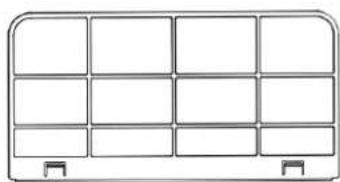
natural_image
Simple line drawing of a 3x4 grid layout with no text, numbers, or symbolsBE COOL
Scan QR code
Registrace
Pokud ještě nemáte
natural_image
Plain light blue rectangular shape with no visible text, symbols, or features.Register

natural_image
Plain light blue rectangular shape with no visible text, symbols, or features.WORKS WITH amazon alexa

works with the Google Assistant
BE COOL
natural_image
Front view of a white BE COOL air conditioner unit with digital display and ventilation grille (no visible text or symbols on main body)GRATULUJEME! ĎAKUJEME, ŽE STE SI VYBRALI PRODUKT OD SPOLOČNOSTI BE COOL.

PRED ZAČATÍM MONTÁŽE, INŠTALÁCIE, PREVÁDZKY ALEBO ÚDRŽBY SI POZORNE PREČÍTAJTE NÁVOD NA OBSLUHU. DODRŽIAVANÍM BEZPEČNOSTNÝCH POKYNOV CHRÁNTE SEBA AJ OSTATNÝCH. NEDODRŽANIE POKYNOV MÔŽE MAŤ ZA NÁSLEDOK ZRANENIE OSÔB A/ALEBO POŠKODENIE MAJETKU A/ALEBO STRATU ZÁRUKY!
flowchart
graph TD
    A["5: moon with star"] --> B["4: fan with sun"]
    B --> C["3: down arrow"]
    C --> D["6: timer display with 88 and icons for air, water, etc."]
    D --> E["2: M 3S-Timer"]
    E --> F["1: power switch with + and - symbols"]
1. Vypínač zapnutia/vypnutia
natural_image
Two identical mechanical components with cylindrical heads and mounting brackets, no visible text or symbols.flowchart
graph TD
    A["Tlmič nárazov"] --> B["Image: magnified device with circular components and dots"]
    style A fill:#f9f,stroke:#333
    style B fill:#bbf,stroke:#333
natural_image
Technical line drawing of a mechanical device before and after assembly (no text or symbols)natural_image
Line drawing of a portable air conditioner unit with cooling fan and front panel (no text or symbols)
natural_image
Line drawing of a portable electronic device with a front-mounted screen and a mesh chamber (no text or symbols)ÚDRŽBA A ČISTENIE
natural_image
Line drawing of a portable electric heater with cooling fins and heat exchangers (no text or symbols)
natural_image
Pure diagram of a 3x4 grid layout with no text, numbers, or symbolsBE COOL
Čistenie povrchu spotrebiča
Scan QR code
Registrácia
Ak ešte nemáte
natural_image
Plain light blue rectangular shape with no visible text, symbols, or features.Register

natural_image
Plain light blue rectangular shape with no visible text, symbols, or features.Pripojte zariadenie k sieti:
WORKS WITH amazon alexa

works with the Google Assistant
BE COOL
| Technické údaje WiFi | |
| rádiová technológia: | Wifi (WLAN) |
| Rádiová prevádzková frekvencia | 2412MHz-2472MHz |
| Pracovná frekvencia BLE | 2402MHz-2480MHz |
| Typ modulácie | 802.11b: DSSS802.11g: OFDM802.11n (20 MHz): OFDM |
| Softvér s pevnou frekvenciou | SecureCRT.exe |
| Zosilnenie antény | 2,5 dBi |
| Typ antény | DPS |
| Prenosový výkon | 520 dBm |
natural_image
Front view of a white BE COOL air conditioner unit with digital display and ventilation grille (no visible text or symbols on main body)FELICITĂRI! VĂ MULȚUMIM PENTRU CĂ AȚI ALES UN PRODUS DE LA BE COOL.

VĂ RUGĂM SĂ CITIȚI CU ATENȚIE INSTRUCTIUNILE DE UTILIZARE ÎNAINTE DE A ÎNCEPE ASAMBLAREA, INSTALAREA, FÚNCTIONAREA SAU ÎNTRETINEREA. PROTEJATI-VĂ ȘI PROTEJATI-I PE CEILALȚI RESPECTÂND INSTRUCTIUNILE DE SIGURANȚĂ. NERESPECTAREA INSTRUCTIUNILOR POATE DUCE LA VĂTĂMĂRI CORPORALE ȘI/SAU DAUNE MATERIALE ȘI/SAU ANULAREA GARANTIEI!
natural_image
Two identical line drawings of a mechanical device with no visible text, numbers, or symbols.natural_image
Technical line drawing of a mechanical device before and after assembly (no text or symbols)natural_image
Line drawings of two household appliances: a front-mounted air conditioner unit and a computer monitor unit (no text or symbols)ÎNTRETINERE ŞI CURĂTARE
natural_image
Line drawing of a portable air conditioner unit with cooling fins and heat sinks (no text or symbols)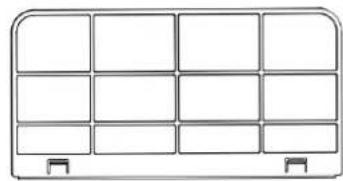
natural_image
Simple line drawing of a 3x4 grid cabinet with two side units at the bottom (no text or symbols)Scan QR code
Înregistrare
Dacă nu aveți încă
natural_image
Plain light blue rectangular shape with no visible text, symbols, or features.Register

natural_image
Blank white image with no visible text, symbols, or discernible subjectConectati un dispozitiv la retea:
WORKS WITH amazon alexa

BE COOL
natural_image
White industrial air conditioner unit with digital display and ventilation grille (no visible text or symbols)GRATULACJE! DZIEKUJEMY ZA WYBRANIE PRODUKTU OD BE COOL.


PRZED ROZPOCZĘCIEM MONTAŻU, INSTALACJI, OBSŁUGI LUB KONSERWACJI NALEŻY UWAŻNIE PRZECZYTAĆ INSTRUKCJĘ OBSŁUGI. NALEŻY CHRONIĆ SIEBIE I INNYCH, PRZESTRZEGAJĄC INSTRUKCJI BEZPIECZEŃSTWA. NIEPRZESTRZEGANIE INSTRUKCJI MOŻE SPOWODOWAĆ OBRAŻENIA CIAŁA I/LUB USZKODZENIE MIENIA I/LUB UNIEWAŻNIENIE GWARANCJI!
natural_image
Two identical line drawings of a mechanical device with no visible text, numbers, or symbols.natural_image
Technical line drawing of a mechanical device before and after assembly (no text or symbols)natural_image
Line drawings of two electronic devices: a front-mounted air conditioner unit and a mounted computer monitor (no text or symbols)KONSERWACJA I CZYSZCZENIE
natural_image
Line drawing of a portable air conditioner unit with cooling fins and ventilation slots (no text or symbols)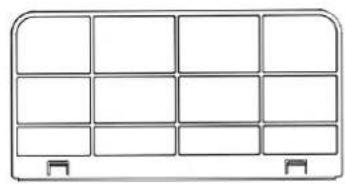
natural_image
Simple line drawing of a 3x3 grid panel with two side handles (no text or symbols)Scan QR code
Rejestracja
natural_image
Plain light blue rectangular shape with no text, symbols, or discernible features.Register

natural_image
Plain light blue rectangular shape with no visible text, symbols, or features.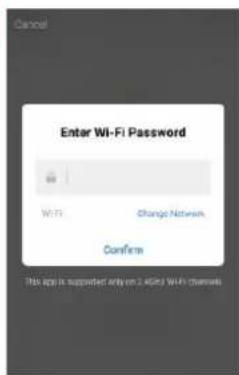
WORKS WITH amazon alexa

BE COOL
natural_image
White industrial air conditioner unit with digital display and ventilation grille (no visible text or symbols)ČESTITAMO!
HVALA, KER STE IZBRALI IZDELEK BE COOL.

Aktualna navodila za uporabo in drugi jeziki
PRED ZAČETKOM MONTAŽE, NAMESTITVE, DELOVANJA ALI VZDRŽEVANJA NATANČNO PREBERITE NAVODILA ZA UPORABO. Z UPOŠTEVANJEM VARNOSTNIH NAVODIL ZAŠČITITE SEBE IN DRUGE. NEUPOŠTEVANJE NAVODIL LAHKO POVZROČI TELESNE POŠKODBE IN/ALI MATERIALNO ŠKODO IN/ALI IZGUBO GARANCIJE!
flowchart
graph TD
    A["5: moon with star"] --> B["4: fan with swirl"]
    B --> C["3: triangle"]
    C --> D["8: digital display with icons like air conditioner, fan, triangle, down arrow"]
    D --> E["6: down arrow"]
    E --> F["M: 3S-Timer"]
    F --> G["2: down arrow"]
    G --> H["1: power switch"]
1. Stikalo za vklop/izklop
Pritisnite ta gumb, da vklopite ali izklopite klimatsko napravo.
Ob vklopu je temperatura standardno nastavljena na 22 °C. Temperaturni senzor zazna trenutno temperaturo v prostoru. Če sobna temperatura preseže 22 °C, začne zunanja enota zniževati temperaturo. Če pa je sobna temperatura že nižja od 22 °C, zunanja enota ostane neaktivna.
2. Način
S pritiskom na ta gumb preklapljajte med načini hlajenja, prezračevanja in razvlaževanja.
natural_image
Technical line drawing of two mechanical components with mounting holes (no text or symbols)flowchart
graph TD
    A["Amortizer"] --> B["Device with internal components"]
    C["Amortizer"] --> D["Device with internal components"]
natural_image
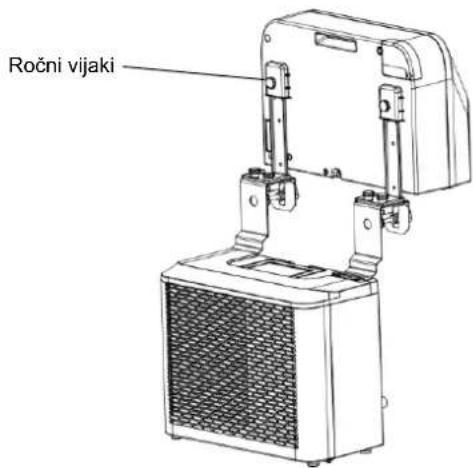
Technical line drawing of a mechanical device before and after assembly (no text or symbols)- Notranjo enoto pritrdite na nosilec in nosilec trdno zategnite. (glejte spodnjo sliko).
natural_image
Line drawing of a portable air conditioner unit with cooling fan and front panel (no text or symbols)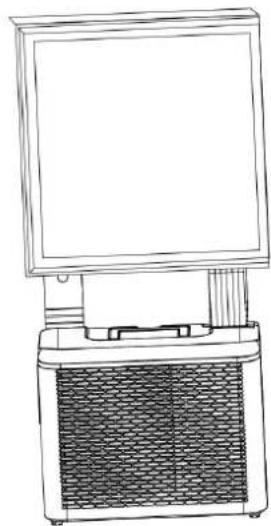
natural_image
Line drawing of a portable electronic device with a front-mounted screen and a mesh chamber (no text or symbols)VZDRŽEVANJE IN ČIŠČENJE
natural_image
Line drawing of a portable air conditioner unit with cooling fins and ventilation slots (no text or symbols)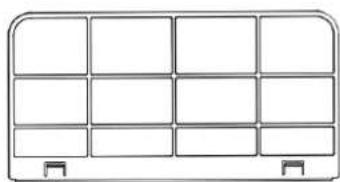
natural_image
Pure diagram of a 3x4 grid layout with no text, numbers, or symbolsBE COOL
Čiščenje površine aparata
Scan QR code
Registracija
Če še nimate
natural_image
Plain light blue rectangular shape with no visible text, symbols, or features.Register

natural_image
Plain light blue rectangular shape with no visible text, symbols, or features.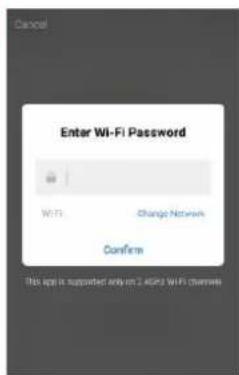
WORKS WITH amazon alexa

works with the Google Assistant
BE COOL
| Tehnični podatki WiFi | |
| radijska tehnologija: | Wifi (WLAN) |
| Radijska delovna frekvenca | 2412 MHz-2472 MHz |
| Delovna frekvenca BLE | 2402 MHz-2480 MHz |
| Vrsta modulacije | 802.11b: DSSS802.11g: OFDM802.11n (20 MHz): OFDM |
| Programska oprema s fiksno frekvenco | SecureCRT.exe |
| Ojačanje antene | 2,5 dBi |
| Vrsta antene | PCB |
| Prenosna moč | 520 dBm |
natural_image
Front view of a white BE COOL air conditioner unit with digital display and ventilation grille (no visible text or symbols on main body)ČESTITAMO! HVALA VAM ŠTO STE ODABRALI PROIZVOD IZ BE COOL-a.


MOLIMO VAS, PAŽLJIVO PROČITAJTE UPUTE ZA UPOTREBU PRIJE POČETKA SASTAVLJANJA, INSTALACIJE, RADA ILI ODRŽAVANJA. ZAŠTITITE SEBE I DRUGE PRIDRŽAVANJEM SIGURNOSNIH UPUTA. NEPRIDRŽAVANJE UPUTA MOŽE DOVESTI DO OSOBNIH OZLJEDA I/ILI ŠTETE IMOVINE I/ILI PONIŠTENJE JAMSTVA!
1. Montaža i rad
natural_image
Technical line drawing of two mechanical components with mounting holes and a central shaft (no text or symbols)- Pričvrstite amortizere na stražnju stranu vanjske jedinice kao što je prikazano na slici.
flowchart
graph TD
    A["Shock absorber"] --> B["Arrow"]
    B --> C["Shock absorber"]
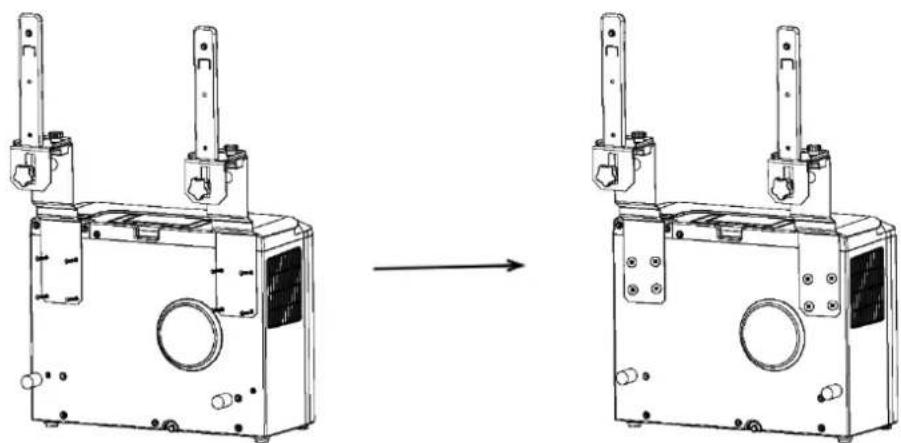
- Sastavite zagrada kao prikazano u ilustracija ispod . Priložiti unutarnji i vanjski jedinica do nosač za spajanje oboje dijelovi zajedno . Zategnite the isporučeno vijci i podloške u rupe pod uvjetom do sigurno pričvrstiti uređaja do zagrada .
natural_image
Technical line drawing of a mechanical device before and after assembly (no text or symbols)natural_image
Line drawings of two household appliances: a front-mounted air conditioner unit and a computer monitor (no text or symbols)ODRŽAVANJE I ČIŠĆENJE
natural_image
Line drawing of a portable air conditioner unit with cooling fins and ventilation slots (no text or symbols)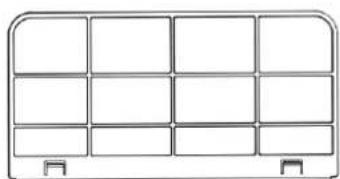
natural_image
Simple line drawing of a 3x3 grid layout with no text or symbolsScan QR code
Registracija
natural_image
Plain light blue rectangular shape with no visible text, symbols, or features.Register

natural_image
Plain light blue rectangular shape with no visible text, symbols, or features.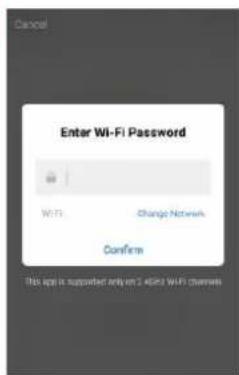
WORKS WITH amazon alexa

works with the Google Assistant
BE COOL
| Tehnički podaci WiFi | |
| radio tehnologija : | Wifi (WLAN) |
| Rad radija frekvencija | 2412MHz-2472MHz |
| BLE radi frekvencija | 2402MHz-2480MHz |
| Vrsta modulacije | 802.11b: DSSS802.11g: OFDM802.11n (20MHz) : OFDM |
| Fiksna frekvencija softver | SecureCRT.exe |
| Antena pojačanje | 2,5 dBi |
| Vrsta antene | PCB |
| Snaga prijenosa | 520 dBm |
| Tehničke informacije | |
| Broj stavke | BC5CSKL |
| Kapacitet hlađenja | 5000 BTU/h |
| 1465 vata | |
| Maks. Potrošnja energije | 560 vati |
| Stopa odvlaživanja | 0,5L/h |
| Ulazni napon | 220 - 240 V |
| Frekvencija | 50 Hz |
| WIFI prijenos učestalost : | 2,4 GHz |
| Snaga prijenosa: | max. 100 mW |
| Rashladno sredstvo / punjenje | R290, 130 g |
| Energetska učinkovitost EER | 2,6 |
| Energetska učinkovitost razreda | A |
| Kruženje zraka | 280 - 330 m^3 /h |
| Razina buke ( zvučna snaga) | 63 dB(A) |
| Težina | 22,5 kg |
| Unutarnja jedinica dimenzije | 454x298x170 mm |
| Dimenzije vanjski jedinica | 445 x 205 x 353 mm |
| Kontakt adresa proizvođača za dodatne informacije | Schuss Home Electronic GmbHScheringgasse 3, A-1140 BečTel: +43 (1) 97 0 21 - 0Servisna linija: +43 (1) 97 0 21 - 502www.becool.atFB-br.: 236974 t / FB-Sud: Beč |
BE COOL
| Zahtjevi za informacije za jednocijevne i dvocijevne klima uređaje | P | |||
| Podaci koji identificiraju model(e) na koje se podaci odnose: | ||||
| Opis | simbol | Vrijednost | Jedinica | |
| Nominalni kapacitet hlađenja | P_rated za hlađenje | 1,472 | kW | |
| Nazivna snaga za grijanje | P_rated za grijanje | - | kW | |
| Nazivna potrošnja energije za hlađenje | P_EER | 0,546 | kW | |
| Nazivna potrošnja energije za grijanje | P_COP | - | kW | |
| Nominalni omjer energetske učinkovitosti | EER_d | 2,696 | - | |
| Nominalni koeficijent snage | COP_d | - | - | |
| Podaci koji identificiraju model(e) na koje se podaci odnose: | ||||
| Opis | simbol | Vrijednost | Jedinica | |
| Potrošnja energije u isključenom načinu rada termostata | P_TO | N/A | W | |
| Potrošnja energije u stanju pripravnosti P | P_SB | 2,0 | W | |
| Potrošnja energije jednokanalnih ili dvokanalnih uređaja (zasebno navesti za hlađenje i grijanje) | Q_SD | SD: 0,546(hlađenje) | kWh/h | |
| Razina zvučne snage | L_WA | 63 | dB(A) | |
| Potencijal globalnog zagrijavanja | GWP | 3 | kgCO2eq. | |
| Kontaktni podaci za daljnje informacije | Schuss Home Electronic GmbHScheringgasse 31140 Beč, AustrijaTelefon: +43 (1) 97 0 21 – 0www.becool.at | |||
BE COOL
JAMSTVO
Caravan air conditioner BC5CSKL

natural_image
White industrial air conditioner unit with digital display and ventilation grille (no visible text or symbols)CONGRATULATIONS! THANK YOU FOR CHOOSING A PRODUCT FROM BE COOL.


Current operating instructions and other languages
Download the latest operating instructions in various languages via the link www.becool.at/ or scan the QR code shown. Follow the instructions on the website.

PLEASE READ THE OPERATING INSTRUCTIONS CAREFULLY BEFORE STARTING ASSEMBLY, INSTALLATION, OPERATION OR MAINTENANCE. PROTECT YOURSELF AND OTHERS BY FOLLOWING THE SAFETY INSTRUCTIONS. FAILURE TO FOLLOW INSTRUCTIONS COULD RESULT IN PERSONAL INJURY AND/OR PROPERTY DAMAGE AND/OR VOID THE WARRANTY!
Attention: Air conditioners should always be stored and transported in an upright position to avoid damage to the compressor. If the appliance has been moved to a different position during transportation, we recommend leaving it to rest for at least 24 hours after installation before putting it into operation. This ensures that the refrigerant in the system stabilizes and smooth operation is guaranteed.
IMPORTANT INFORMATION ON SAFETY, LOCATION AND ELECTRICAL CONNECTION.

1. Installation and operation
- Always place the appliance on a firm, level surface. The air conditioner must not be tilted or inclined during operation.
- This air conditioner is only intended for use in a caravan or motorhome and must not be used outdoors.
- Always keep the appliance in an upright position, both during storage and transportation, to protect the compressor.
BE COOL
- Avoid placing the appliance near strong heat sources, flammable or explosive gases and chemicals.
○ Make sure that the air conditioner's inlets and outlets are unobstructed to ensure optimum air circulation.
Do not use the air conditioner in dusty or particularly dirty environments, as this can clog the filters more quickly and reduce efficiency. - Ensure that the device is not exposed to direct sunlight, as this can impair performance and lead to overheating.
2. Electrical connection
- Only use the appliance in well earthed sockets and check the suitability of the socket beforehand.
Do not use extension cables or multiple sockets as this can lead to overheating and fires. - Ensure that the power cable is not twisted or kinked. Do not pull the cable to disconnect the appliance from the power supply - always use the plug.
- Avoid using the device when the voltage fluctuates greatly or in regions with frequent power failures, as this can damage the electronics.
o Prevent liquids from dripping or spilling onto the appliance. If water gets into the appliance, disconnect it from the power supply immediately and contact an authorized service centre.
3. Handling and handling
Do not expose the device to extreme conditions such as high humidity or water. Avoid using the device in damp rooms such as basements or near swimming pools.
To avoid electric shock, do not touch the appliance or the plug with wet hands.
Make sure that no objects, such as fingers or hard objects, get into the air outlet or the ventilation grille, as this can lead to damage and injury.
4. Child and user safety
Children under the age of 8 and persons with reduced physical, sensory or mental capabilities may only use the appliance under supervision.
- Keep packaging material out of the reach of children - risk of suffocation!
- Do not allow children to play with the appliance.
BE COOL
5. Maintenance and cleaning
- Unplug the appliance before cleaning or servicing it.
- Clean the air filter at least once a week to ensure optimum performance.
- Store the appliance in a safe, dry place that is inaccessible to children when it is not in use.
Do not use any chemical cleaning agents or tools that could damage the appliance.
6. Storage and transportation
- Store the device in an upright position and in a dry, cool place when it is not in use.
- For transportation, empty the condensation container and allow the appliance to rest for at least one hour after transportation before switching it on again.
If the appliance will not be used for a longer period of time, empty the condensation container completely and clean the appliance before storing it.
7. Emergency measures
- In the event of unusual noises, odors or smoke, switch off the appliance immediately, disconnect the mains plug and stop using the air conditioner. Contact an authorized service centre.
Important note: In the event of uncertainties or repairs, please only contact a service center authorized by the manufacturer in order to guarantee the warranty and safety.
BE COOL
SPECIFIC INFORMATION ON THE REFRIGERANT R290
-
R290 is a refrigerant in accordance with EC environmental regulations.
-
The refrigerant is odorless.
-
The appliance must be set up in a room where there are no sources of ignition during operation (e.g. open fire, operating gas and electrical appliances with an open heat source)
-
Do not perforate or burn the air conditioner.
-
Ensure that the cooling circuit is not drilled into.
-
Non-ventilated rooms in which the appliance is installed, operated or stored must be constructed in such a way that any refrigerant losses do not accumulate. This prevents the risk of fire or explosion caused by ignition of the refrigerant by electric ovens, stoves or other ignition sources.
-
The device must be stored in such a way that no mechanical damage can occur.
-
The persons who work on a refrigeration circuit or carry out interventions must be in possession of a valid certificate issued by an authorized authority, which certifies their expertise in handling refrigerants by means of an assessment specification recognized by the industry associations.
-
Repairs must be carried out in accordance with the instructions of the appliance manufacturer. Repair and maintenance work that requires the intervention of other specialist personnel must be carried out under the supervision of the specialist responsible for handling flammable refrigerants.
BE COOL
Recycling, disposal, declaration of conformity
 | RECYCLINGThe packaging materials can be recycled. It is therefore recommended to dispose of them in sorted waste |
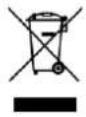 | DISPOSALThe "crossed-out dustbin" symbol requires the separate disposal of waste electrical and electronic equipment (WEEE). Electrical and electronic equipment may contain hazardous and environmentally harmful substances. Therefore, do not dispose of them in unsorted residual waste, but at a designated collection point for waste electrical and electronic equipment. This will help to protect resources and the environment. For further information, please contact your dealer or the local authorities. Directive 2012/19/EU |
 | BATTERY DISPOSALIn accordance with current legislation on batteries, accumulators and related waste, the crossed-out wheeled garbage can symbol on the battery indicates that it is prohibited to dispose of used batteries in household waste. Batteries and accumulators contain highly polluting substances. The user is obliged to dispose of used batteries at the collection points in the municipality or in the appropriate containers. The service is free of charge. In this way, the legal requirements are complied with and the environment is protected.These symbols can be found on batteries:Li = battery contains lithiumAl = battery contains alkaliMn = battery contains manganeseCR 2025 (Li); AA (Al, Mn); AAA (Al, Mn) |
 | DECLARATION OF CONFORMITYWe hereby confirm that this product complies with the essential requirements, regulations and directives of the EU. You can view the detailed declaration of conformity at any time under the following link:https://www.schuss-home.at/downloads |
Errors and technical changes excepted.
BE COOL
DESCRIPTION OF THE DEVICE AND SCOPE OF DELIVERY
SCOPE OF DELIVERY
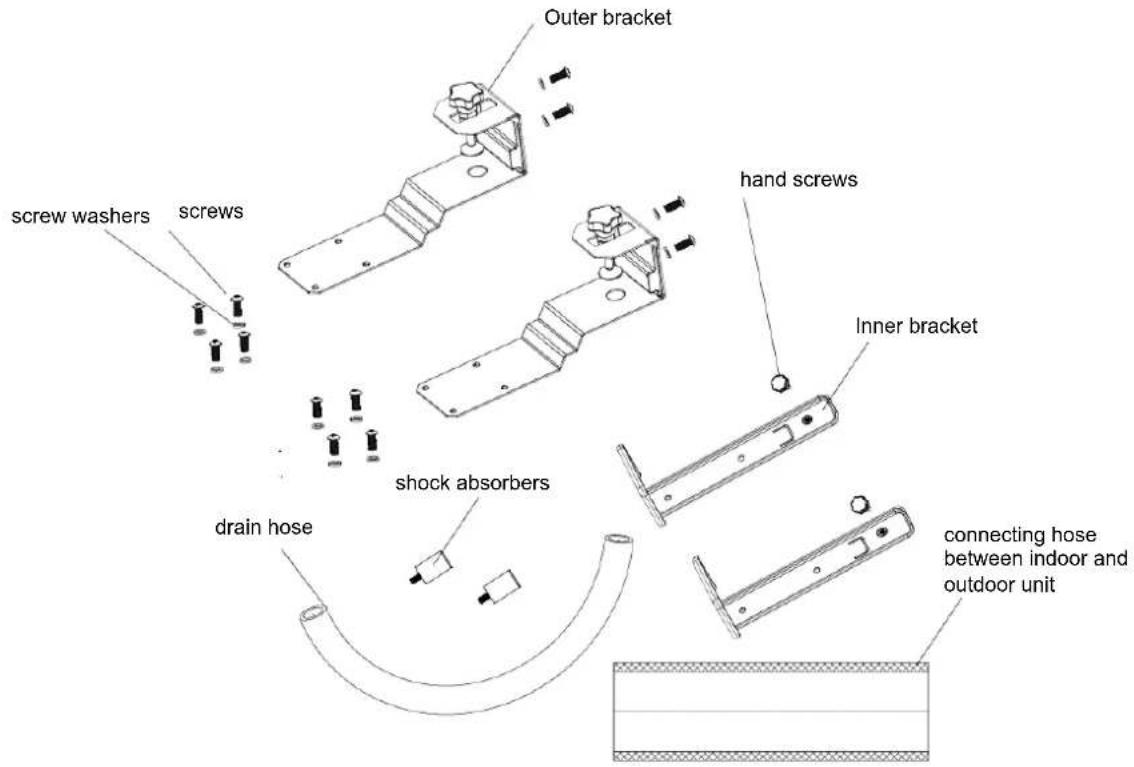
The BE COOL air conditioner is supplied with:
- 1x indoor unit
- 1x outdoor unit
- 1x drain hose
- 2x outer bracket
- 2x inner bracket
- 2x shock absorbers
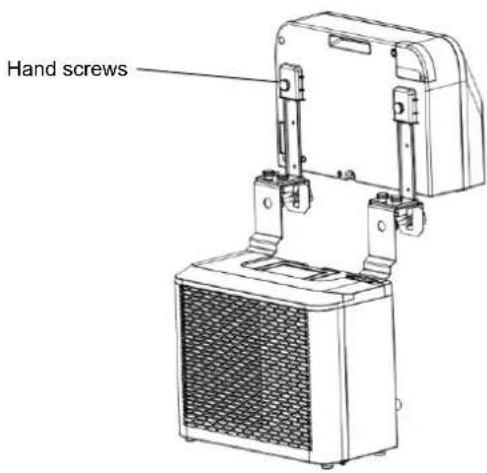
- 2x hand screws
- 12x screws
- 12x screw washers
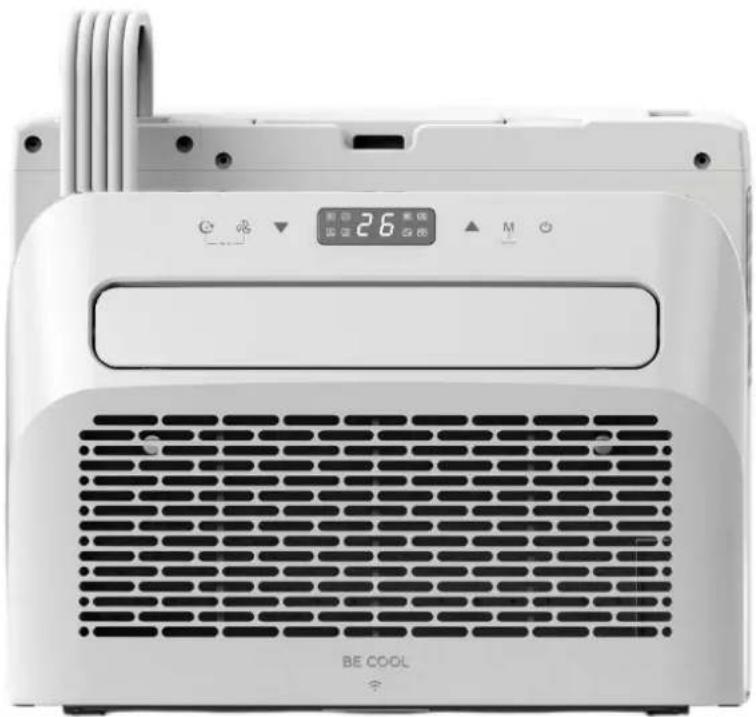
DESCRIPTION
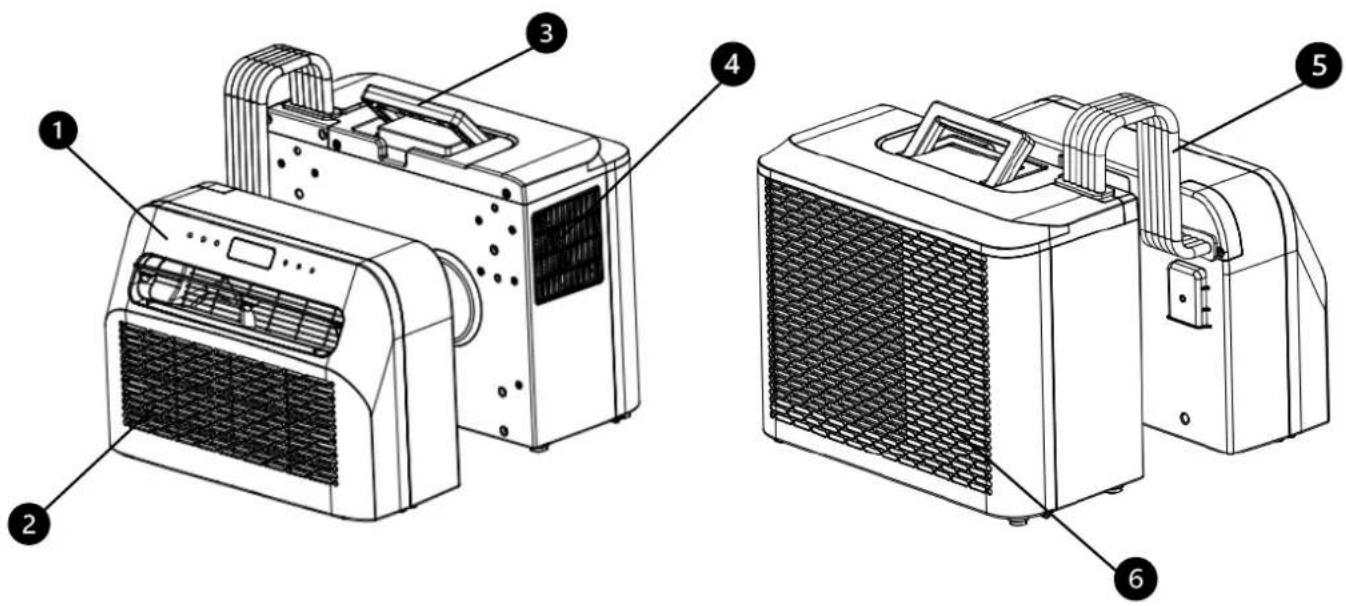
- control panel 4. air outlet
- air inlet and filter 5. hose
- carrying handle 6. air inlet
BE COOL
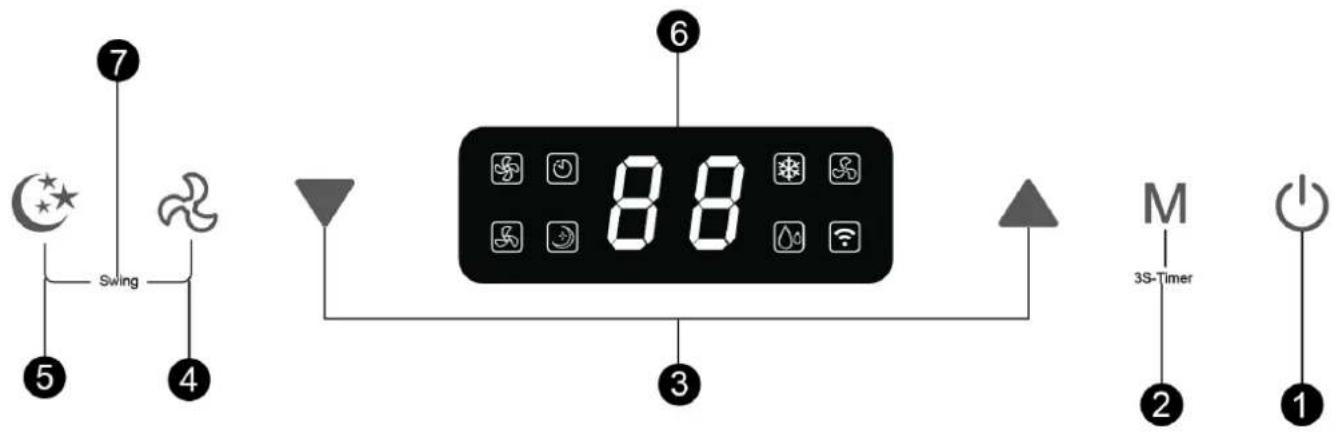
OPERATING FIELD
flowchart
graph TD
    A["5: Star"] --> B["Swing"]
    C["4: Wind Turbine"] --> D["88: Diode with Air Condition Icon"]
    E["6: Air Condition Icon"] --> F["3S-Timer M"]
    G["1: Power Symbol"] --> H["3S-Timer 2"]
    I["7: Display"] --> J["Switch"]
1. On/off switch
Press this button to switch the air conditioner on or off.
When switching on, the temperature is set to 22^ as standard. The temperature sensor detects the current room temperature. If the room temperature exceeds 22^ , the outdoor unit starts to lower the temperature. However, if the room temperature is already below 22^ , the outdoor unit remains inactive.
2. Mode
Press this button to switch between cooling, ventilation and dehumidification modes.
In standby or switched-on mode, you can activate or deactivate the timer by pressing this button for 3 seconds.
BE COOL
3. Temperature/time setting button
In cooling mode, you can use this button to set the temperature; the range is between 16 and 30°C.
In timer mode, use the button to set the switch-on and switch-off time of the appliance.
Press the up and down buttons simultaneously to switch between ^ C and ^ F.
4. Speed button
Press the button to select between low and high wind speed.
5. Sleep mode
Press this button to switch sleep mode on or off. After 20 seconds, all lights and the digital display go out and the air conditioner switches to sleep mode. The fan of the indoor unit continues to run at a reduced wind speed.
6. Digital display
The digital display of the caravan air conditioner shows important information such as the current temperature and the timer settings. It makes it possible to set the temperature in cooling mode to the desired value, with a temperature range between 16 °C and 30 °C. In addition, the display can be used to check the timer settings, which is useful for switching the appliance on or off at specific times. During operation, icons for the selected modes such as cooling, ventilation or dehumidification are also shown on the display so that users can quickly identify the appliance's current mode.
7. Swivel function
Press the buttons for speed and sleep mode at the same time to change the Activate or deactivate the swivel function.
INSTALLATION
IMPORTANT!
Leave the appliance upright for at least 24 hours before using it for the first time.
- Unpack the appliance and accessories and check that the hose between the indoor and outdoor units is properly connected. Also make sure that the condensation drain is sealed with a rubber cover. Finally, check that all the accessories are present.
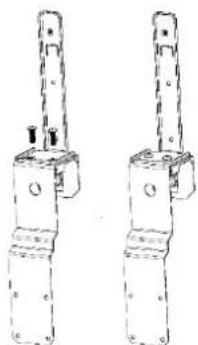
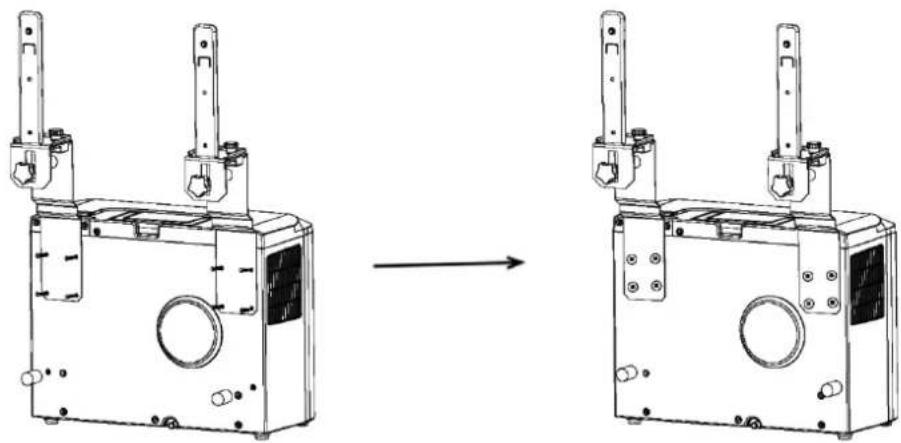
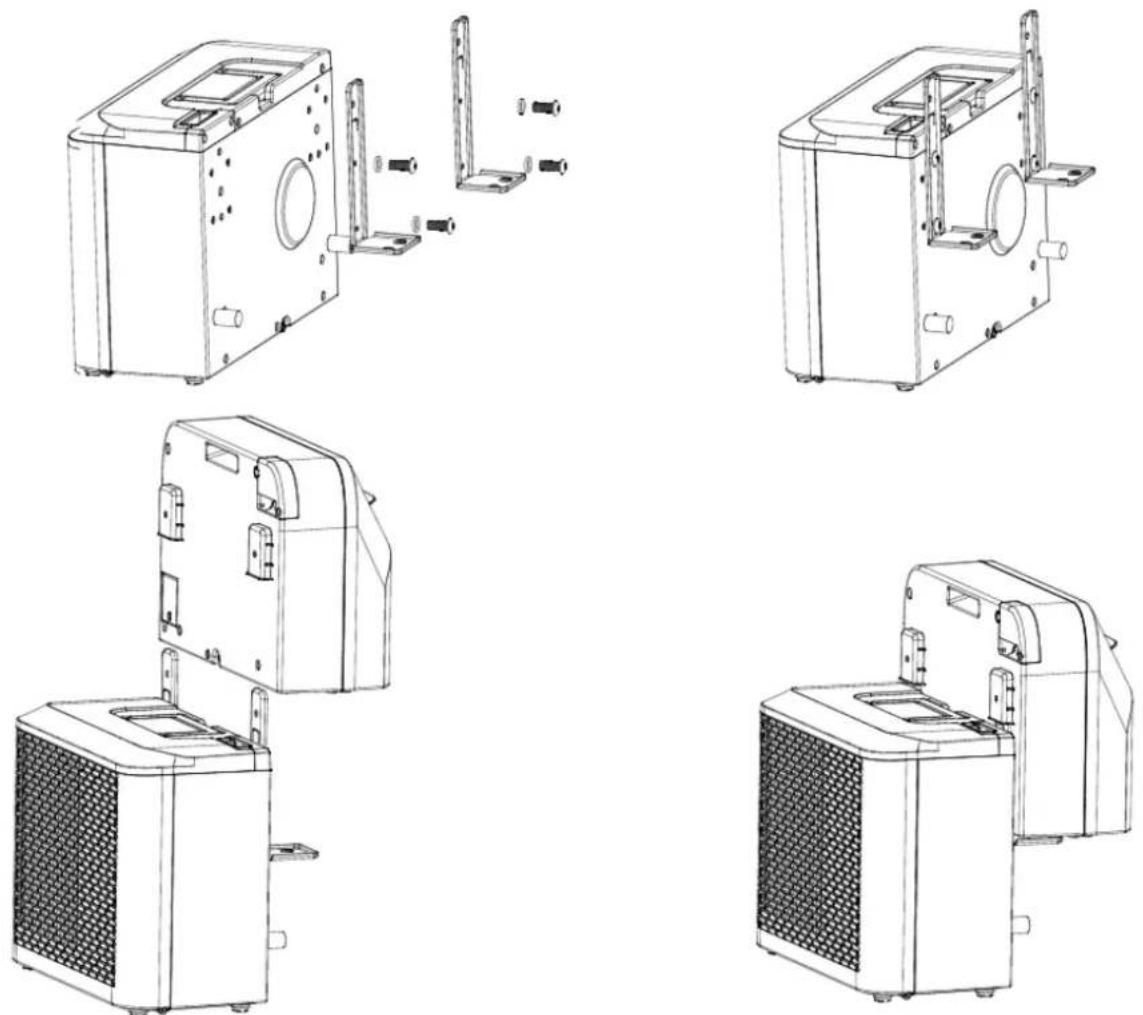
- Fit the accessories as shown in the illustration. Attach the outer bracket to the support block and to the inner bracket by tightening the screws and washer supplied.
BE COOL
natural_image
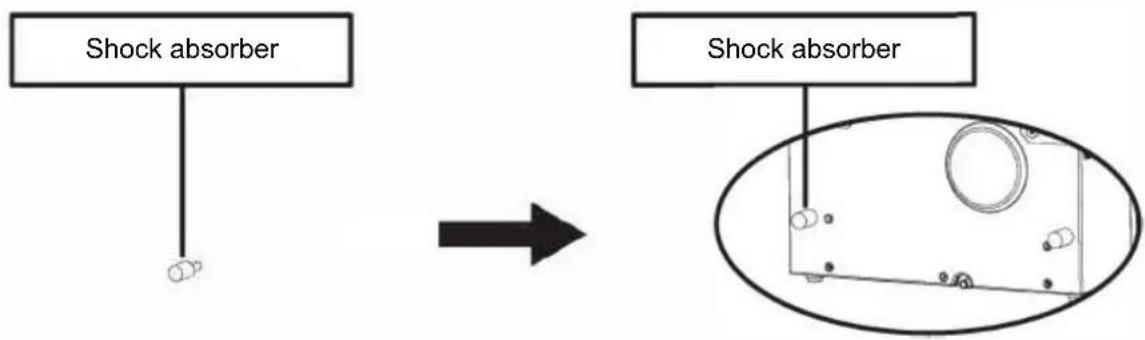
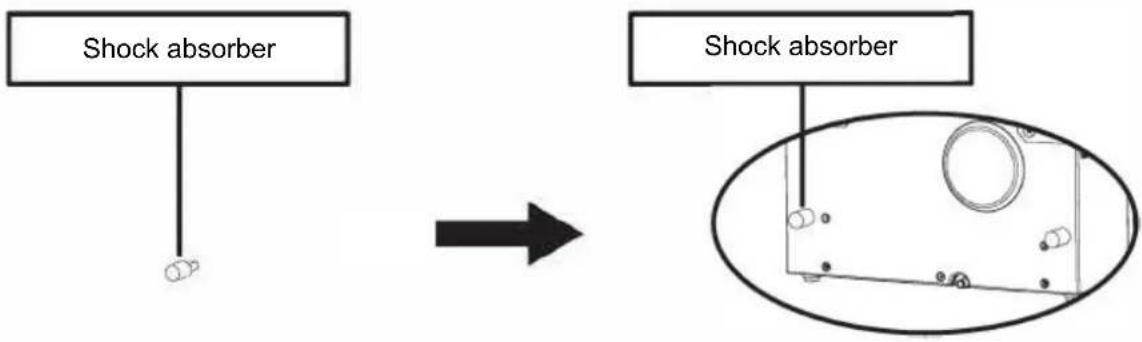
Two identical line drawings of a mechanical device with no visible text, numbers, or symbols.- Attach the shock absorbers to the back of the outdoor unit as shown in the illustration.
flowchart
graph TD
    A["Shock absorber"] --> B["Device with circular components"]
    C["Shock absorber"] --> D["Device with circular components"]
- Assemble the bracket as shown in the illustration below. Attach the indoor and outdoor unit to the bracket to connect both parts together.
Tighten the supplied screws and washers in the holes provided to securely fasten the devices to the bracket.
natural_image
Technical line drawing of a mechanical device before and after assembly (no text or symbols)- Attach the indoor unit to the bracket and tighten the bracket firmly. (see illustration below).
BE COOL
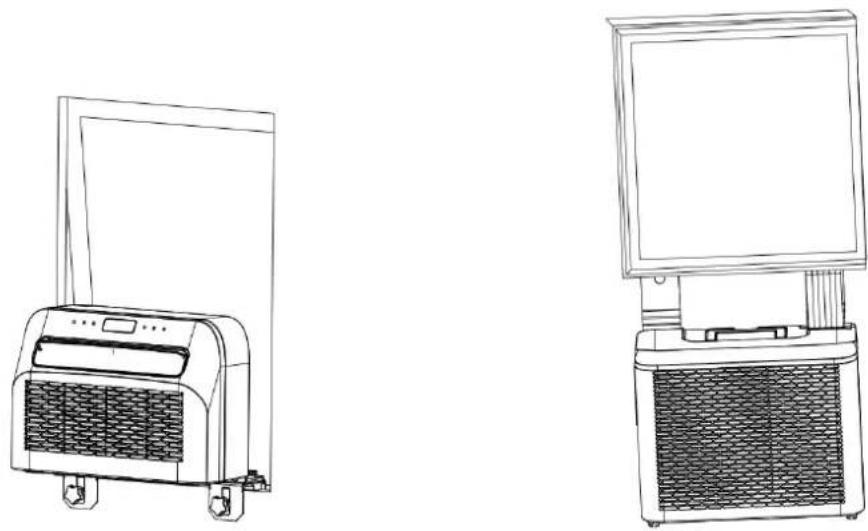
- Insert the complete unit into the window of the caravan and tighten the bracket to fix it securely.
natural_image
Line drawings of two household appliances: a front-mounted air conditioner unit and a computer monitor unit (no text or symbols)MAINTENANCE AND CLEANING
- Ensure that the appliance is disconnected from the power supply before carrying out maintenance work.
- Do not use chemical cleaning agents such as petrol to clean the appliance.
- Do not clean the appliance directly under running water.
- If the air conditioner is damaged, please contact the dealer or a specialist workshop.
Cleaning
Caution: Always unplug the power cable from the socket before cleaning or maintenance.
Cleaning the air filter
- Regularly remove dust from the filter to ensure optimum function.
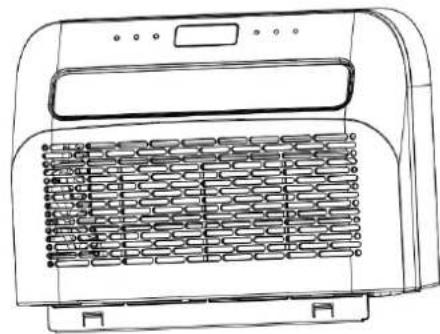
- Remove the filter as shown in the illustration below.
- Clean the filter with tap water and/or a vacuum cleaner to remove any dirt.
- Do not use water above 40 °C for cleaning and do not expose the filter to direct sunlight.
BE COOL
• Make sure that the filter is completely dry before reinserting it into the air conditioner.
natural_image
Line drawing of a portable air conditioner unit with cooling fins and heat exchanger (no text or symbols)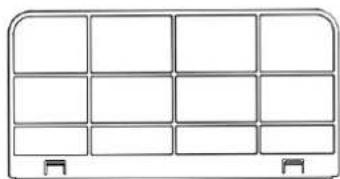
natural_image
Simple line drawing of a 3x4 grid layout with no text, numbers, or symbolsCleaning the surface of the appliance
- First wipe the surface with a neutral cleaning agent and a damp cloth.
- Then dry the appliance thoroughly with a dry cloth.
- Make sure that neither water nor cleaning agents get inside the appliance.
- Do not use aggressive cleaning agents or petrol to clean the air conditioner.
Storage
If the appliance will not be used for an extended period of time, remove the covers from the drainage openings on the underside of the indoor and outdoor appliance to drain off all condensation water in a suitable place.
- Remove the device from the installation location.
- Remove the rubber seal from the indoor and outdoor unit and drain off the condensation.
- Run the fan to dry the inside of the appliance.
- Switch off the air conditioner and disconnect the mains plug.
- Clean the filter and reinsert it.
- Remove all brackets from the air conditioner, mount the indoor unit brackets on the outdoor unit as shown in the illustration below, and then place the unit against a wall.
- Store the air conditioner in a cool, dry place.
- It is recommended that the device is stored in its original packaging to protect it from dust and dirt.
BE COOL
CHECKS AT THE START OF THE SEASON
- Check that the power supply cable and the socket are in order and that the earthing is functional.
- Ensure that the plug is carefully fitted in the condensation water outlet and that the filters are in place.
- Follow the installation and safety instructions carefully.
TROUBLESHOOTING
If the appliance does not work or only works to a limited extent:
Check whether an error code appears on the display and refer to the code table to find a solution. If no error code is displayed, refer to the error table to find a possible solution.
BE COOL
| Code table | ||
| FL | Water tank full | Remove the rubber stopper and allow the water to drain. |
| E1 | System temperature sensor defective | Replace the system temperature sensor.Contact the dealer or our service department. |
| E2 | Room temperature sensor faulty | Replace the room temperature sensor. Contact the dealer or our service department. |
| EF | Indoor unit motor has failed | Replace motor. |
| Eb | Fluorine deficiency | Contact the dealer or our service department. |
| E4 | Frost protection activated | Make sure that the air outlet is clear and keep the air baffle open. |
| FL | Water tank full | Remove the rubber stopper and allow the water to drain. |
| Error table | ||
| Problem | Cause | Solution |
| Device cannot be switched on | No power | Activate power supply |
| Damaged socket outlet | Switch off the power supply and have the socket checked or repaired | |
| Unknown reason | Contact dealer/service | |
| Low air flow rate or insufficient cooling | Lowest fan speed set | Increase fan speed |
| Air filter is dirty | Check and clean the filter | |
| Supply air or exhaust air of the indoor unit blocked | Check whether the appliance is blocked and remove obstacles if necessary | |
| Ambient temperature too low or too high | The ambient temperature should be between 18 °C and 40 °C | |
| Insufficient mains voltage | Contact an electrician or use another power connection | |
| No cooling effect, only air circulation | Device runs in fan mode | Select cooling mode (A/C) |
| Cooling mode has just switched off automatically | Wait about 3-5 minutes until the thermostat starts up again | |
| Unusual noises or vibrations | Brackets not correctly attached to the vehicle or fastening screws loose | Check the brackets and ensure that the fastening screws are tight. |
| Water leakage from the indoor unit | Rubber plug on the underside of the indoor unit is missing or does not fit tightly enough in the opening | Check or replace rubber stopper |
| Device hangs at an angle | Device must be mounted horizontally (maximum angle of inclination <3 °C) | |
BE COOL
Appliance emits an unusual odor
There is a serious problem
Switch off the device immediately and contact the dealer
Smart Home Wi-Fi connection guide
IMPORTANT
Please note that only 2.4 GHz networks are supported!
Transmission power: max. 100mW
App installation
Download the "Smart life" app from the Play Store (Android) or the App Store (iOS). The following QR will take you directly to the app download:

Scan QR code
Registration
If you do not yet have
a Smart Life account, you can register or log in with a verification code that will be sent to you by SMS.
To register:
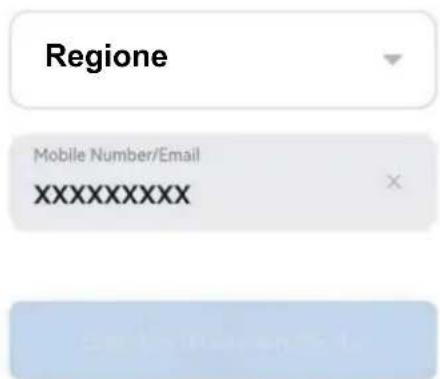
- Tap to open the registration page.
- The system automatically recognizes your country or region. You also have the option of selecting the country code manually. Enter your cell phone number or e-mail address and tap "Next".
- If you select the cell phone number option, enter the verification code you received by SMS. Then set a password and tap on "Confirm" to complete the registration.
BE COOL


Register
| Mobile Number/Email |
| 1 |

natural_image
Plain light blue rectangular shape with no visible text, symbols, or features.Register

natural_image
Blank white image with no visible text, symbols, or discernible subjectConnect a device to the network:
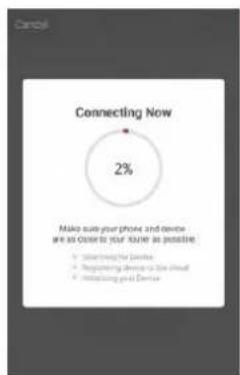
- Set the device to be connected to standby mode and press the "Speed" button (4) on the device for 3 seconds to be able to connect to the network.
- Open the "Smart Life" app on your cell phone and click on the "+" in the top right-hand corner to connect to a new device.
- Make sure that the light on the device flashes (2x/second) and confirm in the app that the light is flashing.
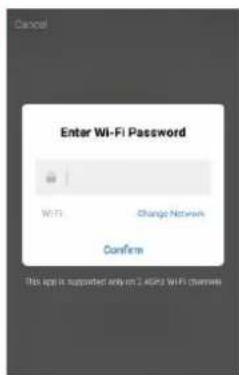
- Then select the Wi-Fi network (2.4 Ghz) and enter the password.
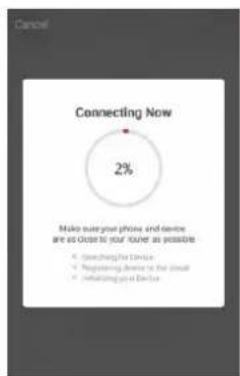
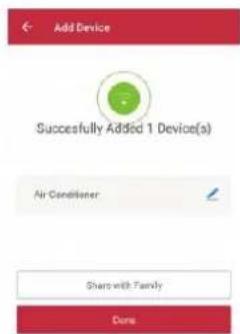
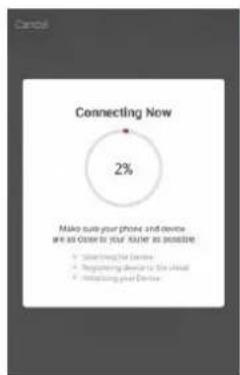
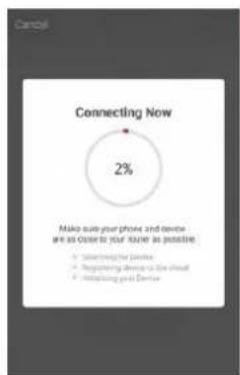
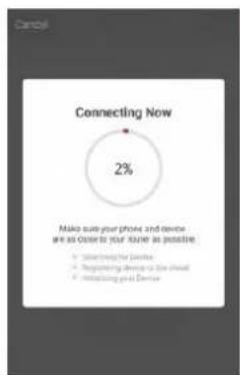
The app will now connect to the device.

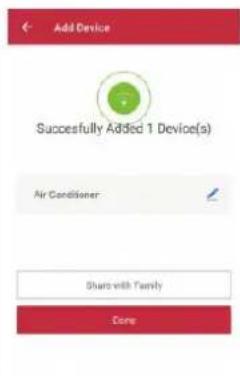
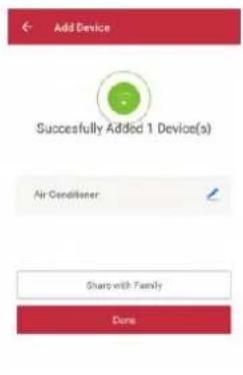
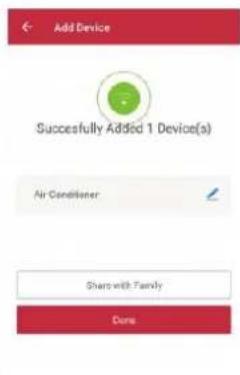
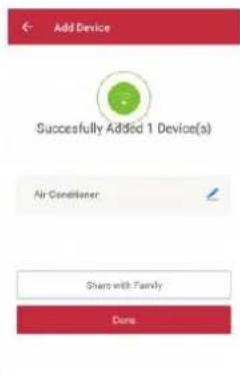
- The device should now be displayed in your app and is therefore successfully connected.
Note:
• If the device is displayed as "online" in the app, it can be controlled via the app.
- If the device is "offline", it can be switched on via the app.
The application also works with Amazon Alexa and Google Assistant

WORKS WITH amazon alexa

BE COOL
| Technical data WiFi | |
| radio technology: | Wifi (WLAN) |
| Radio operating frequency | 2412MHz-2472MHz |
| BLE operating frequency | 2402MHz-2480MHz |
| Modulation type | 802.11b: DSSS802.11g: OFDM802.11n(20MHz): OFDM |
| Fixed frequency software | SecureCRT.exe |
| Antenna amplification | 2.5dBi |
| Antenna type | PCB |
| Transmission power | 520dBm |
| Technical information | |
| Item number | BC5CSKL |
| Cooling capacity | 5000 BTU/h |
| 1465 watts | |
| Max. Power consumption | 560 watts |
| Dehumidification rate | 0.5L/h |
| Input voltage | 220 - 240 V |
| Frequency | 50 Hz |
| WIFI transmission frequency: | 2.4 GHz |
| Transmission power: | max. 100 mW |
| Refrigerant/filling | R290, 130 g |
| Energy efficiency EER | 2,6 |
| Energy efficiency class | A |
| Air circulation | 280 - 330m3/h |
| Noise level (sound power) | 63 dB(A) |
| Weight | 22.5 kg |
| Indoor unit dimensions | 454x298x170 mm |
| Dimensions outdoor unit | 445x205x353 mm |
| Manufacturer contact address for further information | Schuss Home Electronic GmbHScheringgasse 3, A-1140 ViennaTel: +43 (1) 97 0 21 - 0Service line: +43 (1) 97 0 21 - 502www.becool.atFB-No.: 236974 t / FB-Court: Vienna |
BE COOL
| Information requirements for single duct and double duct air conditionier | P | |||
| Information to identify the model(s) to which the information relates to: | ||||
| Description | Symbol | Value | Unit | |
| Description | P_rated for cooling | 1.472 | kW | |
| Rated capacity for cooling | P_rated for heating | - | KW | |
| Rated capacity for heating | P_EER | 0.546 | kW | |
| Rated power input for cooling | P_COP | - | kW | |
| Rated power input for heating | EER_d | 2.696 | - | |
| Rated Energy efficiency ratio | COP_d | - | - | |
| Information identifying the model(s) to which the information relates: | ||||
| Description | Symbol | Value | Unit | |
| Power consumption in thermostat-off mode | P_TO | N/A | W | |
| Power consumption in standby P mode | P_SB | 2.0 | W | |
| Electricity consumption of single/double duct appliances (indicate for cooling and heating separately) | Q_SD | SD: 0.546 (cooling) | kWh/h | |
| Sound power level | L_WA | 63 | dB(A) | |
| Global warming potential | GWP | 3 | kg CO_2 eq. | |
| Contact details for obtaining more information | Schuss Home Electronic GmbH Scheringgasse 31140 Vienna, AustriaTel.: +43 (1) 97 0 21 – 0www.becool.at | |||
BE COOL
WARRANTY
With this quality product from BE COOL, you have made a decision for innovation, durability and reliability.
For this BE COOL device we grant a warranty period of 2 years from the date of purchase valid in Austria!
If, contrary to expectations, service work on your device should nevertheless be necessary during this period, we hereby guarantee you a free repair (spare parts and labor) or (at Schuss's discretion) replacement of the product. If neither repair nor replacement is possible for economic reasons, we reserve the right to issue a time value credit note.
In the case of air conditioners, please always contact the customer hotline as a first step (see sticker on the appliance or front page of the operating instructions); in the case of fans, please contact your specialist dealer or us directly. Please note that repair work not carried out by an authorized workshop in Austria will immediately invalidate this warranty.
This guarantee does not cover
- Repair or replacement of parts due to normal wear and tear
- Damage due to non-compliance with the operating instructions
• Devices that are used - even partially - for commercial purposes - devices mechanically damaged by external influences (fall, impact, breakage, improper use, etc.) as well as signs of wear and tear of an aesthetic nature.
• Devices that have been handled improperly
• Devices that have not been opened by our authorized service workshop.
• Damage caused by improperly closed condensation drain valves on air conditioning units or incorrectly inserted water tanks. - Unfulfilled consumer expectations.
- Damage caused by force majeure, water, lightning, overvoltage.
• Devices where the type designation and/or serial number on the device has been changed, deleted, made illegible or removed. - services outside our authorized workshops, the transport costs to an authorized workshop or to us and back, as well as the associated risks.
We would like to emphasize that within the warranty period, a lump sum of € 60,- (indexed based on CPI 2015, June 2020) will be charged in the event of operating errors or if no error has been detected.
The provision of a warranty service (repair or replacement of the device) does not extend the absolute warranty period of 2 years from the date of purchase.
The 2-year guarantee is only valid on presentation of the proof of purchase (must include the name and address of the dealer and the full name of the appliance) and the corresponding guarantee certificate, on which the appliance type and the serial number (visible on the box and on the back or underside of the appliance) must be noted! Without the warranty certificate, only the statutory warranty applies!
We expressly point out that the statutory warranty rights are not affected by this guarantee and remain unaffected.
Schuss Home Electronic GmbH and its vicarious agents are only liable for damages in the event of gross negligence or intent. Liability for loss of profit, expected but unrealized savings, consequential damages and damages from third party claims is excluded. Damage to or for recorded data is always excluded from the liability for damages.
Congratulations on your choice. We hope you enjoy using your BE COOL appliance!
ADDRESS
Schuss Home Electronic GmbH
1140 Vienna, Scheringgasse 3
Tel.: +43 (0)1/ 970 21
Type designation:
Serial number:
In the event of a warranty claim, this warranty certificate must be handed over together with the device to the authorized service workshop or the dealer from whom you purchased the device!
BE COOL
WICHTIG!
These instructions are only for the BE COOL-Service center!

A Service or repairing of the device must only be performed by a qualified technician who is allowed to handle the R290 refrigerant.
Do not attempt to repair or open the case of the air conditioner yourself, this leads to the immediate loss oft he warranty.
INSTRUCTIONS FOR REPAIRING APPLIANCES CONTAINING R290
1 GENERAL INSTRUCTIONS
1.1 Checks to the area
Prior to beginning work on systems containing flammable refrigerants, safety checks are necessary to ensure that the risk of ignition is minimized. For repair to the refrigerating system, the following precautions shall be complied with prior to conducting work on the system.
1.2 Work procedure
Work shall be undertaken under a controlled procedure so as to minimize the risk of a flammable gas or vapor being present while the work is being performed.
1.3 General work area
All maintenance staff and others working in the local area shall be instructed on the nature of work being carried out. Work in confined spaces shall be avoided. The area around the workspace shall be sectioned off. Ensure that the conditions within the area have been made safe by control of flammable material.
1.4 Checking for presence of refrigerant
The area shall be checked with an appropriate refrigerant detector prior to and during work, to ensure the technician is aware of potentially flammable atmospheres. Ensure that the leak section equipment being used is suitable for use with flammable refrigerants, i.e. non sparking, adequately sealed or intrinsically safe.
1.5 Presence of fire extinguisher
If any hot work is to be conducted on the refrigeration equipment or any associated parts, appropriate fire extinguishing equipment shall be available to hand. Have a dry powder or CO 2 fire extinguisher adjacent to the charging area.
1.6 No ignition sources
BE COOL
No person carrying out work in relation to a refrigeration system which involves exposing any pipe work that contains or has contained flammable refrigerant shall use any sources of ignition in such a manner that it may lead to the risk of fire or explosion. All possible ignition sources, including ecigarette smoking, should be kept sufficiently far away from the site of installation, repairing, removing and disposal, during which flammable refrigerant can possibly be released to the surrounding space. Prior to work taking place, the area around the equipment is to be surveyed to make sure that there are no flammable hazards or ignition risks. "No Smoking" signs shall be displayed.
1.7 Ventilated area
Ensure that the area is in the open or that it is adequately ventilated before breaking into the system or conducting any hot work. A degree of ventilation shall continue during the period that the work is carried out. The ventilation should safely disperse any released refrigerant and preferably expel it externally into the atmosphere.
1.8 Checks to the refrigeration equipment
Where electrical components are being changed, they shall be fit for the purpose and to the correct specification. At all times the manufacturer's maintenance and service guidelines shall be followed. If in doubt consult the manufacturer's technical department for assistance. The following checks shall be applied to installations using flammable refrigerants: the charge size is in accordance with the room size within which the refrigerant containing parts are installed; the ventilation machinery and outlets are operating adequately and are not obstructed; if an indirect refrigerating circuit is being used, the secondary circuit shall be checked for the presence of refrigerant; marking to the equipment continues to be visible and legible. Markings and signs that are illegible shall be corrected; refrigeration pipe or components are installed in a position where they are unlikely to be exposed to any substance which may corrode refrigerant containing components, unless the components are constructed of materials which are inherently resistant to being corroded or are suitably protected against being so corroded.
1.9 Checks to electrical devices
Repair and maintenance to electrical components shall include initial safety checks and component inspection procedures. If a fault exists that could compromise safety, then no electrical supply shall be connected to the circuit until it is satisfactorily dealt with. If the fault cannot be corrected immediately but it is necessary to continue operation, an adequate temporary solution shall be used. This shall be reported to the owner of the equipment so all parties are advised.
Initial safety checks shall include: Those capacitors are discharged: this shall be done in a safe manner to avoid possibility of sparking; that there no live electrical components and wiring are exposed while charging, recovering or purging the system; that there is continuity of earth bonding.
2 REPAIRS TO SEALED COMPONENTS
2.1 During repairs to sealed components, all electrical supplies shall be disconnected from the equipment being worked upon prior to any removal of sealed covers, etc. If it is absolutely necessary to have an electrical supply to equipment during servicing, then a permanently operating form of leak detection shall be located at the most critical point to warn of a potentially hazardous situation.
2.2 Particular attention shall be paid to the following to ensure that by working on electrical components, the casing is not altered in such a way that the level of protection is affected.
This shall include damage to cables, excessive number of connections, terminals not made to original specification, damage to seals, incorrect fitting of glands, etc. Ensure that apparatus is mounted securely. Ensure that seals or sealing materials have not degraded such that they no longer serve the purpose of preventing the ingress of flammable atmospheres. Replacement parts shall be in accordance with the manufacturer's specifications.
NOTE The use of silicon sealant may inhibit the effectiveness of some types of leak detection equipment. Intrinsically safe components do not have to be isolated prior to working on them.
3 REPAIR TO INTRINSICALLY SAFE COMPONENTS
BE COOL
Do not apply any permanent inductive or capacitance loads to the circuit without ensuring that this will not exceed the permissible voltage and current permitted for the equipment in use.
Intrinsically safe components are the only types that can be worked on while live in the presence of a flammable atmosphere. The test apparatus shall be at the correct rating. Replace components only with parts specified by the manufacturer. Other parts may result in the ignition of refrigerant in the atmosphere from a leak.
4 CABLING
Check that cabling will not be subject to wear, corrosion, excessive pressure, vibration, sharp edges or any other adverse environmental effects. The check shall also take into account the effects of aging or continual vibration from sources such as compressors or fans.
5 DETECTION OF FLAMMABLE REFRIGERANTS
Under no circumstances shall potential sources of ignition be used in the searching for or detection of refrigerant leaks. A halide torch (or any other detector using a naked flame) shall not be used.
6 LEAK DETECTION METHODS
The following leak detection methods are deemed acceptable for systems containing flammable refrigerants. Electronic leak detectors shall be used to detect flammable refrigerants, but the sensitivity may not be adequate, or may need recalibration. (Detection equipment shall be calibrated in a refrigerant-free area.) Ensure that the detector is not a potential source of ignition and is suitable for the refrigerant used. Leak detection equipment shall be set at a percentage of the LFL of the refrigerant and shall be calibrated to the refrigerant employed and the appropriate percentage of gas (25 % maximum) is confirmed. Leak detection fluids are suitable for use with most refrigerants but the use of detergents containing chlorine shall be avoided as the chlorine may react with the refrigerant and corrode the copper pipe-work. If a leak is suspected, all naked flames shall be removed/extinguished. If a leakage of refrigerant is found which requires brazing, all of the refrigerant shall be recovered from the system, or isolated (by means of shut off valves) in a part of the system remote from the leak. Oxygen free nitrogen (OFN) shall then be purged through the system both before and during the brazing process.
7 REMOVAL AND EVACUATION
When breaking into the refrigerant circuit to make repairs – or for any other purpose – conventional procedures shall be used. However, it is important that best practice is followed since flammability is a consideration. The following procedure shall be adhered to: remove refrigerant; purge the circuit with inert gas; evacuate; purge again with inert gas; open the circuit by cutting or brazing. The refrigerant charge shall be recovered into the correct recovery cylinders. The system shall be “flushed” with OFN to render the unit safe. This process may need to be repeated several times. Compressed air or oxygen shall not be used for this task. Flushing shall be achieved by breaking the vacuum in the system with OFN and continuing to fill until the working pressure is achieved, then venting to atmosphere, and finally pulling down to a vacuum. This process shall be repeated until no refrigerant is within the system. When the final OFN charge is used, the system shall be vented down to atmospheric pressure to enable work to take place. This operation is absolutely vital if brazing operations on the pipework are to take place.
Ensure that the outlet for the vacuum pump is not close to any ignition sources and there is ventilation available.
8 CHARGING PROCEDURES
In addition to conventional charging procedures, the following requirements shall be followed.
- Ensure that contamination of different refrigerants does not occur when using charging equipment. Hoses or lines shall be as short as possible to minimize the amount of refrigerant contained in them.
- Cylinders shall be kept upright.
- Ensure that the refrigeration system is earthed prior to charging the system with refrigerant.
- Label the system when charging is complete (if not already).
• Extreme care shall be taken not to overfill the refrigeration system. - Prior to recharging the system it shall be pressure tested with OFN. The system shall be leak Tested on completion of charging but prior to commissioning. A follow up leak test shall be Carried out prior to leaving the site.
9 DECOMMISSIONING
Before carrying out this procedure, it is essential that the technician is completely familiar with the equipment and all its detail. It is recommended good practice that all refrigerants are recovered safely. Prior to the task being carried
BE COOL
out, an oil and refrigerant sample shall be taken in case analysis is required prior to re-use of reclaimed refrigerant. It is essential that electrical power is available before the task is commenced.
- Become familiar with the equipment and its operation.
- Isolate system electrically.
- Before attempting the procedure ensure that :mechanical handling equipment is available, if required, for handling refrigerant cylinders; all personal protective equipment is available and being used correctly; the recovery process is supervised at all times by a competent person; recovery equipment and cylinders conform to the appropriate standards.
- Pump down refrigerant system, if possible.
- If a vacuum is not possible, make a manifold so that refrigerant can be removed from various parts of the system.
- Make sure that cylinder is situated on the scales before recovery takes place.
- Start the recovery machine and operate in accordance with manufacturer's instructions.
- Do not overfill cylinders. (No more than 80 % volume liquid charge).
- Do not exceed the maximum working pressure of the cylinder, even temporarily.
- When the cylinders have been filled correctly and the process completed, make sure 11. that the cylinders and the equipment are removed from site promptly and all isolation
- valves on the equipment are closed off.
- Recovered refrigerant shall not be charged into another refrigeration system
- unless it has been cleaned and checked.
10 LABELLING
Equipment shall be labelled stating that it has been de-commissioned and emptied of refrigerant. The label shall be dated and signed. Ensure that there are labels on the equipment stating the equipment contains flammable refrigerant.
11 RECOVERY
When removing refrigerant from a system, either for servicing or decommissioning, it is recommended good practice that all refrigerants are removed safely. When transferring refrigerant into cylinders, ensure that only appropriate refrigerant recovery cylinders are employed. Ensure that the correct number of cylinders for holding the total system charge is available. All cylinders to be used are designated for the recovered refrigerant and labelled for that refrigerant (i.e. special cylinders for the recovery of refrigerant). Cylinders shall be complete with pressure relief valve and associated shut-off valves in good working order. Empty recovery cylinders are evacuated and, if possible, cooled before recovery occurs.
The recovery equipment shall be in good working order with a set of instructions concerning the equipment that is at hand and shall be suitable for the recovery of flammable refrigerants. In addition, a set of calibrated weighing scales shall be available and in good working order. Hoses shall be complete with leak-free disconnect couplings and in good condition. Before using the recovery machine, check that it is in satisfactory working order, has been properly maintained and that any associated electrical components are sealed to prevent ignition in the event of a refrigerant release. Consult manufacturer if in doubt.
The recovered refrigerant shall be returned to the refrigerant supplier in the correct recovery cylinder, and the relevant Waste Transfer Note arranged. Do not mix refrigerants in recovery units and especially not in cylinders.
If compressors or compressor oils are to be removed, ensure that they have been evacuated to an acceptable level to make certain that flammable refrigerant does not remain within the lubricant. The evacuation process shall be carried out prior to returning the compressor to the suppliers. Only electric heating to the compressor body shall be employed to accelerate this process. When oil is drained from a system, it shall be carried out safely.
Competence of service personnel
General
Special training additional to usual refrigerating equipment repair procedures is required when equipment with flammable refrigerants is affected.
In many countries, this training is carried out by national training organizations that are accredited to teach the relevant national competency standards that may be set in legislation. The achieved competence should be documented by a certificate.
BE COOL
Training
The training should include the substance of the following:
Information about the explosion potential of flammable refrigerants to show that flammables may be dangerous when handled without care.
Information about potential ignition sources, especially those that are not obvious, such as lighters, light switches, vacuum cleaners, electric heaters.
Information about the different safety concepts:
Unventilated – (see Clause GG.2) Safety of the appliance does not depend on ventilation of the housing. Switching off the appliance or opening of the housing has no significant effect on the safety. Nevertheless, it is possible that leaking refrigerant may accumulate inside the enclosure and flammable atmosphere will be released when the enclosure is opened.
Ventilated enclosure – (see Clause GG.4) Safety of the appliance depends on ventilation of the housing. Switching off the appliance or opening of the enclosure has a significant effect on the safety. Care should be taken to ensure a sufficient ventilation before.
Ventilated room – (see Clause GG.5) Safety of the appliance depends on the ventilation of the room. Switching off the appliance or opening of the housing has no significant effect on the safety. The ventilation of the room shall not be switched off during repair procedures. Information about the concept of sealed components and sealed enclosures according to IEC 60079-15:2010.
Information about the correct working procedures:
1. Commissioning
o Ensure that the floor area is sufficient for the refrigerant charge or that the ventilation duct is assembled in a correct manner.
o Connect the pipes and carry out a leak test before charging with refrigerant.
o Check safety equipment before putting into service.
2. Maintenance
o Portable equipment shall be repaired outside or in a workshop specially equipped for servicing units with flammable refrigerants.
o Ensure sufficient ventilation at the repair place.
Be aware that malfunction of the equipment may be caused by refrigerant loss and a refrigerant leak is possible.
Discharge capacitors in a way that won't cause any spark. The standard procedure to short circuit the capacitor terminals usually creates sparks.
o Reassemble sealed enclosures accurately. If seals are worn, replace them.
o Check safety equipment before putting into service.
- Repair o Portable equipment shall be repaired outside or in a workshop specially equipped for servicing units with flammable refrigerants.
o Ensure sufficient ventilation at the repair place.
o Be aware that malfunction of the equipment may be caused by refrigerant loss and a refrigerant leak is possible.
o Discharge capacitors in a way that won't cause any spark.
When brazing is required, the following procedures shall be carried out in the right order:
- Remove the refrigerant. If the recovery is not required by national regulations, drain the refrigerant to the outside. Take care that the drained refrigerant will not cause any danger. In doubt, one person should guard the outlet. Take special care that drained refrigerant will not float back into the building.
• Evacuate the refrigerant circuit.
• Purge the refrigerant circuit with nitrogen for 5 min.
- Evacuate again.
- Remove parts to be replaced by cutting, not by flame.
• Purge the braze point with nitrogen during the brazing procedure.
- Carry out a leak test before charging with refrigerant.
• Reassemble sealed enclosures accurately. If seals are worn, replace them.
- Check safety equipment before putting into service.
- Decommissioning o If the safety is affected when the equipment is put out of service, the refrigerant charge shall be removed before decommissioning.
o Ensure sufficient ventilation at the equipment location.
Be aware that malfunction of the equipment may be caused by refrigerant loss and a refrigerant leak is possible.
BE COOL
o Discharge capacitors in a way that won't cause any spark.
Remove the refrigerant. If the recovery is not required by national regulations, drain the refrigerant to the outside. Take care that the drained refrigerant will not cause any danger. In doubt, one person should guard the outlet. Take special care that drained refrigerant will not float back into the building.
o Evacuate the refrigerant circuit.
o Purge the refrigerant circuit with nitrogen for 5 min.
o Evacuate again.
o Fill with nitrogen up to atmospheric pressure.
o Put a label on the equipment that the refrigerant is removed.
- Disposal o Ensure sufficient ventilation at the working place.
Remove the refrigerant. If the recovery is not required by national regulations, drain the refrigerant to the outside. Take care that the drained refrigerant will not cause any danger. In doubt, one person should guard the outlet. Take special care that drained refrigerant will not float back into the building.
o Evacuate the refrigerant circuit.
o Purge the refrigerant circuit with nitrogen for 5 min.
o Evacuate again.
o Cut out the compressor and drain the oil.
Transportation, marking and storage for units that employ flammable refrigerants
Transport of equipment containing flammable refrigerants
Attention is drawn to the fact that additional transportation regulations may exist with respect to equipment containing flammable gas. The maximum number of pieces of equipment or the configuration of the equipment, permitted to be transported together will be determined by the applicable transport regulations.
Marking of equipment using signs
Signs for similar appliances used in a work area generally are addressed by local regulations and give the minimum requirements for the provision of safety and/or health signs for a work location.
All required signs are to be maintained and employers should ensure that employees receive suitable and sufficient instruction and training on the meaning of appropriate safety signs and the actions that need to be taken in connection with these signs.
The effectiveness of signs should not be diminished by too many signs being placed together. Any pictograms used should be as simple as possible and contain only essential details.
Disposal of equipment using flammable refrigerants See national regulations.
Storage of equipment/appliances
The storage of equipment should be in accordance with the manufacturer's instructions. Storage of packed (unsold) equipment Storage package protection should be constructed such that mechanical damage to the equipment inside the package will not cause a leak of the refrigerant charge. The maximum number of pieces of equipment permitted to be stored together will be determined by local regulations.
EU-DECLARATION OF CONFORMITY

SCHUSS
HOME ELECTRONIC
This declaration of conformity is issued under the sole responsibility of the manufacturer.
(1)
Schuss Home Electronic GmbH
Scheringgasse 3
1140 Wien, AUSTRIA
Declares, that the product
is conformity with following directives, norms and/or regulations:
(III)
DIRECTIVE 2014/53/EU OF THE EUROPEAN PARLIAMENT AND OF THE COUNCILof 16 April 2014
on the harmonisation of the laws of the Member States relating to the making available on the market of radio equipment and repealing Directive 1999/5/EC EU L 153/62 22.5.2014
EN 300 328 V2.2.2
EN IEC 62311:2020
EMC Directive (EMC): 2014/30/EU Directive of the European Parliament and of the Council of 26 February 2014 on the harmonisation of the laws of the Member States relating to electromagnetic compatibility; Official Journal of the EU L96, 29/03/2014, p. 79–106
EN 61000-3-3:2013 + A1:2019 + A2:2021
EN IEC 55014-1:2021
EN IEC 61000-3-2:2019 + A1:2021
EN IEC 55014-2:2021
EN 301 489-1 V2.2.3
EN 301 489-17 V3.2.4
Low Voltage Directive (LVD):2014/35/EU Directive of the European Parliament and of the Council of 26 February 2014 on the harmonisation of the laws of the Member States relating to the making available on the market of electrical equipment designed for use within certain voltage limits; Official Journal of the EU L96, 29/03/2014, p. 357–374
BE COOL
EN 60335-1:2012 + A11:2014 + A13:2017 + A1:2019 + A14:2019 + A2:2019 + A15:2021
EN 60335-2-40:2003 + A11:2004 + A12:2005 + A1:2006 + A2:2009 + A13:2012
Ökodesign-Richtlinie Energy-Related-Products-Directive (ErP)2009/125/EC;
Official Journal EU L285/10-35 (31.10.2009) and associated regulation 2015/1188
RoHS Directive: 2011/65/EU Directive of the European Parliament and of the Council of 8 June 2011 on the restriction of the use of certain hazardous substances in electrical and electronic equipment; Official Journal of the EU L174, 1/07/2011, p. 88–110
Reach SVHC(EC)NO. 1907/2006 Schuss Home Electronic GmbH hereby confirms that in the products we supply, there are no substances of very high concern (SVHC) in the candidate list (last ECHA update from June 14, 2023, 235 substances) above 0.1% in accordance with Article 33 of the REACH Regulation (EC) No .1907/2006 are included.
Place and date of issue:
Vienna, 2025-09-12
Declaration reference:
SCHUSS HOME ELECTRONIC GMBH
Scheringgasse 3, 1140 Wien, AUSTRIA
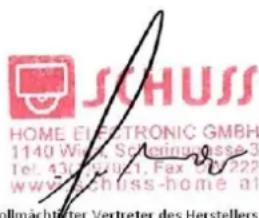
Senior product and purchasing manager i.V..
Name, Funktion / name, function
- Registrierung
- BE COOL
- ENTRETIEN ET NETTOYAGE
- Inscription
- Registrazione
- Caravan airconditioner BC5CSKL
- ONDERHOUD EN REINIGING
- Registratie
- Regisztráció
- Instalace a provoz
- ÚDRŽBA A ČIŠTĚNÍ
- Registrace
- Vypínač zapnutia/vypnutia
- ÚDRŽBA A ČISTENIE
- Čistenie povrchu spotrebiča
- Registrácia
- Pripojte zariadenie k sieti:
- ÎNTRETINERE ŞI CURĂTARE
- Înregistrare
- Register
- Conectati un dispozitiv la retea:
- KONSERWACJA I CZYSZCZENIE
- Rejestracja
- Stikalo za vklop/izklop
- Način
- VZDRŽEVANJE IN ČIŠČENJE
- Čiščenje površine aparata
- Registracija
- Montaža i rad
- ODRŽAVANJE I ČIŠĆENJE
- JAMSTVO
- Caravan air conditioner BC5CSKL
- Current operating instructions and other languages
- Installation and operation
- Electrical connection
- Handling and handling
- Child and user safety
- Maintenance and cleaning
- Storage and transportation
- Emergency measures
- SPECIFIC INFORMATION ON THE REFRIGERANT R290
- DESCRIPTION OF THE DEVICE AND SCOPE OF DELIVERY
- SCOPE OF DELIVERY
- On/off switch
- Mode
- Temperature/time setting button
- Speed button
- Sleep mode
- Digital display
- Swivel function
- INSTALLATION
- IMPORTANT!
- MAINTENANCE AND CLEANING
- Cleaning
- Cleaning the air filter
- Cleaning the surface of the appliance
- Storage
- CHECKS AT THE START OF THE SEASON
- TROUBLESHOOTING
- Smart Home Wi-Fi connection guide
- IMPORTANT
- App installation
- Registration
- Connect a device to the network:
- Note:
- WARRANTY
- For this BE COOL device we grant a warranty period of 2 years from the date of purchase valid in Austria!
- This guarantee does not cover
- ADDRESS
- WICHTIG!
- INSTRUCTIONS FOR REPAIRING APPLIANCES CONTAINING R290
- GENERAL INSTRUCTIONS
- Checks to the area
- Work procedure
- General work area
- Checking for presence of refrigerant
- Presence of fire extinguisher
- No ignition sources
- Ventilated area
- Checks to the refrigeration equipment
- Checks to electrical devices
- REPAIRS TO SEALED COMPONENTS
- REPAIR TO INTRINSICALLY SAFE COMPONENTS
- CABLING
- DETECTION OF FLAMMABLE REFRIGERANTS
- LEAK DETECTION METHODS
- REMOVAL AND EVACUATION
- CHARGING PROCEDURES
- DECOMMISSIONING
- LABELLING
- RECOVERY
- Competence of service personnel
- General
- Training
- Commissioning
- Maintenance
- EU-DECLARATION OF CONFORMITY
- (1)
- Schuss Home Electronic GmbH
- (III)
Brand : Be Cool
Model : BC5CSKL
Category : Air Conditioning