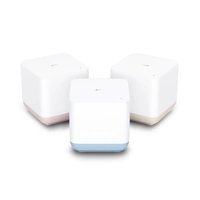
Linkhub MS1G - Wi-Fi Router TCL - Free user manual and instructions
Find the device manual for free Linkhub MS1G TCL in PDF.


| Product Type | Wi-Fi Mesh System (3-node kit) |
| Brand | TCL |
| Model | Linkhub MS1G |
| Technology | Wi-Fi Mesh |
| Frequency Bands | 2.4 GHz and 5 GHz |
| Maximum Transmission Power | 2.4 GHz: 13 dBm, 5 GHz: 16 dBm |
| Ports | 1 WAN port (Ethernet), 1 LAN port (Ethernet) per node |
| Buttons | WPS / Reset |
| Power Supply | AC adapter (included), 5 V DC? (unspecified, estimated) |
| Power Consumption | Low consumption, AC adapter |
| Dimensions (approx.) | Approximately 10 x 10 x 4 cm per node |
| Weight (approx.) | Approximately 200 g per node |
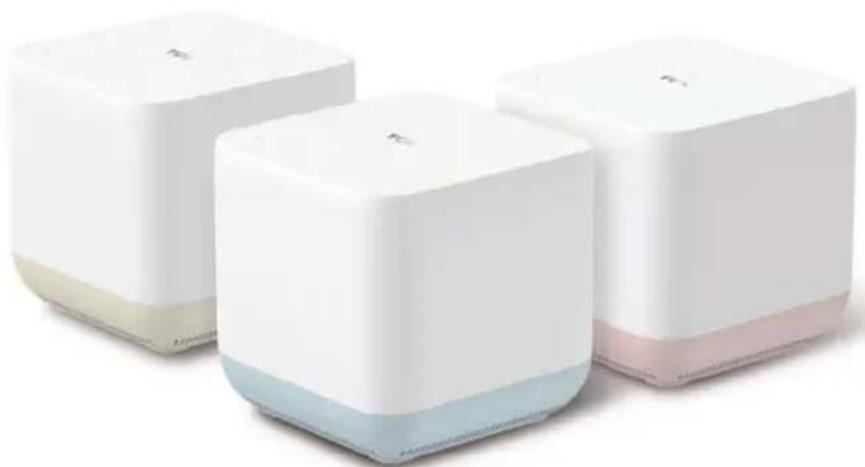
| Package Contents | 3 MS1G nodes, 3 AC adapters, 1 Ethernet cable, 1 quick installation guide |
| Main Functions | Extended Wi-Fi coverage, seamless roaming, management via TCL Wi-Fi app |
| LED Indicators | Solid green (good connection), solid yellow (average connection), solid red (disconnected), blinking green (initialization) |
| Configuration | Via TCL Wi-Fi mobile app (iOS and Android) or direct connection |
| Security | WPA2/WPA3 (unspecified, but standard) |
| Operating Temperature | 0°C to 40°C (AC adapter) |
| Warranty | 24 months for the node, 12 months for accessories |
| Compatibility | Modems, existing routers, 2.4 GHz and 5 GHz Wi-Fi devices |
Frequently Asked Questions - Linkhub MS1G TCL
User questions about Linkhub MS1G TCL
0 question about this device. Answer the ones you know or ask your own.
Ask a new question about this device
Download the instructions for your Wi-Fi Router in PDF format for free! Find your manual Linkhub MS1G - TCL and take your electronic device back in hand. On this page are published all the documents necessary for the use of your device. Linkhub MS1G by TCL.
USER MANUAL Linkhub MS1G TCL
Whole Home WiFi Mesh System MS1G (3 pack)
natural_image
Three white and blue square electronic devices with no visible text or symbols on their surfacesQuick installation guide
CJB1RV005AAA
TCL
EN - 1
Package contents
- MS1G x3
- Power adapter x3
- Ethernet cable x1
- Quick installation guide x1
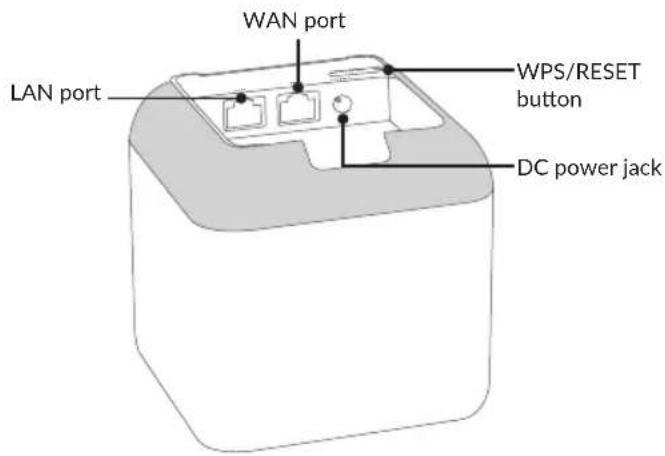
Know your device
Install the TCL WiFi App
Download the TCL WiFi App on your mobile device by searching for TCL WiFi in App Store or Google Play or by scanning the QR code. Then, install the App.
Available for iOS and Android
Or
Connect the primary node
The first node you set up functions as the primary node, while the rest are referred to as the secondary nodes.
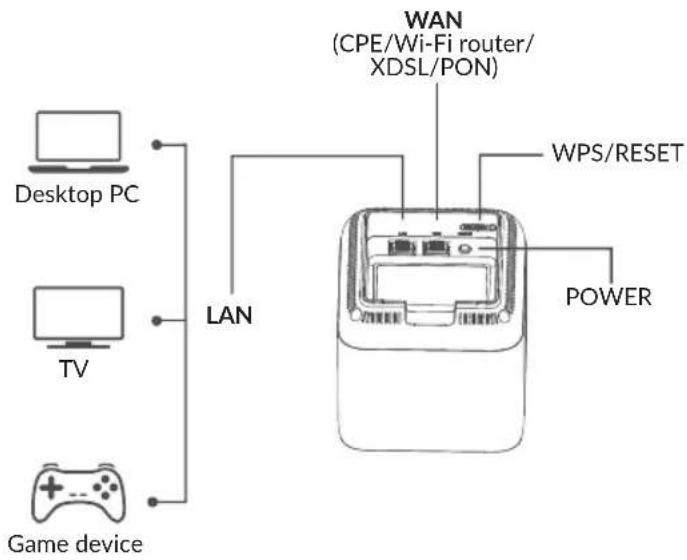
- Use the included Ethernet cable to connect a LAN port of your modem or the Ethernet jack to the WAN port of any node. This node is your primary node.
- Use one of the included power adapters to connect the primary node to a power source, the LED indicator lights solid on. Wait about for 40 seconds.
The system completes startup when the LED indicator blinks green. Place your MS1G on a stable position when using it.
flowchart
graph TD
    A["Desktop PC"] --> B["LAN"]
    C["TV"] --> B
    D["Game device"] --> B
    B --> E["WAN (CPE/Wi-Fi router/XDSL/PON)"]
    E --> F["WPS/RESET"]
    E --> G["POWER"]
Connect the primary node to the internet
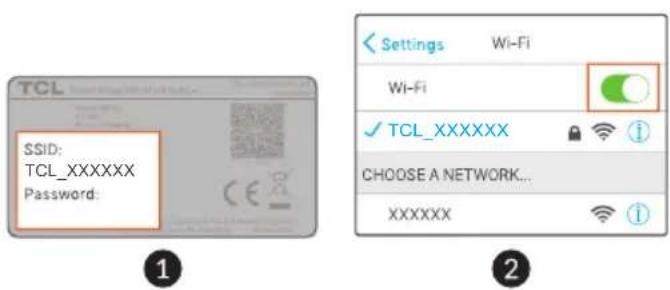
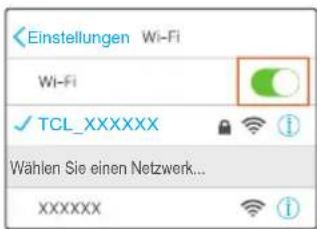
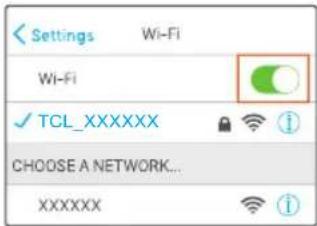
- Go to the WIFI network list on your mobile device, select the SSID of the primary node, and enter its password. The SSID and password are specified on the bottom label of any node,
- Run the TCL WiFi App and follow the onscreen instructions to connect the primary node to the Internet. After the primary node is connected to the Internet, its LED indicator lights solid green.
Connect the secondary nodes to the internet
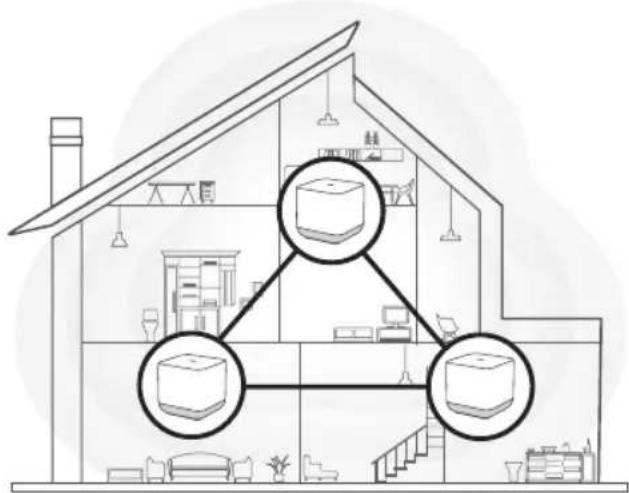
- Place each node:
- At a high and open area. - Ensure that the wall between the nodes is less than two. - Keep your nodes away from electronics with strong interference, such as microwave, induction cooker and refrigerator.
-
Use the other power adapters to connect the remaining secondary nodes to power sources, their LED indicators light solid green. Wait about for 40 seconds. The secondary node is connecting to another node when its LED indicator blinks green.
-
Observe the LED indicators of the secondary nodes until their LED indicators light one of the following colors:
Solid green: Good connection
Solid yellow: Fair connection
Solid red: Disconnected
- If a node's LED does not light solid green, relocate it according to placement tips to get it better connected.
• To access the Internet:
- Wired devices: Connect wired devices to the LAN ports of your nodes. - Wireless devices: Connect wireless devices to your WiFi network using the SSID and WiFi password you set.
- If you want to manage the network anytime anywhere, tap @ and use your account to login.
FAQ
Q1: How can I remove a node from my WiFi network?
A1: Tap the node on the TCL WiFi App, tap .... in the upper-right corner, and choose Delete.
Note: Removal operation restores the node to factory settings.
Q2: Can I add another new set of node to expand my network coverage?
A2: Yes. Open TCL WiFi App, tap Settings in the lower-right corner, tap Add MS1G, and follow the on-screen instructions to add.
Q3: How to restore my network to factory settings?
A3: With your nodes powered on, hold the RST button of your primary node down using a paper clip for about 6 seconds, release when the LED indicator blinks fast. Your network is reset successfully when the LED indicator lights solid on then blinks fast again. And all nodes are restored to factory settings.
Q4: My 2.4 GHz WiFi-enabled devices, such as a home security camera, cannot connect to my TCL WiFi network. What should I do?
A4:
Step 1. Connect your smart phone used for setup to your TCL WiFi network.
Step 2. Run TCL WiFi App, tap Settings, Smart Assistant, and Enable. Your smart phone connects to the 2.4 GHz WiFi network.
Step 3. Use the smart phone to set up your 2.4 GHz WiFi-enabled device guided by its App.
Safety and use
We recommend that you read this chapter carefully before using your device. The manufacturer disclaims any liability for damage, which may result as a consequence of improper use or use contrary to the instructions contained herein.
• CONDITIONS OF USE:
Switch the device off before boarding an aircraft.
Switch the device off when you are in health care facilities, except in designated areas. As with many other types of equipment now in regular use, devices can interfere with other electrical or electronic devices, or equipment using radio frequency.
Switch the device off when you are near gas or flammable liquids. Strictly obey all signs and instructions posted in a fuel depot, petrol station, or chemical plant, or in any potentially explosive atmosphere.
When this device is switched on, it should be kept at least 20 cm from the body.
When the device is switched on, it should be kept at least 15 cm from any medical device such as a pacemaker, a hearing aid, or an insulin pump, etc..
Do not let children use the device and/or play with the device and accessories without supervision.
If your device has a removable cover, note that your device may contain substances that could create an allergic reaction.
If your device is a unibody device, the back cover is not removable. If you disassemble your device the warranty will not apply.
Disassembling the device may cause leakage of substances that could create an allergic reaction.
Always handle your device with care and keep it in a clean and dust-free place.
Do not allow your device to be exposed to adverse weather or
environmental conditions (moisture, humidity, rain, infiltration of liquids, dust, sea air, etc.). The manufacturer's recommended operating temperature range is -20^ (-4°F) to +50^ (122°F).
Do not open, dismantle, or attempt to repair your device yourself.
Do not drop, throw, or bend your device.
Do not paint it.
Use only adapters and accessories which are recommended by TCL Communication Ltd. and its affiliates and are compatible with your device model. TCL Communication Ltd. and its affiliates disclaim any liability for damage caused by the use of other adapters.

This symbol on your device, and the accessories means that these products must be taken to collection points at the end of their life:

- Municipal waste disposal centres with specific bins for these items of equipment;
- Collection bins at points of sale.
They will then be recycled, preventing substances being disposed of in the environment, so that their components can be reused.
In European Union countries:
These collection points are accessible free of charge.
All products with this sign must be brought to these collection points.
In non-European Union jurisdictions:
Items of equipment with this symbol are not to be thrown into ordinary bins if your jurisdiction or your region has suitable recycling and collection facilities; instead they are to be taken to collection points for them to be recycled.
- Adapters:
Mains powered adapters will operate within the temperature range of: 0^ C ( 32^ F) to 40^ C ( 104^ F).
The adapters designed for your device meet the standard for safety of information technology equipment and office equipment use. They are also compliant with the ecodesign directive 2009/125/EC. Due to different applicable electrical specifications, an adapter you purchased in one jurisdiction may not work in another jurisdiction. They should be used for this purpose only.
Radio waves
Proof of compliance with international standards (ICNIRP) or with European Directive 2014/53/EU (RED) is required of all device models before they can be put on the market. The protection of the health and safety for the user and any other person is an essential requirement of these standards or this directive.
THIS DEVICE MEETS INTERNATIONAL GUIDELINES FOR EXPOSURE TO RADIO WAVES.
Your device is a radio transmitter and receiver. It is designed not to exceed the limits for exposure to radio waves (radio frequency electromagnetic fields) recommended by international guidelines. The guidelines were developed by an independent scientific organisation (ICNIRP) and include a substantial safety margin designed to assure the safety of all persons, regardless of age and health.
The World Health Organization has stated that present scientific information does not indicate the need for any special precautions for the use of mobile devices. They recommend that if you are interested in further reducing your exposure then you can easily do so by limiting your usage or keep the device away from the head and body.
For more information, you can go to www.tcl.com/global
Additional information about electromagnetic fields and public health are available on the following site: http://www.who.int/peh-emf.
Your device is equipped with a built-in antenna. For optimal operation, you should avoid touching it or degrading it.
Note that any data shared with TCL Communication Ltd. is stored in accordance with applicable data protection legislation. For these purposes TCL Communication Ltd. implements and maintains appropriate technical and organisational measures to protect all personal data, for example, against unauthorised or unlawful processing and accidental loss or destruction of or damage to such personal data whereby the measures shall provide a level of security that is appropriate having regard to
- The technical possibilities available;
- The costs for implementing the measures;
- The risks involved with the processing of the personal data, and;
- The sensitivity of the personal data processed.
You can access, review, and edit your personal information at any time by logging into your user account, visiting your user profile or by contacting us directly. Should you require us to edit or delete your personal data, we may ask you to provide us with evidence of your identity before we can act on your request.
Licences

The Wi-Fi Logo is a certification mark of the Wi-Fi Alliance.
The 5150-5350 MHz band is restricted to indoor use only.
 | BE | BG | CZ | DK | DE | EE | IE | EL | ES | ||
| FR | HR | IT | CY | LV | NO | IS | LT | LU | |||
| HU | MT | NL | AT | PL | PT | RO | SI | SK | |||
| FI | SE | LI | CH | TR | UK (NI) | ||||||
We hereby point out that the end user warranty for infringement IPR is solely limited to the EU/EEA/Switzerland.
If and to the extent that the Product is exported, taken with, or used by end customer or end user outside the EU/EEA/Switzerland any responsibility, warranty or indemnification of manufacturer and its suppliers in regard to the Product expires (including any indemnification in regard to infringement IPR).
General information
- Internet address: www.tcl.com/global
- Hot Line Number: see "SERVICES" leaflet or go to our website.
• Manufacturer: TCL Communication Ltd. - Address: 5/F, Building 22E, 22 Science Park East Avenue, Hong Kong Science Park, Shatin, NT, Hong Kong.
This radio equipment operates with the following frequency bands and maximum radio-frequency power:
2.4GHz: 13 dBm
5GHz: 16 dBm
Hereby, TCL Communication Ltd. declares that the radio equipment type TCL MS1G is in compliance with Directive 2014/53/EU.
The full text of the EU declaration of conformity is available at the following internet address: https://www.tcl.com/global/en/service-support-mobile/eu-doc.
The description of accessories and components, including software, which allow the radio equipment to operate as intended, can be obtained in the full text of the EU declaration of conformity at the following internet address: https://www.tcl.com/global/en/service-support-mobile/eu-doc.
Disclaimer
There may be certain differences between the user manual description and the device's operation, depending on the software release of your device or specific operator services.
TCL Communication Ltd. shall not be held legally responsible for such differences, if any, nor for their potential consequences, which responsibility shall be borne by the operator exclusively. This device may contain materials, including applications and software in executable or source code form, which is submitted by third parties for inclusion in this device ("Third Party Materials"). All Third Party Materials in this device are provided "as is", without warranty of any kind, whether express or implied. The purchaser undertakes that TCL Communication Ltd. has complied with all quality obligations incumbent upon it as a manufacturer of mobile devices and devices in complying with Intellectual Property rights. TCL Communication Ltd. will at no stage be responsible for the inability or failure of the Third Party Materials to operate on this device or in interaction with any other device. To the maximum extent permitted by law, TCL Communication Ltd. disclaims all liability for any claims, demands, suits or actions, and more specifically – but not limited to – tort law actions, under any theory of liability, arising out of the use, by whatever means, or attempts to use, such Third Party Materials. Moreover, the present Third Party Materials, which are provided free of charge by TCL Communication Ltd., may be subject to paid updates and upgrades in the future; TCL Communication Ltd. waives any responsibility regarding such additional costs, which shall be borne exclusively by the purchaser. TCL Communication Ltd. shall not be held responsible for the lack of availability of any application, as its availability depends on the country and the operator of the purchaser. TCL Communication Ltd. reserves the right at any time to add or remove Third Party Materials from its devices without prior notice; in no event shall TCL Communication Ltd. be held responsible by the purchaser for any consequences of such removal.
Warranty
Your device is warranted against any defect or malfunctioning which may occur in conditions of normal use during the warranty period of twenty-four (24) months ^(1) from the date of purchase as shown on your original invoice.
Accessories sold with your device are also warranted against any defect which may occur during the first twelve (12) months(1) from the date of purchase as shown on your original invoice.
In case of any defect of your device which prevents you from normal use thereof, you must immediately inform your vendor and present your device with your proof of purchase.
If the defect is confirmed, your device or part thereof will be either replaced or repaired, as appropriate. Repaired device and accessories are entitled to a one (1) month warranty for the same defect. Repair or replacement may be carried out using reconditioned components offering equivalent functionality.
This warranty covers the cost of parts and labor but excludes any other costs.
This warranty shall not apply to defects to your device and/or accessory due to (without any limitation):
- Non-compliance with the instructions for use or installation, or with technical and safety standards applicable in the geographical area where your device is used;
- Connection to any equipment not supplied or not recommended by TCL Communication Ltd.;
- Modification or repair performed by individuals not authorised by TCL Communication Ltd. or its affiliates or your vendor;
- Modification, adjustment or alteration of software or
hardware performed by individuals not authorised by TCL Communication Ltd.;
- Inclement weather, lightning, fire, humidity, infiltration of liquids or foods, chemical products, download of files, crash, high voltage, corrosion, oxidation...
Your device will not be repaired in case labels or serial numbers have been removed or altered.
There are no express warranties, whether written, oral or implied, other than this printed limited warranty or the mandatory warranty provided by your country or jurisdiction.
In no event shall TCL Communication Ltd. or any of its affiliates be liable for indirect, incidental or consequential damages of any nature whatsoever, including but not limited to commercial or financial loss or damage, loss of data or loss of image to the full extent those damages can be disclaimed by law.
Some countries/states do not allow the exclusion or limitation of indirect, incidental or consequential damages, or limitation of the duration of implied warranties, so the preceding limitations or exclusions may not apply to you.
CONTACT CENTERS
| Austria | +43 720884481 |
| Belgium | +32 28962999 |
| Bulgaria | +359 24373351 |
| Croatia | +385 13309300 |
| Czech Republic | +420 225341059 |
| France | +33 187161399 |
| Germany | +49 21133995966 |
| Greece | +30 2111991796 |
| Hungary | +36 19989619 |
| Ireland | +353 15712605 |
| Italy | +39 0683464628 |
| Netherlands | +31 207971748 |
| Poland | +48 222112430 |
| Portugal | +351 211451747 |
| Romania | +40 318220100 |
| Serbia | +381 113216845 |
| Slovakia | +421 233329176 |
| Spain | +34 910389663 |
| Switzerland | +41 215458250 |
| Turkey | +90 2129003736 |
| UK | +44 2037953308 |
MS1G
natural_image
Three white and blue square electronic devices with no visible text or symbols on their surfacesFAQ
natural_image
Three white and blue square electronic devices with no visible text or symbols on their surfacesOder
1
natural_image
Three white and blue square electronic devices with gradient coloring, arranged side by side (no visible text or symbols)Oppure
Connettere i nodi secondari a Internet
natural_image
Three white and blue square electronic devices with no visible text or symbols on their surfacesConecte el nodo principal
natural_image
Three white and blue square electronic devices with no visible text or symbols on their surfacesVeelgestelde vragen
De WHO (World Health Organization,
• Fabrikant: TCL Communication Ltd.
- Adres: 5/F, Building 22E, 22 Science Park East Avenue, Hong Kong Science Park, Shatin, NT, Hongkong.
natural_image
Three white and blue square electronic devices with no visible text or symbols on their surfaces1
2
- Quick installation guide
- Package contents
- Install the TCL WiFi App
- Connect the primary node
- Connect the primary node to the internet
- Connect the secondary nodes to the internet
- FAQ
- Safety and use
- • CONDITIONS OF USE:
- In European Union countries:
- In non-European Union jurisdictions:
- - Adapters:
- Radio waves
- Licences
- General information
- Disclaimer
- Warranty
- MS1G
- Connettere i nodi secondari a Internet
- Conecte el nodo principal
- Veelgestelde vragen
Brand : TCL
Model : Linkhub MS1G
Category : Wi-Fi Router