
WS450 - Vacuum Cleaner Sommertal - Free user manual and instructions
Find the device manual for free WS450 Sommertal in PDF.


| Product type | Wash vacuum |
| Brand | Sommertal |
| Model | WS450 |
| Rated voltage | 220-240 V |
| Rated power | 300-450 W |
| Suction capacity | 12 kPa |
| Dirty water tank capacity | 0,6 L |
| Clean water tank capacity | 1,8 L |
| Recommended water type | Room temperature tap water |
| Dimensions (L x W x H) | 235 x 320 x 333 mm |
| Gross weight | 5 kg |
| Power cord length | 1,2 m |
| Included accessories | Main cleaning nozzle, self-cleaning nozzle, crevice tool, round dusting brush, window tool |
| Intended use | Cleaning stains on carpets, upholstered furniture, rugs, beds, delicate surfaces, car interiors |
| Functions | Spray, brush, suction |
| Self-cleaning | Yes, via self-cleaning nozzle |
| Tank material | Plastic |
| Safety instructions | Do not use outdoors, do not vacuum flammable liquids or sharp objects, do not immerse in water, keep out of reach of children |
| Maintenance | Clean tanks after each use, rinse brush, dry before storage |
| Warranty | 24 months from delivery |
| After-sales service | Albatros International GmbH, Konrad-Zuse-Str. 3, D-54552 Nerdlen, Germany |
Frequently Asked Questions - WS450 Sommertal
User questions about WS450 Sommertal
0 question about this device. Answer the ones you know or ask your own.
Ask a new question about this device
Download the instructions for your Vacuum Cleaner in PDF format for free! Find your manual WS450 - Sommertal and take your electronic device back in hand. On this page are published all the documents necessary for the use of your device. WS450 by Sommertal.
USER MANUAL WS450 Sommertal
natural_image
Abstract logo design with stylized letter 'S' surrounded by curved lines (no text or symbols)Sommertal
Waschsauger
Modell: WS450
Bedienungsanleitung
VAR.ID.: 4062


natural_image
Technical line drawing of a mechanical device with two views: front view and side view (no text or symbols)Albatros International GmbH, Konrad-Zuse-Str. 3, D-54552 Nerdlen
Email: info@albatros-international.eu

Sicherheitshinweise
natural_image
Line drawing of a kitchen sink, a water dispenser, and a bottle (no text or symbols)natural_image
Line drawing of hands operating a portable device with arrows indicating motion (no text or symbols)natural_image
Line drawing of a hand holding a cylindrical device with an arrow indicating rotation (no text or symbols)natural_image
Line drawing of a hand holding a cylindrical device with a hose and plug, no text or symbols presentnatural_image
Illustration of a hand pouring liquid into a cylindrical container (no text or symbols)natural_image
Hand holding a cylindrical device with a black arrow indicating rotation (no text or symbols)natural_image
Diagram of a hand operating a mechanical device with a curved handle and arrow indicating rotation (no text or symbols)natural_image
Line drawing of a mechanical device with no visible text or symbols
natural_image
Illustration of a hand using a tool to lift or lift an object on a chair, with arrows indicating motion direction (no text or symbols)natural_image
Illustration of a hand holding a tool with a downward arrow indicating motion (no text or symbols)natural_image
Line drawing of a hand using a tool to interact with a curved surface, showing directional arrows (no text or symbols)natural_image
Diagram showing three sequential steps of a mechanical or electronic component with arrows indicating direction (no text or symbols present)natural_image
Line drawing of a sofa and its interior compartments (no text or symbols)natural_image
Illustration of a hand using a tool to press or install a component, with a cross mark and no visible text or symbols.natural_image
Technical illustration of a mechanical connector with exploded view and assembly (no text or symbols)natural_image
Technical line drawing of a mechanical component with threaded end and handle (no text or symbols)natural_image
Line drawing of a hand inserting a plug into a device with arrows indicating motion (no text or symbols)natural_image
Hand holding a cylindrical device with a scroll wheel, showing a right-hand rule for rotation (no text or symbols)natural_image
Technical line drawing of a mechanical device with an upward arrow indicating motion (no text or symbols)natural_image
Illustration of a hand holding a cylindrical object with a pointed tip, emitting light (no text or symbols visible)natural_image
Technical line drawing of a mechanical device with a downward arrow indicating motion (no text or symbols)natural_image
Line drawing of a hand holding a cylindrical device with an arrow indicating rotation (no text or symbols)natural_image
Line drawing of a portable electronic device with hands operating it, showing internal components and directional arrows (no text or symbols)natural_image
Line drawing of a hand holding a cylindrical device with an arrow indicating rotation (no text or symbols)natural_image
Technical line drawing of a mechanical device with an upward arrow indicating motion or assembly (no text or symbols present)natural_image
Technical line drawing of a mechanical device with internal components and piping (no text or symbols)natural_image
Line drawing of a hand spraying water onto a kitchen sink (no text or symbols)natural_image
Mechanical assembly diagram showing a clamping mechanism with directional arrows indicating motion (no text or symbols)natural_image
Simple line drawing of a sun, a cross, and a device with a lid (no text or symbols)natural_image
Simple line drawing of a trash bin with crossed x-bracing (no text or symbols)D-54552 Nerdlen (Germany)
Tel: +49 (0)6592-1730200
Fax: +49 (0)6592-1730209
www.albatros-international.de
info@albatros-international.eu
natural_image
Abstract logo design with stylized letter 'S' surrounded by curved lines (no text or symbols)Sommertal
natural_image
Technical line drawing of a mechanical device with two views: top shows internal structure, bottom shows external housing (no text or symbols)Albatros International GmbH, Konrad-Zuse-Str. 3, D-54552 Nerdlen
Email: info@albatros-international.eu

natural_image
Line drawing of a kitchen sink, a portable water dispenser, and a bottle (no text or symbols)natural_image
Line drawing of hands operating a portable device with arrows indicating motion (no text or symbols)natural_image
Line drawing of a hand holding a cylindrical device with an arrow indicating rotation (no text or symbols)natural_image
Line drawing of a hand holding a cylindrical device with a hose inserted, no text or symbols presentnatural_image
Line drawing of a hand pouring liquid into a cylindrical container (no text or symbols)natural_image
Line drawing of a hand holding a cylindrical device with a black arrow indicating rotation (no text or symbols)natural_image
Diagram of a hand operating a mechanical device with a handle and arrow indicating rotation (no text or symbols)natural_image
Line drawing of a mechanical device with no visible text or symbols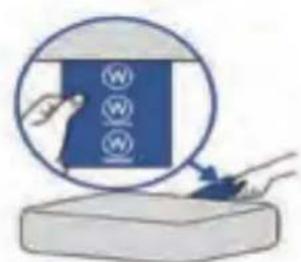
natural_image
Line drawing of a toaster oven with handle and control panel (no text or symbols)natural_image
Diagram of a mechanical device with downward arrows indicating motion or force (no text or symbols)natural_image
Line drawing of a hand operating a camera with a black arrow indicating rotation (no text or symbols)natural_image
Diagram of a hand operating a mechanical device with a black arrow indicating rotation (no text or symbols present)natural_image
Line drawing of a hand holding a tool with an arrow indicating motion (no text or symbols)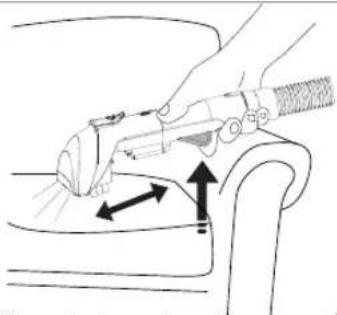
natural_image
Line drawing of a hand using a tool to lift a car seat, with arrows indicating motion direction (no text or symbols)natural_image
Line drawing of a hand holding a tool with a downward arrow indicating motion (no text or symbols)natural_image
Illustration of a hand using a tool to interact with a seated object, showing directional arrows (no text or symbols)natural_image
Diagram showing three sequential steps of a mechanical or electrical component with arrows indicating direction (no text or symbols present)natural_image
Illustration of a hand using a tool to press down a surface, with a cross mark and no visible text or symbolsnatural_image
Technical illustration of a mechanical connector with exploded view and assembly detail (no text or symbols)natural_image
Technical line drawing of a mechanical connector or tool (no text or symbols)natural_image
Line drawing of a portable device with hands operating the top panel and arrows indicating action (no text or symbols)natural_image
Hand holding a cylindrical device with a circular lid and arrow indicating rotation (no text or symbols)natural_image
Technical line drawing of a mechanical device with an upward arrow indicating motion (no text or symbols)natural_image
Illustration of a hand holding a cylindrical object with a dark horizontal bar, emitting a light beam to the right (no text or symbols visible)- Videz l'eau sale.
natural_image
Technical line drawing of a mechanical device with a downward arrow indicating motion (no text or symbols)natural_image
Line drawing of a hand holding a cylindrical device with an arrow indicating rotation (no text or symbols)natural_image
Line drawing of a portable electronic device with hands operating it, showing internal components and directional arrows (no text or symbols)natural_image
Line drawing of a hand holding a cylindrical device with an arrow indicating rotation (no text or symbols)natural_image
Technical line drawing of a mechanical device with an upward arrow indicating motion (no text or symbols)natural_image
Technical line drawing of a mechanical device with internal components and piping (no text or symbols)natural_image
Line drawing of a hand spraying water from a showerhead (no text or symbols)natural_image
Mechanical assembly diagram showing a vertical component with bidirectional arrows indicating motion (no text or symbols)natural_image
Simple line drawing of a sun, a cross, and a device with a lid (no text or symbols)natural_image
Symbol of a trash bin with crossed lines indicating no waste or restriction, and a solid black rectangle below (no text or labels)natural_image
Abstract logo design with stylized letter 'S' surrounded by curved lines (no text or symbols)Sommertal
natural_image
Technical line drawing of a mechanical device with two views: front view and side view (no text or symbols)Albatros International GmbH, Konrad-Zuse-Str. 3, D-54552 Nerdlen
Email: info@albatros-international.eu

natural_image
Line drawing of a kitchen sink, a portable water dispenser, and a plastic bottle (no text or symbols)natural_image
Line drawing of hands operating a portable device with arrows indicating motion (no text or symbols)natural_image
Line drawing of a hand holding a cylindrical device with a curved arrow indicating rotation (no text or symbols)natural_image
Line drawing of a hand holding a cylindrical device with a curved arm and handle, no text or symbols presentnatural_image
Line drawing of a hand pouring liquid into a cylindrical container (no text or symbols)natural_image
Line drawing of a hand holding a cylindrical device with a black arrow indicating rotation (no text or symbols)natural_image
Diagram of a hand operating a mechanical device with a rotating arrow indicating rotation (no text or symbols present)natural_image
Technical line drawing of a mechanical device with no visible text or symbols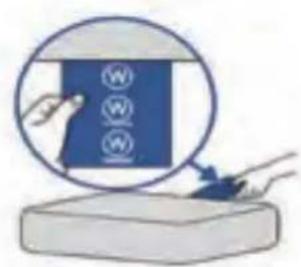
natural_image
Line drawing of a toaster oven with a hand adjusting the door (no text or symbols)natural_image
Diagram of a mechanical device with two downward arrows indicating motion or force direction (no text or symbols)natural_image
Line drawing of a hand operating a camera with a black arrow indicating rotation (no text or symbols)natural_image
Illustration of a hand using a mechanical device to adjust or install a component, with no visible text or symbols.natural_image
Line drawing of a hand holding a tool with an arrow indicating motion (no text or symbols)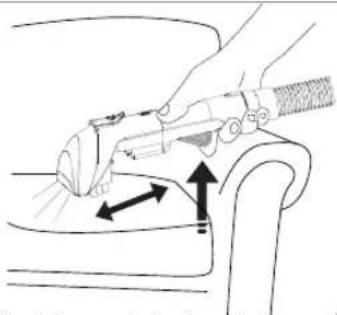
natural_image
Line drawing of a hand using a tool to lift a car seat, showing motion arrows (no text or symbols)natural_image
Line drawing of a hand holding a tool with a downward arrow indicating motion (no text or symbols)natural_image
Illustration of a hand using a tool to interact with a seated object, showing directional arrows (no text or symbols)natural_image
Diagram showing three sequential steps of a mechanical or electrical component with arrows indicating direction (no text or symbols present)natural_image
Illustration of a hand using a tool to lift or lift a small object, with no visible text or symbolsnatural_image
Technical line drawing of a mechanical connector with an arrow indicating assembly direction (no text or symbols)natural_image
Technical line drawing of a mechanical connector or connector (no text or symbols)natural_image
Line drawing of a portable device with hands operating it, showing internal components and directional arrows (no text or symbols)natural_image
Hand holding a cylindrical device with a scroll wheel, showing a right-hand rule for rotation (no text or symbols)natural_image
Technical line drawing of a mechanical device with an upward arrow indicating motion (no text or symbols)natural_image
Illustration of a hand holding a cylindrical object with a gradient fill, emitting a droplet (no text or symbols)natural_image
Technical line drawing of a mechanical device with a downward arrow indicating motion (no text or symbols)natural_image
Line drawing of a hand holding a cylindrical device with an arrow indicating rotation (no text or symbols)natural_image
Line drawing of a portable electronic device with hands operating it, showing internal components and directional arrows (no text or symbols)natural_image
Hand holding a cylindrical device with a handle, showing a right-hand rule for lifting an object (no text or symbols visible)natural_image
Technical line drawing of a mechanical device with an upward arrow indicating motion (no text or symbols)natural_image
Technical line drawing of a mechanical device with internal components and piping (no text or symbols)natural_image
Line drawing of a hand spraying water from a showerhead (no text or symbols)natural_image
Mechanical assembly diagram showing a clamping mechanism with directional arrows indicating motion (no text or symbols)natural_image
Simple line drawing of a sun, cross symbol, and a device with a base (no text or symbols)natural_image
Simple line drawing of a trash bin with no text or symbolsD-54552 Nerdlen (Germania)
Tel: +49 (0) 6592-1730200
Fax: +49 (0) 6592-1730209
www.albatros-international.de
info@albatros-international.eu
natural_image
Abstract logo design with stylized letter 'S' surrounded by curved lines (no text or symbols)Sommertal
natural_image
Technical line drawing of a mechanical device with two views: front view and side view (no text or symbols)Albatros International GmbH, Konrad-Zuse-Str. 3, D-54552 Nerdlen
Email: info@albatros-international.eu

natural_image
Line drawing of a kitchen sink, a portable water dispenser, and a plastic bottle (no text or symbols)natural_image
Line drawing of hands operating a portable device with arrows indicating motion (no text or symbols)natural_image
Line drawing of a hand holding a cylindrical device with a scroll wheel, showing a right-handled rotation arrow (no text or symbols)natural_image
Line drawing of a hand holding a cylindrical device with a curved arm and handle (no text or symbols)natural_image
Line drawing of a hand pouring liquid into a cylindrical container (no text or symbols)natural_image
Line drawing of a hand holding a cylindrical device with a black arrow indicating rotation (no text or symbols)- Gírelo firmemente.
natural_image
Diagram of a hand operating a mechanical device with a handle and arrow indicating rotation (no text or symbols)natural_image
Line drawing of a mechanical device with no visible text or symbols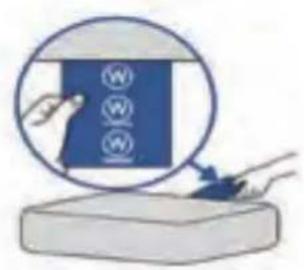
natural_image
Line drawing of a toaster oven with a hand adjusting the handle (no text or symbols)natural_image
Diagram showing two mechanical components with downward arrows indicating motion or force (no text or symbols)natural_image
Line drawing of a hand operating a camera with a black arrow indicating rotation (no text or symbols)natural_image
Illustration of a hand using a mechanical device to press or install a component, showing no text or symbols.natural_image
Line drawing of a hand holding a tool with an arrow indicating motion (no text or symbols)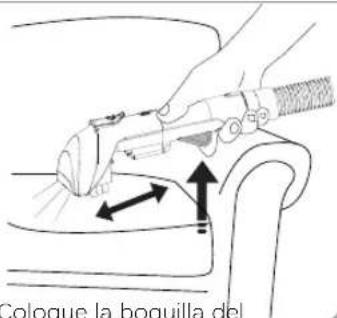
natural_image
Illustration of a hand holding a tool with a downward arrow indicating motion or force (no text or symbols)natural_image
Illustration of a hand using a tool to interact with a car (no text or symbols present)natural_image
Diagram showing three sequential steps of a mechanical or electronic component with arrows indicating direction (no text or symbols present)natural_image
Line drawing of a sofa and its interior compartments (no text or symbols)natural_image
Illustration of a hand using a tool to press down a surface, with a cross mark and no visible text or symbols.natural_image
Technical line drawing of a mechanical component with an arrow indicating direction (no text or symbols)natural_image
Technical line drawing of a mechanical tool or connector (no text or symbols visible)natural_image
Line drawing of a portable device with hands operating the top panel and arrows indicating action (no text or symbols)natural_image
Hand holding a cylindrical device with a scroll wheel, showing a right-hand rule for rotation (no text or symbols)natural_image
Technical line drawing of a mechanical device with an upward arrow indicating motion (no text or symbols)natural_image
Illustration of a hand holding a cylindrical object with a gradient fill, emitting a droplet (no text or symbols visible)natural_image
Technical line drawing of a mechanical device with a downward arrow indicating motion (no text or symbols)natural_image
Line drawing of a hand holding a cylindrical device with an arrow indicating rotation (no text or symbols)natural_image
Line drawing of a portable device with hands operating it, showing internal components and directional arrows (no text or symbols)natural_image
Hand holding a cylindrical device with a scroll wheel, showing a right-hand rule for rotation (no text or symbols)natural_image
Technical line drawing of a mechanical device with an upward arrow indicating motion or assembly (no text or symbols present)natural_image
Technical line drawing of a mechanical device with internal components and piping (no text or symbols)natural_image
Line drawing of a hand spraying water from a showerhead into a pipe (no text or symbols)natural_image
Mechanical assembly diagram showing a vertical component with bidirectional arrows indicating motion (no text or symbols)natural_image
Simple line drawing of a sun, cross symbol, and a device with a base (no text or symbols)natural_image
Symbol of a trash bin crossed with a diagonal line, representing no waste or discharge (no text or labels)
natural_image
Abstract logo design with stylized letter 'S' surrounded by curved lines (no text or symbols)Sommertal
User Manual Extraction Cleaner WS450

Art.No. 4062


Read and understand this manual! Take care of the safety instructions!
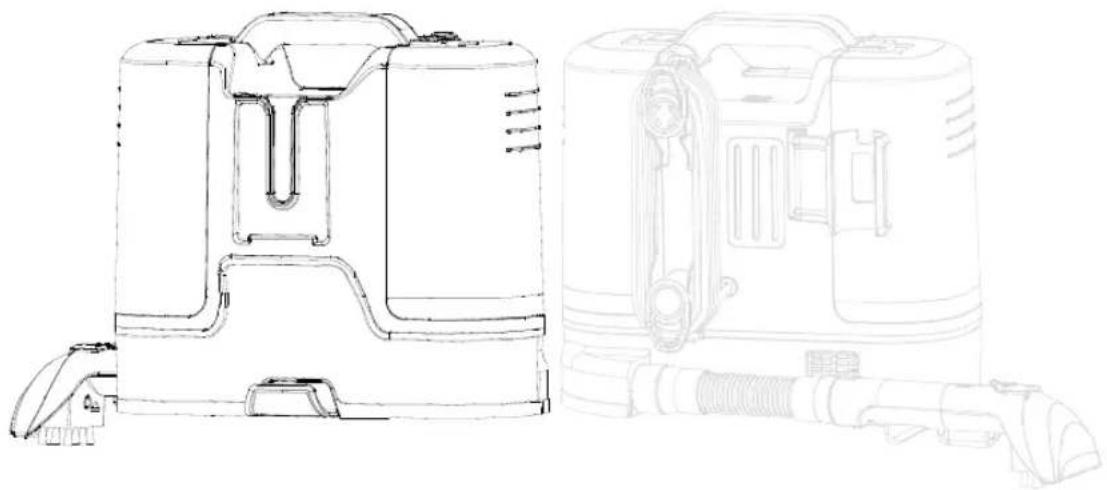
natural_image
Technical line drawing of a mechanical device with two views: top shows internal structure, bottom shows external housing (no text or symbols)Albatros International GmbH, Konrad-Zuse-Str. 3, D-54552 Nerdlen Email: info@albatros-international.eu

Safety Instruction
- Before you use your appliance for the first time, please read this user manual carefully.
- Store it carefully so that you can refer to it in the future, if necessary. To reduce the risk of fire, electrical shock, or injury when using your appliance, follow these basic precautions.
-This appliance can be used by persons with reduced physical, sensory or mental capabilities or lack of experience and knowledge if they have been given supervision or instruction concerning use of the appliance in a safe way and understand the hazards involved.
- The filling aperture must not be opened during use.
-The appliance is not to be used if it has been dropped, if there are visible signs of damage or if it is leaking.
-This appliance is not a children's toy. Children shall not play with the appliance.
- Keep the device and its cable out of the reach of children under 16 years old.
-The children should be monitored to ensure they do not operate this machine.
-The cleaning and maintenance by the user should not be made by children without supervision.
-In order to ensure your children's safety, please keep all packaging out of their reach.
- This appliance is intended to be used in household and similar applications only.
- Never use the appliance outdoors. Use indoor only.
- Do not use the cleaner outdoors or let it come in contact with any liquid. Liquid must not be directed towards equipment containing electrical components.
-Use only as instructed in this manual.
-Always connect to a properly earthed electrical socket. Do not modify earthed plug.
-Make sure the power supply corresponds to one on the rating label.
-Before each use, make sure that the power cord is in perfect condition.
- Do not operate any appliance with a damage cord or plug or after appliance has been damaged in any manner. Return the appliance to the nearest authorized service facility for examination, repair or adjustment.
- Never use a damaged machine.
-If the supply cord is damaged, it must be replaced by the manufacturer or its service agent or a similar quality person in order to avoid a hazard.
- Do not pinch, bend or twist the cable excessively. The core lines may be bared or cut causing a short – circuit which may in fire or electric shock.
-Do not leave appliance when plugged in.
-Always unplug the power cord from the appliance in the following cases:
-after use.
- Before cleaning or maintenance.
- In case of malfunction.
-Keep appliance on a level surface.
- Do not use the cleaner to wash people or animals.
-Use on dry surfaces or only on surfaces moistened by the cleaning process.
-To protect against a risk of electric shock, do not immerse the apparatus in water or any other liquids.
- Never immerse the appliance in water or any other liquid. In the event that liquid is accidentally spilled on electrical components (motor, etc.), disconnect the mains plug immediately.
- Do not place on or near hot surfaces.
- Keep cable away from heated surfaces.
- Do not place the appliance to direct sunlight.
- Do not use the appliance or handle the plug with wet hands.
- Make sure the vacuum cleaner is stored in a dry place.
- Do not pick up anything that is burning or smoking, such as cigarettes butts, matches or hot ashes.
- Do not use to pick up flammable or combustible liquids such as gasoline, petroleum or use in areas where they may be present.
- Do not pick up toxic material (chlorine bleach, ammonia, drain cleaner, etc.)
- Do not use the appliance in an enclosed space filled with vapours given off by oil base paint, paint thinner, some mothproofing substances, flammable dust, or other explosive or toxic vapours.
- Do not pick up hard or sharp objects such as glass nails, screws, coins, etc.
- Keep hair, loose clothing, fingers and all parts of the body away from openings and moving parts of the appliance and its accessories.
- Do not put any objects into openings.
- Do not use with any openings blocked and do not restrict airflow. Keep all openings free of dust, lint, hair, and anything that may reduce airflow.
- Do not run appliance over cable.
- Do not put anything heavy on the mains lead. Do not pull the mains lead.
- Do not pull or carry by cable, use cable as a handle, close door on cable, or pull cable around sharp edges or corners.
- Use extra care when cleaning on stairs.
CAUTION: This appliance contains electrical connections
Do not immerse in any liquid for cleaning.
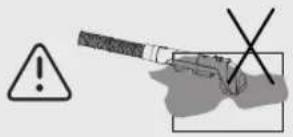
The hose should be checked regularly and must not be used if damaged.
- To unplug, grasp the plug, not the cable.
- Turn off all controls before unplugging.
- Unplug from electrical socket.
o When not in use,
o Before cleaning, maintaining or servicing the appliance, - If your appliance has an accessory tool with a moving brush, before connecting or disconnecting the tool.
- The power supply must be switch off before you remove the plug after each use.
Introduction and Features
- Meet your new Spot Cleaner, the solution to all your spot- cleaning needs! Featuring a potent spraying function and up to 12Kpa of suction power, this multi-surface spot cleaner can quickly remove even the toughest stains from carpet, upholstery, rugs, beds, sensitive surfaces, and even auto interiors.
- You only need to spray, scrub, and vacuum your soiled surfaces to quickly and permanently lift any type of spot from wine spills to pet stains. Its large capacity dual water tanks make it easy to clean large areas, while its compact and lightweight design allows for greater portability and ease of use.
- Pair it with a carpet cleaning solution for an even more effective deep clean. Please contact seller for advice when choosing the cleaning formula.
*The products in this information are mainly in kind, and the products are being continuously improved. Our company reserves the right to update the products.
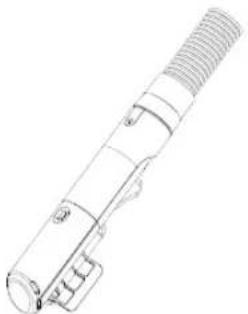
Machine
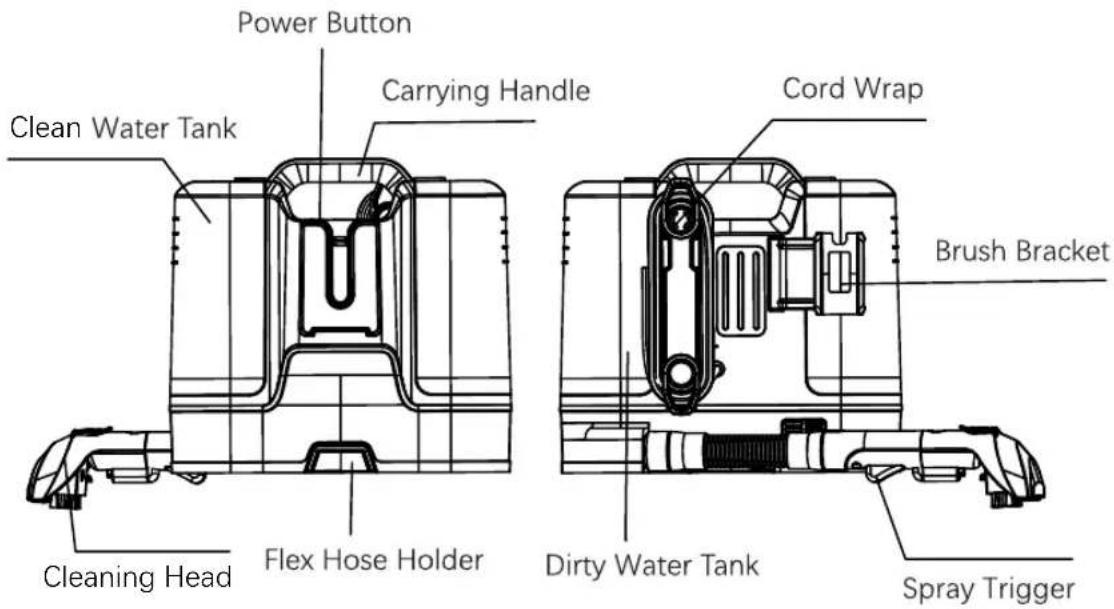
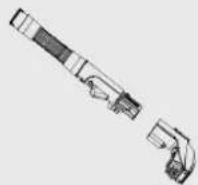
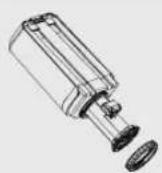
Accessory
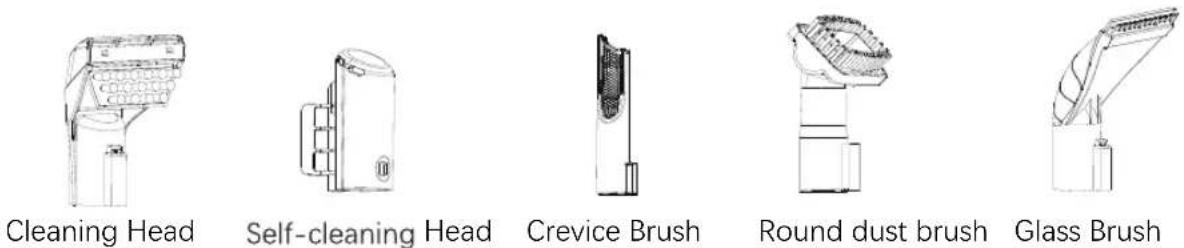


Table of Contents
Steps to use clean water tank 63
Cleaning steps 64
Dirty water tank use steps 66
Keep clean 67
Specification 69
Environmental Tips 70
Warranty 71
Explosion drawing 72
Circuit diagram 73
CE-Conformity 74
natural_image
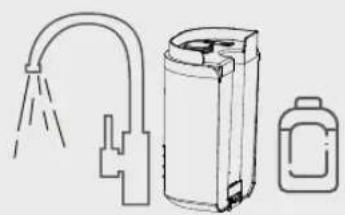
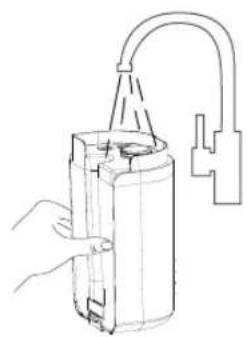
Line drawing of a kitchen sink, a water dispenser, and a bottle (no text or symbols)Steps to Use Clean water
ank

natural_image
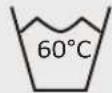
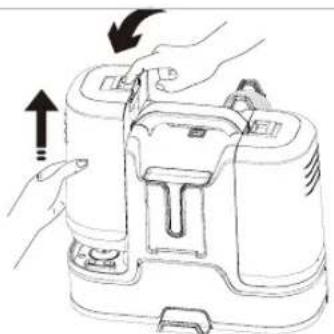
Line drawing of hands operating a portable device with arrows indicating motion (no text or symbols)- Press the clip on top of the Clean Water Tank to detach it.
natural_image
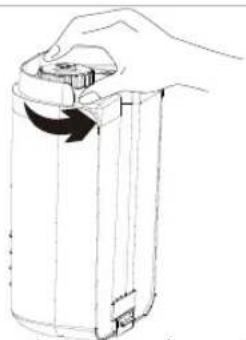
Line drawing of a hand holding a cylindrical device with a curved arrow indicating rotation (no text or symbols)- Unscrew the cap on the clean water tank.
natural_image
Line drawing of a hand holding a cylindrical device with a curved arm and handle (no text or symbols)- Add water to max fill line.
natural_image
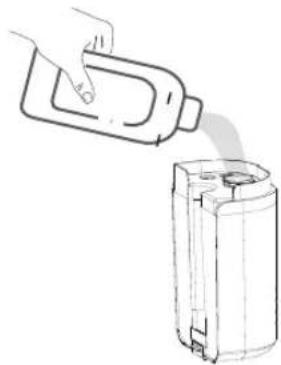
Line drawing of a hand pouring liquid into a cylindrical container (no text or symbols)- Add non-corrosive and low-foaming cleaning formula.
natural_image
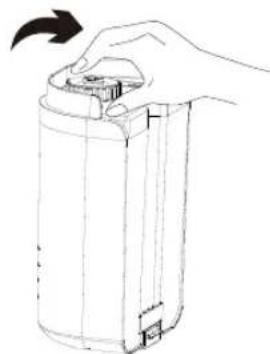
Line drawing of a hand holding a cylindrical device with a black arrow indicating rotation (no text or symbols)- Twist to screw the cap tightly.
natural_image
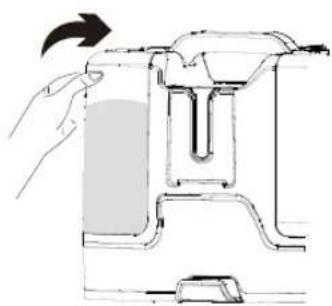
Diagram of a hand operating a mechanical device with a rotating arrow indicating motion (no text or symbols present)- Insert the clean water tank into the machine.
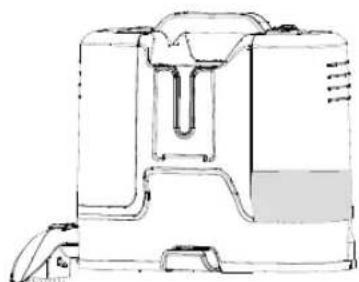
natural_image
Line drawing of a mechanical device with no visible text or symbols7.Add 100 ml clean water into the dirty water tank to protect the motor.
Cleaning Steps
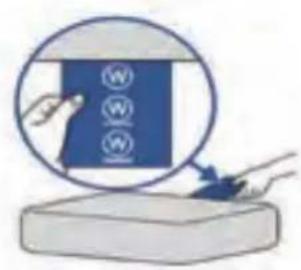
- Please make sure the item is washable before cleaning.
natural_image
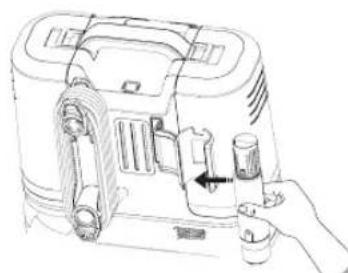
Line drawing of a toaster oven with handle and control panel (no text or symbols)- Remove the handle from the brush bracket.
natural_image
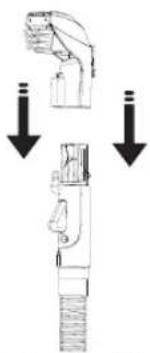
Diagram showing two mechanical components with downward arrows indicating motion or force (no text or symbols)- Pair the handle with the deep cleaning brush.
natural_image
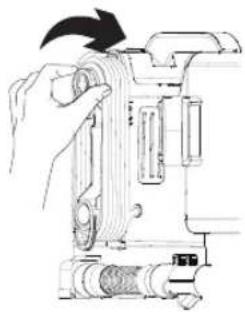
Line drawing of a hand operating a camera with a black arrow indicating rotation (no text or symbols)- Twist the quick release cord wrap.
natural_image
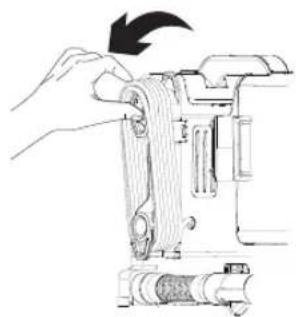
Illustration of a hand using a tool to adjust or install a mechanical component, showing no text or symbols.- Release the power cord.
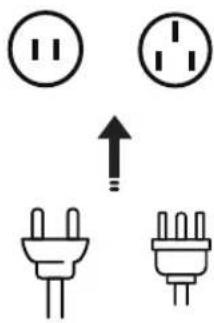
- Plug the cord into a nearby AC power outlet.
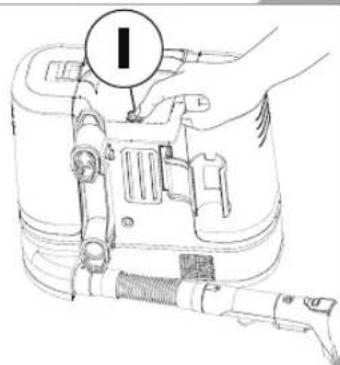
- Press the power button to turn it on.
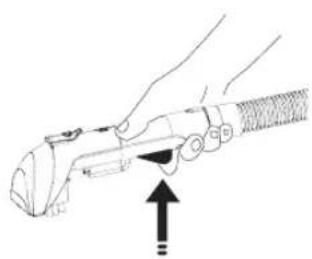
natural_image
Line drawing of a hand holding a tool with an arrow indicating motion (no text or symbols)- Get spray trigger ready.
Cleaning Steps
natural_image
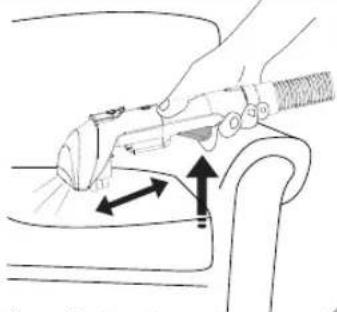
Line drawing of a hand using a tool to lift or press down a chair (no text or symbols)- Place the brush nozzle over the stain or spot.
natural_image
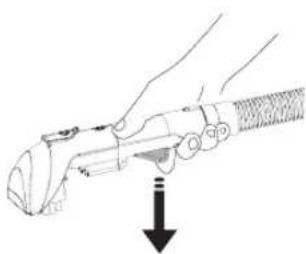
Line drawing of a hand holding a tool with a downward arrow indicating motion (no text or symbols)- Then press the spray trigger on the hose grip.
10
natural_image
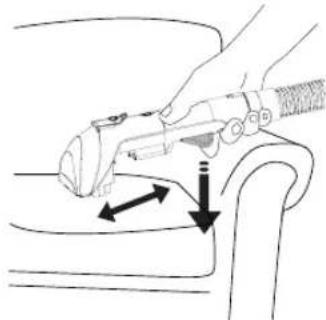
Line drawing of a hand holding a device on a chair, with arrows indicating movement or force (no text or symbols)- Slowly move back and forth to scrub and vacuum the stain away.
natural_image
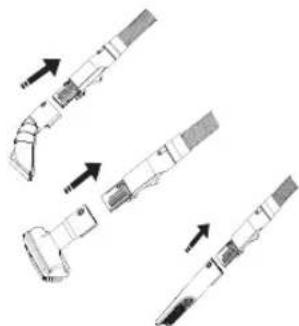
Diagram showing three sequential steps of a mechanical or electronic component with arrows indicating direction (no text or symbols present)- Replace the brush head to meet diverse cleaning needs.
natural_image
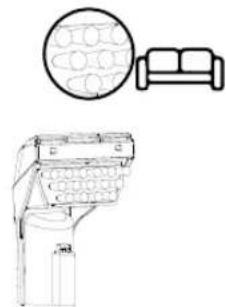
Line drawing of a car interior with sofa, seatbelt, and dashboard (no text or symbols)- Do not use on leather, sensitive or easily damaged surfaces.
13
natural_image
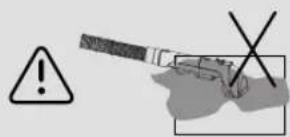
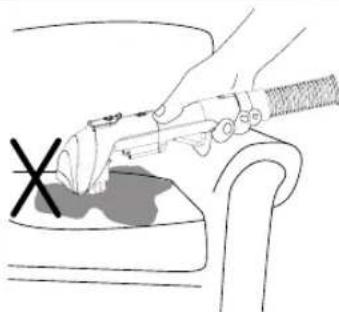
Illustration of a hand using a tool to press or install a component, with a cross mark and no visible text or symbols.- Do not add excessive cleaning formula and do not spray too much water.
natural_image
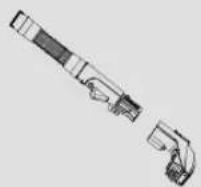
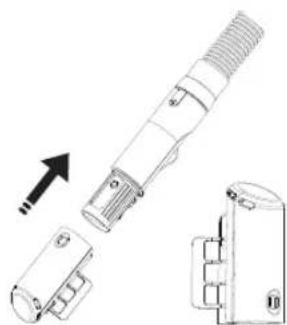
Technical line drawing of a mechanical component with an arrow indicating direction (no text or symbols)- Install the self-cleaning head after cleaning the item.
natural_image
Technical line drawing of a mechanical component with threaded end and clamped base (no text or symbols)16 Press the spray trigger to activate the self-cleaning.
16
Dirty Water Tank Use Steps



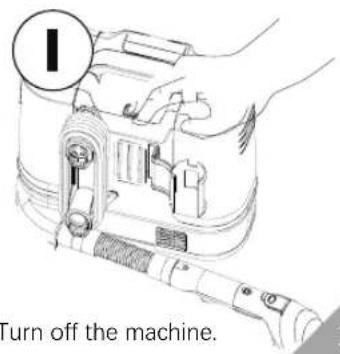
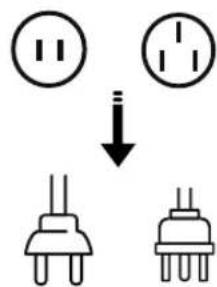
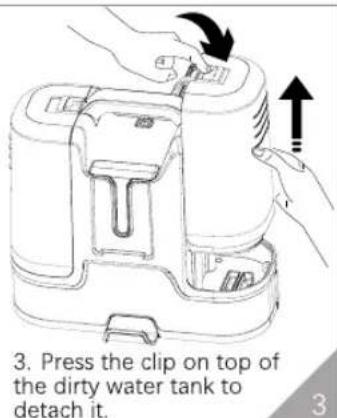
- Unplug from the electrical outlet.
natural_image
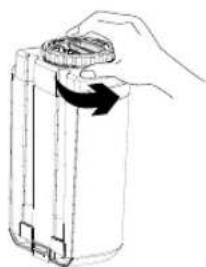
Hand holding a cylindrical device with a circular lid, showing a right-hand rule for rotation (no text or symbols)- Unscrew the cap on the dirty water tank.
natural_image
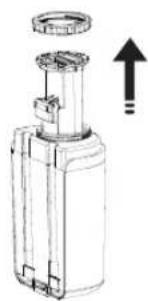
Technical line drawing of a mechanical device with an upward arrow indicating motion (no text or symbols)- Remove buoy bracket.
natural_image
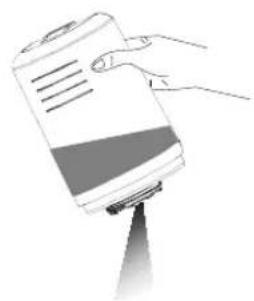
Illustration of a hand holding a cylindrical object with a gradient fill, emitting a pointed beam (no text or symbols visible)- Pour out dirty water.
natural_image
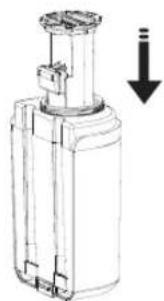
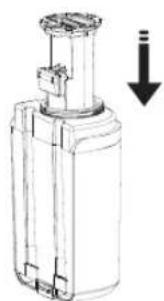
Technical line drawing of a mechanical device with a downward arrow indicating motion (no text or symbols)- Rinse the tank and buoy completely and then reinsert back the buoy.
natural_image
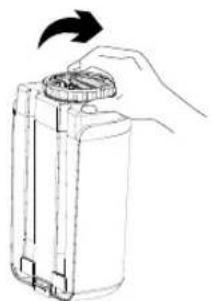
Line drawing of a hand holding a cylindrical device with an arrow indicating rotation (no text or symbols)- Screw the cap back on tightly.
Keep Clean



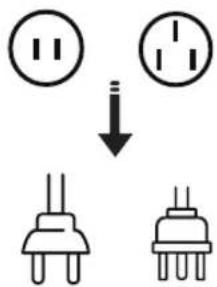
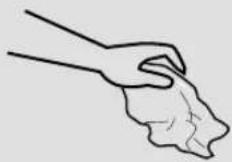
- Unplug from the electrical outlet.
natural_image
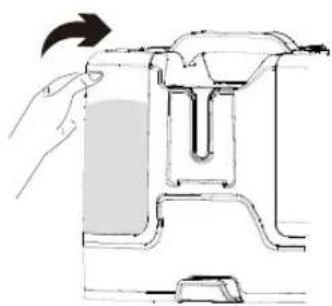
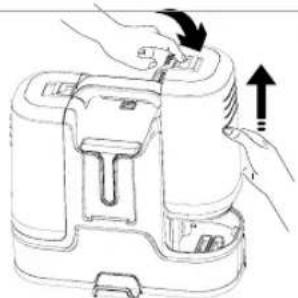
Line drawing of a portable device with hands operating it, showing internal components and directional arrows (no text or symbols)- Press the clip on top of the dirty water tank to detach it.
natural_image
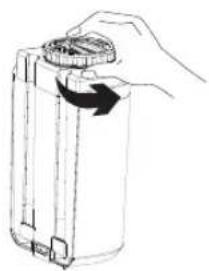
Hand holding a cylindrical device with a scroll wheel, showing a right-hand rule for rotation (no text or symbols)- Twist dirty tank cap.
natural_image
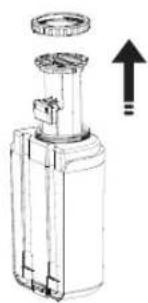
Technical line drawing of a mechanical device with an upward arrow indicating motion (no text or symbols)- Take out the buoy bracket.
natural_image
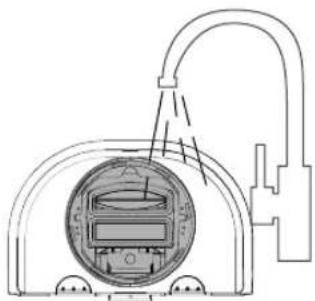
Technical line drawing of a mechanical device with internal components and piping (no text or symbols)- Rinse the dirty water tank entirely.
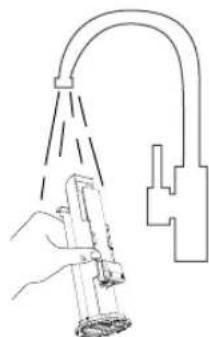
natural_image
Line drawing of a hand spraying water from a showerhead (no text or symbols)- Rinse the buoy bracket.
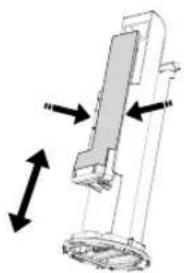
natural_image
Mechanical assembly diagram showing a vertical component with bidirectional arrows indicating motion (no text or symbols)- The buoy bracket is washable. DO NOT dispose of movable parts as they may cause damage.
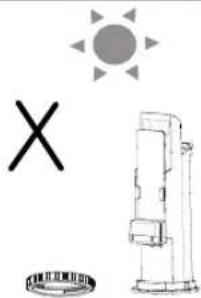
natural_image
Simple line drawing of a sun, a cross, and a portable device (no text or symbols)- No need to dry it up under the direct sun. Install immediately to avoid parts missing or damage.
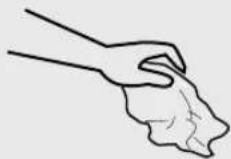
Keep Clean



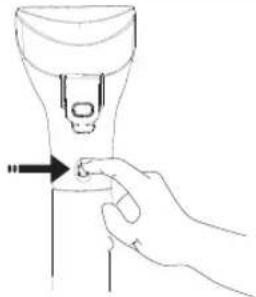 9. Press the button on the hose grip. 9. Press the button on the hose grip. | 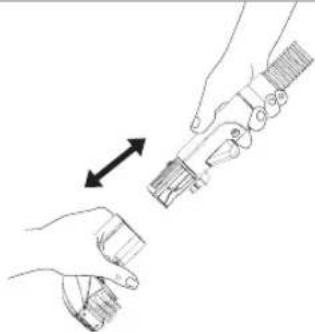 10. Pull the head to detach. 10. Pull the head to detach. | 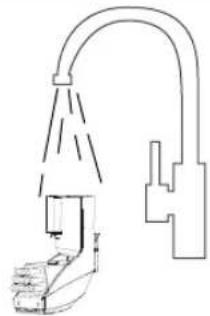 11. Rinse the brush head. 11. Rinse the brush head. |
 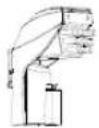 12. Wait until it is dry before storage. 12. Wait until it is dry before storage. | 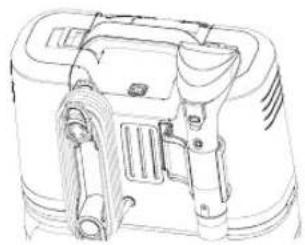 13. Wrap the power cord around the cord wrap. 13. Wrap the power cord around the cord wrap. | 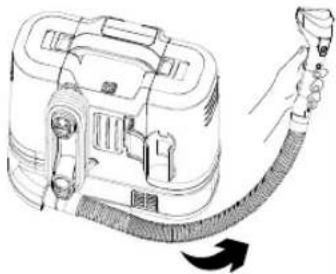 14. Wrap the hose around the machine and rest it on the flex hose holder. 14. Wrap the hose around the machine and rest it on the flex hose holder. |
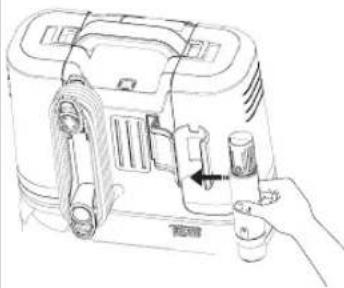 15. Fit the hose into the brush bracket to secure it in place. 15. Fit the hose into the brush bracket to secure it in place. | 15 |
SPECIFICATION
| Rated Voltage | 220-240V |
| Rated Power | 300-450W |
| Suction Ability | 12Kpa |
| Dirty Water Tank Capacity | 0.6L available |
| Clean Water Tank Capacity | 1.8L |
| Supported Water | Room Temperature Tap water |
| Machine Dimension | 235*320*333mm |
| Gross Weight | 5Kgs |
| Cord length | 1.2M |
| Accessories | Main Cleaning Head, Self-cleaning Head, Crevice Brush, Round Dust Brush, Glass Brush |
Environmental Tips
Once any electronic product is no longer functional, it should be disposed of in such a way as to cause minimum environmental impact, in accordance with the regulations of your local authority. In most cases you can take such products to your local recycling station.
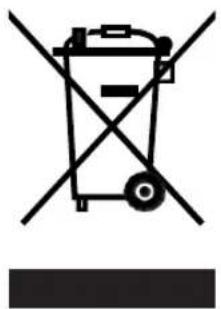
Recycling – European Directive 2012/19/EU
natural_image
Symbol of a trash bin with crossed lines indicating no waste or discharge (no text or labels)This marking indicates that this product should not be disposed with other household wastes. To prevent possible harm to the environment or human health from uncontrolled waste disposal, recycle it responsibly to promote the sustainable reuse of material resources. To return your used device, please use the return and collection systems or contact the retailer where the product was purchased. They can take this product for environmental safe recycling.
The components are quality products. They were designed taking into consideration the latest technical knowledge, and carefully constructed using a standard, good quality material.
The warranty period is 24 months from the time of handover, which must be confirmed through a sales receipt, invoice or delivery note. Within the warranty period, any functional defects in the components will be fixed by our customer service team if these can be shown to be the result of a material defect that has arisen despite prudent handling in accordance with our operating instructions.
The warranty will include repairing defective parts or providing properly functioning replacements free of charge and at our discretion. Any parts that are replaced will become our property. The repair or replacement of individual parts does not result in an extension to the warranty period, nor is there a new warranty period for the specific components affected. There is no separate warranty period for built-in spare parts. We offer no warranty for damage or defects affecting components or their parts if these are caused by excessive use, or incorrect handling or maintenance. The same applies for failure to follow the operating instructions and for the installation of spare parts or accessories not listed in our range. Warranty claims shall be void in the event of interference or modifications to components by unauthorised individuals.
The warranty does not cover parts that are subject to natural wear and tear. In the event of a warranty claim, fault, need for a spare part or accessory, please contact the customer support centre specified here:
Customer support centre:
Albatros International GmbH
Konrad-Zuse-Str. 3
D-54552 Nerdlen (Germany)
Tel: +49 (0)6592-1730200
Fax: +49 (0)6592-1730209
www.albatros-international.de
info@albatros-international.eu
Subject to modification.
Model:
Purchased at:
In (town/city, street):
Buyer's name:
Street, building number:
Postcode, town/city:
Telephone:
Date, signature:
Fault description:
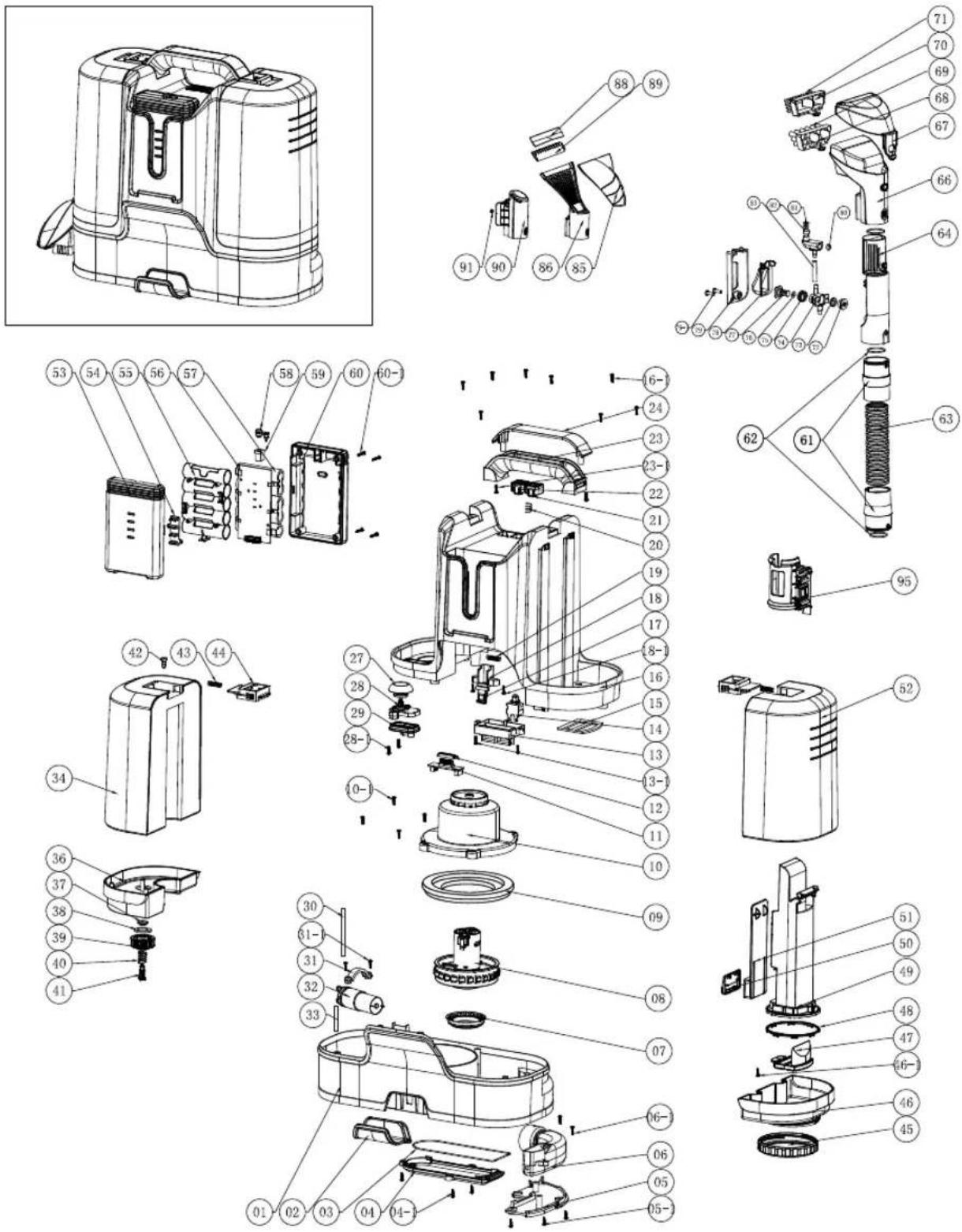
Explosionszeichnung/ Schéma éclaté/ Disegno esploso/ Dibujo explosivo/ Explosion drawing
CE-DÉCLARATION DE CONFORMITÉ
DÉCLARATION DE CONFORMITÉ CE
CE DECLARATION OF CONFORMITY
We herewith declare in our sole responsibility that this product complies with the following standards (1) in accordance with the regulations of the undermentioned Directives (2) test report (3) issuing test office (4).
Waschsauger WS450
EN Importer and responsible for technical documents
Authorized person for the compilation of the technical documentation:
Nerdlen, 10.08.2023



- Sommertal
- Waschsauger
- Modell: WS450
- Bedienungsanleitung
- Sicherheitshinweise
- User Manual Extraction Cleaner WS450
- Safety Instruction
- CAUTION: This appliance contains electrical connections
- Introduction and Features
- Table of Contents
- Steps to Use Clean water
- Cleaning Steps
- Dirty Water Tank Use Steps
- Keep Clean
- SPECIFICATION
- Environmental Tips
- Customer support centre:
- Model:
Brand : Sommertal
Model : WS450
Category : Vacuum Cleaner