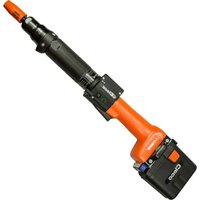
47BSYB15D3 - Screwdriver Cleco - Free user manual and instructions
Find the device manual for free 47BSYB15D3 Cleco in PDF.


| Product type | Charger for cordless screwdriver with lithium-ion battery |
| Brand | Cleco |
| Charger model | 936400PT / 935377 |
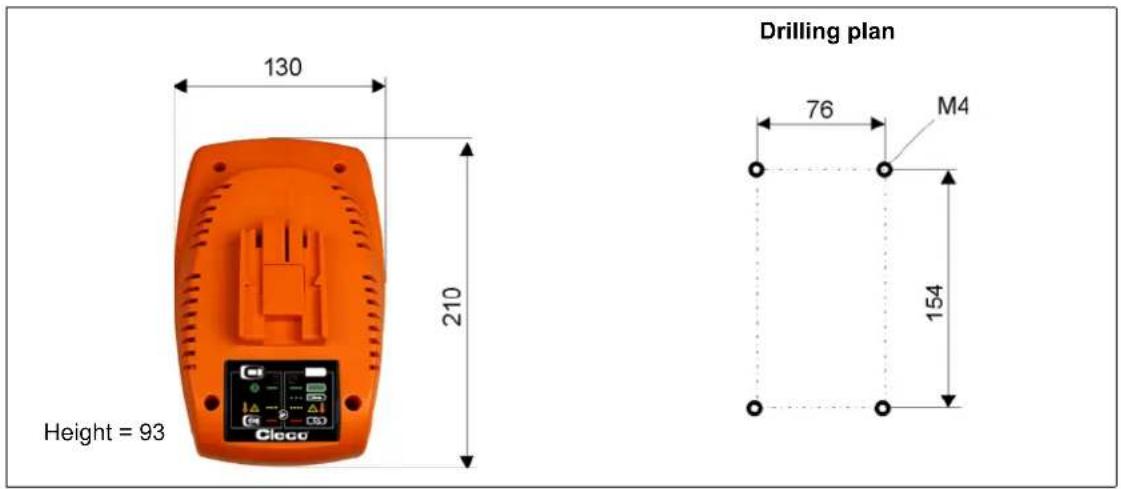
| Dimensions (L x W x H) | 130 x 210 x 93 mm |
| Weight (without cable) | 0.82 kg |
| Supply voltage | 85 – 270 VAC |
| Mains frequency | 47 – 64 Hz |
| Max. supply current | 1 A (110 V) / 0.5 A (230 V) |
| Rated battery voltage | 44 / 26 VDC |
| Final charging voltage | 50.4 / 29.4 VDC (±1 %) |
| Max. charging current | 2000 mA (±10 %) |
| Protection class | IP30 |
| Operating ambient temperature | 0 to +40 °C |
| Operating relative humidity | 0 to 90 % (non-condensing) |
| Main functions | Automatic battery identification, overcharge protection, voltage monitoring, optical charge display, automatic shut-off at end of charge |
| Maintenance and cleaning | Clean with a dry cloth, unplugged from mains. Do not use flammable substances. Clean charger and battery contacts. |
| Safety | Read instructions before use. Do not open or modify. Use only in dry indoor areas. Do not charge other types of batteries. |
| Repairability | Repair only by authorized after-sales service. Opening voids the warranty. |
| Disposal | Do not dispose of with household waste. Dispose of at a collection point or return to the service center. |
Frequently Asked Questions - 47BSYB15D3 Cleco
User questions about 47BSYB15D3 Cleco
0 question about this device. Answer the ones you know or ask your own.
Ask a new question about this device
Download the instructions for your Screwdriver in PDF format for free! Find your manual 47BSYB15D3 - Cleco and take your electronic device back in hand. On this page are published all the documents necessary for the use of your device. 47BSYB15D3 by Cleco.
USER MANUAL 47BSYB15D3 Cleco
natural_image
Orange plastic electrical contactor with control panel and buttons (no readable text or symbols)Contents
CS 3
DE 11
EN 19
ES 27
FR 35
IT 43
PL 51
PT 59
RU 67
SK 75
ZH 83
Upozornění
natural_image
Two orange and black Bosch 3D sensors with a white arrow indicating a change, no visible text or symbols on the devices themselves.natural_image
Two orange and black industrial batteries with a white arrow indicating a change, no visible text or symbols on the main body.7.1 Abmessungen in mm
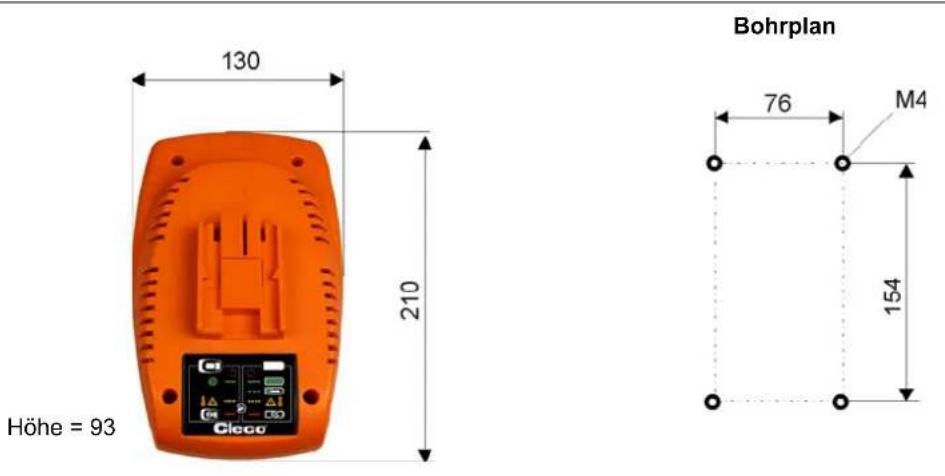
8 Entsorgung
VORSICHT!

Apex Tool Group reserves the right to modify, supplement or improve this document or the product without prior notice. This document may not be reproduced in whole or in part in any way, shape or form, or copied to another natural or machine-readable language or to a data carrier, whether electronic, mechanical, optical or otherwise, without the express permission of Apex Tool Group.
1 S a f e t y
WARNING!

Carefully read all safety information and instructions. Failure to comply with safety instructions and other instructions could result in electric shocks, burns and/or serious injuries.
1.1 Warnings and information
Warning notes are identified by a signal word and a pictogram:
- The signal word describes the severity and the probability of the impending danger.
- The pictogram describes the type of danger.
WARNING!

A symbol combined with the word WARNING warns of a potentially dangerous situation for the health of personnel. If this warning is not observed, death or serious injury may occur.
CAUTION!

A symbol combined with the word CAUTION warns of a potentially harmful situation for the health of personnel or damage to property or the environment. If this warning is not observed, injuries, property or environmental damage may occur.

This symbol indicates a general instruction.
General instructions include application tips and special useful information, but no warnings against dangers.
1.2 Symbols on the product
→ Make sure you are familiar with the meanings before you start using the device.

Read the Instruction Manual before initial operation.

Always return used electrical equipment for recycling.
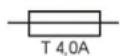
Slow-blow fuse Operation only indoors or in closed prem-


Protection rating II / Protection by double or reinforced insulation

Only for EU countries: Do not dispose of electrical equipment with domestic waste! Pursuant to EU Directive 2002/96/EC, used electrical equipment must be collected separately and returned for environmentally compatible recycling.
1.3 Basic requirements for safe working practices
CAUTION!

Electrical safety
→ Do not operate the charger if the housing, power cable or plug are damaged.
Do not use batteries which have been damaged or modified in any way. Batteries which have been damaged or modified may respond unpredictably, causing fire, explosion or injury.
→ Do not open the charger.
→ Do not modify the charger structurally.
→ Operate the charger in dry, enclosed rooms only.
→ Protect the charger from moisture and rain.
→ Never operate the charger under unsuitable ambient conditions (i.e. where combustible gases, solvents, dust, vapors or moisture is present).
Workstation
→ Ensure that there is enough space at the workstation.
→ Keep the work area clean and dry.
1.4 Designated use
The charger is intended exclusively for charging the following Apex Tool Group lithium ion batteries:
• Order no. 936400PT
• Order no. 935377
1.5 Items supplied
Check shipment for transit damage and ensure that all items have been supplied:
1 Battery charger 1 GB power cable
1 EU power cable 1 Instruction Manual
1 NA power cable
1.6 Transport
Transport and store the charger in the original packaging. The packing is recyclable.
2 Product description
2.1 General description
• Automatic identification of connected battery.
• Automatic identification of a charged battery guarantees optimum charging results.
• Automatic identification of a defective battery.
- The recharging phase guarantees maximum run time of the battery.
- Charge status display
• Overcharge protection
- Wide-range input make worldwide use possible.
- Voltage monitor prevents deep discharging and battery short-circuits.
2.2 LED display
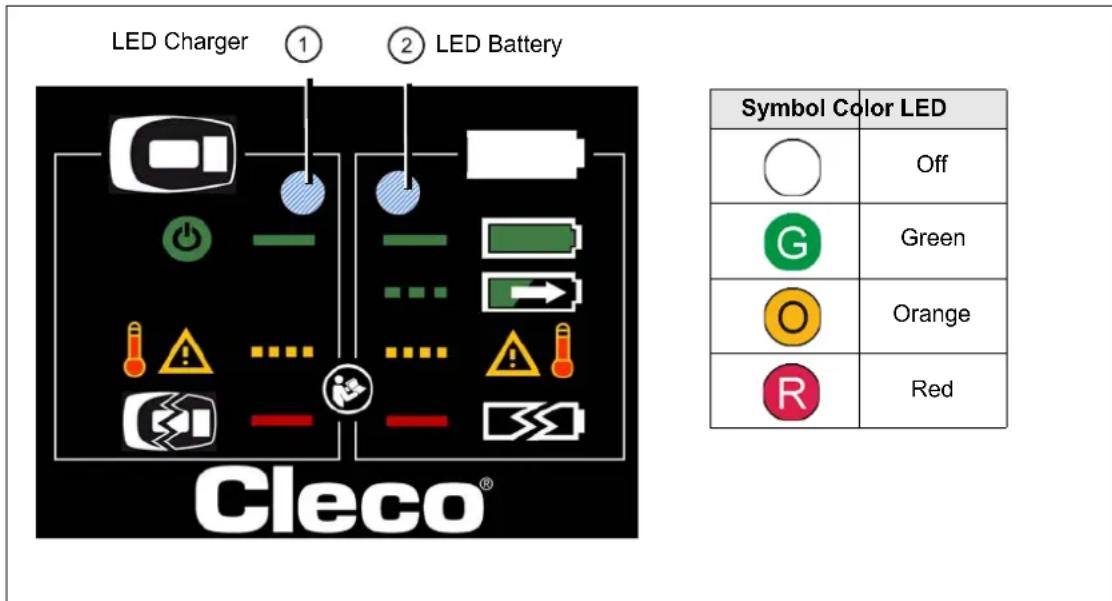
2.2.1 Operating status
   | Graphic Status | 2LEDBattery | Graphic Status | |
 | Off Off – No battery contact | |||
  |   | connected | Lights up Battery is charged | |
Flash 2 Hz  | Error charger,  | see 4 Troubleshooting | Flash 1 Hz Battery charging | |
 Lights up De Lights up De |    | see 4 Troubleshooting | Flash 2 Hz – Only 44 V– | |
| Lights up Defekt batteryR | see 4 Troubleshooting | |||
3 Initial operation
WARNING!

Risk of explosion if other batteries are used
→ Use only to charge CLECO lithium ion batteries, order no. 936400PT or order no. 935377.
Never use to charge other battery types.
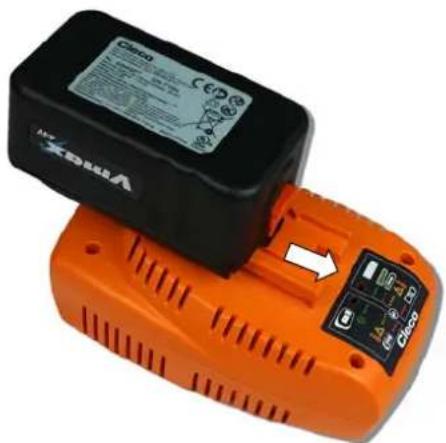
natural_image
Two orange batteries with visible internal components and a white arrow pointing to one (no text or symbols on the main body)→ Connecting the charger to the power network:
① LED lights up green and indicates that power is supplied.
→ Plug the battery into the charger and make sure that it is securely connected.
LED ② is flashing green, indicating that charging is in progress.

LED ② should not be flashing red before it is plugged in. The battery could be damaged.
→ Disconnect the charger from the power supply, wait about 1 minute and then reconnect.
When charging is finished, the charger automatically shuts off the charging process. LED ② lights up permanently in green.
4 Troubleshooting
| 1LEDCharger | 2LEDBattery | Error Measure | |
 |  | No power supply voltagePower cable defectiveCharger defective | → Check and restore the power supply vol-tage.→ Replace power cable→ Send charger to Sales & Service Center. |
 |  | Charger defective | → Send charger to Sales & Service Center. |
 |  | Battery defective | → Send battery to Sales & Service Center. |
 |  | No battery contactContacts are dirtyBattery defective | → Insert battery again→ Clean contacts of the charger and battery→ Check battery and replace if necessary |
 |  | Charger + battery defec-tive | → Do not further operate the defective devices (charger + battery).→ Replace charger + battery for new devices.→ Send defective charger + battery to Sales & Service Center. |
 |  | Error charger:Temperature too high | → No action requiredCharging is automatically started / continued after cooling |
 |  | - Only 44 V -Error battery:Temperature too high | → No action requiredCharging is automatically started / continued after cooling |
 |  | - Only 44 V -Error communication | → Insert battery again→ Clean contacts of the charger and battery |
5 Servicing
CAUTION!

→ To clean the charger, make sure the power plug is disconnected and clean with a dry cloth.
→ Do not use easily inflammable substances for cleaning.
→ To ensure proper charger function, keep the contacts of the charger and batteries free of dirt.
6 Service

If repair is required, send the complete charger to Sales & Service Center. It may only be repaired by authorized technicians. Opening the charger will void the warranty.
7 Technical data
| Features Data | |
| Supply voltage 85 ... 270 VAC | |
| Power supply frequency 47 ... 64 Hz | |
| Efficiency factor 110 VAC | >90% |
| 230 VAC | >93% |
| Max. supply voltage 110 VAC | 1 A |
| 230 VAC | 0.5 A |
| Power loss in standby 110 VAC | 5 W |
| 230 VAC | 4 W |
| Rated battery voltage | 44/26 VDC |
| End-of-charge voltage | 50.4/ |
| Open circuit voltage, without battery Max. 1 VDC | |
| Charging current | max. 2000 mA ±10% |
| Protection category | IP30 |
| Weight without cable | 0.82 kg |
| Operation temperature | +0 to +40 °C (+32 to +104 °F) |
| Operation, relative humidity | 0...90%, non-condensing |
| Storage temperature | -20 to +60 °C (-4 to +140 °F) |
| Storage, relative humidity | 0...80%, non-condensing |
| Storage duration | 100,000 h |
| Life expectancy | 60,000 h |
7.1 Dimensions in mm
8 D i s p o s a l
CAUTION!

Injuries and environmental damage from improper disposal.
Components and auxiliary materials of the charger pose risks to the health and the environment.
→ Separate the components of the packing and segregate the different materials before disposing of them.
→ Follow the locally applicable regulations.

→ Return the charger and defective/used batteries to your company collection facility or to Sales & Service Center.
→ Do not throw the batteries in household refuse, fire or liquids.

natural_image
Two orange OPOL batteries with a black label and a white arrow pointing to one (no visible text or symbols on the battery body)natural_image
Orange and black cylindrical batteries with a small electronic component, no visible text or symbols on the main body.natural_image
Two orange cylindrical batteries with a black and white label, one showing a small electronic component (no readable text or symbols)natural_image
Two orange and black circular batteries with a white arrow pointing to one, one showing internal components (no readable text or symbols)natural_image
Two orange and black circular batteries with visible branding and a white arrow indicating a change (no text or symbols on the main body)natural_image
Two orange and black cylindrical batteries with a control panel, one open and one closed, no visible text or symbols on the main body.natural_image
Two orange and black batteries with a small display showing internal components (no visible text or symbols)natural_image
Two orange OPD batteries with a black Dako ID card and a white arrow pointing to one (no visible text or symbols on the battery body)Please note that all locations may not service all products.
Contact the nearest Apex Tool Group Sales & Service Center for the appropriate facility to handle your service requirements.
Sales Center
Service Center
NORTH AMERICA | SOUTH AMERICA
Detroit, Michigan
Apex Tool Group
2630 Superior Court
Auburn Hills, MI 48236
Lexington, South Carolina
Apex Tool Group
670 Industrial Drive
Lexington, SC 29072
Louisville, Kentucky
Apex Tool Group
1000 Glengarry Drive
Suite 150
Fairdale, KY 40118
Phone: +1 (502) 708-3400
apexpowertools.com/service
Canada
Apex Tool Canada, Ltd.
7631 Bath Road
Mississauga, Ontario L4T 3T1
Canada
Phone: (866) 691-6212
Fax: (905) 673-4400
Mexico
Apex Tool Group
Manufacturing México
S. de R.L. de C.V.
Ind. Com. Ferram, Ltda.
Av. Liberdade, 4055
Zona Industrial Iporanga
Sorocaba, São Paulo
CEP# 18087-170
Brazil
Phone: +55 15 3238 3820
Fax: +55 15 3238 3938
EUROPE | MIDDLE EAST | AFRICA
England
Apex Tool Group GmbH
C/O Spline Gauges
Piccadilly, Tamworth
Staffordshire B78 2ER
United Kingdom
Phone: +44 1827 8727 71
Fax: +44 1827 8741 28
France
Apex Tool Group S.A.S.
519 Nurigong Street, Albury
NSW 2640
Australia
Phone: +61 2 6058 0300
China
Apex Power Tool Trading
(Shanghai) Co., Ltd
2nd Floor, Area C
177 Bi Bo Road
Pu Dong New Area, Shanghai
China 201203 P.R.C.
Phone: +86 21 60880320
Fax: +86 21 60880298
India
Apex Power Tools India
Private Limited
Gala No. 1, Plot No. 5
S. No. 234, 235 & 245
Indialand Global
Industrial Park
Taluka-Mulsi, Phase I
Hinjawadi, Pune 411057
Maharashtra, India
Phone: +91 020 66761111
Japan
Apex Tool Group Japan
Korin-Kaikan 5F,
3-6-23 Shibakoen, Minato-Ku,
Tokyo 105-0011, JAPAN
Phone: +81-3-6450-1840
Fax: +81-3-6450-1841
Korea
Apex Tool Group Korea
1503, Hibrand Living Bldg.,
215 Yangjae-dong,
Seocho-gu, Seoul 137-924,
Korea
Phone: +82-2-2155-0250
Fax: +82-2-2155-0252
Apex Tool Group, LLC
1000 Lufkin Road
Apex, NC 27539
Phone: +1 (919) 387-0099
Fax: +1 (919) 387-2614
www.apexpowertools.com

APEX
TOOL GROUP
- Contents
- Abmessungen in mm
- Entsorgung
- VORSICHT!
- S a f e t y
- WARNING!
- Warnings and information
- CAUTION!
- Symbols on the product
- Basic requirements for safe working practices
- Electrical safety
- Workstation
- Designated use
- Items supplied
- Transport
- Product description
- General description
- LED display
- Operating status
- Initial operation
- Troubleshooting
- Servicing
- Service
- Technical data
- Dimensions in mm
- D i s p o s a l
- NORTH AMERICA | SOUTH AMERICA
- Detroit, Michigan
- Lexington, South Carolina
- Louisville, Kentucky
- Canada
- Mexico
- EUROPE | MIDDLE EAST | AFRICA
- England
- France
- China
- India
- Japan
- Korea
- 1503, Hibrand Living Bldg.,
Brand : Cleco
Model : 47BSYB15D3
Category : Screwdriver