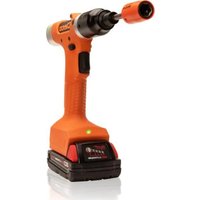
CLBP12Q - Screwdriver Cleco - Free user manual and instructions
Find the device manual for free CLBP12Q Cleco in PDF.


Pick your language and provide your email: we'll send you a specifically translated version.
| Product Type | Cordless Screwdriver |
| Model | CLBP12Q |
| Brand | Cleco |
| Battery Voltage | 12V |
| Battery Type | Li-Ion (integrated or interchangeable) |
| Chuck Type | Quick-release hex (1/4") |
| Max Torque | Approx. 10 Nm |
| No-Load Speed | 0-600 RPM variable |
| Weight | Approx. 0.9 kg (with battery) |
| Dimensions (L x W x H) | 200 x 50 x 180 mm |
| Power Supply | Rechargeable battery, input: 100-240V AC charger |
| Charging Time | Approx. 1 hour |
| Forward/Reverse | Yes, slide switch |
| Variable Speed Trigger | Yes, for precise control |
| LED Work Light | Yes, above trigger |
| Belt Clip | Included |
| Key Functions | Driving and removing screws in wood, metal, plastic |
| Maintenance | Keep vents clean; store in dry place; charge regularly |
| Safety Features | Lock-off trigger, overcharge protection |
| Spare Parts Available | Battery pack, charger, chuck, casing |
| Repairability | Modular design; authorised service centres recommended |
| Warranty | 1-2 years (depending on region) |
Frequently Asked Questions - CLBP12Q Cleco
How do I charge the battery?
Insert the battery pack into the charger until it clicks. Connect the charger to a mains outlet. The LED on the charger will turn red during charging and green when fully charged. Charging typically takes about 1 hour.
Can I use the screwdriver while charging?
No, the tool is not designed to operate while connected to the charger. Always remove the battery before charging.
How do I insert and remove bits?
Pull the chuck collar forward, insert the bit fully, then release the collar to lock it in place. To remove, pull the collar forward again and pull out the bit.
What should I do if the screwdriver stops working?
Check that the battery is charged and properly inserted. Ensure the forward/reverse switch is not in the middle position. If it still doesn't work, contact Cleco service.
How do I clean and maintain the screwdriver?
Wipe the exterior with a dry cloth. Keep air vents free of dust. Do not use solvents. Store in a dry place at room temperature.
What type of bits are compatible?
The screwdriver accepts standard 1/4" hex shank bits (6.35 mm). Both screwdriver and drill bits with hex shank are compatible.
Is the battery removable or built-in?
The battery is removable. Press the release button on the battery pack and slide it out. Replace only with Cleco-approved batteries.
Why does the LED light flash?
The LED may flash to indicate low battery. Charge the battery. If it flashes rapidly, there may be an overheat or overload condition; allow the tool to cool down.
Can I use the screwdriver for drilling?
It is primarily a screwdriver. For light drilling in soft materials, use appropriate drill bits with a hex shank. For heavier drilling, use a dedicated drill.
Where can I find replacement parts?
Contact Cleco customer service or visit authorised dealers. Common parts like battery packs and chargers are available online.
User questions about CLBP12Q Cleco
0 question about this device. Answer the ones you know or ask your own.
Ask a new question about this device
No questions yet. Be the first to ask one.
Download the instructions for your Screwdriver in PDF format for free! Find your manual CLBP12Q - Cleco and take your electronic device back in hand. On this page are published all the documents necessary for the use of your device. CLBP12Q by Cleco.
USER MANUAL CLBP12Q Cleco
Manual assistant
Powered by Anthropic
Waiting for your message
Product information
Brand : Cleco
Model : CLBP12Q
Category : Screwdriver