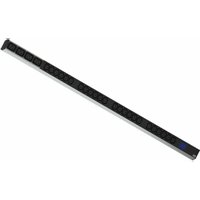
BlueNet BN0500 - Power strip Bachmann - Free user manual and instructions
Find the device manual for free BlueNet BN0500 Bachmann in PDF.


User questions about BlueNet BN0500 Bachmann
0 question about this device. Answer the ones you know or ask your own.
Ask a new question about this device
Download the instructions for your Power strip in PDF format for free! Find your manual BlueNet BN0500 - Bachmann and take your electronic device back in hand. On this page are published all the documents necessary for the use of your device. BlueNet BN0500 by Bachmann.
USER MANUAL BlueNet BN0500 Bachmann
text_image
Technical diagram showing four different electrical panel designs with labeled components and circuit symbolsBlueNet BN0500
deutsch
Bedienungsanleitung
english
Manual
français
Mode d'emploi
text_image
Technical diagram of a multi-pin electrical connector with labeled parts and exploded viewnatural_image
Technical line drawing of two parallel rack-mounted electronic equipment units with circular components and mounting brackets (no text or symbols)text_image
12.5 A 1536.9 kWhContents and Overview
text_image
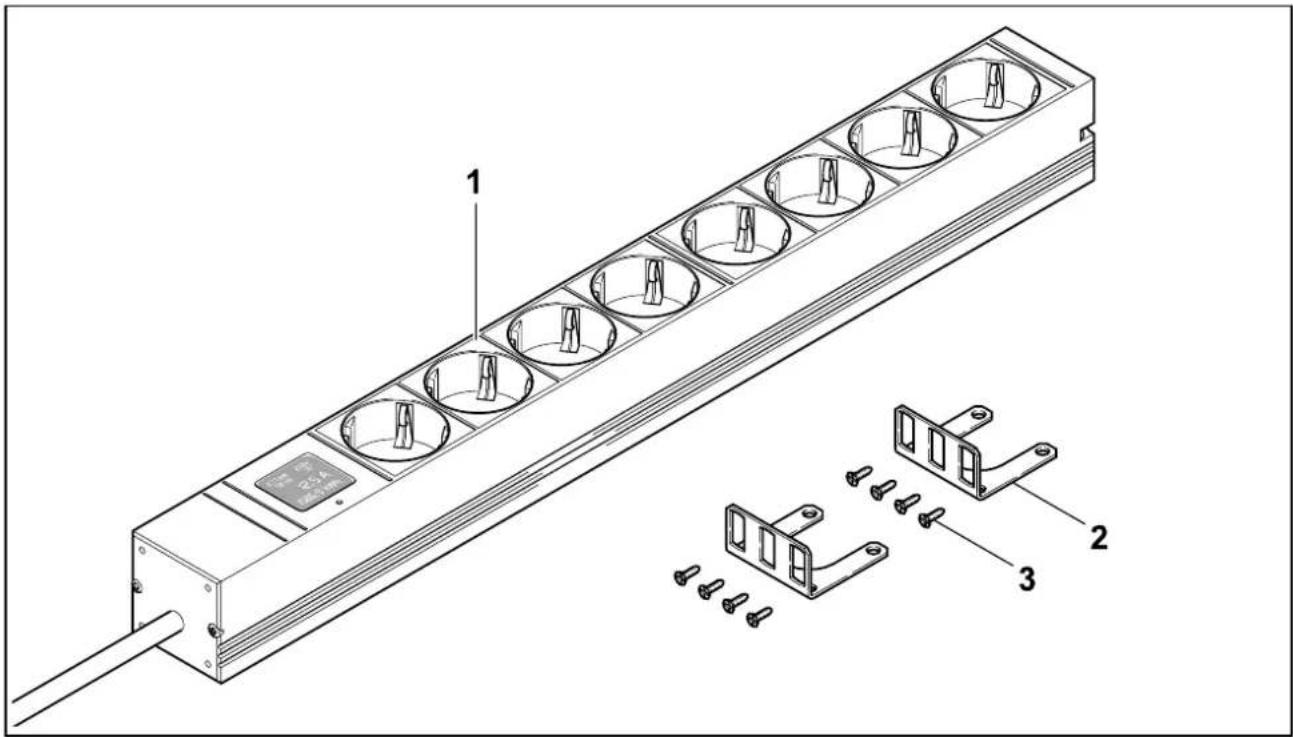
Technical diagram of a multi-pin electrical connector with labeled parts and component annotations1 Power strip (variations not shown)
2 Fixing brackets
3 Screws 2.9 x 10 mm
Technical Data
| Designation Power supply voltage | Measurement range T | Temperature range | Storage temperature | Relative humidity |
| BN0500 ~ 230 V 0.1A to | 32 A + 5 to + 45 °C | -15 to +60 °C < 80 % non- | condensing |
| Measurement and display values | Current (I) | Voltage (U) | Effective power (P) | Energy consumption (E) | Phase shift angle (φ) | Frequency (f) |
| Measuring accuracy 0.0 | 1 A 0.1 V 1 | W 0.1 kWh 0.1 | ° | 0.1 Hz | ||
| Display resolution | 0.1 A | 1 V | 1 W | 0.1 kWh | 1 ° | 1 Hz |
Table of Contents
| English | Page | ||
| Contents and Overview | 7 | Display | 10 |
| Technical Data | 7 | Operation | 11 |
| Safety Information | 8 | What to do if... | 11 |
| Intended use | 9 | Storage and Disposal | 11 |
| Installation | 10 | ||
| Initial Operation | 10 |
Thank you
Congratulations on selecting the intelligent BN0500 power strip from Bachmann's BlueNet series. From the moment of installation, the various products in the Bachmann BlueNet range will deliver you a high level of cost-effectiveness. The various modules offer you the best conditions for setting up an optimized energy management system.
Before starting to use this product please read the entire manual and observe all operational and safety notices to ensure safe operation.
Safety Information

Use only in indoor, well ventilated and dry areas.

Never use the power strip immediately after bringing it into a warm room from a cold one. The condensation this creates can, in some cases, cause a shortcircuit and destroy the product. It also presents a fatal electrocution hazard!

The power cable of the power strip must be neither repaired nor replaced. If the power cable is damaged, the power strip must be replaced.

Ensure when selecting the installation site that no high humidity, high temperatures (see Technical Data), moisture, solvents, flammable gases, dust or vapors are present. The heat generated during operation must be dissipated.

The power strip may be operated only when connected to power socket protected by a 16A fuse. Do not exceed the maximum power transmission (see Technical Data). If the power strip shows outward signs of wear from transport or improper handling, it must not be put into operation or must be put out of operation immediately and must be replaced or sent back to the manufacturer for repair.

Danger of fatal electric shock: Never carry out work on the power strip with wet hands.

Risk of finger crushing during installation or mounting work.

BlueNet BN0500 is a maintenance-free system. There is no need to open the housing during installation.

Do not use aggressive substances such as spirits or acids to clean the unit, as these can damage it. To clean the housing use a slightly moistened cloth.

Observing these notices is part of our terms of warranty.

The product fulfills the requirements of the valid European and national directives and standards. The CE conformity has been documented, and the corresponding certificates are on file at the manufacturer's location.
Intended Use
The BlueNet BN0500 power strip is intended solely for the common connection of different electrical devices in accordance with the permitted specifications (see Technical Data). The unit also gives a continuous display of the power consumption of the connected equipment for consumption monitoring purposes.
Uses other than that specified above are not permitted and may lead to damage to the power strip. No modification may be made to any part of the power strip. Any such modification forfeits all warranty liability.
Installation
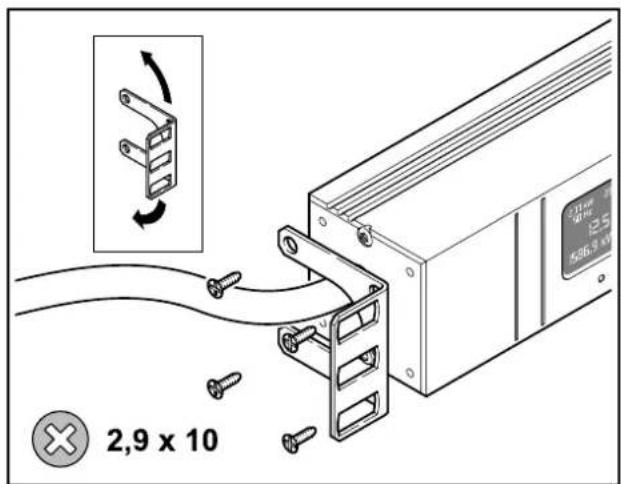
For fitting in a cabinet, mount the fixing brackets onto the power strip.
text_image
2,9 x 10Place the brackets in the desired position on the power strip, insert and tighten screws.
The fixing brackets must be fitted in the same position on both sides.
text_image
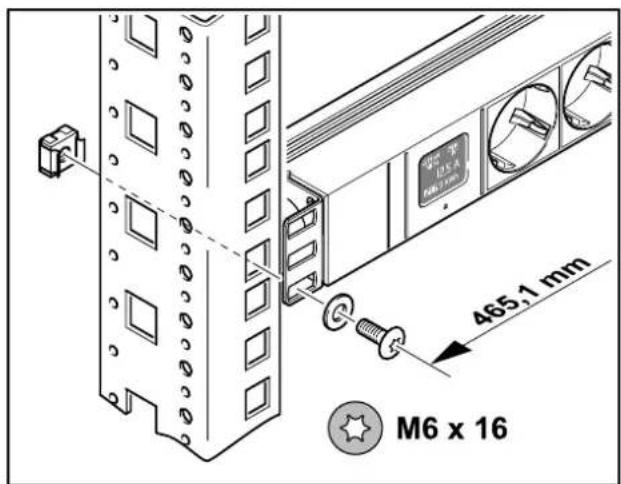
465.1 mm M6 x 16Position the power strip on the mounting profile of the cabinet.
Fixing materials are not included.
Installation Options
natural_image
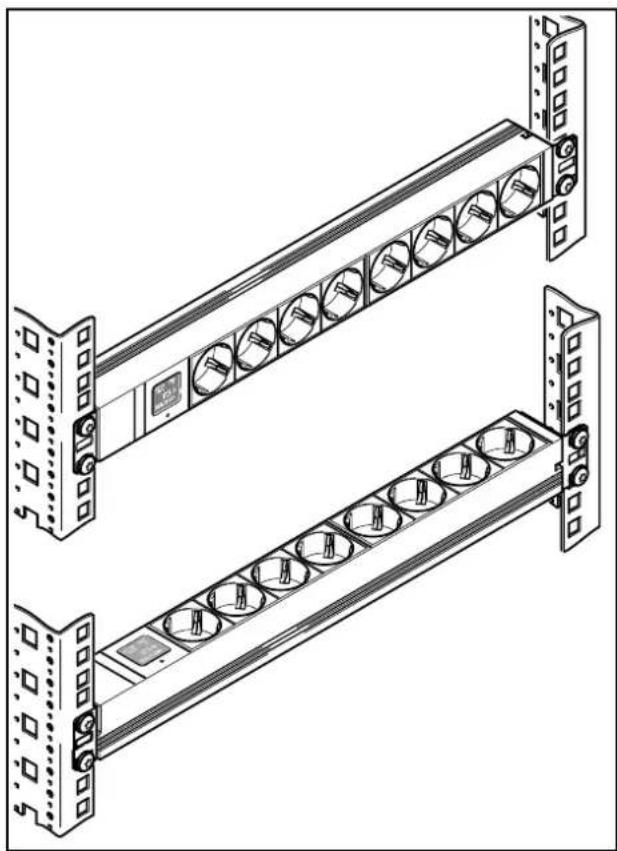
Technical line drawing of two parallel rack-mounted electronic equipment units with circular components and mounting brackets (no text or symbols)The versatile mounting brackets can be fitted to the power strip in four different positions (each rotated by 90°).
This facilitates installation of the power strip according to individual needs.
Initial Operation
Before interrupting the power supply to your equipment, make certain that the equipment has been correctly switched off.
text_image
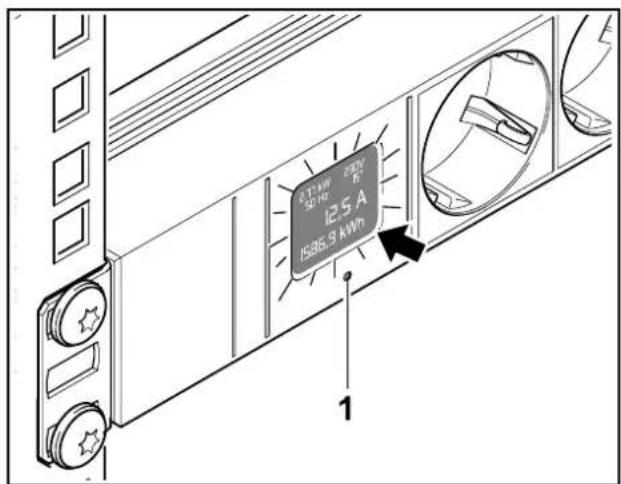
12.5 A 1536.9 kWhInsert the power strip's plug into the power socket.
Press button (1) to activate the display (arrow). The display will turn off again after 5 minutes.
Now you may plug your equipment into the power strip.
For voltage and current consumption... see Technical Data.
Display
The values shown in the display fulfill Accuracy class 2.
text_image
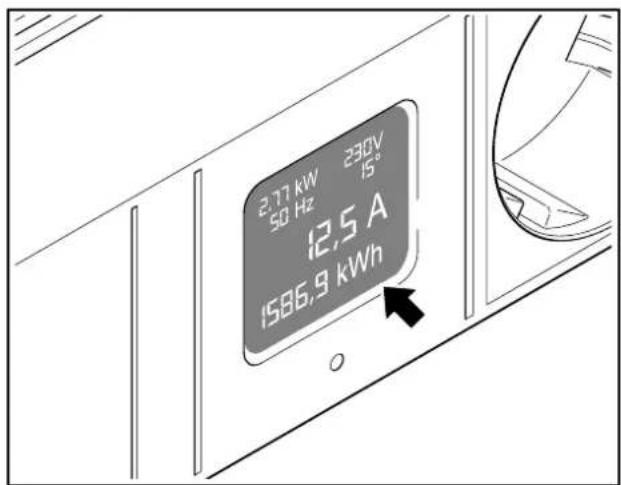
2.77 kW 230V 50 Hz 15° 12,5 A 1586,9 kWhThe display (arrow) is situated on the front of the power strip.
The following values can be read from the display.
Display Overview
text_image
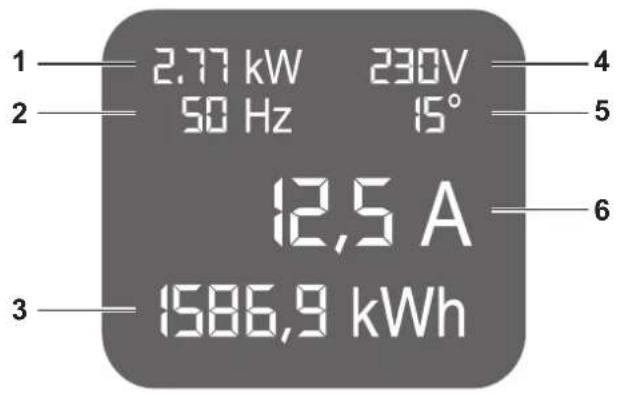
1 2.77 kW 230V 50 Hz 15° 12,5 A 1586,9 kWh 3 4 5 61. kW - Power measurement
Electrical output of all connected devices taking into account the phase shift.
2. Hz - Frequency
Current power frequency.
3. kWh - Kilowatt-hour
Records the power consumed by all connected devices. The counter reading is stored and can be reset to zero using the Reset button.
4. V - Power supply voltage
Current voltage of the power supply.
5. Phase angle
Displays the phase shift in the power supply.
6. A - Amps
Current drawn at the present time by all connected devices.
Operation
Activate display
Press the button (1) to reactivate the display. Button (1) must be pressed for at least one second. The display will now light up.
Resetting the energy counter
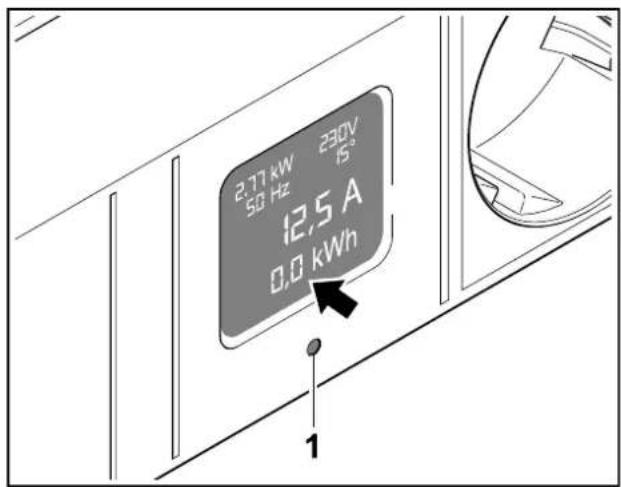
By pressing button (1) for at least 10 seconds, the energy counter will be reset to zero.
This process can be carried out at any time during operation (the connected devices do not have to be shut off).
The displayed kWh counter reading is stored every 30 minutes and retained even if the power strip is unplugged.
If necessary, write down the current counter reading first.
text_image
2.77 kW 230V 50 Hz 15" 12.5 A 0.0 kWh 1Press the button (1) until the kWh counter reading (arrow) is at zero.
The kWh counter resumes counting immediately after you release the button (1).
Near overload alarm
When the load reaches 90% of the rated load for the power strip the display will start flashing.
The alarm will remain even if the load is back under 90% of the rated load.
To quit the alarm, press the button (1) for 3 seconds.
The alarm has been quit.
What to do if...
| Display no longer shows all readings. | Unplug power strip from power supply and plug back in. Strip re-starts. Connected equipment must be switched off before strip is unplugged. Connected equipment must be switched off before strip is unplugged. |
| No voltage at a socket on the strip. | Contact our service department. |
Storage and Disposal
We recommend that the power strip be disconnected from the power supply and stored if it is not to be used for an extended period.

Protect power strips in storage from moisture and dust; for further information see Technical Data.
Do not throw electrical devices into household waste. These must be disposed of in an environmentally responsible manner via your local collection point!
text_image
Technical diagram of a multi-layered electrical connector with labeled parts and mounting hardwarenatural_image
Technical line drawing of two parallel rack-mounted electronic equipment units with circular components and mounting brackets (no text or symbols)text_image
12.5 A 1536.9 kWhDuplication or copying, even in part, is permitted only with the manufacturer's express authorization. We reserve the right to make technical modifications to the products described in this document and assume no responsibility for any mistakes or printing errors contained herein.