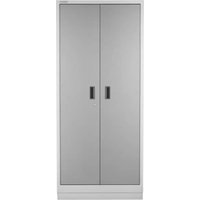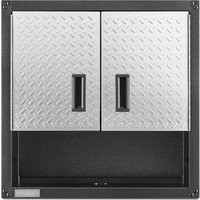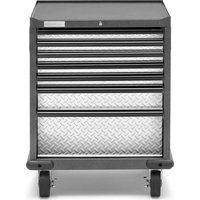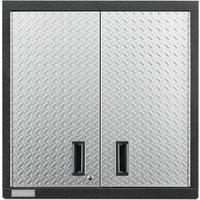
GAWG302DRG - Wardrobe Gladiator - Free user manual and instructions
Find the device manual for free GAWG302DRG Gladiator in PDF.


User questions about GAWG302DRG Gladiator
0 question about this device. Answer the ones you know or ask your own.
Ask a new question about this device
Download the instructions for your Wardrobe in PDF format for free! Find your manual GAWG302DRG - Gladiator and take your electronic device back in hand. On this page are published all the documents necessary for the use of your device. GAWG302DRG by Gladiator.
USER MANUAL GAWG302DRG Gladiator
GAWG241DRG - 24" Hammered Granite/Silver Tread
GAWG241DDR - 24" Hammered Granite/Red Tread
GAWG241DKW - 24" Hammered White/Gray Slate
GAWG302DRG - 30" Hammered Granite/Silver Tread
GAWG302DDR - 30" Hammered Granite/Red Tread
GAWG302DZW - 30" Hammered White/Gray Slate
GAWA30SFRG - 30" Hammered Granite
GAWA30SFZW - 30" Hammered White
GAWA48SFRG - 48" Hammered Granite
GAWA48SFZW - 48" Hammered White
Modèles
24" (60.96 CM) AND 30"
(76.20 CM) PREMIER
WELDED-STEEL WALL
GEARBOX CABINET
Assembly Instructions
ARMOIRE MURALES
À OUTILS EN ACIER
SOUDÉ DE HAUTE
QUALITÉ, 24 PO (60,96
CM) ET
30 PO (76,20 CM)
CABINET SAFETY......2
PARTS....2
ASSEMBLY INSTRUCTIONS......3
Tools and Parts 3
Cabinet Use Requirements......3
Unpack the Cabinet......3
Install the Cabinet to the Wall......3
Adjust Shelves ....5
Adjust Door(s) 6
Reverse Door (24" [60.96 cm] Wall
Cabinet Only) 6
WARRANTY....6
SÉCURITÉ DE L'ARMOIRE .....7
PIÈCES 7
INSTRUCTIONS D'ASSEMBLAGE.....8
Your safety and the safety of others are very important.
We have provided many important safety messages in this manual and on your appliance. Always read and obey all safety messages.

This is the safety alert symbol.
This symbol alerts you to potential hazards that can kill or hurt you and others.
All safety messages will follow the safety alert symbol and either the word "DANGER" or "WARNING."
These words mean:
DANGER
You can be killed or seriously injured if you don't immediately follow instructions.
WARNING
You can be killed or seriously injured if you don't follow instructions.
All safety messages will tell you what the potential hazard is, tell you how to reduce the chance of injury, and tell you what can happen if the instructions are not followed.
PARTS

natural_image
Isometric line drawing of a rectangular metal plate with labeled point P1 (no text or symbols beyond label)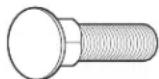
F1 F2 F3

| Label Description | Quantity | |
| 24" 30" | ||
| P1 Mounting Bracket 1 2 | ||
| F1 M8 x 16 mm Carriage bolts 2 4 | ||
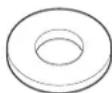
| F2 M1 2 Washer 2 4 | ||
| F3 M8 Hex nuts 2 4 | ||
ASSEMBLY INSTRUCTIONS
Tools and Parts
Gather the required tools and parts before starting installation.
Tools Needed:
■13 mm Wrench (GearWall® panel or GearTrack® channel mount)
■7/16" Wrench (Standard mount)
■ Phillips-head screwdriver
■ Blunt Tool
Parts Needed for Standard Mount:
■ 1/2" - 20 x 1½" Lag screws (4)
■ 1/4" Flat washers (4)
Parts Supplied for 24" (60.96 cm) Cabinet:
■ Full-width shelf (1)
■ M8 Hex nuts (2)
■M8 x 16 mm Carriage bolts (2)
■M12 Washer (2)
■Mounting bracket (1)
Parts Supplied for 30" (76.20 cm) Cabinet:
■ Full-width shelves (2)
■ M8 Hex nuts (4)
■M8 x 16 mm Carriage bolts (4)
■M12 Washer (4)
■ Mounting brackets (2)
■ Key (2)
Cabinet Use Requirements
■Intended for use in a garage, storage area, laundry room, etc.
■Maximum weight limit is 50 lbs (22 kg) for each shelf.
■ Maximum weight limit is 150 lbs (68 kg) for the 24" (60.96 cm) cabinet.
■ Maximum weight limit is 200 lbs (91 kg) for the 30" (76.20 cm) cabinet.
Unpack the Cabinet
- Open the cabinet door.
- Remove and verify the contents. See "Parts Supplied" in "Tools and Parts."
- Dispose of/recycle all packaging materials.
Install the Cabinet to the Wall
WARNING
Excessive Weight Hazard
Use two or more people to move, assemble or install cabinet.
Failure to do so can result in back or other injury.
IMPORTANT: Decide if you are going to mount the cabinet on Gladiator® GearWall® panels or GearTrack® channels, or on a standard wall. Follow the instructions that apply to your installation.
1. Install cabinet to GearWall ^® panels or GearTrack ^® channels
text_image
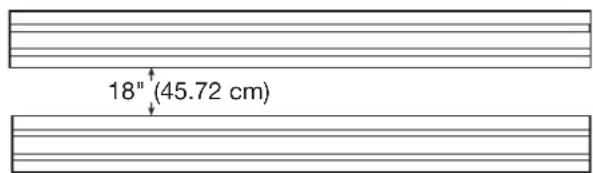
18" (45.72 cm)IMPORTANT: Be sure the Gladiator® GearWall® panels or GearTrack® channels are installed with mounting screws in every slot and at every stud location with a maximum of 24" (60.96 cm) horizontally between screws. If Gladiator® GearTrack® channels will be used to mount the Welded-Steel Wall GearBox cabinet, they must be installed 18" (45.72 cm) apart.
24" (60.96 cm) Cabinet
- Attach bracket
text_image
F1 F2 F3 A A Production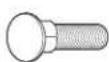
F1

F2

F3
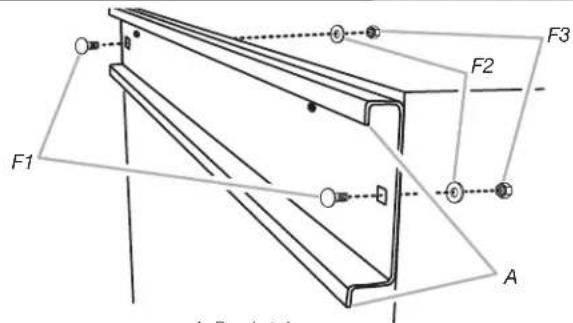
With the rims of a mounting bracket pointing down, align the holes in the bracket with the pair of holes in the back panel. Working from the back, insert a carriage bolt (F1) through the bracket and back panel as shown. Working from the cabinet interior, fasten each bolt with a washer (F2) and a hex nut (F3). Completely tighten the nuts.
- Install cabinet
text_image
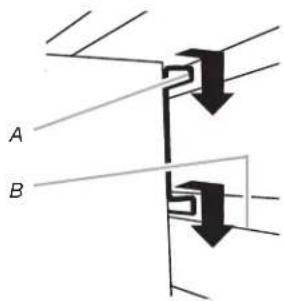
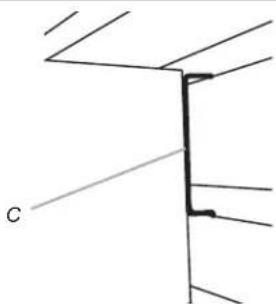
A BA. Bracket rim C. Mounting bracket fully engaged B. Slot
natural_image
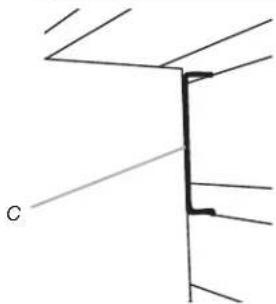
Pure technical line drawing of a structural joint or bracket (no text or symbols)IMPORTANT: If installing cabinet on GearTrack® channel, a second channel should be installed 18" (45.72 cm) below the bottom of the supporting channel so the cabinet will hang level. Close the cabinet door. Determine cabinet mounting location on a GearWall® panel or GearTrack® channels. Using two or more people, engage the mounting bracket into the wall slots by lifting up, pushing toward the wall and lowering the bracket rims into the slots as shown. Make sure the mounting bracket is fully engaged in the slots as shown. If you want to reverse the door, see "Reverse Door."
30" (76.20 cm) Cabinet
- Attach bracket
text_image
F2 F3 F1 F2 F3 F3 F2 F1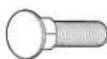
F1

F2

F3
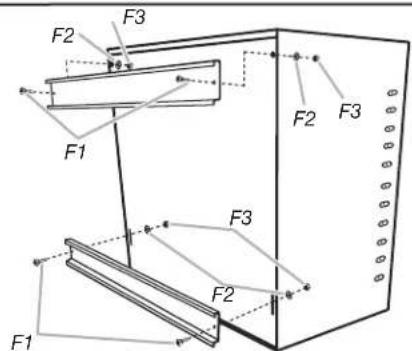
With the rims of a mounting bracket pointing down, align the holes in the bracket with the pair of holes in the back panel. Working from the back, insert a carriage bolt (F1) through the bracket and back panel. Working from the cabinet interior, fasten each bolt with a washer (F2) and a hex nut (F3). Completely tighten the nuts. With the rims of the mounting bracket pointing down, align the holes in the bracket with the pair of slots in the back panel. Working from the back, insert a carriage bolt (F1) through the lower bracket and back panel. Working from the cabinet interior, fasten each bolt with a washer (F2) and a hex nut (F3). Only hand tighten the nuts. The lower bracket will need to be adjusted to mount the cabinet on the wall.
IMPORTANT: Completely tighten the hex nuts (F3) on the lower bracket after mounting the cabinet on the wall.
- Install cabinet
text_image
A BA. Bracket rim C. Mounting bracket fully engaged B. Slot
natural_image
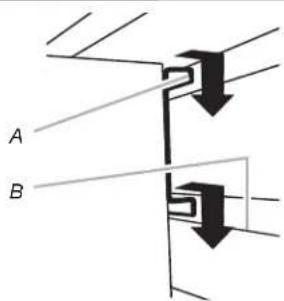
Pure technical line drawing of a structural joint or bracket (no text or symbols)Close the cabinet doors. Determine cabinet mounting location on GearWall® panel or GearTrack® channels. Using two or more people, engage the top mounting bracket into the wall slots by lifting up, pushing toward the wall and lowering the bracket rims into the slots as shown. Make sure the top mounting bracket is fully engaged in the slots as shown. Open the cabinet doors. From the cabinet interior, lift up on the two lower bolts to adjust the lower mounting bracket so that it aligns with the slots on the GearWall® panel or GearTrack® channels. Push the cabinet toward the GearWall® panel or GearTrack® channels and lower the lower bracket rims into the slots. Make sure the bottom mounting bracket is fully engaged in the slots. Using a 13 mm wrench, tighten the two nuts on the bottom wall mounting bracket.
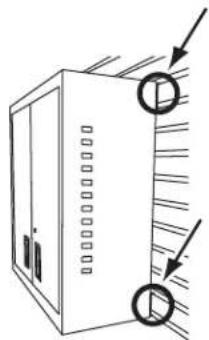
- Inspect the cabinet from the sides
natural_image
Simple line drawing of a cabinet with two circular arrows pointing to the front panel (no text or symbols)Inspect the cabinet from the sides to ensure both the top and bottom wall-mounting brackets are fully engaged in their respective slots as shown.
- Install cabinet to a standard wall
natural_image
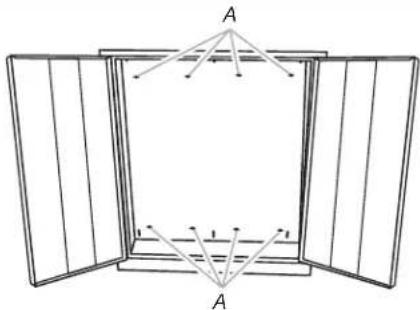
Diagram of a window frame with two open panes and a central square, showing internal line segments labeled A (no text or symbols present)A. Holes for standard wall mounting
IMPORTANT: The round holes in the top and bottom cabinet back panels are spaced 8" (20.32 cm) apart to allow you to mount the wall cabinet to your garage wall studs. Locate the wood studs in your garage wall. Align two holes at the top and two holes at the bottom with the wood studs, and mark the location of the holes. While two or more people hold the cabinet against the wall, attach the wall cabinet to the garage wall using 1/4" flat washers and 1/4" - 20 x 1½" Lag screws (not provided). Using a 7/16" wrench, fully tighten the screws.
Adjust Shelves
- Remove the shelves
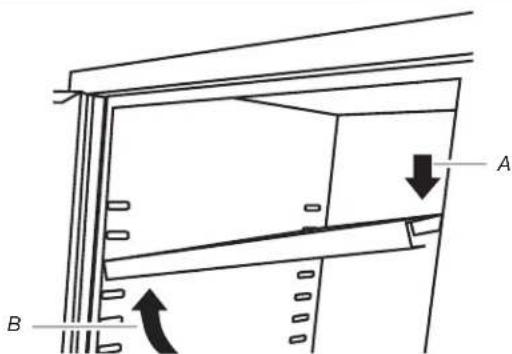
text_image
Technical diagram showing a structural component with labeled parts A and B, including directional arrows indicating movement or force.A. Push down
B. Lift up
natural_image
Technical line drawing of a shelving unit with labeled component A (no text or symbols beyond label)A. Remove the shelf
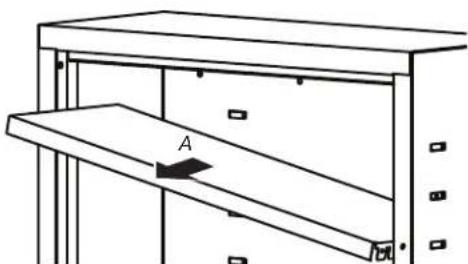
Remove the shelf clips from their shipping position on the sides and rear of the cabinet. Working from the inside of the cabinet and using a blunt tool, push out the plastic shelf clips. Discard the clips. Lift up on the underside of the shelf until the shelf tabs are free of the cabinet slots. Tilt the shelf up to reposition it within the cabinet or to remove it from the cabinet.
- Replace the shelves
natural_image
Technical line drawing of a mechanical assembly with two stacked plates and a labeled component 'A' (no text or symbols beyond label)A. Insert the shelf
text_image
A. Push down B. Lift up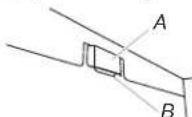
A. Slot B. Shelf tab
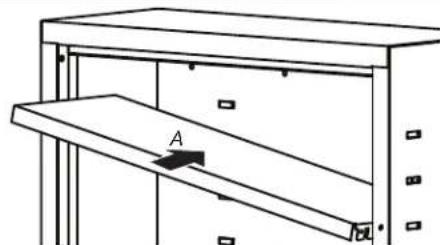
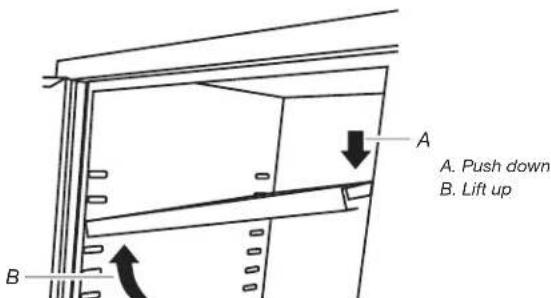
NOTE: Plan your shelf heights and install shelves starting from the bottom. The shelves are supported by the metal tabs on the back and side walls of the cabinet. Determine the placement of the shelves. Tilt the shelf so that one end is higher than the other as shown. Insert the shelf into the cabinet so that the higher end is directly above the desired slots and push the shelf down in place behind the side slots. Raise the lower end so it is directly above the desired slots and push the shelf down.
NOTE: Make sure the shelf tabs are in place behind all the slots, as shown. Repeat this process for the other shelf.
Adjust Door(s)
The cabinets are designed with adjustable door(s).
- Using a Phillips-head screwdriver, loosen all screws attaching the hinge to the cabinet.
- Adjust door to the desired height.
- Tighten the screws.
Reverse Door (24" [60.96 cm] Wall Cabinet Only)
- Using a Phillips-head screwdriver, remove all the screws attaching the door hinge to the cabinet.
- Using the screws removed in Step 1, reattach the door hinge to the opposite side of the cabinet.
WARRANTY
For warranty information:
In the U.S.A. call 1-866-342-4089 or visit our website at
www.gladiatorgarageworks.com
In Canada call 1-800-807-6777 or visit our website at
www.gladiatorgarageworks.ca
SÉCURITÉ DE L'ARMOIRE
natural_image
Technical line drawings of a metal bracket, bolt, washer, and hex nut (no text or symbols)F1 F2 F3
text_image
18" (45,72 cm)natural_image
Pure technical line drawing of a structural joint or bracket (no text or symbols)natural_image
Pure technical line drawing of a structural joint or bracket (no text or symbols)natural_image
Simple line drawing of a cabinet with two circular arrows pointing to the front panel (no text or symbols)natural_image
Diagram of a window frame with two open panes and internal vertical supports, no text or symbols presentwww.gladiatorgarageworks.com
www.gladiatorgarageworks.ca
natural_image
Technical line drawings of a metal bracket, bolt, washer, and hex nut (no text or symbols)F1 F2 F3
text_image
18" (45,72 cm)natural_image
Pure technical line drawing of a structural joint or bracket (no text or symbols)natural_image
Pure technical line drawing of a structural joint or bracket (no text or symbols)natural_image
Diagram of a server rack with two circular components and directional arrows indicating movement (no text or symbols)natural_image
Diagram of a window frame with two open panes and a central square, showing internal geometric lines and points (no text or symbols)text_image
Technical diagram showing a structural component with labeled parts A and B, including directional arrows indicating movement or force.natural_image
Simple line drawing of a shelving unit with a labeled component 'A' and no text or symbolsA. Saque el estante
natural_image
Technical line drawing of a mechanical assembly with two stacked plates and a labeled component 'A' (no text or symbols beyond labels)text_image
Technical diagram showing a mechanical or structural component with labeled points A and B and directional arrows indicating movement or force.www.gladiatorgarageworks.com
www.gladiatorgarageworks.ca