HBW7519CF - Fridge HAIER - Free user manual and instructions
Find the device manual for free HBW7519CF HAIER in PDF.


User questions about HBW7519CF HAIER
0 question about this device. Answer the ones you know or ask your own.
Ask a new question about this device
Download the instructions for your Fridge in PDF format for free! Find your manual HBW7519CF - HAIER and take your electronic device back in hand. On this page are published all the documents necessary for the use of your device. HBW7519CF by HAIER.
USER MANUAL HBW7519CF HAIER
natural_image
Modern minimalist display shelf with glass shelves holding various kitchenware items (no visible text or symbols)
natural_image
Interior view of a modern refrigerator with open doors showing food compartments and shelves (no visible text or symbols)
bar
| Category | Value | | -------- | ----- | | Category1 | 0.000 | | Category2 | 0.000 | | Category3 | 0.000 | | Category4 | 0.000 | | Category5 | 0.000 | | Category6 | 0.000 | | Category7 | 0.000 | | Category8 | 0.000 | | Category9 | 0.000 | | Category10 | 0.000 | | Category11 | 0.000 | | Category12 | 0.000 | | Category13 | 0.000 | | Category14 | 0.000 | | Category15 | 0.000 | | Category16 | 0.000 | | Category17 | 0.000 | | Category18 | 0.000 | | Category19 | 0.000 | | Category20 | 0.000 | | Category21 | 0.000 | | Category22 | 0.000 | | Category23 | 0.000 | | Category24 | 0.000 | | Category25 | 0.000 | | Category26 | 0.000 | | Category27 | 0.000 | | Category28 | 0.000 | | Category29 | 0.000 | | Category30 | 0.000 | | Category31 | 0.000 | | Category32 | 0.000 | | Category33 | 0.000 | | Category34 | 0.000 | | Category35 | 0.000 | | Category36 | 0.000 | | Category37 | 0.000 | | Category38 | 0.000 | | Category39 | 0.000 | | Category40 | 0.000 | | Category41 | 0.000 | | Category42 | 0.000 | | Category43 | 0.000 | | Category44 | 0.000 | | Category45 | 0.000 | | Category46 | 0.000 | | Category47 | 0.000 | | Category48 | 0.000 | | Category49 | 0.000 | | Category50 | 0.001 | | Category51 | 1.599 | | Category52 | 1.599 | | Category53 | 1.599 | | Category54 | 1.599 | | Category55 | 1.599 | | Category56 | 1.599 | | Category57 | 1.599 | | Category58 | 1.599 | | Category59 | 1.599 | | Category60 | 1.599 | | Category61 | 1.599 | | Category62 | 1.599 | | Category63 | 1.599 | | Category64 | 1.599 | | Category65 | 1.599 | | Category66 | 1.599 | | Category67 | 1.599 | | Category68 | 1.599 | | Category69 | 1.599 | | Category70 | 1.599 | | Category71 | 1.599 | | Category72 | 1.599 | | Category73 | 1.599 | | Category74 | 1.599 | | Category75 | 1.599 | | Category76 | 1.599 | | Category77 | 1.599 | | Category78 | 1.599 | | Category79 | 1.599 | | Category80 | 1.599 | | Category81 | 1.599 | | Category82 | 1.599 | | Category83 | 1.599 | | Category84 | 1.599 | | Category85 | 1.599 | | Category86 | 1.599 | | Category87 | 1.599 | | Category88 | 1.599 | | Category89 | 1.599 | | Category90 | 1.599 | | Category91 | 1.599 | | Category92 | 1.599 | | Category93 | 1.599 | | Category94 | 1.599 | | Category95 | 1.599 | | Category96 | 1.599 | | Category97 | 1.599 | | Category98 | 1.599 | | Category99 | 1.599 | | Category100 | 1.599 |
natural_image
Modern kitchen interior with white shelves, open refrigerator, and stone coffee table (no visible text or symbols)WELCOME
This installation manual is designed for kitchen manufacturers who will deal with these products. To ensure safety and get the best results, please read this manual carefully, including the safety instructions, and keep it for future reference. Before proceeding with the installation, take note of the serial number, as you may need it in case of repairs. Check for any damage during transport and consult a technician when in doubt before using. Always keep all packing material away from children.
NOTE: features, pictures in the manual and product accessories may vary depending on the model purchased.
index
1 Safety warnings for installation p.8
2 Where to install the product p.9
3 Refrigerator dimensions p.10
4 Installation tools p.12
5 Cabinet dimensions p.12
5.1 Precautions
5.2 Dimensions in mm
6 Cabinet installation and ventilation p.14
6.1 Installation in column
7 Installation video step by step p.15
8 Removal of the seal blocks p.16
8.1 Unlocking the doors
9 Changing the direction of door opening p.16
9.1 Removing the bottom screw
9.2 Hinges inversion
9.3 Securing the top cover
9.4 Securing the screws on the opposite side of the refrigerator
9.5 Installing the bottom screw on the opposite side of the refrigerator
9.6 Securing the doors on the opposite side of the refrigerator
10 Installation instructions for the refrigerator p.21
10.1 Applying the top installation bar of the refrigerator
10.2 Applying the spacers on the side of the refrigerator
10.3 Applying the mounting brackets to the refrigerator doors
10.4 Applying the spacer to the back of the refrigerator
10.5 Built-in installation
10.6 Tolerances on the hinge side
10.7 Positioning the central cover
10.8 Adjusting the height of the refrigerator
10.9 Tolerances with the cabinet
index
10.10 Securing the hinges to the cabinet
10.11 Mounting the central cover
10.12 Securing the refrigerator to the upper shelf
10.13 Removing the spacer positioning fins
10.14 Installing the cabinet doors
10.15 Rotating the spacers from the cross brace
10.16 Adjusting the cross brace
10.17 Detaching the cross brace from the refrigerator door
10.18 Positioning the cross brace on the cabinet door
10.19 Securing the cross brace to the cabinet door
10.20 Positioning the cabinet door on the corresponding refrigerator door
10.21 Adjusting the cabinet door
10.22 Securing the cabinet door
10.23 Attaching the mounting brackets to the cabinet doors
10.24 Applying the cover to the upper hinge
10.25 Applying the covers to the central hinges
10.26 Applying the bottom covers
10.27 Applying the covers to the refrigerator doors
10.28 Applying the seals to the side of the refrigerator
11 Connection to the mains p.44
11.1 Warnings
11.2 Other advices
12 Delivery to the user p.46
13 Disassemble the product p.46
Observe these directions before beginning the installation of the product. Please observe the following guidelines before starting the installation of the product. Your safety is very important to us. Read these instructions carefully before using the product.
- The installation must be carried out by a qualified technician who is familiar with and adheres to the applicable laws in the country of installation and the manufacturer's instructions;
- If assistance from the manufacturer is required to rectify faults resulting from incorrect installation, such assistance is not covered by the warranty;
- Remove the packaging material before operating the appliance;
- After unpacking the product, check that it is not damaged. In case of any issues, contact the service center before proceeding with installation and do not connect it to the power supply;
- A damaged product can cause a short circuit, electric shock, fire hazard and other dangers;
- Check for any accessories or supplementary materials (bags with screws, documents, brochures, etc.) in the packaging and, if present, remove and store them;
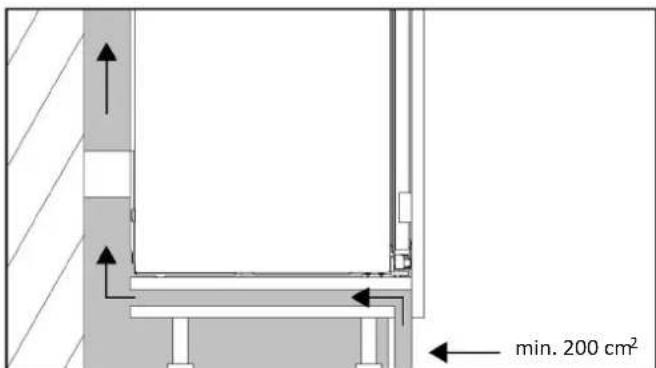
- Before installing the appliance, ensure that ventilation is sufficient to allow the proper circulation of fresh air needed for cooling and protecting the internal components. Depending on the type of setup, create the specified openings as illustrated;
- If manufacturer assistance is needed to rectify any faults due to incorrect installation, such assistance is not covered by the warranty. Follow the installation instructions provided for qualified personnel;
- Incorrect installation can cause damage or injury to people, animals, or property. The manufacturer cannot be held responsible for such damage or injury;
- Safe usage is guaranteed only if the installation has been carried out correctly according to these instructions. In case of damage due to incorrect installation, the responsibility lies with the installer;
- It is recommended to wear protective gloves during installation to avoid injury from cuts;
- The warranty does not cover damage caused by incorrect installation;
- In case of incorrect installation, tampering with the appliance, or non-compliant connection, the product warranty becomes invalid;
- After installation, the power cord must not come into contact with moving parts of kitchen components (e.g., a drawer) and must not be subjected to mechanical stress;
- This product requires constant ventilation during use. Do not cover the air vents;
- Upon completion of the installation, the technician must ensure that the product has been installed correctly.
Important warnings
- Do not install the appliance in areas exposed to direct sunlight to avoid altering the product's performance;
• Install and use this product in an enclosed, covered, dry, and well-ventilated environment; - Do not install the product in outdoor areas exposed to weather elements;
• Install the product near an electrical outlet; - Keep the product away from sources of flames;
• Install the appliance on a flat surface, in an area suitable for its size and use; - Clean the appliance with water and a mild detergent, and dry it with a soft cloth;
WARNING: The refrigerator is a heavy appliance. To avoid damage to the unit and prevent injuries, it is essential that the transportation be carried out by at least two people in a slow and controlled manner. Always keep the refrigerator in an upright position.
- After installation, allow the refrigerator to rest for at least 4 hours before turning it on to let the compressor oil settle.
This product is intended solely for installation in domestic or similar environments, such as:
- Kitchen areas intended for staff in shops, offices, and other working environments;
- Spaces available to staff and customers in hotels, motels, and other residential-type environments;
• Beauty farms, Bed & Breakfasts (B&B); - For catering services and similar applications, excluding retail sales.
Install this product in a location where the ambient temperature is not lower or higher than the operating temperature indicated on the product label: otherwise, the appliance will not function correctly.
- Extended temperate (SN): "This appliance is intended for use in ambient temperatures ranging from 10°C to 32°C";
- Temperate (N): "This appliance is intended for use in ambient temperatures ranging from 16°C to 32°C";
- Subtropical (ST): "This appliance is intended for use in ambient temperatures ranging from 16°C to 38°C";
- Tropical (T): "This appliance is intended for use in ambient temperatures ranging from 16°C to 43°C."
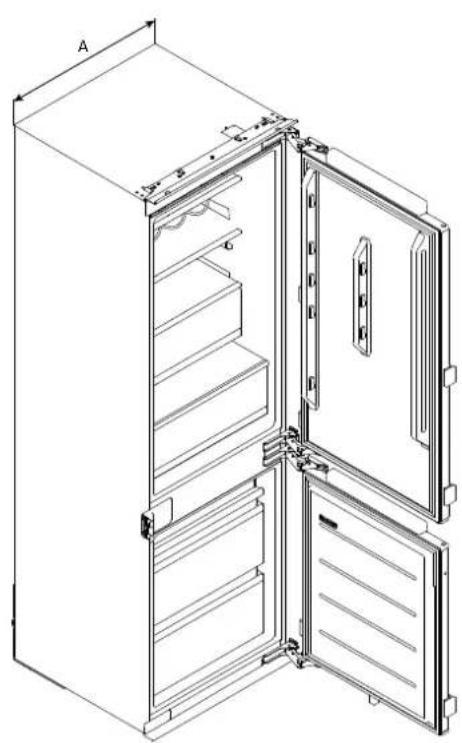
Dimensions in mm
Front axonometric view Rear axonometric view
natural_image
Technical line drawing of an open refrigerator with doors and shelves (no text or symbols)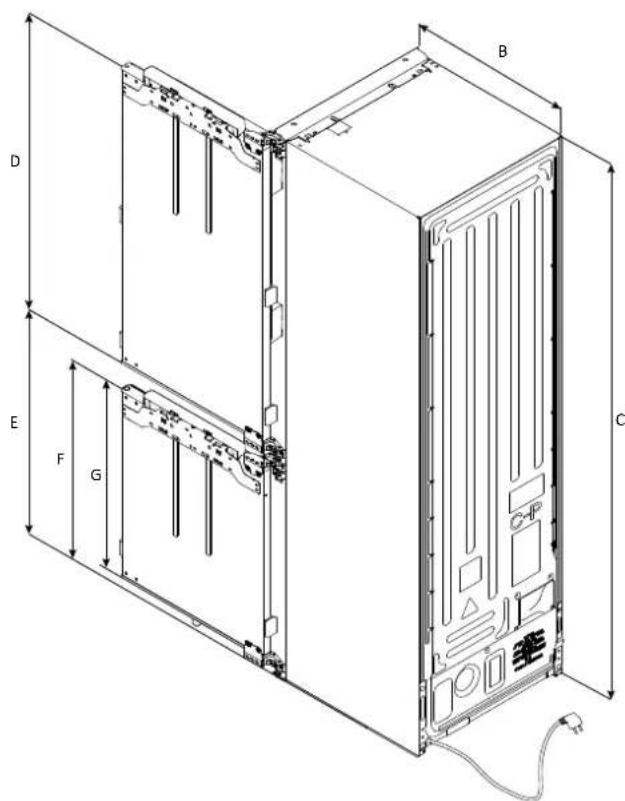
text_image
A B C D E F GCable length 2270 mm
| Models | A(mm) | B(mm) | C(mm) | D(mm) | E(mm) | F(mm) | G(mm) |
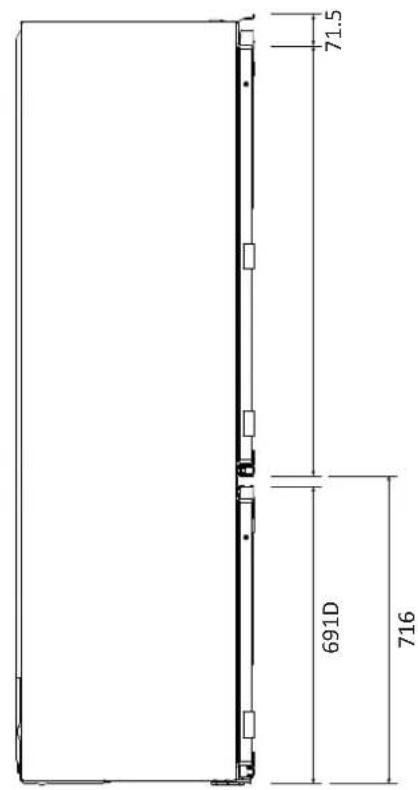
| HBW7518CF | 550±2 | 550±2 | 1772±2 | 1027 | 716 | 691 | 675 |
| HBW7519CF | 550±2 | 550±2 | 1935±2 | 1190 | 716 | 691 | 675 |
Dimensions in mm
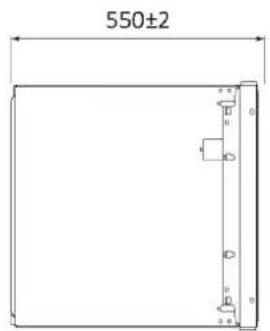
Side view
with doors closed
text_image
71.5 691D 716Side view
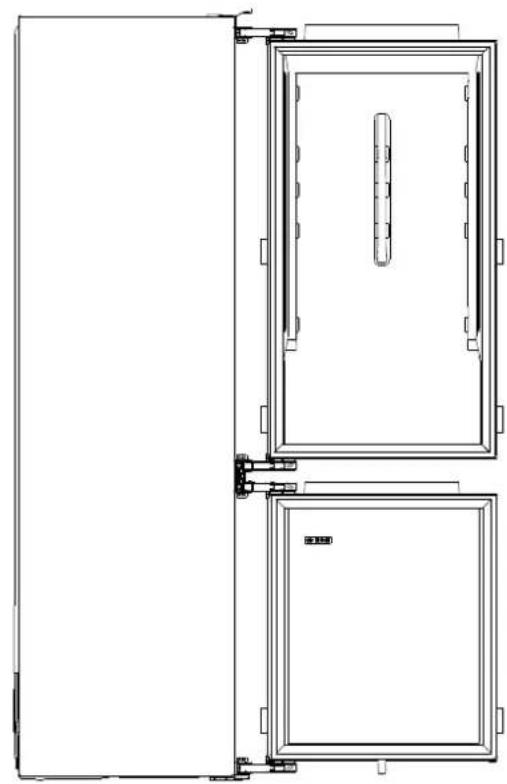
with doors open
natural_image
Technical line drawing of a double door with internal panel and side connectors (no text or symbols)Top view
with door closed
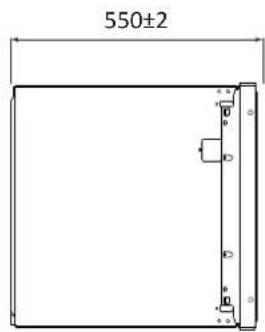
text_image
550±2Top view
with doors open
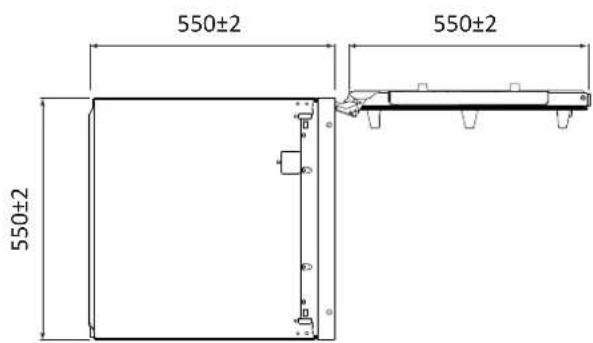
text_image
550±2 550±2 550±2Product codes
HBW7518CF
HBW7519CF

NOTE: the codes may change over time.
4 Installation tools
Tools needed
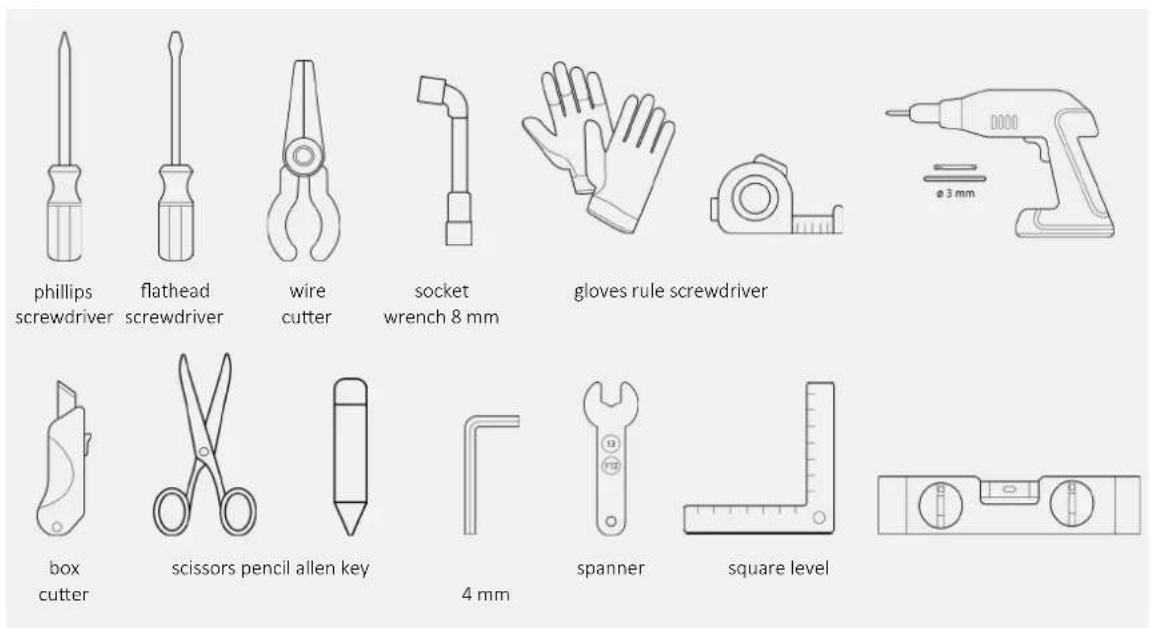
text_image
phillips screwdriver flathead screwdriver wire cutter socket wrench 8 mm gloves rule screwdriver box cutter scissors pencil allen key 4 mm spanner square levelTools supplied with the product
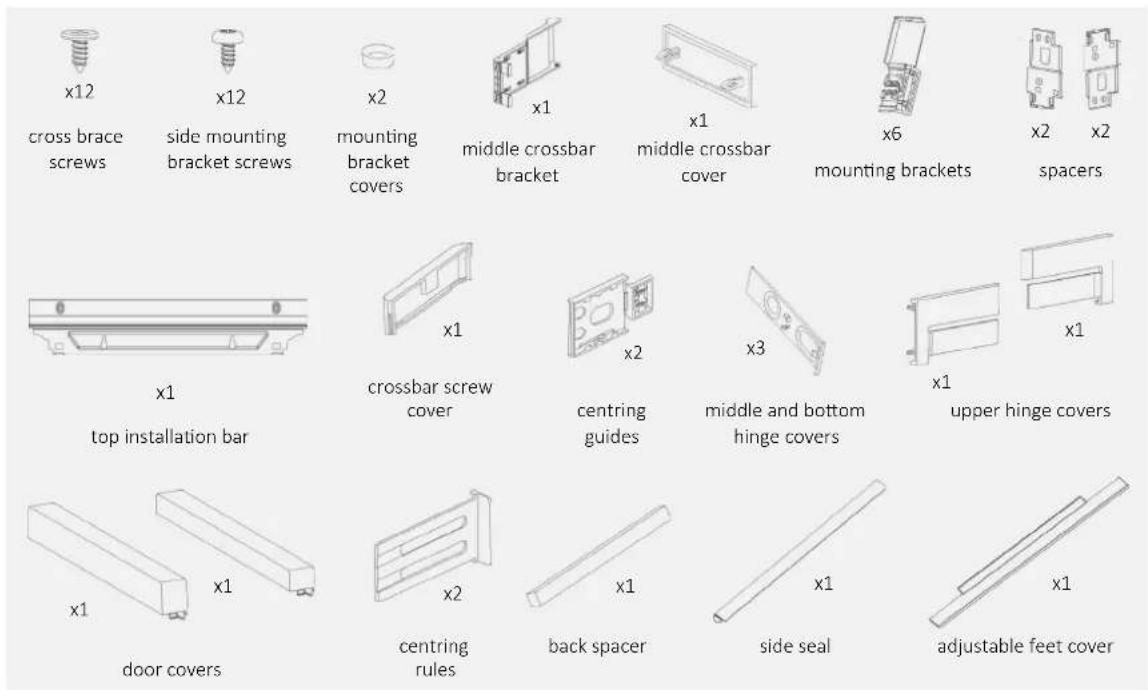
text_image
x12 cross brace screws x12 side mounting bracket screws x2 mounting bracket covers x1 middle crossbar bracket x1 middle crossbar cover x6 mounting brackets x2 x2 spacers x1 top installation bar x1 crossbar screw cover x2 centring guides x3 middle and bottom hinge covers x1 upper hinge covers x1 door covers x1 x1 centring rules x2 back spacer x1 side seal x1 adjustable feet cover5 Cabinet dimensions
Precautions5.1
- Provide the built-in compartment without a back wall;
• For product ventilation, follow the instructions in this manual; - It is recommended to secure the unit to the wall to prevent tipping.
Dimensions in mm5.2
Front axonometric view
with unassembled doors
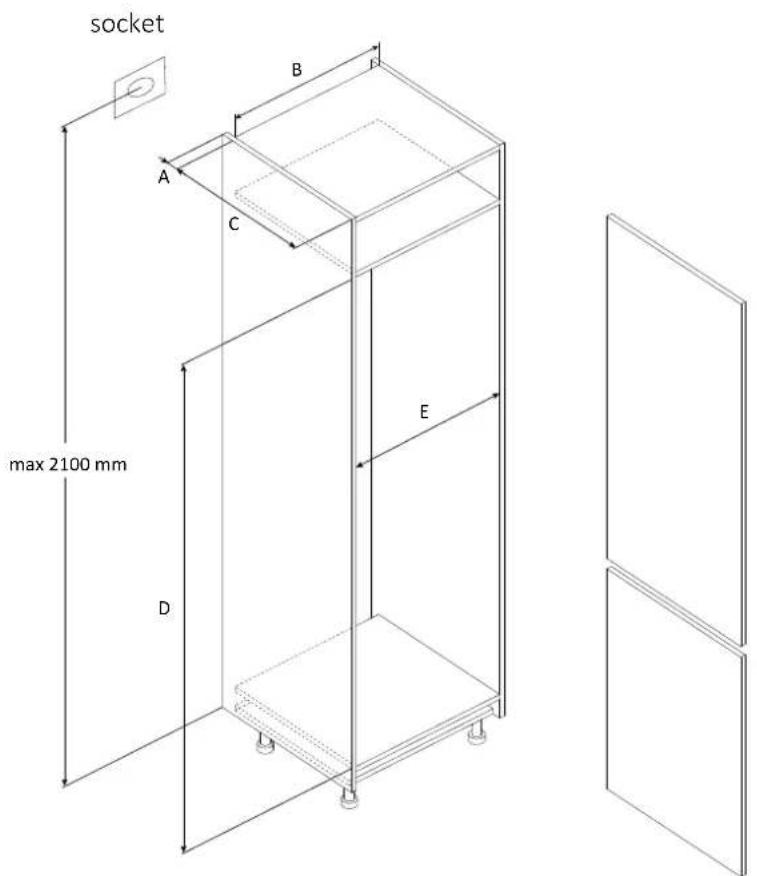
text_image
socket max 2100 mm A B C D E| Models | A(mm) | B(mm) | C(mm) | D(mm) | E(mm) | |
| HBW7518CF | Min. | 50 | 400 | 560 | 1778 | 555 |
| Recommended | 580 | 1780 | 562 | |||
| Max. | - | 1782 | 568 | |||
| HBW7519CF | Min. | 50 | 400 | 560 | 1941 | 555 |
| Recommended | 580 | 1943 | 562 | |||
| Max. | - | 1945 | 568 | |||
Installation in column6.1
Side section Side section
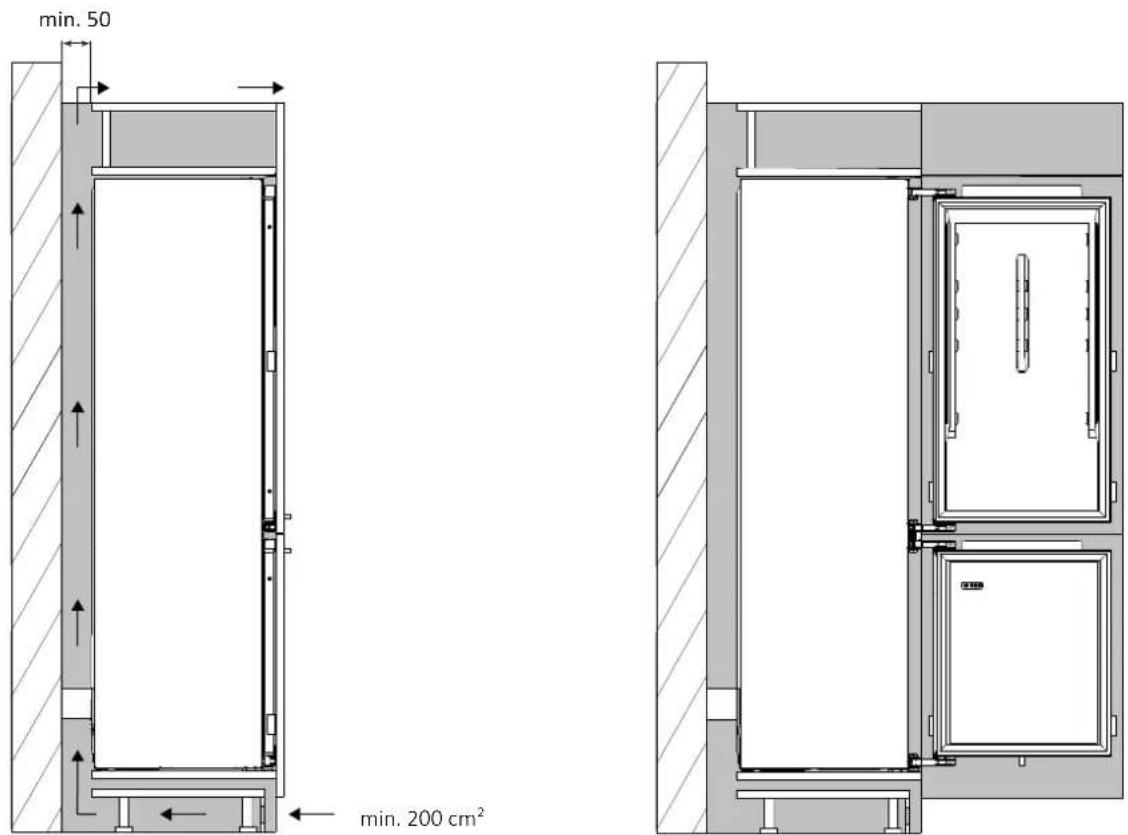
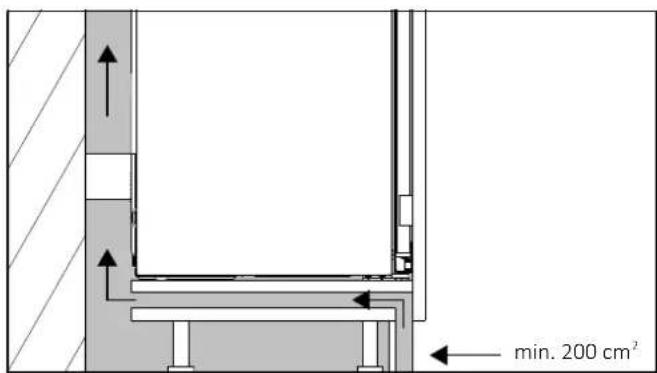
text_image
min. 200 cm²If it is not possible to create an opening in the baseboard, find an alternative solution to ensure proper air circulation.
You can view the product installation video by scanning the Qr Code.

text_image
QR code image containing encoded data, no visible human-readable textor by clicking
this link
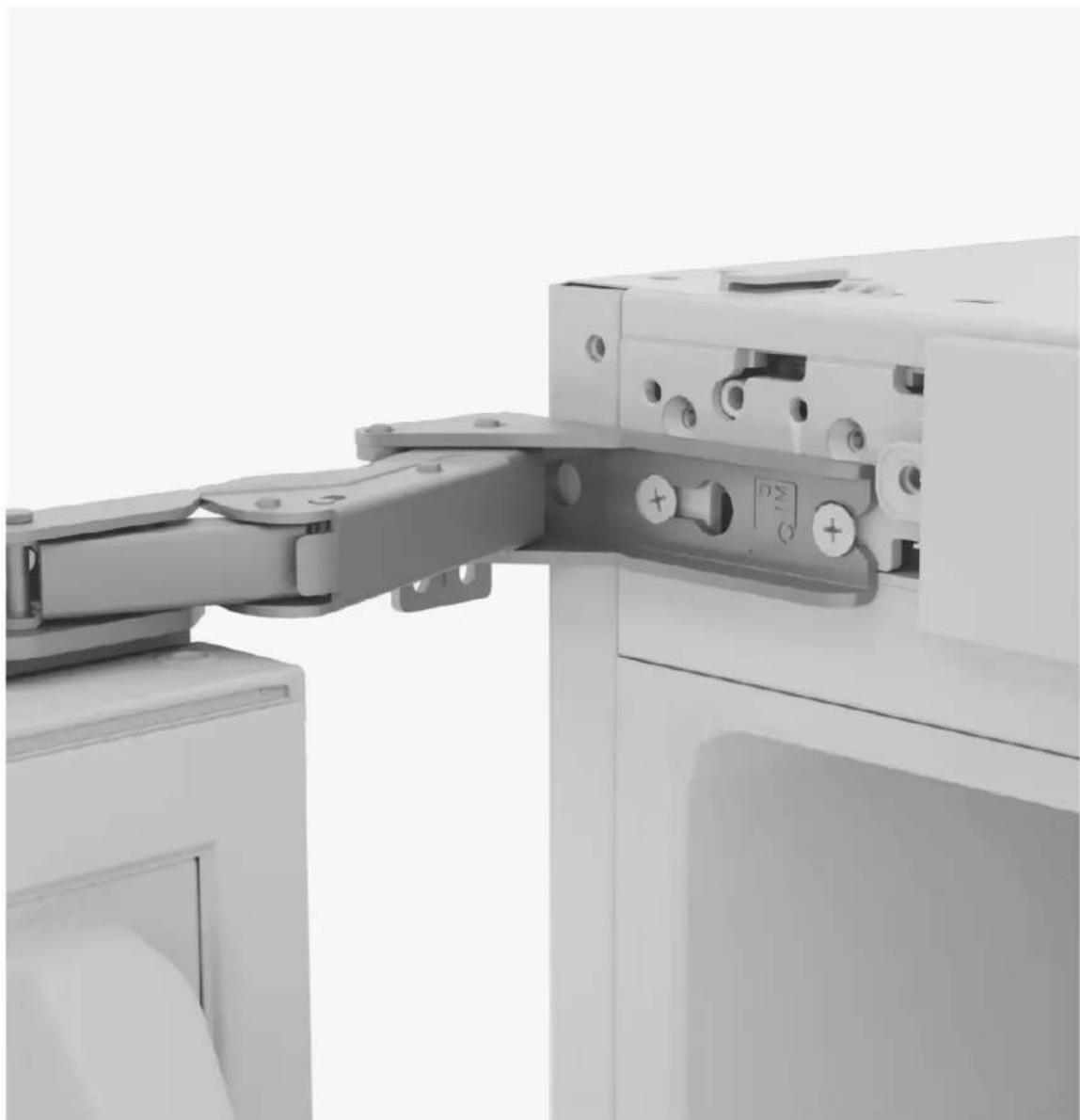
natural_image
Close-up of a mechanical assembly with a metal bracket and adjustment knobs (no visible text or symbols)8.1 Unlocking the doors
Loosen the screw by 5 mm, push down the seal blocks to remove them and then discard them.
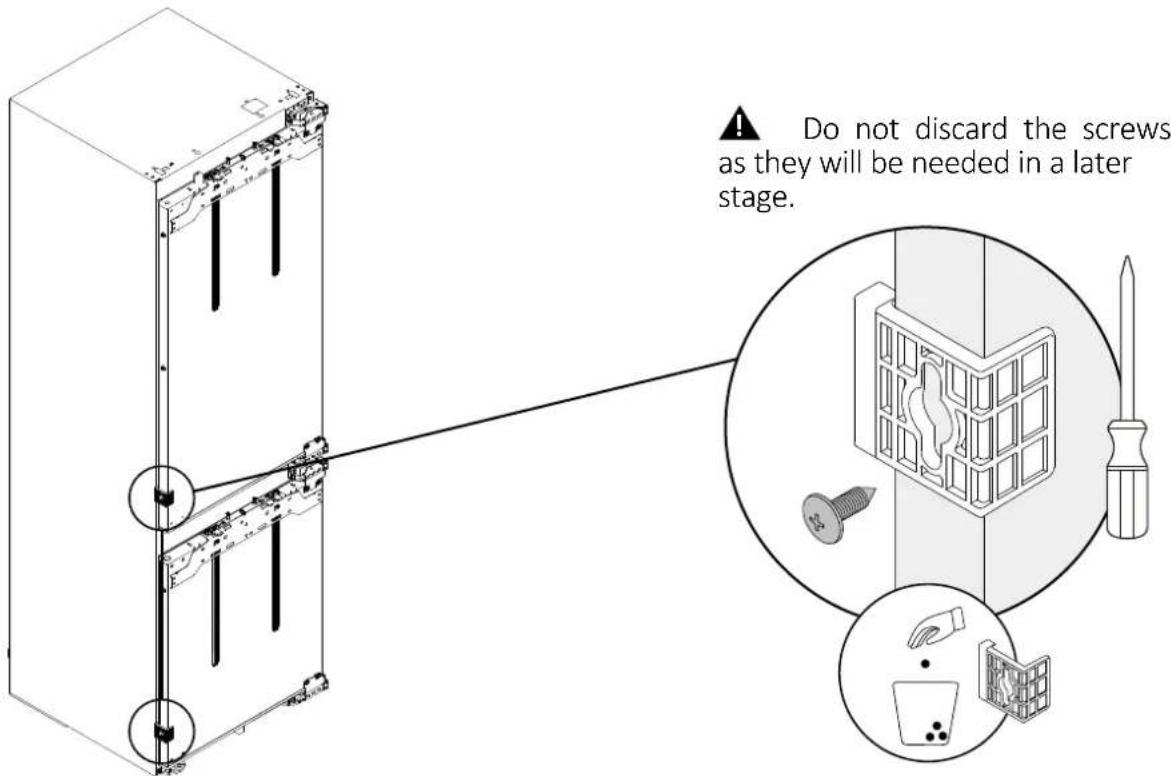
text_image
Do not discard the screws as they will be needed in a later stage.Changing the direction of door opening
NOTE: follow the instructions below only if it is necessary to reverse the door opening direction; otherwise, proceed to the next chapter (pag.21).
Removing the bottom screw9.1
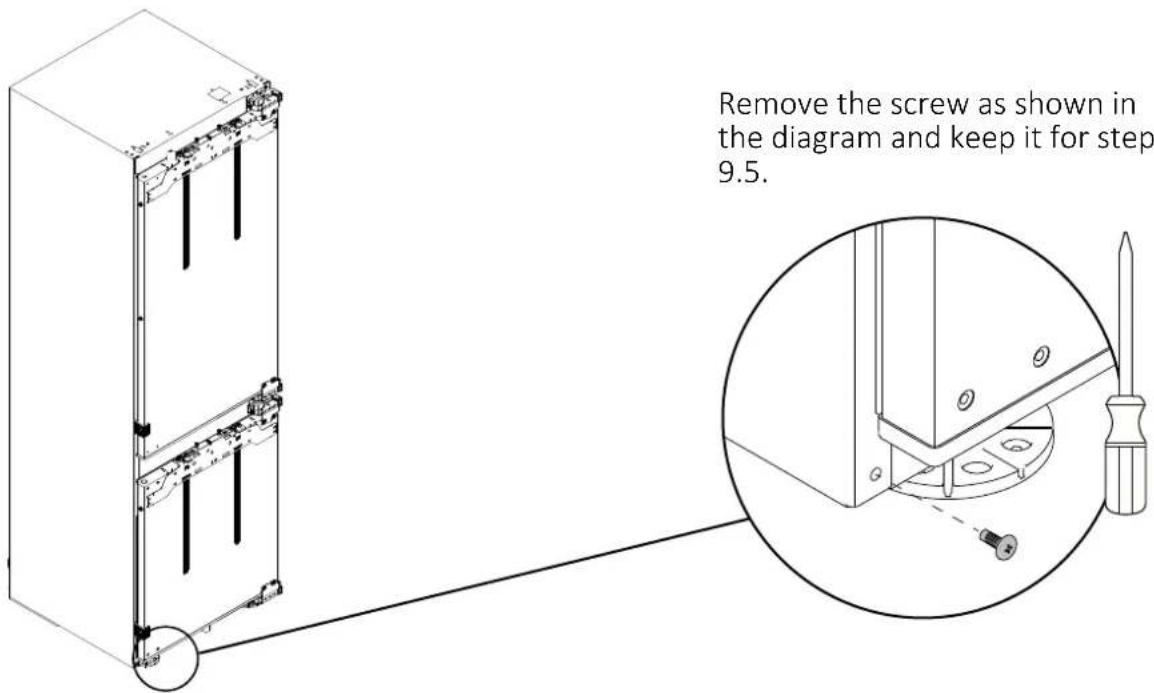
text_image
Remove the screw as shown in the diagram and keep it for step 9.5.Changing the direction of door opening
9.2 Hinges inversions
Loosen (do not completely remove) the hinge screws before removing the refrigerator doors.
Next, remove the doors and fully unscrew the screws.
≈9 mm
Rotate the hinges 180^ and install them as shown in the diagram.
9.3 Securing the top cover
Remove the top cover and the sensor.
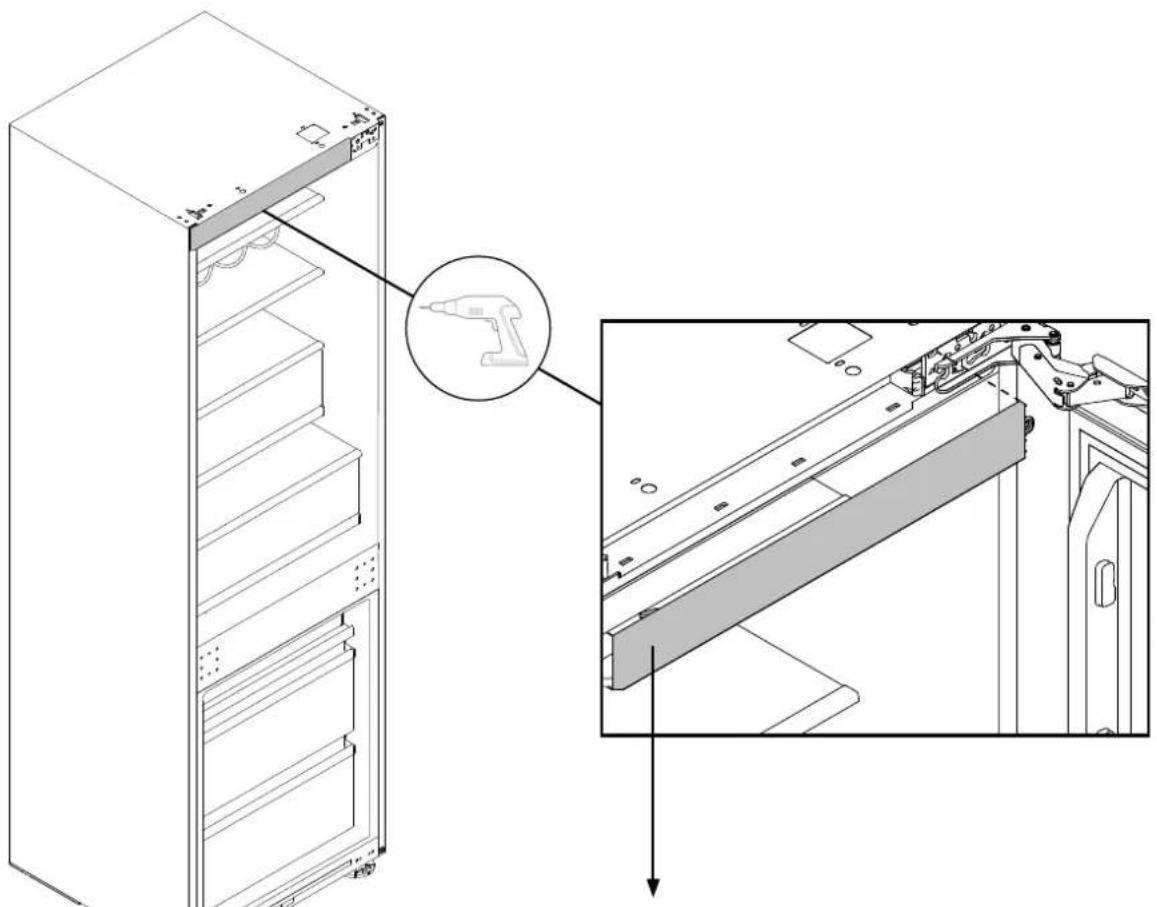
natural_image
Technical line drawing of a refrigerator with an inset showing the internal components (no text or symbols present)Rotate the cover 180^ and secure the sensor on the inside, as shown in the diagram. Then, tighten the top cover into the new position.
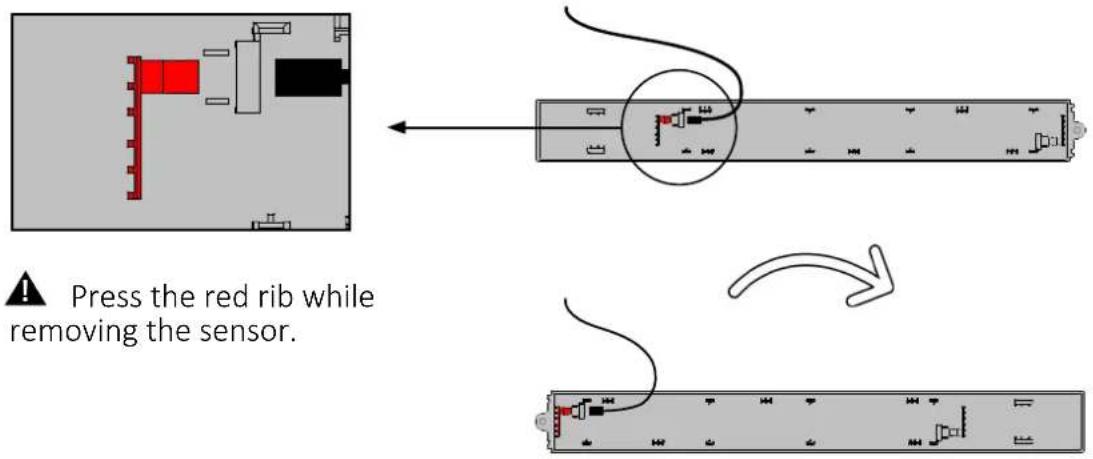
text_image
Press the red rib while removing the sensor.9.4 Securing the screws on the opposite side of the refrigerator
Tighten the screws on the opposite side of the refrigerator, leaving a tolerance of approximately 9 mm.
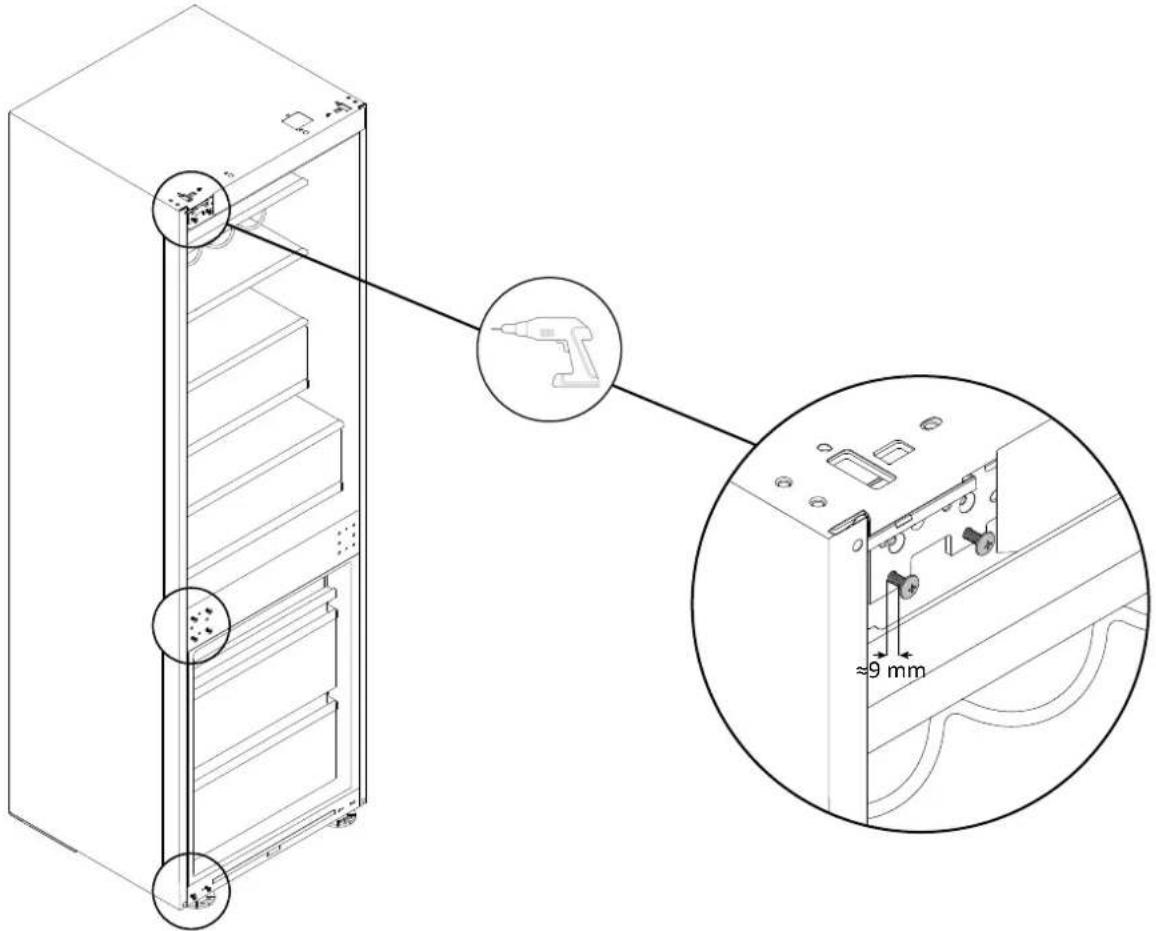
text_image
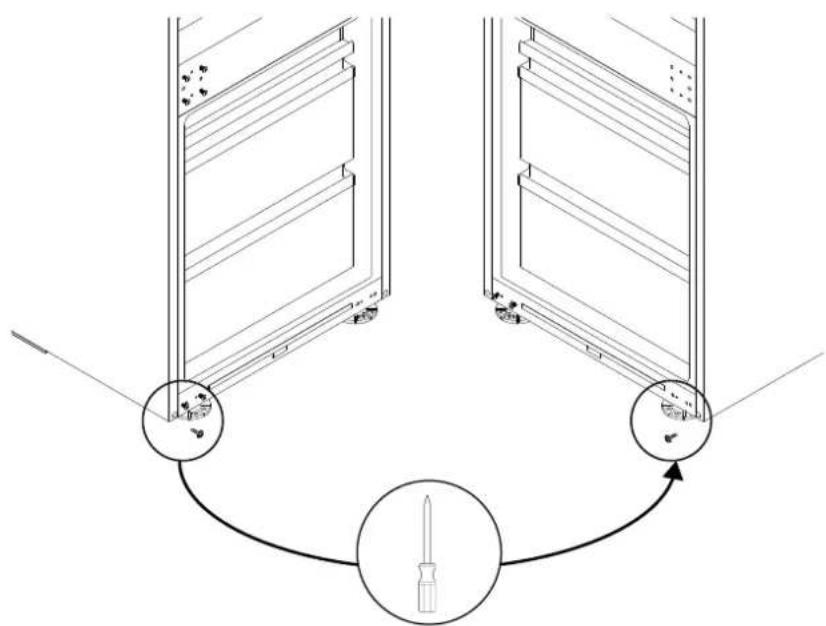
Technical diagram of a refrigerator with labeled components and close-up detail showing internal structure and dimension annotation.9.5 Installing the bottom screw on the opposite side of the refrigerator
Tighten the screw kept from step 9.1 as shown in the diagram.
text_image
Diagram illustrating a screwdriver tool interacting with two storage compartments, showing alignment and component placement.Changing the direction of door opening
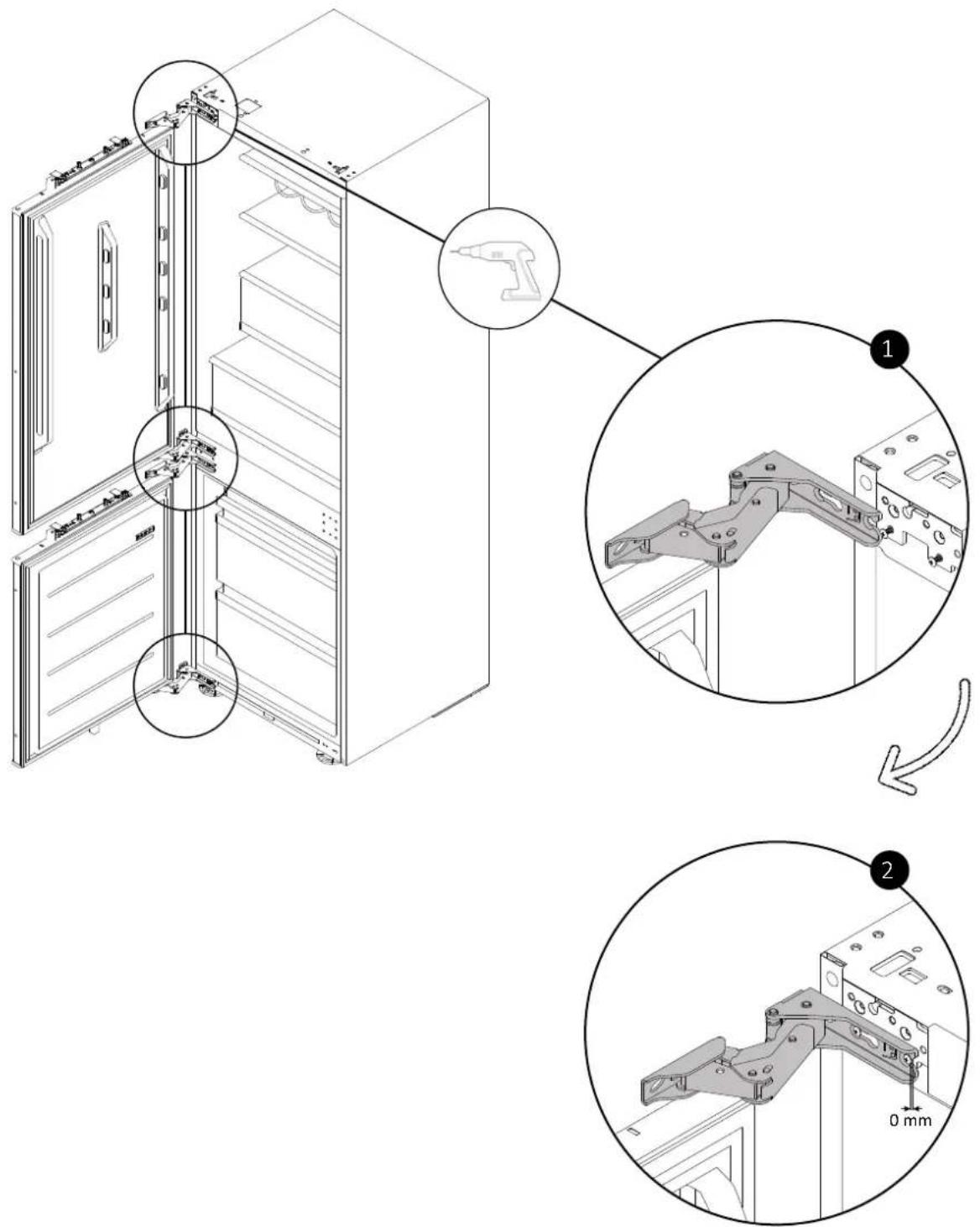
9.6 Securing the doors on the opposite side of the refrigerator
Attach the doors and tighten the screws.
text_image
Technical diagram showing assembly of a server rack with labeled components and dimensions, including mounting holes and bracketing details.10.1 Applying the top installation bar of the refrigerator
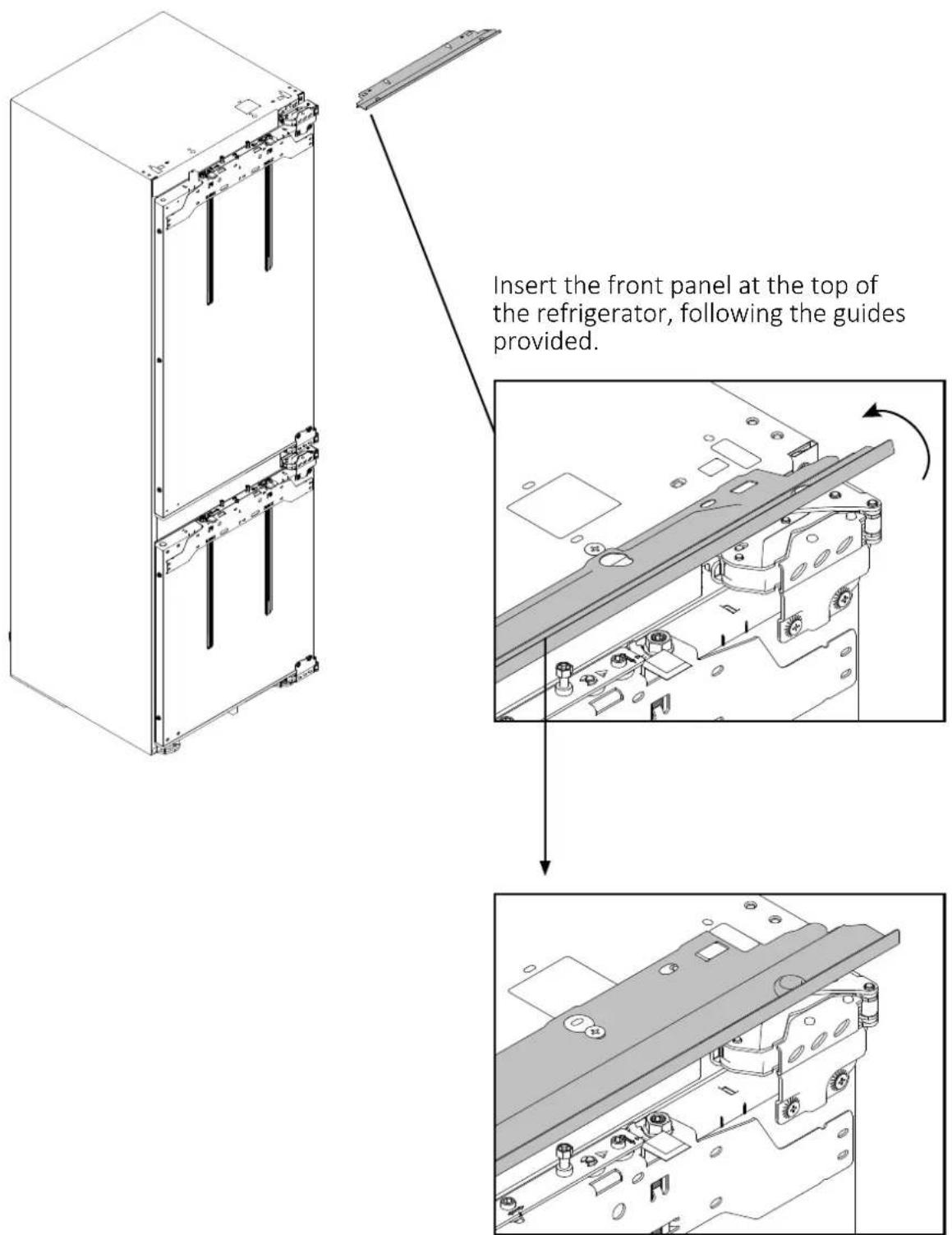
text_image
Insert the front panel at the top of the refrigerator, following the guides provided.10.2 Applying the spacers on the side of the refrigerator
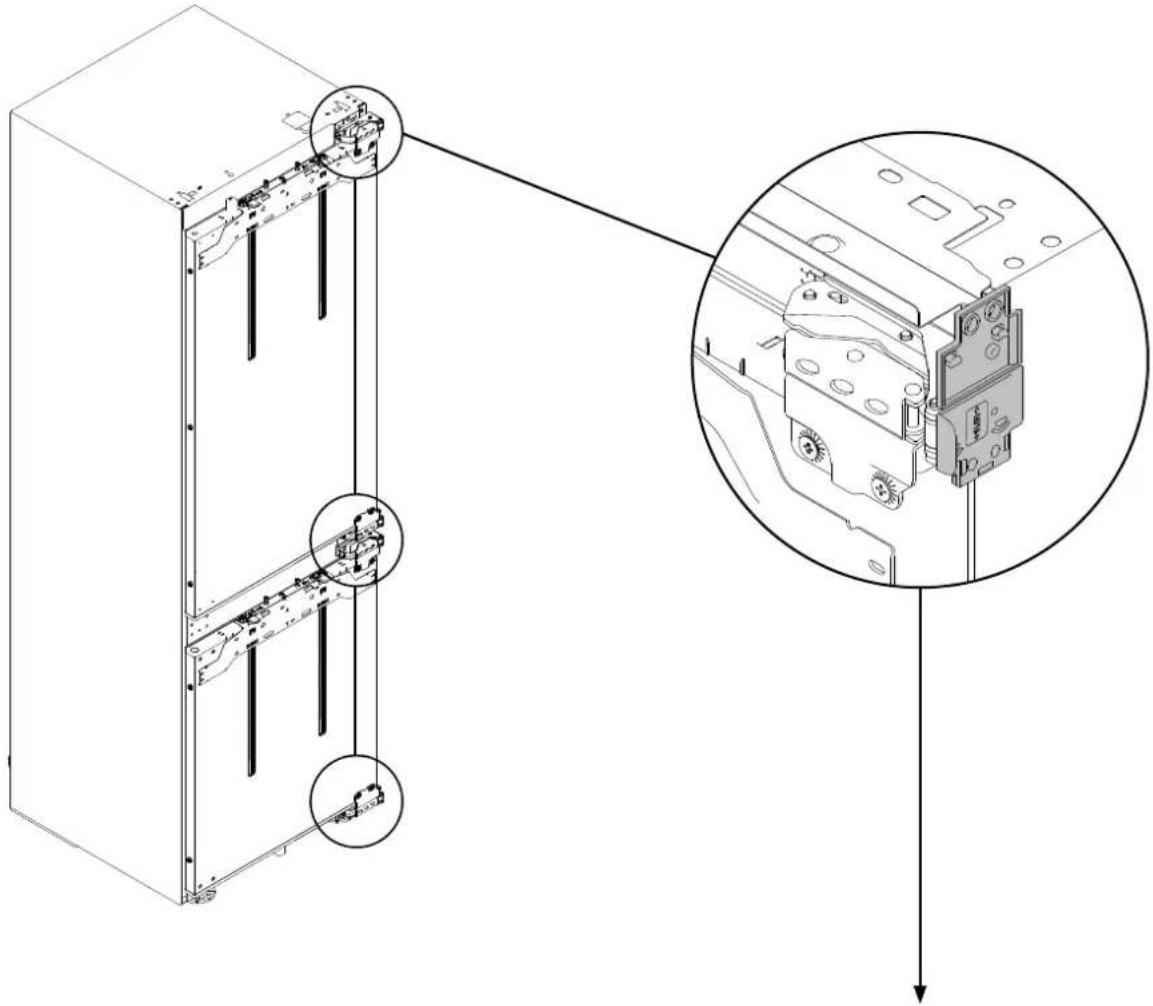
Position the spacers on the outer side of the hinges as shown in the diagram. Be careful of the thickness of the cabinet side.
text_image
Technical diagram of a server rack with labeled components and exploded view showing internal structure details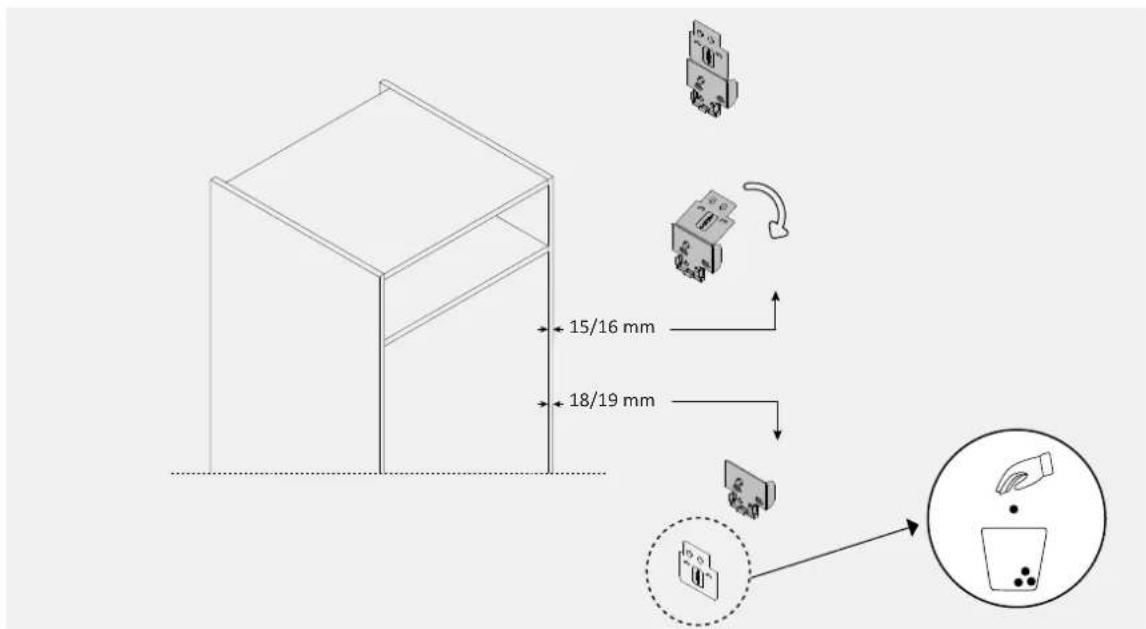
text_image
15/16 mm 18/19 mm10.3 Applying the mounting brackets to the refrigerator doors
Attach the mounting brackets to the refrigerator doors as shown in the diagram.
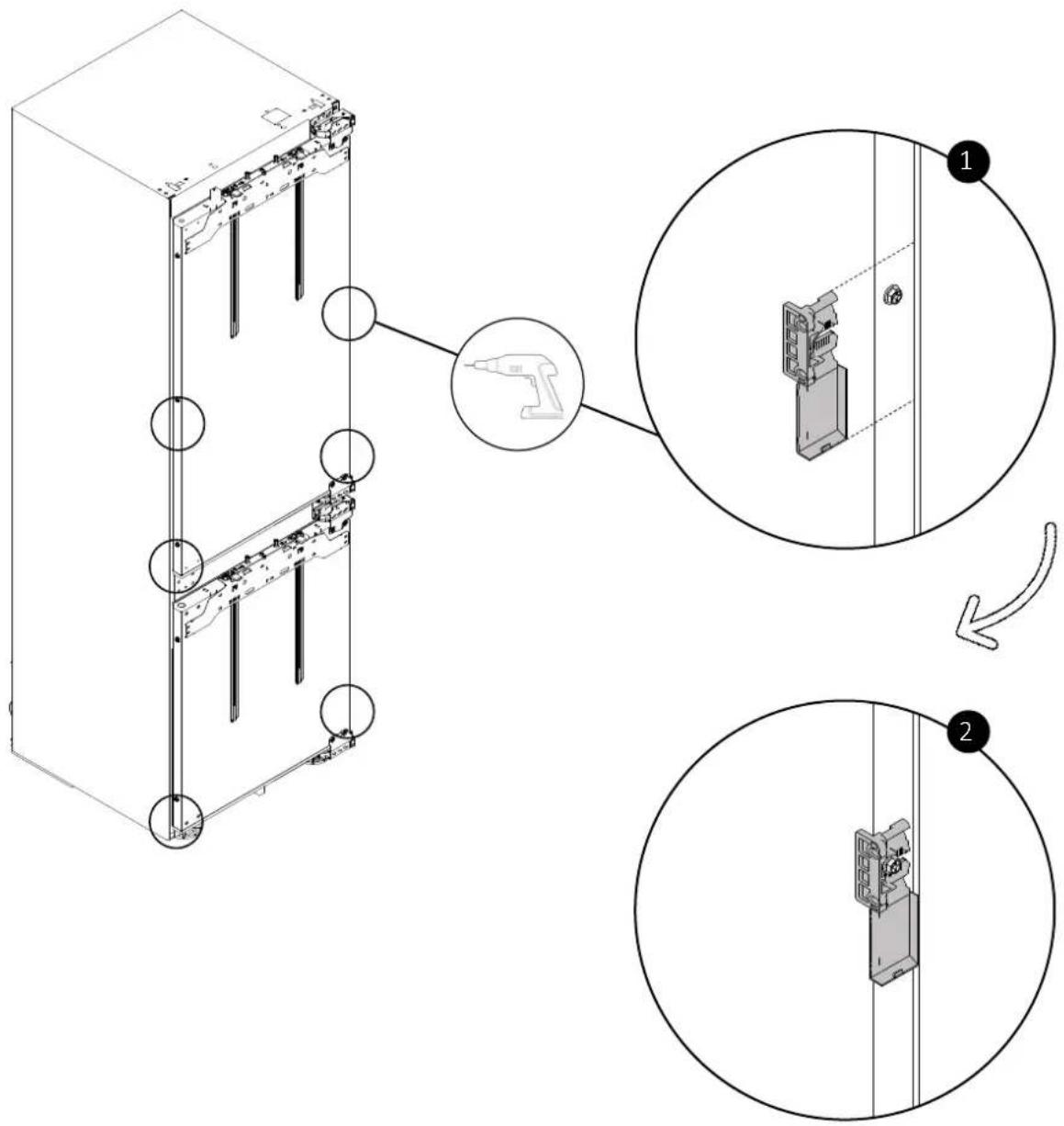
text_image
Technical diagram showing assembly steps of a server rack with labeled components and tool insertion instructions10 Installation instructions for the refrigerator
10.4 Applying the spacer to the back of the refrigerator
Apply the spacer to the back of the refrigerator as shown in the diagram.
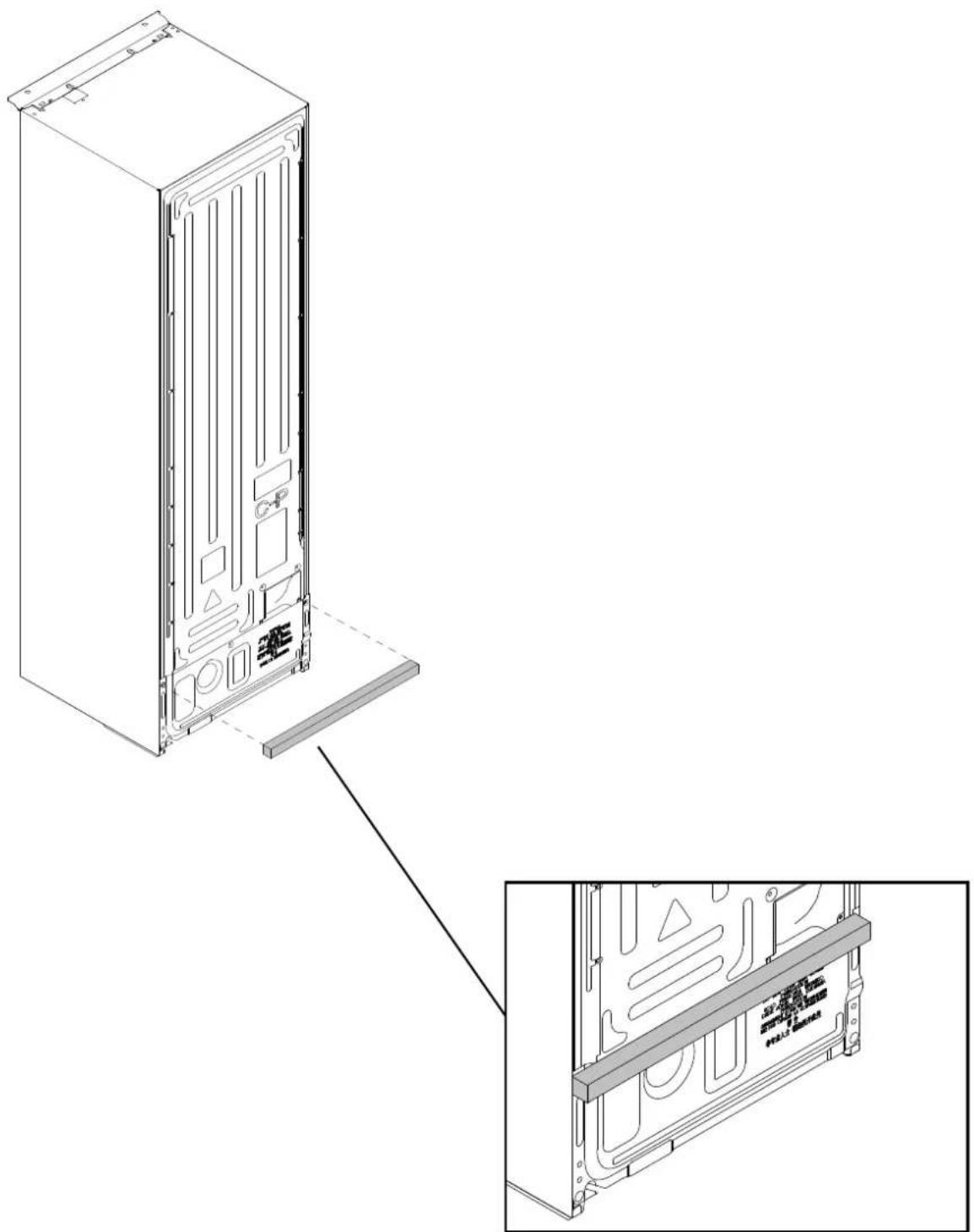
natural_image
Technical line drawing of a server rack unit with internal components and mounting bracket (no text or symbols)10.5 Built-in installation
WARNING: before inserting the refrigerator into the cabinet, thread the power cord through and temporarily secure it on top with tape. Then, lift the product with two people and insert it into the recess, taking care not to damage the power cord. Ensure that the outlet must be freely accessible.
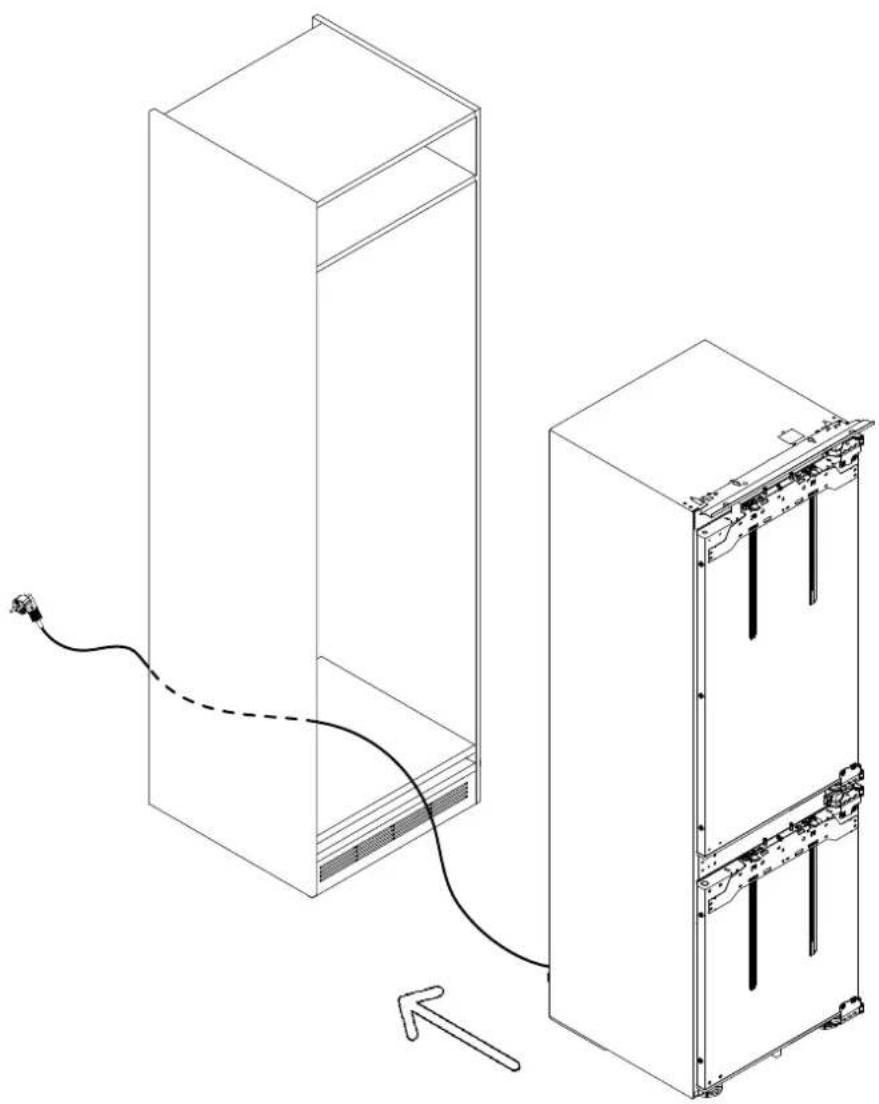
natural_image
Technical line drawing of a server rack with connected cable and internal components (no text or symbols)10 Installation instructions for the refrigerator
10.6 Tolerances on the hinge side
Fit the spacer positioning fins (secured in step 10.2) to the side of the cabinet as shown in the diagram.
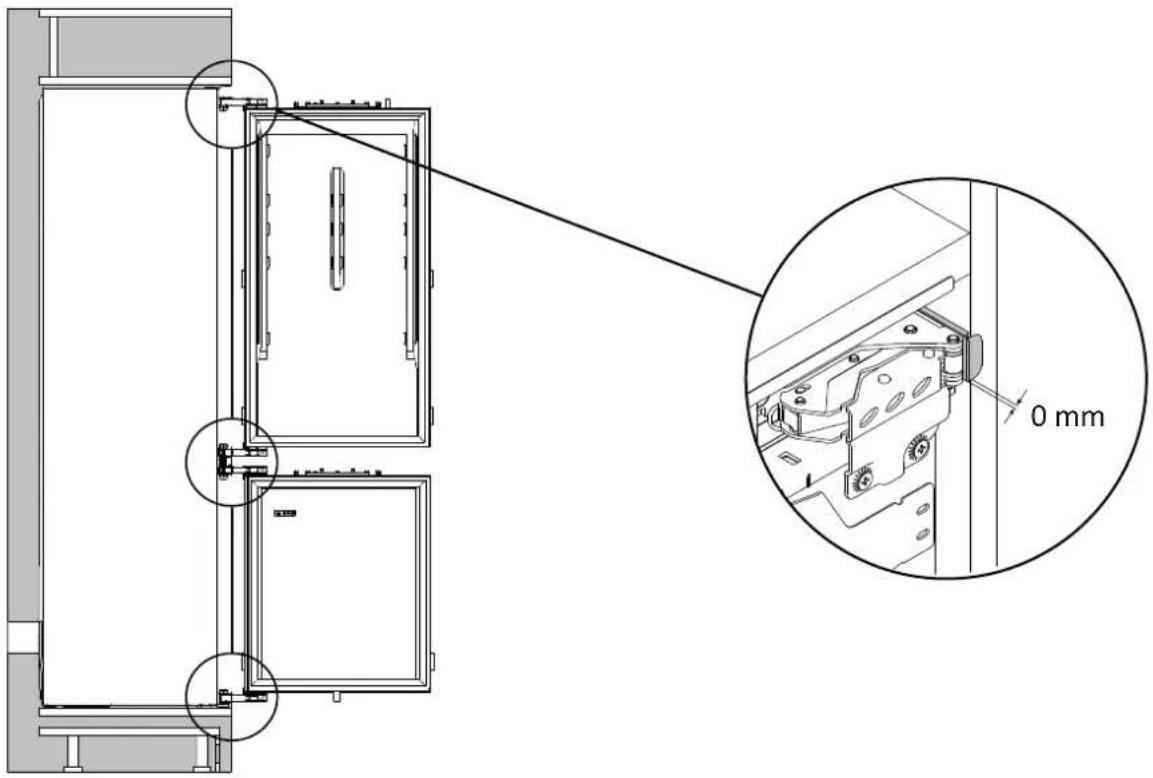
text_image
Technical diagram showing a door assembly with an inset close-up of the component, annotated with 0 mm dimension.10.7 Positioning the central cover
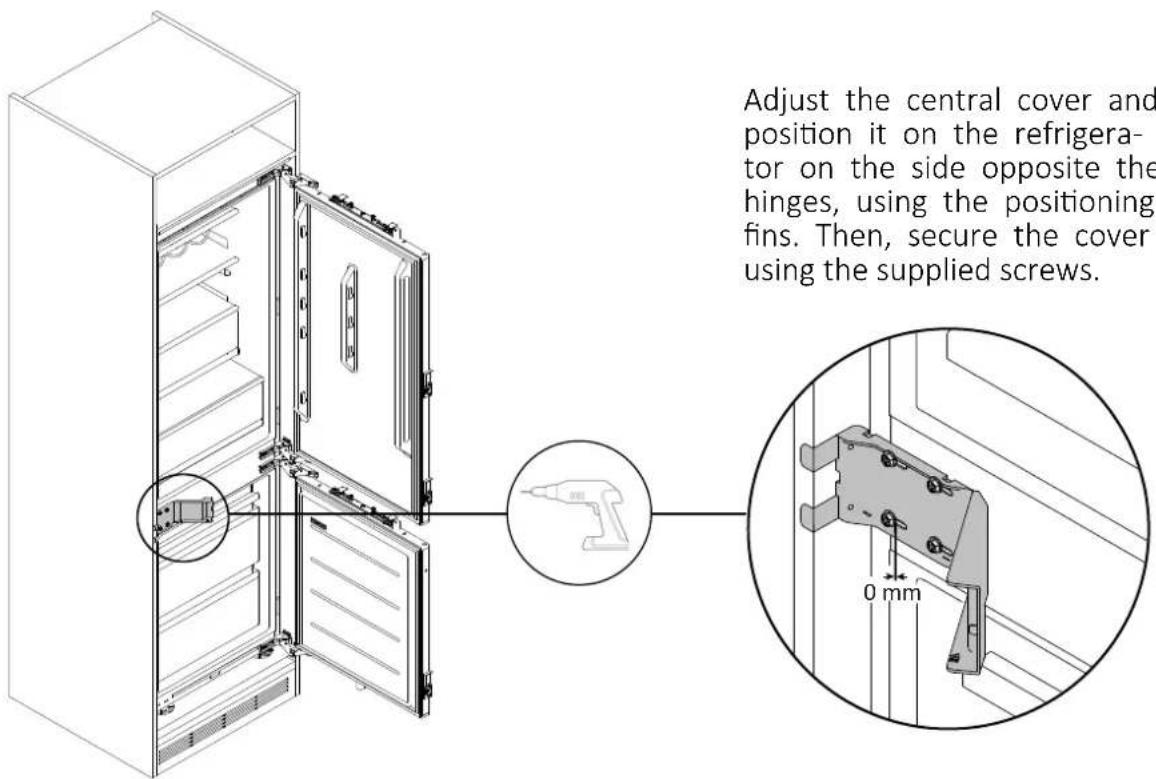
text_image
Adjust the central cover and position it on the refrigerator on the side opposite the hinges, using the positioning fins. Then, secure the cover using the supplied screws.10.8 Adjusting the height of the refrigerator
Adjust the desired height of the refrigerator's feet as shown in the diagram.
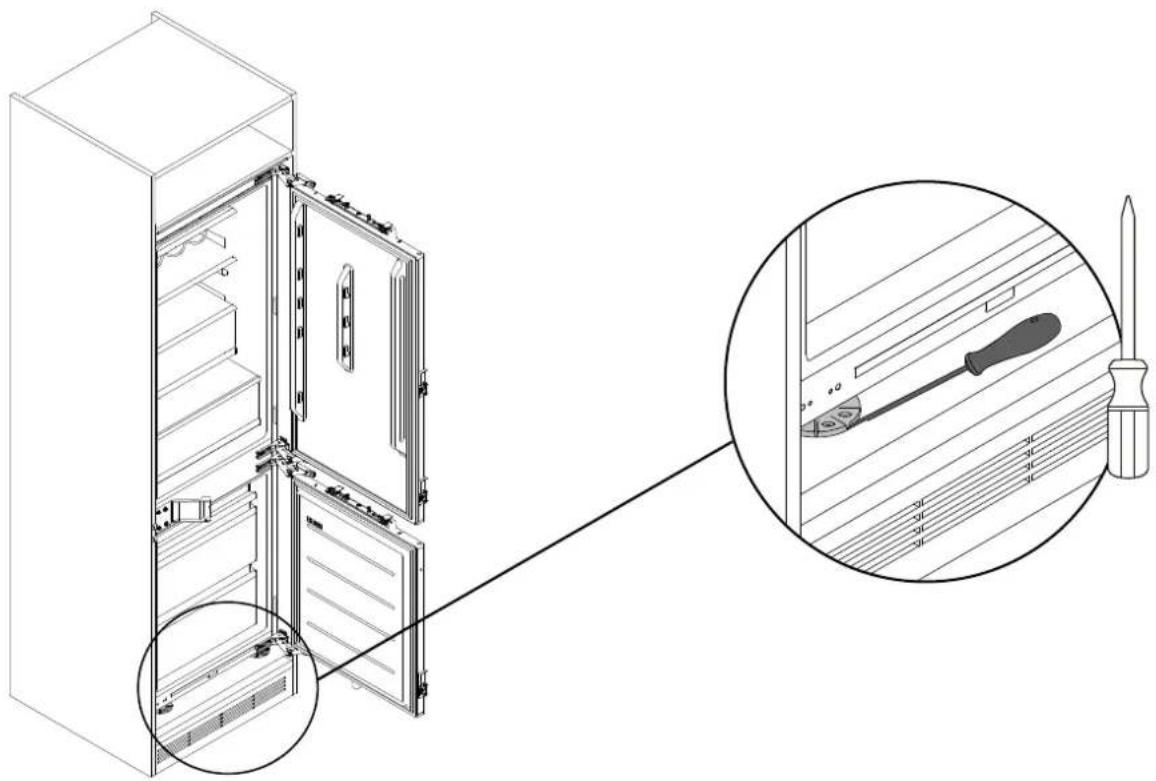
natural_image
Technical illustration of a refrigerator with open door and internal compartments, showing close-up of screwdriver and screwdriver handle (no text or symbols)10.9 Tolerances with the cabinet
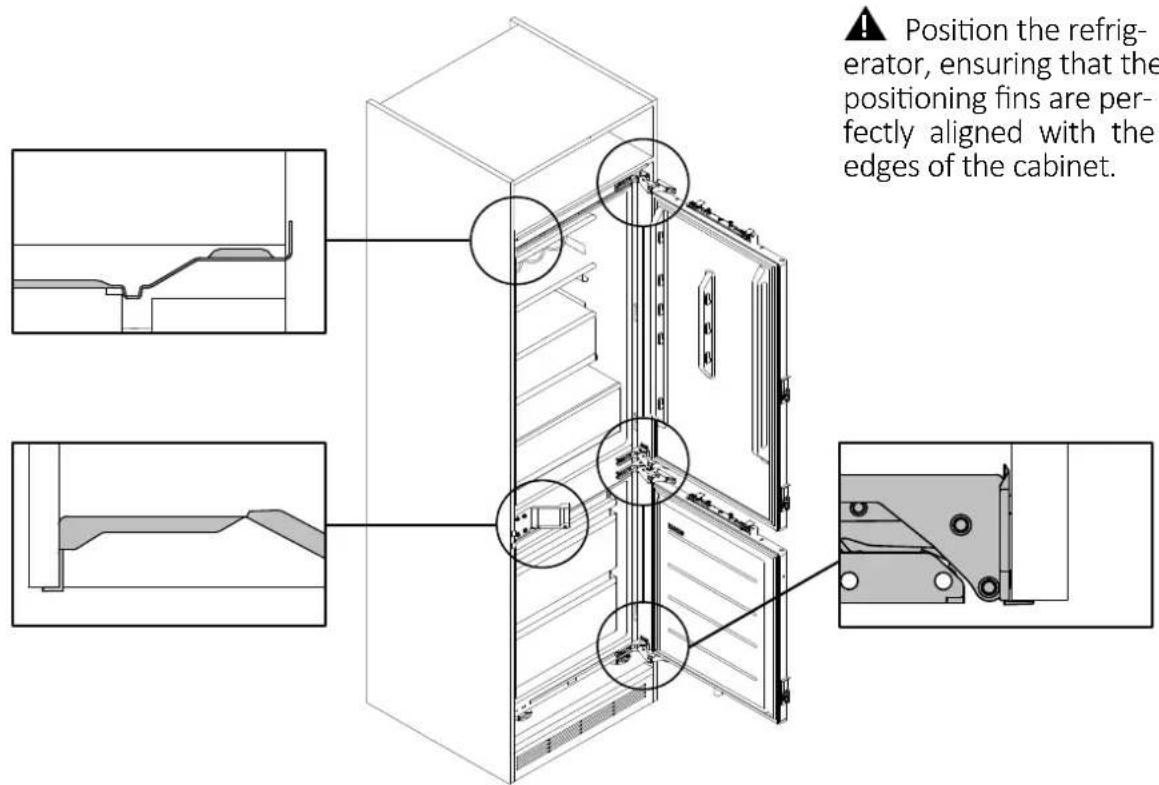
text_image
Position the refrigerator, ensuring that the positioning fins are perfectly aligned with the edges of the cabinet.10 Installation instructions for the refrigerator
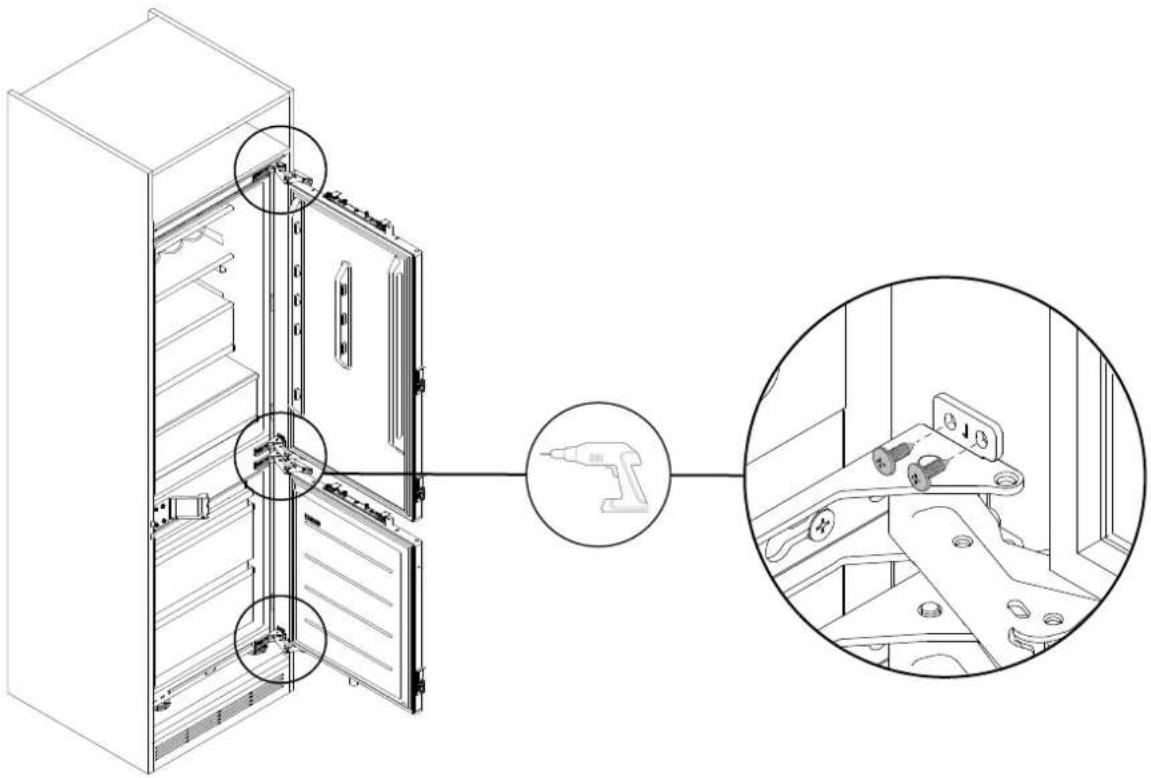
Securing the hinges to the cabinet10.10
Using the supplied screws, secure the refrigerator hinges to the side of the cabinet.
text_image
Technical diagram showing the assembly of a refrigerator with labeled parts and a magnified inset of the device's internal components.10.11 Mounting the central cover
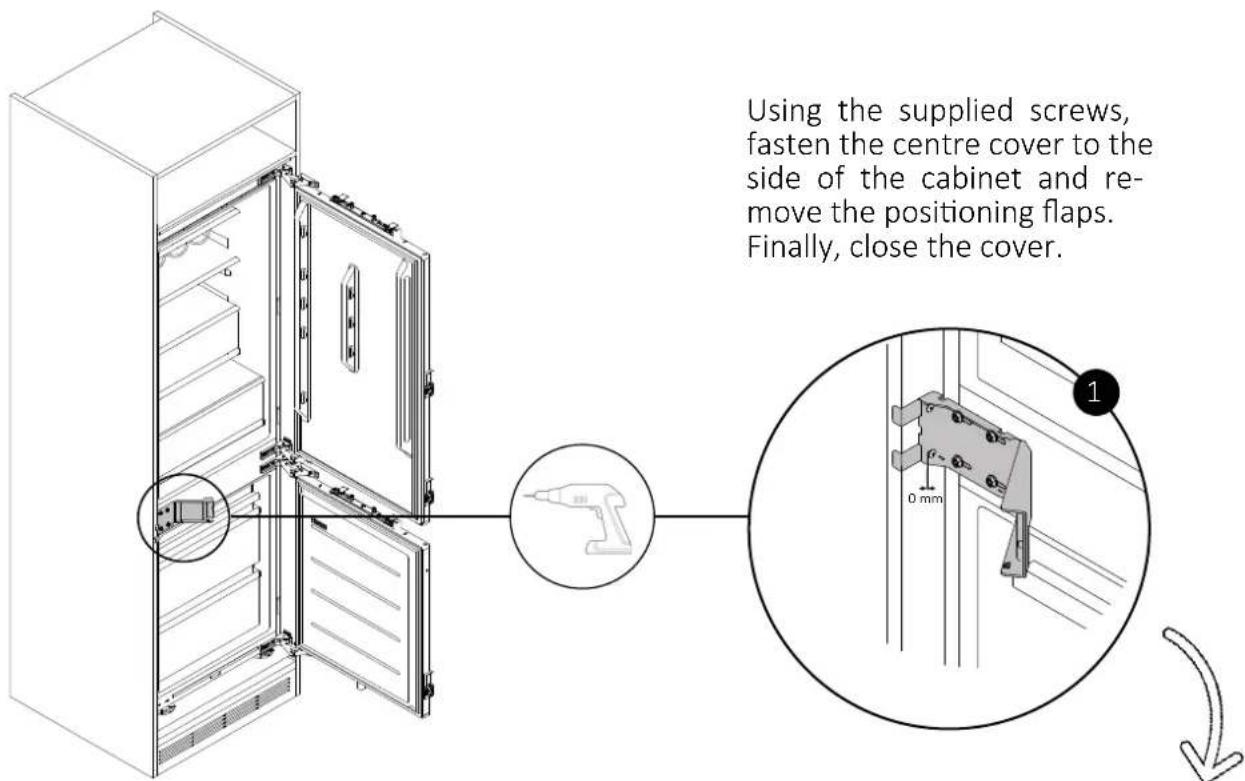
text_image
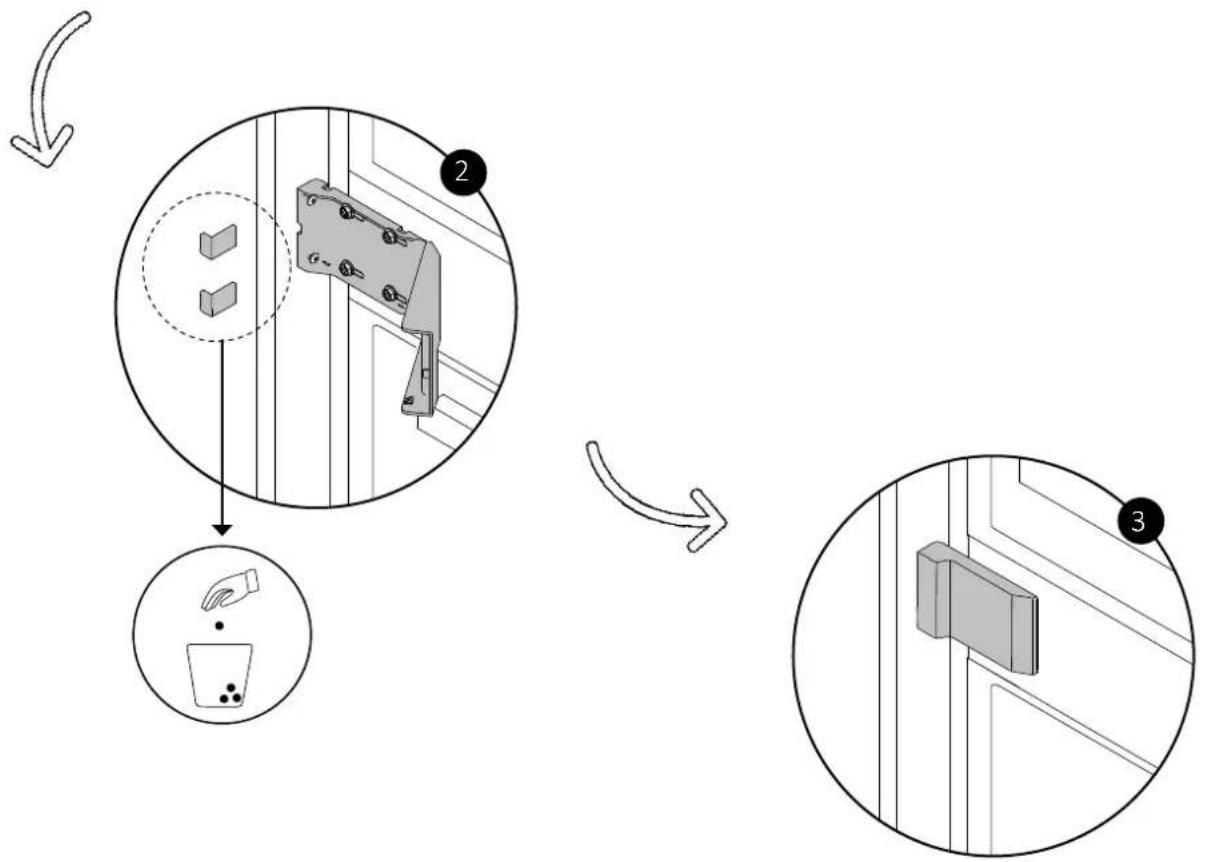
Using the supplied screws, fasten the centre cover to the side of the cabinet and re- move the positioning flaps. Finally, close the cover.10.11 Mounting the central cover
flowchart
graph TD
    A["Add Door Panel"] --> B["Remove Cup"]
    B --> C["Adjusting Cabinet"]
    C --> D["Final Display Panel"]
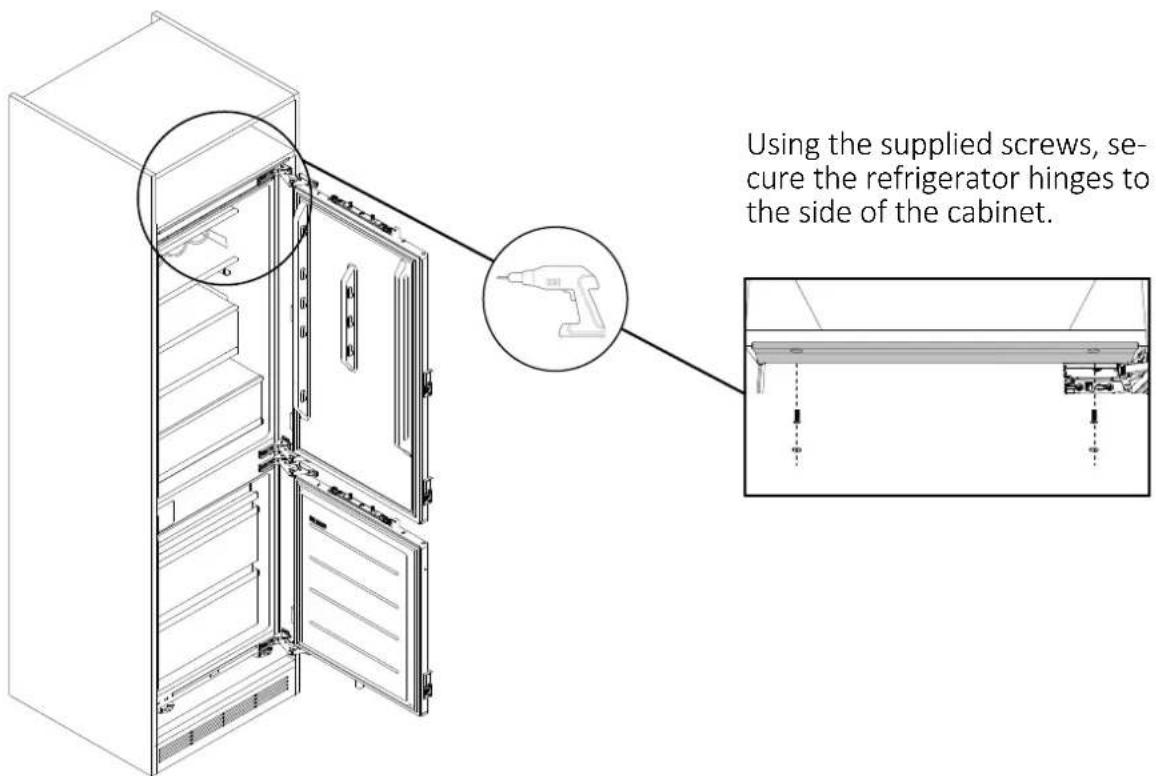
10.12 Securing the refrigerator to the upper shelf
text_image
Using the supplied screws, secure the refrigerator hinges to the side of the cabinet.10 Installation instructions for the refrigerator
10.13 Removing the spacer positioning fins
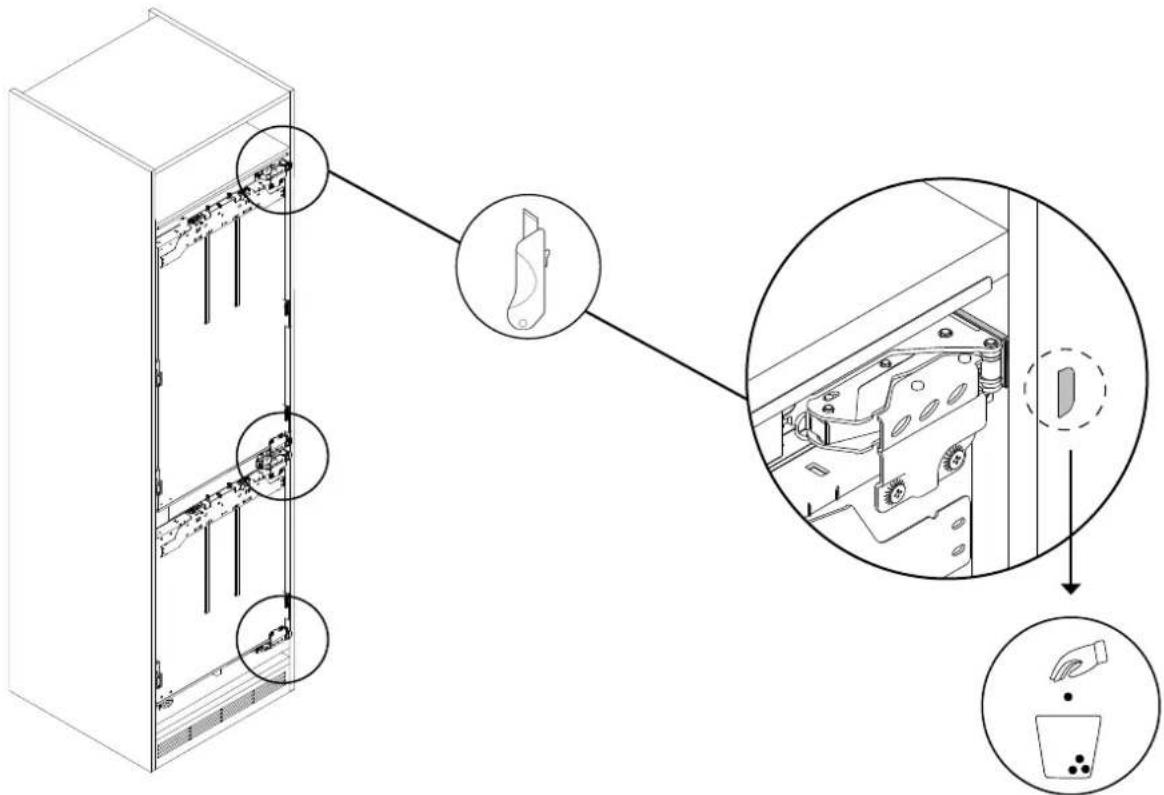
Using a box cutter, remove the positioning fins of the spacers placed in step 10.2 as shown in the diagram.
text_image
Technical diagram showing assembly of server racks with labeled components and a close-up view of internal components.10.14 Installing the cabinet doors
natural_image
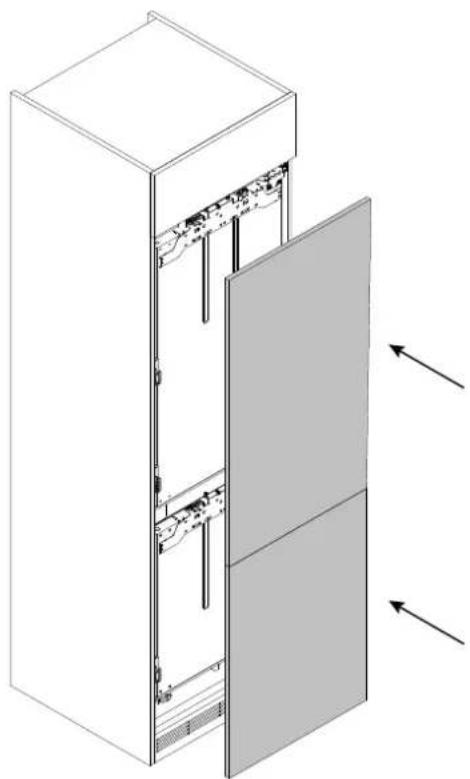
Isometric line drawing of a multi-tiered server cabinet with internal components and ventilation ducts (no text or symbols)⚠️ Start with the installation of the upper cabinet door and repeat steps 10.15 - 10.20 for the lower door.
10.15 Rotating the spacers from the cross brace
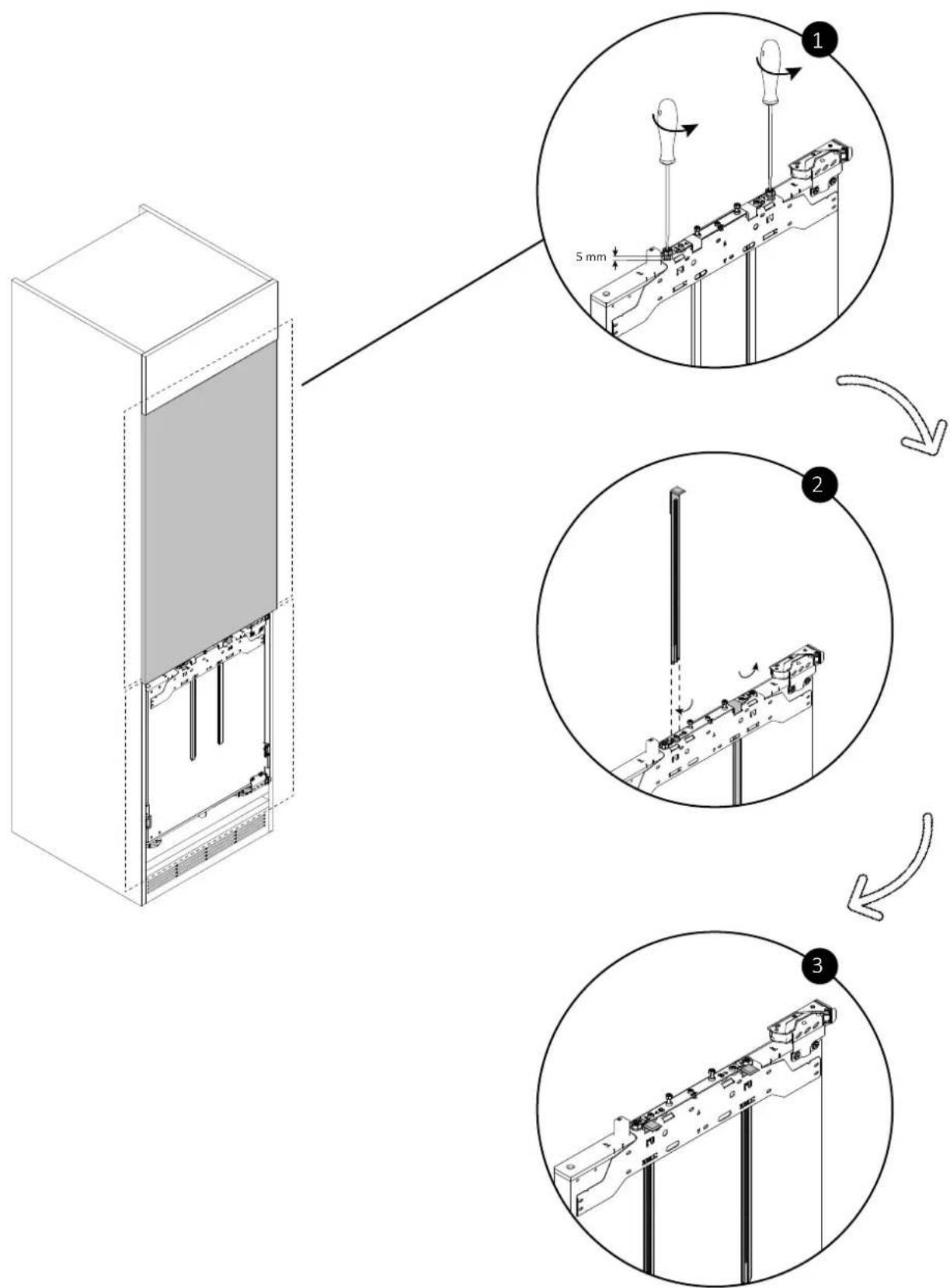
Using a screwdriver, loosen the bolts as indicated in the diagram.
Then, remove the two spacers from the cross brace and reposition them in the outermost hole, rotating them 180^ .
text_image
Technical diagram illustrating three-step assembly process for a server or rack unit, with labeled components and directional arrows.10 Installation instructions for the refrigerator
10.16 Adjusting the cross brace
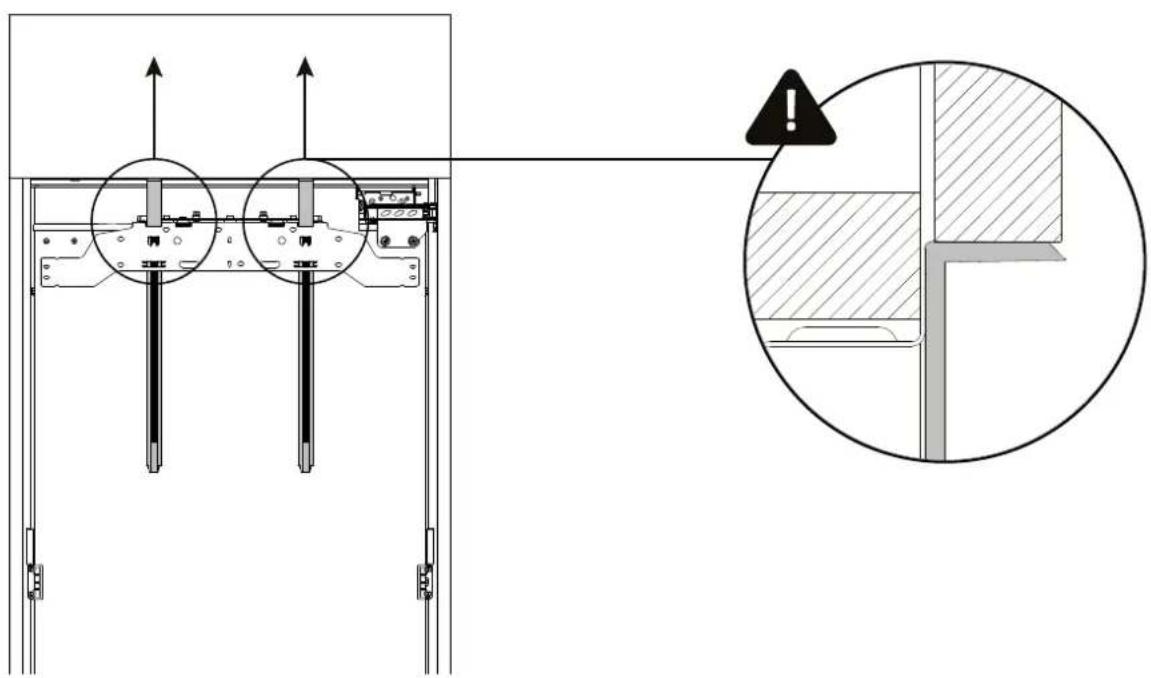
Raise the spacers of the cross brace until they adhere perfectly to the closed upper cabinet door. If there is no upper cabinet door above the refrigerator, raise the spacers to the top of the cabinet.
text_image
Technical diagram showing structural components with directional arrows and a magnified detail view highlighting a section with warning symbol.10.17 Detaching the cross brace from the refrigerator door
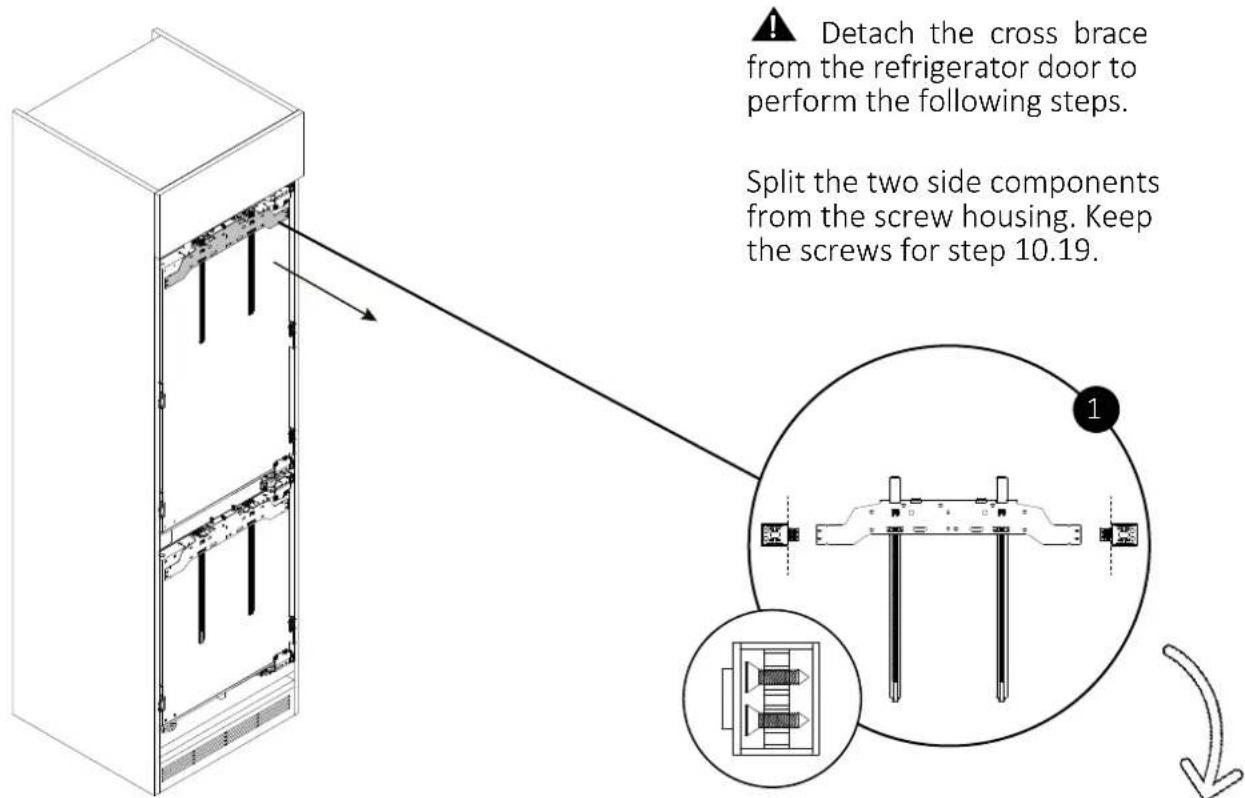
text_image
Detach the cross brace from the refrigerator door to perform the following steps. Split the two side components from the screw housing. Keep the screws for step 10.19.10.17 Detaching the cross brace from the refrigerator door
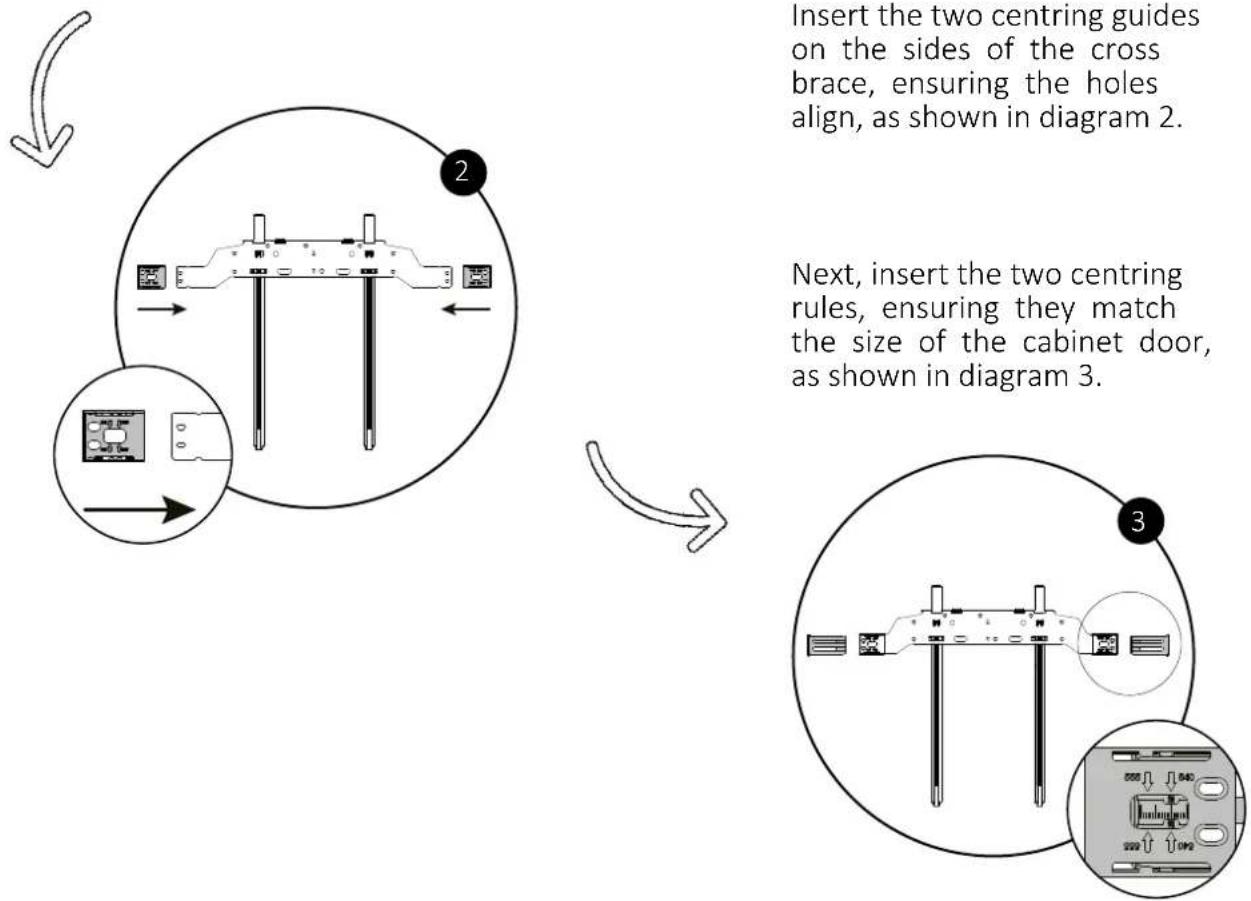
Insert the two centring guides on the sides of the cross brace, ensuring the holes align, as shown in diagram 2.
Next, insert the two centring rules, ensuring they match the size of the cabinet door, as shown in diagram 3.
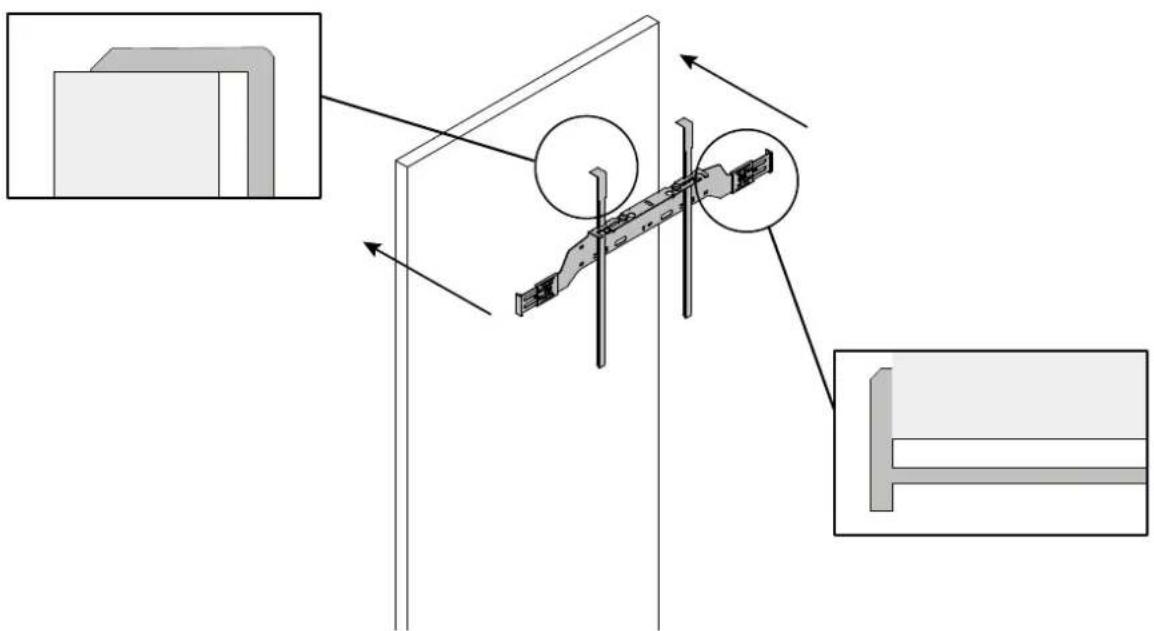
10.18 Positioning the cross brace to the cabinet door
When positioning the cross brace on the cabinet door, make sure it is flush against the sides and the top of the cabinet door.
natural_image
Technical diagram showing structural components and assembly, with no visible text or symbols10 Installation instructions for the refrigerator
10.19 Securing the cross brace
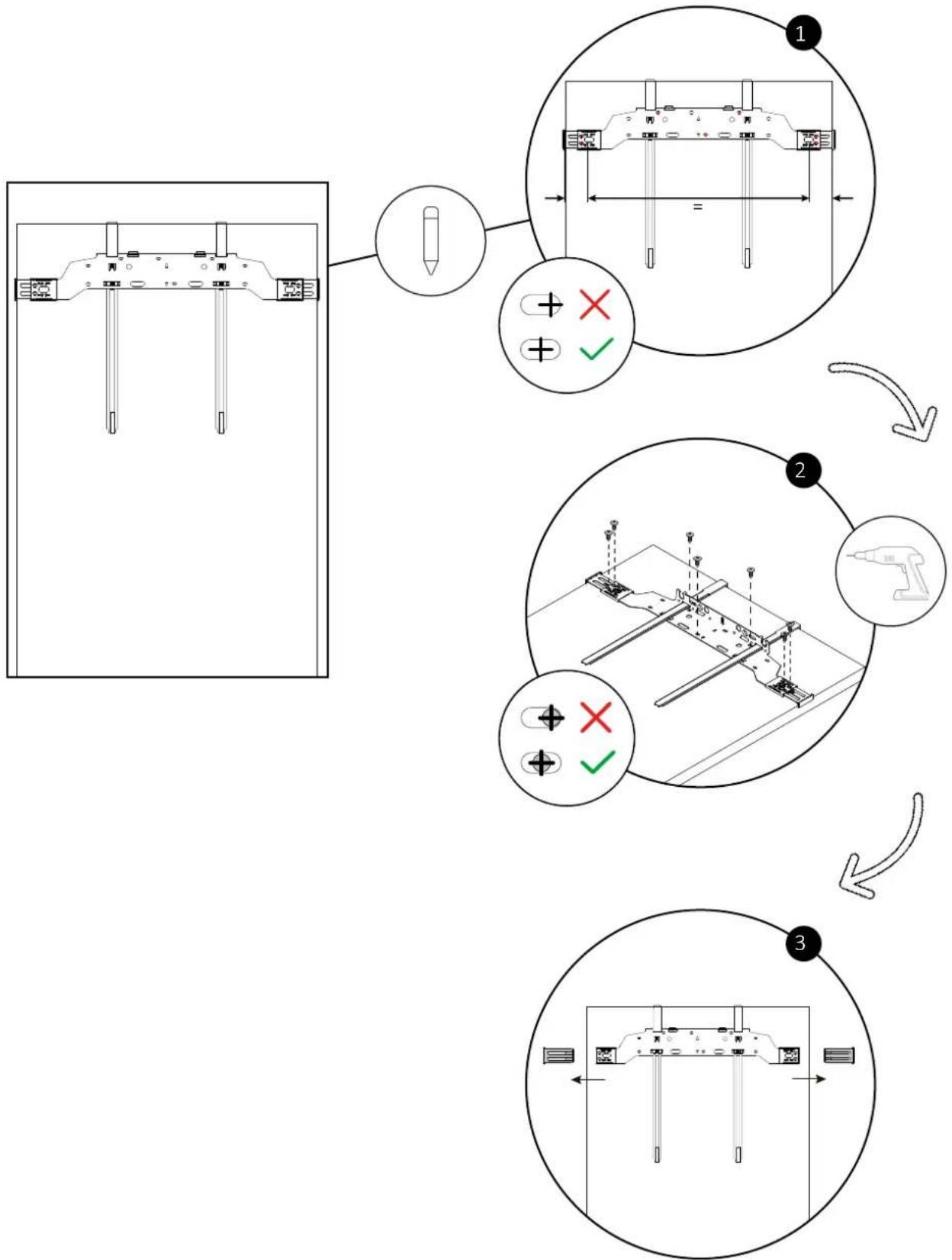
Once the cross brace is positioned on the cabinet door, mark the drilling points with a pencil as indicated in the diagram. Then, remove the centring rules and tighten the screws kept from step 10.17.
flowchart
graph TD
    A["Tool Position"] --> B{Checkmark}
    B -->|Yes| C["Assembly"]
    B -->|No| D["Adjustment"]
    C --> E["Final Assembly"]
    D --> F["End"]
10.20 Positioning the cabinet door on the corresponding refrigerator door
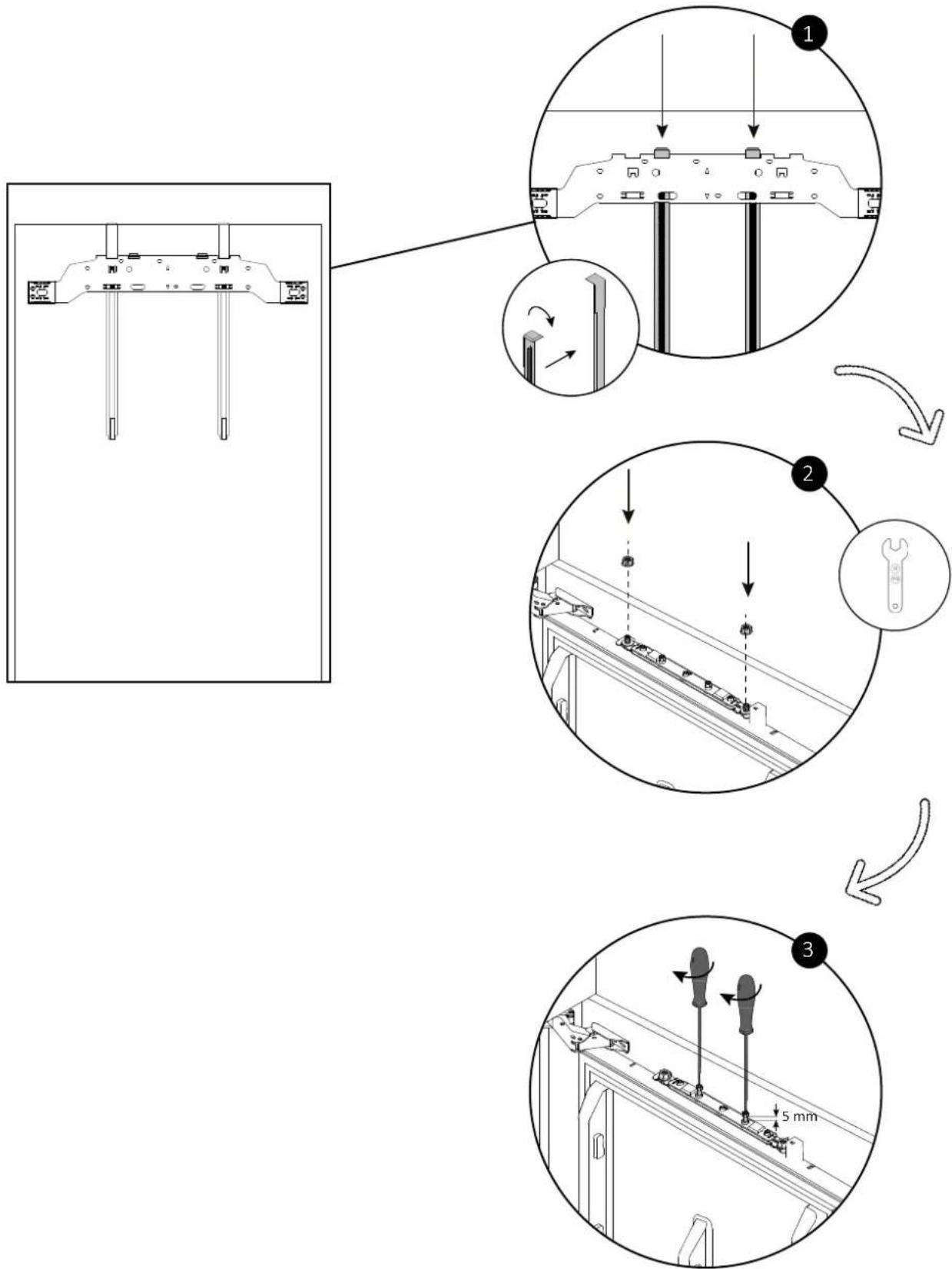
Remove the spacers from the cross brace, rotate them 180^ and insert them into the innermost holes, as shown in the diagram. Then, position the cabinet door onto the corresponding refrigerator door and secure the bolts, leaving a tolerance of 5 mm.
text_image
Technical diagram illustrating three-step assembly steps for a mechanical component, with numbered annotations and directional arrows.10 Installation instructions for the refrigerator
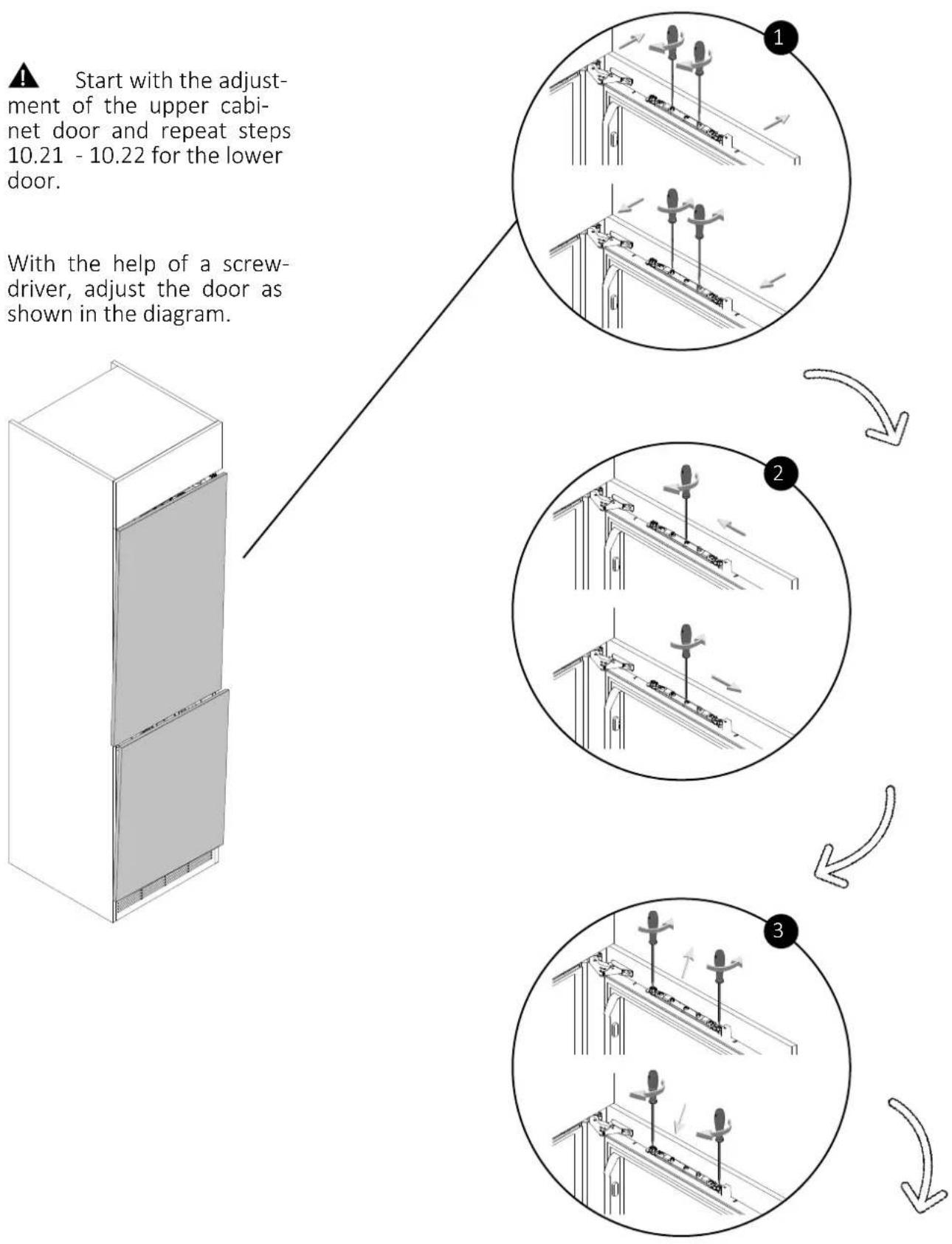
⚠ WARNING: before proceeding to the next step, make sure to install the lower cabinet door by repeating steps 10.15 - 10.20.
10.21 Adjusting the cabinet door
flowchart
graph TD
    A["Start with the adjustment of the upper cabinet door and repeat steps 10.21 - 10.22 for the lower door."] --> B["With the help of a screw-driver, adjust the door as shown in the diagram."]
    B --> C["Step 1: Adjustment of upper cabinet door and repeat steps"]
    B --> D["Step 2: Adjustment of upper cabinet door and repeat steps"]
    B --> E["Step 3: Adjustment of upper cabinet door and repeat steps"]
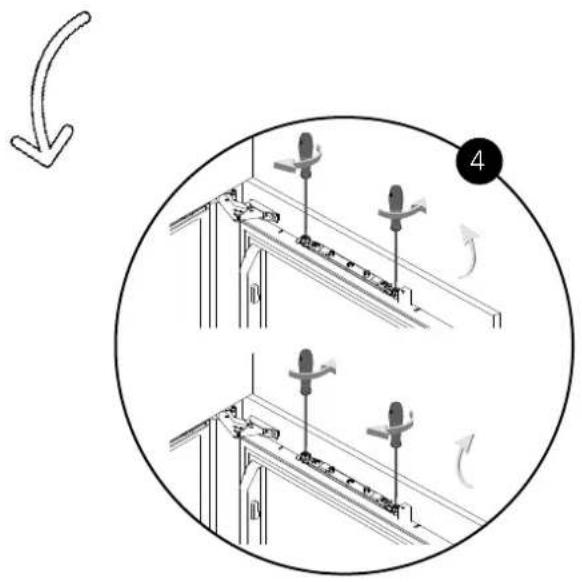
10.21 Adjusting the cabinet door
text_image
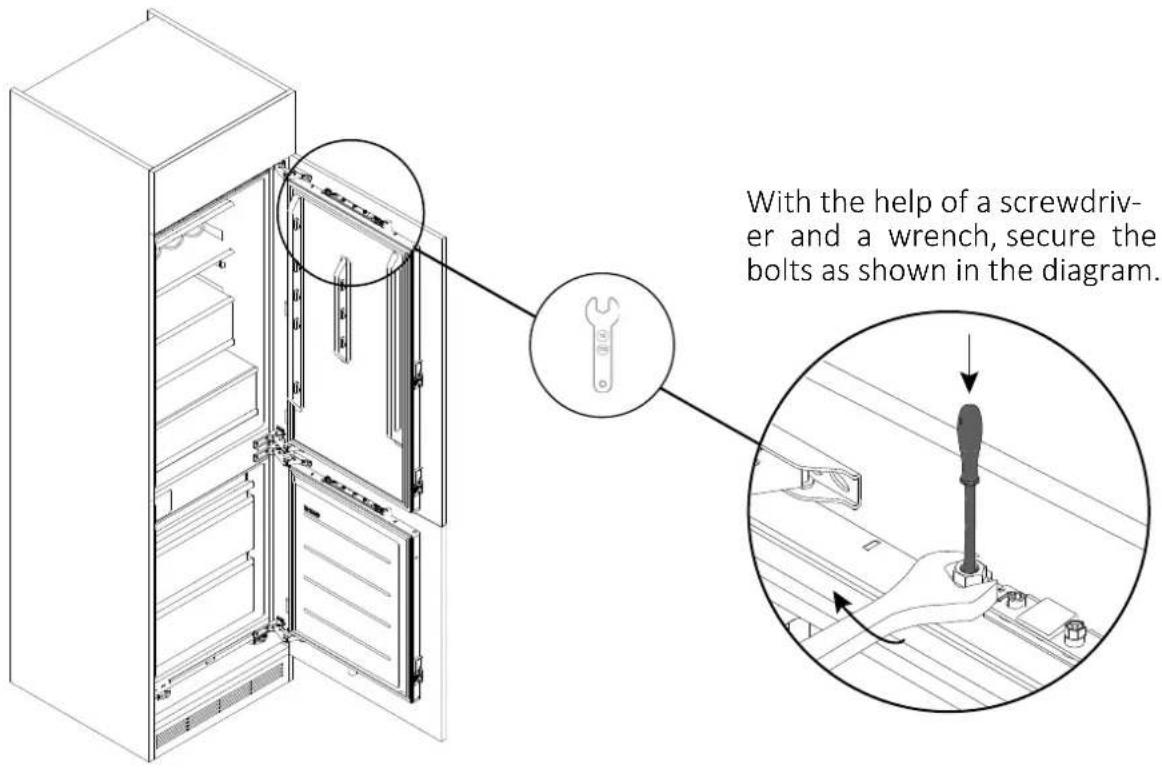
Diagram showing two mechanical assembly steps with rotating components and directional arrows, labeled with number 4.10.22 Securing the cabinet door
text_image
With the help of a screwdriver and a wrench, secure the bolts as shown in the diagram.10 Installation instructions for the refrigerator
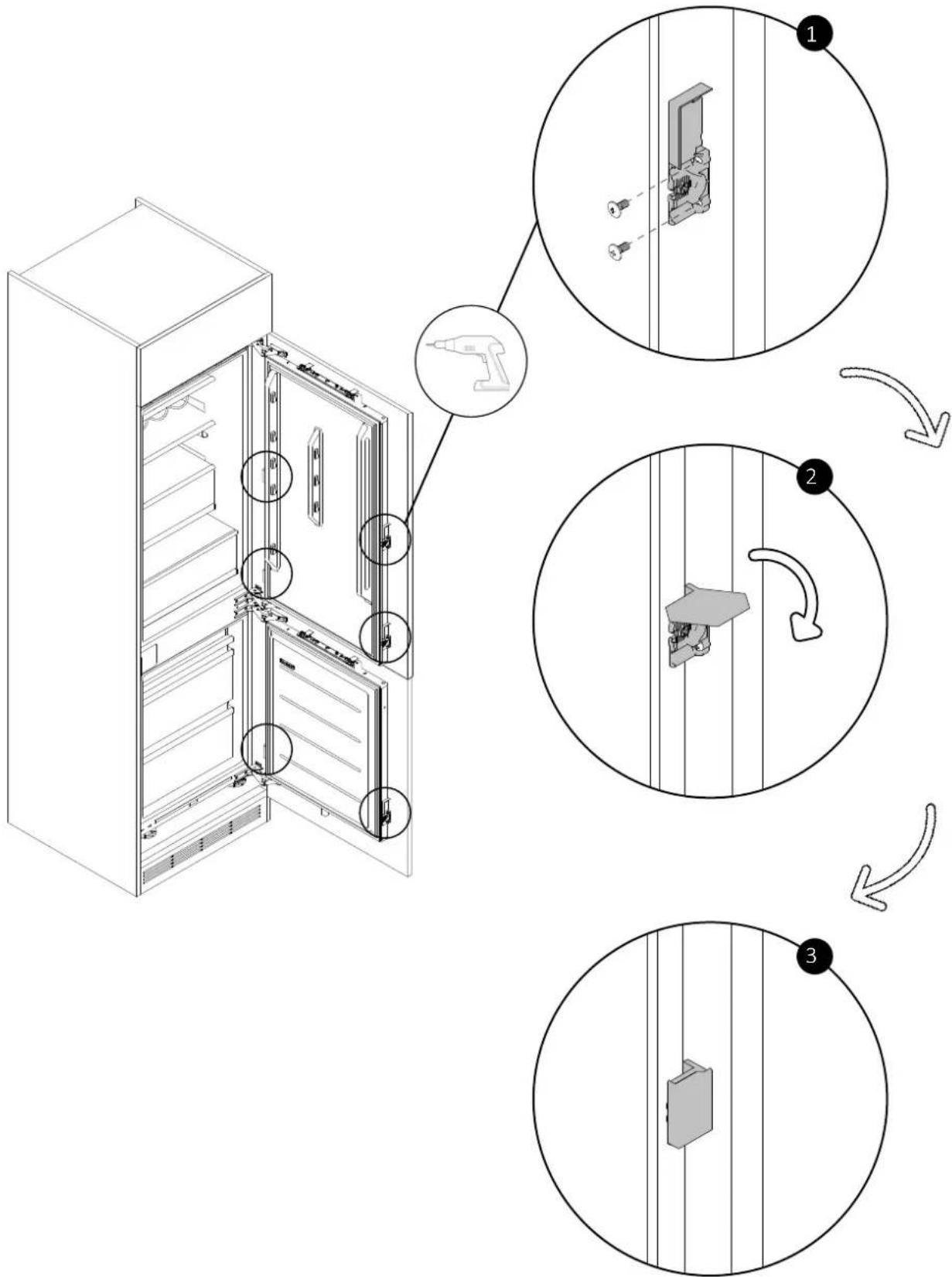
10.23 Attaching the mounting brackets to the cabinet door
With the help of a screwdriver, secure the mounting brackets to the cabinet doors (previously installed on the refrigerator doors in step 10.3). Then, close the covers as shown in the diagram.
text_image
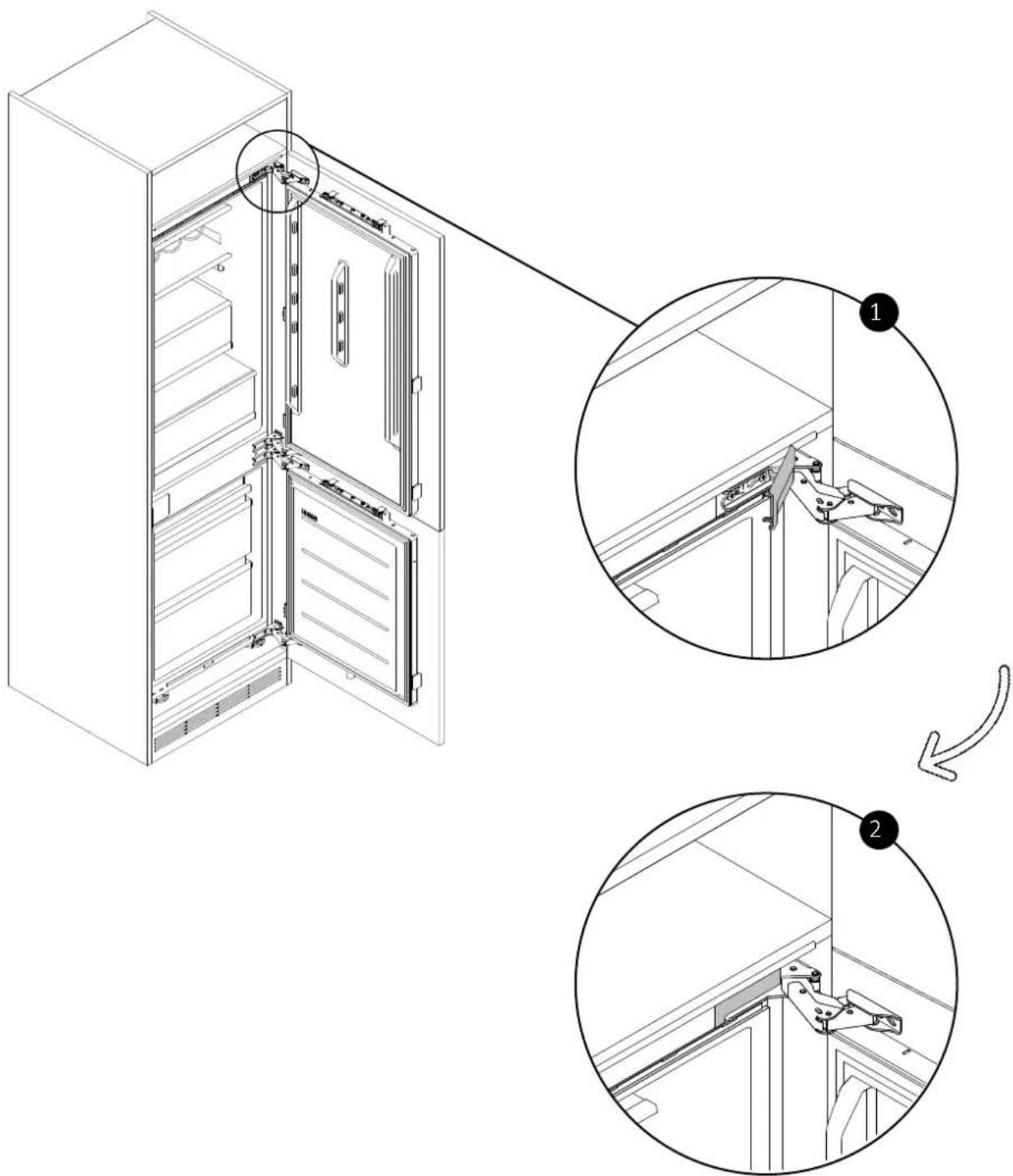
Diagram illustrating the step-by-step installation of a refrigerator door, showing component positioning and assembly steps.10.24 Applying the cover to the upper hinge
Apply the cover to the upper hinge as shown in the diagram.
text_image
Technical diagram showing the internal structure and assembly of a refrigerator with labeled parts, including close-ups and annotations in Chinese.10 Installation instructions for the refrigerator
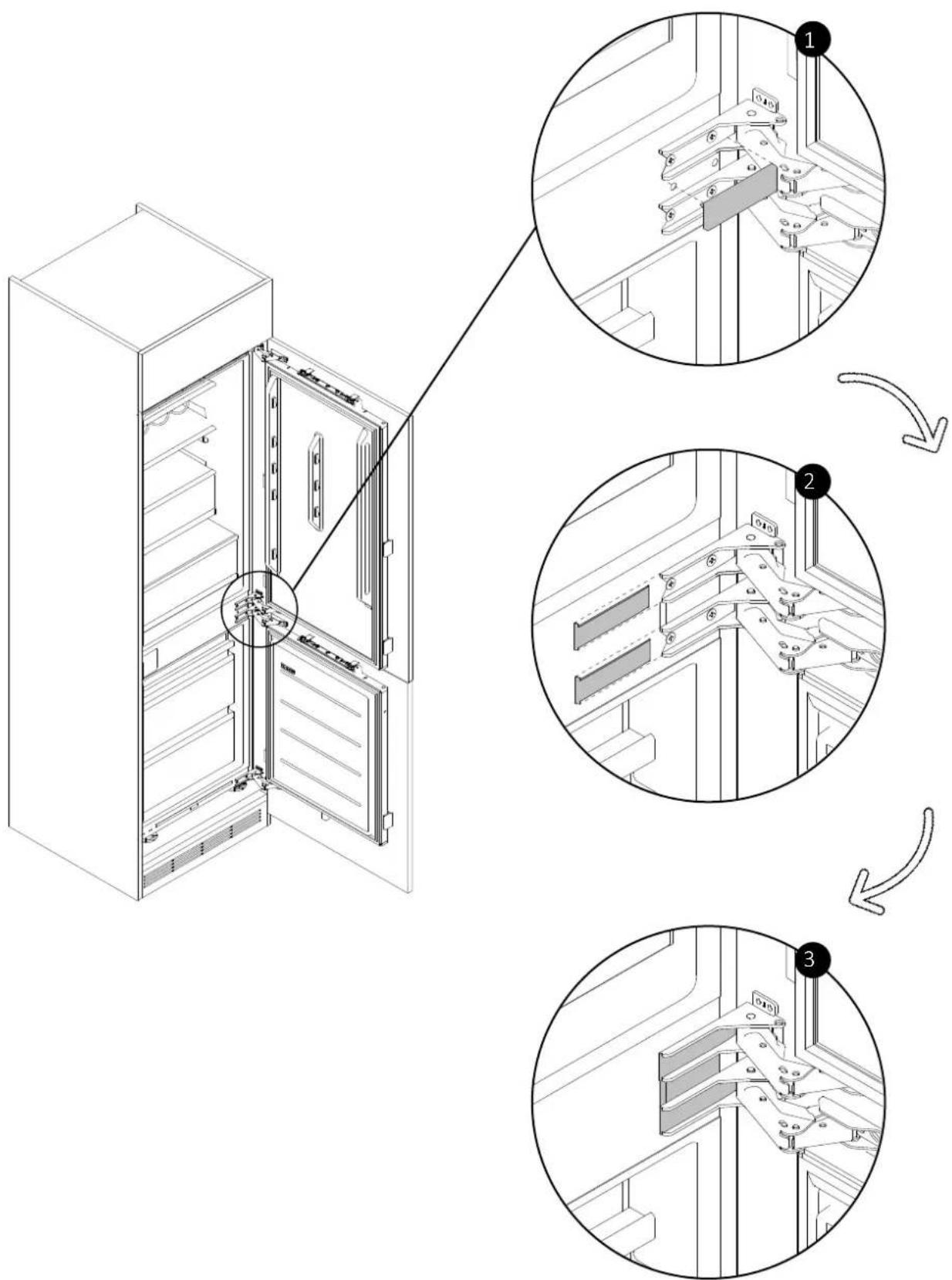
10.25 Applying the covers to the central hinges
Apply the covers to the central hinges as shown in the diagram.
text_image
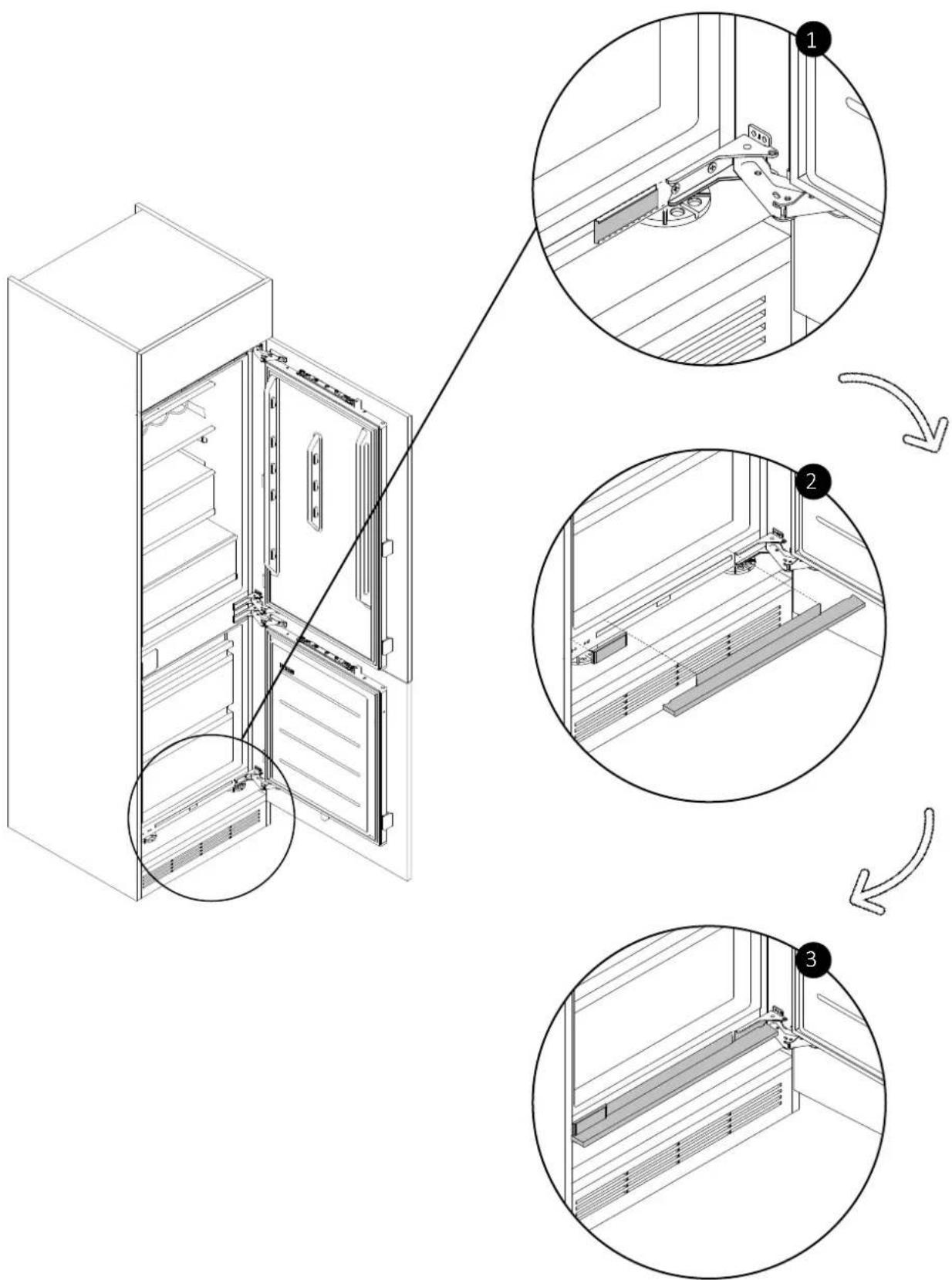
Technical diagram showing the assembly of a refrigerator with labeled parts and three sequential steps for mounting or repair.10.26 Applying the bottom covers
Apply the lower covers as shown in the diagram.
text_image
Technical diagram showing three-step assembly of a refrigerator with labeled components and directional arrows indicating assembly steps.10 Installation instructions for the refrigerator
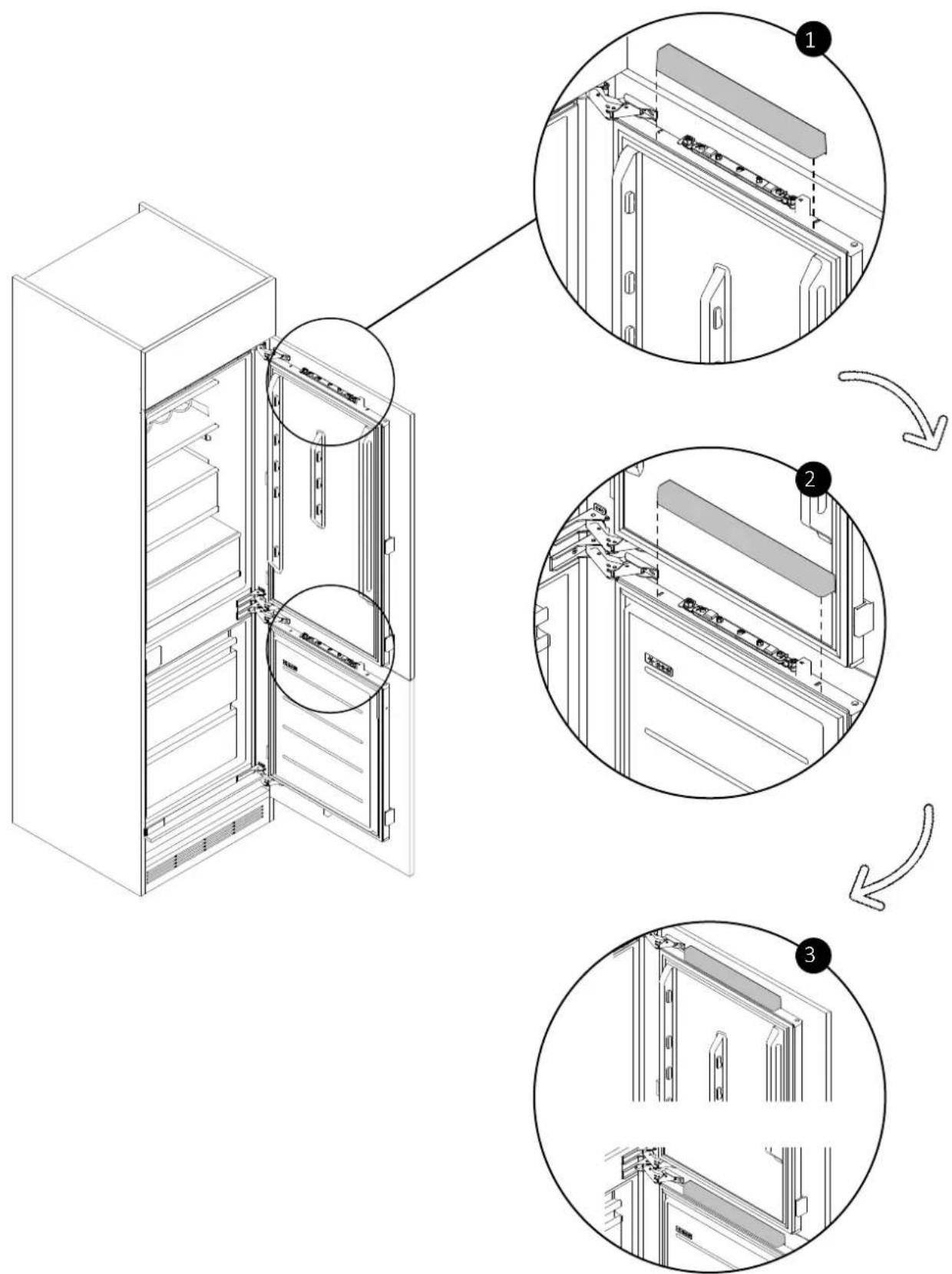
10.27 Applying the covers to the refrigerator doors
Apply the covers to the top of the refrigerator doors as shown in the diagram.
text_image
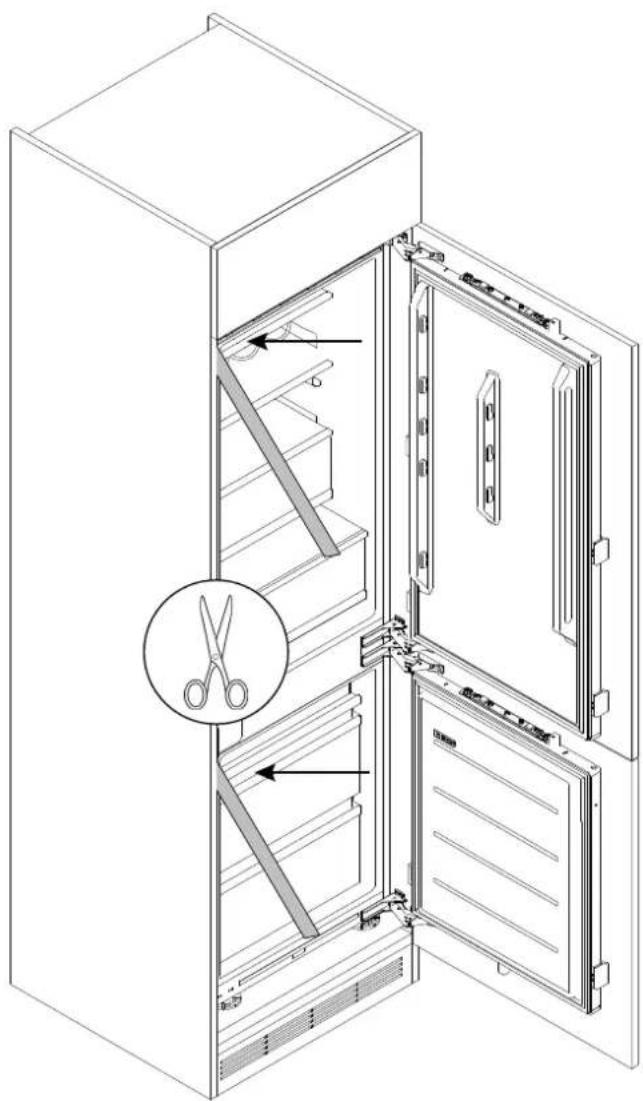
Technical diagram showing three-step assembly of a refrigerator with labeled components and directional arrows indicating sequence.10.28 Applying the seals to the side of the refrigerator
Cut the seals to size and apply them to the side of the refrigerator, on the side opposite to the hinges.
natural_image
Line drawing of an open refrigerator with a close-up of the door and a magnified inset showing a pair of scissors (no text or symbols)Warnings11.1
To safely perform the electrical connection of the appliance, observe the following warnings:
- Any repair, installation, and maintenance not performed correctly can seriously endanger the user;
- The manufacturing company declares no responsibility for direct or indirect damages caused by incorrect installation, maintenance, or repair interventions.
The company also does not respond to damages caused by the lack or interruption of the grounding system (e.g., electric shock); - Connect the product exclusively using the provided power cord;
- The product must be connected to an electrical system installed professionally;
• In case of damage caused by improper connection, the warranty is void; - For any repairs, contact Customer Service exclusively and request the use of original spare parts;
- Disconnect the product from the electrical supply before performing any intervention or maintenance on it.
• To avoid the risk of fire or electrical shock, do not damage the plug or power cord; - Do not connect the appliance to power strips, extension cords, or portable power supplies;
- When the appliance is placed in the chosen location, make sure the power cord is not stuck or damaged and that there are no power strips or portable power supplies in the back of the appliance.
Power absorbed
See product data plate.
Differential circuit breaker (life - saving)
The use of a residual current circuit breaker (earth leakage circuit breaker) with trip current complying with current standards is recommended.
⚠ WARNING: the product must be connected to the power supply via an omnipolar disconnection device that ensures a separation between contacts complying with overvoltage category III. Such a device must withstand the maximum loads connected and comply with current standards.
- Make sure the electrical specifications on the data plate are in conformity with the power supply;
• The appliance operates on 220 - 240 Vac/50 Hz electric current; -
Abnormal voltage fluctuations may cause the appliance not to start, damage to the temperature control or compressor, or abnormal noises during operation. In such a case, an automatic regulator should be fitted;
-
Ensure that the main cable is not caught under the appliance during and after transportation/movement, to prevent the main cable from being cut or damaged. If the power cord of the appliance should be damaged, do not proceed with the installation and contact service;
- Ensure that the power source, plug, and fuses are conform to the data on the data plate;
• Make sure the power plug is grounded and do not use power strips or extension cords.
NOTE (United Kingdom only): the power cord of the appliance is equipped with a 3-prong plug (grounded) suitable for a standard 3-prong outlet (grounded).
Never cut or remove the third prong (ground connection). After installing the appliance, the plug must remain accessible.
Other advices11.2
The use of any household appliance requires adherence to certain basic rules:
- It is recommended to keep the plug clean: any dirt residue on the plug may cause fire;
- Do not pull the power cord to disconnect the appliance from the power supply while operating;
- Do not touch the appliance with wet or damp hands or feet. The use of adapters, power strips or extension cords is discouraged;
- In case of malfunction and/or performance drop, turn off the appliance and do not manipulate/altere it.
Deliver to the user
At the end of installation:
• Inform the user about essential functions;
• Inform the user about all aspects relevant to safe use and handling;
- Deliver accessories and instructions for use and assembly to the user to be kept with care.
After installation is complete, remove the protective film, tape, and all other packing materials.
- After turning the fridge on, wait at least 2 hours before placing food in the appliance to ensure the correct temperature inside the fridge.

WARNING: the product requires adequate ventilation for normal operation. Not obstruct the ventilation openings for any reason.

NOTE: the actual appearance of the product depends on the model chosen.
Disassemble the product
- Disconnect the product from the power supply;
• Unscrew the fixing screws; - Lift the product slightly and pull it out completely;
- This product will not damage the cabinet, which can also be used with a new appliance.

bar
| Category | Value | | -------- | ----- | | Category1 | 0.00% | | Category2 | 0.00% |
natural_image
Modern kitchen interior with white shelves, open refrigerator, and stone coffee table (no visible text or symbols)BENVENUTI
natural_image
Technical line drawing of an open refrigerator with doors and shelves (no text or symbols)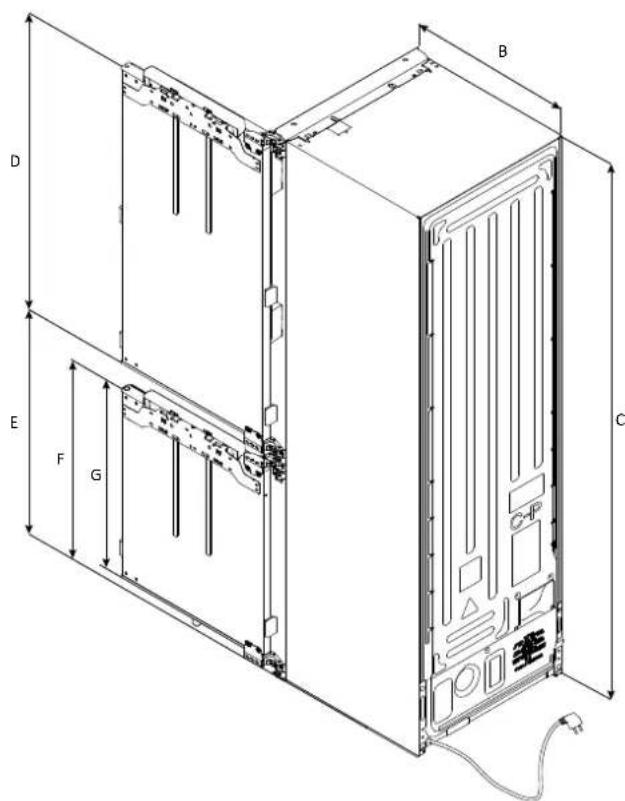
text_image
A B C D E F Gnatural_image
Technical line drawing of a double door with internal panel and side connectors (no text or symbols)text_image
QR code image containing encoded data, no visible human-readable textnatural_image
Close-up of a mechanical assembly with a handle and mounting bracket (no visible text or symbols)text_image
Technical diagram of refrigerator internal components with labeled parts and assembly viewsnatural_image
Technical line drawing of a refrigerator with an inset showing the internal components (no text or symbols present)text_image
Technical diagram of a refrigerator with labeled components and close-up detail showing internal wiring and dimensions.text_image
Diagram illustrating a screwdriver tool interacting with two storage compartments, showing alignment and component placement.text_image
Technical diagram showing assembly of a server rack with labeled components and dimensions, including mounting holes and bracketing details.text_image
Technical diagram of a server rack with labeled components and an inset close-up showing internal circuit connections.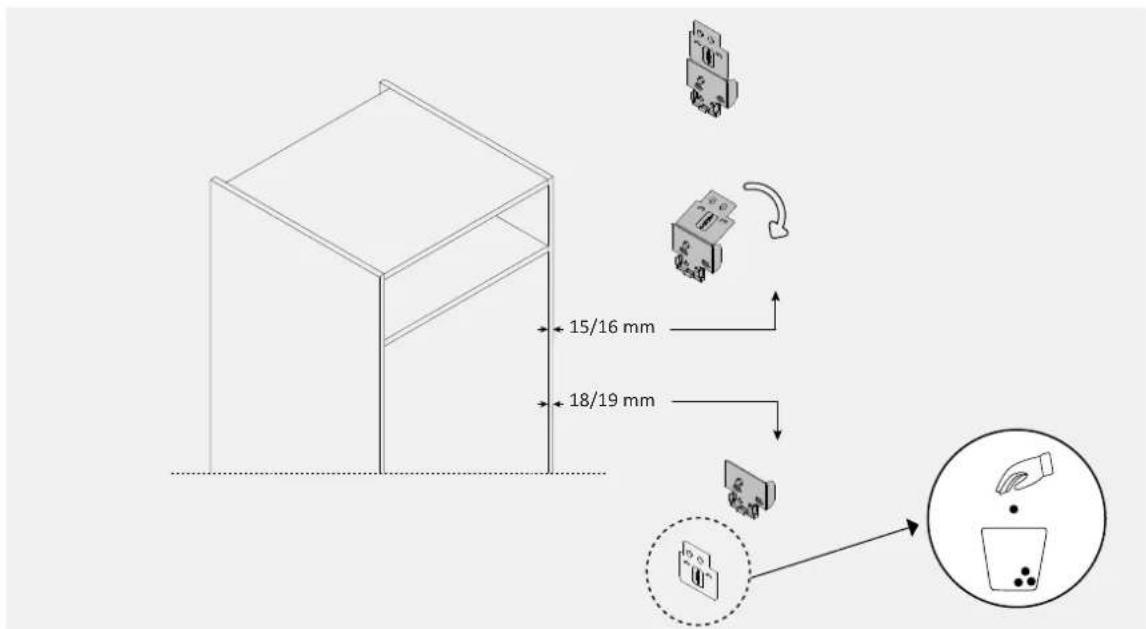
text_image
15/16 mm 18/19 mmtext_image
Technical diagram showing assembly of a server rack with labeled components and two circular insets illustrating the internal structure.natural_image
Technical line drawing of a server rack unit with internal components and mounting bracket (no text or symbols)10.5 Incasso
natural_image
Technical line drawing of a server rack with connected cable and internal components (no text or symbols)text_image
Technical diagram showing a door assembly with an inset close-up of the component, annotated with 0 mm dimension.natural_image
Technical line drawing of an open refrigerator with a screwdriver inserted, showing internal components and a close-up view (no text or symbols)text_image
Technical diagram showing the internal structure of a refrigerator with labeled parts and an exploded view of the interior panel.flowchart
graph TD
    A["Add Door Panel"] --> B["Remove Cup"]
    B --> C["Adjusting Cabinet"]
    C --> D["Final Display Panel"]
text_image
Technical diagram showing assembly of server racks with labeled components and a close-up view of internal components.natural_image
Isometric line drawing of a multi-tiered server cabinet with internal components and ventilation ducts (no text or symbols)text_image
Technical diagram illustrating three-step assembly process for a server or rack unit, with labeled components and directional arrows.text_image
Technical diagram showing structural components with directional arrows and a magnified detail view highlighting a warning symbol.text_image
Diagram of a device with labeled components and an inset showing internal circuit connectionsnatural_image
Technical diagram of a structural assembly with components and directional arrows, no visible text or symbolstext_image
Technical diagram illustrating three-step assembly steps for a mechanical component, with numbered annotations and directional arrows.text_image
Diagram illustrating a mechanical or structural assembly with labeled components and motion arrows, showing two sequential steps.text_image
Diagram illustrating the step-by-step installation of a refrigerator door, showing component positioning and assembly steps.text_image
Technical diagram showing the open door of a refrigerator with close-up insets for detail and assembly steps.text_image
Technical diagram showing the assembly of a refrigerator with labeled parts and three sequential steps for mounting or repair.text_image
Technical diagram showing three-step assembly of a refrigerator with labeled components and directional arrows indicating sequence.text_image
Technical diagram showing three-step assembly of a refrigerator with labeled components and directional arrows indicating sequence.natural_image
Line drawing of an open refrigerator with a close-up of the door and a magnified inset showing a pair of scissors (no text or symbols)Avvertenze11.1
natural_image
Line drawing of an open refrigerator with doors open and side by side (no text or symbols)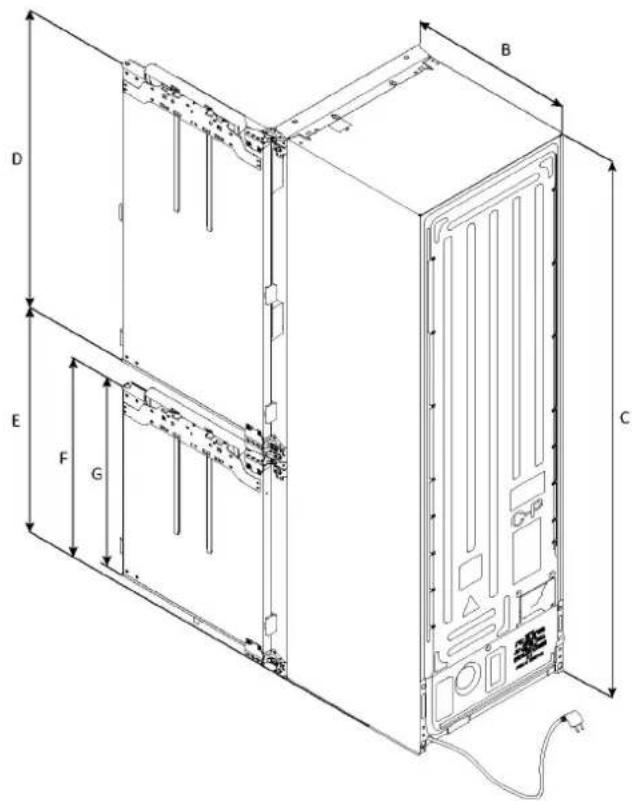
text_image
B D E F G Cnatural_image
Technical line drawing of a door frame with internal compartments and mounting brackets (no text or symbols)Pohled shora
se zavřenými dvířky
Pohled shora
s otevřenými dvířky
text_image
550±2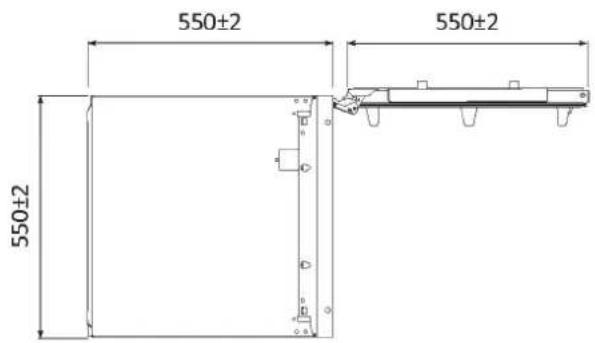
text_image
550±2 550±2 550±2 550±2Kódy výrobků
HBW7518CF
HBW7519CF

natural_image
Architectural cross-section diagram of a double door and cabinet assembly (no text or labels)