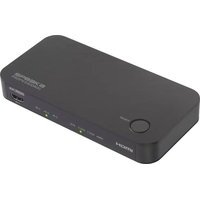
SP-HDA-510 - Audio/video converter Speaka - Free user manual and instructions
Find the device manual for free SP-HDA-510 Speaka in PDF.


User questions about SP-HDA-510 Speaka
0 question about this device. Answer the ones you know or ask your own.
Ask a new question about this device
Download the instructions for your Audio/video converter in PDF format for free! Find your manual SP-HDA-510 - Speaka and take your electronic device back in hand. On this page are published all the documents necessary for the use of your device. SP-HDA-510 by Speaka.
USER MANUAL SP-HDA-510 Speaka
GB Operating instructions
SP-HDA-510 HDMI eARC audio adapter with HDMI switch
Item no. 2525735
CE
1 Intended use
This product is designed to split an HDMI-eARC signal into a 4K video signal and an audio signal, or to forward an HDMI-eARC audio signal from a TV device. For example, it enables TVs and audio playback devices to be supplied with a separate video and audio signal, or allows the audio signal to be forwarded to an audio playback device when streaming via the TV. In addition, the product also has an HDMI switch that allows you to switch between different playback sources.
The product is intended for indoor use only. Do not use it outdoors. Contact with moisture must be avoided under all circumstances.
Using the product for purposes other than those described above may damage the product. Improper product use can cause a short circuit, fire, electric shock or other hazards.
This product complies with statutory, national and European regulations. For safety and approval purposes, you must not rebuild and/or modify the product.
Read the operating instructions carefully and store them in a safe place. Make this product available to third parties only together with the operating instructions.
All company and product names contained herein are trademarks of their respective owners. All rights reserved.
HDMI is a registered trademark of HDMI Licensing L.L.C.
2 Delivery content
Product
Power supply with micro-USB connection
Operating instructions
Adapter cable from 3.5 mm jack plug to cinch
Remote control for HDMI switch
3 Latest product information
Download the latest product information at www.conrad.com/downloads or scan the QR code shown. Follow the instructions on the website.
4 Description of symbols
The following symbols are on the product/appliance or are used in the text:

The symbol warns of hazards that can lead to personal injury.

The symbol warns of dangerous voltage that can lead to personal injury by electric shock.
5 Safety instructions

Read the operating instructions carefully and especially observe the safety information. If you do not follow the safety instructions and information on proper handling, we will assume no liability for any resulting personal injury or damage to property. Such cases will invalidate the warranty/guarantee.
5.1 General information
This product is not a toy. Keep it out of the reach of children and pets.
Do not leave packaging material lying around carelessly. It may become a dangerous plaything for children.
Should you have any questions or concerns after reading this document, please contact our technical support or a professional technician.
Maintenance, modifications and repairs must be carried out by a technician or a specialist repair centre.
5.2 Handling
■handle the product carefully. Impact, shocks or a fall even from a low height can damage the product.
5.3 Operating conditions
Do not expose the product to any mechanical stress.
Protect the product from extreme temperatures, strong jolts, flammable gases, vapours, and solvents.
Protect the product from high humidity and moisture.
The product must not be exposed to direct sunlight.
Never switch the device on immediately after taking it from a cold into a warm environment. This may cause condensation to form, which can destroy the product. Allow the product to reach room temperature before using it.
5.4 Operation
Consult an expert when in doubt about the operation, safety or connection of the device.
If it is no longer possible to operate the product safely, stop using it and prevent unauthorised use. DO NOT attempt to repair the product yourself. Safe operation can no longer be guaranteed if the product:
– is visibly damaged,
– is no longer working properly,
– has been stored for extended periods in poor ambient conditions or
– has been subjected to any serious transport-related stress.
5.5 Power adapter

Do not modify or repair mains supply components including mains plugs, mains cables, and power supplies. Do not use damaged components. Risk of death by electric shock!
Connect the product to a wall socket that can be accessed easily.
Only use the supplied mains adapter as a power supply.
Only connect the power adapter to a normal mains socket connected to the public supply. Before plugging in the power adapter, check whether the voltage stated on the power adapter complies with the voltage of your electricity supplier.
Never connect or disconnect the power adapter if your hands are wet.
Never pull the cable to disconnect the power adapter from the mains socket. Instead, always use the gripping surfaces on the mains plug.
For safety reasons, disconnect the power adapter from the mains socket during storms.
Do not touch the power adapter if there are any signs of damage, as this may cause a fatal electric shock! Proceed as follows:
- First, cut off the power supply to the mains socket to which the power adapter is connected (switch off the corresponding circuit breaker or remove the safety fuse, and then switch off the corresponding RCD protective switch so that all poles of the mains socket are disconnected).
- Unplug the power adapter from the mains socket.
- Use a new power adapter of the same design. Do not use the damaged power adapter again.
Make sure that the cable is not pinched, kinked or damaged by sharp edges.
Always lay cables so that nobody can trip over or become entangled in them. Risk of injury!
5.6 Connected devices
Always observe the safety information and operating instructions of any other devices which are connected to the product.
6 Overview of product
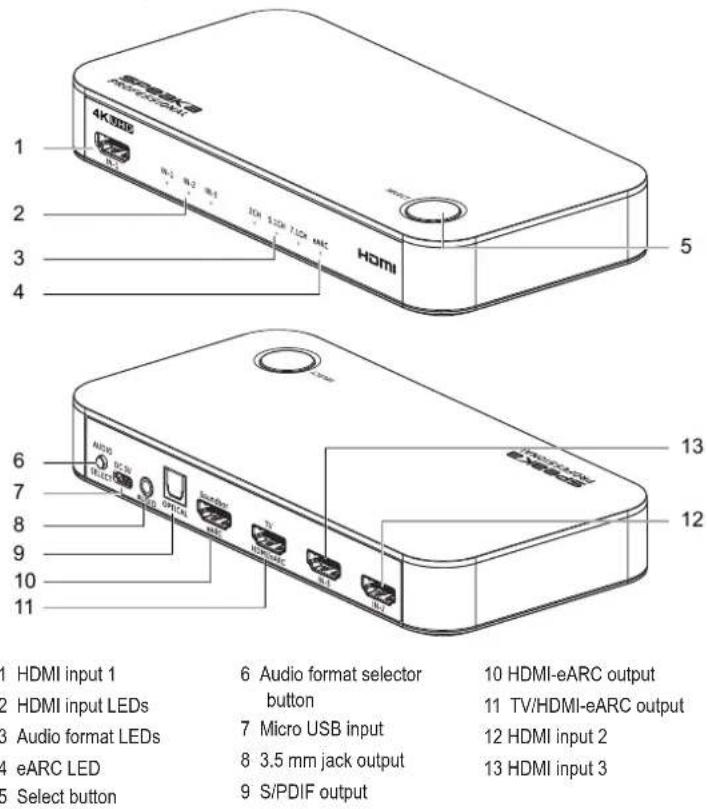
text_image
1 2 3 4 5 6 7 8 9 10 11 HDMI input 1 HDMI input LEDs Audio format LEDs eARC LED Select button 4K3000 HDMI Audi DC N Micro USB input 3.5 mm jack output S/PDIF output 6 Audio format selector button 7 Micro USB input 8 3.5 mm jack output 9 S/PDIF output 10 HDMI-eARC output 11 TV/HDMI-eARC output 12 HDMI input 2 13 HDMI input 37 Installation and setup
The installation and setup procedure depends on how the product is used. The following applications are possible:
Dividing the HDMI signal from an external playback source (e.g. game console or Blu-Ray player) into a 4K video signal and an audio signal
Forwarding an HDMI-eARC audio signal from a TV (e.g. to connect a sound system when streaming via the TV)
7.1 Division into a video and audio signal
- Connect the HDMI output of the first playback source to the HDMI input 1 (1) on the product. You can connect other playback sources to HDMI input 2 (12) and HDMI input 3 (13). Use a suitable premium high-speed or ultra-high-speed HDMI cable.
- Connect the HDMI input on the playback device (e.g. TV set) to the TV/HDMI-eARC output (11) on the product. Use a suitable premium high-speed or ultra-high-speed HDMI cable.
-
Connect the audio playback device with the appropriate cable:
-
For devices with a 3.5 mm jack plug, connect the jack plug to the 3.5 mm jack output (8).
- For devices with an S/PDIF connection, connect the S/PDIF plug to the S/PDIF output (9).
-
For devices with a HDMI-eARC connection, connect the HDMI cable to the HDMI-eARC output (10) (requires an eARC-compatible HDMI cable).
-
Connect the micro-USB plug on the supplied power adapter to the micro-USB input (7).
- Connect the mains plug on the supplied power adapter to a suitable socket.
→ The product will switch on.
- Press the select button (5) until the HDMI input LED (2) of the desired playback source lights up.
- Press the audio format selection button (6) until the audio format LED (3) for the desired format lights up. The format must be supported by the playback device.
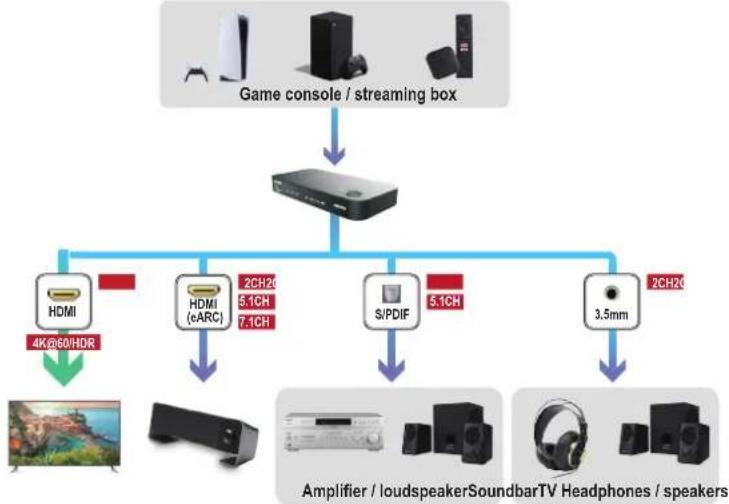
flowchart
graph TD
    A["Game console / streaming box"] --> B[" Streaming Box"]
    B --> C1["HDMI 4K@60HDR"]
    B --> C2["HDMI (eARC) 2CH2C 5.1CH 7.1CH"]
    B --> C3["S/PDIF 5.1CH"]
    B --> C4["3.5mm 2CH2C"]
    C1 --> D["Video Headphone"]
    C2 --> D
    C3 --> E["Speaker Headphones"]
    C4 --> E
    style A fill:#f9f,stroke:#333
    style B fill:#ccf,stroke:#333
    style C1 fill:#cfc,stroke:#333
    style C2 fill:#cfc,stroke:#333
    style C3 fill:#cfc,stroke:#333
    style C4 fill:#cfc,stroke:#333
7.2 Forwarding the audio signal
- Connect the HDMI (eARC) port on the TV set to the TV/HDMI-eARC output (11) on the product. Use a suitable premium high-speed or ultra-high-speed HDMI cable.
-
Connect the audio playback device with the appropriate cable:
-
For devices with a 3.5 mm jack plug, connect the jack plug to the 3.5 mm jack output (8).
- For devices with an S/PDIF connection, connect the S/PDIF plug to the S/PDIF output (9).
-
For devices with an eARC-HDMI connection, connect the HDMI cable to the HDMI-eARC output (10) (requires an eARC-compatible HDMI cable).
-
Connect the micro-USB plug on the supplied power adapter to the micro-USB input (7).
- Connect the mains plug on the supplied power adapter to a suitable socket.
→ The product will switch on.
- Press the audio format selection button (6) until the audio format LED (3) for the desired format lights up. The format must be supported by the playback device.
Note:
- When the eARC LED (4) lights up, the audio signal is transmitted by the TV set.
- When the eARC LED (4) is off, the audio signal is transmitted from the external source (default setting).
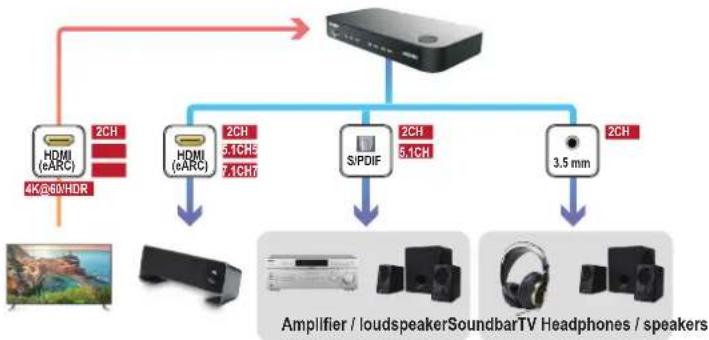
flowchart
graph TD
    A["Speaker Device"] --> B["2CH 4K,860/HDR"]
    A --> C["2CH 5.1CH 7.4CH"]
    A --> D["2CH 5.1CH"]
    A --> E["3.5 mm"]
    B --> F["Amplifier / loudspeaker"]
    C --> G["Soundbar TV Headphones / speakers"]
    D --> H["Speaker"]
    E --> I["Speaker"]
8 Operation
8.1 Selecting the playback source (HDMI switch)
There are 2 ways to select the playback source:
- Via the select button (5): Press the select button (5) until the HDMI input LED (2) of the desired playback source lights up.
- Via the remote control: Press one of the buttons 1–3 to select the respective playback source. The HDMI input LED (2) of the desired playback source will light up.
8.2 Changing the remote control battery
If the range of the remote control decreases, you should change the battery in the remote control:
- Remove the retaining screw on the back of the remote control with a suitable screwdriver.
- Press on the side of the battery holder and pull the battery holder out of the remote control.
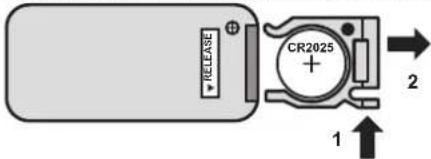
text_image
RELEASE CR2025 1 2- Replace the battery with a new CR2025 battery.
- Place the battery holder back into the remote control and screw in the retaining screw.
9 Troubleshooting
| Problem Reason Solution | ||
| No image is displayed on the playback device | The HDMI cables are not connected properly | Check that the HDMI cables are connected correctly and are securely in place. |
| The HDMI cables are unsuitable | Use a premium high-speed or ultra-high-speed HDMI cable. | |
| Error on the playback source or playback device | Connect the playback source directly to the playback device. If the issue persists, there is a problem with one of the devices. Refer to the manufacturer's instructions for troubleshooting. | |
| No power supply Make sure that the micro-USB plug on the supplied power adapter is properly connected to the micro-USB input (7) and that the mains plug is plugged into a suitable socket. | ||
| No 4K resolution The playback | source or playback device does not support 4K | Check that all of the connected devices support 4K. |
| The HDMI cable does not support 4K. | Use a premium high-speed or ultra-high-speed HDMI cable. | |
| No sound from the audio playback device | The audio playback device is not switched on | Turn on the audio playback device. |
| Incorrect source selected Select the correct source on the audio playback device. | ||
| The audio cable is not connected correctly | Make sure that the audio cable is connected correctly to the audio playback device. | |
10 Cleaning and care
Important:
- Do not use any aggressive cleaning agents, rubbing alcohol or other chemical solutions. These may damage the housing and can cause the product to malfunction.
-
Do not immerse the product in water.
-
Disconnect the product from the power supply.
-
Disconnect all connected cables.
-
Clean the product with a dry, lint-free cloth.
11 Disposal
11.1 Product

This symbol must appear on any electrical and electronic equipment placed on the EU market. This symbol indicates that this device should not be disposed of as unsorted municipal waste at the end of its service life.
Owners of WEEE (Waste from Electrical and Electronic Equipment) shall dispose of it separately from unsorted municipal waste. Spent batteries and accumulators, which are not enclosed by the WEEE, as well as lamps that can be removed from the WEEE in a non-destructive manner, must be removed by end users from the WEEE in a non-destructive manner before it is handed over to a collection point.
Distributors of electrical and electronic equipment are legally obliged to provide free take-back of waste. Conrad provides the following return options free of charge (more details on our website):
in our Conrad offices
at the Conrad collection points
at the collection points of public waste management authorities or the collection points set up by manufacturers or distributors within the meaning of the ElektroG
End users are responsible for deleting personal data from the WEEE to be disposed of.
It should be noted that different obligations about the return or recycling of WEEE may apply in countries outside of Germany.
11.2 (Rechargeable) batteries
Remove batteries/rechargeable batteries, if any, and dispose of them separately from the product. According to the Battery Directive, end users are legally obliged to return all spent batteries/rechargeable batteries; they must not be disposed of in the normal household waste.

Batteries/rechargeable batteries containing hazardous substances are labelled with this symbol to indicate that disposal in household waste is forbidden. The abbreviations for heavy metals in batteries are: Cd = Cadmium, Hg = Mercury, Pb = Lead (name on (rechargeable) batteries, e.g. below the trash icon on the left).
Used (rechargeable) batteries can be returned to collection points in your municipality, our stores or wherever (rechargeable) batteries are sold. You thus fulfil your statutory obligations and contribute to environmental protection.
Batteries/rechargeable batteries that are disposed of should be protected against short circuit and their exposed terminals should be covered completely with insulating tape before disposal. Even empty batteries/rechargeable batteries can contain residual energy that may cause them to swell, burst, catch fire or explode in the event of a short circuit.
12 Technical data
12.1 Power supply
Input voltage / current.....5 V/DC, 1 A
Power consumption......Max. 5 W
Remote control battery .... 1 x CR2025 button cell, 3 V
12.2 Power adapter
Input voltage / current....100 – 240 V/AC, 50/60 Hz, 0.15 A
Output voltage/current....5 V/DC, 1 A
12.3 Compatibility
Bandwidth....18 Gbit/s
Supported HDMI functions ..... eARC, HDCP 2.3, CEC
Supported video technologies ..... Dolby vision, Full 3D, HDR
Supported audio technologies.....DSD, DTS-HD, Dolby TrueHD, Dolby Atmos
Audio interfaces......HDMI-eARC, S/PDIF, 3.5 mm analogue output
Supported audio channels.....2.0, 5.1, 7.1
Supported image quality
Resolution.... 4096 x 2160 px (4K) at 60 Hz frame rate
Colour depth 12 bit
Pixel frequency 25 – 600 MHz
12.4 Ambient conditions
Operating temperature .... 0 to +43 °C
Operating humidity 10 – 90 % RH
Storage temperature....-20 to +60 °C
Storage humidity....10 – 85 % RH
12.5 Other
Dimensions (L x W x H)....175 x 86.6 x 26.3 mm
Weight 156 g
Maximum HDMI cable
length (not included)....3 m
This is a publication by Conrad Electronic SE, Klaus-Conrad-Str. 1, D-92240 Hirschau (www.conrad.com).
All rights including translation reserved. Reproduction by any method (e.g. photocopying, microfilming or capturing in electronic data processing systems) requires prior written approval from the publisher. Reprinting, also in part, is prohibited. This publication reflects the technical status at the time of printing.
Copyright 2022 by Conrad Electronic SE.
*2525735_v2_0622_02_DS_m_4L_(1)
F Mode d'emploi
Copyright 2022 by Conrad Electronic SE.
*2525735_v2_0622_02_DS_m_4L_(1)
Copyright 2022 by Conrad Electronic SE.
*2525735_v2_0622_02_DS_m_4L_(1)