BC4030 - Vacuum Cleaner KENMORE - Free user manual and instructions
Find the device manual for free BC4030 KENMORE in PDF.


User questions about BC4030 KENMORE
0 question about this device. Answer the ones you know or ask your own.
Ask a new question about this device
Download the instructions for your Vacuum Cleaner in PDF format for free! Find your manual BC4030 - KENMORE and take your electronic device back in hand. On this page are published all the documents necessary for the use of your device. BC4030 by KENMORE.
USER MANUAL BC4030 KENMORE
Bagged Canister Vacuum Cleaner with Hair Eliminator® Brushroll
Para mascotas POP-N-GO®
Aspirador con bolsa y cepillo Hair Eliminator®
Vacuum Cleaner Help Line:
1-877-531-7321 (US) / 1-844-608-3081 (CA)
8:00am - 5:00pm EST, M-F
www.kenmorefloorcare.com

TABLE OF CONTENTS
Before Using Your New Vacuum Cleaner ....2
Packing List....2
Important Safety Instructions....3-4
Vacuum Cleaner Warranty....5
Parts and Features......6-8
Assembly Instructions....9-10
Operating Instructions....10-16
Performance/Safety Features....17-18
Vacuum Maintenance and Care....19-23
Troubleshooting 24-25
Requesting Assistance or Service...... Back Cover
BEFORE USING YOUR NEW VACUUM CLEANER
Read this Use & Care Guide. It will help you assemble and operate your new Kenmore vacuum cleaner in the safest and most effective way.
For more information about vacuum cleaner care and operation, call the Vacuum Cleaner Help Line at 1-877-531-7321 (US) / 1-844-608-3081 (CA). You will need the complete model and serial numbers when requesting information.
Your vacuum cleaner's model and serial numbers are located on the Model and Serial Number Plate. Use the space below to record the model number and serial number of your new Kenmore vacuum cleaner.
Model No.
Serial No. ____
Date of Purchase ____
Keep this book and your sales check (receipt) in a safe place for future reference.
PACKING LIST
Your KENMORE BAGGED CANISTER VACUUM CLEANER is packaged with the following parts and components included separately in the carton:
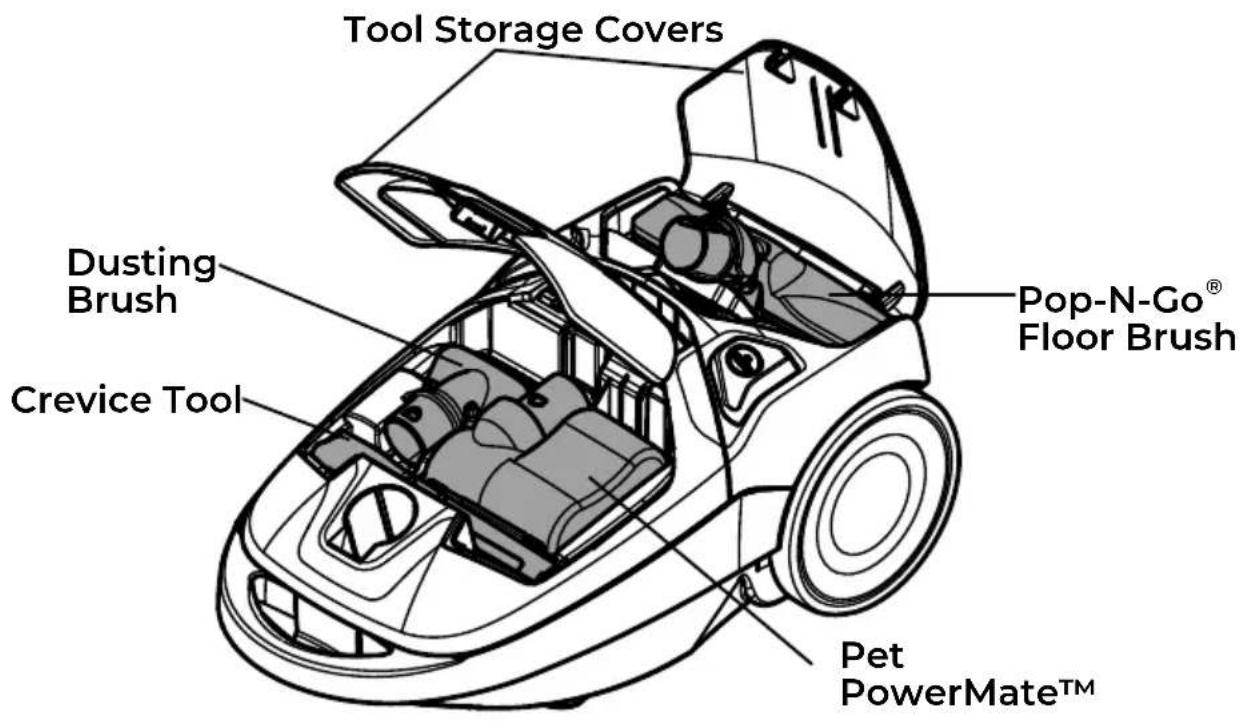
1 Canister Vacuum Cleaner (with Floor Brush, Dusting Brush, Pet PowerMate™, and Crevice Tool)
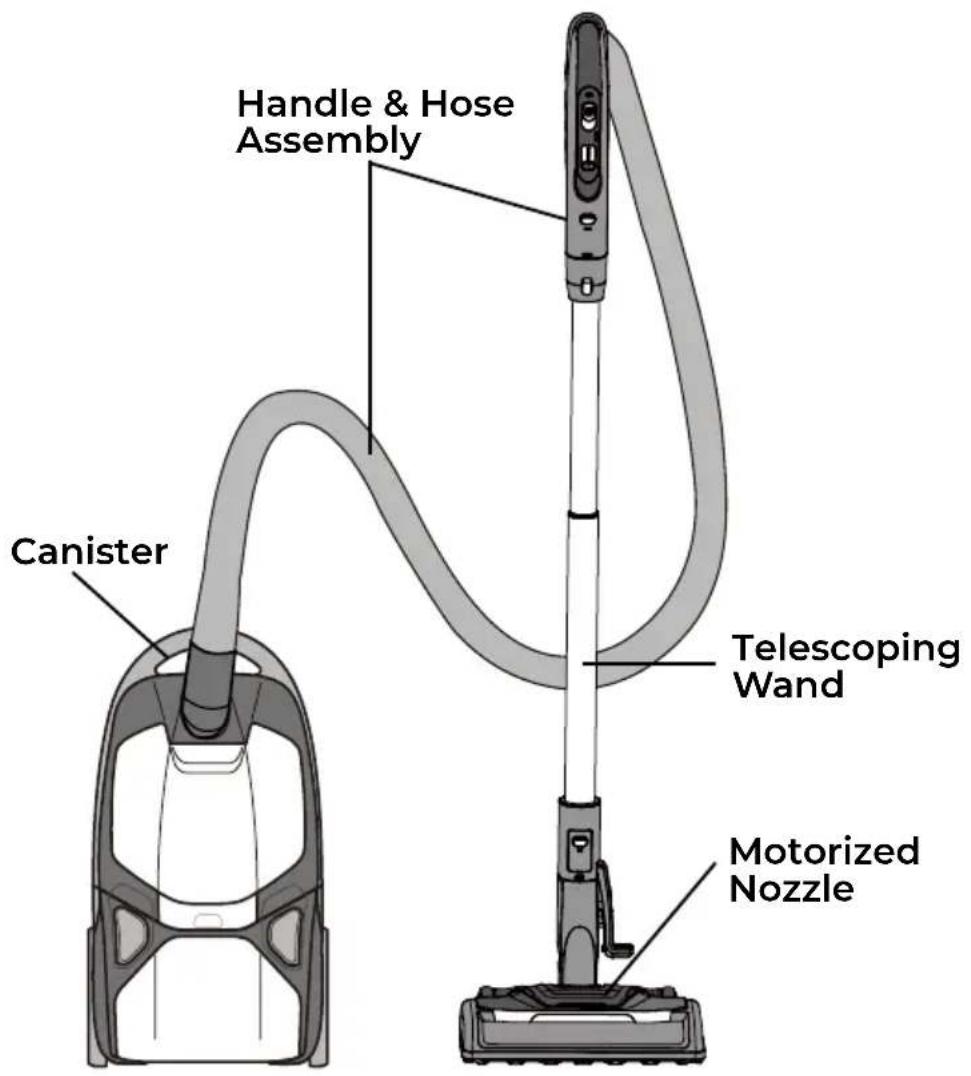
1 Handle & Hose Assembly
1 Telescoping Wand
1 Motorized Nozzle with Hair Eliminator®
1 Dust Bag (Pre-installed)
1 Use & Care Guide
IMPORTANT SAFETY INSTRUCTIONS
Read all instructions in this guide before assembling or using your vacuum cleaner.

WARNING!
Your safety is important to us. To reduce the risk of fire, electrical shock, injury to persons or damage when using your vacuum cleaner, follow basic safety precautions including the following:
- Use your vacuum cleaner only as described in this Use & Care Guide. Use only manufacturer's recommended attachments.
- Disconnect electrical supply before servicing or cleaning out the brushroll area. Failure to do so could result in the brushroll unexpectedly starting, causing personal injury from moving parts.
- Do not leave vacuum cleaner when plugged in. Unplug from outlet when not in use and before performing maintenance.
- To reduce the risk of electrical shock - Do not use outdoors or on wet surfaces.
- Do not allow to be used as a toy. Close attention is necessary when used by or near children.
- Do not use with a damaged cord or plug. If vacuum cleaner is not working as it should, has been dropped, damaged, left outdoors, or dropped in water, immediately discontinue use and call 1-877-531-7321 (US) / 1-844-608-3081 (CA) for assistance.
- Do not pull or carry by cord, use cord as a handle, close a door on
cord, or pull cord around sharp edges or corners. Do not run vacuum cleaner over cord. Keep cord away from heated surfaces.
- Do not unplug by pulling on cord. To unplug, grasp the plug, not the cord.
- Do not handle plug or vacuum cleaner with wet hands.
- Do not put any objects into openings.
- Do not use with any opening blocked; keep free of dust, lint, hair, and anything that may reduce air flow.
- Keep hair, loose clothing, fingers, and all parts of body away from openings and moving parts.
- Turn off all controls before unplugging.
- Use extra care when cleaning on stairs.
- Do not put on chairs, tables, etc. Keep on floor.
- Do not use vacuum cleaner to pick up flammable or combustible liquids (gasoline, cleaning fluid, perfumes, etc.), or use in areas where they may be present. The fumes from these substances can create a fire hazard or explosion.
IMPORTANT SAFETY INSTRUCTIONS
- Do not pick up anything that is burning or smoking, such as cigarettes, matches, or hot ashes.
- Do not use vacuum cleaner without dust bag and/or filters in place.
- Always change the dust bag after vacuuming carpet cleaners or freshener, powders, and fine dust. These products clog the bag, reduce airflow and can cause the bag to burst. Failure to change the bag could cause permanent damage to the vacuum cleaner.
-
Do not use the vacuum cleaner to pick up sharp hard objects, small toys, pins, paper clips, etc. They may damage the vacuum cleaner.
-
Do not operate the vacuum cleaner without the exhaust filter or filter door in place.
- The hose contains electrical wires. Do not use when damaged, cut, or punctured. Replace hose if cut or worn. Do not pick up sharp objects.
- Always turn off and unplug vacuum cleaner before connecting or disconnecting either hose, wand Pet PowerMate™, or motorized nozzle.
- Hold plug when rewinding onto cord reel. Do not allow plug to whip when rewinding.
- You are responsible for making sure that your vacuum cleaner is not used by anyone unable to operate it properly.
SAVE THESE INSTRUCTIONS
Proper assembly and safe use of your vacuum cleaner are your responsibility. Your vacuum cleaner is intended for Household Use. Read this Use & Care Guide carefully for important use and safety information. This guide contains safety statements under warning and caution symbols.
VACUUM CLEANER WARRANTY
LIMITED WARRANTY
FOR ONE YEAR from the date of sale (or, for deliveries in the State of California, one year from the date of delivery), this product is warranted against defects in material or workmanship.
WITH PROOF OF SALE a defective product will be replaced free of charge.
The Kenmore brand is used under license. Direct all claims for warranty service to: 1-877-531-7321 (US) / 1-844-608-3081 (CA).
This warranty does not cover filters or belts, which are expendable parts that can wear out from normal use within the warranty period.
This warranty is void if this product is ever used for anything other than private household purposes. This warranty gives you specific legal rights, and you may also have other rights which vary from state to state.
Cleva North America, Inc., Greenville SC 29607
PARTS AND FEATURES
It is important to know your vacuum cleaner's parts and features to ensure its proper and safe use. Review these before using your vacuum cleaner.
REPLACEMENT PARTS
| Item Part No.(US) Part No.(CA) | |
| Dust Bag (2-pack) 20-53291 20-53291 | |
| Dust Bag (6-pack) 20-53292 20-53292 | |
| HEPA Media Exhaust Filter 20-52731 20-52731 | |
| Motor Safety Filter 20-81002 20-81002 |
To order a replacement part, call 1-877-531-7321 (US) / 1-844-608-3081 (CA).
PARTS AND FEATURES
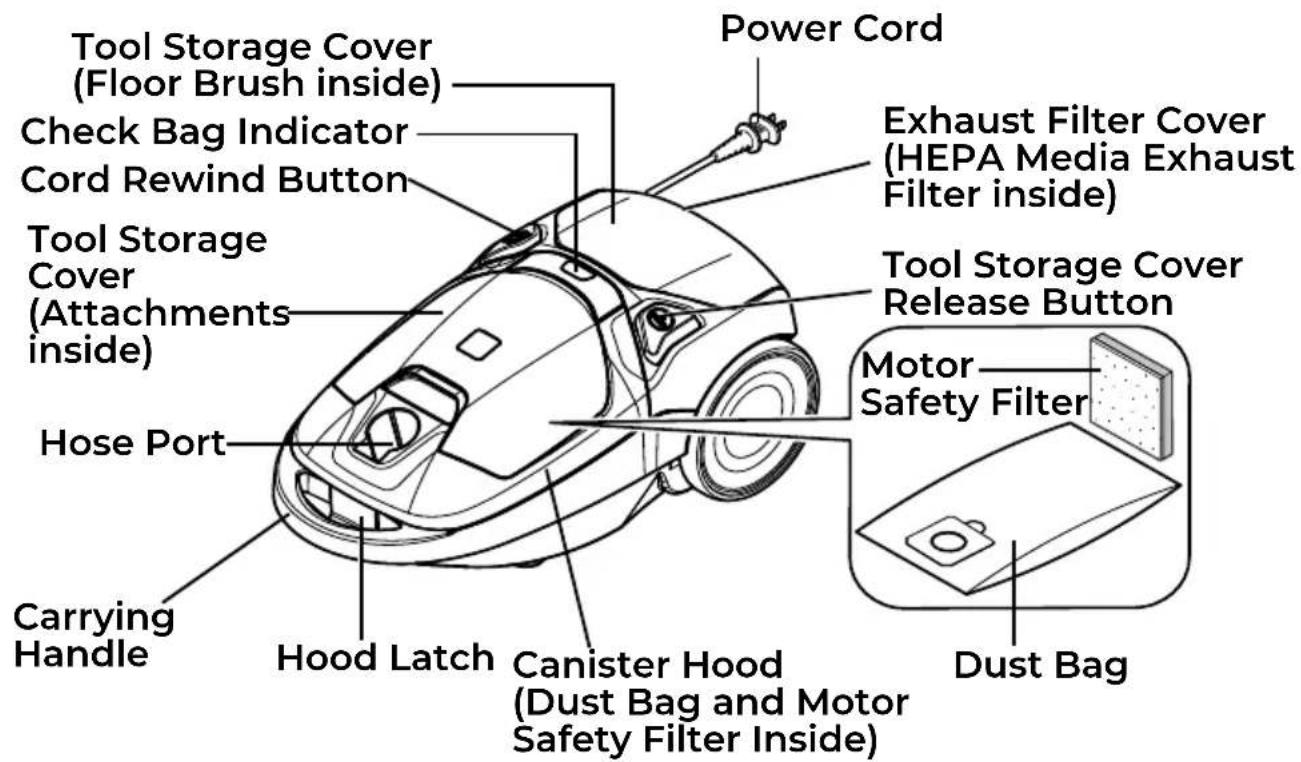
CANISTER
ATTACHMENTS
PARTS AND FEATURES
HANDLE & HOSE ASSEMBLY TELESCOPING WAND
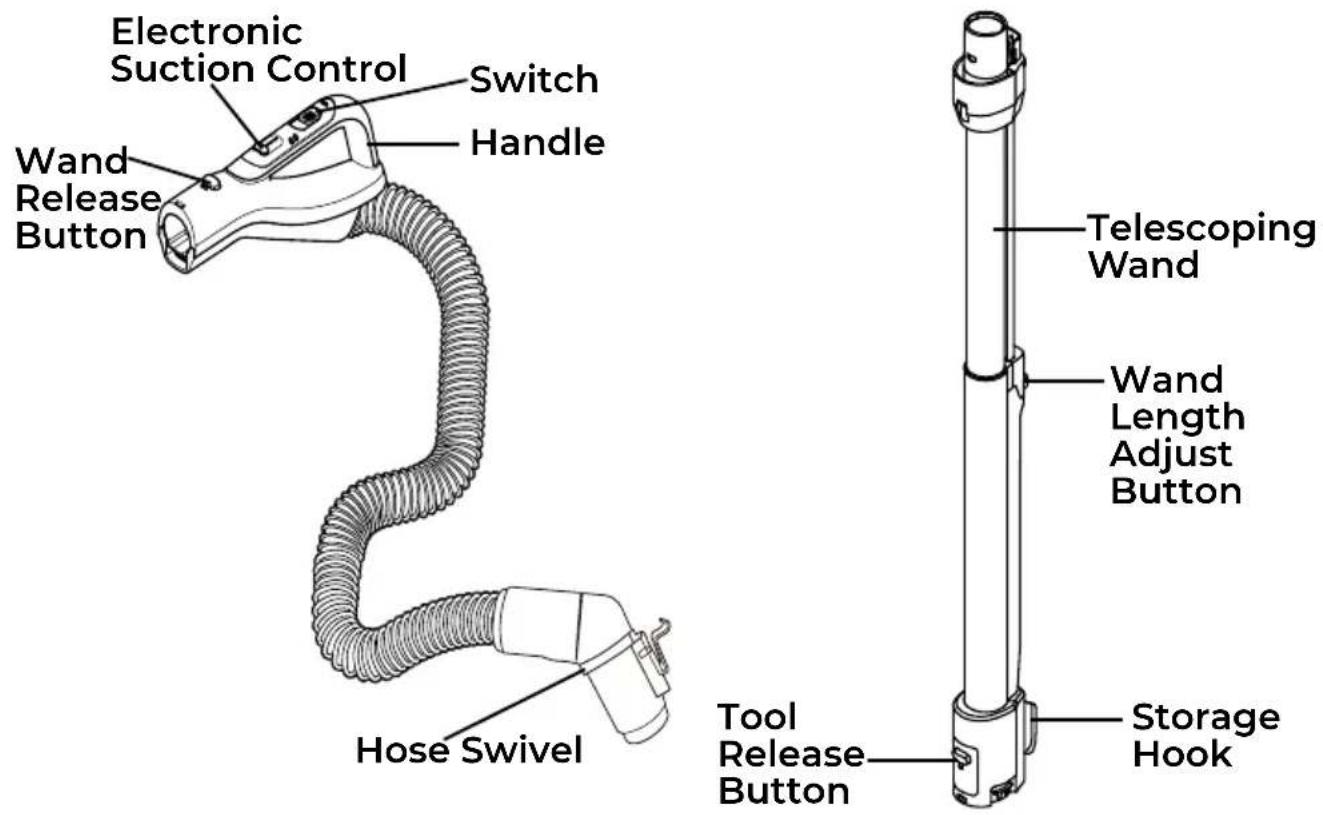
MOTORIZED NOZZLE
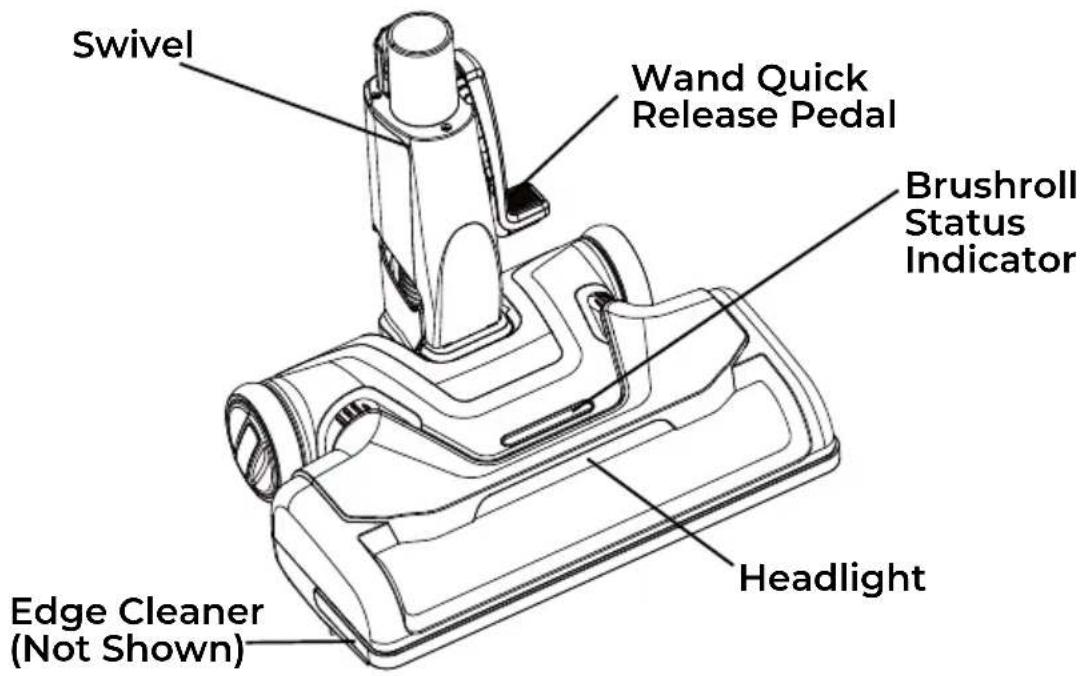

Please pay special attention to these hazard alert boxes, and follow any instructions given. WARNING statements alert you to such hazards as fire, electric shock, burns and personal injury. CAUTION statements alert you to such hazards as personal injury and/or property damage.
ASSEMBLY INSTRUCTIONS
Before assembling the vacuum cleaner, check the PACKING LIST (page 2). Use this list to verify that you have received all the components of your new Kenmore Bagged Canister Vacuum Cleaner.

WARNING
Electrical Shock Hazard DO NOT plug into electrical supply until assembly is complete. Failure to do so could result in electrical shock or injury.
MOTORIZED NOZZLE
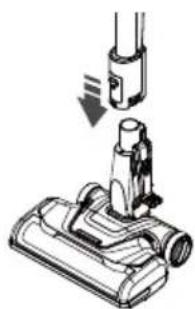
Align wand and insert onto the motorized nozzle until the wand locks into place.
natural_image
Diagram of a vacuum cleaner with a downward arrow indicating motion (no text or symbols present)HANDLE ASSEMBLY
Insert wand into handle until lock button snaps in place.
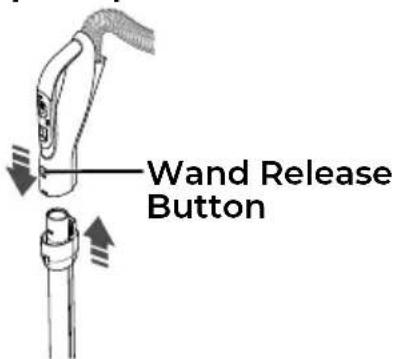
To remove: Press wand release button and pull up on handle. To store: Disconnect hose from wand and canister to prevent stress on hose during storage.
Store hose in a loosely coiled position so the hose covering is not stressed.
WAND (TELESCOPING)
The wand length is adjustable and requires no assembly. To adjust, simply push on the wand adjust button and slide the upper wand to the desired height.
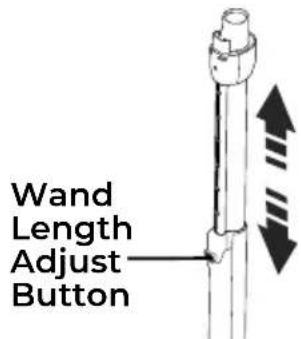
NOTE: When adjusting the wand length you may have to hold the motorized nozzle with your hand or foot.
HOSE
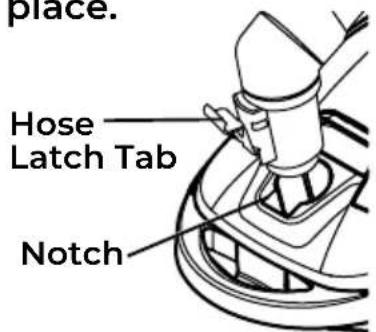
Line up the hose latch tab and notch in canister hood and insert hose into canister until it snaps into place.
ASSEMBLY INSTRUCTIONS
IMPORTANT:
Push hose connector firmly into the canister body until the hose latch tab snaps into place. The vacuum cleaner will not operate until the hose is fully connected.
To remove: Do not open the hood before removing hose. With hood closed, press hose latch tab and remove hose.
CANISTER
- Open the canister hood.
- Check to see that the dust bag is properly installed. See DUST BAG CHANGING (page 20-21) for instructions.
- Check to see that the motor safety filter is properly installed. See MOTOR SAFETY FILTER CLEANING (page 22) for instructions.
OPERATING INSTRUCTIONS

CAUTION
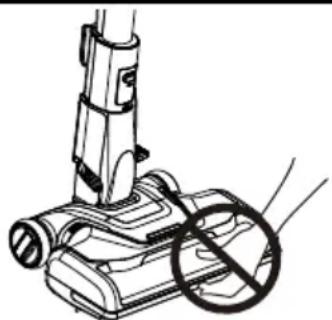
Moving parts! To reduce the risk of personal injury, DO NOT touch the brushroll when vacuum cleaner is on. Contacting the brushroll while it is rotating can cut, bruise or cause other injuries. Always turn off and unplug from electrical outlet before servicing. Use caution when operating near children.
natural_image
Line drawing of a vacuum cleaner with a circular stop symbol (no text or labels)HOW TO START

WARNING
Personal Injury and Product Damage Hazard
- ALWAYS turn off the vacuum cleaner before unplugging.
- The cord moves rapidly when rewinding. Keep children away and provide a clear path when rewinding the cord to prevent personal injury.
- DO NOT use outlets above counters. Damage from cord to items in surrounding area could occur.
- When any abnormality/failure occurs, stop using the product immediately and disconnect the power plug.
NOTE: To reduce the risk of electric shock, this vacuum cleaner has a polarized plug; one blade is wider than the other. This plug will fit in a polarized outlet only one way. If the plug does not fit fully in the outlet, reverse the plug. If it still does not fit, contact a qualified electrician to install the proper outlet. Do not change the plug in any way.
HOW TO START
WARNING
Personal Injury and Product Damage Hazard
• DO NOT run over power cord with motorized nozzle. Personal injury or product damage could result.
• DO NOT pull plug from wall by the power cord. If there is damage to the cord or plug, personal injury or property damage could result.
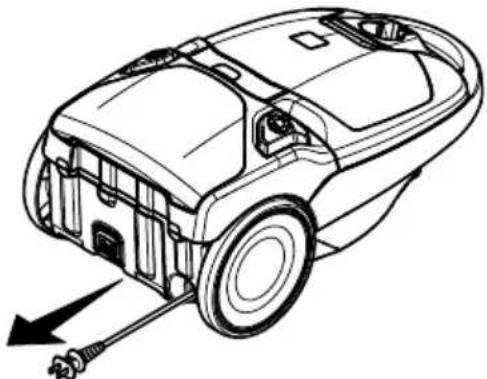
- Pull cord out of canister to desired length. The cord will not rewind until the cord rewind button is pushed.
natural_image
Line drawing of a car's internal components with a tool, showing no text or symbols- Plug the polarized power cord into a 120 Volt outlet located near the floor.
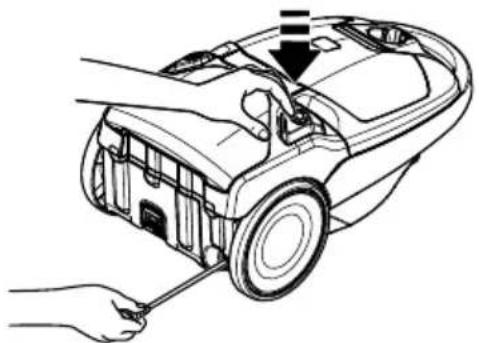
To rewind: Turn off and unplug the vacuum cleaner. Hold the plug while rewinding to prevent damage or injury from the moving cord. Push the cord rewind button.
natural_image
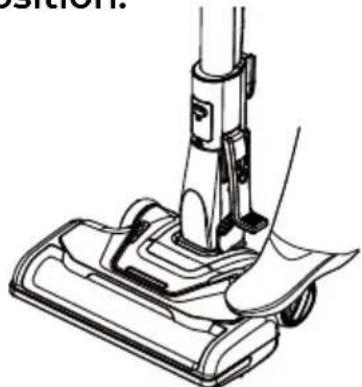
Line drawing of a car interior with tools and a hand holding the tool (no text or symbols)- Release the handle by placing a foot on the nozzle and pulling back to change handle position.
natural_image
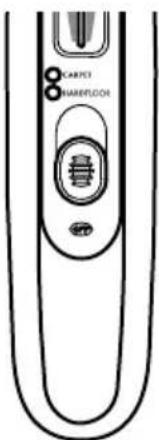
Line drawing of a vacuum cleaner's base with handle and blade (no text or symbols)- Select a position on the handle 3-way On/Off switch.
OFF
Turns the vacuum cleaner off.
HARDFLOOR
Turns on the canister motor only, and the brushroll will not spin.
CARPET
Turns on both the canister and the motorized nozzle motors, and the brushroll will start to spin.
CAUTION
DO NOT leave the motorized nozzle running in one spot for any length of time. Damage to carpet may occur.
CAUTION
Product Damage Hazard Use care if the motorized nozzle and wand is left in the upright position as it may tip over easily. Property damage can occur if tipped.
VACUUMING TIPS
FOR BEST CLEANING RESULTS
- Slide the electronic suction control forward to increase suction for upholstery and carpets.
- Slide the electronic suction control back to decrease suction for lightweight rugs or drapes.
- Keep the airflow passage open. Check each assembly area in REMOVING CLOGS (page 19-20) occasionally for clogs.
SUCTION CONTROL

WARNING
Turn off and unplug vacuum cleaner from outlet before checking for clogs.
STAIRS
WARNING
Personal Injury Hazard
Use care if canister is placed on stairs. It may fall, causing personal injury or property damage.
CAUTION
Product Damage Hazard Do not pull on the hose to move the canister from one stair to the next. When finished cleaning in one area use the handle grip on the canister to move the vacuum cleaner to a new location for further cleaning.
The stair grip located on lower body of the canister will aid in preventing the canister from slipping when used on stairs.
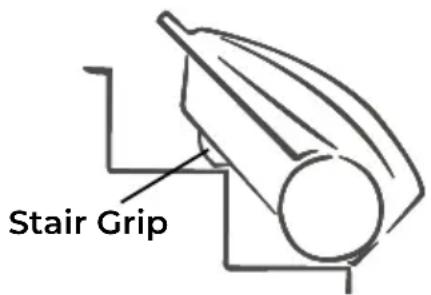
NOTE: Be sure the stair grip has engaged a step and that the canister is balanced securely on stairs before starting to vacuum.
SUGGESTED SWEEPING PATTERN
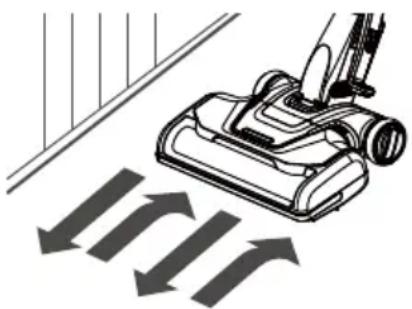
For best cleaning action, the motorized nozzle should be pushed straight away from you and pulled straight back. At the end of each pull stroke, the direction of the motorized nozzle should be changed to point into the next section to be cleaned. This pattern should be continued across the carpet with slow, gliding motions.
NOTE:
Fast, jerky strokes do not provide complete cleaning.
natural_image
Illustration of a vacuum cleaner with directional arrows indicating airflow or movement (no text or symbols)VACUUMING TIPS
EDGE CLEANER
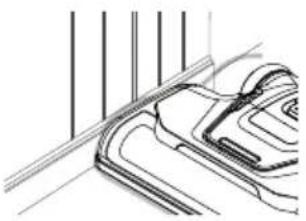
Active brush edge cleaners are on both sides of the motorized nozzle. Guide either side of the motorized nozzle along base- boards or next to furniture to help remove dirt trapped at carpet edges.
natural_image
Technical line drawing of a mechanical component with vertical lines and curved surfaces (no text or symbols)MOTORIZED NOZZLE STORAGE
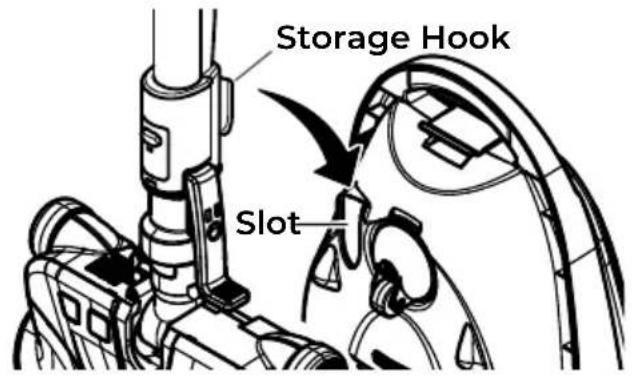
The wand has a U-shaped storage hook that slides into the U-shaped slot on the canister. The storage hook allows the wand and motorized nozzle to
be stored with the canister to conserve storage space. The canister must be stored on end for this feature to be used.
To attach the motorized nozzle, it must be in the flat position. The wand will slip out of the slot as it is lifted up for use and will slide into the slot as it is lowered for storage.
ATTACHMENTS
CAUTION
DO NOT attach or remove handle or wands while vacuum cleaner is ON. This could cause sparking and damage the electrical contacts or electronic controls.
ATTACHMENT STORAGE
This canister is equipped with an on-board storage area for attachments.
POP-N-GO® FLOOR BRUSH
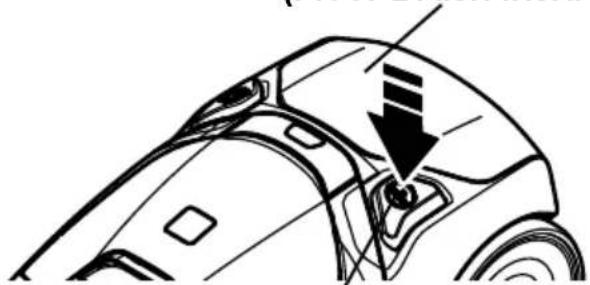
- Press the release button to open the tool storage cover. The neck of the floor brush will pop up at an angle that makes it easy to attach the wand.
Tool Storage Cover (Floor Brush inside)
natural_image
Technical line drawing of a car's rear wheel and side door (no text or symbols)Tool Storage Cover Release Button
ATTACHMENTS
- Push the wand collar over the floor brush neck. Tilt wand upward and lift out.
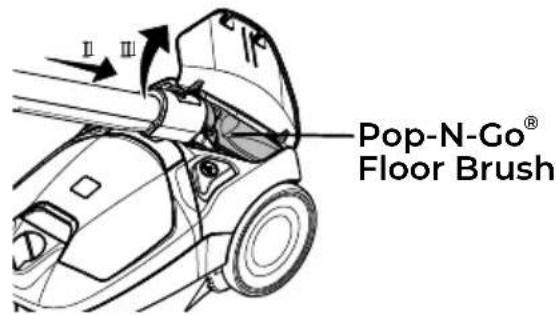
NOTE: If there is difficulty attaching brush to wand in the manner described above, simply remove the brush from storage compartment and insert it into the wand collar.
TO REINSTALL:
- With the floor brush on the wand, insert the floor brush into place.
- Tilt the wand and floor brush downward.

natural_image
Technical line drawing of a mechanical device with no visible text or symbols- Pull the wand away from the floor brush. The floor brush will disconnect from the wand.
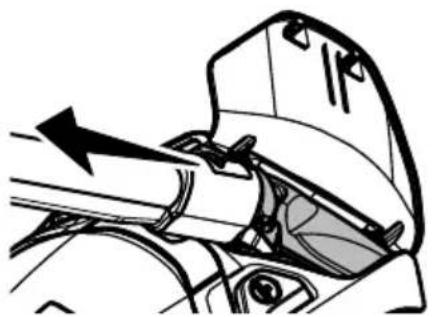
natural_image
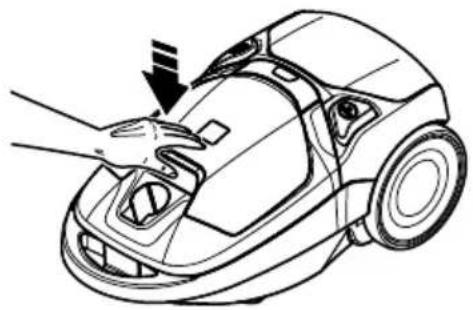
Mechanical diagram showing a lever mechanism with an arrow indicating motion (no text or symbols present)- Close the tool storage cover securely.
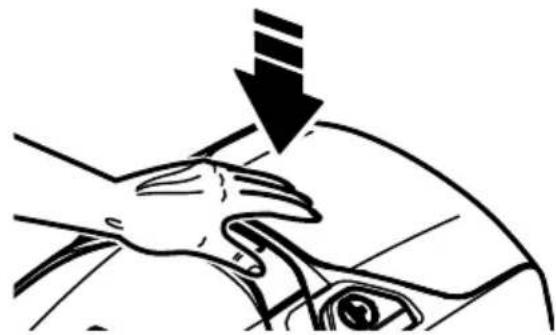
natural_image
Illustration of a hand pressing down on a car's seat, with a downward arrow indicating motion (no text or symbols)NOTE: If there is difficulty detaching the wand from brush in the manner described above, simply press the Tool Release button to disconnect brush from wand.
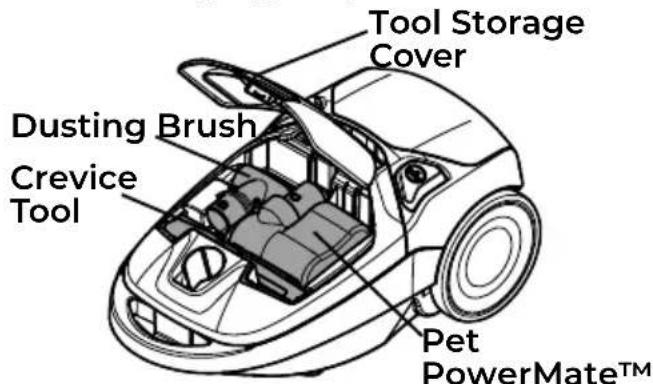
DUSTING BRUSH, CREVICE TOOL, & PET POWERMATE™
- Lift the tool storage cover to open.
Tool Storage Cover (Attachments inside)
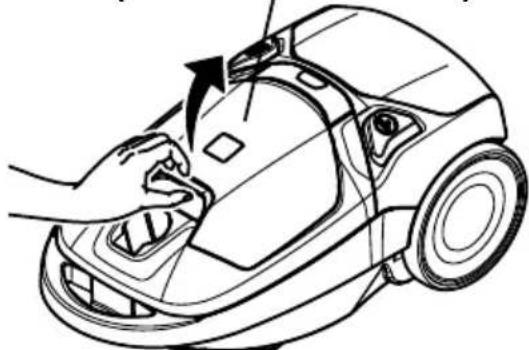
natural_image
Line drawing of a hand cleaning a car's hood with a tool, showing no text or symbols- Remove attachment as needed. See ATTACHMENT USE TABLE (page 16).
ATTACHMENTS
TO REINSTALL:
Insert the attachment, press down into place, and close the tool storage cover securely.
natural_image
Line drawing of a robotic vacuum cleaner with hand adjusting the hood (no text or symbols)ATTACHMENTS ON HANDLE
NOTE: If the motorized nozzle is attached, turn vacuum cleaner off before removing handle from wand.
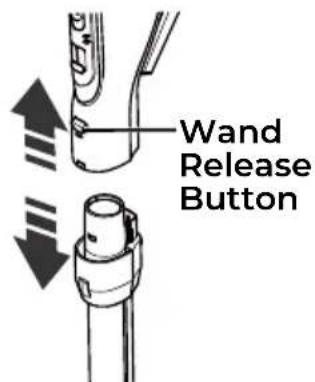
- Press wand release button and pull up on handle.
- Slide attachments into handle as needed. All except crevice tool will click into place. See ATTACHMENT USE TABLE (page 16).
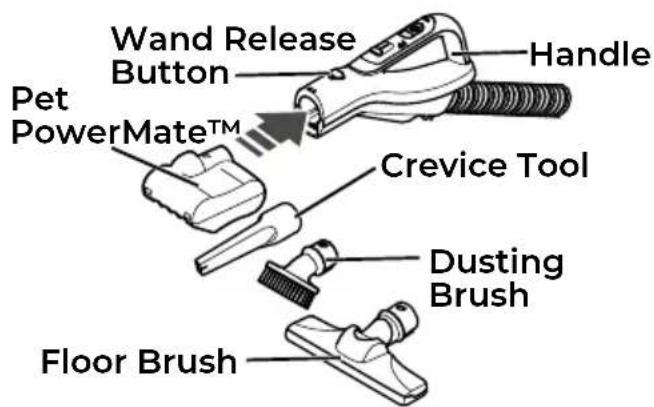
NOTE: To remove Pet PowerMate™, dusting brush, and/or floor brush, press the Wand Release button and slide out.
ATTACHMENTS ON WAND
- To remove wand from the motorized nozzle, lock wand in upright position.
- Press wand release pedal with foot and pull the wand straight up and out of the motorized nozzle.
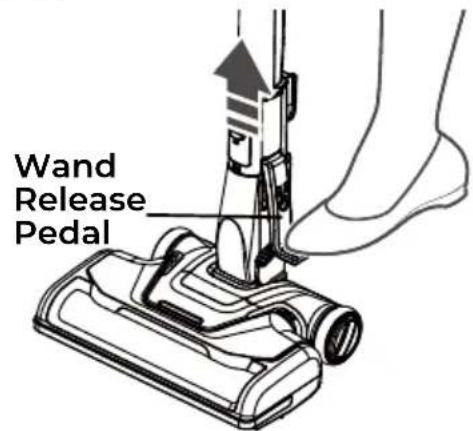
- Slide attachments into wand as needed. All except crevice tool will click into place. See ATTACHMENT USE TABLE (page 16).
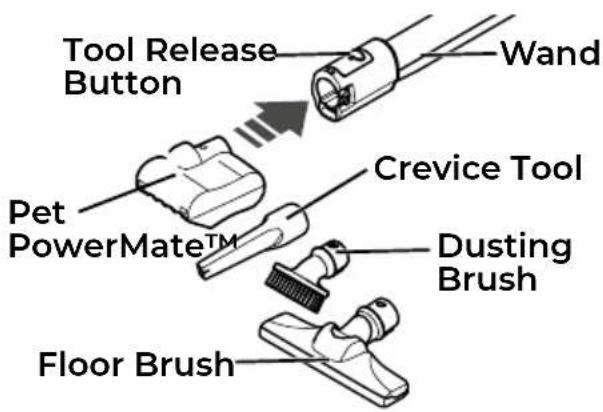
NOTE: To remove Pet PowerMate™, dusting brush, and/or floor brush, press the tool release button and slide out.
ATTACHMENT USE TABLE
| CLEANING AREA | ||||||||
| ATTACHMENT | Furniture^1 | Cushions^1 | Drapes^1 | Floors Floors/Rug | dete | praCera WallsS | ||
Dusting Brush  | √ | √ | √ | |||||
Crevice Tool 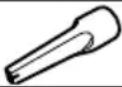 | √ | √ | ||||||
Floor Brush  | √ | √ | √ | |||||
Motorized Nozzle  | ^2 | √ | ||||||
Pet PowerMateTM3  | √ | √ | ||||||
- Always clean attachments before using on fabrics.
- 3-way On/Off switch should be in HARDFLOOR position.
- Pet PowerMate ^TM attachment instructions are included with the product.

WARNING
NEVER use the Pet PowerMate™ directly on pets, as it may cause injury. The Pet PowerMate™ is only designed to vacuum pet hair that is shed on stairs or furniture.
PERFORMANCE/SAFETY FEATURES

WARNING
Personal Injury Hazard
To avoid accidental brushroll starting, always turn off and unplug the vacuum cleaner before cleaning the brushroll area. Failure to do so can result in personal injury.
HAIR ELIMINATOR® BRUSHROLL
For best performance, the motorized nozzle is equipped with a hair eliminator® brushroll, which prevents build-up of hair, string and other debris on the brushroll. To remove any hair wrapped around the brushroll, simply continue vacuuming, allowing the brushroll to automatically remove the hair wrap and send it to the dust bag.
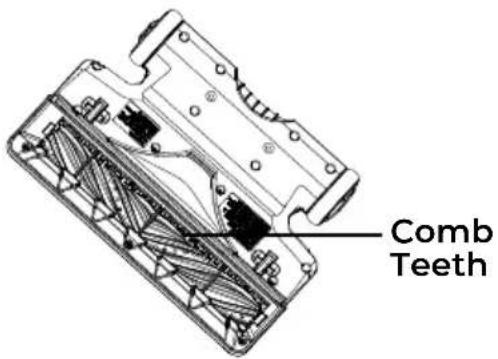

CAUTION
Moving parts! To reduce the risk of personal injury, DO NOT touch the brushroll when vacuum is on. Contacting the brushroll while it is rotating can cut, bruise or cause other injuries.
BRUSHROLL RESET
The brushroll has built-in protection against motor damage should the brushroll jam. If the brushroll slows down or stops, the brushroll overload protector shuts off the brushroll motor and the brushroll status indicator emits a red light. The vacuum cleaner suction motor will continue to run.
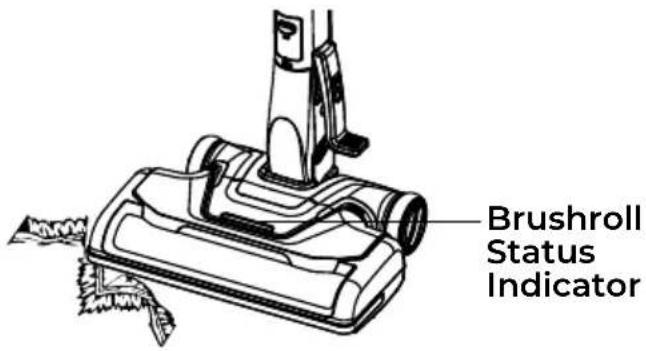
To correct problem: Turn off and unplug vacuum cleaner, remove obstruction, then turn on the vacuum cleaner again. The brushroll status indicator will be off.
NOTE: Once the brushroll motor shuts down, clear jam from brushroll and then restart the vacuum cleaner. If the problem persists, call 1-877-531-7321 (US) / 1-844-608-3081 (CA) for assistance.
ELECTRONIC SUCTION CONTROL
The electronic suction control allows you to change the power of the vacuum cleaner suction motor. When increasing the suction to the highest power, you will hear a click and the suction control can be locked into this position.
PERFORMANCE/SAFETY FEATURES
SUCTION CONTROL
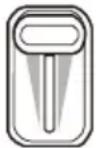

Increase Suction
Decrease Suction
Increase suction for upholsteries, carpets, and bare floors.
Decrease suction for draperies and lightweight rugs.
CHECK BAG INDICATOR
When the vacuum cleaner is running with normal airflow, the light on the check bag indicator is off. The light comes on whenever the airflow becomes blocked. If that occurs, check the disposable dust bag, motor safety filter and other possible clog locations shown in REMOVING CLOGS (page 19-20).
Check Bag Indicator -
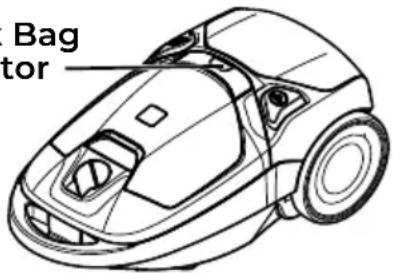
To correct problem: See "Check bag indicator activates" in TROUBLESHOOTING (page 25).
NOTE: The indicator may activate when using certain attachments due to reduced airflow through attachment.
THERMAL PROTECTOR
This vacuum cleaner has a thermal protector which automatically trips to protect the vacuum cleaner from overheating. If a clog prevents the normal flow of air to the motor, the thermal protector turns the motor off automatically. This allows the motor to cool in order to prevent possible damage to the vacuum cleaner.
To correct problem: Turn off and unplug vacuum cleaner to allow the vacuum cleaner to cool and the thermal protector to reset. Check for and remove clogs, if necessary. Also check and clean or replace any clogged filters. Wait approximately fifty (50) minutes and plug the vacuum cleaner in and turn back on to see if the motor protector has reset.
If the canister motor does not resume operation after the reset procedure described above, call 1-877-531-7321 (US) / 1-844-608-3081 (CA) for assistance.
VACUUM MAINTENANCE AND CARE
Always follow all safety precautions when performing maintenance to the vacuum cleaner.

WARNING
Electrical Shock and Personal Injury Hazard
Always turn off and unplug vacuum cleaner before performing maintenance to the vacuum cleaner. Failure to do so could result in electrical shock or personal injury from vacuum cleaner suddenly starting.
REMOVING CLOGS
The vacuum cleaner creates suction that picks up dirt. Rapidly moving air carries the dirt to the dust bag through the airflow passages. The dust bag lets the air pass through, while it traps the dirt.
For best cleaning results, keep the airflow passage open. Check the starred (★) areas occasionally for clogs. Turn off and unplug vacuum cleaner from outlet before checking.
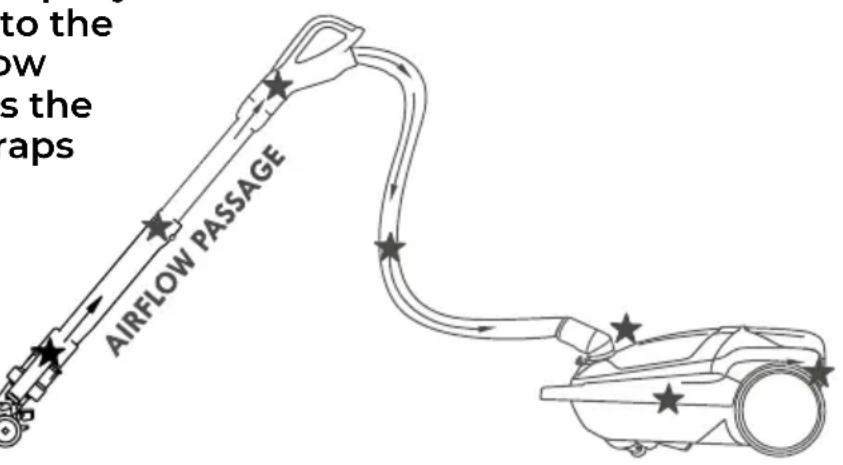
TO CHECK FOR CLOGS:
- Check dust bag and change if full. See DUST BAG CHANGING (page 20-21).
- Check motor safety filter and exhaust filter and clean or replace if dirty. See MOTOR SAFETY FILTER CLEANING (page 22) and EXHAUST FILTER CHANGING (page 22-23).
- Check motorized nozzle for obstructions in the brushroll
area. Carefully remove any obstruction.
If the vacuum cleaner still has poor suction, do the following:
- Connect the hose to the canister and turn vacuum cleaner on. Check the end of the hose for suction. If there is good suction on the hose handle, there is no clog in the hose. If the suction is bad, remove any dirt or debris in the hose and handle.
REMOVING CLOGS
- Connect hose handle to wand. Check the end of the wand for suction. If there is good suction at the end of the wand, there is no clog in the wand. If the
suction is bad, remove any dirt or debris in the wand.
- Check the motorized nozzle swivel. Remove any dirt or debris.
CLEANING EXTERIOR AND ATTACHMENTS
- Turn off and unplug vacuum cleaner. DO NOT drip water on vacuum cleaner.
- To clean exterior, or to reduce static electricity and dust build-up, wipe outer surface with a clean, soft cloth that has been dipped in a solution of mild liquid detergent and water, then wrung dry. Wipe dry after cleaning.
CAUTION
Do not use attachments if they are wet. Attachments used in dirty areas, such as under a refrigerator, should not be used on other surfaces until they are washed. They could leave marks.
DUST BAG CHANGING
For best cleaning results, the dust bag should be changed often. The check bag indicator will come on when the bag needs to be changed or the airflow is blocked.
NOTE: See REPLACEMENT PARTS for part number and purchase details (page 6).
-
Turn off and unplug vacuum cleaner.
-
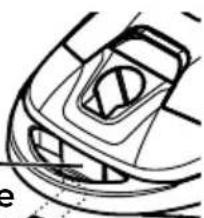
Remove hose Hood—from canister. Release
-
Pull hood release out and up, then lift canister hood.
natural_image
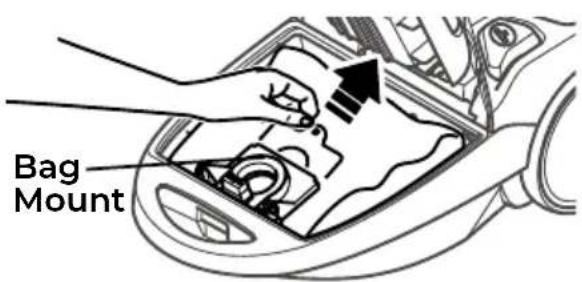
Top-down line drawing of a car's front and side views (no text or symbols)- Pull bag out of the bag mount.
NOTE: The bag mount will flip forward after removing bag. This will prevent the hood from closing until a new bag is installed.
DUST BAG CHANGING
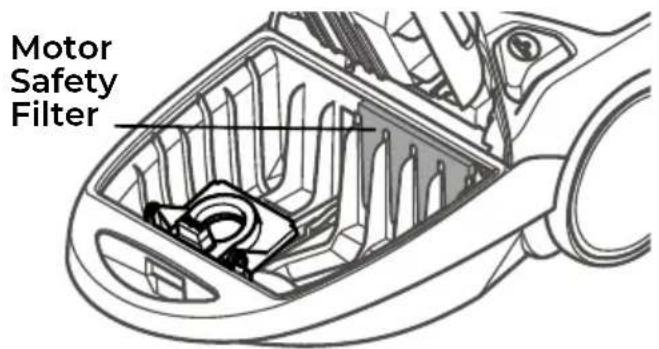
- Check the motor safety filter and clean or if necessary replace. See MOTOR SAFETY FILTER CLEANING (page 22).
NOTE: DO NOT bend or crease the middle of the cardboard when installing the bag into the bag mount slots.
- Rotate bag mount down and install bag into slots per illustration, pushing down until the cardboard tab locks into position and the holes align.
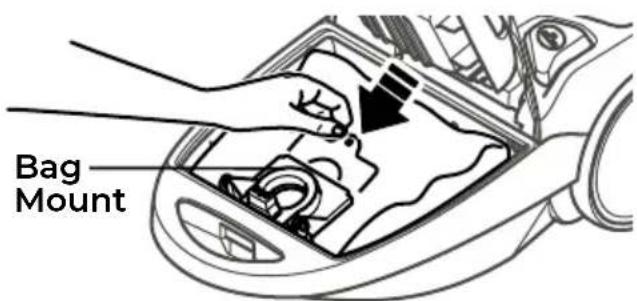
- Tuck the bag securely into the bag cavity so that none of the bag will be pinched by the hood.
- Close and latch canister hood.
- Insert hose into canister until it snaps in place.
10.Plug cord into wall outlet.
CAUTION
NEVER REUSE A DUST BAG. Very fine materials, such as carpet freshener, face powder, fine dust, plaster, soot, new carpet lint, etc. can clog the bag and cause it to burst before it is full, which may damage the vacuum cleaner motor. Change bag more often when vacuuming these materials.
MOTOR SAFETY FILTER CLEANING

WARNING
Electrical Shock Hazard
Turn off and unplug vacuum cleaner from electrical outlet. Do not operate the vacuum cleaner without the motor safety filter. Be sure the filter is dry and properly installed to prevent motor failure and/or electrical shock.
MOTOR SAFETY FILTER
Check motor safety filter occasionally and clean when dirty.
NOTE: See REPLACEMENT PARTS for part number and purchase details (page 6).
-
Remove the bag as outlined in the DUST BAG CHANGING (page 20-21) section.
-
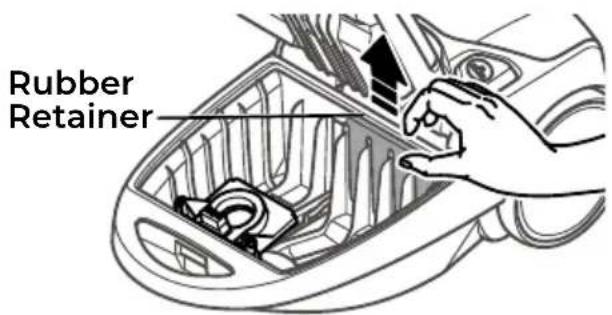
Lift the rubber retainer and pull out motor safety filter as shown.
-
Wash filter in warm soapy water, rinse, then dry. Do not clean in dishwasher or install while damp.
-
Slide the filter back into place under the ribs in the bag cavity. Tuck filter in so that it fits completely under the rubber retainer.
-
Replace the bag as outlined in the DUST BAG CHANGING (page 20-21) section.
EXHAUST FILTER CHANGING

WARNING
Fire and/or Electrical Shock Hazard
Do not operate with a clogged exhaust filter or without the exhaust filter installed. Do not operate without filter cover installed.
HEPA MEDIA EXHAUST FILTER
The exhaust filter cartridge must be replaced when dirty. Replace the filter when the entire surface area is covered evenly. The filter CANNOT be washed as it will lose its dust trapping ability.
NOTE: See REPLACEMENT PARTS for part number and purchase details (page 6).
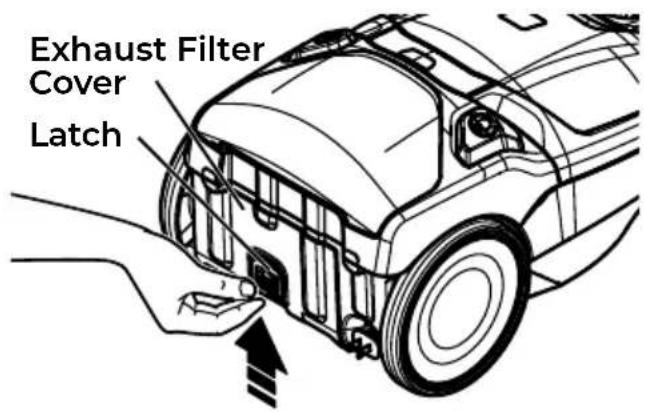
- Push latch up to release the exhaust filter cover from slot in canister.
EXHAUST FILTER CHANGING
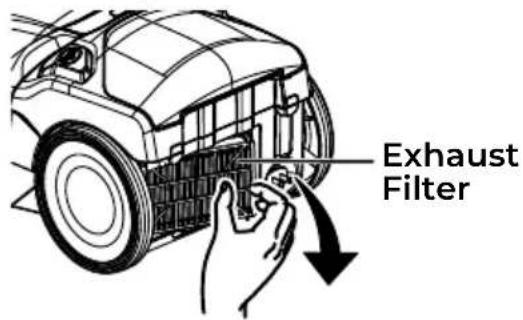
- Pull filter cover outward to remove it from canister.
- Remove the exhaust filter cartridge.
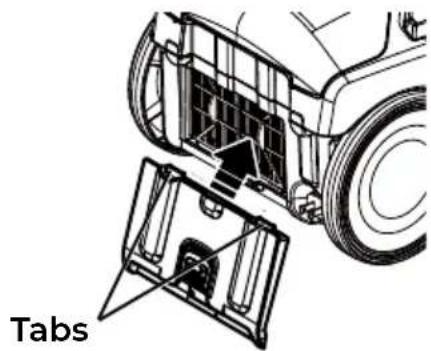
- Insert the new exhaust filter cartridge into the canister with the rubber seal towards the canister. The arrow on the top ridge of the filter indicates the direction of air flow.
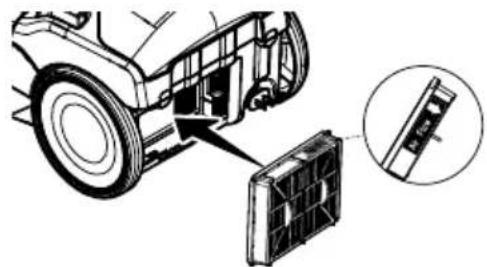
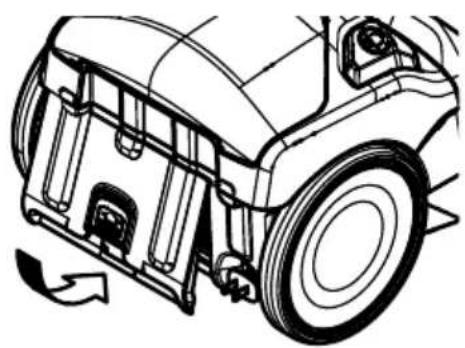
- To replace the exhaust filter cover, place the two tabs on the filter cover into the canister.
natural_image
Technical diagram of a vehicle's internal components, showing dashboard and air gap assembly (no text or symbols)- Rotate the filter cover and lock it into place.
natural_image
Technical line drawing of a vehicle's front wheel assembly with visible brackets and mounting points (no text or symbols)PET POWERMATE™ CLEANING
WARNING
Always unplug the power cord from an electrical outlet before performing maintenance to the vacuum cleaner.
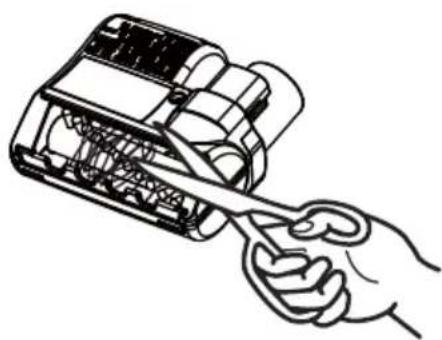
Cut off any carpet pile and lint entangled around brushroll with a pair of scissors.
CAUTION
To reduce the risk of injury from moving parts, remove Pet PowerMate™ from vacuum hose or wand before servicing.
natural_image
Line drawing of a hand holding a tool interacting with an open battery pack (no text or symbols)TROUBLESHOOTING
Review this table to find do-it-yourself solutions for minor performance problems. Any service needed, other than maintenance described in this Use & Care Guide, should be performed by a qualified service agent.

WARNING
Always turn off and unplug vacuum cleaner before performing maintenance to the vacuum cleaner. Failure to do so could result in electrical shock or personal injury.
| PROBLEM | POSSIBLE CAUSE SOLUTION | ON |
| Vacuum cleaner won't start. | Unplugged at wall outlet. | Plug in firmly, press On/Off switch. |
| Tripped circuit breaker/blown fuse at household service panel. | Reset circuit breaker or replace fuse. | |
| Loose hose electrical connections. | Reconnect hose ends. | |
| Poor job of dirt pick-up. | Full or clogged dust bag. | Check for clogs and/or change bag if necessary. |
| Clogged airflow passages. | Clear airflow passages. | |
| Dirty filters. | Clean/change filters. | |
| Wrong power level selected. | Adjust control. | |
| Hole in hose. Replace hose. | ||
| The brushroll is worn. | Call 1-877-531-7321 (US) / 1-844-608-3081 (CA) for assistance. | |
| Canister hood open. Close and latch hood. | ||
| Vacuum cleaner starts but shuts off. | Hose or hood electrical connections. | Check connections, reconnect hose ends. |
| Tripped thermal protector in canister. | See THERMAL PROTECTOR (page 18). | |
| Brushroll does not turn. | Motorized nozzle connections unplugged. | Plug in firmly. |
| Brushroll is jammed. | Remove obstruction. Follow instructions on page 17. | |
| Thermal protector in the motorized nozzle is activated. | Clear all clogs or change bag. | |
| Vacuum cleaner in HARD FLOOR mode. | Press CARPET button to activate the brushroll. | |
TROUBLESHOOTING
| Check bag Indicator activates. | Full or clogged dust bag. Change bag. | |
| Dirty filters. Clean/change filters. | ||
| Blocked airflow passage. | Clear blockage from airflow passage. | |
| Certain attachment tools. | This is normal. Light should go off when tool is removed. | |
| Vacuum cleaner picks up moveable rugs, or the motorized nozzle pushes too hard. | Suction too strong. Select lower Power Level. | |
| Cord won’t rewind. | Dirty power cord. Clean the power cord. | |
| Cord jammed. Pull out cord and rewind. | ||
| Vacuum cleaner leaves marks on carpet. | Wrong vacuuming pattern. | See VACUUMING TIPS (page 12). |
Kenmore®/MD
Cleva North America, Inc., Greenville SC 29607
PIEZAS Y CARACTERÍSTICAS
natural_image
Diagram of a vacuum cleaner with a downward arrow indicating motion (no text or symbols present)ENSAMBLAJE DE LA MANILLA
natural_image
Line drawing of a vacuum cleaner with a circular prohibition symbol (no text or labels)CÓMO COMENZAR

ADVERTENCIA:
natural_image
Line drawing of a car interior with visible engine and battery components (no text or symbols)natural_image
Line drawing of a car interior with a hand holding a tool, showing no text or symbolsnatural_image
Line drawing of a vacuum cleaner's hood and base (no text or symbols)natural_image
Illustration of a vacuum cleaner with directional arrows indicating airflow or movement (no text or symbols)LIMPIADOR DE BORDES
natural_image
Technical line drawing of a mechanical component or bracket assembly (no text or symbols)ALMACENAMIENTO DE LA BOQUILLA MOTORIZADA
natural_image
Technical line drawing of a car's front wheel and side door (no text or symbols)natural_image
Technical line drawing of a car's front wheel assembly with no visible text or symbolsnatural_image
Mechanical component diagram showing a piston and lever mechanism (no text or symbols)natural_image
Line drawing of a hand pressing down on a car's side panel, with a downward arrow indicating motion (no text or symbols)natural_image
Line drawing of a hand cleaning a car's hood with a tool, showing no text or symbolsnatural_image
Line drawing of a car with a hand adjusting the hood (no text or symbols)ACCESORIOS EN LA MANILLAMANILLA
natural_image
Line drawing of a robotic car with labeled component 'e' (no text or symbols on the car itself)natural_image
Diagram of a vehicle's internal components and battery pack assembly (no text or labels)natural_image
Technical line drawing of a vehicle's front wheel assembly with mounting brackets and a gear shift (no text or symbols)LIMPIEZA CON EL PET POWERMATE™
ADVERTENCIA
natural_image
Line drawing of a hand using a tool to adjust or install electronic components (no text or symbols visible)Cleva North America, Inc., Greenville SC 29607
PIÈCES ET FONCTIONNALITÉS
natural_image
Diagram of a vacuum cleaner with a downward arrow indicating motion (no text or symbols present)MONTAGE DE LA POIGNÉE
natural_image
Diagram of a handheld device with arrows indicating movement or force (no text or symbols present)natural_image
Line drawing of a vacuum cleaner with a circular no-smoking symbol (no text or labels)COMMENT DÉMARRER

AVERTISSEMENT :
natural_image
Line drawing of a car interior with visible engine and battery components (no text or symbols)natural_image
Line drawing of a car interior with tools and a hand holding the tool (no text or symbols)natural_image
Line drawing of a vacuum cleaner's base with handle and blade (no text or symbols)natural_image
Illustration of a vacuum cleaner with directional arrows indicating airflow or movement (no text or symbols)NETTOYEUR DE BORDS
natural_image
Technical line drawing of a car interior component with a directional arrow indicating movement (no text or symbols)natural_image
Technical line drawing of a mechanical device with lever and adjustment knob (no text or symbols)natural_image
Mechanical diagram showing a lever mechanism with an arrow indicating motion (no text or symbols present)ACCESSOIRES
natural_image
Illustration of a hand pressing down on a car's head, with a downward arrow indicating motion (no text or symbols)natural_image
Line drawing of a hand pressing down on a car's hood with an arrow indicating the process (no text or symbols present)natural_image
Line drawing of a robotic vacuum cleaner with hand and arrow indicating motion (no text or symbols)ACCESSOIRES SITUÉS SUR LA POIGNÉE
natural_image
Line drawing of a robotic car with visible engine and wheels (no text or symbols)Voir "Le Voyant CHECK BAG S'allume" sous la rubrique DÉPANNAGE (page 28).
natural_image
Line drawing of a car's front wheel and side panel, with a hand pointing to the wheel (no text or symbols)natural_image
Technical diagram of a vehicle's internal components, showing a car body with a fan and a magnified inset of the fan (no text or symbols)natural_image
Technical line drawing of a vehicle's front wheel assembly with visible brackets and mounting points (no text or symbols)NETTOYAGE DE L'ACCESSOIRE PET POWERMATE™
