
PS-931 - Speakers SHARP - Free user manual and instructions
Find the device manual for free PS-931 SHARP in PDF.
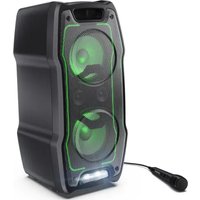


| Product type | Party speaker with karaoke function |
| Brand | Sharp |
| Model | PS-931 / PS-932 (XParty Sing) |
| Power supply | 100-240 V AC, 50/60 Hz via power adapter; built-in rechargeable lithium-ion battery |
| Battery life | Not specified (recharge ≥ 4 h recommended) |
| Connectivity | Bluetooth 5.0 (range not specified), AUX 3.5 mm input, USB port for playback and charging 5V=1A |
| Supported audio formats (USB) | MP3, WAV, FLAC |
| Output power | Not specified (warning: may exceed 85 dB SPL) |
| Speakers | Multiple (unspecified), with bass enhancement (Super Bass) |
| Audio functions | Equalizer (Flat/Pop/Dance/Rock/Live/Club), microphone reverb, Duo TWS mode |
| Microphone inputs | 2 x 6.35 mm jack with individual volume control |
| Light effects | Integrated LEDs with multiple modes, stroboscope activatable |
| Display | LED screen for source and status indicators |
| Maintenance and cleaning | Unplug before cleaning; use a soft dry cloth; avoid chemicals |
| Safety | Double insulation (Class II); do not obstruct ventilation openings; avoid heat sources; do not expose to humidity |
| Spare parts and repairability | Not user-serviceable; battery not replaceable; contact an authorized Sharp service center |
| Box contents | Speaker, power cable, microphone, documentation |
| Weight | Not specified |
| Dimensions | Not specified |
Frequently Asked Questions - PS-931 SHARP
User questions about PS-931 SHARP
0 question about this device. Answer the ones you know or ask your own.
Ask a new question about this device
Download the instructions for your Speakers in PDF format for free! Find your manual PS-931 - SHARP and take your electronic device back in hand. On this page are published all the documents necessary for the use of your device. PS-931 by SHARP.
USER MANUAL PS-931 SHARP
User manual
Party
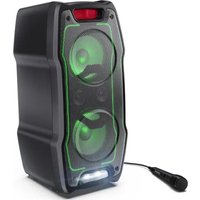
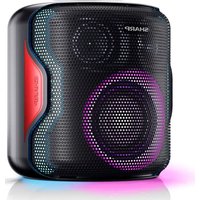
PS-931 / PS-932 XParty Sing Party Speaker

Product images are for illustration purposes only. Actual product may vary.
Trademarks
Party
The term "XParty" and the XParty logo device are registered trademarks of Sharp Consumer Electronics Poland sp. z o.o

Bluetooth®
The Bluetooth® word mark and logos are registered trademarks owned by Bluetooth SIG, Inc.
1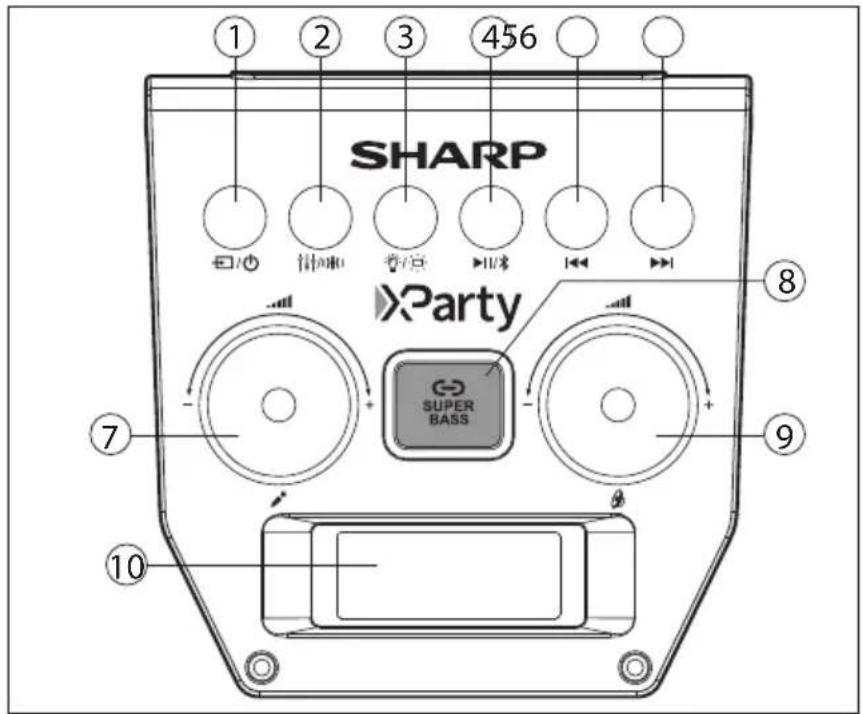
2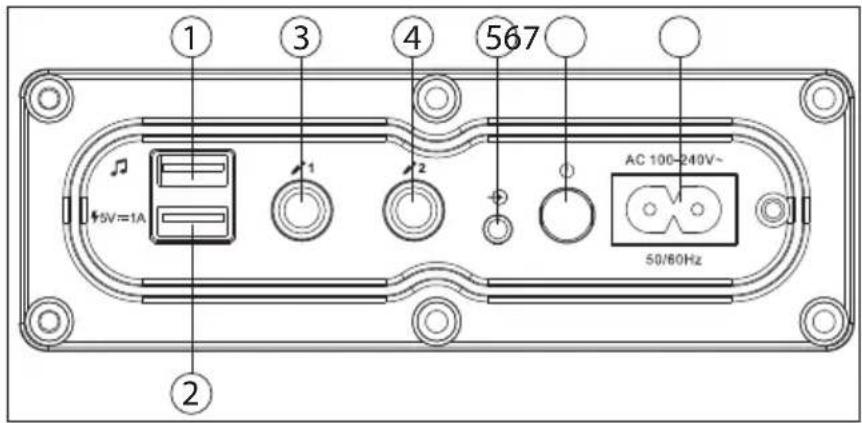
Important safety instructions
Please follow all safety instructions and heed all warnings. Keep this manual for future reference.

This symbol instructs the user to consult the user manual for further safety, operation, and maintenance related information.

This symbol indicates presence of uninsulated "dangerous voltage" within the product and may be of sufficient magnitude as to constitute a risk of electric shock to persons.

Refers to alternating current (AC).
This symbol indicates that the rated voltage marked with the symbol is AC voltage.

Refers to class II equipment.
This symbol indicates that this product has a double insulation system and does not require a safety connection to electrical earth (ground).
Precautions
Damage
- Please inspect the unit for damage after unpacking. If it is damaged in any way, do not operate the unit and consult your dealer.
Power connection and accessibility
- Do not handle the power cord with wet hands as it may cause an electric shock. If the power plug does not fit into your outlet, do not force the plug into an electrical socket. Switch off the unit completely before unplugging. Disconnect the power cord if it is not used for a long time. Ensure that the power plug is always easily accessible. Do not attach extension cables.
Power source
- Ensure that the unit is plugged into an AC 100-240V 50/60Hz power outlet. Using higher voltage may cause the unit to malfunction or even catch fire.
Fused moulded power plug (non rewireable) - UK, Malta, Cyprus and Ireland only.
- The power lead on this equipment is supplied with a plug incorporating a 3 Amp fuse. The value of the fuse is indicated on the pin face of the plug and if it requires replacing, a fuse approved to BS1362 of the same rating must be used.
Power cord protection
- Do not damage the power cord, do not place any heavy objects on it, do not stretch it or bend it. Damage to the power cord can result in fire or electric shock. If the power cord is damaged, it must be replaced.
Child safety
Always follow basic safety precautions when using this product, especially when children are present. Children should be supervised to ensure that they do not play with the product.
Location
When in use, this product should be placed on a flat, stable surface with no part of the main unit overhanging an edge.
Insertion hazards
Slots and openings in the cabinet are provided for ventilation and to ensure reliable operation of the product, protecting it from overheating. These openings must not be blocked or covered. Ensure a minimum distance of 5 cm around the product for sufficient ventilation. Never
let anyone push anything into holes, slots, or any other openings in the product's casing, as this could result in an electric shock.
Heat and operating temperature
Do not place near any heat sources such as radiators, heat registers, stoves, or other apparatus (including amplifiers) that produce heat. Avoid prolonged exposure to direct sunlight.
Naked flames
To prevent the risk of fire, keep candles or open flames away from this product.
Storms and lightning
Storms are dangerous for all electric products. If the power is struck by lightning, the product might get damaged, even if it is turned off. You should disconnect all the cables and connectors of the product before a storm.
Power cable
Do not damage, stretch, bend, or place heavy objects on the power cable.
Damage
Please inspect the unit for damage after unpacking. If it is damaged in any way, do not operate the unit and consult your dealer.
Maintenance
Unplug the power cable from the power source before cleaning the product. Use a soft and clean cloth to clean the outside of the unit. Never clean it with chemicals or detergent.
Service and repair

This product does not contain any parts that are serviceable by the user. Exposing the internal parts inside the device may endanger your life. In case of a fault, contact the manufacturer or authorized service department. The manufacturer's guarantee does not extend to faults caused by repairs carried out by unauthorized third parties.
Caution:
Epilepsy warning
- Before using the strobe light, check if nearby persons are vulnerable to rapid flashing light. If present, do not use the strobe light.
- Certain people with epilepsy and photo-sensitivity may suffer a seizure if exposed to flashing or strobe lighting.
Prevention of hearing loss and damage
The XParty Sing party speaker is capable of generating excessive sound pressure levels (SPL) sufficient to cause permanent hearing loss or damage.
Caution should be taken to avoid prolonged exposure to excessive volume (>85 dBA).
Built-in lithium-ion battery care
Your product is powered by a built-in lithium-ion rechargeable battery. - The battery can be charged and discharged hundreds of times, but will eventually wear out. - Unplug the product when not in use.
- Do not leave a fully charged battery connected to a power outlet, as it may shorten its lifetime.
- If left unused, a fully charged battery will lose its charge over time.
- Leaving the product in hot or cold places, such as in a closed car in summer or winter conditions, will reduce the capacity and lifetime of the battery.
- Always try to store your device in a cool, moisture-free environment that is less than 32°C.
- If you plan to store your device for longer than six months, charge the battery to 50% every six months to keep it fresh. Store the device at temperatures between 5°C and 20°C.
Battery warning
- The battery used in this product may present a risk of fire or chemical burn if mistreated.
- Do not attempt to open the product to replace the battery; it is not designed to be changed by the user.
- Batteries may explode if damaged.
- Do not expose batteries to high temperatures or excessive radiant heat.
- Do not drop the product or subject it to strong physical shock.
- Please dispose of the battery pack correctly by following the guidance in this manual (see section "Disposal of equipment and batteries"). Do not throw them into fire, do not disassemble them; they could leak or explode.
Disposal of equipment and batteries
This product does not contain any parts that are serviceable by the user. Electronic products and batteries should not be mixed with general household waste. Household users should contact either the retailer where they purchased this product, or their local government office for details of where and how they can take these items for environmentally safe recycling.
The batteries should be removed by an authorized Sharp service centre and disposed of according to local regulations.
Do not dispose as household waste or in a fire as they may explode.
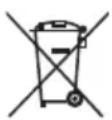
This symbol means that the product contains batteries covered by European Directive 2013/56/EU which cannot be disposed of with normal household waste. Cd, Hg and Pb underneath the wheelie bin symbol shows whether the battery contains, cadmium (Cd), mercury (Hg) or lead (Pb).
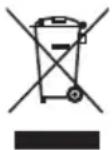
This symbol on a product means that the product is covered by European Directive 2012/19/EU and must not be disposed of or dumped with your other household waste.

These symbols on the products, packaging, and/or accompanying documents mean that used electrical and electronic products and batteries should not be mixed with general household waste.
CE and UKCA statement
- Hereby, Sharp Consumer Electronics Poland sp. z o.o. declares that this audio device is in compliance with the essential requirements and other relevant provisions of RED Directive 2014/53/EU and UK Radio Equipment Regulations 2017.
- The full CE text and UKCA declaration of conformity are available at sharpconsumer.eu, enter the download section of your model and choose "Declaration of Conformity".
What is included in the box
• XParty Sing PS-931 / PS-932 Party Speaker - Power cables - Microphone - User documentation
Controls
(Refer to 1 on page 2).
- ☐/☐ - Long press to turn ON/OFF. Short Press to cycle the audio source (Bluetooth, Aux-in, USB).
- ↑↓↑/))↓(− EQ effect/Microphone reverb effect on/off
- 🎨/☐ – LED light effects. Press to cycle various LED effects. Press once more to turn the LEDs off. Long press to turn the strobe light on/off.
- ▶||/* - Play/pause/pair
- Play previous track
- Play next track
- Microphone volume controller
- Bass boost/Duo mode
- Master volume
- LED display
Inputs/Outputs
(Refer to 2 on page 2).
- USB port for playback
- 5V=1A - USB port for charging devices
- 1- Microphone 1 input
- 2- Microphone 2 input
- -Aux input (3.5mm)
- ⏻ - Switch speaker on/off
- AC power input (100-240V ~ 50/60Hz)
Operation instruction
Power connection / charging the speaker
This speaker uses a built-in lithium-ion battery pack. Before using it, charge the battery by connecting the power cable and charge the speaker for a minimum of three hours.
Risk of product damage! Ensure that the power supply voltage corresponds to the voltage printed on the back of the speaker. Connect the power cable to the AC power input of the speaker and then insert the plug into a mains power socket.
Turning on/off
To turn the speaker on, put the button on the rear of the speaker into the ON position. The button clicks into place for ON and returns to its original position for OFF.
The speaker is now in standby.
Long press the □/⏻ button for 2 seconds to turn the speaker on.
To put the speaker back into standby, long press the ☐/☐ button for 3 seconds.
To turn the speaker off, switch the ⏻ button to the OFF position.
Controlling the master volume
Rotate the knob to change the master volume level.
Connect Bluetooth audio output device
To connect a Bluetooth audio output device (e.g. smart phone or tablet PC), proceed as follows:
- Switch the speaker on.
- Press the 📄/⏻ button once or repeatedly until the screen shows 'bt' to switch to the Bluetooth mode. The speaker is now in pairing mode. During this time will flash on the display screen and you will hear an audio prompt.
- Activate your Bluetooth device and select the search mode. "XParty PS-931" or "XParty PS-932" will appear on your Bluetooth device list.
- Once successfully connected, the speaker will give an audio prompt and on the screen will be solid.
You can control tracks being played back and the volume of the party speaker on your external device. The functions available when using an audio playback device on the party speaker will depend on your device and the software used.
Press and hold the ▶II/× button (for 3sec.) to disconnect the current Bluetooth connection. This will be confirmed with an audio prompt.
NOTE:
The speaker will attempt to automatically connect itself to the last audio output device connected via Bluetooth. If this is not possible, the speaker sends its device identification via Bluetooth and will flash on the display.
USB playback
- Insert the USB device into USB on the rear of the speaker.
- USB mode will automatically be selected.
- Press ◀◀ or ▶ button to select the previous or next track.
NOTES:
Supported file formats: MP3/WAV/FLAC
External hard disks are not supported.
Supports USB devices up to 128GB.
AUX-IN
The speaker can be used to listen to audio from external devices.
- Connect an auxiliary audio device to the speaker via the 3.5mm Audio input.
- Press the ☐/☐ button until the LED display shows .
- Play and control music on the source audio device.
USB charging
The speaker has a built-in 5V 1A charger to charge an external USB device:
- Connect the USB plug from the external USB Device to the port. 5V=1A
- To charge the external USB device, the speaker needs to be powered on.
Connecting a microphone
Before connecting a microphone, ensure the Master volume on the speaker is low.
- Insert the cord of the microphone supplied into the 1 or plug on the rear of the speaker.
- Use the knob to select the desired microphone volume.
EQ / Super bass
Short press the button to cycle equaliser effects that best match the music style. Select from: FLAT/POP/DANCE/ROCK/LIVE/CLUB.
Long press the up/down button to turn the microphone reverb effect on/off. The LED display will show for reverb off and for reverb on.
Short press the SUPER BASS button to boost the bass. Short press again to turn off. The button will light up when it is on.
Duo mode: True Wireless Stereo (TWS)
This allows for two XParty Sing speakers to connect together as left and right stereo speakers.
The first connected speaker is the primary one (LEFT CHANNEL) and the other will be the secondary (RIGHT CHANNEL).
To begin the pairing process, proceed as follows:
- Power on both speakers. Ensure that there are no existing Bluetooth connections on both speakers.
- Press the ⬤ button on the top panel of the first speaker. This should be the speaker you want as the LEFT CHANNEL. The speaker will prompt, "Duo mode pairing".
- Press the ⬤ button on the second speaker. This should be the speaker you want as the RIGHT CHANNEL.
- The two speakers will pair with each other automatically within a few seconds. Once successfully paired, the first speaker will display and the second speaker will display . The speaker will prompt, "Duo mode connected". This confirms that the two speakers are in Duo mode.
- In Duo mode only the LEFT CHANNEL speaker can be connected to via your Bluetooth device.
NOTES:
If two speakers have already been paired, Duo mode / TWS will reconnect automatically when both speakers are powered on. When in Duo mode, only the Bluetooth from the LEFT CHANNEL will be shared. Input from ⚙1 and ⚙2 both speakers will remain local to that speaker. To disconnect from another speaker in Duo mode / TWS, press and hold the Button. Press and hold the button again to restart the Duo mode connection process.
- USER MANUAL
- PARTY
- TRADEMARKS
- BLUETOOTH®
- IMPORTANT SAFETY INSTRUCTIONS
- PLEASE FOLLOW ALL SAFETY INSTRUCTIONS AND HEED ALL WARNINGS. KEEP THIS MANUAL FOR FUTURE REFERENCE
- PRECAUTIONS
- DAMAGE
- POWER CONNECTION AND ACCESSIBILITY
- POWER SOURCE
- FUSED MOULDED POWER PLUG (NON REWIREABLE) - UK, MALTA, CYPRUS AND IRELAND ONLY
- POWER CORD PROTECTION
- CHILD SAFETY
- LOCATION
- INSERTION HAZARDS
- HEAT AND OPERATING TEMPERATURE
- NAKED FLAMES
- STORMS AND LIGHTNING
- POWER CABLE
- MAINTENANCE
- SERVICE AND REPAIR
- CAUTION
- EPILEPSY WARNING
- PREVENTION OF HEARING LOSS AND DAMAGE
- BUILT-IN LITHIUM-ION BATTERY CARE
- BATTERY WARNING
- DISPOSAL OF EQUIPMENT AND BATTERIES
- CE AND UKCA STATEMENT
- WHAT IS INCLUDED IN THE BOX
- CONTROLS
- INPUTS/OUTPUTS
- OPERATION INSTRUCTION
- POWER CONNECTION / CHARGING THE SPEAKER
- TURNING ON/OFF
- CONTROLLING THE MASTER VOLUME
- CONNECT BLUETOOTH AUDIO OUTPUT DEVICE
- NOTE
- USB PLAYBACK
- NOTES
- AUX-IN
- USB CHARGING
- CONNECTING A MICROPHONE
- EQ / SUPER BASS
- DUO MODE: TRUE WIRELESS STEREO (TWS)
- TO BEGIN THE PAIRING PROCESS, PROCEED AS FOLLOWS
Brand : SHARP
Model : PS-931
Category : Speakers