RCGH-100 - Range hood Royal Catering - Free user manual and instructions
Find the device manual for free RCGH-100 Royal Catering in PDF.
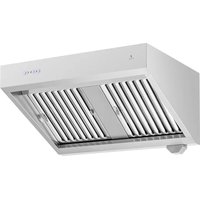


| Product type | Gastronomic hood |
| Model | RCGH-100 |
| Dimensions (W x D x H) | 1000 x 700 x 530 mm |
| Weight | 37.9 kg |
| Rated voltage | 230 V / 50 Hz |
| Rated power | 150 W |
| Protection class | I |
| Speed levels | 4 (Silent, Low, Medium, High) |
| LED lighting power | 3 W, variable intensity |
| Airflow | 1000 m³/h |
| Usage | Commercial applications (restaurants, professional kitchens) |
| Material | Stainless steel |
| Functions | Delayed automatic shut-off (3 min), last speed memory, dimmer |
| Safety | ON/OFF switch, electric shock protection, emergency stop (double press) |
| Maintenance and cleaning | Clean with mild non-corrosive detergent; do not immerse; do not use water jets |
| Spare parts and repairability | Grease and charcoal filters (not included); LED bulbs; repair only by approved center |
| General information | Wall mounting on stable, fireproof surface; safety distance of 10 cm around the appliance |
Frequently Asked Questions - RCGH-100 Royal Catering
User questions about RCGH-100 Royal Catering
0 question about this device. Answer the ones you know or ask your own.
Ask a new question about this device
Download the instructions for your Range hood in PDF format for free! Find your manual RCGH-100 - Royal Catering and take your electronic device back in hand. On this page are published all the documents necessary for the use of your device. RCGH-100 by Royal Catering.
USER MANUAL RCGH-100 Royal Catering
| DE | Produktname | Gastronomie-Abzugshaube | |
| EN | Product name | Gastronomy hood | |
| PL | Nazwa produktu | Okap gastronomiczny | |
| CZ | Název výrobku | Gastronomická digestoř | |
| FR | Nom du produit | Hotte gastronomique | |
| IT | Nome del prodotto | Cappa gastronomia | |
| ES | Nombre del producto | Campana gastronómica | |
| HU | Termék neve | Gasztronómiai búra | |
| DA | Produktnavn | Gastronomi emhætte | |
| FI | Tuotteen nimi | Gastronominen-liesituuletin | |
| NL | Productnaam | Gastronomie afzuigkap | |
| NO | Produktnavn | Kjøkkenvifte for gastronomi | |
| SE | Produktnamn | Spisflåkt för gastronomi | |
| PT | Nome do produto | Exaustor de cozinha para gastronômico | |
| SK | Názov produktu | Odsávač pár pre gastronómiu | |
| DE | Modell | RCGH-100 | RCGH-120 |
| EN | Product model | ||
| PL | Model produktu | ||
| CZ | Model výrobku | ||
| FR | Modèle | ||
| IT | Modello | ||
| ES | Modelo | ||
| HU | Modell | ||
| DA | Model | ||
| FI | Tuotteen malli | ||
| NL | Productmodel | ||
| NO | Produktmodell | ||
| SE | Produktmodell | ||
| PT | Modelo do produto | ||
| SK | Model | ||
| DE | Hersteller | expondo Polska sp. z o.o. sp. k. | |
| EN | Manufacturer | ||
| PL | Producent | ||
| CZ | Výrobce | ||
| FR | Fabricant | ||
| IT | Produttore | ||
| ES | Fabricante | ||
| HU | Termelő | ||
| DA | Producent | ||
| FI | Valmistaja | ||
| NL | Producent | ||
| NO | Produsent | ||
| SE | Tillverkare | ||
| PT | Fabricante | ||
| SK | Výrobca | ||
| DE | Anschrift des Herstellers | ul. Nowy Kisielin – Innowacyjna 7, 66-002 Zielona Góra | Poland, EU | |
| EN | Manufacturer Address | ||
| PL | Adres producenta | ||
| CZ | Adresa výrobce | ||
| FR | Adresse du fabricant | ||
| IT | Indirizzo del produttore | ||
| ES | Dirección del fabricante | ||
| HU | A gyártó címe | ||
| DA | Producentens adresse | ||
| FI | Valmistajan osoite | ||
| NL | Adres producent | ||
| NO | Produsentens adresse | ||
| SE | Tillverkarens adress | ||
| PT | Endereço do fabricante | ||
| SK | Adresa výrobcu | ||

This User Manual has been translated for your convenience using machine translation. Reasonable efforts have been made to provide an accurate translation; however, no automated translation is perfect nor is it intended to replace human translators. The official User Manual is the English version. Any discrepancies or differences created in the translation are not binding and have no legal effect for compliance or enforcement purposes. If any questions arise related to the accuracy of the information contained in the User Manual, please refer to the English version of those contents which is the official version.
Technical data
| Parameter description | Parameter value | |
| Product name | Gastronomy hood | |
| Model | RCGH-100 | RCGH-120 |
| Rated voltage [V~] / Frequency [Hz] | 230 / 50 | |
| Rated power [W] | 150 | |
| Protection class | I | |
| Dimensions [Width x Depth x Height; mm] | 1000 x 700 x 530 1200 x 700 x 530 | |
| Weight [kg] | 37.9 | 43,5 |
| Speed levels | 4 | |
| LED illuminating power [W] | 3 | |
| Airflow [m3/h] | 1000 | |
1. General description
The user manual is designed to assist in the safe and trouble-free use of the device. The product is designed and manufactured in accordance with strict technical guidelines, using state-of-the-art technologies and components. Additionally, it is produced in compliance with the most stringent quality standards.
DO NOT USE THE DEVICE UNLESS YOU HAVE THOROUGHLY READ AND UNDERSTOOD THIS USER MANUAL.
EN
To increase the product life of the device and to ensure trouble-free operation, use it in accordance with this user manual and regularly perform maintenance tasks. The technical data and specifications in this user manual are up to date. The manufacturer reserves the right to make changes associated with quality improvement. The device is designed to reduce noise emission risks to a minimum, taking into account technological progress and noise reduction opportunities.
Legend
The product satisfies the relevant safety standards.
Read instructions before use.
The product must be recycled.
WARNING! or CAUTION! or REMEMBER! Applicable to the given situation.
(general warning sign)
Wear protective gloves (during product installation).
ATTENTION! Electric shock warning!
ATTENTION! Loud noise warning!
ATTENTION! Rotating parts, entanglement hazard!
Do not touch!
ATTENTION! Hot surface, risk of burns!
Only use indoors.

PLEASE NOTE! Drawings in this manual are for illustration purposes only and in some details may differ from the actual product.
2. Usage safety

ATTENTION! Read all safety warnings and all instructions. Failure to follow the warnings and instructions may result in electric shock, fire and/or serious injury or even death.
The terms "device" or "product" are used in the warnings and instructions to refer to the:
Gastronomy hood with motor
2.1. Electrical safety
a) The plug must fit the socket. Do not modify the plug in any way. Using original plugs and matching sockets reduces the risk of electric shock.
b) Do not touch the device with wet or damp hands.
c) Use the cable only for its designated use. Never use it to carry the device or to pull the plug out of a socket. Keep the cable away from heat sources, oil, sharp edges or moving parts. Damaged or tangled cables increase the risk of electric shock.
d) If using the device in a damp environment cannot be avoided, a residual current device (RCD) should be applied. The use of an RCD reduces the risk of electric shock.
e) Do not use the device if the power cord is damaged or shows obvious signs of wear. A damaged power cord should be replaced by a qualified electrician or the manufacturer's service center.
f) ATTENTION! DANGER TO LIFE! While cleaning, never immerse the device in water or other liquids.
2.2. Safety in the workplace
a) If you discover damage or irregular operation, immediately switch the device off and report it to a supervisor without delay. b) If you are unsure about whether the product is operating correctly or if you find damage, please contact the manufacturer's service center. c) Only the manufacturer's service center may make repairs to the product. Do not attempt to make repairs yourself! d) In case of fire, use a powder or carbon dioxide (CO2) fire extinguisher (one intended for use on live electrical devices) to put it out. e) Regularly inspect the condition of the safety labels. If the labels are illegible, they must be replaced. f) Please keep this manual available for future reference. If this device is passed on to a third party, the manual must be passed on with it. g) Keep packaging elements and small assembly parts in a place not available to children.

Remember! When using the device, protect children and other bystanders.
2.3. Personal safety
a) Do not use the device when tired, ill or under the influence of alcohol, narcotics or medication which can significantly impair the ability to operate the device. b) The device is not designed to be handled by persons (including children) with limited mental and sensory functions or persons lacking relevant experience and/or knowledge unless they are supervised by a person responsible for their safety or they have received instruction on how to operate the device. c) When working with the device, use common sense and stay alert. Temporary loss of concentration while using the device may lead to serious injuries. d) To prevent the device from accidentally switching on, make sure the switch is on the OFF position before connecting to a power source. e) If suction is to be connected to the device, check all connections and make sure they are tight. Using a dedusting system may reduce the risks associated with dust.
f) Remove all adjusting tools or spanners before turning the device on. A tool or spanner left in the revolving part of the device may cause injury. g) The device is not a toy. Children must be supervised to ensure that they do not play with the device. h) Some parts of the appliance can become very hot during prolonged use - risk of burns, use caution!
2.4. Safe device use
a) Do not use the device if the "ON/OFF" switch does not function properly (does not switch the device on and off). Devices which cannot be switched on and off using the ON/OFF switch are hazardous, should not be operated and must be repaired. b) Disconnect the device from the power supply before commencement of adjustment, cleaning and maintenance. Such a preventive measure reduces the risk of accidental activation. c) Keep the device in perfect technical condition. Before each use check for general damage, especially check moving components for cracked parts or elements, and for any other conditions which may impact the safe operation of the device. If damage is discovered, hand over the device for repair before use. d) Keep the device out of the reach of children. e) Device repair or maintenance should be carried out by qualified persons, only using original spare parts. This will ensure safe use. f) To ensure the operational integrity of the device, do not remove factory-fitted guards and do not loosen any screws. g) Avoid situations where the device stops working during use due to excessive loading. This may result in overheating of the drive elements and damage to the device. h) Do not touch articulated parts or accessories unless the device has been disconnected from the power source. i) Do not move, adjust or rotate the device in the course of work. j) Clean the device regularly to prevent stubborn grime from accumulating. k) Do not cover the air intake and outlet. l) The device is not a toy. Cleaning and maintenance may not be carried out by children without supervision by an adult person. m) It is forbidden to interfere with the structure of the device in order to change its parameters or construction. n) The installation of the device into the appropriate ventilation ducts of the building should be carried out by a specialist.
o) If the hood is used in a room where there are fuel burning devices, it is necessary to ensure adequate ventilation. p) Do not leave the device in operation above a gas stove with an exposed flame. q) Before installing the device, make sure that the vents in the room are not blocked. r) Before installing the device, make sure that the surface of the wall on which you intend to fix it is stable and provides sufficient load-bearing capacity. s) DO NOT check the condition of the device filters when the device is in the operating mode. t) It is recommended to supervise the dishes being cooked as hot fat is a fire hazard.

ATTENTION! Despite the safe design of the device and its protective features, and despite the use of additional elements protecting the operator, there is still a slight risk of accident or injury when using the device. Stay alert and use common sense when using the device.
3. Use guidelines
The appliance is designed to extract various odors, steam, fats mixing together over the kitchen while cooking a variety of meals.
The device is intended for commercial applications.
The user is liable for any damage resulting from unintended use of the device.
3.1. Preparing for use
APPLIANCE LOCATION
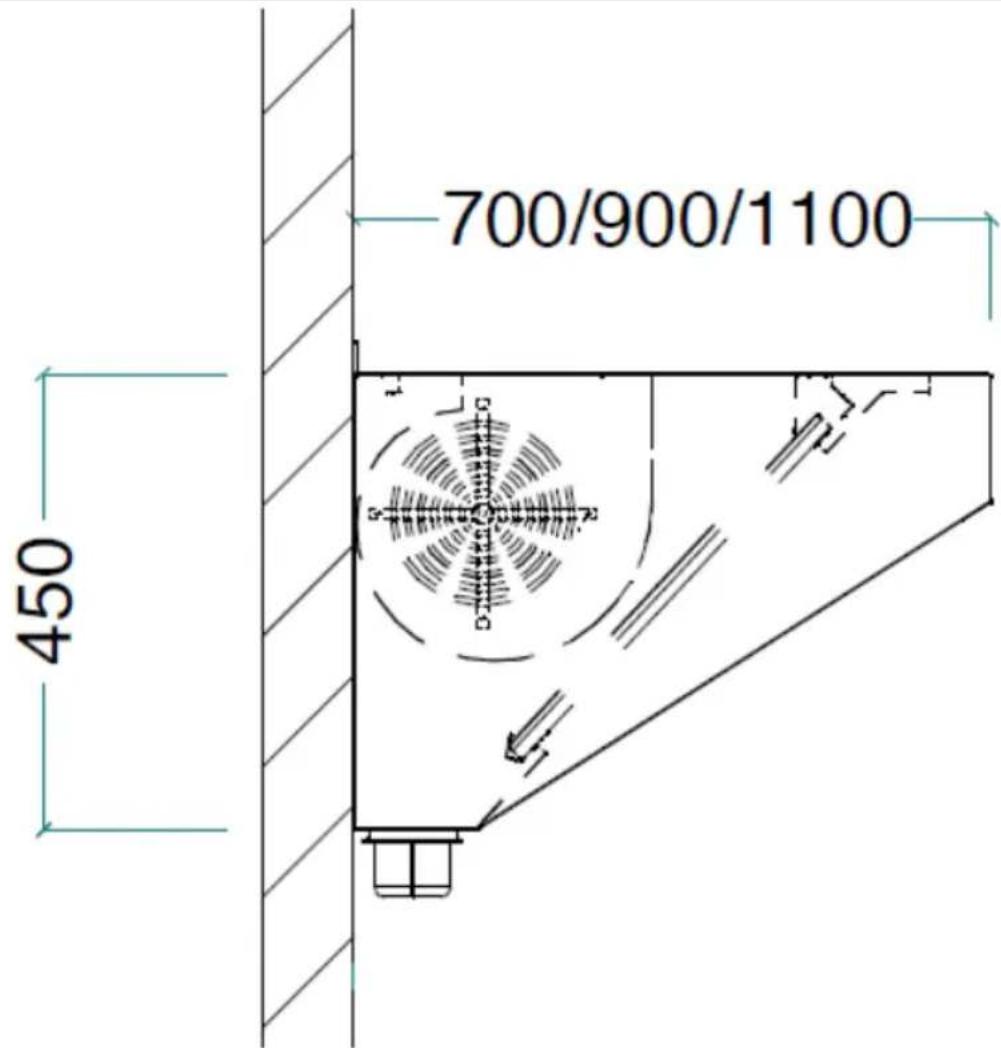
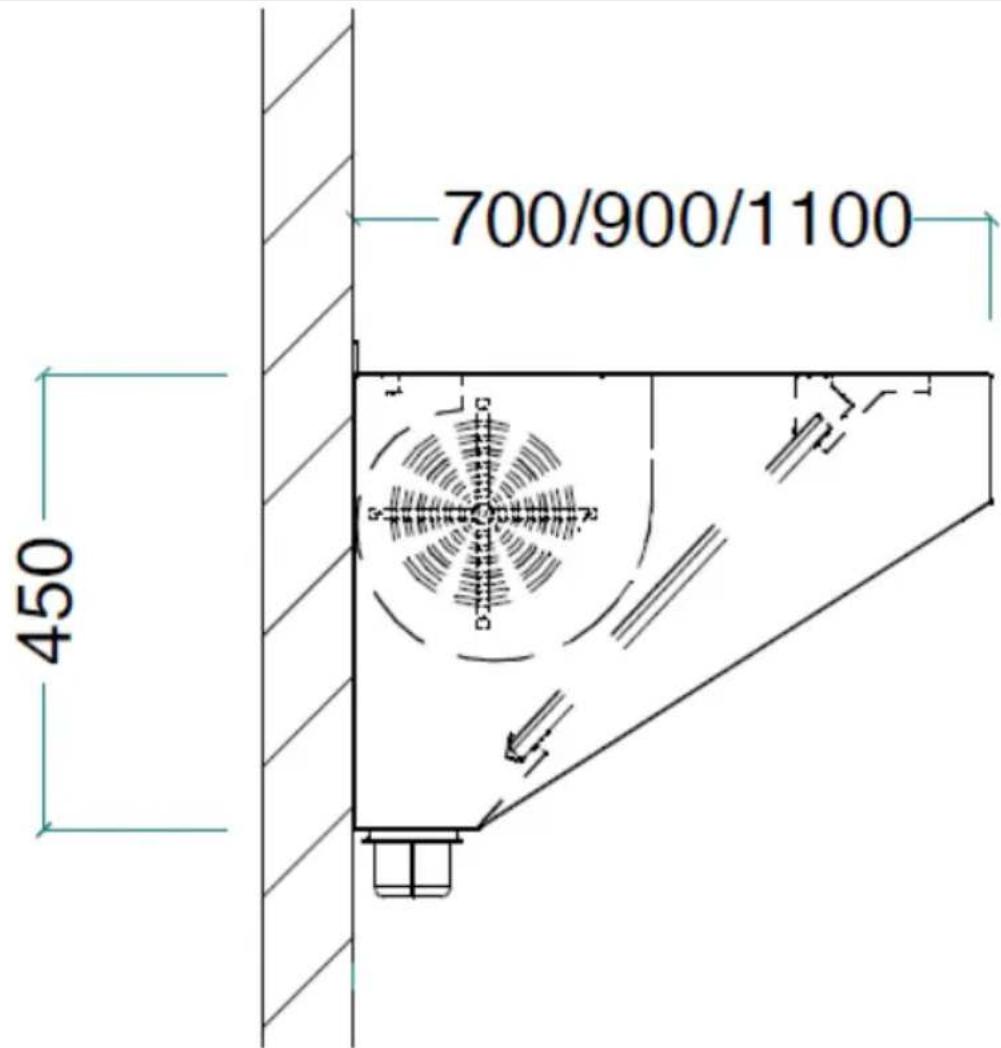
The temperature of environment must not be higher than 40° C and the relative humidity should be less than 85%. There should be at least 10 cm distance between each free sides of the device and the wall or other objects. The device should always be used when positioned on a vertical, stable, fireproof and dry surface and be out of the reach of children and persons with limited mental and sensory functions. Position the device such that you always have access to the power plug. The power cord connected to the appliance must be properly grounded and correspond to the technical details on the product label.
ASSEMBLING THE APPLIANCE
ELECTRICAL DIAGRAM![graph TD A["Light Bulb L"] -->|Brown| B["Blue"] A -->|N Yellow| C["Yellow"] C --> D["2"] D --> E["Blue"] D --> F["White"] D --> G["Pink"] D --> H["Red"] D --> I["Orange"] E --> J["AC-L"] E --> K["AC-N"] E --> L["MO-n"] E --> M["MO-1"] E --> N["MO-2"] E --> O["MO-3"] E --> P["MO-4"] J --> Q["4"] K --…](/content/2026/04/711494/images/44476202bd2b889c1a65419951c1b8c21aa38cfe439e2e6e94523995b2f64396.jpg)
- Capacitor
- Motor
- Spot lighting
4. Control buttons
3.2. Device use
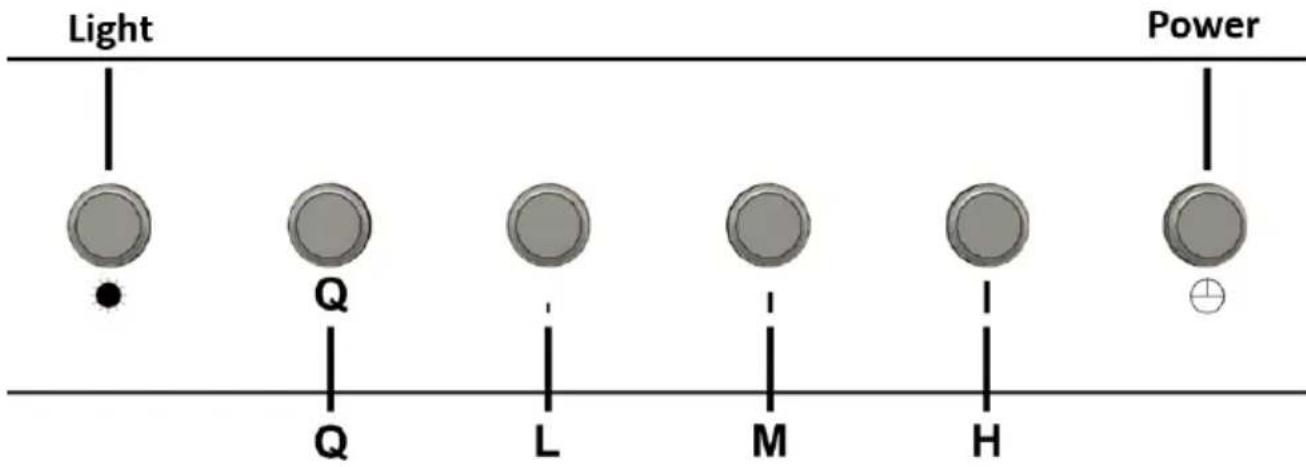
Light – lighting control button
- Press the Light button once and the lamps will turn on at maximum brightness.
- When the lamps are on, press and hold the Light button to reduce the brightness and then release the Light button when the desired brightness is reached.
- Press the Light button again and the lamps will turn off.
- The lamps can be turned off manually or automatically with the Delayed Auto Shut Off-function.
Power – device on/off button
- Pressing the Power button turns on the device and resumes the fan speed last time used.
- After finishing cooking, a quickly pressing the Power button twice will turn off the device immediately.
- After finishing cooking, pressing the Power button once will activate the 3-Minute Delayed Auto Shut Off-function and when the timer finishes counting down the device will automatically turn off. NOTE: while the Delayed Auto Shut Off-function is activated and the timer counting down, pressing the Power button again will turn off the device immediately.
Q-L-M-H - fan speed control
• Q – quiet mode for less speed and noise (perfect for light cooking). - L - low speed • M – medium speed - H – high speed
- NOTE: pressing any of these speed-buttons will turn on the device and set the corresponding fan speed. The last selected fan speed will be memorized and resumed the next time the device will be turned on by pressing the Power button.
3.3. Cleaning and maintenance
a) Unplug the mains plug and allow the device to cool completely before each cleaning, adjustment or replacement of accessories, or if the device is not being used for a longer period. - Wait for the rotating elements to stop. b) Use only non-corrosive cleaners to clean the surface. c) Use only mild, food-safe detergents to wash the device. d) After cleaning the device, all parts should be dried completely before using it again. e) Do not spray the device with a water jet or submerge it in water. f) Do not allow water to get inside the device through vents in the housing of the device. g) Clean the vents with a brush and compressed air. h) Use a soft, damp cloth for cleaning. i) Do not use sharp and/or metal objects for cleaning (e.g. a wire brush or a metal spatula) because they may damage the surface material of the appliance. j) Do not clean the device with an acidic substance, agents of medical purposes, thinners, fuel, oils or other chemical substances because it may damage the device.
DISPOSING OF USED DEVICES
Do not dispose of this device in municipal waste systems. Hand it over to an electric and electrical device recycling and collection point. Check the symbol on the product, instruction manual and packaging. The plastics used to construct the device can be recycled in accordance with their markings. By choosing to recycle you are making a significant contribution to the protection of our environment.
Contact local authorities for information on your local recycling facility.

ELECTRICAL DIAGRAM![graph TD A["Light Bulb L"] -->|Brown| B["Blue"] A -->|N Yellow| C["Yellow"] C --> D["2"] D --> E["Blue"] D --> F["White"] D --> G["Pink"] D --> H["Red"] D --> I["Orange"] E --> J["AC-L"] E --> K["AC-N"] E --> L["MO-n"] E --> M["MO-1"] E --> N["MO-2"] E --> O["MO-3"] E --> P["MO-4"] Q["1"] --> R["Yel…](/content/2026/04/711494/images/8d69867e17c8ca85b972315a59546bc1afe87cb847cbdc0cd14a86afb1b9c85e.jpg)
- Capacitor
- Motor
- Spotlight
- Control buttons
3.2. Using the device
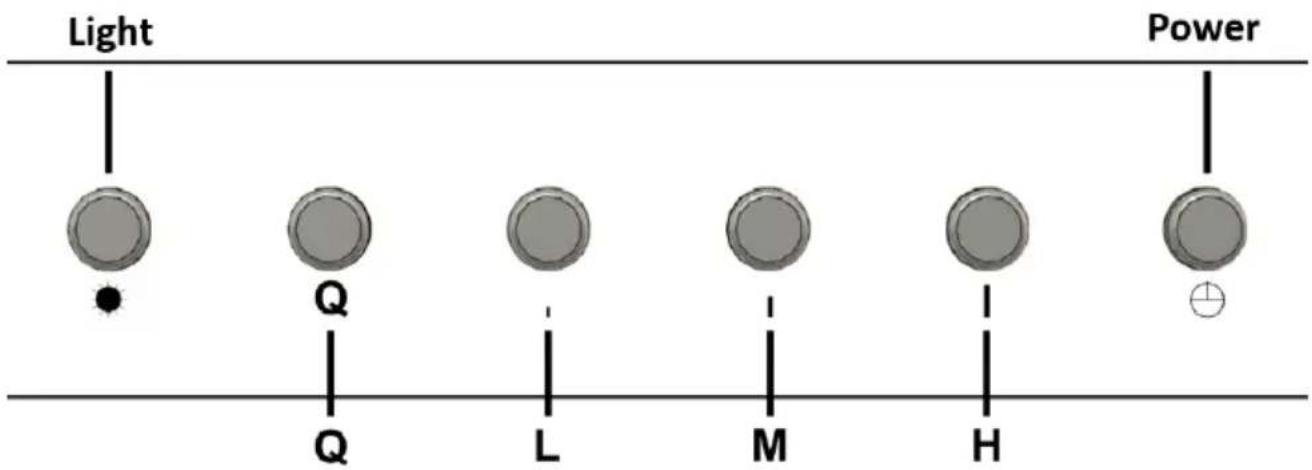
Light - button for light control
PLACEMENT OF THE DEVICE
MOUNTING THE DEVICE
ELECTRICAL SCHEME![graph TD L["Light Bulb"] --> N["N"] N --> Yellow1["Yellow"] Yellow1 --> 2["2"] 2 --> BlueBlue["Blue"] 2 --> PinkPink["Pink"] 2 --> RedRed["Red"] 2 --> OrangeOrange["Orange"] BlueBlue --> AC-L["AC-L"] BlueBlue --> AC-N["AC-N"] BlueBlue --> MO-N["MO-N"] BlueBlue --> MO-1["MO-1"] BlueBlue --> MO-2["MO-…](/content/2026/04/711494/images/cc0bc0888749251c34db432291b2d5908203166435b86470f15f6884f3ea8e06.jpg)
- Capacitor
- Motor
- Spotlight
Light – lighting control button
Light – light control button
PLACEMENT OF THE DEVICE
Light – lighting control button
For the disposal of the device, please consider and act according to the national and local rules and regulations.
CONTACT
expondo Polska sp. z o.o. sp. k.
- GENERAL DESCRIPTION
- EN
- LEGEND
- USAGE SAFETY
- ELECTRICAL SAFETY
- SAFETY IN THE WORKPLACE
- PERSONAL SAFETY
- SAFE DEVICE USE
- USE GUIDELINES
- PREPARING FOR USE
- APPLIANCE LOCATION
- ASSEMBLING THE APPLIANCE
- CONTROL BUTTONS
- DEVICE USE
- LIGHT – LIGHTING CONTROL BUTTON
- POWER – DEVICE ON/OFF BUTTON
- Q-L-M-H - FAN SPEED CONTROL
- CLEANING AND MAINTENANCE
- DISPOSING OF USED DEVICES
- USING THE DEVICE
- LIGHT - BUTTON FOR LIGHT CONTROL
- PLACEMENT OF THE DEVICE
- LIGHT – LIGHT CONTROL BUTTON
- CONTACT
Brand : Royal Catering
Model : RCGH-100
Category : Range hood