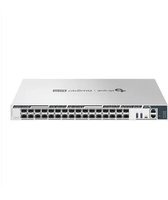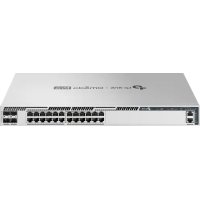
S7500-24Y4C - Switch TP-LINK - Free user manual and instructions
Find the device manual for free S7500-24Y4C TP-LINK in PDF.


User questions about S7500-24Y4C TP-LINK
0 question about this device. Answer the ones you know or ask your own.
Ask a new question about this device
Download the instructions for your Switch in PDF format for free! Find your manual S7500-24Y4C - TP-LINK and take your electronic device back in hand. On this page are published all the documents necessary for the use of your device. S7500-24Y4C by TP-LINK.
USER MANUAL S7500-24Y4C TP-LINK
Omada Pro L3 Managed Switch Datasheet
S7500-24Y4C
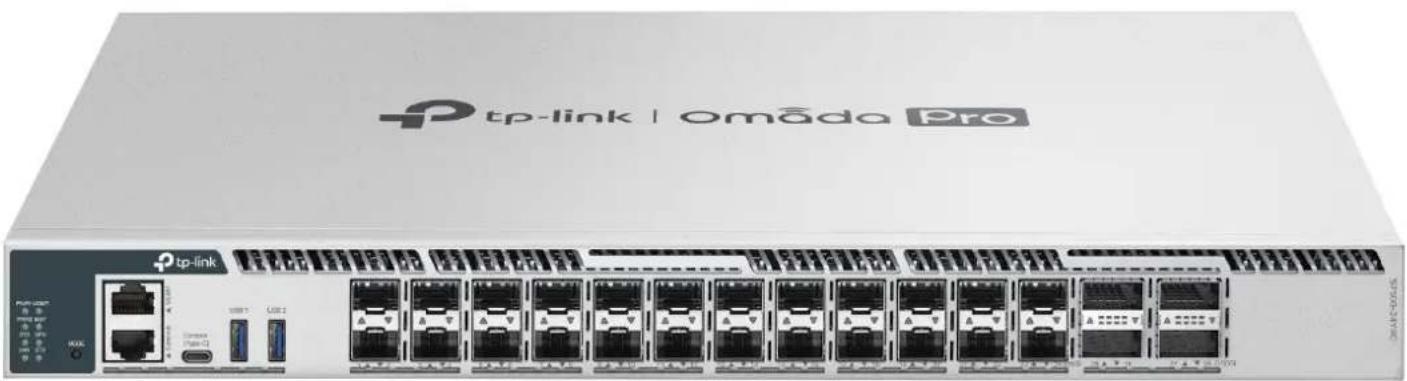
Omada Pro 24-Port 25G Stackable L3 Managed Aggregation/Core Switch with 4 100G Slots
text_image
tp-link | omāda Pro tp-link USB1 USB2 USB3 USB4 USB5 USB6 USB7 USB8 USB9 USB10 USB11 USB12 USB13 USB14 USB15 USB16 USB17 USB18 USB19 USB20 USB21 USB22 USB23 USB24 USB25 USB26 USB27 USB28 USB29 USB30 USB31 USB32 USB33 USB34 USB35 USB36 USB37 USB38 USB39 USB40 USB41 USB42 USB43 USB44 USB45 USB46 USB47 USB48 USB49 USB50 USB51 USB52 USB53 USB54 USB55 USB56 USB57 USB58 USB59 USB60 USB61 USB62 USB63 USB64 USB65 USB66 USB67 USB68 USB69 USB70 USB71 USB72 USB73 USB74 USB75 USB76 USB77 USB78 USB79 USB80Highlights
- 24× 1/10/25G SFP28 Slots and 4× 40/100G QSFP28 Slots
• Physical stacking for built-in redundancy and performance
• L3 Features: OSPF, BGP, IS-IS, VRRP, PIM-SM/PIM-DM/PIM-SSM, ECMP, PBR
• Security Strategies: Secure Boot, RADSEC, IMPB, SFTP, 802.1X, Port Security
• Highly available with two field-replaceable power supplies, VRRP, ERPS, and BFD - Easy O&M: NETCONF, Configuration Rollback, Hot Patching, and RSPAN
- Centralized cloud management via the web or the Omada app ^+
Product Pictures
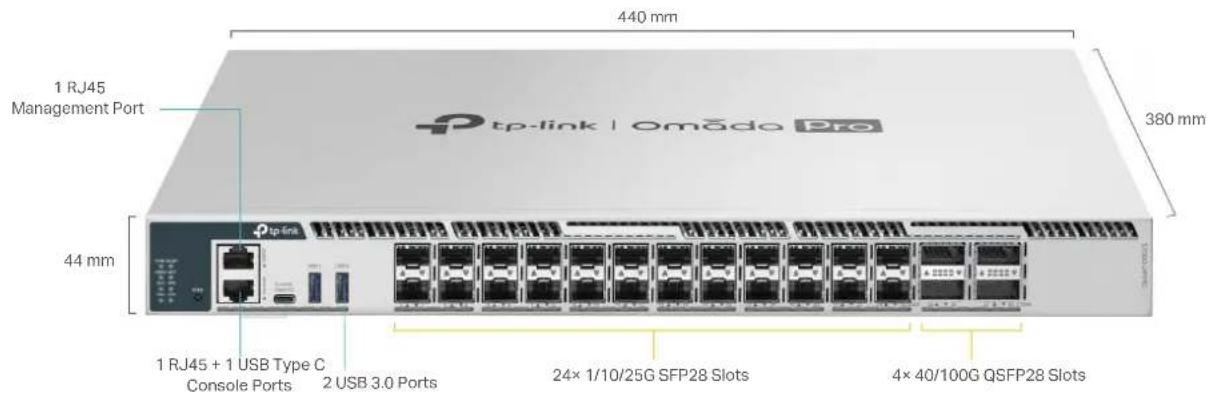
text_image
440 mm 1 RJ45 Management Port 380 mm 44 mm 1 RJ45 + 1 USB Type C Console Ports 2 USB 3.0 Ports 24× 1/10/25G SFP28 Slots 4× 40/100G QSFP28 SlotsOmada Pro Solution
Omada Pro is an intelligent cloud solution for enterprise networking, offering enterprise-grade product line designed to meet the high-capacity, security, and management needs of various industries, such as MDUs, hospitality, K-12 education, public works, and more.
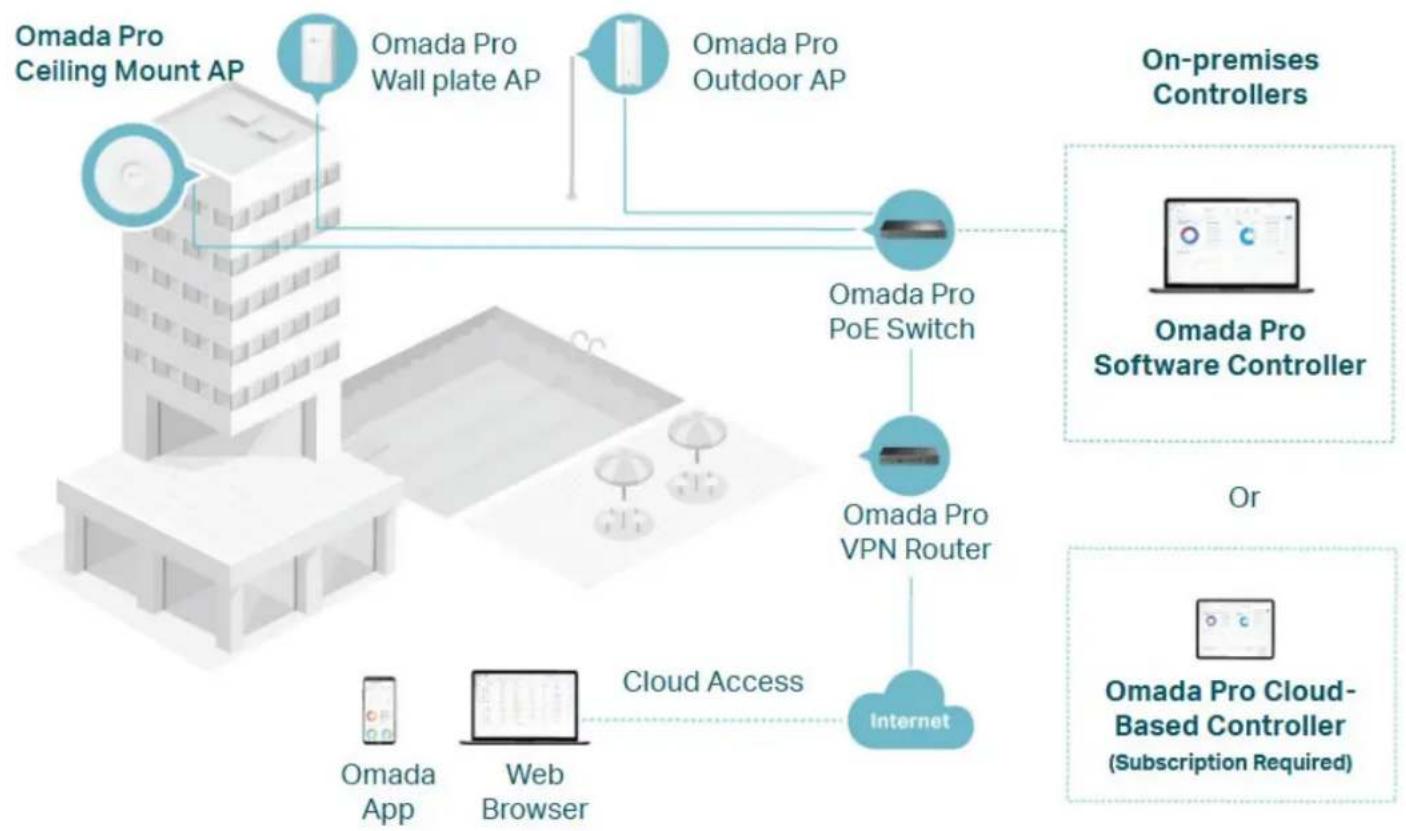
flowchart
graph TD
    A["Omada Pro Ceiling Mount AP"] --> B["Omada Pro Wall plate AP"]
    A --> C["Omada Pro Outdoor AP"]
    B --> D["Omada Pro PoE Switch"]
    C --> D
    D --> E["Omada Pro VPN Router"]
    E --> F["Internet"]
    G["Omada App"] --> H["Web Browser"]
    I["Cloud Access"] --> H
    J["On-premises Controllers"] --> K["Omada Pro Software Controller"]
    L["Or"] --> M["Omada Pro Cloud-Based Controller (Subscription Required)"]

MDUs

Hospitality

Public Works

Catering

Manufacturing

Retail
Specifications
Hardware Features & Performance
| Model S7500-24Y4C | ||
| General | Interface | 24×1/10/25G SFP28 Slots4×40/100G QSFP28 Slots |
| Console Ports 1 × RJ45 | +1 × USB Type C | |
| Management Port 1 × RJ45 | ||
| USB Ports 2 × USB 3.0 | ||
| Flash 2×4 MB Nor + 8 GB EMMC | ||
| DRAM 8GB DDR4 | ||
| Processor Quad-Core ARM @1.2GHz CPU | ||
| Performance | Switching Capacity 2000 Gbps | |
| Forwarding Bandwidth 1000 Gbps | ||
| Packet Forwarding Rate 810 Mpps | ||
| MAC Address Table 128K | ||
| Packet Buffer 8 MB | ||
| Stacking Port 100G QSFP28 slot (all uplink ports can be used as stacking ports)* | ||
| Stacking Bandwidth Up to 800 Gbps (4 stacking ports) | ||
| Max Stacking Number | 12 in standalone mode, 4 in Omada controller mode | |
| Compatible Models for Stacking | S7500-24Y4C | |
| Transmission Method | Store and Forward | |
| Jumbo Frame | 9 KB | |
| Power Supply | 100-240 V ~50/60 Hz | |
| Redundant Power Supply | Max 2 hot swappable power supply module, N+1 redundant (shipping with one PSM550-AC module by default) | |
| Suitable Power Supply Module | PSM550-AC | |
| Max Power Consumption | 137.63W (220 V/50 Hz) | |
| Max Heat Dissipation | 469.6BTU/hr (220 V/50 Hz) | |
| Physical & Environmet | Standby Power Consumption | 43.72W (220 V/50 Hz) |
| Noise | 1× PSM550-AC power supply module:Min: 35.6 dBA @ 1m 25 °CMax: 54.2 dBA @ 1m 25 °C | |
| Fan Quantity | 4 hot swappable fan modules, N+1 redundant | |
| Airflow | Front-to-back | |
| Surge Protection | Service port: ±6 kV in common modePower port: ±4 kV in differential mode; ±4 kV in common mode | |
| ESD Protection | Air: ±15 kV, Contact: ±8 kV | |
| MTBF | 382,117 h @ 25 °C | |
| Dimensions (W x D x H) | 17.3 × 15.0 × 1.7 in (440 × 380 × 44 mm) | |
| Installation | Rackmount | |
| Operating Temperature & Altitude | -5 °C to 50 °C (23 °F to 122 °F) @ 300 meters-5 °C to 45 °C (23 °F to 113 °F) @ 2,000 meters-5 °C to 40 °C (23 °F to 104 °F) @ 3,000 meters** | |
| Storage Temperature | -40 °C to 70 °C (-40 °F to 158 °F) | |
| Operation Humidity | 10% to 90% RH, non-condensing | |
| Storage Humidity | 5% to 90% RH, non-condensing | |
| Certification | CE, FCC, RoHS | |
| Software Features ^a | |||
| Model S7500-24Y4C | |||
| System | System Info | Device Description- Name- Location- System ContactSystem Time- Manual- Synchronize with PC's Clock- SNTP ClientDST- Predefined Mode- Recurring Mode- Date Mode | LED- LED on/offSystem IP- Static IP/DHCP/BOOTPSystem IPv6- Link-local Address Config- Global Address Autoconfig via RA Message- Global Address Autoconfig via DHCPv6 Server- Add a Global Address Manually |
| User Management | User SettingsAccess Level: 4 levels | Password Recovery Settings | |
| System Tools | Config Restore/Backup- Web: HTTP- CLI: TFTP/Flash/USBFirmware Upgrade- Web: HTTP- CLI: TFTP/Flash/USB | System RebootSystem ResetBoot Config (Dual Image)Reboot ScheduleConfig RollbackHot Patch | |
| Access Security | Access Control Config- IP-based- MAC-based- Port-based- IPv6-basedHTTP Config- Enable/Disable- Session Config- Access User Number- Port SettingSSL Config- SSLv3/TLSv1 Enable/Disable- CipherSuite Config- IPv6 SSL | SSH Config- Enable/Disable-v2- Encryption Algorithm- Data Integrity Algorithm- Port Setting- IPv6 SSHTelnet Config- Enable/Disable- Port Setting- IPv6 TelnetConsole Port- Baud Rate setting | |
| Stack | Stack SettingStack-port LAG: up to 6 groups, each group supports a maximum of all stackable-ports | Stackable Devices: up to 12 devicesStack MAC Address Switching Delay | |
| SDM Template | Default Template- IPv4 ACL Rules: 2000 entries- MAC ACL Rules: 2000 entries- Combined ACL: 2000 entries- IPv4 Source Guard: 899 entriesIPv4 Access- IPv4 ACL Rules: 0 entries- MAC ACL Rules: 2000 entries- Combined ACL: 4000 entries- IPv4 Source Guard: 999 entries | IPv6 Access- IPv4 ACL Rules: 0 entries- MAC ACL Rules: 2200 entries- IPv6 ACL: 24000 entries- IPv6 Source Guard: 749 entriesOmada- IPv4 ACL Rules: 0 entries- MAC ACL Rules: 0 entries- Combined ACL: 4000 entries- IPv6 ACL: 1700 entries- IPv4 Source Guard: 0 entries | |
| Time Range | Time Range Config | Holiday Config | |
| File System | File OperationFTP SFTP | SCP TFTP USB Storage | |
| Software Features ^4 | |||
| Model S7500-24Y4C | |||
| L2 Features | Port | • Port config- Status- Speed and Duplex- Flow Control(802.3x)- Jumbo Frame: 1518-9216 KB• Port Mirror- Ingress (Many to One)- Egress (Many to One)- RSPAN | • Port Security- Learn mode: Dynamic/Static/Permanent/Sticky- Port Max Learned MAC: 64- Current Learned Number- Status- Exceed Max Learned Trap• Port Isolation• Loopback Detection- Alert- Port Based- VLAN Based |
| DDM | |||
| LAG | • Hash Algorithm: SRC MAC/DSTMAC/SRC MAC +DST MAC/SRC IP/DST IP/SRC IP +DST IP | • Static LAG: Up to 120 groups, up to 8 ports per group• LACP(802.3ad) | |
| Traffic Monitor | • TX Packets/Bytes• RX Packets/Bytes• TX Unicast/Multicast/Broadcast• RX Unicast/Multicast/Broadcast | • TX Errors• RX Errors• RX Packet Size Analysis | |
| MAC Address | • MAC Address Table: 128K entries• IVL/SVL: IVL• Create Static Unicast Address | • Bind Dynamic Address• Create Filtering Address• MAC Notification Settings | |
| VLAN | • 802.1Q VLAN(802.1q): 4K VLANs• MAC VLAN: 200 entries• Protocol VLAN- 16 Protocol VLAN Template- 12 Protocol VLAN Group | • QinQ(VLAN VPN): 256 entries• Private VLAN• GVRP | |
| Multicast | • Max Multicast Groups: 4K (IPv4,IPv6)• IGMP Snooping- IGMP V1/V2/V3- Report Message Suppression- Fast Leave- Unknown Multicast Discard- Static Multicast Groups- IGMP Snooping Querier- IGMP Packet Statistics- IGMP Authentication- Multicast Filtering: 256 profiles and 16 entries per profile- Router Port Setting: Static Router Port/Forbidden Router Port• MVR | • MLD Snooping- MLD V1/V2- Report Message Suppression- Unknown Multicast Discard- Fast Leave- Static Multicast Groups- MLD Snooping Querier- MLD Packet Statistics- Multicast Filtering: 256 profiles and 16 entries per profile- Router Port Setting: Static Router Port/Forbidden Router Port• Multicast Table- IPv4 Multicast Table- IPv6 Multicast Table | |
| STP | • STP(802.1d)• RSTP(802.1w)• MSTP(802.1s)• MSTI entries: 64 | • STP Security- Loop Protect- Root Protect- TC Protect- BPDU Protect- BPDU Filter | |
| LLDP (802.1ab) | • Enbale/Disable• Local Info• Neighbor Info• Statistic Info | • LLDP-MED- Local Info- Neighbor Info | |
| L2PT • Layer 2 Protocol Tunneling | |||
| PPPoE ID Insertion | • Circuit-ID Type- IP- MAC- UDF- UDF-ONLY | • Remote-ID | |
| ERPS • Ring: 64 | |||
| Virtual MAC | |||
| Sticky MAC | |||
| Software Features* | |||
| Model S7500-24Y4C | |||
| L3 Features | L3 INTERFACE: 256(IPv4,IPv6) | ||
| STATIC ROUTE: 2048 IPv4, 1024 IPv6 | |||
| IPv4 Host Router entries + IPv6 Host Router entries: 15300 | |||
| IPv4 Network Router entries: 102400 (shared with IPv6 Network Router entries)IPv6 Network Router entries: 51200 (shared with IPv4 Network Router entries) | |||
| ECMP | • ECMP entries: 256• MAX-PATH: 32 | ||
| ARP | • Static ARP: 1024• Dynamic ARP: 24576 | ||
| ND: 24576 | |||
| DHCP | • DHCP Server - IP Pool: 64 - IP MAX entries: 8000 - Manual Binding: 1000 - Excluded IP Range: 100 • VRRP V2/V3 • VRRP Instance: 64 • VRRP Virtual IP: 32 per instance | ||
| VRRP | • OSPFv2 - OSPF Instance: 16 - Network entries: 256 entries - Area entries For Stub Or NSSA: 16 per instance - AreaRange entries: 16 per instance - Virtual-link entries: 16 per instance - Redistribute: conneted/static/RIP/OSPF/IS-IS/BGP - Graceful Restart - OSPFv2 BFD | ||
| OSPF | • RIPv1/v2 - Network entries: 256 - Redistribute entries: 20 - Redistribute: BGP/connected/OSPF/IS-IS/static | ||
| RIP | • IS-IS Interfaces: 128 • IS-IS Area Numbers: 3 • Redistribute: BGP/connected/OSPF/OSPFv3/RIP/static/RIPng | ||
| IS-IS | • IS-IS Interfaces: 128 • IS-IS Area Numbers: 3 • Redistribute: BGP/connected/OSPF/OSPFv3/RIP/static/RIPng | ||
| BGP | • Redistribute: IS-IS/connected/OSPF/RIP/static | ||
| PIM | • PIM DM • PIM SM • PIM SSM | ||
| IGMP • Version: v1/v2/v3 • IGMP Multicast Groups: 2K | |||
| BFD • Template Numbers: 16 • Session Numbers: 8 | |||
| PBR | |||
| uRPF | |||
| QoS | Class of Service | • Priority Queues: 8 Queues • Port Priority • 802.1P Priority • DSCP/ToS Priority • Priority Schedule Mode: SP/WRR per Queue • Queue Weight Config: For WRR/SP+WRR Mode | |
| Bandwidth Control | • Rate Limit - Ingress Rate Limit - Egress Rate Limit - Rate Limit Grade: 64kbps • Storm Control - Control Mode: kbps/ratio - Broadcast - Multicast - Unknown Unicast | ||
| Voice VLAN • Supported OUI Numbers: 64 | |||
| WRED • WRED profile: 16 | |||
| Software Features* | |||
| Model S7500-24Y4C | |||
| Network Security | IP-MAC Binding | Binding entries: 1024 entriesManual Binding | ARP ScanningDHCP Snooping |
| IPv6-MAC Binding | Binding entries: 1024 entriesManual Binding | DHCPv6 SnoopingND Snooping | |
| ARP Inspection | ARP Detect entries: 1024 entriesARP Detect | ARP DefendARP Statistics | |
| ND Detection | ND Detection entries: 1024 entriesND Detect | ND Statistics | |
| IP Source Guard | IP Source Guard entries- Default SDM Template: 899- IPv4 SDM Template: 999- IPv6 SDM Template: 0 | Security Type- Source IP- Source IP + Source MAC | |
| IPv6 Source Guard | IPv6 Source Guard entries- Default SDM Template: 0- IPv4 SDM Template: 0- IPv6 SDM Template: 749 | Security Type- Source IPv6- Source IPv6 + Source MAC | |
| RA Guard: 30 entries | |||
| DoS Defend | Scan SYNFINXmascanNULL Scan | SYN sPort less 1024Ping FloodingSYN/SYN-ACK Flooding | |
| DHCP Filter | DHCPv4 Filter- Legal Server entries: 200 | DHCPv6 Filter- Legal Server entries: 200 | |
| 802.1x | Control Type- Port Based- MAC BasedAuth Method: PAP/EAP-MD5/EAP-TLS/EAP-TTLS/EAP-PEAP | Radius AuthenticationRadius AccountingRadius Server Load BalancingRADSECGuest VLAN | |
| AAA | |||
| ACL | Time-Range- Time Slice- Week Time-Range- Absolute Time-Range- HolidayMAC ACL- Source MAC- Destination MAC- VLAN ID- EtherType- User PriorityIP ACL- Source IP- Destination IP- IP Protocol- TCP Flag- TCP/UDP Source Port- TCP/UDP Destination Port- DSCP/IP ToSCombined ACLIPv6 ACLRule Operation- Permit- DenyPolicy Action- Mirror- Rate Limit- Redirect- QoS RemarkBinding- Port Binding- VLAN Binding | Default Template- IPv4 ACL Rules: 2000 entries- IPv6 ACL Rules: 0 entries- MAC ACL Rules: 2000 entries- Combined ACL: 2000 entriesIPv4 Access- IPv4 ACL Rules: 0 entries- IPv6 ACL Rules: 0 entries- MAC ACL Rules: 2000 entries- Combined ACL: 4000 entriesIPv6 Access- IPv4 ACL Rules: 0 entries- IPv6 ACL Rules: 2400 entries- MAC ACL Rules: 2200 entries- Combined ACL: 0 entriesOmada- IPv4 ACL Rules: 0 entries- IPv6 ACL Rules: 1700 entries- MAC ACL Rules: 0 entries- Combined ACL: 4000 entries | |
| Secure Boot | |||
| Virtualization IP Tunnel | IPv6 over IPv4IPv6 over IPv4 GRE | IPv4 over IPv4 GRETunnel entries: 100 | |
| Software Features ^a | ||
| Model S7500-24Y4C | ||
| System Monitor | CPU MonitorMemory Monitor | |
| sFlow | ||
| OAM | EFM- Link Monitoring- Remote Failure Indication Config- Statistics | |
| DLDP | ||
| SNMP | SNMP Version: v1/v2c/v3SNMP Config- Global Config-SNMP View-SNMP Group-SNMP User-SNMP CommunityNotification- Trap: IPv4/IPv6-Inform: IPv4/IPv6-RMON v1/v2Public MIBsPrivate MIBs | |
| MIBs | MIB II (RFC1213)Interface MIB (RFC2233)Ethernet Interface MIB (RFC1643)Bridge MIB (RFC1493)P/Q-Bridge MIB (RFC2674)RMON MIB (RFC2819)RMON2 MIB (RFC2021)RADIUS Accounting Client MIB (RFC2620)RADIUS Authentication Client MIB (RFC2618)Remote Ping, Traceroute MIB (RFC2925)Support TP-Link Private MIB | |
| NETCONF | ||
| DHCP Auto Install | ||
| Log | Display/FilteringSeverity LevelSave to FlashRemote HostBackup Log | |
| Network Diagnostics | PingIPv6 PingTracertIPv6 Tracert | |
| Others | Index | |
| Show running config | Use the show running config command to view device's running status via telnet.Configuration File: Import/Export/Edit | |
| Omada SDN Controller | Omada Pro SDN controller | |
Ordering Information
Host Switch
| Model Description | |
| S7500-24Y4C Omada Pro 24-Port 25G Stackable L3 Managed Aggregation/Core Switch with 4 100G Slots |
Power Supply Module
| Model Description | |
| PSM550-AC 550 W AC Power Supply Module |
SFP/SFP+/SFP28/QSFP28 Modules
| Model Description | |
| SM311LS Gigabit | SFP module, Single-mode, LC interface, Up to 20km distance |
| SM311LM Gigabit | SFP module, Multi-mode, LC interface, Up to 550m distance |
| SM321A Gigabit | WDM Bi-Directional SFP Module, single-mode, LC connector, TX: 1550 nm/RX: 1310 nm, 20 km |
| SM321A-2 Gigabit | WDM Bi-Directional SFP Module, single-mode, LC connector, TX: 1550 nm/RX: 1310 nm, 2 km |
| SM321B Gigabit | WDM Bi-Directional SFP Module, single-mode, LC connector, TX: 1310 nm/RX: 1550 nm, 20 km |
| SM321B-2 Gigabit | WDM Bi-Directional SFP Module, single-mode, LC connector, TX: 1310 nm/RX: 1550 nm, 2 km |
| SM5110-LR 10GBase-LR SFP+ LC Transceiver, single-mode, LC connector, 1310nm, 10 km | |
| SM5110-SR 10GBase-SR SFP+ LC Transceiver, multi-mode, LC connector, 850nm, 300 m | |
| SM6110-LR 25GBase-LR SFP28 LC Transceiver, single-mode, LC connector, 1310nm, 10 km | |
| SM6110-SR 25GBase-SR SFP28 LC Transceiver, multi-mode, LC connector, 850nm, 300 m | |
| SM9110-SR4 100GBASE-SR4 QSFP28 Transceiver | |
Direct Attach Cable
| Model Description |
| SM5220-1M 1 Meter 10G SFP+ Direct Attach Cable |
| SM5220-3M 3 Meters 10G SFP+ Direct Attach Cable |
| SM6220-1M 1 Meter 25G SFP28 Direct Attach Cable |
| SM9220-1M 1 Meter 100G QSFP28 Direct Attach Cable |
RJ45 SFP/SFP+ Modules
| Model Description | |
| SM331T | 1000BASE-T RJ45 SFP Module |
| SM5310-T | 10GBASE-T RJ45 SFP+ Module |
MC Series Media Converter
| Model Description | |
| MC210CS Gigabit | Single-Mode Media Converter, up to 20 km, chassis mountable |
| MC200CM Gigabit | multi-mode SC SFP Transceiver, up to 550 m, chassis mountable |
| MC200L Gigabit | SFP slot supporting mini-GBIC modules, chassis mountable |
| MC1400 14-slot | power supply chassis for TP-LINK MC Series Media Converter, 19-inch rack-mountable |
FC Series Media Converter
| Model Description | |
| FC311A-2 Gigabit | Single-Mode WDM Media Converter, up to 2 km, TX:1550nm, RX:1310nm, chassis mountable |
| FC311B-2 | Gigabit Single-Mode WDM Media Converter, up to 2 km, TX:1310nm, RX:1550nm, chassis mountable |
| FC311A-20 | Gigabit Single-Mode WDM Media Converter, up to 20 km, TX:1550nm, RX:1310nm, chassis mountable |
| FC311B-20 | Gigabit Single-Mode WDM Media Converter, up to 20 km, TX:1310nm, RX:1550nm, chassis mountable |
| FC1400 | 14-slot power supply chassis for TP-LINK FC Series Media Converter, 19-inch rack-mountable |
†These functions require the use of the Omada Pro SDN Controller. Zero-Touch Provisioning requires the use of the Omada Pro Cloud-Based Controller.
The model featured in this guide may be unavailable in your country or region. Visit TP-Link website for local sales information: www.tp-link.com.
Specifications are subject to change without notice. All the brands and product names are trademarks or registered trademarks of their respective holders. © 2024 TP-Link