ZenWiFi BD4 - WiFi antenna ASUS - Free user manual and instructions
Find the device manual for free ZenWiFi BD4 ASUS in PDF.
User questions about ZenWiFi BD4 ASUS
0 question about this device. Answer the ones you know or ask your own.
Ask a new question about this device
Download the instructions for your WiFi antenna in PDF format for free! Find your manual ZenWiFi BD4 - ASUS and take your electronic device back in hand. On this page are published all the documents necessary for the use of your device. ZenWiFi BD4 by ASUS.
USER MANUAL ZenWiFi BD4 ASUS
natural_image
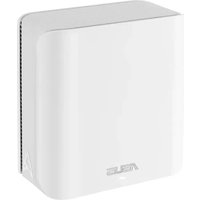
Line drawing of a rectangular electronic device with visible internal structure and brand logo (no text or symbols on body)F23951
Première Édition
Juillet 2024
3.2 Service Adaptive QoS....21
3.3 Administration....24
3.4 AiProtection....27
natural_image
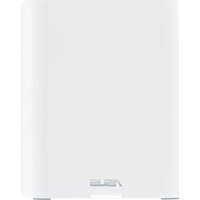
Front view of a white electronic device labeled 'ASUS' (no additional text or symbols visible)
text_image
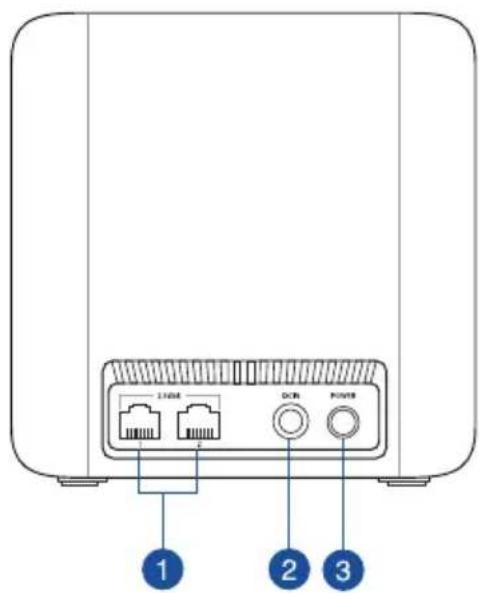
L108 DDR POWER 1 2 3text_image
Boutons de commande Operation Mode: Wireless cardier Provider Version - 1.6.0.6.10E-5233 Operation Mode: Wireless cardier Provider Version - 1.6.0.6.10E-5233 System Status CPU Case 1 23% Case 2 28% Case 3 10% Case 4 27% Security: WPA2/WPA3- Personal Class1 View List Ethernet Ports 2.5G 2.5G Connected Notice Untagged Assistant de configuration internet Volet de navigation USB Services | Product Registration | Feedback | Help & Support: ASUS ZanWIFI 804 | Product Registration | Feedback | ©2024 ADJ/TME Computer Inc. All rights reservedtext_image
Main Network Network Clients General WiFi7 Mode Network Name (SSID) ZenWiFi WiFi Band 2.4GHz 5GHz Security Open Password RADIUS Setting Authentication Method WPA2/WPA3-Personal Wireless Security ..........flowchart
graph TD
A["Internet status: Connected"] --> B["Security: WPA2/WPA3-Personal"]
B --> C["Clients: 1 View List"]
3.2 Service Adaptive QoS
text_image
QoS - QoS to configuration Quality of Service (QoS) ensures bandwidth for prioritized tasks and applications. • Adaptive QoS ensures inbound and outbound bandwidth on both wired and wireless connections for prioritized applications and tasks via pro-defined, drag-and-drop presets: gaming, media streaming, VoIP, web surfing and file transferring • Traditional QoS ensures inbound and outbound bandwidth on both wired and wireless connections for prioritized applications and tasks via manual user-defined parameters. • Bandwidth Limiter lets you set limits on download and upload speeds. To enable QoS function, click the QoS slide switch and fill in the upload and download. Enable QoS OFF Applytext_image
Administration - Operation Mode ZenWiFi BD4 supports several operation modes to meet different requirements. Please select the mode that match your situation ○ Wireless router mode / AiMesh Router mode (Default) ● Access Point(AP) mode / AiMesh Router in AP mode ● AiMesh Node AiMesh Router mode is a traditional mode with AiMesh functionality, which connects to the Internet via PPPoE, DHCP, PP TP, L2TP, or Static IP and shares the wireless network to LAN clients or devices. In this mode, NAT, firewall, and DHCP server are enabled by default. UPnP and Dynamic DNS are supported for SOHO and home users. Select this mode if you are a first-time user or you are not currently using any wired/wireless routers. You can add AiMesh nodes to form an AiMesh WiFi system to provide extra WiFi coverage. Savetext_image
AIProtection Network Protection with Trend Micro protects against network exploits to secure your network from unwanted access. AiProtection FAQ Enabled AiProtection OFF 1 Router Security Assessment Scan your router to find vulnerabilities and offer available options to enhance your devices protection Scan Danger 2 Malicious Sites Blocking Restrict access to known malicious websites to protect your network from malware, phishing, spam, adware, hacking, and ransomware attacks. ON 0 Protection 2 Two-Way IPS The Two-Way Intrusion Prevention System protects any device connected to the network from spam or DDoS attacks. It also blocks malicious incoming packets to protect your router from network vulnerability attacks, such as Shellshocked, Heartbleed, Bitcoin mining, and ransomware. Additionally, Two-Way IPS detects suspicious outgoing packets from infected devices and avoids botnet attacks. ON 0 Protection 3 Infected Device Prevention and Blocking This feature prevents infected devices from being enslaved by botnets or zombie attacks which might steal your personal information or attack other devices. ON 0 Protection Alert Preferencetext_image
Default router login username and password changed - No Wireless password strength check - Very Weak Wireless encryption enabled - Strong WPS Disabled - No UPnP service disabled - No Web access from WAN disabled - Yes PING from WAN disabled - Yes DMZ disabled - Yes Port trigger disabled - Yes Port forwarding disabled - Yes Anonymous login to FTP share disabled - Yes Disable guest login for Network Place Share - Yes Malicious Website Blocking enabled - No Vulnerability Protection enabled - No Infected Device Prevention and Blocking - No Closetext_image
Parental Controls - Web & Apps Filters Web & Apps Filters allows you to block access to unwanted websites and apps. To use web & apps Filters: 1. In the [Clients Name] column, select the client whose network usage you want to control. The client name can be modified in network map client list. 2. Check the unwanted content categories 3. Click the plus (+) icon to add rule then click apply. If you want to disable the rule temporarily, uncheck the check box in front of rule. Parental Controls FAQ Web & Apps Filters OFFtext_image
Parental Controls - Web & Apps Filters Web & Apps Filters allows you to block access to unwanted websites and apps. To use web & apps Filters: 1. In the (Clients Name) column, select the client whose network usage you want to control. The client name can be modified in network map client list. 2. Check the unwanted content categories 3. Click the plus (+) icon to add rule then click apply. If you want to disable the rule temporarily, uncheck the check box in front of rule. Parental Controls FAQ Web & Apps Filters ON Client List (Max Limit : 54) Client Name (MAC Address) Content Category Add / Delete Adult Block adult/mature content to prevent children from visiting sites that contain material of a sexual, violent, and illegal nature. Instant Message and Communication Block instant communication software and messaging apps to prevent children from becoming addicted to social networking sites. P2P and File Transfer by booking P2P and File Transforming you can make sure your network has a better quality of data transmission. Streaming and Entertainment By blocking streaming and entertainment services you can limit the time your children spend online. No data in table ApplyPlanification horaire
text_image
Parental Controls - Time Scheduling By enabling Block All Devices, all of the connected devices will be blocked from Internet access. Enable block all devices OFF This feature allows you to set up a scheduled time for specific devices' Internet access. 1. In [Client Name] column, select a device you would like to manage. You can also manually key in MAC address in this column. 2. In the [Add / Delete] column, click the plus(*) icon to add the client. 3. In [Time Management] column, click the edit icon to set a schedule. 4. Click [Apply] to save the configurations. Enable Time Scheduling ON System Time Thu, Sep 21 12:34:41 2023 Client List (Max Limit : 64) Select all Client Name (MAC Address) Time Time Management Add / Delete - No data in table. Applytext_image
Firewall General Enable the firewall to protect your local area network against attacks from hackers. The firewall filters the incoming and outgoing packets based on the filter rules. QoS Protection FAQ Enable Firewall Yes No Enable DoS protection Yes No Logged packets type None Respond ICMP Echo (ping) Request from VLAN Yes No Basic Config Enable IPv4 inbound firewall rules Yes No Inbound Firewall Rules (Max Limit: 128) Source IP Port Range Protocol Add / Delete No data in table. IPv6 Firewall All outbound traffic coming from IPv6 hosts on your LAN is allowed, as well as related Inbound traffic. Any other inbound traffic must be specifically allowed here. You can leave the remote IP blank to allow traffic from any remote host. A subnet can also be specified (2001-1111-2222-3330/84 for example) Basic Config Enable IPv6 Firewall Yes No Famous Server List Please select Inbound Firewall Rules (Max Limit: 128) Service Name Remote IPCIDR Local IP Port Range Protocol Add / Delete TCP No data in table. Applytext_image
Firewall - URL Filter Key in the keywords for the sites that you want to block. For example, enter "XXX" in the list The URL filter will block the http://www.abcXXX.com, http://www.XXXbbb.com and so on. Basic Config Enable URL Filter Enabled Disabled Filter table type Deny List URL Filter List (Max Limit : 64) URL Filter List Add / Delete No data in table. Applytext_image
Firewall - Keyword Filter Keyword Filter allows you to block the clients' access to webpages containing the specified keywords. Limitations of the filtering function : 1. Compressed webpages that use HTTP compression technology cannot be filtered. see here for more details. 2. Https webpages cannot be filtered. Basic Config Enable Keyword Filter Enabled Disabled Keyword Filter List (Max Limit : 64) Keyword Filter List Add / Delete No data in table. Applytext_image
Firewall - Network Services Filter The Network Services filter blocks the LAN to WAN packet exchanges and restricts devices from using specific network services. For example, if you do not want the device to use the Internet service, key in 80 in the destination port. The traffic that uses port 80 will be blocked (but https can not be blocked). Leave the source IP field blank to apply this rule to all LAN devices. Deny List Duration : During the scheduled duration, clients in the Deny List cannot use the specified network services. After the specified duration, all the clients in LAN can access the specified network services. Allow List Duration : During the scheduled duration, clients in the Allow List can ONLY use the specified network NOTE : If you set the subnet for the Allow List, IP addresses outside the subnet will not be able to access the Internet or any Internet service. Network Services Filter Enable Network Services Filter Yes No Filter table type Deny List Well-Known Applications user Defined Date to Enable LAN to WAN Filter Mon Tue Wed Thu Fri Time of Day to Enable LAN to WAN Filter 00:00-23:59 Date to Enable LAN to WAN Filter Sat Sun Time of Day to Enable LAN to WAN Filter 00:00-23:59 Filtered ICMP packet types Network Services Filter Table (Max Limit : 32) Source IP Port Range Destination IP Port Range Protocol Add / Delete TCP No data in table. Applytext_image
LAN - LAN IP Configure the LAN setting of ASUS Router. Host Name ASUS Router ASUS Router's Domain Name IP Address 192.168.50.1 Subnet Mask 255.255.255.0 Applytext_image
LAN - DHCP Server DHCP (Dynamic Host Configuration Protocol) is a protocol for the automatic configuration used on IP networks. The DHCP server can assign each client an IP address and informs the client of the of DNS server IP and default gateway IP. ASUS Router supports up to 253 IP addresses for your local network. Manually Assigned IP around the DHCP list FAQ Basic Config Enable the DHCP Server Yes No ASUS Router's Domain Name IP Pool Starting Address 192.168.50.2 IP Pool Ending Address 192.168.50.254 Lease time 88400 Default Gateway DNS and WINS Server Setting DNS Server 1 DNS Server 2 Advertise router's IP in addition to user-specified DNS Yes No WINS Server Manual Assignment Enable Manual Assignment Yes No Manually Assigned IP around the DHCP list (Max Limit : 64) Client Name (MAC Address) IP Address DNS Server (Optional) Host Name (Optional) Add / Delete No data in table. Applytext_image
LAN - Route This function allows you to add routing rules into. It is useful if you connect several routers behind to share the same connection to the Internet. Basic Config Enable static routes Yes No Static Route List (Max Limit : 32) NetworkHost IP Network Gateway Metric Interface Add / Delete LAN No data in table. Applytext_image
LAN - IPTV To watch IPTV the WAN port must be connected to the Internet. Please go to WAN - Dual WAN to confirm that WAN port is assigned to primary WAN. LAN Port Select ISP Profile None Choose IPTV STB Port None Special Applications Use DHCP routes 41cm060ft Enable multicast routing (IGMP Proxy) Disable UDP Proxy (Udpxy) 0 Apply3.8 Réseau
text_image
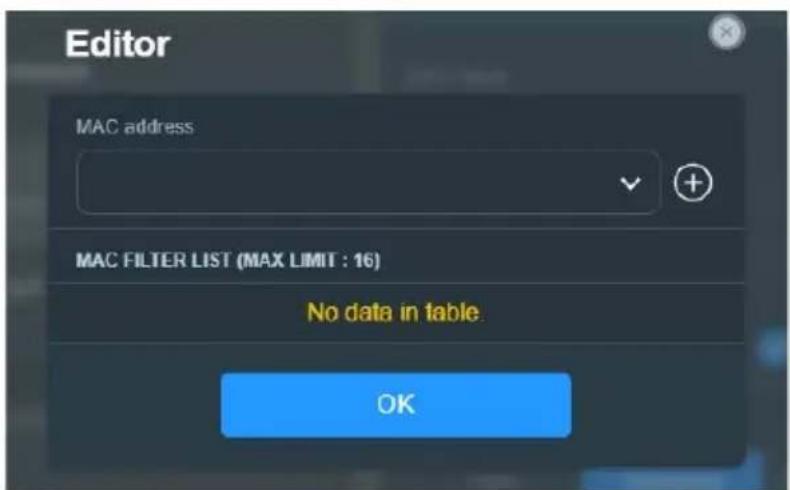
Enable MAC Filter Accept MAC filter list
text_image
Editor MAC address MAC FILTER LIST (MAX LIMIT : 16) No data in table. OK3.8.2 Réseau invité
text_image
GUEST NETWORK Guest Network Provide scheduled or one time access network. SMART HOME MASTER Kid's Network Ensure Internet access safety for kid IoT Network Easily separate a network for your IoT devices VPN Network Establish a secure internet connection Multi-Link Operation(MLO) Boost data rates, reduce latency, and improve reliability.text_image
Guest Network Network Name (SSID) Security Open Password WiFi Scheduling Scheduled One Time Access 30 mins 1 hr(s) 2 hr(s) 4 hr(s) 6 hr(s) Custom More Config WiFi Band 2.4GHz / 5GHz AlMesh ZenWiFi BD4 192.108.50.1 Bandwidth Limiter Access Intranet Use same subnet as main network Applytext_image
Default IoT Network Network Name (SSID) Wireless Security Use same subnet as main network More Config WiFi Band 2.4GHz / 5GHz Sync to all AMesh node(s) WiFi Scheduling Applytext_image
VPN Network Network Name (SSID) Wireless Security VPN VPN CLIENT There is no VPN profile now. Click [Go Setting] below to VPN setting page and create. Go Setting → VPN SERVER WireGuard VPN Go Setting → More Config WiFi Band 2.4GHz / 5GHz AiMesh ZenWiFi BD4 102.168.50.1 WiFi Scheduling Bandwidth Limiter Access Intranet3.9 Journal système
text_image
System Log - General Log This page shows the detailed system's activities. System Time Thu, Aug 23 07:15:34 2018 Uptime 0 days 1 hours 18 minute(s) 11 seconds Remote Log Server Apply Aug 23 06:51:04 miniupnpd[7139]: version 1.9 started Aug 23 06:51:04 miniupnpd[7139]: HTTP listening on port 52102 Aug 23 06:51:04 miniupnpd[7139]: Listening for NAT-PMP/PCP traffic on port 5351 Aug 23 06:59:52 kernel: "[0;33;4lm[PATHSTAT] path_add_flow ASSETI: (enroute_pathkey != PATH_INX_INVALID) Aug 23 06:59:52 kernel: "[0;33;4lm[PATHSTAT] path_add_flow ASSETI: (enroute_pathkey != PATH_INX_INVALID) Aug 23 06:59:53 kernel: "[0;33;4lm[PATHSTAT] path_add_flow ASSETI: (enroute_pathkey != PATH_INX_INVALID) Aug 23 06:59:53 kernel: "[0;33;4lm[PATHSTAT] path_add_flow ASSETI: (enroute_pathkey != PATH_INX_INVALID) Aug 23 06:58:55 kernel: "[0;33;4lm[PATHSTAT] path_add_flow ASSETI: (enroute_pathkey != PATH_INX_INVALID) Aug 23 06:58:55 kernel: "[0;33;4lm[PATHSTAT] path_add_flow ASSETI: (enroute_pathkey != PATH_INX_INVALID) Aug 23 06:58:57 kernel: "[0;33;4lm[PATHSTAT] path_add_flow ASSETI: (enroute_pathkey != PATH_INX_INVALID) Aug 23 06:58:57 kernel: "[0;33;4lm[PATHSTAT] path_add_flow ASSETI: (enroute_pathkey != PATH_INX_INVALID) Aug 23 06:58:57 kernel: "[0;33;4 lm[PATHSTAT] path_add_flow ASSETI: (enroute_pathkey != PATH_INX_INVALID) Aug 23 06:58:57 kernel: "[0;33;4lm[PATHSTAT] path_add_flow ASSETI: (enroute_pathkey != PATH_INX_INVALID) Aug 23 07:07:14 rc_service: httpd 1079notify rc_start multipath Aug 23 07:07:14 miniupnpd[7139]: shutting down MiniUPnPd Aug 23 07:07:14 net:: apply net rules (/tmp/net_rules_etb0_etb0) Aug 23 07:07:14 miniupnpd[7688]: version 1.9 started Aug 23 07:07:14 miniupnpd[7688]: HTTP listening on port 60956 Aug 23 07:07:14 miniupnpd[7688]: Listening for NAI-PMP/PCP traffic on port 5351 Aug 23 07:07:14 wen:: finish adding multi routes Aug 23 07:07:14 nep:: start NTP update Aug 23 07:07:15 miniupnpd[7688]: shutting down MiniUPnPd Aug 23 07:07:15 miniupnpd[7729]: version 1.8 started Aug 23 07:07:15 miniupnpd[7729]: HTTP listening on port 5863S Aug 23 07:07:15 miniupnpd[7729]: Listening for NAI-PMP/PCP traffic on port 5351 Clear Saveline
| Time (PM) | Current (MB/s) | Average (MB/s) | Maximum (MB/s) | Total (MB/s) | |-----------|----------------|----------------|----------------|--------------| | 02:44 pm | 0.07 | 0.16 | 9.47 | 98.32 | | | | | | | | | | | | | | | | | | | | | | | | | | | | | | | | | | | | | | | | | | | | | | | | | | | | | | | | | | | | |text_image
WAN - Internet Connection ASUS Router supports several connection types to WAN (wide area network). These types are selected from the dropdown menu beside WAN Connection Type. The setting fields differ depending on the connection type you selected. Configure the Ethernet WAN settings of ASUS Router. Basic Config WAN Connection Type Automatic IP Enable WAN Yes No Enable NAT Yes No Enable UPnP UPNP_FAQ Yes No Enable WAN Aggregation Yes No WAN Aggregation combines two network connections to increase your WAN speed up to 2Gbps. Connect your router's WAN port and LAN 4 port in your student's LAN parts (ensure you use two cables with the same specification) WAN Aggregation FAQ WAN DNS Setting Default status: Get the DNS IP from your ISP automatically DNS Server Assign a DNS service to improve security, block advertisement and gain faster performance Forward local domain queries to upstream DNS Yes No Enable DNS Blind protection Yes No Enable DNSSEC support Yes No Prevert client auto DoH Auto DNS Privacy Protocol None DHCP Option Class-Identifier (Option 60): IAID/DUID Class-Identifier (Option 61): IAID/DUID Class-Identifier (Option 60): IAID/DUID Class-Identifier (Option 61): IAID/DUID Account Settings Authentication None PPP Echo Interval 6 PPP Echo Max Failures 10 Special Requirement from ISP Host Name MAC Address MAC Clone DHCP query frequency Aggressive Mode Extend the TTL value Yes No Spoof LAN TTL value Yes No Applytext_image
WAN - Dual WAN ZanMIFI BD4 provides Dual WAN support. Select Follower mode to use a secondary WAN for backup network access. Select Load Balancs mode to optimize bandwidth, maximize throughput, minimize response time, and prevent data overload for both WAN connections: Dual WAN FAQ Basic Config Enable Dual WAN OFF Primary WAN WAN Auto Network Detection Detailed explanations are available on the ASUS Support Site FAQ, which may help you use this function effectively. Detect Interval Every 3 seconds Internet Connection Diagnosis When the current WAN fails 2 continuous times, it is deemed a disconnection. Network Monitoring DNS Query Ping Applytext_image
WAN - Port Trigger Port Trigger allows you to temporarily open data ports when LAN devices require unrestricted access to the Internet. There are two methods for opening incoming data ports. port forwarding and port trigger. Port forwarding opens the specified data ports all the time and devices must use static IP addresses. Port trigger only opens the incoming port when a LAN device requests access to the trigger port. Unlike port forwarding, port trigger does not require static IP addresses for LAN devices. Port forwarding allows multiple devices to share a single open port and port trigger only allows one client at a time to access the open port. Port_Trigger_FA0 Basic Config Enable Port Trigger Yes No Well-Known Applications Please select Trigger Port List ( Max Limit : 32 ) Description Trigger Port Protocol Incoming Port Protocol Delete No data in table Applytext_image
WAN - Virtual Server / Port Forwarding Virtual Server / Port forwarding allows remote computers to connect to a specific computer or service within a private local area network (LAN). For a faster connection, some P2P applications (such as BitTorrent), may also require that you set the port forwarding setting. Please refer to the P2P application's user manual for details. You can open the multiple port or a range of ports in router and redirect data through those ports to a single client on your network. If you want to specify a Port Range for clients on the same network, enter the Service Name, the Port Range (e.g. 10200: 10300), the LAN IP address, and leave the Local Port blank. • When your network's firewall is disabled and you set 80 as the HTTP server's port range for your WAN setup, then your http server/web server would be in conflict with ASUS Server's web user interface. • When you set 20.21 as your FTP server's port range for your WAN setup, then your FTP server would be in conflict with ASUS Server's native FTP server. Virtual Server / Port Forwarding FAQ Basic Config Enable Port Forwarding OFF Port Forwarding List (Max Limit : 64) Service Name External Port Internal Port Internal IP Address Protocol Source IP Edit Delete no data in table. Add profile- Local IP (Adresse IP locale): Adresse IP locale du client.
text_image
WAN - DMZ Virtual DMZ allows you to expose one computer to the Internet, so that all the inbound packets will be redirected to the computer you set. It is useful while you run some applications that use uncertained incoming ports. Please use it carefully. Special Applications • Some applications require special handler against NAT. These special handlers are disabled in default. • Please add a rule to port forwarding list for USB Disk access properly on FTP service. DMZ_EAQ Enable DMZ Yes No Applytext_image
WAN - DDNS DDNS (Dynamic Domain Name System) is a service that allows network clients to connect to the wireless router, even with a dynamic public IP address, through its registered domain name. The wireless router is embedded with the ASUS ODNS service and other DDNS services. If you cannot use ASUS DDNS services, please go to https://iplookup_asus.com/ms Population.php to reach your internet IP address to use this service. The wireless router currently uses a private WAN IP address. This router may be in the multiple-NAT environment and DDNS service cannot work in this environment. The host name is successfully registered. You can use "[hostname] asuscomm.com" to access the service in home network from WAN. Use "[hostname] asuscomm.com" to remotely access your network. Go to Advanced Settings > WAN to configure the port forwarding or DMZ settings to allow other WAN clients to remotely access your network. If you want to remotely configure the wireless router, go to here. Enable the DDNS Client Yes No Server MWR, ASUS, COM Deregister Host Name A8878A1/5D4A6F0540ZE68D61950B5EF7 asuscomm.com DDNS Status Active DDNS Registration Result Registration is successful HTTPS/SSL Certificate Free Certificate from Let's Encrypt Import Your Own Certificate None Applytext_image
WAN - NAT Passthrough Enable NAT Passthrough to allow a Virtual Private Network (VPN) connection to pass through the router to the network clients. PPTP Passthrough Enable ✓ L2TP Passthrough Enable ✓ IPSec Passthrough Enable ✓ RTSP Passthrough Enable ✓ H.323 Passthrough Enable ✓ SIP Passthrough Enable ✓ PPPoE Relay Disable ✓ FTP ALG port 2021 Apply3.12 WiFi
3.12.1 WPS
text_image
Wireless - WPS WPS (WiFi Protected Setup) provides easy and secure establishment of a wireless network. You can configure WPS here via the PIN code or the WPS button. Enable WPS ON Current Frequency 2.4 GHz Connection Status Idle Configured Enabled Reset Pressing the reset button resets the network name (SSID) and WPA encryption key AP PIN Code 51246044 You can easily connect a WPS client to the network in either of these two ways: • Method1: Click the WPS button on this interface (or press the physical WPS button on the router), then press the WPS button on the client's WLAN adapter and wait for about three minutes to make the connection. • Method2: Start the client WPS process and get the client PIN code. Enter the client's PIN code on the Client PIN code field and click Start. Please check the user manual of your wireless client to see if it supports the WPS function. If your wireless client does not support the WPS function, you have to configure the wireless client manually and set the same network Name (SSID), and security settings as this router. WPS Method: ● Push button ○ Client PIN Code Starttext_image
Wireless - Bridge Bridge (or named WDS - Wireless Distribution System) function allows your ASUS Router to connect to an access point wirelessly. WDS may also be considered a repeater mode. Note: The function only support [Open-System/NONE, Open-System/WEP] security authentication method. To set up the corresponding authentication method, please select Legacy as your wireless mode first Click Here to modify. Please refer to this FAQ for more details To enable WDS to extend the wireless signal, please follow these steps : 1. Select [WDS Only] or [Hybrid] mode and add MAC address of APs in Remote AP List. 2. Ensure that this wireless router and the AP you want to connect to use the same channel. 3. Key in the remote AP mac in the remote AP list and open the remote AP's WDS management interface, key in the this router's MAC address. 4. To get the best performance, please go to Advanced Settings > Wireless > General and assign the same channel bandwidth, control channel, and extension channel to every router in the network. You are currently using the Auto channel bandwidth. Click here to modify. You are currently using the Auto channel. Click here to modify. Basic Config 2.4 GHz MAC CB:7F:54:12:69:C8 5 GHz MAC CB:7F:54:12:69:CC Band 2.4 GHz AP Mode AP Only Connect to APs in list ● Yes ● No Remote AP List (Max Limit : 4) Remote AP List Add / Delete No data in table. Applytext_image
Wireless - RADIUS Setting This section allows you to set up additional parameters for authorizing wireless clients through RADIUS server. It is required while you select "Authentication Method" in "Wireless - General" as "WPA Enterprise / WPA2 Enterprise". Band 2.4GHz Server IP Address Server Port: 1817 Connection Secret Applytext_image
Wireless - Professional Wireless Professional Setting allows you to set up additional parameters for wireless. But default values are recommended. Band 2.4 GHz Enable Radio ○ Yes ○ No Enable wireless scheduler ○ Yes ○ No Set AP Isolated ○ Yes ○ No Roaming assistant Enable √ Disconnect clients with RSSI lower than: -70 dBm Bluetooth Coexistence Disable √ Enable IGMP Snooping Enable √ Multicast Rate(Mbps) Auto √ Preamble Type Long √ AMPOU RTS Enable √ RTS Threshold 2347 DTIM Interval 1 Beacon Interval 100 Enable TX Bursting Enable √ Enable YMM Enable √ Enable YMM No-Acknowledgement Disable √ Enable YMM APSD Enable √ Optimize AMFDU aggregation Disable √ Modulation Scheme Up to MCS 11 (NitroQAK/1024-QAK) √ Airtime Fairness Disable √ Multi-User MIMO Enable √ OFDMA/802.11ax MU MIMO Disable √ Explicit Beamforming Enable √ Universal Beamforming Enable √ Tx power adjustment Performance Applytext_image
Before you get started, please check the model name and hardware version from the label. 1. Please confirm the label at the bottom of your router model shows H/W Version, different hardware version needs different firmware version to process restoration. 2. Download firmware from ASUS support site: https://www.asus.com/support For example, if your label shows "RT-AC66U_B1" , firmware of "RT-AC66U" is not available for restoration. Model: RT-AC66U B1 Input : 19V Wireless-AC 1750 Dual Band Gigabit Ro Com IDA S DB Filename Browse... Status After locating the firmware file, click Upload.text_image
Administration - Firmware Upgrade Note: 1. The latest firmware version includes updates from the previous version. 2. Configuration parameters will keep their settings during the firmware update process. 3. In case the upgrade process fails, ASUS Router enters the emergency mode automatically. The LED signals at the front of ASUS Router will indicate such a situation. Please visit ASUS Download Center to download ASUS Firmware Restoration utility for a manual update. Check on FAQ for more instructions. 4. Get the latest firmware version from the ASUS Support site Auto Firmware Upgrade Auto Firmware Upgrade OFF Firmware Version Signature version 2.372 Updated 2023/09/21 12:11 Check Check Update Check I would like to retrieve beta firmware. Aimesh router RT-AX86U Pro Current Version : 1.0.0.4.988_23565-gsd7idale Manual firmware update * Upback Note: A manual firmware update will only update selected AIMesh routers / nodes, when using the AIMesh system. Please make sure you are uploading the correct AIMesh firmware version to each applicable router / node.flowchart
graph TD
A["Internet status: Connected WAN IP: 192.168.123.154 DDNS: GO"] --> B["Security: WPA2/WPA3-Personal"]
B --> C["Clients: 1 View List"]
D["Client status"] --> E["Online: Wired (1)"]
E --> F["AA2201415-NB 192.168.50.155 60:E0:4C:71:F8:99"]
F --> G["Refresh"]
5.2 Foire aux questions (FAQ)
text_image
Internet Options General Security Privacy Content Connections Programs Advanced Home page To create home page tabs, type each address on its own line. https://www.msn.com/?PC=19C1 Use current Use default Use new tab Startup Start with tabs from the last session Start with home page Tabs Change how webpages are displayed in tabs. Tabs Browsing history Delete temporary files, history, cookies, saved passwords, and web form information. Delete browsing history on exit Delete... Settings Appearance Colors Languages Fonts Accessibility OK Cancel ApplyREMARQUES :
text_image
LAN - DHCP Server DHCP (Dynamic Host Configuration Protocol) is a protocol for the automatic configuration used on IP networks. The DHCP server can assign each client an IP address and informs the client of the of DNS server IP and default gateway IP. ASUS Router supports up to 253 IP addresses for your local network. Manually Assigned IP around the DHCP list FAQ Basic Config Enable the DHCP Server Yes No ASUS Router's Domain Name IP Pool Starting Address 192, 168, 50, 7 IP Pool Ending Address 192, 168, 50, 254 Lease time 86400 Default Gateway DNS and WINS Server Setting DNS Server 1 DNS Server 2 Advertise router's IP in addition to user-specified DNS Yes No WINS Server Manual Assignment Enable Manual Assignment Yes No Manually Assigned IP around the DHCP list (Max Limit : 64) Client Name (MAC Address) IP Address DNS Server (Optional) Host Name (Optional) Add / Delete no data in table. Applytext_image
Wireless - General Set up the wireless related information below. Enable Smart Connect OFF Band 2.4 GHz Network Name (SSID) LTAO Hide SSID Yes No Wireless Mode Auto Big Protection Disable 110 802.11ax / WIFI 6 mode Enable If compatibility issue occurs when enabling 802.11ax / WIFI 6 mode, please check FAQ WiFi Agile Multiband Disable Target Wake Time Disable Channel bandwidth 20/40 MHz Control Channel Auto Current Control Channel 5 Extension Channel Auto Authentication Method WPA2-Personal WPA Encryption AES WPA Pre-Shared Key Group Key Rotation Interval 3600 Weak Applytext_image
Administration - Restore/Save/Upload Setting This function allows you to save current settings of ASUS Router to a file, or load settings from a file. Factory default Restore ■ Initialize all the settings, and clear all the data log for AIProtection, Traffic Analyzer, and Web History Save setting ■ Click on this checkbox if you want to share the config file for debugging. Since the original password in the config file will be removed, please do not import the file into your rights ■ Transfer ASUS DONS name Restore setting Uploadtext_image
Parental Controls - Web & Apps Filters Web & Apps Filters allows you to block access to unwanted websites and apps. To use web & apps Filters: 1. In the [Clients Name] column, select the client whose network usage you want to control. The client name can be modified in network map client list. 2. Check the unwanted content categories 3. Click the plus (+) icon to add rule then click apply. If you want to disable the rule temporarily, uncheck the check box in front of rule. Parental Controls FAQ Web & Apps Filters OFFtext_image
Internet Options General Security Privacy Context Connections Programs Advanced To set up an Internet connection, click Setup. Setup Dial-up and Virtual Private Network settings Access RD Network Resources - Go to vpn.as Add... Add VPN... Remove... Settings Choose Settings if you need to configure a proxy server for a connection. Never dial a connection Dial whenever a network connection is not present Always dial my default connection Current None Set default Local Area Network (LAN) settings LAN Settings do not apply to dial-up connections. Choose Settings above for dial-up settings. LAN settings OK Cancel Applytext_image
Local Area Network (LAN) Settings Automatic configuration Automatic configuration may override manual settings. To ensure the use of manual settings, disable automatic configuration. □ Automatically detect settings □ Use automatic configuration script Address Proxy server □ Use a proxy server for your LAN (These settings will not apply to dial-up or VPN connections). Address: Port: 80 Advanced □ Bypass proxy server for local addresses OK CancelSous MAC OS
text_image
Network Show All Displays Sound Network Startup Disk Location:Automatic Show:Built-in Ethernet TCP/IP PPPoE AppleTalk Proxies Ethernet Select a proxy server to configure: FTP Proxy Web Proxy (HTTP) Secure Web Proxy (HTTPS) Streaming Proxy (KTSP) SOCKS Proxy Gopher Proxy Bypass proxy settings for these Hosts & Domains: Use Passive FTP Mode (PASV) Click the lock to prevent further changes. Apply Now FTP Proxy Server Proxy server requires password Set Passwordtext_image
Network and Sharing Center Control Panel Home Change adapter settings Change advanced sharing settings View your basic network information and set up connections View your active networks corpusetaxus Domain network Access type: Internet Connections: Ethernet Change your networking settings Set up a new connection or network Set up a broadband, dial-up, or VPN connection; or set up a router or access point. Troubleshoot problems Diagnose and repair network problems, or get troubleshooting information.text_image
Ethernet Status General Connection IPv4 Connectivity: Internet IPv6 Connectivity: No network access Media State: Enabled Duration: 03:29:31 Speeds: 1.0 Gbps Details... Activity Sent — Received Bytes: 71,424,646 | 70,727,241 Properties Disable Diagnose Closetext_image
Ethernet Properties Networking Authentication Connect using: Intel(R) Ethernet Connection (2) I219-V Configure... This connection uses the following items: GoS Packet Scheduler Internet Protocol Version 4 (TCP/IPv4) Microsoft Network Adapter Multiplexer Protocol Microsoft TCP Protocol Driver Internet Protocol Version 6 (TCP/IPv6) Link-Layer Topology Discovery Responder Link-Layer Topology Discovery Mapper I/O Driver Install... Uninstall Properties Description Transmission Control Protocol/Internet Protocol. The default wide area network protocol that provides communication across diverse interconnected networks. OK Canceltext_image
Internet Protocol Version 4 (TCP/IPv4) Properties General Alternate Configuration You can get IP settings assigned automatically if your network supports this capability. Otherwise, you need to ask your network administrator for the appropriate IP settings. Obtain an IP address automatically Use the following IP address: IP address: .... Submit mail: .... Default gateway: .... Obtain DNS server address automatically Use the following DNS server addresses: Preferred DNS servers: .... Alternate DNS servers: .... Validate settings upon exit Advanced... OK CancelSous MAC OS
GNU General Public License
Licensing information
This product includes copyrighted third-party software licensed under the terms of the GNU General Public License. Please see The GNU General Public License for the exact terms and conditions of this license. All future firmware updates will also be accompanied with their respective source code. Please visit our web site for updated information. Note that we do not offer direct support for the distribution.
GNU GENERAL PUBLIC LICENSE
Version 2, June 1991
Copyright (C) 1989, 1991 Free Software Foundation, Inc.
59 Temple Place, Suite 330, Boston, MA 02111-1307 USA
Everyone is permitted to copy and distribute verbatim copies of this license document, but changing it is not allowed.
Preamble
The licenses for most software are designed to take away your freedom to share and change it. By contrast, the GNU General Public License is intended to guarantee your freedom to share and change free software--to make sure the software is free for all its users. This General Public License applies to most of the Free Software Foundation's software and to any other program whose authors commit to using it. (Some other Free Software Foundation software is covered by the GNU Library General Public License instead.) You can apply it to your programs, too.
When we speak of free software, we are referring to freedom, not price. Our General Public Licenses are designed to make sure that you have the freedom to distribute copies of free software (and charge for this service if you wish), that you receive source code or can get it if you want it, that you can change the software or use pieces of it in new free programs; and that you know you can do these things.
To protect your rights, we need to make restrictions that forbid anyone to deny you these rights or to ask you to surrender the rights. These restrictions translate to certain responsibilities for you if you distribute copies of the software, or if you modify it.
For example, if you distribute copies of such a program, whether gratis or for a fee, you must give the recipients all the rights that you have. You must make sure that they, too, receive or can get the source code. And you must show them these terms so they know their rights.
We protect your rights with two steps: (1) copyright the software, and (2) offer you this license which gives you legal permission to copy, distribute and/or modify the software.
Also, for each author's protection and ours, we want to make certain that everyone understands that there is no warranty for this free software. If the software is modified by someone else and passed on, we want its recipients to know that what they have is not the original, so that any problems introduced by others will not reflect on the original authors' reputations.
Finally, any free program is threatened constantly by software patents. We wish to avoid the danger that redistributors of a free program will individually obtain patent licenses, in effect making the program proprietary. To prevent this, we have made it clear that any patent must be licensed for everyone's free use or not licensed at all.
The precise terms and conditions for copying, distribution and modification follow.
Terms & conditions for copying, distribution, & modification
- This License applies to any program or other work which contains a notice placed by the copyright holder saying it may be distributed under the terms of this General Public License. The “Program”, below, refers to any such program or work, and a “work based on the Program” means either the Program or any derivative work under copyright law: that is to say, a work containing the Program or a portion of it, either verbatim or with modifications and/or translated into another language. (Hereinafter, translation is included without limitation in the term “modification”). Each licensee is addressed as “you”.
Activities other than copying, distribution and modification are not covered by this License; they are outside its scope. The act of running the Program is not restricted, and the output from the Program is covered only if its contents constitute a work based on the Program (independent of having been made by running the Program). Whether that is true depends on what the Program does.
- You may copy and distribute verbatim copies of the Program's source code as you receive it, in any medium, provided that you conspicuously and appropriately publish on each copy an appropriate copyright notice and disclaimer of warranty; keep intact all the notices that refer to this License and to the absence of any warranty; and give any other recipients of the Program a copy of this License along with the Program.
You may charge a fee for the physical act of transferring a copy, and you may at your option offer warranty protection in exchange for a fee.
- You may modify your copy or copies of the Program or any portion of it, thus forming a work based on the Program, and copy and distribute such modifications or work under the terms of Section 1 above, provided that you also meet all of these conditions:
a) You must cause the modified files to carry prominent notices stating that you changed the files and the date of any change.
b) You must cause any work that you distribute or publish, that in whole or in part contains or is derived from the Program or any part thereof, to be licensed as a whole at no charge to all third parties under the terms of this License.
c) If the modified program normally reads commands interactively when run, you must cause it, when started running for such interactive use in the most ordinary way, to print or display an announcement including an appropriate copyright notice and a notice that there is no warranty (or else, saying that you provide a warranty) and that users may redistribute the program under these conditions, and telling the user how to view a copy of this License. (Exception: if the Program itself is interactive but does not normally print such an announcement, your work based on the Program is not required to print an announcement.)
These requirements apply to the modified work as a whole. If identifiable sections of that work are not derived from the Program, and can be reasonably considered independent and separate works in themselves, then this License, and its terms, do not apply to those sections when you distribute them as separate works. But when you distribute the same sections as part of a whole which is a work based on the Program, the distribution of the whole must be on the terms of this License, whose permissions for other licensees extend to the entire whole, and thus to each and every part regardless of who wrote it.
Thus, it is not the intent of this section to claim rights or contest your rights to work written entirely by you; rather, the intent is to exercise the right to control the distribution of derivative or collective works based on the Program.
In addition, mere aggregation of another work not based on the Program with the Program (or with a work based on the Program) on a volume of a storage or distribution medium does not bring the other work under the scope of this License.
- You may copy and distribute the Program (or a work based on it, under Section 2) in object code or executable form under the terms of Sections 1 and 2 above provided that you also do one of the following:
a) Accompany it with the complete corresponding machine-readable source code, which must be distributed under the terms of Sections 1 and 2 above on a medium customarily used for software interchange; or,
b) Accompany it with a written offer, valid for at least three years, to give any third party, for a charge no more than your cost of physically performing source distribution, a complete machine-readable copy of the corresponding source code, to be distributed under the terms of Sections 1 and 2 above on a medium customarily used for software interchange; or,
c) Accompany it with the information you received as to the offer to distribute corresponding source code. (This alternative is allowed only for noncommercial distribution and only if you received the program in object code or executable form with such an offer, in accord with Subsection b above.)
The source code for a work means the preferred form of the work for making modifications to it. For an executable work, complete source code means all the source code for all modules it contains, plus any associated interface definition files, plus the scripts used to control compilation and installation of the executable. However, as a special exception, the source code distributed need not include anything that is normally distributed (in either source or binary form) with the major components (compiler, kernel, and so on) of the operating system on which the executable runs, unless that component itself accompanies the executable.
If distribution of executable or object code is made by offering access to copy from a designated place, then offering equivalent access to copy the source code from the same place counts as distribution of the source code, even though third parties are not compelled to copy the source along with the object code.
-
You may not copy, modify, sublicense, or distribute the Program except as expressly provided under this License. Any attempt otherwise to copy, modify, sublicense or distribute the Program is void, and will automatically terminate your rights under this License. However, parties who have received copies, or rights, from you under this License will not have their licenses terminated so long as such parties remain in full compliance.
-
You are not required to accept this License, since you have not signed it. However, nothing else grants you permission to modify or distribute the Program or its derivative works. These actions are prohibited by law if you do not accept this License. Therefore, by modifying or distributing the Program (or any work based on the Program), you indicate your acceptance of this License to do so, and all its terms and conditions for copying, distributing or modifying the Program or works based on it.
-
Each time you redistribute the Program (or any work based on the Program), the recipient automatically receives a license from the original licensor to copy, distribute or modify the Program subject to these terms and conditions. You may not impose any further restrictions on the recipients' exercise of the rights granted herein. You are not responsible for enforcing compliance by third parties to this License.
-
If, as a consequence of a court judgment or allegation of patent infringement or for any other reason (not limited to patent issues), conditions are imposed on you (whether by court order, agreement or otherwise) that contradict the conditions of this License, they do not excuse you from the conditions of this License. If you cannot distribute so as to satisfy simultaneously your obligations under this License and any other pertinent obligations, then as a consequence you may not distribute the Program at all. For example, if a patent license would not permit royalty-free redistribution of the Program by all those who receive copies directly or indirectly through you, then the only way you could satisfy both it and this License would be to refrain entirely from distribution of the Program.
If any portion of this section is held invalid or unenforceable under any particular circumstance, the balance of the section is intended to apply and the section as a whole is intended to apply in other circumstances.
It is not the purpose of this section to induce you to infringe any patents or other property right claims or to contest validity of any such claims; this section has the sole purpose of protecting the integrity of the free software distribution system, which is implemented by public license practices. Many people have made generous contributions to the wide range of software distributed through that system in reliance on consistent application of that system; it is up to the author/donor to decide if he or she is willing to distribute software through any other system and a licensee cannot impose that choice.
This section is intended to make thoroughly clear what is believed to be a consequence of the rest of this License.
-
If the distribution and/or use of the Program is restricted in certain countries either by patents or by copyrighted interfaces, the original copyright holder who places the Program under this License may add an explicit geographical distribution limitation excluding those countries, so that distribution is permitted only in or among countries not thus excluded. In such case, this License incorporates the limitation as if written in the body of this License.
-
The Free Software Foundation may publish revised and/or new versions of the General Public License from time to time. Such new versions will be similar in spirit to the present version, but may differ in detail to address new problems or concerns.
Each version is given a distinguishing version number. If the Program specifies a version number of this License which applies to it and “any later version”, you have the option of following the terms and conditions either of that version or of any later version published by the Free Software Foundation. If the Program does not specify a version number of this License, you may choose any version ever published by the Free Software Foundation.
- If you wish to incorporate parts of the Program into other free programs whose distribution conditions are different, write to the author to ask for permission.
For software which is copyrighted by the Free Software Foundation, write to the Free Software Foundation; we sometimes make exceptions for this. Our decision will be guided by the two goals of preserving the free status of all derivatives of our free software and of promoting the sharing and reuse of software generally.
NO WARRANTY
11 BECAUSE THE PROGRAM IS LICENSED FREE OF CHARGE, THERE IS NO WARRANTY FOR THE PROGRAM, TO THE EXTENT PERMITTED BY APPLICABLE LAW. EXCEPT WHEN OTHERWISE STATED IN WRITING THE COPYRIGHT HOLDERS AND/OR OTHER PARTIES PROVIDE THE PROGRAM "AS IS" WITHOUT WARRANTY OF ANY KIND, EITHER EXPRESSED OR IMPLIED, INCLUDING, BUT NOT LIMITED TO, THE IMPLIED WARRANTIES OF MERCHANTABILITY AND FITNESS FOR A PARTICULAR PURPOSE. THE ENTIRE RISK AS TO THE QUALITY AND PERFORMANCE OF THE PROGRAM IS WITH YOU. SHOULD THE PROGRAM PROVE DEFECTIVE, YOU ASSUME THE COST OF ALL NECESSARY SERVICING, REPAIR OR CORRECTION.
12 IN NO EVENT UNLESS REQUIRED BY APPLICABLE LAW OR AGREED TO IN WRITING WILL ANY COPYRIGHT HOLDER, OR ANY OTHER PARTY WHO MAY MODIFY AND/OR REDISTRIBUTE THE PROGRAM AS PERMITTED ABOVE, BE LIABLE TO YOU FOR DAMAGES, INCLUDING ANY GENERAL, SPECIAL, INCIDENTAL OR CONSEQUENTIAL DAMAGES ARISING OUT OF THE USE OR INABILITY TO USE THE PROGRAM (INCLUDING BUT NOT LIMITED TO LOSS OF DATA OR DATA BEING RENDERED INACCURATE OR LOSSES SUSTAINED BY YOU OR THIRD PARTIES OR A FAILURE OF THE PROGRAM TO OPERATE WITH ANY OTHER PROGRAMS), EVEN IF SUCH HOLDER OR OTHER PARTY HAS BEEN ADVISED OF THE POSSIBILITY OF SUCH DAMAGES.
END OF TERMS AND CONDITIONS