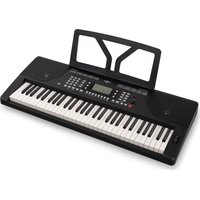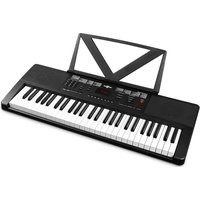
Rhapsody61L - Musical instrument MAX - Free user manual and instructions
Find the device manual for free Rhapsody61L MAX in PDF.


User questions about Rhapsody61L MAX
0 question about this device. Answer the ones you know or ask your own.
Ask a new question about this device
Download the instructions for your Musical instrument in PDF format for free! Find your manual Rhapsody61L - MAX and take your electronic device back in hand. On this page are published all the documents necessary for the use of your device. Rhapsody61L by MAX.
USER MANUAL Rhapsody61L MAX
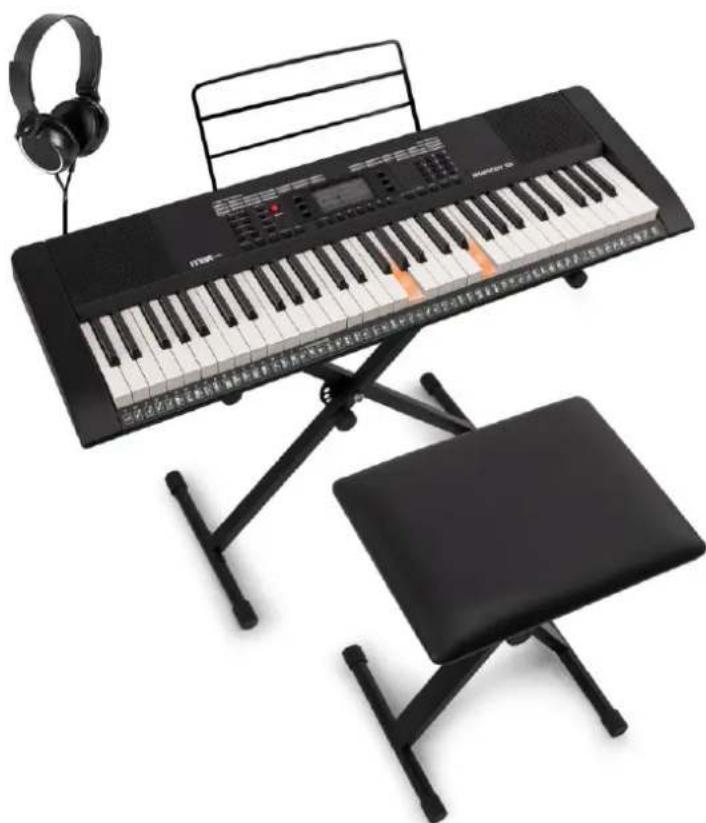
Rhapsody61L Electronic Keyboard 61 light Set
Ref. nr.: 130.046
natural_image
Black electronic keyboard with headphones, piano keyboard, and chair with guitar (no visible text or symbols)INSTRUCTION MANUAL GEBRUIKSAANWIJZING BEDIENUNGSANLEITUNG MANUAL DE INSTRUCCIONES MANUEL D”INSTRUCTIONS INSTRUKCJA OBSŁUGI NÁVOD K POUŽITÍ
Congratulations to the purchase of this Max Music product. Please read this manual thoroughly prior to using the product in order to benefit fully from all features.
Read the manual prior to using the product. Follow the instructions in order not to invalidate the warranty. Take all precautions to avoid fire and/or electrical shock. Repairs must only be carried out by a qualified technician in order to avoid electrical shock. Keep the manual for future reference.
- Prior to using the product, please ask advice from a specialist. When the unit is switched on for the first time, some smell may occur. This is normal and will disappear after a while.
- The unit contains voltage carrying parts. Therefore do NOT open the housing.
- Do not place metal objects or pour liquids into the product. This may cause electrical shock and malfunction.
- Do not place the product near heat sources such as radiators, etc. Do not place the unit on a vibrating surface. Do not cover the ventilation holes.
- The product is not suitable for continuous use.
- Be careful with the mains lead and do not damage it. A faulty or damaged mains lead can cause electrical shock and malfunction.
- When unplugging the product from a mains outlet, always pull the plug, never the lead.
- Do not plug or unplug the unit with wet hands.
- If the plug and/or the mains lead are damaged, they need to be replaced by a qualified technician.
- If the product is damaged to such an extent that internal parts are visible, do NOT plug the unit into a mains outlet and DO NOT switch the product on. Contact your dealer. Do NOT connect the product to a rheostat or dimmer.
- To avoid fire and shock hazard, do not expose the product to rain and moisture.
- All repairs should be carried out by a qualified technician only.
- Connect the product to an earthed mains outlet (220-240Vac/50Hz) protected by a 10-16A fuse.
- During a thunderstorm or if the product will not be used for a longer period of time, unplug it from the mains. The rule is: Unplug it from the mains when not in use.
- If the product has not been used for a longer period of time, condensation may occur. Let the unit reach room
temperature before you switch it on. Never use the product in humid rooms or outdoors.
- During operation, the housing may become hot.
- To prevent accidents in companies, you must follow the applicable guide lines and follow the instructions.
- Do not repeatedly switch the product on and off. This shortens the life time.
- Keep the unit out of the reach of children. Do not leave the unit unattended.
- Do not use cleaning sprays to clean switches. The residues of these sprays cause deposits of dust and grease. In case of malfunction, always seek advice from a specialist.
- Only operate the product with clean hands.
- Do not force the controls.
- If the product has fallen, always have it checked by a qualified technician before you switch the product on again.
- Do not use chemicals to clean the unit. They damage the varnish. Only clean the product with a dry cloth.
- Keep away from electronic equipment that may cause interference.
- Only use original spares for repairs, otherwise serious damage and/or dangerous radiation may occur.
- Switch the product off prior to unplugging it from the mains and/or other equipment. Unplug all leads and cables prior to moving the product.
- Make sure that the mains lead cannot be damaged when people walk on it. Check the mains lead before every use for damages and faults!
- The mains voltage is 220-240Vac/50Hz. Check if power outlet match. If you travel, make sure that the mains voltage of the country is suitable for this product.
- Keep the original packing material so that you can transport the product in safe conditions

This mark attracts the attention of the user to high voltages that are present inside the housing and that are of sufficient magnitude to cause a shock hazard.

This mark attracts the attention of the user to important instructions that are contained in the manual and that he should read and adhere to.
The product has been certified CE. It is prohibited to make any changes to the product. They would invalidate the CE certificate and their guarantee!
NOTE: To make sure that the unit will function normally, it must be used in rooms with a temperature between 5^ C/41°F and 35^ C/95°F.

Electric products must not be put into household waste. Please bring them to a recycling centre. Ask your local authorities or your dealer about the way to proceed. The specifications are typical. The actual values can slightly change from one unit to the other. Specifications can be changed without prior notice.
Do not attempt to make any repairs yourself. This would invalid your warranty. Do not make any changes to the product. This would also invalid your warranty. The warranty is not applicable in case of accidents or damages caused by inappropriate use or disrespect of the warnings contained in this manual. Max cannot be held responsible for personal injuries caused by a disrespect of the safety recommendations and warnings. This is also applicable to all damages in whatever form.
UNPACKING INSTRUCTION
CAUTION! Carefully unpack the box upon receipt. Check the contents to ensure that all parts are present and have been received in good condition. Notify the shipper immediately and retain packaging material if any parts appear damaged from shipping or the package itself shows signs of mishandling. Save the package and all packaging materials. If the product must be returned, it is important that the product is returned in the original factory box and packaging. If the device has been exposed to drastic temperature fluctuation (e.g. after transportation), do not switch it on immediately. The arising condensation water might damage your device. Leave the device switched off until it has reached room temperature.
POWERSUPPLY
The label on the back/under side of the product indicates the mains voltage to which it must be connected. Check that the mains voltage corresponds to this. Any other voltage than the one indicated may cause irreparable damage to the unit. The unit must also be connected directly to the mains voltage and no dimmer or adjustable power supply may be used.

Always connect the device to a protected circuit (circuit breaker or fuse). Make sure the device has an appropriate electrical ground to avoid the risk of electrocution or fire.
ASSEMBLY INSTRUCTIONS BENCH
- Place the seat upside down.
- Lift both the left and right legs upwards.
- Slide leg supports into brackets to lock the legs in position.
- Rotate the caps to stabilize the bench.
NOTE: make sure the leg supports are sitting all the way inside the bracket. Sit down and play music like never before.
natural_image
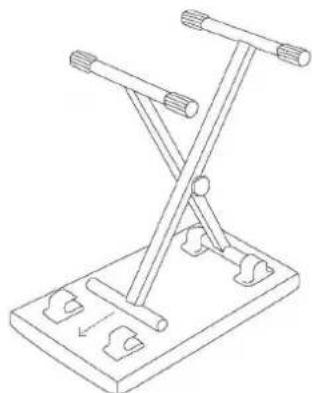
Line drawing of a mechanical support structure with no text or symbolsASSEMBLY INSTRUCTIONS STAND
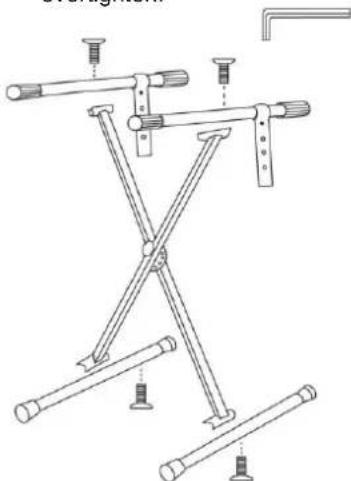
- Place the feet on the floor in the position indicated in the illustration.
- Using the screws, secure the X bracket onto the feet using the Allen wrench
- Place the upper support bars onto the upper part of the bracket and secure with the screws using the Allen wrench. Do not overtighten.
natural_image
Technical line drawing of a mechanical clamp or bracket assembly (no text or symbols)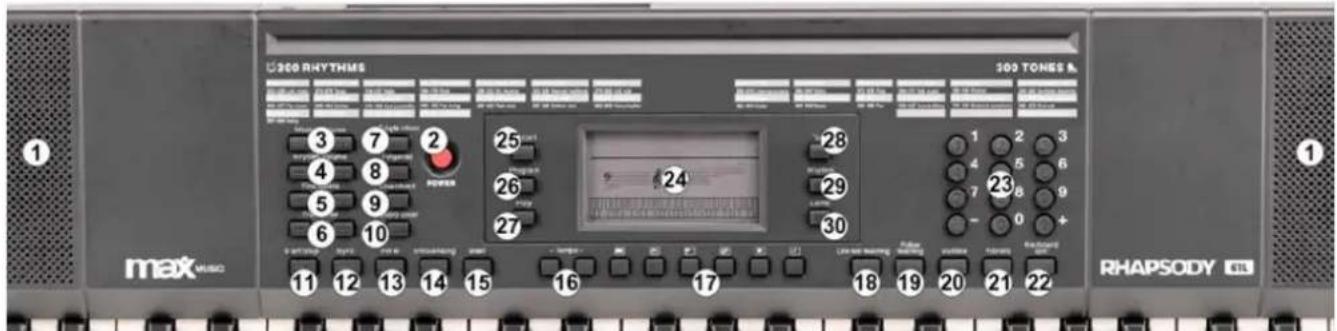
text_image
300 RHYTHMS 300 TONES & max Musc RHAPSODY 4131. SPEAKERS
Loudspeakers to reproduce the sound of the music played. Sound level is determined on the basis of the volume setting.
2. ON/OFF
Press to turn power on/off
3. MASTER VOLUME
Press [Master Vol +] or [Master Vol -] to raise or lower the master volume. The keyboard had 9 levels of volume from 00-08.
4. RYTHME VOLUME
Press [Rythme Vol +] or [Rythme Vol -] to raise or lower the accompt volume. The default volume is 06. Press the [Rhythm vol + and -] simultaneously will recover default Rhythm volume automatically.
5. FINE TUNING
Press fine tuning [+ or -] to micro control the tone within the range of +/- 99 levels between te two connecting tones. Keep pressing [+ or -] button to increase or decrease levels continuously. Press [+ and -] button simultaneously to return to the level of initially set.
6. TRANSPOSE
Press [Transpose + / -] to increase or decrease the transpose value up and down +/- 6 levels and shift the pitch of entire keyboard up and down in semitone intervals. Press the [Transpose +] or [Transpose -] simultaneously to return to default status of keyboard tone.
7. SINGLE CHORD
Press [Start/Stop] to start the auto accompaniment. Then press the [Single chord] button to start single finger accompaniment. Press any key of the left 19 keys to begin Rhythm. Press different key on left keyboard to select different chord. One key you press will always determine the root of the chord you played. Press the [Start/Stop] button again to end the effect.
8. FINGER CHORD
Press [Start/Stop] to start the auto accompaniment. Press [Finger chord] to start fingered accompaniment. Press any key of the left 19 keys to begin Rhythm. Press different key on left keyboard to select different chord. Once you play any chord in auto accompaniment section of keyboard the chord along with Rhythm will be automatically begun to play key you press will always determine the root of the chord you played. Press [Start/Stop] again to end the effect.
9. LOW CHORD
Press [Low chord] to change the effect of Bass.
10. CHORD CLEAR
Press [Chord clear] to end the accompaniment under chord status, the Rhythm will being continued to play.
11. START/STOP
Press this button to start or stop playing selected program.
12. SYNC
In rhythm mode, press [SYNC]. Play any key in the chord key zone (the 1st-19th key, from the left) to activate the accompaniment rhythm.
13. FILL IN
Press [FILL-IN] to add a short fill in Rhythm variation at any time while the Rhythm is playing. Then the normal Rhythm will begin from next measure.
14. INTRO/ENDING
Press [Intro/Ending] before Rhythm was started, the keyboard will perform a length of relative intro, then returns back to relative normal Rhythm. Press [Intro/Ending] after Rhythm was started, the keyboard will perform a length of relative ending to stop.
15. BEAT
There are 4 kinds of beat voice stored on the keyboard: 1/4 beat, 2/4 beat, 3/4 beat and 4/4 beat. Press the [Beat] button simultaneously for the different beats.
16. TEMPO
Press [Tempo +/-] to increase or decrease the rhythm speed.
17. TOP PANEL PERCUSSION
Press one of the Percussion buttons. There are 6 kinds of percussion available for this keyboard.
- Hi-Hat Open
- Hi-Hat Closed
- Snare L
- Bongo L
• Bass Drum H Soft - Bass Drum L
18. ONE KEY TEACHING
Press [One Key] to enable the single key training function. Press the number keys [1-9] or [+/-] button to select the song to be learned. One key training aims at duration learning, and there is no requirement on pitch or creativeness. This mode allows for mistakes when playing the keys, but the keyboard still plays correct notes.
19. FOLLOW TEACHING
Press [Follow teaching] to enable the follow key training function. Follow the display to play the note correctly, then play the next note shown automatically on the display.
20. SUSTAIN
Press [Sustain] and the notes played on the keyboard will be decayed gradually after lifting your finger from the keyboard. Press this button again and the sustain effect will be disenabled.
21. VIBRATO
Press [Vibrato] and the vibrato effect will be activated. Press this button again and the vibrato effect will be disenabled.
22. KEYBOARD SPLIT
Press [Keyboard Split] to divide keyboard into left hand keyboard and right hand keyboard. The left 24 keys will be left-hand keyboard and the rest part of keys will be divided as right-hand keyboard. The voice on right-hand keyboard can be selected by pressing the number on numeric group buttons. The voice on left-hand keyboard is initially set by producer. Press this button once again to turn split effect off.
23. NUM-PAD
Press [+/-] or "0" to "299" in numeric group buttons to select accompaniment. Press [+/-] simultaneously to turn the luminous keyboard on/off.
24. LCD DISPLAY
Displays current mode, notes to play, rhythm, tempo, etc.
25. RECORD
Press [REC] to enable the recording function.
26. PROGRAM
Press to enable the Rhythm programming function.
27. PLAY
Press to playback recorded notes or Rhythms.
28. VOICE
There are 300 different kinds of voices. Press [Voice] to start choosing a voice. You can press the [0-9] number or [+/-]. (Appendix I)
29. RHYTHM
There are 300 different kinds of rhythms. (Appendix II) Press [Start/Stop] button to start the rhythm you need. Rhythm starts from "00" to "299" and if the input is out of this range, it will be ineffective.
30. DEMO
This keyboard has 39 stored demo songs ("000" to "039") for your selection. Press [DEMO] and the default demo song will start to play. During playing process, press [DEMO] to play the next demonstration song. Press [Start/Stop] to stop playing. During the playing process, you can also press the [0-9] number or [+] / [-] to select other demonstration songs. The selected demonstration song will then play repeatedly.
CONNECTIONS
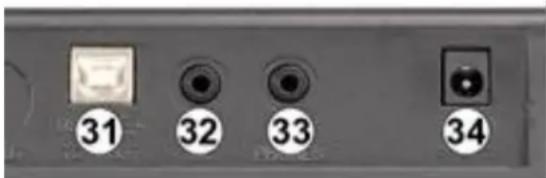
31. USB Midi jack
Connect the keyboard to a personal computer. Transfer information with computer in both direction such as you can store the music that you played on his keyboard to the computer. You can also play midi document of your computer by this keyboard. The USB audio equipment can't be settled for input and output at the same time when you do the setting of the computer software or else the sound will be overlapping when you play the keys.
text_image
31 32 33 3432. MICROPHONE INPUT
Connect a microphone to the MIC port to sing while playing the keyboard.
33. HEADPHONES/OUTPUT
When connecting headphones to the PHONES/OUTPUT port, the loudspeaker will be disenabled automatically. You can perform without disturbing others and other disturbing you.
34. DC INPUT
Socket for plugging in the supplied micro USB cable.
KEYBOARD LIGHTING
Press both [+] and [-] on the numpad to turn the keyboard lighting on/off.
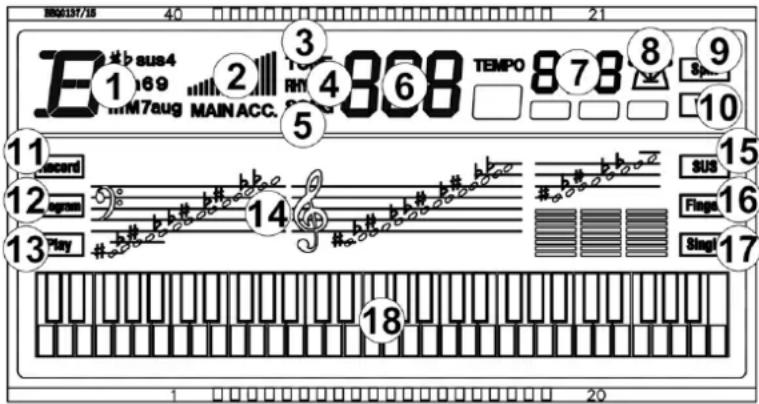
DISPLAY
-
Chord display Area
-
Volume
-
Tone
-
Rhythm
-
Demo
-
Number display
-
Tempo
-
Beat (metronome shows the current beat)
-
Split
-
Vibrato
-
Record
-
Program
-
Play
-
Staff notation
-
Sustain
-
Finger chord
-
Single chord
-
Black/white key display
BEFORE YOU START
text_image
E#baus4 169 M7aug MAIN ACC. 2 3 4 868 TEMPO 878 8 9 Sp... 10 11 Record 12 Bags 13 Play 14b#
b#
b#
b#
b#
b#
b#
b#
b#
b#
b#
b#
b#
b#
b#
b#
b#
b#
b#
b#
b#
b#
b#
b#
b#
b#
b#
b#
b#
b#
b#
b#
b#
b#
##b## ##b## ##b## ##b## ##b## ##b## ##b## ##b## ##b## ##b## ##b## ##b## ##b## ##b## ##b## ##b## ##b## ##b## ##b## ##b## ##b## ##b## ##b## ##b## ##b## ##b## ##b## ##b## ##b## ##b## ##b## ##b## ##b## ##b##SUS
Fings Singl 18 1 20POWERSUPPLY:
• Using AC-DC adapter:
Use the special power adapter that is equipped with this electronic keyboard or a power adaptor with DC 9V out voltage 500m A. Insert the DC plug or power adaptor into the DC 9V power jack in the rear panel of the electronic keyboard, insert the other end into Main socket, turn on power switch and start performance.
• Using batteries: (not included):
Open the battery compartment cover located on the bottom panel of the Electronic keyboard. Insert 6 pcs AA batteries, being carefully to follow the polarity marking on the cabinet. Replace the compartment cover, making sure that it locks firmly in place.
- Place the music stand in the keyboard slot.
RECORDING
Recording
Press [Rec] to enable the recording function, "rEC" will show on the display. In this mode all played notes will be recorded. The maximum record quantity is 48 notes. When storage is full, "Ful" will flash on the display and recording will stop automatically. Press [Play] to playback the recorded notes, "Ply" will show on the screen. On completion of playback, "rEC" will show on the display. You can record a new Rhythm, or you can press [Play] to playback the recorded Rhythm.
Press [Program] to enter into Rhythm programming mode. Press 6 kinds of panel percussion or keyboard to program a paragraph of Rhythm. The edited Rhythm can record 32 drum points at maximum. Press [Play] to play the edited drum sound in sequence, forming a kind of self-made Rhythms after programming was finished. The best Rhythm play effect can be get by adjusting [Temp +/-] buttons. Every time you press [Program] it will clear last memory and enter into programming mode again.
LUMINOUS TEACHING FUNCTION
One key teaching:
To choose the song you need to learn by number buttons and [+] or [-] buttons after [One Key teaching] was pressed down. The LCD display screen displays the present song number. One key teaching function is special for the learning of songs. The luminous keyboard will light based on the main melody's notes. It will remind the note that should be played at the present. You can play the keyboard based on the luminous keyboard guiding. It doesn't have requirement about the pitch and correctness of the notes. The LCD display screen displays correct keys 'value of notes. One song was learned over, it will repeatedly learn present song or next song automatically. Pressing [Start/stop] or pressing [One key teaching] again to exit the teaching function.
Follow teaching:
To choose the song you need to learn by number buttons and [+] or [-] buttons after [Follow teaching] was pressed down. Follow teaching function is special for following to play correct notes to proceed with the learning You can proceed with play based on the DEMO. The luminous keyboard will light based on the main melody's notes. It will remind the note that should be played at the present. You can play the keyboard based on the luminous keyboard guiding. You can also learn based on the keys 'value of notes displayed in the LCD screen. The song can continue to play if you play corresponding notes. The song will be in waiting state all the time until you play correct notes. Pressing [Start/stop] or pressing [Follow teaching] again to exit the teaching function.
Note: The correct played keynotes can be play, there is no response to the wrong played keys in the following teaching function mode. It will repeatedly learn present song or next song automatically.
natural_image
Line drawing of a mechanical support structure with two arms and a base (no text or symbols)MONTAGE-INSTRUCTIE KEYBOARD STANDAARD
natural_image
Technical line drawing of a mechanical clamp or bracket assembly (no text or symbols)
text_image
360 RHYTHMS 200 TONES B max MUSIC RHAPSODY 4L 1 2 3 4 5 6 7 8 9 10 11 12 13 14 15 16 17 18 19 20 21 22 23 24 25 26 27 28 29 30 Power Ringshare Lands Line and matching Routledge Routledge1. LUIDSPREKERS
- Hi-Hat Closed
- Snare L
- Bongo L
- Bass Drum H Soft
- Bass Drum L
18. ONE KEY TRAINNING
natural_image
Line drawing of a mechanical support structure with no text or symbolsnatural_image
Technical line drawing of a mechanical clamp or bracket assembly (no text or symbols)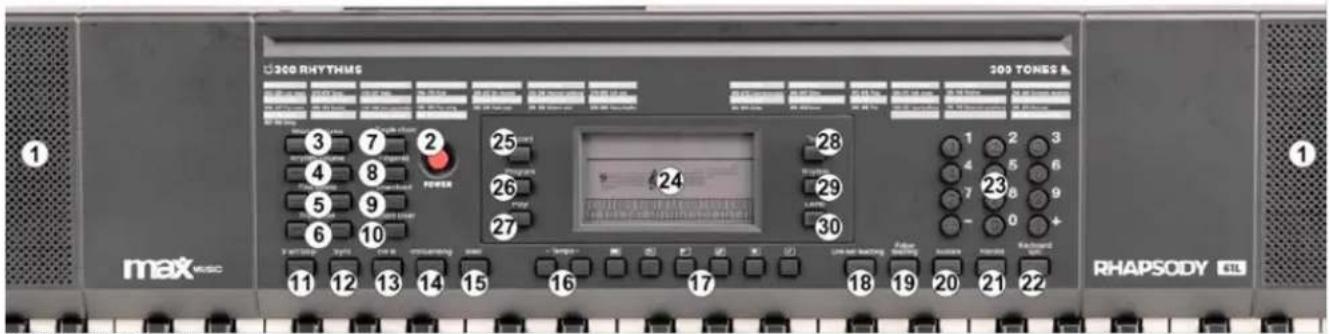
text_image
300 RHYTHMS 300 TONES & max MUSIC RHAPSODY ETL1. LAUTSPRECHER
18. ONE KEY-TEACHING
natural_image
Line drawing of a mechanical support structure with no text or symbolsINSTRUCCIONES DE MONTAJE SOPORTE
natural_image
Technical line drawing of a mechanical clamp or support structure with no visible text or symbols
text_image
300 RHYTHM5 300 TONES max MUSIC 1 2 3 4 5 6 7 8 9 10 11 12 13 14 15 16 17 18 19 20 21 22 23 24 25 26 27 28 29 30 RhapsODY 4TL1. ALTAVOCES
natural_image
Line drawing of a mechanical device with two arms and a base plate (no text or symbols)INSTRUCTIONS D'ASSEMBLAGE PIED
natural_image
Technical line drawing of a mechanical clamp or bracket assembly (no text or symbols)
text_image
300 RHYTHENS 300 TONES A maxRHYD RHAPSODY1. HAUT-PARLEURS
natural_image
Line drawing of a mechanical support structure with two arms and a base plate (no text or symbols)INSTRUKCJA MONTAŻU STOJAKA
natural_image
Technical line drawing of a mechanical clamp or bracket assembly (no text or symbols)
text_image
200 RHYTHMS 1 max MUSO 1 200 TONES & 1 RHAPSODY 4TL1. GŁOŚNIKI
natural_image
Line drawing of a mechanical support structure with no text or symbolsNÁVOD K MONTÁŽI STOJANU
natural_image
Technical line drawing of a mechanical clamp or bracket assembly (no text or symbols)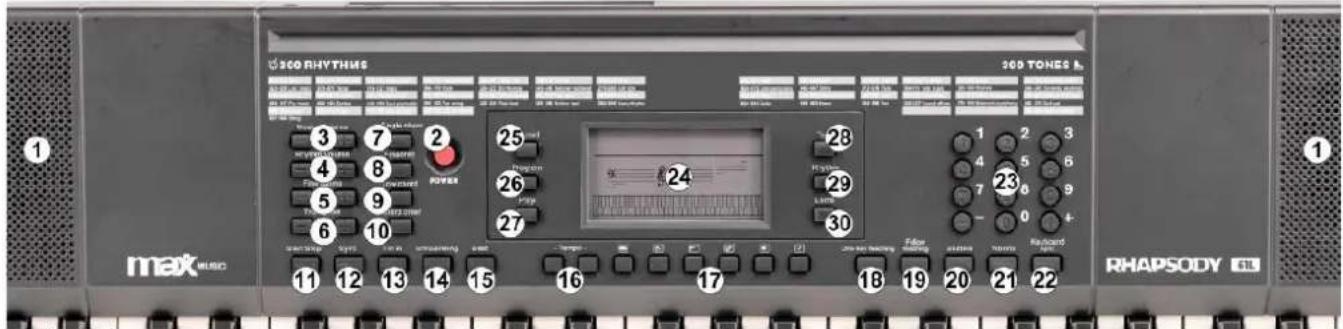
text_image
360 RHYTHUS 360 TONES max MISO RHAPSODY 4L 1 2 3 4 5 6 7 8 9 10 11 12 13 14 15 16 17 18 19 20 21 22 23 24 25 26 27 28 29 30 RHYTHUS RHYTHUS RHYTHUS RHYTHUS RHYTHUS RHYTHUS RHYTHUS RHYTHUS RHYTHUS RHYTHUS RHYTHUS RHYTHUS RHYTHUS RHYTHUS RHYTHUS RHYTHUS RHYTHUS RHYTHUS RHYTHUS RHYTHUS RHYTHS RHYTHS RHYTHS RHYTHS RHYTHS RHYTHS RHYTHS RHYTHS RHYTHS RHYTHS RHYTHS RHYTHS RHYTHS RHYTHS RHYTHS RHYTHS RHYTHS RHYTHS RHYTHS RHYTHS RHYTH S RHYTH S RHYTH S RHYTH S RHYTH S RHYTH S RHYTH S RHYTH S RHYTH S RHYTH S RHYTH S RHYTH S RHYTH S RHYTH S RHYTH S RHYTH S RHYTH S RHYTH S RHYTH S RHYTH S RHYTH TONE 100 MHz 100 MHz 100 MHz 100 MHz 100 MHz 100 MHz 100 MHz 100 MHz 100 MHz 100 MHz 100 MHz 100 MHz 100 MHz 100 MHz 100 MHz 100 MHz 100 MHz 100 MHz 100 MHz 100 MHz 100 GHz1. ŘEČNÍCI
| 0 Acoustic Grand Piano | 75 Pan Flute | 150 Magic Electronic | 225 Baritone Sax ensemble |
| 1 Bright Acoustic iano | 76 Bottle Blow | 151 Bright violin | 226 Crystal Sax |
| 2 Electric Grand Piano | 77 Shakuhachi | 152 Atonic Violin | 227 Soft Baritone Sax |
| 3 Honky-tonk Piano | 78 Whistle | 153 Heavy 151 Bright Violin | 228 Synth Baritone Sax |
| 4 Rhodes Piano | 79 Ocarina | 154 Synth Clarinet | 229 Heavy metal Sax |
| 5 Chorused Piano | 80 Lead 1 (square) | 155 Interactive Lead | 230 Church Oboe |
| 6 Harpsichord | 81 Lead 2 (sawtooth) | 156 For the keyboard | 231 Oboe ensemble |
| 7 Clavichord | 82 Lead 3 (caliope lead) | 157 Bagpipes | 232 Bass Oboe |
| 8 Celesta | 83 Lead 4 (chiff lead) | 158 Suona | 233 Bright Oboe |
| 9 Glockenspiel | 84 Lead 5 (charang) | 159 Pipa | 234 distortio oboe |
| 10 Music man | 85 Lead 6 (voice) | 160 Church Piano | 235 English Horn ensemble |
| 11 Vibraphone | 86 Lead 7 (fifths) | 161 Church electric Piano | 236 Pizzicato English Horn |
| 12 Marimba | 87 Lead 8 (bass+lead) | 162 Synth Piano | 237 Diplophonia English Horn |
| 13 Xylophone | 88 Pad 1 (new age) | 163 Baritone Piano | 238 Bright English Horn |
| 14 Tubular Bells | 89 Pad 2 (warm) | 164 Piano PAD | 239 Synth English Horn |
| 15 Dulcimer | 90 Pad 3 (polysynth) | 165 String Piano | 240 Psychedelic Synth Lead |
| 16 Hammond Organ | 91 Pad 4 (choir) | 166 Metal Piano | 241 Vibraphone Synth Lead |
| 17 Percussive Organ | 92 Pad 5 (bowed) | 167 Light rhythm Piano | 242 Marimba Synth Lead |
| 18 Rock Organ | 93 Pad 6 (metallic) | 168 electric Piano Pad | 243 Metal FX |
| 19 Church Organ | 94 Pad 7 (halo) | 169 Classical piano | 244 Electronic FX |
| 20 Reed Organ | 95 Pad 8 (sweep) | 170 Guitar organ | 245 Electronic String Ensemble |
| 21 Accordian | 96 FX 1 (rain) | 171 An electric guitar | 246 Wind FX |
| 22 Harmonica | 97 FX 2 (soundtrack) | 172 synthesis Nylon Guitar | 247 Clarinet FX |
| 23 Tango Accordian | 98 FX 3 (crystal) | 173 Synthetic electronic guitar | 248 Organ FX |
| 24 Acoustic Guitar (nylon) | 99 FX 4 (atmosphere) | 174 Bright clean Guitar | 249 Crystal FX |
| 25 Acoustic Guitar (steel) | 100 FX 5 (brightness) | 175 Orchestra Guitar | 250 Synth Shamisen |
| 26 Electric Guitar (jazz) | 101 FX 6 (goblins) | 176 Psychedelic Guitar | 251 Electronic Shamisen |
| 27 Electric Guitar (clean) | 102 FX 7 (echoes) | 177 Bright Organ | 252 Bright Sitar |
| 28 Electric Guitar (muted) | 103 FX 8 (sci-fi) | 178 Pick Organ | 253 Whistle Accord |
| 29 Overdriven Guitar | 104 Sitar | 179 Synth Accordion | 254 rhythm Nation |
| 30 Distortion Guitar | 105 Banio | 180 Bright Violin | 255 Bright Koto |
| 31 Guitar Harmonics | 106 Shamisen | 181 Stringed Violin | 256 Koto Lead |
| 32 Acoustic Bass | 107 Koto | 182 Trill Violin | 257 Diplophonia Koto |
| 33 Electric Bass(finger) | 108 Kalimba | 183 Electronic Violin | 258 Baritone Koto |
| 34 Electric Bass (pick) | 109 Bagpipe | 184 Large Violin | 259 Synth Koto |
| 35 Fretless Bass | 110 Fiddle | 185 rhythm Orchestra | 260 Environmental Lead |
| 36 Slap Bass 1 | 111 Shanai | 186 Pizzicato Violin | 261 Metal Lead |
| 37 Slap Bass 2 | 112 Tinkle Bell | 187 Pizzicato Ensemble 1 | 262 Orchestra Lead |
| 38 Synth Bass 1 | 113 Aqogo | 188 Pizzicato Ensemble 2 | 263 Glockenspiel Lead |
| 39 Synth Bass 2 | 114 Steel Drums | 189 Percussion Band | 264 Bass Lead |
| 40 Violin | 115 Woodblock | 190 Baritone Synth Contrabass | 265 Fifths Lead |
| 41 Viola | 116 Taiko Drum | 191 Bass Flute | 266 Wind Lead |
| 42 Cello | 117 Melodic Tom | 192 Distortion Contrabass | 267 Atmosphere Lead |
| 43 Contra Bass | 118 Synth Drum | 193 Contrabass Lead | 268 Sharp Lead |
| 44 Tremolo Strings | 119 Reverse Cymbal | 194 Violin Lead | 269 Bright Lead |
| 45 Pizzicato Strings | 120 Guitar Fret Noise | 195 Cello Lead | 270 East Nation Pad |
| 46 Orchestral Harp | 121 Breath Noise | 196 Pizzicato Rhythm | 271 Atmosphere Pad |
| 47 Timpani | 122 Seashore | 197 High Harp | 272 Electric bass Pad |
| 48 String Ensemble 1 | 123 Bird Tweet | 198 Harp ensemble | 273 electric Piano Pad |
| 49 String Ensemble 2 | 124 Telephone Ring | 199 Synth Harp | 274 Clean Guitar Pad |
| 50 Synth Strings 1 | 125 Helicopter | 200 Baritone Trumpet | 275 Western Pad |
| 51 Synth Strings 2 | 126 Applause | 201 Trumpet ensemble | 276 Sci-fi Pad |
| 52 Choir Aahs | 127 Gunshot | 202 Rhythm Trumpet | 277 Metal Sci-fi Pad |
| 53 Voice Oohs | 128 Percussion | 203 High Trumpet | 278 Clarinet Pad |
| 54 Synth Voice | 129 Rhythm electric Piano | 204 Synth Trumpet | 279 Electronic dance Pad |
| 55 Orchestra Hit | 130 Baritone Xylophone | 205 Baritone Trombone | 280 Double Kalimba |
| 56 Trumpet | 131 Clean Piano | 206 Trombone ensemble | 281 Bright Kalimba |
| 57 Trombone | 132 Bright Dulcimer | 207 Rhythm Trombone | 282 Crystal Kalimba |
| 58 Tuba | 133 Rhythm Grand Piano | 208 High Trombone | 283 Synth Kalimba |
| 59 Muted Trumpet | 134 Traditional Piano | 209 Baritone Trombone | 284 Electronic Bagpipe |
| 60 French Horn | 135 Aluminium jean | 210 Synth Trombone | 285 Wind Bagpipe |
| 61 Brass Section | 136 Rock Grand Piano | 211 Violin French Horn | 286 High Bagpipe |
| 62 Synth Brass 1 | 137 Electronic organ | 212 French Horn ensemble | 287 Bright Bagpipe |
| 63 Synth Brass 2 | 138 Psychedelic electronic | 213 Electronic French Horn | 288 Orchestra Bagpipe |
| 64 Soprano Sax | 139 Water jean | 214 Synth French Horn | 289 Baritone Bagpipe |
| 65 Alto Sax | 140 Bright Guitar | 215 Psychedelic Synth Brass | 290 Environmental Shanai |
| 66 Tenor Sax | 141 Orchestra piccolo | 216 Distortion Synth Brass | 291 Baritone Shanai |
| 67 Baritone Sax | 142 Heavy metal guitar | 217 Vibraphone Synth Brass | 292 Tenor Shanai |
| 68 Oboe | 143 Crystal guitar | 218 Rock Synth Brass | 293 high Shanai |
| 69 English Horn | 144 Queer electric Piano | 219 Synth Muted Trumpet | 294 Synth Shanai |
| 70 Bassoon | 145 Bright bass | 220 Soprano Sax ensemble | 295 Bright Steel Drums |
| 71 Clarinet | 146 Rock Electric Bass | 221 rhythm Soprano Sax | 296 Steel Drums Lead |
| 72 Piccolo | 147 Rhythm Electric Bass | 222 Synth Soprano Sax | 297 Lyric Steel Drums |
| 73 Flute | 148 Psychedelic Bass | 223 National Sax | 298 Orchestra Steel Drums |
| 74 Recorder | 149 Heavy Metal Bass | 224 Metal Sax | 299 Synth Steel Drums |
APPENDIX II RHYTHM
| 000 Soul 1 | 075 Tango1 | 150 Psychedelic Swing | 225 Jump Samba 1 |
| 001 Soul 2 | 076 Tango2 | 151 Folk Rock 1 | 226 Jump Samba 2 |
| 002 Soul 3 | 077 Tango3 | 152 Folk Rock 2 | 227 Jump Samba 3 |
| 003 Soul 4 | 078 Mambo 1 | 153 New century 1 | 228 Afro Samba |
| 004 Soul 5 | 079 Mambo 2 | 154 New century 2 | 229 Rock March 1 |
| 005 Soul 6 | 080 Rhumba 1 | 155 New century 3 | 230 Rock March 2 |
| 006 Soul 7 | 081 Rhumba 2 | 156 16 Pop 1 | 231 Rock March 3 |
| 007 Soul 8 | 082 Rhumba 3 | 157 16 Pop 2 | 232 Rock March 4 |
| 008 Slow Soul 1 | 083 Rhumba 4 | 158 Modern dance 1 | 233 Polka Blues 1 |
| 009 Slow Soul 2 | 084 Rhumba 5 | 159 Modern dance 2 | 234 Polka Blues 2 |
| 010 Slow Soul 3 | 085 Bequine | 160 Modern dance 3 | 235 Polka Blues 3 |
| 011 Slow Soul 4 | 086 Salsa | 161 Modern dance 4 | 236 Country Rock 1 |
| 012 Slow Soul 5 | 087 Merengue 1 | 162 Modern dance 5 | 237 Country Rock 2 |
| 013 Funky Soul 1 | 088 Merengue 2 | 163 8 Post Rock | 238 Jazz Blues |
| 014 Funky Soul 2 | 089 Vallenato | 164 Classic Rock | 239 Country Dance 1 |
| 015 Funky soul 3 | 090 Plena | 165 Jazz Rock 1 | 240 Country Dance 2 |
| 016 Funky soul 4 | 091 Lambada | 166 Jazz Rock 2 | 241 Country Dance 3 |
| 017 Funky soul 5 | 092 Bachata 1 | 167 Traditional Pop | 242 World Fusion |
| 018 Funky soul 6 | 093 Bachata 2 | 168 Country Blues | 243 Chinese Traditional 1 |
| 019 Funky soul 7 | 094 Bachata 3 | 169 Indian Pop | 244 Chinese Traditional 2 |
| 020 Funky soul 8 | 095 Samba 1 | 170 Hard 3 Rock | 245 Chinese Traditional 3 |
| 021 West Coast | 096 Samba 2 | 171 Classical Ballad 1 | 246 Thailand Rhythm |
| 022 Euro Soul | 097 Pop Samba 1 | 172 Classical B allad 2 | 247 Modern Waltz 1 |
| 023 16 AOR 1 | 098 Pop Samba 2 | 173 Classical ballad 3 | 248 Modern Waltz 2 |
| 024 16 AOR 2 | 099 Pop Samba 3 | 174 Classical ballad 4 | 249 Modern Waltz 3 |
| 025 16 Beat 1 | 100 Jazz Samba | 175 Light Ballad | 250 Modern Waltz 4 |
| 026 16 Beat 2 | 101 March 1 | 176 Deep House | 251 Brit Pop Waltz 1 |
| 027 16 Beat 3 | 102 March 2 | 177 Hard House | 252 Brit Pop Waltz 2 |
| 028 16 Ballad 1 | 103 March 3 | 178 House dance | 253 Brit Pop Waltz 3 |
| 029 16 Ballad 2 | 104 March 4 | 179 8 Pop | 254 Contemporary Waltz 1 |
| 030 Pop Dance 1 | 105 Polka 1 | 180 Japanese Folk Music | 255 Contemporary Waltz 2 |
| 031 Pop Dance 2 | 106 Polka 2 | 181 Trip Hop 1 | 256 Modern Soul |
| 032 Pop Dance 3 | 107 Polka 3 | 182 Trip Hop 2 | 257 Modern Soul 2 |
| 033 Shuffle 1 | 108 C & W 1 | 183 Chamber Pop 1 | 258 Modern Soul 3 |
| 034 Shuffle 2 | 109 C & W 2 | 184 Chamber Pop 2 | 259 Modern Soul 4 |
| 035 Shuffle 8 | 110 Bluegrass | 185 Pop Swing 1 | 260 Modern Soul 5 |
| 036 Hard Rock | 111 Country 1 | 186 Pop Swing 2 | 261 Modern Soul 6 |
| 037 Slow Rock 1 | 112 Country2 | 187 Pop Swing 3 | 262 Modern Soul 7 |
| 038 Slow Rock 2 | 113 Country 3 | 188 Pop Swing 4 | 263 Modern Soul 8 |
| 039 Pop Classic | 114 Middle East | 189 Pop Swing 5 | 264 Classical Soul 1 |
| 040 Blues | 115 China 1 | 190 Pop Swing 6 | 265 Classical Soul 2 |
| 041 Twist | 116 China 2 | 191 Celtic Pop | 266 Classical Soul 3 |
| 042 Hard 3 Beat | 117 China 3 | 192 Hawaiian Pop | 267 Classical Soul 4 |
| 043 Love Ballad 1 | 118 Thailand | 193 Soft Bossanova 1 | 268 Classical Soul 5 |
| 044 Love Ballad 2 | 119 Waltz 1 | 194 Soft Bossanova 2 | 269 Contemporary R&B1 |
| 045 Love Ballad 3 | 120 Waltz 2 | 185 Soft Bossanova 3 | 270 Contemporary R&B2 |
| 046 Love Ballad 4 | 121 Waltz 3 | 196 Soft Bossanova 4 | 271 Contemporary R&B3 |
| 047 Euro Beat | 122 Waltz 4 | 197 Soft Bossanova 5 | 272 Contemporary R&B4 |
| 048 House 1 | 123 Jazz Waltz 1 | 198 Mento | 273 Contemporary R&B5 |
| 049 House 2 | 124 Jazz Waltz 2 | 199 Shima Uta | 274 Contemporary R&B6 |
| 050 Swing Beat | 125 Jazz Waltz 3 | 200 Reggae Pop 1 | 275 Contemporary R&B7 |
| 051 8 Ballad | 126 Country Waltz 1 | 201 Reggae-Pop 2 | 276 Contemporary R&B8 |
| 052 Step | 127 Country Waltz 2 | 202 European Traditions | 277 Deep Funk |
| 053 Big Band 1 | 128 Jazz Soul 1 | 203 Tango Pop 1 | 278 European Jazz |
| 054 Big Band 2 | 129 Jazz Soul 2 | 204 Tango Pop 2 | 279 70' Rock |
| 055 Cobmo 1 | 130 Jazz Soul 3 | 205 Tango Pop 3 | 280 80' Rock |
| 056 Cobmo 2 | 131 Jazz Soul 4 | 206 Rhythm Mambo 1 | 281 16 Soft Rock 1 |
| 057 Swing 1 | 132 Jazz Soul 5 | 207 Rhythm Mambo 2 | 282 16 Soft Rock 2 |
| 058 Swing 2 | 133 Jazz Soul 6 | 208 Brit Rhumba 1 | 283 16 Soft Rock 3 |
| 059 Swing 3 | 134 Jazz Soul 7 | 209 Brit Rhumba 2 | 284 16 Ballad Rock 1 |
| 060 Swing 4 | 135 Jazz Soul 8 | 210 Brit Rhumba 3 | 285 16 Ballad Rock 2 |
| 061 Swing 5 | 136 Light Beat 1 | 211 Brit Rhumba 4 | 286 Afro Dance 1 |
| 062 Swing 6 | 137 Light Beat 2 | 212 Brit Rhumba 5 | 287 Afro Dance 2 |
| 063 Baiao | 138 Light Beat 3 | 213 Soul Bequine | 288 Afro Dance 3 |
| 064 Bolero | 139 Light Beat 4 | 214 Chamber pop | 289 Jazz Shuffle 1 |
| 065 Bossanova 1 | 140 Light Beat 5 | 215 Neo-Merengue 1 | 290 Jazz Shuffle 2 |
| 066 Bossanova 2 | 141 Soul Psychedelic 1 | 216 Neo-Merengue 2 | 291 8 Jazz Shuffle |
| 067 Bossanova 3 | 142 Soul Psychedelic 2 | 217 Big Beat | 292 Heavy Metal Rock |
| 068 Bossanova 4 | 143Soul Psychedelic 3 | 218 Plena Beat | 293 Rock Dance 1 |
| 069 Bossanova 5 | 144 Soul Psychedelic 4 | 219 Down Tempo | 294 Rock Dance 2 |
| 070 Calypso | 145 Soul Psychedelic 5 | 220 Electric Bachata 1 | 295 Middle East Pop |
| 071 Habanera | 146 Soul Psychedelic 6 | 221 Electric Bachata 2 | 296 Soul Blues |
| 072 Reggae 1 | 147 Soul Psychedelic 7 | 222 Electric Bachata 3 | 297 Glam Rock |
| 073 Reggae 2 | 148 Soul Psychedelic 8 | 223 Folk Samba 1 | 298 Hard House |
| 074 Jorpo | 149 Goth Psychedelic | 224 Folk Samba 2 2 | 299 Light Ballad |
| No. | Song name | No. | Song name | No. | Song name |
| 00 | Turkey March | 14 | Chong Erfei | 28 | In rain |
| 01 | Red River Valley | 15 | Minuet in G major | 29 | Long time ago |
| 02 | American Patrol | 16 | Spanish Matador | 30 | Magic Flute Overture |
| 03 | Susanna | 17 | Serenade-Haydn | 31 | Silent Night |
| 04 | Mozart Piano Sinata | 18 | Yankee Doodle | 32 | Hungary Dane |
| 05 | Mariage d'amour | 19 | Waltz | 33 | Western is gone |
| 06 | Waterside Adi Lina | 20 | Minuet | 34 | Fountain |
| 07 | Smile Polka | 21 | Rain Melody | 35 | Mary had a little lamb |
| 08 | Jingle Beus | 22 | Frosty | 36 | Music box dance |
| 09 | Lardesik March | 23 | Old French | 37 | Four seasons |
| 10 | Mozart No.40 | 24 | Blue Danube | 38 | Concerto of love |
| 11 | Clapping song | 25 | A small brown bottle | 39 | Destiny |
| 12 | Fur Elise | 26 | Hawthorn | ||
| 13 | Katyusha | 27 | River Of Babylon |
Number of keys : 61
Display : LCD
Power Supply : 100-240VAC 50/60Hz (9V Adapter)
Weight : 8,40 kg
Dimensions : 945 x 315 x 105mm
The specifications are typical. The actual values can slightly change from one unit to the other. Specifications can be changed without prior notice.
The products referred to in this manual conform to the European Community Directives to which they are subject:
European Union
Tronios B.V.,
7602KR Almelo, The Netherlands
2014/35/EU
2014/30/EU
2011/65/EC

United Kingdom
Tronios Ltd.,
130 Harley Street,
London W1G 7JU, United Kingdom
S.I. 2016:1101
S.I. 2016:1091
S.I. 2012:3032

Specifications and design are subject to change without prior notice.
www.tronios.com
Copyright © 2024 by Tronios The Netherlands