XDV-10 - DVD player PIONEER - Free user manual and instructions
Find the device manual for free XDV-10 PIONEER in PDF.


| Product type | DVD player |
| Brand | Pioneer |
| Model | XDV-10 |
| Chassis dimensions (W × H × D) | 188.3 mm × 57.4 mm × 183 mm |
| Weight | 1.36 kg |
| Rated power supply | 14.4 V DC (12.0 – 14.4 V admissible) |
| Maximum power consumption | 10.0 A |
| Grounding type | Negative |
| Region code | 2 |
| Playable discs | DVD-Video, VIDEO-CD, CD, CD-R, CD-RW, DVD-R, DVD-RW, DVD-RDL |
| Frequency response | 5 Hz to 44,000 Hz (with DVD, 96 kHz sampling) |
| Signal-to-noise ratio | 96 dB (1 kHz) |
| Video output level | 1.0 Vp-p 75 Ω (±0.2 V) |
| Number of audio channels | 2 (stereo) |
| Decoded audio formats | MP3 (MPEG-1,2 & 2.5 Layer 3), WMA, AAC |
| Compatible with | AVIC-EVO1 (sold separately) |
| Main functions | DVD, VCD, CD playback; automatic insertion and ejection; control via AVIC-EVO1 screen |
| Maintenance | Clean discs with a soft cloth from the center outward; use only 12 cm circular discs |
| Safety | Class 1 laser product (IEC 60825-1:2007); do not open; professional installation; use only with 12 V battery and negative ground |
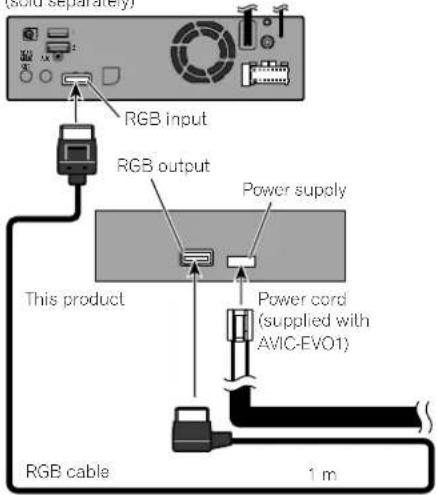
| Supplied parts | RGB cable, instruction manual |
| Servicing | Leave servicing to an authorized Pioneer service center; do not disassemble yourself |
Frequently Asked Questions - XDV-10 PIONEER
User questions about XDV-10 PIONEER
0 question about this device. Answer the ones you know or ask your own.
Ask a new question about this device
Download the instructions for your DVD player in PDF format for free! Find your manual XDV-10 - PIONEER and take your electronic device back in hand. On this page are published all the documents necessary for the use of your device. XDV-10 by PIONEER.
USER MANUAL XDV-10 PIONEER
Thank you for buying this Pioneer product. Please read through these instructions so you will know how to operate your model properly. After you have finished reading the instructions, keep this document in a safe place for future reference.
Precaution. 3
Important safety information 3
To avoid battery exhaustion. 3
In case of trouble. 3
Visit our website. 3
About this product 3
Basic operation. 4
Checking part names and functions. 4
Inserting and ejecting a disc. 4
Connection. 4
Precautions. 4
Before installing this product. 4
To prevent damage 4
Parts supplied 4
Connecting the system 5
■ Installation 5
Precautions before installation 5
Before installing 5
Installation notes 5
Installing this product 50
Removing this product 51
Removing this product
Appendix. 6
Handling and care of discs. 6
Playable discs 6
Specifications 7
Precaution
Certain country and government laws may prohibit or restrict the placement and use of this product in your vehicle. Please comply with all applicable laws and regulations regarding the use, installation and operation of this product.

If you want to dispose this product, do not mix it with general household waste. There is a separate collection system for used electronic products in accordance with legislation that requires proper treatment, recovery and recycling.
Private households in the member states of the EU, in Switzerland and Norway may return their used electronic products free of charge to designated collection facilities or to a retailer (if you purchase a similar new one). For countries not mentioned above, please contact your local authorities for the correct method of disposal. By doing so you will ensure that your disposed product undergoes the necessary treatment, recovery and recycling and thus prevent potential negative effects on the environment and human health.
CAUTION
This product is a Class 1 laser product classified under the Safety of laser products, IEC 60825-1:2007, and contains a class 1M laser module. To ensure continued safety, do not remove any covers or attempt to gain access to the inside of the product. Refer all servicing to qualified personnel.
CLASS 1 LASER PRODUCT
CAUTIONCLASS 1M VISIBLE AND INVISIBLE LASER RADIATION WHEN OPEN,DO NOT VIEW DIRECTLY WITH OPTICAL INSTRUMENTS.
Important safety information
WARNING
Do not attempt to install or service this product by yourself, Installation or servicing of this product by persons without training and experience in electronic equipment and automotive accessories may be dangerous and could expose you to the risk of electric shock, injury or other hazards.
- Do not allow this product to come into contact with liquids. Electrical shock could result. Also, damage to the product, smoke, and overheating could result from contact with liquids.
If liquid or foreign matter should get inside this product, park your vehicle in a safe place, turn the ignition switch off (ACC OFF) immediately and consult your dealer or the nearest authorised Pioneer Service Statcn. Do not use this product in this condition because doing so may result in a fire, electric shock, or other failure.
If you notice smoke, a strange noise or odour from this product, or any other abnormal signs on the LCD screen, turn off the power immediately and consult your dealer or the nearest authorised Pioneer Service Station. Using this product in this condition may result in permanent damage to the system.
Do not disassemble or modify this product as there are high-voltage components inside which may cause an electric shock. Be sure to consult your dealer or the nearest authorised Pioneer Service Station for internal inspection, adjustments or repairs.
Before using this product, be sure to read and fully understand the following safety information:
Do not operate this product, any applications, or the rear view camera option (if purchased) if doing so will divert your attention in any way from the safe operat on of your vehicle. Always observes safe driving rules and follow all existing traffic regulations. If you experience difficulty in operating this product or reading the display, park your vehicle in a safe location and apply the handbrake before making the necessary adjustments.
To promote safety, certain funct ons are disabled unless the vehicle is stopped and/or the handbrake is applied.
- Keep this manual hancy as a reference for operating procedures and safety information.
Do not install this product where it may (i) obstruct the driver's vision, (ii) impair the performance of any of the vehicle's operating systems or safety features, including air
bags or hazard lamp buttons or (iii) impair the driver's ability to safely operate the vehicle.
Please remember to fasten your seat belt at all times while operating your vehicle. If you are ever in an accident, your injuries can be considered very severe if your seat belt is not properly buckled.
- Never use headphones while driving.
To avoid battery exhaustion
Be sure to run the vehicle engine while using this product. Using this product without running the engine can drain the battery.
WARNING
Do not install this product in a vehicle that does not have an ACC wire or circuitry available.
In case of trouble
Should this product fail to operate properly, contact your dealer or nearest authorised Pioneer Service Station.
Visit our website
V. Visits at the following sites: http://www.pioneer-car.com
Regster your product. We will keep the details of your purchase on file to help you refer to this information in the event of an insurance claim such as loss or theft.
CORPORATION OF THE PIONEER COORATION ON OUR website.
- Pioneer regularly provides software updates to further improve its products. Please check the support section of the Pioneer website for all available software updates.
About this product
This product is designed for exclusive use with the AVIC-EVO1. When this product is connected to the AVIC-EVO1, you can control this DVD player as the AV source.
Basic operation
Checking part names and functions
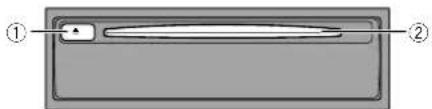

Inserting and ejecting a disc
CAUTION
Do not insert anything other than a disc into the disc-loading slot.
Inserting a disc
1 Insert a disc into the disc-loading slot.
Ejecting a disc
1 Press the button.
2 Remove the disc, and press the button.
Connection
Precautions
CAUTION
- Do not directly connect the yellow lead of this product to the vehicle battery. If the lead is directly connected to the battery, engine vibration may eventually cause the insulation to fail at the point where the wire passes from the passenger compartment into the engine compartment. If the yellow lead's insulation tears as a result of contact with metal parts, short-circuiting can occur, resulting in considerable danger.
Make sure that the cables and wires will not interfere with or become caught in any of the vehicle's moving parts, especially the steering wheel, gearstick, handbrake, sliding seat tracks, doors, or any of the vehicle's controls. - Do not route wires where they will be exposed to high temperatures. If the insulation heats up, wires may become damaged, resulting in a short circuit or malfunction and permanent damage to the product.
- Do not shorten any leads. If you do, the protection circuit (fuse holder, fuse resistor or filter, etc.) may fail to work properly.
- Never feed power to other electronic products by cutting the insulation of the power supply lead of this product and tapping into the lead. The current capacity of the lead will be exceeded, causing overheating.
Before installing this product
- Use this product with a 12-volt battery and negative grounding only. Failure to do so may result in a fire or malfunction.
- To avoid shorts in the electrical system, be sure to disconnect the (-) battery cable before installation.
To prevent damage
The black lead is earth. Please earth this lead separately from the earth of high current products such as power amps. Do not earth more than one product together with the earth from another product. For example, you must separately earth any amp unit away from the earth of this product. Connecting grounds together can cause a fire and/or damage the products if their grounds became detached.
This product cannot be installed in a vehicle without ACC (accessory) position on the ignition switch.
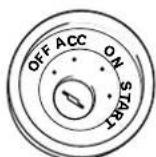
ACC position No ACC position
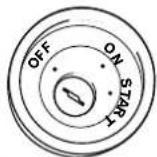
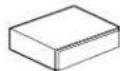
RGB cable This product
Connection
Connecting the system
AVIC-EVO1 main unit (sold separately)
Installation
Precautions before installation
CAUTION
Never install this product in places where, or in a manner that:
- Could injure the driver or passengers if the vehicle stops suddenly.
- May interfere with the driver's operation of the vehicle, such as on the floor in front of the driver's seat, or close to the steering wheel or gearstick.
To ensure proper installation, be sure to use the supplied parts in the manner specified. If any parts are not supplied with this product, use compatible parts in the manner specified after you have the parts' compatibility checked by your dealer. If parts other than supplied or compatible ones are used, they may damage internal parts of this product or they may work loose and the product may become detached. - Never install this product in front of or next to the place in the dashboard, door, or pillar from which one of your vehicle's airbags would deploy. Please refer to your vehicle's owner's manual for reference to the deployment area of the frontal airbags.
Before installing
- Consult with your nearest dealer if installation requires drilling holes or other modifications of the vehicle.
Before making a final installation of this product, temporarily connect the wiring to confirm that the connections are correct and the system works properly.
Installation notes
- Do not install this product in places subject to high temperatures or humidity, such as:
- Places close to a heater, vent or air conditioner.
Places exposed to direct sunlight, such as on top of the dashboard.
Places that may be exposed to rain, such as close to the door or on the vehicle's floor.
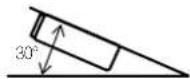
Install this product horizontally on a surface within 30 to 30 degrees tolerance (within 5 degrees to the left or right). Improper installation of the product with the surface tilted more than these tolerances increases the potential for errors in the vehicle's location display, and might otherwise cause reduced display performance.
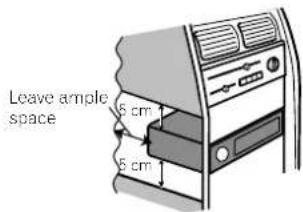
- When installing to ensure proper heat dispersal when using this product, make sure you leave ample space behind the rear panel and wrap any loose cables so they are not blocking the vents.
The semiconductor laser will be damaged if it overheals, so don't install this product anywhere hot— for instance, near a heater outlet.
Installing this product
Before you completely install this product, connect the
1 Open the glove box.
To prevent damaging things inside the glove box, remove them from the glove box.
2 Insert this product into the housing structure for DIN audio equipment in the glove box.
Gently slide into the housing structure until you can near snapping sounds and be sure that this product is firmly fixed.
Removing this product
If you do not wish to use the DVD player anymore, you can remove it.
1 Insert the separately sold extraction keys into both sides of the unit until they click into place.
Installation
2 Pull the unit out of the DIN space in the glove box.
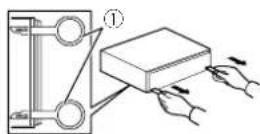
(1) Extraction keys
Appendix
Handling and care of discs
Some basic precautions are necessary when handling your disca:
Built-in drive and care
Use only conventional, fully circular discs. Do not use shaped discs.
Do not use cracked, chipped, warped, or otherwise damaged discs as they may damage the built-in drive.
Use 2-cm discs. Do not use 8-cm discs or an adapter for 8-cm discs.
When using discs that can be printed on label surfaces, check the instructions and the warnings of the discs. Depending on the discs, inserting and ejecting may not be possible. Using such discs may result in damage to this equipment.
- Do not attach labels, write on or apply chemicals to the surface of the discs.
Do not attach commercially available labels or other materials to the discs.
To clean a disc, wipe it with a soft cloth, moving outward from the centre.
- Condensation may temporarily impair the built-in drive's performance.
Playa4 of discs may not be possible because of disc characteristics, disc format, recorded application, playback environment, storage conditions and so on.
Road shocks may interrupt disc payback.
Read the precautions for discs before using them.
Ambient conditions for playing a disc
- At extremely high temperatures, a temperature cutout protects this product by switching it off automatically
Despite our careful design of the product, small scratches that do not affect actual operation may appear on the disc surface as a result of mechanical wear, ambient conditions for use or handling of the disc. This is not a sign of the malfunction of this product. Consider it to be normal wear and tear.
Playable discs
DVD-Video

Trademark of DVD Format/Logo Licensing Corporation.
It is not possible to play DVD-Audio discs. This DVD drive may not be able to play all discs bearing the marks shown above.
CD

AVCHD recorded discs
This unit is not compatible with discs recorded in AVCHD (Advanced Video Codec High Definition) format. Do not insert AVCHD discs. If inserted, the disc may not be ejected.
Playing DualDisc
DualDiscs are two-sided discs that have a recordable CD for audi on one side and a recordable DVD for video on the other.
Playback of the DVD side is possible with this product. However, since the CD side of DualDiscs is not physically compatible with the general CD standard, it may not be possible to play the CD side with this product.
Frequent loading and ejecting of a DualDisc may result in scratches to the disc.
- Serious scratches can lead to playback problems on this product. In some cases, a DualDisc may become stuck
Appendix
in the disc-loading slot and will not eject. To prevent this, we recommend you refrain from using DualDisc with this product.
Please refer to the manufacturer for more detailed information about DualDiscs.
Dolby Digital
This product will down-mix Dolby Digital signals internally and the sound will be output in stereo.
Manufactured under license from Dolby Laboratories. Dolby and the double D symbol are trademarks of Dolby Laboratories.

DOLBY DIGITAL
Specifications
General
Rated power source 14.4 V DC (12.0-14.4Vallowable)
Ersihing system Negative type Maximum current consumption . 10.0 A
Dimensions (W× H× D) : Chassis 188.3 mm x 57.4 mm x 183 mm Weight 1.06 kg
DVD drive
System . DVD Video, VCD, CD, MP3, WMA, AAC, MPES player Region number.
Usable discs.DVD-VIDEO,VIDEO-CD.CD.CD-R.CD-RW,DVD-R, DVD-RW,DVD-RDL
Frequency response....5 Hz to 44 000 Hz (with DVD, at sampling frequency 96 kHz)
Signal-to-noise ratio ... 96 dB (1 kHz) (IEC-A network) (RCA level)
Output level:
video 1.0 Vp-p/75 O (±0.2 V) Number of channels 2(stereo)
MP3 decoding format MPEG-1,2&2.5 Audio Layer 3
WMA decoding format ...Ver.7, 8, 9 (2 ch audio) (Windows Media Player).
AAC decoding format. .MPEG4 AAC (Tunes encoded only): m4a (Ver. 11 and earlier)
MPEG video decoding format......... MPEG-1: mog,mpeg,dat MPEG-2 PS:mpg,mpg
MPEG-4 Part2 (Visual).MS MPEG-4 Ver.3:avi
Specifications and design are subject to possible modifications without net due to improvements.
Sommaire
KLASSE 1 LASERPRODUCT
VOORZICTIG-ZICHTBARE ENOZICTBARE LASERSTRALING KLASSEN 1M INDEN OPEN NIECTRECHSKEBEKLUEN MET OPTISCHE INSTRUMENTEN.
Visit www.pioneer-car.co.uk (or www.pioneer-car.eu) to register your product.
28-8, Honkomagome 2-chome, Bunkyo-ku,
Tokyo 113-0021, JAPAN
PIONEER EUROPE NV
Haven 1087, Keetberglaan 1, B-9120 Melsele, Belgium/
Belgique
TEL: (0) 3/570.05.11
© 2016 PIONEER CORPORATION. All rights reserved.