51248 - Grass trimmer TORO - Free user manual and instructions
Find the device manual for free 51248 TORO in PDF.


| Product type | Electric grass trimmer |
| Brand | Toro |
| Model | 51248 |
| Weight | 2.3 kg |
| Power source | Mains (power cord) |
| Double insulation | Yes |
| Electrical protection | 30 mA residual-current device |
| Sound pressure level | 82.5 dBA |
| Sound power level | 96 dBA |
| Hand-arm vibration | 6.54 m/s² |
| Line diameter | 1.6 mm |
| Maximum line length | 9 m |
| Spool type | Pre-wound spool (model 88175) or bulk line |
| Main functions | Edging, trimming, bump feed |
| Safety | Protective guard, automatic stop, eye protection required |
| Maintenance | Clean with damp cloth, check fasteners, clean air vents |
| Spare parts available | Pre-wound spool, nylon line, replacement spool |
| Metal line guide | Not included (model 51348 only) |
Frequently Asked Questions - 51248 TORO
User questions about 51248 TORO
0 question about this device. Answer the ones you know or ask your own.
Ask a new question about this device
Download the instructions for your Grass trimmer in PDF format for free! Find your manual 51248 - TORO and take your electronic device back in hand. On this page are published all the documents necessary for the use of your device. 51248 by TORO.
USER MANUAL 51248 TORO
Model No. 51348—250000001 and Up
WARNING!—When using the machine, the safety rules must be followed. For your own safety and bystanders, please read these instructions before operating the machine. Please keep the instructions safe for later use.
It is essential that you or any other operator of the appliance read and understand the contents of this manual before operating the appliance. Pay particular attention to the safety alert symbol ⚠️ which means CAUTION, WARNING or DANGER—personal safety instruction. Read and understand the instruction because it has to do with safety. Failure to comply with these instructions may result in personal injury, risk of fire, or electrical shock.
The following safety information has been adapted from European Standard EN 786:1996 and EN 60335-2-91:2002:
- Be familiar with the controls and proper use of the machine.
- Wear protective glasses or goggles.
- Never allow children or people unfamiliar with the instructions to use the machine.
- Stop using the machine while people, especially children, or pets are nearby.
- Only use the machine in daylight or good artificial light.
- Before using the machine and after any impact, check for signs of wear or damage and repair as necessary.
- Never operate the machine with damaged guards or without the guards in place.
- Keep hands and feet away from the cutting means at all times and especially when switching on the motor.
•Take care against injury from the line cutting blade on the underside of the trimmer. After installing new line, always return the machine to its normal operating position before switching it on.
- Never use metal cutting elements.
- Do not carry a plugged-in trimmer with your finger on the switch. Ensure that the switch is off when plugging in the trimmer.
- Disconnect the machine from the power source before checking, cleaning, or working on the machine and when it is not in use.
- Always ensure that the ventilation openings are kept clear of debris.
- Before use, check the supply and extension cord for signs of damage or ageing.
- If the cord becomes damaged during use, disconnect the cord from the power supply immediately. Do not touch the cord before disconnecting the power supply.
- Do not use the machine if the cord is damaged or worn.
- Warning, the cutting element continues to rotate after the motor is switched off.
- Keep extension cords away from the cutting element.
- The power supply used with the appliance should be a residential current device (RCD) with a tripping current of not more than 30 mA.
•The machine weighs 2.3 kg.
•After use, check the machine for damage. - When not in use, store the machine away from children.
- If the trimmer requires repair, take it to an Authorized Toro Dealer.
- Use only Toro replacement parts and accessories.
Sound Pressure
This unit has a maximum sound pressure level at the operator's ear of 82.5 dBA, based on measurements of identical machines per Directive 98/37/EC.
Sound Power
This unit has a guaranteed sound power level of 96 dBA, based on measurements of identical machines per Directive 2000/14/EC.
Vibration, Hand/arm
This unit does not exceed a hand/arm vibration level of 6.54 m/s^2 , based on measurements of identical machines per Directive 98/37/EC.
Safety/Instruction Decals
Important: Safety and instruction decals are located near areas of potential danger. Replace damaged or lost decals.

106-6039
- Warning—read the Operator's Manual.
- Cutting hazard of hand or foot—stay away from moving parts. Keep bystanders away.
- Thrown object hazard—wear eye protection.
- Warning—disconnect the trimmer from the power outlet and read the instructions before servicing or performing maintenance.
- Electric shock hazard—keep the trimmer out of the rain and other wet conditions.
Setup
Adjusting and Assembling the Trimmer
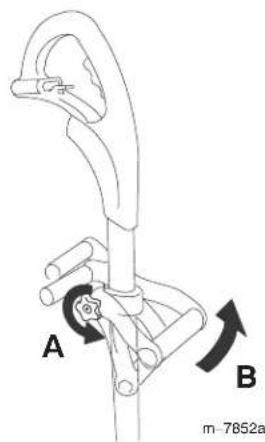
- Loosen the knob (A), then move the assist handle up or down the shaft to your desired height.
- Pivot the assist handle to a comfortable position (B), then tighten the knob.
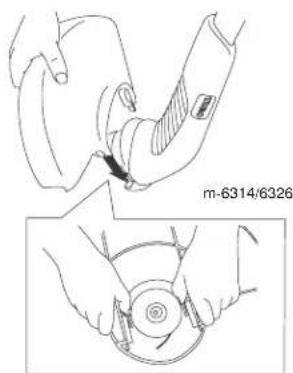
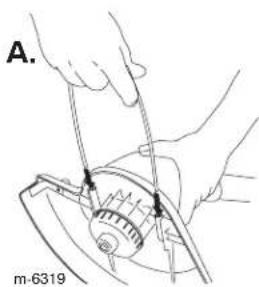
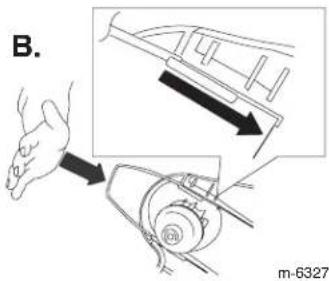
- Install the guard as shown, snapping it into both sides of the trimmer.
!
The blade under the guard is sharp and can cut you. Be careful when handling the trimmer so that you do not accidentally cut yourself.
- Install the metal wire guide (model 51348 only).
Operation
!
During operation, the trimmer may throw objects in the operator's or a bystander's direction, causing injury.
- Wear safety goggles or other suitable eye protection, long pants, and shoes while operating the trimmer.
- Keep bystanders away from the work area.
!
When the trimmer is running the cutting head is spinning. If you contact the cutting line or cutting head, you could be injured.
- Keep the cutting head away from your hands, feet, and bystanders. Keep the guard in place and in working order.
- Wear shoes and long pants when using the trimmer.
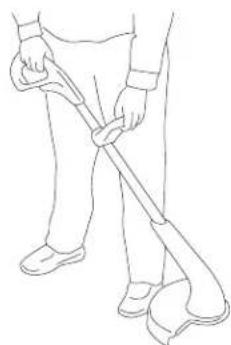
- Ensure that the cutting head has stopped and you disconnect the trimmer from the power source before you service or examine the cutting head. Do not start the trimmer unless your hands are on both handles and the cutting head is down near the ground.
- Do not allow the trimmer to cut into the cord.
Connecting to a Power Source
!
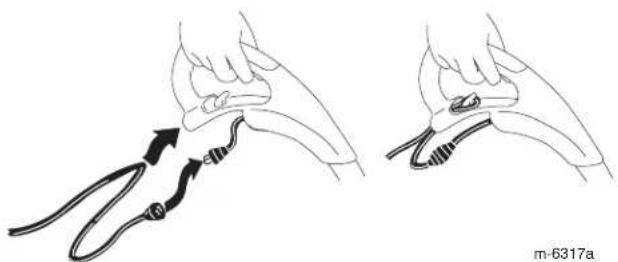
If you do not fully seat the extension cord on the inlet plug, the loose plug could lead to overheating and cause a fire, possibly burning you or others.
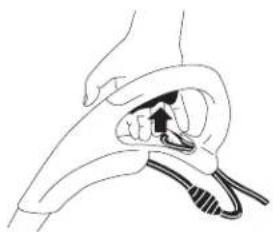
Ensure that you fully seat the cord on the plug and use the cord lock feature to secure the cord.
natural_image
Illustration of two medical procedures showing a catheter being inserted into a jawbone (no text or symbols present)Important: Do not use a damaged cord.
Starting the Trimmer
To start the trimmer, squeeze the trigger.
natural_image
Line drawing of a hand holding a small object with a black arrow, possibly indicating a motion or force (no text or symbols present)m-6412a
Stopping the Trimmer
To stop the trimmer, release the trigger.
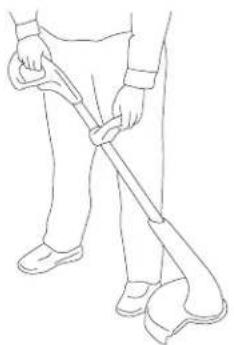
Trimming
natural_image
Line drawing of a person using a walking stick (no text or symbols)m-6316a
Lengthening the Line
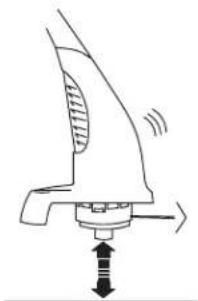
To increase the length of the cutting line, tap the spool on the ground while the trimmer is running.
Note: The blade under the guard will cut the line to the correct length.
natural_image
Diagram of a mechanical device with directional arrows indicating movement or force (no text or symbols)Important: Use the following precautions to ensure optimal line performance.
- Do not hold the spool on the ground.
•To help prevent line tangle, tap only once to lengthen line. If additional line is required, wait a few seconds before tapping the trimmer head. - If the line is not advanced occasionally, it will wear down to the eyelet. When the trimmer stops, the short line may retract into the cutter head. Should this occur, remove spool, refeed the line through eyelet, and assemble spool to trimmer.
Operating Tips
To reduce line wear and improve trimming performance, use the following techniques when trimming:
- Remove any wire, rope or string-like matter which could become entangled in the rotating line from the trimming area.
- Trim only when the grass and weeds are dry.
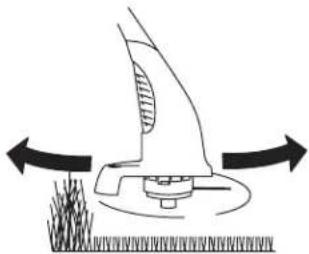
- Slowly move the trimmer in and out of the area being cut.
natural_image
Diagram of a robotic arm with directional arrows indicating movement or force (no text or symbols)- Cut grass in excess of eight inches tall or weeds from the top to the bottom in small increments.
- Do not force the trimmer. Allow the very tip of the line to do the cutting.
Replacing Line
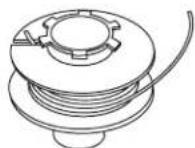
For replacement line, you can purchase either a new, pre-wound spool of line (model no. 88175) or bulk line (0.065 inch dia. (1.6 mm) x 30ft. (9 m)) that you can wind onto the old spool. Both are available from your Authorized Toro Dealer.

Metal wire, rope, plastic knives, or any material other than Toro .065 inch dia. (1.6 mm) nylon monofilament may overload the motor, possibly causing a fire or electrical shock.
Do not use any material other than Toro .065 inch dia. (1.6 mm) nylon monofilament, 30 ft. (9 m) maximum line length.
Removing the Spool
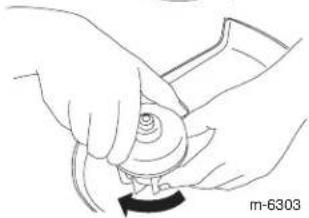
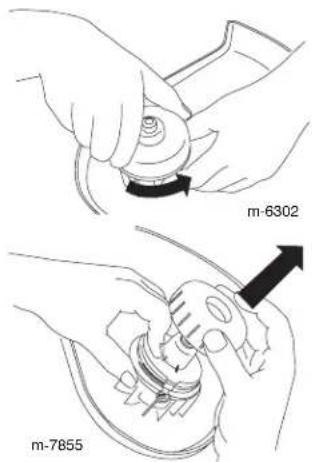
- Twist the cap off counterclockwise.
- Remove the cap and spool.
Note: If the spring falls off, install it before installing the spool. - Thoroughly clean the cutting head and cap and inspect them for any damaged or worn parts.
Rewinding the Spool
Note: If you are replacing the spool with a new, pre-wound spool, discard the empty spool and skip this section.
- Remove any cutting line left on the spool.
- Hook one end of line all the way into the slot on the spool, allowing no more than 1/8 inch (3 mm) to protrude.
- Wind the line in the direction of the arrow on the spool, in level rows, between the spool flanges.
Note: The trimmer will not function correctly if you wind the line in the wrong direction, the end of the line protrudes more than 1/8 inch (3 mm), or you wind more than 30 ft of line on the spool.
Installing the Spool

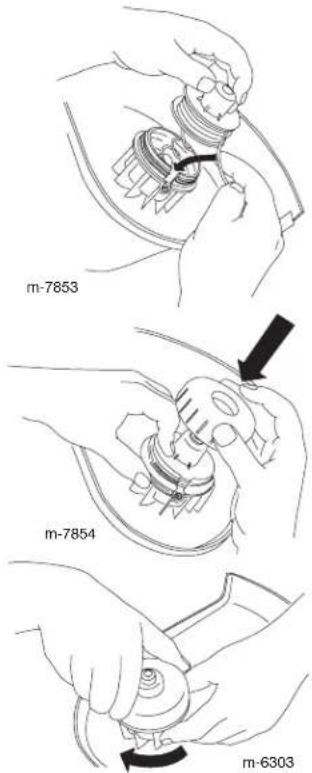
If you do not fully install the spool and cap, the trimmer could throw them during operation, causing injury to you or bystanders.
-
Holding the line and spool, insert the spool into the cutting head and the line into the eyelet.
-
Holding the line and spool, place the cap over the spool.
-
Twist the cap on securely clockwise.
Maintenance
After each use of the trimmer, complete the following:
- Wipe the trimmer clean with a damp cloth. Do not hose the trimmer down or submerge it in water.
- Wipe or scrape clean the cutting head area any time there is an accumulation of dirt or cuttings.
- Check and tighten all fasteners. If any part is damaged or lost, repair or replace it.
- Brush debris away from air intake vents on the back of the shaft to prevent the motor from overheating.
Storage
Store the trimmer and extension cord indoors, in a cool dry location, out of reach of children and animals.
Important: Do not rest the trimmer on the guard or it may may warp and interfere with the cutting line.
Note: Devices for retaining extension cords are commercially available.
Service
Toro has designed this product to give you years of trouble free use. Should it need service, take the product to your Authorized Toro Service Dealer. Your Toro Dealer is specially trained to fix Toro products and will ensure that your Toro stays "All" Toro.
Double-insulated Appliance
In a double-insulated appliance, two systems of insulation are provided instead of grounding. No grounding means is provided on a double-insulated appliance, nor should a means for grounding be added to the appliance. Servicing a double-insulated appliance requires extreme care and knowledge of the system, and should be done only by the qualified service personnel at your Authorized Toro Service Dealer. Replacement parts for a double-insulated appliance must be identical to the parts they replace. A double-insulated appliance is marked with the words "Double Insulation" or "Double Insulated." The symbol (square within a square) may also be marked on the appliance.
Sicherheit
106-6039
natural_image
Illustration of two hands performing a medical procedure with a tool, showing no text or symbolsnatural_image
Illustration of a hand holding a medical device with a catheter inserted (no text or symbols)m-6412a
Stoppen des Rasentrimmers
natural_image
Line drawing of a person using a walking stick (no text or symbols)m-6316a
natural_image
Diagram of a mechanical device with directional arrows indicating movement or force (no text or symbols)natural_image
Diagram of a mechanical device with directional arrows indicating motion or force (no text or symbols)natural_image
Line drawing of hands assembling a mechanical component (no text or symbols)natural_image
Illustration of hands using a tool to adjust a mechanical component (no text or symbols visible)natural_image
Line drawing of hands holding a small object with a circular base, no text or symbols presentWartung
©2005 – The Toro Company
8111 Lyndale Ave., Bloomington, MN 55420, USA
106-6039
natural_image
Illustration showing two steps of a medical procedure involving a tool and a device, with no visible text or symbols.natural_image
Illustration of a hand holding a medical device with a black arrow pointing to the device (no text or symbols present)m-6412a
natural_image
Line drawing of a person using a walking stick (no text or symbols)m-6316a
natural_image
Diagram of a mechanical device with directional arrows indicating movement or force (no text or symbols)natural_image
Diagram of a brush applying material to a surface, showing directional arrows (no text or symbols)natural_image
Line drawing of hands assembling a mechanical component (no text or symbols)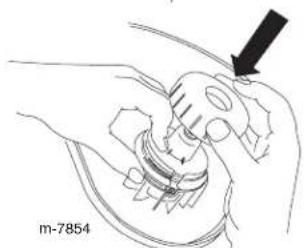
natural_image
Line drawing of hands holding a mechanical component with an arrow indicating direction (no text or symbols)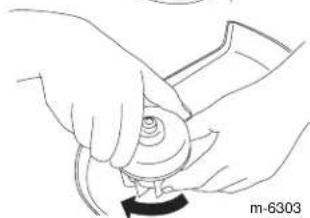
natural_image
Line drawing of hands holding a mechanical component (no text or symbols)Mantenimiento
natural_image
Illustration of two hands performing a medical procedure with a tool, showing anatomical positioning (no text or symbols)natural_image
Illustration of a hand holding a small object with a black arrow indicating force or movement (no text or symbols present)m-6412a
natural_image
Line drawing of a person holding a walking stick, wearing shoes and boots (no text or symbols)m-6316a
Allonger le fil
natural_image
Diagram of a mechanical device with directional arrows indicating motion or force (no text or symbols)natural_image
Diagram of a robotic arm with directional arrows indicating movement or force (no text or symbols)natural_image
Technical illustration showing two hands performing a mechanical assembly, with no visible text or symbols.!
natural_image
Illustration showing two steps of a medical procedure involving a tool or device, with no visible text or symbols.natural_image
Illustration of a hand holding a small object with a black arrow indicating force or movement (no text or symbols present)m-6412a
natural_image
Line drawing of a person holding a walking stick, no text or symbols presentm-6316a
natural_image
Diagram of a mechanical device with directional arrows indicating movement or force (no text or symbols)natural_image
Diagram of a robotic arm with directional arrows indicating movement or force (no text or symbols)106-6039
natural_image
Illustration of two hands performing a medical procedure with a tool, showing anatomical positioning (no text or symbols)natural_image
Illustration of a hand holding a small object with a black arrow indicating force or movement (no text or symbols)m-6412a
De trimmer afzetten
Om de trimmer af te zetten, laat u de trekker los.
Trimmen
natural_image
Line drawing of a person holding a long pole with feet extended (no text or symbols)m-6316a
De draad verlengen
natural_image
Diagram of a mechanical device with directional arrows indicating motion or force (no text or symbols)natural_image
Diagram of a robotic arm with directional arrows indicating movement or force (no text or symbols)106-6039
natural_image
Illustration of a hand holding a medical device with attached tubing, showing two different steps (no text or symbols present)natural_image
Illustration of a hand holding a small object with a black arrow pointing to it, no text or symbols presentm-6412a
Stänga av trimmern
natural_image
Line drawing of a person holding a walking stick, no text or symbols presentm-6316a
Förlänga träden
natural_image
Diagram of a mechanical device with directional arrows indicating movement or force (no text or symbols)natural_image
Diagram of a robotic arm with directional arrows indicating movement or force (no text or symbols)natural_image
Line drawing of hands assembling a mechanical component (no text or symbols)natural_image
Line drawing of hands operating a mechanical component with a black arrow pointing to the handle (no text or symbols present)- Skruva på käpan medurs tills den sitter fast ordentligt.