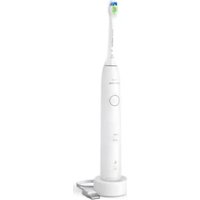
Sonicare 5500 HX7110 - Toothbrush PHILIPS - Free user manual and instructions
Find the device manual for free Sonicare 5500 HX7110 PHILIPS in PDF.

 FR
FR
 AZ
AZ
 BG
BG
 CS
CS
 DA
DA
 DE
DE
 EL
EL
 EN
EN
 ES
ES
 ET
ET
 FI
FI
 HE
HE
 HU
HU
 IT
IT
 KK
KK
 KY
KY
 LT
LT
 LV
LV
 MK
MK
 NL
NL
 NO
NO
 PL
PL
 PT
PT
 RO
RO
 RU
RU
 SK
SK
 SL
SL
 SQ
SQ
 SV
SV
 TG
TG
 TK
TK
 UK
UK
 UZ
UZ
User questions about Sonicare 5500 HX7110 PHILIPS
0 question about this device. Answer the ones you know or ask your own.
Ask a new question about this device
Download the instructions for your Toothbrush in PDF format for free! Find your manual Sonicare 5500 HX7110 - PHILIPS and take your electronic device back in hand. On this page are published all the documents necessary for the use of your device. Sonicare 5500 HX7110 by PHILIPS.
USER MANUAL Sonicare 5500 HX7110 PHILIPS
natural_image
White Philips Soulcare electric toothbrush with white body and orange tip, no visible text or symbols on the device itself.1
text_image
Diagram of an electric toothbrush with labeled parts including a base, body, and connector-1
1_
-1
1
English 5
Azərbaycanca 23
Čeština 42
Dansk 61
Deutsch 80
Eesti 102
Español 120
Français 141
Hrvatski 162
Italiano 181
Latviešu 202
Lietuviškai 221
Magyar 241
Nederlands 261
Norsk 281
O'zbek 299
Polski 320
Português 341
Română 362
Shqip 382
Slovenščina 402
Slovensky 421
Srpski 440
Suomi 460
Svenska 480
Türkmençe 499
Ελληνικά 519
Български 541
Кыргызча 563
Македонски 585
Русский 606
Точикй 628
Українська 650
Қазақша 671
Ruijtntu 692
phosphorus 714
736
Introduction
Welcome to the Philips Sonicare family! This toothbrush enables you to obtain superior plaque removal, whiter teeth and healthier gums. Using Sonicare's combination of gentle sonic technology and clinically developed and proven features, you can be confident that you're getting the very best clean, every time.
Further support and product registration are available to you at:
www.philips.com/support
Important safety information
Only use the product for its intended purpose. Read this information carefully before you use the product and its batteries and accessories, and save it for future reference. Misuse can lead to hazards or serious injuries.
WARNINGS
- Only use original Philips accessories or consumables. If supplied, only use the original USB cable and USB power supply unit.
- This appliance contains no user-serviceable parts. If the appliance is damaged, stop using it and contact the Consumer Care Center in your country. If the USB cable is damaged, stop using it.
- Keep the chargers away from water.
- After cleaning, make sure the chargers and travel charger cases are completely dry before you connect these.
- This appliance can be used by children and persons with reduced physical, sensory or mental capabilities or lack of experience and knowledge if they have been given supervision or instruction concerning use of the appliance in a safe way and understand the hazards involved. Cleaning and user maintenance shall not be made by children without supervision.
- Children should be supervised to ensure that they do not play with the product.
- Do not clean any part of the product in the dishwasher.
- Do not use adapters and chargers outdoors or near heated surfaces.
- This appliance has only been designed for cleaning teeth, gums and tongue.
- Stop using a brush head with crushed or bent bristles. Replace the brush head every 3 months or sooner if signs of wear appear.
- Avoid direct contact with products that contain essential oils or coconut oil. Contact may result in bristles dislodging.
- The maximum altitude of use is 4500 meters.
MEDICAL WARNINGS
- Stop using the appliance and consult your dentist/doctor if excessive bleeding occurs after use, if bleeding continues to occur after 1 week of use or if you experience discomfort or pain.
- If you have had oral or gum surgery in the previous 2 months, consult your dentist before you use this appliance.
- If you have a pacemaker or other implanted device, contact your doctor or the manufacturer of the implanted device prior to use.
- If you have medical concerns, consult your doctor before you use this appliance.
- This appliance is a personal care device and is not intended for use on multiple patients in a dental practice or institution.
BATTERY SAFETY INSTRUCTIONS
- This appliance contains batteries that are only to be removed by skilled persons.
- Only use the product for its intended purpose. Read this information carefully before you use the product and its batteries and accessories, and save it for future reference. Misuse can lead to hazards or serious injuries. Accessories supplied may vary for different products.
- Only use original Philips accessories and consumables.
- Keep product and batteries away from fire and do not expose them to direct sunlight or high temperatures.
- If the product becomes abnormally hot or smelly, changes color or if charging takes longer than usual, stop using and charging the product and contact Philips.
- Do not place products and their batteries in microwave ovens or on induction cookers.
- Do not open, modify, pierce, damage or dismantle the product or battery to prevent batteries from heating up or releasing toxic or hazardous substances. Do not short-circuit, overcharge or reverse charge batteries.
- This appliance contains batteries that are non-replaceable. When the battery is at end of life, the appliance shall be properly disposed of, see section on Recycling.
- Charge only with Philips HX6110 input ratings: 4.75-5.25VDC, 1.5W.
- Charge and use the product at a temperature between 0 °C and 40 °C (32°F and 104 °F).
- To avoid accidental short-circuiting of batteries after removal, do not let battery terminals come into contact with metal object (e.g. coins, hairpins, rings). Do not wrap batteries in aluminium foil. Tape battery terminals or put batteries in a plastic bag before you discard them.
- This appliance contains a Lithium-ion rechargeable cell. MUST BE RECYCLED OR DISPOSED OF PROPERLY.
Storage and transportation conditions
Temperature -20^ to +60^ ( -4^ to 140^ ).
Electromagnetic fields (EMF)
This Philips appliance complies with all applicable standards and regulations regarding exposure to electromagnetic fields.
Radio Equipment Directive
Hereby, Philips declares that electric toothbrushes with radio equipment type (Bluetooth, NFC) are in compliance with Directive 2014/53/EU.
- The Bluetooth radio frequency interface in applicable products operates at 2.4 GHz.
- The maximum output power by the Bluetooth appliance is 3 dBm.
- The NFC radio frequency interface in applicable products operates at 13.56 MHz.
- The maximum RF power transmitted by the appliance is 30.16 dBm.
The full text of the EU declaration of conformity is available at the following internet address: www.philips.com/support
Note: The Features of different models may vary. Some models may not be equipped with Bluetooth or NFC.
SAVE THESE INSTRUCTIONS
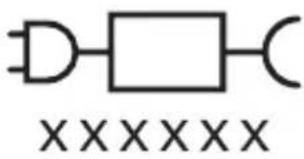
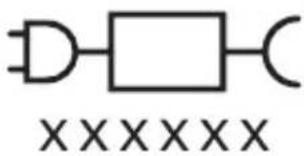
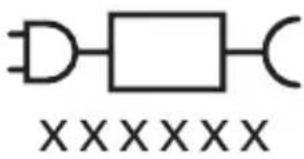
The following symbols may appear on the product:

natural_image
Simple line drawing of an open book with no text or symbols visibleThis symbol means read the instructions for use, before using the appliance.
text_image
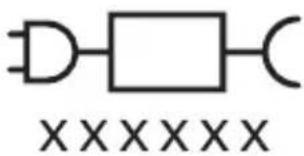
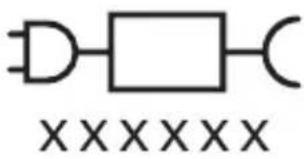
XXXXXXThis symbol means to use the indicated power supply.
Intended use
Sonicare power toothbrushes are intended to remove adherent plaque and food debris from the teeth to reduce tooth decay and improve and maintain oral health.
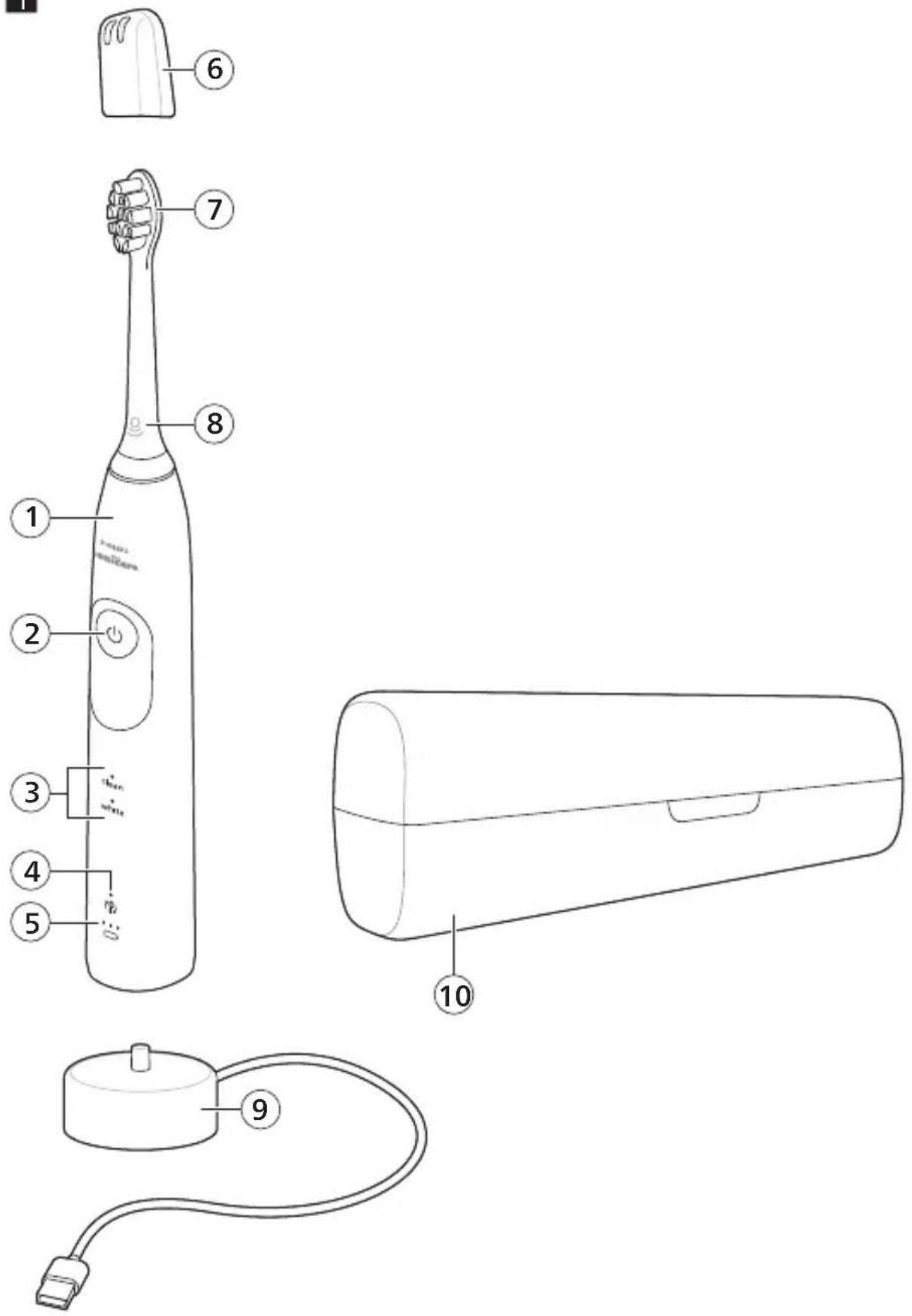
Your Philips Sonicare (Fig 1.)
1 Handle
2 Power on/off button
3 Modes (depending on model)
4 Brush head replacement reminder
5 Battery indicator
Accessories:
6 Brush head cap
7 Brush head(s)
8 BrushSync symbol
9 USB charger (wall adapter not included)
10 Travel case
Note: Accessories included may vary based on the model purchased.
Note: Wall adapter not included. We recommend any compatible IPX4 splash-proof adapter (identifiable by the "IPX4" text or symbols on the adapter).
Getting started
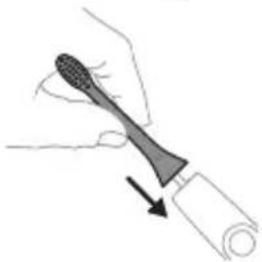
Attaching the brush head
natural_image
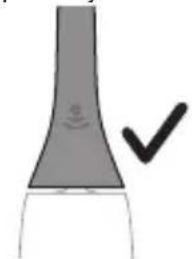
Illustration of a hand holding a toothbrush with an arrow indicating force or movement (no text or symbols)1 Align the brush head so the bristles point in the same direction as the front of the handle.
natural_image
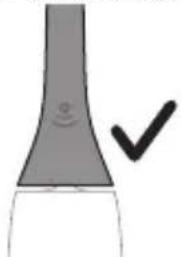
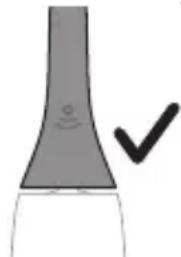
Simple line drawing of a bulb-like object with a checkmark indicating a detail (no text or symbols)2 Firmly press the brush head down onto the metal shaft until it will not go any further.
Note: It is normal to see a slight gap between the brush head and the handle.
Using your Philips Sonicare toothbrush
If you are using your Sonicare toothbrush for the first time, it is normal to feel more vibration than when using a non-electric toothbrush. It is common for first-time users to apply too much pressure. Only apply gentle pressure and let the toothbrush do the brushing for you. Please follow the brushing instructions below for the best experience.
To help you transition to your new Sonicare power toothbrush, use a lower setting for the first 1-2 weeks, then transition to a higher setting.
Brushing instructions
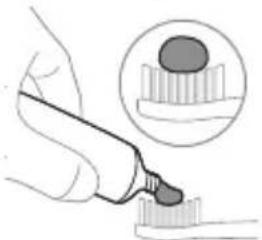
natural_image
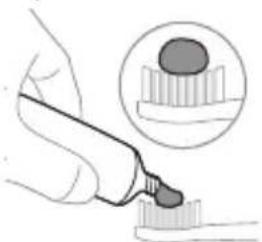
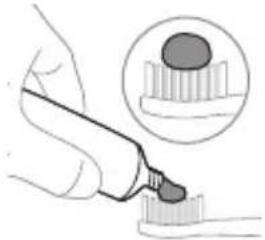
Illustration of a hand using a pipette to apply liquid onto a surface, with an inset showing a droplet on a surface (no text or symbols present)1 Wet the bristles and apply a small amount of toothpaste.
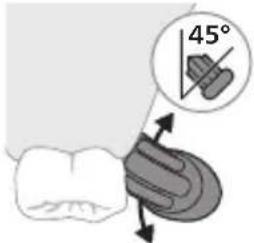
text_image
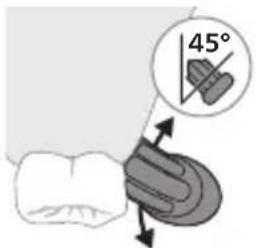
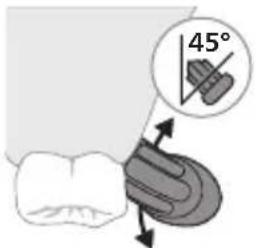
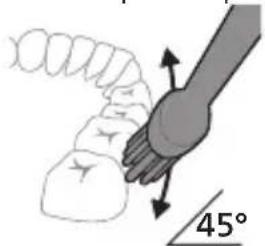
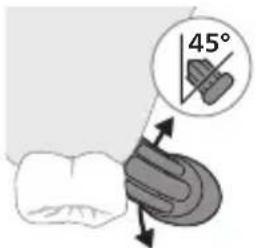
45°2 Place the toothbrush bristles against the teeth at a slight angle (45 degrees). Pressing firmly to make the bristles reach the gumline or slightly beneath the gumline.
Note: Keep the center of the brush in contact with the teeth at all times.
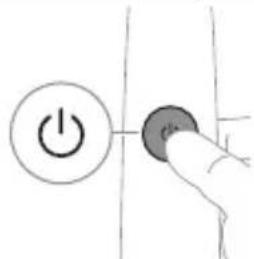
text_image
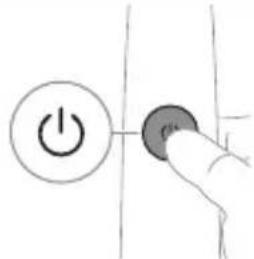
Hand-drawn diagram showing a power button with an 'Power' icon and a circular button labeled 'OK'.3 Press the power on/off button to switch on the Philips Sonicare.
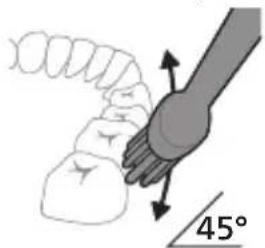
text_image
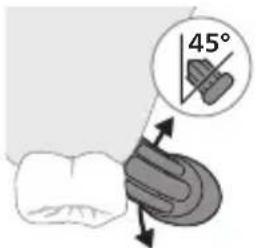
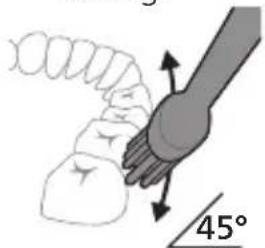
45°4 Gently keep the bristles placed on the teeth and in the gumline. Brush your teeth with small back and forth motion so the bristles reach between the teeth. Continue this motion throughout your brushing cycle.
Note: The bristles should slightly flare. It is not recommended to scrub as you would with a manual toothbrush.
Note: If you apply too much pressure, you will be alerted by a change in vibration of the handle.
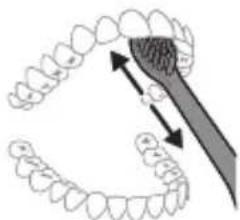
natural_image
Illustration of dental tool interacting with teeth (no text or symbols)5 To clean the inside surfaces of the front teeth, tilt the brush handle semi-upright and make several vertical overlapping brushing strokes on each tooth.
6 After you have completed the brushing cycle, you can spend additional time brushing the chewing surfaces of your teeth and areas where staining occurs. You can also brush your tongue, with the toothbrush switched on or off, as you prefer.
Note: Your Philips Sonicare toothbrush is safe to use on braces (brush heads wear out sooner when used on braces) and dental restorations (fillings, crowns, veneers) if they are properly adhered and not compromised.
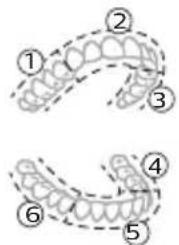
BrushPacer
text_image
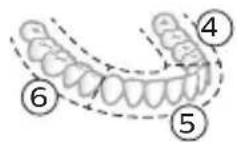
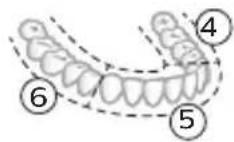
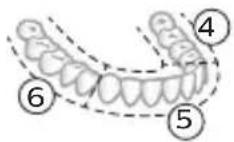
Diagram showing two types of dental arches with numbered labels indicating different anatomical or structural features.To make sure you brush evenly throughout the mouth, divide your mouth into 6 sections using the BrushPacer feature. The BrushPacer divides the brushing time into 6 equal segments and indicates when you should move to the next area. The segments are indicated with a brief pause in vibration. The toothbrush automatically stops at the end of the brushing session.
Note: Additional time may be added when you use the White mode (when available).
Modes
Your power toothbrush is equipped with up to 2 different modes: Clean and White. Based on the smart brush head you use, the optimal mode and intensity will be selected automatically by the BrushSync technology. To manually change the mode/intensity, press the power on/off button within 2 seconds of starting or resuming the brushing while the toothbrush is running. All brush heads work with each mode.
Clean White (5500 only)
| Benefit Plaque removal Plaque and surface | stains removal | |
| Recommended intensity level | High High | |
| Total brushing time 2 minutes 2 minutes and 40 seconds | ||
| How to brush Brush each segment 20 seconds. | 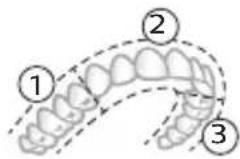 | Brush each segment for 20 seconds, 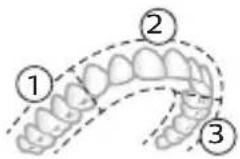 |
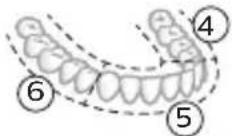 | 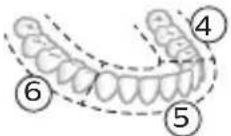 then brush segments 7 and 8 for 20 seconds each. then brush segments 7 and 8 for 20 seconds each. | |
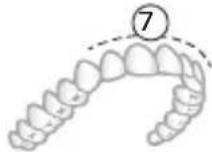 | ||
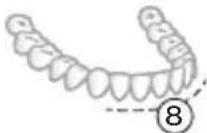 | ||
Intensities (5300 only)
Intensity settings
Your power toothbrush comes with 2 different intensities:
- High intensity
- Low intensity
Note: We recommend high intensity for best results.
To manually select your desired intensity, press the power button within 2 seconds of starting or resuming the brushing when the toothbrush is on, to toggle between the options.
BrushSync technology
natural_image
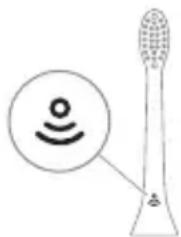
Illustration of a toothbrush with a circular icon showing wireless signal (no text or symbols)BrushSync technology enables your brush head to communicate with your handle using a microchip. The symbol at the bottom of the brush head indicates that the brush head is equipped with this technology.
BrushSync technology enables:
- Brush head replacement reminder
- BrushSync mode and intensity pairing
Note: The availability of BrushSync mode pairing depends on the model of your toothbrush.
Philips Sonicare offers a wide range of smart brush heads, equipped with BrushSync technology. To explore our full range of toothbrush brush heads, and find the brush head that is best for you, go to
www.philips.com/toothbrush-heads for more information.
Features
- Pressure Sensor Feedback
- BrushPacer
- SmarTimer
- EasyStart
- Brush Head Replacement Reminder
- Brush Head Mode Pairing
Pressure Sensor Feedback
Your Sonicare toothbrush measures the pressure you apply while brushing, to protect your gums and teeth from damage. If you apply excess pressure, the handle changes its vibration and sound until you reduce the pressure.
Note: Your product comes with the Pressure Sensor Feedback activated. To deactivate this feature (see 'Activating or deactivating features').
BrushPacer
text_image
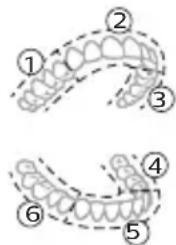
Diagram showing two dental arch structures with numbered labels indicating different tooth locations or regions.The BrushPacer is an interval timer that helps you to brush evenly through the mouth by dividing your mouth into 6 sections.
Note: When available, additional time may be added when you use the White mode.
SmarTimer
The SmarTimer indicates that your brushing cycle is complete by automatically switching off the toothbrush at the end of the brushing cycle.
Dental professionals recommend brushing no less than 2 minutes twice a day.
Note: If you press the power on/off button after you started the brushing cycle, the toothbrush pauses. If you press the on/off button within 30 seconds, the timer resumes to allow you to finish your brushing cycle. After a pause of 30 seconds, the SmarTimer resets.
EasyStart
This Philips Sonicare model comes with the EasyStart feature deactivated. The EasyStart feature gently increases the power over the first 14 brushings to help you get used to brushing with the Philips Sonicare. The EasyStart feature works with all modes.
Note: EasyStart feature comes activated on the 5500 series.
*Disclaimer
When the Philips Sonicare toothbrush is used in clinical studies, it must be used at high intensity with the handle fully charged and the EasyStart feature deactivated.
To activate EasyStart (see 'Activating or deactivating features').
Brush Head Replacement Reminder
Your Philips Sonicare is equipped with BrushSync technology that tracks the wear of your brush head.
Note: This feature only works with Philips Sonicare smart brush heads with BrushSync technology.
1 When you attach a new smart brush head for the first time, the handle recognizes that you have a Philips brush head with BrushSync technology and begins tracking brush head wear.
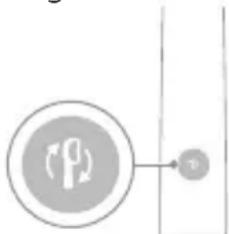
2 Over time, based on the pressure you apply and the total time the brush head has been used, the handle tracks brush head wear in order to determine the optimal time to replace your brush head. This feature guarantees the best cleaning and care of your teeth.
flowchart
graph TD
    A["Directional Arrow"] --> B["v"]
3 When the Brush Head Replacement Reminder indicator lights up amber, you should replace your brush head.
Note: All smart brush heads come with the brush head replacement reminder feature activated. To deactivate the brush head replacement reminder see 'Activating or deactivating features'.
Brush head mode pairing
Brush heads with BrushSync technology are equipped with a microchip which communicates with the handle and automatically pairs it with the recommended mode and intensity. Most brush heads with BrushSync technology will auto pair to Clean Mode. Brush heads with specific benefits will pair with the corresponding mode (when available), examples include:
- W3 Premium White or W DiamondClean (NAM) / W OptimalClean (ROW): White Mode (when available)
Note: If you choose to change mode/intensity from the recommended setting, the brush head will remember your chosen setting for future brushing sessions.
Activating or deactivating features
You can activate or deactivate the following features of your toothbrush:
- EasyStart
English
- Brush Head replacement reminder
- Pressure Sensor Feedback
Note: The brush head replacement reminder is only compatible with Sonicare smart brush heads. The smart brush head must be attached to the toothbrush in order to activate or deactivate the replacement reminder.
From handle:
Step 1: Place the handle on a plugged in charger/charging travel case.
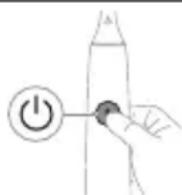
Step 2: Press and hold power on/off button for:
EasyStart Brush Head Replacement Reminder Pressure Sensor Feedback
Up to 3 seconds Up to 5 seconds Up to 7 seconds
Step 3: Let go of the power on/off button when you hear:
1 beep 1 beep and then 1 beep, 2 beeps and 2 beeps then 3 beeps
Together with:
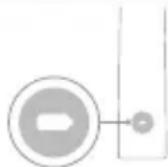
If you see the left LED for the battery indicator flash green 2 times and hear 3 tones low to high, then the feature has been activated.
OR
If you see the left LED for the battery indicator flash amber 1 time and hear 3 tones high to low, then the feature has been deactivated.
Charging and battery status
This Philips Sonicare toothbrush is designed to provide on average 42 brushing sessions, each session lasting 2 minutes (21 days if used twice per day) on a fully charged battery. The battery indicator shows the battery status when you complete the 2-minute brushing session, when you pause the toothbrush, or while it is charging.
Note: It can take up to 24 hours to fully charge the battery before first use, but you can use the Philips Sonicare toothbrush before it is fully charged.
Charging
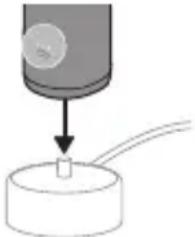
Charging on charger
1 Attach the USB charging cord to a wall adapter, plug the wall adapter into an electrical wall outlet.
natural_image
Diagram showing a mechanical component with a downward arrow and a small cylindrical object on a base (no text or symbols)2 Place the handle on the charger.
3 Connect the attached USB cable to the 5V DC input power supply unit.
- Charge only with Philips compatible chargers or safety approved adapters with input ratings: 100 - 240V\~; 50/60Hz; 3.5W and output ratings 5VDC; 2.5W.
- A UL-listed or certified 1310 Class 2 power supply (NAM only)
4 The battery indicator and light ring illuminate, the handle beeps twice, and all lights on the handle illuminate upward from the bottom of the handle.
5 The flashing light of the battery indicator shows that the toothbrush is charging.
6 When the handle is on the charger and the battery is fully charged, the LED lights of the battery indicator start flashing green. Once the battery is full, the green light remains solid for 30 seconds and then turns off.
Battery status
Battery status (handle on plugged-in charger)
When the handle is placed on the charger, the battery indicator shows the battery level.
| Battery status | Number of flashing LEDs | LED color |
| Low 1 Flashing green | ||
| Partially full 2 Flashing green | ||
| Full 3 Flashing green until full, | then green for 30 seconds and then switches off | |
Battery status (when handle is not on plugged-in charger)
When the toothbrush is awake, the battery indicator at the bottom of the handle shows the battery level.
Battery status Number of LEDs LED color
| Full 3 Solid green | |
| Partially full 2 Solid green | |
| Medium low 1 Solid green | |
| Low 1 with 3 beeps after brushing | Flashes amber |
| Empty 1 with 2 sets of 5 beeps Flashes amber | |
| Note: To save energy, the battery indicator will switch off when not in use. | |
| Note: When the battery is completely empty, the toothbrush switches off. Place the toothbrush on the charger to charge it. | |
| Note: To keep the battery fully charged at all times, you may keep your toothbrush on the charger when not in use. | |
Cleaning
Toothbrush handle
natural_image
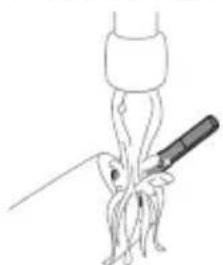
Simple line drawing of a medical procedure with a tool and tubing (no text or symbols)1 Remove the brush head and rinse the metal shaft area and buttons with warm water. Make sure you remove any residual toothpaste on the handle and around the buttons at least once a week, but preferably after each use.
Caution: Do not push on the rubber seal on the metal shaft or around buttons with sharp objects, as this may cause damage.
2 Wipe the entire surface of the handle with a damp cloth.
Note: Do not tap the handle on the sink to remove excess water.
3 Dry the handle with a soft cloth or towel.
Brush head
natural_image
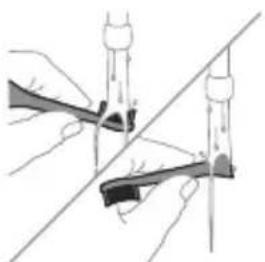
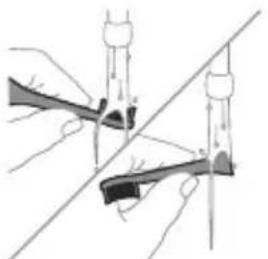
Illustration of two hands using a tool to cut or adjust a mechanical component, with no visible text or symbols.1 Rinse the brush head and bristles after each use.
2 Remove the brush head from the handle and rinse the brush head connection with warm water at least once a week. Rinse the travel cap as often as needed and air dry. Use only on a dry brush head.
Note: The brush head cap is used for shipping purposes and is not intended for continued use.
Charger
1 Unplug the charger before you clean it.
2 Wipe the surface of the charger with a damp cloth.
3 Dry the charger with a soft cloth or towel.
Travel case
Rinse with warm water and use a damp cloth to clean the travel case and allow to air dry.
Storage
If you are not going to use the product for an extended period of time, unplug it from the electrical outlet, clean it and store it in a cool and dry place away from direct sunlight.
Replacement
Replace Philips Sonicare brush heads every 3 months to achieve optimal results. Use only Philips Sonicare replacement brush heads.
Locating the model number
Look on the bottom of the Philips Sonicare toothbrush handle for the model number (e.g.HX740x).
Troubleshooting (ROW)
This chapter summarizes the most common problems you could encounter with the appliance. If you are unable to solve the problem with the information below, visit www.philips.com/support and insert your model number for a list of frequently asked questions or contact the Consumer Care Center in your country.
Problem Possible Cause Solution
| I cannot fully attach the brush head. There is a gap between the brush head and handle. | This gap is normal and is needed for the brush head to vibrate appropriately. The brush head must be able to move to create the right amount of vibrations. | |
| My Philips Sonicare toothbrush vibration is less powerful than before. | The brush head is too close to the body of the handle. | Remove the brush head from the handle and re-set it on the metal shaft leaving a small gap.(1-2mm). |
| The toothbrush stops working. | The battery is empty. Charge the toothbrush handle on the charger. | |
Problem Possible Cause Solution
| I charged my toothbrush, but it only works for a short time. | The toothbrush handle is not placed vertically on the charger, resulting in no charge. | Place the handle vertically on charger base and make sure the charger is plugged in. |
WARRANTY EXCLUSIONS
What is not covered under warranty:
- In mouth attachments including brush heads and nozzles.
- Damage caused by use of unauthorized replacement parts or unauthorized brush heads.
- Damage caused by misuse, abuse, neglect, alterations or unauthorized repair.
- Normal wear and tear, including chips, scratches, abrasions, discoloration or fading.
IMPLIED WARRANTIES
ANY IMPLIED WARRANTIES, INCLUDING IMPLIED WARRANTIES OF MERCHANTABILITY AND FITNESS FOR A PARTICULAR PURPOSE, SHALL BE LIMITED TO THE DURATION OF THE EXPRESS WARRANTIES SET FORTH ABOVE. IN SOME STATES LIMITATIONS ON DURATION OF IMPLIED WARRANTIES DO NOT APPLY.
LIMITATION OF REMEDIES
IN NO EVENT SHALL PHILIPS OR ANY OF ITS AFFILIATED OR SUBSIDIARY COMPANIES BE LIABLE FOR ANY SPECIAL, INCIDENTAL OR CONSEQUENTIAL DAMAGES BASED UPON BREACH OF WARRANTY, BREACH OF CONTRACT, NEGLIGENCE, TORT, OR ANY OTHER LEGAL THEORY. SUCH DAMAGES INCLUDE, WITHOUT LIMITATION, LOSS OF SAVINGS OR REVENUE; LOSS OF PROFIT; LOSS OF USE; THE CLAIMS OF THIRD PARTIES INCLUDING, WITHOUT LIMITATION, DENTISTS AND DENTAL HYGIENISTS; AND COST OF ANY SUBSTITUTE EQUIPMENT OR SERVICES. SOME STATES DO NOT ALLOW THE EXCLUSION OR LIMITATION OF INCIDENTAL OR CONSEQUENTIAL DAMAGES.
Warranty and support (ROW)
If you need information or support, please visit www.philips.com/support or read the international warranty leaflet.
Warranty exclusions
What is not covered under warranty:
22 English
- In mouth attachments including brush heads and nozzles.
- Damage caused by use of unauthorized replacement parts or unauthorized brush heads.
- Damage caused by misuse, abuse, neglect, alterations or unauthorized repair.
- Normal wear and tear, including chips, scratches, abrasions, discoloration or fading.
Recycling
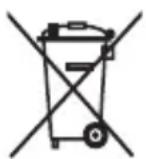
- This symbol means that electrical products and batteries shall not be disposed of with normal household waste.
- Follow your country's rules for the separate collection of electrical products and batteries.
- The built-in rechargeable battery must be removed by a qualified professional when the product is discarded. Instructions for removal of built-in rechargeable batteries can be found on www.philips.com/support. Use the Philips support home search bar to enter the toothbrush model number and find your product. The model number begins with "HX" (e.g. HX123A) and can be found on the bottom of your toothbrush. The battery removal instructions are in the Troubleshooting and Repair section of the product's support page.
- If batteries are damaged or leaking, avoid contact with the skin or eyes. If this occurs, immediately rinse well with water and seek medical care.
- When you handle batteries, make sure that your hands, the product and the batteries are dry.
Giriş
www.philips.com/support
natural_image
Simple line drawing of an open book with no text or symbols visiblenatural_image
Illustration of a hand holding a toothbrush with an arrow indicating force or movement (no text or symbols)natural_image
Simple line drawing of a curved object with a checkmark mark (no text or symbols)natural_image
Illustration of a hand using a pipette to apply liquid onto a surface, with an inset showing a microplate (no text or symbols present)text_image
Hand-drawn diagram showing a power button with an 'Power' icon and a button labeled 'OK' pointing to it.natural_image
Illustration of a hand holding a small object with directional arrows indicating movement, labeled '45°' (no text or symbols on the diagram itself)natural_image
Diagram showing dental tool application on upper teeth with magnified detail (no text or symbols)text_image
Diagram showing two dental arch structures with numbered labels indicating different tooth locations or regions.natural_image
Illustration of a toothbrush with a circular icon showing wireless signal (no text or symbols)text_image
Diagram showing two dental arch structures with numbered labels indicating different tooth locations or regions.natural_image
Simple diagram showing a mechanical component with a downward arrow and a small circular base (no text or symbols)natural_image
Line drawing of a medical procedure showing a needle inserted into tissue (no text or symbols)natural_image
Illustration of hands using a tool to cut or adjust a mechanical component, with no visible text or symbols.www.philips.com/support
natural_image
Simple line drawing of an open book with no text or symbols visiblenatural_image
Illustration of a hand holding a tool with a pointed tip, showing a force or motion (no text or symbols)natural_image
Simple line drawing of a curved object with a checkmark mark (no text or symbols)natural_image
Illustration of a hand using a pipette to apply liquid onto a surface, with an inset showing a microplate (no text or symbols present)text_image
Hand-drawn diagram showing a power button with an 'Power' icon and a button labeled 'OK' pointing to it.natural_image
Illustration of a hand holding a small object with directional arrows indicating movement, labeled '45°' (no text or symbols on the diagram itself)natural_image
Diagram showing dental tool application on upper teeth with magnified detail (no text or symbols)text_image
Diagram showing two dental arch structures with numbered labels indicating different tooth locations or regions.natural_image
Illustration of a toothbrush with a circular icon showing wireless signal (no text or symbols)text_image
Diagram showing two dental arch structures with numbered labels indicating different tooth locations or regions.natural_image
Diagram showing a mechanical component with a downward arrow and a small square component, no text or symbols present.2 Postavte rukojeť na nabíječku.
natural_image
Line drawing of a medical procedure with a needle inserted into tissue (no text or symbols)natural_image
Illustration of two hands using a tool to cut or adjust a mechanical component, with no visible text or symbols.www.philips.com/support
natural_image
Simple line drawing of an open book with no text or symbols visiblenatural_image
Illustration of a hand holding a tool with a pointed tip, showing motion (no text or symbols)natural_image
Simple line drawing of a curved object with a checkmark indicating a detail (no text or symbols)natural_image
Illustration of a hand using a pipette to apply liquid onto a surface, with an inset showing a droplet on a surface (no text or symbols present)text_image
Hand-drawn diagram showing a power button with an 'Power' icon and a circular button labeled 'On'.natural_image
Diagram showing a hand holding a small object with directional arrows, labeled '45°' (no text or symbols on the diagram itself)natural_image
Diagram showing dental tool application on upper teeth with magnified detail (no text or symbols)text_image
Diagram showing two dental arch structures with numbered labels indicating different tooth locations or regions.natural_image
Diagram of a microphone with a circular icon showing wireless signal, no text or symbols presenttext_image
Diagram showing two dental arch structures with numbered labels indicating different tooth locations or regions.flowchart
graph TD
    A["Person Icon"] --> B["B"]
natural_image
Simple diagram showing a mechanical component with a downward arrow and a small rectangular object on a base (no text or symbols)natural_image
Simple line drawing of a medical procedure with a tool and tubing (no text or symbols)natural_image
Illustration of two hands using a tool to cut or adjust a mechanical component, with no visible text or symbols.natural_image
Simple line drawing of an open book with no text or symbols visiblenatural_image
Illustration of a hand holding a tool with a pointed tip and arrow indicating direction (no text or symbols)natural_image
Simple line drawing of a curved object with a checkmark indicating a detail (no text or symbols)natural_image
Illustration of a hand using a pen to apply a product to a surface, with an inset showing a textured surface (no text or symbols)text_image
Hand-drawn diagram showing a power button with an 'Power' icon and a button labeled 'C' pointing to it.natural_image
Diagram showing a hand holding a tool with a 45-degree angle indicator (no text or symbols on the diagram itself)natural_image
Illustration of dental tool application on upper teeth with magnified view (no text or symbols)text_image
Diagram of dental arch with numbered labels indicating different tooth positions or regions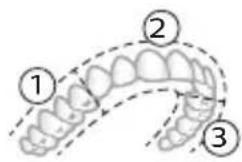
text_image
Diagram of dental arch with numbered labels indicating different tooth positions or regions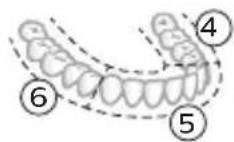
natural_image
Diagram of a toothbrush with a circular icon showing wireless signal and a sensor symbol (no text or labels)text_image
Diagram showing two types of dental arches with numbered labels indicating different tooth positions or regions.natural_image
Diagram showing a mechanical component with a downward arrow and a small cylindrical part inside a circular base (no text or symbols)natural_image
Simple line drawing of a fork with a knife inserted, no text or symbols presentnatural_image
Illustration of two hands using a tool to cut or adjust a mechanical component, with no visible text or symbols.www.philips.com/support
Tähtis ohutusteave
MEDITSIINILISED HOIATUSED
www.philips.com/support
natural_image
Simple line drawing of an open book with no text or symbols visiblenatural_image
Illustration of a hand holding a tool with an arrow indicating direction (no text or symbols)natural_image
Simple line drawing of a bulb-like shape with a checkmark indicating a detail (no text or symbols)natural_image
Illustration of a hand using a pen to apply a sample onto a surface, with an inset showing a magnified view of the sample (no text or symbols present)text_image
Hand-drawn diagram showing a power button with an icon and a circular button, likely indicating a control or operation step.natural_image
Diagram showing a hand holding a small object with directional arrows indicating movement, labeled '45°' (no text or symbols on the diagram itself)natural_image
Diagram showing dental tool application on upper teeth with magnified view (no text or labels)Eesti
natural_image
Illustration of a toothbrush with a circular icon showing wireless signal (no text or symbols)text_image
Diagram showing two dental arch structures with numbered labels indicating different tooth locations or regions.flowchart
graph TD
    A["Process Node"] --> B["Output u"]
natural_image
Diagram showing a mechanical component with a downward arrow and a small cylindrical part attached to a circular base (no text or symbols)natural_image
Simple line drawing of a medical procedure with a tool and tubing (no text or symbols)natural_image
Illustration of two hands using a tool to cut or adjust a mechanical component, with no visible text or symbols.natural_image
Simple line drawing of an open book with no text or symbols visiblenatural_image
Illustration of a hand holding a toothbrush with an arrow indicating force or direction (no text or symbols)natural_image
Simple line drawing of a curved object with a checkmark indicating a detail (no text or symbols)natural_image
Illustration of a hand using a pipette to apply liquid onto a surface, with an inset showing a droplet on a surface (no text or symbols present)text_image
Hand-drawn diagram showing a power button with an 'Power' icon and a circular button with pointer, likely indicating a control or operation step.natural_image
Illustration of a tooth profile with a tool interacting with a tooth (no text or symbols)text_image
Diagram of dental arch with numbered labels indicating different tooth positions or regions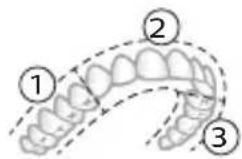
natural_image
Diagram of a toothbrush with a circular icon showing wireless signal and a sensor symbol (no text or labels)text_image
Diagram showing two dental arch structures with numbered labels indicating different tooth locations or regions.natural_image
Diagram showing a mechanical component with a downward arrow and a small cylindrical part attached to a circular base (no text or symbols)natural_image
Line drawing of a medical procedure with a needle inserted into tissue (no text or symbols)natural_image
Illustration of two hands using a tool to adjust or install a mechanical component, with no visible text or symbols.GARANTÍAS IMPLÍCITAS
natural_image
Simple line drawing of an open book with no text or symbols visiblenatural_image
Illustration of a hand holding a tool with a pointed tip, showing a force or motion (no text or symbols)natural_image
Simple line drawing of a curved object with a checkmark mark (no text or symbols)natural_image
Illustration of a hand using a pipette to apply liquid onto a surface, with an inset showing a magnified view of the liquid (no text or symbols present)text_image
Hand-drawn diagram showing a power button with an 'Power' icon and a button labeled 'OK' pointing to it.natural_image
Diagram showing a hand holding a small object with directional arrows indicating movement, labeled '45°' (no text or symbols on the diagram itself)natural_image
Diagram showing dental tool application on upper teeth with arrows indicating direction (no text or labels)text_image
Diagram showing two dental arch structures with numbered labels indicating different tooth positions or regions.Clean White (5500
uniquement)
Clean White (5500
uniquement)
natural_image
Diagram of a toothbrush with a circular icon showing wireless signal and a sensor symbol (no text or labels)text_image
Diagram showing two types of dental arches with numbered labels indicating different tooth positions or regions.natural_image
Diagram showing a mechanical component with a downward arrow and a small cylindrical part, connected to a wire (no text or symbols)natural_image
Simple line drawing of a medical procedure with a tool inserted into tissue (no text or symbols)natural_image
Illustration of two hands using a tool to cut or mark a surface, with no visible text or symbolsEXCLUSIONS DE GARANTIE
www.philips.com/support
www.philips.com/support
Napomena: značajke različitih modela mogu se razlikovati. Neki modeli možda nisu opremljeni sustavom Bluetooth ili NFC.
POHRANITE OVE UPUTE
Na proizvodu se mogu pojaviti sljedeći simboli:

natural_image
Simple line drawing of an open book with no text or symbols visibleOvaj simbol znači da prije upotrebe uređaja morate pročitati upute za upotrebu.
text_image
XXXXXXOvaj simbol znači da morate upotrijebiti naznačeno napajanje.
Namjena
Električne četkice za zube Sonicare namijenjene su za uklanjanje naslaga i ostataka hrane sa zuba kako bi se smanjio karijes te poboljšalo i održavalo oralno zdravlje.
Vaš Philips Sonicare (Slika 1)
natural_image
Illustration of a hand holding a toothbrush with an arrow indicating force or direction (no text or symbols)natural_image
Simple line drawing of a curved object with a checkmark mark (no text or symbols)2 Glavu četkice čvrsto pritisnite prema dolje na metalnu osovinu drške sve do kraja.
Napomena: Uobičajeno je vidjeti blagi razmak između glave četkice i drške.
Uporaba četkice za zube Philips Sonicare
Ako prvi put upotrebljavate četkicu za zube Sonicare, normalno je da osjećate više vibracija nego pri upotrebi četkice za zube koja nije električna. Korisnici pri prvoj upotrebi često primjenjuju preveliki pritisak. Samo blago pritisnite i četkanje prepustite četkici za zube. Za najbolje iskustvo slijedite upute za četkanje u nastavku.
Da biste se jednostavnije prebacili na svoju novu električnu četkicu za zube Sonicare, upotrebljavajte nižu postavku prvih 1 – 2 tjedna, a zatim prijeđite na višu postavku.
Upute za četkanje
natural_image
Illustration of a hand using a pipette to apply liquid onto a surface, with an inset showing a droplet on a surface (no text or symbols present)1 Smočite vlakna četkice i nanesite malu količinu paste za zube.
text_image
45°2 Postavite vlakna četkice na zube pod blagim kutom (45 stupnjeva). Čvrstim pritiskom omogućite da vlakna dosegnu liniju desni ili malo ispod nje.
text_image
Hand-drawn diagram showing a power button with an icon and a circular button, likely indicating a control or operation step.natural_image
Diagram showing a hand holding a small object with directional arrows indicating movement, labeled '45°' (no text or symbols on the diagram itself)natural_image
Diagram showing dental tool application on upper teeth with magnified detail (no text or symbols)natural_image
Diagram of a microphone with a circular icon showing wireless signal, no text or symbols presentTehnologija BrushSync omogućava glavi četkice da komunicira s drškom s pomoću mikročipa. Simbol na donjem dijelu glave četkice naznačuje da je glava četkice opremljena tom tehnologijom.
Tehnologija BrushSync omogućuje:
text_image
Diagram showing two dental arch structures with numbered labels indicating different tooth locations or regions.natural_image
Diagram showing a mechanical component with a downward arrow and a small cylindrical part attached to a circular base (no text or symbols)2 Stavite dršku na punjač.
natural_image
Simple line drawing of a medical procedure with a tool and tubing (no text or symbols)1 Odvojite glavu četkice i isperite prostor oko metalne osovine i tipki toplom vodom. Najmanje jednom tjedno, a po mogućnosti nakon svake upotrebe, obavezno uklonite svu preostalu zubnu pastu s drške i oko tipki.
natural_image
Illustration of two hands using a tool to cut or adjust a mechanical component, with no visible text or symbols.natural_image
Simple line drawing of an open book with no text or symbols visiblenatural_image
Illustration of a hand holding a tool with a pointed tip, showing a force or motion indicator (no text or symbols present)natural_image
Simple line drawing of a curved object with a checkmark indicating a detail (no text or symbols)natural_image
Illustration of a hand using a pipette to apply liquid onto a surface, with an inset showing a droplet on a surface (no text or symbols present)text_image
Hand-drawn diagram showing a power button with an 'Power' icon and a button labeled 'OK' pointing to it.natural_image
Diagram showing dental tool application on upper teeth with magnified detail (no text or symbols)text_image
Diagram showing two dental arch structures with numbered labels indicating different tooth locations or regions.natural_image
Diagram of a microphone with a circular icon showing wireless signal, no text or symbols presenttext_image
Diagram showing two types of dental arches with numbered labels indicating different anatomical or structural features.flowchart
graph TD
    A["P"] --> B["v"]
natural_image
Diagram showing a mechanical component with a downward arrow pointing to a small cylindrical object (no text or symbols present)natural_image
Simple line drawing of a medical procedure with a tool and tubing (no text or symbols)natural_image
Illustration of two hands using a tool to cut or adjust a mechanical component, with no visible text or symbols.www.philips.com/support
natural_image
Simple line drawing of an open book with no text or symbols visiblenatural_image
Illustration of a hand holding a toothbrush with an arrow indicating force or direction (no text or symbols)natural_image
Simple line drawing of a curved object with a checkmark mark (no text or symbols)natural_image
Illustration of a hand using a pipette to apply liquid onto a surface, with an inset showing a droplet on a surface (no text or symbols present)1 Samitriniet sarus un uzklājiet mazliet zobu pastas.
text_image
45°text_image
Hand-drawn diagram showing a power button with an icon and a circular button, likely indicating a control or operation step.natural_image
Diagram showing a hand holding a small object with directional arrows, labeled '45°' (no text or symbols on the diagram itself)natural_image
Diagram showing dental tool interacting with teeth (no text or symbols)text_image
Diagram showing two dental arch structures with numbered labels indicating different tooth locations or regions.natural_image
Illustration of a toothbrush with a sensor icon and a circular label (no text or symbols)text_image
Diagram showing two dental arch structures with numbered labels indicating different tooth locations or regions.natural_image
Diagram showing a mechanical component with a downward arrow and a small circular base (no text or symbols)natural_image
Simple line drawing of a medical procedure with a tool and tubing (no text or symbols)natural_image
Illustration of two hands using a tool to adjust or install a mechanical part, with no visible text or symbols.www.philips.com/support
Svarbi saugos informacija
www.philips.com/support
natural_image
Simple line drawing of an open book with no text or symbols visiblenatural_image
Illustration of a hand holding a tool with a pointed tip, showing a force or grip (no text or symbols present)natural_image
Simple line drawing of a vertical pipe or duct with a checkmark indicating a detail (no text or symbols present)natural_image
Illustration of a hand using a pipette to apply liquid onto a surface, with an inset showing a droplet on a surface (no text or symbols present)text_image
Hand-drawn diagram showing a power button with an 'Power' icon and a button labeled 'On' pointing to it.natural_image
Illustration of a hand holding a small object with directional arrows indicating movement, labeled '45°' (no text or symbols on the diagram itself)natural_image
Diagram showing dental tool application on upper teeth with magnified detail (no text or symbols)natural_image
Diagram of a toothbrush with a circular icon showing wireless signal and a sensor symbol (no text or labels)text_image
Diagram showing two dental arch structures with numbered labels indicating different tooth locations or regions.natural_image
Diagram showing a mechanical component with a downward arrow and a small cylindrical part attached to a circular base (no text or symbols)natural_image
Simple line drawing of a medical procedure with a tool and tubing (no text or symbols)natural_image
Illustration of two hands holding a tool with a diagonal line crossing through (no text or symbols)natural_image
Simple line drawing of an open book with no text or symbols visiblenatural_image
Illustration of a hand holding a tool with a black arrow indicating force or movement (no text or symbols)natural_image
Simple line drawing of a vertical pipe or duct with a checkmark indicating a measurement or inspection (no text or symbols present)natural_image
Illustration of a hand holding a pen, with an inset showing a magnified view of a cylindrical object (no text or symbols present)text_image
Hand-drawn diagram showing a power button with an 'OK' icon and a button labeled 'OK' pointing to it.natural_image
Diagram showing a hand holding a small object with directional arrows indicating movement, labeled '45°' (no text or symbols on the diagram itself)natural_image
Diagram showing dental tool application on upper teeth with magnified detail (no text or symbols)text_image
Diagram showing two dental arch structures with numbered labels indicating different tooth locations or regions.natural_image
Diagram of a toothbrush with a circular icon showing wireless signal and a sensor symbol (no text or labels)text_image
Diagram showing two dental arch structures with numbered labels indicating different tooth locations or regions.natural_image
Diagram showing a mechanical component with a downward arrow and a small cylindrical part attached to a circular base (no text or symbols)natural_image
Simple line drawing of a medical procedure with a needle inserted into tissue (no text or symbols)natural_image
Illustration of two hands using a tool to cut or mark a surface, with no visible text or symbolswww.philips.com/support
natural_image
Simple line drawing of an open book with no text or symbols visiblenatural_image
Illustration of a hand holding a tool with a pointed tip and arrow indicating direction (no text or symbols)natural_image
Simple line drawing of a bulb-like object with a checkmark indicating a detail (no text or symbols)natural_image
Illustration of a hand holding a pen, with an inset showing a magnified view of a cylindrical object (no text or symbols present)text_image
Hand-drawn diagram showing a power button with an 'Power' icon and a circular button with a pointer, likely indicating a control or operation step.natural_image
Diagram showing dental tool application on upper teeth with magnified detail (no text or symbols)natural_image
Diagram of a microphone with a sensor icon and signal symbol (no text or labels)text_image
Diagram showing two dental arch structures with numbered labels indicating different tooth locations or regions.flowchart
graph TD
    A["Traffic Light Icon"] --> B["n"]
natural_image
Diagram showing a mechanical component with a downward arrow and a small rectangular object on a base (no text or symbols)natural_image
Simple line drawing of a medical procedure with a needle inserted into tissue (no text or symbols)natural_image
Illustration of two hands using a tool to adjust or install a mechanical component, with no visible text or symbols.www.philips.com/support
natural_image
Simple line drawing of an open book with no text or symbols visiblenatural_image
Illustration of a hand holding a toothbrush with an arrow indicating force or movement (no text or symbols)natural_image
Simple line drawing of a bulb-like object with a checkmark indicating a detail (no text or symbols)natural_image
Illustration of a hand using a pipette to apply liquid onto a surface, with an inset showing a droplet on a surface (no text or symbols present)text_image
Hand-drawn diagram showing a power button with an icon and a circular button, likely indicating a switch or control interface.natural_image
Diagram showing dental tool application on upper teeth with magnified detail (no text or symbols)text_image
Diagram showing two types of dental arches with numbered labels indicating different tooth positions or regions.natural_image
Illustration of a toothbrush with a sensor icon and a magnified view of its tip (no text or symbols)text_image
Diagram showing two dental arch structures with numbered labels indicating different tooth locations or regions.flowchart
graph TD
    A["P"] --> B["v"]
3 Når indikatorvarselet for utskifting av børstehode lyser gult, bør du bytte børstehodet.
natural_image
Diagram showing a mechanical component with a downward arrow and a small square base, no text or symbols present.natural_image
Simple line drawing of a medical procedure with a tool and tubing (no text or symbols)natural_image
Illustration of two hands using a tool to cut or adjust a mechanical component, with no visible text or symbols.www.philips.com/support
Xavfsizlikka oid muhim axborot
Mahsulotdan faqat to'g'ri maqsadda foydalaning. Mahsulotdan hamda uning batareyalari va aksessuarlaridan foydalanishni boshlashdan oldin ushbu axborotni diqqat bilan o'qib chiqing va keyinchalik murojaat qilish uchun uni saqlab qo'ying. Noto'g'ri foydalanish xavflarga yoki jiddiy jarohatlarga olib kelishi mumkin.
OGOHLANTIRISHLAR
- Faqat original Philips aksessuarlaridan va sarf materiallaridan foydalaning. Agar to'plamda mavjud bo'lsa, faqat original USB kabeldan va USB ta'minot blokidan foydalaning.
- Jihoz foydalanuvchi xizmat ko'rsata olmaydigan qismlarga ega. Agar jihoz shikastlangan bo'lsa, undan foydalanishni to'xtating va mamlakatingizdagi Mijozlarga xizmat ko'rsatish markaziga murojaat qiling. Agar USB kabel shikastlangan bo'lsa, undan foydalanishni to'xtating.
- Quvvatlagichlarni suvdan uzoqda tuting.
- Tozalashdan keyin quvvatlagichlar va sayohat quvvatlagich g'iloflarini tarmoqqa ulashdan avval to'liq quriganini tekshiring.
- Ushbu jihoz bolalar hamda jismoniy, hissiy yoki aqliy qobiliyatlari cheklangan yoki tajriba va bilimga ega bo'Imagan shaxslar tomonidan, agar ularga jihozdan xavfsiz foydalanish bo'yicha ko'rsatmalar berilgan bo'lsa yoki ular nazorat ostida bo'lsalar va agar ular undan kelib chiqishi mumkin bo'Igan xavfni tushunsalar, ishlatilishi mumkin. Bolalar jihozni tozalash va unga xizmat ko'rsatish ishlarini nazoratsiz amalga oshirmasliklari lozim.
- Bolalar mahsulot bilan o'ynamasliklari nazorat ostida bo'lishi lozim.
- Mahsulotning hech bir qismini idish yuvish mashinasida tozalamang.
- Adapterlar va quvvatlagichdan tashqarida yoki isitiladigan yuzalar yaqinida foydalanmang.
- Jihoz faqat tishlarni, milklarni va tilni tozalash uchun ishlab chiqilgan.
- Tuklari singan yoki bukilgan cho'tka kallagidan foydalanishni to'xtating. Cho'tka kallagini har 3 oyda yoki agar eskirganlik belgilari namoyon bo'lsa – undan ham tezroq almashtiring.
- Tarkibida efir moylari yoki kokos moyi bo'lgan mahsulotlarning bevosita teginishidan saqlaning. Teginish – cho'tkaning siljib qolishiga olib kelishi mumkin.
- Foydalanishning maksimal balandligi – 4500 metr.
TIBBIY OGOHLANTIRISHLAR
- Agar foydalanishdan keyin ortiqcha qon chiqishi kuzatilsa, qon chiqishi 1 hafta foydalangandan keyin ham davom etsa yoki noqulaylik va og'riq his qilsangiz, jihozdan foydalanishni to'xtating va stomatolog/shifokorga murojaat qiling.
- Agar oxirgi 2 oy ichida og'izda yoki milklarda jarrohlik ishlari olib borilgan bo'lsa, jihozdan foydalanishdan avval shifokor bilan maslahatlashing.
- Agar sizga kardiostimulyator yoki boshqa qurilma implantatsiya qilingan bo'lsa, foydalanishdan oldin shifokor bilan yoki implantatsiya qilingan qurilma ishlab chigaruvchisi bilan maslahatlashing.
- Agar salomatligingizda masalalar bor bo'lsa, ushbu jihozdan foydalanishdan avval shifokor bilan maslahatlashing.
- Ushbu jihoz shaxsiy parvarish qurilmasi bo'lib, stomatologik klinikada yoki muassasada bir necha bemorlar foydalanishi uchun mo'ljallanmagan.
BATAREYA XAVFSIZLIGIGA OID KO'RSATMALAR
- Bu jihozda fagat malakali shaxslar almashtira oladigan batareyalar mavjud.
- Mahsulotdan faqat to'g'ri maqsadda foydalaning. Mahsulotdan hamda uning batareyalari va aksessuarlaridan foydalanishni boshlashdan oldin ushbu axborotni diqqat bilan o'qib chiqing va keyinchalik murojaat qilish uchun uni saqlab qo'ying. Noto'g'ri foydalanish xavflarga yoki jiddiy jarohatlarga olib kelishi mumkin. Taqdim etilayotgan aksessuarlar turli mahsulotlarda o'zaro farqlanishi mumkin.
- Fagat original Philips aksessuarlari va sarf materiallaridan foydalaning.
- Mahsulotni va batareyalarni olovdan nari tuting va quyosh yoki yuqori harorat ta'sirida goldirmang.
- Agar mahsulot noodatiy qizib ketsa yoki hid chiqarsa yoki rangini o'zgartirsa yoki odatdagidan uzoq vaqt quvvatlansa, undan foydalanishni va quvvatlashni to'xtating va Philips kompaniyasiga murojaat giling.
-
Mahsulotni va uning batareyalarini mikroto'lqinli pechga yoki induksiyali plitaga qo'ymang.
-
Batareyalar qizishi yoki zaharli va xavfli moddalar ajralishining oldini olish uchun jihozni yoki batareyani ochmang, o'zgartirmang, teshmang, shikastlamang yoki qismlarga ajratmang. Qayta quvvatlanadigan batareyalarning qisqa tutashuviga, ortiqcha quvvatlanishiga yoki teskari quvvatlanishiga yo'l qo'ymang.
- Bu jihozda almashtirib bo'Imaydigan batareyalar mavjud. Batareya xizmat muddatining oxiriga yetganida jihoz tegishli tarzda chiqindiga tashlanishi kerak, Qayta ishlash bo'limiga qarang.
- Faqat Philips HX6110 kirish nominallari bilan quvvatlang: 4,75-5,25VDC, 1,5 Vt.
- Mahsulotni 0 °C va 40 °C orasidagi haroratda quvvatlang va ishlating.
- Batareyani ajratib olgach, qisqa tutashuv sodir bo'lmasligi uchun batareya klemmalariga metall buyum (masalan, tanga, soch qadagich, uzuk) tegishining oldini oling. Batareyalarni zarqog'ozga o'ramang. Batareyani chiqindiga tashlashdan avval, uning klemmalarini skotch bilan o'rang yoki batareyani paketga soling.
- Bu jihozda litiy-ionli qayta quvvatlanadigan batareya mavjud. TEGISHLI TARTIBDA QAYTA ISHLANISHI YOKI CHIQITGA CHIQARILISHI KERAK.
Saqlash va tashish sharoitlari
Harorat -20^ to +60^ ( -4^ dan 140^ gacha) gacha.
natural_image
Simple line drawing of an open book with no text or symbols visiblenatural_image
Illustration of a hand holding a toothbrush with an arrow indicating force or direction (no text or symbols)1 Cho'tka tuklari dastaning old qismi bilan bir xil yo'nalishda bo'lishi uchun cho'tka kallagini tekislang.
natural_image
Simple line drawing of a bulb-like object with a checkmark indicating a detail (no text or symbols)2 Cho'tka kallagini u boshqa kirmagunigacha metall valga qattiq dosing.
Izoh: Cho'tka kallagi va dasta orasida kichik tirqish ko'rinishi – normal holat.
Philips Sonicare tish pastangizdan foydalanish
Agar Sonicare tish pastasidan birinchi marta foydalanayotgan bo'lsangiz, elektr bo'Imagan tish cho'tkasidan foydalanishga qaraganda ko'proq tebranish sezish normal holat. Odatda birinchi marta foydalanayotgan foydalanuvchilar ortiqcha bosim beradi. Faqat yumshoq bosib bering va tish cho'tkasi siz uchun tozalashiga imkon bering. Eng yaxshi taassurot uchun tish tozalash ko'rsatmalariga amal qiling.
Yangi Sonicare motorli tish cho'tkasiga o'tishingizga yordam berish uchun ilk 1-2 hafta pastroq sozlamada foydalaning, keyin yuqoriroq sozlamaga o'ting.
Tish tozalash ko'rsatmalari
natural_image
Illustration of a hand using a pen to apply a product to a surface, with an inset showing a cylindrical object (no text or symbols present)1 Cho'tkani namlang va unga kam miqdorda tish pastasi surting.
text_image
45°2 Tish cho'tkasini tishlar qarshisida kichik (45 daraja) burchak ostida tuting. Cho'tkalar milk chizig'iga yoki uning tagiga yetishi uchun uni qattiq dosing. Izoh: Cho'tka markazini tishlarga doimi to'liq tekkizib turing.
text_image
Hand-drawn diagram showing a power button with an icon and a button labeled 'Power' pointing to it.3 Philips Sonicare qurilmasini yoqish uchun yoqish/o'chirish tugmasini bosing.
text_image
45°4 Cho'tkani tishlar va milk chizig'iga yengil tutib turing. Cho'tkalar tishlar orasiga kirishi uchun cho'tka kallagini oldinga-orqaqa kichik harakatlar bilan tishlaringizni tozalang. Bu harakatlarni tish tozalash siklingiz yakunlangunga qadar bajaring.
natural_image
Diagram showing dental tool application on upper teeth with magnified detail (no text or symbols)text_image
Diagram showing two dental arch models with labeled anatomical parts (⑦ and ⑧)Jadallik (faqat 5300)
Jadallik sozlamalari
natural_image
Diagram of a toothbrush with a circular icon showing wireless signal and a sensor symbol (no text or labels)BrushSync texnologiyasi cho'tka kallagining dasta bilan mikrochip orqali muloqot qilishiga yordam beradi. Cho'tka kallagi ostidagi belgisi cho'tka kallagi ushbu texnologiya bilan jihozlanganini anglatadi.
BrushSync texnologiyasi quyidagilarni faollashtiradi:
- Cho'tka kallagini almashtirishni eslatish funksiyasi
- BrushSync rejimi va jadallikni juftlash
Izoh: BrushSync rejimini juftlash funksiyasi mavjudligi tish cho'tkangiz modeliga bog'liq.
Philips Sonicare BrushSync texnologiyasiga ega keng turdagi smart cho'tka kallaklarini taklif qiladi. Tish cho'tkasining cho'tka kallaklari to'liq ko'lami bilan tanishish va sizga eng mos keladigan cho'tka kallagini topish uchun www.philips.com/toothbrush-heads veb-saytiga kiring.
Funksiyalar
- Bosim sensori bildirgisi
- BrushPacer
- SmarTimer
- EasyStart
- Cho'tka kallagini almashtirishni eslatish funksiyasi
- Cho'tka kallagini juftlash rejimi
text_image
Diagram showing two dental arch structures with numbered labels indicating different tooth locations or regions.natural_image
Diagram showing a mechanical component with a downward arrow and a small cylindrical part attached to a circular base (no text or symbols)2 Dastani quvvatlash moslamasiga joylang.
3 Biriktirilgan USB kabelni quyidagi 5V kuchlanishli doim tok ta'minot blokiga ulang.
- Faqat Philips bilan muvofiq quvvatlagichlar yoki nominal kirish quvvatlari bilan xavfsizligi tasdiqlangan adapterlarida quvvatlang: 100 - 240V\~; 50/60Hz; 3,5 Vt va chiqish kuchlanishi 5VDC; 2,5 Vt.
- UL bilan qayd etilgan yoki 1310 Toifa 2 bilan sertifikatlangan quvvat ta'minoti (faqat NAM)
4 Batareya indikatori va chiroq halqasi yonadi, dasta ikki marta signal beradi va dastadagi barcha chiroqlar dastaning yuqori qismidan ostiga qarab yonadi.
5 Batareyaning miltillovchi indikatori tish cho'tkasi quvvatlanayotganini bildiradi.
6 Dasta quvvatlagichda bo'lsa va batareya to'liq quvvatlansa, batareya indikatorining LED chiroqlari yashil rangda miltillashni boshlaydi. Batareya to'liq quvvatlansa, yashil chiroq 30 soniya yonib turadi va keyin o'chadi.
Batareya holati
Batareya holati (ulangan quvvatlagichdagi dasta)
Dasta quvvatlagichga joylanganda batareya indikatori batareya darajasini aks ettiradi.
| Batareya holati | Miltillovchi LED chiroqlar soni | LED rang |
| Past 1 Miltillovchi yashil | ||
| Qisman to’lgan 2 Miltillovchi yashil | ||
| To’lgan 3 To’lgunicha yashil | rangda miltillaydi, keyin 30 soniya yashil rangdayonib turadi va keyin o’chadi | |
Batareya holati (dasta tarmoqqa ulangan quvvatlagichga qo'yilmaganida)
Tish cho'tkasi faolligida dasta ostidagi batareya indikatori batareya darajasini aks ettiradi.
Batareya holati LED chiroqlar soni LED rang
| To’lgan 3 Yaxlit yashil | ||
| Qisman to’lgan 2 Yaxlit yashil | ||
| O’rtacha past 1 Yaxlit yashil | ||
| Past Tozalashdan keyin 3 ta qisqa signal bilan 1 marta | Sariq rangda miltillaydi | |
| Bo’sh 5 ta signalli 2 ta majmuali 1 ta | Sariq rangda miltillaydi | |
Izoh: Energiya tejash uchun batareya indikatori ishlatilmayotganida o'chadi.
natural_image
Simple line drawing of a medical procedure with a tool and tubing (no text or symbols)1 Cho'tka kallagini chiqarib oling va metall val atrofi va tugmalarini iliq suv bilan yuving. Dasta va tugmalar atrofidagi tish pastasi qoldiqlarini haftada kamida bir marta, lekin yaxshisi har foydalanishdan keyin tozalang.
Ogohlantirish: Metall valdagi yoki tugmalar atrofidagi rezina zichlagichni o'tkir narsalar bilan bosmang, bu shikastlanishga olib kelishi mumkin.
2 Dastaning butun yuzasini nam mato bilan artib oling.
Izoh: Ortiqcha suvni yo'qotish uchun dastani rakovinaga urmang.
3 Dastani yumshoq mato yoki sochiq bilan quriting.
Cho'tka kallagi
natural_image
Illustration of two hands holding a tool with arrows indicating motion (no text or symbols)1 Cho'tka kallagi va cho'tkani har foydalanishdan keyin yuving. 2 Cho'tka kallagini dastadan chiqarib oling va cho'tka kallagi ulanish qismini kamida haftada bir marta iliq suv bilan yuving. Sayohat qopqog'ini zarur bo'Igancha tez-tez yuving va havoda quriting. Faqat quruq cho'tka kallagida ishlating.
natural_image
Simple line drawing of an open book with no text or symbols visiblenatural_image
Illustration of a hand holding a toothbrush with an arrow indicating force or direction (no text or symbols)natural_image
Simple line drawing of a bulb-like object with a checkmark indicating a detail (no text or symbols)natural_image
Illustration of a hand using a pipette to apply liquid onto a surface, with an inset showing a droplet on a surface (no text or symbols present)text_image
Hand-drawn diagram showing a power button with an icon and a finger pointing to it, likely indicating a button or function.natural_image
Diagram showing a hand holding a small object with directional arrows indicating movement, labeled '45°' (no text or symbols on the diagram itself)natural_image
Diagram showing dental tool application on upper teeth with magnified detail (no text or symbols)text_image
Diagram of dental arch with numbered labels indicating different tooth positions or regions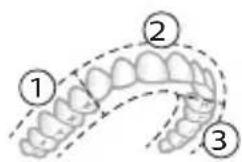
text_image
Diagram of dental arch with numbered labels indicating different tooth positions or regions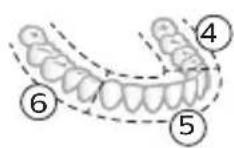
text_image
Diagram showing two dental arch models with numbered labels 7 and 8 indicating different tooth positions or dental positioning.natural_image
Illustration of a toothbrush with a circular icon showing wireless signal and a warning symbol (no text or labels)text_image
Diagram showing two dental arch structures with numbered labels indicating different tooth locations or regions.flowchart
graph TD
    A["P"] --> B["v"]
natural_image
Simple diagram showing a mechanical component with a downward arrow and a small square component on a circular base (no text or symbols)natural_image
Illustration of a medical procedure showing a needle inserted into an anatomical structure (no text or symbols present)natural_image
Illustration of two hands using a tool to cut or mark a surface, with no visible text or symbolswww.philips.com/support
natural_image
Simple line drawing of an open book with no text or symbols visiblenatural_image
Illustration of a hand holding a tool with a pointed tip and arrow indicating motion (no text or symbols)natural_image
Simple line drawing of a curved object with a checkmark (no text or symbols)natural_image
Illustration of a hand using a pipette to apply liquid onto a surface, with an inset showing a microplate (no text or symbols present)text_image
Hand-drawn diagram showing a power button with an 'Power' icon and a circular button with a minus sign, connected by a line.natural_image
Diagram showing a hand holding a small object with directional arrows indicating movement, labeled '45°' (no text or symbols on the diagram itself)natural_image
Diagram showing dental tool interacting with teeth (no text or symbols)text_image
Diagram showing two dental arch structures with numbered labels indicating different tooth locations or regions.text_image
Diagram showing two dental arch models with numbered labels ⑦ and ⑧ indicating different tooth positions or dental positioning.Intensidades (apenas no modelo 5300)
natural_image
Diagram of a toothbrush with a circular icon showing wireless signal and a sensor symbol (no text or labels)text_image
Diagram showing two types of dental arches with numbered labels indicating different anatomical or structural features.flowchart
graph TD
    A["Process"] --> B["Output"]
natural_image
Diagram showing a mechanical component with a downward arrow and a small square component on a circular base (no text or symbols)natural_image
Simple line drawing of a medical procedure with a tool and tubing (no text or symbols)natural_image
Illustration of two hands using a tool to cut or adjust a mechanical component, with no visible text or symbols.GARANTIAS IMPLÍCITAS
natural_image
Simple line drawing of an open book with no text or symbols visiblenatural_image
Illustration of a hand holding a tool with a downward arrow indicating motion (no text or symbols)natural_image
Simple line drawing of a curved object with a checkmark (no text or symbols)natural_image
Illustration of a hand using a pipette to apply liquid onto a surface, with an inset showing a microplate (no text or symbols present)text_image
Hand-drawn diagram showing a power button with an 'OK' icon and a circular button with a pointer, likely indicating a control or operation step.natural_image
Diagram showing dental tool interacting with teeth (no text or symbols)text_image
Diagram showing two dental arch models with numbered labels ⑦ and ⑧ indicating different tooth positions or dental positioning.natural_image
Diagram of a toothbrush with a circular icon showing wireless signal (no text or symbols)text_image
Diagram showing two dental arch structures with numbered labels indicating different tooth locations or regions.natural_image
Diagram showing a mechanical component with a downward arrow and a small cylindrical part attached to a circular base (no text or symbols)natural_image
Simple line drawing of a medical procedure with a tool inserted into tissue (no text or symbols)natural_image
Illustration of two hands holding a tool with a pointed tip, intersected by a diagonal line (no text or symbols)www.philips.com/support
natural_image
Simple line drawing of an open book with no text or symbols visiblenatural_image
Illustration of a hand holding a tool with a pointed tip, showing a force or grip (no text or symbols present)natural_image
Simple line drawing of a curved object with a checkmark mark (no text or symbols)natural_image
Illustration of a hand using a pipette to apply liquid onto a surface, with an inset showing a droplet on a surface (no text or symbols present)text_image
Hand-drawn diagram showing a power button with an 'Power' icon and a circular button labeled 'On'.natural_image
Diagram showing a hand holding a small object with directional arrows, labeled '45°' (no text or symbols on the diagram itself)natural_image
Diagram showing dental tool application on upper teeth with magnified detail (no text or symbols)natural_image
Diagram of a toothbrush with a circular icon showing wireless signal and a sensor symbol (no text or labels)text_image
Diagram showing two dental arch structures with numbered labels indicating different tooth locations or regions.natural_image
Diagram showing a mechanical component with a downward arrow and a small cylindrical object on a base (no text or symbols)natural_image
Line drawing of a medical procedure with a needle inserted into tissue (no text or symbols)natural_image
Illustration of two hands using a tool to adjust or install a mechanical component, with no visible text or symbols.www.philips.com/support
natural_image
Simple line drawing of an open book with no text or symbols visibleTa simbol pomeni, da morate pred uporabo aparata prebrati navodila za uporabo.
text_image
XXXXXXTa simbol pomeni, da morate uporabiti navedeni napajalnik.
Predvidena uporaba
natural_image
Illustration of a hand holding a toothbrush with an arrow indicating force or movement (no text or symbols)natural_image
Simple line drawing of a vertical pipe or tube with a checkmark indicating a detail (no text or symbols present)natural_image
Illustration of a hand using a pipette to apply liquid onto a surface, with an inset showing a droplet on a surface (no text or symbols present)text_image
Hand-drawn diagram showing a power button with an icon and a circular button, likely indicating a control or operation step.3 Zobno ščetko Philips Sonicare vklopite tako, da pritisnete gumb za vklop/izklop.
natural_image
Diagram showing a hand holding a small object with directional arrows, labeled '45°' (no text or symbols on the object itself)natural_image
Diagram showing dental tool interacting with teeth (no text or labels)Slovenščina
natural_image
Illustration of a toothbrush with a sensor icon and a magnified view of its tip (no text or symbols)text_image
Diagram showing two dental arch structures with numbered labels indicating different tooth locations or regions.natural_image
Diagram showing a mechanical component with a downward arrow and a small cylindrical part attached to a circular base (no text or symbols)natural_image
Simple line drawing of a medical procedure with a tool and tubing (no text or symbols)natural_image
Illustration of two hands using a tool to lift or stand (no text or symbols present)www.philips.com/support
www.philips.com/support
natural_image
Simple line drawing of an open book with no text or symbols visibleTento symbol znamená, aby ste si pred použitím zariadenia prečítali návod na použitie.
text_image
XXXXXXnatural_image
Illustration of a hand holding a tool with a pointed tip, showing a force or motion (no text or symbols)natural_image
Simple line drawing of a curved object with a checkmark indicating a detail (no text or symbols)natural_image
Illustration of a hand using a pipette to apply liquid onto a surface, with an inset showing a microplate (no text or symbols present)text_image
Hand-drawn diagram showing a power button with an icon and a circular button labeled '###' pointing to it.natural_image
Illustration of dental tool interacting with teeth (no text or symbols)text_image
Diagram showing two dental arch structures with numbered labels indicating different tooth locations or regions.natural_image
Illustration of a toothbrush with a circular icon showing wireless signal (no text or symbols)text_image
Diagram showing two dental arch structures with numbered labels indicating different tooth locations or regions.natural_image
Diagram showing a mechanical component with a downward arrow and a small square component on a circular base (no text or symbols)natural_image
Simple line drawing of a medical procedure with a tool and tubing (no text or symbols)natural_image
Illustration of two hands using a tool to tie or connect a diagonal line (no text or symbols)www.philips.com/support
natural_image
Simple line drawing of an open book with no text or symbols visibleOvaj simbol označava da je potrebno pročitati uputstvo za upotrebu pre korišćenja uređaja.
text_image
XXXXXXnatural_image
Illustration of a hand holding a toothbrush with an arrow indicating force or movement (no text or symbols)1 Poravnajte glavu četkice tako da su vlakna okrenuta u istom smeru kao i prednja strana drške.
natural_image
Simple line drawing of a curved object with a checkmark indicating a detail (no text or symbols)2 Čvrsto pritisnite glavu četkice na metalnu osovinu do kraja.
natural_image
Illustration of a hand using a pipette to apply liquid onto a surface, with an inset showing a droplet on a surface (no text or symbols present)1 Pokvasite vlakna i nanesite malu količinu paste za zube.
text_image
45°2 Postavite vlakna četkice za zube na zube tako da budu pod blagim uglom (45 stepeni). Čvrsto pritisnite kako bi vlakna stigla do desni ili malo ispod desni.
text_image
Hand-drawn diagram showing a power button with an icon and a circular button, likely indicating a switch or control interface.natural_image
Diagram showing a hand holding a small object with directional arrows indicating movement, labeled '45°' (no text or symbols on the diagram itself)4 Nežno držite vlakna na zubima i desnima. Perite zube blagim pokretima unapred i unazad tako da vlakna mogu da dosegnu između zuba. Nastavite sa ovakvim pokretima tokom celog ciklusa pranja zuba.
natural_image
Illustration of dental tool application on upper teeth (no text or symbols)Srpski
text_image
Diagram showing two dental arch structures with numbered labels indicating different tooth locations or regions.natural_image
Diagram of a toothbrush with a circular icon showing wireless signal and a sensor symbol (no text or labels)Tehnologija BrushSync omogućava komunikaciju između glave četkice i drške koristeći mikročip. Simbol na donjoj strani glave četkice označava da glava četkice sadrži ovu tehnologiju.
Tehnologija BrushSync omogućava:
- Podsetnik za zamenu glave sa četkicom
- Režim i intenzitet uparivanja BrushSync
Napomena: Dostupnost režima uparivanja BrushSync zavisi od modela četkice za zube.
Philips Sonicare ima široku paletu pametnih glava četkica sa tehnologijom BrushSync. Za više informacija o našoj cjelokupnoj paleti glava četkica za zube posjetite www.philips.com/toothbrush-heads i pronadite glavu četkice koja vam najviše odgovara.
Funkcije
- Povratne informacije senzora pritiska
- BrushPacer
- SmarTimer
- EasyStart
- Podsetnik za zamenu glave sa četkicom
- Režim uparivanja glave sa četkicom
text_image
Diagram showing two dental arch structures with numbered labels indicating different tooth locations or regions.natural_image
Diagram showing a mechanical component with a downward arrow and a small cylindrical part attached to a circular base (no text or symbols)2 Postavite dršku na punjač.
3 Povežite priloženi USB kabl na ulazno napajanje jednosmerne struje od 5 V.
natural_image
Simple line drawing of a medical procedure with a tool and tubing (no text or symbols)1 Skinite glavu četkice i isperite prostor oko metalne osovine i dugmadi toplom vodom. Najmanje jednom nedeljno, a po mogućnosti nakon svake upotrebe, obavezno uklonite svu preostalu zubnu pastu sa drške i oko dugmadi.
Oprez: Nemojte da gurate gumenu zaptivku na metalnoj osovini ili u području oko dugmadi oštrim predmetima pošto to može da dovede do oštećenja.
2 Čitavu površinu drške obrišite vlažnom krpom.
Napomena: Nemojte da udarate ručkom o sudoperu da biste uklonili višak vode.
natural_image
Illustration of two hands using a tool to cut or mark a surface, with no visible text or symbols1 Glavu četkice i vlakna isperite nakon svake upotrebe. 2 Bar jednom nedeljno skinite glavu četkice sa drške i toplom vodom isperite njen priključak. Putni poklopac isperite kad god je to potrebno i osušite na vazduhu. Stavljajte ga samo na suvu glavu četkice.
Napomena: Poklopac glave četkice upotrebljava se u transportu i nije namenjen za stalnu upotrebu.
Punjač
1 Isključite punjač iz električne mreže pre čišćenja.
2 Obrišite površinu punjača vlažnom krpom.
3 Osušite punjač mekom krpom ili peškirom.
Putna torbica
Putnu torbicu isperite toplom vodom i očistite vlažnom krpom i ostavite da se osuši na vazduhu.
Skladištenje
Ako proizvod nećete koristiti duže vreme, isključite ga iz zidne utičnice, očistite ga i odložite na hladno i suvo mesto, dalje od direktne sunčeve svetlosti.
Zamena
Zamenite Philips Sonicare glave četkice na svaka 3 meseca kako biste postigli optimalne rezultate. Koristite samo zamjenske glave četkice Philips Sonicare.
www.philips.com/support
natural_image
Simple line drawing of an open book with no text or symbols visiblenatural_image
Illustration of a hand holding a tool with an arrow indicating motion (no text or symbols)natural_image
Simple line drawing of a curved object with a checkmark mark (no text or symbols)natural_image
Illustration of a hand using a pen to apply a brush to a surface, with an inset showing a magnified view of the brush (no text or symbols present)text_image
Hand-drawn diagram showing a power button with an 'Power' icon and a button labeled 'P', connected by a finger.natural_image
Illustration of a hand holding a small object with directional arrows indicating movement, labeled '45°' (no text or symbols on the diagram itself)natural_image
Illustration of dental arching technique with tooth arrangement and tool (no text or symbols)text_image
Diagram of dental arch with numbered labels indicating different tooth positions or regions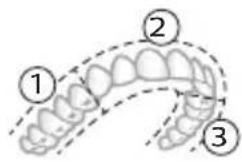
text_image
Diagram of dental arch with numbered labels indicating different tooth positions or regions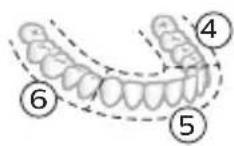
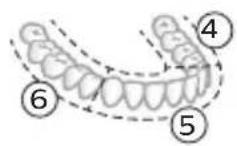
natural_image
Diagram of a toothbrush with a circular icon showing wireless signal (no text or symbols)text_image
Diagram showing two dental arch structures with numbered labels indicating different tooth locations or regions.natural_image
Simple diagram showing a device pressing into a cylindrical component with a cable (no text or symbols)natural_image
Simple line drawing of a medical procedure with a tool and tubing (no text or symbols)natural_image
Illustration of two hands using a tool to cut or adjust a mechanical component, with no visible text or symbols.www.philips.com/support
natural_image
Simple line drawing of an open book with no text or symbols visiblenatural_image
Illustration of a hand holding a tool with a pointed tip, showing a force or grip (no text or symbols present)natural_image
Simple line drawing of a curved object with a checkmark mark (no text or symbols)natural_image
Illustration of a hand using a pipette to apply liquid onto a surface, with an inset showing a droplet on a surface (no text or symbols present)text_image
Hand-drawn diagram showing a power button with an 'Power' icon and a circular button labeled 'On'.natural_image
Diagram showing a hand holding a small object with directional arrows, labeled '45°' (no text or symbols on the diagram itself)natural_image
Diagram showing dental tool application on upper teeth with magnified detail (no text or symbols)natural_image
Illustration of a toothbrush with a circular icon showing wireless signal (no text or symbols)text_image
Diagram showing two dental arch structures with numbered labels indicating different tooth locations or regions.flowchart
graph TD
    A["Process"] --> B["v"]
natural_image
Diagram showing a mechanical component with a downward arrow and a small central component, no text or symbols present.natural_image
Simple line drawing of a fork with a knife inserted, no text or symbols presentnatural_image
Illustration of two hands using a tool to cut or adjust a mechanical component, with no visible text or symbols.www.philips.com/support
Möhüm howpsuzlyk maglumaty
Bu önümi diñe onuň niyetlenilýän maksady üçin ulanyň. Önümi we onuň batareýalaryny hem-de esbaplaryny ulanmazdan ozal, şu maglumatı üns bilen okaň hem-de geljekde gollanmak üçin ýygnap goýuň. Nädogry ulanmak howplara yá-da agyr şikeslere eltip bilýär.
DUYDURYSLAR
- Diñe hakyky Philips esbaplaryny a-da sarp ediş materiallaryny ulanyň. Eger berlen bolsa, diñe original USB kabelini we USB tok üpjünçilik bloguny ulanyň.
- Bu enjamda ulanyjynyň tehniki hyzmat edip biljek şaýlary ýokdur. Eger enjama zeper ýetse, ony ulanmagy bes ediň we ýurduňyzdaky Müşderi goldawy merkezine ýüz tutuň. USB kabele zeper ýeten bolsa, ony ulanmagy bes ediň.
- Zarýadnikleri suwdan uzakda saklaň.
- Arassalanyňyzdan soň zarýad berijileri we syýahat wagtynda zarýad beriş çehollaryny birikdirmezden ozal olaryň doly gurandygyna göz yetiriň.
- Enjamy çagalar, şeyle hem enjamy howpsuz görnüşde ulanmak boyunça gözükdirijiler berlen ya-da howpsuz ulanmak boyunça gözegçilik astyndaky we değişli howplar özlerine mälim edilen yagdayynda fiziki, duýgurlyk yada zehin ukyplary pes ya-da tejribesi we bilimi bolmadyk şahslar hem ulanyp biler. Çagalar gözegçilik astynda däl wagty enjamda arassaçylyk we ulanyjy tarapyndan geçirilmäge değişli abatlayış işlerini geçirmeli däl.
- Çagalaryň önlem bilen oýnamazlygyny úpjün etmek üçin olary gözegçilikde saklamaly.
- Önümiň hiç bir bölegini gap-gaç yuwujyda arassalamaň.
- Adapterleri we zarýad berijileri açyk howada ýa-da gyzdyrylýan üstleriň ýakynynda ulanmaň.
- Bu enjam diñe dişleri, diş etini we dili arassalamak üçin dizayın edilendir.
-
Gyllary mynjiyran yá-da eplenen çotga nasadkasyny ulanmagy bes ediň. Nasadkany her 3 aydan yá-da könelme alamatlary yüze çyksa, ondan hem ir çalşyryň.
-
Düzüminde efir yaglary ya-da kokos yagy bar bolan önümler bilen gönümel galtaşdyrmaň. Galtaşma gyllaryň gopmagyna eltip biler.
- Ulanmagyň maksimum beýikligi 4500 metrdir.
LUKMANÇYLYK DUÝDURYŞLARY
natural_image
Simple line drawing of an open book with no text or symbols visibleBu nyşan enjamy ulanmazdan ozal ulanyş gözükdirijilerini okaň diýmegi aňladýar.
text_image
XXXXXXBu nysan görkezilen elektrik üpjünçiligini ulanmalydygyny aňladýar.
Niyetlenilýän ulanys
Sonicare Prestige elektrikli diş çotgalary dişiň çüyremegini azaltmak we agyz saglygyny saklamak maksady bilen, dişlerdâki daşy hem-de iýmit galyndylaryny aýryrmaklyga niyetlenilýär.
Philips Sonicare enjamyňyz (Şek. 1.)
natural_image
Illustration of a hand holding a tool with a black arrow indicating direction (no text or symbols)1 Gyllar tutawajyň öň tarapy bilen bir ugra seredip durar ýaly edip, nasadkany deňläň.
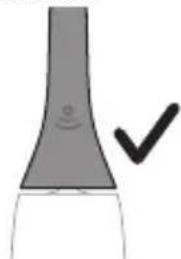
natural_image
Simple line drawing of a curved object with a checkmark indicating a detail (no text or symbols)2 Nasadkany metal walyň üstüne ol aňryk baryp direyänçä dôzümli basyň.
natural_image
Illustration of a hand using a pipette to apply liquid onto a surface, with an inset showing a droplet on a surface (no text or symbols present)1 Gyllary öllän we üstüne azajyk diş pastasyny çalyn.
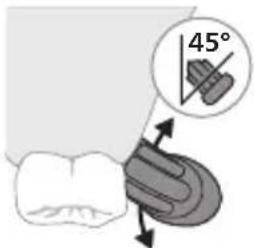
text_image
45°text_image
Hand-drawn diagram showing a power button with an icon and a circular button labeled '###' pointing to it.natural_image
Diagram showing dental tool application on upper teeth with magnified detail (no text or symbols)natural_image
Illustration of a toothbrush with a circular icon showing wireless signal (no text or symbols)text_image
Diagram showing two dental arch structures with numbered labels indicating different tooth locations or regions.BrushPacer agyz boşlugyňzy 6 bölege bölmek arkaly tutuş agyzda gyradeň çotgalamaga kömek edýän aralyk taýmeri bolup durýar.
Bellik: Elýeter bolsa, White tertibini ulanýan wagtyňyz goşmaça wagt goşulmagy mümkin.
SmarTimer
flowchart
graph TD
    A["Process"] --> B["v"]
natural_image
Diagram showing a mechanical component with a downward arrow and a small central component, no text or symbols present.2 Tutawajy zarýadnige yerleşdiriň.
3 Dakylgy USB kabelini 5V hemişelik tok çeşmesine birikdiriň,
- Diñe Philips bilen sazlaşykly yá-da giriş derejesi aşakda berlen
howpsuzlygy tassyklanan adapterler bilen zarýad beriň: 100 - 240V\~;
50/60Hz; 3,5W we çykyş derejeleri 5V hemişelik tok; 2,5W.
512 Türkmençe
- UL talaplaryna laýyk gelýän ya-da 1310 Class 2 standardy boýunça sertifisirlenen tok çeşmesi (diñe NAM)
natural_image
Simple line drawing of a medical procedure with a needle inserted into tissue (no text or symbols)natural_image
Illustration of two hands using a tool to cut or mark a surface, with no visible text or symbols1 Her ulanyşdan soň nasadkany we gyllary ýuwup durlaň. 2 Azyndan hepdede bir gezek nasadkany tutawaçdan ayryp, nasadkanyň birikmesini ýyly suw bilen ýuwup durlaň. Syýahat gapagyny näçe ýygylykda zerur bolsa ýuwup durlaň we howa bilen guradyň. Diňe gury nasadkany ulanyň.
Bellik: Nasadkanyň gapagy ony daşamakda ulanylýar we hemişe ulanylmaga niyetlenilmeyär.
Zarýadnik
Kepillik we goldaw (ROW)
Maglumat yá-da goldaw gerek bolsa, www.philips.com/support salgysyna girin yá-da halkara kepillik hatyny okaň.
natural_image
Simple line drawing of an open book with no text or symbols visiblenatural_image
Illustration of a hand holding a toothbrush with an arrow indicating force or movement (no text or symbols)natural_image
Simple line drawing of a curved object with a checkmark mark (no text or symbols)natural_image
Illustration of a hand using a pipette to apply liquid onto a surface, with an inset showing a droplet on a surface (no text or symbols present)text_image
Hand-drawn diagram showing a power button with an 'Power' icon and a button connected to a vertical line, indicating action or connection.natural_image
Diagram showing a hand holding a tool interacting with a textured surface, labeled 45° (no text or symbols on the diagram itself)natural_image
Diagram showing dental tool application on upper teeth with magnified detail (no text or symbols)text_image
Diagram showing two types of dental arches with numbered labels indicating different anatomical or structural features.text_image
Diagram showing a microphone with signal icon and speech bubble, likely illustrating wireless or audio signals.text_image
Diagram showing two dental arch structures with numbered labels indicating different tooth locations or regions.flowchart
graph TD
    A["Process Node"] --> B[" connector B"]
natural_image
Diagram showing a mechanical component with a downward arrow and a small square base, connected to a circular base (no text or symbols)natural_image
Simple line drawing of a medical procedure with a needle inserted into tissue (no text or symbols)natural_image
Illustration of two hands using a tool to adjust or install a mechanical component, with no visible text or symbols.www.philips.com/support
natural_image
Simple line drawing of an open book with no text or symbols visiblenatural_image
Illustration of a hand holding a tool with a downward arrow indicating motion (no text or symbols)natural_image
Simple line drawing of a bulb-like shape with a checkmark mark (no text or symbols)natural_image
Illustration of a hand holding a pipette over a surface with an inset showing a droplet on a surface (no text or symbols)text_image
Hand-drawn diagram showing a power button with an 'OK' icon and a button labeled 'OK' pointing to it.natural_image
Diagram showing dental alignment with a toothbrush and tooth arrangement (no text or symbols)text_image
Diagram showing two dental arch structures with numbered labels indicating different tooth locations or regions.natural_image
Diagram of a toothbrush with a circular icon showing wireless signal and a sensor symbol (no text or labels)text_image
Diagram showing two dental arch structures with numbered labels indicating different tooth locations or regions.natural_image
Diagram showing a mechanical component with a downward arrow and a small square component attached to a circular base (no text or symbols)natural_image
Line drawing of a medical procedure with a needle inserted into tissue (no text or symbols)natural_image
Illustration of two hands using a tool to lift or stand, forming a V-grip (no text or symbols present)www.philips.com/support
natural_image
Simple line drawing of an open book with no text or symbols visiblenatural_image
Illustration of a hand holding a tool with a pointed tip and arrow indicating direction (no text or symbols)natural_image
Simple line drawing of a curved object with a checkmark mark (no text or symbols)natural_image
Illustration of a hand using a pipette to apply liquid onto a surface, with an inset showing a droplet on a surface (no text or symbols present)text_image
Hand-drawn diagram showing a power button with an icon and a circular button, likely indicating a control or operation step.natural_image
Diagram showing dental tool interacting with teeth (no text or symbols)text_image
Diagram showing two dental arch structures with numbered labels indicating different tooth positions or regions.natural_image
Diagram of a toothbrush with a circular icon showing wireless signal and a sensor symbol (no text or labels)text_image
Diagram showing two dental arch structures with numbered labels indicating different tooth locations or regions.natural_image
Diagram showing a mechanical component with a downward arrow and a small cylindrical part attached to a circular base (no text or symbols)2 Кармагычты кубаттагычтын устүне коюңуз.
3 Камтылган USB кабелин 5V DC кубат булагына туташтырыңыз.
natural_image
Simple line drawing of a medical procedure with a tool and tubing (no text or symbols)natural_image
Illustration of two hands using a tool to adjust or install a mechanical component, with no visible text or symbols.natural_image
Simple line drawing of an open book with no text or symbols visiblenatural_image
Illustration of a hand holding a tool with a pointed tip and arrow indicating direction (no text or symbols)natural_image
Simple line drawing of a bulb-like object with a checkmark indicating a detail (no text or symbols)natural_image
Illustration of a hand using a pipette to apply liquid onto a surface, with an inset showing a droplet on a surface (no text or symbols present)text_image
Hand-drawn diagram showing a power button with an icon and a button labeled 'i' pointing to it.natural_image
Diagram showing a hand holding a small object with directional arrows indicating movement, labeled '45°' (no text or symbols on the diagram itself)natural_image
Diagram showing dental tool application on upper teeth with magnified detail (no text or symbols)text_image
Diagram showing two dental arch structures with numbered labels indicating different tooth locations or regions.natural_image
Diagram of a toothbrush with a circular icon showing wireless signal and a sensor symbol (no text or labels)text_image
Diagram showing two dental arch structures with numbered labels indicating different tooth locations or regions.natural_image
Diagram showing a mechanical component with a downward arrow and a small square component, no text or symbols present.natural_image
Line drawing of a medical procedure with a needle inserted into tissue (no text or symbols)natural_image
Illustration of two hands holding a tool with a diagonal line crossing through them (no text or symbols)natural_image
Simple line drawing of an open book with no text or symbols visiblenatural_image
Illustration of a hand holding a toothbrush with an arrow indicating force or movement (no text or symbols)natural_image
Simple line drawing of a bulb-like shape with a checkmark indicating a detail (no text or symbols)natural_image
Illustration of a hand using a pipette to apply liquid onto a surface, with an inset showing a droplet on a surface (no text or symbols present)text_image
Hand-drawn diagram showing a power button with an 'Power' icon and a circular button labeled 'OK'.natural_image
Diagram showing a hand holding a small object with directional arrows, labeled '45°' (no text or symbols on the diagram itself)natural_image
Illustration of a toothbrush applying sealant to teeth (no text or symbols)text_image
Diagram showing two types of dental arches with numbered labels indicating different tooth positions or regions.natural_image
Diagram of a toothbrush with a circular icon showing wireless signal and a sensor symbol (no text or labels)text_image
Diagram showing two types of dental arches with numbered labels indicating different anatomical or structural features.natural_image
Simple diagram showing a mechanical component with a downward arrow and a small square component on a circular base (no text or symbols)natural_image
Simple line drawing of a medical procedure with a needle inserted into tissue (no text or symbols)natural_image
Illustration of two hands holding a tool with a diagonal line crossing through (no text or symbols)natural_image
Simple line drawing of an open book with no text or symbols visiblenatural_image
Illustration of a hand holding a toothbrush with an arrow indicating force or movement (no text or symbols)natural_image
Simple line drawing of a curved object with a checkmark mark (no text or symbols)natural_image
Illustration of a hand using a pipette to apply liquid onto a surface, with an inset showing a droplet on a surface (no text or symbols present)natural_image
Simple line drawing of a hand pressing a button on a power button (no text or symbols)3 Барои фаьол кардани «Philips Sonicare» тугмаи фаьол/хомўшро пахш кунед.
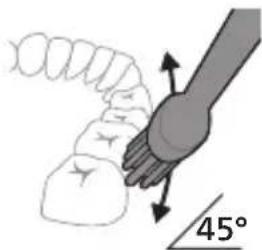
text_image
45°natural_image
Diagram showing dental tool application on upper teeth with magnified view (no text or labels)5 Барои тоза кардани сатххои дарунии дандонхои пеш, дастаки чуткаро нимамудй хам кунед ва дар хар як дандон чанд зарбан амудии якхеларо анчом дихед.
6 Пас аз анчом додани давраи дандоншуй, шумо метавонед вақти иловагиро барои тоза кардани сатхи хояндаи дандонхо ва чойхое, ки дар он догхо пайдо мешаванд, сарф кунед. Шумо инчунин метавонед забони худро бо чуткаи дандоншуии фаьол ё гайрифаьолшуда ба таври дилхох тоза кунед.
text_image
Diagram showing two types of dental arches with numbered labels indicating different anatomical or structural features.text_image
Diagram showing two dental arch models with numbered labels ⑦ and ⑧ indicating different tooth positions or dental placement.Шиддат (танхо 5300)
Танзимоти шиддат
natural_image
Diagram of a toothbrush with a circular icon showing wireless signal and a sensor symbol (no text or labels)natural_image
Simple diagram showing a device pressing into a cylindrical component with wires (no text or symbols)natural_image
Line drawing of a medical procedure showing a tool inserted into tissue (no text or symbols)natural_image
Illustration of two hands holding a tool with a pointed tip and a pointed tip, intersected by a diagonal line (no text or symbols)www.philips.com/support
natural_image
Simple line drawing of an open book with no text or symbols visiblenatural_image
Illustration of a hand holding a tool with a pointed tip and arrow indicating direction (no text or symbols)natural_image
Simple line drawing of a vertical tube with a checkmark mark (no text or symbols)natural_image
Illustration of a hand using a pipette to apply liquid onto a surface, with an inset showing a droplet on a surface (no text or symbols present)text_image
Hand-drawn diagram showing a power button with an 'Power' icon and a circular button labeled '0'natural_image
Illustration of a hand holding a small object with directional arrows indicating movement, labeled '45°' (no text or symbols on the diagram itself)natural_image
Diagram showing dental tool application on upper teeth with magnified detail (no text or symbols)text_image
Diagram showing two dental arch structures with numbered labels indicating different tooth locations or regions.natural_image
Diagram of a toothbrush with a circular icon showing wireless signal (no text or symbols)text_image
Diagram showing two types of dental arches with numbered labels indicating different tooth positions or regions.flowchart
graph TD
    A["Directional Arrow"] --> B["v"]
natural_image
Diagram showing a mechanical component with a downward arrow and a small cylindrical part attached to a circular base (no text or symbols)natural_image
Simple line drawing of a medical procedure with a needle inserted into tissue (no text or symbols)natural_image
Illustration of two hands using a tool to cut or adjust a mechanical component, with no visible text or symbols.www.philips.com/support
natural_image
Simple line drawing of an open book with no text or symbols visiblenatural_image
Illustration of a hand holding a tool with a pointed tip and arrow indicating direction (no text or symbols)natural_image
Simple line drawing of a bulb-like object with a checkmark mark (no text or symbols)natural_image
Illustration of a hand holding a pen, with an inset showing a magnified view of a cylindrical object (no text or symbols present)text_image
Hand-drawn diagram showing a power button with an 'Power' icon and a button labeled 'C', connected by a line to a hand.natural_image
Illustration of a hand holding a small object with directional arrows indicating movement, labeled '45°' (no text or symbols on the diagram itself)natural_image
Diagram showing dental tool application on upper teeth with magnified view of tooth structure (no text or labels)text_image
Diagram showing two dental arch structures with numbered labels indicating different tooth locations or regions.natural_image
Diagram of a toothbrush with a circular icon showing wireless signal and a sensor symbol (no text or labels)text_image
Diagram showing two dental arch structures with numbered labels indicating different tooth locations or regions.natural_image
Diagram showing a mechanical component with a downward arrow and a small square component on a circular base (no text or symbols)natural_image
Simple line drawing of a medical procedure with a needle inserted into tissue (no text or symbols)natural_image
Illustration of two hands holding a tool with a diagonal line crossing through (no text or symbols)natural_image
Simple line drawing of an open book with no text or symbols visibleUju ù2wùn gnìg ț unwìhu, nn wùhnpudt2un ț lqwnŋwi oqunwqnndúwù hnwhwùquttn` ùwhupwù uwnpù oqunwqnndtīn:
text_image
XXXXXXUju ǔ2wùn gnìg ǐ unwìhu, nn wùhnpudtī2n ǐ oqúnwqnnǎtǐ ǔ2uìwǒ tǐghùnnwúwùnwlywnwnpnniún:
Lwwinnwlywjhù oqinnwqnδniú
Sonicare wunwuttnp ùwpnti nì hīlūnpuwlu wù hunquwuwjuttn pwhwuntuulwò tǔ ylnunwylwò wunwutuwhwwn l u uànwnjhù uówgnnnuttn wunwuttnhg hānwgutni hwiúwn, hùsù oquniú l ǔuqwatgutl wunwuttnh ywnhtun l puntiwwutl ywu wwhwuwutl pānwuh hunnzh winnngniŋntiún:
2tn Philips Sonicare-n (Uy. 1.)
1 Enuwl
2 3nuwùph úhwúguìwù/wùgùnúwù lynǎwù
3 Ωισταμίν (ύπητιλής ψωμυλωδ)
4 lunqwùwlyh qlhuhlyh yhnhuwnhùuìwù hh2tigniú
5 Uwnunlngh gnighs
Uputuniwnutn.
6 ἐnquùwǔh qǐhuìh yuìhwùnhs
7 lunqwuwlyh qlhuhly(utn)
8 BrushSync ǔ2wǔ
9 USB lhgpwulnnhε (wwwnh hwnúwnwulgghη ιθηwnημωδ εξ)
10 Azwúhnnnwlywù wwnjwù
L2niú 3tinn unnuúwnnunn wputuniwnuttn ywnnn tǔ unwnptnulti' qùuwó uunntihg ywhuylwó:
^12 niú 7wnh hwnúwnwughn útnwnzluð ʒ: hnnhnnn túp unwlhu gwjuntnhg ww2nuwwünn gwúlywgud hwúwuntntbih IPX4 hwnúwnwughs (hwnúwnwughsh ynw ú2luð ʒ «IPX4» ubpuunn lyuú ú2wuùtnn):
hùzhg ulutl
Uúnwgntp hunqwùwlyh qìhuhyn
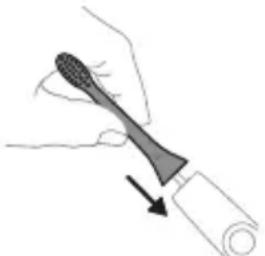
natural_image
Illustration of a hand holding a toothbrush with a directional arrow indicating force or movement (no text or symbols)1 lonquuwlyh qihuhyn hwwuwwntgntp wjuwtu, nn uwqhutnu ninnylwsh hutu unju ninnnjajwup, huz pnuwlyh nhuwgh lnnun:
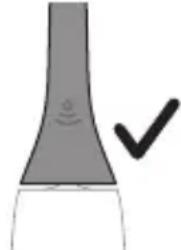
natural_image
Simple line drawing of a bulb-like shape with a checkmark indicating a detail (no text or symbols)2 Uúnín utnúúp hunqwùwlyh aíjuhún útnplú útunwnŋwlywù jhutzh útg, u̅hùzlu wju l̅wùq wnǔh:
^12 nui' funquwuh qihuh u pruuluh uhgu hnpn wugph wnlywnjajnün unnuwl 5:
2tn Philips Sonicare wunwutph junquuwlyh oqunwqnpnniun
tret wunghù wùqwú tṛ oqunwqnδniú átn Sonicare winwúh hunqwùwln, wultih 2wn jænæng qawln 'unnúwl t' hwútuwinwó n_z htyunnwlywù hunqwùwlyh htún: Unpúwl t, tnp wnwghù wùqwú oqunwqnδnnútnz swhhg 2wn tiú utnúniú qnpòwnnniú: Uhwjù yhnwntp iünnp utnúniú u janj untp, nnwtuqh winwúh hunqwùwlyn átn ynhwnptù úwpnh: Uànnniú tǔp htunluti uunnlu útnlywjwgluwó hunqwùwlyhg oqunlūtni gnigniwutnhù luwrqnijù wnnjniúpūtn uinnwùwni hwiúwn: Uugniún átn ünn Sonicare htyunnwlywù winwúh hunqwùwlyhú ht2nwgutjni hwiúwn winwghù 1-2 2wrpwəulw núpəwgpniú oqunwqnδtip wultih gwón lwwqnwlnnniú, wjùnhtinlu wügtip wultih pwnàn lwwqnwlnnúwù:
Uwpnúwù hnwhuìqùtn
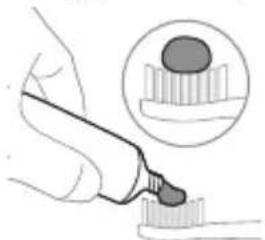
natural_image
Illustration of a hand holding a pen, with an inset showing a magnified view of a textured surface (no text or symbols)1 陰ntp hunqwùwuh ùwqhúttnn u utngntp wunwuh ùwðniyh phz puìwlynipajniù:
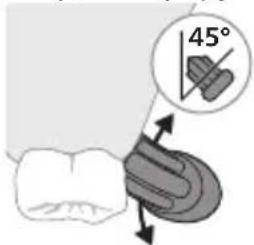
text_image
45°2 Uunwuh hunqwuwuh uwhqhyutnp nntp wunwutph ynw nnn2 wuljwu unwyl (45 wunhǎwù): Uúnin utnútp, nnwtuqh uwhqhyutnp hwuutu lùntnh tanwqðhù ywiú nnwuhg utnplu:
L2niú Úúpnng āwúwùwú húnqwùwúh yītǔnnnún wùwhtp wùnwùutnh htún 2yúwù útq:
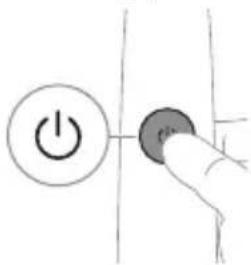
text_image
Hand-drawn diagram showing a power button with an 'Power' icon and a circular button labeled 'OK'.3 Utnútip hnuwùph úhwgúwù/wùgwùnúwù lynǎwùn` Philips Sonicare-n úhwgǔtīnì huúwùn:
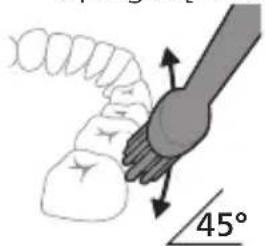
text_image
45°4 Unpntu wuhtp hunquuwlyh uwqtnu wunwutph ynw untwnwnluw6 u luntinh tanwqdnui: Uwpntp wunwutpn p#p#uwlyh htun ni wizw 2wndnuutpnyl, nnwtuqh hunquuwlyh uwqhutpn hwutu wunwutphu: Cwnniuwtyp wju 2wndniun atn uwpnuwu hnlih wupnng np#wgpnui:
L2niú hunquùwuh úwqhúutnp whtnp t úh ühnpn lujùwùwù: hunphnngh unnuíniú wunwúutnp úwpntl wjùwbu, hùswtu nnip lúwwpnthp unluŋnwlywù wunwúh hunquìuwynu:
^12 niù ^13 at ^14 wuhg 2win ^15 u2niú qnnòwnntip, wwwp núwuh jənəngn luynhuh' qqnizwgutinú àtq:
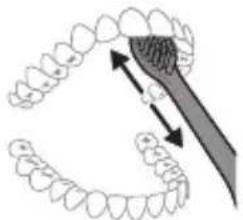
natural_image
Diagram showing dental tool interacting with teeth (no text or labels)5 Unquh winwutph utpuh uwltnunjautpn uwptni hwuwn pattp hunqwuwuh pnuwyn yhuwninhn nhnpnu l u ih puuh ninnwhwjug uwqnnn 2wpdnwutp ywinwntp jninwpwuyjln winwuh ynw:
6 Uwpntni yhnii wuwnbting htiun lwwnn tpr inwgnighs dwuwuwly hwnluygutl wunwutph dwiunn uwlvtntuuttn uwpntniu lu wju hwnulwodtphu, npuntn wnwgwuniu 5 powlnpnu: uwpnn tpr uwu uwpntl bqniu' hunqwuwyn wwhtinu uhwglwdo lwi wugwinwdo, huswbu uwjunwnniu tpr:
^12 niú 2tn Philips Sonicare wunwúh hunquùwūn wùuúnwùq t wunwúutnh pntytunutnh (hunquùwūh qīhuḥn 2niun t úw2u niú pntytunutnh u̱nw) l wunwúutnh ytnwluwùqūnn hwnúwnwùpùtph (ignùniúutn, 2wwghyùtn, yltùhnùtn) oqnwqqnnòuwi ñtiwpnui, tiāt ħnwùp wwniŋ2wǎ tǔ oqnwqqnnòu niú l zǐu huu̱huìunlniú:
BrushPacer
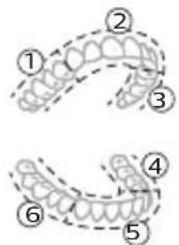
text_image
Diagram showing two types of dental arches with numbered labels indicating different tooth positions or regions.Зwinqutni hwiwn, np hwiwwwnwwh tp úwpnniú wúpnng ptnwùn, ptnwùn 6 úwuh pudwutp` oqnuwqnòtlnu BrushPacer qnnðwnnyjən: BrushPacer unthuünqhwù hunqwüwlyúwù dwúwüwlyn pudwūnui 5 6 hwiwwwn úwuh u waŋwù2wǔnui 5, pà tnp 5 hwnywlhn wùgutl hwgnnn hwnylwòhù: Zwinylwòutnh waŋwù2wùnuiún untnh 5 niútuniú panpangh ywnðwinlu wnwnph úhongnu: Umwùh hunqwüwlyú wujinnúwn lytnwnu wùgwunylnui 5 hunqwüwlytini utuhwjh wylwnuhù:
^12 Ni ^16 White ntidhu ^16 oqnwnqnptjhu lwnnn ^16 wultlwgulti lnwgnighs dwuwuwly (wnlywjnjaju ^16 ntiwpnui):
Ntchutn
Eğluynnwlywù hunqwùwlyu niúh úhtyşu 2 unwnptn ntādhūtún. Clean u White: 2tn oqunwqnndowó hutlwgh hunqwùwlyh qihuhlyh hhúwù yjnu` BrushSync unthuüninqhwjh úhongnyl wujnnúwin yttnwny lqnüunnultü owunhúwi ntādhún u hùntiúuhynjajniún:
ntdchún/hùntúuhúlníjniún átnípnú ynhutíni huuíwn, tnp hunqwúwwlín úhwgúwó t, utnútp hnuwúph úhwgúwú/wúgwunúwú lynówlín` wunwúutnh úwpnniúu ulyutíng lyuú útnulyutíng htinn 2 úwijnlywúh núpawgpniú: Fnnn hunqwúwwlútph qihuhýutnú wzhuwinniú tǔ jnínpapwúyjnín ntdhúnú:
Clean White (úhuìjù 5500)
| Unwultinipjniù Uunwúwwihwnhhtnwniú | Unwúwwihwnh luúwútnunijeh pòtinhhtnwniú |
| rùntùuhjlnipjwiùwnwqwnjlnnwwunhǎwùn | Fwnàn Fwnàn |
| bùnwùwlytīnìpùnhwùnìnđwúwàwlyn | 2 pnwt 2 pnwt, 40 ljuŋljwiù |
Clean White (úhuìjù 5500)
| hùwǒtu hūnqùwǔyǎl 3nīnwòp wùyúnín hwnuǐwǒn hūnqùwǔyǎtp 20 yǔjǐyìwǔ: | 3nīnwòp wùyúnín hwnuǐwǒn hūnqùwǔyǎtp 20 yǔjǐyìwǔ, |
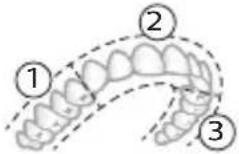 | 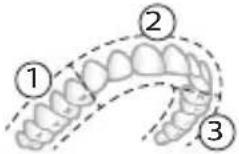 |
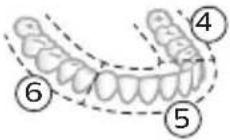 | 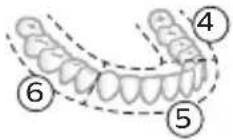 |
| www hūnqùwǔyǎtp 7-nη l u 8-nη hwnuǐwǒuṭnη jīnnpòwùyúnín n 20 yǔjǐyìwǔ: | |
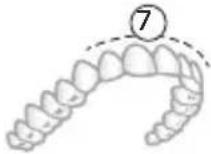 | |
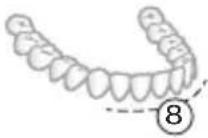 |
hùntùuhúnipjwù wuunhǎwùutn (úhwjù 5300)
hùntùuhúniējū lhuŋqwǔnnuìtún
Etiyunnwlywù hunqwǔwlyu niùn hùntǔuhlniŋwù 2 unwnptn wuuuhǎwùutn.
- Fwnàn hùnbuuhuŋniǔ
- 3wòn hùnbuuhúniŋniǔ
L2niu' Lwuwqnju wnnjniuputnh hwuwn hunphnnn tup unwihu pwnàn huntuuuhynujniu:
2tn gwùlywgwò hùntìuhúlníjniùn àtnpnu nùnntāni hhuúwn hunqwùwyn úhwgulwò dhuìwùwly utnútp hnuuùph úhwgúwù/wùgwùnúwù lynǎwyn
winwutph uwpnnu uytinig yuw utnulutinig htunn 2 uwjnywuh nupwgpniu unwnptnwutph usgl uhnwnyutni hwuun:
BrushSync unthuünqhw
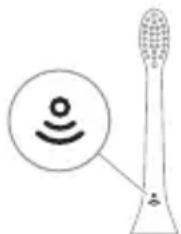
natural_image
Illustration of a toothbrush with a sensor icon and signal symbol (no text or labels)BrushSync unthuünlnqhwiù àtn hunqwùwlyh qihuhlyhù jəniyl 5 unwlhu hwnnnnwulgutl pràuwlyh htn uhlynnzhwh oqùnjajwúp: hunqwùwlyh qihuhlyh uunnnhù hwnulwðniú qinùynn 22wùn gnjg 5 unwlhu, np hunqwùwlyh qihuhlyu wwwhnylquò 5 wju unthuünlnqhwiŋnu: BrushSync unthuünlnqhwiù wwwuhnyniú 5.
- lunqwùwlyh qìhuhyh ynhhuwnhúu wù hǎtāgniú
- BrushSync n'tdhu l huntuuhynjawu hwuwnniu
U2niú BrushSync ntidhúh qniqwulnpúwù hwwuwútjhnipajniùn ywhuulwó 5 àtn wunwúh hunqwúwúh ünntúhg:
Philips Sonicare-ù wɪnɡwʊŋlniú ß BrushSync (lʊnquùwʊŋhUhùpnnùwgniú) uːtʃuːnɪnqhwjnu ñutlugh hʊnquùwʊŋ qəhuhyūtnh lʊjù uːtʃuːwʊwùh: lʊnquùwʊyūtnh qəhuhyūtnh útn wúpnno uːtʃuːwʊwùniú əwùnpəwùwɪni u òtɕu wútiʊwhuːwʊwwuːnwaʊhuːwú qəhuhyn qunùtɪni u ľnwgnighz uːntʃlɪnyəjniúu̩tɒnh huu̩wn wjgtịtp www.philips.com/toothbrush-heads:
9nρδωνηγρεύτη
- ǒu2úwù utùunnh wnàwqwùp
- BrushPacer
- SmarTimer
- EasyStart
- lunqwùwlyh qjhuhyh yhnhuwnhúuówü hh2tigniú
- lunqwùwlyh qjhuhlyh ntādhúh qniqwwynnniú
Δυ₂ύμι υτύμην ωπάωρωμ
2tn Sonicare wunwuh hunqwuwyn zwuhniú 5 úwpntini núwgpniú átn lynuhg qnnðwnnluwð áu2niún` átn jùntpn u wunwutpnn yiuwuulwópútnhg www2nuwwutjni hwiúwn: 3rāt szuhhg 2wn áu2niú qnnðwnhtp, www pnüwwyh pénjæzngn u àwjùn yhhnhuh` úhùzì lnyhù súylwqagutp áu2niún:
^12 niù' Uwnpniu ywùhuwnnluwǒ ytnwnu wlnhúwgulwǒ t zúzúwù utùunnh wnàwqwùpn: Uju qnnòwnnyjāu wwwwwlnhúwgǔtini hwiúwn (Stu qinihu «Ulnhúwgǔti ywú wwwwwlnhúwgǔti qnnòwnnyjāutīpn»):
BrushPacer
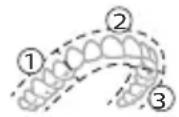
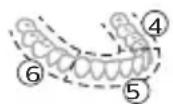
BrushPacer-ŋ hùntɪnʊwɪtɪnh dʊwʊwʊwɪh ʒ, nnʊ oqʊniʊ ʒ ɒtɪq hʊwʊwwənwʊwɪh ʊwɒpntɪ pɪnʊwɪn ˈpʊdʊwɪtɪnʊ wju 6 hʊwnʊwəh:
^12 Ni ^16 Unlywniajwù ntiwpniú, White ntidhuì oqunwqnδtǐhu lqunnh 5 wultlwgutī lnuqnighs dwiúwùwú:
SmarTimer
SmarTimer-n gnjg 5 unwju, nn úwpnúwù yhnù wulwnunlwið 5 úwpnúwù yhnìh útnqniú wulnnúwùn ytnwnú wúgwintǐnú wunwúh húnquìwūn: Uunwúwwpnýd-úwuùwqṭunùtn p hunphnīŋ bù unwju úwpntí wunwútīpn onwlywù 2 wùqwúhg n_z uwwlywu:
^12 niú ^b pt utnútp hnuwúph úhwúwù/wùgwinúwù lynǎwln úwpnúwù yhníŋ ulyutínig htunn, wunwúh hunqwúwlyn ywùq ywnǔh: trpt 30 úwjnljjuwùh núwugpniú utnútp hnuwúph úhwúwù/wùgwinúwù lynǎwln, wuw duwúwzwnh yultinulyuqh` rānyl unwīnul àtiq wylwnnti úwpnúwù yhníŋ: 30 úwjnljjuwù nwnwnhg htunn SmarTimer-n útnwlywjlniú t:
EasyStart
Uju Philips Sonicare ἅnŋtliù wnnwqwnlμlniú § EasyStart qnnδwnnjiαu wwwwwlnhluwgulwó uħawlynú: EasyStart qnnδwnnjiαn lμwiug-lμwiug wultuugüniú § hqnηνησηνιu wnnwghù 14 ὑωρηνιώτιŋh dμwūwūy` oqūtniú àtiq unylnnti Philips Sonicare wnnwúh junqwüwwlyhg oqunlμtniú: EasyStart qnnδwnnjiαn qnnδniú § pninn nzhduutynú:
L2niu 5500 2wnpnui wlnhluwglud; EasyStart qnnδwnnyρn:
*3nwdwnwqh
tnp Philips Sonicare wunwúh húnquìwù y oqunwqnδuǐnǚ l yīhuìhyuìwù hānwqnnníjniùutpnì, wǔ yītūnp l oqunwqnδuǐh pwnàn hùntìuhúlníjwiù yǔw` pnùwùn wúpnnqniŋwúr lhgpwúlnnluwò, húy EasyStart qnnðwinnyiən` wùgwinluwò:
EasyStart qnnðwn2nýjəu wlyunhúwɡǔtlní hwiúwùn (Stu qíníhu «Ulyunhúwɡǔtlnyú wyywwuynhúwɡǔtln qnnðwn2nýjəuttnp»):
funqwùwlyh qìhuhyh yhnhuwnhùuòu hìh2tigniú
2tn Philips Sonicare-tu niúh BrushSync (UwppnuwuUhuppnuwgniu) unthuunqnhwu, nnp htunwqdnui 5 2tn hunqwuuwh qihuhuh uw2quwnpajniùn:
^12 niù Uju qnnδwnnyjəu w2huwinniú ʒ úhwjù Philips Sonicare hutluugh hunquüwlyh qlhuhluitn BrushSync (funquüwlyhUhùpnnüwgniú) unthuünqnhwjnu:
1 tnp wnwghu wiuqwiun hutlwgh hunqwuwlyh qihuhly tip wúnwgünui, pnuwln dawuwwniui t, nn nnp niutp Philips hunqwuwly BrushSync (hunqwuwlyhUhupnnuwgnui) unthuüninqhwynl u uluniui t htinwqdtj hunqwuwlyh qihuhlyh uww2lwwdnijnniun:
2 dwuwuwlyh npawgpnui, ywhuwd atn lnnuhg yhnwnzuwd atu2niuhg u qihuhh oqunwqnnduwu npnhwünin dwuwuwlyhg, pnuwyn htunwqdnui h hunqwuwlyh qihuhh uwzuwdnupniun' nnp2tini hwuwn atn hunqwuwlyh qihuhn yhnhutini hwuwn lwuwqnju dwuwuwyn: Uju qnnowwnijan tnww2hwuwnnui t atn wunwutph lwuwqnju uwppnnui ni huuwupn:
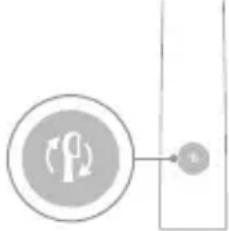
flowchart
graph TD
    A["Process Node"] --> B[" connector B"]
    style A fill:#f9f,stroke:#333
    style B fill:#ccf,stroke:#333
3 tnp hunquùwlyh qihuhlyh yhnhuwnhúuówu hh2tgúwù gnighzn uwnuŋniú 5 ntnhù qnyùnu, nintúšu wtaunp 5 yhnhtup hunquùwlyh qihuhyn:
^12 nù fú l wgh hunqù u wlyh pninn qihuh yutnh ynhuwnhùwù hh2tgú wù qnnðwnnijəù wlnhluwgüwò ʒ: hunqù uwh qihuh ynhuwnhùwù hh2tgniú wwwwwlnhluwgütinì hwúwn unú "Ulnhluwgüli ywú wwwwwlnhluwgüli qnnðwnnijəutnp":
funqwùwuh qihuhuh ntādhūh qniqwulnniú
BrushSync unthuunqhwjnu hunqwuwlyh qihuhyttnn uhlynshw niutu, nnp hwnnnnwulgniwi t pruwynjh htun u wylnnuwin ytwnynl qniqwulnnniw wju
wnwgwunlyunn ntadhuh lu huintiuuhynipajwù htün: BrushSync unthuünqnhwjnu lunqwüwwyh qihuhytphg 2wnntnì wuinnúwùn ytnpwnl qniqwulnniú t Clean ntadhuh htün: Nnn2wuh wnwyltlnipajniúutnnu hunqwüwwh qihuhyttnyqniqwulnniú huuiwwwwwnuwuhwù ntadhuh htün (wnlywjnipajwù ntiwpniú): Onhüwwyttnn ütnwnniú tǔ htunlywijn`
- W3 Premium White lquw W DiamondClean (NAM) / W OptimalClean (ROW) 'White nbdhui (wnlywnipajwù nbtwpniú)
^12 nui' tpi nnn2tp ynhutl ntdhup/huuntuuhunjniun hunphnnn unpunn ywnqwulnnniuhg, hunqwuwuh qihuhyn yhh2h atn lynnuhg njuunnluwó ywnqwulnnniun hunqwuwyluwu htinwqu wpngttnnipwutnh hwiúwn:
Ulnhluwgutl ywi wwwwnlnhluwgutl qnpdwnnypruttn
2tn wunwuh hunqwùwlyh ynw 7nip lqwnn tip wlnhluwgutl ywu wwwwuynhluwgutl htinlwwl qnnδwnnijrəutqn`
- EasyStart
- lunqwùwlyh qìhuhyh yhnhuwnhùuìwù hh2tgniu
- ฐวุผิ utุนท mnòwqwùp
L2niú fūnquùwùh qīhuh ynhuwnhùwù hǎtāgniún huúwuntntìh tǔhuwù Sonicare hūtiug hūnquùwùh qīhuhyùtnh htún: Φnhuwnhùwù hǎtāgniún wúnhuwrgutīni yuú wuuwwlnhúwrgutīni huúwù hūtiug hūnquùwùh qīhuh yuánp t wúnwguwò zhù hūnquùwùhù:
Fnüwlyhg
Pwll 1. Fnùwùn ntp hnuwùphù úhwgnwǒ jhgpwulnnhsh / jhgpwulnnúwù āwúzhnnnwlywù wwwunjwù ynw:
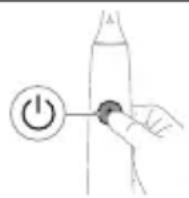
Pwjl 2. Utnúbp u utnúwð wuhtp úhwgúwù/wǔgwùnúwù lynówyn.
| EasyStart lunquùwlyhqhuhlyhnhwnphùuwùhh2tigniú | āūzúwù utùunnhwnàwqwùp | |
| Uhùzì 3lwwjnljwùunlunnniŋjwùp | Uhùzì 5 Vwjnlyjwùunlunnniŋjwùp | |
| ↓ ↓ ↓ | ||
| Pwji 3. Fwg panntp hnuwùph úhwgúwù/wùgwùnúwùlnǎwyl, tnp lutp. | ||
| 1 wqnwiù2wù 1 wqnwiù2wù,wwμ 2wqnwiù2wù | 1 wqnwiù2wù, 2wqnwiù2wù, wμw 3wqnwiù2wù | |
| ↓ ↓ ↓ | ||
| hùzwtu ùwùl` | ||
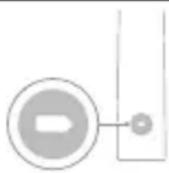 | bṛat úwnunlyngh lhgph àwhu LED gnighén 2 wùqwú puwnḥlquwùz ľnijunú l u lutp 3 wqnwiù2wù`gwônhg úhùzì puàn,wwμw qnnòwnnýrəu wlnhúwgúwò §: | |
| 4UU | ||
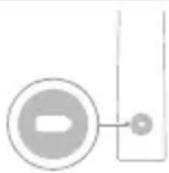 | bṛat úwnunlyngh lhgph àwhu LED gnighén 1 wùqwú puwnḥntanhù ľnijunú l u lutp 3 wqnwiù2wù`pwônhg úhùzì gwòn,wwμw qnnòwnnýrəu wwnwllynhúwgúwò §: | |
Lhgpwwlnnniú u úwnunlyngh lhgph ywnqwwlhǎwú
Uju Philips Sonicare wunwuh hunqwuwyn uwhwintuuulwδ t ughwn 42 hunqwuwlyu wu hwuyn', jninwpwusyn in wpngtnninwü 2 nnwt ununnniqwup (21 on, tpat oqnwnqnduh onwlywü tnlni wuqwui) lnhylhgpwulnnluwδ uwnunlngnu: Uwnunlyngh lhgph gnighn gnig t unwju uwnunlyngh lwnqwuhawyn, tnp wilwnnni t p hunqwuwlyu wü 2 nnwtwung wpngtnninwü, tnp wugwnni t p hunqwuwyn, ywu tnp wju lhgpwulnnluwü t:
^12 niú 4wnn l wwhwúzúl úhúu 24 dwú, nnwtuqh úwnnyngù wúpnnnqniŋwúp lhgpwwlnnh` uwhupwù wnwghù oqnwnqnδniún, uwlywju nniú ywnnn tāp oqnwnqnδti Philips Sonicare wnwuh hunqwùwyn, uwhupwù wjù wúpnnnqnuħu lhgpwwlnnulán:
Lhgpwynnni#
Lhgpwulnniun lhgpwulnnhsh ynw
1 Uhwqntp USB lhgpwulnnuwu lwnn wwnh qwnnwlyhu, uhwqntp wwnh hwnuwnnwlyghzn wwnh tliqynnwlywu hnuwuph qwnnwlyhu:
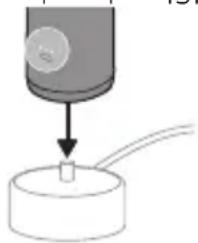
natural_image
Diagram showing a mechanical component with a downward arrow and a small cylindrical object on a base (no text or symbols)natural_image
Simple line drawing of a medical procedure with a needle inserted into tissue (no text or symbols)1 3tizwqntap hunqwúwlyh qihuhyn u ljuwqtp útünwnwlywù jhutnh hwinluwòn u lynǎwlyúttnn unwp qpnú: 3wúnqultp, np htizwqntal tp przüwlyh ulnwjh u lynǎwlyúttnh 2ninŋn qunüulnn wunwúh úwðnilyh útüwgnpnúttnn wnzülwqu 2wprwən útly wùqwú, puwjg gwúlywylh 5' wútú wùqwú oqinwqqnpôtlínig htunn:
2qn12wgniu' Uh hntp ntnuhut yuhpn unin wnwnywttnu' ntwh jhutnh utg ywu lyndwlutnh 2ninp, pwuh nn wju lwwnn t hwuqtguti yuuwulwoph:
2 Fnùwùh wúpnnq úwútntun úwpntp hùnùwù qnnòu wǒpnù:
^12 niù' Uh hwnlquātp pniwlynq lqugwqnwhù' wultinnq gninn htnwgutlni hwúwn:
3 Enuwnynnnwgntp ywhnly yunnnyl yww unphynl:
hunquwuh qihuh
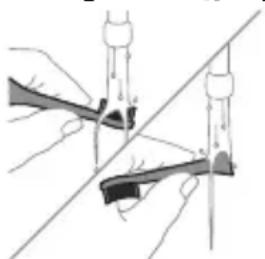
natural_image
Illustration of two hands using a tool to lift or stand, forming a V-grip (no text or symbols present)1 3nipwpuusynin oqunwqnndniuhg htunn luwgtp hunqwüwwyh qihuhyn u uwhyutp:
2 3twnwgntap hunqwùwlyh qlnihun pnùwlyhg l u wnzùlqwqù 2wpwràn úthu luwgtap hunqwùwlyh qihuhyn unwp znnu: Lluwgtap āwuúhnnnnwlywù luwihwnhsù wjùpwù hwaówhu, nnpwù wùhnwdt2un 5, l jænntap, nn znnnwùw: Oqnwnqqnndōtp úshwju znn hunqwùwlyh qihuhyh ynw:
^12 niù ^1 nquùwlyh qihuhyh ywhwnhşù oqunwqnδύniú 5 wnwpúwù ^1 wwwnwlynú l u whiwuntuylwó 3⁄5 2wnniùwlywlwù oqunwqnδύwiú hwiùwn:
Lhgpwulnnhs
1 Uguwntp Ihgpwlnnhn` uwhupwu wju uwpntln:
2 Lhgpwwnnhhsh uwwytnttun uwpntap hunuwwu qnnδuwwdpnu:
3 Lhgpwulnnhen znnwqntap ywhwnly yunnnnu lywi unphznu:
phosphorus phosphate
natural_image
Simple line drawing of an open book with no text or symbols visiblegù lùdàmmm bùdǎsī, bùnʒnmbmm gùdmyjībòn lìbùfēngjūn dāmbùmànmànn lìgùdmyjībòsādāq.
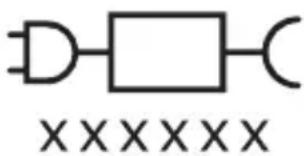
text_image
XXXXXXglunodommm bndbsz, gudmnygmon dnnnnngdymn 33gdnl bysfm.
Sonicare grades from designations of the designations of the designations of the designations of the designations of the designations of the designations of the designations of the designations of the designations of the designations of the designations of the designations of the designations of the designations of the designations of the designations of the designations of the designations of the designations of the designations of the designations of the designations of the designations of the designations of the designations of
உநேஞ்செ Philips Sonicare (முதி. 1.)
natural_image
Illustration of a hand holding a toothbrush with an arrow indicating force or direction (no text or symbols)natural_image
Simple line drawing of a bulb-like shape with a checkmark indicating a detail (no text or symbols)natural_image
Illustration of a hand using a pipette to apply liquid onto a surface, with an inset showing a droplet on a surface (no text or symbols present)text_image
Hand-drawn diagram showing a power button with an icon and a hand pressing a button, likely illustrating a control or operation.3 Philips Sonicare-nu Bubunmuzoo, qusgfngm bumoz/30dmmnznu mnmosb.
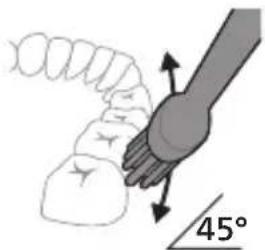
natural_image
Diagram showing a hand holding a 45-degree angle with a coiled spring and handle (no text or symbols)4 ghmbnngq dmsuzlgn tsgmyngon zdnngdus qss mndmnl bs88j. gunbdnbgom zdnngon dqnng bnb qss yzub dmdmsdom nlj, hmd tsgmyngon bzogdom6gb zdnngdu dmhnl. gubsgmdgm slgmn dmdmsmòs bdjbcwnl yuzmnl zgbduzmmòsdn.
natural_image
Diagram showing dental tool application on upper teeth with magnified detail (no text or symbols)text_image
Diagram showing two types of dental arches with numbered labels indicating different tooth positions or regions.natural_image
Diagram of a toothbrush with a circular icon showing wireless signal and a sensor symbol (no text or labels)text_image
Diagram showing two types of dental arches with numbered labels indicating different tooth positions or regions.BrushPacer ʃəmɒl ɒbʃɪmʒʊŋyʃn ʃʊndʒfɔn, ʃmɒŋɡnɒ ʒʌbðjθρσdɒ ʒʌbðsɪŋgðsɒn, ɕɔʊyʒən ʒɪnˈnɒ ʃmɪ 6 ɔːbɒnəsɒ.
∂θδησθε: θγμαθησθεραθαθησθε, White θγμαθησθε, θγμαθησθε, θγμαθησθε, θγμαθησθε, θγμαθησθε, θγμαθησθε, θγμαθησθε, θγμαθησθε, θγμαθησθε, θγμαθησθε,
SmarTimer-o
flowchart
graph TD
    A["Process Node"] --> B["Output 6"]
natural_image
Simple diagram showing a cylindrical object being inserted into a circular base, with no visible text or symbols.odds funds funds funds funds funds funds funds funds funds funds funds funds funds funds funds funds funds funds funds funds funds funds funds funds funds funds funds funds funds funds funds funds funds funds funds funds funds funds funds funds funds funds funds funds funds funds funds funds funds funds funds funds funds funds funds funds funds funds funds funds funds funds funds funds funds funds funds funds funds funds funds funds funds funds funds funds funds funds funds funds funds funds funds funds funds funds funds funds funds funds funds funds funds funds funds funds funds funds funds funds Funds
ඉංකිය අඩා
15360 3 3300m% 6360
6560mmdm3 15362 2 330mm 36363
natural_image
Line drawing of a medical procedure involving an incision or needle inserted into a patient's leg (no text or labels)natural_image
Illustration of two hands using a tool to adjust or install a mechanical component, with no visible text or symbols.phosphorus phosphate
gǔ ǒn zhī ǒu dōng yī gān sōng bān mī 3hī mòu nōng dōng, hī māng mūs yī dōng mōng bān sōng yī gān sōng dōng dōng sōng dōng dōng sōng dōng dōng sōng dōng dōng sōng dōng dōng sōng dōng dōng sōng dōng dōng sōng dōng dōng sōng dōng dōng sōng dōng dōng sōng dōng dōng sōng dōng dōng dōng sōng dōng dōng sōng dōng dōng sōng dōng dōng sōng dōng dōng sōng dōng dōng sōng dōng dōng sōng dōng dōng sōng dōng dōng sōng dōng dōng sōng dōng dōng sān 00000000000000000000000000000000000000000000000000000000000000000000000000000
36100000000000000000000000000000000000000
| fszgmolnu oszluhygmsq 3gmzdszgmj. fszgmolnuoszlu qss lsbgymnmldmmlu smnl lzn3m2j. | luzm2j bmmdsmynmncos luzgnmns ndnunzni, mmd tszgmolnu oszdubsmsgomngndmnml. tszgmolnuoszlu y6cos dggdmmldmdmsmds, msondgndbsl zndmsygnllubmnn msmcgbmds. | |
| hgdn Philips Sonicare-nu zdonmnu fszgmolnuzndmsjns buzmgdsoqdmngmns, zngmjsjsdqg. | dyusmmp ussdzsgmntzsgmolnu osznlsbgmynm8j. | dmbugbnm tszgmolnuoszn lusbgmynmncs6,bgmbsms gussdsgmgnmmmbnl mgtmd8j qsspsgmzgn dʒnmj gmomon.(1-2 dd). |
| zdonmnu fszgmolnbyzgflu dydsmdsl. | dsfusmgs bsfmgnmns. foqgbgn zdonmnutszgmolnu lusbgmynmncosdgh68j. | |
| dj fozgh6j hgdnzlonmnu fszgmolndzsmsd dbmmmpdʒmfg bsbl dydsmdl. | zdonmnu fszgmoln3gmphysmynmmp smssdmoszbjdygmncosdgh68j, dygagssrm nfgh68ds. | lsbgmynm3gmfhzsmynmncodmsmszijon foqdhgbndmf8j qss foqmbdybgnm, mmd foqdh6bndghmngdymns. |
zsmbgngb zsdmbzqngd
natural_image
Simple line drawing of an open book with no text or symbols visiblenatural_image
Illustration of a hand holding a tool with a downward arrow indicating motion (no text or symbols)1
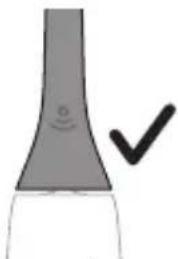
natural_image
Simple line drawing of a curved object with a checkmark indicating a detail (no text or symbols)הכלה 2
.תָאַל
natural_image
Illustration of a hand holding a pipette with a magnified inset showing a droplet on a surface (no text or symbols)text_image
Hand-drawn diagram showing a power button with an 'OK' icon and a circular button, likely indicating a control or operation step.natural_image
Diagram showing dental tool interacting with teeth (no text or labels)natural_image
Illustration of a toothbrush with a circular icon showing a sensor symbol (no text or labels)EasyStart is. This is EasyStart is. This is Philips Sonicare is. This is. This is EasyStart is. This is Philips Sonicare is.
.5500 This is a good thing that is easy to start.
*הכלה
Philips Sonicare 77.
.'הכלהה' (בַרְׁהָה) EasyStart 7'
flowchart
graph TD
    A["Person Icon"] --> B["Terminal Block"]
natural_image
Simple diagram showing a mechanical component with a downward arrow and a small circular component at the base (no text or symbols)natural_image
Simple line drawing of a fork with a pen inserted, no text or symbols present- 1
natural_image
Illustration of two hands using a tool to lift or stand (no text or symbols present).הכלההוּרָהוּרָהוּרָהוּרָהוּרָהוּרָהוּרָהוּרָהוּרָהוּרָהוּרָהוּרָהוּרָהוּרָהוּרָה
-ロナ クロナ ヨウ
-.הַרְׁבָרִיֹת
-הכלה
www.philips.com/support
Philips 7
www.philips.com/Sonicare
©2024 Koninklijke Philips N.V. (KPNV). All rights reserved. Philips and the Philips shield are trademarks of KPNV. Sonicare and the Sonicare logo are trademarks of Philips Oral Healthcare, LLC and/or KPNV.
300012731202 (12/07/2024)