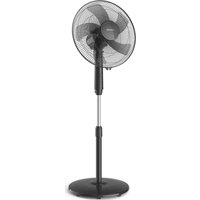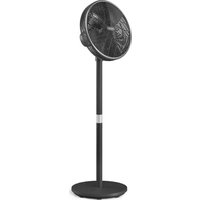
CX3550 - Fan PHILIPS - Free user manual and instructions
Find the device manual for free CX3550 PHILIPS in PDF.


| Brand | Philips |
| Model | CX3550 |
| Product type | Pedestal fan |
| Dimensions (approx.) | Height: 100 cm, Base diameter: 30 cm |
| Weight (approx.) | 5 kg |
| Power supply | Mains, 220-240 V, 50 Hz |
| Power consumption (approx.) | 50 W |
| Fan speeds | 3 manual speeds, Sleep mode, Natural breeze mode |
| Oscillation | Horizontal: 90°, Vertical: 30° (manual adjustment) |
| Timer | 1, 2, 3, 4, 8 or 12 hours (automatic shut-off or start) |
| Connectivity | Wi-Fi 2.4 GHz (802.11 b/g/n/ax), Bluetooth 5.2 LE |
| App | Philips Air+ (iOS and Android) |
| Smart functions | App control, scheduling, custom modes |
| Cleaning | Soft dry cloth; do not immerse or use harsh detergents |
| Safety | Liquid protection, safety grilles, automatic shut-off if tipped over? (not specified) |
| Warranty | 2 years (Versuni) |
Frequently Asked Questions - CX3550 PHILIPS
User questions about CX3550 PHILIPS
0 question about this device. Answer the ones you know or ask your own.
Ask a new question about this device
Download the instructions for your Fan in PDF format for free! Find your manual CX3550 - PHILIPS and take your electronic device back in hand. On this page are published all the documents necessary for the use of your device. CX3550 by PHILIPS.
USER MANUAL CX3550 PHILIPS
natural_image
Black outdoor fan with a circular grille and a black stand, no visible text or symbols.-1
!
-1
i
-1
-1
1_
1
-1
1_
-1
1
English 6
Čeština 18
Dansk 30
Deutsch 42
Eesti 55
Español 67
Français 79
Hrvatski 91
Italiano 103
Latviešu 115
Lietuviškai 127
Magyar 139
Nederlands 151
Norsk 163
Polski 175
Português 187
Română 199
Shqip 211
Slovenščina 223
Slovensky 235
Srpski 247
Suomi 259
Svenska 271
Türkçe 283
Ελληνικά 295
Български 307
Македонски 319
Українська 331
343 العربية
Important
Read this user manual carefully before you use the appliance, and save it for future reference.
Danger
- Do not let any liquid or flammable detergent enter the appliance, to avoid electric shock and/or a fire hazard.
Warning
- This appliance can be used by children aged from 8 years and above and persons with reduced physical, sensory or mental capabilities or lack of experience and knowledge if they have been given supervision or instruction concerning use of the appliance in a safe way and understand the hazards involved.
- Children of less than 3 years should be kept away unless continuously supervised.
- Children shall not play with the appliance.
- Cleaning and maintenance shall not be made by children without supervision.
- Take care that curtains or other objects are not sucked into the fan during operation.
- Do not insert fingers, sticks or other objects into the machine, in order to avoid electric shocks physical injury or fire.
- Do not use the appliance near gas appliances, fireplaces.
- Do not spray any flammable materials such as insecticides or fragrance around the appliance.
- If the power cord is damaged, you must have it replaced by Philips, a service center authorized by Philips, or similarly qualified persons in order to avoid a hazard.
Caution
- Always place and use the appliance on a dry, stable, and horizontal surface.
- Do not use the appliance in surroundings with high humidity such as the bathroom, toilet, kitchen, swimming pool, or any outdoor environment.
- Always unplug the appliance when you want to move, clean appliance, or carry out other maintenance. After assembly, do not remove the guards during use or cleaning.
- The appliance is only intended for household use under normal operating conditions.
- Keep product away from fire and do not expose them to direct sunlight or high temperatures.
- Keep long hair away from working appliance, to avoid hair get tangled in appliance.
- Standard WiFi interface based on 802.11b/g/n/ax at 2.4GHz with a maximum output power of 64mW EIRP.
- Bluetooth version 5.2 (LE) at frequency 2.4GHz with RF output less than 10mW EIRP.
Electromagnetic fields (EMF)
This appliance complies with the applicable standards and regulations regarding exposure to electromagnetic fields.
Recycling
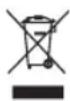
This symbol means that this product shall not be disposed of with normal household waste (2012/19/EU).
Follow your country's rules for the separate collection of electrical and electronic products. Correct disposal helps prevent negative consequences for the environment and human health.
Simplified EU declaration of conformity
Hereby, DAP B.V. declares that the radio equipment type CX3550 is in compliance with Directive 2014/53/EU. The full text of the EU declaration of conformity is available at the following internet address: www.philips.com.
8 English
Your pedestal fan
Product overview
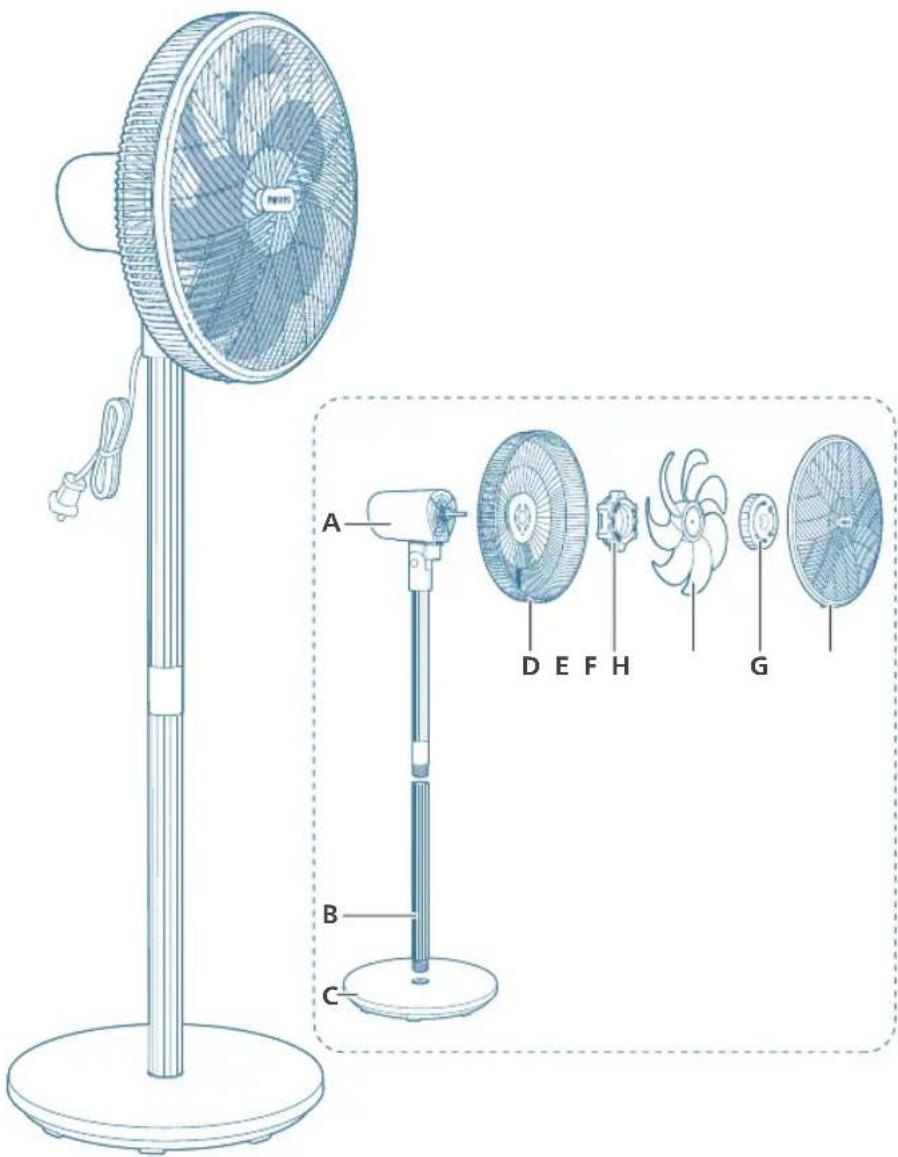
A Motor&upper pillar E Plastic nut
B Lower pillar F Fan blade
C Base G Spinner
D Rear grill H Front grill
Controls overview
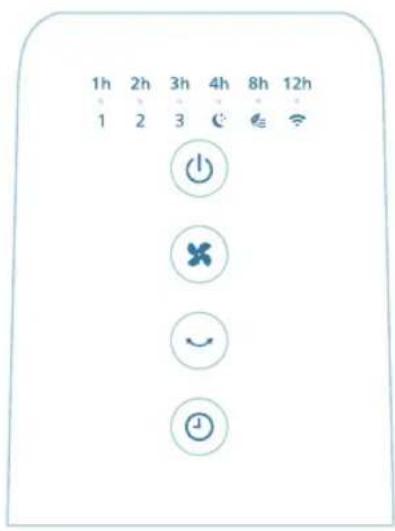
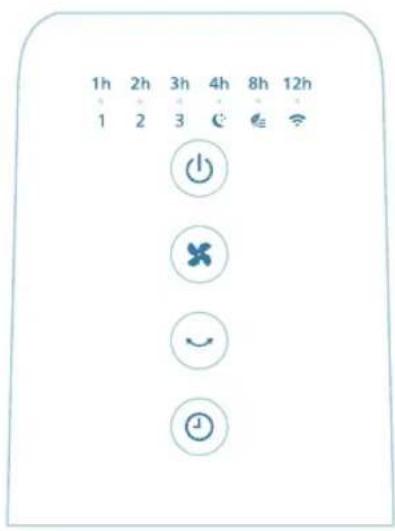
Power on/off button Fan speed/mode selection button
Rotation button Timer button
1, 2, 3 Fan speed indicator Timer indicator 1h
Sleep mode indicator Natural breeze mode indicator
WiFi indicator
Getting started
Installing the fan
natural_image
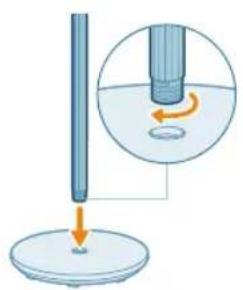
Diagram showing a rod being inserted into a container with an arrow indicating force or motion (no text or symbols present)Remove all packaging of the fan before first use.
Make sure all components of the fan are correctly installed and fastened.
1 Insert the lower pillar into the base, and turn it clockwise until it is secured and fixed in the position.
10
English
natural_image
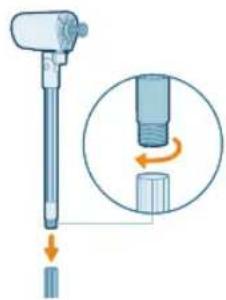
Illustration of a medical or laboratory device with an inset showing a mechanical component (no text or symbols present)2 Align the upper pillar with the lower pillar and securely fasten it by turning it clockwise.
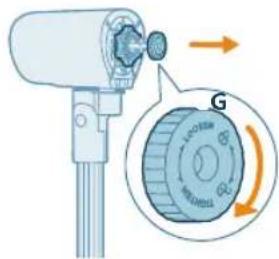
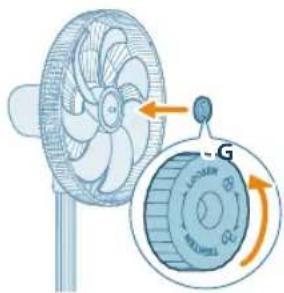
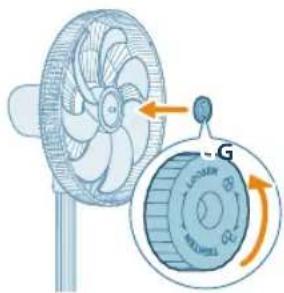
3 Rotate the spinner in a clockwise direction to detach it from the motor.
natural_image
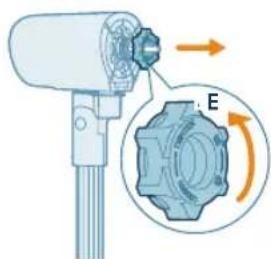
Diagram of a mechanical device with gear and directional arrows indicating rotation (no text or symbols)4 Turn the plastic nut counterclockwise to detach it from the motor.
natural_image
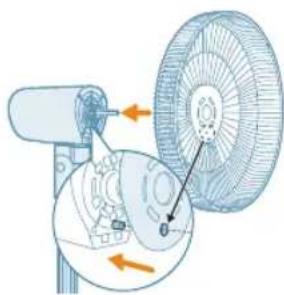
Diagram of a fan blade assembly with directional arrows indicating components (no text or labels)5 Secure the rear grill to the motor by aligning the mounting hole on the rear grill with the bolt on the motor.
natural_image
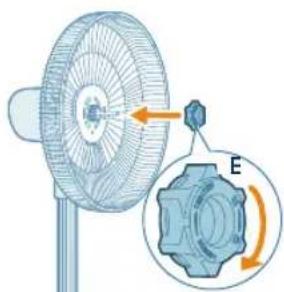
Diagram of a fan with a gear mechanism showing rotational direction (no text or symbols)6 Turn the plastic nut clockwise to secure the rear grill.
natural_image
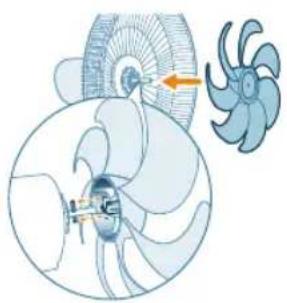
Diagram of a turbine fan assembly with a highlighted blade and rotor blades (no text or labels)7 Install the fan blade as indicated in the illustration.
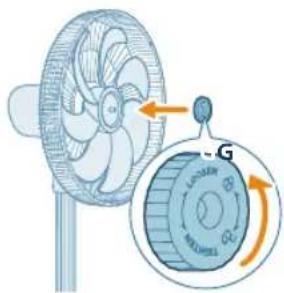
natural_image
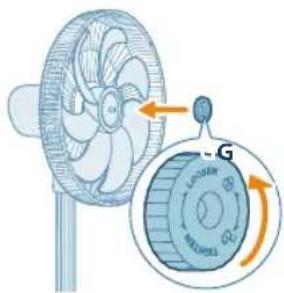
Illustration of a fan with an inset showing the internal components (no text or symbols)8 Rotate the spinner in a counterclockwise direction to secure the fan blade.
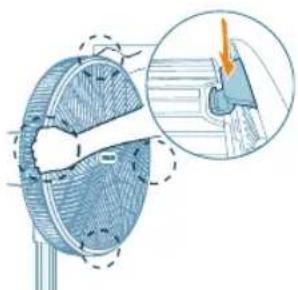
natural_image
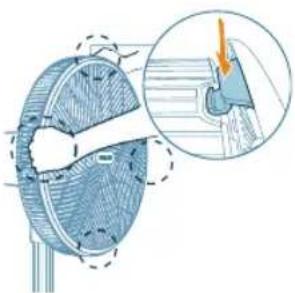
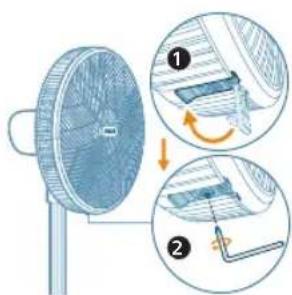
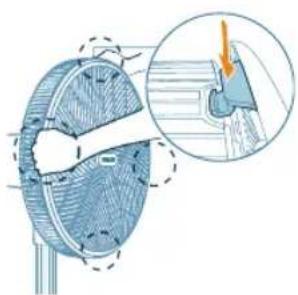
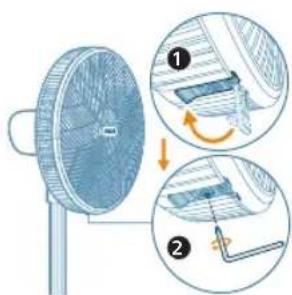
Diagram of a mechanical component with cross-section view and magnified detail (no text or symbols)9 Secure the top buckle first and then use your hands to connect the front grill to the rear grill.
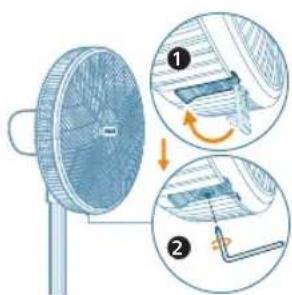
10 Align the bottom buckle on the grill and use a screw driver to securely fasten the rear and front grill together.
Wi-Fi connection

Setting up the Wi-Fi connection for the first time
1 Download and install the Philips "Air+" app from the App Store or Google Play.
2 Put the plug of the fan in the power socket and press to turn on the fan.
- The Wi-Fi indicator 📋 blinks orange for the first time.
3 Make sure that your smart phone or tablet is successfully connected to your Wi-Fi network.
Note: Enable Bluetooth feature on your smart phone to ensure the smooth pairing.
4 Launch the Philips "Air+" app and click on "Add a device" or press the "+" button on the screen. Follow the on-screen instructions to connect the fan to your network.
Note:
This instruction is only valid when the fan is being set up for the first time. If the network has changed or the setup needs to be performed again.
If you want to connect more than one fan to your smart phone or tablet, you have to do this one by one.
Make sure that the distance between your smart phone or tablet and the fan is less than 10 m without any obstructions.
Reset the Wi-Fi connection
1 Put the plug of the fan in the power socket and press to turn on the fan.
2 Press for 3 seconds until you hear a beep.
- The fan goes to pairing mode.
- The Wi-Fi indicator 📋links orange.
3 Follow the steps 3-4 in "Setting up the Wi-Fi connection for the first time" section.
Using your pedestal fan
Turning on and off
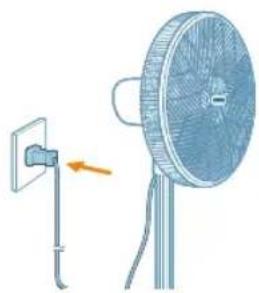
natural_image
Illustration of a fan with a mounted power outlet and a separate stand, showing no text or symbols.1 Put the plug in the power socket.
natural_image
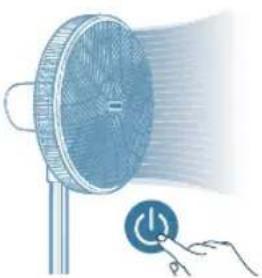
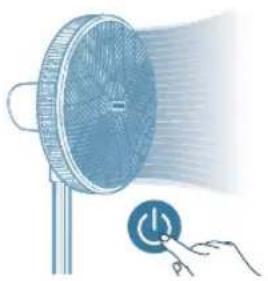
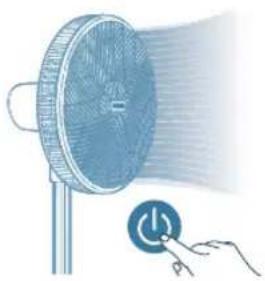
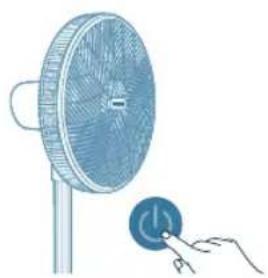
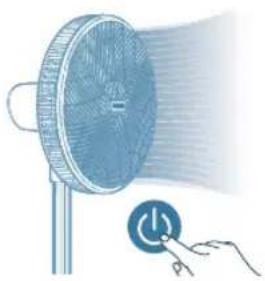
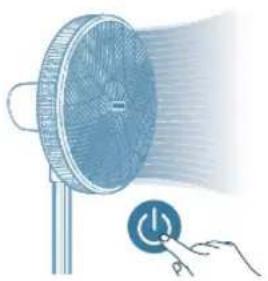
Illustration of a fan emitting a light beam with a power button, no text or symbols present2 Press the button to switch on the fan. The appliance beeps once.
natural_image
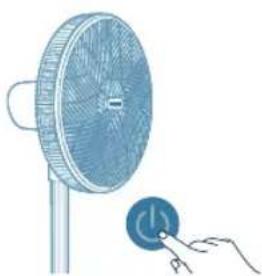
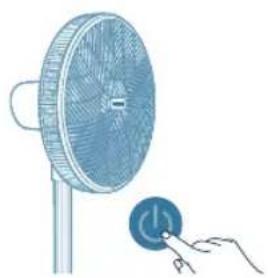
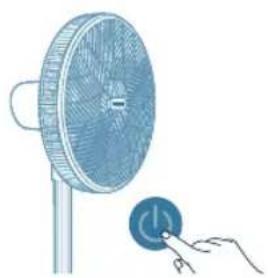
Illustration of a fan with a power button connected to a hand (no text or symbols)3 Press the button again to switch off the fan.
Changing the fan speed
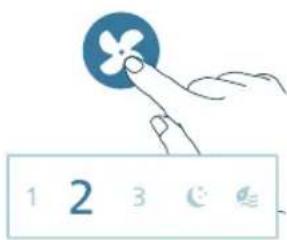
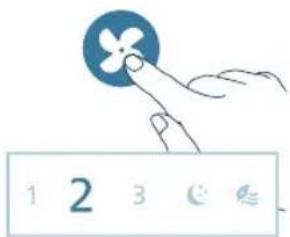
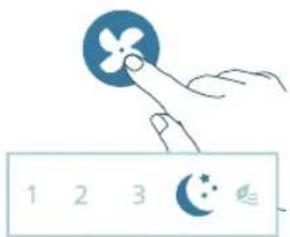
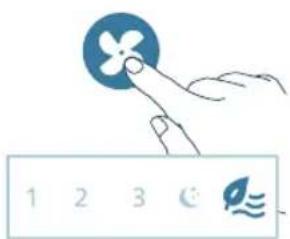
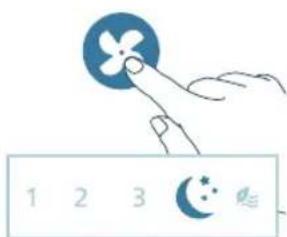
- You can choose the fan speed 1, fan speed 2, fan speed 3, sleep mode or the natural wind mode by pressing the button.
Manual speed (1, 2, 3): In manual mode, the fan operates on speed 1, speed 2 or speed 3.
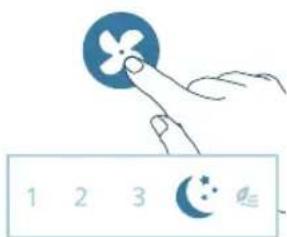
Sleep mode ( ) : Experience a cool and peaceful night's sleep with the Sleep mode. This mode gradually decreases the fan speed to the lowest setting over 30 minutes, helping you fall asleep naturally while also conserving energy.
14
English
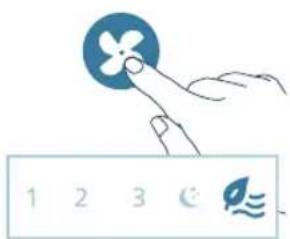
Natural breeze mode ( Ⓞ) Adjusts fan speeds up and down to mimic the natural movement of air and bring the refreshing feeling of an outdoor breeze into the room.
Using the timer function
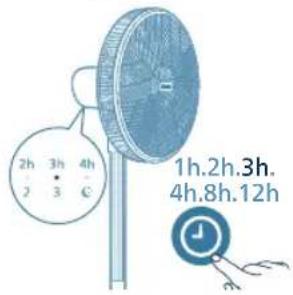
Press the ⏻ button repeatedly to choose from 1, 2, 3, 4, 8, or 12 hours, when the fan is on or off. Once the timer ends, the fan will either stop or start operating automatically.
If you need to set a timer for a different length of time, such as 5 or 7 hours, you can use the Air+ app.
After the set timer has ended:
When the fan is off
- The fan will be turned on automatically.
When the fan is on
- The fan will be off automatically.
Oscillation
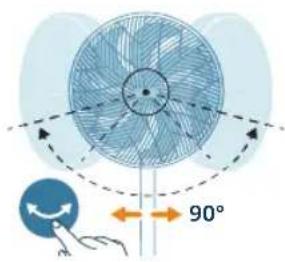
Horizontal oscillation
Press the button on the appliance activate the oscillation feature in your fan. The fan can oscillate horizontally up to 90 degrees.
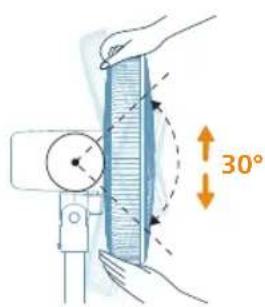
Vertical oscillation
You can manually adjust the fan to oscillate up to 30 degrees vertically.
Cleaning and maintenance
Always unplug the appliance before you clean it.
Never immerse the appliance in water or any other liquid.
natural_image
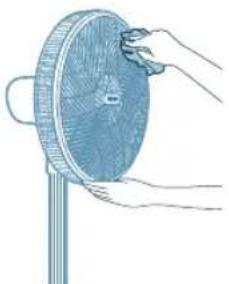
Illustration of hands holding a circular object with a handle, no text or symbols presentNever use abrasive, aggressive, or flammable cleaning agents such as bleach or alcohol to clean any part of the appliance.
Regularly clean the outside of the fan to prevent dust from collecting.
- Use a soft, dry cloth to clean both the exterior of the appliance and the air outlet.
Storage
1 Turn off the appliance and unplug from the power socket.
2 Clean the appliance.
3 Store the appliance in a cool, dry location.
4 Always thoroughly wash hands after cleaning.
Troubleshooting
This chapter summarizes the most common problems you could encounter with the appliance. If you are unable to solve the problem with the information below, contact the Consumer Care Center in your country.
Problem Possible solution
| My fan fails to turn on or off. If the appliance can't be turned on, please ensure the power plug is plugged in properly or try another power socket. | |
| If the appliance still doesn't work, contact the Consumer Care Center in your country. | |
| My fan is not producing sufficient amount of air or very weak. | Ensure the appliance is set to the highest fan speed for maximum air circulation. Allow the appliance to fully circulate the air throughout the room, this may take few minutes. |
| Ensure all the air inlet and outlet grilles are unobstructed. | |
| The fan produces a strange/burnt smell. The first few times you use the appliance, it may produce a plastic smell. This is normal on new appliance. However, if the appliance produces a burnt smell, turn off the appliance and unplug immediately, then contact the Consumer Care Center in your country. | |
English
| My fan is too loud. The higher the fan speed setting of the appliance, the louderthe noise will be. Set to lower fan speed, the noise will bereduced. | |
| If anything drops into air outlet, it may also cause abnormalloud sound.Immediately turn off appliance, and get theforeign objects out of the appliance. | |
| If there is abnormal sound, contact the Consumer CareCenter in your country. | |
| My appliance is loud at Sleep mode. To optimize cooling performance in the Sleep mode, your fanruns at a higher fan speed for the first 30 minutes, graduallydecreasing to a lower fan speed. The noise reducesaccordingly. You could also choose the lowest fan speed forconsistent airflow and lower sound level. | |
| The fan base is wobbly or vibrating. Check if the appliance is placed on the flat floor or surface. | |
| Check if any foreign objects beneath the appliance. | |
| Check if the base of the appliance is properly assembled, | |
| Check the chapter "Installing the fan". | |
| The Wi-Fi setup is not successful. If the router your appliance is connected to is dual – bandand currently it is not connecting to a 2.4GHz network, pleaseswitch to another band of the same router (2.4GHz) and tryto pair your appliance again. 5GHz networks are notsupported. | |
| Web authentication networks are not supported. | |
| Check if the appliance is within range of the Wi-Fi router. Youcan try to locate the appliance closer to the Wi-Fi router. | |
| Check if the network name is correct. The network name iscase-sensitive. | |
| Check if the Wi-Fi password is correct. The password is case-sensitive. | |
| Retry the setup with the instructions in section "Reset the Wi-Fi connection". | |
| The Wi-Fi connectivity can be interrupted by electromagneticor other interferences. Keep the appliance away from otherelectronic devices that may cause interferences. | |
| Check if the mobile device is in airplane mode. Make sure tohave the airplane mode deactivated when connecting to theWi-Fi network. | |
| Consult the help section in the App for extensive and up-to-date troubleshooting tips. | |
Warranty and support
Versuni offers a two-year warranty after purchase on this product. This warranty is not valid if a defect is due to incorrect use or poor maintenance. Our warranty does not affect your rights under law as a consumer. For more information or for invoking the warranty, please visit our website www.philips.com/support.
Důležité informace
natural_image
Diagram showing a rod falling into a circular base with an arrow indicating rotation around it, no text or symbols present.natural_image
Illustration of a medical or laboratory device with an inset showing a mechanical component (no text or symbols present)natural_image
Diagram of a mechanical device with a gear and directional arrows indicating rotation (no text or symbols)natural_image
Diagram of a fan blade assembly with directional arrows indicating components (no text or labels)natural_image
Diagram of a fan with internal blades and a gear mechanism, showing rotational motion (no text or symbols)natural_image
Diagram of a turbine fan assembly with a highlighted blade and rotor blades (no text or labels)natural_image
Illustration of a fan with an attached circular component showing internal components (no text or symbols)natural_image
Diagram of a mechanical component with cross-sectional view and magnified detail (no text or symbols)natural_image
Illustration of a fan mounted on a stand next to a wall-mounted panel, with an arrow indicating the next component (no text or symbols present)natural_image
Illustration of a megaphone emitting light with a power button, no text or symbols presentnatural_image
Illustration of a fan with a power button connected to a hand (no text or symbols)natural_image
Illustration of hands holding a circular object with a handle, no text or symbols presentnatural_image
Diagram showing a vertical rod falling into a circular base with an arrow indicating rotation, and a magnified inset showing the process (no text or symbols)34 Dansk

natural_image
Diagram of a turbine fan assembly with a propeller and fan blade (no text or labels)7 Montér ventilatorbladet som vist på illustrationen.
natural_image
Illustration of a fan with an inset showing the internal components (no text or symbols)8 Drej spinneren mod uret for at fastgøre ventilatorbladet.
natural_image
Technical diagram of a mechanical component with cross-sectional view and magnified detail (no text or symbols)natural_image
Illustration of a fan with a mounted power outlet and a separate stand, showing no text or symbols.natural_image
Illustration of a fan emitting a light beam with a power button, no text or symbols presentnatural_image
Illustration of a fan with a power button connected to a hand (no text or symbols)3 Tryk på knappen igen for at slukke ventilatoren.
natural_image
Illustration of hands holding a circular object with a handle, no text or symbols presentOpbevaring
natural_image
Diagram of a fan with an arrow indicating rotation and a gear symbol labeled 'E' (no text or symbols present)natural_image
Diagram of a turbine fan assembly with a propeller and rotor blades (no text or labels)natural_image
Illustration of a fan with an attached circular component showing internal components (no text or symbols)natural_image
Technical illustration of a mechanical component with an inset magnified view showing a detail (no text or symbols)natural_image
Illustration of a fan mounted on a stand next to a wall-mounted panel, with an arrow indicating the direction (no text or symbols present)natural_image
Illustration of a fan emitting a light beam with a power button, no text or symbols presentnatural_image
Illustration of a fan with a power button and a hand interacting with it (no text or symbols)Vertikales Pendeln
natural_image
Illustration of hands holding a circular object with a handle, no text or symbols presentnatural_image
Diagram showing a vertical rod falling into a circular base with an arrow indicating rotation around it, no text or symbols present.
natural_image
Diagram of a turbine fan and impeller assembly (no text or labels)natural_image
Diagram of a mechanical component with cross-section view and magnified detail (no text or symbols)natural_image
Illustration of a fan with a mounted power outlet and a separate stand, showing no text or symbols.natural_image
Illustration of a fan emitting a light beam with a power button, no text or symbols presentnatural_image
Illustration of a fan with a power button connected to a hand (no text or symbols)natural_image
Illustration of hands holding a circular object with a handle, no text or symbols present
natural_image
Diagram showing a vertical rod falling into a circular base with an arrow indicating rotation, and a magnified inset showing the process (no text or symbols)
natural_image
Diagram of a turbine fan and impeller assembly (no text or labels)natural_image
Diagram of a mechanical component with cross-section view and magnified detail (no text or symbols)natural_image
Illustration of a fan with a mounted power outlet and a separate stand, showing no text or symbols.natural_image
Illustration of a fan emitting a light beam with a power button, no text or symbols presentnatural_image
Illustration of a fan with a power button connected to a hand (no text or symbols)natural_image
Illustration of hands holding a circular object with a handle, no text or symbols presentnatural_image
Diagram of a fan with an arrow indicating rotation and a gear symbol labeled 'E' (no text or symbols present)natural_image
Diagram of a turbine fan assembly with a propeller and rotor blades (no text or labels)natural_image
Illustration of a fan with an attached circular component showing internal components (no text or symbols)natural_image
Technical illustration of a mechanical component with an inset showing a magnified view of a detail (no text or symbols present)natural_image
Illustration of a fan mounted on a stand next to a wall-mounted socket, with an arrow indicating the direction (no text or symbols present)natural_image
Illustration of a fan emitting a light beam with a power button, no text or symbols presentnatural_image
Illustration of a fan with a power button connected to a hand (no text or symbols)Oscillation verticale
natural_image
Illustration of hands holding a circular object with a handle, no text or symbols presentA Motori gornji stup E Plastična matica
B Donji stup F Lopatica ventilatora
C Podnožje G Rotor
D Stražnja rešetka H Prednja rešetka
Pregled kontrola

natural_image
Diagram showing a vertical rod falling into a circular base with an arrow indicating rotation, and a magnified inset showing the process (no text or symbols)
natural_image
Diagram of a turbine fan and impeller assembly (no text or labels)7 Lopatice ventilatora postavite na način naznačen na slici.
natural_image
Illustration of a fan with an attached circular component showing internal components (no text or symbols)natural_image
Diagram of a mechanical component with cross-sectional view and magnified detail (no text or symbols)9 Najprije pričvrstite gornju kopču, a zatim rukama spojite prednju rešetku sa stražnjom rešetkom.
10 Poravnajte donju kopču na rešetci te upotrijebite odvijač kako biste dobro spojili stražnju i prednju rešetku.
Veza Wi-Fi

natural_image
Illustration of a fan with a mounted power outlet and a separate fan blade, showing no text or symbols.natural_image
Illustration of a hand pressing a button on a fan-shaped device with a power button (no text or symbols)natural_image
Illustration of a fan with a power button connected to a hand (no text or symbols)natural_image
Illustration of hands holding a circular object with a handle, no text or symbols presentSpremanje

natural_image
Illustration of a fan with an arrow pointing to a gear mechanism labeled E (no text or symbols present)natural_image
Diagram of a turbine fan assembly with a propeller and rotor blades (no text or labels)natural_image
Illustration of a fan with an attached rotary dial and fan blade, showing mechanical components without any text or symbols.natural_image
Cross-sectional diagram of a mechanical component with an inset showing a highlighted section (no text or labels)natural_image
Illustration of a fan with a mounted power outlet and a separate stand, showing no text or symbols.natural_image
Illustration of a fan emitting a light beam with a power button, no text or symbols presentnatural_image
Illustration of a fan with a power button and a hand interacting with it (no text or symbols)natural_image
Diagram of a fan with directional arrows indicating 90° rotation, no text or symbols presentnatural_image
Illustration of hands holding a circular object with a handle, no text or symbols presentConservazione
A Motors un augšējais statnis E Plastmasas uzgrieznis
natural_image
Diagram showing a vertical rod and base with an inset illustrating the process of fluid or material flowing through it (no text or symbols present)
natural_image
Diagram of a turbine fan and impeller assembly (no text or labels)natural_image
Illustration of a fan with an attached circular component showing internal components (no text or symbols)natural_image
Diagram of a mechanical component with cross-sectional view and magnified detail (no text or symbols)natural_image
Illustration of a fan with a mounted power outlet and a separate stand, showing no text or symbols.1 lespraudiet kontaktdakšu kontaktligzdā.
122
Latviešu
natural_image
Illustration of a fan emitting a light beam with a power button, no text or symbols present2 Lai ieslēgtu ventilatoru, nospiediet pogu. Ābrīce vienreiz nopīkst.
natural_image
Illustration of a fan with a power button connected to a hand (no text or symbols)natural_image
Illustration of hands holding a circular object with a handle, no text or symbols presentnatural_image
Diagram showing a rod falling into a circular base with an arrow indicating rotation, no text or symbols present
natural_image
Diagram of a turbine fan and rotor assembly (no text or labels)natural_image
Illustration of a fan with an attached circular component showing internal components (no text or symbols)natural_image
Diagram of a mechanical component with cross-sectional view and magnified detail (no text or symbols)natural_image
Illustration of a fan mounted on a stand next to a wall-mounted panel, with an arrow indicating the direction (no text or symbols present)natural_image
Illustration of a fan emitting a light beam with a power button, no text or symbols presentnatural_image
Illustration of a fan with a power button and a hand interacting with it (no text or symbols)Vertikalusis pasvirimas
natural_image
Illustration of a hand cleaning a circular object with a handle (no text or symbols)Laikymas
natural_image
Diagram showing a vertical rod falling into a circular base with an arrow indicating rotation, and a magnified inset showing the process (no text or symbols)
natural_image
Diagram of a turbine fan and impeller assembly (no text or labels)natural_image
Illustration of a fan with an attached circular component showing internal components (no text or symbols)natural_image
Diagram of a mechanical component with cross-section view and magnified detail (no text or symbols)natural_image
Illustration of a fan mounted on a stand next to a wall-mounted panel, with an arrow indicating the direction (no text or symbols present)natural_image
Illustration of a fan emitting a light beam with a power button, no text or symbols presentnatural_image
Illustration of a fan with a power button connected to a hand (no text or symbols)natural_image
Diagram of a fan with 90-degree angle标注, showing airflow direction and angle marker (no text or symbols beyond basic geometry)natural_image
Illustration of hands cleaning a circular object with a handle (no text or symbols)Tárolás
natural_image
Diagram showing a vertical rod falling into a circular base with an arrow indicating rotation, and a magnified inset showing the process (no text or symbols)Nederlands 155

natural_image
Diagram of a turbine fan and impeller assembly (no text or labels)natural_image
Illustration of a fan with an attached circular component showing internal components (no text or symbols)natural_image
Diagram of a mechanical component with cross-sectional view and magnified detail (no text or symbols)natural_image
Illustration of a fan with a mounted socket connected to a stand, showing no text or symbols.natural_image
Illustration of a fan emitting a light beam with a power button, no text or symbols presentnatural_image
Illustration of a fan with a power button and a hand interacting with it (no text or symbols)natural_image
Illustration of hands holding a circular object with a handle, no text or symbols presentnatural_image
Diagram showing a rod falling into a circular container with an arrow indicating rotation (no text or symbols)natural_image
Diagram of a turbine fan and rotor assembly (no text or labels)natural_image
Diagram of a mechanical component with cross-section view and magnified detail (no text or symbols)natural_image
Illustration of a fan with a mounted power outlet and a separate stand, showing no text or symbols.natural_image
Illustration of a fan emitting a light beam with a power button, no text or symbols present2 Trykk på -kappen for å slå på viften. Apparatet piper kontinuerlig.
natural_image
Illustration of a fan with a power button and a hand interacting with it (no text or symbols)natural_image
Illustration of hands holding a circular object with a handle, no text or symbols presentOppbevaring

natural_image
Diagram of a fan with an arrow indicating rotation and a gear symbol labeled 'E' (no text or symbols present)natural_image
Diagram of a turbine fan assembly with a propeller and rotor blades (no text or labels)natural_image
Illustration of a fan with an attached rotary dial and fan blade, showing mechanical components without any text or symbols.natural_image
Diagram of a mechanical component with an inset showing a cross-section view (no text or labels)natural_image
Illustration of a fan with a mounted socket connected to a stand, showing wiring and a separate fan blade (no text or symbols)natural_image
Illustration of a megaphone emitting a light beam with a power button, no text or symbols presentnatural_image
Illustration of a fan with a power button connected to a hand (no text or symbols)natural_image
Illustration of hands cleaning a circular object with a handle (no text or symbols)A Motor e suporte superior E Porca de plástico
natural_image
Diagram of a fan with an arrow indicating rotation and a gear symbol labeled 'E' (no text or symbols present)natural_image
Diagram of a turbine fan assembly with a propeller and rotor blades (no text or labels)natural_image
Illustration of a fan with an attached rotary dial and fan blade, showing mechanical components without any text or symbols.natural_image
Diagram of a mechanical component with an inset showing a cross-section view (no text or labels)natural_image
Illustration of a fan with a mounted power outlet and a separate stand, showing no text or symbols.natural_image
Illustration of a fan emitting a light beam with a power button, no text or symbols presentnatural_image
Illustration of a fan with a power button connected to a hand (no text or symbols)Oscilação vertical
natural_image
Illustration of hands holding a circular object with a handle, mounted on a stand (no text or symbols)D Grătar spate H Grătar frontal
202 Română
natural_image
Diagram showing a vertical rod falling into a circular base with an arrow indicating rotation, and a magnified inset showing the process (no text or symbols)
natural_image
Diagram of a turbine fan and impeller assembly (no text or labels)natural_image
Illustration of a fan with an attached circular component showing internal components (no text or symbols)natural_image
Diagram of a mechanical component with cross-sectional view and magnified detail (no text or symbols)natural_image
Illustration of a fan with a mounted power outlet and a separate stand, showing no text or symbols.natural_image
Illustration of a megaphone emitting light with a power button, no text or symbols presentnatural_image
Illustration of a fan with a power button connected to a hand (no text or symbols)natural_image
Diagram of a fan with directional arrows and a 90° angle indicator, no readable text or symbols present.natural_image
Illustration of hands holding a circular object with a handle, no text or symbols presentnatural_image
Diagram showing a vertical rod falling into a circular base with an arrow indicating rotation, and a magnified inset showing the process (no text or symbols)
natural_image
Diagram of a turbine fan and impeller assembly (no text or labels)natural_image
Illustration of a fan with an attached circular component showing internal components (no text or symbols)natural_image
Diagram of a mechanical component with cross-section view and magnified detail (no text or symbols)natural_image
Illustration of a fan with a mounted power outlet and a separate stand, showing no text or symbols.natural_image
Illustration of a fan emitting a light beam with a power button, no text or symbols presentnatural_image
Illustration of a fan with a power button and a hand interacting with it (no text or symbols)natural_image
Illustration of hands holding a circular object with a handle, mounted on a stand (no text or symbols)A Motor in zgornji drog E Plastična matica
natural_image
Diagram showing a vertical rod falling into a circular base with an arrow indicating rotation, and a magnified inset showing the process (no text or symbols)
2 Poravnajte zgornji drog s spodnjim in ga varno pritrdite tako, da ga obračate v desno.
natural_image
Diagram of a turbine fan and rotor assembly (no text or labels)8 Zasukajte pritrdilni element v levo, da pritrdite lopatico ventilatorja.
natural_image
Diagram of a mechanical component with cross-section view and magnified detail (no text or symbols)natural_image
Illustration of a fan mounted on a stand next to a wall-mounted device, with no visible text or symbols.1 Vtič priključite v električno vtičnico.
230 Slovenščina
natural_image
Illustration of a fan emitting a light beam with a power button, no text or symbols presentnatural_image
Illustration of a fan with a power button connected to a hand (no text or symbols)natural_image
Illustration of hands holding a circular object with a handle, no text or symbols presentShranjevanje
A Motor a horný stípik E Plastová matica
B Dolný stípik F Lopatka ventilátora
natural_image
Diagram showing a rod falling into a circular base with an arrow indicating rotation around it, no text or symbols present.
natural_image
Diagram of a turbine fan and impeller assembly (no text or labels)natural_image
Illustration of a fan with an attached circular component showing internal components (no text or symbols)natural_image
Diagram of a mechanical component with cross-sectional view and magnified detail (no text or symbols)natural_image
Illustration of a fan with a mounted power outlet and a separate stand, showing no text or symbols.natural_image
Illustration of a fan emitting a light beam with a power button, no text or symbols presentnatural_image
Illustration of a fan with a power button connected to a hand (no text or symbols)natural_image
Illustration of hands holding a circular object with a handle, no text or symbols presentOdkladanie
1 Vypnite zariadenie a odpojte ho od elektrickej zásuvky.
2 Vyčistite zariadenie.
3 Zariadenie skladujte na chladnom a suchom mieste.
4 Po čistení si vždy dôkladne umyte ruky.
Riešenie problémov
natural_image
Diagram showing a vertical rod falling into a circular base with an arrow indicating rotation around it, no text or symbols present.
natural_image
Diagram of a turbine fan and impeller assembly (no text or labels)7 Instalirajte krilca ventilatora kao što je prikazano na ilustraciji.
natural_image
Illustration of a fan with an attached circular component showing internal components (no text or symbols)natural_image
Diagram of a mechanical component with cross-sectional view and magnified detail (no text or symbols)9 Prvo obezbedite gornju kopču, pa rukama spojite prednju i zadnju mrežu.
natural_image
Illustration of a fan with a mounted power outlet and a separate stand, showing no text or symbols.natural_image
Illustration of a fan emitting a light beam with a power button, no text or symbols present2 Pritisnite dugme da biste uključili ventilator. Aparat će se oglasiti jednim zvučnim signalom.
natural_image
Illustration of a fan with a power button connected to a hand (no text or symbols)3 Ponovo pritisnite dugme da biste isključili ventilator.
Menjanje brzine ventilatora
- Možete da odaberete brzinu ventilatora 1, brzinu ventilatora 2, brzinu ventilatora 3, režim za spavanje ili režim prirodnog povetarca tako što ćete pritisnuti dugme ✗
Ručna brzina (1, 2, 3): U ručnom režimu ventilator radi na brzini 1, brzini 2 ili brzini 3.
Režim za spavanje (K) Iskusite miran san u rashlađenom okruženju sa režimom za spavanje. Ovaj režim postepeno smanjuje brzinu ventilatora do najmanje postavke tokom 30 minuta, što vam pomaže da prirodno utonete u san i štedi energiju.
Režim prirodnog povetarca (Povećava i smanjuje brzinu ventilatora radi oponašanja prirodnog kretanja vazduha i unošenja osvežavajućeg doživljaja prirodnog povetarca u prostoriju.
Vertikalna oscilacija
Možete ručno da podesite ventilator da oscilira do 30 stepeni vertikalno.
256 Srpski
natural_image
Illustration of hands holding a circular object with a handle, no text or symbols presentOdlaganje
1 Isključite aparat i isključite ga iz zidne utičnice.
2 Očistite aparat.
3 Odložite aparat na hladno, suvo mesto.
4 Uvek temeljno operite ruke nakon čišćenja.
Rešavanje problema
U ovom poglavlju ukratko su navedeni najčešći problemi do kojih može da dode sa aparatom. Ako ne možete da rešite problem pomoću liste mogućih problema u nastavku, obratite se centru za korisničku podršku u svojoj zemlji.
natural_image
Diagram showing a vertical rod falling into a circular base with an arrow indicating rotation around it, no text or symbols present.
natural_image
Diagram of a turbine fan and impeller assembly (no text or labels)natural_image
Diagram of a mechanical component with cross-section view and magnified detail (no text or symbols)natural_image
Illustration of a fan mounted on a stand with an arrow indicating direction (no text or symbols)natural_image
Illustration of a fan emitting a light beam with a power button, no text or symbols presentnatural_image
Illustration of a fan with a power button connected to a hand (no text or symbols)natural_image
Diagram of a fan with directional arrows indicating rotation, showing 90° angle and circular motion (no text or symbols)natural_image
Illustration of hands holding a circular object with a handle, no text or symbols presentnatural_image
Diagram showing a rod falling into a circular container with an arrow indicating rotation (no text or symbols present)
natural_image
Diagram of a turbine fan and impeller assembly (no text or labels)natural_image
Diagram of a mechanical component with cross-section view and magnified detail (no text or symbols)natural_image
Illustration of a fan with a mounted power outlet and a separate stand, showing no text or symbols.natural_image
Illustration of a fan emitting a light beam with a power button, no text or symbols presentnatural_image
Illustration of a fan with a power button connected to a hand (no text or symbols)natural_image
Illustration of hands holding a circular object with a handle, no text or symbols presentA Motor ve üst direk E Plastik somun
natural_image
Diagram showing a rotating rod and base with an arrow indicating rotation (no text or symbols)natural_image
Diagram of a turbine fan and impeller assembly (no text or labels)natural_image
Illustration of a fan with an attached circular component showing internal components (no text or symbols)natural_image
Diagram of a mechanical component with cross-sectional view and magnified detail (no text or symbols)natural_image
Illustration of a fan mounted on a stand next to a wall-mounted socket, with an arrow indicating the direction (no text or symbols present)1 Fisi prize takın.
290 Türkçe
natural_image
Illustration of a fan emitting a light beam with a power button, no text or symbols presentnatural_image
Illustration of a fan with a power button connected to a hand (no text or symbols)natural_image
Illustration of hands holding a circular object with a handle, no text or symbols presentnatural_image
Diagram showing a rod inserted into a liquid column with an arrow indicating force direction (no text or symbols)
natural_image
Diagram of a turbine fan and impeller assembly (no text or labels)natural_image
Illustration of a fan with an attached circular component showing internal components (no text or symbols)natural_image
Diagram of a mechanical component with cross-sectional view and magnified detail (no text or symbols)natural_image
Illustration of a fan mounted on a stand next to a wall-mounted panel, with an arrow indicating the direction (no text or symbols present)natural_image
Illustration of a fan emitting a light beam with a power button, no text or symbols presentnatural_image
Illustration of a fan with a power button connected to a hand (no text or symbols)natural_image
Illustration of hands holding a circular object with a handle, no text or symbols presentnatural_image
Illustration of a fan with an arrow pointing to a gear mechanism labeled 'E' (no text or symbols beyond the label)natural_image
Diagram of a turbine fan assembly with a propeller and rotor blades, showing internal components without any text or labels.natural_image
Illustration of a fan with an attached circular component showing internal components (no text or symbols)natural_image
Technical illustration of a mechanical component with an inset magnified view showing a detail (no text or symbols)natural_image
Illustration of a fan mounted on a stand next to a wall-mounted panel, with an arrow indicating the direction (no text or symbols present)natural_image
Illustration of a fan emitting a light beam with a power button, no text or symbols presentnatural_image
Illustration of a fan with a power button and a hand interacting with it (no text or symbols present)natural_image
Diagram of a fan with 90-degree angle标注, showing airflow direction and angle marker (no text or symbols beyond basic geometry)natural_image
Illustration of hands holding a circular object with a handle, no text or symbols presentА Мотор и горна шипка Е Пластична навртка
В Долна шипка F Перка на вентилаторот
С Основа G Тркалце
natural_image
Illustration of a fan with an arrow pointing to a gear mechanism, showing rotational direction (no text or symbols)natural_image
Diagram of a turbine fan assembly with a propeller and rotor blades (no text or labels)natural_image
Illustration of a fan with an attached circular component showing internal components (no text or symbols)natural_image
Technical illustration of a mechanical component with an inset showing a magnified view of a detail (no text or symbols present)natural_image
Illustration of a fan mounted on a stand next to a wall-mounted panel, with an arrow indicating the direction (no text or symbols present)natural_image
Illustration of a fan emitting a light beam with a power button, no text or symbols presentnatural_image
Illustration of a fan with a power button and a hand interacting with it (no text or symbols present)natural_image
Diagram of a fan with 90-degree angle标注, showing airflow direction and angle (no text or symbols beyond basic geometry)natural_image
Illustration of hands holding a circular object with a handle, no text or symbols present
natural_image
Diagram showing a vertical rod falling into a circular base with an arrow indicating rotation, next to a magnified view of the tube (no text or symbols)
natural_image
Diagram of a turbine fan and impeller assembly (no text or labels)natural_image
Illustration of a fan with an attached circular component showing airflow direction (no text or symbols)natural_image
Diagram of a mechanical component with cross-sectional view and magnified detail (no text or symbols)natural_image
Illustration of a fan mounted on a stand next to a wall-mounted device, with no visible text or symbols.natural_image
Illustration of a fan emitting sound waves with a power button, no text or symbols presentnatural_image
Illustration of a fan with a power button connected to a hand (no text or symbols)natural_image
Illustration of hands holding a circular object with a handle, no text or symbols presentnatural_image
Diagram showing a rod falling into a circular base with an arrow indicating rotation around it, no text or symbols present.العربية 347

- عقارب rmsاعة
scale en المحرك.
سلها عن المحرك.
natural_image
Diagram of a turbine fan and impeller assembly (no text or labels)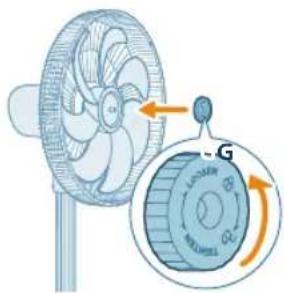
natural_image
Illustration of a fan with an attached circular component showing airflow direction (no text or symbols)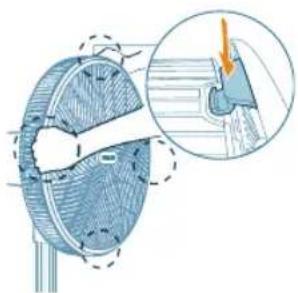
natural_image
Diagram of a mechanical component with cross-sectional view and magnified detail (no text or symbols)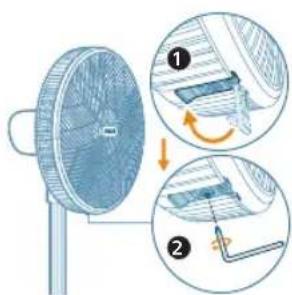
بين في الاصورة. 7.
شفرة الامروحة.
لاغطاء الاخلفي.9
natural_image
Illustration of a fan with a mounted power outlet and a separate stand, showing no text or symbols.350 العربية
natural_image
Illustration of a fan emitting a light beam with a power button, no text or symbols present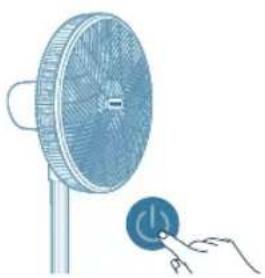
natural_image
Illustration of a fan with a power button connected to a hand (no text or symbols)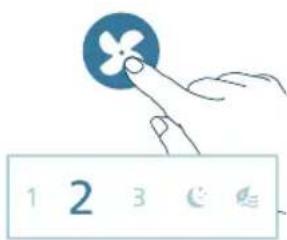
(
- و titية مرة واحدة
(
شغيل المروحة 3.
تغيير سرعة المروحة
natural_image
Illustration of hands cleaning a circular object with a handle (no text or symbols)PHILIPS and the Philips Shield Emblem are registered trademarks of Koninklijke Philips N.V. and are used under license.
This product has been manufactured by and is sold under the responsibility of Versuni Holding B.V., and Versuni Holding B.V. is the warrantor in relation to this product.
2024 © Versuni Holding B.V.