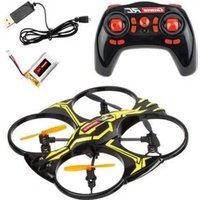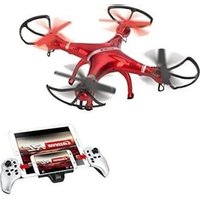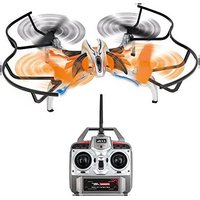
RC Video Next - Drone CARRERA - Free user manual and instructions
Find the device manual for free RC Video Next CARRERA in PDF.


User questions about RC Video Next CARRERA
0 question about this device. Answer the ones you know or ask your own.
Ask a new question about this device
Download the instructions for your Drone in PDF format for free! Find your manual RC Video Next - CARRERA and take your electronic device back in hand. On this page are published all the documents necessary for the use of your device. RC Video Next by CARRERA.
USER MANUAL RC Video Next CARRERA
# 370503018 Carrera RC Quadrocopter
RC Video Next
GB USA Assembly and operating instructions
natural_image
Close-up of a red-handled drone with attached metal frame and handle, showing 4x speed measurement (no text or symbols on the diagram itself)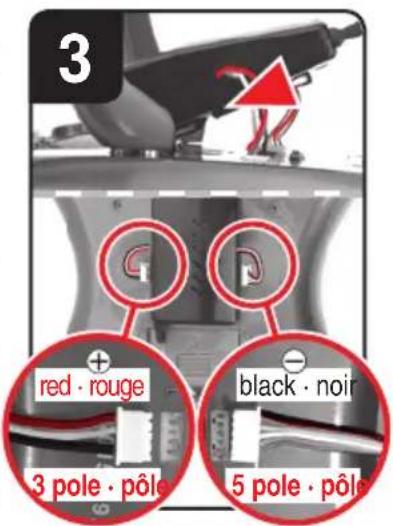
text_image
LED OFF = Charging DEL OFF = En charge LED OFF = Cargando Green = Ready Vert = Prêt Verde = Listo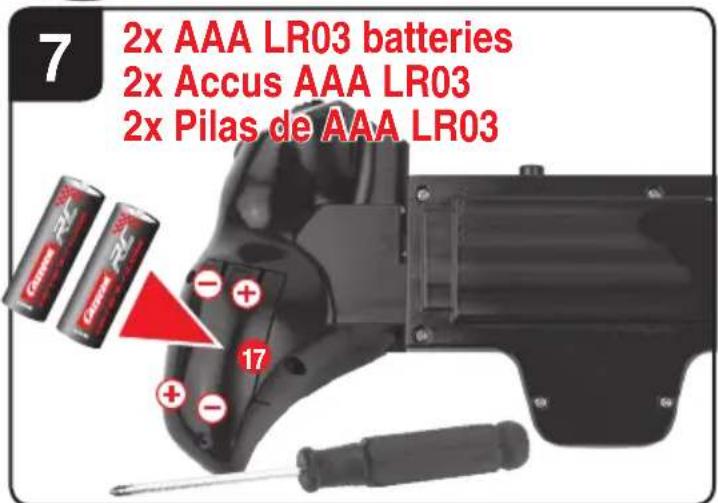
text_image
7 2x AAA LR03 batteries 2x Accus AAA LR03 2x Pilas de AAA LR03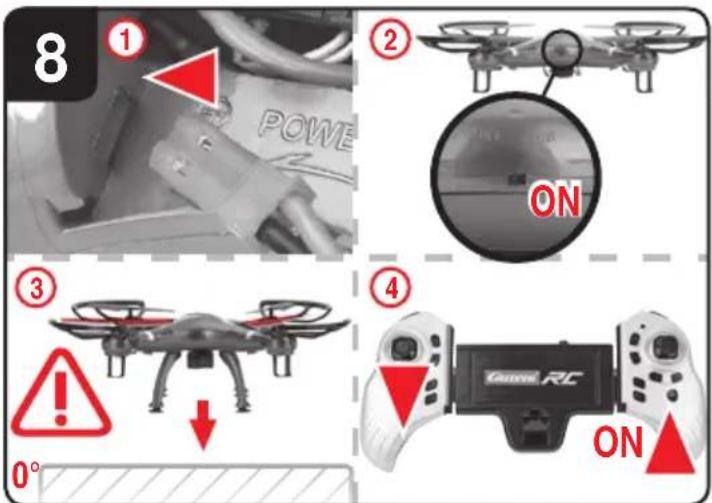
text_image
8 ① POWER ② ON ③ ! ↓ 0° ④ Gaze RC ON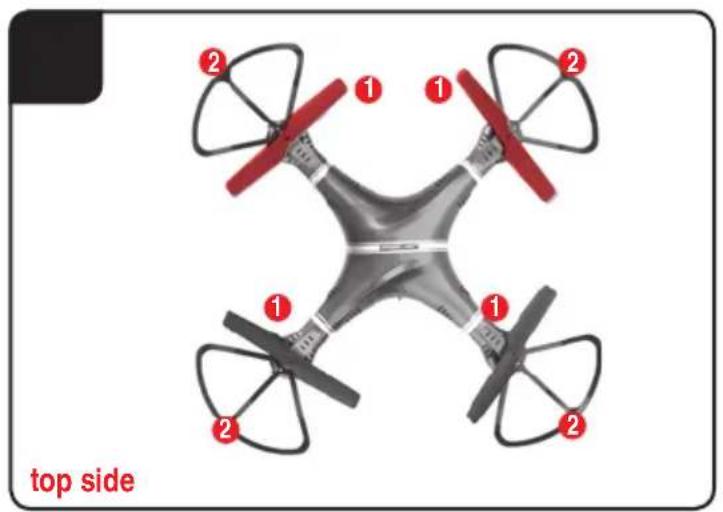
text_image
top side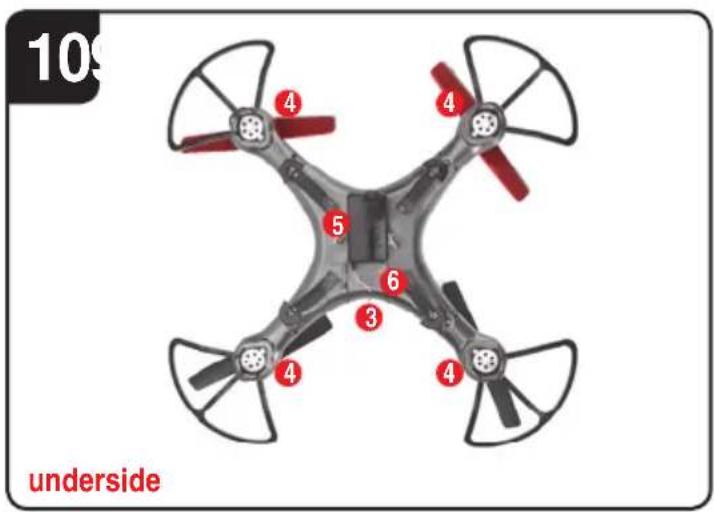
text_image
10 underside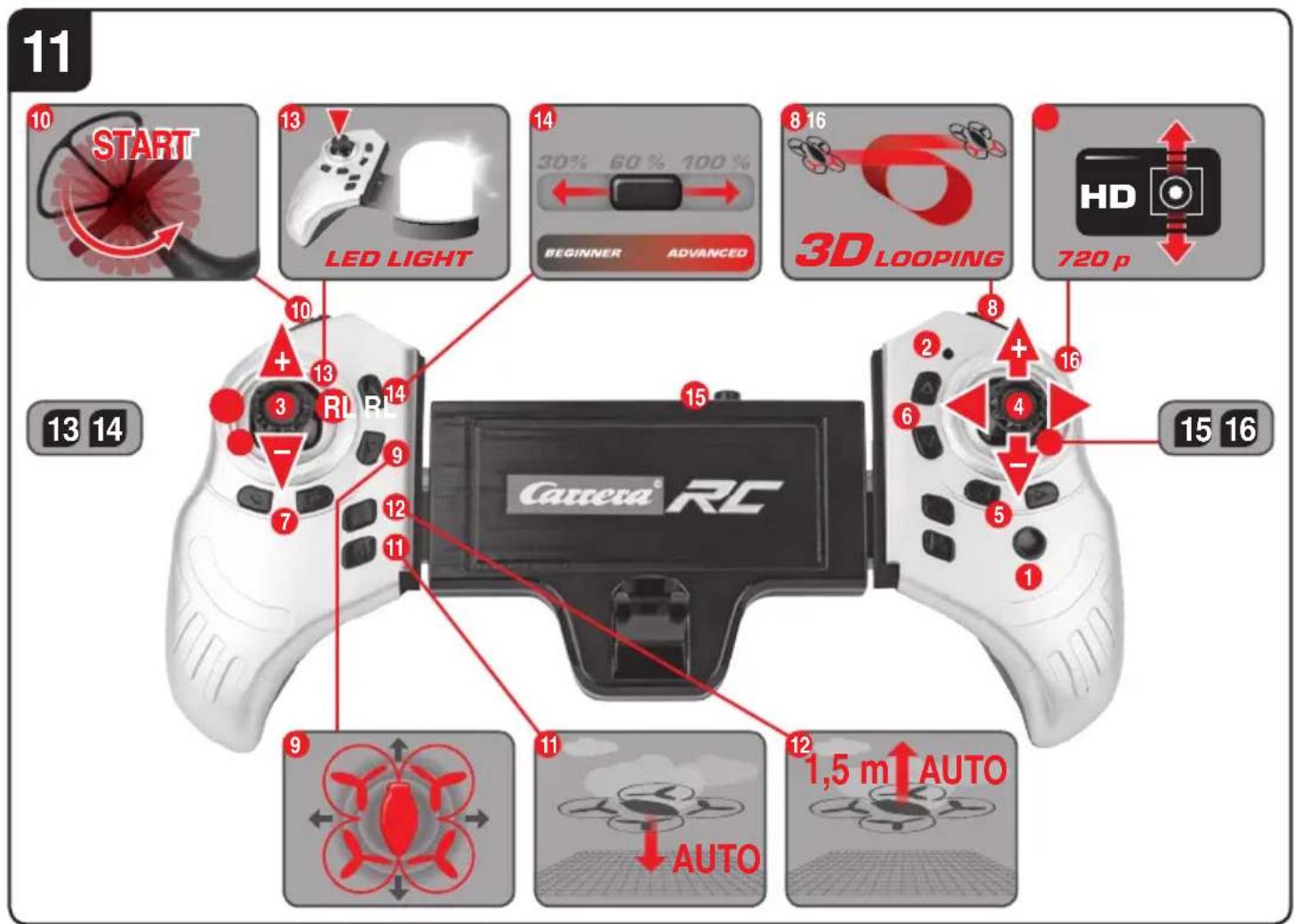
text_image
11 10 START 13 LED LIGHT 14 30% 60% 100% 8 16 BEGINNER ADVANCED 3D Looping HD 720 p 13 14 + 13 RL RL 14 15 15 16 Cassena RC 9 AUTO 11 12 1,5 m AUTO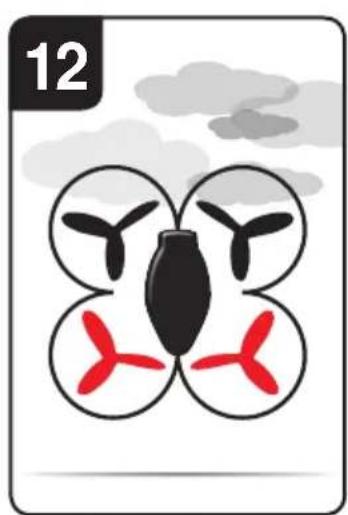
natural_image
Illustration of a four-bladed drone with red and black propellers inside, set against a cloudy sky (no text or symbols)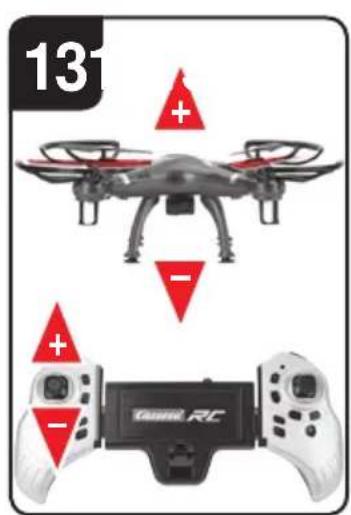
text_image
131 Tannel RC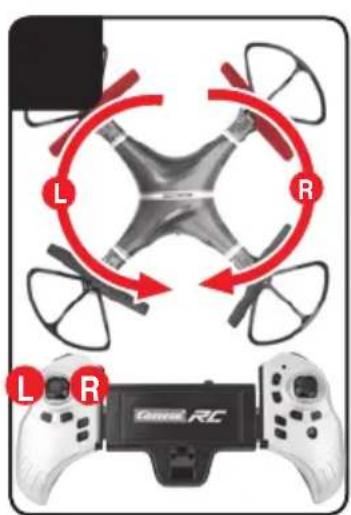
text_image
L R L R ToneR RC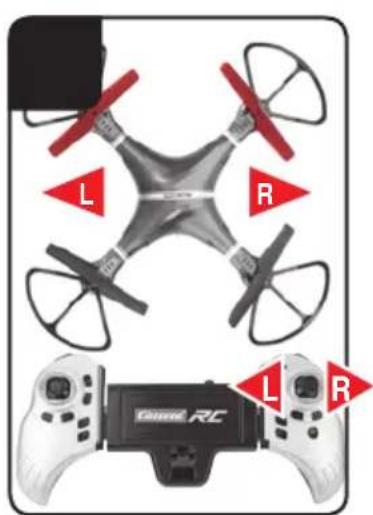
natural_image
Two drone headsets with red flags labeled 'L' and 'R' on their wings, connected to a handheld controller (no text or symbols beyond labels)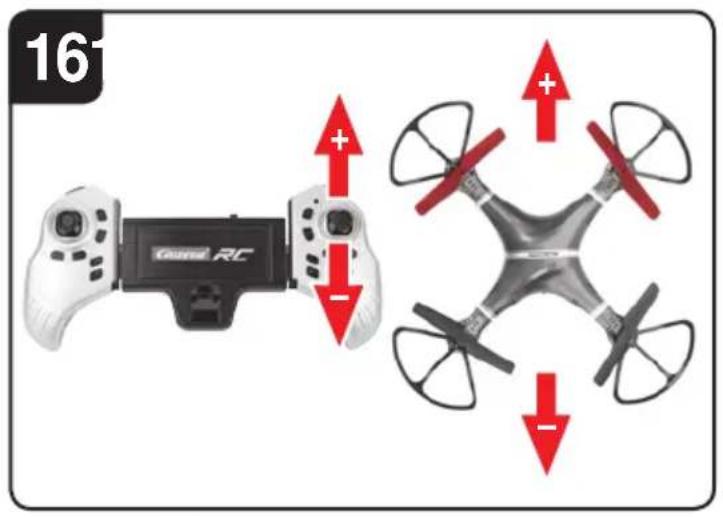
text_image
16 Guru RC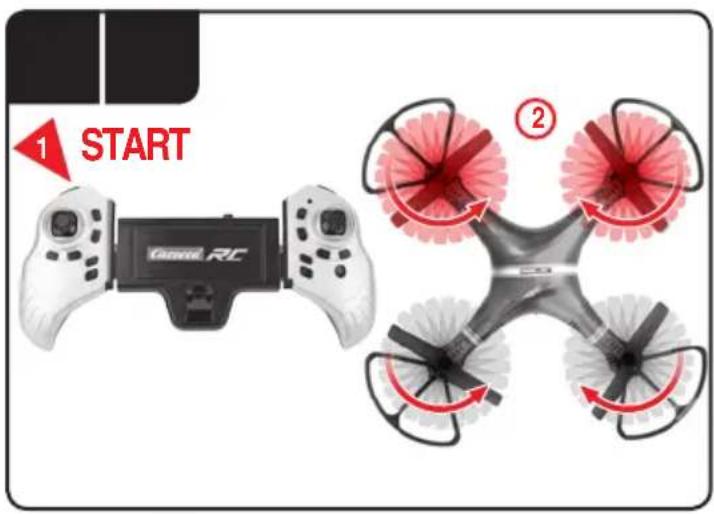
text_image
1 START Cannell RC ②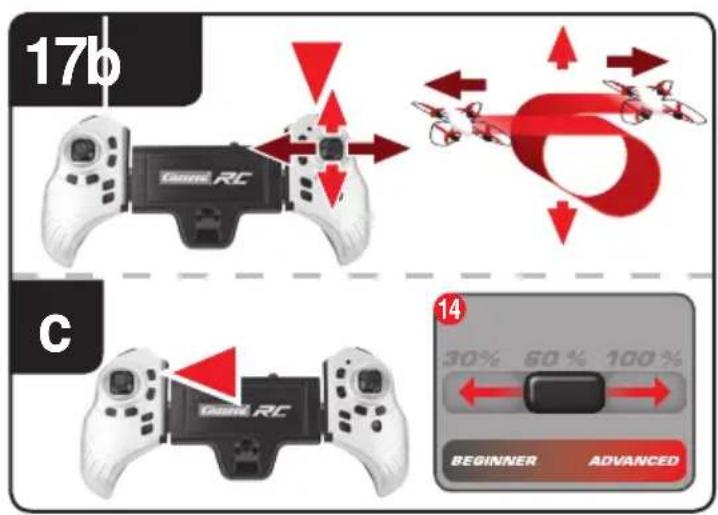
text_image
17b c 30% 50% 100% BeginNER ADVANCED 14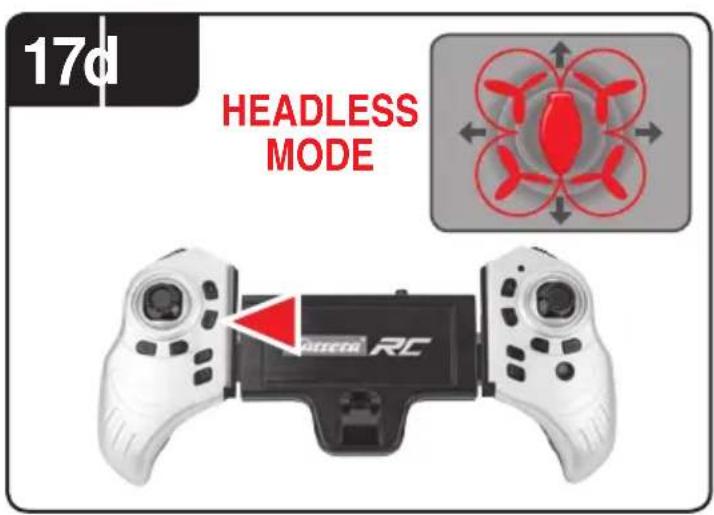
text_image
17d HEADLESS MODE DC-DC-DC RC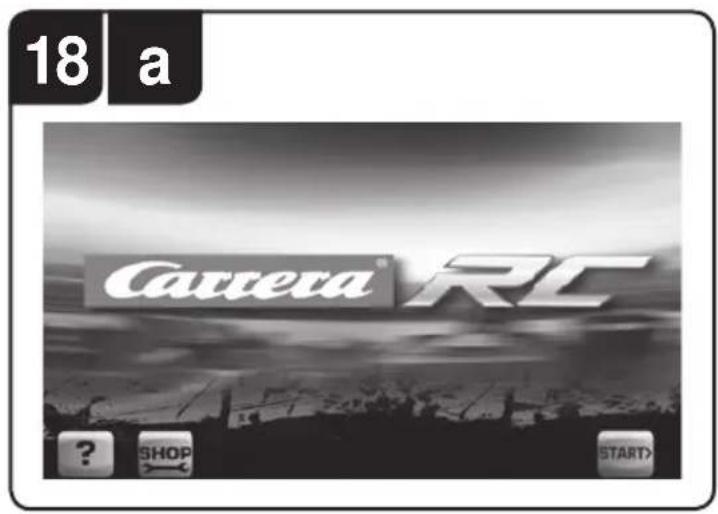
text_image
18 a Camera RC ? SHOP START>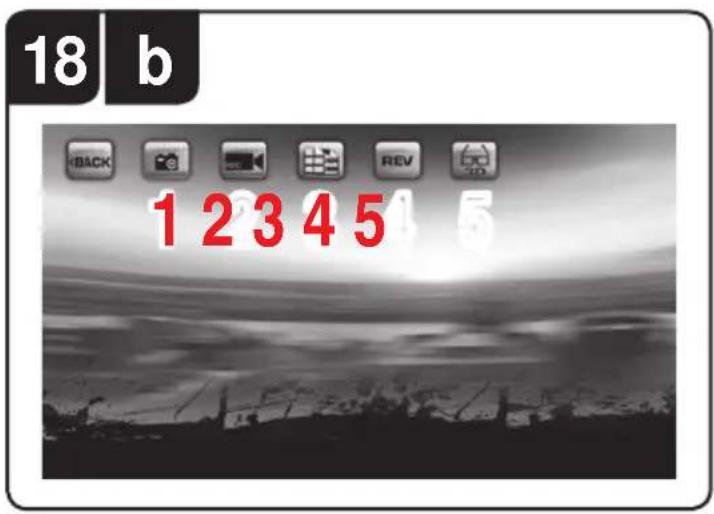
text_image
18 b 1 2 3 4 5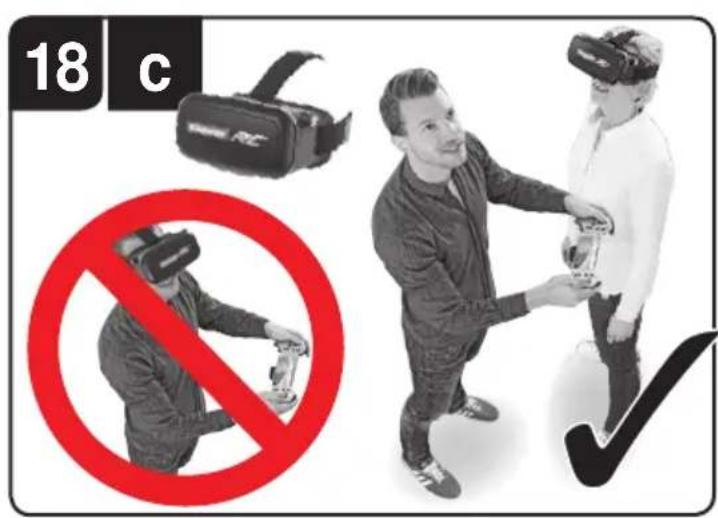
text_image
18 c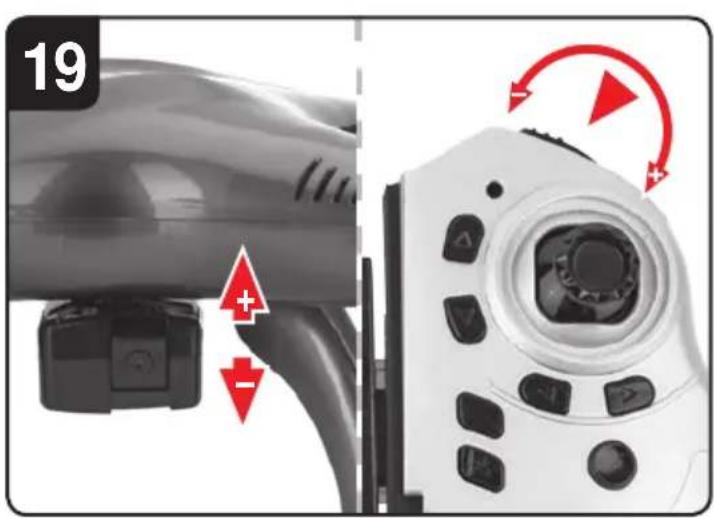
text_image
19 + - →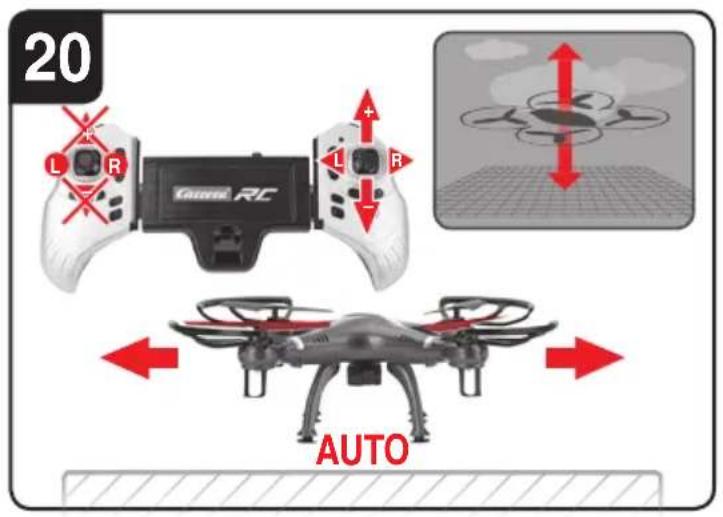
text_image
20 L R Gazeer RC AUTO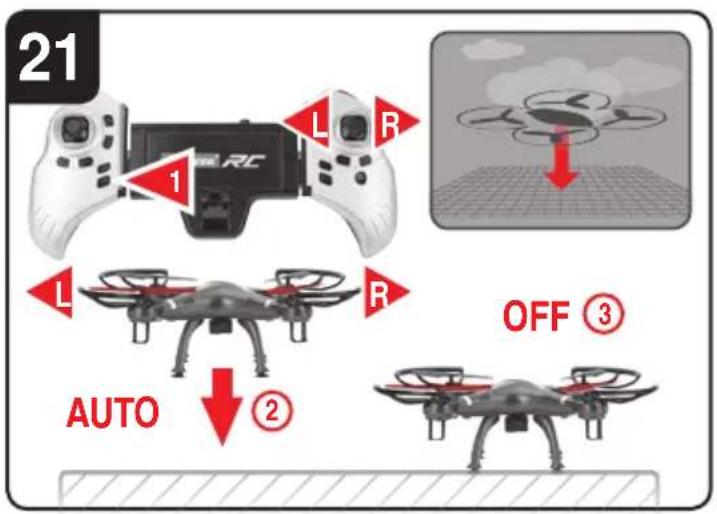
text_image
21 L R 1 L R AUTO 2 OFF ③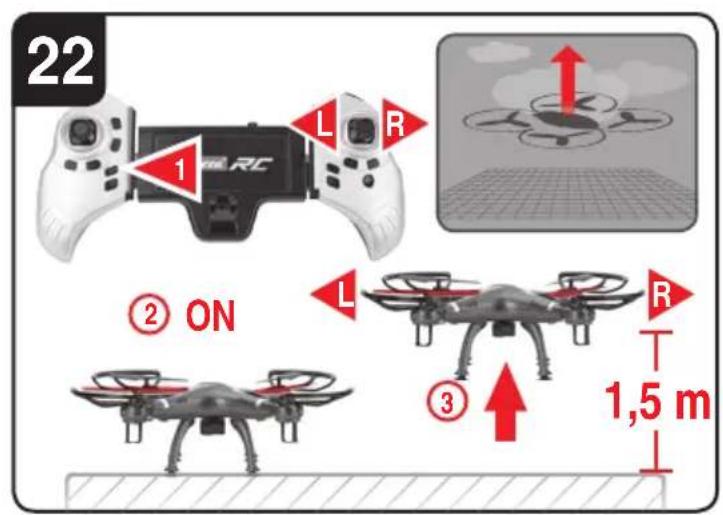
text_image
22 L R ① ON ② L R ③ 1,5 m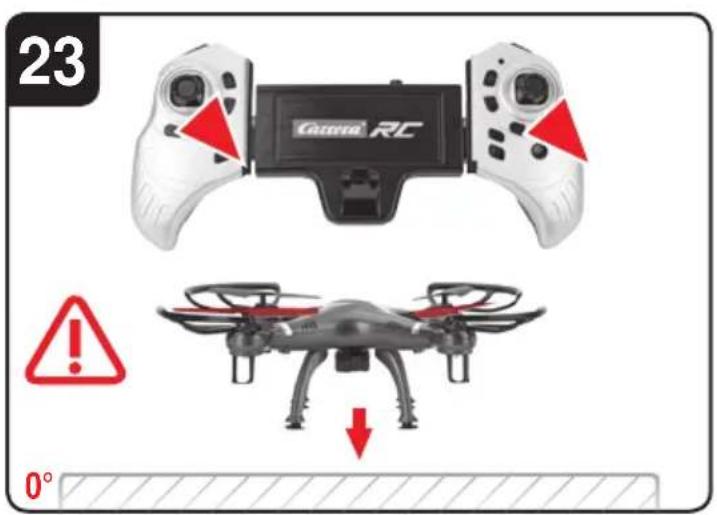
text_image
23 Cane RC 0°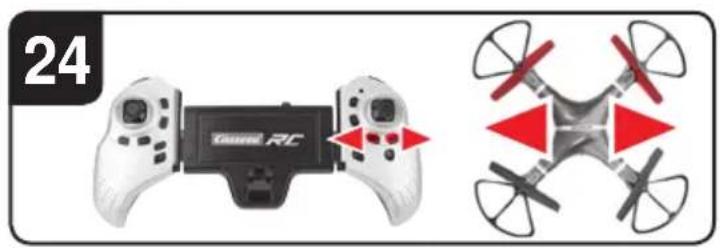
natural_image
Two drone control devices: a beige game controller labeled 'Game RC' and a red-and-white quadcopter drone with directional arrows (no text or symbols on the devices themselves)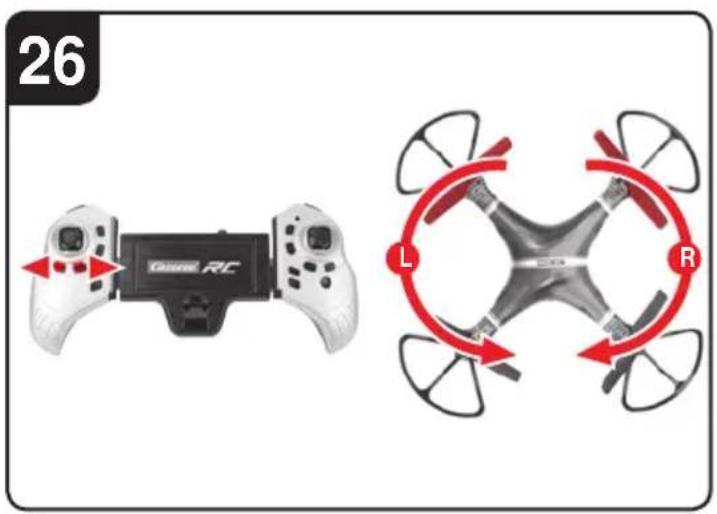
text_image
26 GKRC RC L R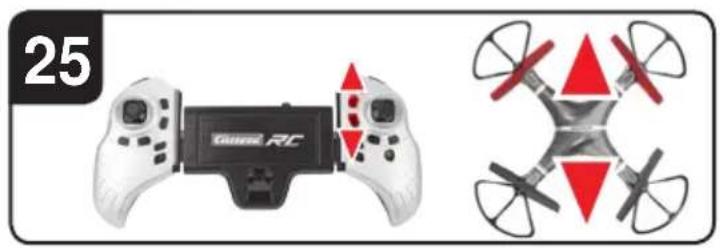
natural_image
Two drone control devices: a game controller with red triangular targeting and a multi-rotor drone (no text or symbols visible)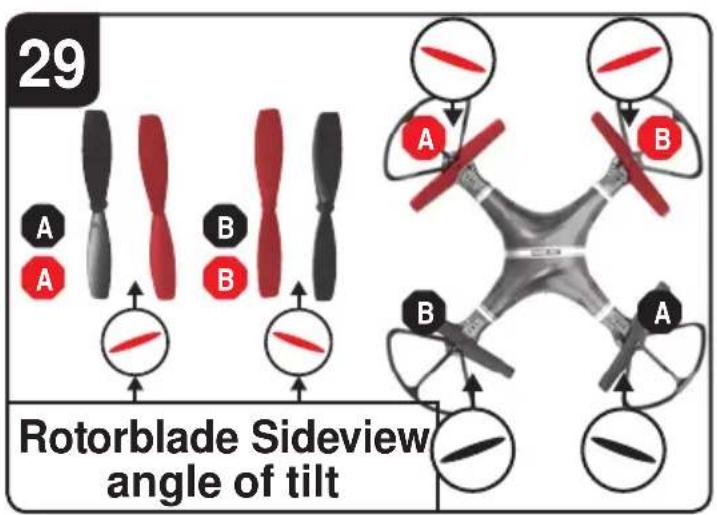
text_image
29 Rotorblade Sideview angle of tilt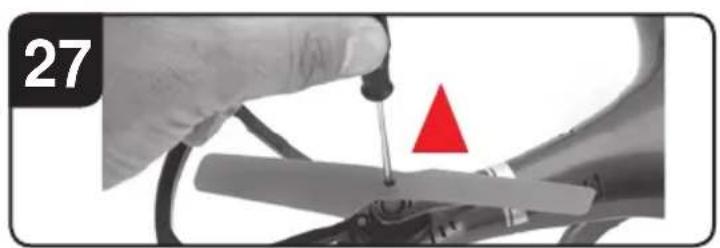
natural_image
Close-up of a hand using a tool to adjust or install a mechanical component, with a red triangle marker highlighting a specific part (no text or symbols present)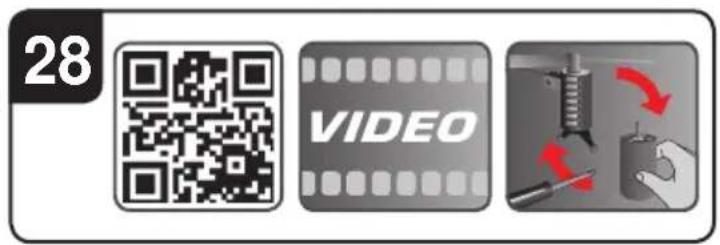
text_image
28 VIDEOD
Sehr geehrter Kunde
Congratulations! You bought a Carrera RC Quadrocopter which has been manufactured according to today's state-of-the-art technology. As it is our constant endeavour to develop and improve our products, we reserve the right to make modifications, either of a technical nature or with respect to features, materials and design, at any time, and without prior notice. For this reason, no claims will be accepted for any slight deviations in your product from the data and illustrations contained in these instructions. These operating and assembly instructions are an integral part of the product. Non-observance of these operating instructions and the safety instructions they contain will render the guarantee null and void. These instructions are to be kept for future reference and in the event that the product is passed on to a third party.
For the latest version of these operating instructions and information on replacement and spare parts available, please visit carrera-rc.com in the service area.
WARNING! Before you first fly the model, find out whether there is a legal requirement to insure model aeroplanes such as this in your country.
Guarantee conditions
Carrera products are technically advanced products (NO TOYS) which should be handled with care. It is important to follow the directions given in the operating instructions. All components have been subjected to careful inspection (technical modifications and alterations to the model for the purpose of product improvement are reserved).
Should any faults nevertheless occur, guarantee is assumed within the scope of the following conditions:
In accordance with the following provisions, Stadlbauer Marketing + Vertrieb GmbH (hereinafter referred to as “manufacturer”) warrants to the endconsumer (hereinafter referred to as "customer") that the Carrera RC-model-Quad-rocopter (hereinafter referred to as "product") delivered to the customer shall be free from defects in material or workmanship for two years from the date of purchase (guarantee period). Such defects will, at the manufacturer's option, either be repaired by the manufacturer or fixed by delivering new or refurbished parts free of charge. The warranty does not cover failure due to normal wear and tear, (e.g. to batteries, rotor blades, cabin covering, gear wheels etc.), or damage as a result of improper handling/misuse or unauthorised interference. Any other customer's claims asserted against the manufacturer, especially action for damages, shall be excluded.
The contractual and statutory rights of the customer against the seller (supplementary performance, rescission of the contract, abatement, compensation) which exist with the product not having been free from defects at the time of the passing of risk, shall remain unaffected by this warranty.
Claims from this special warranty shall only be valid if:
- the defect reported has not arisen by damage caused by unintended use or misuse as specified in the instruction manual,
- the failure of the product is not due to normal wear and tear
- the product does not show any signs resulting from repairs or other interferences carried out by workshops not having been authorised by the manufacturer,
- the product has only been operated with accessories authorised by the manufacturer.
Guarantee cards cannot be replaced.
Note for EU countries: Reference is hereby made to the seller's statutory guarantee obligation, to the extent that this guarantee obligation is not restricted by the product guarantee.
The manufacturer shall bear the costs for sending in and returning the product.
This warranty shall be valid to the extent aforementioned and under the above-named
circumstances (including the submittal of the original proof of purchase also in case of re-sale) for any future owner of the product.
Declaration of conformity
Stadlbauer Marketing + Vertrieb GmbH hereby declares that this model including the controller conforms with the fundamental requirements of the following EC directives: EC Directives 2009/48 and 2004/108/EC regarding electromagnetic compatibility and the other relevant regulations of Directive 2014/53/EU (RED). The original declaration of conformity can be requested from carrera-rc.com.


Maximum radio-frequency power transmitted <10 dBm
Warning!
A remote-controlled Quadrocopter is NOT A TOY and is only suitable for teenagers over the age of 14!
This product is not intended for use by children without supervision of a parent. Flying the helicopter requires skill and children must be trained under the direct supervision of an adult. Before first use: Read the user's information together with your child. In-appropriate use may result in severe injuries and/or damage to property.
It has to be operated with care and caution and requires both mechanical and mental skills. The operating instructions contain notes on safety and technical regulations as well as information on maintaining and operating the product. It is indispensable to read these instructions thoroughly before the first usage. Only this helps to avoid accidents with injuries and damage.
Hands, hair and loose clothing, including other objects such as pens and screwdrivers must be kept away from the propeller (rotor). Do not touch the rotating rotor. Especially take care that your hands DO NOT get close to the rotor blades!
ENGLISH
WARNING: Do not fly near your face to avoid injuries. For use only outdoors – not to be used indoors. Risk of eye injuries. Start and fly only when the area is appropriate for the intended use (free area, no obstacles) and only within direct visual contact. As user of this product you are solely responsible for handling it safely in order to ensure that neither you nor other persons or their property suffer damages or are endangered.
- Never use your model with weak remote control batteries.
- Avoid busy areas. Always make sure that there is enough space.
- Preferably do not use your model on an open street or in public areas in order not to endanger or hurt anyone.
- CAUTION Do not start up and fly when persons, a nimals or any obstructions are within the flying range of the Quadrocopter.
- Start and fly is strictly forbidden near high voltage poles, railway tracks, roads, swimming pools or open water.
- Only operate under good visibility and calm weather conditions.
- Exactly observe the instructions and warnings for this product and for any possible additional equipment (battery charger, rechargeable batteries etc.) being used by you.
- Should the Quadrocopter come into contact with any living thing or solid object, immediately return the gas control to zero, in other words the left-hand joystick must be at the stop at the bottom of the slide!
- Avoid any moisture as this might do damage to the electronics.
- There is a risk to suffer severe injury or even death if you put parts of your model into your mouth or lick them.
- Do not change or modify anything on the Quadrocopter.
If you do not agree to these terms please immediately return the complete Quadrocopter model in new and unused condition to the retailer.
Important information concerning Lithium Polymer rechargeable batteries
Lithium-Polymer (LiPo) rechargeable batteries are significantly more sensitive than traditional alkali- or NiMH-rechargeable batteries normally used with radio control units. Therefore the instructions and warnings have to be observed in detail. In case of improper use of LiPo rechargeable batteries there is a danger of fire. Always follow the manufacturers' instructions if you dispose of LiPo rechargeable batteries.
Regulations on disposal for waste electrical and electronic equipment (WEEE)
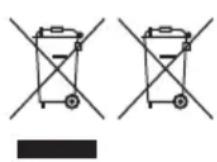
This symbol, showing refuse bins with a cross through them, denotes that empty batteries, rechargeable batteries, button cells, recharge able battery packs, equipment batteries, disused electrical equipment, etc. should not be disposed of in domestic refuse, as they are harmful to the environment and health. Please help to preserve environment and health and talk to your children about the correct disposal of used batteries and disused electrical equipment. Batteries and disused electrical equipment should be handed in to the usual collection points where they can be properly recycled.
Do not mix dissimilar battery types or employ new and used batteries together. Empty batteries should be removed from the product. Do not attempt to recharge non-rechargeable batteries.
WARNING!
Rechargeable batteries are only to be charged by adults.
Never leave the battery unattended while it is charging. Exhausted batteries are to be removed from the toy. Rechargeable batteries should be removed from the product before charging. Supply terminal are not to be short-circuited. Only use the batteries recommended or equivalent types.
If in regular use the charger must be examined for damage to the cord, plug, covers and all other parts. If any signs of damage are found the charger may only be used again after repair work has been completed.
The toy is only to be connected to Class II equipment bearing the following symbol.
FCC statement
This device complies with Part 15 of the FCC Rules. Operation is subject to the following two conditions:
(1) this device may not cause harmful interference, and
(2) this device must accept any interference received, including interference that may cause undesired operation.
Guidelines and warnings for the use of LiPo rechargeable batteries
- You have to charge the attached 3,7 V — 1000 mAh / 3,7 Wh LiPo rechargeable battery in a safe place and at a safe distance to flammable material.
- Never leave the battery unattended while it is charging
- After a flight, the rechargeable battery has to cool down to the ambient air temperature before charging it.
- You must always use the corresponding LiPo charging unit (USB cable / remote control). In case of non-compliance with these directions there is a danger of fire resulting in a health risk and/or damage to property. NEVER use any other battery charger.
- Should the rechargeable battery swell or deform while discharging or recharging, you have to immediately stop charging or discharging the battery. Take the battery out as quickly and carefully as possible and place it in a safe and open area offside any inflammable material and watch it for at least 15 minutes. In case you continue charging or discharging a battery which has already started to swell or deform there is a danger of fire! Even in case of slight deforming or ballooning the rechargeable battery has to be taken out of operation.
-
Store the rechargeable battery at ambient temperature in a dry place.
-
Always recharge the battery immediately after use to prevent its becoming deep discharged. Please make sure to allow a pause of about 20 minutes between finishing the flight and recharging the battery. Recharge the battery occasionally (suggested every 2-3 months). Failure to treat the battery as described above can lead to its becoming defective.
- When transporting or temporarily storing the rechargeable battery the temperature should be between 5-50°C. If possible, do not store the battery or the model in a car and do not expose it to direct sunlight. In case the battery is broiled it can be damaged or catch fire.
Note: If the battery voltage/output is low you will recognise that a considerable trim and/or controlling is necessary to avoid that the Quadrocopter starts trundling. This usually occurs before reaching a battery voltage of 3 V and it is a good moment to end the flight.
Instruction Manual
Contents of package
1 x Quadrocopter
1 x Adjustable controller
1 x USB charging cable
1x 3,7 V=1000 mAh Rechargeable Battery
1 x Camera
1 x Landing feet including screws
1 x Table holder
2 x Replacement motor (right/left)
1x Screwdriver
2 x AAA LR03 batteries (non-rechargeable)
Fixing of the landing feet and the camera
2 Using the screwdriver, fix the four landing feet on the underside of the Quadrocopter, as shown in the illustration.
3 Place the camera in its central mounting underneath the Quadrocopter. Plug the three-wire plug in the left-hand and the five-wire plug in the right-hand socket next to the mounting.
Fixing the portable phone
4 A portable phone can be fixed between both sides of the controller. Press the button in the middle of the controller for this purpose, in order to change the width in such a way that the portable phone is clamped and it cannot slip out of position.
Mount the table holder
5 if you want to use a tablet in your controller, then we recommend that you mount the supplied holder for reasons of safety.
① Push the holder onto the middle of the controller's back until it engages.
② The holder's length can be set with the adjusting wheel. Fix the holder in such a way that the tablet is firmly clamped onto the controller.
Recharging the LiPo rechargeable battery
Make sure you only charge the LiPo rechargeable battery supplied with the LiPo charging unit also supplied (USB cable and remote control). If you try to charge the rechargeable battery with a different LiPo battery charger or any other battery charger, this might cause serious damage. Please carefully read the previous chapter with warnings and guidelines on the usage of rechargeable batteries before proceeding. Supply terminals are not to be short-circuited.
You can charge the rechargeable battery fitted in the Quadrocopter with its USB charging cable from a USB port on a computer:
6a Charging via computer:
- Rechargeable batteries are to be removed from the model before being charged.
- Connect the USB charging cable with the USB port of a computer. The LED on the USB charger cable lights green indicating that the charger unit is correctly connected to the computer. If you plug in a Quadro-copter with a discharged battery, the LED
on the USB charging cable no longer lights up, showing that the Quadrocopter battery is being charged. The USB charging cable and the charging socket on the Quadrocopter are designed to make incorrect connection impossible.
- It takes about 120 minutes to recharge a discharged battery (but NOT a deep-discharged one). When the battery is fully charged, the LED display on the USB charger cable lights up green again.
Note: when supplied, the lipo-battery is already partially charged. So the first charging cycle may well take less time.
It is essential to follow the connection sequence given above!
Undo the plugged connection on the Quadrocopter when you are not using the Quadrocopter. Failure to observe this precaution may cause battery damage!
6b Insertion of the rechargeable batteries into the Quadrocopter
- Open the cover of the battery compartment with the aid of the enclosed screwdriver. Insert the battery. Close the battery compartment.
- If the LED on the Quadrocopter flashes slowly, you must change the battery.
Inserting the batteries in the remote control
7 Open the battery compartment with a screw-driver and insert the batteries in the remote control. Please keep in mind the correct polarity. Different types of batteries or new and used batteries are not to be mixed. After having closed the compartment you can check all functions of the remote control with the help of the power-switch on the front.
With the power switch turned ON and functioning correctly, the top centre LED on the remote control will light up red. If the LED control flashes slowly and an acoustic signal is heard, the batteries in the controller must be changed.
Frequency bind between model and remote control
8 The Carrera RC Quadrocopter and the controller automatically link up renewed with every operational start-up. If initially there are any problems with communication between the Carrera RC Quadrocopter and the remote control, please carry out a new frequency bind.
- Connect the battery in the model.
- Switch the model ON at the ON/OFF switch.
- WARNING! Immediately after switching it on, place the Quadrocopter on a flat and level surface. The gyro-system will then set itself automatically.
- The LEDs on the quadrocopter now flash rhythmically.
- Switch on the controller at the ON/OFF switch.
- Push the left-hand joystick, i.e., the throttle control, completely upwards and then completely downwards.
- The binding has now been successfully established.
- The LED on the controller now lights continuously.
- After approx. 5½ minutes, the controller switches off. Please repeat the link procedure for renewed use.
Description of the Quadrocopter
9 1. Rotor system
2. Rotor protection cage
3. ON-/OFF switch
10 4. LEDs
5. Video camera
6. Battery compartment
Range of functions of the remote control
11 1. Power switch (ON / OFF)
-
Control LED
-
Gas
-
Control LED
- Gas
Circling
-
Forwards / backwards right / left banking
-
Trimmer for right / left banking
-
Trimmer for forwards / backwards
-
Trimmer for rotation
-
Looping Button
-
Headless Mode
-
Start rotor' button
-
'Auto-landing' button
-
'Auto-start & fly to 1.5 m' button
-
"LED lights ON/OFF" button
-
Beginner/Advanced switch (30%/60%/100%)
-
Adaptable tablet holder – button for adjusting the controller's width
-
Knob for camera angle adjustment
7 17. Battery compartment
Choosing the flight area
12 The Quadrocopter may be flown outdoors. When you have trimmed your Quadrocopter properly and are thoroughly familiar with its controls and how it can perform, you can then start to fly it in smaller and more confined spaces. Please be aware that, although it may be calm on the ground, it may still be very windy even a little way off the ground. If this warning is disregarded, it may lead to total loss of the Quadrocopter.
Checklist for flight preparation
This checklist is not a substitute for the contents of the operating instructions. Although it can be used as a quick-start-guide, we strongly recommend you first to read the operating instructions in detail before you proceed.
- Check the contents of the package.
- Fit the landing feet and the camera as described under 2 3.
- Fix your portable phone or tablet to the controller 4 5.
- Charge the lipo-battery as described in the section “Recharging the LiPo rechargeable battery”.
- Fit 2 AAA batteries in the controller, making sure their polarity is correct.
- Look for a suitable environment for flying.
- Read and comply with the legal and safety regulations governing the use of your Quadrocopters.
- Slide the battery into the battery bay on the bottom of the Quadrocopter. 6b
- Switch the model ON at the ON/OFF switch.
- WARNING! Immediately after switching it on, place the Quadrocopter on a flat and level surface. The gyro-system will then set itself automatically.
- The LEDs on the quadrocopter now flash rhythmically
- Switch on the controller at the ON/OFF switch. Be sure to check the Beginner-Advanced switch (17c). Push the left-hand joystick, i.e., the throttle control, completely upwards and then completely downwards.
- Allow the Quadrocopter a few moments until the system is correctly initialised and is ready for operation. The LED in the Quadrocopter now lights continuously. The LED on the controller now lights continuously.
- Repeat the above points as required, if you wish to fly more Quadrocopters at the same time.
- Bind your smartphone as described in point 18b with the Quadrocopter until you see the camera live picture on the screen. Furhter details on functions on the camera see point 18 18a 18b.
- Important note! Please perform the auto-trimming 23 before each flight without fail!
- Start the Quadrocopter by means of pressing on the ‘Start rotors’ key.
- Check the control system.
- Make yourself familiar with the control system.
- Trim the Quadrocopter as necessary as described under 23 24 25 26, so that when hovering it no longer moves from the spot without a command from the controller.
- The Quadrocopter is now ready to be flown.
- If the Quadrocopter displays no functions, retry the above binding procedure.
- Fly the model.
- The LED lamps on the model start to flash shortly before the battery is discharged.
- Land the model.
- Switch the model off at the ON/OFF switch
- Disconnect the battery plug connection.
• Always switch off the remote control last.
Flying the 4-channel Quadrocopter
NOTE!
Take care particularly in the first few flights to move the lever on the controller very gently and not over-hurriedly. As a rule, only very small movements of the respective levers are necessary to carry out the desired control commands!
If you notice that the Quadrocopter moves forwards or to the side without your touching the respective lever, please adjust the trim of the Quadrocopter as described in 23 24 25 26.
13 +/- Gas (up / down)
To start or to fly higher, push the gas lever on the left cautiously forwards. To land or fly lower, push the gas lever on the left cautiously backwards.
14 To make the Quadrocopter circle to the left or the right on the spot, move the lever on the left cautiously to the left or the right.
15 To fly the Quadrocopter to the left or the right, push the lever on the right cautiously to the left or the right.
16 To fly the Quadrocopter forwards or backwards, push the lever on the right cautiously forwards or backwards.
Start the rotors and motors
17 a Press the 'Start rotors' button on the controller, in order to start the motors. You can lift the throttle control upwards as soon as the rotors are running.
Looping function
WARNING!
ONLY FOR EXPERIENCED PILOTS!
17 b If you press the “Looping Button” ①, then an acoustic signal sounds 5x times. As long as the acoustic signal sounds, slide the right-hand joystick up, down, to the right or to the left. The Quadrocoper then carries out the loop or roll in the respective direction. Before you do this, make sure you have ample room on all sides (about 4 m – 13').
The “3D looping” only functions when the camera is unplugged and removed!
Beginner/Advanced switch ②
17 c 30% = beginner mode
Signal sounds once on switching over.
$$ 60 \% = \text { medium mode } $$
The quadrocopter reacts more sensitively than in 30 % mode. Signal sounds twice on switching over.
$$ 100 \% = \text{Advanced Modus -> 3D Modus} $$
The Quadrocopter reacts very sensitively to joystick movements. Signal sounds three times on switching over.
WARNING!
100 % IS ONLY FOR EXPERIENCED PILOTS!
Headless Mode
17 d The headless mode helps beginners learn how to fly. Regardless of which direction the Quadrocopter is rotated, the flight direction always corresponds exactly to the flight direction implemented on the controller. Therefore a beginner no longer has to steer mirror-imaged when he flies e.g. to himself.
If you press the "Headless Mode Button"
9, an acoustic signal sounds for as long as you are in the Headless mode. To deactivate the Headless mode, press the button renewed.
Video & photo function
WARNING!
Please note that taking pictures or videos with the built-in camera may infringe the image copyright and rights of personality of others! A person filmed without his or her permission, for example in the neighbourhood, may take civil action for restraint or claim for damages. Taking pictures of people in other people's residences or gardens protected by sightscreening hedges may also be a criminal offence! Always keep up to date with existing legal provisions.
Use of the Carrera RC App
18 a Load the application with the name of 'Carrera RC FPV' in the respective application or play store. You can find the respective QR code on the packaging. Connect your smartphone with your Quadrocopter's W Lan device. Look for the W Lan with the name of 'Carrera_RC_FPV_...' It may be up to about 30 seconds before the W-Lan is found and can be connected. Start the app now.
On the right of the Start Screen you see the „Start“ button where you enter the flight menu of the app. Use the buttons on the right to get to the help menu or the general settings. Enter the spare parts shop by using this button: the spare parts shop opens in the smart phone browser.
Availability in, and delivery of the spare parts to, certain countries is not possible. If necessary, contact the representation in your country, shown on the back of the packing.
18 b Functional overview of the flight menu: START>
- Press this button to take photos
- Press this button to take videos
- Here you find the photos and videos taken on your smartphone
- Here, rotate the camera picture by 180°
- Use this button before inserting the mobile phone into the 3D VR glasses.
You are able to view all of the recorded videos in the 3D VR perspective in the file: just activate this mode in the corresponding menu by means of pressing the 📄 icon.
You will find the pictures / videos in the respective picture / video file in your unit. (Please note the access rights for the IOS). An additional video player may possibly be required.
18 c Wear the 3D VR spectacles (not included)
We recommend that you learn to fly the Quadrocopter reliably first of all, before you use the 3D spectacles!
CAUTION! NEVER fly a Quadrocopter with the 3D VR spectacles alone! You would commit a criminal offence by doing so!
Ensure that a 2nd person is standing next to you whenever you fly the Quadrocoper while wearing the 3D spectacles. The 2nd person must monitor the Quadropcopter's position for you and help you to correct the flying position, in order to prevent accidents.
Please note that you only have a limited field of vision!
19 Altering the camera angle
Using the setting wheel on the controller top right, the camera angle can be altered (approx. 70^-80^ tilt).
Automatic control of altitude
20 The Quadrocopter will maintain the current flying altitude automatically as soon as you release the left-hand joystick during the flight.
Auto Landing
21 You can trigger the automatic landing function at any time by means of pressing the 'Auto landing' button. The speed of the rotors will reduce gradually as a result. You are able to influence the landing position at any time during the landing procedure by means of moving the right-hand joystick. The motor will switch itself off as soon as the Quadrocopter is on the ground.
Auto-Start & Fly to 1.5m
22 Press the 'Auto-start & fly to 1.5 m' button on the controller, in order to start the motors and automatically fly up to the altitude of about 1.5 m. You are able to influence the direction of flight at any time during the starting operation by means of moving the right joystick. The Quadrocopter will maintain itself in position automatically as soon as the altitude of about 1.5 m has been reached.
Trimming the Quadrocopter
23 Auto-trimming
- Place the Quadrocopter on a horizontal surface.
- Link the Quadrocopter with the controller as described in "Linking the model with the controller".
- Slide the gas lever and the lever for forward / back simultaneously into the right lower corner. The LED on the Quadrocopter flashes on briefly and then lights up continuously. The signaling tone will sound once.
- The neutral setting is completed.
24 When hovering, if the Quadrocopter flies to the left or right without you moving the lever for left / right movement, please proceed as follows: If the Quadrocopter moves on its own fast or slow sideways to the left, press the lower right trimmer for right / left tilt in steps to the right. If the Quadrocopter moves right, press the trimmer for right / left tilt in steps to the left.
25 When hovering, if the Quadrocopter flies forwards or backwards without you moving the lever for forwards or backwards movement, please proceed as follows: If the Quadrocopter moves on its own fast or slow forwards, press the upper right trimmer for forwards / backwards in steps downwards. If the Quadrocopter moves backwards, press the trimmer for forwards / backwards in steps upwards.
26 When hovering and without you moving the lever for circling on the spot, if the quadrocoper rotates to left or right, proceed as follows: If the quadrocoper rotates quickly or slowly to the left around its own axis, press the trimmer for rotation below left in steps to the right. If the quadrocoper rotates to the right, press the trimmer for rotation in steps to the left.
Changing the rotor blades
27 Use a scredriver for unscrewing a rotor blade. Make sure that you draw the rotor blade with great care vertically upwards, and hold the motor from below to stabilise it. Screw the rotor blade firmly back on to the quadrocopter.
28 QR code for motor-change system, spare parts and further information.
29 WARNING!
Be sure to note the marking and colour, also the tilt angle of the rotor blades!
Front left: red – marking "A"
Front right: red – marking "B"
Rear right: black – marking "A"
Rear left: black – marking "B"
Troubleshooting
Problem: Remote control does not work.
Cause: The ON/OFF-power switch is turned "OFF".
Solution: Turn the ON/OFF-power switch "ON".
Cause: The batteries have been wrongly inserted.
Solution: Check if the batteries have been correctly inserted.
Cause: The batteries do not have enough power.
Solution: Insert new batteries.
Problem: The Quadrocopter cannot be controlled with the remote control
Cause: The power switch on the reomote control is turned "OFF".
Solution: First turn the power switch on the
remote control "ON".
Cause: The remote control is possibly not correctly frequency bound with the receiver on the Quadrocopter.
Solution: Please carry out the binding procedure as described in "Checklist for flight preparation".
Problem: The Quadrocopter does not start.
Cause: The 'Start rotors' button has not been pressed on the controller.
Solution: Press the ,Start rotors' button on the controller.
Problem: The Quadrocopter does not lift.
Cause: The rotor blades rotate too slowly.
Solution: Slide the gas lever up.
Cause: The battery's power is not sufficient.
Solution: Charge the battery (see chapter "Charging the battery").
Problem: During flight, the Quadrocopter loses speed and height without any obvious reason.
Cause: The battery is too weak.
Solution: Charge the battery (see chapter "Charging the battery").
Problem: The quadrocopter only flies in a circle or turns over on starting.
Cause: Rotor blades incorrectly fitted or damaged.
Solution: Fit rotor blades / replace rotor blades as described in 27 28 29.
Problem: Wifi/W-Lan connection not possible.
Cause: The model's power switch is set to "OFF".
Solution: First switch the model's power switch to "ON".
Errors and changes excepted
Colours / final design – changes excepted
Technical changes and design-related changes excepted
Pictograms = symbolic photos

Chère cliente ! Cher client !
6b Insertion of the rechargeable batteries into the Quadrocopter
Vooraan links: rood – marking 'A'
Vooraan rechts: rood – marking 'B'
13 +/- gas (upp/ned)
- Wykonać lot modelem.
100% = tryb Advanced -> tryb 3D
Lade opp LiPo-akkumulator
Beginner/Advanced bryter ②
17 c 30 % = begynner modus
تنبيه! أحرس على مerationة أن الصور أو ماطع الفيديو المنتقة بكاميرا مدجمة يمكن أن تخرق الحقوق المتعلقة بالصور والشخصياتً لافراد أخرى! والشخص الذي يتم تصويره في مقطع فيديو دون الانتاق معه على ذلك، مثلّا في الجوار، يمكن الاستعاع بالقانون intermedi لتصدي لtersف مثل هذا والمática بحNF الشهد المصور أو التويضön但这سب. كيا أن المشاهد المصورة لأفراد في مساكن لا نؤول لم Honduras him Honduras him Honduras him Honduras him Honduras him Honduras him Honduras him Honduras him Honduras him Honduras him Honduras him Honduras him Honduras him Honduras him Honduras him Honduras him Honduras him Honduras him Honduras him Honduras him Honduras him Honduras him Honduras him Honduras him Honduras him Honduras him Honduras him Honduras him Honduras him Honduras him Honduras him Honduras him Honduras him Honduras him Honduras him Honduras him Honduras him Honduras him Honduras him Honduras him Honduras him Honduras him Honduras him Honduras him Honduras him Honduras him Honduras him Honduras him Honduras him Honduras him Honduras Jim
. quadrocopter : her
Room 1917, North Tower
Concordia Plaza
1 Science Museum Road
Tsimshatsui East · Kowloon
Hong Kong
Phone +852 2722 0620
Fax +852 2367 0792
internet www.carrers-rc.com
USA / CANADA
Carrera of America Inc.
2 Corporate Drive
Cranbury, NJ 08512 · USA
Phone +1 609 409 8510
Fax +1 609 409 8610
Email reception@carrera-toys.com
Internet www.carrera-rc.com
BENELUX
21 B. Route Nationale
Ivanhoe, Victoria 3079 - Australia
Phone +61 3 84811000
Fax +61 3 94972311
Email sales@zimbler.com.au
Internet www.zimbler.com.au
BULGARIA
Ivantchev Ltd.
78a, Maria Luiza Blvd.
1202 Sofia · Bulgaria
Phone +359 283 22020
Fax +359 283 22020
Email kivanchev@del.bg
CHINA
Shanghai Wowgame
Commercial Company Ltd.
Room 110, Tower 1.
German Centre,
88 Keyuan Road
(Zhangjiang Hi-Tech Park),
Pudong.
201203 Shanghai · China
Phone +86 21 53821692
Mobile +86 155 77449439
Email eddychan@wowgame.com.cn
Internet www.wowgame.net.cn
CYPRUS
TGW TOYS GAMES WORLD LTD
38 Spyrou Kyprianou Street
4043 Potamos Germasogias,
Limassol - Cyprus
Phone +357 25 430043
Email info@toytower.com
Internet www.toytower.com
CZECH REPUBLIC
ConQuest entertainment a.s.
Hioubetinska 11
198 00 Praha 9 - Hloubetin
Czech Republic
Phone +420 284 000 111
Fax +420 284
Email radim.kalo@conquest.cz
Internet www.cqe.cz
DENMARK / SWEDEN /
NORWAY / FINLAND / ICELAND
Tactic Games OY
Raumanjuovantie 2
P.O. Box 4444
28101 Port Finland
Phone +358 2 624 4144
Fax +358 2 624 4211
Email info@tactic.net
Internet www.tactic.net
ESTONIA
Anvol Ltd.
Madikse 7.
74114 Maardu · Estonia
Phone +372 63 88 100
Fax +372 63 88 101
Email anvol@anvol.eu
Internet www.anvoi.eu
GREECE
Enarxis Dynamic Media Ltd.
68, Ilia Iliou Stre
11 744, Neos Kosmos
Athens·Greece
Phone +30 2109011900
Fax +30 2109028700
Email info@enarxis.eu
Internet www.enarxis.eu
HONG KONG
Chun Lee (HK) Industrial Limited
RM. 1801-5, 18/F.
King Palace Plaza,
52A Sha Tsui Road,
Tsuen Wan
N.T. Hong Kong
Phone +852 910 36679
Email eddychan@yu-lee.com
INDONESIA
PT, Toys Games Indonesia
Kawan Lama Building,
7th Floor
P.O. Box 1565 Jounieh Lebanon
Twin Towers Building Blk A
Sarba High Way
Jounieh - Lebanon
Phone +961 3 840505
Fax +961 9 635473
Email riad.aouad@faouad.com
MONGOLIA
Circle LLC
Encanto Town
District Bayanzurkh 26th khoroo
Ikh Mongol State Street
210523 Ulaanbaatar · Mongolia
Phone +976 77073034
Fax +976 11 305646
Email import1@orgil.mn
Internet www.orgil.mn
NEW ZEALAND
FW Cave Ltd.
15 Old North Road
P.O. Box 278,
Kumeu 0841
Auckland - New Zealand
Phone +64 9 4157 766
Fax +64 9 4157 099
Email sales@wcave.co.nz
Internet www.fwcave.co.nz
RUSSIA
Unitoys MSK Ltd.
Mnevnik, 7-2
123308 Moscow - Russia
Phone +7 495 276 0286
Fax +7 499 946 4616
Email office@unitoys.ru
Internet www.unitoys.ru
SERBIA / MONTENEGRO
CoolPlay d.o.o.
Dr. Nika Miljanica 18
11000 Belgrade · Serbia
Phone +381 65 8026620
Email office@coolplay.rs
SWITZERLAND
Waldmeier AG
Neustrasse 50
4623 Neuendorf · Switzerland
Phone +41 62 387 98 18
Fax +41 62 387 98 20
Email info@waldmeier.ch
SUNMAN SAN. MAM. ITH. IHR. ve TIC. A.S.
Turgut Özal Cad. No.125
41420 Cayirova / Kocaeli - Turkey
Phone +90 216 499 80 80
Fax +90 216 314 67 20
Email info@sunman.com.tr
Internet www.sunman.com.tr
UNITED KINGDOM
The Hobby Company Ltd.
Garforth Place, Knowlhill
Milton Keynes MK5 BPG - UK
Phone +44 1908 209480
Fax +44 1908 235900
Email enquiries@hobbyco.net
Internet www.hobbyco.net
UNITED ARAB EMIRATES
Toyworld Distributor
P.O. Box 289, Gibca Building
Al Wahda Street, Sharjah · UAE
Phone 197165337418
Fax +971 6 5336682
Email info@toyworlduae.com
Internet www.toyworlduae.com
VIETNAM
Viet Tinh Anh JSC
V33-35 Street 04, Him Lam,
Tan Hung ward,
Dist.7, Ho Chi Minh City · Vietnam
Phone +84 8 543187-17
Fax +84 8 543187-16
Email info@viettinhanh.com.vn
Internet www.viettinhanh.com.vn

text_image
WARNING: CHOKING HAZARD-SMALL PARTS NOT FOR CHILDREN UNDER 3 YEARS. ATTENTION: DANGER D'ÉTOUFFEMENT - PRÉSENCE DE PETITES PIÉCES NE CONVIENT PAS AUX ENFANTS DE MOINS DE 3 ANS.carrera-rc.com