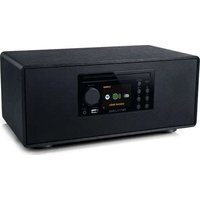
M-697 IDT - Hi-fi system MUSE - Free user manual and instructions
Find the device manual for free M-697 IDT MUSE in PDF.


| Product Type | Hi-Fi system |
| Brand | MUSE |
| Model | M-697 IDT |
| Power supply | 100-240 V, 50/60 Hz |
| Display | LCD TFT 2.8 inches |
| Main functions | Internet radio, Podcasts, Spotify, DAB/DAB+, FM, Bluetooth, CD, USB, AUX |
| Bluetooth | Version 5.3 |
| NFC | Yes |
| USB port | Yes (MP3 playback) |
| CD player | Yes |
| AUX input | Yes (3.5mm jack) |
| Remote control | Yes (with AAA batteries) |
| Sleep timer | Yes (15, 30, 45, 60 min) |
| Alarm | Yes, dual programmable alarm |
| Equalizer | Presets (Normal, Natural, Jazz, Rock, Classic, Pop, etc.) |
| Antenna | External (cable) |
| Maintenance | Soft dry cloth; do not use solvents |
| Safety | Do not expose to moisture; do not open the casing; remove batteries if not used for extended periods |
Frequently Asked Questions - M-697 IDT MUSE
User questions about M-697 IDT MUSE
0 question about this device. Answer the ones you know or ask your own.
Ask a new question about this device
Download the instructions for your Hi-fi system in PDF format for free! Find your manual M-697 IDT - MUSE and take your electronic device back in hand. On this page are published all the documents necessary for the use of your device. M-697 IDT by MUSE.
USER MANUAL M-697 IDT MUSE
+Lacapaeur eaeur fumit est exusienment destine a tre olire avccel apareil N luliez donc pas avccd sapperei.
EleignzIapparel avan debrancher Iadapaleur secleur ain devier dabirer le lecteur
+EN EACNNEHANPONNNNNNNNNNNNNNNNNNNNNNNNNNNNNNNNNNNNNNNNNNNNNNNNNNNNNNNNNNNNNNNNNNNNNNNNNNNNNNNNNNNNNNNNNNNNNNNNNNNNN
Paeeppe aepnepa pme prne mre d e n qe cne rme tane rannr anessie en ca de systenonment. debranee immedtienl (aparai de la preie murale.
Lcasssteur selr perier de ctenher Tappere. Il not ceter fatement accessori durant fulitioe. Poor couper complettemel. dalfimentation en saccar, defenfance tout a la fide patele de ane sccer.
Nilliae an aetate sehme. Pae zie s dla ealmentation de mieria sra and da fagon a ne pas le ciner ou teeser S
MISE EN MARCHE ET ARRET DE L'APPAREIL
Eepoee has detals des intotions svice aes
-
Version logs
-
Version Spolity
ID radio
Non curvival
-Remodirage
Cat appareill paul atocker 40 stations webradiolPodcasts + 40 DAB/DAB + 40 stations FM + 10 Spotfly.
Utilities up expense N5C
NFC (Nesr Field Communication) is a technology that permits the communication sans fil de courte portefone entre ses specaux compatibles
ae ie mode de countane and active
- Evidences of the properties of
3.192200000000000000000000000000000000000000
- FOr aterer la fucr, deonie che 2 yore sourca subiige da tse AOX IN
Response 2005:Ex Operations State:Merit Prkper
INTERNET:Bi-bane (802.11 a/b/
Frequenc
2.400-2.4635GHz
6.150 5.350 GHz
5.470.5675GHz
Fissance de sordes 8R (fauvence cdoa) 14.575 dcm
RADIO: FM 97.5-109MHz
DAB:DAB:174.929-239.200MHz
PRODUT CASE DE CLASSIF

IMPORTANT
LIiR
1
e rccn t i a
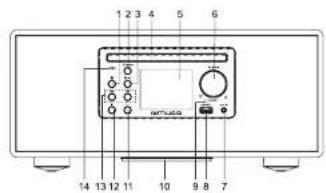
1- Enter into the menu of current mode; Return to previous step.
2 - To sum and subtract: Lang press & To unit ON/OFF; Short press.
MODE: Main menu switching, Internal Radio, Podcasts, Sportsy, Music player, DAS Radio, FM Radio, Bluetooth Audio, CD: AUX
- ■Stop playback
SELECT Setting down/up; To confirm the selection settings: To adjust volume:
7.AIXINJx(25m)
1.163mL for N50 ethanol
8. USE GENI M-3 playback 6.2.40
10. Relese nst
10.PresnE
11.P4Recal presel radio staion in radio mode 12.4 to presech the
12A:10opencln863456198
13.44 Search Tuning
74.CIEC NFC Tag
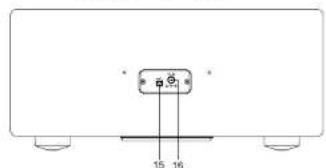
16.1AB+FMvm antenna
16 DC in jack
REMOTE CONTROL
E1.
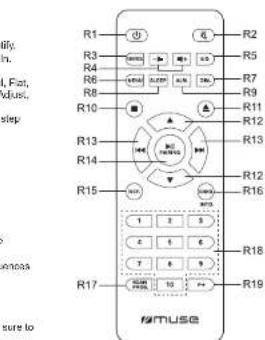
RJ. SOURCE: Mari modes switching Internet Radio, Paccase, Spally
Music player, DAB Radio, FM Radio, Bluetooth Audio. CD. AUX H
R4. -To adjust volume
RS.EQ:To select desired sound effects' sound mode setting: Normal,Flat
Jazz, Rock, Movie, Classic, Pop, News, Podcasts, Podcasts Auto Adjust.
My EQ My EQ profile setup
R6. MENU: Enter into the menu of current mode; Return to previous step
B7.PIM-Adaptive the brightness level of display
B3.SLEEP.To887sE0010
B9 ALM To set the slant from sarmme
F12:Shoeplayssck
H11▲:To open close the disc tray
H17A
113
514NABRING:H2
15.59:To rereot
- REP. 10% p#p8y
F1A.
rrnnnne nnnnne rnrnnnne ennnnne eannne
RT/SCAN PROG.ALM&SNR 18 program ayaneck sequence
18 1-10 Nuee 2nny
K18: P4: Recal preset radio station in radio mode
INSTALLING BATTERY
Insert 2: AWW UN4 batteries to the remote control port to use. Make sure to match their polarities (N^-) to the markings inside the compartment.

Before throwing any laters away, consult your distributor who may be able to take them back for specific recycling.
NOTES
- New recharge the batteries, apply heat to them or take them apart.
- If the remote control is not going to be used for a long time, remove the battery to avoid damage caused by battery leakage corrosion.
- Attention should be given to the government agencies at battery disposal
P
Battery shall not be exposed to excessive heat such as sunshining, or on the like.
CAUTION: Danger of explosion if battery is incorrectly replaced. Replace only with the same or equivalent type.
EN-1EN-2
SPMILLMS001Rv0mdd
POWER SUPPLY
AC ADAPTOR
The supplied AC acaptor is suitable for use on AC main supplies of 100-240V ∼ 50/60Hz and should only be connected to a mains supply within these parameters.
In a concern of saving energy, when playback has reached its end or listening volume is set at a very low level and no control is operated on the device for a period of 15 minutes, the unit will automatically switch to Stanley mode.
To set the time of standby mode
When unit is ON, press button on unit or MENU button on ramota control to access setting menu, choose "System settings" → Inactive Standby 12/4/5/8 hours.
Cautions
The AC adnay reduced with this unit is for use only. Pare not it with other equipment
Turn off the unit before unplugging the AC adaptor from the unit so as to avoid the unit being damaged. When the unit is not coming to be used for long time, disconnected the AC adaptor from the AC outlet.
Be sure to use it near the wall outlet and easily accessible. If a malfunction occurs, disconnect the plug from the wall outlet at once.
- AC adaptor is used as the discovered device. It shall remain readily operable and should not be obstructed during intercised use. To be completely disconnected the apparatus from scuply mains, the AC adaptor of the apparatus shall be disconnected from the mains societie.
- Never use an AC adaptor that is damaged, route power lead in a safe manner and make sure it is not subjected to tripping or pinching. If the power lead is damaged refer to a qualified service agent.
TURNING UNIT ON/OFF
- Earnings and hold (share) in last on the unit
- Long prees button on unit or prcess button on remote control to turn off the unit.
FIRST TIME SETUP SETTING
When you first turn on the unit it will required to use the OSD language. - Ralate SELECT kncb on unil or /on remote control to choose your desired language, press SELECT cnul or on remote control to confirm
is displayed and display show "Start now?", select "YES" to confirm to setup start is display, rotate SELECT button to select 12 or 24* hour format and press SELECT to confirm is displayed, rotate SELECT to choose your updated option and press SELECT to confirm.
111111111111111111111111111111
If your country using daylight saving, the automatically updated time from the network may be hove tolerance by one hour. When daylight savings affected (during the winter), turn on the option of Daylight savings to rectify.
<Network settings is displayed and display shows "Keep network connected", rotates SELECT to choose "YES" wireless connection will not be disconnected whenever unit is in a sterility mode or non-network mode.- Run wizard again at next start up? It is displayed, select 'YES', unit will run again the same setup procedure (follow the above settings) when ra-power on the unit next time, select 'NO' will enter to main menu or last operated mode, no need reset the above process.
SELECTING FUNCTION
When the unit is on, press MODE button on unit or SOURCE button on remote control to access to main function mode.
Repeadedly prase on unil or aon remote control to select desired mode: Internet Radio, Podcasts, Systify, Music Player: DAB Radio, FM Radio, Blueooth, CD, AUX in.
MUTING THE SOUND
When the unit is on, press button on remote control to mute the sound. Press again to restore.
ADJUSTING VOLUME
B000100000000000000000000000000000000000000000
EC
Press EQ suction on remote control erder into EQ selling mode. Press on remote control to select different sound effects: Normal, Flat, and High. Click OK to confirm the setting. Click OK to confirm your settings. -Podcast Auto Adjust "Automatically adjust EQ when playing podcasts" select "YES" or "NO" to confirm your setting.
- My EQ profile setup: Enter to the option to adjust the value of BASS. Toggle and Loudness ON/OFF, press SELECT on unit or H0 on remote control to enter in the settings, rotate SELECT button on uncl or ▲▼ on remote control to adjust the value, press SELECT on uncl to confirm, and then press EQ button, display will show "save changes" salad "Y/H" to confirm. "Equisiter savant" show on the display few minutes. Press EQ button on remote control again, salad "My EQ" and press to confirm to activate your EQ profile settings and values.
SLEEP FUNCTION
When the unit is ON, press SLEEP button on remote control to enter to sleep setting mode. Otherwise press button on remote control to select '15-30-45-45' minutes of listening, press to confirm. Sleep icon with remaining time will show on the display. The unit will automatically turn off after the spatiotempal time. To cancel the sleep function, press button on remote control to select 'Sleep OFF', and press confirm. Sleep icon disappears.
DIMMER
Press DIM button on remote control to select the brightness of the scene: High, mid, low
2024/3/11/34:21

TIMER
When the unit is on, press button on unit or MENU button on remote control to access setting menu. Rotate SELECT button on unit or▲▼ on remote control to select 'Main menu', press to confirm.
Repeatedly press on unit or on remote control to select "Time" and press to confirm, display seven 30 minutes", rotate the SELECT button on unit or on remote control to select this duration from 1-99 minutes, press SELECT or to confirm, it will start to countdown and display shows the countdown time. When the countdown time is reached, there will be the buzzer sound and sound volume will increase gradually, and the sound will lasting 30 minutes.
Press button on unit or press MENU button on remote control to exit the countdown timer screen, but timer will continue to countdown whatever the display shows.
To cancel the timer, rotate the SELECT button to select to "0 Minutes" press to confirm.
SETTING THE TIME AND DATE
- When button is ON, press on button or MENU button on remote control to access to "System settings", press SELECT on unit or on ramona control in the form
- Rotate the SELECT knob to choose Time/Datay,press SELECT knob to enter into limit setting menu. 3. Rotate the SELECT knob to scroll to sSeIms/Icons, then press SELECT knob to confirm.
4 Use SELECT in to set the data [DD/MM/YYYY], time [HH:MM] and AMPM formet. (Rotate SELECT knob to adjust the setting; then press SELECT knob to confirm.)
Note: When the unit is not connected to a wireless network, the first time you turn on the unit or disconnect the AC adapter and power on again, then you need to set the time manually.
SETTING THE ALARM AND ALARM MODE
When unit is ON, press ALM, button on remote control to access alarm setting mode. Rotate SELECT knob to select an option and/or adjust the selling, then press SELECT knob to confirm.
Select 'Alarm 1' or 'Alarm 2', then press SELECT to confirm.
Enabe: Oh, Dally, Orce, Weekcays, Weekends.
0
"Space. The alarm will be called once only."
Workdays: The alarm will sound on workday only. (Monday to Friday)
Weekends: The alarm will sound on weekend only. (Saturday and Sunday)
Time: To act the alarm time
-
Model: To set the wake-up source: BUZZER, Internet radio, DAB, FM
P t i r a t t t t t t t t t t t t t t t t t t t t t t t t t t t t t t t t t t t t t t t t t t t t t t t t t t d
Duration: To set the alarm duration 15:30,45,60,90,120
Volume: To sat the alarm volume -
Steve Select this option and press SELECT to confirm all above settings. "Alarm Savast" displayed, display will return to "Alarms" menu and then return to previous menu few minutes later, alarm indicator will be displayed.
Noted: Same procedure applies for Alarm 2 option.
The alarm indicator will blink when the alarm time is reached.
In 12 hour clock format, be sure to observe the MAPM indicator to set the alarm line correct.
Stepping the Alarm 4. Alerting
Press SLEEP buttons on female control in prior into smogese mode.
Repeatly press SLEEP on remote control to set remaining snoop time: 5 × 10 < 15 < 30 minutes, display will switch to the clock line. Inframe that it is being into the snoop mode.
2-Alarm stop
Press ALM, on remote control to stop the alarm, "Alarm OFF" displayed.
Note:
- When the alarm is set, the alarm will not sound again. The alarm indicator will let off.
- When Weekday is set, the alarm will sound again on next weekday (Monday to Friday) at the same time.
- When "Weekends" is set, the alarm will sound again the following Saturday or Sunday at the same time.
3 - Alarm Cancellation
Prr 1
MAIN MENU
When the unit is on, press button on unit or MENU button on remote control to access selling menu. Rotate SELECT button on unit or
Repeadly prs an or a n o rme to control solat madr. Rnir. Pocst, Spsty, Mie perr DAB
Press SELECT button on unit or In remote control to confirm.
EN-3EN-4
SYSTEM SETTINGS
-Refers to the operations in section EQ.
- Streaming audio quality
Salad the level of audio quality: Low quality, Normal quality, High quality, press SELECT button on unit or non remote control to confirm
Network
Network wizard
Network wizard This wizard is the necessary steps to join into a network. This is automatically run as part of the setup wizard. Display presented is dependent on the type of network.
Display show "Nework wizc Scanning", SSID list will be displayed after searching. Select the SSID from the list and press I to enter into
Enter into the numbers, letters, symbols, prices confirm.
"BKSP". Delete the wrong input
Cerberbck 88 Dcl.
-OK.951
PBCWs0a
"Push WPS button at the other end displayed. press SELECT on unit or press on remote control to continue, it is to connect the AP which supports WPS (presses, non-selected set).
View settings
View the Information of setting below:
-Active connection
MAC address
Wan region
-DACP
-880
-
Ganetm
Primary CNS
Secondary CNS
m - 1 0 ;
- Manual selling
Wired/Wireless Easy/odWBIA (DURIC/Deprinic Host Configuration Protocol)
E-104
Connection type wireless DHCP erable, eriter SSIDnetwork name) A network key can need to be added.
Connection type Wireless DHCP Disable assume DHCP service is active but network information such as IP address, subnet mask
gaiway address. DNS will need to be entered
Network profile
Unit will remember the last four wireless net works you connected recently, and try to connect one of them when they are available. You can
See the registered new-wars from this list, also, you can be seen Unwared Newwarks.
- Clear network settings
To clear the network settings: Select "YES" to clear all the current network settings. Select "NO" to cancel this settings.
+Keep network connected
To keep the network connected, wireless connection will not disconnected whatever it is in standby mode or non-network radio mode.
-1024Date
SetTarryDate
Use SELECT knob to set the date (DD/MM/YYYY), time (HH:MM) and AMPM format. (Rotate SELECT knot to adjust the setting; then press
SELECT knob to confirm.)
/√uiisupdate
Update from DAB Time update from DAB/DAD+
Uddale (m) FM: Tne uddale (m) FM
Upda t Network: Time updat from Network, If you selct this option, set your time zone.
No update: Show the line from system setting.
Note:
If you are updating the line from DVB or FM, the Daylight savings option has no effect on the clock's time.
-124697101WOW-OPINHONMTHTSHNTHSCHNEWHHTHNNNTB
·Salornal
Set time format 12:24 hour clock display
2024/8/11 15:34:29

Set time zone [Only available for "Auto update" set to "Update from Network"]
There is the list of large cities in many time zones, rotate the SELECT and choose one city that it close to your location and in the same time zone.
·Payback savings
If your country using daylight saving, the automatically updated time from the network may be have tolerance by one hour. When daylight saving effected during the winter), turn on the option of Daylight savings to rectify this.
Innive Stardly
Set the time of unit standby mode: OFF-2-4-5-6 hours
Landspace
Select your desired language of the menu. English, Czech, Danish, Dutch, Finnish, French, German, Italian, Norwegian, Polish, Portuguese, Slovak, Spanish, Swedish, Turkish.
Unit defaul language is English. To change others. Go to "System settings" Language rotate SELECT button to choose your desired language and press it to confirm.
-Factory 100
To change all user existing setting to default factory setting, select "YES" to proceed, select "NO" to keep the existing setting.
-Software update
·
"Network wizard scanning" displayed. It start to scan and search the available updated immediately.
- Software upgrade
Press INFO to confirm the upgrade. After upgrading, all user settings will keep remained.
-5800A129H
You can reset the setup wizard at any time, to get more information, please see the section "FIRST TIME SETUP SETUP SETTING".
-Info
Listed the details of existing system information
·84versa
- Spotify version
Radio ID
- Friendly Name
-Backlight
To aet the time out period and display baltersaenns
Time out: On > 10 s > 20 s > 30 s > 45 s > 60 s > 90 s > 120 s > 180 s
On Level: High, No
Dim lve:Medium, Low
Noted: When do the setting in the menu, press the button on unit or MENU button on remote control will return to previous step.
LISTEN TO INTERNET RADIO
When the unit is on, press MODE button on unit or SOURCE button on remote control to access to main function mode.
Repeatously press on unit or on remote control to select Internet radio mode, press SELECT button on unit or on remote control to confirm.
Network wizard scanning is displayed, unit will start connecting the radio to your wireless network or changing the existing network. It will show the status of the network and the locations once connected successfully; select a network from the list. If connecting fails, it will automatically return to previous menu to scan eights.
LISTEN TO PODCASTS
When the unit is on, press MODE button or unit or SOURCE button an node control to access to main function mode.
Rapeesily prn on or on reme contol to selc Pocosts mode pres SELECT buton uril or on rernce control to conti.
Unit support to play thousands of podcasts radio station and podcasts from around the world by broadband Internet connection.
When you select to Inte rter radio or Pociot mode, unit will conted the Fierler Smet Technologis to get a list of available station or pocrads. If pociat is seleclor, unit will go to the pociat made directly.
SPOTIFY
Use your phone, tablet or computer as a remote control for Spotify.
Go to sposthy.com/connect to learn how
The Spotify Software is subject to third party licenses found here: https://www.spotfly.com/connect/third-party-licenses
Deezermode
Open the OKTV app and select one of the streaming sources. You need paid subscription to access the service. Enter your streaming account's user name and password in the OKTV app.
EN-5EN-8


Quick preset
Long press (1-10) button on remote control to share 10 station in preset channel respectively.
Listen to the radio presets
Preset station list
Press + on uril or ± an remote control, preset list will be displayed. Rotate the SELECT button on uril or / button on remote control to select your desire preset stolon, press SELECT button on uril or on remote control to confirm.
Number button
Press [1-10] number buillors on remole contol to recall the station in preset channel.
BLUETOOTH FUNCTION
The Bluetooth® work mark and logo are registered trademarks owned by Bluetooth SIC, Inc. and any use of such marks by New One S.A.S is under license. Other trademarks and trade names are those of their respective owners.
Pairing a Bluetooth Device
-
When the unit is on, press MODE button on unit or SOURCE button on remote control to access main function mode. Respectively presses or unit or or remote control to select SIBLCT button on unit or Hapn remote control to confirm
-
Sutcoo pinrning name MUScM6710 appears on the depiey and 3 indicator blinks this is indicated to paining mode
-
On the Bluetooth device, enable Bluetooth and select "MUSE MRID/ID" from the Device List (Refer to the user manual of the device to be connected for detailed operations). If the Bluetooth device prompts for a pass code, use "0000". Some Bluetooth devices will ask you to accept the connection. If the units are paired properly, you will hear this indication sound. The display will show "Connected", Bluetooth indicator remains on.
Notes:
If you want to connect your Bluetooth speaker to another Bluetooth audio device, long press | | to disconnect current device first and follow the steps above to make a new connection.
On some devices such as computers, once paired you must select the unit from the Bluetooth menu and choose "Use as Audio Device (speakers) to simulate
Paining remains intact when the unit and/or your Bluetooth device is taken out of communication range. An active connection will be reestablished when your Bluetooth device returns within range.
- When the unit is turned on again, it will automatically try to reconnect with the most recently paired Bluetooth device.
Using a Bluetooth Device
-
With a unit paired (see previous section), operates your Bluetooth device and its sound will be heard through the M-597/DT's speakers. 2. Press the button to answer the question. From now on, you can use this button.
-
Select desired track all
-
Adjust the volume using the Volume buttons. You can also adjust the volume on the device to which you are paired.
Using a NEC Device
NFC (Near Field Communication) is a technology that enables short-range wireless communication between NFC-enabled devices, such as mobile phones.
-
When the unit is on, press MODE button on unit or SOURCE button on remote control to access to main function mode
-
Repetadly press on ur or on remote control to selct Bluetooth Audio mode , press SELECT button on ur or on remote control in centrorm.
-
Bualcoth paining name: MUSE M-897ID appears on the display and indicates blinks, this is indicated to paining mode.
-
Enable Ni-C and Bluetooth in your Bluetooth device (see the user manual of your device for details), tag the Ni-C device on the NFC tag or unit used to bear an indication value. The display will show 'Compaired'. The NFC device is comprised to this unit via Bluetooth.
-
Select and play audio files or music on your NFC device.
To break the connection, tap the NFC device with the NFC tag NFC on this unit again.
Note: The operational range between the main unit and a NFC device is approximately 10 meters.
Herb, NEW ONE S.A.S, destiates that this MUSE M-887 IDT is in compliance with the essential requirements and other relevant provisions of Division 2014/537FL. The designation of permits may be granted by any one or more means.
2014年1月1日
LISTENING TO DISC
-
When the unit is on, press MODE button on unit or SOURCE button on remote control in access to main function mode.
-
Repeadedly press on urit or on remote control to select CD mode , press SELECT buton urit or on remote control
-
Press to open the disc tray. Insert a disc with label side facing up. Press again to close the disc tray. Note: If there is no disc inserted,
The depaay will show "NO DISC"
-
The display will show "Loading"
-
It will start to play back automatically after few seconds.
-
Press end hold on unit or press on remote control to stop the CD playbeck. press SELECT or on remote control to restart playbeck
PLAY MODES (CD/MP3)
Repeat playback
Press REP. button on remote control repeatedly to select a play mode, repeat indicator will lights up.
-RepeatOne:Displayahows
-Repeat folder:Display shows 一 ^ 一 (MP3only)
-Repeat All Display shows
To cancel repeat playback, choose REP button repeatedly until repeat indicator disappears.
Random playback
Press and hold RAND. button again to cancel this function, Random indicator lights off.
Program playback
- In a mode (press button on pote control.
- Select the general track with H, then press PROG, button to confirm
- Balance above 20% to program up in 99 tracts for CD or MP3
- Press and paid sales revenues
- Press and hold button on unit or press button on remote control to stop the program playback. Press twice to cancel this function.
Select a folder (mp3 only)
- Press on remplo control in selct the first track of next folder of your current disc.
*Press on remote control to select the first track of previous folder of your current disk.
By number buttons 1-10
Use the number buttons to input the track number, and it will start peagback from the selected track automatically.
y 10
1
P 100
Exa 10
Exa 4, to selc the 3051rack, nry prs 2 hien prees 10. and pess 8 (200+100+5=305)
CONNECTING AUXILIARY SOURCE
- When the unit is ar, press MODE button an unit or SOURCE button on remote control to access la main function mode.
- Repostedly press on unit or on remote control to select Aux in mode , press SELECT button on unit or on remote
control to confirm. - Correct your auxiliary source (e.g. m03 player) in the AUX IN pack of unit (table included).
- Start playback from your auxiliary source
- Adjust the volume to desired level.
- To stop playback, disconnect your auxiliary source from the AUX IN jack
SETTING MENU
When the unit is on, press button on unit or Menu button on remote control to access setting menu. Rotate SELECT knob to select an option and/or adjust the setting, then press SELECT to confirm.
2017年1月16日
Notes
The 已 will be displayed next to the current setting
- When do the setting in the menu, press button on unit or MENU button on remote control to return back to previous step.
Internet radio setting menu:
Last listene
Show the list of least an internal Radio stations that have been selected.
Station list
If no previous Internet radio service has been selected, the station list menu is automatically presented to find and select an Internet Radio
1
The stnst t h t t t t t t t t t t t t t t t t t t t t t t t t t t t t t t t t t t t t t t t t t t t t t t t t t t
System settings
Please refer to the section "System settings"
Main menu
Please refer to section 10.1111/j.1263-8495.2017.0003.x
Podsalsellingim
Last listened
Show the list of last ten Podcasts that have been selected.
Podcast list
If no previous Podcast service has been selected, the Podcast list menu is automatically presented to find and select an Podcast service.
The Pocessist is praded for the Pocess pal, so it is only asseesible when unit is conected to the intemal. Podcast iis and submertus will change from time to time.
system settings
Paaee Prrer in the secur System selngs
Main menu
Please refer to section "Main menu".
3^x = - 2 + 22
B
System settings
Please refer to section "Main menu".

Music player setting menu: HOP-1200 HOP-1200
USB playase
Please refer to section 'USB playback'.
Rotate the SELECT button to choose your desired track folder, press and hold SELECT button to add track folder to "My plafles".
Repeatly press SELECT to set shims play mode ONOFF
In USB mode, when repeat play mode and shuffle play mode are turn on at the same time, shuffle play mode will be activated priority.
Clear My playlist
Rotate to SELECT to choose "YES", then all traces will be removed from My playlist.
NO"ALL exal and return to prnoss stas
10.4.2.3.1
System settings
Please refer to the section System settings
m : x = 1 或 3x + 4y + 1 = 0
Main menu:
Please refer to section "Main purpose".
- 实验原理
DAB setting menu
□
Station List
Show a full list of DAB stations available.
Scan
This function allows you to automatically scan and create a list of receivable DWB brochures.
中
Manual tune
This function can be used to assist the positioning of antenna or the unit, to enhance specific channel or frequency reception ability.
Rolate SELECT knob to select
PruneInvalid
Rernnssrnnne rnrnnnne aenrrnne
The dorey will show This will prese all alawal stlans onontes?
Eolse SELECT to select 'Yes' and press SELECT to confirm
DRC (Dynamic range compression)
EIRF are roar rnrssrccn to pcr when the uist is used in a rowe orontant
E
BDC set on compression The is the default setting
DRC-10453287
BAC
DRC hgh - maxlmL mcmpaa
Note: DRC is effective only in dynamic range compression broadcast.
System settings
Please refer to the section System settings.
Main menu:
Please refer to section "Main menu".
2019年4月26日
FM setting menu
Scan setting
By default, setting FM scan may not stop at any available station. It will have weak signal and poor noise. To see the scan setting change to stop only at stations with good signal strength, rotate SELECT button to choose 'Yes' to confirm scanning only at strong station.
Audio setting
All station is in stree mode.
To lisen the radio in mono mode only, press SELECT and rotate it to choose YES option, press SELECT to confirm.
Auto prosetting
Select "YES", unit will sue search locates strong stallions and then eumonically save the first 40 FM stallions.
Select "NO", unit will auto search locates strong statiere, but it will NOT automatically save the FM statiere.
System settings
Please refer to the section of "System settings"
Main menu:
Please note to section Main page
EN-9EN-10
Bluetooth setting menu:
Setup Blunteath
Discoep your current evice Eshoth in discoverable mode. 10inks on darley you can select M-6971DT from your Bluebath device
and reconned or make a new corrlction.
- 2018年
View details
- Blueashima
Show the information of Bualtoon status. Bualtoon Fimware, Bactoth Fendly name
2017年4月16日
Show the information of current connected Bluetooth device. Device ACRCP version
04344161825
·Earpng DeviceList
Show the list of parts and instructions.
- 2018年4月26日
System sallno
Please refer to the section of "System settings"
To check the CD from wave version
Shuffle
Choose the Shuffle mode ON/OFF.
Repeat
Choose the repeat mode. Off, Repeatal one, Repeat folder, Repost all
System settings
Please refer to the section of "System settings"
Main menu:
Please refer to section "Mainmerx".
- 实验原理
AUX In setting menu:
System settings
Please refer to the section of "System Actions"
Main menu:
Please refer to section Mainmerl.
MAINTENANCE
WANT
Cleaning
WARNING: Disconnect the unit from the mains supply before cleaning
-
Use a soft, dry, clean cloth. Regularly dust the vents at the back or sides.
-
Using solvents, abrasive or alcohol-based products risks damaging the appliance.
If an object or liquid enters inside the appliance, unplug it immediately and have it checked by an authorized engineer.
Notes on disc
Do not use irregular shape CDs (example: heart-shaped, octagonal ones). It may result in malfunctions.
- Dn no slarh more than one disc in the disc sccmpentment
Do not try to open the disc compartment during peeling.
Do not touch the lens. Doing so may cause malfunction.
- If there is a scratch, dirt or finer marks on the disc. It may cause friction error. Before playing clean the disc with a cleaning cloth. Wise the
dav from the center cut. Don't store discs in places with high temperatures or high humidity they can become warmed. After draining, store
the disc in its case.
Important Note
Before transporting the unit, remove the disc from the disc compartment.
NOW PLAYING INFORMATION
While a station is playing, the display shows its name and DLS (Dynamic Label Segment) information transmitted by the radio station such as program name, track title and contact details. When you press button on unit or INFO button on remote control each time, the next set of information is displayed, cycling through:
mertacion
Slogan, Descriiption, Langagge, Locaion, Bll rale, Samping rate, Playack buffer, Today's Date
一、本次减持计划的基本情况
Podcasts:
Tracn hame, nack description, Alist, Aalbum, h rata, Samping rate, playback hutter. Today's Date
Spolity mode:
Artisi, Alburt, Audio Quality, Playback buffer

DAB mode:
Program type, enscribne name, (DAB variant) channel numar, region, datel channel number, frequency, bit rate, codat signal erer rate, signal strength Radio test.
FNR grade
Radio Text, Program Type, Frequency, Today's date
USB mode
Aulal. Aunl. Fofder, Path, Bttale, Saingrate, Playback buffer, Today's Da
Bluchtholl model:
Artist: Album: Codec, History, Sampling rate
ERROR MESSAGES
Not available: No DAB reception.
No DAB station: The listed station cannot be found.
No sation found. No DAB stations are available, checkmew the eortree
No Radio Text No HDS text information is available on this station
No program type. No RDS program type information is available.
TECHNICAL SPECIFICATION
GENERAL
POWER SUPPLY: DC 12.0V-2.0A Consumption: 24W
BLUETOOTH
Bluetooth Version: V5.2
Blueoth 2.402-2.48CF5
RF Cuiot Power: 2134 DBI
Working Distance: Up to 10 meters measured in open space (wall and structures may affect range of device)
INTERNET: Dual band (802.11 abg)
Frequency:
2.400-2.4635GH
5.168-5.300 GHz
Specifications are subject to change without notice.
TROUBLESHOOTING GUIDE
Should this unit exhibit a problem, check the following before seeking service:
No Power Midway
Make sure units is connected to NC power.
No Sound - General
External device's volume is set to minimum, raise volume.
The M-697 IDT's volume is set to minimum, take volume.
The Bluetooth device cannot pair or connect with the unit.
You have not activated the Bluetooth function of your device. Refer to the user manual of your device to activate Bluetooth function.
The unit is not in peiring mode. Press and hold the button until the Bluetooth Indicator blinks fast.
The unit is already connected with another Bluetooth device; disconnect that device and then try again.

SAFETYINSTRUCTIONS
CAUTION CAUTION: to reduce the risk of electric shock, do not open the device, there is no party inside for the user. Refer all servicing to qualified personnel.

The lightning with the arrow symbol in this triangle is a warning sign alerting this user to "dangerous voltage" inside the unit.

The exclamation point in the triangle is a warning sign alerting the user of important instructions accompanying the product.
The Caution mark is located at the back of the device
WARNING: TO PREVENT FIRE OR SHOCK HAZARD, DO NOT EXPOSE THIS APPLIANCE TO RAIN OR MOISTURE.
CAUION: Inalable laer rdeon when open and Interlocks deflated. Avoid exposure to been.
This compact disc player is classified as a CLASS 1 LASER product. The CLASS 1 LASER PRODUCT marking is located on the back cabinet.

IMPORTANT
The use of apparatus in moderate climates.
The Marking plate is located at the back of the device.
Make sure to have a minimum distance of 5 cm around the unit for sufficient ventilation.
Pn rne n n
Dor pae aegn his aurngs to tioing or subshinw wates
- Dra rola, which is a part of the splicing system
Do not throw batteries into fire! Respect the environment when disposing of used ballers.
Ballees houd not be exposed to excesse heal such as sunshine, fire or other similar heat source.
The power plug is used as a disconnect device and must be easily accessible. To be completely disconnected from the power, the plug of
The apnise should be discontinued completely. The sockl must not be abstracted and should be easily accessible during intended use.
- Under the influence of light transient and/or electronic electric phenomenon, the protocol may malfunction and the user must perform a power reset of the device.
The normal function of the product may be distanced by strong Electro-Magnetic Interferences. If so, simply reset the product to resume normal operation by following the inclusion manual. In case the function could not resume, consider use the product in other location.

If in the future, you need to get rid of this product, please note that Waste electrical products should not be disposed of with
Household waste Recycling facilities exist. Check with your municipality or ask your dealer for advice. (Directive for Waste Electrical and Electronic Equipment)
EXALTO BENELc sainy
Aannnnnnaaennnnn 23.1483 Farnneos5-Rreennn Bgann


MICRO SISTEMA INTELIGENTEPT
DESCRICAO DO APARELHO
DRC issuing media compression
DRC allo - maxima compressao.
Para verificar a versuso co firmwereco CD
Alestorio
Escoherligaiesligar o mode aiealior
Rapatir
RF output power: 14.575 dbm
2018年1月26日
RADIO: F147.5-10M16
Og eao h a 88 especifcans esto suilias a mutiosas sem sioe pridoo
CJ11P5F50020PEPROEL
Cae e aalr haganee o npnoa, virefse s asepnles selr fes a de contacar u lccip
Nao funciaa
- Certificare se de aue a aparo hseia conoslao a ura loina.
S#
- O nslav de voia de cloosibho xerro es a no minioa augente o volume.
0.1562 00000000000000000000000000000000000000
-01968
O disposiTo:bluTeoth nao consoque parrar ou cnoesbar apapelbho.
8.USB-Port for MP3-Wedergate
DHCPC (Dynamic Host Configuration Protocol) akmder'deakhtiven.
The Sporship Software Dinerlog Ben Zlotzen van DMH https://www.sporship.com/ontocompact.net/ licenses
AENNNNNEENNNNNNNNNNNNNNNNNNNNNNNNNNNNNNNNNNNNNNNNNNNNNNNNNNNNNNNNNNNNNNNNNNNNNNNNNNNNNNNNNNNNNNN
Moine Playlist lecon
WEN108NLIN WEN108L088C
Systemeinstellungen
Kae Rerereee: Aarreerererererrn rrrrnrnnrnnrnnrnnrnnrnnrnnrnnrnnrnnrnnrnnrnnrnnrnnrnnrnnrnnrnnrnnrnnrnnrnnrnnrnnrnnrnnrnnrnnrnnrnnrnnrnnrnnrnnrnnrnnrnnrnnrnnrnnrnnr
TEQUINE
EXALTO Benalux active
Avenue Landaslaan, 23, 1490 Salmo/S; Ronside Belgium


SP 24601L MUSEO01 Rvvoindd 25

MICROSISTEMA INTELIGENTE ES
DESCRIPCION DEL APARATO
15Antonai siennca DAH+FM
16.Toma DC
MANDO A DISTANCIA
B1. Poler (P: Paa eunen'auagar la yidas
B2. Polar Supersion del zoids
R3. SOURCE: Camber Ice modes principales; Internet Radio, Podcasts, SpO2, Repr. de puejia; DAR pote EN serin Bredtoch Auto CD, Auin
R15. REP: Pare repaillre reproduction
R15. RANDI/INFO. Paraactivar desactivar la function de reproduction slelatoire. Para revisiter le informcion transmisicra la来源于 radio o pesta promodurica.
- SCANPROG: Autobusuuga de emisora Rana agrotar saccopias da produccion
10.1-10. Delights in the
B13.P+Selecipioneremorsaergedatio prentorizases en mode rato
-
Direction IP
-
Mascarana subred
-
direction porta
-
DNS pRnSA
-DRS SECURITIES
.
Cmrig. manual
- Cateier hnsirbies Active description of PHCR (Propanoate de coufouranine dienzoate de la)
Dato de cipnio Insgntre - DHPG active, Intrazucia SSIQ (comtro de ro). Es possible que sea reoceante aulir un clape da ro.
Tipde de cuestion Inasimbrico-DHCP inacto. Asuma que el service DHCP esta active, porra sera necessar to intrudir la intereetion de rad comic drcion IP, Mersa subietd, direction portai y DNS.
1.股票代码:
Selectione i quene que dessre para le menu de la uricad: Englch, Czeh, Danish, Dutch, Finnish, French, German, Italian, Norwegian, Polish, Portuguese, Slovak, Surinsh, Swedish, Turkish.
-100000000000000000000000000000
:
Gare cokhnaar al aarile da flanra n la anfrennirn ha hile da la nontala
国
-5
·2019年1月24日/星期五
Not available:
No DAB station;no they (No one) is on board.
No names (an nomencl) "Not stated"
No Radio Leaf In the text on radio
No program type
Pte 10235. Saeioni tis nstion aie cie stion radio preaionz dndrirds. Qo93 optione depomnne 60
: Inpostationco hse prate disaribl lal as onzioe "Aortor, autocatio" a impostata au "Aciorn, dale nca
Ap 10000 dnnn nnnn nn nnnn nnnn nnnn nnnn nnnn nnnn nnnn nnnn nnnn nnnn nnnn nnnn nnnn nnnn nnnn nnnn nnnn nnnn nnnn nnnn nnnn nnnn nnnn nnnn nnnn nnnn nnnn nnnn nnnn nnnn nnnn nnnn nnnn nnnn
·DST
Sezionai, Slavien de Szarodar datrnni'apparechio. English, Czech, Danl, Dutch, Finnish, French, German, Italian, Norwegian, Polish, Fortunpau, Slovak, Spanish, Swedish, Turkish.
-10000000000000000000000000000000000000000000000
Merry International Inc.
Consulate is proposed
Sollwors in procedur cnded mns vclion wioe prinip
Staughts min playlist
Ee 1
DRC disalilis - no compresion. This is the datut setting. DRC known as a non-quantum
DRC ala - maximum conversion
1
- Eiffel distributional model
Moser-Lipschitz theorem of positivity
m
- Contig.di systema
Potenza RF (radialfrequency) irradiata: 2.134 dBm
aayara la hong poa Hueepoth
RTO Tees:Atanasal stopean
Warpe u e meedelina "Necrkwzoe Scane 21st Zie de SllDlist pa her zekar pa he abana tegend wroto. Selecter de SSI
ui de liq 100000000000000000000000000000000000000000000000000000
y
Updated 06 Feb 2019 to January 05, 2019
Updaten xiy dnye, iid biyox np anef Nystey Auy dae oia knt kurt u w lidzons instell
Sae naddate: looi d tioan de ayoslmalalirn
Determination
-As in de tic biwot vanat DAB or FM zal da cote Daichchensarirn rier van invoed zin en doe dor kik ananenienen lid
-1697IDzaiuulatiech upoien varaf de geeelecebrion 200e de lidinlormale beschidss
Tcholsde
Aeae aee eae aeae aeae aeae aeae aeae aeae aeae aeae aeae aeae aeae aeae aeae aeae aeae aeae aeae aeae aeae aeae aeae aeae aeae aeae aeae aeae aeae aeae aeae aeae aeae aeae aeae aeae aeae aeae aeae aeae aeae aeae aeae aeae aeae aeae aeae aeae aeae aeae aeae aeae aaee
T
- ANFILS 1000 Medium 230
- Ilmo rivaia Medum Leao
5.Horheai 2-600 ardane zengera 10 is alar
Snelle Voorinstelling
NFC (near Field Communication) is an electronic way to communicate with people around the world.
Aeae aee eae aeae aeae aeae aeae aeae aeae aeae aeae aeae aeae aeae aeae aeae aeae aeae aeae aeae aeae aeae aeae aeae aeae aeae aeae aeae aeae aeae aeae aeae aeae aeae aeae aeae aeae aeae aeae aeae aeae aeae aeae aeae aeae aeae aeae aeae aeae aeae aeae aeae aeae aaee
m - 1 0 ;
Systeminstellinger
Raspeeg ce instudies in de secie "Syteeminstelligen"
Hoofdmenu
Occording: DBG word sleep debut bH DBG-utzanginoen
Systeminstellings
ORGERAST: Kowal had to wait for you. She was standing behind the door, looking at me again.
Ariest; Alburn, Map, Pad, Bilfrequenie, Samplingfrequency, Mspee buffer, Hudge datum
Bluetogath nodus:
Ariest, Alburn, Codec, Geschiedenis. Sampingfrequenie
FOUTMELDINGEN
"Green gardeners are indeed, Elinin green DAB gardeners beschikkaa aocotol
INTERNET: Dukks band (802-11 a/b/c)
Frequentis:
2.40T-2.4835GHz
5.150-5.350GHz
5.470-5.875GHz
RF-ve-mogen (radiofrequencyvermogan): 14.576 dm
RADIO:EM:87.5-109MHz DAP:DAP:-174-326-239.200MHz
Avenue Landosaan, 23, 1490 Salinas/St-Ronide Belgium

华
- MISE EN MARCHE ET ARRET DE L'APPAREIL
- Utilities up expense N5C
- DC in jack
- REMOTE CONTROL
- INSTALLING BATTERY
- NOTES
- POWER SUPPLY
- TURNING UNIT ON/OFF
- SELECTING FUNCTION
- MUTING THE SOUND
- EC
- SLEEP FUNCTION
- DIMMER
- TIMER
- SETTING THE TIME AND DATE
- SETTING THE ALARM AND ALARM MODE
- Stepping the Alarm 4. Alerting
- 2-Alarm stop
- - Alarm Cancellation
- MAIN MENU
- SYSTEM SETTINGS
- Quick preset
- Listen to the radio presets
- Number button
- BLUETOOTH FUNCTION
- Pairing a Bluetooth Device
- Notes:
- Using a Bluetooth Device
- Using a NEC Device
- 2014年1月1日
- LISTENING TO DISC
- PLAY MODES (CD/MP3)
- Random playback
- Program playback
- Select a folder (mp3 only)
- By number buttons 1-10
- CONNECTING AUXILIARY SOURCE
- SETTING MENU
- Internet radio setting menu:
- Podsalsellingim
- Music player setting menu: HOP-1200 HOP-1200
- DAB setting menu
- □
- Bluetooth setting menu:
- MAINTENANCE
- WANT
- NOW PLAYING INFORMATION
- DAB mode:
- FNR grade
- USB mode
- Bluchtholl model:
- ERROR MESSAGES
- TECHNICAL SPECIFICATION
- GENERAL
- BLUETOOTH
- Frequency:
- TROUBLESHOOTING GUIDE
- No Power Midway
- No Sound - General
- SAFETYINSTRUCTIONS
- IMPORTANT
- MICRO SISTEMA INTELIGENTEPT
- DESCRICAO DO APARELHO
- Alestorio
- Rapatir
- CJ11P5F50020PEPROEL
- AENNNNNEENNNNNNNNNNNNNNNNNNNNNNNNNNNNNNNNNNNNNNNNNNNNNNNNNNNNNNNNNNNNNNNNNNNNNNNNNNNNNNNNNNNNNNN
- Moine Playlist lecon
- Systemeinstellungen
- TEQUINE
- MICROSISTEMA INTELIGENTE ES
- DESCRIPCION DEL APARATO
- MANDO A DISTANCIA
- Merry International Inc.
- Staughts min playlist
- Snelle Voorinstelling
- m - 1 0 ;
- Systeminstellinger
- Hoofdmenu
- Systeminstellings
- Bluetogath nodus:
- FOUTMELDINGEN
- Frequentis:
Brand : MUSE
Model : M-697 IDT
Category : Hi-fi system