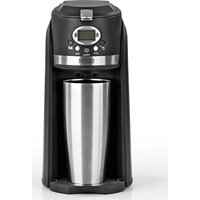
Grind Brew Go - Coffee machine BEEM - Free user manual and instructions
Find the device manual for free Grind Brew Go BEEM in PDF.


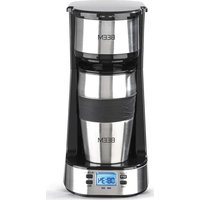
| Product type | Coffee machine with grinder |
| Brand | BEEM |
| Model | Grind Brew Go |
| Reference | 08769 |
| Model number | CM-501E |
| Power supply voltage | 220-240 V ~ 50-60 Hz |
| Power | 700-800 W |
| Water tank capacity | 300-400 ml |
| Thermal mug capacity | Max. 400 ml |
| Usable coffee type | Beans or ground |
| Main functions | Coffee preparation, delayed programming, keep warm |
| Filter | Permanent filter included |
| Included accessories | Thermal mug, measuring spoon, filter holder with lid, drip tray |
| Cleaning of parts | Dishwasher safe (except body) |
| Maintenance | Descaling every 2 to 6 weeks recommended |
| Safety | Automatic shut-off in case of water shortage, overheat protection |
| Main material | Plastic |
| Protection class | I (grounded) |
Frequently Asked Questions - Grind Brew Go BEEM
User questions about Grind Brew Go BEEM
0 question about this device. Answer the ones you know or ask your own.
Ask a new question about this device
Download the instructions for your Coffee machine in PDF format for free! Find your manual Grind Brew Go - BEEM and take your electronic device back in hand. On this page are published all the documents necessary for the use of your device. Grind Brew Go by BEEM.
USER MANUAL Grind Brew Go BEEM
Information About Your Operating Instructions 17
Explanation of the Symbols 17
Explanation of the Signal Words 17
Intended Use 17
Safety Notices 18
Before Initial Use 21
Handling and Operation 22
Display Lighting 22
Time 22
Filling the Water Tank 22
Inserting the Filter Holder 22
Pouring In Coffee Beans or Coffee Powder 23
Preparation 23
Making Coffee with a Preset Time 24
Deactivating the Preset Time 25
Cleaning and Care 25
Descaling 25
Storage 26
Troubleshooting 26
Warranty and Limitations of Liability 27
Technical Data 28
Disposal 28
Items Supplied
- Coffee machine
- Thermal cup
• Permanent fi Iter with blade - Filter holder with lid
- Drainage grille
- Drip tray
• Coffee measuring spoon - Operating instructions
Check the items supplied for completeness and transport damage. If you find any damage to the device or the connecting cable, do not use the device (!), but contact our customer service department.
Device Overview
Key
(See fold-out page for illustrations)
Filter holder
2 Lid of the thermal cup
3 Thermal cup
4 Permanent fi Iter
5 Drainage grille
6 Drip tray
7 Coffee measuring spoon
8 Main device
9 Coffee outlet
10 Water tank
11 Locking latch
12 Lid of the water tank
Control panel
13 Display
14 Button with control lamp
15 MIN button (Setting the minutes)
16 PROG button
17 STD (Hour) button (Setting the hours)
18 📂 button with control lamp
Congratulations!
Dear Customer,
We are delighted that you have chosen this coffee machine.
If you have any questions about our device and about spare parts/accessories, contact the customer service department via our website: www.beem.de
Information About Your Operating Instructions
Before using the device for the first time, please read the operating instructions carefully and keep them for future reference. If the device is given to someone else, it should always be accompanied by these operating instructions. The manufacturer and importer do not accept any liability if the information in these operating instructions is not complied with.
Explanation of the Symbols

Danger symbols: These symbols indicate dangers of injury. Read through the associated safety notices carefully and follow them to prevent personal injury.
Beware of hot surfaces!

Supplementary information

Suitable for use with food.

Read operating instructions before use!
Explanation of the Signal Words
DANGER Warns of serious injuries and danger to life.
WARNING Warns of possible serious injuries and danger to life.
CAUTION Warns of slight to moderate injuries.
NOTICE Warns of damage to property.
Intended Use
• This device is only intended to be used to make coffee using coffee powder or coffee beans.
- The device is for personal use only and is not intended for commercial or domestic-like applications, e.g. in hotels, bed and breakfasts, offices, staff kitchens or similar places.
- The device should only be used as described in the operating instructions. Any other use is deemed to be improper.
Safety Notices

Warning: Read all safety notices, instructions, illustrations and technical data provided with this device. Failure to follow the safety notices and instructions may result in electric shock, fire and / or injuries.
- This device may be used by children aged 8 and above and by people with reduced physical, sensory or mental abilities or a lack of experience and/or knowledge if they are supervised or have received instruction on how to use the device safely and have understood the dangers resulting from failure to comply with the relevant safety precautions.
• Children must not play with the device.
• Cleaning and user maintenance must not be carried out by children, unless they are older than 8 years of age and are supervised. - Children younger than 8 years of age and animals must be kept away from the device and the connecting cable.

CAUTION: Hot surfaces!
The device and the accessories are very hot during and shortly after use. Only touch the buttons while the device is in operation. Allow the device to cool down completely before it is cleaned.
- Never exceed the maximum fill level (approx. 400 ml). If the water tank is overfilled, the water tank or the to-go cup could overflow.
- The device is not designed to be operated with an external timer or a separate remote control system.
- Never immerse the device and the connecting cable in water or other liquids and ensure that they cannot fall into water or become wet.
-
The device must always be disconnected from the mains when it is left unattended and before assembling, disassembling, filling or emptying the water tank or cleaning it.
-
In the interest of your own safety, inspect the device and the connecting cable for damage each time before you use it. Use the device only if it is in working order.
- Do not make any modifications to the device. Do not replace the connecting cable yourself. If the device or the connecting cable of the device is damaged, it must be replaced by the manufacturer, customer service department or a specialist workshop in order to avoid any hazards.
- It is essential to follow the instructions in the "Cleaning and Care" chapter.

DANGER – Risk of Electric Shock
- Use the device only in closed rooms.
- Do not use the device in rooms with high humidity.
- Should the device fall into water, switch off the power supply immediately. Do not attempt to pull it out of the water while it is still connected to the mains power!
- Never touch the device and the connecting cable with wet hands when these components are connected to the mains power.
- Make sure that the steam which emerges is not aimed directly at electrical devices and equipment containing electrical components.

WARNING – Danger of Injury
- Danger of suffocation! Keep children and animals away from the packaging material.
- Keep items of clothing such as scarves, shawls, jewellery, ties and long hair away from the coffee bean compartment and the grinder shaft.
- Do not reach into the coffee bean compartment and the grinder shaft and do not insert any objects when the device is in operation!
Danger of scalding from heat, hot steam or condensation!
- Avoid coming into contact with the rising steam. Do not open the water tank lid during the brewing process.
- Be careful when removing the filter insert and the permanent filter after operating the device. There may still be hot water remaining in the filter insert and in the permanent filter! Always allow all parts to cool down first before they are removed / cleaned.
- Never pour water into the water tank when the device is switched on or during the brewing process. Allow the device to cool down before filling it again.
- Do not move the device during the brewing process.
- Make sure that the connecting cable does not represent a tripping hazard. The connecting cable may not hang down from the surface on which the device is placed in order to prevent the device from being pulled down.
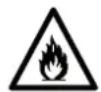
WARNING – Danger of Fire
- Do not use the device in rooms containing easily ignitable dust or poisonous and explosive fumes.
- Do not operate the device in the vicinity of combustible material. Do not place any combustible materials (e.g. cardboard, paper, wood or plastic) in or on the device.
- Do not cover the device during operation.
NOTICE – Risk of Damage to Material and Property
- Only connect the device to a plug socket with safety contacts that is properly installed and matches the technical data of the device. The plug socket must also be readily accessible after connection so that the connection to the mains can quickly be isolated.
- Lay the mains cable in such a way that it does not become squashed or bent and does not come into contact with hot surfaces (also applies to the hot surfaces of the device!).
- The device should only be used if it has been correctly assembled! Before each use, check whether the filter holder and the permanent filter are inserted correctly, the water tank is filled correctly and the lids are closed correctly!
- Switch off the device and pull the mains plug out of the plug socket if an error occurs during operation, when there is a power cut or before a thunderstorm.
- Never pull or carry the device by the connecting cable. When you pull it out of the socket, always pull on the mains plug and never the mains cable!
- Protect the device from other heat sources, naked flames, sub-zero temperatures, persistent moisture, wet conditions and impacts.
- Use only original spare parts from the manufacturer in order to guarantee that there is no interference that may prevent the product from working and to avoid possible damage.
Before Initial Use
PLEASE NOTE!
- Always set up the device with a clear space at the sides (at least 20 cm) and clear space above it (at least 30 cm) on a flat, solid and heat-resistant surface that is resistant to splashing.
- Do not place the device below kitchen wall units or similar cupboards. The rising steam could cause damage to them!
- The surfaces of furniture may possibly contain elements which can attack and soften the feet of the device. If necessary, place a suitable pad below the feet.
- There may still be some production residues on the device. To avoid harmful effects to your health, clean the device before you first use it (see the "Cleaning and Care" chapter).
I. Remove all packaging materials and any possible protective films used for protection during transportation. Never remove the rating plate and any possible warnings.
2. Wipe the device with a clean, damp cloth. Clean the permanent filter (4), the filter holder (1) and the thermal cup (3) with mild detergent and warm water or in the dishwasher.
3. Place the device in a suitable location, following the safety notices and the notices provided at the beginning of this chapter.
4. Fully unwind the connecting cable and insert the mains plug into a properly installed socket that is easily accessible.
5. Before you enjoy your first coffee, we recommend that you carry out a trial run to remove any possible production residues in the water system. To do this, follow the instructions in the "Preparation" chapter.

When the device is first used, production-related additives (e.g. grease) may cause a small amount of smoke and / or an odour to be produced. This is normal and not a device defect.
-
Perform this process twice. Do not drink this coffee!
-
Clean the device and accessories (see the "Cleaning and Care" chapter).
Handling and Operation
PLEASE NOTE!
- Do not pour milk or other liquids into the water tank. Only ever use water to make coffee!
• Never overfill the permanent filter.
Display Lighting
The display lighting goes out approx. 5 minutes after the last button has been pressed, unless the device is in operation. To switch on the display lighting, press any button.
Time
As soon as the mains plug is plugged into a plug socket, the display lighting turns on and the time display 12:00 starts flashing. The clock has a 24-hour time format.
I. Set the hours by pressing the STD (Hour) button (17).
2. Set the minutes by pressing the MIN button (15).

Hold down the respective button to run through the hours / minutes quickly.
The time is saved until a new time is set or the device has been disconnected from the power supply.
Filling the Water Tank
I. Lift up the locking latch (11) and open the lid of the water tank (12) (Picture A).
2. Pour the quantity of water you want (min. 300 ml, max. 400 ml) into the water tank (10) (Picture B). Note the MAX marking.
3. Close the lid using the locking latch. This must engage in place.

All of the water in the water tank always runs through, unless the brewing process is stopped prematurely.
Inserting the Filter Holder
I. Lift up the locking latch (11) and open the lid of the water tank (12) (Picture A).
2. Insert the filter holder (I) into the device so that the outlet on the filter holder is placed in the sealing ring in the filter compartment and the lid handle fits correctly (Picture C).
3. Close the lid using the locking latch. This must engage in place.
Pouring In Coffee Beans or Coffee Powder
I. Lift up the locking latch (II) and open the lid of the water tank (I2) (Picture A).
2. Flip open the lid of the filter holder (I).
3. Take out the permanent filter (4) by the handles.
4. Fill the permanent filter with your favourite type of coffee beans or coffee powder. Note the MAX marking! We recommend three heaped coffee measuring spoonfuls of coffee powder or 25 – 30 g of coffee beans per 400 ml.
5. Insert the permanent filter back into the filter holder. Make sure that it fits correctly (Picture D).
6. Close the lid of the filter holder.
7. Close the lid using the locking latch. This must engage in place.
Preparation
PLEASE NOTE!
- Do not operate the device without water or with less water than is required to reach the 300 ml marking. If this does happen, the device switches off automatically. In this case, allow the device to cool down before water is poured in and the device is used again.
- Never operate the device without a suitable vessel placed below the coffee outlet.

During brewing condensation may form on the buttons and display due to steam rising up from the thermal cup. We recommend cleaning / care after each brewing process.
I. Fill the water tank (10) with water (see the “Handling and Operation” chapter – “Filling the Water Tank”). Note that the lid of the water tank must be closed as otherwise the brewing process cannot start.
2. Insert the filter holder (I) (see the "Handling and Operation" chapter – "Inserting the Filter Holder").
3. Use a suitable spoon to pour the quantity of coffee powder or coffee beans you want into the permanent filter (see the “Handling and Operation” chapter – “Pouring In Coffee Beans or Coffee Powder”).
4. Place the thermal cup (3), without the lid (2), under the coffee outlet (9).

Preheat the thermal cup with hot water so that your coffee does not cool down too quickly.
You can also use any other vessel as long as it can hold at least 300 ml and fits under the coffee outlet.
- Proceed as follows depending on the preparation method:
-To make coffee using coffee powder, press the 📋 button (18) to start the brewing process. The display (13) shows the symbols 📋 and ON. The control lamp in the 📋 button flashes during the brewing process. The water is transported from the water tank through the permanent filter into the thermal cup and kept warm inside it.
-To make coffee using coffee beans, press the 🎨 button (14) to start the grinding and brewing process. The display (13) shows the symbols 🎨 and ON. The control lamp in the 🔊 button flashes during the grinding and brewing process. The coffee is ground and the water is transported from the water tank through the permanent filter into the thermal cup and kept warm inside it.

If the lid of the water tank is opened during use, the grinding process and / or brewing process is stopped immediately. In this case, close the lid of the water tank again. The grinding process and / or brewing process continues.
- Once the brewing process has finished, the two symbols go out on the display and the corresponding control lamp is lit constantly. The device automatically switches to stand-by mode after around two minutes. The two control lamps will go out.

If the brewing process is to be aborted prematurely, press the corresponding button (14 or 18) again.
- Remove the thermal cup from the drainage grille (5). Place the lid (2) on the thermal cup and turn it clockwise to secure it in place. Press the catch on the lid to open or close the drink opening.
Making Coffee with a Preset Time
I. Prepare the coffee machine. To do this, follow points 1 – 4 of the previous section.
2. Press the PROG button (16). The display (13) shows the timer time set most recently (in the presetting 12:00) and the symbol PROGRAM.
3. Use the STD (Hour) button (17) and MIN button (15) to set the start time you want (see the "Handling and Operation" chapter – "Time").
4. Depending on the type of preparation, press the button ⏻ (18) or ⏻ (14). The preset time is activated, on the display the PROGRAM symbol goes out and the AUTO symbol appears. In addition, the control lamp for the selected type of preparation is lit up constantly.
Once the preset time is reached, the device switches on automatically. On the display the AUTO symbol goes out and the 🎨 and ON symbols appear. The corresponding control lamp flashes during the grinding and / or brewing process.
Deactivating the Preset Time
To deactivate the preset time which is set, press the button PROG (16), the button ⚫ (18) or ⏻ (14). The AUTO symbol goes out on the display. The programming is deactivated and both control lamps are lit up constantly again. However, the preset time is saved until a new time is programmed in or the device has been disconnected from the power supply.
The previously set time can be reactivated by pressing the PROG button.
Cleaning and Care
PLEASE NOTE!
- Do not use any toxic, corrosive or abrasive cleaning agents or scouring sponges to clean the device. These may damage the surface.
I. Clean the permanent filter (4), the filter holder (1) and the thermal cup (3) as well as its lid (2) after every use with mild detergent and warm water or in the dishwasher:

Always clean the lid of the thermal cup with the valve open, otherwise water may collect in the lid. If this should happen, thoroughly rinse through the lid again with the valve open and allow it to dry overnight with the valve open.
- Wipe the housing out and down with a damp cloth. If necessary, use a little mild detergent to remove more intense soiling.
- Check the connecting cable regularly for any damage.
Descaling
Limescale deposits have an adverse effect not only on the quality of the coffee, but they also cause power losses and shorten the lifespan of the device. The thicker a limescale layer is, the more difficult it is to remove.
We therefore recommend regularly removing limescale deposits with a descaling agent in accordance with the water quality in your area and how often the device is used (approx. every 2 – 6 weeks).
The first indications that descaling is required are a large amount of steam being produced and slower brewing of the coffee.
For descaling we recommend the BEEM premium descaler concentrate. The efficient, food-safe and environmentally friendly BEEM premium descaler concentrate is available from selected specialist stockists, via our website www.beem.de or from our customer service department on request.
Descaling with the BEEM Premium Descaler Concentrate
I. Fill the water tank (10) up to the MAX marking (approx. 400 ml) with a concentrate/water solution of no more than 1:20 (one part concentrate to 20 parts water) (see the “Handling and Operation” chapter – “Filling the Water Tank”).
2. Place a suitable vessel under the coffee outlet (9).
- Press the 📋 button (18) to start the descaling process. Allow the descaling solution to run out through the coffee outlet.
- To rinse the device, allow two tankfuls (approx. 400 ml each) of clear water to run through it. The device is now descaled and ready to be used again.
Storage
Disconnect the device from the mains power when it is not going to be used for a prolonged period. Clean the device again if necessary (see the “Cleaning and Care” chapter) and let it dry completely.
Store the device and all accessories in a dry, clean, frost-free place that is protected from direct sunlight and cannot be accessed by children or animals.
Troubleshooting
If the device does not work properly, check whether you are able to rectify a problem yourself. If the problem cannot be solved with the steps that are listed, contact the customer service department.

Do not attempt to repair an electrical device yourself!
| Problem Possible cause Fix | ||
| Nothing is shown on the display (13). | The mains plug is not inserted correctly in the plug socket. | Insert the mains plug. |
| The plug socket is defective.There is no mains voltage. | Try another plug socket.Check the fuse of the mains connection. | |
| The fuse in the fuse box is triggered. | Too many devices connected to the same circuit. | Reduce the number of devices in the circuit. |
| Water runs out of the device. | There is too much water in the water tank (10). | Do not overfi ll the water tank! |
| The coffee runs very slowly out of the coffee outlet (9). | The coffee outlet is blocked. Clean | the coffee outlet. |
| The device is furred up. | Descale the device (see the "Cleaning and Care" chapter – “Descaling”). | |
| The coffee does not taste very good. | There is not enough coffee powder in the permanent filter (4). | Pour the quantity of coffee required into the permanent filter (see the “Preparation” chapter). |
| The device needs to be cleaned. | Clean the device (see the "Cleaning and Care" chapter). | |
| The coffee/water mixture is not ideal. | Adjust the mixture to your own individual taste. | |
| The water quality is not good. | Check the water quality and filter the water if necessary. | |
| The device switches off during the brewing process. | There is no longer any water in the water tank. | Pour water into the water tank (see the “Handling and Operation” chapter – “Filling the WaterTank”). |
| A large amount of steam is produced in the brewing process. | The device is furred up. | Descale the device (see the "Cleaning and Care" chapter – “Descaling”). |
| During use, an unpleasant smell is detected. | The device is being used for the first time. | A smell often develops when new devices are first used. The smell should disappear once the device has been used several times. |
| The device has previously been descaled. | Rinse out the device with clear water. | |
| The device does not start the brewing process at the set timer time. | The power supply has been cut in between times. | As soon as the power supply is cut, all settings (time, timer) are cancelled. |
Warranty and Limitations of Liability
The warranty excludes any defects caused by improper use, calcification, damage or repair attempts. The same applies to normal wear and tear.
We do not accept any liability for damage or consequential damage resulting from:
- Failure to follow the operating instructions
• Non-designated use - Improper or unsuitable handling
• Repairs which are not carried out properly - Unauthorised modifications
• Use of outside parts or spare parts
- Use of unsuitable additional parts or accessories

Keep the original packaging during the warranty period of the product so that the product can be properly repacked if it needs to be returned. The warranty claim will lapse if any damage is caused during transport.
Technical Data
Article number: 08769
Model number: CM-501E
Voltage supply: 220 – 240 V \~ 50-60 Hz
Power: 700 – 800 W
Protection class:
Capacity
- Water tank: 300 - 400 ml
- Thermal cup: max. 400 ml
ID of operating instructions: Z 08769 M BE V3 0120 uh


Disposal

Dispose of the packaging material in an environmentally friendly manner so that it can be recycled.
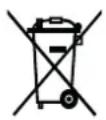
This device is governed by the European Directive 2012/19/EU on waste electrical and electronic equipment (WEEE). Do not dispose of this device as normal domestic waste, but rather in an environmentally friendly manner via an officially approved waste disposal company.
All rights reserved..
Composition 30
- Items Supplied
- Device Overview
- Key
- Control panel
- Congratulations!
- Information About Your Operating Instructions
- Explanation of the Symbols
- Explanation of the Signal Words
- Intended Use
- Safety Notices
- CAUTION: Hot surfaces!
- DANGER – Risk of Electric Shock
- WARNING – Danger of Injury
- Danger of scalding from heat, hot steam or condensation!
- WARNING – Danger of Fire
- NOTICE – Risk of Damage to Material and Property
- Before Initial Use
- PLEASE NOTE!
- Handling and Operation
- Display Lighting
- Time
- Filling the Water Tank
- Inserting the Filter Holder
- Pouring In Coffee Beans or Coffee Powder
- Preparation
- Making Coffee with a Preset Time
- Deactivating the Preset Time
- Cleaning and Care
- Descaling
- Descaling with the BEEM Premium Descaler Concentrate
- Storage
- Troubleshooting
- Warranty and Limitations of Liability
- Technical Data
- Disposal
- Composition 30
Brand : BEEM
Model : Grind Brew Go
Category : Coffee machine