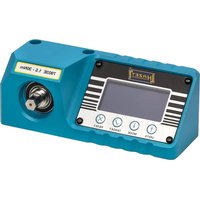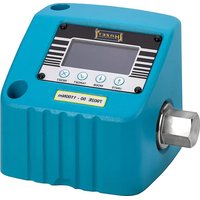
7902E - Torque meter Hazet - Free user manual and instructions
Find the device manual for free 7902E Hazet in PDF.


| Product type | Electronic torque control device |
| Brand | Hazet |
| Model | 7902E |
| Torque range | 50 - 1100 Nm |
| Accuracy | ±1% of measured value (according to calibration certificate) |
| Display resolution | 4 digits |
| Units of measurement | Nm, dNm, cNm, kgf·m, kgf·cm, gf·m, lbf·ft, lbf·in, ft·lb, in·lb, ozf·in, in·oz |
| Measurement modes | Track (continuous), Clic (first peak), Dial (final peak) |
| Power supply | AC adapter 90-264 V AC, output 5 V DC / 1 A (USB) |
| Power consumption | 0.5 W max |
| Display | LCD screen 128 x 64 pixels, RGB backlight |
| Interface | USB port (power and communication) |
| Operating temperature | 0 °C to +50 °C |
| Storage temperature | -20 °C to +70 °C |
| Max humidity | 85% RH at 30 °C |
| Protection rating | IP40 (indoor, light industrial environment) |
| Housing material | Aluminum with powder coating, stainless steel shaft |
| Cleaning | Dry cloth only, avoid liquids and chemicals |
| Maintenance | Calibration recommended after 5000 cycles or 1 year, repair by Hazet specialist |
| Safety | Do not exceed rated torque, use only with manual tools, read manual |
| Included accessories | AC adapter with interchangeable plugs, USB cable, transport case |
Frequently Asked Questions - 7902E Hazet
User questions about 7902E Hazet
0 question about this device. Answer the ones you know or ask your own.
Ask a new question about this device
Download the instructions for your Torque meter in PDF format for free! Find your manual 7902E - Hazet and take your electronic device back in hand. On this page are published all the documents necessary for the use of your device. 7902E by Hazet.
USER MANUAL 7902E Hazet
Operating instructions
Torque tester
7901 E
7902 E
7903 E
Mode d'emploi
natural_image
Blue industrial electronic device with digital display and control buttons (no visible text or symbols)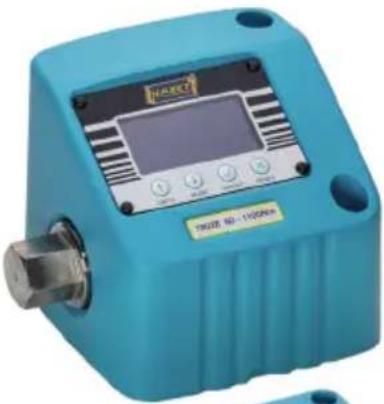
natural_image
Blue industrial sensor device with digital display and control buttons (no visible text or symbols on body)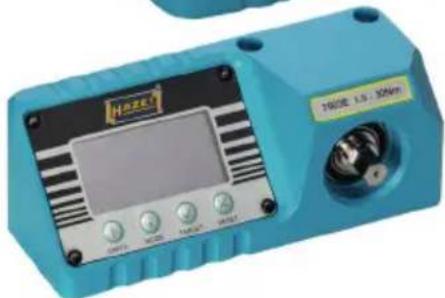
natural_image
Blue handheld electronic device with display and control buttons (no visible text or symbols)| HAZET No. | 7903 E 7901 | E 7902 E | |
| Drehmomentbereich / Torque range / Plage de couple / Rango de par de apriete / Campo di coppia / Amplitude do binário / Momentområde / Momentområde / Momenttialue / Vridmomentintervall | 1.5 – 30Nm 10 | – 350Nm 50 – 1100Nm | |
 |  |  |  |

Inhaltsverzeichnis
① General information / safety instructions 19....21
② Operating instructions 22 27
Measurement screen 22 22
Units menu 23 23
Click menu 23 23
Target menu 24 24
Version screen / design 24 24
Configuration menu 25 25
Zero setting 25 25
Active from setting 26 26
Setpoint display 26 26
Use of the device 27 27
USB port 27 27
③ Technical data 28 28
7903E (1.5 - 30Nm)
7901E (10 - 350Nm)
7902E (50 - 1100Nm)
④ Maintenance / calibration 29 30
Repair 29 29
Cleaning / storage 29 29
Disposal 30 30
Hotline / contact 30 30

Sommaire
③ Informations techniques 40....40
7903E (1,5 - 30 Nm)
7901E (10 - 350Nm)
7902E (50 - 1100Nm)
Deponering 102.... 102
Hotline / Kontakt 102 102

Sisällysluettelo
① For your information

1. General information
-
Find a suitable surface and a suitable position for installing the tool.
-
Drill two mounting holes for the torque testers 7903E (1.5 - 30Nm):
suitable for M6 fastening elements, M6 cylinder screws, at least quality grade 8.8. Recommended tightening torque between 7.3 and 8.4 Nm. 7901E (10 - 350 Nm) / 7902E (50 - 1100 Nm): suitable for M10 fastening elements, M10 cylinder screws, at least quality grade 12.9. Recommended tightening torque between 35 and 40 Nm.
- After connecting the supplied power supply, the tool is ready for use after approx. 12 seconds.

- Ensure that the mounting surface can support and hold the tool when the max. rated torque is applied.
- Only use the supplied mains adapter.
- Do not apply a higher torque than the max. rated torque of the respective torque tester.

The torque testers are only designed to test manually operated torque tools.
For intended use of the torque tester, it is essential that all safety and other information in these operating instructions is adhered to. This is the only way to guarantee long-term, problem-free use.
For this reason, always keep these operating instructions together with your torque tester.

Follow all safety, warning and operating instructions for safe and problem-free operation of the tool and to prevent any immediate risks.
2. Explanation of symbols
Attention: Pay strict attention to these symbols!
READ THE OPERATING INSTRUCTIONS!

The owner is obliged to observe the operating instructions and instruct any users of the tool according to the operating instructions.
NOTE!

This symbol indicates advice that is helpful when using the tool.
WARNING!

This symbol indicates important descriptions, dangerous conditions, safety risks and safety advice.
CAUTION!

This symbol marks advice which, if disregarded, results in damage, malfunction and/or functional failure of the tool.
TO BE USED BY QUALIFIED PERSONNEL ONLY!

Special knowledge is required to operate this tool. That is why is must be used by qualified personnel only. Any handling by non-qualified people may lead to injuries to persons or damage to the tool.
Safety precaution:



- Specialist technical knowledge and, or suitable training is required for the use and repair of this tool.
- The tool was developed and manufactured according to the technical norms and standards valid at the time and is considered to be operationally reliable. Nevertheless, the tool can present a danger when it is not used as intended or in an inappropriate way by non-qualified personnel. Please make sure that any person using this tool or carrying out any maintenance work carefully reads these operating instructions and fully understands all the provided information before using the tool.
- Keep the operating instructions together with the tool at all times. If the operating instructions have been mislaid or made unusable, please contact your specialist dealer or HAZET-WERK.
- Only operate the tool if it is in good working condition. If the tool does not work properly, it must be removed from service and inspected.
- All safety, warning and operation instructions on the tool must remain legible. Any damaged labels or stickers, as well as the display cover, must be replaced immediately.
- In addition to the safety advice given in these operating instructions, the general safety regulations, accident prevention regulations and environmental protection regulations relevant to the application of this tool are to be observed and adhered to.
- All safety equipment must always be within reach and should be checked regularly.
2. Intended use
Operational reliability can only be ensured, if the tool is used as intended and in compliance with the indications given in the operating instructions. Any deviation from
the intended use and/or any misapplication of the tool is not allowed and will be considered as improper use.
Use and maintenance of the tool must always comply with relevant national or federal regulations.
Incorrect use, use whilst failing to comply with the safety instructions and overloading of the HAZET torque tester can result in incorrect readings and/or failure of the system (and therefore death, serious injury, health problems and material damage).
Never modify the tool. For safety reasons, any modification of the HAZET torque tester is strictly forbidden. Do not remove safety devices and/or housing parts.
Never operate the tool if a protective cover is missing or if not all of the safety devices are fitted and in perfect working order.
The maximum permissible torque must not be exceeded. All indications concerning threshold values, setting values and setting ranges must be observed.
Any claims against the manufacturer and/or its authorised agents because of damage caused by improper use of the tool are void. Any modification of the tool and/or improper use will result in immediate exclusion from warranty and liability. Any personal injury or material losses caused by improper use of the tool are the sole responsibility of the owner.
3. Dangers that may arise from using the tool


Before each use, check the torque tester for full functionality. Do not use the tool if its functional efficiency (according
to the test results) cannot be ensured or if damage is detected. If it is determined that the tool is not in good working order but the tool is used despite this, there is a danger of serious damage to body, health and property.
- Electronic torque testers are calibrated measuring instruments and must be handled with care. Avoid any mechanical, chemical and thermal exposure that goes beyond the stresses of normal use.
- The electronic torque tester must not be exposed to rain, moisture or liquids. Do not allow any foreign bodies to penetrate it and always ensure that unused connectors are covered. Extreme climatic conditions such as cold, heat and humidity can have an effect on measurement values/results. Failure to comply with these instructions can result in damage to or destruction of the torque tester.
- Only transport the torque tester in its case and ensure that it does not fall during transportation. Avoid any mechanical shock effects such as hard impacts or falls. Failure to comply can damage electronic components of the tool.
Measurement screen
Operating mode
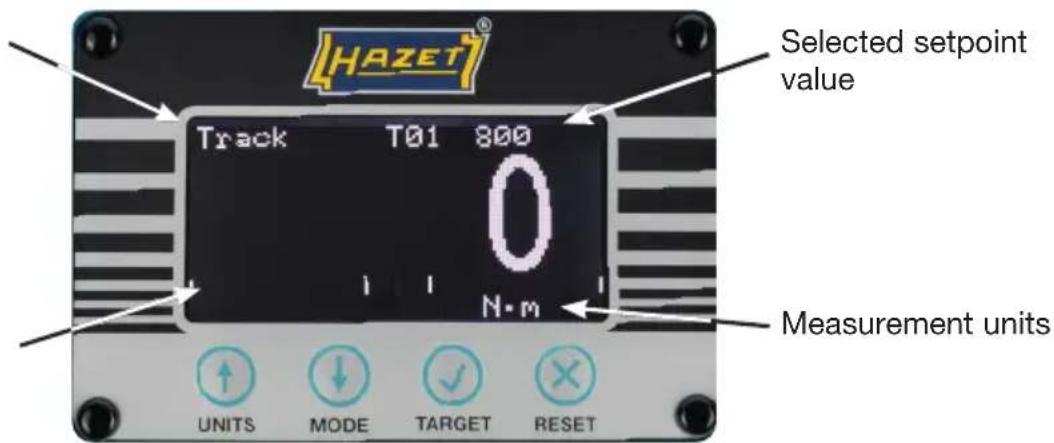
Setpoint value display line

Short press changes the units of measurement
(Nm, lbf.ft and lbf.in, etc.)
Long press
Use the UNITS MENU to activate or deactivate units (Press and hold)

Short press changes the selected setpoint value
(T01 XXX.X, T02 XXX.X, etc.)
The units are automatically changed to the setpoint units.
NOTE:
T-- ---- means that no setpoint value is set
Long press
Use the TARGET MENU to edit setpoint values (Press and hold)
Short press changes the operating mode
(Track, click and dial) ^*
Short press resets a detected peak value
In track mode (and click mode if set to manual reset)
Zeroes the measured value
In track mode with a measured value < 4% of the max. value.
In click and dial mode with a measured value < 1%.
Long press
Use the CLICK MENU to change the click mode settings
(Press and hold)
* Track = Tracking measurement / display value (no value saving)
Klick = Automatic click point detection (first peak)
Dial = Peak value measurement (final peak)
② Operating instructions
Units menu
| Units menu | |
| Nm √ | lbf.ft |
| dNm × | lbf.in |
| cNm × | ft.lb |
| kgf m × | in.lb |
| kgf cm × | ozf.in |
| gf m × | in.oz |

Select units to activate or deactivate

Toggle activation or deactivation (√ or x)
Select 📄 and press to save and quit

Cancel (exit without saving changes)

NOTE:
The units that can be activated are model-specific – see technical specification.
Click menu
| Click | menu |
| Sensitivity | High |
| Reset | Autom. |
| Holding time: | 3 s |

Select menu item (e.g. sensitivity)

Confirm menu item

Modify setting (e.g. high to medium)

Confirm setting
Cancel (exit without saving changes)
Setting options
Sensitivity: High / Medium / Low
Reset: Autom. / manual
Holding time: 1 s / 2 s / 3 s
Target menu
Target menu
# 01
Unit Nm
Value 200.0
±% 03

Setting options
# (Setpoint value no.): 01 - 15
Units: Nm / lbf.ft / etc.
Value: 0 or 2 - 100 % capacity
(e.g. 7.0 - 350.0)
± % (Tolerance): 1 - 15%

Select menu item (e.g. units)

Confirm menu item

Modify setting (e.g. Nm to lbf ft)

Confirm setting
Select and press to save and quit
Cancel (exit without saving changes)

NOTE:
- When changing the setpoint, you can hold the buttons down to speed up the change
- If you change the unit, the setpoint value changes accordingly
- If you set the setpoint value to "0" it is deactivated, i.e. it cannot be selected in the measurement screen
Version screen
Design
P/N 43525
S/N 123456
S/W 1.1.0
Press and hold 📄 on the measurement screen to display the version screen
The version screen contains:
Design
P/N (part number)
S/N (serial number)
S/W (software version number)
Press RESET to return to the measurement screen
② Operating instructions
Configuration menu
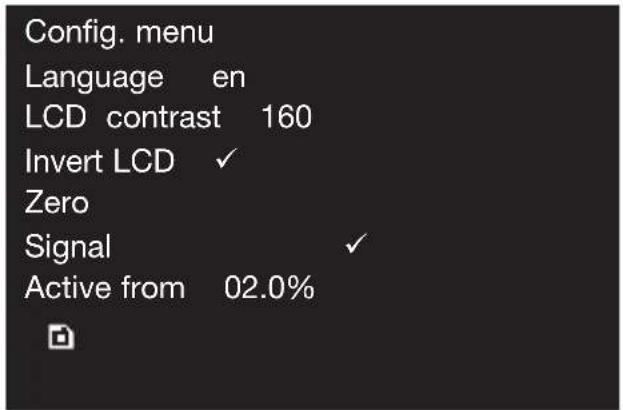
Setting options
Language: en / fr / de / it / da / es / fi / sv / no / pt
LCD contrast: 1 - 255 (standard 160)
Invert LCD: Invert (√) or do not invert (×)

Reset the stored zero value, see below.
Signal:Activate(√) or deactivate (✗)
Active from: 2.0 to 40.0 % (standard 2.0%)
Press and hold ON the measurement screen to display the version screen.
Press target to enter the configuration menu


Select menu item (e.g. language)

Confirm menu item

Modify setting (e.g. en to fr)

Confirm setting
Cancel (exit without saving changes)

Zero setting
Zeroing should only be performed if zeroing is not enabled for the torque tester in track mode. In this event, it is possible that the torque sensor will be overloaded.
If the measured value is unstable the torque tester must be repaired. It is recommended that the torque tester is re-calibrated as soon as possible after zeroing.
Ensure that no torque is applied to the device and remove all tools from the input drive when zeroing.

Active from setting
This is a percentage of the max. nominal value of the device at which the click or dial mode starts to record peak values.

Setpoint value display
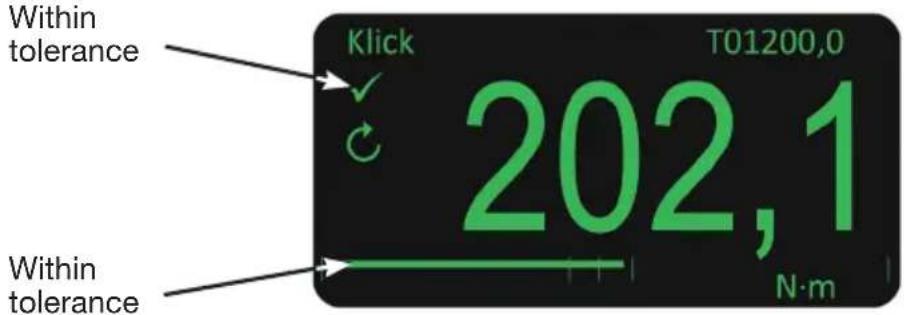
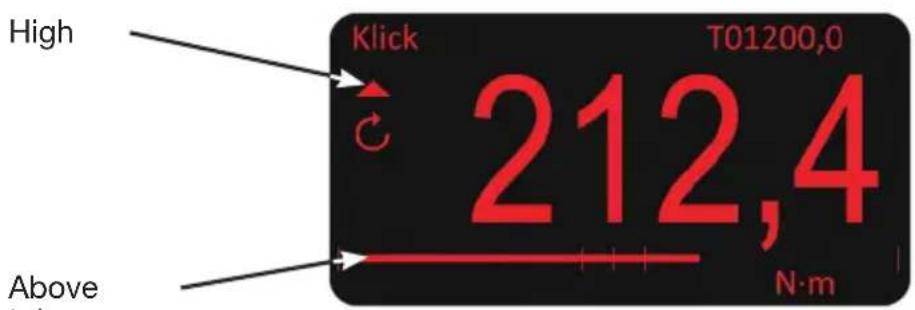
When a target value is selected, the torque tester indicates in three different ways whether the reading is too low, within tolerance or too high.
- Text colour: low = yellow; within tolerance = green; high = red
- Setpoint value symbols: low = ▼; within tolerance = √; high = ▲
- Setpoint value display line
Example
Setpoint value 1 (T01) set to 200.0 Nm ± 3 % (194.0 - 206.0 Nm); mode set to click
First measurement: 190.7 Nm (value too low)

Second measurement: 202.1 Nm (value within tolerance)
Third measurement: 212.4 Nm (value too high)

Use of the device
- Select operating mode
- Select setpoint value
- Select unit
- Place a torque screwdriver / torque wrench in or on the input drive and work in the desired direction
- Remove the torque screwdriver / torque wrench and set the display to zero (if necessary) by pressing the RESET button
- Place a torque screwdriver / torque wrench in or on the input drive and work in the desired direction
USB port
The USB port provides the power supply for the torque tester. The supplied USB cable can also be used to connect the unit to a PC / laptop for transferring measured torque values.
Connect the torque tester to the PC / laptop and a virtual com port appears in the device manager. This com port should be selected and configured to match the program used to display the measured torque values.
Measured torque values are sent to the PC / laptop when the RESET button is pressed in any mode and a peak value is reset (either manually via the RESET button in dial or click mode or when the automatic reset is triggered in click mode).

NOTE: system requirement:
Windows 10 (ff.) operating system is required to connect the torque tester to a PC / laptop and the HAZET torque testing software.
TECHNICAL DATA
Display: 128 x 64 pixel RGB backlit LCD
Display refresh rate: 5 readings per second (5Hz)
Resolution: 4 digits
Zero switch-off: None
Precision: See calibration certificate
(nom. ±1% of the measured value)
Measurement units: Available units depending on the respective torque tester
| Nm | dNm | cNm | kgf·m | kgf·cm | gf·m | lbf.ft | lbf.in | ft.lb | in.lb | ozf.in | in.oz | |
| 1.5 - 30 Nm | √ | √ | √ | √ | √ | √ | √ | √ | √ | √ | √ | √ |
| 10 - 350 Nm | √ | √ | √ | √ | √ | √ | √ | √ | ||||
| 50 - 1100 Nm | √ | √ | √ | √ | √ | √ |
Hold time auto-reset: 1, 2 or 3 seconds (adjustable)
AC power adapter: 90 to 264 volts AC at 47 - 63 Hz input (world) Includes replaceable mains plug Energy efficiency level VI 5V, 1,000 mA DC USB A output plug
Power consumption: 0.5 W – maximum
Operating temperature range: 0°C to +50°C
Storage temperature range: -20^ to +70^
Max. operating humidity: 85% relative air humidity at 30^ C
Environment: IP 40, for enclosed spaces in a lightly polluted
industrial environment
Max. rotational load in operation: 120% of the nominal rotational load
Materials / design of housing: Powder-coated aluminium housing
Measuring shaft made of stainless steel
Electromagnetic compatibility: Developed in accordance with EN 61326-1.
Low Voltage Directive: Developed according to EN 61010-1.TRANSIENT
OVERVOLTAGE up to
OVERVOLTAGE CATEGORY II

NOTE: Subject to technical changes
Maintenance / calibration
An electronic torque tester should be checked and calibrated regularly. After a long period of use, new calibration or re-calibration by the factory is advisable. Electronic torque testers are measuring instruments. Measuring instruments must be tested and, if necessary, adjusted at the intervals specified by quality management using suitable measuring equipment. The time gap between test dates is dependent on the frequency of use. We recommend this after approx. 5000 operations or after one year at the latest.
HAZET has appropriate test equipment. After testing and any necessary adjustment, the HAZET torque testers will be returned to you with a calibration certificate. The torque test equipment used by HAZET is continually monitored by the German Calibration Service (DKD) and is calibrated and adjusted whenever required. This ensures that the necessary expertise is available and that the quality of HAZET tools is maintained.
We can also receive the electronic torque tester via your specialist dealer for inspection and calibration at the HAZET factory. To this end, we can provide you with a test equipment monitoring service for your torque tester. Please refer to the HAZET tool catalogue or visit www.hazet.de


Repairs:
Any service or repair work must be carried out by qualified personnel only. To arrange this, please get in touch with HAZET Service.
Only genuine spare parts may be used. Unsuitable or defective spare parts may cause damage, malfunction or total failure of the device.
The use of unapproved spare parts will void all warranty, service and liability claims as well as all claims for compensation against the manufacturer or its agents, distributors and sales representatives.
The internal mechanical and electronic functional elements do not require any maintenance.

Do not remove the front cover. No internal repairs or adjustments will be required.

Cleaning / storage:
The torque tester must be cleaned and stored according to the following conditions:
- Only clean the torque tester with a dry cloth.
- Do not expose tool to liquids and/or aggressive substances.
- Prevent tool from falling.
- Keep tool in a dry and dust-free place.
- Do not store the tool outdoors.
- Protect the tool from unauthorised access.
- Storage temperature -20^ to +70^ .
• Relative air humidity max. 85% at 30°C

Disposal:
For disposal, clean the electronic torque tester in accordance with locally applicable work safety and environmental protection regulations.
Components can be recycled. Dispose of electronic components and batteries in accordance with legal regulations and environmental directives and the applicable waste regulations, e.g. at waste material collection points or recycling centres. Scrap any residual metal. Environmental protection is of fundamental importance to us here at HAZET. Reducing environmental pollution and preserving the environment are at the heart of our activities!

Hotline / contact:
This product has been developed and tested in accordance with high quality standards. If you have any questions, comments, suggestions for improvement or change requests, we would like to express our thanks to all HAZET customers for your feedback and will be glad to address your issues.
National contact (Germany):
Telephone: +49 (0) 2191 / 792 - 355
Fax: +49 (0) 2191 / 792 - 523
Email: service-center@hazet.de
International contact:
Telephone: +49 (0) 2191 / 792 - 0
Email: export@hazet.de
E-mail : service-center@hazet.de
(Track, Clic y Dial)*
Pulsación larga
(Track, Clic e Dial) ^*
LER O MANUAL DE INSTRUÇÕES!

(Track, Klick e Dial) ^*
Pressionar demoradamente
E-post: service-center@hazet.de
E-post: export@hazet.de

1. Yleisiä tietoja
± % (tolerans): 1 - 15%

Välj menypost (t. ex. enheter)

Bekräfta menypost

E- post: service-center@hazet.de