Task - Lighting LUMIE - Free user manual and instructions
Find the device manual for free Task LUMIE in PDF.


User questions about Task LUMIE
0 question about this device. Answer the ones you know or ask your own.
Ask a new question about this device
Download the instructions for your Lighting in PDF format for free! Find your manual Task - LUMIE and take your electronic device back in hand. On this page are published all the documents necessary for the use of your device. Task by LUMIE.
USER MANUAL Task LUMIE
text_image
task by lumie®
Safety
Read instructions for use.

If the unit is damaged, please contact Lumie before use.
Keep away from water and damp.
For indoor use only.


The unit gets warm when the light is on, so make sure that it is not covered.
Use only the mains power adaptor supplied.
Keep the mains power adaptor and cable away from heated surfaces. If either are damaged, they should be replaced with an approved Lumie product.
This appliance does not have a ON/OFF switch. To power down or reset, remove the mains power adaptor from the wall socket. You should therefore ensure the socket is easily accessible.
Only to be used by adults and children over 7 years old. Children using the light, or playing near it, should be supervised.
Caution – do not attempt to service or modify any part of the unit.

If the unit has been stored outside the recommended operating temperature range (5 °C to 35 °C), allow it to stand for at least 1 hour before applying power to avoid condensation or overheating.
The light source contained in this luminaire shall only be replaced by Lumie or an authorised Lumie distributor.
Electromagnetic compatibility
Electrostatic discharge may affect the working of this product. If this occurs, simply switch off for at least 10 seconds and the unit will reset.
Task uses a touch sensor to control the light. In rare situations, external conditions may trigger the touch sensor. This can occasionally cause the light to vary in intensity or turn on or off. If this happens, use the touch interface to set the light to the previous level. Task will continue to operate normally and remains safe to use.
Disposal
Do not throw out the mains power adaptor or the unit with normal domestic waste. Take them to an official recycling point to be disposed of responsibly.

WARNING!
Check with your doctor before using this product if any of the following apply:
You have a major eye problem or have had eye surgery;
You have been advised to avoid bright light or are taking medication that may cause photosensitivity;
You have been diagnosed with depression or other mood/sleep disorders. This is especially important if you are also taking medication for this, since light therapy can affect your mood.
Introduction
Task is a professional bright light therapy task lamp that closely mimics natural daylight to help optimise your mood, enhance alertness and productivity as well as support your vision.
Task's high-performance broad-spectrum LEDs are gentle on the eyes while delivering effective light therapy, so you stay focused, energised and positive. True colour rendering and clear contrast allow you to see details, text and textures as they really are, making it easier to read or work on design, craft and art projects.
Colour temperature: 5000 K Colour rendering index: 95
At maximum brightness, Task delivers 10 000 lux at 15 cm.
Please read these instructions carefully to get the most out of Task.
Out of the box
text_image
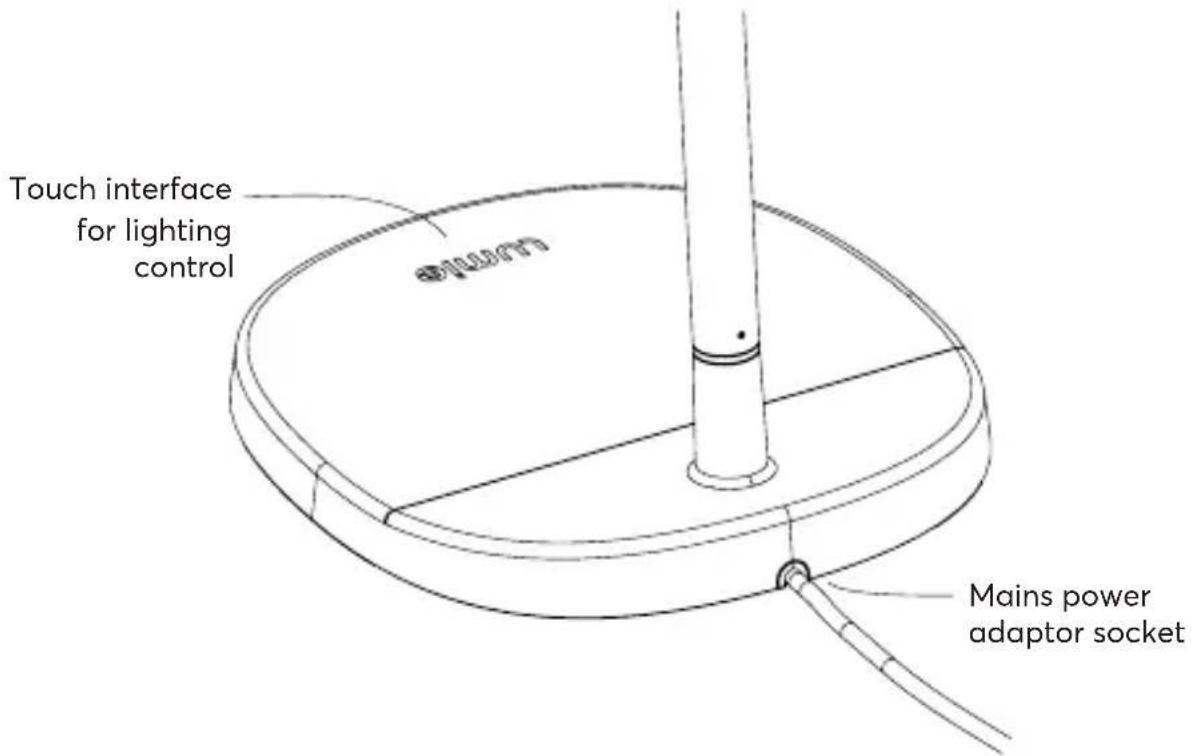
Touch interface for lighting control Mains power adaptor socket- Connect the mains power adaptor to the socket in the base of the unit.
- Position Task on a flat surface.
- Plug in at the mains.
The Lumie touch interface briefly illuminates whilst the sensor is calibrating.
Task is now ready to use.
Note: If you are using Task and the touch interface doesn't seem to be working properly, repeat the last steps and make sure you don't press the touch interface whilst the sensor is calibrating.
Lighting control
The light is controlled by the touch interface.
lumie
- Slide your finger across the touch interface.
When using the touch interface, the letters light up individually to indicate brightness.
- Slide right past the 'e' for full brightness.
- Slide left past the 'l' to turn off.
- Or lift your finger anywhere in between.
Now, the whole 'lumie' interface lights up if the light is on (at any brightness) and is off if the light is off.
Task lighting
Task is a highly adjustable task light with a small footprint for use in your office, workshop or studio. Daylight-simulating LEDs provide excellent contrast for reading and finely detailed work and can help reduce eye-strain. Viewing artwork and creative projects under natural conditions will bring out the true colours and show your designs at their best.
text_image
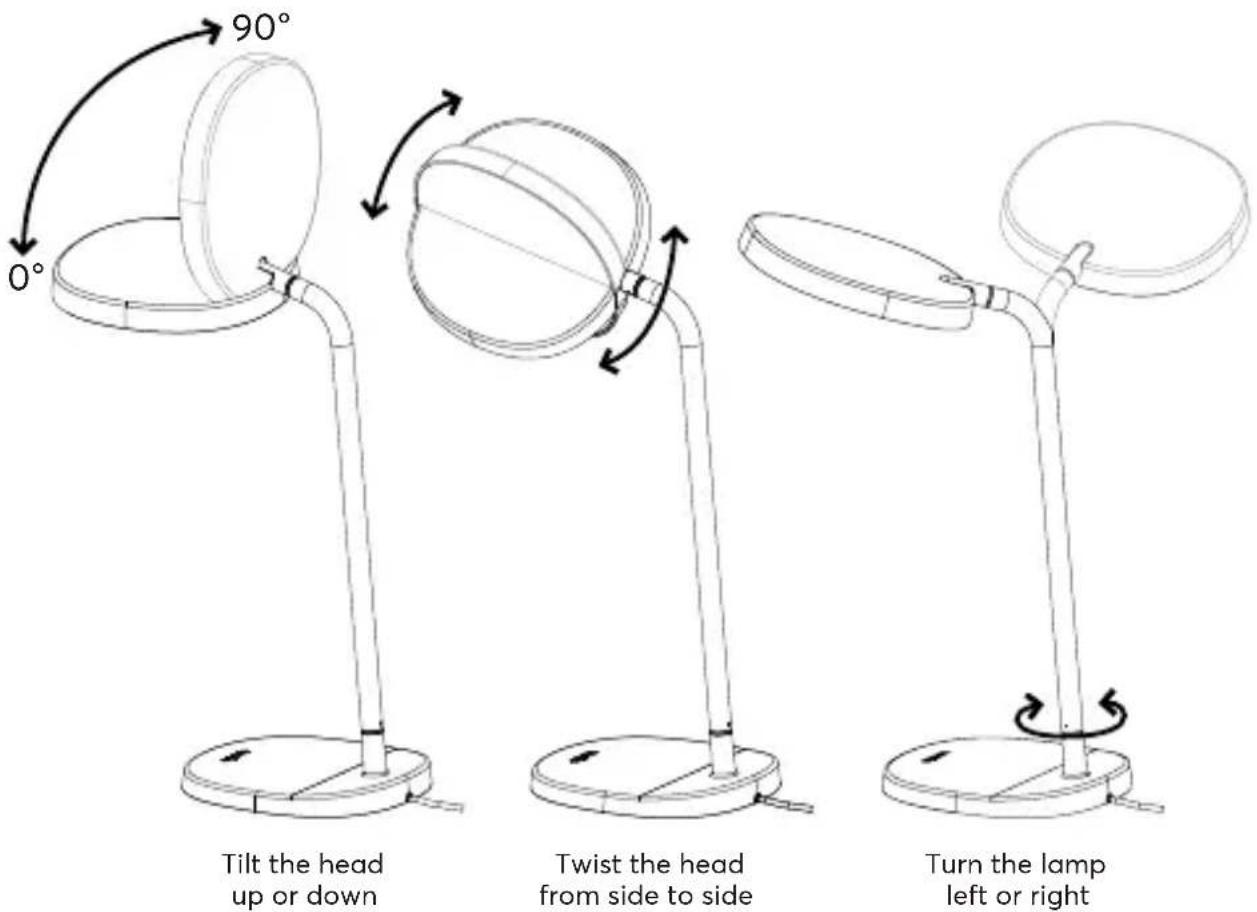
0° 90° Tilt the head up or down Twist the head from side to side Turn the lamp left or rightAngle Task towards your face for bright light therapy whilst you're getting on with something else.
Note: Do not push the head past 90 degrees or you may damage the product.
Task for bright light therapy
Sunlight is a natural mood-booster, influencing body chemistry (e.g. melatonin and serotonin levels). If you're not getting enough exposure to daylight, bright light therapy with Task is the next best thing, putting you in a better mood, boosting energy and helping you to feel more alert. It can also help relieve the symptoms of winter blues.
- Make sure the light is at maximum brightness.
- Position Task at arm's length (about 50 cm) with the light angled towards your face.

text_image
Head upright at 90 degrees Set to full brightnessAlthough you don't need to stare at it, the light must reach your eyes to have any effect. This means you
can use Task whilst reading, working on your laptop, crafting etc.
How often?
For wellbeing support
Your body's natural rhythms, which influence mood, sleep and general wellbeing, are governed by how much light (natural and artificial) you're exposed to.
Task mimics the colour and intensity of natural light, so if you're indoors, a bright light therapy session works quickly to improve mood, energy, focus and performance. Used daily, Task can encourage a more regular sleep/wake pattern, making it easier to get to sleep and wake up feeling more refreshed.
For winter blues
Look out for early signs of winter blues in Sept/Oct and if you start feeling more tired, anxious or irritable, start using Task. As spring comes around, you can cut back on your bright light sessions. If symptoms return, simply use Task again for a few days.
When?
If you're using Task to help with the winter blues, bright light in the morning is most effective so try that first. For some people, early evening light exposure is beneficial.
I find it difficult to get going in the morning
Switch on Task as soon as you can. If you don't have much time in the morning, then you should aim for a top-up or full session in the afternoon.
I feel sleepy or fall asleep too early
Use Task in the late afternoon/early evening. It's best to avoid bright light too close to bedtime - within about three hours - as you may find it difficult to get to sleep.
How long?
With the light at full brightness, you're getting the maximum benefit so position Task at arm's length (approx. 50 cm) and start with 30 minutes a day (1 500 lux). You may find this is enough but if you don't notice much of an effect, increase your exposure each day until you find something that works for you.
If you're more comfortable with Task positioned further away, then less light will reach your eyes and you'll need to use it for longer.
Similarly, if you're using Task at reduced brightness, then less light will reach your eyes and you'll need to use it for longer.
There's no harm in using the light for longer than suggested. You can get your bright light therapy all in one go or use Task on-and-off throughout the day for a cumulative effect.
If you find your eyes ache slightly, try using it further away, reduce the brightness or switch off for a while.
Whether you're using Task for winter blues, or for general wellbeing, once you've found a pattern that's right for you try to use it around the same time every day.
Maintenance
Clean only with a dry or lightly moistened cloth.
Always unplug the unit first and let it cool if necessary.
Replacement mains power adaptors are available from Lumie.
LED lifetime
The LEDs in this product will typically last for many years, even with several hours use a day.
Warranty
This unit is covered under warranty against any manufacturing defect for 3 years from the date of purchase. This is in addition to your statutory rights. If you need to return the product for servicing, use the original packaging (including internal packing) if possible. Make sure the mains power adaptor is prevented from moving in transit and damaging the unit. If the unit is received damaged, through misuse or accidental damage, then we may have to charge to repair it; we will contact you first. Please contact Lumie for further advice.

Serial number (see base of unit)

Importer
Technical description
Subject to change without notice.
Lumie Task
Detachable accessory: Mains power adaptor (supplied) Rated Input: 220–240 V AC, 50 Hz, 0.8 A max. (PF > 0.9) Rated Output: 12 V == 2 A (24 W)
Operating conditions:
Temperature: 5 °C to 35 °C
Relative humidity: 15% to 93% (non-condensing)
Atmospheric pressure: 70 kPa to 106 kPa
Storage/transport conditions:
Temperature: -25 °C to +70 °C
Relative humidity: 15% to 93% (non-condensing)
Atmospheric pressure: 25 kPa to 106 kPa
This product contains a light source of energy efficiency class F.

European Declaration of Conformity

UK Conformity Assessed
Contact us
If you have any questions or problems regarding this product, or have suggestions that you feel could help us improve our products or service please email info@lumie.com.

Outside In (Cambridge) Limited, 3 The Links,
Trafalgar Way, Bar Hill, Cambridge, CB23 8UD, UK.
Lumie is a registered trademark of:
Outside In (Cambridge) Limited, incorporated in England and Wales.
Registered Number: 2647359.
VAT No:
GB 880 9837 71 (UK)
NL 826301381B01 (EU)
text_image
task iSécurité
Description technique
Outside In (Cambridge) Limited, 3 The Links, Trafalgar Way, Bar Hill, Cambridge, CB23 8UD, UK.
Outside In (Cambridge) Limited, 3 The Links, Trafalgar Way, Bar Hill, Cambridge, CB23 8UD, UK.
Outside In (Cambridge) Limited, 3 The Links, Trafalgar Way, Bar Hill, Cambridge, CB23 8UD, UK.
Outside In (Cambridge) Limited, 3 The Links,
Trafalgar Way, Bar Hill, Cambridge, CB23 8UD, UK.
Outside In (Cambridge) Limited, 3 The Links,
Trafalgar Way, Bar Hill, Cambridge, CB23 8UD, UK.
Outside In (Cambridge) Limited, 3 The Links, Trafalgar Way, Bar Hill, Cambridge, CB23 8UD, UK.
Outside In (Cambridge) Limited, 3 The Links,
Trafalgar Way, Bar Hill, Cambridge, CB23 8UD, UK.
Outside In (Cambridge) Limited, 3 The Links,
Trafalgar Way, Bar Hill, Cambridge, CB23 8UD, UK.
Lumie er et registret varemerke for:
Outside In (Cambridge) Limited, 3 The Links,
Trafalgar Way, Bar Hill, Cambridge, CB23 8UD, UK.
Outside In (Cambridge) Limited, 3 The Links, Trafalgar Way, Bar Hill, Cambridge, CB23 8UD, UK.
Outside In (Cambridge) Ltd.
3 The Links,
Trafalgar Way,
Bar Hill,
Cambridge,
CB23 8UD, UK
www.lumie.com
LUMIE is a registered trademark of Outside In (Cambridge) Limited.
The TASK luminaire is a registered design of Outside In (Cambridge) Limited.
© Lumie 2023
03/07/2023
1-780-000004-01