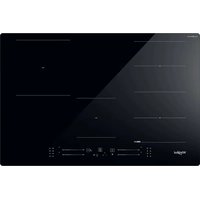
WF S7977 CPNE - Grill plate WHIRLPOOL - Free user manual and instructions
Find the device manual for free WF S7977 CPNE WHIRLPOOL in PDF.


| Product type | Grill plate |
| Brand | Whirlpool |
| Model | WF S7977 CPNE |
| Dimensions (W x D x H) | 77 cm x 51 cm x 5.5 cm (estimated) |
| Net weight | Approximately 12 kg |
| Power supply | 220-240 V / 50-60 Hz |
| Maximum total power | 7.2 kW (adjustable from 2.5 kW to 7.2 kW) |
| Number of cooking zones | 4 zones (2 of which can be combined in FlexiSide) |
| Technology | Induction |
| Surface material | Ceramic glass with CleanProtect coating |
| Special functions | FlexiSide, 6th Sense, Chef Control, Booster, Keep Warm, Melt, Simmer, Boil |
| Connectivity | Wi-Fi b/g/n 2.4 GHz, remote control via 6th Sense Live app |
| Control type | Touch sliders with cursors |
| Timer | Yes, programmable for each zone |
| Child lock | Yes, by long press on OK/Lock |
| Residual heat indicator | Yes ('H' display) |
| Pan detection | Yes, with symbol if absent or unsuitable |
| Automatic shutdown | Yes, in case of overheating or absence of pan |
| Safety | Lock, automatic shutdown, pan detection, residual heat indicator |
| Cleaning and maintenance | Clean with water and non-abrasive sponge; avoid steam cleaner; scraper for stubborn residues |
| Repairability index | 8.0/10 (estimated) |
| Country of manufacture | Not specified |
Frequently Asked Questions - WF S7977 CPNE WHIRLPOOL
User questions about WF S7977 CPNE WHIRLPOOL
0 question about this device. Answer the ones you know or ask your own.
Ask a new question about this device
Download the instructions for your Grill plate in PDF format for free! Find your manual WF S7977 CPNE - WHIRLPOOL and take your electronic device back in hand. On this page are published all the documents necessary for the use of your device. WF S7977 CPNE by WHIRLPOOL.
USER MANUAL WF S7977 CPNE WHIRLPOOL
Download the complete instruction manual on http://docs.whirlpool.eu or call the phone number shown on the warranty booklet.
Before using the appliance, read these safety instructions. Keep them nearby for future reference. These instructions and the appliance itself provide important safety warnings to be observed at all times. The manufacturer declines any liability for failure to observe these safety instructions, for inappropriate use of the appliance or incorrect setting of controls.
WARNING: If the hob surface is cracked, do not use the appliance - risk of electric shock.
WARNING: Danger of fire: Do not store items on the cooking surfaces.
CAUTION: The cooking process has to be supervised. A short cooking process has to be supervised continuously.
WARNING: Unattended cooking on a hob with fat or oil can be dangerous - risk of fire. NEVER try to extinguish a fire with water: instead, switch off the appliance and then cover flame e.g. with a lid or a fire blanket.
Do not use the hob as a work surface or support. Keep clothes or other flammable materials away from the appliance, until all the components have cooled down completely - risk of fire.
Metallic objects such as knives, forks, spoons and lids should not be placed on the hob surface since they can get hot.
Very young children (0-3 years) should be kept away from the appliance. Young children (3-8 years) should be kept away from the appliance unless continuously supervised. Children from 8 years old and above and persons with reduced physical, sensory or mental capabilities or lack of experience and knowledge can use this appliance only if they are supervised or have been given instructions on safe use and understand the hazards involved. Children must not play with the appliance. Cleaning and user maintenance must not be carried out by children without supervision.
After use, switch off the hob element by its control and do not rely on the pan detector.
WARNING: The appliance and its accessible parts become hot during use. Care should be taken to avoid touching heating elements. Children less than 8 years of age shall be kept away unless continuously supervised.
PERMITTED USE
CAUTION: the appliance is not intended to be operated by means of an external switching device, such as a timer, or separate remote controlled system.
IMPORTANT TO BE READ AND OBSERVED
This appliance is intended to be used in household and similar applications such as: staff kitchen areas in shops, offices and other working environments; farm houses; by clients in hotels, motels, bed & breakfast and other residential environments.
No other use is permitted (e.g. heating rooms).
This appliance is not for professional use. Do not use the appliance outdoors.
INSTALLATION
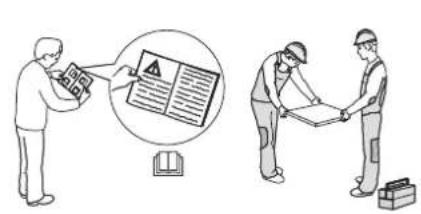
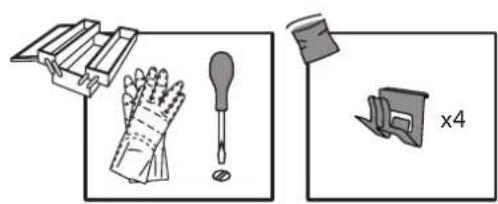
The appliance must be handled and installed by two or more persons - risk of injury. Use protective gloves to unpack and install - risk of cuts.
Installation, including water supply (if any), electrical connections and repairs must be carried out by a qualified technician. Do not repair or replace any part of the appliance unless specifically stated in the user manual. Keep children away from the installation site. After unpacking the appliance, make sure that it has not been damaged during transport. In the event of problems, contact the dealer or your nearest After-sales Service. Once installed, packaging waste (plastic, styrofoam parts etc.) must be stored out of reach of children - risk of suffocation. The appliance must be disconnected from the power supply before any installation operation - risk of electric shock. During installation, make sure the appliance does not damage the power cable - risk of fire or electric shock. Only activate the appliance when the installation has been completed.
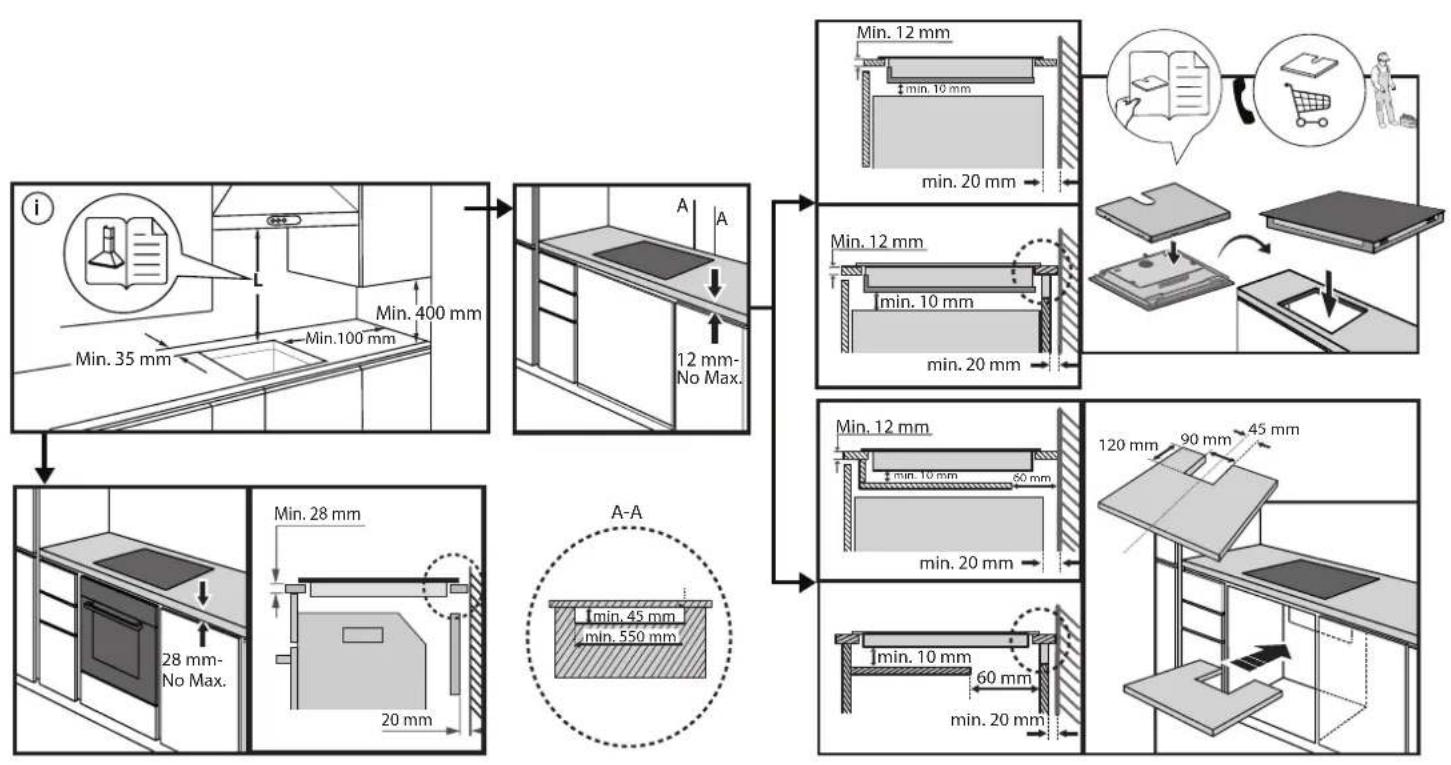
Carry out all cabinet cutting operations before fitting the appliance and remove all wood chips and sawdust.
If the appliance is not installed above an oven, a separator panel (not included) must be installed in the compartment under the appliance.
ELECTRICALWARNINGS
It must be possible to disconnect the appliance from the power supply by unplugging it if plug is accessible, or by a multi-pole switch installed upstream of the socket in accordance with the wiring rules and the appliance must be earthed in conformity with national electrical safety standards.
Do not use extension leads, multiple sockets or adapters. The electrical components must not be accessible to the user after installation. Do not use the appliance when you are wet or barefoot. Do not operate this appliance if it has a damaged power cable or plug, if it is not working properly, or if it has been damaged or dropped.
Installation using a power cable plug is not allowed unless the product is already equipped with the one provided by the Manufacturer.
If the supply cord is damaged, it must be replaced with an identical one by the manufacturer, its service agent or similarly qualified persons in order to avoid a hazard - risk of electric shock.
CLEANING AND MAINTENANCE
WARNING: Ensure that the appliance is switched off and disconnected from the power supply before performing any maintenance operation; never use steam cleaning equipment - risk of electric shock.
Do not use abrasive or corrosive products, chlorine-based cleaners or pan scourers.
DISPOSAL OF PACKAGING MATERIALS
The packaging material is 100% recyclable and is marked with the recycle symbol
The various parts of the packaging must therefore be disposed of responsibly and in full compliance with local authority regulations governing waste disposal.
DISPOSAL OF HOUSEHOLD APPLIANCES
This appliance is manufactured with recyclable or reusable materials. Dispos of it in accordance with local waste disposal regulations. For further information on the treatment, recovery and recycling of household electrical appliances, contact your local authority, the collection service for household waste or the store where you purchased the appliance. This appliance is marked in compliance with European Directive 2012/19/EU, Waste Electrical and Electronic Equipment (WEEE) and with the Waste Electrical and Electronic Equipment regulations 2013 (as amended).
By ensuring this product is disposed of correctly, you will help prevent negative consequences for the environment and human health.
The symbol on the product or on the accompanying documentation indicates that it should not be treated as domestic waste but must be taken to an appropriate collection center for the recycling of electrical and electronic equipment.
ENERGY SAVING TIPS
Make the most of your hot plate's residual heat by switching it off a few minutes before you finish cooking.
The base of your pot or pan should cover the hot plate completely; a container that is smaller than the hot plate will cause energy to be wasted. Cover your pots and pans with tight-fitting lids while cooking and use as little water as possible. Cooking with the lid off will greatly increase energy consumption.
Use only flat-bottomed pots and pans.
DECLARATION OF CONFORMITY
This appliance meets Ecodesign requirements of European Regulation 66/2014 and The Ecodesign for Energy-Related Products and Energy Information (Amendment) (EU Exit) Regulations 2019 in compliance with the European standard EN 60350-2.
NOTE
People with a pacemaker or similar medical device should use care when standing near this induction cooktop while it is on. The electromagnetic field may affect the pacemaker or similar device. Consult your doctor, or the manufacturer of the pacemaker or similar medical device for additional information about its effects with electromagnetic fields of the induction cooktop.
The Manufacturer, Whirlpool Management EMEA S.r.l., declares that this 1100 EMEA model of household appliance with radio equipment is compliant with directive 2014/53/UE and Radio Equipment Regulations 2017.
The complete text of the declaration of conformity is present at the following website: https://docs.whirlpool.eu.
The radio equipment operates in the 2.4 GHz ISM frequency band, the maximum radio-frequency power transmitted does not exceed 20 dBm (e.i.r.p.).
This product includes certain open source software developed by third parties. The open source license usage statement is available at the following website: https://docs.whirlpool.eu.
INSTALLATION
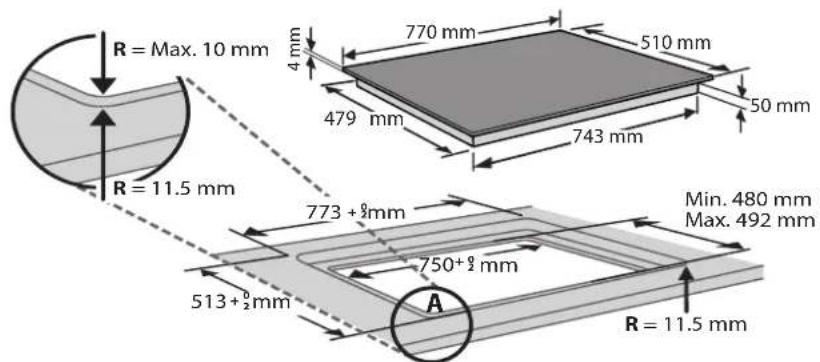
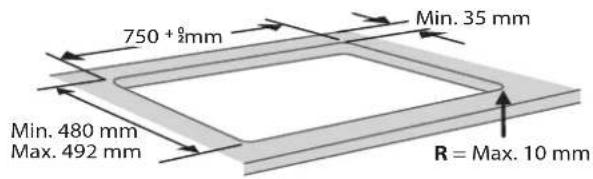
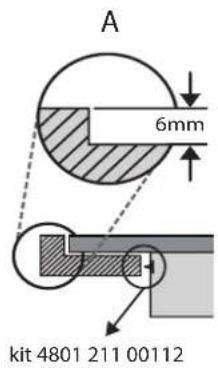
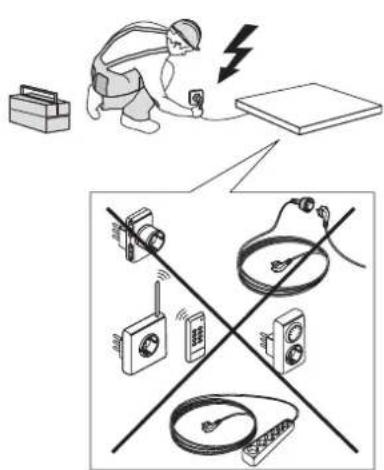
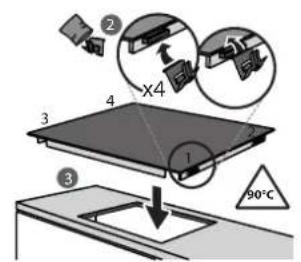
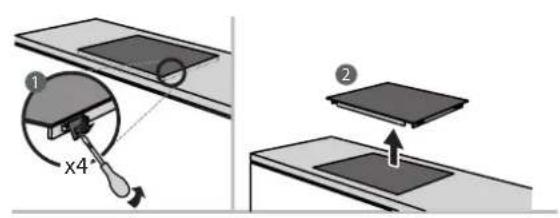
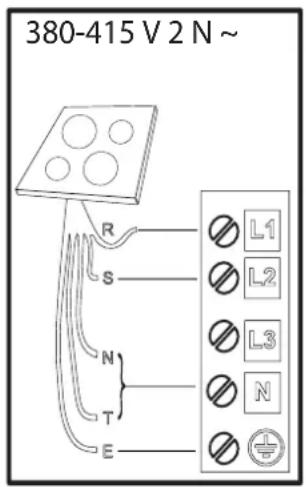
Electrical connection must be made before connecting the appliance to the electricity supply.
Installation must be carried out by qualified personnel who know the current safety and installation regulations. Specifically, installation must be carried out in compliance with the regulations of the local electricity supply company.
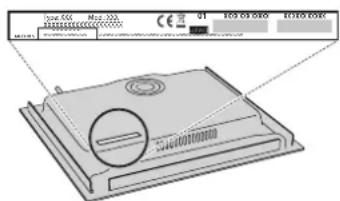
Make sure the voltage specified on the data plate located on the bottom of the appliance is the same as that of the home.
Regulations require that the appliance be earthed: use conductors (including the earth conductor) of the appropriate size only.
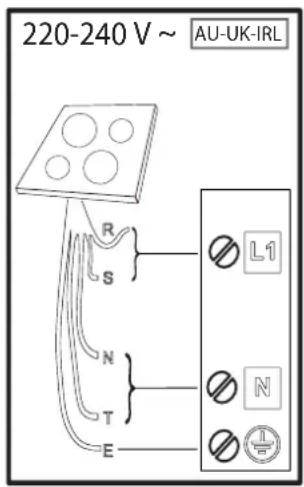
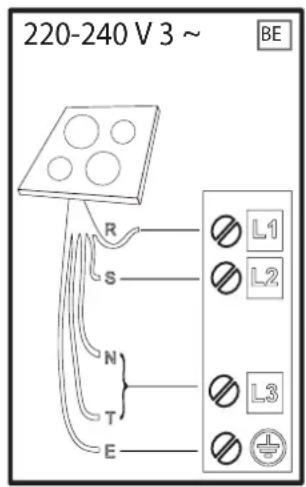
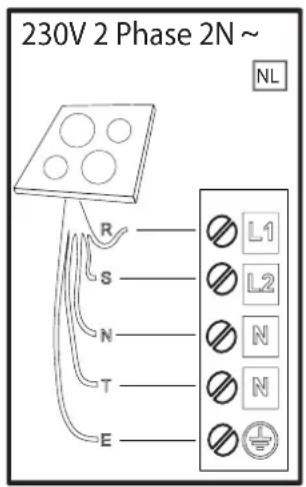
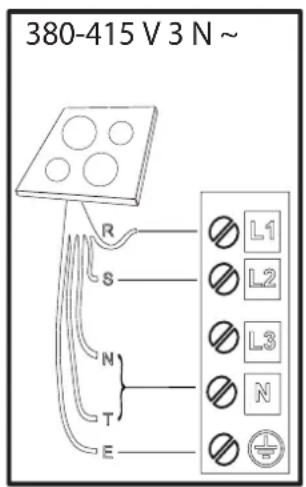
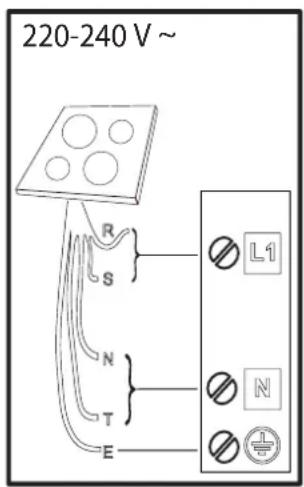
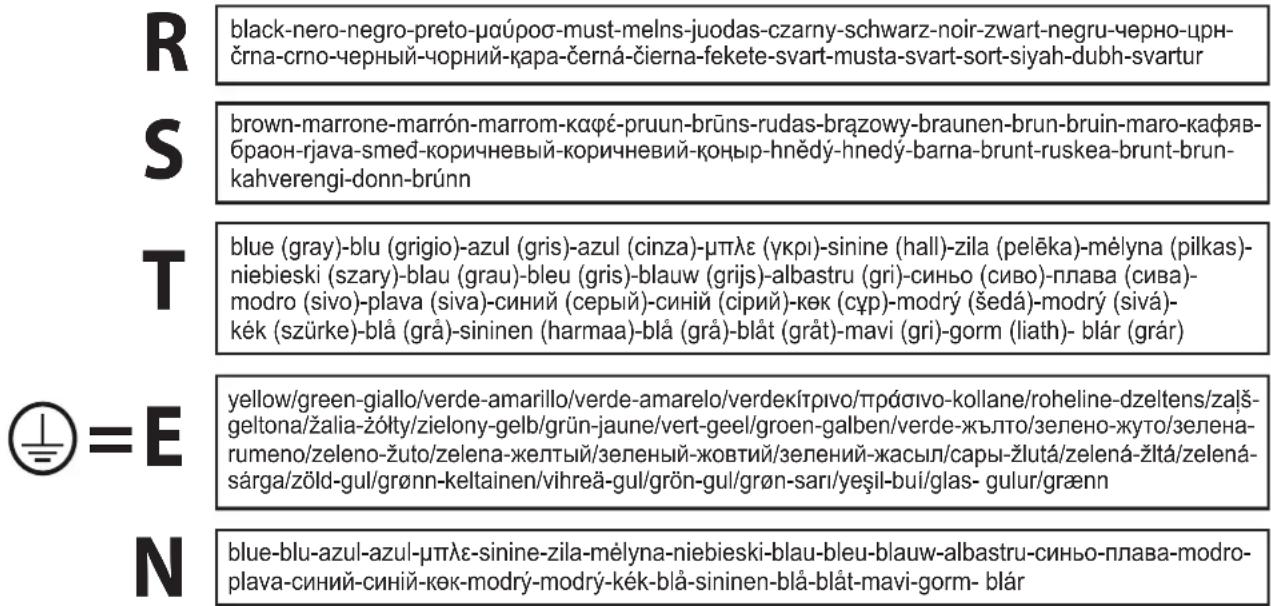
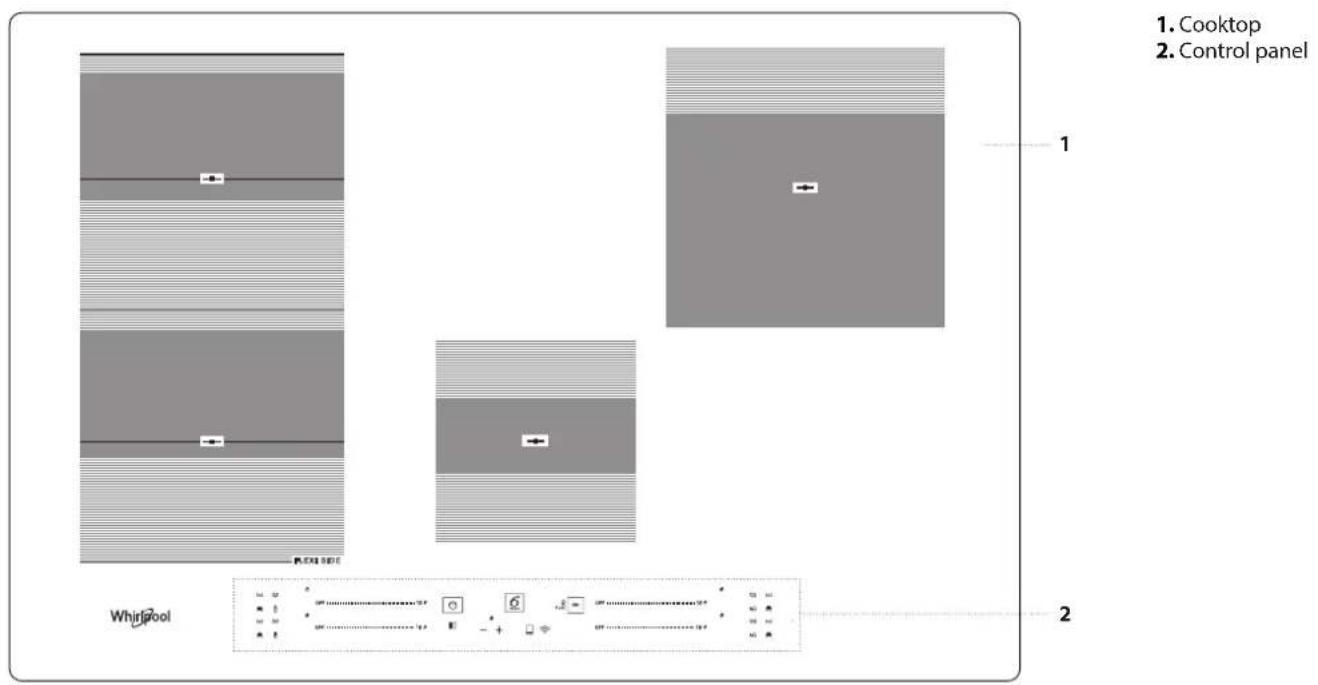
CONTROL PANEL
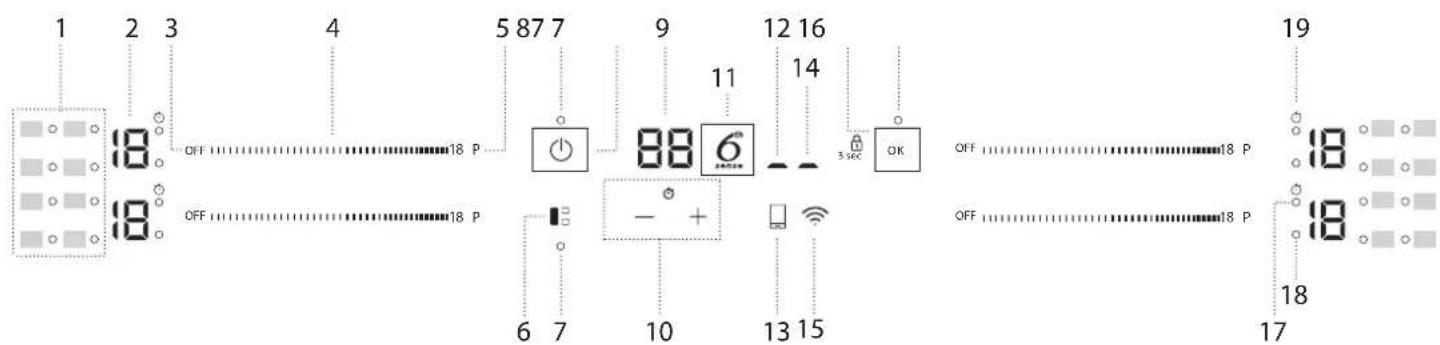
1. Symbols/activation of special functions
2. Cooking level selected
3. Cooking zone off button
4.Scroll keypad
5. Fast heating button (Booster)
6. FLEXISIDE button
7. Indicator light - function active
-
On/Off button
-
Cooking time indicator
-
Timer
11.6 ^th Sense button
-
Remote active indicator
-
Remote key
-
Wi-Fi active indicator
-
Wi-Fi key
-
OK/Key lock button - 3 seconds
-
Timer active indicator
-
Zone selection indicator
-
Timer indicator symbol
POTS AND PANS
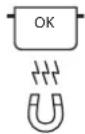
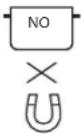
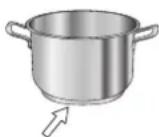
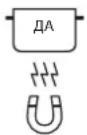
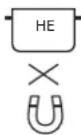
Only use pots and pans made from ferromagnetic material which are suitable for use with induction hobs:
- enamelled steel
cast iron - special pots and pans in stainless steel, suitable for induction cooking
Check for the symbol (usually stamped on the bottom) to determine whether a pot is suitable. A magnet may be used to check whether pots are magnetic.
The quality and the structure of the pot base can alter cooking performance. Some indications for the base's diameter do not correspond to the actual diameter of the ferromagnetic surface.
Some pots and pans have only a part of the bottom in a ferromagnetic material, with parts in another material not suitable for induction cooking. These areas may heat up at different levels or lower temperatures. In certain cases, where the bottom is made mainly of non-ferromagnetic materials, the hob might not recognise the pan and therefore not switch on the cooking zone.
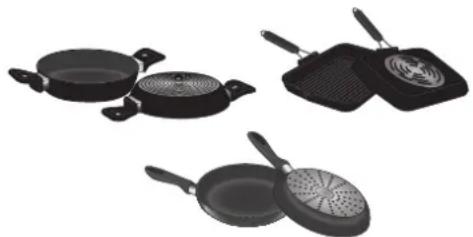
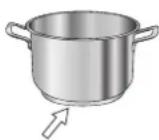
To ensure optimum efficiency, always use pots and pans with a flat bottom that distributes the heat evenly. If the bottom is uneven, this will affect power and heat conduction.
FIRST TIME USE
POWER MANAGEMENT
At the time of purchase, the hob is set to the maximum possible power. Adjust the setting concerning the limits of your home's electrical system as described in the following paragraph.
N.B: Depending on the power selected for the hob, some of the cooking zone power levels and functions (e.g. boil or fast heating) could be automatically limited to prevent the selected limit from being exceeded.
To set the power of the hob:
Once you have connected the device to the mains power supply, you can set the power level within 60 seconds.
Press the Wi-Fi button (For at least 5 seconds. The display shows "PL". Press the button to confirm.
Use the button to increase the power level, and the button to reduce it. The power levels available are: 2.5kW - 4.0kW - 6.0kW - 7.2kW .
Confirm by pressing OK
The power level selected will stay in the memory even if the power supply is interrupted.
To change the power level, disconnect the appliance from the mains for at least 60 seconds, plug it back in, and repeat the above steps.
If an error occurs during the setting sequence, the "EE" symbol will appear, and you will hear a beep. If this happens, repeat the operation. If the error persists, contact the After-Sales Service.
Empty pots or pots with a thin base
Do not use empty pots or pans when the hob is on. The hob is equipped with an internal safety system that constantly monitors the temperature, activating the "automatic off" function where high temperatures are detected. When used with empty pots or pots with thin bases, the temperature may rise very quickly, and the "automatic off" function may not be triggered immediately, damaging the pan or the hob surface. If this occurs, do not touch anything and wait for all components to cool down.
If any error messages appear, call the service centre.
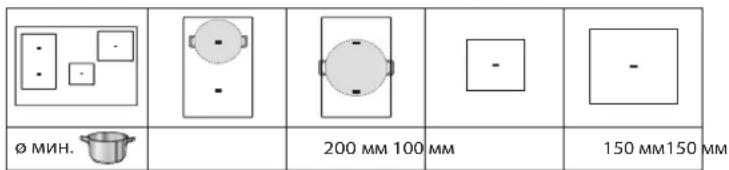
Minimum diameter of pot/pan base for the different cooking areas
To ensure that the hob functions properly, use pots of a suitable minimum diameter (refer to the table below).
Always use the cooking zone that best corresponds to the minimum diameter of the bottom of the pot.
Place the pot making sure it is well centered on the cooking zone in use.
It is recommended not to use pots that exceed the perimeter of the cooking zone in use.
| ø min. | 200 mm 100 | mm | 150 mm150 mm |
ADAPTER FOR POTS/PANS UNSUITABLE FOR INDUCTION
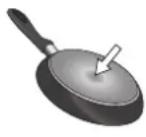
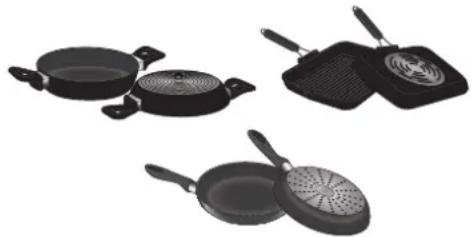
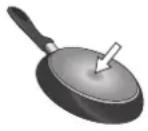
Using this accessory makes it possible to use pots and pans that are not suitable for induction hobs. It is important to bear in mind that using it affects efficiency and, consequently, the time needed to heat food. Its use should be limited because the temperatures reached on its surface depend significantly on the pot/pan used, its flatness and the type of food being cooked. Using a pot or pan with a smaller diameter than the adapter disc may cause heat to build up that is not transmitted to the pot or pan, which could blacken both the hob and the disc. Adapt the diameter of your pots/pans and the hob to the diameter of the adapter.
ACOUSTIC SIGNAL ON/OFF
To switch the acoustic signal on/off:
- Connect the hob to the power supply;
- Wait for the switch-on sequence;
- Press the "P" button of the first scroll keypad at the top left for 5 seconds. Any alarms set will remain active.
DEMOMODE(reheating deactivated, see the section on "Troubleshooting")
To switch the demo mode on and off:
- Connect the hob to the power supply;
- Wait for the switch-on sequence;
- Within the first minute, press the fast heating button "P" of the bottom left keypad for 5 seconds (as shown below);
- "DE" will show on the display.

WI-FI SETUP (not applicable outside of European Union)
To enable the appliance to be remotely controlled, you have to successfully complete the process to connect your appliance to your home network and App. The setup procedure has to be carried out only once. You will have to carry it out again only if you change your router setup properties (network name and password).
Minimum requirements
Smart device: Android with a 1280x720 (or higher) screen or iOS. See on App store the App compatibility with Android or iOS versions. Wireless router: 2.4Ghz Wi-Fi b/g/n.
How to setup
To use this feature you need to own: a smart phone or a tablet and a wireless router connected to internet.
Please verify with your smart device that the signal strength of your home wireless network close to the appliance is good.
Download the 6^th Sense Live app for your mobile device. You can download the 6^th Sense Live app by visiting either iTunes or Google Play.
DAILY USE

SWITCHING THE HOB ON/OFF
To turn the hob on, press the power button for around 1 second. To turn the hob off, press the same button again, and all cooking zones will be deactivated.
POSITIONING
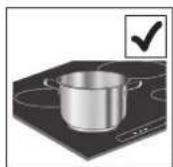
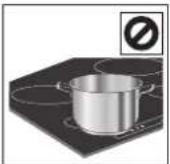
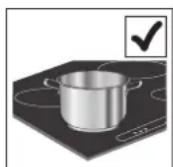
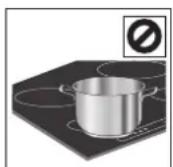
Do not cover the control panel symbols with the cooking pot.
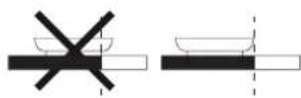
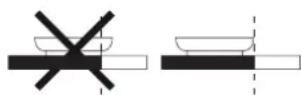
Please note: In the cooking zones close to the control panel, it is advisable to keep pots and pans inside the markings (taking both the bottom of the pan and the upper edge into consideration, as this tends to be larger).
This prevents excessive overheating of the keypad. When grilling or frying, please use the rear cooking zones wherever possible.
ACTIVATING/DEACTIVATING COOKING ZONES AND ADJUSTING POWER LEVELS
OFF111111111111111111111111111111111111111118P
To activate the cooking zones:
Move your finger horizontally across the scroll keypad (SLIDER) of the required cooking zone to activate it and adjust the power. The level will be shown in line with the area and the indicator light identifying the active cooking zone. The "P" button can be used to select the fast heating function (Booster).
Once downloaded, please follow the instructions from App to create an account.
Once you have your account, open the App and press "+" on the bottom left of the screen to add a new appliance to your account. The 6^th Sense Live App will be your guide to walk you through all of the steps needed to complete the process.
The sticker with QR, SAID and Mac Address code is used to sync a smart device with your appliance.
The pairing procedure has to be carried out again only if you change your router set up properties (network name or password or data provider).
To deactivate the cooking zones:
Select the "OFF" button at the beginning of the scroll keypad.

CONTROL PANEL LOCK
To lock the settings and prevent it from accidentally switching on, press and hold the OK/Key lock button for 3 seconds. A beep and a warning light above the symbol indicate that this function has been activated. The control panel is locked except for the switching off function (O). To unlock the controls, repeat the activation procedure.
$$ - + \text {T I M E R} $$
The timer controls all cooking zones.
To activate the timer:
Press the "+" or "-" button to set the desired time on the cooking zone in use. An indicator light will be activated in line with the specific symbol Once the set time has elapsed, a beep will sound, and the cooking zone will switch off automatically.
The time can be changed at any point, and several timers can be activated simultaneously.
In case 2 timers on the same side of the hob are activated simultaneously, "Zone selection indicator" flashes and the relative cooking time selected is displayed on the central display.
To deactivate the timer:
Press the ^ 一 + ^ 一 and - buttons together until the timer is deactivated.

TIMER INDICATOR
This LED (when ON) indicates that the timer has been set for the cooking zone.
FUNCTIONS


FLEXISIDE
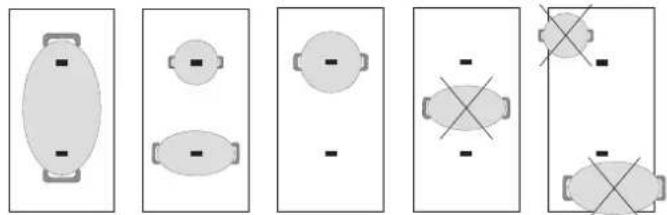
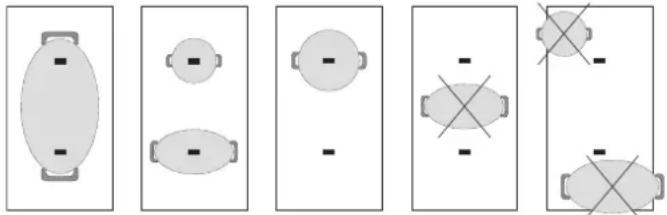
By selecting the "FLEXISIDE" button, you can combine two cooking zones and use them at the same power by covering the entire surface with a large pot or partially with a round/oval pot.
The function always remains on and, when using only one pot, can be moved over the entire area. In this case, both left-hand scroll keyboards can be used indifferently.
Ideal for cooking with oval or rectangular pots or with pan supports. To deactivate the function, press the "FLEXISIDE" button.
N.B. Special functions cannot be selected when using this feature.
IMPORTANT: Place the pots in the center of the cooking zone so that they cover at least one of the reference points (as shown below).

6^TH SENSE
The "6th Sense" button activates the special functions.
Place the pot in position and select the cooking zone.
Press the "6th Sense" button. The display of the selected area will show "A". The indicator for the first special feature available for the cooking zone will light up.
Select the desired special function by pressing the "6th Sense" button one or more times.
The function is activated once the button has been pressed to confirm. To select another special function, press "OFF" and then the "6th Sense" button to choose the required function.
To deactivate the special functions and return to manual mode, press "OFF". The power level when using special functions is pre-set by the hob and cannot be modified.

MELTING
This function allows you to bring food to the ideal temperature for melting and maintain the food condition without the risk of burning.
This method is ideal, as it does not damage delicate foods such as chocolate and prevents them from sticking to the pot.

KEEP WARM
This feature allows you to keep your food at an ideal temperature, usually after cooking is complete or reducing liquids very slowly.
Ideal for serving foods at the perfect temperature.

SIMMERING
This function is ideal for maintaining a simmering temperature, allowing you to cook food for long periods with no risk of burning.
Ideal for long-cooking recipes (rice, sauces, roasts) with liquid sauces.

BOILING
This function allows you to bring water to the boil and keep it boiling, with lower energy consumption.
About 2 litres of water (preferably at room temperature) should be placed in the pan.
In all cases, users are advised to closely monitor the boiling water and check the amount of water remaining regularly.
If the pots are big and the water quantity is higher than 2 litres, we recommend using a lid to optimize boiling time.

CHEF CONTROL
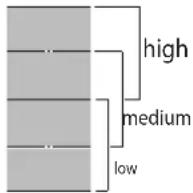
The flexible zone is divided into three cooking zones (see the figure) activated at a pre-set power (high, medium or low) depending on the position of the pot/pan: move the pot/pan over the surface to continue cooking at different temperatures without having to use the controls.

WI-FI KEY
How to connect the cooktop to the Wi-Fi network
To connect the cooktop to the user's Wi-Fi network using the mobile App: turn on the cooktop, press and hold the Wi-Fi button for at least 1 second (as it's touched, a sound will be heard) and for no longer than 2 seconds. As it's released, a long sound will be heard. Follow the instructions via the mobile App. If a second sound before the longer one is heard, the
INDICATORS

RESIDUAL HEAT
If "H" appears on the display, this means that the cooking zone is hot. The indicator lights up even if the zone has not been activated but has been heated due to the adjacent zones' use or because a hot pot has been placed on it.
When the cooking zone has cooled down, the "H" disappears.
connection to the user's Wi-Fi network by the router's WPS button procedure has been activated (see the following paragraph); please read the "Wi-Fi CONNECTION RESET PROCEDURE" paragraph if you do not want to follow this procedure and run the connection to the Wi-Fi network again using the mobile App.
To connect the cooktop to the user's Wi-Fi network using the router's WPS button: turn on the cooktop, press the Wi-Fi button (as it's touched, a sound will be heard) and keep it pressed for 3 seconds until a second sound is heard, then release the button. As it's released a long sound will be heard. Press the WPS button on your router within a maximum of two minutes. Follow the instructions via the mobile App.
PLEASE NOTE: If the user connects the cooktop but later decides not to use the Wi-Fi function, the connection can be stopped at any time without following the procedure described below: while the cooktop is on, press the Wi-Fi button (as it's touched, a sound will be heard) and keep it pressed for 7 seconds until a second sound will be heard, then release the button. As it's released a long sound will be heard. To connect the cooktop back, press the Wi-Fi button (as it's touched, a sound will be heard) and keep it pressed for 3 seconds until a second sound will be heard, then release the button. As it's released, a long sound will be heard. This procedure allows to restore the connection, avoiding using the instructions via the mobile App.

REMOTE KEY
How to confirm the commands sent via the mobile app
If the cooktop receives a command from remote (e.g.: a smartphone or a tablet, through the mobile app) the user is required to confirm it by pressing the remote control button: turn on the cooktop and keep the remote control button pressed for at least 1 second (as it's touched a sound will be heard). As it's released, a long sound will be heard.
How to disconnect the cooktop from the Wi-Fi network
To disconnect the cooktop from the user's Wi-Fi network (e.g. when the router has to be replaced): turn the cooktop on, press the remote control button (as it's touched a sound will be heard) and keep it pressed for 7 seconds, until a second sound will be heard, then release the button. As it's released a long sound will be heard.
Wi-Fi connection reset procedure
If an incorrect connection procedure has been selected or if any of the connection procedures described above has to be interrupted before completed (the cooktop hasn't been connected to the network yet): turn the cooktop on, press the remote control button (as it's touched, a sound will be heard) and keep it pressed for 7 seconds, until a second sound will be heard, then release the button. As it's released a long sound will be heard.
In case the reset procedure hadn't been successfully completed (if the long sound isn't heard), disconnect the cooktop from the mains for at least 20 seconds and then reconnected it to the mains; then, repeat the reset procedure from the beginning.

POT INCORRECTLY POSITIONED OR MISSING
This symbol appears if the pot is not suitable for induction cooking, is not positioned correctly or is not of an appropriate size for the cooking zone selected. If no pot is detected within 30 seconds of making the selection, the cooking zone switches off.
COOKING TABLE
The cooking table offers an example of the cooking type for each power level. The actual delivered power of each power level depends on the cooking zone dimension.
| POWER LEVEL TYPE | OF COOKING | LEVEL USE (indicating cooking experience and habits) | |
| Maximum power | P Fast | Heating/Booster | Ideal for rapidly increasing food temperature to a fast boil (for water) or for rapidly heating cooking liquids. |
| 14-18 | Frying - boiling | Ideal for browning, starting to cook, frying deep-frozen products, bringing liquids to the boil quickly. | |
| Browning - sautéing - boiling - grilling | Ideal for sautéing, maintaining a lively boil, cooking and grilling. | ||
| 10-14 | Browning - cooking - stewing - sautéing -grilling | Ideal for sautéing, maintaining a gentle boil, cooking and grilling, and preheating accessories. | |
| Cooking - stewing - sautéing -grilling - cooking until creamy | Ideal for stewing, maintaining a gentle boil, cooking and grilling (for longer periods). | ||
| 5-9 | Cooking - simmering - thickening - creaming | Ideal for slower-cook recipes (rice,sauces,roast,fish) with liquids (e.g. water, wine, broth, milk), and for creaming pasta. | |
| Ideal for slow-cook recipes (quantities under 1 litre: rice, sauces, roasts, fish) with liquids (e.g. water,wine,broth,milk). | |||
| 1-4 | Melting - defrosting Ideal for | softening butter, gently melting chocolate, thawing small items. | |
| Keeping food warm - creaming risotto | Ideal for keeping small portions of just-cooked food or serving dishes warm and for creaming risotto. | ||
| Zero power | OFF - | Hob in stand-by or off mode (possible end-of-cooking residual heat, indicated by an "H"). | |
MAINTENANCE AND CLEANING

WARNING
- Do not use steam cleaning equipment.
Before cleaning, make sure the cooking zones are switched off and that the residual heat indicator ("H") is not displayed.
Important:
- Do not use abrasive sponges or scouring pads as they may damage the glass.
- After each use, clean the hob (when it is cool) to remove any deposits and stains from food residue.
- A surface that is not kept suitably clean may reduce the sensitivity of control panel buttons.
- Use a scraper only if residues are stuck to the hob. Follow the scraper manufacturer's instructions to avoid scratching the glass.
- Sugar or foods with high sugar content can damage the hob and must be immediately removed.
Salt, sugar and sand could scratch the glass surface. - Use a soft cloth, absorbent kitchen paper or a special hob cleaner (follow the Manufacturer's instructions).
- Spills of liquid in the cooking zones can cause the pots to move or vibrate.
After cleaning the hob, dry thoroughly.
If the CleanProtect logo is present on the glass, the hob has been treated with CleanProtect technology. This exclusive coating ensures excellent cleaning results and keeps the hob surface shiny for longer.
Daily cleaning after each use is suggested.
To clean CleanProtect hobs, follow these recommendations:
- Soak the zones that need to be cleaned with water making sure to cover the entire stained area and being careful not to drop water on the control panel.
For the water soaking:
In normal conditions, wait at least 2 minutes.
In heavy-dirt conditions, wait for at least 5 minutes.
- If the water dries on the hob it is necessary to repeat the soaking step.
- Use a non-abrasive sponge to remove deposits and dry the hob after cleaning.
TROUBLESHOOTING
- Check that the electricity supply has not been shut off.
- If you cannot to turn the hob off after using it, disconnect it from the power supply.
- If alphanumeric codes appear on the display when the hob is switched on, consult the following table for instructions.
Please note: The presence of water, liquid spilled from pots or any objects resting on any of the hob buttons can accidentally activate or deactivate the control panel lock function.
| DISPLAY CODE DESCRIPTION | CRIPTION POSSIBLE CAUSES SOLUTION | ||
| F0E1 | Cookware is detected but it is not compatible with requested operation. | The cookware is not well positioned on the cooking zone, or it is not compatible with one or more cooking zones. | Press On/Off button twice to remove the F0E1 code and restore the functionality of the cooking zone. Then, try to use the cookware with a different cooking zone, or use different cookware. |
| F0E7 | Wrong power cord connection. The power supply connection is not exactly as indicated in "ELECTRICAL CONNECTION" paragraph. | Adjust the power supply connection according to "ELECTRICAL CONNECTION" paragraph. | |
| F0EA | The control panel switches off because of excessively high temperatures. | The internal temperature of electronic parts is too high. | Wait for the hob to cool down before using it again. |
| F0E9 | The cooking zone turns off when the temperatures are too high. | The internal temperature of electronic parts is too high. | Wait until the cooking area has cooled off before using it again. |
| F0E2, F0E4, F0E6, F0E8, F0EC, F1E1, F2E1, F6E1, F6E3, F7E5, F7E6 | Disconnect the hob from the power supply.Wait a few seconds then reconnect the hob to the power supply.If the problem persists, call the service centre and specify the error code that appears on the display. | ||
| d E[when the hob is off] | The hob does not switch heat up. The functions do not come on. | DEMO MODE on. | Follow the instructions in the "DEMO MODE" paragraph. |
| Wi-Fi LED: On (fixed)REM LED: blinks slowly (1s On/1s Off) | The hob does not work.B年由ors are not responding. | Software update is running (it can take more than 1 hour). | Wait for the update to finish before using the hob again. |
| e.g. | The hob does not allow a special function to be activated. | The power regulator limits the power levels in accordance with the maximum value set for the hob. | See paragraph "Power management". |
| e.g. P → S[Power level lower than level requested] | The hob automatically sets a minimum power level to ensure that the cooking zone can be used. | The power regulator limits the power levels in accordance with the maximum value set for the hob. | See paragraph "Power management". |
WI-FI FAQ
Which Wi-Fi protocols are supported?
The Wi-Fi adapter installed supports Wi-Fi b/g/n for European countries.
Which settings need to be configured in the router software?
The following router settings are required: 2.4 GHz enabled, Wi-Fi b/g/n, DHCP and NAT activated.
Which Version of WPS is supported?
WPS 2.0 or higher. Check the router documentation.
Are there any differences between using a smartphone (or tablet) with Android or iOS?
You can use whichever operating system you prefer, it makes no difference.
Can I use mobile 3G tethering instead of a router?
Yes, but cloud services are designed for permanently connected devices.
How can I check whether my home Internet connection is working and wireless functionality is enabled?
You can search for your network on your smart device. Disable any other data connections before trying.
How can I check whether the appliance is connected to my home wireless network?
Access your router configuration (see router manual) and check whether the appliance's MAC address is listed on wireless connected devices page.
Where can I find the appliance's MAC address?
There is a sticker showing the SAID and MAC addresses on the glass. The MAC address consists of a combination of numbers and letters starting with "88:e7".
How can I check whether the appliance's wireless functionality is enabled?
Use your smart device and the 6^th Sense Live app to check whether the appliance network is visible and connected to the cloud.
Is there anything that can prevent the signal reaching the appliance?
Check that the devices you have connected are not using up all the available bandwidth.
Make sure that your Wi-Fi-enabled devices do not exceed the maximum number permitted by the router.
How far should the router be from the appliance?
Normally the Wi-Fi signal is strong enough to cover a couple of rooms, but this very much depends on the material the walls are made of. You can check the signal strength by placing your smart device next to the appliance.
What can I do if my wireless connection does not reach the appliance? You can use specific devices to extend your home Wi-Fi coverage, such as access points, Wi-Fi repeaters and power line bridges (not provided with appliance).
How can I find out the name of and password for my wireless network? See the router documentation. There is usually a sticker on the router showing the information you need to reach the device setup page using a connected device.
What can I do if my router is using the neighbourhood Wi-Fi channel?
Force the router to use your home Wi-Fi channel.
What can I do if Wi-Fi's Led is blinking or the appliance is unable to establish a stable connection to my home router?
The appliance might have successfully connected to the router, but it is not able to access the Internet. To connect the appliance to the Internet, you will need to check the router and/or carrier settings.
Router settings: NAT must be on, firewall and DHCP must be properly configured. Password encryption supported: WEP, WPA,WPA2. To try a different encryption type, please refer to the router manual.
Carrier settings: If your Internet service provider has fixed the number of MAC addresses able to connect to the Internet, you may not be able to connect your appliance to the cloud. The MAC address of a device is its unique identifier. Please ask your Internet service provider how to connect devices other than computers to the Internet.
How can I check whether data is being transmitted?
After setting up the network, switch the power off, wait 20 seconds and then switch on the appliance: Check that the app is showing the UI status of the appliance.
Some settings take several seconds to appear in the app.
How can I change my Whirlpool account but keep my appliances connected?
You can create a new account, but remember to remove your appliances from your old account before moving them to your new one.
I changed my router - what do I need to do?
If you can keep the previous network name and password in the new router, then you have nothing to do, the appliance will reconnect automatically.
Otherwise to reconnect the appliance to the new wi network just press "+" in the App home page without unclaiming the appliance and follow the instructions of the App.
SOUNDS PRODUCED DURING OPERATION
Induction hobs may whistle or creak during normal operation.
These noises actually come from the cookware and are linked to the pan bottoms' characteristics (for example, when the bottoms are made from different layers of material or are irregular).
These noises may vary according to the type of cookware used and the amount of food it contains and not the symptom of something wrong.
AFTER-SALES SERVICE
To receive complete assistance, please register your product on www.whirlpool.eu/register.
BEFORE CALLING THE AFTER-SALES SERVICE:
- See if you can solve the problem by yourself with the help of the TROUBLESHOOTING suggestions.
- Switch the appliance off and back on again to see if the fault persists.
IF AFTER THE ABOVE CHECKS THE FAULT STILL OCCURS, GET IN TOUCH WITH THE NEAREST AFTER-SALES SERVICE.
To receive assistance, call the number shown on the warranty booklet or follow the website's instructions on www.whirlpool.eu.
When contacting our Client After sales service, always specify:
a brief description of the fault;
- the type and exact model of the appliance;
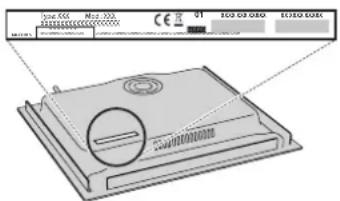
- the serial number (number after the word SN on the rating plate located under the appliance). The serial number is also indicated in the documentation;

Mod. XXXXXX
- your full address;
- your telephone number.
If any repairs are required, please contact an authorized after-sales service (to guarantee that original spare parts will be used and repairs carried out correctly).
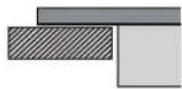
In the case of flush-mounted installation, call the After Sales Service to request assembly of screws kit 4801 211 00112.
In case of installation not over a built-in oven, you can call the After Sales Service to buy the divider kit C00628720 (cooktop 60 and 65~cm ) or C00628721 (cooktop 77~cm ).
If you prefer not to buy the divider kit please ensure that a separator is installed according to the installation instructions.
Conditions requires minimales
$$ - + \text {C O N T A M I N U T I} $$
$$ - + \text {M I N U T N I K} $$
HELISIGNAAL SEES/VALJAS
ELIMINAREA APARATELO ELECTROCASNICE
19.CmBONHaHnHnKaTopaHaTaMepa
TEHJKEPN TIGAHN
3nON3BaIe CaMO TeHxJKePN TnraHn OT 费 epomarHnTHMaTePAHn,POXoJaUa 3a pa6oTa C HNDyKUMOHN IOTBAPCKN PINOTOBE:
-TeHKePN TnraHOn OT eMaJInpaHa CTOMHa
-yyryHeH TeHxepn TnraHn
cneuHaHn TeHxepn TnraHn OTHepbKaJaMa
CTOMaHa, NOxOJaIa 3a INHdYKUHOHNO TOTBeHe
3a da onpeennte da nn CbBt e noxdoi, npoBepe Ta nn mHa 03haeHne (obNKHOeHo HaHeceHO Ha HbHTo). MoKe Da n3no3BaTe MarHNT, 3a da npOBepnte da nn CbBt e ot fepOMarHnTHMaTePnAIn. KaueCTBOTO n CTpykTypata Ha OCHOBATA Ha Cbda 3a rotBeHe Morat da NobnraHT Ha Ipoueca Ha rotBeHe. HkONn INnKaunn 3a DnAmetbpa Ha OCHOBATA He OTROBAPrHa DeNCTBnTeHNn DnAmetbprHa fepOMarHnTHTa NOBbpxHOCT.
Pn HAKON TeHxepn n TtRaHn CaMo qact OT bHOTo e HAnpaBHeO t ΦepOMaHHTeH MaTePnA, DOKaTO OCTaHaNITE qACTu Ca HApBaEH N O Tpy BND MaTePnA, KOIT He e NOXODua 3a INdyKUHOH TOBHe. Te3n 30HN MORAT da ce HargreTdo pAnIuH NBO NNpN no-HNcKa TEMnePaTpa. B HAKON Cnyau, KORAto DbHOTo e HAnpaBEo OCHOBn OMaTePnA, KOITNo He ca ΦepOMaHHTHn, e Bb3MOxHO KOTJIOHbT Da He pa3no3Ha, Ye mHa NoCTaBeH TtRaN cLcDOBAteH Do He BKlOHy 3OHaTa 3a TOBHe.
3aOcNpyraBeHaMaKcMmaHa eΦeKTNBHOCT N3IOn3BaYTe CaMO TeHJKeepn TnraHn C nloCKo DbHO, KOeTO OcNpyraBa paBHomepHO pa3npedeeneHe Ha ToPnHaTa. Ako DbHOTo He e paBHO, TOBa Ie NOBInre Ha MoUHOCCTTa nToTlONpOBODmOCTTa.
N3NOJ3BAHE 3A INPbB INbT
ONPEDEJANE HA MOUHOCTTA
B MOMHTa Ha NOKyPKaTa NIObT e HAcTpoEH Ha MaKcMmaHa MoUHOCr. PerynpaIte HAcTpoIKaTa CbrracHO npaMeTpne Ha eNeKTpUeCKaTa Mpeka B Doma Bn, KaKTo e OnncAHO B CnEJaun pa3dien.
3A5EJEXKKA: B 3aBncmocT oMouHOCCTa, n36paHa 3a IIOTa 3a rotBeHe, HAKON OT HnBaTa Ha MOUHOC T ΦyHKuIMTe Ha 3OHa 3a rotBeHe (HAnp. BapeHe nn 6bp3o npTeOpTnHe) Morat Da 6bDaT aBtOMaTHO ORpaHueHH, 3a Da He 6bDaT ppeBnuaabaHn 36paHInTe rpaHnH CTOnHOCTn.
Hacmpoubahe Ha Mouhcmma Ha nIoma:
B npOaIbIkeHHe Ha 60 cekyHn CneI CBbp3BaHe Ha ypeHa KbM eIeKtpuYeckata MpeKa e B3MOXHO Da Ce 3aJaE MaKcMaJIHaTa MoUHOCT Ha IIOTA.
HaTnCHeTe 6yToH Wi-Fi ( 念 ) n ro 3aIpBXte 3a Hai-MaIKo 5 cekyHn. Ha ekpaHa ce n3BexJa CmMBOJbT "PL".
HaTnCHETe 6yToH 3a da nOTBpDnTe.
I3noI3BaIte 6yToHa 念 ,3a da yBeIInuHTe HnBOTO Ha MoUHOCT, n 6yToHa ,3a Da Ro HaMaNITe.
Bb3MOXHN ca cIeHHTe cToHocTn: 2,5 KBT-4,0 KBT-6,0 KBT-7,2 KBT.
IotBbPdTe, KaTo HaTnCHete
I36paHATA MaKcImaHa MoUHocTe ce 3ana3Ba DOpN i CneI npeKbcBaHe Ha eNEKTPnueckOTo 3axpaHbAe.
3a da npomeHnTe MaKcImaHaTa MoUHcT, N3KJIouHe Te ypeDa OT eNEkTpncueckaTmpeXa, N3YakaiTe NoHe 60 cekyHn, BKNIOHe TOr OTHOB IN 3NtBnHeTe ONCaHnTe NO-TOpe CTbIKN.
Ppa3Hu cboBe uu cbdoBe cmbHko dbHo
He noctabraIte npa3Hn TeHJkepr nnn TuraHb Bbpxy BKIOueHn rTOBapckn nIOT. IIObTbIMa BrpaDeHa CNTeMa 3a 6e3oNaCHocT, KOrTo HnpeKbChato cIeJeN TemepaTypa n ABTomATnuHO rN3KIIOuBa, KOrTo perNCTpnpa pKeomepHO BnCOKa TEMepaTypa. PnHarpBaHe Ha npa3Hn CbIObe nnn CbIOBe C TbHKo DbHO TemepaTypa MoKe Da ce NobuIN TBbpIe 6bp3O h FynHKUraTa 3a ABTomAtnuHO N3KIOuBaHa De He ycnee Da cpa60Tu HabPeme, KoEOto ue OBOBe Do NOBPeHa n BaDa nnn NobbpXHoCtTa Ha nIoTa. B TaKbB cUYau HE NIIaHTe NHIo N3UcakAIte BCNUKO Da ce OxuaDi.
Ako ce noaBn CbO6eHne 3a rpeWka, CBpbXeTe Ce cbc cepBn3Hna ueTbp.
MuHmAnen duamembpa hcbHomHa cda3apa3nHume HaapeBamenHu 30HU
3a da ce rapaHTnpa npabunHata pa6oTa ha nITo 3a roTBeHe, nIIOJI3BaITe CbIOBE 3a roTBeHe C noDxOJaU MNHMamEn DnAmEtbp (BnuKTe DOnHaTa Ta6Nua).
BnHaRn 3nOJ3BaIe 3oHata 3a rOTBeHe, KOrTo CbOTBeTCTBa Hau-Do6pe Ha MNHMnHnN DaAMetbp Ha DbHOTO Ha rOTBapCKn8CbD.
IocTaBte roTbapcknKaTo ce yBepnte,Ye e Ido6pe ueHTpnpaH Bbpxu 3nOJ3BaHaTa 30Ha 3a roTBeHe.
He ce npenopbUba n3non3BaHEno Ha roTbapckn cbDoBe, qneTo DbHo npBnwaobaNKoKLkataHa n3noJ3BaHATA 30Ha 3a rotBeHe.
AANTEP 3A TEHJXEPN N TUNAHN, KOUTO HCA NOOXOJAU 3A INHNYKUIN
C NOMOUITa Ha Ta3n PInHaJdIeXHcOT MoKe Da n3NtON3BaTe TeHIXepn IN TIRaHN, KOITo He ca NoxOJaun 3a HnyKUIOHNN KOTIOH.N BaxHO e da imate npedBnD, Ye n3NtON3BaHeTo HA aadTepa OKa3Ba BnIaHne Bbpyx efeKTHBHOCTTA n CIEDOBaTeJIHO Ha BpeMeTO, Heo6XoIMo 3a 3aRpaBaHe HA xpaHaTa. N3NtON3BaHTo HA aadTepa e OPAHueNo, TBk KATO TEMNEpATypata, KOHTO DOCTnra Herobata NOBbpxHOCT, 3aBNCn DO rOJMA CTenEH OT TEHIXePaTa/TIRaHa, KOIKI NIOCKo E bHOTo N KaKBb TIN XpHa c epnroTBA. N3NtON3BaHoTe HA TeHIXePaN IN TIRaHc N O-MaJbK dIaMaTeBp OT DnCKa HA aadTepa MoKe DA DObede Do HAtpyINbHa HA TOIIHnA, KOrTO He ce npedaba H TeHIXePaTa INN TIRaHa n BNOcIeCTBne KAKTo KOTIOHbT, Taka N DnCKbT da NOePHeR. Cb6pa3e DNAmEtBpa Ha TeHIXePHT/TrgAHnE t KOTIOHa C DNAmEtBpa Ha adTepa.
PnI rpeuKa nO BpeMe Ha NaHacTpoiKaTaHa eKpaHa ce N3BexKa cMBOblT "EE"
Ie npodaba 3BykoB cnHan.AKO TOBa ce cnyu, NOBTOpe npoceypata.
Ako rpekkaTHe n3ue3He, o6aTe ce B cepBn3a 3a noDipbKka.
BKJIOUBAHE/U3KJIIOUBAHE HA 3BYKOBM CnHAI
BkIIOUbaHe/I3KIIIOUbaHe Ha 3BYKOBnCnHaJ:
CbbpKTe KOToHa KbM 3aXpaHbAHeTo;
BCEKnDHEBHA YNOTPEBA

BKJIIOUBAHE/M3KJIIOUBAHE HA TOTBAPCKNIAIOT
3a Da BKNIOUHTe RTOBAPCKN IIOIT, HAINCHETe 6yTOHa 3a BKNIOUBAHe B npOdbJxHHe Ha OKOLO 1 cekyHda. 3a Da N3KIOUHTe NIOTa, HATNCHE ToHOBO CbIINs 6yTOH - IN3KIOUBAc BCNUKN HArpeBaTeHN 3OHN.
PA3NOLIATAHACbIOBETE
Cbnt He Tpr6Ba Da nokpmba CmBONITE Ha nahe 3a ynpabnHe.
MOnI, mImaTe npEbnD: Ako 30HnTe 3a roTBeHe ca pa3nONoKeHN 6n3o Do KOHTpOInHnaHEn, npEopbUHTeHNO e DaNbPbXnTE TcHJKePnTE nTfAHaNtB OueptanHra Ha 30HnTe (KATO ce CbOpa3HBaTe KAKTO CDbHOTo HA rTOBapCKn CB,Taka n CToPnHa My Pb6, Tb KaTO o6KnHOBeHo Te3n cAChTa Ca NO-WhPOk). ToBa npEtna3Ba CEhOpnHa naHEn OTpeKaLeHo HarpBaHe. PnI neNeH en IIN IbPxkeHe n3No13BaIte 3aHnTe 30Hn 3a roTBeHe, aKO e Bb3MOxHO.
BKJIOUBAHE/V3KJIIOUBAHE HA PEYJINPAHE HA MOUHOCTTA
HARPEBATEJIHNTE 3OHN
OFF1111111111111111111111111111111111111111111111
Bkiuoyahe Ha Haspeamenna 3oHa:
Дижete npbcta cn xopn3oHTaHNO no nIb3raaata Knabnataya (Пльз4A)Ha xeJahata 3OHa 3a rotBeHe, 3a Ja a kTNBnPate N da peryInpate MOUHOCTTa. HbOTO ha MOnIOCT qe c NOk3aBa BcToBtHeTATA 3OHa 3aeJHo Cbc CBetTINHHN INHINKATOP, o6O3NaUaBaI a KNTBnAtra 3OHa 3a rotBeHe. ByToHbT "P" MoKe da Ce I3NON3Ba 3a I36iPAne Ha cyHKunrTa 3a 6bp3o 3arpBaHe (Booster).
N3KIIIO4eAHe Ha HAZpeBamenHa 30Ha:
HATINCHETe 6yToH "OFF", pa3nOIOxEn ot IaBaTa CTpaHa Ha IIb3raUaTa ce KlaBnaTypa.
ФУнКУМN


FLEXISIDE
CHaTnckaHe Ha 6byToHa "FLEXISIDE" MoXeTe Da KOMBnHnPate Dbe 3OHN 3aTOrBeHe N da Tn IIN3N03BaTe C eHna N cbua MOUHCT, KATO NOKPnEte UAnata NOBpHXoCT H a 3OHNTE C ToJMA TeHxkepa NNtCACTMnO C KpbTnA/OBANH TeHxkepa. OHKNUrta Octaba BNHarN BkIIOUeHa N KOrTa IIN3N03BaTe cAmO eHn TaHxpepa, MoXeTe Da N MeCTNe IO nraN tO hA. B TozN cnyau N dBeTe Bn NtB3rAun KnabNaTpy MOrat Da 6bDat N3N03BaHn No eHaNkb H aHyH.
Haun Ha konfozypupahe
3a da n3no13BaTe Ta3n fhyHKUa, Tp86Ba Da npTeKabate: CmptfoH nn ta6net n MappyTu3aTop 3a 6e3xuHa Bp3ka C nHTepHet.
N3non3BaIe cMapr yCtpoiCTB0TO Cn, 3a da npOBepTe daJIIN CNHAnbT Ha
DOMAunHATA Bn 6E3KNUHa MPexa e DOCTaBHyO CnEN H 6nn3oCT Do ypea.
N3terne pnpIOKeHHeTo 6h Sense Live Ha BaJeTo MO6UNHO yCtpoiCTBO.
Mokete da n3terlnte npINOKeHHeTo 6h Sense Live ot iTunes nn Google
Play.
Cne3aBpUbaHe Ha n3TeTnHaTo CnEBAuTe HnCTpyKunTe B npInIOxKeHNeTo n Cn Cb3dAte aKayHT.
Clekato c3daTe CBOA kayHT, OTBopete npinojKeHneTo HaTnChete ^ 十 + ^ 一 B DOnHaTa JRAaCT Ha ekpaHa, 3a Da Do6aBnTe HOB ypeKbM BaWnA kayHT. PInioJKeHneTo 6" Sense Live ue Bn npeBepee nee BCnUKN CTbnKn, Heo6xOdmm 3a 3abbpwbaHe Ha npoueca.

BLOKUPAHE HA BYTOHUTE
3a da 3akIIOHTe 6yToHInTe 3a HaCTPOIMKa n 3a da n36ErHeTe CnyauHOTO BkIOUBAHe Ha KOTNoHa, HATnCHte N 3adPbXte 3a 3 cekyHn 6yToHa OK/ BLOKINPAHe HA naHEA 3a ynpaBnHE. IOnaba ce 3BYKO BcHnAn n HAd 6yToHa ce NOBBA CBETnHa, CNHANmHPaua, ye fYHKuTnE BKIOUeHa. PAHnBt 3a ynpaBnHE Beue e 6NOKpAH, c N3KIOUeHne Ha fYHKuTnA 3a INKIOUBaHe (⑥). 3a da De6NOKpATE NaHEA 3a ynpaBnHe, nobTopete npoceDypata 3a 6NOKpAhe.

TaimepbTy npabBBA BCNUK30H3a rotBeHe.
Bknoubahe Ha Taumep:
HaTnCHe6yToH“"iIN"-3aJa 3aJaIaTeJeKeNaHaTApODbJnxHTHeH apa6ota Ha n3nON3BaHaTaharpeBaTeHa 3oHa.1e CBeTHe HnDnKAtOp 3aeHOb cBcOTBeTHN CmBOn Cled n3TuHaHe Ha 3aJaDeHO ToPeMe ce IOnDaBA 3BYKO BnHAn HArpeBaTeHATA 3oHa ABOTMATuHO Ce N3KnIOvBa.
BpeMeTo MoKe Da 6bJe PnPomeHNO BbB BceKn eINH MoneHT n E Bb3MOxHO HraKoIKO TaMepa Da 6bDaT aKTbUpaHn eHOBpeMeHNo.
B cnyaui Ha nnoTa 3a roTBeHe 6bDat akTNBupaHn eNHOpeMeHHO 2 TaMepa, INDkaTopbT 3a N36Op Ha 30Ha 3aNOUba Da MIRa N CbOTBeTHO N36paHOTo BpeMe Ha roTBeTe Ce NOKa3Ba HA CEHTpAINHn DnCnJIe.
M3KnIOyBaHe Ha Taumep:
HaTnCHTe eHOBpeMeHHo 6yToHn"++ "DOKaTO TaImeBpCTe H3KJIIOH.

HДNKATOP HATAIMEPA
To3n CBTeOAnIO (Korato CBeTn) 06o3NaHaaBa, Ye 3a Ta3n 3oHa 3a RotBeHe mMa 3aJaDeH TaMep.
Takaba HaPBeBaTeHa 3OHa e MHOro NpOxOJa7a 3a OBaJIH NII PpaBObIJIH CbIOBE INI NpIoJIOXKN.
3a da deakTNBnPaTe yHKunraTa,HaTncHeTe 6yToHa "FLEXISIDE".
3A6EJIEXKKA: KOrato n3non3BaTe Ta3n FyHKu, He MoKe Da n36npaTe CneuaHn FyHKu.
BAXKHO:IOCTABRITOTBAPCKNTcBDOBE BcHTbpaHa3OHaTa3aTROBeHe Taka, ye da NOKPBAI TOHne eHna OT MapKnpaUNTe TOKN (KaKTo e NOKa3aHO No-DoJy).

6^TH SENSE
Byton "6th Sense" BKnouBa cneuaJIHInTe fynKcun.
NoCTaBeTe Cbda Hn36epeTe CbOTBeTHaTa HArpeBaTeHHa 3OHa.
HaTncheTe 6yToH "6" Sense".IucnpeT Ha n36paHaTa 30Ha ue nokaBa"A
CBeTBA INHnKaTopbT 3a nbpBata CneuHa Hha yHKn, Bb3MOxHa 3a n36paHATA HarpeBaTeHnHa 30Ha.
I36epeteKeJahata CneuaHna yHKnna, KaTO HATNCHTe 6yToH "6th Sense" BeHbX NIN HAKONKO nTNI.
Функциrtа ceakTNBupa cned notBbpxdabahe c6byToh
3a n36bpahe na dpyra cneuaHna fynkunn HATNCHETe "OFF" n cneTob a 6ytoHa "6th Sense", 3a da n36pepe Te kehaHata fynkun.
3a DeakTNBnPaHe Ha CneuaHnTe FyHKuM N BpbUaHe KbM pueH peXIM HAtnChTe "OFF".
Pn n3non3BaHe Ha cneuaHn fynKcH NHBOTa H MoOHOCT e npedBapnteHo 3aadaEHO OT nToA He MOKe da bDe npomeHaHO.

PA3TOINBAHE
Функцята позьлая за ce ocngури и пдьрха Heo6xodmata Tempepatypa 3a pa30нlahe Ha xpaHa 6e onachOCT OT 3arapHe.
Функлuarte e MHoro NOIe3Ha, TbN KaTo He NOBpeXJa FOHNTE XpaHn, HapnpMep WOKOJana, N He No3BOJRA Da 3aJIENHt KaM DbHOTo Ha CbJa.

IOnDbPxA TOIIIO
Ta3nФyHKUINo3B0JRABaJaNoDlbPkaTeXpaHaTApnHai-NOxOJAaTa Tempepatya,OBnKHOBeHO CIED PpIKIOuBaHe Ha rOtBeHeTo INI INPm MHOro 6abHO n3napraBaHe Ha TeuHOCTTa.
MHoro noDxOJa 3a cepBpuAHe Ha xpaHa CnIeAHa TeMpeAtpa.

KbKPEHE
Функцятana no3B0JЯBaJa ce noДьрЖa Tempepatya 3a KbKpeH e n da ce TOTBn npOdbJnxIteNHO6e onaChoc XpaHaT a Da 3arOpn.
MHoro noDxOJa7a 3apeCNTn, n3NCKBaun npOdbJnxTeHOrToTBeHe (Opn3, COCOBE, neeHO) C TeHn COCOBE.

KUNHE
TOrBapckata Ta6nua daBa npimepe 3a Tnna roTBeHe npu BcKO HnBO Ha MOHocT. PeaHaTa noDaBaHa MoHOCT Ha BCKO OT HnBaTa Ha MOHOCT 3aBnCn OT pa3Mepa Ha 3OHaTa 3a roTBeHe.
PpOBepeTe dAnu ycToCtBaTa, KOITo CTe CBbp3aJIn, He n3non3BaT UNaTa HAnuHa HeCTOTHaJeHTA.
YbepTe ce, Ye BaunTe yctpoiCTBa c Wi-Fi He HaBnAbaT MaKcMaJIHnI 6pO, pa3peSeH oT pyTePA.
Ha kakbo pa3cTOnHne Tp6Ba da e pyTepbT otypea?
O6KHOBOH Wi-Fi CnHbT e DocTaBHo CnHe, 3a da NOKPne HAKOLKO CTAN, HO TOBA MHOrO 3aBcN oT MaTePnAna, OT KOITo Ca HAnpaBeH CTeHrTe. MoKeTe Da npOBepuTE CnA Ta H CnHana, KaTo NoCTaBtE cMap T yCTPOIcTBOTo Cn DO ypeDa.
KaKBO Mora Da HappaB, aKO 6e3xMHaTa MN Bp73Ka He DOCTNRHe Do ype?
Moxete da n3non3bATE onpeeneen yctpoiCTBa, 3a da pa3wnpnte poktneto Ha domaunn Wi-Fi, kaTo Toukn 3a DocTbn, Wi-Fi peTaHcnaTopu mOCTOBe 3a eNEKTPoPiBODo (He ce doctabrt cypeja).
Kak mora da pa36epa imeto n npoIata 3a MoTt 6e3KuHa Mpeka?
BxKTe DOKymeHTaunraHa pytepa.ObHKHOBeHO mMa CTnKepe Ha pytepa, nok3BaUHΦopMaunra,OT KOrTO ce HJXJaete,3a Da DOCTmHete Do CTpaHtuaTa 3a HAcTpoKa HaYCTPOINCTBOTo CnOMoTu Ha CBbP3aHOYCTPOINCTBO.
KaKBO Mora Da HappaB, aKO MoT pyTeP u3NoJ3Ba KbApTaHnMa Wi-Fi KaHaI?
PnHynde pyTepa da n3non3Ba BawmaDomaweH Wi-Fi kaHaJ.
Kakbo da HanpaB, ako CBetOnoBt 3a Wi-Fi Bpb3ka npemurBa nnna ako ypeBt He MoKe Da yCTaHOBn Cta6uHa Bpb3Ka C domaunm MapupyTu3atop?
YpeBt MoKeJa ce cBbP3aJyCneuHc pyTepa, Ho He MoKeJa OcbIeCTBN DOCTbn Do INTEpHT. 3a Da CbbpKte ypeDa KbM INTEpHT, Ye Tp6Ba Da npOBepTe HaCtpoKnTe Ha pyTepa N/INn ONepaTopa.
Hactpoikn ha pytepa: NAT trp6ba da e BkIouehen, 3aunTHata CTeha n DHCP trp6ba da ca npabunHO KOhFHynpaHn. Noidbpxka ce KpnTnpaHe Ha napona: WEP, WPA, WPA2. 3a da onntate pa3niuehen TIN KpnTnpaHe, MoJI, BIXKTe pBkoBOCTBOTo ha pytepa.
UYMOBE IIO BPEME HA PABOTA
Hnykuohnne IIOTOBE MORATa N3daBcNCTAUNIykaU Wym NO BpeMe Ha HopmaHa pa6oTa. UymbT BCbUHOCT NBAOTcbDAu 3aBcNOT CBOINCTBaTHa HrOBoTO DbHO (HAnpImep KOrATO DbHOTO e OT HAKONK CNoR O Tpa3nnHmMaTePnannn INe HeeHOpOHO).
CJIENPPODAJXBEHO OBCJYXBAHE
3a da nonyuabaTe no-ntbIHO cBJeNCTBVE, pernctpnpaTe Baunr ypeH na www.whirlpool.eu/register.
IPEIN IA CE OBAJNTE HA OTDA 3A CIEINPODAK6EHOOBCLYXBAH:
1.ПовереTe ДдМожete Да OТСТРАнITE смИnpoБЛмс nOMOHTa Na npedLOXeHЯТа,ДадeHиВ pa3dela OTCTPAHЯBAHE HA HEN3IPABHOCTN.
2.ИЗкIOуTe ypeDA n ro BkIOUeTe OTHOBO,3aДЯ npOBepTe dAnHEN3IpaBHOCTTa eOTcTpaHEHa.
AKO CJEIN3BbPbBAHE HA TOPENOCOYHTE NPOBEPKHNH3NPABOCTTA BCE OUe HE E OTCTPAHEA, CbPxETE CE CHAH-BJIN3KNOTDEI 3A CJIENIIPODAXSEHO6CNIYXBAHE.
3aДа NOJUyHTe CbdeIcTBnE, ce ObaTe Ha HOMepa, HAMcaH Ha KHNKkata 3a rapaHua, IIN cIeBaIte INHCTpyKuNTe Ha ye6caTa www.whirlpool.eu.
Korato ce cBpkeTe c otdeHa 3a cnepnoaX6eHo o6cnykBaHe, BnHarn nocouBaIte:
KpaTKO ONICAHHe Ha HeH3PpABHOCTTa;
TOUHINI MOpelHaypea;
Hahtpoikn Ha onepaTopa: Ako Baunr JocTabuH Ka HHTepHcYcnyr e onpeenl6pO HA MAC aPecnte, KOTo MoT a ce Cbbp3BaC HHTepHc, MOKe da He ycneete Da CbbpXeTe yCTPOIcTBOTo cKbM oBnaka. MAC aDpcBt Ha daJeHO YcTPOIcTBo e HerOBnT yHnKaane HdEHTNΦkAtop.MOna, noniTae BuaNIOCTabuH Ka HHTepHcYcNyra KAc Da CbbpXeTe YCTPOIcTBa, pa3nHn OT KOMNIOTpN, KbM HHTepHc.
Kak Mora da npobepa dan ce npedaba TaHHn?
CneI kato hactpone Mpekata, n3KIOUeTe 3axpaHbaHeTo, n3aKaaiTe 20 cekyHnN i CneI TOBA BKNIOUeTe ypea: PpOBePeT daNN npInNOKeHneTo nOKa3Ba CbCToHNeTo Ha noTpe6ntenckn INTEPfeic Ha ypea.
HЯко HabcpoiKo OTHeMaT HЯКOLKO cekyHdN, 3a Da ce nokkaat B npinloXeHneTo.
Kak Mora da npomeha akayhta cn B Whirlpool, Ho da 3ana3y ypeinte cn CBp3aHn?
MoKeTe Da Cb3daTe HOB akayHT, Ho He 3a6paBraTe Da npEmaxHeTe ypeNTe CNOT CTapnA kayHT, PpeN da rN ppeMeCTNE B HOBn.
CmeHnX Mappytn3aTopa cn - KaKBO Tp86Ba da Hapab?
Ako MoKTe Da 3aNa3NTE npEiHHTO IMe I napoHa MpeKaTa B HOBn MapuTy3aTOp, He e Heo6xOIMo da npaBNTe HnIO; ypeBt ue ce CBbPKe OTHOBO ABTomaTHHO.
B npotnBeH cnuya, 3a da CbByKeTe OTHOBO ypeHa KbM HOBaTa 6e3KuHa MPexa, npocTo HaTncHeTe "+" Ha NaaHaHa TcPaHnHa Ha npinIOKeHneTo, 6e3 Da OTnNCBaTe ypeHa, n CneDbAte NHCtpyKUnTe.
UymoBeTe ca pa3nHn 3a pa3nHnHTe BnObe CbObe n 3aBnCrt O T KOINueCTBOTo Ha XpaHaTa B TEx; Te He ca Pn3HaK 3a HEn3PpABHOCT.
- cepneH Homep (HomepbT cIeI yMaTa SN Ha ta6eKata C HOMHaJIHN daHHn, pa3noJooKeHa nOyypea).CepuHnT Homep e NocOueH cbIoN B DOkyMeHTaunra;

Mod. XXXXXX