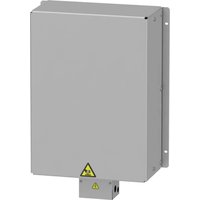
VW3A7751 - Residual current circuit breaker SCHNEIDER - Free user manual and instructions
Find the device manual for free VW3A7751 SCHNEIDER in PDF.


| Product type | Residual Current Circuit Breaker (RCCB) type B-SI |
| Brand | Schneider Electric |
| Model | VW3A7751 |
| Family | Acti9 iID |
| Number of poles | 4P (2P version also available) |
| Rated voltage | 230/400 V AC |
| Rated frequency | 50/60 Hz |
| Insulation voltage (Ui) | 250 V (2P) / 500 V (4P) |
| Impulse withstand voltage (Uimp) | 6 kV |
| Short-circuit breaking capacity | 3 000 A (according to Belgian standard) |
| Voltage presence indicator | Green LED |
| Operation test | T button (self-diagnosis) |
| Connection | Input terminals: N, 1, 3, 5; output terminals: N, 2, 4, 6 |
| Installation | Reserved for qualified personnel |
| Maintenance | Monthly test via T button |
| Repairability | Not repairable (replacement required) |
| Standards | IEC 61008-2, IEC 62423 |
| Environmental protection | Green Premium, silicone-free |
| Use | AC network only |
Frequently Asked Questions - VW3A7751 SCHNEIDER
User questions about VW3A7751 SCHNEIDER
0 question about this device. Answer the ones you know or ask your own.
Ask a new question about this device
Download the instructions for your Residual current circuit breaker in PDF format for free! Find your manual VW3A7751 - SCHNEIDER and take your electronic device back in hand. On this page are published all the documents necessary for the use of your device. VW3A7751 by SCHNEIDER.
USER MANUAL VW3A7751 SCHNEIDER
Residual Current Device iID (Type B) SI User Guide and FAQs
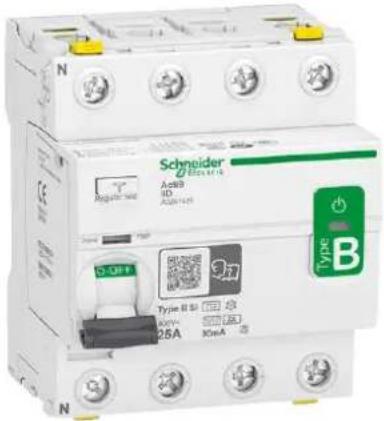
The Acti9 iID B-SI Type - User Guide is available in the below mentioned languages:

English

Svenska

Italiano

Français

Dansk

Español

Deutsch

中文,汉语,漢語

Norsk

Nederlands
User Guide 4
ENGLISH....6
Installation 6
Wiring 7
Voltage presence LED....8
Operating Test....9
Dielectric Test....10
FAQ 11
Guida all'uso....12
ITALIANO....14
Residual Current Device iID (Type B) SI User Guide
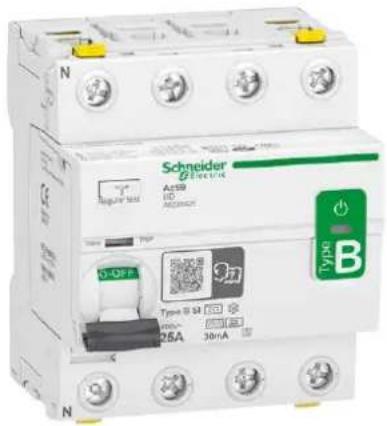
PLEASE NOTE
■ The installation, maintenance and eventual replacement of this device must only be carried out by a qualified electrician.
■This device must not be repaired.
■ All applicable local, regional and national regulations must be complied with during the installation, use, maintenance and replacement of this device.
■ This device should not be installed if, when unpacking it, you observe that it is damaged.
■ Schneider Electric cannot be held responsible in the event of non-compliance with the instructions in this document and in the documents to which it refers.
■ The service instruction must be observed throughout the life time of this device.

Installation
△ ▲ DANGER
HAZARD OF ELECTRIC SHOCK, EXPLOSION, OR ARC FLASH
■Turn off all power supplying this device before working on it.
■ Use a voltage tester with a suitable rated voltage, in order to check that all active conductors aren't energized.
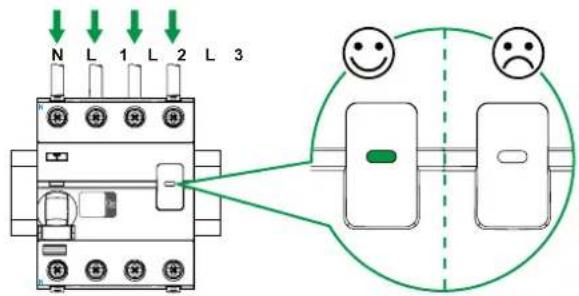
■ Do not consider the Voltage Presence LED as a substitute for the voltage test.
Failure to follow these instructions will result in death or serious injury.
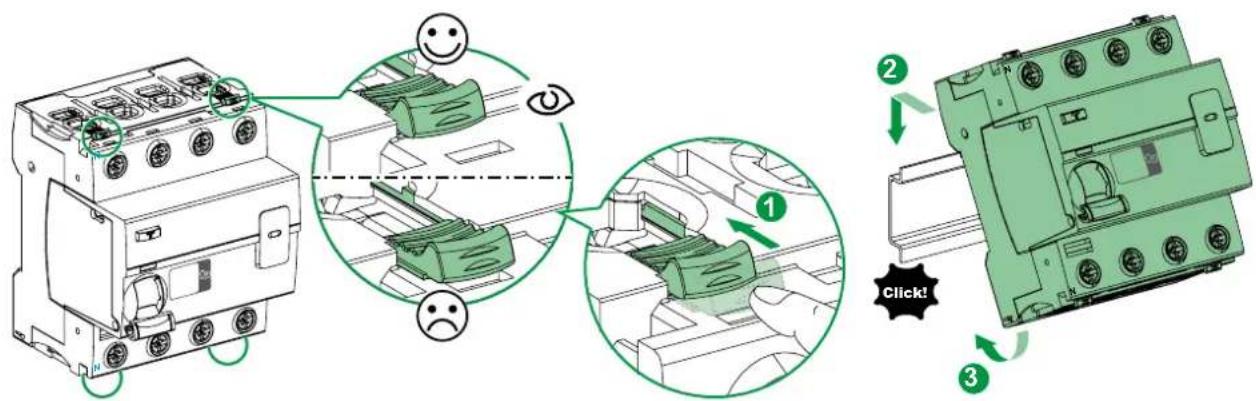
Wiring
Electrical wiring
■ Wire all active conductors and external cables (L1, L2, L3 and the neutral conductor N) to the device, paying attention to the current flow direction, namely that the input terminals are N, 1, 3, 5 and the consumer system side is N, 2, 4, 6.
■Remember to test your product after installation.
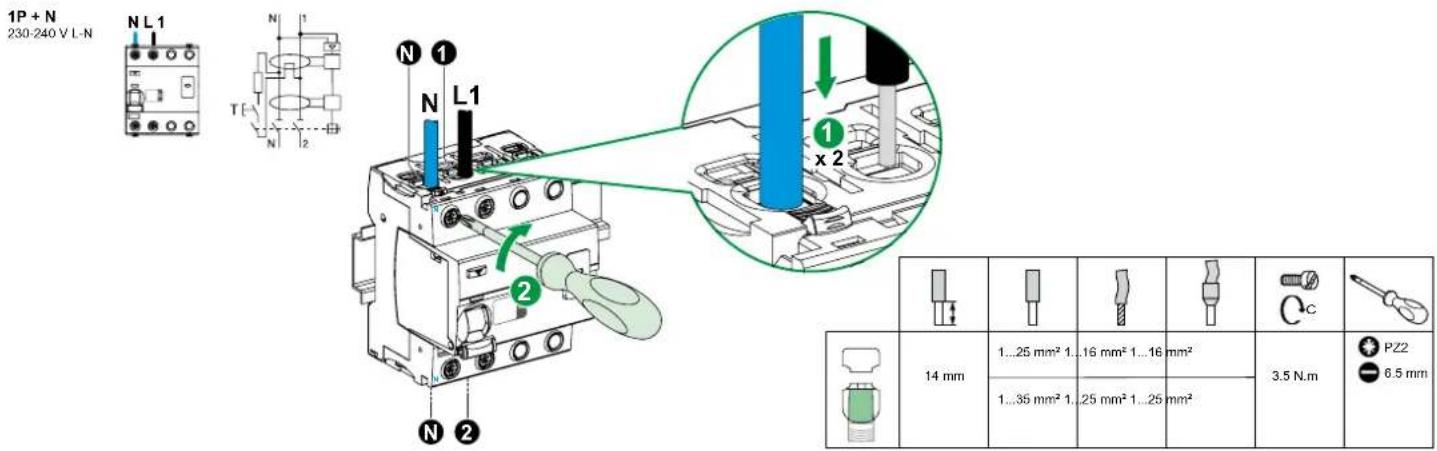
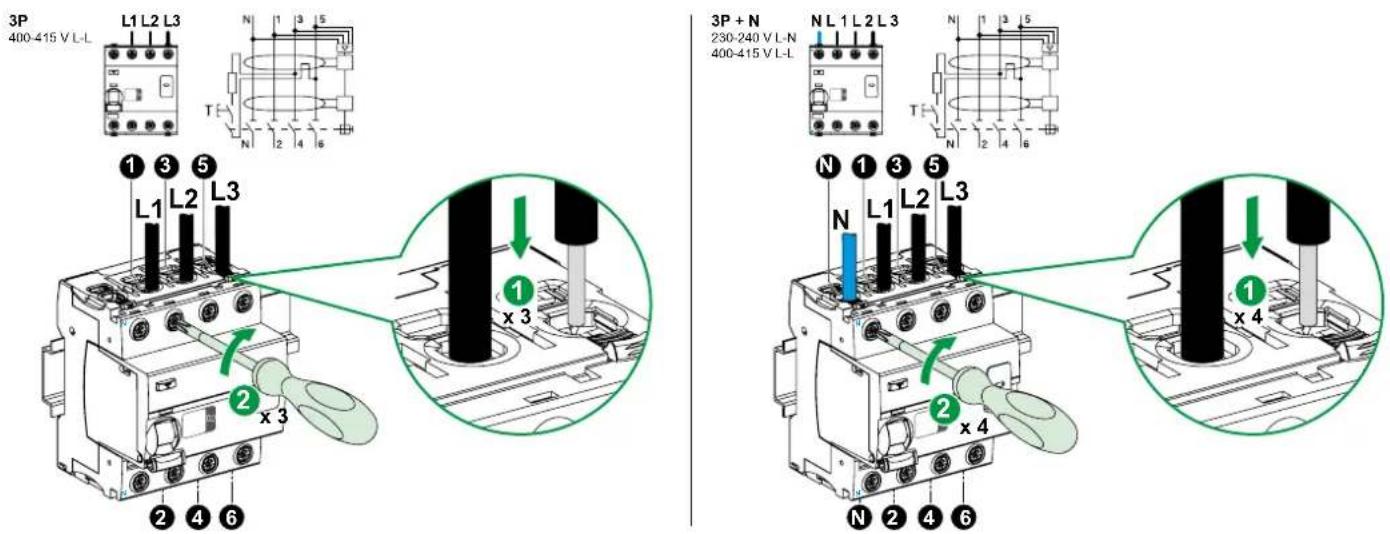
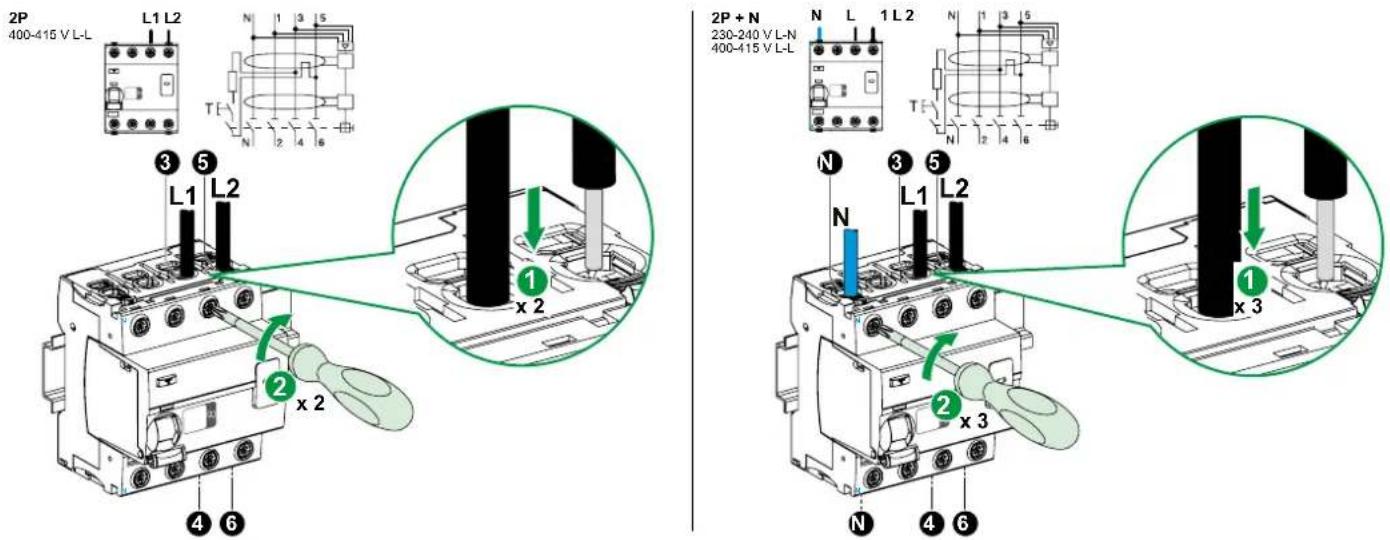
Voltage presence LED
Operating Test
WARNING
PRODUCT OUT OF ORDER
Run a self diagnostic test of device after installing it, and then at regular intervals by pressing the Test button (marked T). (see drawing below).
Failure to follow these instructions can result in death, serious injury, or equipment damage.
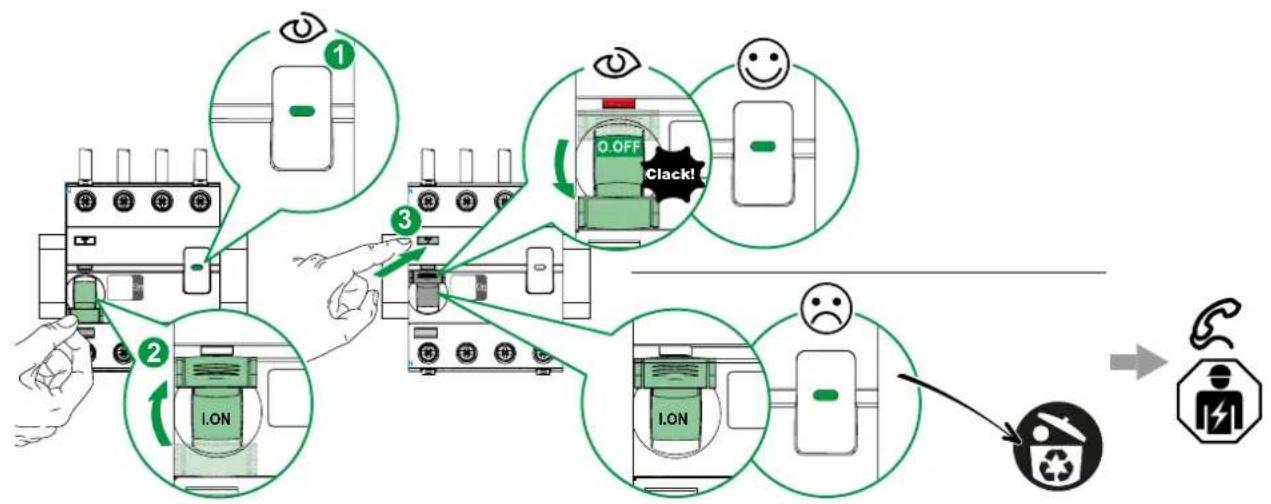
flowchart
graph TD
    A["1 Eye"] --> B["2 Lock"]
    B --> C["3 Clapping"]
    C --> D["4 Signal Recovery"]
    D --> E["End"]
Dielectric Test
NOTICE
RISK OF DAMAGE TO THE EQUIPMENT ACTI9 iID
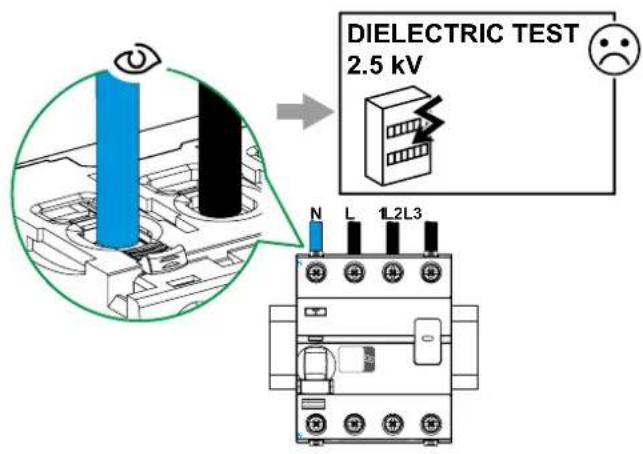
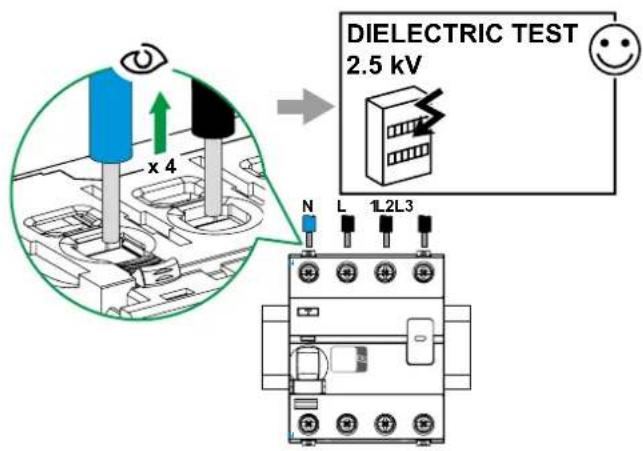
Disconnect all input and output wires from the Acti9 iID device before running an insulation resistance test (dielectric test).
Failure to follow these instructions can result in equipment damage.
FAQ
Can we use a 4P iID B-SI type in a 2P application?
iID B-SI 2P is now available.
If the voltage is 400 V it's possible to use a 4P for 2P application connecting the terminals between 3/5 and 4/6.
Can we use a 4P iID B-SI type in a 3P application?
The iID 4P is well adapted for 3P application.
What precaution shall I take to perform the dielectric test according to the standard?
If the test is performed above 500 V peak (for example 2 kV 50 Hz) all terminals must be disconnected.
What is the coordination table for iID B-SI type?
Schneider Electric MCB's provide complete information in the coordination table CA908023E in Acti9 catalog or website.
What recommendations do you have for an RCD connected Upstream or in parallel of an iID BSI type?
You will find more information in Earth Leakage Protection Guide CA908066E.
What is the heat dissipation for iID B-SI type in Watt?
For all ratings, you will find more information in the catalog CA908009E.
Where can I find the technical characteristics of the contacts for Open/Close Fault Signal auxiliary?
For all Acti9 products, you will find information in the auxiliary catalog for Open/Close Fault Signal auxiliary CA907002E.
What is the tripping time for ID B-SI type?
In addition to standards IEC 61008-2 and IEC 62423, you will find more information in Earth Fault Protection guide N° CA908066E.
What is the U value?
U_i=250 V 2P; U_i=500 V 4P, you will find more information in catalog CA902055E.
What is the U_imp value?
U_imp=6 kV ; you will find more information in catalog CA902055E.
Is the iID B-SI type with auxiliaries free of silicone?
Yes, our products are green premium, you will find more information in the environmental sheet.
Can iID B-SI type be installed on DC network?
No, the iID B-SI type is always installed on the AC part of the installation. There is no RCD offer for DC network.
What is the difference between B-SI type RCCB and A/AC type RCCB?
B-SI type RCCB is the strongest RCCB in the market, it includes the AC/A and F protection in its design, including electronics that can filter multifrequency for which A/AC type is blinded.
Can I substitute the old B-SI type RCCB with the new iID B-SI type Acti9?
Yes, they are both 4 modules, and the performance of new iID B-SI type Acti9 has been improved. In case you use old B-SI type 4P version for a 2P application, you can now use the 2P reference.
What kind of loads need B-SI type protection?
All loads that injects DC disturbances or could produce frequencies between 16 to 4000Hz in the network.
Examples: Speed Drive (cranes, pumps, lift, HVAC, OEMs machines), Converters for Photovoltaic, Electrical Vehicle, UPS equipment, medical equipment.
Is the iID B-SI type compliant with the 3000A 22.5 kA²s short circuit test?
Yes, the iID B-SI type is compliant to Belgium Standard.
Acti9 iID tipo B-SI
Collegamento
Funzione di prova
AVVERTENZA
PRODOTTO FUORI SERVIZIO
Tilslutning
Elektrisk tilslutning
Test knap
▲ ADVARSEL!
PRODUKT UDE AF DRIFT
flowchart
graph TD
    A["Device 1: Inverter"] --> B["Device 2: Lock with I.ON"]
    B --> C["Device 3: Clack with 0.OFF"]
    C --> D["Device 4: No OK"]
    D --> E["Device 5: Clack with -"]
    E --> F["Device 6: Clack with -"]
    F --> G["Device 7: Clack with -"]
    G --> H["Device 8: Clack with -"]
    H --> I["Device 9: Clack with -"]
    I --> J["Device 10: Clack with -"]
    style A fill:#f9f,stroke:#333
    style B fill:#ccf,stroke:#333
    style C fill:#cfc,stroke:#333
    style D fill:#fcc,stroke:#333
    style E fill:#cff,stroke:#333
    style F fill:#ffc,stroke:#333
    style G fill:#fcf,stroke:#333
    style H fill:#cff,stroke:#333
    style I fill:#ffc,stroke:#333
    style J fill:#cfc,stroke:#333
Dielektrisk test
BEMÆRK
RISIKO FOR BESKADIGELSE AF ACTI9 iID UDSTYRET
Verkabelung
Testfunktion
⚠️ WARNING
GERÄT OHNE FUNKTION
flowchart
graph TD
    A["Device 1: Inverter"] --> B["Device 2: Lock with I.ON"]
    B --> C["Device 3: Lock with 0.OFF Clack!"]
    C --> D["Device 4: Inverter with I.ON"]
    D --> E["Device 5: Inverter with 0.OFF Clack!"]
    E --> F["Device 6: Inverter with 0.OFF Clack!"]
    F --> G["Device 7: Inverter with 0.OFF Clack!"]
    G --> H["Device 8: Inverter with 0.OFF Clack!"]
    H --> I["Device 9: Inverter with 0.OFF Clack!"]
    I --> J["Device 10: Inverter with 0.OFF Clack!"]
    J --> K["Device 11: Inverter with 0.OFF Clack!"]
    K --> L["Device 12: Inverter with 0.OFF Clack!"]
    L --> M["Device 13: Inverter with 0.OFF Clack!"]
    M --> N["Device 14: Inverter with 0.OFF Clack!"]
    N --> O["Device 15: Inverter with 0.OFF Clack!"]
    O --> P["Device 16: Inverter with 0.OFF Clack!"]
    P --> Q["Device 17: Inverter with 0.OFF Clack!"]
    Q --> R["Device 18: Inverter with 0.OFF Clack!"]
    R --> S["Device 19: Inverter with 0.OFF Clack!"]
    S --> T["Device 20: Inverter with 0.OFF Clack!"]
    T --> U["Device 21: Inverter with 0.OFF Clack!"]
    U --> V["Device 22: Inverter with 0.OFF Clack!"]
    V --> W["Device 23: Inverter with 0.OFF Clack!"]
    W --> X["Device 24: Inverter with 0.OFF Clack!"]
    X --> Y["Device 25: Inverter with 0.OFF Clack!"]
    Y --> Z["Device 26: Inverter with 0.OFF Clack!"]
    Z --> AA["Device 27: Inverter with 0.OFF Clack!"]
    AA --> AB["Device 28: Inverter with 0.OFF Clack!"]
    AB --> AC["Device 29: Inverter with 0.OFF Clack!"]
    AC --> AD["Device 30: Inverter with 0.OFF Clack!"]
Tilkobling
Elektrisk tilkobling
Testfunksjon
▲ ADVARSEL
PRODUKT UTE AV DRIFT
Kabling
Elektrisk inkoppling
Testfunktion
▲ WARNING
flowchart
graph TD
    A["1: Display with eye"] --> B["2: Alarm with I.ON"]
    B --> C["3: Detection with 0.OFF Clack!"]
    C --> D["4: Detection with I.ON"]
    D --> E["5: Signal with smiling face"]
    E --> F["6: No smoking"]
    F --> G["7: Discharge symbol"]
    G --> H["8: Discharge symbol"]
    H --> I["9: No smoking"]
    I --> J["10: No smoking"]
    J --> K["End"]
Isolationstest
OBS
RISK FÖR SKADA PÅ ACTI9 iID-enheten
Connexion
DYSFONCTIONNEMENT DU PRODUIT
flowchart
graph TD
    A["Device 1: Inverter"] --> B["Device 2: Lock/ON"]
    B --> C["Device 3: Inverter with 0.0FF Clack!"]
    C --> D["Device 4: Inverter with 0.05V/100% load"]
    D --> E["Device 5: Inverter with 0.05V/100% load"]
    E --> F["Device 6: Inverter with 0.05V/100% load"]
    F --> G["Device 7: Inverter with 0.05V/100% load"]
    G --> H["Device 8: Inverter with 0.05V/100% load"]
    H --> I["Device 9: Inverter with 0.05V/100% load"]
    I --> J["Device 10: Inverter with 0.05V/100% load"]
    J --> K["Device 11: Inverter with 0.05V/100% load"]
    K --> L["Device 12: Inverter with 0.05V/100% load"]
    L --> M["Device 13: Inverter with 0.05V/100% load"]
    M --> N["Device 14: Inverter with 0.05V/100% load"]
    N --> O["Device 15: Inverter with 0.05V/100% load"]
    O --> P["Device 16: Inverter with 0.05V/100% load"]
    P --> Q["Device 17: Inverter with 0.05V/100% load"]
    Q --> R["Device 18: Inverter with 0.05V/100% load"]
    R --> S["Device 19: Inverter with 0.05V/100% load"]
    S --> T["Device 20: Inverter with 0.05V/100% load"]
Test dielectrique
AVIS
RISQUE D'ENDOMMAGEMENT DE L'EQUIPEMENT ACTI9 iID
Cableado
Conexión eléctrica
Función de prueba
ADVERTENCIA
PRODUCTO FUERA DE SERVICIO
接线
电气连接
运行测试
警告
产品故障
Bedrading
Testfunctie
⚠ WAARSCHUWING
PRODUCT BUITEN WERKING
flowchart
graph TD
    A["Eye Contact"] --> B["Check Valve"]
    B --> C{Check Valve}
    C -->|Yes| D["OK Battery"]
    C -->|No| E["Disable Battery"]
    D --> F["Check Valve with Clack!"]
    E --> G["Check Valve with Clack!"]
    F --> H["Recovery to Battery"]
    G --> I["Recovery to Battery"]
    H --> J["Warning: No Rejection"]
    I --> K["Warning: No Rejection"]
Diëlektrische test
OPMERKING
RISICO OP BESCHADIGING VAN DE ACTI9 iID
As standards, specifications and designs change from time to time, please ask for confirmation of the information given in this publication.
- Residual Current Device iID (Type B) SI User Guide and FAQs
- PLEASE NOTE
- Installation
- △ ▲ DANGER
- HAZARD OF ELECTRIC SHOCK, EXPLOSION, OR ARC FLASH
- Wiring
- Electrical wiring
- Voltage presence LED
- Operating Test
- WARNING
- PRODUCT OUT OF ORDER
- Dielectric Test
- NOTICE
- FAQ
- Acti9 iID tipo B-SI
- Collegamento
- Funzione di prova
- AVVERTENZA
- PRODOTTO FUORI SERVIZIO
- Tilslutning
- Elektrisk tilslutning
- Test knap
- ▲ ADVARSEL!
- PRODUKT UDE AF DRIFT
- Dielektrisk test
- BEMÆRK
- Verkabelung
- Testfunktion
- ⚠️ WARNING
- GERÄT OHNE FUNKTION
- Tilkobling
- Elektrisk tilkobling
- Testfunksjon
- ▲ ADVARSEL
- PRODUKT UTE AV DRIFT
- Kabling
- Elektrisk inkoppling
- ▲ WARNING
- Isolationstest
- OBS
- Connexion
- DYSFONCTIONNEMENT DU PRODUIT
- Test dielectrique
- AVIS
- Cableado
- Conexión eléctrica
- Función de prueba
- ADVERTENCIA
- PRODUCTO FUERA DE SERVICIO
- 接线
- 电气连接
- 运行测试
- 警告
- 产品故障
- Bedrading
- Testfunctie
- ⚠ WAARSCHUWING
- PRODUCT BUITEN WERKING
- Diëlektrische test
- OPMERKING
Brand : SCHNEIDER
Model : VW3A7751
Category : Residual current circuit breaker