HCO 460 X - Oven HOOVER - Free user manual and instructions
Find the device manual for free HCO 460 X HOOVER in PDF.


| Brand | Hoover |
| Model | HCO 460 X |
| Product type | Built-in oven |
| Dimensions (H x W x D) | 460 x 597 x 570 mm |
| Usable volume | 37 L |
| Power supply | 230 V ~ 50/60 Hz |
| Maximum cooking power | 5300 W |
| Cooking functions | 9: lamp, conventional, bottom heat, top heat, central grill, ventilation + grill, fan-assisted conventional, fan-assisted, defrost |
| Timer type | Electronic with 24h clock, timer, automatic and semi-automatic cooking |
| Maximum temperature | 250 °C (estimate) |
| Interior lighting | 25W lamp, type E-14, T 300°C |
| Removable door | Yes, for easy cleaning |
| Side racks | Removable |
| Door material | Glass |
| Included accessories | Grid and drip tray |
| Color | Stainless steel (estimate) |
| Electrical connection | Minimum cable cross-section 1.5 mm², omnipolar switch |
| Earth connection | Mandatory |
| Repairability | Replaceable lamp; authorized after-sales service for repairs |
| Use | Domestic |
| Compliance | CE, directives 2006/95/EC and 2004/108/EC |
Frequently Asked Questions - HCO 460 X HOOVER
User questions about HCO 460 X HOOVER
0 question about this device. Answer the ones you know or ask your own.
Ask a new question about this device
Download the instructions for your Oven in PDF format for free! Find your manual HCO 460 X - HOOVER and take your electronic device back in hand. On this page are published all the documents necessary for the use of your device. HCO 460 X by HOOVER.
USER MANUAL HCO 460 X HOOVER
SCHEMA INCASSO (fig. 1)
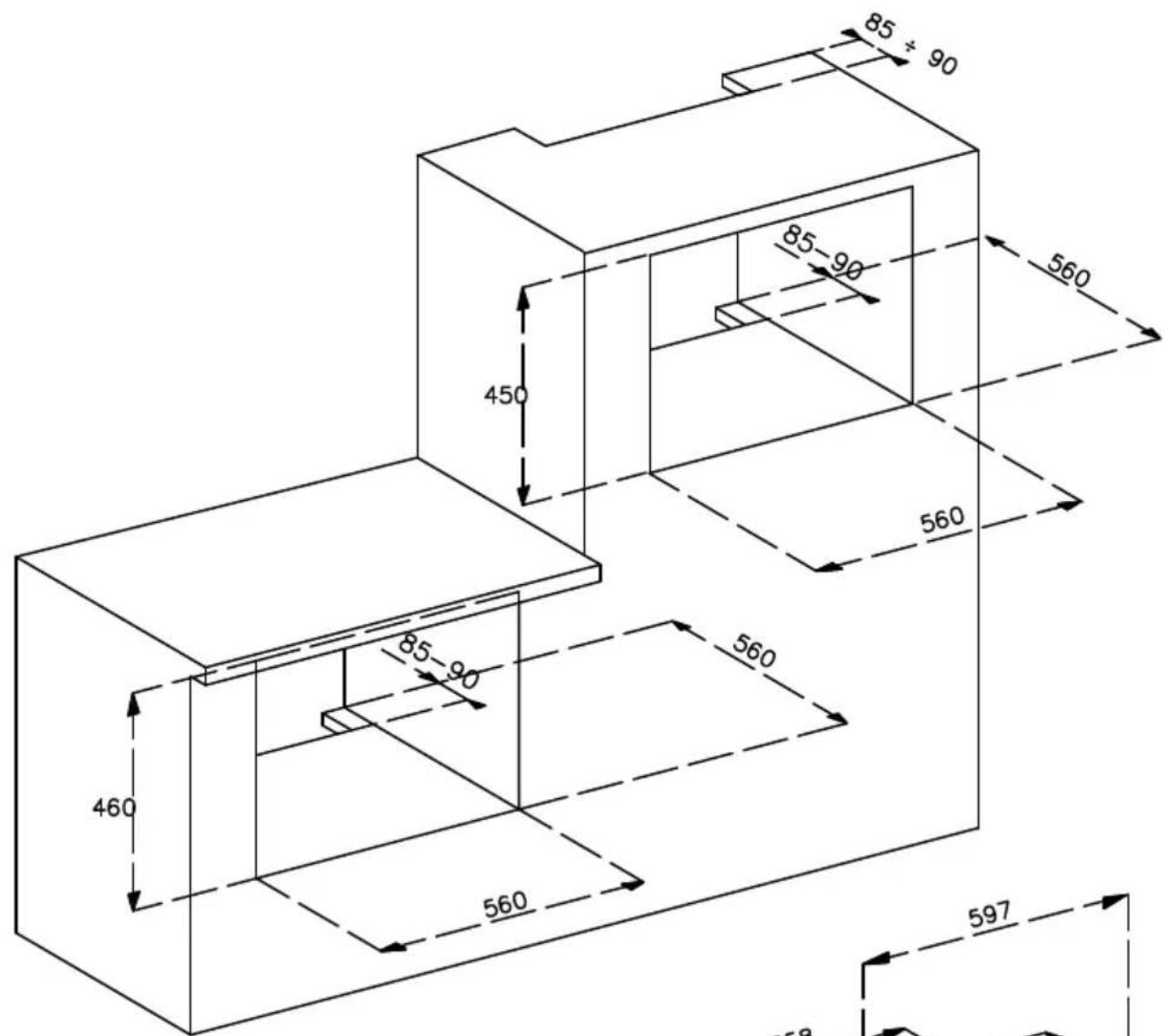
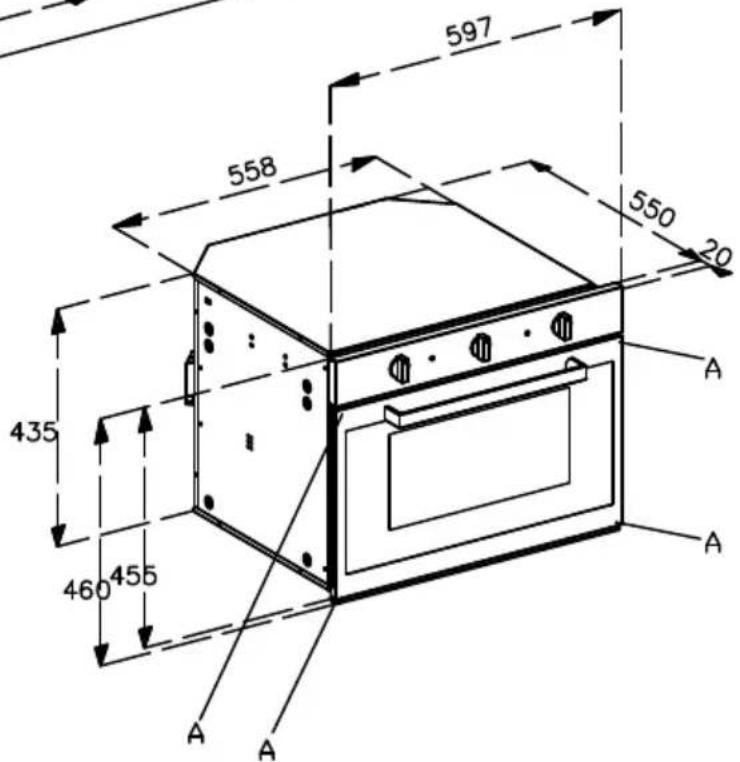
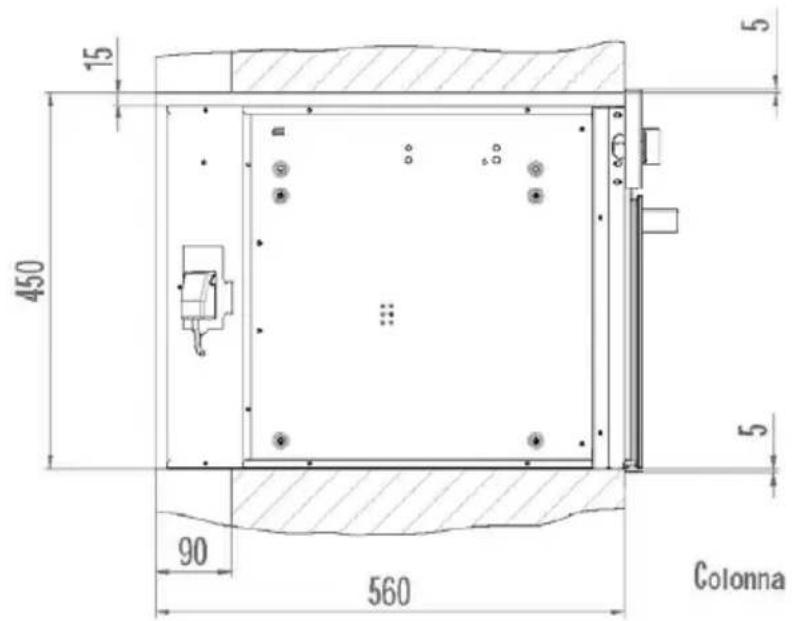
Fig. 2
natural_image
Technical diagram of a mechanical assembly with labeled parts A and B, showing internal components without any text or symbols.ATTENZIONE:
natural_image
Line drawing of an open oven with internal door and door panel (no text or symbols)Instructions for the user
Thank you for choosing one of our products. We hope you will get the very best performance from this appliance.
Therefore we would ask you to carefully comply with the suggestions and instructions in this manual for proper use of our products.
The manufacturer shall not be held liable for damage to persons and property which is due to poor or incorrect installation of the appliance.
The manufacturer reserves the right to modify its products as deemed fit with no advance notice.
EC declaration of conformity
This appliance, in the parts that are to come into contact with food substances, is compliant with provisions of directive EEC 89/109.
This appliance is compliant with European Directives 73/23/ EEC and 89/336/ EEC, respectively replaced by 2006/95/CE and 204/108/EC and subsequent modifications.
Technical characteristics
Dimensions: Volume:
Height: 460 mm Gross: 43 dm 3
Width: 597 mm Net: 37 dm ^3
Depth: 570 mm
Power supply voltage: 230V\~ 50/60Hz
Input watts (power):
Lamp: 25W
Radial fan: 20W
Tangential fan: 11W
Bottom: 1300W
Top: 600W
Grill: 1400W
Circular: 2000W
Electronic Prog. 1W
Instructions for user
Any work on the appliance must be done with the appliance disconnected from the electrical power supply.
Attention: earth connection is required by law.
Heat forms during cooking and the appliance door, especially if made in glass, can become very hot. To prevent burns, do not touch the door and keep children away.
Never clean the appliance with high pressure water or steam cleaning equipment.
Do not use the appliance to heat the room.
The manufacturer will in no way be held liable if accident prevention standards are not observed.
The manufacturer shall not be held liable for damage to persons or property due to poor or incorrect maintenance of the appliance.
The manufacturer reserves the right to make any modifications to its products which it feels are necessary or useful without any advance notice.
Packaging (e.g. paper, polystyrene) may be hazardous to children (danger of suffocation. Keep packaging out of the reach of children.
This appliance is not intended for use by children or by persons who are not able or are not familiar with use of the product, unless they are supervised and instructed on use of the product by a person who is responsible for their safety.
Supervise children to make sure they do not play with the appliance.
It is not permitted to modify, tamper with or attempt repairs on the appliance, especially with tools (screwdrivers and the like) either inside or outside the appliance.
Repairs must only be carried out by authorized personnel, especially on the electrical parts.
Inappropriate repair work may cause serious accidents, damage the appliance and equipments and lead to improper operation.
Appliances repaired in technical service centres must undergo routine testing, especially the continuity of the earth circuit.
This product was designed for household use.
The manufacturer shall not be held liable for damage to persons or property due to incorrect installation, or improper, wrong or ludicrous use of the appliance.
In the event of a breakdown or if indispensable repairs are required, contact customer service.
If the oven is visibly damaged, do not use it. Unplug it and contact customer service.
As soon as an operating problem is discovered, the oven must be unplugged.
Make sure that the power cord of electrical appliances is not crushed by the oven door. The electrical insulation could be damaged.
If the power cord has been damaged, it must be replaced by customer service to prevent danger.
Before closing the oven door, make sure there are no foreign objects or pets inside the oven.
Do not place heat-sensitive or flammable materials in the ovens such as detergents, oven sprays, etc.
During operation the oven gets very hot. It remains hot for a long time, even after it has been turned off. It cools slowly until it reaches room temperature. Wait for a sufficient length of time before doing anything like cleaning the oven.
When the oven door is opened, steam and water droplets may come out.
If the oven contains steam, it is not advisable to put your hands inside of it.
Hot grease and fat catch fire easily.
It is dangerous to heat oil in the oven to cook meat and this should be avoided.
Never try to put out a grease fire using water (there may be an explosion). Suffocate the flames with wet cloths.
The grill, the plates and the cooking containers become very hot. When using or caring for the oven, do not place the fingers in the hinges, to prevent crushing and other injuries
Use care especially if children are present.
Leave the door open only in the ajar position.
If the door is left open there is the danger of tripping.
Do not sit or lean on the door and do not use it as a worktop.
The oven is equipped with a cooling fan that comes on when the cooking cycle is selected. It creates a slight air flow that exits from the slot under the control panel. It shuts down 10-30 minutes after the oven is switched off (depending on oven temperature).
INSTRUCTIONS FOR INSTALLATION OF THE UNIT
All tasks involved in installing the appliance must be carried out by skilled personnel.
Any work is to be performed with the appliance unplugged.
Electrical connection:
make sure that the voltage corresponds to that indicated on the tag on the side. The oven must be connected using a cable with a minimum cross-section of 1.5 mm on the rear, and with an omni-polar switch compliant with current standards with a distance of aperture between contacts of at least 3 mm.
Caution:
if you need to replace the power cord, make sure you comply with the following colour-code when connecting the single wires:
BLUE - NEUTRAL (N)
BROWN - PHASE (L)
YELLOW-GREEN - EARTH ( ± )
Attention: earth connection is required by law.
The manufacturer will in no way be held liable if accident prevention standards area not observed.
Insertion into the furniture unit:
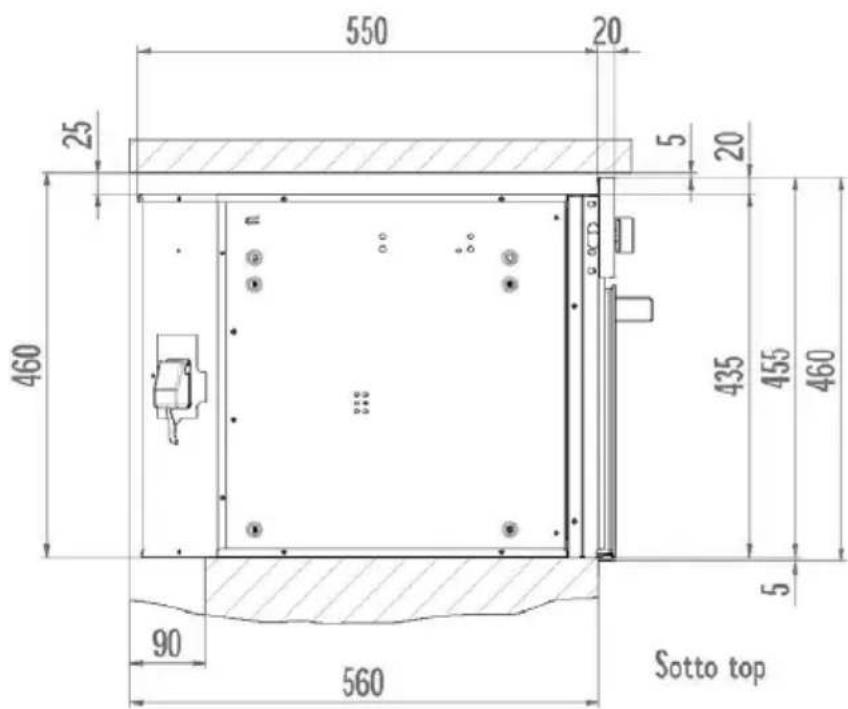
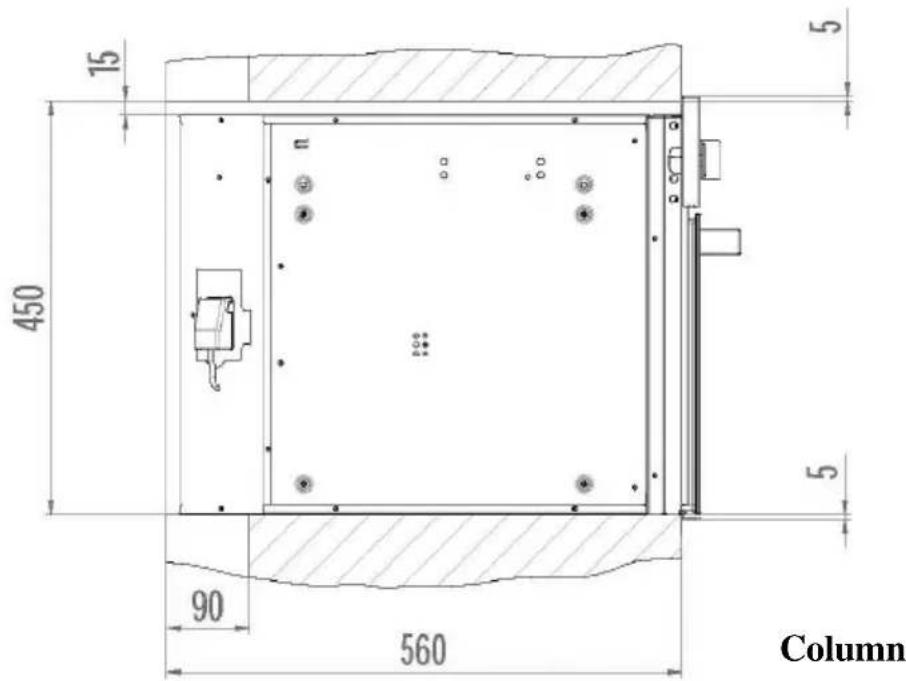
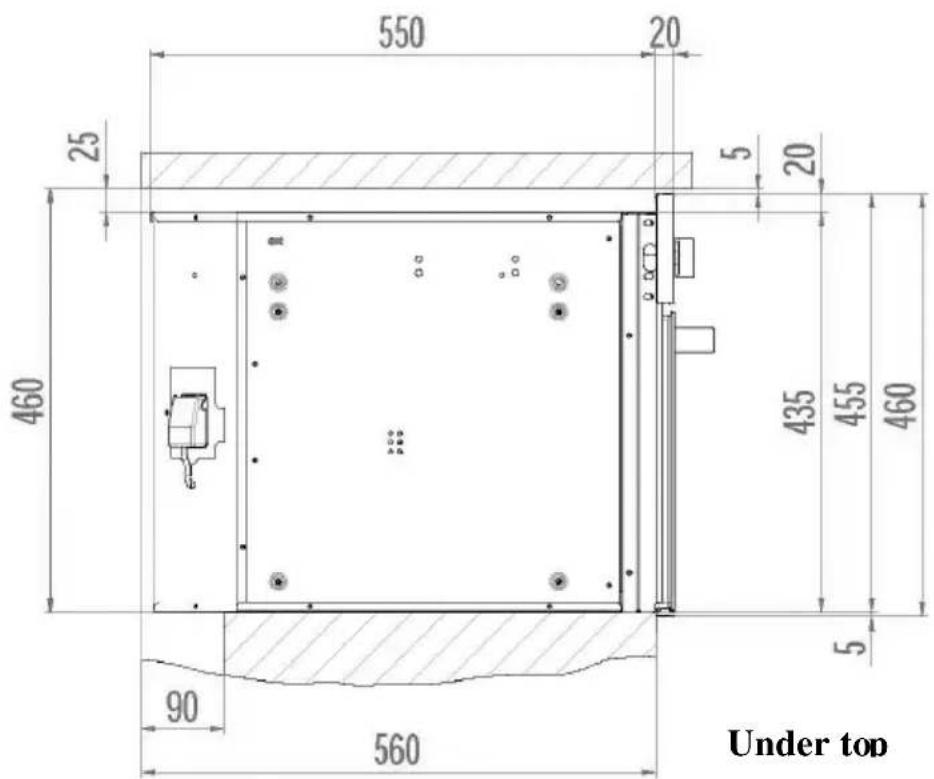
The appliance can be inserted either under a worktop or into a column. In either case comply with the dimensions shown in figures 1 and 2.
For column installation, in order to ensure proper ventilation, it is indispensable to provide an opening of at least 85-90mm as shown in figure 1.
The oven is secured to the furniture unit by four screws “A” located in the holes of the perimeter frame (see fig. 1).
Do not use the door a lever when installing the oven.
Do not place excessive pressure on the oven door when it is open.
BUILT-IN DIAGRAM Fig. 1
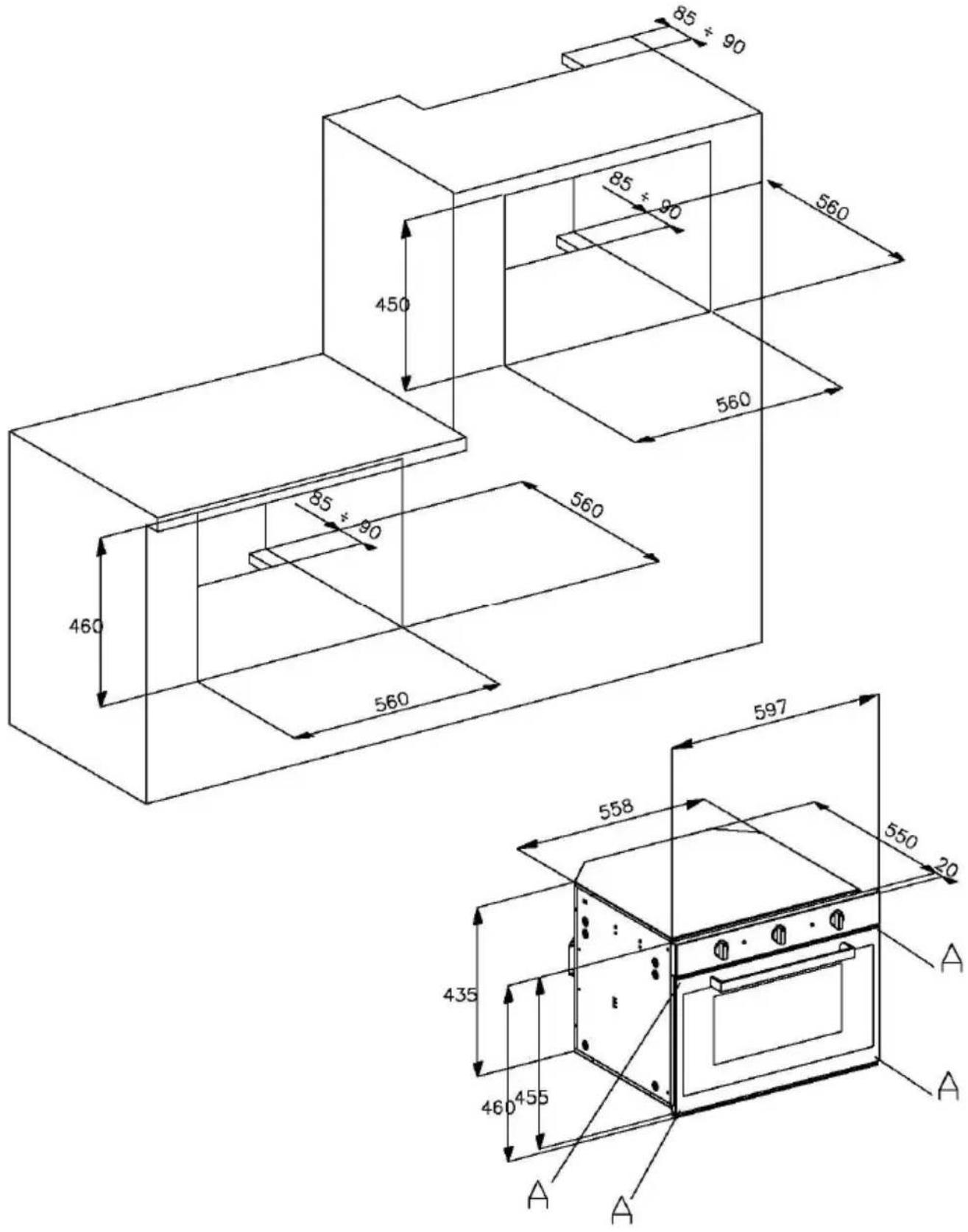
Fig. 2
Before using the oven for the first time
After unpacking the oven, inserting it in the furniture unit and removing the accessories (drip pan and racks), it is advisable to run it at the highest temperature for about 20 minutes to remove any oily residues left from the manufacturing process which may cause unpleasant odours during cooking. Aerate the room while doing this. Wash the drip pan and racks with dish detergent.
For the first few minutes that the oven is in operation, condensation may form on the front. This does not in any way compromise operation of the unit.
OVEN FUNCTIONS
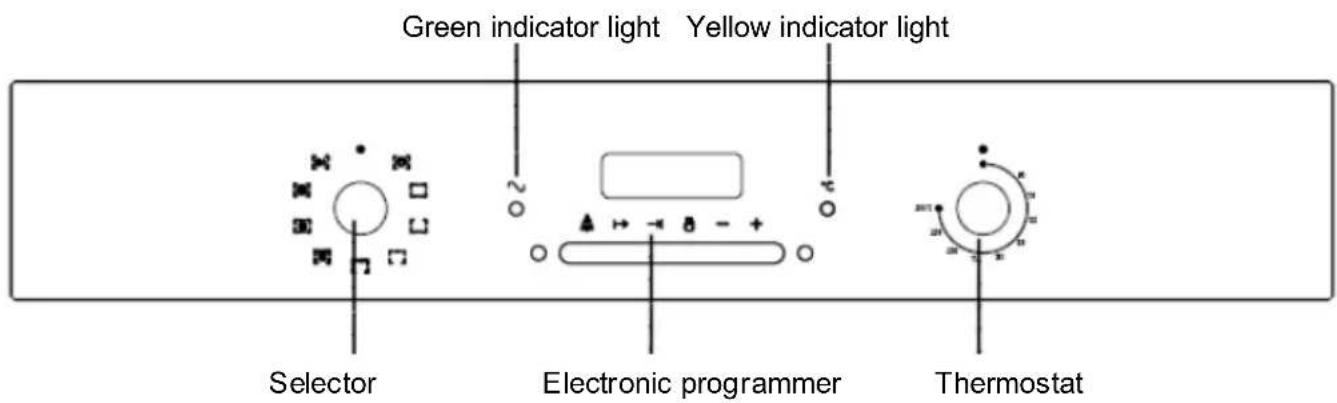
Indicator light
For any position of the selector knob other than 0, the green indicator light comes on. If the yellow indicator light is on it indicates that the thermostat is in operation.
Selector knob
This device lets you select various cooking functions.
USE OF THE SELECTOR

OVEN LIGHT
To turn on the light inside the oven.

TRADITIONAL COOKING
Select the desired temperature.
The yellow indicator light will stay on until the set temperature is reached.
Be sure to pre-heat the oven before inserting food.

LOWER HEATING
Select the desired temperature.
Suitable for very slow cooking and warming up of food.

UPPER HEATING
Select the desired temperature.
Suitable for keeping food warm or gently reheating.

GRILL
Select the desired temperature with the oven door closed.
This kind of cooking is especially suited to small amounts of food.

GRILL WITH FAN
Select the desired temperature.
The action of the fan, combined with the action of the grill, allows for quick, thorough cooking of special foods.
It is advisable to heat the oven for a few minutes before putting food in it.

TRADITIONAL COOKING WITH FAN
Select the desired temperature.
Cooking mode suited to bake bread, pizzas and lasagne.
It is recommended that the oven be pre-heated.
While cooking, keep the door closed.

MULTIFUNCTION COOKING
This type of cooking allows even heat distribution to all parts of the oven.
It is possible to cook two different types of food (e.g. meat and fish) while using their different respective cooking times.

DEFROSTING
The oven light and the green indicator light come on as for all other oven functions.
Only the fan starts working, without propagation of heat as the thermostat is not in operation.
The oven door must be closed. This function makes it possible to defrost foods using only about one-third of the time that would normally be required.
Table of cooking suggestions
| Type of dish Temp. | °C | Cooking time in minutes | Level (from bottom) | Cycle |
| • Bread and biscuits | ||||
| Pizza | 220 | 20/30 | [....][....] | |
| Loaf bread 190/200 45/60 | 1 | |||
| Bread with filling 150/160 | 20/25 1 or 2 | |||
| White bread 175/210 25/40 | 1 or 2 | |||
| Biscuits 140/150 20/30 1 | or 2 | |||
| • Pie and pastry | ||||
| Focaccia | 175 | 40/45 | 2 | [....][....][BGCA] |
| Millefoglie cake | 190 | 25/35 2 | ||
| Chocolate cake | 175 | 30/40 2 | ||
| Fruit pie | 140 | 50/70 2 | ||
| Vol-au-vent | 175 | 20 | 2 | |
| Doughnut | 180 | 35/45 | 2 | |
| Angel food cake | 150 | 20/25 2 | ||
| Souffle | 180/200 | 20/30 | 2 | |
| Meringue | 120/125 | 25/35 | 2 | |
| • Meat | ||||
| Veal stew (1/1,5Kg) | 150/160 | 180/210 | 1 or 2 | [....][....] |
| Roast veal (1/1,5Kg) | 150/160 | 120/150 | 1 or 2 | |
| Meat loaf(1/1,5Kg) | 180/190 90/120 | 1 or 2 | ||
| Lamb (leg or chop) | 180/190 60/90 | 1 or 2 | ||
| Kid (leg or chop) | 180 | 45/60 1 or 2 | ||
| Pork (loin or leg) | 180 | 60/90 2 | ||
| • Game | ||||
| Roast hare | 180 | 60/90 1 or 2 | ||
| Roast pheasant | 180 | 60/90 1 or 2 | ||
| Chamois, roast deer | 175 | 90/120 | 1 or 2 | |
| • Poultry | ||||
| Chicken | 170 | 90/120 | 1 or 2 | |
| Duck | 175 | 180/200 | 1 | |
| • Fish | ||||
| Fish in general | 200 | 15/20 2 |
| Cooking time in minutes Food | ||
| Over | Under | |
| Thin meat 6 4 | ||
| Normal meat 8 5 | ||
| Fish (e.g. trout, salmon) 15 12 | ||
| Sausage | 12 | |
| Toast | 5 | |
s to be grill
Depending on the type of food (e.g. meats, fish, poultry, etc.), you will need to turn the food to expose both sides to the infrared rays.
The data provided above is approximate.
Cooking times vary based on the experience of the person using the oven and the amount and quality of the foods.
The cooking times do not include pre-heating. It is advisable to pre-heat the oven for about 15 min.
With the ventilated grill function, do not select a temperature of more than 190^ C.
Electronic programmer - Fig. 3
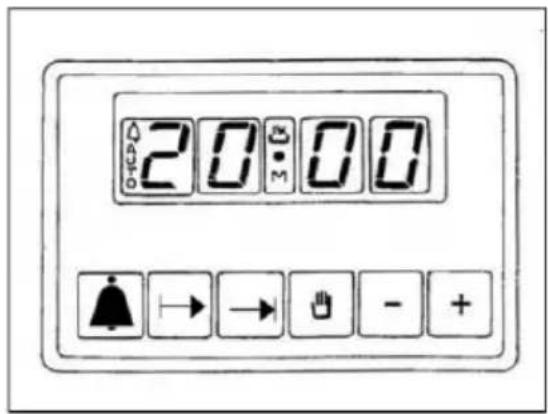
Fig. 3
The electronic programmer includes the following functions:
- 24-hour clock with illuminated display
- Timer (up to 23 hours 59 minutes)
- Programme to automatically start and stop cooking
- Programme for semi-automatic cooking (possible to programme only beginning and end)
Description of buttons

TIMER SETTING
COOKING TIME
END OF COOKING TIME

MANUAL POSITION
+ SCROLL FORWARD THROUGH ALL PROGRAMME NUMBERS
- SCROLL BACK THROUGH ALL PROGRAMME NUMBERS
Description of illuminated symbols
« AUTO » - (flashing) - Programmer in automatic position, but not programmed.
« AUTO » - (on steady) - Programmer in automatic position, with program inserted.
→ Automatic cooking operation
Timer in operation
and « AUTO » (both flashing) – Programme error
No symbol on except for numbers on clock: programmer set in manual mode.
Digital clock
Indicates the hours (0-24) and minutes.
Immediately after connection (as well as after a power outage), THREE intermittent numerals are shown on the display.
To set the correct time, press simultaneously |→ + |→ and AT THE SAME TIME one of the buttons + or - until you have the correct time.
The speed with which the numerals change on the display increases substantially a few seconds after pressing the buttons + and - .
Manual cooking
(without programmer)
To use the oven without the programmer, you will need to cancel the flashing «AUTO»
message. To do so, just press the button 📊. If the «AUTO» message is steady, showing that the oven has been programmed, you will
need to cancel the programme by pressing so that the display shows zero.
Automatic cooking
(cooking start and stop)
1) Programme the length of cooking time with
2) Programme the cooking stop time with
3) Select the desired temperature and function using the controls of the thermostat and selector.
After doing the above, the display will show the «AUTO»symbol on steady, indicating that the oven has been programmed.
As an example: you want to cook for 45 minutes, ending at 14.00.
- Press → to show 0.45 on the display. - Press → to show 14.00 on the display.
After doing this, the display will once again show the current time and the «AUTO» symbol, to indicate that your programming has been understood and memorized. At 13.15 (14.00 less 45 minutes), the oven will start automatically, and during cooking the symbols → and «AUTO» will be shown.
At 14.00 cooking will stop automatically. A signal will sound, which you can stop by pressing 🙏.
Semi-automatic cooking
A. Programming of cooking time.
B. Programming of end of cooking time.
A) Set the desired cooking time using the button →.
Cooking will start immediately, and the display will show the symbols «AUTO» and
When the programmed time has expired, cooking will stop, and an intermittent signal will sound. You can stop the signal as described above.
B) Set the desired end of cooking time using the button ↩. Cooking will start immediately, and the display will show the symbols «AUTO» and ↩.
At the established time, cooking will stop, and an intermittent signal will sound. You can stop the signal as described above.
It is possible to view the programming status at any time by pressing the corresponding button. You can also cancel programming at any time by pressing the button and setting the display to zero. If you then press
you will set up the oven for manual operation.
Electronic signal
The function of the «timer» consists simply of an acoustic signal which can be set for a maximum period of up to 23 hours and 59 minutes.
To set the timer, press ⚠ and at the same time + or - until the display shows the desired time.
When setting is complete, the clock will once again show on the display along with the
symbol.
The countdown will start immediately and you will be able to view it on the display at any time by pressing the button 🙏.
After the set time has expired, the symbol will go off and an acoustic signal will sound, which you can shut off by pressing the button
ATTENTION! A power outage will cause deletion of programmed functions, including the clock.
Once you have reset the time, three intermittent zeroes will appear, and you can re-programme.
CLEANING AND MAINTENANCE OF THE OVEN
Important: Before performing any maintenance, you must either unplug the oven or disconnect the power supply via the omni-polar switch of the electrical system.
Cleaning the oven:
- Let the oven cool after each use and clean it to keep encrusted residues from getting heated again and again.
- For tough dirt, use a product specifically for oven cleaning. Follow the instructions on the container of the product.
- Clean the outside with a sponge dampened in lukewarm water.
- Never clean the appliance with high pressure water or steam cleaning equipment.
- Do not use abrasive products, steel wool pads or flammable products.
- Do not use abrasive substances or materials to clean the glass as they may damage it.
- Wash accessories in a dishwasher or by hand using a product for oven cleaning.
ATTENTION: use protective gloves for the following tasks.
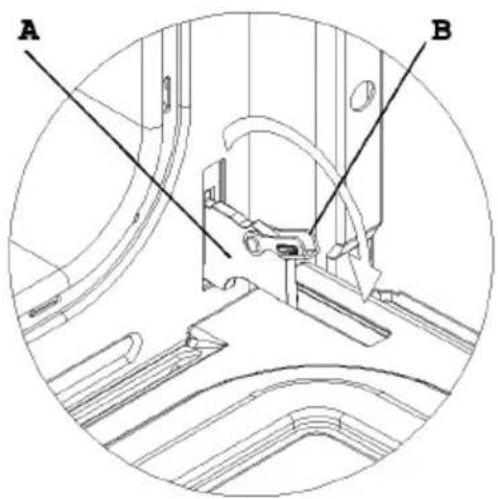
How to remove the oven door (fig. 4)
To make it easier to clean the oven, it is possible to remove the door from the hinges as follows:
The hinges A are equipped with 2 mobile U-bolts B.
When the U-bolts B are lifted, the hinges are disconnected from their housing.
- After this, lift the door up and pull it outwards, grasping the door on the sides near the hinges.
To re-install the door:
- Slide the hinges into the grooves and open the door all the way.
- Turn the mobile U-bolts to their starting position before closing the door again.
Fig. 4
natural_image
Technical line drawing of a mechanical assembly with labeled parts A and B (no text or symbols beyond labels)ATTENTION:
Make sure you do not remove the locking system of the hinges when you remove the door. The hinge mechanism has a very strong spring. Never immerge the door in water.
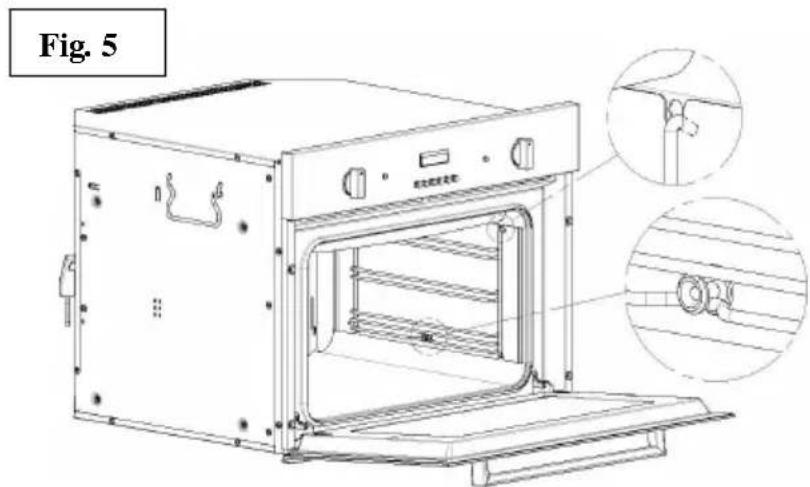
Cleaning the side grilles - Fig. 5
The side grilles are to be hooked onto the wall of the oven. Slide the racks and tray provided into the side grille.
To remove the side grilles. press on part A as shown.
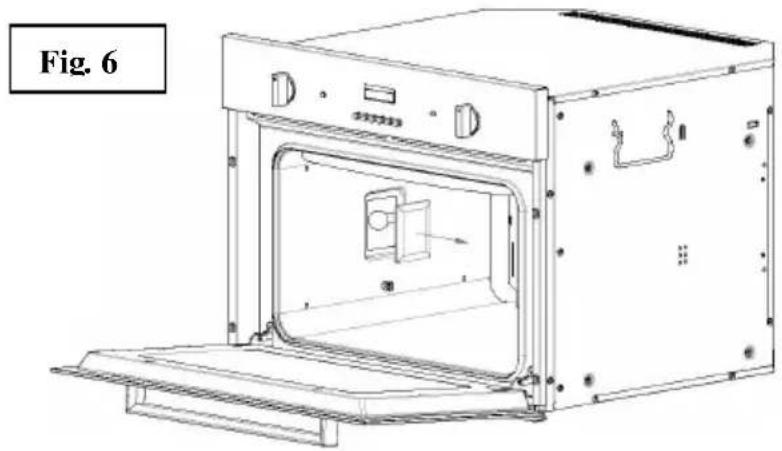
Replacement of oven lamp (fig. 6)
- Disconnect the oven from the electrical power supply.
- Use a screwdriver to remove the light cover.
- Replace the lamp
- Put the light cover back
- Restore the power supply
N.B.: use only lamps that are 25W 230V, type E-14, T 300°C, available from our technical service.
natural_image
Line drawing of an open oven with internal door and ventilation slots (no text or symbols)CUSTOMER ASSISTANCE SERVICE
If you cannot identify the cause of the operating anomaly: switch off the appliance (do not subject it to rough treatment) and contact the Assistance Service.
PRODUCT SERIAL NUMBER: Where can I find it?
It is important you to inform the Assistance Service of your product code and its serial number (a 16 character code which begins with the number 3); this can be found on the guarantee certificate or on the data plate located on the appliance. This will help to avoid wasted journeys to technicians, thereby (and most significantly) saving the corresponding callout charges.
This household appliance is marked in compliance with European Directive 2002/96/EC on waste from electrical and electronic equipment (WEEE). If you make sure this product is disposed of properly, you will help to prevent possible negative consequences for the environment and for people's health, which otherwise might occur due to incorrect treatment of this product at the end of its life cycle.

The symbol ■ on the product indicates that this appliance may not be handled as normal domestic waste. In fact, it must be turned in to the nearest collection point for the recycling of electrical and electronic waste. It must be disposed of in accordance with current environmental regulations on waste disposal. For more information about treatment, salvage and recycling of this product, please contact the nearest local authorities, the organization that collects waste at home, or the shop where it was purchased.
natural_image
Line drawing of an oven with a door and control panel, labeled Abb. 6 (no text or symbols on the diagram itself)KUNDENDIENST
Absorption Watt (puissance):
natural_image
Technical line drawing of a mechanical assembly with labeled parts A and B (no text or symbols beyond labels)ATTENTION :
natural_image
Line drawing of an oven with internal structure and labeled components, shown in two views (no text or symbols on the diagram itself)natural_image
Line drawing of an open oven with internal door and vent, labeled Fig. 6 (no text or symbols on the diagram itself)SERVICE D'ASSISTANCE A LA CLIENTELE
natural_image
Technical line drawing of a mechanical assembly with labeled components A and B (no text or symbols beyond labels)ATENCIÓN:
natural_image
Line drawing of an oven with internal structure and labeled components, shown in two views (no text or symbols on the diagram itself)natural_image
Line drawing of an open oven with internal door and ventilation slots (no text or symbols)natural_image
Technical line drawing of a mechanical assembly with labeled components A and B (no text or symbols beyond labels)LET OP:
natural_image
Line drawing of an oven with internal structure and labeled components, shown in two views (no text or symbols on the diagram itself)De ovenlamp vervangen (fig. 6)
natural_image
Line drawing of an oven with a door and vent, labeled Fig. 6 (no text or symbols on the diagram itself)natural_image
Technical line drawing of a mechanical assembly with labeled components A and B (no text or symbols beyond labels)ATENÇÃO:
natural_image
Line drawing of an oven with internal structure and two inset views showing internal components (no text or symbols)natural_image
Line drawing of an open oven with internal components and ventilation slots (no text or symbols)SERVIÇO DE ASSISTÊNCIA AO CLIENTE
natural_image
Technical line drawing of a mechanical assembly with labeled parts A and B (no text or symbols beyond labels)UWAGA:
natural_image
Line drawing of an open oven with internal door and ventilation slots (no text or symbols)SERWIS OBSŁUGI KLIENTÓW

- ATTENZIONE:
- Instructions for the user
- EC declaration of conformity
- Technical characteristics
- Instructions for user
- INSTRUCTIONS FOR INSTALLATION OF THE UNIT
- Electrical connection:
- Caution:
- Attention: earth connection is required by law.
- Insertion into the furniture unit:
- Before using the oven for the first time
- OVEN FUNCTIONS
- Indicator light
- Selector knob
- USE OF THE SELECTOR
- OVEN LIGHT
- TRADITIONAL COOKING
- LOWER HEATING
- UPPER HEATING
- GRILL
- GRILL WITH FAN
- TRADITIONAL COOKING WITH FAN
- MULTIFUNCTION COOKING
- DEFROSTING
- Description of buttons
- Description of illuminated symbols
- Digital clock
- Manual cooking
- (without programmer)
- Automatic cooking
- (cooking start and stop)
- Semi-automatic cooking
- Electronic signal
- CLEANING AND MAINTENANCE OF THE OVEN
- Cleaning the oven:
- How to remove the oven door (fig. 4)
- ATTENTION:
- Cleaning the side grilles - Fig. 5
- Replacement of oven lamp (fig. 6)
- CUSTOMER ASSISTANCE SERVICE
- PRODUCT SERIAL NUMBER: Where can I find it?
- KUNDENDIENST
- ATTENTION :
- SERVICE D'ASSISTANCE A LA CLIENTELE
- ATENCIÓN:
- LET OP:
- De ovenlamp vervangen (fig. 6)
- ATENÇÃO:
- SERVIÇO DE ASSISTÊNCIA AO CLIENTE
- UWAGA:
- SERWIS OBSŁUGI KLIENTÓW
Brand : HOOVER
Model : HCO 460 X
Category : Oven