303592 - Battery charger Aplic - Free user manual and instructions
Find the device manual for free 303592 Aplic in PDF.


| Product type | Battery charger |
| Brand | Aplic |
| Model | 303592 |
| Power supply | USB-C, 5 V / 2 A minimum (via USB power adapter) |
| Compatible rechargeable battery types | Ni-MH/NiCd (1.2 V), Li-ion (3.6/3.7 V), LiFePO4 (3.2 V) |
| Compatible battery sizes | AA, AAA, A, SC, C, 10440, 14500, 14650, 16340, 17335, 17500, 17650, 17670, 18350, 18500, 18650, 18700, 20700, 21700, 22650, 22700, 26500, 26650 |
| Number of charging slots | 4 (independent) |
| Charge current (Ni-MH/Cd) | 1.48 V, 1000 mA per slot (4 slots simultaneously) |
| Charge current (Li-ion) | 4.20 V, up to 2000 mA (slot 1 or 4 alone), 1000 mA (2 slots), 650 mA (3 slots), 500 mA (4 slots) |
| Charge current (LiFePO4) | 3.65 V, up to 2000 mA (slot 1 or 4 alone), 1000 mA (2 slots), 650 mA (3 slots), 500 mA (4 slots) |
| Display | LCD, with voltage, current, capacity and battery type |
| Functions | Independent charging per slot, automatic type detection, Li-ion/LiFePO4 selection, mute |
| Safety | Short-circuit, overcharge, reverse polarity protection; do not use with non-rechargeable batteries |
| Maintenance | Clean with a soft dry cloth; disconnect before cleaning |
| Included accessories | USB-A to USB-C cable, user manual |
| Repairability | Not user-serviceable; opening voids warranty |
| General information | Compliant with WEEE directive (2012/19/EU); SYDEREP registration FR031263 |
Frequently Asked Questions - 303592 Aplic
User questions about 303592 Aplic
0 question about this device. Answer the ones you know or ask your own.
Ask a new question about this device
Download the instructions for your Battery charger in PDF format for free! Find your manual 303592 - Aplic and take your electronic device back in hand. On this page are published all the documents necessary for the use of your device. 303592 by Aplic.
USER MANUAL 303592 Aplic
natural_image
Abstract geometric logo design with a stylized letter 'Q' inside a circular frame (no text or symbols)BEDIENUNGSANLEITUNG
USER MANUAL
INTELLIGENT 4-BAY BATTERY CHARGER
Mod.-Nr.: 303592
Table of contents
- Deutsch....3
- English....9
- Français....14
- Italiano....21
- Español....26
GER
Read the operating instructions carefully and especially observe the safety information. If you do not follow the safety instructions and information on proper handling in this manual, we assume no liability for any resulting personal injury or damage to property. Such cases will invalidate the warranty/guarantee.
Never operate the product unattended. Despite the extensive and varied protective circuits, malfunctions or problems when charging a battery cannot be ruled out.
FRA
Thank you for choosing an aplic product. Please read the following user manual carefully so as to get the most from the product you have purchased. Before using the product, first check that the delivered item is complete, accurate and undamaged.
1. Scope of delivery
- 4-slot charger
• USB charging cable (type A to type C) - User manual
2. Technical data
| Operating voltage at least 5V / 2 A (via USB type C port) | ||
| Output 4 charging slots | ||
| Battery types | 1.2V NiCd / MH3.6 / 3.7 V Li-ion (IMR / INR / ICR)3.2V LiFePo4 | |
| Compatible battery types | AA, AAA, A, SC, C10440, 14500, 14650, 16340, 17335, 17500, 17650, 17670, 18350, 18500, 18650, 18700, 20700, 21700, 22650, 22700, 26500, 26650 | |
| Modes Charge | ||
| Charging current | Ni-MH/CD 1.48V | 1000mA*4 |
| Li-Ion | 4.20V2000mA*1 (only port 1 or 4)1000mA*2650mA*3500mA*4 | |
| LiFePO4 | 3.65V2000mA*1 (only port 1 or 4)1000mA*2650mA*3500mA*4 | |
Note: The charging current depends on the current that can be supplied by the connected power supply.
3. Function
Check that the product and the components are intact and that the device is working properly when using it for the first time. The Aplic charger is intended for microprocessor-controlled charging of Ni-MH/CD, LiFePO4 or lithium-ion batteries. The four independent charging slots can accommodate and control batteries of different type, size and capacity at the same time. The large, easy-to-read LC display shows information such as charging current and charged battery capacity.

Caution! Make sure that the battery being charged supports a charging current of at least 1000 mA NiCd/NH or 2000mA Li-ion!
4. Product details
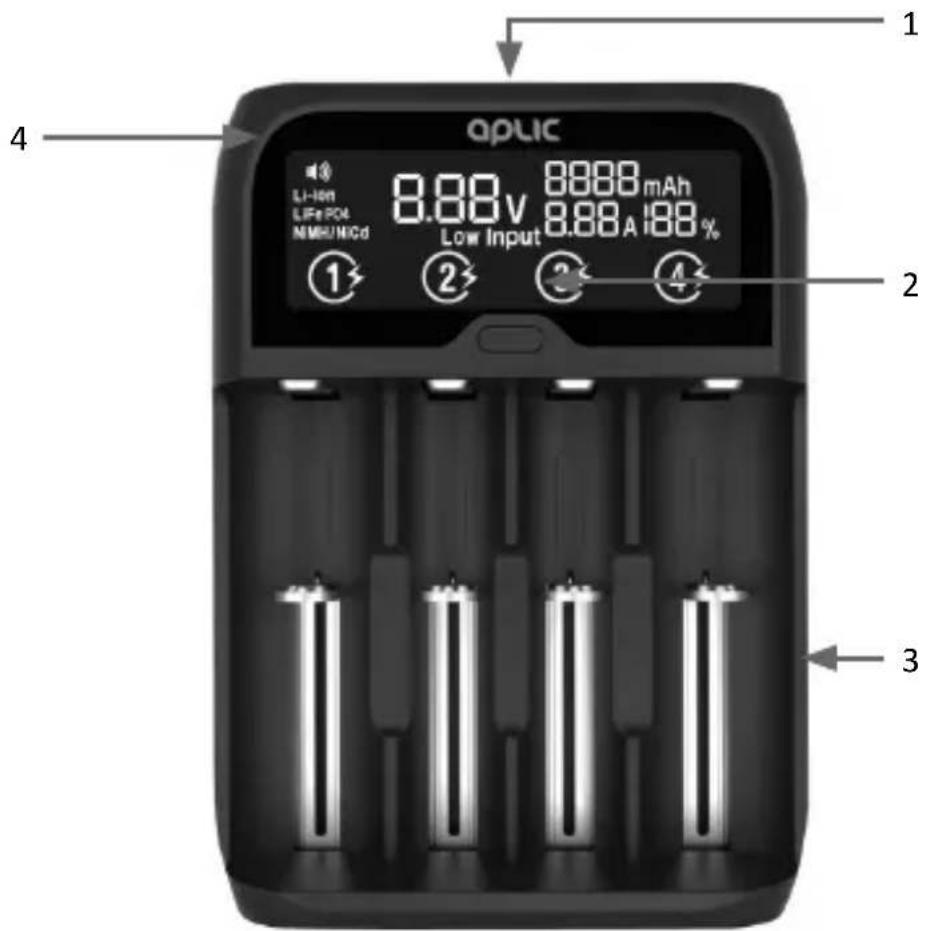
| 1 LC display |
| 2 Multi-functional button |
| 3 Charging slots |
| 4 Type indicator |
4.1 Button functions
| Multi-function-al button | Pressing: Switches between the charging portsPressing twice in quick succession: Disable sound |
4.2 Switching between Li-Ion and LiFePO4
Switching between Li-Ion and LiFePO4 is only possible immediately after inserting the battery or immediately after switching on the device. This is indicated by the flashing of the type indicator (4). You can switch the battery types by holding down the multifunction button (2). The display changes from Li-Ion to LiFePO4.
Caution! After disconnecting the power, the setting must be carried out again!
5. Power supply
Use a power adapter with a USB type A port (for example, the charger of a Smartphone) with at least 5V / 2A output voltage. All the LCD segments will light up briefly as soon as the charger is switched on. A 'zero' is displayed until all the batteries are inserted.
6. Initial use
Take the device out of the package and remove all the packaging material. Connect your power adapter to a properly installed 230V AC socket. Connect the supplied USB type A to USB type C using the power adapter and the charger. You can then insert the desired type of battery into the charger.

Caution! Charge only rechargeable batteries. Please do not use non-rechargeable batteries!
12 English
Once a battery is inserted, the type of battery, the actual voltage and the charging current is displayed. You can switch between the four different charging slots in the display by pressing the "Multifunction button". If you are charging completely empty batteries, the charging process may be more effective if you charge them using a lower charging current.
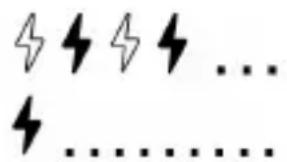
flashing: Charging process
continuously on: The battery is fully charged
The currently selected charging slot is represented by a permanently displayed number (1-4). As an example, slot 2 was selected in the figure below:




7. Cleaning and Care
Disconnect the device from the mains and make sure that it is not carrying any current. Wipe it using a dry and soft cloth. Please do not use aggressive cleaning agents.

8. Safety instructions and disclaimer
Never try to open the device to carry out repairs or modifications. Avoid contact with the mains voltage. Do not short-circuit the product. The device is not waterproof, therefore please use it only in dry surroundings. Protect it from high humidity, water and snow. Keep the device away from high temperatures.
Do not expose the device to sudden changes in temperature or strong vibrations, as this could damage the electronic components. Check the device for any damage before using it. The device should not be used if it was subject to impact
or has been damaged in some other manner. Please comply with the local regulations and restrictions.
Do not use the device for purposes other than those described in the user manual. This product is not a toy. Keep it out of the reach of children or mentally disabled persons. Any repair or modifications to the device, which are not carried out by the original supplier, will void any warranty and guarantee claims. The device should be used only by those who have read and understood this user manual. The specifications of the device may be changed without prior notice.
9. Disposal instructions
In line with the European WEEE directive, electrical and electronic devices should not be disposed of along with domestic waste. Their components must be separately sent for recycling or disposal, as improper disposal of toxic and dangerous components may permanently damage the environment.
According to the Electrical and Electronic Equipment Act (ElektroG), you are obliged (as a consumer) to return (free of charge) all electrical and electronic devices to the manufacturer, the point of sale, or public collection points at the end of their service life. The relevant local laws regulate the details in this regard. The symbol displayed on the product, in the user manual or/and on the packaging refers to these regulations. With this manner of sorting, recycling and disposal of used devices, you make an important contribution towards protecting our environment.



WEEE Guideline: 2012/19/EU
WEEE Register no.: DE 67896761
The company WD Plus GmbH hereby certifies that the device 303592 /20201014SZ137 complies with the fundamental requirements and all other relevant stipulations. A complete conformity statement can be obtained from: WD Plus GmbH, Wohlenbergstraße 16, 30179 Hanover
ENG: Current drivers, user manuals and other relevant documents for this product can be found on our homepage.
MO-FR 9:30am - 18pm CET

- BEDIENUNGSANLEITUNG
- USER MANUAL
- INTELLIGENT 4-BAY BATTERY CHARGER
- Table of contents
- GER
- FRA
- Scope of delivery
- Technical data
- Function
- Product details
- Button functions
- Switching between Li-Ion and LiFePO4
- Power supply
- Initial use
- English
- Cleaning and Care
- Safety instructions and disclaimer
- Disposal instructions
Brand : Aplic
Model : 303592
Category : Battery charger