302277 - Battery charger Aplic - Free user manual and instructions
Find the device manual for free 302277 Aplic in PDF.


| Product type | Battery charger / Universal power supply |
| Brand | Aplic |
| Model | 302277 |
| Input voltage | 100-240 V AC, 50/60 Hz, 350 mA |
| Output voltage | 5 V / 6 V / 7.5 V / 9 V / 10 V / 12 V / 15 V (adjustable) |
| Max output current | 2.4 A (5 V), 2 A (6-10 V), 1.5 A (12-15 V) |
| Number of tips included | 9 |
| Tip types | Hollow connectors (5.5x2.1; 5.5x2.5; 4.0x1.7; 3.0x1.0; 3.5x1.35; 2.5x0.7), microUSB, miniUSB, female USB |
| Main functions | Powers and recharges various electronic devices (smartphones, tablets, etc.) thanks to 9 different tips |
| Special features | Voltage selector, overload protection |
| Approximate dimensions | 10 x 5 x 3 cm |
| Approximate weight | 150 g |
| Care and cleaning | Clean with a dry cloth; do not use chemicals |
| Safety instructions | Do not open, avoid humidity, do not short-circuit, use indoors only |
| Spare parts and repairability | Repairs exclusively by the manufacturer; no spare parts available |
| General information | Manual available in several languages (FR, DE, EN, ES, IT, etc.); WEEE number: DE 67896761 |
Frequently Asked Questions - 302277 Aplic
User questions about 302277 Aplic
0 question about this device. Answer the ones you know or ask your own.
Ask a new question about this device
Download the instructions for your Battery charger in PDF format for free! Find your manual 302277 - Aplic and take your electronic device back in hand. On this page are published all the documents necessary for the use of your device. 302277 by Aplic.
USER MANUAL 302277 Aplic
Universal Power Supply, 5-15V DC
ENG: Latest information, drivers, user manuals and data sheets can be found at www.ganzeinfach.de in our download area.
Thank you for choosing an aplic product. Please read the following user manual carefully to have an enjoyable experience with your purchased product. Before using the delivered product, check that it is complete, faultless and undamaged.
1. Scope of supply
- Power adapter
- 9 different attachments
- User manual
2. Technical data
| Operating voltage 110-240V AC, 50/60Hz, 500mA | |||||||
| Output voltage in DC (adjustable) | 5,0V 6,0V 7,5V 9,0V 10,0V 12,0V 15,0V | ||||||
| Maximum output current (for the adjusted voltage) | 2,4A 2,0A 2,0A 2,0A 1,5A 1,5A | ||||||
| Attachments | • 1x 5.5*2.1mm coaxial power plug• 1x 5.5*2.5mm coaxial power plug• 1x 4.0*1.7mm coaxial power plug• 1x 3.0*1.0mm coaxial power plug• 1x 3.5*1.35mm coaxial power plug• 1x 2.5*0.7mm coaxial power plug• 1x micro-USB attachment• 1x mini-USB attachment• 1x USB female attachment |  | |||||
3. Functions
With the aplic universal power adapter, you can operate or charge different devices like handheld computers, mini-TVs or smartphones. The desired output voltage can be selected in seven different levels between 5V and 15V. Please pay attention to the amperage of the devices that you want to connect to the adapter. The maximum permissible amperage of the power adapter may not be exceeded!
4. Product details
5. Connection and use
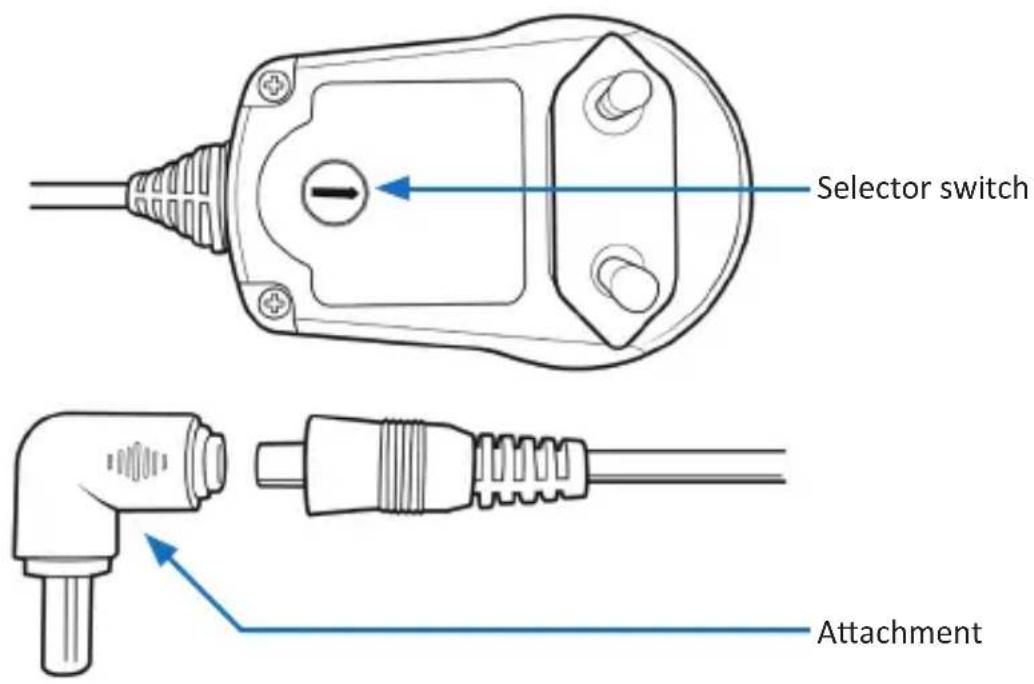
When the device is put into operation for the first time, check the intactness of the product or components and their function again. Take the device out of the package and remove all the packaging material. Plug the desired attachment on the output of the power adapter. Then adjust the output voltage of the power adapter at the bottom side. Please refer to chapter "6" of this user manual). Make sure that the adjusted voltage of the power adapter complies with the specifications on the nameplate of the device. Then connect the power adapter to a properly installed power socket and connect the power adapter to the device such as smartphone or handheld computer.

Please note! Before use, always check if the mains voltage and the polarity is within the specified range and is correct.
6. Adjusting the output voltage
The output voltage of the power adapter is selected by the position of the selector switch at the bottom side of the power adapter. You can choose between seven different output voltages. Disconnect the power adapter from the power socket if you want to adjust the voltage. Using a flat-headed screwdriver, turn the selector switch until the arrow points towards the desired output voltage (5V-15V).

7. Safety instructions and liability disclaimer
Never try to open the device to carry out repairs or conversions. Avoid contact with mains voltages. Do not short-circuit the product. The device is not certified for use in the open air; only use it in dry conditions. Protect it from high humidity, water and snow. Keep it away from high temperatures. Do not subject the device to sudden changes in temperature or heavy vibration as this might damage electronic components. Examine the device for damage before using it. The unit should not be used if it has received an impact or has been damaged in any other way. Please observe national regulations and restrictions. Do not use the device for purposes other than those described in the instructions. This product is not a toy. Keep it out of the reach of children or mentally impaired persons. Any repair or alteration to the device not carried out by the original supplier, will invalidate the warranty or guarantee. The product may only be used by persons who have read and understood these instructions. The device specifications may change without any separate prior notice to this effect.
8. Disposal instructions
Electrical and electronic devices may only be disposed of in accordance with the European WEEE Directive and not with household rubbish. Components must be disposed of or recycled separately as dangerous, toxic elements can inflict sustained damage on the environment if they are disposed of incorrectly. As a consumer, you are bound by the Electrical and Electronic Devices Act (ElektroG) to return electrical and electronic goods free of charge at the end of their useful life to the manufacturer, the place of purchase or to specially set up, public collection points. The details in each case are governed by national law. The symbol on the product, the operating instructions and/or the packaging refers to these regulations. By separating materials in this way, recycling and disposing of old devices, you are making an important contribution towards protecting our environment.


WEEE guideline: 2012/19/EU
WEEE register number: DE 67896761
WD Plus GmbH, herewith declares that this product 302277/20200408SZ138 conforms to the principle requirements and other relevant stipulations. The complete Declaration of Conformity can be obtained from: WD Plus GmbH, Wohlenbergstraße 16, 30179 Hanover
Brand : Aplic
Model : 302277
Category : Battery charger