CS-A24JKD - Air Conditioning PANASONIC - Free user manual and instructions
Find the device manual for free CS-A24JKD PANASONIC in PDF.


User questions about CS-A24JKD PANASONIC
0 question about this device. Answer the ones you know or ask your own.
Ask a new question about this device
Download the instructions for your Air Conditioning in PDF format for free! Find your manual CS-A24JKD - PANASONIC and take your electronic device back in hand. On this page are published all the documents necessary for the use of your device. CS-A24JKD by PANASONIC.
USER MANUAL CS-A24JKD PANASONIC
Operating Instructions Air Conditioner
Indoor Unit Outdoor Unit
CS-PA18JKD
CS-PA24JKD
CU-PA18JKD
CU-PA24JKD


ENGLISH
2~7
Before operating the unit, read these operating instructions thoroughly and keep them for future reference.
r_0 r 。
Jiei iLi LaLej o1
Jie jiu Jie ao aiue
1. ≤ lg2.5 < g · lgg( 1 - lg2.5) < 1.
Juaaunui geos
FRANCAIS
8~13
© Panasonic HA Air-Conditioning (M) Sdn. Bhd. 2008. Unauthorized copying and distribution is a violation of law.
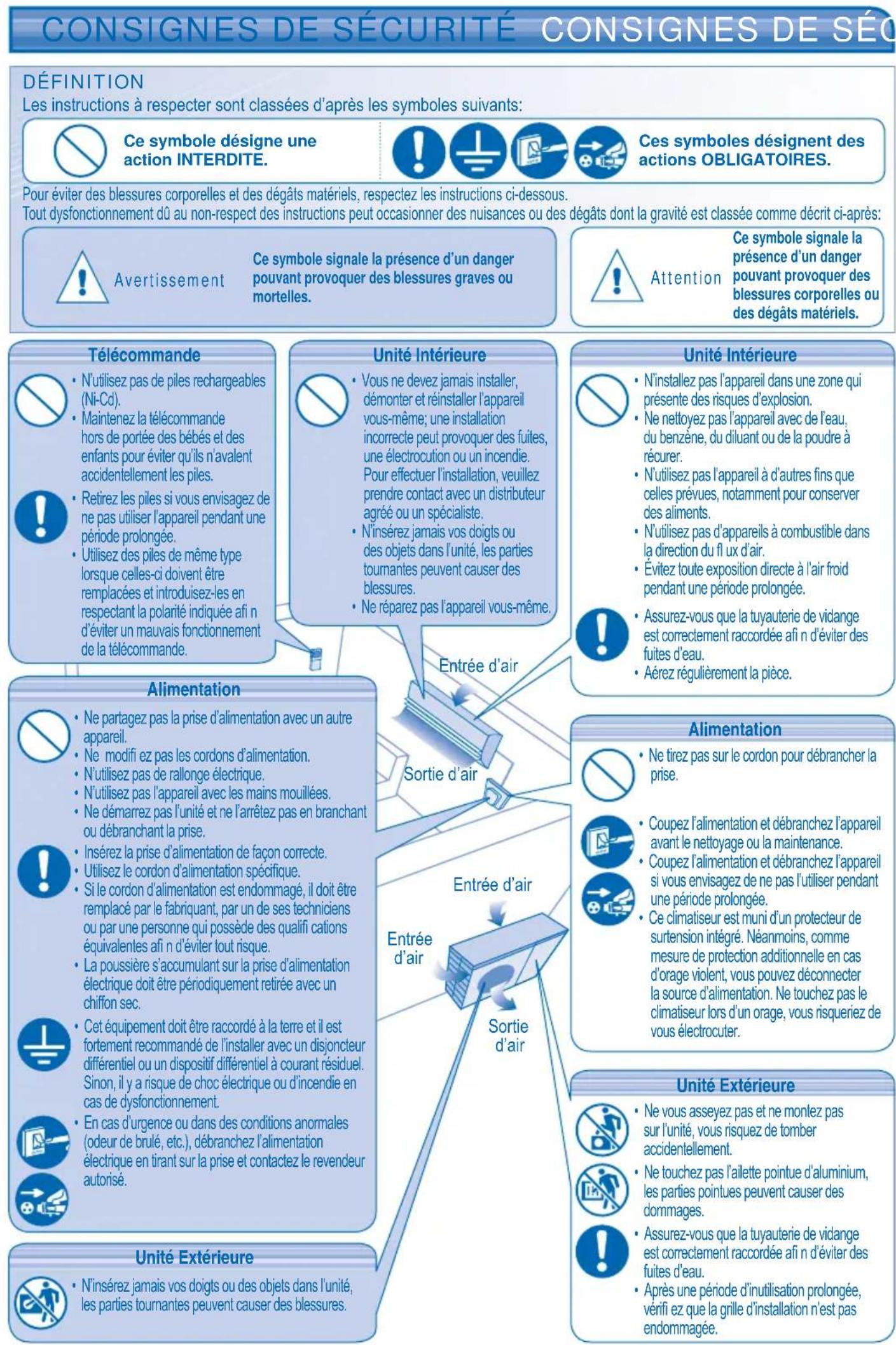
DEFINITION
The instructions to be followed are classified by the following symbols:

This symbol denotes an action that is PROHIBITED.




These symbols denote actions that are COMPULSORY.
To prevent personal injury, injury to others, or property damage, please observe the following.
Incorrect operation due to failure to follow instructions may cause harm or damage, the seriousness of which is classified as below:

Warning
This sign warns of death or serious injury.

Caution
This sign warns of injury or damage to property.
Remote Control

-
Do not use rechargeable (Ni-Cd) batteries.
-
Do not allow infants and small children to play with the remote control to prevent them from accidentally swallowing the batteries.

-
Remove the batteries if the unit is not going to be used for a long period of time.
-
New batteries of the same type must be inserted following the polarity stated to prevent malfunction of the remote control.
Indoor Unit

- Do not install, remove and reinstall the unit by yourself; improper installation will cause leakage, electric shock or fire. Please consult authorized dealer or specialist for the installation work.
- Do not insert your fingers or other objects into the unit, rotating parts may cause injury.
- Do not attempt to repair the unit by yourself.
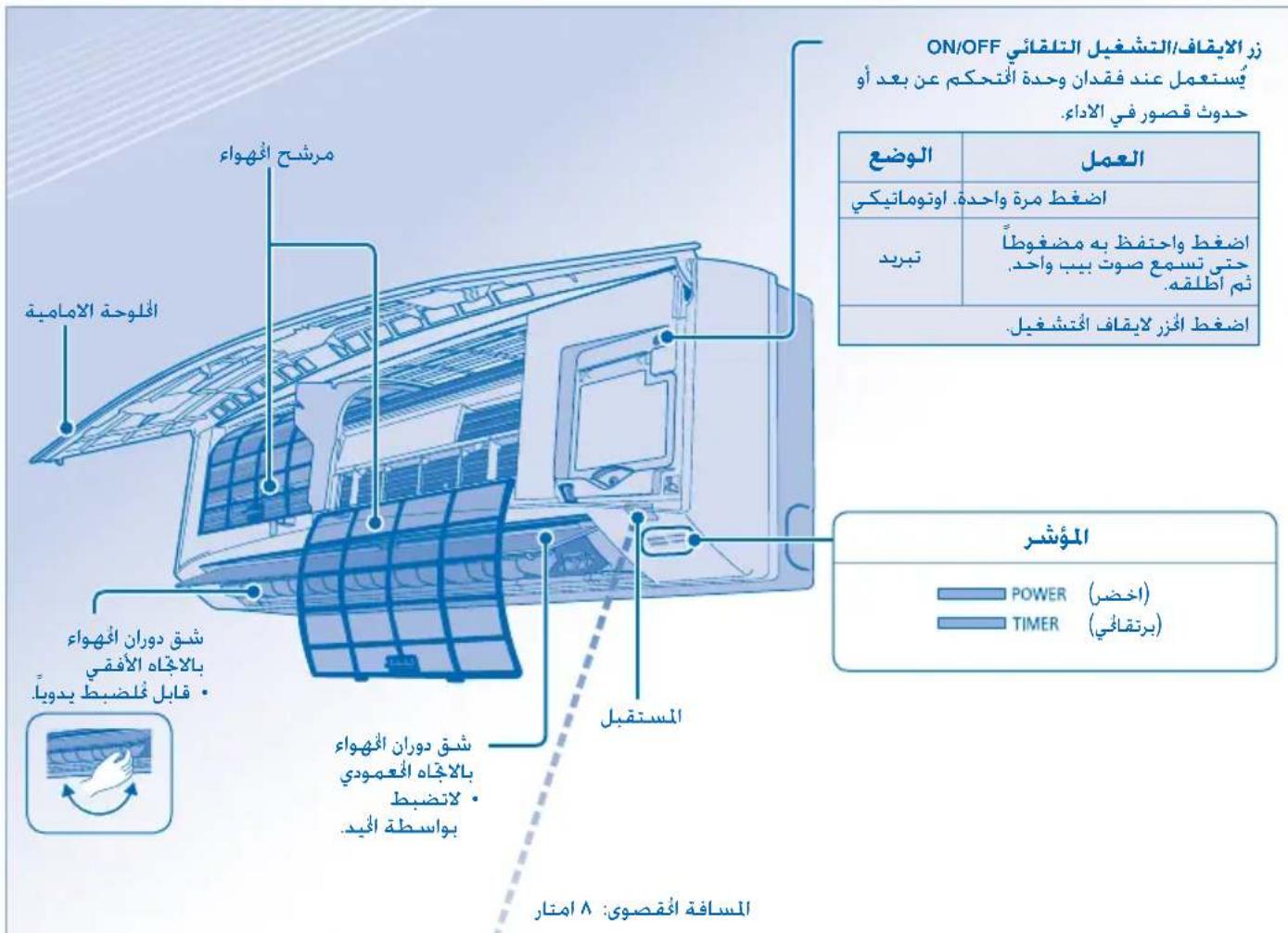
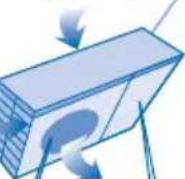
Air inlet
Indoor Unit

-
Do not install the unit in a potentially explosive atmosphere.
-
Do not wash the unit with water, benzene, thinner or scouring powder.
- Do not use for other purposes such as preservation of food.
- Do not use any combustible equipment in front of the airflow outlet.
- Do not expose directly to cold air for a long period.
- Ensure that the drainage pipe is connected properly. Otherwise, leakage may occur.
Aerate the room regularly.
Power Supply

-
Do not share the same power outlet with other equipment.
-
Do not modify power cords.
-
Do not use extension cords
-
Do not operate with wet hands.
-
Do not operate or stop the unit by inserting or pulling out the power plug.
-
Insert the power plug properly.
-
Use the specified supply cord.
-
If the supply cord is damaged, it must be replaced by the manufacturer, its service agent or similarly qualified persons in order to avoid a hazard.
-
Dust on the electric power plug should be periodically wiped with a dry cloth.
-
This equipment must be earthed and strongly recommended to be installed with Earth Leakage Circuit Breaker (ELCB) or Residual Current Device (RCD). Otherwise, it may cause electrical shock or fire in case of malfunction.

In case of emergency or abnormal conditions (burnt smell, etc), turn off the power supply and unplug, and please consult authorized dealer.
Outdoor Unit

- Do not insert your fingers or other objects into the unit, rotating parts may cause injury.
Power Supply

- Do not pull the cord to disconnect the plug.

- Switch off the power supply and unplug before cleaning or servicing

- Turn off the power supply and unplug if the unit is not used for a long period of time.
This air conditioner is equipped with a built-in surge protective device. However, in order to further protect your air conditioner from being damaged by abnormally strong lightning activity, you may want to disconnect it from the power supply. Do not touch the air conditioner during lightning, it may cause electric shock.
Outdoor Unit

- Do not sit or step on the unit, you may fall down accidentally.

- Do not touch the sharp aluminium fin, sharp parts may cause injury.

- Ensure that the drainage pipe is connected properly. Otherwise, leakage may occur.
After long periods of use, make sure the installation rack is not damaged.
REGULATORY INFORMATION
This appliance is not intended for use by persons (including children) with reduced physical, sensory or mental capabilities, or lack of experience and knowledge, unless they have been given supervision or instruction concerning use of the appliance by a person responsible for their safety. Children should be supervised to ensure that they do not play with the appliance.
OPERATION CONDITION
Use this air conditioner under the following temperature range
| Temperature (°C) | Indoor Outdoor | |||
| *DBT *WBT *DBT *WBT | ||||
| COOLING | Maximum 32 | 23 43 26 | ||
| Minimum 16 | 1 16 11 | |||
| HEATING | Maximum 30 - | 24 18 | ||
| Minimum 16 - | -5 | -6 | ||
- DBT: Dry bulb temperature
- WBT: Wet bulb temperature
Replacement or installation of power plugs shall be performed by authorized/ qualified personnel only. The wires in this mains lead are coloured in accordance with the following code:
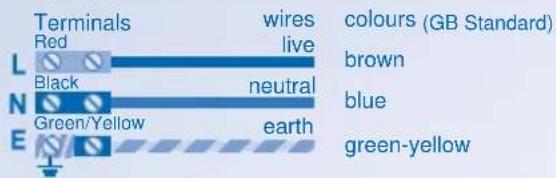
Wiring colour may vary depending on a country wiring code's standard.
TABLE OF CONTENTS
SAFETY PRECAUTIONS 2
REGULATORY INFORMATION 3
PRODUCT OVERVIEW & OPERATIONS 4~5
CARE & CLEANING 6
TROUBLESHOOTING 7
The illustrations in this manual are for explanation purposes only and may differ from the actual unit. It is subjected to change without notice for future improvement.
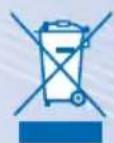
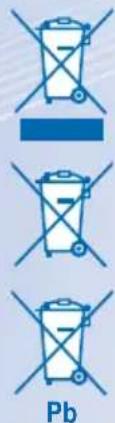
Information for Users on Collection and Disposal of Old Equipment and used Batteries
Pb
[Information on Disposal in other Countries outside the European Union]
These symbols are only valid in the European Union. If you wish to discard these items, please contact your local authorities or dealer and ask for the correct method of disposal.
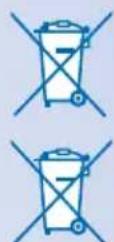
Note for the battery symbol (bottom two symbol examples):
This symbol might be used in combination with a chemical symbol. In this case it complies with the requirement set by the Directive for the chemical involved.
- Do not switch ON the unit when waxing the floor. After waxing, aerate the room properly before operating the unit.
- Do not install the unit in oily and smoky areas.
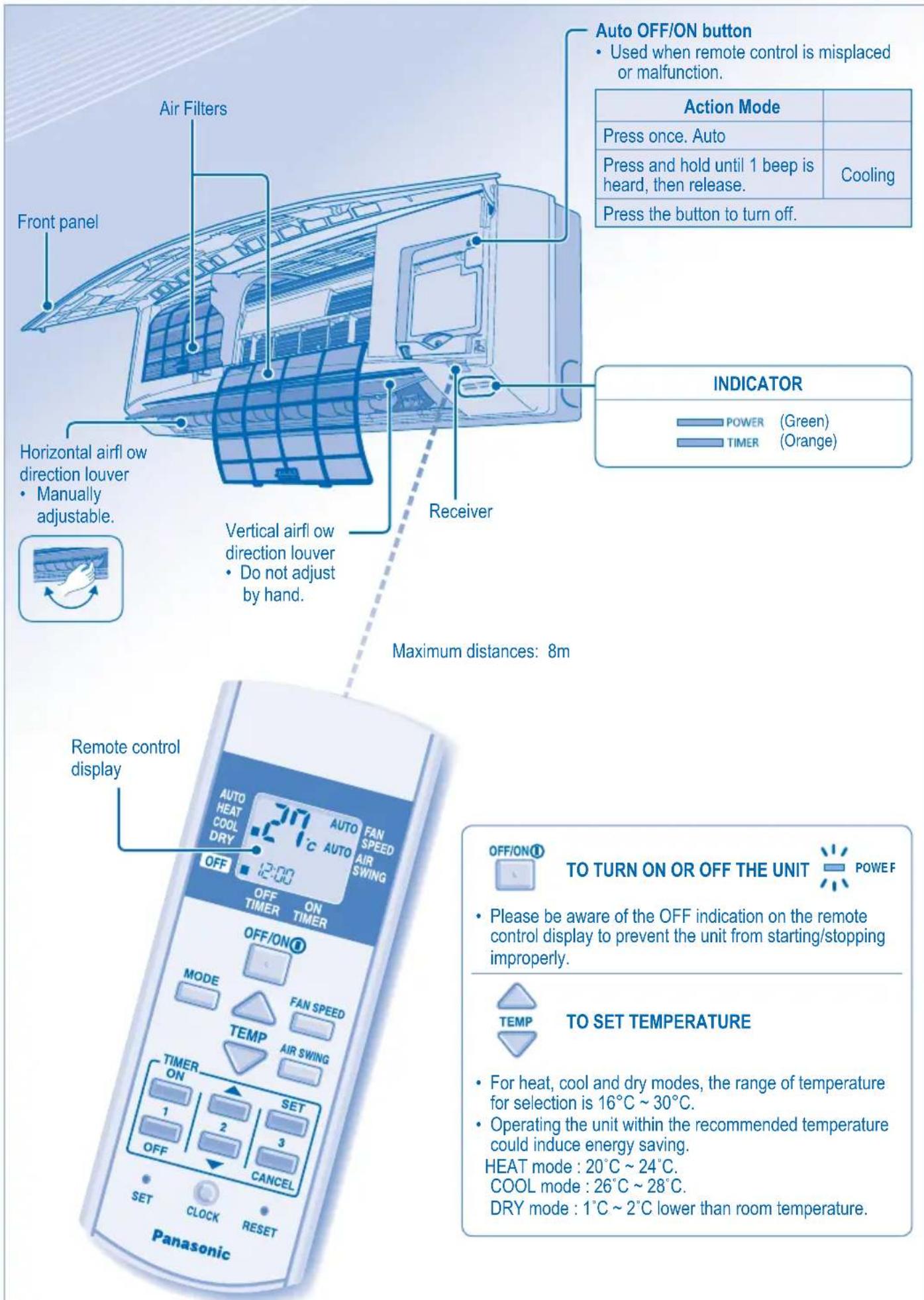

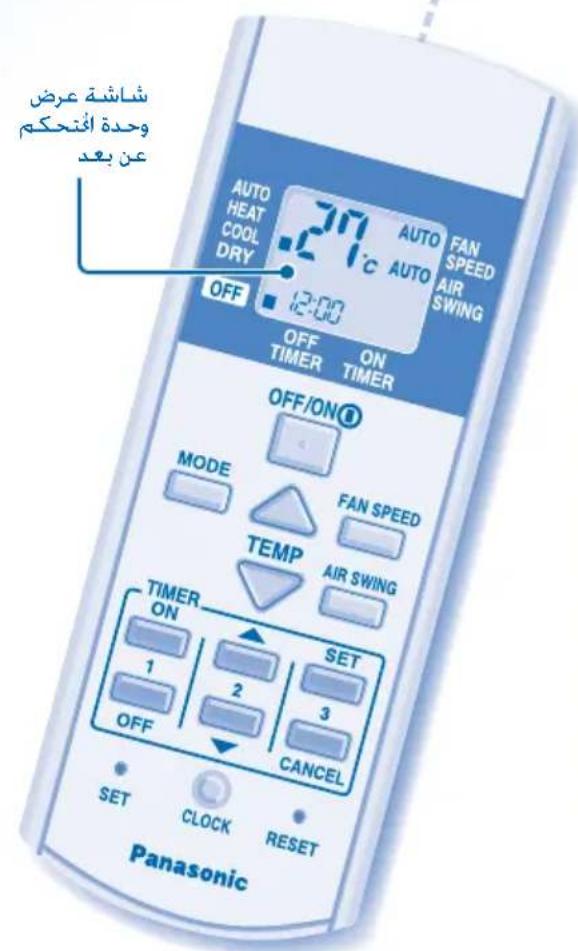
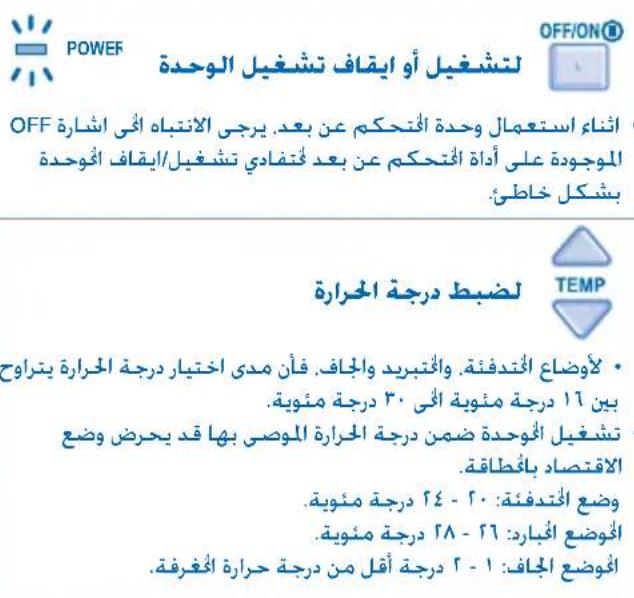
- Unit selects the operation mode according to the room temperature.
- Once auto mode is selected, the unit will operate at the standard setting temperature.
| Room temperature | Operation mode | Standard setting temperature |
| 23°C & above Cool 25°C | ||
| Below 23°C Dry | 22°C | |
| Below 20°C Heat 21°C | ||
To change the standard setting temperature, press for "HI" or for "LO".
| Operation mode HI (+2°C) LO (-2°C) | |
| Cool | 27°C 23°C |
| Dry | 24°C 20°C |
| Heat | 23°C 19°C |
HEAT mode - To enjoy warm air
- In heat mode, it takes a while for the unit to warm up. The power indicator blinks during this operation.
COOL mode - To enjoy cool air
DRY mode - To dehumidify the environment
- Unit operates at low fan speed to give a gentle cooling operation.

TO SELECT FAN SPEED (3 OPTIONS)

- For AUTO, the indoor fan speed is automatically adjusted according to the operation mode.

TO ADJUST VERTICAL AIRFLOW DIRECTION (5 OPTIONS)

- Keeps the room ventilated.
- If AUTO is set, the louvers swing up/down automatically.
- In heat mode, the air blows horizontally for a while, then starts to blow downwards and the airflow louver start to swing left/right after the temperature rises.
TO SET THE TIMER
- To turn ON or OFF the unit at a preset time.
Select ON or OFF timer.

Set the time. Confrm.
- To cancel ON or OFF timer, press
press CANCEL
- When ON Timer is set, the unit may start earlier (up to 30 minutes) before the actual set time in order to achieve the desired temperature on time.
- Timer operation is based on the clock set in the remote control and repeats daily once set. For clock setting, please refer to Remote Control Preparation at back cover.
- If timer is cancelled manually or due to power failure, you can restore the previous setting (once power is resumed) by pressing SET
OPTIONAL SETTINGS

Press and hold for 5 seconds to dim or restore the unit's indicator brightness.

Press and hold for approximately 10 seconds to show temperature setting in ^ C or ^ F .

Press and hold for approximately 5 seconds to show 12-hour (am/pm) or 24-hour time indication.

Press to restore the remote control's default setting.

Not used in normal operations.
Use curtains to screen off sunlight and outdoor heat to reduce power consumption during cool mode.
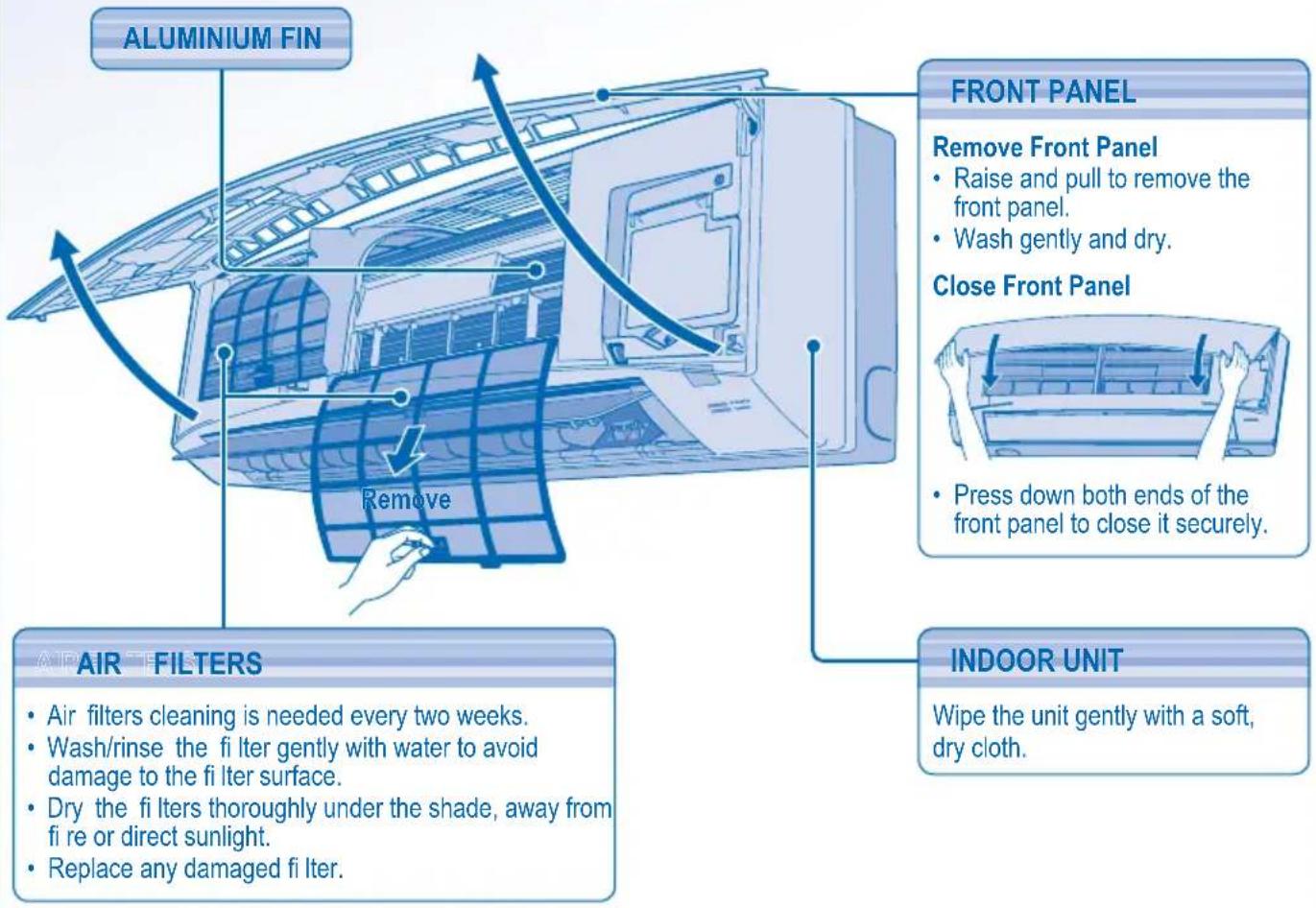
CARE & CLEANING CARE & CLEANING

-
Switch off the power supply and unplug before cleaning.
-
Do not touch the aluminium fin, sharp parts may cause injury.
WASHING INSTRUCTIONS
- Do not use benzene, thinner or scouring powder.
- Use only soap ( pH7) or neutral household detergent.
- Do not use water hotter than 40^ .
HINT
- To ensure optimal performance of the unit, cleaning maintenance have to be carried out at regular intervals. Please consult authorized dealer.
FOR SEASONAL INSPECTION AFTER EXTENDED NON-USE
- Checking of remote control batteries.
- No obstruction at air inlet and air outlet vents.
- After 15 minutes of operation, it is normal to have the following temperature difference between air inlet and air outlet vents:
Cooling: ≥ 8^ Heating: ≥ 14^
FOR EXTENDED NON-USE
- Activate heat mode for 2~3 hours to remove moisture left in the internal parts thoroughly.
- Turn off the power supply and unplug.
- Remove the remote control batteries.
NON SERVICEABLE CRITERIAS
TURN OFF POWER SUPPLY AND UNPLUG then please consult authorized dealer under the following conditions:
Abnormal noise during operation.
Water/foreign particles have entered the remote control.
Water leaks from Indoor unit.
- Circuit breaker switches off frequently.
- Power cord becomes unnaturally warm.
- Switches or buttons are not functioning properly.
- Timer indicator blinks.
The following symptoms do not indicate malfunction.
| Symptom | Cause |
| Mist emerges from indoor unit. • Condensation effect due to cooling process. | |
| Water flowing sound during operation. | • Refrigerant flow inside the unit. |
| The room has a peculiar odour. • This may due to damp smell emitted by the wall, carpet, furniture or clothing. | |
| Indoor fan stops occasionally during automatic fan speed setting. | • This helps to remove the surrounding odours. |
| Operation is delayed a few minutes after restart. | • The delay is a protection to the unit's compressor. |
| Outdoor unit emits water/steam. • Condensation or evaporation occurs on pipes. | |
| Timer indicator is always on. • The timer setting repeats daily once set. | |
| Power indicator blinks during operation and the indoor fan is stopped. | • The unit is in defrost mode, and the melted frost is drained from the outdoor unit. |
| Indoor fan stops occasionally during heating operation. | • To avoid unintended cooling effect. |
| Cracking sound during operation. • Changes of temperature cause the expansion/contraction of the unit. | |
Check the following before calling for servicing.
| Symptom | Check |
| Heating/Cooling operation is not working effi cientsly. | ·Set the temperature correctly. ·Close all doors and windows. ·Clean or replace the fi iters. ·Clear any obstruction at the air inlet and air outlet vents. |
| Noisy during operation. · Check if the unit has been installed at an incline. · Close the front panel properly. | |
| Remote control does not work. (Display is dim or transmission signal is weak.) | ·Insert the batteries correctly. ·Replace weak batteries. |
| The unit does not work. · Check if the circuit breaker is tripped. · Check if timers have been set. | |
| The unit does not receive the signal from the remote control. | ·Make sure the receiver not obstructed. ·Certain fluorescent lights may interfere with signal transmitter. Please consult authorized dealer. |
| Remote Control Preparation · Préparation De La Telecommande · Preparación Del Mando a Distancia · Poirotobka Пульта Дuctанционогу Уразаленя К Рабote · Пidrotobka пьыты диссанционогу керувашия | |
| 1 | Pull out • Retirez • Quite • сдениcope • Витаянту |
| 2 | Insert AAA or R03 batteries (can be used ~ 1 year) • Placez des piles AAA ou R03 (valables environ 1 an) • Inserte pilas AAA o R03 (puede ser uso ~ 1 ano) • (бдддддддддддддддддддддддддддддддддддддддддддддддддддддддддддддддддддддддддддддддддддддддддддддддддддд徳 |
| 3 | Bctabte батешик (AAA полбоватс ~ 1 rod) • Установпьбатешик AAA abo R03 (тетмин вikоростанн ~ 1 pik) |
| 4 | Close the cover • Fermez le couvercle • Cierre la tapa • сиз cute • • 3akpoite кршку • 3akpiite вдддддддддддддддддддддддддддддддддддддддддддддддддддддддддддддддддддддддддддддддддддддддддддддддддддkill |
| 5 | Press CLOCK • Appuyez sur CLOCK • Presione CLOCK • CLOCK • Нж�mate коньу CLOCK • Наточинь коньу "CLOCK" |
| 6 | Set time • Réglez l'heure • Ajuste la hora • сиз cute • • Ustahовпente врема • Ustahовпьчac |
| 7 | Confirm • Confirmez • Confirmar • Confirmar • Confirmar • Confirmar • Confirmar • Confirmar • Confirmar • Confirmar • Confirmar • Confirmar • Confirmar • Confirmar • Confirmar • Confirmar • Confirmar • Confirmar • Confirmar • Confirmar • Confirmar • Confirmar • Confirmar • Confirmar • Confirmar • Confirmar • Confirmar • Confirmar • Confirmar • Confirmar • Confirmar • Confirmar • Confirmar • Confirmar • Confirmar • Confirmar |
| 1 MODE AUTOHEAT DRYGGOL | Select the desired mode. Sélectionnez le mode de fonctionnement soushaité. Selección el modo deseado. woge l'air l'air l'air l'air l'air l'air l'air l'air l'air l'air l'air l'air l'air l'air l'air l'air l'air l'air l'air l'air l'air l'air l'air l'air l'air l'air l'air l'air l'air l'air l'air l'air l'air l'airl BvibepiTE Heoobxodmbl pexim. ObepiTB noTpi6nbl pexim. |
| 2 OFF/ON OFF OFF OFF OFF OFF OFF OFF OFF OFF OFF OFF OFF OFF OFF OFF OFF OFF OFF OFF OFF OFF OFF OFF OFF OFF OFF OFF OFF OFF OFF OFF OFF OFF OFF OFF OFF OFF OFF OFF OFF OFF OFF OFF OFF OFF OFF OFF OFF OFF OFF ON OFF ON OFF ON OFF ON OFF ON OFF ON OFF ON OFF ON OFF ON OFF ON OFF ON OFF ON OFF ON OFF ON OFF ON OFF ON OFF ON OFF ON OFF ON OFF ON OFF ON OFF ON OFF ON OFF ON OFF ON OFF OFF ON OFF ON OFF ON OFF ON OFF ON OFF ON OFF ON OFF ON OFF ON OFF ON OFF ON OFF ON OFF ON OFF ON OFF ON OFF ON OFF ON OFF ON OFF ON OFF ON OFF ON OFF ON OFF ON OFF ON ON OFF ON OFF ON OFF ON OFF ON OFF ON OFF ON OFF ON OFF ON OFF ON OFF ON OFF ON OFF ON OFF ON OFF ON OFF ON OFF ON OFF ON OFF ON OFF ON OFF ON OFF ON OFF ON OFF ON OFF ON OFF ON OFF ON OFF ON OFF ON OFF ON OFF ON OFF ON OFF ON OFF ON OFF ON OFF ON OFF ON OFF ON OFF ON OFF ON OFF ON OFF ON OFF ON OFF ON OFF ON OFF ON OFF ON OFF ON OFF ON OFF ON Off ON OFF ON OFF ON OFF ON OFF ON OFF ON OFF ON OFF ON OFF ON OFF ON OFF ON OFF ON OFF ON OFF ON OFF ON OFF ON OFF ON OFF ON OFF ON OFF ON OFF ON OFF ON OFF ON OFF ON OFF ON ON ON OFF ON OFF ON OFF ON OFF ON OFF ON OFF ON OFF ON OFF ON OFF ON OFF ON OFF ON OFF ON OFF ON OFF ON OFF ON OFF ON OFF ON OFF ON OFF ON OFF ON OFF ON OFF ON OFF ON OFF OFF OFF OFF OFF OFF OFF OFF OFF OFF OFF OFF OFF OFF OFF OFF OFF OFF OFF OFF OFF OFF OFF OFF OFF OFF OFF OFF OFF OFF OFF OFF OFF OFF OFF OFF OFF OFF OFF OFF OFF OFF OFF OFF OFF OFF OFF OFF OFF | Start/sop the operation. Mettez l'appareil sous/hors tension. Inicie/detenga el functiOnamento. Juguiuia/la/ Bknquyts/ocstaHOBnItb pa6oty. Ponatok/3aBepueHnra po6otn. |
| 3 OFF ON OFF ON OFF ON OFF ON OFF ON OFF ON OFF ON OFF ON OFF ON OFF ON OFF ON OFF ON OFF ON OFF ON OFF ON OFF ON OFF ON OFF ON OFF ON OFF ON OFF ON OFF ON OFF ON OFF ON OFF on OFF ON OFF ON OFF ON OFF ON OFF ON OFF ON OFF ON OFF ON OFF ON OFF ON OFF ON OFF ON OFF ON OFF ON OFF ON OFF ON OFF ON OFF ON OFF ON OFF ON OFF ON OFF ON OFF ON OFF ON OFF ON OFF ON OFF ON OFF ON OFF ON OFF ON OFF ON OFF ON OFF ON OFF ON OFF ON OFF ON OFF ON OFF ON OFF ON OFF ON OFF ON OFF ON OFF ON OFF ON OFF ON OFF ON OFF ON OFF ON OFF ON OFF ONT OFF ON OFF ON OFF ON OFF ON OFF ON OFF ON OFF ON OFF ON OFF ON OFF ON OFF ON OFF ON OFF ON OFF ON OFF ON OFF ON OFF ON OFF ON OFF ON OFF ON OFF ON OFF ON OFF ON OFF ON OFF IN OFF OFF OFF OFF OFF OFF OFF OFF OFF OFF OFF OFF OFF OFF OFF OFF OFF OFF OFF OFF OFF OFF OFF OFF OFF OFF OFF OFF OFF OFF OFF OFF OFF OFF OFF OFF OFF OFF OFF OFF OFF OFF OFF OFF OFF OFF OFF OFF OFF OCT OFF OFF OFF OFF OFF OFF OFF OFF OFF OFF OFF OFF OFF OFF OFF OFF OFF OFF OFF OFF OFF OFF OFF OFF OFF OFF OFF OFF OFF OFF OFF OFF OFF OFF OFF OFF OFF OFF OFF OFF OFF OFF OFF OFF OFF OFF OFF OFF OFF Off Off Off Off Off Off Off Off Off Off Off Off Off Off Off Off Off Off Off Off Off Off Off Off Off Off Off Off Off Off Off Off Off Off Off Off Off Off Off Off Off Off Off Off Off Off Off Off Off Off OFF OFF OFF OFF OFF OFF OFF OFF OFF OFF OFF OFF OFF OFF OFF OFF OFF OFF OFF OFF OFF OFF OFF OFF OFF OFF OFF OFF OFF OFF OFF OFF OFF OFF OFF OFF OFF OFF OFF OFF OFF OFF OFF OFF OFF OFF OFF OFF OFF 070000000000000000000000000000000000000000000000000000000000000000000000000000000000000000000000000000100000000000000000000000000000000000000000000000000000000000000000000000000000000000000000000000000080000000000000000000000000000000000000000000000000000000000000000000000000000000000000000000000000005000000000000000000000000000000000000000000000000000000000000000000000000000000000000000000000000000600000000000000000000000000000000000000000000000000000000000000000000000000000000000000000000000000040000000000000000000000000000000000000000000000000000000000000000000000000000000000000000000000000002500000000000000000000000000000000000000000000000000000000000000000000000000000000000000000000000000150000000000000000000000000000000000000000000000000000000000000000000000000000000000000000000000000085000000000000000000000000000000000000000000000000000000000000000000000000000000000000850000000000000851555555555555555555555555555555555555555555555555555555555555555555555555555555555555555555555555555565555555555555555555555555555555555555555555555555555555555555555555555555555555555555555555555555558555555555555555555555555555555555555555555555555555555555555555555555555555555555555555555555555555. 1 2 3 4 5 6 7 8 9 10 11 12 13 14 15 16 17 18 19 20 21 22 23 24 25 26 27 28 29 30 31 32 33 34 35 36 37 38 39 40 41 42 43 44 45 46 47 48 49 50 51 52 53 54 55 56 57 58 59 60 61 62 63 64 65 66 67 68 69 70 71 72 73 74 75 76 77 78 79 80 81 82 83 84 85 86 87 88 89 90 91 92 93 94 95 96 97 98 99 |
INFORMATION RÉGLEMENTAIRE
- No tocar las partes de aluminio angulosas,SEO,SEO,SEO,SEO,SEO,SEO,SEO,SEO,SEO,SEO,SEO,SEO,SEO,SEO,SEO,SEO,SEO,SEO,SEO,SEO,SEO,SEO,SEO,SEO,SEO,SEO,SEO,SEO,SEO,SEO,SEO,SEO,SEO,SEO,SEO,SEO,SEO,SEO,SEO,SEO,SEO,SEO,SEO,SEO,SEO,SEO,SEO,SEO,SEO,SEO, SEO

ab = 30
1 1000000000000000000000000000000000000000000000000000000000
aloeiuiu Luyhjg aaiiui u yalsijg eo Jg Ulogell
[1] 21 21 J Lg 21 Jn Jn Jn Jn Jn Jn Jn Jn Jn Jn Jn Jn Jn Jn Jn Jn Jn Jn Jn Jn Jn Jn Jn Jn Jn Jn Jn Jn Jn Jn Jn Jn Jn Jn Jn Jn Jn Jn Jn Jn Jn Jn Jn Jn Jn Jn Jn Jn Jn Jn J
()
Pb
1J 1J 1J 1J 1J 1J 1J 1J 1J 1J 1J 1J 1J 1J 1J 1J 1J 1J 1J 1J 1J 1J 1J 1J 1J 1J 1J 1J 1J 1J 1J 1J 1J 1J 0
J 10
J

L
MEPbI INPEdIOCTOPOXKHOCTN
ONPEDEJEHNE
HCTpyKm, KOtOpBle CnEyTe BbIOJNHrTb, 06O3HaayIOTcCnEdyUOMM CIMBOJAMM

3TOT CUMBOJ 06o3Haayet dienctbne kak 3APPEUHEHHOE.


3TN CMBOJIbI 0603HaaHOT deiCTBnKaK O6RA3ATEJIbHbIE.
IpyeHn HnueHn TpAaHn Hnncn HteChbX IOpeXeHn DpyTm Nmuam n yuepbaM MmyecTBy cneYET coBIOaTb Cnekyoune HNCTpykum. He npabnBna 3KcPiyyataun BCNEcTBn HecoBIOJeHn IHcTyKm HnEceT Bpei nn yuep6, cTeNeHb cepbe3HOCTN KOtbpix KnaaccnpuPyetc cneDyUOUM opa30m:

PpeDyIpyKxJdHne
3TOT CMMBOIN ppeDynpexkdaet O cmeptelhoon aacohctn nno pncke noynueHn cepbe3HO TpaBMbl.

PpeodctepexeHne
3TOT CMBOINpeDynpexkdaet O6OnaCHOCTN TpaBMblHn HAneHeCENBByepda NMyIecCTBy.
DuctanuOHoe ynpabHeHne

He nCIOJIb3yIte HnKeJIb-KaIIMneBbIe (Ni-Cd) aKKyMylTOpbl.
IepKTe PnybT DByBdAnr OTrpyDhBx IN ManeHbMx Detey,BO N36ExaHne CnyauHOrO pOrnLaTbAHHa 6atape.
N3BnKeMTE 6aTapeN,ecnn KOHNIMUHOHE He 6yIDET 3KcTIpyATINPOBaTBcBA TteHHe DInTeBHorO BpEMHe.
Heo0xmo3aMeHntbctapbIe 6atapeKnnybTaNyHaHOBbteTAKO 17 TIN,coBIOJADNIOJPHOCtB 17Toro,TOyOBblnybTPypaOtaI INPpABHO.
BnytpenHHn 6nok

He yctahabnBaIte, He cHIMaTe HnepeyctahabnBaIte KOHNIOHep camocToTEnHO. HenpaBnBnaYcTaHOBAKnBeTeK TNe, NopApKeHHO 3JNEKTPNHECKM TOKOM INI NOkApy. IIN BbIOINHEmIO paBOT NO yCTaHOBKe 6obpatntecb K ABTOPI3OBAHHomD INIEpey ININ CTEINANCTY.
He BCTaBnIe nIbIyI mIIN DpymIE npEIMTe bBIOK-BpaAioUmeCAHtN MOrY HaeCTn TpaBMY.
He pemOHmpyMe KOHmLIOHEp CAMOCTORTeBHO.
Bnytpenhn6nok

He yctaHabnBaIte KOHNIOHOep B NOMeLHeHM C noteHUNaJIbHO B3pIBOONIacOH aTMOCpeoM.
He MoITE KOHINIOHOP BOJOM,6EH3O1OM, pa36abITeIeM IIM C YMCTAUM NPOUOKOM
HeNCIOJIb3yIte KOHNIOHMOHEp IINIOCTOPOHHHX uei, HapIMeP, dIpyxpaHHeHn PPOdyKTOB.
He noIb3yIteCb HnKaKIMM npMoOpAMn OTKpbITOrO TopeHn IpeD Bo3dyXOBblYCKHbIM OTBepCTnEM.
He npBepraitecB03eCTBnO xoIIOHORO B03yxaTeueHne DITTEbHO BpemeH.
Y6eHNTecb, cyrpehakna Tpyoka NIOcOeINHeHa PpabInbHO. B npOTnBHom Cnyaem MOKET BO3HMkHTb TeHb.
Peyynpno npobetpmbaite nomeuene.
3neKtpoCha6xHHe

- He BkIIOHaiMe KOHNIOHep B pOaTeKy C dpyTMM pIMbOpAMM.
He m3MeHnIte cTeBbIe IHyDbl.
-
He mcnoiibayite yudinHInTeJI.
-
He pabotaiTe MOKpbIMM pykAMM.
He BkIOHuaTe NnH He BbIKIOUaTe annapat, BCTABNIA NmBbIHMaA WTeNCeJIb CeTEBOrO WHypa N3 3NEKTPuHeckoP03ETIK.
-Правимьн Всвгайпштесьссвогошура.
Vicnabzmyte cneuwalbHbCtBcBouh shyp.
EcnKaben3eKnptnTahmnoBpexHb,BO36ExAHMe ONaCHOCTN3aMEHyDIOKHePN03BcTnN3ROBOTeNB, PnepCTaBNTeNB N3ROBOTeNB NO CEPBCHOMYOBcJyXBaHNO HnAn aHaONHbKNBaIINPIMPOBAHHb cneuaHnCT.
PbIb, cKaIIMBaHouyOc Hs WTeICene CetEBOR 0hUpa, HeoXIOIMMO IepnOIOUeCKM IpOToPAb BnAkhOH TKAHbO.
HactoTbHO peKOMeHyETc3a3EMNTb DaHHoe 0bOpyOBaHMe N yCTAHOBnB tEro C aBTOMATVHECKM BkIOHYATEIe C cyHKUeIe 3aHTNtBt O YTEKHN H3EMIO (ELCB) mCytPOCTBOM KOHTPONO OCTaTOHO TOKA (RCD). VHaHe BCnYae HeNCpABHO paBOtBt 3TO MOKET CTaTB PmHHO TOpAKENH 3NEKTPNECKM TOKOM INN BO3rOpaHn.

B3KCTPNHOM CNYae INM B CNYae HENOpMaNbHbIX yCIOBIM (3aIax rapiN T. n.) BYIKIOHTME 3JIeKTPoNTaHMe, OTOeOHNITE YCTPOINCTBOOT CETNI NIPOKOHbTmpyITcB C ABTOPIN0BAHHBM DInIEPOM.
HapyxHbI 6nok

He BCTABNITe nIbIy IIN Dpyme npedMetbI B 6IOK -BpaauoUmeC RACTM MOnr HaeCTn TpaBMY.
Bo3dyxo3a6opnK
Bo3dyx-OBbIn-yCKHoeOTBepCTne
Bo3dyx03a6opHnK
Bo3dyo3a60-pnHK
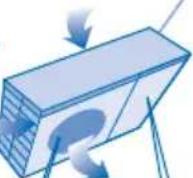
Bo3nyx-OBblyckhoeOTBepCTne
3Neektpocha6xehne

He depkntecb 3a shypr npn otKIOHcHm cTeBOrO shhpya n3 3NEkTPnueckoP o3eTkn.


Ipeed OHCTKOMTNTEXMHNECKM 06CITYKBMAHEM BbIKIOHTE3NEKTPONTAHME M OTKIOHTEOT3NEKTPHECKO CETM.
Ecnn KOHmHOpHe McnOJb3yETcB TeueHne DInTeJbHoro BpeMeH, BkHOHTe 3NEKTPoNTaHme NOTKIOHTe OT 3NEKTPHECKOMCTN.
JaHHb KOHdUHOEP OCHaUe H BCTPOEHbIM YcTPOYCTBOM DnI 3aUNtBI OT NpePAnoB HanpRAKeHr. OJHaKO, DnI NocEJeIOUe 3aUNtBI KOHdUHOHePAOT NOBPeKHeHm BCNeDCBNE CnTHBOrO pAsra MoHIM Heo6XoIMMO OTKINHOHe BO BPMe rPo3bI, NocOJIbKy 3TO MOKeT BblBaTb NopAkeHme 3JEKTPNHECKM TOKOM.
Hapyxhhi 6nok

He caNTecb Hc tAHOBNTecb Ha yCTpoCTBO, BBIMOXETeYIACTb.

He npikacaiTecb K OCTpbIM aIOMHHEbbpe6pam, OCTpbly cAHTM MOrY T HAeCTN TpaBMY.

Y6eIITcB, YTO npenHnA TpybKa NIOCOEINHeHa IpaBnIBHO. B IpOTINHOM Cnyae MOKET BO3HNKHTyTEy.
Iocne dInnteBHOKcNpyTaUMnpOBpeTe, He NOBPEXDeHmYCTaHOBOHbKPOHHTeH.
HOPMATBHAI HOPMAU
JaHHeO yCTpOCTBO MOKET NcTOb3OBaTcBcRnIuAMN COrPAnHeHHbIMM Fn3NueCKMM, YyBCTBnteJIbHbIMN IINYMCTBeHHbIMN cNoOC6HOCTaMn (BKIOUaAJeTei) INI NlUaAMN COTcyTCTBnEM ONbITaNIN 3HaHnA TOIbKO pIn yCIOBm, YTO OHN HaxoJATc NOI HA3OpOM INI NOLyHINOT IINCA, OTBETCTBEHHORO 3a IN 6E30NaChOCTb, COOTBETCTByIOUne INCHTrpyKzIMN IO NcTOb3OBaHMIO N3dEINIA. DeTI DOnIKhbl HaxoITbCSr NOI HaJIIODeHnEM. Heo6XoIMMo CneDITb 3a TEM, YTObIb OHN HE INrpaIIN C yCTPOCTBOM.
UCIOBNA 3KCNJYATAUIN
IcnoJIb3yIte daHHbI KOHdIciHOhepB CneDyIOeM dnaIana3OHe TEMpepaTy
BbIEOP PEXKMA PABOTbl
ABTOMATUeCKN PeKm -ДЯ BaWero yOdo6CTBa
- AnnapaT BbIbnaeT peKIM pa6OtB 3aBcHMOCTN OT TempeatypbBO3dyxA B NOMEueHN.
- PnBbIbope aBTOMaTHueCKOrO peKIma, annapat 6ydet pa60TaTb PnCtAHdApThbIX HAcTpOnkax TemNepaTypbI.
LICMBONNNo3HaayoTbIi, kE OBOB'RA3KOBUMN.
Ira toro, 063aio6iTn TpaMbYBaHNO Ce6 Ta iHux i NooKOJKeHHo MaHa, Heo6xioHO IOTpMByBaNcB NKlaeHNx HIXue IHCTpyKqim. HenpaBnIbHa ekCnIyataua Jpe3 npuyuHHe Lnx IHCTpyKcu MoKe np3BeCTn Do TpaMbYBaHHa YI NooKOJKeHHa MaHa. Cepno3HicTB HeratNBHX HaclndkIB No3HaacEbCra TaKIM YINHOM:

ybara
Cen CMBON 03Hauac He6e3neky 3arH6eni YN OTPMaHHa 3HaHOI TpaBMn.

06epexHo
UeH CMBON
03Naac He6e3neky
TpaBMyBaHHH yN
NIOUKOJXeHHMaHa.
NytbDnctanuHoro KepyBaHHa

He BnKOpNCTOByIte akymyIaTOpN (Ni-Cd).
HeIO3BOIINTEHEMOBNIATAMTaITRm rpatncr 3NylbTOMDCTAHUHORO KepyBaHH,UIo6YHKHTn BInaIKOBOrO KOBTAHH6BatapeMOK.
KIO KOHNIOJHOEP He BKNOPUCTOByBaTUMETbCnPOTROM TpBaNOrO yacy,BNIMtBbATapeeKm
Hobi 6atapeKNI TORO CAMOROTiny NOBHHI BYTN BCTAHOBNEHI 3IINHO 3 yka3aHOIO NONAPHCIO, IO6 YHMKHHTN HecnpabHOCTI NylbTA DnCTAHJHNO KepyBaHHA.
Bnytpiwni 6nok

He bCTAHOBIOHKe I He DEMOHTyIte arperat camocTINHO. DopyiMb MOHTaK KOHNIOHepa yNOBHOBAxEHOMY dNnEPy aBTOPI3OBAHOMY IHCTAJIHOMY ueHTpy.
He BCTpOMJIrte NaIbU ta IHHI npEIMETB6IOK-CACTHNI,RAI oBePTaIObCMAOxyTb CnPHHTN TpaBMY.
He pemohtyte arperat camoctiHo.
Bnytpiunhi 6nok

He BCTAHOBHIOHTe KOHNIOJHOEP y MicuX, de E Bu6yXoHE63neHi rAa.
He MInTe KOHdUziohep BOIOHO,BeH3OJIOM, pO3uHHKAMM uN nopoukamn dIa YIeHHA.
He BnKOpNCObYyTe KOHmUioJeOp dIa HInxu zin, (Hanp., 36epirAHn npOpykTb.
He po3taowbyte Ha wnynotky nobitpr npictpoi 3 BIDKPNTM BORHE.
He donyckaite Tpmbalno Bnmbby xiondno IOBiTpa HIOdei.
Ipekeohntec,IO dpenhaxn Tpybopobid npncdhaHO HaneXHM uHOM. Ihakwe BODNPOTikatme.
- Perynphno npobitpoite Te npimiuenHH.
KuBHeHHa

He BMKaiTe KOHdIioHep B Ody po3eTy 3 HUIMM enEKTponpinaaAM.
He 3mHIOHTe UHP eJeKToPQMBIeHnHa
He Kopmctyteca npOobkyBaHAM.
- He TopkainTeec 6bnokai ndacpoobotnBoNOMMpykAMi
He 3anyckaiTe i He 3yInHnTKe KOHNJIOHeP 7nRAOM BMKAHH Ta BMMKAnHH 3 PO3eTK.
PapabnBHO BCTABNRIte BNIky BPO3ETKY eNEKTPOMEpeXi.
BikopocTobyIte pekomedobamHm Hyp enektpokmbenha.
IooyHnHytn Hebe3neKn TpaMbYBaHH B pazi
NtKOJKeHH NHypa XMBHeHH, NOrO 3AmHy NOBHH
3dINCHOBaTN PpuiBHNK BnpoBHMa, NoOePbcHi
PepCTABHmN qn DaxiBui, LIO MaHOb aHaIOrTHHy
KBanifkaiio.
Плп,шо 3бмраettingа наштencьн Вилц, HeobxHocacBID YACY BINDAIANTC CYXIO TKAHMHO.
LJen arperat Heo6xHIO 3aemnITn. Okpim TOrO, pni nHOr MOHTAKI peKOMEHdyTcBcR BIKOPNCOTByBatn ABOTMATHHN BIMNKAH HbMnADOK BtOky HA 3a3eMnHnA bO npCTPII DpepeHuaHbHO 3axHcy. Y npOTnEKNOMy pa3i,ixH BAICYTHICb MoKe Pn3BecTn DO ypaKeHH eIEKTPMH CTPYMOM qH NIOXekI.
BekctpeHOMy BnAky afo y BnAky HeHOpMaIbHHX o6tBmH (3aTAPy Ta Iuue) BIMKHTb XMBIEHHA, BIDcHaiTe pncTpi BID MEpexi Ta pOKOHcyIbTyITcBy ABTOPi3OBAHOro DInepa.
Otrbip nra 3abopy nobirpr
OToBip dnn BnXoDy NOBiTPra
OTBip dna 3abopy nobirp
OToBip nIy 3a6bOp y nobItpr
OTBip DnBxOdy nobitpr
XuBJeHHa

HeTnHtB3aHypXMBneHHA,IObBnHATNU TENTCENBYBNIKY.

IpeaTMMKCHNTN KOHIOHep 3DmCHOBaTN NOrO OcnyROyBaHHBUMKHITb XNBHeHH Ta BnIMtB Bnky 3 pOeTK.

KoHIOHe BIKOPCTOByBaTMETbCnPOTrOM TPBaNOrO Yacy,BIMKHITb XNBHeHH Ta BIMtB BNky 3 P03eTKI.
LeKoHnDIOJHOep 6bIaHaHH BByObaHO CXeMOHO 3axiCTy BiN iINBUNeHH HAnpyr. Ipote Ira toro, uOb HauHInIe 3anobirn Ioro BHXOy 3 naHy uepe NIDBUNeHry rpo3OBy AKTMBHcTB, BN MOKeTe BmKNHTy arperat i3 eNekTpomepexi.He TopkaTecra KOHnDIOJHOep nIid cA rpo3N, OckIbKn CE MOne np3BcTn DO ypaXeHH ENeKTHHMM CTpyMOM.
3OBHIshH6nok

He ciaaIte Ta He CTabaIte Ha npncptpi, 60 MoKeTe Bnactn.

HeDToTopKaITeB do roCTpNX aIiOMHiEBNX pe6ep, roCTpi qactuHMoKyTb 3aBdATn TpaBMy.

Ipekeohane, 0epehAnHn TpyoPobid npEHaHO HaeKHM CHOM. IhaKe Boda npotikatme.
IpebeipraTe, HHe NooKoKeHa MOHTaxHa pama, nicra TpBnAoE Kcnnyatau.
3OBhiHnH 6nok

He BCTPOMNIA TE naIbci Ta IHNI pneMetn B 6IOK - YACTINH, RKI oBepTaIOTBc, MOKyTB CnpMHNIT TpABMY.
IHOPMAU3IINPABNJBE3NEKN
IeBnpi6 He npn3HaueHm dnn KOpNCTyBaHHa Oo6amn (BKNIOuOauOn DiTei) 3OBmExeHMMn cI3uHMMn, ceHCOPHMn Yn po3ymOBMn MOKNIBOCTMa a60 oc6aMn, kI BiDyBaHOb 6paK DocBiHy n3HaHb. KopNCTyBaHHa BInpo6om TaKIMN OC6aMn Do3BOHe NIIeY pa3i Harny y nnonepeHbOrO IHCTpyTBAHH o6oH, Ika BiINOBiJaE 3a ixHIO 6e3neky. HarnjaTe 3a diTbMn, 106 BOHn He 6abNlncb BInpo6om.
KoHnIioHep nOtpi6Ho BnKOpncTObyBaTu B TAKOMy TempepaTyphOMy diana30Hi
YMOBN EKCNJYATAUJI
YCYHEHHH HECIPABHOCTEN 41
41
KOPOTKA IHCTPYKJIJA
3AHH
OBKlaDHKA
NPMMITKA :
Habehehi tyiHocpaii cnykata
TINbKn Inna NoaehHH; 3OBHIuHi
BnrrnKoHNIOHePA MoKe
BiPi3HrTnc BID 3O6paXeHOrO.
KoHCTpyKlju i Dn3aHn BINObMoKyTB
6yTu 3mHeH63 NonepeXeHH3
MeTOIO HOrO BDOCKHOHeHH.
InopmaiaIy KopncTyBaiv 360y Ta yTnla3aui CTaporo 6bnaHaHH I BnKOpncTaHx 6aTaep
[IHopmaiia yo ytni3aii B iHnx kpaihax 3a Mexamn EC]
Li Cnmbonni diiChi Niwe B CC. 06 di3HaTncra k npabunbHO yTuNl3yBaTH Taki Bnpo6, 3BepTaIeCb Do MICeBnx oprAHIB BnaH a60 ToproBOrO pndTabHnka.
Pnmuitka 0do cmbony 6aTapei (noDbiHn CMBON BHN3y dny npknady):
CnBMO MoKe BNOpNCToByBaTncb y NoeHaHHi 3i CNBOMoXimHoro npOdykTy. Y TaKMy pa3i Bpi6 BiNobIaE BmOram DnpeKTHB 0do BNOpNCtAHH XIMiHx npOdykTIB.
IHΦOPMAUJI YOIO TEPMIHY CJYK6N (PNUDATHOCTI)
BCTaHOBJIeHn BInpO6HbKOM TepMin Cnyk6n (npuaTHocTi) 7 pOKAM 3 DaTn BInrTOBHeHHa yMOBN, 0u BnpiB BnKOpNCBOyETbcra y cybopi BIDNOiHOcTi Do DInCHOI INCTpykui 3 ekCnnyaTaui Ta TexHnix CTaHdApTIB, 1o 3AcTOCOByOTbcra do boro BInpO6y.
KoHniohep He noBHeH 6yTu yBIMKHeHn NiJ Yac HATnpaHH NIOI NOrN BOCOM. 3aBepuBnHaTnpaHH, DObpe npoBtpiB npMiuEHH nepu HIX yMKatn KOHNIOHep.
He BCTaHOBJIOnTe KOHNlIioHep y MacJHnCTnx i 3aIIMJIeHnX MiCJx.
3AΓΑЛьHA IHΦOPMAцЯ ПО BИPIБ TA ネΝΟ EΚСПЛУATAцIO

UCYHEHNA HECNPABHOCTEN
Habeeni dani cmmtom He cbiduatb npo hecnpabHicTB.
| СимпTom | Причona |
| I3 BvytrpiiHbOro 6lOKa BvXoDnItb TymaH. | ·Кондесаця BhacniIDOK poBOTu B rejximi OXoIodJKeHry. |
| Pobota cunpoBODKUcTcBcA 3BykOM, lo HaraIdye шуM BovN. | ·ПOTOK xonodoareHTy B cnCTeMI. |
| Y prumiiSeHHi BiDyBaE7bcra CneuФiHny Зanax. | ·Причною сьOTO може 6bytazapax BORKocTi,ДжерелOMЯKOrO moxyTb 6byt stiHn, KINIMn, Me6Pi abO oJyR, lo 3naXoDArTbCyr y npimiiueHNI. |
| Y rejxmi ABTOmatUHoro peryIIOBAHNY ШвДКоCTI oberpTaHNY BeHTIJIaTOp BHyTPiIshBoro 6lOKa Yac BiD YacSy 3yPnIHYeTBcY. | ·Чe ДОТМАгЕ усуНу TЗлax NiD Yac poBOTu KOHdIzioHepa. |
| KoHdIzioHep He noChHaE roPoBOTy IprToTOM KilbKOx XBIniH nICsЯ nepeZaIpycky. | ·Чe зanobirae пошкODKEHNO kOMnpecopa arperata. |
| I3 ZOBHiiHbOro 6lOKa BvXoDnITb BODa/napa. | ·Ha noberpXHi Trpy6 BiD6yBaE7bcra KOHdEHaCaizy abO BvnapOBvBaHNY. |
| IndNKaTOp TaMepa NoctiHNo ropitb. | ·Taimerp cnpaCbOBye 5ODeHNO 3 OndHm i TImN camIMN NaCTPOHOBAHNYM. |
| Y rejxmi PoobToI IndNKaTOp BBIMKHeHNY БлIMa€, a BeHTIJIaTOp BHyTPiIshBoro 6lOKa He npaIoo. | ·БLOK 3NaXoDnITbCyr y rejxmi pOZMOPoJHNe, i Tana BODa 3NIMBaE7bcry chepe3 ZOBHiiH N 6lOK. |
| Y rejxmi ObjirpiBv BeHTIJIaTOp BHyTPiIshBoro 6lOKa Yac BiD YacSy 3yPnIHYeTBcY. | ·Чe дОnomarae yHnKHyTu Ne6aJxHoro OXoIodJKeHNY. |
| 3Byk TrPickOtIHNY niD Yac poBotoN. | ·3i 3MiHO To TempepaTyPi BiD6yBaE7bcry poOZIMpeHNY a60 3ByxJeuHNY arperata. |
Ipeed TmM, yk 3BepTaTncsdo faxibua, nepebipte take.