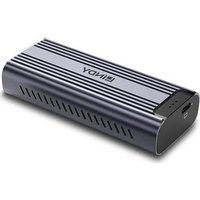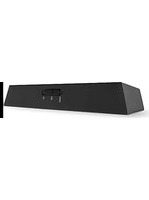
70445 - Receiver Lindy - Free user manual and instructions
Find the device manual for free 70445 Lindy in PDF.


User questions about 70445 Lindy
0 question about this device. Answer the ones you know or ask your own.
Ask a new question about this device
Download the instructions for your Receiver in PDF format for free! Find your manual 70445 - Lindy and take your electronic device back in hand. On this page are published all the documents necessary for the use of your device. 70445 by Lindy.
USER MANUAL 70445 Lindy
3.5mm & TosLink (Optical) Bluetooth Transceiver
User Manual English
natural_image
Black LINDY brand electronic device with control panel and indicator lights (no readable text or symbols beyond branding)No. 70445
lindy.com
Introduction
Thank you for purchasing the 3.5mm and TosLink (Optical) Bluetooth Transceiver. This product has been designed to provide trouble free, reliable operation. It benefits from both a LINDY 2-year warranty and free lifetime technical support. To ensure correct use, please read this manual carefully and retain it for future reference.
The Lindy 3.5mm & TosLink (Optical) Audio Bluetooth Transceiver is a compact, multi-function solution for connecting non-Bluetooth devices wirelessly to sources and outputs with Bluetooth connectivity. 3.5mm and TosLink (Optical) input ports allow for the connection of non-BT source devices such as TVs, amplifiers and laptops, this transceiver can then transmit a high-quality audio signal wirelessly to Bluetooth headsets, soundbars or speaker setups.
Package Contents
- Bluetooth Transceiver
■ USB Type A Male to Micro-B Male Cable, 0.8m
■ Lindy Manual
Features
- Transmit 3.5mm or TosLink (Optical) audio signals from an audio device that does not support Bluetooth.
- Connect to non-Bluetooth audio devices including speakers, amplifiers or soundbars to receive audio signals from Bluetooth devices.
- aptX, aptX Low Latency and SBC Codec Support.
■ Multipoint Transmission Support for connection of 2 separate output devices simultaneously.
Specification
■ Bluetooth Standard: 5.0
■ Bluetooth Chipset: CSR 8670
■ Bluetooth Profiles: A2DP
■ Bluetooth Range: Up to 10m (32.81ft)
■ Maximum Supported Audio Sample Rate: 24-bit / 48KHz
■ Frequency Response: 20Hz-20KHz
■ Nominal THD: <0.1%
■ Housing Material: Plastic
■ Operating Temperature: -20°C - 60°C (-4°F - 140°F)
■ Storage Temperature: -20^ - 60^ ( -4^ - 140^ )
■ Humidity: 0 - 85% RH (non-condensing)
Colour: Black
■ Power Requirements: 5VDC 0.5A
Connectors
■ Input: TosLink (Optical) (Female), 3.5mm (Female)
■ Output: TosLink (Optical) (Female), 3.5mm (Female)
■ Power: USB Micro-B (Female)
Product Diagram
Front Panel
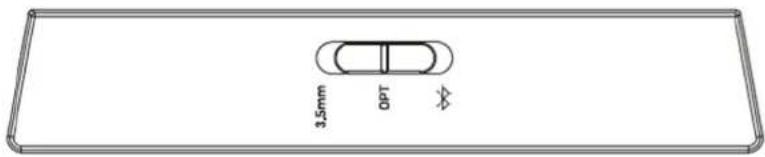
text_image
3.5mm OPT3.5mm – Push to select the 3.5mm Input or Output.
Opt – Push to select the TosLink (Optical) Input or Output.
Bluetooth – Push and hold to enable pairing mode. Please see below for further information.
Rear Panel
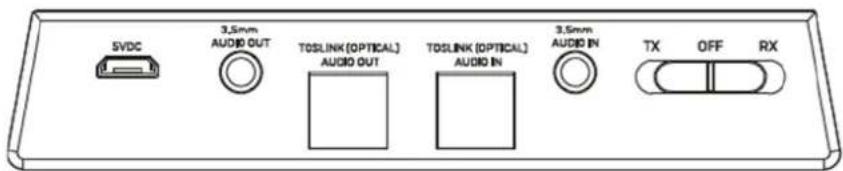
text_image
SVDC 3.5mm AUDIO OUT TOSLINK (OPTICAL) AUDIO OUT TOSLINK (OPTICAL) AUDIO IN 3.5mm AUDIO IN TX OFF RX5V – Connect the USB Micro-B cable from a USB PSU or source.
3.5mm Audio Out – Connect to a 3.5mm Audio Output using a 3.5mm Male to Male cable.
TosLink (Optical) Audio Out – Connect to a TosLink (Optical) Audio Output using an optical cable
3.5mm Audio In - Connect to a 3.5mm Audio source using a 3.5mm Male to Male cable.
TosLink (Optical) Audio In – Connect to a TosLink (Optical) Audio source using an optical cable TX – Push switch to activate Transmitter mode.
RX – Push switch to activate receiver mode.
Off – Push switch to turn off transceiver.
Installation & Operation
Using double-sided sticky pad, mount the transceiver in a location that has no obvious obstructions that may interrupt the Bluetooth signal.
Connect the USB Micro-B cable to the transceiver, with the USB Type A side connected to a USB power supply or port.
Using the rear panel switch, select which functionality is required, whether Transmitter or Receiver. The LED will flash to indicate the Transceiver is powered on. To switch the transceiver off, push the switch to "Off".
LED Indicator
- LED Indicator Off – Power Off
- Illuminated Blue with Slow Pulse – Power on with TosLink (Optical) Connection Selected
- Illuminated Green with Slow Pulse – Power on with 3.5mm Connection Selected
- Flashing Blue and Red – Pairing with a TosLink (Optical) Connection
- Flashing Green and Red – Pairing with a 3.5mm Connection
- Solid Blue – Successfully paired with a TosLink (Optical) Connection
- Solid Green – Successfully paired with a 3.5mm Connection
Transmitter Functionality
- Connect the transceiver to a non-Bluetooth source device using the appropriate cable. Place the receiver device i.e. headphones, speaker or soundbar within a 1m (3ft) range and activate this devices Bluetooth pairing mode.
- Push the Multi-Function switch on the front panel to the right, to the Bluetooth logo, and hold in place. The LED indicator will flash red and blue / green to indicate the transceiver Bluetooth pairing mode has been activated. The switch can then be released.
- The transceiver should remain in pairing mode for approximately 30 seconds until pairing has been successful. Once paired, the LED indicator will illuminate solid blue.
- Please ensure the correct input connection has been used and push the multi-function switch to the appropriate connection.
- The devices will now be paired. This should be indicated on the receiver device with a beep, voice indicator or otherwise. Please refer to the receiver devices manual for further information.
Multipoint Transmission
- Connect the 1^st device by following the above steps.
- Push the multi-function switch to the right to re-initiate pairing mode. The LED indicator will again flash red and blue.
- Place the second receiver devices i.e. headphones or speaker to pairing mode. The connection will be confirmed from the receiver device.
- Audio will now play to both receiver devices simultaneously.
Receiver Functionality
- Connect the transceiver to a non-Bluetooth receiver device i.e. speakers, headphones or amplifier.
- With the transceiver powered on, switch the rear panel switch to Receiver mode. Push and hold the Multi-function switch to the right to initiate pairing mode. The LED indicator will flash red and blue. The switch can then be released.
- Turn on Bluetooth pairing on the source device i.e. laptop, smartphone or tablet and go to the Bluetooth device list.
- Scan for new Bluetooth devices and select Lindy 70445. The LED indicator will illuminate solid blue to confirm the connection is successful.
- Please ensure the correct connection has been used and then push the multi-function switch to the appropriate connection.
- Audio can now be played from the source device via the connected audio output.
Re-connection
Once the transceiver is switched on, previously paired devices should automatically re-connect. It is recommended that the transceiver is turned on first prior to the paired device so it can accept the incoming connection.
Volume Adjustment
The transceiver has no volume adjustment functionality. Volume adjustment must be controlled from the connected source or receiver device.
Factory Reset
With the transceiver powered on, slide and hold the multi-function switch to the right for approximately 6 seconds until the LED indicator illuminates a solid static colour. When the LED flashes red and blue, release the switch. The transceiver has now re-entered pairing mode with previous connections now cleared.
Troubleshooting
Transceiver is connected but will not power on
Please confirm that the power adapter is connected to the transceiver using the included USB cable and plugged into a functioning AC outlet. The LED Indicator will illuminate Blue. This will flash very slowly by pushing the rear switch to Tx or Rx indicating the product is on.
Transceiver will not pair and connect with the Bluetooth device
Please ensure the transceiver is set to the correct Transmitter or Receiver functionality.
As a Transmitter:
Please ensure that both the transceiver and audio output device are in pairing mode at the same time and are within a 2m distance of each other.
As a Receiver:
Please ensure Bluetooth is activated on the source device. Please ensure the LED indicator is blinking and the source and receiver are within 1m of each other.
Bluetooth output is connected however there is no audio playback
Please ensure the audio source is securely connected to the transceiver. Audio inputs are only used in transmitter mode.
Please ensure the correct audio input is selected on the switch of the transceiver.
Please ensure that audio is playing from the source device and that volume is set to an audible level.
If using the TosLink (Optical) connection, remove any connection to the 3.5mm port, or vice versa.
Source device is connected however there is no audio playback
Please ensure the audio output is securely connected to the transceiver. Audio outputs are only used in receiver mode.
Please ensure the correct audio output is selected on the switch of the transceiver.
Please ensure that audio is playing from the source device and that volume is set to an audible level. If the audio output has independent controls, pleas ensure the volume is set to an audible level here also. If using the TosLink (Optical) connection, remove any connection to the 3.5mm port, or vice versa.
If the audio is poor or is dropping
Please move the connected devices within a closer range of each other.
Bluetooth devices are susceptible to inference and interruptions from devices that may operate on a 2.4GHz bandwidth, as well as thick surfaces. Remove potential devices of high interference where possible.
There is a delay in the audio
Due to encoding and decoding of signals, a small delay in audio can be expected with Bluetooth transmission. aptX and aptX low latency support limits the delay compared to standard audio codecs. Some source and output devices have independent latency options. Please ensure these are set to 0 or adjust if necessary.
Einführung
text_image
3,5mm OPTtext_image
3.5mm OPTTransmission multipoint
text_image
3,5mm OPTDeclaration of Conformity
We, LINDY Electronics LTD, hereby declare that the product(s)
LINDY 3.5mm & TosLink (Optical) Bluetooth Transceiver No. 70445
conforms to with the requirements of the following EU Directives:
EU Directive 2014/35/EU (RED)
EU Directive 2014/35/EU (LVD)
EU Directives 2011/65/EU, 2015/863/EU amendment Annex II, Article 13 (RoHS II)
The following standards were used to evaluate the product:
ETSI EN 300 328 V2.2.2
ETSI EN 301 489-1 V2.2.3
ETSI EN 301 489.17 V3.2.2
EN 62479 : 2010
EN 62368-1 :2014/A11 :2017
EN 50581 :2012, EN IEC 63000: 2018
Date: 24 January 2021
Signature

text_image
DunmmyName: Darren N. Casey
Position: Managing Director, LINDY Electronics LTD
Lindy Supplier Office Reference: 03.07.20
L/PF/103b/DOC/EMC-LVD-RoHS Issue 10

LINDY Electronics Limited
Sadler Forster Way | Teesside Industrial Estate | Thornaby, Stockton-on-Tees | TS17 9JY, England
General T +44 1642 754000 | F +44 1642 754031 | postmaster@lindy.co.uk
Accounts T +44 1642 754035 | F +44 1642 754031 | accounts@lindy.co.uk
Co. Reg No. 02132710 (Registered office as above) | Vat Reg No. GB 472 0100 00
Dr. Rainer Bachmann Head of Global Product Compliance
Mannheim, 20.07.2020

Ref. LINDY S-Office: 720600 03072020
WEEE (Waste of Electrical and Electronic Equipment), Recycling of Electronic Products
Europe, United Kingdom
In 2006 the European Union introduced regulations (WEEE) for the collection and recycling of all waste electrical and electronic equipment. It is no longer allowable to simply throw away electrical and electronic equipment. Instead, these products must enter the recycling process.
Each individual EU member state has implemented the WEEE regulations into national law in slightly different ways. Please follow your national law when you want to dispose of any electrical or electronic products. More details can be obtained from your national WEEE recycling agency.
Tested to comply with
FCC Standards
For Home and Office Use!
No. 70445
nd Edition, January 2021
lindy.com