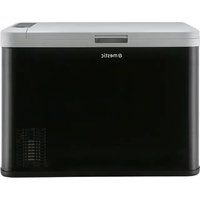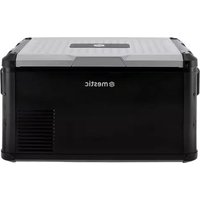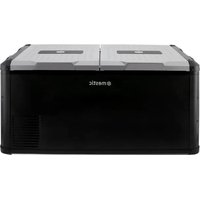
MCC-40 - Refrigerator Mestic - Free user manual and instructions
Find the device manual for free MCC-40 Mestic in PDF.


| Product type | Portable refrigerator / compressor cooler |
| Brand | Mestic |
| Model | MCC-40 |
| Capacity | 40 liters |
| Dimensions (W x D x H) | 450 x 300 x 400 mm |
| Weight | 14 kg |
| Power supply | 12V / 24V DC (cable included) or 220-240V AC (optional mains adapter, ref. 1502950) |
| Power consumption | Efficient compressor, nominal power not specified |
| Temperature range | Cooling down to -20°C (depending on conditions) |
| Temperature setting | Digital via control panel |
| Operating modes | MAX (rapid cooling), ECO (energy saving) |
| Display | Temperature in °C or °F (switchable) |
| Battery protection | 3 levels (High, Medium, Low) preventing excessive vehicle battery discharge |
| Ventilation | Integrated fan for heat dissipation |
| Error codes | E1 (low voltage), E2 (fan), E3 (compressor), E4 (compressor speed), E5 (overheating), E6 (module), E7 (NTC sensor) |
| Maintenance and cleaning | Clean inside/outside with damp cloth, defrost regularly, use non-aggressive detergent |
| Safety | Do not immerse, do not use non-recommended accessories, disconnect before cleaning, stable and dry surface |
| Spare parts and repairability | Repair only by manufacturer or qualified technician; spare parts available on request |
| Included accessories | Instructions, 12V/24V cable, user manual |
| General information | Household use, do not use with other electrical appliances inside, maintain 10 cm clearance around appliance |
Frequently Asked Questions - MCC-40 Mestic
User questions about MCC-40 Mestic
0 question about this device. Answer the ones you know or ask your own.
Ask a new question about this device
Download the instructions for your Refrigerator in PDF format for free! Find your manual MCC-40 - Mestic and take your electronic device back in hand. On this page are published all the documents necessary for the use of your device. MCC-40 by Mestic.
USER MANUAL MCC-40 Mestic
text_image
42 L -18°C +10°C Cooling 2 L DC 12-24 V KG 17.5 kg Keep it COOL —MCC-40
Cool box
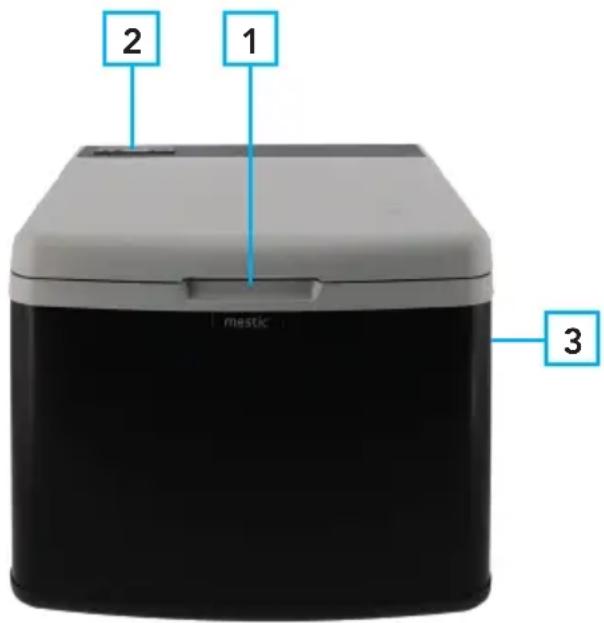
Kenmerken
- Handvat deksel
- Display
- Handvat
text_image
2 1 mestic 3Levering
text_image
Mode Indicator Light Setting Temperature Adjustment MAX ECO ON/OFF Temperature Display| Product name Coolerbox | |
| Item number | MCC-40 |
| Volume 42 L | |
| Climate classification | T、ST、SN、N |
| Insulation class | III |
| Net weight | 17.5 kg |
| Rated Voltage DC | 12V/24V--- |
| Rated Current for DC | 4.6A/2.3A |
| Total Input Power | 55W |
| Refrigerant | R134a (65g) |
| CO2equiv. | 0.093t |
| Foam Vesicant | C-Pentane |
| Order number | INK-026497 |
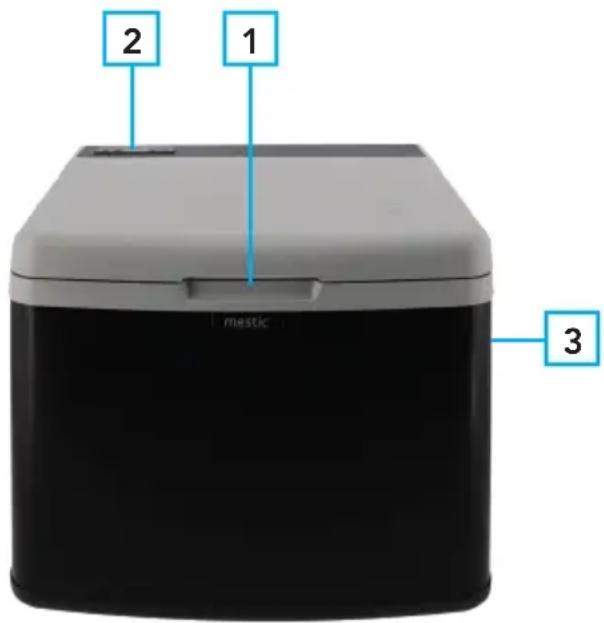
Features
- Lid handle
- Display
- Handle
text_image
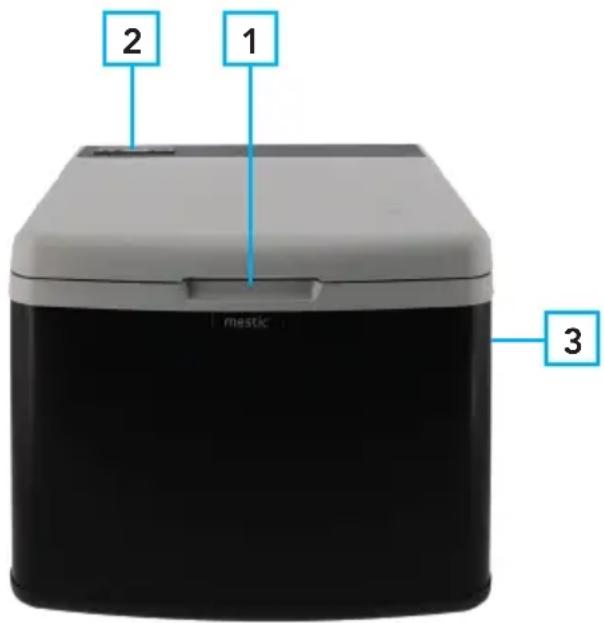
2 1 mestic 3Delivery
- Cooler box
- Connection cable for 12V / 24V DC
- Instructions manual
Accessories (not included)
1502950 Mestic AC adapter (220-240)
Important safety instructions
Read the operating instructions carefully before putting the appliance into operation and keep the instructions including the warranty, the receipt and, if possible, the box with the internal packing. If you give this device to other people, please also pass on the operating instructions.
General safety
- Read the manual before use.
- If the conditions of use are not complied with, the manufacturer will not be liable for damage or injury resulting from the use of this device.
- Save the manual, the warranty certificate and the sales receipt.
- The use of this device is not permitted for young children. During use, someone must constantly supervise.
- Children must be supervised to ensure that they do not play with the device.
- This device is not intended for use by children up to 8 years of age and persons with limited physical, sensory or mental abilities or insufficient experience and knowledge, unless they are supervised or have received instructions on how to use the device by a person responsible is for their safety.
- The device must always be on a flat, stable and dry surface.
- Never use the appliance if it is visibly damaged or if there are breaks in the cord.
- In the event of damage to the appliance, the cord or the plug, never carry out repairs yourself. Always have this done by the manufacturer or a qualified technician.
- The device is not suitable for commercial use.
• Always use and store the device in a dry place. - Never use accessories that are not recommended by the manufacturer.
- This device is only suitable for household use and for the purpose for which it is intended.
Safety in use
• Always remove the plug from the device when it needs to be maintained or cleaned.
- Never use the device in the vicinity of hot or hot objects.
- Prevent the device from coming into contact with rain.
- Do not place other electrical devices in the device.
- Do not place chemical or explosive agents in the device.
- Only use the DC 12V/24V (2,5; 16AWG) or 230V connection cable (230V not included). NOTE: never use both energy sources at the same time.
- Defrost the device regularly to ensure that the device functions optimally.
- Do not pull on the connecting cord, but pull on the plug to remove the cord from the socket.
- If the cool box is connected to the DC socket, disconnect your cool box and other consumers from the battery before you connect a fast charger
- If the cool box is connected to the DC socket; switch off the cool box or break the connection when you switch off the engine. The battery can be discharged otherwise.
- Pay attention! That the heat that arises during the operation of the cool box can be properly dissipated.
- Enough distance between product and objects and walls.
• Never immerse the device in water
- Ventilation slots must not be covered at all times.
Use
- Remove all packaging materials from the device.
- Place the device on a flat and stable surface with at least 10 cm of free space on each side.
- Do not switch the appliance on immediately after you transport it, where the cool box has been tilted more than -30°. This could cause damage to the cooling system. The device must first stand upright for 30 minutes so that the coolant can be collected again in the compressor. This prevents the compressor from running dry.
- Look at the above safety instructions before use.
- For hygienic reasons, you must clean the inside and outside of the appliance with a damp cloth before using your cool box.
- Connect the cooler box.
Control
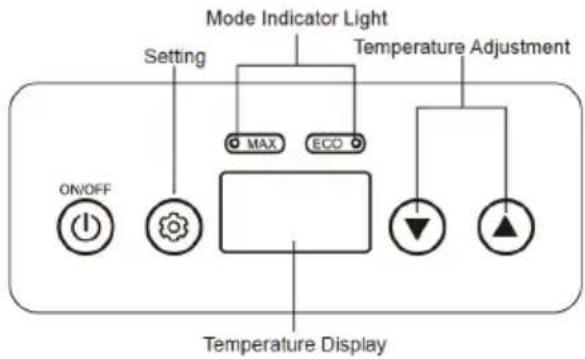
text_image
Mode Indicator Light Setting Temperature Adjustment MAX ECO ON/OFF Temperature Display- Switching on and off: press and hold the on / off button, the refrigerator will now start or switches off.
- Temperature adjustment: press the " ▲" or "▼" button to adjust the temperature. The temperature is now set.
- Fast cooling / energy saving mode: press the set button " Ⓞ" to quickly switch between cooling mode MAX and energy saving mode ECO.
- Switch C to F: In standby mode, hold down the " 🔒" and "▲" key for 3 seconds to switch Fahrenheit and Celsius, (F is Fahrenheit, C is Celsius), Then use the "▲" or "▼" to select Celsius or Fahrenheit.
- Battery protection: In standby state, press " 🔒" and " 🔒 for 3 seconds at the same time to enter the battery protection gear setting menu, and then press "▲" or "▼" to set the corresponding battery protection.
Battery power detection
The device features a multi-level battery guard that protects your vehicle battery from excessive discharge when the device is connected to the built-in DC power supply. If the cooler is operated with the vehicle ignition off, the cooler will shut off automatically when the power supply voltage drops below a set level. The cooler will turn back on once the battery is charged to the restart voltage level. The compressor will restart automatically in a few minutes when the voltage returns to normal values.
Note: these values are measured at the input of the control unit and / or at the DC connection.
- Battery protection function for the cooler with three-class battery protection function, can automatically check the battery voltage of the vehicle, before the electricity consumption will affect the normal functions of the car. The cool box will stop automatically to ensure that the car's battery does not run out.
(high "—") (middle "") (low " ")
- Method for adjusting the battery protection: read under the section "Control" how to adjust the battery protection.
| Protection Position\Voltage | Display | 12V 24V | |||
| CUT OFF (V) | CUT IN (V) | CUT OFF (V) | CUT IN (V) | ||
| Low | 1 bar | 9.6V 10.9V | 21.3V 22.7V | ||
| Middle | 2 bars | 10.4V 11.7V | 22.8V 24.2V | ||
| High | 3 bars | 11.1V 12.4V | 24.3V 25.7V | ||
Tip: It is recommended to set the H-class when the cool box is connected to a vehicle, otherwise the car's battery may be too empty and affect the normal ignition of the car; When connecting the cool box to an external or backup battery, it is recommended to set the M-mid range so that the cool box can work longer.
Error code list
| E1 Battery voltage is low | |
| E2 Fan failure | |
| E3 Compressor start up problems | |
| E4 Compressor running speed fails to reach the requirements | |
| E5 The model is overheating | |
| E6 Compressor control module fault | |
| E7 Thermal head fault (NTC open circuit or short circuit) |
Cleaning
- Before cleaning, remove the products from the device and remove the plug from the power supply. Only clean with a slightly damp cloth, if necessary a non-aggressive cleaning agent can be used. After cleaning, always dry all wet surfaces with a dry cloth.
- Never use sharp or abrasive products to clean the device.
-
Defrost the cool box: frost can settle on the evaporator or inside of the cool box due to humidity, this can reduce the cooling capacity. The cool box must be defrosted in time:
-
Take the products out of the cool box
- Switch off the device
- Open the lid
- Sweep up the melt water or drain the melt water through the plug

Recycling
This product bears the selective sorting symbol for waste electrical and electronic equipment. This means that this product must be handled pursuant to European Directive 2012/19/EU in order to be recycled or dismantled to minimize its impact on the environment. For further information, please contact your local or regional authorities. Electronic products not included in the selective sorting process are potentially dangerous for the environment and human heath due to the presence of hazardous substances.
Declaration of conformity
Hereby Gimeg Nederland B.V. declares that the device MCC-40 applies all basic requirements and other relevant regulations listed in the European directive for electromagnetic compatibility (2014/30/EU) and low voltage directive (2014/35/EU). If you require a full declaration of conformity, you can contact the adress listed on the backside of this manual.
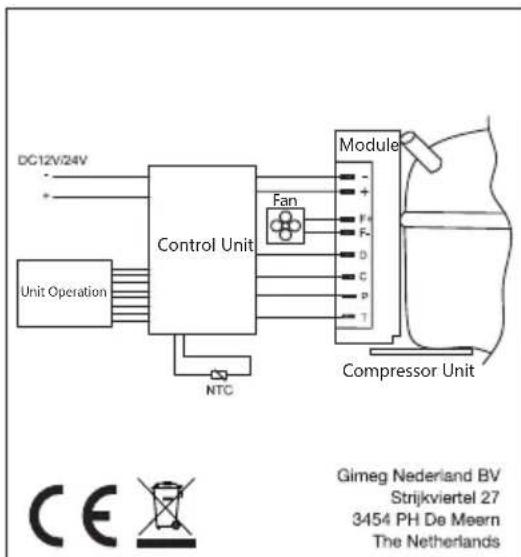
flowchart
graph LR
    A["DC12V/24V"] --> B["Control Unit"]
    C["Unit Operation"] --> B
    B --> D["Fan"]
    D --> E["Module"]
    E --> F["Compressor Unit"]
    G["NTC"] --> B
    H["Gimeg Nederland BV<br>Strijkviertel 27<br>3454 PH De Meern<br>The Netherlands"] --> I["CE"]
| Product name Coolerbox | |
| Item number | MCC-40 |
| Volume 42 L | |
| Climate classification | T、ST、SN、N |
| Insulation class | III |
| Net weight | 17.5 kg |
| Rated Voltage DC | 12V/24V--- |
| Rated Current for DC | 4.6A/2.3A |
| Total Input Power | 55W |
| Refrigerant | R134a (65g) |
| CO2equiv. | 0.093t |
| Foam Vesicant | C-Pentane |
| Order number | INK-026497 |
Bestandteile
text_image
Mode Indicator Light Setting Temperature Adjustment MAX ECO ON/OFF Temperature Display| Product name Coolerbox | |
| Item number | MCC-40 |
| Volume 42 L | |
| Climate classification | T、ST、SN、N |
| Insulation class | III |
| Net weight | 17.5 kg |
| Rated Voltage DC | 12V/24V--- |
| Rated Current for DC | 4.6A/2.3A |
| Total Input Power | 55W |
| Refrigerant | R134a (65g) |
| CO2equiv. | 0.093t |
| Foam Vesicant | C-Pentane |
| Order number | INK-026497 |
mestic
Caractéristiques
Accessoires (non inclus)
text_image
Mode Indicator Light Setting Temperature Adjustment MAX ECO ON/OFF Temperature Display| Product name Coolerbox | |
| Item number | MCC-40 |
| Volume 42 L | |
| Climate classification | T、ST、SN、N |
| Insulation class | III |
| Net weight | 17.5 kg |
| Rated Voltage DC | 12V/24V--- |
| Rated Current for DC | 4.6A/2.3A |
| Total Input Power | 55W |
| Refrigerant | R134a (65g) |
| CO2equiv. | 0.093t |
| Foam Vesicant | C-Pentane |
| Order number | INK-026497 |
Características
text_image
Mode Indicator Light Setting Temperature Adjustment MAX ECO ON/OFF Temperature Display| Product name Coolerbox | |
| Item number | MCC-40 |
| Volume 42 L | |
| Climate classification | T、ST、SN、N |
| Insulation class | III |
| Net weight | 17.5 kg |
| Rated Voltage DC | 12V/24V--- |
| Rated Current for DC | 4.6A/2.3A |
| Total Input Power | 55W |
| Refrigerant | R134a (65g) |
| CO2equiv. | 0.093t |
| Foam Vesicant | C-Pentane |
| Order number | INK-026497 |
Caratteristiche
text_image
Mode Indicator Light Setting MAX ECO Temperature Adjustment ON/OFF Temperature Display| Product name Coolerbox | |
| Item number | MCC-40 |
| Volume 42 L | |
| Climate classification | T、ST、SN、N |
| Insulation class | III |
| Net weight | 17.5 kg |
| Rated Voltage DC | 12V/24V--- |
| Rated Current for DC | 4.6A/2.3A |
| Total Input Power | 55W |
| Refrigerant | R134a (65g) |
| CO2equiv. | 0.093t |
| Foam Vesicant | C-Pentane |
| Order number | INK-026497 |
Funktioner
| Product name Coolerbox | |
| Item number | MCC-40 |
| Volume 42 L | |
| Climate classification | T、ST、SN、N |
| Insulation class | III |
| Net weight | 17.5 kg |
| Rated Voltage DC | 12V/24V = = |
| Rated Current for DC | 4.6A/2.3A |
| Total Input Power | 55W |
| Refrigerant | R134a (65g) |
| CO2equiv. | 0.093t |
| Foam Vesicant | C-Pentane |
| Order number | INK-026497 |
Funktioner
text_image
Mode Indicator Light Setting Temperature Adjustment MAX ECO ON/OFF Temperature Display| Product name Coolerbox | |
| Item number | MCC-40 |
| Volume 42 L | |
| Climate classification | T、ST、SN、N |
| Insulation class | III |
| Net weight | 17.5 kg |
| Rated Voltage DC | 12V/24V--- |
| Rated Current for DC | 4.6A/2.3A |
| Total Input Power | 55W |
| Refrigerant | R134a (65g) |
| CO2equiv. | 0.093t |
| Foam Vesicant | C-Pentane |
| Order number | INK-026497 |
Funksjoner
- Lokkhändtak
- Skjerm
- Händtak
text_image
2 1 mestic 3Levering
text_image
Mode Indicator Light Setting Temperature Adjustment MAX ECO ON/OFF Temperature Display| Product name Coolerbox | |
| Item number | MCC-40 |
| Volume 42 L | |
| Climate classification | T、ST、SN、N |
| Insulation class | III |
| Net weight | 17.5 kg |
| Rated Voltage DC | 12V/24V--- |
| Rated Current for DC | 4.6A/2.3A |
| Total Input Power | 55W |
| Refrigerant | R134a (65g) |
| CO2equiv. | 0.093t |
| Foam Vesicant | C-Pentane |
| Order number | INK-026497 |
mestic®
Importer: