DO239S - Vacuum Cleaner DOMO - Free user manual and instructions
Find the device manual for free DO239S DOMO in PDF.


User questions about DO239S DOMO
0 question about this device. Answer the ones you know or ask your own.
Ask a new question about this device
Download the instructions for your Vacuum Cleaner in PDF format for free! Find your manual DO239S - DOMO and take your electronic device back in hand. On this page are published all the documents necessary for the use of your device. DO239S by DOMO.
USER MANUAL DO239S DOMO
natural_image
Exterior view of a white and black DOKO vacuum cleaner with blue internal structure (no text or symbols visible)DO239S
| Handleiding Handstofzuiger | |
| Mode d'emploi Aspirateur à main | |
| Gebrauchsanleitung Handstaubsauger | |
| Instruction booklet Handheld vacuum cleaner | |
| Manual de instrucciones Aspiradora de mano | |
| Istruzioni per l'uso Aspirapolvere a mano | |
| Návod k použití Ruční mini vysavač | |
| Návod na použitie Ručný mini vysávač |

natural_image
Two black-and-white icons: a triangular warning triangle with an exclamation mark and an open book with stacked pages (no text or symbols)⚠PRODUCTSPECIFIEKE WAARSCHUWINGEN
natural_image
Close-up of a handheld device with a labeled component (13), no visible text or symbols beyond the numbernatural_image
Technical line drawing of a mechanical component with an arrow indicating direction (no text or symbols)2
natural_image
Technical line drawing of a mechanical component with internal parts and an arrow indicating a specific feature (no text or symbols present)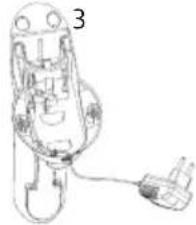
natural_image
Line drawing of a mechanical device with a plug and cable (no text or symbols)4
natural_image
Line drawing of a medical device with a plug inserted into a housing (no text or symbols)GEBRUIK
natural_image
Technical line drawing of a mechanical component with no visible text or symbols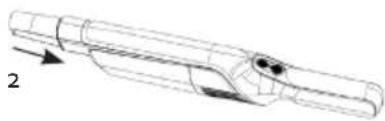
natural_image
Technical line drawing of a mechanical component with no visible text or symbolsREINIGING EN ONDERHOUD
HET TOESTEL PROPER MAKEN
natural_image
Close-up of hands holding a cylindrical device with a black handle, no visible text or symbols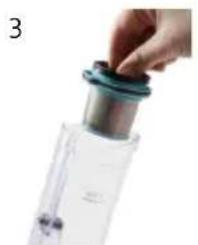
natural_image
Close-up of a hand adjusting a blue-tinted plastic container with a metallic lid (no text or symbols visible)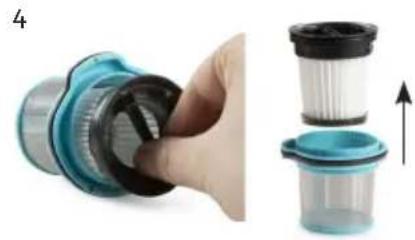
natural_image
Close-up of a hand holding a blue plastic filter component, next to a stack of three transparent plastic containers with black lids and an upward arrow indicating motion (no text or symbols)PROBLEEM EN OPLOSSING
text_image
Prohibition sign with a trash bin and crossed lines, indicating no waste or dischargenatural_image
Recycling symbol icon with three chasing arrows forming a triangle (no text or labels)natural_image
Symbol of a trash bin crossed out by two diagonal lines, representing no waste or discharge (no text or numbers present)⚠ AVERTISSEMENTS SPÉCIFIQUES AU PRODUIT
natural_image
Technical line drawing of a mechanical component with no visible text or symbols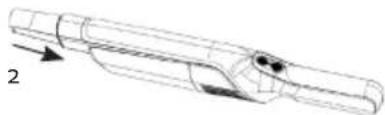
natural_image
Technical line drawing of a mechanical component with no visible text or symbolsNETTOYAGE ET ENTRETIEN
NETTOYER L'APPAREIL
natural_image
Close-up of hands holding a cylindrical device with black components, no visible text or symbols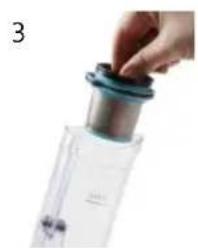
natural_image
Close-up of a hand holding a small metallic object with a blue cap, next to a transparent container (no visible text or symbols)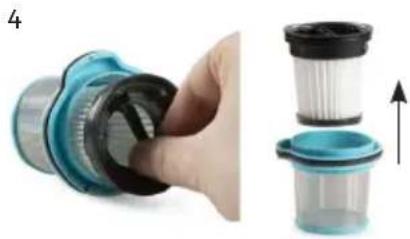
natural_image
Close-up of a hand holding a blue mechanical component, next to a stack of three transparent plastic containers with an upward arrow indicating motion (no text or symbols visible)text_image
Prohibition sign depicting a trash bin crossed with a diagonal line, indicating no waste or discharge.natural_image
Recycling symbol icon with three chasing arrows forming a triangle (no text or labels)natural_image
Symbol of a trash bin crossed out by two diagonal lines, representing no waste or discharge (no text or numbers present)BATTERIE NON AMOVIBLE
natural_image
Technical line drawing of a mechanical component with an arrow indicating direction (no text or symbols)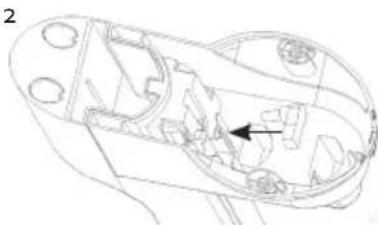
natural_image
Technical line drawing of a mechanical component with internal cavities and a directional arrow (no text or symbols)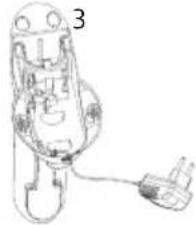
natural_image
Line drawing of a handheld device with a plug and cable (no text or symbols)4
natural_image
Line drawing of a medical device with a plug inserted into a socket (no text or symbols)GEBRAUCH
natural_image
Technical line drawing of a mechanical component with no visible text or symbols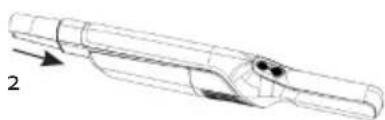
natural_image
Technical line drawing of a mechanical component with no visible text or symbolsnatural_image
Four-step cleaning process showing hand holding a plastic bag, pouring into a filter, and finally adjusting a partially filled container (no text or symbols visible)text_image
Prohibition sign depicting a trash bin crossed with a diagonal line, indicating no waste or discharge.natural_image
Recycling symbol icon with three chasing arrows forming a triangle (no text or labels)natural_image
Symbol of a trash bin crossed out by two diagonal lines, representing no waste or discharge (no text or numbers present)NICHT HERAUSNEHMBARE BATTERIE
All of our products are always submitted to a strict quality control before they are sold to you.
Should you nevertheless experience problems with your device, we sincerely regret this.
In that case, we kindly request you to contact our customer service.
Our staff will gladly assist you.

+32 14 21 71 91

info@linea2000.be
Monday – Thursday: 8.30 – 12.00 and 13.00 – 17.00
Friday: 8.30 - 12.00 and 13.00 - 16.30
This appliance has a two year warranty period. During this period the manufacturer is responsible for any failures that are the direct result of construction failure. When these failures occur the appliance will be repaired or replaced if necessary. The warranty will not be valid when the damage to the appliance is caused by wrong use, not following the instructions or repairs executed by a third party. The guarantee is issued with the original till receipt. All parts, which are subject to wear, are excluded from the warranty. If your device breaks down within the 2-year warranty period, you can return the device together with your receipt to the shop where you purchased it.
The guarantee on accessories and components that are liable to wear-and-tear is only 6 months.
The guarantee and responsibility of the supplier and manufacturer lapse automatically in the following cases:
- If the instructions in this manual have not been followed.
· In case of incorrect connection, e.g., electrical voltage that is too high.
· In case of incorrect, rough or abnormal use.
· In case of insufficient or incorrect maintenance.
In case of repairs or alterations to the device by the consumer or non-authorised third parties. - If the customer used parts or accessories that are not recommended or provided by the supplier / manufacturer.
SAFETY INSTRUCTIONS
When using electrical appliances, basic safety precautions should always be taken, including the following:
- Read all instructions carefully. Keep this manual for future reference.
- Make sure all packaging materials and promotional stickers have been removed before using the appliance for the first time. Make sure children cannot play with the packaging materials.
· This appliance is intended to be used in household and similar applications such as:
- staff kitchen areas in shops, offices and other working environments;
- farm houses;
- by clients in hotels, motels and other residential type environments;
- bed and breakfast type environments.
· Children should be supervised to ensure that they do not play with the appliance.
- This appliance can be used by children aged from 16 years and above and persons with reduced physical, sensory or mental capabilities or lack of experience and knowledge if they have been given
supervision or instruction concerning use of the appliance in a safe way and understand the hazards involved. Children shall not play with the appliance. Cleaning and user maintenance shall not be made by children unless they are older than 16 and supervised.
- Keep the appliance and its cord out of reach of children younger than 16 years.
· All repairs should be carried out by the manufacturer or its aftersales service.
- Any injury or damage caused by failure to comply with these rules are at your own risk. Neither the manufacturer, importer, or the supplier may be held liable.
▲ELECTRICAL WARNINGS
- In order to avoid a hazard this appliance must not be supplied through an external switching device, such as a timer or a separate remote control, or connected to a circuit that is regularly switched on and off by the utility.
- The appliance must be disconnected from its power source when not in use, during service and when replacing parts. Allow to cool before putting on or taking off parts, and before cleaning the appliance. To disconnect, turn controls to "OFF" or "o" position, then remove the plug from the wall. Never pull the cord or appliance to remove the plug from the socket.
- Check carefully that the voltage and frequency of the power net match the indications on the rating label of the appliance.
- The plug must be plugged into an appropriate outlet that is installed and grounded in accordance with all local standards and requirements.
- Do not let the power supply cord hang over the edge of a counter, or touch hot surfaces.
- Keep the power cord away from hot parts and don't cover the appliance.
- Unwrap the cord completely to prevent overheating of the cord. Do not allow the power cord supply to run underneath or around the unit.
- The appliance may not be used with an extension lead or a multiple socket.
- Do not operate this appliance with a damaged cord or plug or in the event the appliance malfunctions or has been damaged in any manner. Return the appliance to the DOMO Service Department or its service agent for examination, repair, or electrical or mechanical adjustment. Do not try to repair the appliance yourself.
⚠️INSTALLATION
- Do not place near flammable materials, gases or explosives.
- Do not use or store this appliance outdoors.
· Always use the appliance on a steady, dry and level surface.
- Never place this appliance near a gas stove or electrical stove or in a place where it may come into contact with a warm appliance.
⚠ USE
- Do not use this appliance for other than intended use.
- Only use the appliance for domestic use. The manufacturer cannot be held responsible for accidents that result from improper use of the appliance or not following the instructions described in this manual.
· Never leave the appliance unattended while it is functioning.
- Do not operate the appliance with wet hands.
- The use of accessories that are not recommended or sold by the manufacturer can cause fire, electrical shock or injuries. Only use the utensils delivered with the appliance.
⚠ CLEANING AND MAINTENANCE
• To protect against electrical shock or burns, do not immerse unit, cord, or plug in water or other liquid.
- Failure to maintain this appliance in a clean condition could adversely affect the life of the appliance and possibly result in a hazardous situation.
⚠️PRODUCT-SPECIFIC WARNINGS
- Do not use the vacuum cleaner to vacuum up detergents, liquids, needles, matches and other similar liquids, sharp objects or flammable objects.
- Do not use the vacuum cleaner to vacuum up cement, powder and other small particles. Also avoid vacuuming up large objects. The vacuum cleaner could be clogged, the motor could overheat or other damage may occur.
- Make sure that the air intake opening does not become blocked.
- Make sure that the machine does not come into contact with liquids.
- First charge a new battery up completely.
-
Pull the plug from the outlet when the vacuum cleaner is fully charged.
-
This product contains a rechargeable battery. Batteries should be recycled. Do not drill into the battery or expose it to high temperatures; the battery could explode.
- Under extreme circumstances, there could be leakage of the battery. If the liquid from the battery comes into contact with the skin, wash it off immediately with water and soap or neutralize it with a mild acid such as lemon juice or vinegar. If the liquid comes into contact with the eyes, rinse them liberally with water for at least 10 minutes and contact a doctor.
- Do not place foreign objects in the openings of your machine. Do not use the machine if an opening is blocked. Keep the machine free from dust, dirt, hair or anything that could reduce the air supply.
- Remove large and sharp objects from the floor to prevent damage to the plastic components, the brushes and the motor.
- Keep hair, loose clothing, fingers and other body parts away from openings and moving parts.
· Never use the appliance without a filters. This will damage the motor and render it unusable.
SAVE THESE INSTRUCTIONS FOR FUTURE REFERENCE
PARTS
- Handle
- On-off button
- Battery indicator
- Speed button
- Motor compartment
- HEPA filter
- Coarse debris filter
- Dust reservoir
- Charging base with storage for accessories
- Dust brush
- Crevice vacuum cleaner
- Adapter
- Unlock button for dust reservoir
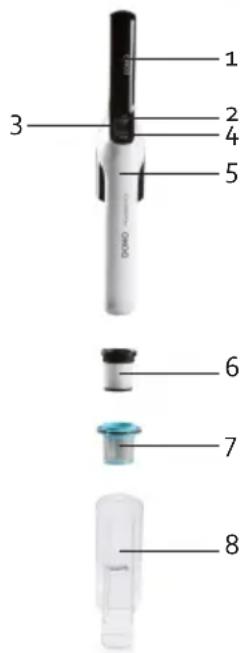
text_image
1 2 3 4 5 6 7 8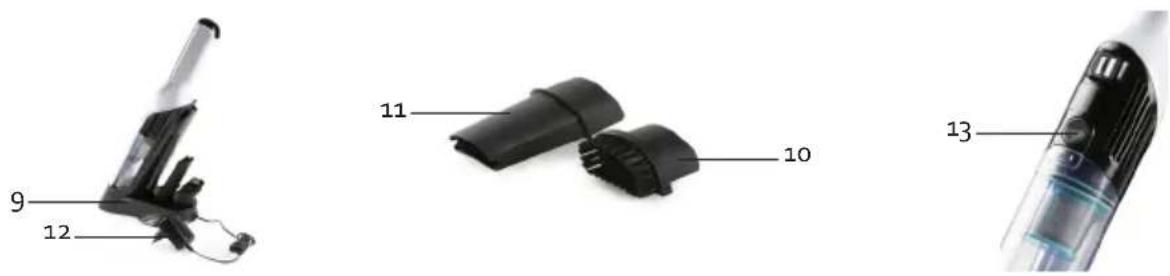
BEFORE THE FIRST USE
- Carefully remove the device from the packaging. Remove any promotional stickers.
· Clean the outside of the device with a soft damp cloth.
CHARGING
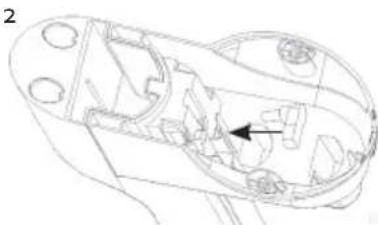
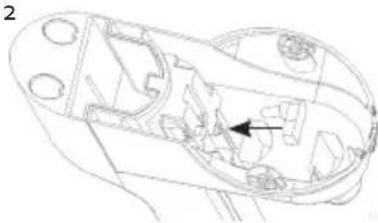
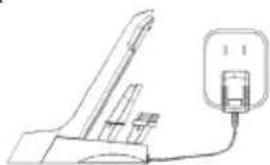
- Assemble the charging base by clicking both parts together.
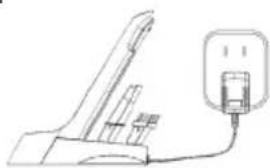
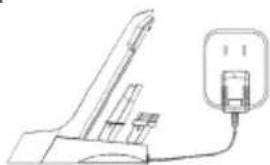
- Insert the end of the adapter into the socket at the bottom of the charging base.
- You can easily fit the cord in the recess at the bottom of the charging base so that it stays in place.
-
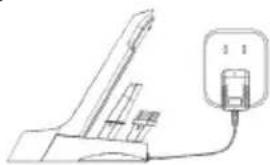
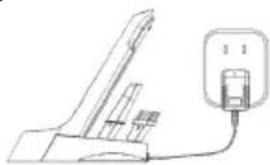
Place the appliance in its storage base. Plug the adapter into the wall socket to charge the appliance.
-
The battery indicator shows when the appliance is fully charged. While charging, the indicator flashes. When the battery is fully charged, the indicator will turn off.
· The machine cannot be started during charging. - Prior to first use, charge the machine for 3-5 hours in order to be able to utilize the full capacity of the battery.

USE
- Remove the handheld vacuum cleaner from its charging base.
- Press the on/off button to turn the appliance on.
- The motor in the device will start working, allowing you to vacuum crumbs or small dust particles.
- Press the speed controller to decrease the speed and to increase it again.
- Press the on/off button again to turn off the appliance.
-
Return the handheld vacuum and accessories to the charging base for storage or charging.
-
The battery indicator light indicates the battery level. When the battery is low, the indicator will blink on and off.
- For the best results, clean the dust reservoir and the filters after each use. This is better for the suction power and the life span of the machine.
· While vacuuming, warm air will come out of the motor compartment. This is normal.
ACCESSORIES
You can use the following accessories on the hand-held vacuum cleaner:
-
Dust brush: for furniture, bookshelves, curtains and hard to clean surfaces.
-
Crevice vacuum cleaner: for crevices, corners, stairs, keyboards,...
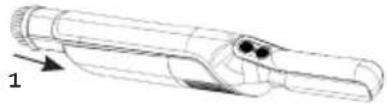
natural_image
Technical line drawing of a mechanical component with no visible text or symbols
natural_image
Technical line drawing of a mechanical component with no visible text or symbolsCLEANING AND MAINTENANCE
CLEANING THE MACHINE
Clean the machine with a slightly moist soft cloth. Dry the machine off well. Never submerge the machine in water!
CLEANING THE DUST RESERVOIR
- Never exceed the maximum indicator on the dust container. For the best results, clean the dust reservoir and the filters after each use. This is better for the suction power and the life span of the machine.
- Press the dust container release to release the dust container from the appliance.
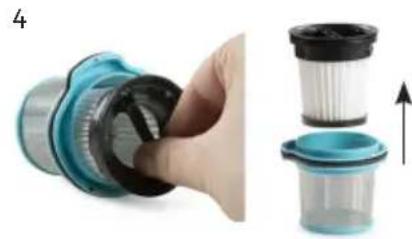
- Pull the filters out of the dirt receptacle (C). Empty the canister.
- Remove the HEPA filter (A) from the coarse debris filter (B). Pay attention to the lock symbol.
A. HEPA filter: this round dust filter captures the small dust particles.
B. Coarse debris filter: this ensures that the large dust particles remain in the dirt receptacle.
C. Dirt receptacle: this is where all large dirt particles are collected.
- You can now clean all the parts separately. We recommend you do this with compressed air. If you do not have compressed air, you can wash out the parts. Make sure they are completely dry before using them again.
- Replace the HEPA filter in the coarse debris filter. Pay attention to the lock symbol.
- Put the filters back in the dirt receptacle.
- Click the dust container back onto the motor part.
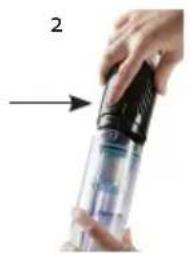
natural_image
Close-up of hands holding a cylindrical device with a black handle, no visible text or symbols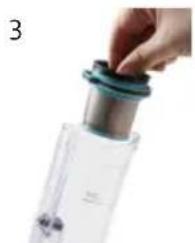
natural_image
Close-up of a hand holding a small container with a teal lid, next to a transparent bottle (no visible text or symbols)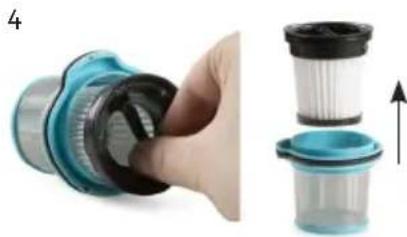
natural_image
Close-up of a hand holding a blue mechanical component, next to a stack of three transparent plastic containers with an upward arrow indicating motion (no text or symbols)

A

B
C
We advise replacing the filters regularly to ensure an optimal operation of the machine. Dirty filters will reduce the suction power drastically. For the best results, clean the dust reservoir and the filters after each use. This is better for the suction power and the life span of the machine.
PROBLEM AND SOLUTION
| Problem Solution | |
| The battery charge indicator will flash on and off. | · The battery is empty. Charge the machine. |
| The machine does not start up. · The battery is empty. Charge the machine. | |
| The machine does not vacuum. · The filters are dirty/the dust reservoir is full. Clean the machine as described in this manual. | |
| The running time of the machine is shorter and shorter. | · The filters are dirty/the dust reservoir is full. Clean the machine as described in this manual.· The machine is not sufficiently charged. Charge the machine fully and try again.· The battery is broken or old. Contact the after sales service.· Stuck hairs. Remove the hairs stuck on the brushes. |
ENVIRONMENTAL GUIDELINES
text_image
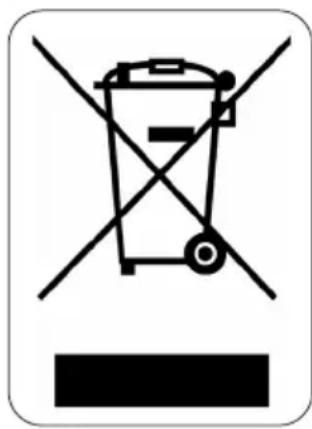
Prohibition sign with crossed-out trash bin and no text, indicating no waste or disposal restrictionThis symbol on the product or on its packaging indicates that this product may not be treated as household waste. Instead it must be brought to the applicable collection point for recycling of electrical and electronic equipment. By ensuring this product is disposed of correctly, you will help prevent potential negative consequences for the environment and human health, which could otherwise be caused by inappropriate waste handling of this product. For more detailed information about recycling of this product, please contact your local city office, your household waste disposal service or the shop where you purchased the product.
natural_image
Recycling symbol icon with three chasing arrows forming a triangle (no text or labels)The packaging is recyclable. Please treat the packaging ecologically.
natural_image
Symbol of a trash bin crossed with two diagonal lines, representing no waste or discharge (no text or numbers present)NON-REMOVABLE BATTERY
The appliance is battery-operated, and the battery must not be disposed of with household waste, even after use. You can take the appliance to a collection point for discarded electrical appliances (Recupel) in your neighbourhood (container park, specialist shop, etc.). Batteries contain substances that are dangerous to human health and to the environment.
GARANTIA
natural_image
Technical line drawing of a mechanical component with an arrow indicating direction (no text or symbols)2
natural_image
Technical line drawing of a mechanical component with internal cavities and a directional arrow (no text or symbols)
natural_image
Line drawing of a handheld device with a cable and plug, no text or symbols present4
natural_image
Line drawing of a medical device with a plug inserted into a socket (no text or symbols)USO
natural_image
Technical line drawing of a mechanical component with no visible text or symbols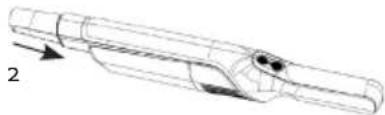
natural_image
Technical line drawing of a mechanical component with no visible text or symbolsLIMPIEZAY MANTENIMIENTO
LIMPIAR EL APARATO DE POLVO
natural_image
Close-up of hands holding a cylindrical device with a black handle, no visible text or symbols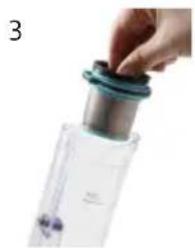
natural_image
Close-up of a hand holding a small container with a blue lid, next to a transparent plastic bottle (no visible text or symbols)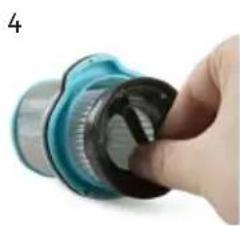
natural_image
Close-up of a hand holding a blue and black mechanical component (no visible text or symbols)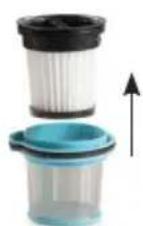
natural_image
Symbol of a trash bin crossed with no text or numbers, indicating no waste or discharge (no text present)natural_image
Recycling symbol icon with three chasing arrows forming a triangle (no text or labels)natural_image
Symbol of a trash bin crossed out by two diagonal lines, representing no waste or discharge (no text or numbers present)BATERÍA NO EXTRAÍBLE
natural_image
Two black plastic components with labeled parts (10 and 11), no text or symbols present.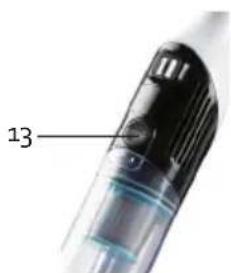
text_image
13PRIMA DELL'USO
natural_image
Technical line drawing of a mechanical component with an arrow indicating direction (no text or symbols)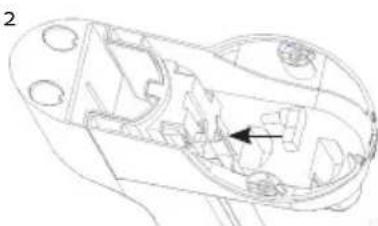
natural_image
Technical line drawing of a mechanical component with internal cavities and a highlighted section (no text or symbols)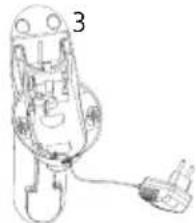
natural_image
Line drawing of a mechanical device with a plug and cable (no text or symbols)4

natural_image
Line drawing of a medical or laboratory device with a plug and connector (no text or symbols)UTILIZZO
natural_image
Technical line drawing of two mechanical components with arrows indicating assembly or movement (no text or symbols)natural_image
Close-up of hands holding a cylindrical device with black handle, no visible text or symbols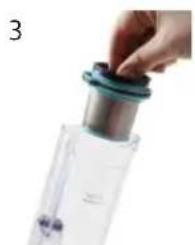
natural_image
Close-up of a hand holding a small metallic object with a teal cap, next to a transparent container (no visible text or symbols)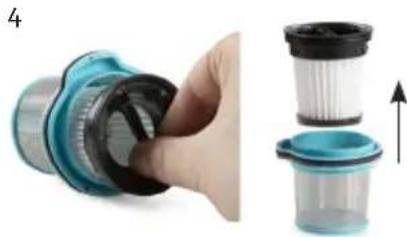
natural_image
Close-up of a hand holding a blue mechanical component, next to a stack of three plastic containers with an upward arrow indicating motion (no text or symbols visible)

A

B
C
text_image
Prohibition sign depicting a trash bin crossed with a diagonal line, indicating no waste or discharge.natural_image
Recycling symbol icon with three chasing arrows forming a triangle (no text or labels)natural_image
Symbol of a trash bin crossed with two crossed lines, no text or numbers presentBATTERIA NON RIMOVIBILE
natural_image
Close-up of a handheld electronic device with a labeled component (13), no visible text or symbols beyond the number.PŘED PRVNÍM POUŽITÍM
natural_image
Technical line drawing of a mechanical component with an arrow indicating direction (no text or symbols)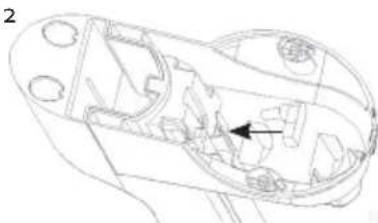
natural_image
Technical line drawing of a mechanical component with internal cavities and a highlighted section (no text or symbols)
text_image
3 14
natural_image
Line drawing of a medical device with a plug inserted into a socket (no text or symbols)POUŽITÍ
natural_image
Technical line drawing of a mechanical component with no visible text or symbols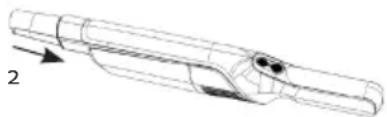
natural_image
Technical line drawing of a mechanical component with directional arrows (no text or symbols)ČIŠTĚNÍ A ÚDRŽBA
ČIŠTĚNÍ PŘÍSTROJE
OHLED NA ŽÍVOTNÍ PROSTŘEDÍ

text_image
Prohibition sign depicting a trash bin crossed with a diagonal line, indicating no waste or discharge.natural_image
Recycling symbol icon with three chasing arrows forming a triangle (no text or labels)natural_image
Symbol of a trash bin crossed with no text or numbers, representing waste sorting or disposal (no text present)PEVNĚ ZABUDOVANÉ BATERIE
natural_image
Technical line drawing of a mechanical component with an arrow indicating direction (no text or symbols)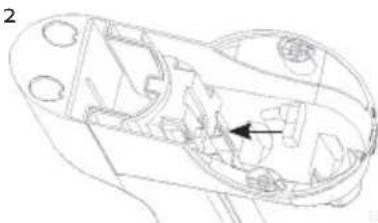
natural_image
Technical line drawing of a mechanical component with internal cavities and a highlighted section (no text or symbols)
natural_image
Line drawing of a mechanical device with a cable and plug, no text or symbols present4
natural_image
Line drawing of a medical device with a plug inserted into a socket (no text or symbols)POUŽITIE
natural_image
Technical line drawing of a mechanical component with two views (1 and 2), no text or symbols present.ČISTENIE A ÚDRŽBA
ČISTENIE PRÍSTROJA
natural_image
Three labeled images of a cleaning or cleaning device, A, B, and C, showing different shapes (no text or symbols on the devices themselves)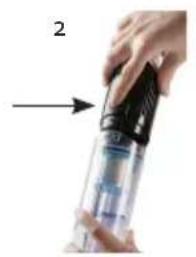
natural_image
Close-up of hands holding a handheld device with a black handle, no visible text or symbols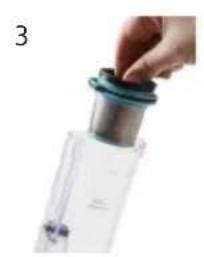
natural_image
Close-up of a hand holding a small container with a teal lid, next to a transparent plastic container (no visible text or symbols)