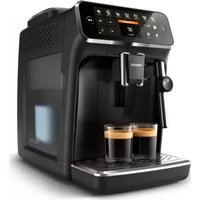
4300 Series EP4321 - Coffee machine PHILIPS - Free user manual and instructions
Find the device manual for free 4300 Series EP4321 PHILIPS in PDF.


| Product Type | Fully automatic coffee machine |
| Brand | Philips |
| Model | 4300 Series EP4321 |
| Dimensions (W x H x D) | 246 x 377 x 434 mm |
| Weight | 7 to 7.5 kg |
| Power supply | See label inside the service door |
| Water tank capacity | 1.8 L |
| Bean hopper capacity | 275 g |
| Grounds container capacity | 12 servings |
| LatteGo capacity (milk container) | 250 ml |
| Adjustable spout height | 88 to 145 mm |
| Beverages prepared | Espresso, Coffee, Americano, Cappuccino, Latte Macchiato, Café au lait, Hot water, Steam (depending on model) |
| Grind setting | 12 levels, adjustable while grinding |
| Coffee strength | 5 adjustable levels |
| Custom profiles | Yes, several color profiles + guest profile |
| Water filter | AquaClean integrated, activation via menu |
| Cleaning | Removable brewing unit, dishwasher-safe parts, descaling program, quick milk cleaning |
| Maintenance | Lubricate brewing unit every 2 months, descale according to alert |
| Included accessories | Measuring spoon, water hardness test strip, AquaClean filter, LatteGo or milk frother depending on model |
| Spare parts | Available online at the Philips website |
Frequently Asked Questions - 4300 Series EP4321 PHILIPS
User questions about 4300 Series EP4321 PHILIPS
0 question about this device. Answer the ones you know or ask your own.
Ask a new question about this device
Download the instructions for your Coffee machine in PDF format for free! Find your manual 4300 Series EP4321 - PHILIPS and take your electronic device back in hand. On this page are published all the documents necessary for the use of your device. 4300 Series EP4321 by PHILIPS.
USER MANUAL 4300 Series EP4321 PHILIPS
4300 series 5400 series
natural_image
Illustration of a coffee maker with a water tap and grain pile, showing internal components (no text or symbols)EN USER MANUAL
DA BRUGERVEJLEDNING
flowchart
graph TD
    A["C1"] --> B["Espresso"]
    A --> C["Coffee"]
    A --> D["Americano"]
    A --> E["Caffe Crema"]
    A --> F["Ristretto"]
    A --> G["Hot Water"]
    A --> H["Steam"]
    I["Power"] --> J["My coffee choice profiles"]
    K["Clean"] --> L["Settings"]
    M["C7"] --> N["Series 4300"]
    O["C3C4C5C6C8 C2"] --> P["OK"]
flowchart
graph TD
    D["?"] --> E1["D1"]
    D --> E2["E1"]
    D --> E3["E2"]
    E1 --> F1["Espresso"]
    E1 --> F2["Coffee"]
    E1 --> F3["Americano"]
    E1 --> F4["Cappuccino"]
    E1 --> F5["Latte Macchiatlo"]
    E1 --> F6["Café au laï"]
    E1 --> F7["Meire Drinks"]
    F1 --> G1["My coffee menu"]
    F2 --> G2["Series 4300"]
    F3 --> G2
    F4 --> G2
    F5 --> G2
    F6 --> G2
    F7 --> G2
    G1 --> H1["√"]
    G2 --> H2["OK"]

| Series 4300Series 5400 | A18 A19 A20 | A21 A22 | ○ | ○ | ○ |
Classic Milk FrotherEP4327EP4324EP4321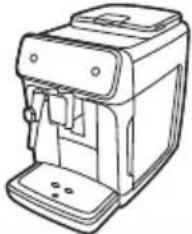 | √ | √ | √ | √ | × |
LatteGoEP5447EP5446EP5444EP5443EP5441EP5144EP4349EP4346EP4343EP4341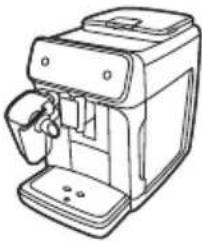 | √ | √ | √ | × | √ |
Contents
Machine overview (Fig. A) 4
Control panel 5
Introduction 5
Before first use 6
Brewing drinks 7
Personalizing drinks 9
Adjusting machine settings ____ 10
Removing and inserting the brew group 11
Cleaning and maintenance 12
AquaClean water filter 14
Descaling procedure (30 min.) 15
Ordering accessories 16
Troubleshooting 16
Technical specifications 22
Machine overview (Fig. A)
A1 Control panel A10 Data label with type number
A2 Cup holder A11 Water tank
A3 Pre-ground coffee compartment A12 Hot water spout
A4 Lid of bean hopper A13 Coffee grounds container
A5 Adjustable coffee spout A14 Front panel of coffee grounds container
A6 Grind setting knob A15 Drip tray cover
A7 Coffee bean hopper A16 Drip tray
A8 Brew Group A17 'Drip tray full' indicator
A9 Service door
Accessories
A18 AquaClean water filter A21 Classic milk frother (specific types only)
A19 Measuring scoop A22 LatteGo (milk container) (specific types only)
A20 Water hardness test strip
Control panel
There are multiple versions of this espresso machine, with different control panels. Each version has its own type number. You can find the type number on the data label on the inside of the service door (Fig. A9). You can also find the type number by tapping the Settings icon and selecting 'Support'.
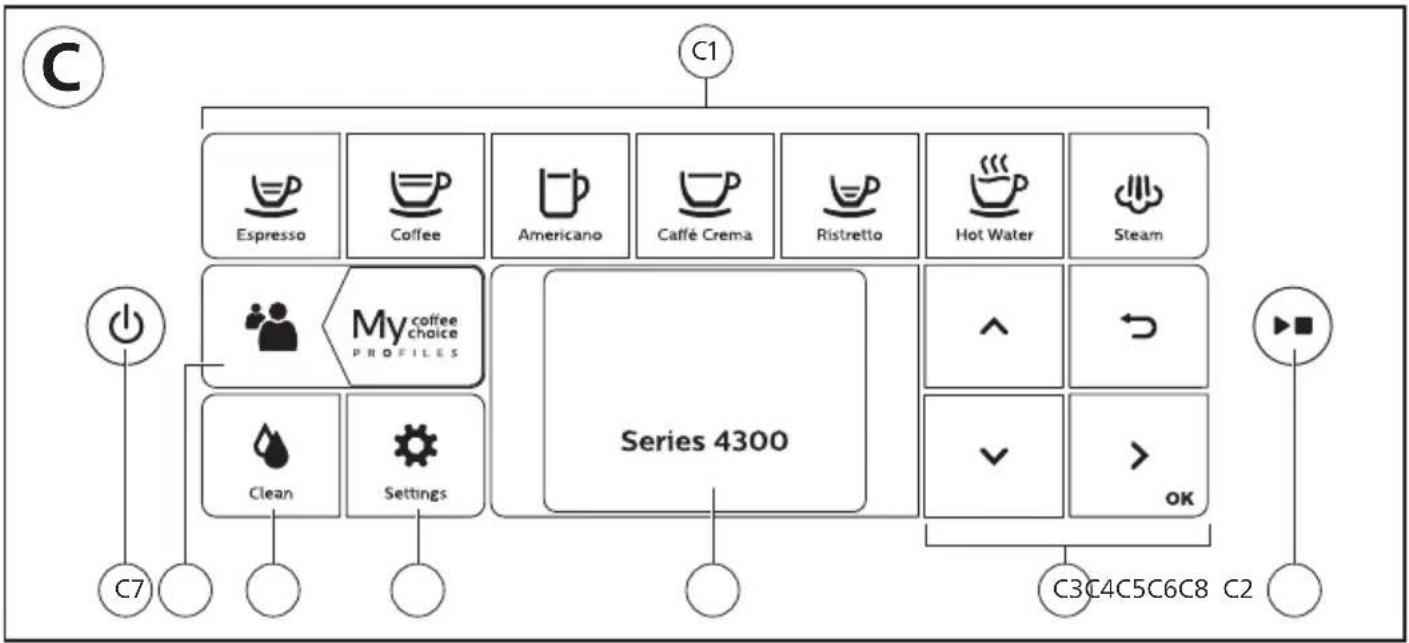
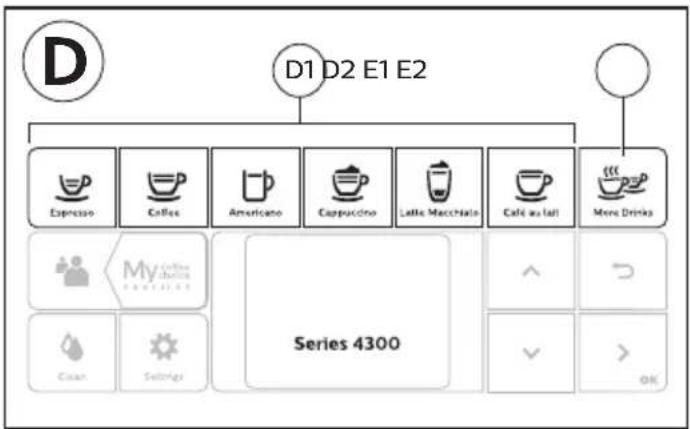
Refer to figure C and D for an overview of all buttons and icons. Below you find the description.
Use the up and down arrows to scroll through the display and tap the OK icon to select or confirm your choices.
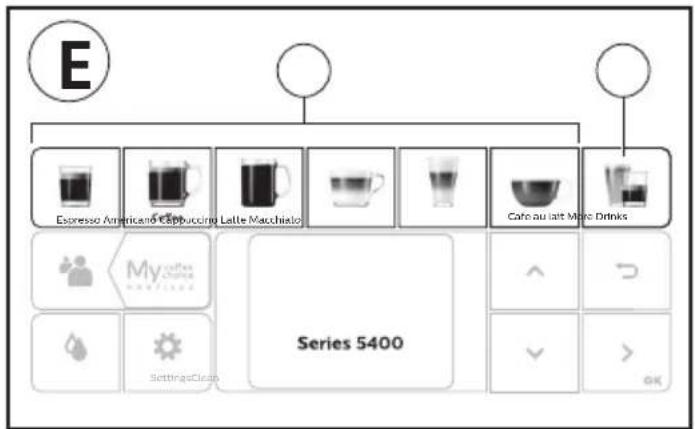
All types (Fig. C/D/E)
C1/D1/E1 One-touch drink icons C3. Navigation icons (up, down, back, ok)
C6. Cleaning menu
C2. Start/stop button C4. Display C7. Personal profiles

D2/E2 Menu with More Drinks C5. Machine settings C8. On/off button
EP4327, EP4324, EP4321 only (Fig. C)
C1 One-touch drink icons: Espresso, Coffee, Americano, Caffé Crema, Ristretto, Hot Water and Steam
EP4349, EP4346, EP4343, EP4341 only (Fig. D)
D1 One-touch drink icons: Espresso, Coffee, Americano, Cappuccino, Latte Macchiato, Café au lait
EP5447, EP5446, EP5444, EP5443, EP5441, EP5144 only (Fig. E)
E1 One-touch drink icons: Espresso, Coffee, Americano, Cappuccino, Latte Macchiato, Café au lait
Introduction
Congratulations on your purchase of a Philips fully automatic coffee machine! To fully benefit from the support that we offer, please register your product at www.home.id.
Read the separate safety booklet carefully before you use the machine for the first time and save it for future reference.
Before first use, rinse with hot water all removable accessories destined to come into contact with water or milk. To help you get started and to get the best out of your machine, we offer support in multiple ways. In the box you find:
1 The Quick Start Guide with picture-based usage instructions and information on cleaning and maintenance.
2 The separate safety booklet with instructions on how to use the machine in a safe way.
3 For online support (this extended user manual, frequently asked questions, videos, etc.), scan the QR code on the cover of this booklet to download the HomeID App, or visit www.home.id/support. You can also find the QR code by tapping the Settings icon and selecting support.
i This machine has been tested with coffee. Although it has been carefully cleaned, there may be some coffee residues left. We guarantee, however, that the machine is absolutely new.
The machine automatically adjusts the amount of ground coffee that is used to make the best-tasting coffee. You should brew 5 coffees initially to allow the machine to complete its self-adjustment.
Make sure you rinse the LatteGo (milk container) or the classic milk frother before first use.
Before first use
Assembling LatteGo
natural_image
Illustration of a hand pressing down on a mechanical component (no text or symbols visible)▶
▶
natural_image
Diagram of a mechanical component with a lever and handle, showing alignment or disassembly (no text or symbols)▶
natural_image
Simple line drawing of a device with a checkmark pointing to it (no text or symbols present)Assembling the classic milk frother (specific types only)
flowchart
graph TD
    A["Press Hand"] --> B["Valve"]
    B --> C["Lock"]
    C --> D["Switch"]
    D --> E["Car"]
Brewing drinks
General steps
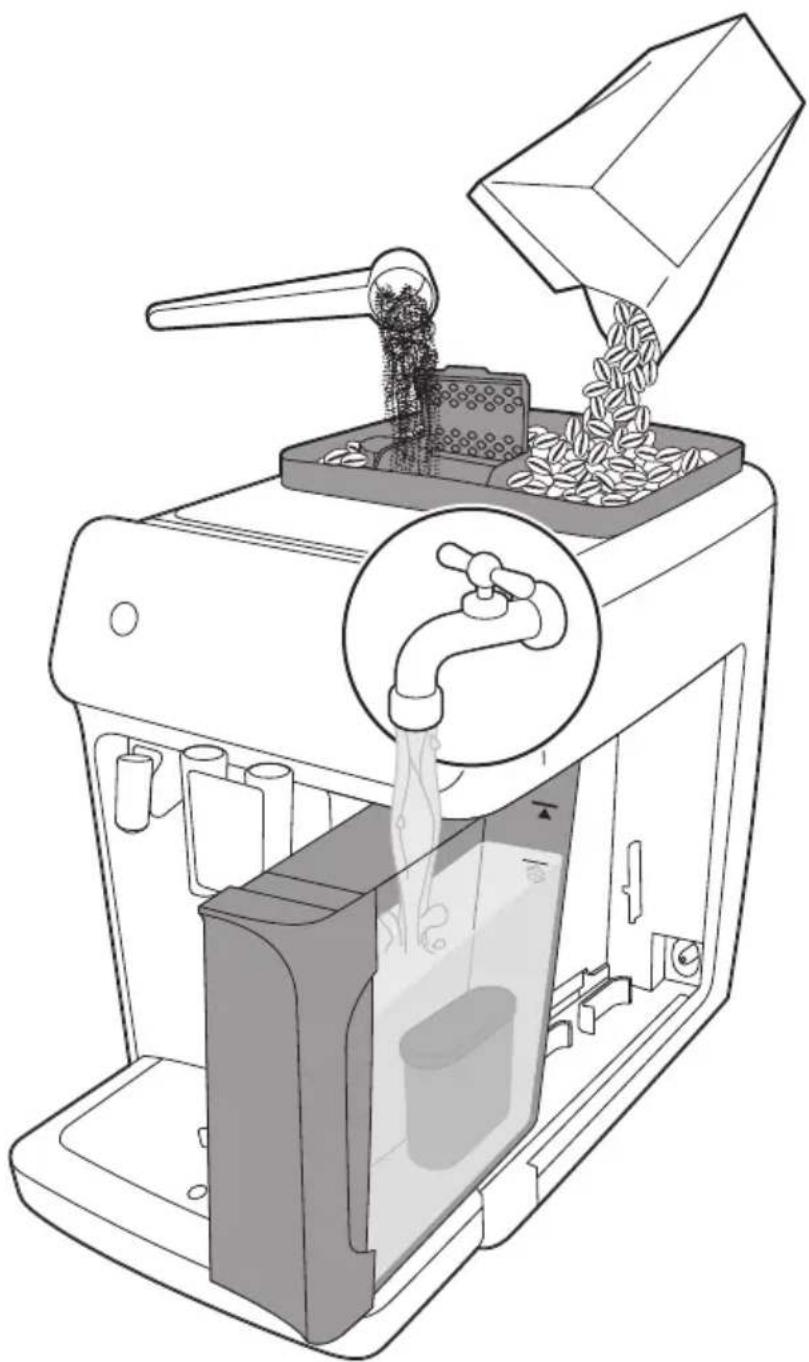
1 Fill the water tank with tap water and fill the bean hopper with beans.
2 Insert the small plug into the socket located on the back of the machine. Insert the mains plug into the wall socket.
3 Press the on/off button to switch on the machine.
- The machine starts heating up and performs the automatic rinsing cycle.
- When all lights in the drink icons light up continuously, the machine is ready for use.
4 Place a cup under the coffee dispensing spout. Slide the coffee dispensing spout up or down to adjust its height to the size of the cup or glass you are using (Fig. 1).
Brewing coffee with beans
1 To brew a coffee, tap the drink icon of your choice (Fig. 2) or tap the 'More Drinks' icon (Fig. 3) (specific types only).
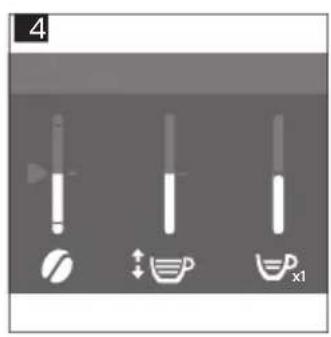
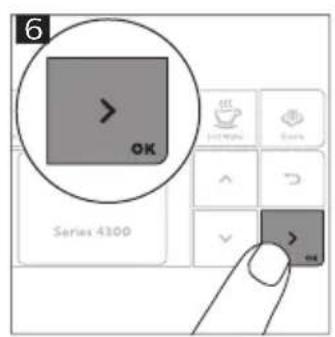
- You can now adjust the drink to your personal taste (Fig. 4). Use the up and down arrows (Fig. 5) to adjust the coffee strength. Tap the OK icon if you want to adjust more settings (Fig. 6).
2 Press the start/stop button at any time to start brewing the selected drink.
3 To stop dispensing coffee before the machine is finished, press the start/stop button again.
To brew 2 coffees at the same time, tap the drink icon twice or select the 2x icon scrolling the dedicated bar.
Do not use caramelized or flavored coffee beans.
Brewing milk-based drinks with LatteGo (milk container)
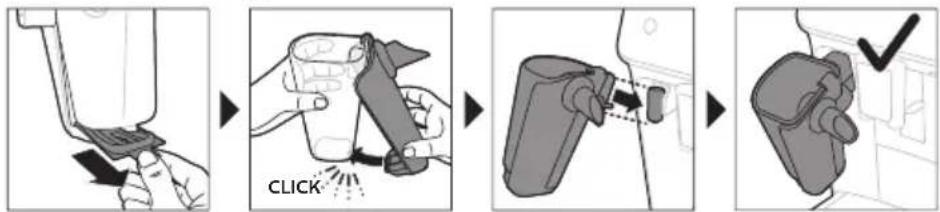
LatteGo consists of a milk container, a frame and a storage lid. To avoid leakage, make sure the frame and the milk container are properly assembled before you fill the milk container.
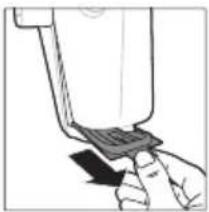
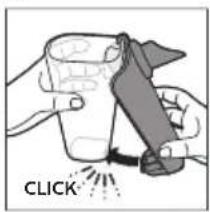
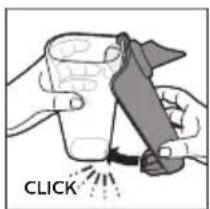
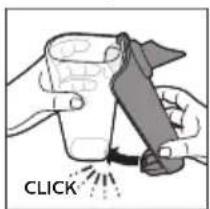
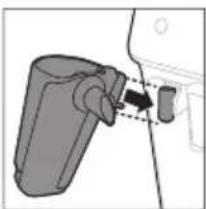
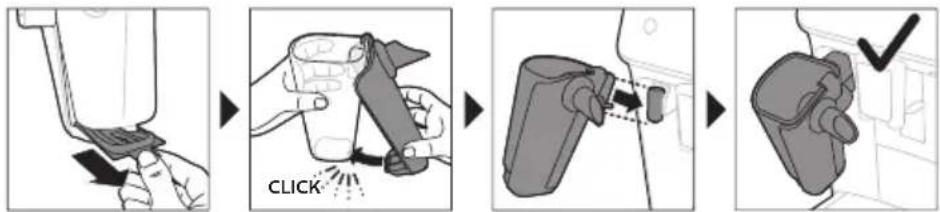
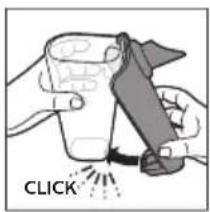
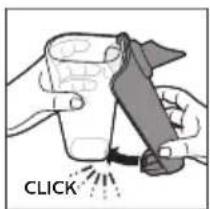
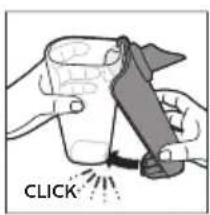
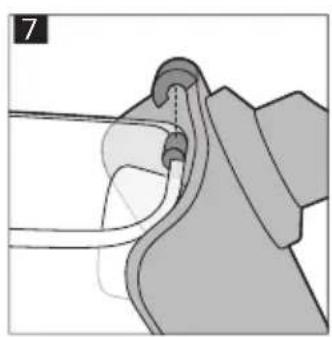
1 To assemble LatteGo, first insert the top of the milk container under the hook at the top of the frame (Fig. 7). Then press home the bottom part of the milk container. You hear a click when it locks into place (Fig. 8).
Note: Make sure that the milk container and the frame are clean before you connect them.
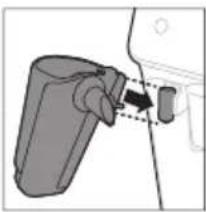
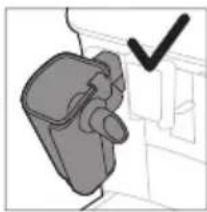
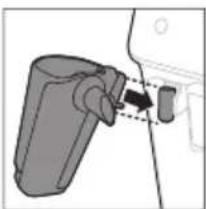
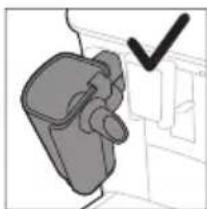
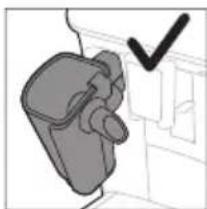
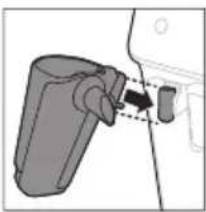
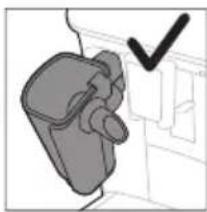
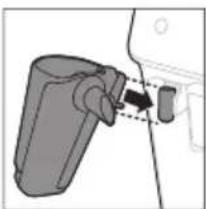
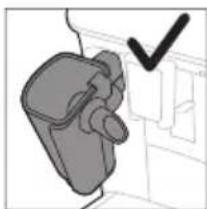
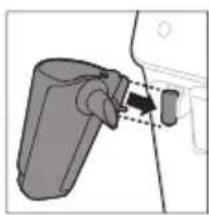
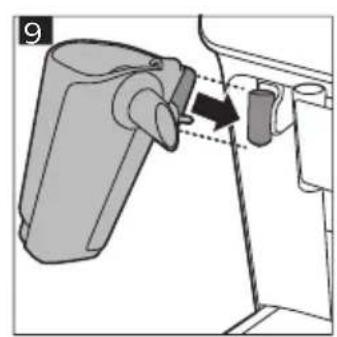
2 Slightly tilt LatteGo and put it on the hot water spout (Fig. 9). Then press it home until it locks into place (Fig. 10).
3 Fill LatteGo with milk (Fig. 11). Do not fill the milk container beyond the maximum indication.
i If you have personalized the milk quantity, you may need to fill the milk container with more or less milk than indicated for this drink on LatteGo.
Always use milk coming directly from the fridge for optimal results.
4 Place a cup on the drip tray.
5 Tap the milk-based drink icon of your choice or tap the 'More Drinks' icon (specific types only) to select a different drink (see 'Personalizing drinks')
- You can now adjust the drink to your own preference.
6 Press the start/stop button.
- When you brew cappuccino, flat white or latte macchiato, the machine first dispenses milk and then coffee. When you brew caffè latte or café au lait, the machine first dispenses coffee and then milk.
- To stop dispensing milk before the machine has dispensed the preset amount, press the start/stop button.
7 To stop dispensing the complete drink (milk and coffee) before the machine is finished, press and hold the start/stop button.
Frothing or heating up milk with classic milk frother
Always use milk coming directly from the fridge for the best foam quality.
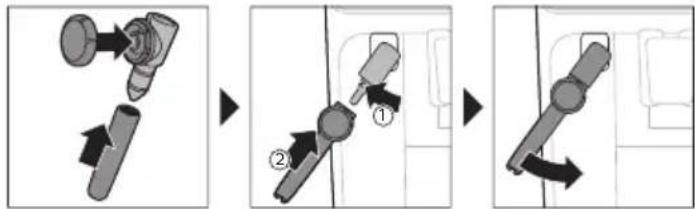
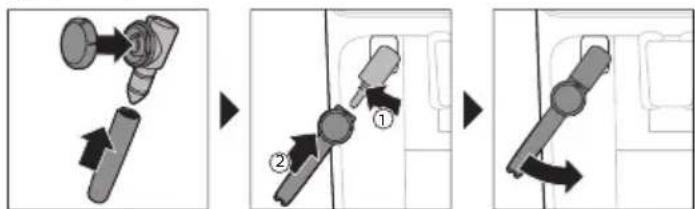
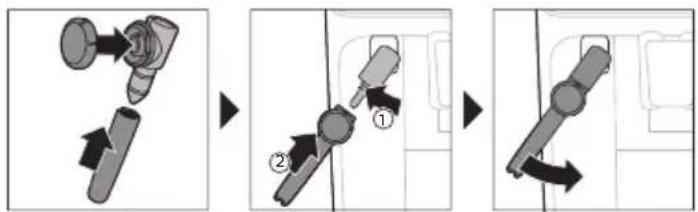
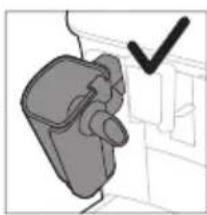
1 Tilt the black silicone handle on the machine to the left and slide the milk frother onto it (Fig. 12).
2 Fill a milk jug with with approx. 100 ml milk for cappuccino and approx. 150 ml milk for latte macchiato.
3 Insert the milk frother approx. 1 cm into the milk.
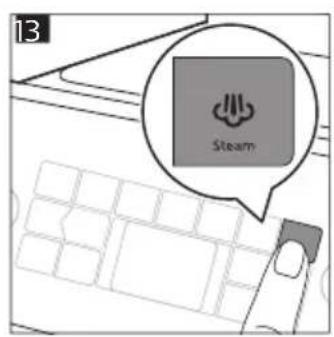
4 Tap the steam icon (Fig. 13).
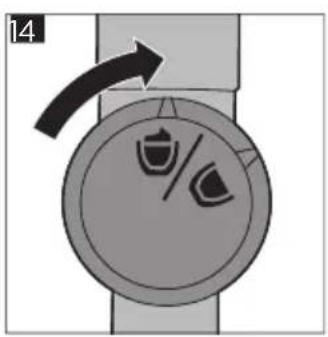
5 Turn the knob on the classic milk frother to the milk frothing icon (Fig. 14) if you want to froth milk. Turn the knob on the classic milk frother to the flat milk icon (Fig. 15) if you want heat up milk.
6 Make sure that the icon on the knob of the classic milk frother is aligned with the black arrow.
7 Press the start/stop button to start (Fig. 16).
- The machine starts heating up, steam is forced into the milk and the milk is either frothed or heated. Small jets of hot water can be dispensed by the classic milk frother.
8 When the milk in the milk jug has reached the required foam volume or heat, press the start/stop button again to stop frothing/heating milk.
i Never steam milk longer than 90 seconds. The steaming automatically stops after 90 seconds.
In order to get the best milk froth quality, you do not have to move the milk jug during milk frothing.
Extra shot (ExtraShot) (specific types only)
Your machine offers you the possibility to add an extra shot of Ristretto to your coffee and milk drinks, for example if you want to have a stronger coffee.
1 Place a cup under the spout
2 Tap one of the one-touch drinks icons to select a drink or tap the 'More Drinks' icon (specific types only) to select a drink.
3 Use the up arrow to set the strength to the top level and then select the ExtraShot function (Fig. 17).
4 Tap the OK icon if you want to personalize the other settings. Then press the start/stop ▶■ icon to start brewing the drink.
5 To stop dispensing the drink before the machine has finished, press the start/stop▶■ icon again.
When you have selected the ExtraShot function, you can only brew one coffee at the time.
Brewing coffee with pre-ground coffee
You can choose to use pre-ground coffee instead of beans, for example if you prefer a different coffee variety or decaffeinated coffee.
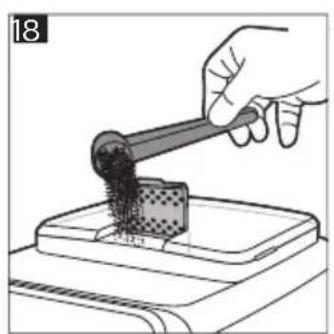
1 Open the lid of the pre-ground coffee compartment and pour one leveled measuring scoop of pre-ground coffee into it (Fig. 18). Then close the lid.
2 Tap one of the one-touch drink icons or tap the 'More Drinks' icon (specific types only) to select another drink.
3 Select the pre-ground coffee function. You can do this in 2 different ways:
- use the down arrow to set the strength to the lowest level and then select the pre-ground function.
- press the Settings icon and use the down arrow to select the pre-ground function.
4 To stop dispensing coffee before the machine has finished, press the start/stop ▶ button again.
i When you select the pre-ground coffee function:
- it is automatically stored.
- you can only brew one coffee at a time.
- you cannot select a different aroma strength.
Dispensing hot water
1 If attached, remove LatteGo or the milk frother.
2 Place a cup under the hot water spout.
3 Tap the 'Hot Water' icon (specific types only) or tap the 'More Drinks' icon (specific types only) (Fig. 3) to select hot water.
4 Use the up and down arrows to adjust the hot water quantity and/or temperature to your preference.
5 Press the start/stop button.
- Hot water is dispensed from the hot water spout (Fig. 19).
6 To stop dispensing hot water before the machine is finished, press the start/stop ▶ button again.
Personalizing drinks
The machine allows you to adjust the settings of a drink to your own preference and to store the adjusted drink in a personal profile. The different profiles have different colors.
After selecting a drink by tapping one of the one-touch drink icons or by tapping the 'More Drinks' icon (specific types only), you can do the following things:
1 adjust the aroma strength with the up and down icons (Fig. 20). There are 5 strengths, the lowest is the mildest and the highest is the strongest.
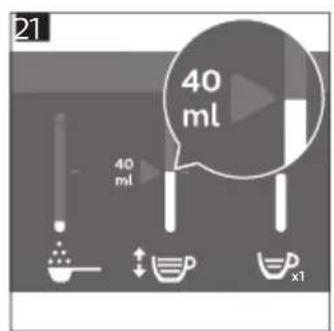
2 adjust the coffee quantity (Fig. 21) and/or the milk quantity (specific types only) with the up and down icons. There are 5 quantities for each of the settings.
i As soon as the machine has finished brewing, the settings you selected will be stored automatically in the profile you chose.
Select a profile
You can select a profile and store a recipe using My coffee choice profiles (My Coffee Choice Profiles).
1 Tap the profiles 🎨 icon repeatedly to select one of the colored profiles. All profiles have a different color.
2 Select a drink by tapping one of the one-touch drink icons or by tapping the 'More Drinks' icon (specific types only).
3 Adjust the drink settings to your favorite taste.
4 Press start/stop button to brew the drink you selected
- Your new settings have now been stored in the colored profile you selected.
i You can always restore the factory settings of the machine (see 'Restoring factory settings').
Guest profile
Your machine is equipped with a guest profile. When the guest profile is selected, the profile icon is off. When you select this profile, you can still personalize the settings to your own preference but the recipes you brew will not be stored.
Adjusting machine settings
Setting the water hardness
We advise you to adjust the water hardness setting to the water hardness level in your region for optimal performance and a longer lifetime of the machine. This also prevents you from having to descale the machine too often. The default water hardness setting is 4: hard water.
Use the water hardness test strip supplied in the box to determine the water hardness in your region:
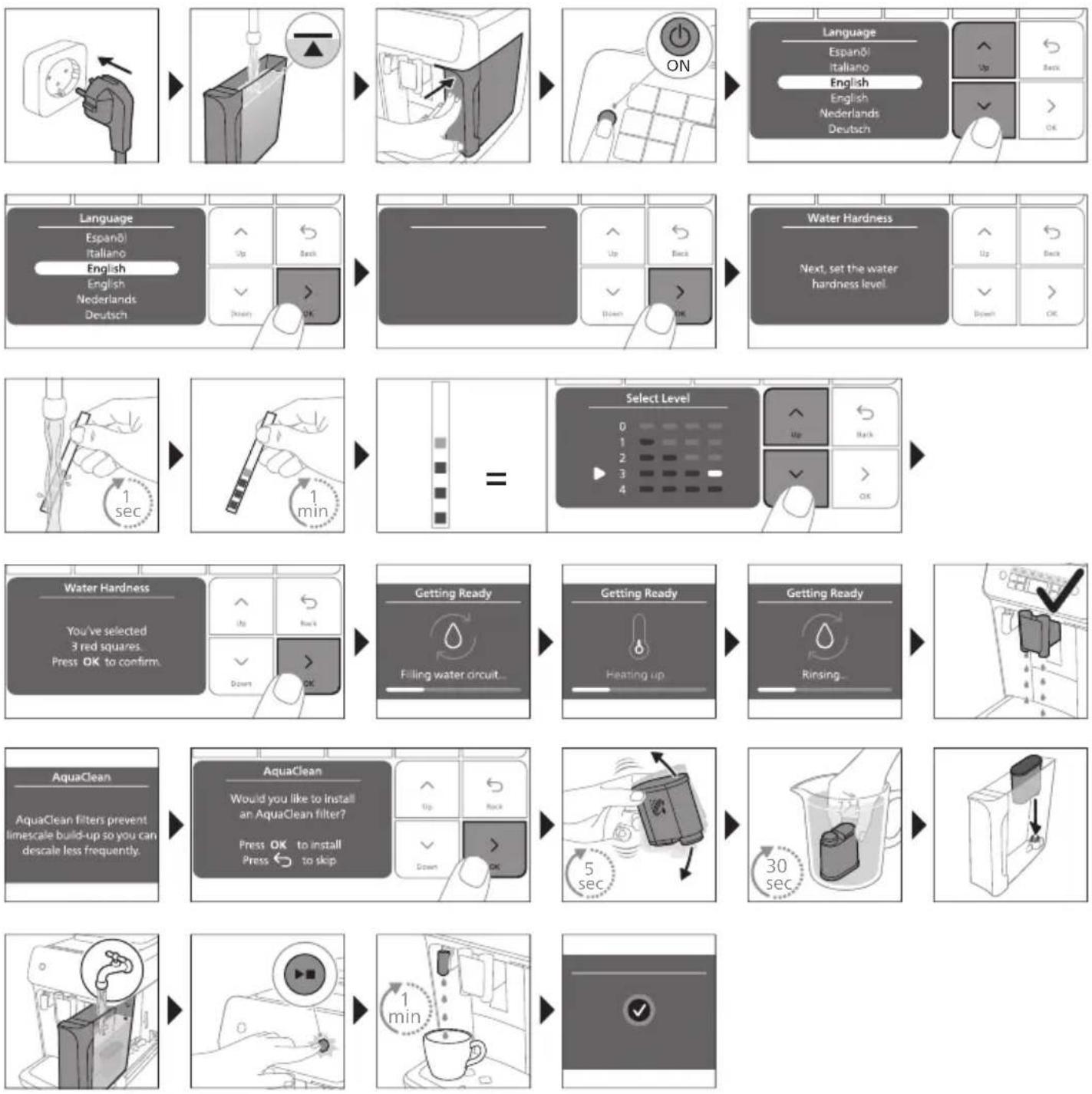
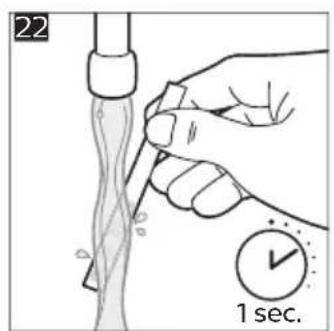
1 Immerse the water hardness test strip in tap water or hold it under the tap for 1 second (Fig. 22).
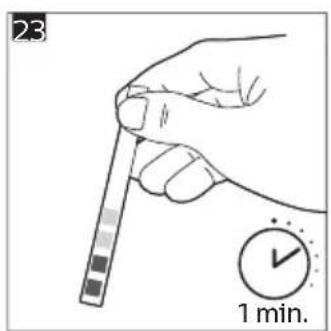
2 Wait 1 minute. The number of squares on the test strip that turn red indicate the water hardness (Fig. 23).
Set the machine to the correct water hardness:
1 Tap the Settings ✪ icon and use the up and down arrows to select 'Water hardness'. Then press the OK icon to confirm.
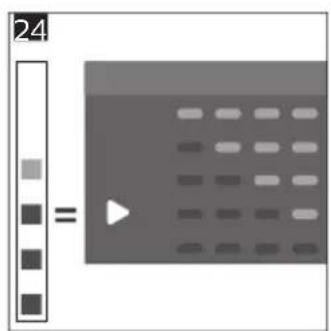
2 Use the up and down arrows to select the water hardness level. The number of red squares selected on the display should be the same as the number of red squares on the test strip (Fig. 24).
3 When you have set the correct water hardness, tap the OK icon to confirm.
Adjusting grinder settings
You can change the coffee strength with the grind setting knob inside the bean container. The lower the grind setting, the finer the coffee beans are ground and the stronger the coffee. There are 12 different grind settings you can choose from.
The machine has been set up to get the best taste out of your coffee beans. Therefore we advise you not to adjust the grind setting until you have brewed 100-150 cups (approx. 1 month of use).
i You can only adjust the grind settings when the machine is grinding coffee beans. You need to brew 2 to 3 drinks before you can taste the full difference.
Do not turn the grind setting knob more than one notch at a time to prevent damage to the grinder.
1 Place a cup under the coffee dispensing spout.
2 Open the lid of the coffee bean hopper.
3 Tap the espresso icon and then press the start/stop button.
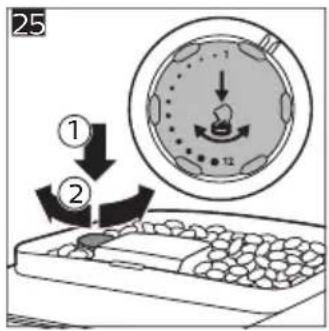
4 When the grinder starts grinding, press down the grind setting knob and turn it to the left or right. (Fig. 25)
Adjusting other machine settings
By tapping the Settings ⚙con you can adjust the following machine settings:
- Water hardness: you can select between 5 levels according to the water hardness in your region;
- Standby time: you can select 15, 30, 60 or 180 min
- Display brightness: you can select low, medium and high.
- Language
- Sound: you can activate or deactivate the beeping sound of the machine
- Temperature: you can choose between 3 brewing temperatures for your coffee
- Front illumination (specific types only): you can choose 'always on', 'on during brewing' or 'always off'.
- Measuring unit: you can choose between ml. or oz.
Restoring factory settings
The machine offers you the possibility to restore the factory settings at any moment.
1 Tap the Settings icon.
2 Use the up and down icons to select 'Factory settings'. Confirm by tapping the OK icon.
3 Press the start/stop button to confirm you want to restore the settings.
- The settings are now being restored.
i The following factory settings are restored to default: water hardness, standby time, brightness, display backlight, start-up rinsing, sound, temperature, front illumination, profiles.
Removing and inserting the brew group
Go to www.home.id/support for detailed video instructions on how to remove, insert and clean the brew group.
Removing the brew group from the machine
1 Switch off the machine.
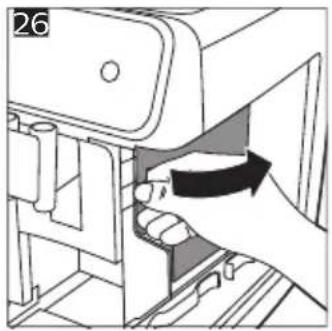
2 Remove the water tank and open the service door (Fig. 26).
3 Press the PUSH handle (Fig. 27) and pull at the grip of the brew group to remove it from the machine (Fig. 28).
Reinserting the brew group
Before you slide the brew group back into the machine, make sure it is in the correct position.
1 Check if the brew group is in the correct position. The arrow on the yellow cylinder on the side of the brew group has to be aligned with the black arrow and N (Fig. 29).
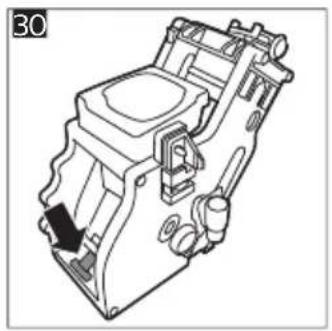
- If they are not aligned, push down the lever until it is in contact with the base of the brew group (Fig. 30).
2 Slide the brew group back into the machine along the guiding rails on the sides (Fig. 31) until it locks into position with a click (Fig. 32). Do not press the PUSH button.
3 Close the service door and place back the water tank.
Cleaning and maintenance
Regular cleaning and maintenance keeps your machine in top condition and ensures good-tasting coffee for a long time with a steady coffee flow.
Consult the table below for a detailed description on when and how to clean all detachable parts of the machine. You can find more detailed information and video instructions on www.home.id/support. See figure B for an overview of which parts can be cleaned in the dishwasher.
Detachable parts When to clean How to clean
| Brew group Weekly Remove the brew group from the machine (see 'Removing and inserting the brew group'). Rinse it under the tap (see 'Cleaning the brew group under the tap'). | ||
| Monthly Clean the brew group with the Philips coffee oil remover tablet (see 'Cleaning the brew group with the coffee oil remover tablets'). | ||
| Classic milk frother After every use First clean the milk frother while it is attached to the machine by using the 'Quick milk clean' program (see 'Quick cleaning the classic milk frother'). Then remove the milk frother from the machine and disassemble it. Clean all parts under the tap or in the dishwasher. Let the parts air dry before reassembling them. | ||
| Pre-ground coffee compartment | Check the pre-ground coffee compartment weekly to see if it is clogged. | Unplug the machine and remove the brew group. Open the lid of the pre-ground coffee compartment and insert the spoon handle into it. Move the handle up and down until the clogged ground coffee falls down (Fig. 33). Go to www.home.id/support for detailed video instructions. |
| Coffee grounds container | Empty the coffee grounds container when prompted by the machine. Clean it weekly. | Remove the coffee grounds container while the machine is switched on. Rinse it under the tap with some washing-up liquid or clean it in the dishwasher. The front panel of the coffee grounds container (Fig. A13) is not dishwasher-safe. |
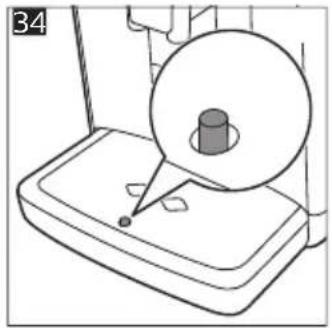
| Drip tray Empty the drip tray daily or as soon as the red 'drip tray full' indicator pops up through the drip tray (Fig. 34). Clean the drip tray weekly. | Remove the drip tray (Fig. 35) and rinse it under the tap with some washing-up liquid. You can also clean the drip tray in the dishwasher. The front panel of the coffee grounds container (Fig. A13) is not dishwasher-safe. | |
| LatteGo After every use First clean LatteGo while it is attached to the machine by using the 'Quick milk clean' program (see 'Quick cleaning LatteGo'). Or remove it from the machine and rinse it under the tap or clean it in the dishwasher. | ||
Detachable parts When to clean How to clean
| Lubrication of the brew group | Every 2 months Consult the lubrication table and lubricate the brew group with the Philips grease (see 'Lubricating the brew group'). |
| Water tank Weekly Rinse the water tank under the tap | |
| Machine front Weekly Clean with a non-abrasive cloth | |
Cleaning the brew group
Regular cleaning of the brew group prevents coffee residues from clogging up the internal circuits. Visit www.home.id/support for support videos on how to remove, insert and clean the brew group.
Cleaning the brew group under the tap
1 Remove the brew group (see 'Removing and inserting the brew group').
2 Rinse the brew group thoroughly with water. Carefully clean the upper filter (Fig. 36) of the brew group.
3 Let the brew group air-dry before you place it back. Do not dry the brew group with a cloth to prevent fibers from collecting inside the brew group.
Cleaning the brew group with the coffee oil remover tablets
Only use Philips coffee oil remover tablets.
1 Tap the Clean icon and use the up and down arrows to select 'Brew group clean'.
2 Tap the OK icon to confirm and then follow the instructions on the screen.
Lubricating the brew group
To improve your machine's performance, we suggest that you lubricate the brew group every 2 months, to ensure that the moving parts continue to move smoothly.
1 Apply a thin layer of grease on the piston (grey part) of the brew group (Fig. 37).
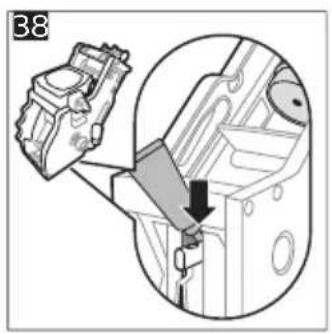
2 Apply a thin layer of grease around the shaft (yellow part) in the bottom of the brew group (Fig. 38).
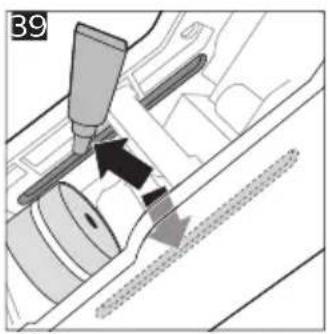
3 Apply a thin layer of grease to the guiding rails on both sides (Fig. 39).
Cleaning LatteGo (milk container) (specific types only)
Quick cleaning LatteGo
1 Make sure LatteGo is properly attached to the machine (Fig. 9).
2 Place a cup under the spout.
3 Tap the Clean 🔊 icon and use the up and down arrows to select the 'Quick milk clean' program.
4 Tap the OK icon to confirm and then follow the instructions on the screen to remove any milk that may be left inside the milk system.
- Small jets of hot water will be dispensed by the milk system.
5 Store LatteGo with the remaining milk in the fridge.
Thoroughly cleaning LatteGo
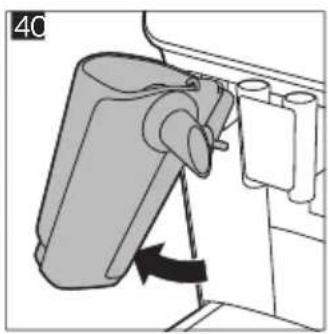
1 Remove LatteGo from the machine (Fig. 40).
2 Pour out any remaining milk.
3 Press the release button and remove the milk container from the frame of LatteGo (Fig. 41).
4 Clean all parts in the dishwasher or under the tap with lukewarm water and some washing-up liquid.
Cleaning the classic milk frother (specific types only)
Quick cleaning the classic milk frother
1 Make sure the classic milk frother is properly attached to the machine (Fig. 12).
2 Place a cup under the spout.
3 Tap the Clean 🔊 icon and use the up and down arrows to select the 'Quick milk clean' program.
4 Tap the OK icon to confirm and then follow the instructions on the screen to remove any milk that may be left inside the milk frother.
- Small jets of hot water will be dispensed by the milk system.
5 Clean the milk frother with a damp cloth.
Daily cleaning of the classic milk frother
1 Let the milk frother cool down completely.
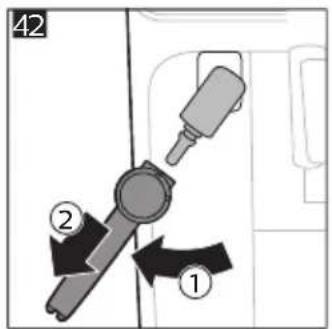
2 Tilt the milk frother to the left and remove the metal part and the silicone part (Fig. 42).
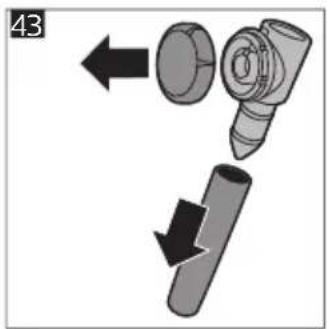
3 Disassemble the three parts (Fig. 43) and rinse them with fresh water or clean them in the dishwasher.
4 Let the three milk frother parts air dry, reassemble the parts and reattach the milk frother to the machine.
AquaClean water filter
Your machine is AquaClean enabled. You can place the AquaClean water filter in the water tank to preserve the taste of your coffee. It also diminishes the need for descaling by reducing limescale build-up in your machine. You can purchase an AquaClean water filter from your local retailer*, from authorized service centers or online at https://www.home-appliances.philips/parts-accessories.
i *Availability varies per country.
AquaClean filter status indication
When the AquaClean is active, the status of the AquaClean filter is always visible on the screen as a percentage.
- If the status of the AquaClean filter is 10% or less, the screen shows a message for 2 seconds each time you switch on the machine. This message advises you to buy a new filter.
- If the status of the filter is 0%, the machine asks you to replace the AquaClean filter every time you switch on the machine.
Activating the AquaClean water filter (5 min.)
i The machine does not automatically detect that a filter has been placed in the water tank. Therefore you need to activate each new AquaClean water filter that you install in the 'Clean' menu.
When the machine stops showing the filter activation message, you can still activate an AquaClean water filter, but you will need to descale the machine first.
i Your machine has to be completely limescale-free before you start using the AquaClean water filter.
Before activating the AquaClean water filter, it has to be prepared by soaking it in water as described below. If you don't do this, air might be drawn into the machine instead of water, which makes a lot of noise and prevents the machine from being able to brew coffee.
1 Tap the 'Clean' 🔊 icon and use the up and down arrows to select 'AquaClean'.
2 Tap the OK icon to confirm.
3 Tap the OK icon again when the activation screen appears. Follow the instructions on the screen.
4 Shake the filter for about 5 seconds (Fig. 44).
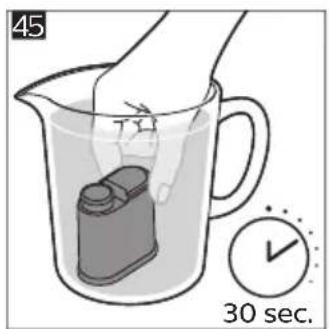
5 Immerse the filter upside down in a jug with cold water and shake/press it (Fig. 45).
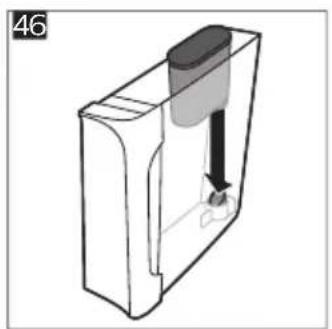
6 Insert the filter vertically onto the filter connection in the water tank. Press it down to the lowest possible point (Fig. 46).
7 Fill the water tank with fresh water and place it back into the machine.
8 If attached, remove the LatteGo (specific types only).
9 Place a bowl under the hot water spout/milk frother.
10 Press the start/stop button to start the activation process.
11 Hot water will be dispensed from the hot water spout/milk frother during 1 minute.
12 The filter is now successfully activated.
Replacing the AquaClean water filter (5 min.)
After 95 liters of water have flowed through the filter, the filter will cease to work. The AquaClean status indicator drops to 0% to remind you to replace the filter. As long as the AquaClean status indicator is shown on the display, you can replace the filter without having to descale the machine first. If you do not replace the AquaClean water filter in time, the AquaClean indicator goes out after some time. In that case you can still replace the filter but you first need to descale the machine.
When the AquaClean status indicator drops to 0% or when the machine reminds you to replace the AquaClean filter:
1 take out the old AquaClean water filter.
2 install a new filter and activate it as described in chapter 'Activating the AquaClean water filter (5 min).'
i Replace the AquaClean water filter at least every 3 months, even if the machine does not yet indicate that replacement is required.
Descaling procedure (30 min.)
To clean and descale the machine, we recommend to use the Philips maintenance products if available in your country. Under no circumstances should you use a descaler based on sulfuric acid, hydrochloric acid, sulfamic or acetic acid (vinegar) as this may damage the water circuit in your machine and not dissolve the limescale properly. Failure to descale the appliance will also void your warranty. You can buy Philips descaling solution in the online shop at https://www.home-appliances.philips/parts-accessories.
When the machine needs descaling, a message appears on the display.
1 Touch the clean icon on the user interface and select 'Descaling' in the menu.
2 Follow the instructions on the screen.
3 If attached, remove LatteGo or the milk frother.
4 Remove the drip tray and the coffee grounds container, empty them and put them back into place.
5 Remove the water tank and empty it. Then remove the AquaClean water filter.
6 Pour the whole bottle of Philips descaler in the water tank and then fill it with water up to the Calc / Clean indication (Fig. 47). Then place it back into the machine.
7 Place a large container (1.5 l) under the coffee dispensing spout and the water spout.
8 Press the start/stop button to start the descaling procedure. The descaling procedure lasts approximately 30 minutes and consists of a descaling cycle and a rinsing cycle.
9 Wait until the machine stops dispensing water. Refill the water tank when the message appears on the display. The descaling procedure is finished when the machine stops dispensing water.
10 Install and activate a new AquaClean water filter in the water tank.
- When the descaling procedure is finished, the machine reminds you to install the new AquaClean filter (see 'Replacing the AquaClean water filter (5 min.)').
Tip: Using the AquaClean filter reduces the need for descaling!
What to do if the descaling procedure is interrupted
You can exit the descaling procedure by pressing the on/off button on the control panel. If the descaling procedure is interrupted before it is completely finished, do the following:
1 Empty and rinse the water tank thoroughly.
2 Fill the water tank with fresh water up to the Calc / Clean level indication and switch the machine back on.
3 Before brewing any drinks, perform a manual rinsing cycle. To perform a manual rinsing cycle, first dispense half a water tank of hot water by repeatedly selecting the hot water function and then brew 2 cups of pre-ground coffee without adding ground coffee.
i If the descaling procedure was not completed, the machine will require another descaling procedure as soon as possible.
Ordering accessories
To clean and descale the machine, we advise you to use the Philips maintenance products such as descaling solution, AquaClean water filter and coffee oil remover tablets if available in your country. These products can be purchased from your local retailer, from the authorized service centers or online at
https://www.home-appliances.philips/parts-accessories. To find a full list of spare parts online, enter the model number of your machine. You can find the model number on the inside of the service door.
Brita-filters are not compatible with this machine.
Troubleshooting
This chapter summarizes the most common problems you could encounter with the machine. Support videos and a complete list of frequently asked questions are available on www.home.id/support. If you are unable to solve the problem, contact the Consumer Care Center in your country. For contact details, see the warranty leaflet.
Warning icons
| Warning icon | Solution |
 | The 'water tank empty' icon pops up on the display.- The water tank is almost empty. Fill the water tank with fresh water to the maximum level indication.- The water tank is not in place. Place back the water tank. |
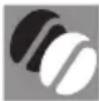 | The 'add beans' icons pops up on the display.- Fill the bean hopper with coffee beans. |
Warning icon
Solution

The 'empty coffee ground container' icon pops up on the display.
- The coffee grounds container is full. Remove and empty the coffee grounds container while the machine is switched on. Wait 5 seconds before you place it back.

The 'insert brew group' icon pops up on the display.
- The brew group is not in place or not placed correctly. Remove the brew group and make sure it is locked into place. See chapter 'Removing and inserting the brew group' for step-by-step instructions.
Error codes
Below you find a list of the error codes showing problems that you can solve yourself. Video instructions are available on www.home.id/support. If another error code appears, please contact the Philips Consumer Care Center in your country. For contact details, see the warranty leaflet.
Error code
Problem Possible solution
| 01 The coffee funnel is clogged. | Switch off the machine and unplug it. Remove the brew group. Then open the lid of the pre-ground coffee compartment and insert the spoon handle. Move the handle up and down until the clogged ground coffee falls down. Visit www.home.id/support for detailed video instructions. |
| 03 The brew group is dirty or not well-greased. | Switch off the machine. Rinse the brew group with fresh water, let it air-dry and then lubricate it. Consult chapter 'Cleaning the brew group' or visit www.home.id/support for detailed video instructions. Then switch the machine on again. |
| 04 The brew group is not positioned correctly. | Switch off the machine. Remove the brew group and reinsert it. Make sure that the brew group is in the correct position before you insert it. Consult chapter 'Handling the brew group or visit www.home.id/support for detailed video instructions. Then switch the machine on again. |
| 05 There is air in the water circuit. | Restart the machine by switching it off and on again. If this works, dispense 2-3 cups of hot water. Descale the machine if you have not done so for a longer period of time. |
| 05 The AquaClean filter was not prepared properly before installation or it is clogged. | Remove the AquaClean filter and try again to brew a coffee. If this works, make sure that the AquaClean filter is prepared properly before you place it back. Put the AquaClean filter back into the water tank. If this still does not work, the filter might be clogged and needs to be replaced. |
| 11 Machine needs to adjust to room temperature | Allow some time for the machine to adjust from transport/outdoor temperature to room temperature. Switch off the machine for 30 minutes and switch it on again. If this does not work, contact the Consumer Care Center in your country. For contact details, see the warranty leaflet. |
Error code Problem Possible solution
| 14 The machine is overheated. | Switch the machine off and switch it back on again after 30 minutes. |
| 19 The machine is not connected to the wall socket properly. | Make sure that the small plug of the power cord is properly connected to the socket on the back of the machine. |
Troubleshooting table
This chapter summarizes the most common problems you could encounter with the machine. Support videos and a complete list of frequently asked questions are available on www.home.id/support. If you are unable to solve the problem, contact the Consumer Care Center in your country. For contact details, see the warranty leaflet.
Problem Cause Solution
| There are some coffee residues inside my new coffee machine. | This machine has been tested with coffee. | Although it has been carefully cleaned, there may be some coffee residues left. However, the machine is absolutely new. |
| The drip tray fills up quickly / there is always some water in the drip tray. | This is normal. The machine uses water to rinse the internal circuit and brew group. Some water flows through the internal system directly into the drip tray. | Empty the drip tray daily or as soon as the red 'drip tray full' indicator pops up through the drip tray cover. Tip: place a cup under the dispensing spout to collect rinsing water that comes out of it. |
| The 'empty coffee grounds container' icon remains on. | You emptied the coffee grounds container while the machine was switched off, or placed it back too fast. | Always empty the coffee grounds container while the machine is switched on. Remove the coffee grounds container, wait at least 5 sec. and then insert it again. |
| The machine prompts to empty the coffee grounds container even though the container is not full. | The machine did not reset the counter the last time you emptied the coffee grounds container. | Always wait approx. 5 seconds when you place back the coffee grounds container. In this way the coffee grounds counter will be reset to zero and the number of coffee pucks is counted correctly. |
| Always empty the coffee grounds container while the machine is switched on. If you empty the coffee grounds container when the machine is switched off, the coffee grounds counter won't reset. | ||
| The coffee grounds container is too full and the 'empty coffee grounds container' icon did not appear on the display. | You removed the drip tray without emptying the grounds container. | When you remove the drip tray, also empty the coffee grounds container even if it contains only a few coffee pucks. This ensures that the coffee pucks counter is reset to zero and that the number of coffee pucks is counted correctly. |
Problem Cause Solution
| I cannot remove the brew group. | The brew group is not in the correct position. | Reset the machine in the following way: close the service door and place back the water tank. Switch the machine off and back on again and wait for the lights in the drinks icons to come on. Try again to remove the brew group. See chapter 'Removing and inserting the brew group' for step by step instructions. |
| I cannot insert the brew group. | The brew group is not in the correct position. | Reset the machine in the following way: close the service door and place back the water tank. Leave the brew group out. Switch the machine off and unplug it. Wait for 30 sec. and then plug the machine back in and switch it on and wait for the lights in the drinks icons to come on. Then put the brew group in the correct position and reinsert it into the machine. See chapter 'Removing and inserting the brew group' for step by step instructions. |
| The coffee is watery. The brew group is dirty or needs to be lubricated. | Remove the brew group (see 'Removing the brew group from the machine'), rinse it under the tap and leave it to dry. Then lubricate the moving parts (see 'Lubricating the brew group'). | |
| The machine is performing its self-adjustment procedure. This procedure is started automatically when you use the machine for the first time, when you change to another type of coffee beans or after a long period of non-use. | Brew 5 cups of coffee initially to allow the machine to complete its self-adjustment procedure. | |
| The grinder is set to a too coarse setting. | Set the grinder to a finer (lower) setting. Brew 2 to 3 drinks to be able to before taste the full difference. | |
| The coffee is not hot enough. | The temperature is set too low. Set the temperature to the maximum setting. To adjust the temperature, press the 'Settings' icon. | |
| A cold cup reduces the temperature of the drink. | Preheat the cups by rinsing them with hot water. | |
| Adding milk reduces the temperature of the drink. | Regardless of whether you add hot or cold milk, adding milk always reduces the temperature of the coffee. Preheat the cups by rinsing them with hot water. | |
Problem Cause Solution
| Coffee does not come out or coffee comes out slowly. | The AquaClean water filter was not prepared properly for installation. | Remove the AquaClean filter and dispense some hot water. If this works, the AquaClean filter was not installed properly. Reinstall and activate the AquaClean filter and follow all steps in chapter 'AquaClean water filter'. |
| After a long period of non-use, you need to prepare the AquaClean water filter for use again and dispense 2-3 cups of hot water. | ||
| The AquaClean water filter is clogged. | Replace the AquaClean water filter every 3 months. A filter that is older than 3 months can become clogged. | |
| The grinder is set to a too fine setting. | Set the grinder to a coarser (higher) setting. Note that this will impact the coffee taste. | |
| The brew group is dirty. Remove the brew group and rinse it under the tap (see 'Cleaning the brew group under the tap'). | ||
| The coffee dispensing spout is dirty. | Clean the coffee dispensing spout and its holes with a pipe cleaner or needle. | |
| The pre-ground coffee compartment is clogged | Switch off the machine and remove the brew group. Open the lid of the pre-ground coffee compartment and insert the spoon handle into it. Move the handle up and down until the clogged ground coffee falls down (Fig. 33). | |
| The machine circuit is blocked by limescale. | Descale the machine. Always descale when the machine prompts you. | |
| The milk does not froth. Machines with LatteGo: LatteGo is assembled incorrectly. | Make sure that the milk container is properly assembled to the frame of LatteGo ('click'). | |
| Machines with LatteGo: the milk container and/or frame of LatteGo are dirty. | Disassemble LatteGo and rinse both parts under the tap or clean them in the dishwasher. | |
| Machines with classic milk frother: the milk frother is assembled incorrectly. | Make sure that the classic milk frother is proplerly assembled (see 'Assembling the classic milk frother (specific types only)'). | |
| The type of milk used is not suitable for frothing. | Different types of milk result in different amounts of froth and different froth qualities. We have tested the following milk types which proved to deliver a good milk froth result: semi-skimmed or full-fat cow's milk and lactose-free milk. | |
Problem Cause Solution
| Milk is leaking from the bottom of the LatteGo milk container. | The frame and the milk container are not assembled properly. | First insert the top of the milk container under the hook at the top of the frame. Then press home the bottom part of the milk container. You hear a click when it locks into place. |
| The milk container and/or frame of LatteGo are dirty. | Disassemble LatteGo and rinse both parts under the tap or clean them in the dishwasher. | |
| The machine seems to be leaking. | The machine uses water to rinse the internal circuit and brew group. This water flows through the internal system directly into the drip tray. This is normal. | Empty the drip tray every day or as soon as the 'drip tray full' indicator pops up through the drip tray cover. Tip: Place a cup under the dispensing spout to collect rinsing water and reduce the amount of water in the drip tray. |
| The drip tray is too full and has overflowed which makes it look like the machine is leaking. | Empty the drip tray every day or as soon as the 'drip tray full' indicator pops up through the drip tray cover. | |
| The water tank is not fully inserted, some water is leaking out of the water tank and air is drawn into the machine. | Make sure the water tank is in the correct position: remove it and insert it again pushing it as far as possible. | |
| The brew group is dirty/clogged. Rinse the brew group. | ||
| The machine is not placed on a horizontal surface. | Place the machine on a horizontal surface so that the drip tray does not overflow and the 'drip tray full' indicator works properly. | |
| I cannot activate the AquaClean water filter and the machine asks for descaling. | The filter has not been installed or replaced in time after the screen shows the AquaClean reminder. This means your machine is not anymore completely limescale free. | Descale your machine first and then install the AquaClean water filter. |
| The new water filter does not fit. | You are trying to install another filter than the Philips AquaClean water filter. | Only the Philips AquaClean water filter fits into the machine. |
| The rubber ring on the AquaClean water filter is not in place. | Place back the rubber ring on the AquaClean water filter. | |
| The machine is making a loud noise. | It is normal that your machine makes some noise during use. | If the machine starts to make a different kind of noise, clean the brew group and lubricate it (see 'Lubricating the brew group'). |
Problem Cause Solution
| The AquaClean water filter was not prepared properly and air is now drawn into the machine. | Remove the AquaClean water filter from the water tank and properly prepare it for use before you place it back. See chapter 'AquaClean water filter' for step-by-step instructions. | |
| The water tank is not fully inserted and air is drawn into the machine. | Make sure the water tank is in the correct position: remove it and insert it again pushing it as far as possible. |
Technical specifications
The manufacturer reserves the right to improve the technical specifications of the product. All the preset quantities are approximate.
Description Value
| Size (w x h x d) 246 x 377 x 434 mm |
| Weight 7 - 7.5 kg |
| Power cord length 800-1200 mm |
| Water tank 1.8 litres |
| Coffee bean hopper capacity 275 g |
| Coffee grounds container capacity 12 pucks |
| LatteGo (milk container) capacity 250 ml |
| Adjustable spout height 88-145 mm |
| Nominal voltage - Power rating - Power supply See data label on inside of service door (Fig. A9) |
Obsah
natural_image
Illustration of a hand pressing a button on a device (no text or symbols visible)▶
▶
natural_image
Diagram of a mechanical component with a dashed arrow indicating direction (no text or symbols)▶
natural_image
Simple line drawing of a device with a checkmark (no text or symbols)flowchart
graph TD
    A["Top Door Valve"] --> B["Inserted Valve"]
    B --> C["Downside Valve"]
    C --> D["Downside Valve with Step ①"]
    D --> E["Downside Valve with Step ②"]
Brygning af drikke
Generelle trin
flowchart
graph LR
    A["AquaClean"] --> B["Pre-screening: pre-screening filters prevent timescale build-up so you can descale less frequently."]
    B --> C["Press OK to install, press left to skip"]
    C --> D["5 sec"]
    D --> E["Hearts with 30 sec cleaning device"]
    E --> F["30 sec packaging with 1 minute mark"]
    F --> G["Final packaging with checkmark icon"]
natural_image
Illustration of a hand pressing a button on a device (no text or symbols visible)▶
▶
natural_image
Diagram of a mechanical component with a dashed arrow indicating direction (no text or symbols)▶
natural_image
Simple line drawing of a device with a checkmark (no text or symbols)flowchart
graph TD
    A["Valve with lever"] --> B["Adjustment to valve"]
    B --> C["Step ①: Adjustment to valve"]
    C --> D["Step ②: Adjustment to valve"]
https://www.home-appliances.philips/parts-accessories.
flowchart
graph LR
    A["AquaClean"] --> B["Pre-screening: pre-screening filters prevent timescale build-up so you can descale less frequently."]
    B --> C["Press OK to install, press left to skip"]
    C --> D["5 sec"]
    D --> E["Hearts with hand holding device, 30 sec mark"]
    E --> F["Check for cleaning"]
    F --> G["1 min in washing machine, check inside container"]
    G --> H["Final inspection: 30 sec clean"]
Montaje del LatteGo
flowchart
graph TD
    A["Top view: Inserted valve with handle"] --> B["Step 1: Inserted valve with handle, labeled Step ①"]
    B --> C["Step 2: Disassembly with handle, labeled Step ②"]
    C --> D["Step 3: Disassembly with handle, labeled Step ③"]
flowchart
graph TD
    A["Valve with lever"] --> B["Switch with valve"]
    B --> C["Valve with valve disassembly"]
    C --> D["Valve with valve shift"]
    D --> E["Valve with valve disassembly"]
flowchart
graph TD
    A["Start"] --> B["Step 1: Rotation of tool"]
    B --> C["Step 2: Rotation of tool"]
    C --> D["Step 3: Rotation of tool"]
Kuhanje napitaka
Opći koraci
flowchart
graph TD
    A["Start"] --> B["Close-up valve"]
    B --> C["Adjustment to valve"]
    C --> D["Close-up valve with adjustment arrow"]
    D --> E["End"]
https://www.home-appliances.philips/parts-accessories.
flowchart
graph TD
    A["Step ①: Top part of component"] --> B["Step ②: Lower part of component"]
    B --> C["Step ③: Downward motion of part"]
Dzérienu gatavošana
Vispārīgās darbības
natural_image
Illustration of a hand holding a small electronic device with a black arrow indicating force or movement (no text or symbols present)▶
▶
natural_image
Diagram of a mechanical component with a dashed arrow indicating direction (no text or symbols)▶
natural_image
Simple line drawing of a mechanical device with a checkmark symbol (no text or labels)flowchart
graph TD
    A["Valve with lever"] --> B["Switch with directional arrows"]
    B --> C["Valve with valve disassembly"]
    C --> D["Valve with valve rotation"]
    D --> E["Valve with valve disassembly"]
Italok főzése
Általános lépések
natural_image
Illustration of a hand pressing a small electronic component with a black arrow indicating force (no text or symbols)▶
▶
natural_image
Diagram of a mechanical component with a dashed arrow indicating direction (no text or symbols)▶
natural_image
Simple line drawing of a device with a checkmark overlay (no text or symbols)Montere den klassiske melkeskummeren (bare spesifikke typer)
flowchart
graph TD
    A["Step 1: Valve with lever and handle"] --> B["Step 2: Valve with handle, labeled Step ②"]
    B --> C["Step 3: Valve with handle, labeled Step ①"]
Brygge drikker
Generelle trinn
AquaClean-vannfilter
https://www.home-appliances.philips/parts-accessories.
Personalizar as bebidas 312
flowchart
graph LR
    A["AquaClean"] --> B["Pre-screening: pre-screening filters prevent timescale build-up so you can descale less frequently."]
    B --> C["Press OK to install, press left to skip"]
    C --> D["5 sec"]
    D --> E["Hearts with hand holding device, 30 sec mark"]
    E --> F["Check for cleaning"]
    F --> G["1 min, check inside container"]
    G --> H["Final inspection icon"]
Montar o LatteGo
flowchart
graph TD
    A["Valve with lever"] --> B["Valve with lock"]
    B --> C["Valve with valve position"]
    C --> D["Valve with valve position and rotation"]
Preparar bebidas
Passos gerais
Personalizar as bebidas
Encomendar acessórios
flowchart
graph TD
    A["Valve with lever"] --> B["Switch with valve"]
    B --> C["Valve with valve disassembly"]
    C --> D["Valve with valve shift"]
    D --> E["Valve with valve disassembly"]
Përgatitja e pijeve
https://www.home-appliances.philips/parts-accessories.
Samo EP5447, EP5446, EP5444, EP5443, EP5441, EP5144 (slika E)
E1 Ikone za pripravo napitka z enim dotikom: Espresso (ekspresna kava), Coffee (kava), Americano (ekspresna kava z dodano vročo vodo), Cappuccino (kapučino), Latte Macchiato (mleko s kavo), Café au lait (kava z mlekom)
Uvod
Vodni filter AquaClean
Len modely EP4349, EP4346, EP4343, EP4341 (obr. D)
D1 – Ikony na výber nápoja jedným dotykom: Espresso, Káva, Americano, Cappuccino, Latte Macchiato, Café au lait
Len modely EP5447, EP5446, EP5444, EP5443, EP5441, EP5144 (obr. E)
E1 – Ikony na výber nápoja jedným dotykom: Espresso, Káva, Americano, Cappuccino, Latte Macchiato, Café au lait
Úvod
flowchart
graph TD
    A["Component 1"] --> B["Assembly Step ①"]
    B --> C["Assembly Step ②"]
    C --> D["Assembly Step ③"]
Príprava nápojov
Všeobecný postup
natural_image
Illustration of a hand pressing a small object on a surface, with no visible text or symbols▶
▶
natural_image
Mechanical component diagram showing a lever mechanism with a dashed arrow indicating motion (no text or symbols)▶
natural_image
Simple line drawing of a device with a checkmark (no text or symbols)Montera den klassiska mjölkskummaren (endast vissa modeller)
flowchart
graph TD
    A["Start"] --> B["Inserted parts"]
    B --> C["Retraction steps"]
    C --> D["Close-up of door handle with arrows indicating motion"]
Brygga drycker
Allmänna steg
7 Su haznesini temiz suyla doldurup makineye geri takın. (Fill the water tank with fresh water up to the indication and place it back)
flowchart
graph LR
    A["AquaClean"] --> B["AquaClean filters prevent limescale build-up so you can descale less frequently."]
    B --> C["Press OK to install press ← to skip"]
    C --> D["5 sec"]
    D --> E["30 sec"]
    E --> F["1 min"]
    F --> G["OK"]
Assembling LatteGo
flowchart
graph LR
    A["AquaClean"] --> B["Pre-screening: pre-screening filters prevent timescale build-up so you can descale less frequently."]
    B --> C["Press OK to install, press left to skip"]
    C --> D["5 sec"]
    D --> E["Hearts with 30 sec cleaning device"]
    E --> F["1 min in washing machine"]
    F --> G["Final packaging check"]
flowchart
graph TD
    A["Start"] --> B["Close-up valve with directional arrow"]
    B --> C["Step ①: Insert valve, Step ②: Pull-in valve"]
    C --> D["Step ②: Insert valve, Step ②: Pull-in valve"]
natural_image
Symbolic illustration of a person recycling a large recycling triangle with a trash bin (no text or symbols)| הכלה A11הכלה A2 | |
| הכלה A12הכלה A3 | |
| הכלה A13הכלה A4 | |
| הכלה A14הכלה A5 | |
| הכלה A15הכלה A6 | |
| הכלה A16 | הכלה A7 |
| הכלה A17 | הכלה A8 |
| הכלה A9 | |
| (הכלה A21) (הכלה A22) (הכלה A23) (הכלה A24) (הכלה A25) (הכלה A26) (הכלה A27) (הכלה A28) (הכלה A29) (הכלה A30) (הכלה A31) (הכלה A32) (הכלה A33) (הכלה A34) (הכלה A35) (הכלה A36) (הכלה A37) (הכלה A38) (הכלה A39) (הכלה A40) (הכלה A41) (הכלה A42) (הכלה A43) (הכלה A44) (הכלה A45) (הכלה A46) (הכלה A47) (הכלה A48) (הכלה A49) (הכלה A50) (הכלה A51) (הכלה A52) (הכלה A53) (הכלה A54) (הכלה A55) (הכלה A56) (הכלה A57) (הכלה A58) (הכלה A59) (הכלה A60) (הכלה A61) (הכלה A62) (הכלה A63) (הכלה A64) (הכchia) (AquaClean) (AquaClean) (AquaClean) (AquaClean) (AquaClean) (AquaClean) (AquaClean) (AquaClean) (AquaClean) (AquaClean) (AquaClean) (AquaClean) (AquaClean) (AquaClean) (AquaClean) (AquaClean) (AquaClean) (AquaClean) (AquaClean) (AquaClean) (Aqua Clean) (AquaClean) (AquaClean) (AquaClean) (AquaClean) (AquaClean) (AquaClean) (AquaClean) (AquaClean) (AquaClean) (AquaClean) (AquaClean) (AquaClean) (AquaClean) (AquaClean) (AquaClean) (AquaClean) (AquaClean) (AquaClean) (AquaClean) (Aqua clean) (Aqua clean) (Aqua clean) (Aqua clean) (Aqua clean) (Aqua clean) (Aqua clean) (Aqua clean) (Aqua clean) (Aqua clean) (Aqua clean) (Aqua clean) (Aqua clean) (Aqua clean) (Aqua clean) (Aqua clean) (Aqua clean) (Aqua clean) (Aqua clean) (Aqua clean) (Aqua Clean) (Aqua Clean) (Aqua Clean) (Aqua Clean) (Aqua Clean) (Aqua Clean) (Aqua Clean) (Aqua Clean) (Aqua Clean) (Aqua Clean) (Aqua Clean) (Aqua Clean) (Aqua Clean) (Aqua Clean) (Aqua Clean) (Aqua Clean) (Aqua Clean) (Aqua Clean) (Aqua Clean) (Aqua Clean) (Aqua clean) (Aqua clean) (Aqua clean) (Aqua clean) (Aqua clean) (Aqua clean) (Aqua clean) (Aqua clean) (Aqua clean) (Aqua clean) (Aqua clean) (Aqua clean) (Aqua clean) (Aqua clean) (Aqua clean) (Aqua clean) (Aqua clean) (Aqua clean) (Aqua clean) (Aquaclean) (Aqua clean) (Aqua clean) (Aqua clean) (Aqua clean) (Aqua clean) (Aqua clean) (Aqua clean) (Aqua clean) (Aqua clean) (Aqua clean) (Aqua clean) (Aqua clean) (Aqua clean) (Aqua clean) (Aqua clean) (Aqua clean) (Aqua clean) (Aqua clean) (Aqua clean) (Aqualean) (Aqua clean) (Aqua clean) (Aqua clean) (Aqua clean) (Aqua clean) (Aqua clean) (Aqua clean) (Aqua clean) (Aqua clean) (Aqua clean) (Aqua clean) (Aqua clean) (Aqua clean) (Aqua clean) (Aqua clean) (Aqua clean) (Aqua clean) (Aqua clean) (Aqua clean) (Aqua clear) (Aqua clean) (Aqua clean) (Aqua clean) (Aqua clean) (Aqua clean) (Aqua clean) (Aqua clean) (Aqua clean) (Aqua clean) (Aqua clean) (Aqua clean) (Aqua clean) (Aqua clean) (Aqua clean) (Aqua clean) (Aqua clean) (Aqua clean) (Aqua clean) (Aqua clean) (Aqua open) (Aqua clean) (Aqua clean) (Aqua clean) (Aqua clean) (Aqua clean) (Aqua clean) (Aqua clean) (Aqua clean) (Aqua clean) (Aqua clean) (Aqua clean) (Aqua clean) (Aqua clean) (Aqua clean) (Aqua clean) (Aqua clean) (Aqua clean) (Aqua clean) (Aqua clean) (Aqua secure) (Aqua clean) (Aqua clean) (Aqua clean) (Aqua clean) (Aqua clean) (Aqua clean) (Aqua clean) (Aqua clean) (Aqua clean) (Aqua clean) (Aqua clean) (Aqua clean) (Aqua clean) (Aqua clean) (Aqua clean) (Aqua clean) (Aqua clean) (Aqua clean) (Aqua clean) (Aqua close) (Aqua clean) (Aqua clean) (Aqua clean) (Aqua clean) (Aqua clean) (Aqua clean) (Aqua clean) (Aqua clean) (Aqua clean) (Aqua clean) (Aqua clean) (Aqua clean) (Aqua clean) (Aqua clean) (Aqua clean) (Aqua clean) (Aqua clean) (Aqua clean) (Aqua clean) (Aqua loose) (Aqua clean) (Aqua clean) (Aqua clean) (Aqua clean) (Aqua clean) (Aqua clean) (Aqua clean) (Aqua clean) (Aqua clean) (Aqua clean) (Aqua clean) (Aqua clean) (Aqua clean) (Aqua clean) (Aqua clean) (Aqua clean) (Aqua clean) (Aqua clean) (Aqua clean) (Aqua simple) (Aqua clean) (Aqua clean) (Aqua clean) (Aqua clean) (Aqua clean) (Aqua clean) (Aqua clean) (Aqua clean) (Aqua clean) (Aqua clean) (Aqua clean) (Aqua clean) (Aqua clean) (Aqua clean) (Aqua clean) (Aqua clean) (Aqua clean) (Aqua clean) (Aqua clean) (Aqua solid) (Aqua clean) (Aqua clean) (Aqua clean) (Aqua clean) (Aqua clean) (Aqua clean) (Aqua clean) (Aqua clean) (Aqua clean) (Aqua clean) (Aqua clean) (Aqua clean) (Aqua clean) (Aqua clean) (Aqua clean) (Aqua clean) (Aqua clean) (Aqua clean) (Aqua clean) (Aqua pure) (Aqua clean) (Aqua clean) (Aqua clean) (Aqua clean) (Aqua clean) (Aqua clean) (Aqua clean) (Aqua clean) (Aqua clean) (Aqua clean) (Aqua clean) (Aqua clean) (Aqua clean) (Aqua clean) (Aqua clean) (Aqua clean) (Aqua clean) (Aqua clean) (Aqua clean) (Aqua free) (Aqua clean) (Aqua clean) (Aqua clean) (Aqua clean) (Aqua clean) (Aqua clean) (Aqua clean) (Aqua clean) (Aqua clean) (Aqua clean) (Aqua clean) (Aqua clean) (Aqua clean) (Aqua clean) (Aqua clean) (Aqua clean) (Aqua clean) (Aqua clean) (Aqua clean) (Aqua green) (Aqua green) (Aqua green) (Aqua green) (Aqua green) (Aqua green) (Aqua green) (Aqua green) (Aqua green) (Aqua green) (Aqua green) (Aqua green) (Aqua green) (Aqua green) (Aqua green) (Aqua green) (Aqua green) (Aqua green) (Aqua green) (Aqua green) (Aqua clean) (Aqua clean) (Aqua clean) (Aqua clean) (Aqua clean) (Aqua clean) (Aqua clean) (Aqua clean) (Aqua clean) (Aqua clean) (Aqua clean) (Aqua clean) (Aqua clean) (Aqua clean) (Aqua clean) (Aqua clean) (Aqua clean) (Aqua clean) (Aqua clean) (Aqua light) (Aqua clean) (Aqua clean) (Aqua clean) (Aqua clean) (Aqua clean) (Aqua clean) (Aqua clean) (Aqua clean) (Aqua clean) (Aqua clean) (Aqua clean) (Aqua clean) (Aqua clean) (Aqua clean) (Aqua clean) (Aqua clean) (Aqua clean) (Aqua clean) (Aqua clean) (Aqua thin) (Aqua clean) (Aqua clean) (Aqua clean) (Aqua clean) (Aqua clean) (Aqua clean) (Aqua clean) (Aqua clean) (Aqua clean) (Aqua clean) (Aqua clean) (Aqua clean) (Aqua clean) (Aqua clean) (Aqua clean) (Aqua clean) (Aqua clean) (Aqua clean) (Aqua clean) (Aqua deep) (Aqua clean) (Aqua clean) (Aqua clean) (Aqua clean) (Aqua clean) (Aqua clean) (Aqua clean) (Aqua clean) (Aqua clean) (Aqua clean) (Aqua clean) (Aqua clean) (Aqua clean) (Aqua clean) (Aqua clean) (Aqua clean) (Aqua clean) (Aqua clean) (Aqua clean) (Aqua dark) (Aqua clean) (Aqua clean) (Aqua clean) (Aqua clean) (Aqua clean) (Aqua clean) (Aqua clean) (Aqua clean) (Aqua clean) (Aqua clean) (Aqua clean) (Aqua clean) (Aqua clean) (Aqua clean) (Aqua clean) (Aqua clean) (Aqua clean) (Aqua clean) (Aqua clean) (Aqua fast) (Aqua clean) (Aqua clean) (Aqua clean) (Aqua clean) (Aqua clean) (Aqua clean) (Aqua clean) (Aqua clean) (Aqua clean) (Aqua clean) (Aqua clean) (Aqua clean) (Aqua clean) (Aqua clean) (Aqua clean) (Aqua clean) (Aqua clean) (Aqua clean) (Aqua clean) (Aqua quick) (Aqua quick) (Aqua quick) (Aqua quick) (Aqua quick) (Aqua quick) (Aqua quick) (Aqua quick) (Aqua quick) (Aqua quick) (Aqua quick) (Aqua quick) (Aqua quick) (Aqua quick) (Aqua quick) (Aqua quick) (Aqua quick) (Aqua quick) (Aqua quick) (Aqua quick) (Aqua fast) (Aqua quick) (Aqua quick) (Aqua quick) (Aqua quick) (Aqua quick) (Aqua quick) (Aqua quick) (Aqua quick) (Aqua quick) (Aqua quick) (Aqua quick) (Aqua quick) (Aqua quick) (Aqua quick) (Aqua quick) (Aqua quick) (Aqua quick) (Aqua quick) (Aqua quick) (Aqua clean) (Aqua clean) (Aqua clean) (Aqua clean) (Aqua clean) (Aqua clean) (Aqua clean) (Aqua clean) (Aqua clean) (Aqua clean) (Aqua clean) (Aqua clean) (Aqua clean) (Aqua clean) (Aqua clean) (Aqua clean) (Aqua clean) (Aqua clean) (Aqua clean) (Aqua good) (Aqua good) (Aqua good) (Aqua good) (Aqua good) (Aqua good) (Aqua good) (Aqua good) (Aqua good) (Aqua good) (Aqua good) (Aqua good) (Aqua good) (Aqua good) (Aqua good) (Aqua good) (Aqua good) (Aqua good) (Aqua good) (Aqua good) (Aqua great) (Aqua great) (Aqua great) (Aqua great) (Aqua great) (Aqua great) (Aqua great) (Aqua great) (Aqua great) (Aqua great) (Aqua great) (Aqua great) (Aqua great) (Aqua great) (Aqua great) (Aqua great) (Aqua great) (Aqua great) (Aqua great) (Aqua great) (Aqua strong) (Aqua strong) (Aqua strong) (Aqua strong) (Aqua strong) (Aqua strong) (Aqua strong) (Aqua strong) (Aqua strong) (Aqua strong) (Aqua strong) (Aqua strong) (Aqua strong) (Aqua strong) (Aqua strong) (Aqua strong) (Aqua strong) (Aqua strong) (Aqua strong) (Aqua strong) (Aqua strongly) (Aqua strong) (Aqua strong) (Aqua strong) (Aqua strong) (Aqua strong) (Aqua strong) (Aqua strong) (Aqua strong) (Aqua strong) (Aqua strong) (Aqua strong) (Aqua strong) (Aqua strong) (Aqua strong) (Aqua strong) (Aqua strong) (Aqua strong) (Aqua strong) (Aqua strong) (Aqua weak) (Aqua strong) (Aqua strong) (Aqua strong) (Aqua strong) (Aqua strong) (Aqua strong) (Aqua strong) (Aqua strong) (Aqua strong) (Aqua strong) (Aqua strong) (Aqua strong) (Aqua strong) (Aqua strong) (Aqua strong) (Aqua strong) (Aqua strong) (Aqua strong) (Aqua strong) (Aqua very strong) (Aqua strong) (Aqua strong) (Aqua strong) (Aqua strong) (Aqua strong) (Aqua strong) (Aqua strong) (Aqua strong) (Aqua strong) (Aqua strong) (Aqua strong) (Aqua strong) (Aqua strong) (Aqua strong) (Aqua strong) (Aqua strong) (Aqua strong) (Aqua strong) (Aqua strong) (A Aqua clean) (A Aqua clean) (A Aqua clean) (A Aqua clean) (A Aqua clean) (A Aqua clean) (A Aqua clean) (A Aqua clean) (A Aqua clean) (A Aqua clean) (A Aqua clean) (A Aqua clean) (A Aqua clean) (A Aqua clean) (A Aqua clean) (A Aqua clean) (A Aqua clean) (A Aqua clean) (A Aqua clean) (A Aqua clean) (A Aqua clear) (A Aqua clear) (A Aqua clear) (A Aqua clear) (A Aqua clear) (A Aqua clear) (A Aqua clear) (A Aqua clear) (A Aqua clear) (A Aqua clear) (A Aqua clear) (A Aqua clear) (A Aqua clear) (A Aqua clear) (A Aqua clear) (A Aqua clear) (A Aqua clear) (A Aqua clear) (A Aqua clear) (A Aqua clear) (A Aqua clean) (A Aqua clean) (A Aqua clean) (A Aqua clean) (A Aqua clean) (A Aqua clean) (A Aqua clean) (A Aqua clean) (A Aqua clean) (A Aqua clean) (A Aqua clean) (A Aqua clean) (A Aqua clean) (A Aqua clean) (A Aqua clean) (A Aqua clean) (A Aqua clean) (A Aqua clean) (A Aqua clean) (A Aqua good) (A Aqua good) (A Aqua good) (A Aqua good) (A Aqua good) (A Aqua good) (A Aqua good) (A Aqua good) (A Aqua good) (A Aqua good) (A Aqua good) (A Aqua good) (A Aqua good) (A Aqua good) (A Aqua good) (A Aqua good) (A Aqua good) (A Aqua good) (A Aqua good) (A Aqua good) (A Aqua bad) (A Aqua bad) (A Aqua bad) (A Aqua bad) (A Aqua bad) (A Aqua bad) (A Aqua bad) (A Aqua bad) (A Aqua bad) (A Aqua bad) (A Aqua bad) (A Aqua bad) (A Aqua bad) (A Aqua bad) (A Aqua bad) (A Aqua bad) (A Aqua bad) (A Aqua bad) (A Aqua bad) (A Aqua bad) (A Aqua good) (A Aqua good) (A Aqua good) (A Aqua good) (A Aqua good) (A Aqua good) (A Aqua good) (A Aqua good) (A Aqua good) (A Aqua good) (A Aqua good) (A Aqua good) (A Aqua good) (A Aqua good) (A Aqua good) (A Aqua good) (A Aqua good) (A Aqua good) (A Aqua good) (A Aqua poor) (A Aqua good) (A Aqua good) (A Aqua good) (A Aqua good) (A Aqua good) (A Aqua good) (A Aqua good) (A Aqua good) (A Aqua good) (A Aqua good) (A Aqua good) (A Aqua good) (A Aqua good) (A Aqua good) (A Aqua good) (A Aqua good) (A Aqua good) (A Aqua good) (A Aqua good) (A Aqua too) (A Aqua good) (A Aqua good) (A Aqua good) (A Aqua good) (A Aqua good) (A Aqua good) (A Aqua good) (A Aqua good) (A Aqua good) (A Aqua good) (A Aqua good) (A Aqua good) (A Aqua good) (A Aqua good) (A Aqua good) (A Aqua good) (A Aqua good) (A Aqua good) (A Aqua good) (A Aqua no) (A Aqua good) (A Aqua good) (A Aqua good) (A Aqua good) (A Aqua good) (A Aqua good) (A Aqua good) (A Aqua good) (A Aqua good) (A Aqua good) (A Aqua good) (A Aqua good) (A Aqua good) (A Aqua good) (A Aqua good) (A Aqua good) (A Aqua good) (A Aqua good) (A Aqua good) (A Aqua perfect) (A Aqua perfect) (A Aqua perfect) (A Aqua perfect) (A Aqua perfect) (A Aqua perfect) (A Aqua perfect) (A Aqua perfect) (A Aqua perfect) (A Aqua perfect) (A Aqua perfect) (A Aqua perfect) (A Aqua perfect) (A Aqua perfect) (A Aqua perfect) (A Aqua perfect) (A Aqua perfect) (A Aqua perfect) (A Aqua perfect) (A Aqua perfect) (A Aqua perfectly) (A Aqua perfectly) (A Aqua perfectly) (A Aqua perfectly) (A Aqua perfectly) (A Aqua perfectly) (A Aqua perfectly) (A Aqua perfectly) (A Aqua perfectly) (A Aqua perfectly) (A Aqua perfectly) (A Aqua perfectly) (A Aqua perfectly) (A Aqua perfectly) (A Aqua perfectly) (A Aqua perfectly) (A Aqua perfectly) (A Aqua perfectly) (A Aqua perfectly) (A Aqua perfectly) (A Aqua strongly) (A Aqua strongly) (A Aqua strongly) (A Aqua strongly) (A Aqua strongly) (A Aqua strongly) (A Aqua strongly) (A Aqua strongly) (A Aqua strongly) (A Aqua strongly) (A Aqua strongly) (A Aqua strongly) (A Aqua strongly) (A Aqua strongly) (A Aqua strongly) (A Aqua strongly) (A Aqua strongly) (A Aqua strongly) (A Aqua strongly) (A Aqua strongly) (A Aqua strong) (A Aqua strongly) (A Aqua strongly) (A Aqua strongly) (A Aqua strongly) (A Aqua strongly) (A Aqua strongly) (A Aqua strongly) (A Aqua strongly) (A Aqua strongly) (A Aqua strongly) (A Aqua strongly) (A Aqua strongly) (A Aqua strongly) (A Aqua strongly) (A Aqua strongly) (A Aqua strongly) (A Aqua strongly) (A Aqua strongly) (A Aqua strongly) (A Aqua sharply, A Aqua strongly, A Aqua strongly, A Aqua strongly, A Aqua strongly, A Aqua strongly, A Aqua strongly, A Aqua strongly, A Aqua strongly, A Aqua strongly, A Aqua strongly, A Aqua strongly, A Aqua strongly, A Aqua strongly, A Aqua strongly, A Aqua strongly, A Aqua strongly, A Aqua strongly, A Aqua strongly, A Aqua strongly, A Aqua strongly, A Aqua strongly, A Aqua strongly, A Aqua strongly, A Aqua strongly, A Aqua strongly, A Aqua strong, A Aqua strongly, A Aqua strongly, A Aqua strongly, A Aqua strongly, A Aqua strongly, A Aqua strongly, A Aqua strongly, A Aqua strongly, A Aqua strongly, A Aqua strongly, A Aqua strongly, A Aqua strongly, A Aqua strongly, A Aqua strongly, A Aqua strongly, A Aqua strongly, A Aqua strongly, A Aqua strongly, A Aqua strongly, A Aqua strongly, A Aqua strongly, A Aqua strongly, A Aqua strongly, A Aqua strongly, A Aqua强烈, A Aqua strongly, A Aqua strongly, A Aqua strongly, A Aqua strongly, A Aqua strongly, A Aqua strongly, A Aqua strongly, A Aqua strongly, A Aqua strongly, A Aqua strongly, A Aqua strongly, A Aqua strongly, A Aqua strongly, A Aqua strongly, A Aqua strongly, A Aqua strongly, A Aqua strongly, A Aqua strongly, A Aqua strongly, A Aqua strongly, A Aqua strongly, A Aqua strongly, A Aqua strongly, A Aqua strongly, A Aquastrong, A Aqua strongly, A Aqua strongly, A Aqua strongly, A Aqua strongly, A Aqua strongly, A Aqua strongly, A Aqua strongly, A Aqua strongly, A Aqua strongly, A Aqua strongly, A Aqua strongly, A Aqua strongly, A Aqua strongly, A Aqua strongly, A Aqua strongly, A Aqua strongly, A Aqua strongly, A Aqua strongly, A Aqua strongly, A Aqua strongly, A Aqua strongly, A Aqua strongly, A Aqua strongly, A Aqua strongly, A Aqua Strong, A Aqua strongly, A Aqua strongly, A Aqua strongly, A Aqua strongly, A Aqua strongly, A Aqua strongly, A Aqua strongly, A Aqua strongly, A Aqua strongly, A Aqua strongly, A Aqua strongly, A Aqua strongly, A Aqua strongly, A Aqua strongly, A Aqua strongly, A Aqua strongly, A Aqua strongly, A Aqua strongly, A Aqua strongly, A Aqua strongly, A Aqua strongly, A Aqua strongly, A Aqua strongly, A Aqua strongly, A Aqua strictly, A Aqua strongly, A Aqua strongly, A Aqua strongly, A Aqua strongly, A Aqua strongly, A Aqua strongly, A Aqua strongly, A Aqua strongly, A Aqua strongly, A Aqua strongly, A Aqua strongly, A Aqua strongly, A Aqua strongly, A Aqua strongly, A Aqua strongly, A Aqua strongly, A Aqua strongly, A Aqua strongly, A Aqua strongly, A Aqua strongly, A Aqua strongly, A Aqua strongly, A Aqua strongly, A Aqua strongly, A AquaStrong, A Aqua strongly, A Aqua strongly, A Aqua strongly, A Aqua strongly, A Aqua strongly, A Aqua strongly, A Aqua strongly, A Aqua strongly, A Aqua strongly, A Aqua strongly, A Aqua strongly, A Aqua strongly, A Aqua strongly, A Aqua strongly, A Aqua strongly, A Aqua strongly, A Aqua strongly, A Aqua strongly, A Aqua strongly, A Aqua strongly, A Aqua strongly, A Aqua strongly, A Aqua strongly, A Aqua strongly, A Aqua strongest, A Aqua strongly, A Aqua strongly, A Aqua strongly, A Aqua strongly, A Aqua strongly, A Aqua strongly, A Aqua strongly, A Aqua strongly, A Aqua strongly, A Aqua strongly, A Aqua strongly, A Aqua strongly, A Aqua strongly, A Aqua strongly, A Aqua strongly, A Aqua strongly, A Aqua strongly, A Aqua strongly, A Aqua strongly, A Aqua strongly, A Aqua strongly, A Aqua strongly, A Aqua strongly, A Aqua strongly, A Aqua fully, A Aqua strongly, A Aqua strongly, A Aqua strongly, A Aqua strongly, A Aqua strongly, A Aqua strongly, A Aqua strongly, A Aqua strongly, A Aqua strongly, A Aqua strongly, A Aqua strongly, A Aqua strongly, A Aqua strongly, A Aqua strongly, A Aqua strongly, A Aqua strongly, A Aqua strongly, A Aqua strongly, A Aqua strongly, A Aqua strongly, A Aqua strongly, A Aqua strongly, A Aqua strongly, A Aqua strongly, A Aqua slightly, A Aqua strongly, A Aqua strongly, A Aqua strongly, A Aqua strongly, A Aqua strongly, A Aqua strongly, A Aqua strongly, A Aqua strongly, A Aqua strongly, A Aqua strongly, A Aqua strongly, A Aqua strongly, A Aqua strongly, A Aqua strongly, A Aqua strongly, A Aqua strongly, A Aqua strongly, A Aqua strongly, A Aqua strongly, A Aqua strongly, A Aqua strongly, A Aqua strongly, A Aqua strongly, A Aqua strongly, A Aqua closely, A Aqua strongly, A Aqua strongly, A Aqua strongly, A Aqua strongly, A Aqua strongly, A Aqua strongly, A Aqua strongly, A Aqua strongly, A Aqua strongly, A Aqua strongly, A Aqua strongly, A Aqua strongly, A Aqua strongly, A Aqua strongly, A Aqua strongly, A Aqua strongly, A Aqua strongly, A Aqua strongly, A Aqua strongly, A Aqua strongly, A Aqua strongly, A Aqua strongly, A Aqua strongly, A Aqua strongly, A Aqua sharply, A Aqua strongly, A Aqua strongly, A Aqua strongly, A Aqua strongly, A Aqua strongly, A Aqua strongly, A Aqua strongly, A Aqua strongly, A Aqua strongly, A Aqua strongly, A Aqua strongly, A Aqua strongly, A Aqua strongly, A Aqua strongly, A Aqua strongly, A Aqua strongly, A Aqua strongly, A Aqua strongly, A Aqua strongly, A Aqua strongly, A Aqua strongly, A Aqua strongly, A Aqua strongly, A Aqua strongly, 1. | |
תְקָרִי הַל
www.home.id/support HomeID App
natural_image
Illustration of a hand pressing down on a mechanical component (no text or symbols visible)▶
▶
natural_image
Mechanical component diagram showing a lever mechanism with a dashed arrow indicating motion (no text or symbols)▶
natural_image
Simple line drawing of a device with a checkmark (no text or symbols)flowchart
graph TD
    A["Start"] --> B["Valve with valve"]
    B --> C["Step ①: Assembly with valve"]
    C --> D["Step ②: Assembly with valve"]
    D --> E["End"]
תָּאַלְרִי בְּרִי
תְּרָה בְּרָה
הכלה,הכלההוּרָהוּרָהוּרָהוּרָהוּרָהוּרָהוּרָהוּרָהוּרָהוּרָהוּרָהוּרָהוּרָהוּרָהוּרָה
-https://www.home AquaClean
.appliances.philips/parts-accessories
.הכלהה*
AquaClean כר בְּרָה
natural_image
Three white tool icons on a dark background: a pen, a cup with arrows, and a magnifying glass (no text or symbols)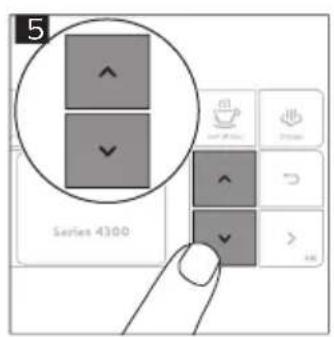
natural_image
Diagram of a mechanical joint or connector with no visible text or symbols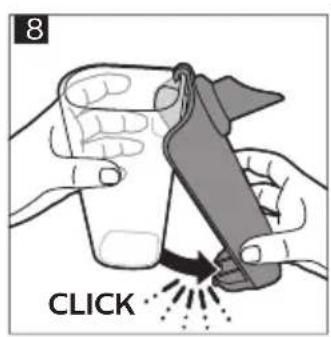
natural_image
Mechanical component diagram showing a lever mechanism with a highlighted arrow (no text or symbols)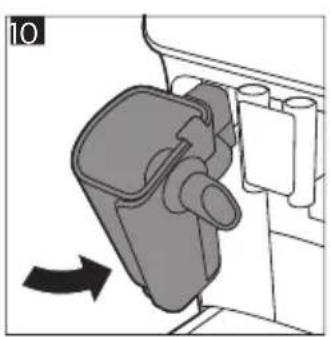
natural_image
Diagram of a mechanical device with a lever and housing, showing a directional arrow (no text or symbols)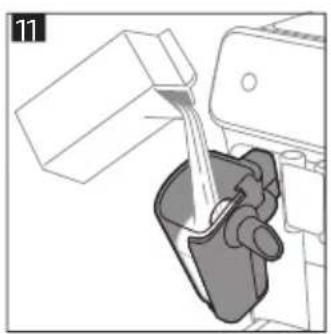
natural_image
Illustration of a mechanical device pouring liquid into a container (no text or symbols visible)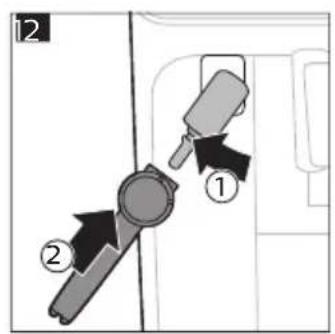
natural_image
Diagram of a circular device with internal components and an arrow indicating rotation (no text or symbols)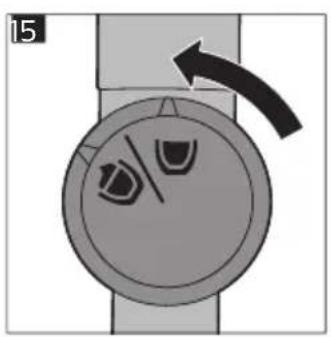
natural_image
Diagram of a circular device with internal components and an arrow indicating rotation (no text or symbols)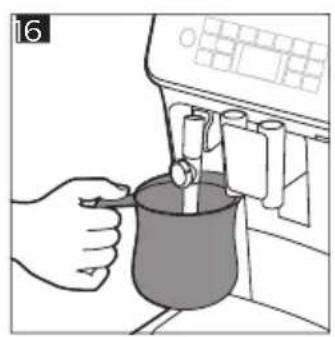
natural_image
Illustration of a hand pouring liquid into a beaker using a digital water dispenser (no text or symbols visible)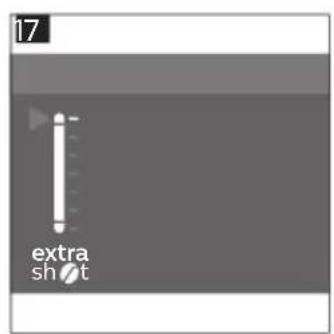
natural_image
Illustration of a hand using a tool to press granular material into a container on a base (no text or symbols)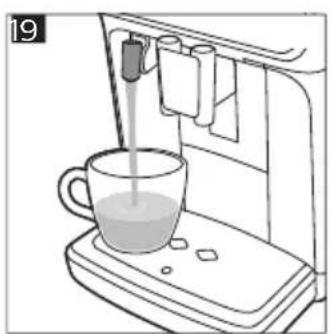
natural_image
Line drawing of a hand mixer machine with a glass of milk being poured into it (no text or symbols)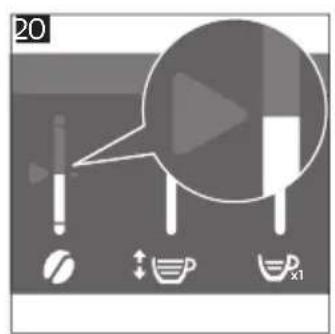
natural_image
Mechanical assembly diagram showing a hand pressing down a component with an arrow indicating motion (no text or symbols present)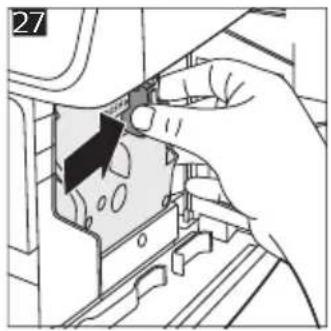
natural_image
Hand inserting a component into a device (no text or symbols visible)
natural_image
Close-up of a hand inserting a component into a device (no visible text or symbols)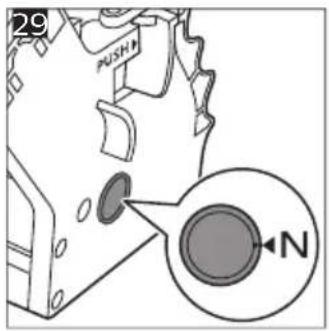
natural_image
Technical line drawing of a mechanical component with no visible text or symbols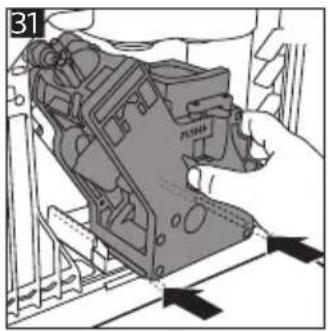
natural_image
Mechanical assembly diagram showing a hand operating a component with arrows indicating motion (no text or symbols)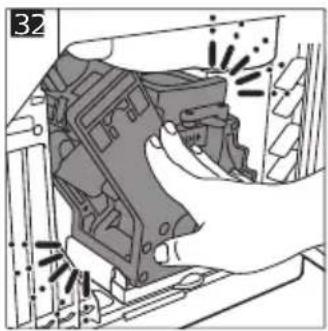
natural_image
Hand inserting a component into a device housing (no visible text or symbols)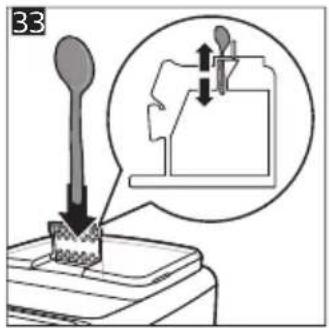
natural_image
Line drawing of a mechanical device with a circular inset showing a cylindrical component (no text or symbols)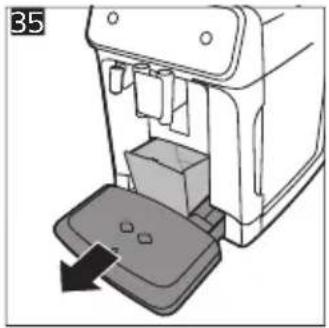
natural_image
Diagram of a device with a base and arrow indicating movement, no text or symbols present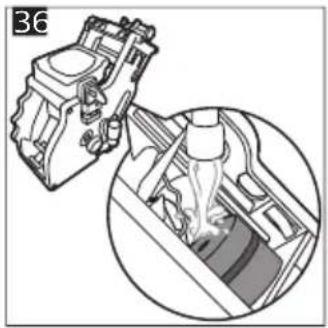
natural_image
Mechanical assembly diagram showing a piston and crankshaft mechanism (no text or labels)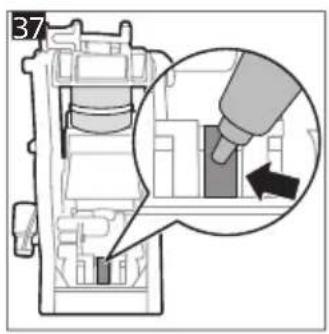
natural_image
Mechanical assembly diagram showing a lever mechanism with a curved arrow indicating motion (no text or symbols present)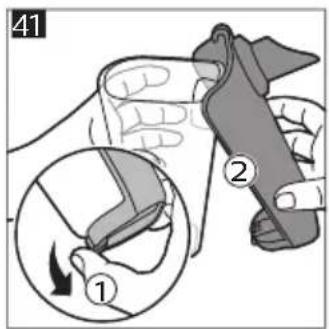
natural_image
Diagram showing three mechanical components with arrows indicating movement, no text or symbols present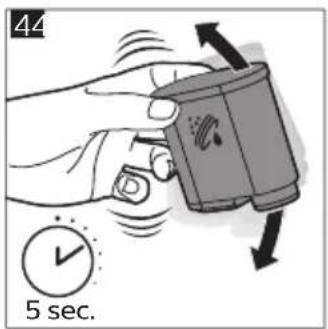
natural_image
3D diagram of a mechanical component with a downward arrow indicating force or direction (no text or symbols)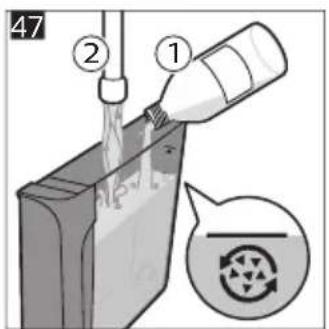
2025 © Versuni Holding B.V.
PHILIPS and the Philips Shield Emblem are registered trademarks of Koninklijke Philips N.V. and are used under license.
This product has been manufactured by and is sold under the responsibility of Versuni Holding B.V., and Versuni Holding B.V. is the warrantor in relation to this product.

642001030398 (8/2025) rev.00

www.home.id