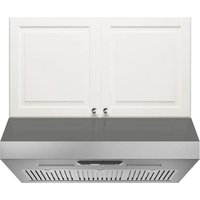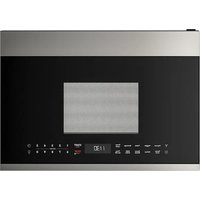
VÄLSKAPT 605.153.03 - Basket IKEA - Free user manual and instructions
Find the device manual for free VÄLSKAPT 605.153.03 IKEA in PDF.


| Product Type | Combination microwave hood (microwave with exhaust hood) |
| Brand | IKEA |
| Model | VÄLSKAPT 605.153.03 |
| Dimensions (W x H x D) | 23 55/64 in x 16 21/32 in x 16 3/16 in (approx. 60.6 cm x 42.3 cm x 41.1 cm) |
| Cavity dimensions (W x H x D) | 15 25/64 in x 10 45/64 in x 15 9/32 in (approx. 39.1 cm x 27.1 cm x 38.8 cm) |
| Oven capacity | 1.4 ft³ (approx. 39.6 L) |
| Net weight | 52.76 lb (approx. 23.9 kg) |
| Gross weight | 61.42 lb (approx. 27.9 kg) |
| Power supply | 120 V ~ 60 Hz, AC only, 15 A minimum |
| Power consumption | 1500 W (13.5 A) |
| Microwave output power | 1000 W (IEC standard) |
| Microwave frequency | 2450 MHz (Class B / Group 2) |
| Main functions | Microwave, sensor cooking, auto defrost, popcorn, beverage, vegetables, melt/soften, two-step cooking, quick start +30 sec, timer, child lock |
| Fan speeds | High / Low / Off (auto on in case of overheating) |
| Surface lighting | 2 x LED 1.2 W (high / low / off) |
| Oven lighting | 1 x LED 1.2 W |
| Filters | Metal grease filter (dishwasher safe); charcoal filter for recirculation (replace every 6 to 12 months) |
| Cleaning and maintenance | Clean exterior with mild soap; interior with a damp cloth; do not use abrasive cleaners; grease filter must be cleaned at least once a month |
| Safety | Child lock, automatic fan shut-off in case of overheating, mandatory grounding |
| Spare parts and repairability | Repairs must be carried out by an IKEA authorized service; available parts: charcoal filter (ref. 5304478913), surface LED bulb (ref. 5304499540) |
| General information | 5-year warranty except LAGAN/TILLREDA (2 years); for household use only |
Frequently Asked Questions - VÄLSKAPT 605.153.03 IKEA
User questions about VÄLSKAPT 605.153.03 IKEA
0 question about this device. Answer the ones you know or ask your own.
Ask a new question about this device
Download the instructions for your Basket in PDF format for free! Find your manual VÄLSKAPT 605.153.03 - IKEA and take your electronic device back in hand. On this page are published all the documents necessary for the use of your device. VÄLSKAPT 605.153.03 by IKEA.
USER MANUAL VÄLSKAPT 605.153.03 IKEA
Please record your model and serial numbers below for reference.
natural_image
Technical line drawing of an oven with internal grating and ventilation duct (no text or symbols)Please refer to the last page of this manual for the full list of IKEA appointed After Sales Service Provider and relative national phone numbers.
Please attach sales receipt here for future reference.
IMPORTANT SAFETY INSTRUCTIONS ....3
PART NAMES 8
CONTROL PANEL 9
MANUAL COOKING ....11
AUTO COOKING 13
SENSOR COOKING 18
CONVENIENT FEATURES ....20
CLEANING AND CARE....23
SERVICE CALL CHECK 26
SPECIFICATIONS 26
IKEA LIMITED GUARANTEE ..... 27
IMPORTANT SAFETY INSTRUCTIONS
PRECAUTIONS TO AVOID POSSIBLE EXPOSURE TO EXCESSIVE MICROWAVE ENERGY
(a) Do not attempt to operate this oven with the door open since open-door operation can result in harmful exposure to microwave energy. It is important not to defeat or tamper with the safety interlocks.
(b) Do not place any object between the oven front face and the door or allow soil or cleaner residue to accumulate on sealing surfaces.
(c) Do not operate the oven if it is damaged. It is particularly important that the oven door close properly and that there is no damage to the: (1) door (bent), (2) hinges and latches (broken or loosened), (3) door seals and sealing surfaces.
(d) The oven should not be adjusted or repaired by anyone except properly qualified service personnel.
IMPORTANT SAFETY INSTRUCTIONS
EN
Definitions
This is the safety alert symbol. It is used to alert you to potential personal injury hazards. Obey all safety messages that follow this symbol to avoid possible injury or death.

WARNING
WARNING indicates a potentially hazardous situation which, if not avoided, could result in death or serious injury.

CAUTION
CAUTION indicates a potentially hazardous situation which, if not avoided, may result in minor or moderate injury.
READ ALL INFORMATION BEFORE USING

WARNING
To reduce the risk of fire, burns, electric shock, injury to persons, or exposure to excessive microwave energy when using your appliance, follow basic precautions, including the following sections.
- Read all instructions before using the appliance.
- Read and follow the specific "PRECAUTIONS TO AVOID POSSIBLE EXPOSURE TO EXCESSIVE MICROWAVE ENERGY" on page 3.
- This appliance must be grounded. Connect only to properly grounded outlet. See "GROUNDING INSTRUCTIONS" on page 5-6.
- Install or locate this appliance only in accordance with the provided assembly instructions.
- Some products such as whole eggs and sealed containers —for example, closed glass jars—are able to explode and should not be heated in this microwave oven.
- Use this appliance only for its intended use as described in this manual. Do not use corrosive chemicals or vapors in this appliance. This type of microwave oven is speci cally designed to heat, cook or dry food. It is not designed for industrial or laboratory use.
- As with any appliance, close supervision is necessary when used by children.
- Do not operate this appliance if it has a damaged cord or plug, if it is not working properly or if it has been damaged or dropped.
- This appliance should be serviced only by qualified service personnel. Contact (833) 337-4006 for examination, repair or adjustment.
- Do not cover or block any openings on the appliance.
- Do not store or use this appliance outdoors. Do not use this product near water—for example, near a kitchen sink, in a wet basement or near a swimming pool, or similar locations.
- Do not immerse cord or plug in water.
- Keep cord away from heated surfaces.
- Do not let cord hang over edge of table or counter.
• See door surface cleaning instructions on page 23. - Do not mount over a sink.
- Do not store anything directly on top of the appliance surface when the appliance is in operation.
• To reduce the risk of fire in the microwave oven cavity:
- Do not overcook food. Carefully attend appliance when paper, plastic or other combustible materials are placed inside the microwave oven to facilitate cooking.
- Remove wire twist-ties from paper or plastic bags before placing bag in microwave oven.
- If materials inside the microwave oven ignite, keep microwave oven door closed, turn microwave oven off and disconnect the power cord or shut off power at the fuse or circuit breaker panel.
- Do not use the cavity for storage purposes. Do not leave paper products, cooking utensils or food in the cavity when not in use.
- Liquids, such as water, coffee or tea are able to be overheated beyond the boiling point without appearing to be boiling. Visible bubbling or boiling when the container is removed from the microwave oven is not always present. THIS COULD RESULT IN VERY HOT LIQUIDS SUDDENLY BOILING OVER WHEN A SPOON OR OTHER UTENSIL IS INSERTED INTO THE LIQUID.
To reduce the risk of injury to persons:
- Do not overheat the liquid.
- Stir the liquid both before and halfway through heating it.
- Do not use straight-sided containers with narrow necks. Use a wide-mouthed container.
- After heating, allow the container to stand in the microwave oven at least for 20 seconds before removing the container.
-
Use extreme care when inserting a spoon or other utensil into the container.
-
Clean ventilation openings and grease filters frequently. Grease should not be allowed to accumulate on ventilation openings, louver or grease filters.
- Use care when cleaning the louver and the grease filters. Corrosive cleaning agents, such as lye-based oven cleaners, may damage the louver and the grease filters.
- When flaming food under the hood, turn the fan on.
- This appliance is suitable for use above both gas and electric cooking equipment 30" wide.
- Do not clean with metal scouring pads. Pieces off the pad can touch electrical parts involving risk of electric shock.
WARNING
If you see arcing, press the Cancel button and correct the problem.
1) Oversized food or oversized metal utensils should not be inserted in a microwave/toaster oven as they may create a fire or risk of electric shock.
2) Do not clean with metal scouring pads. Pieces can burn off the pad and touch electrical parts involving a risk of electric shock.
3) Do not use paper products when appliance is operated in the toaster mode.
4) Do not store any materials, other than manufacturer's recommended accessories, in this oven when not in use.
5) Do not cover racks or any other part of the oven with metal foil. This will cause overheating of the oven.
SAVE THESE INSTRUCTIONS.
ARCING
Arcing is the microwave term for sparks in the oven. Arcing is caused by:
• Metal or foil touching the side of the oven.
- Foil not molded to food (upturned edges act like antennas).
- Metal, such as twist-ties, poultry pins, or gold-rimmed dishes, in the microwave.
• Recycled paper towels containing small metal pieces being used in the microwave.
Federal Communications Commission Radio Frequency Interference Statement (U.S.A. Only)
This equipment generates and uses ISM frequency energy and if not installed and used properly, that is in strict accordance with the manufacturer's instructions, may cause interference to radio and television reception. It has been type tested and found to comply with limits for ISM Equipment pursuant to part 18 of FCC Rules, which are designed to provide reasonable protection against such interference in a residential installation.
However, there is no guarantee that interference will not occur in a particular installation. If this equipment does cause interference to radio or television reception, which can be determined by turning the equipment off and on, the user is encouraged to try to correct the interference by one or more of the following:
- Reorient the receiving antenna of the radio or television.
- Relocate the microwave oven with respect to the receiver.
- Move the microwave oven away from the receiver.
- Plug the microwave oven into a different outlet so that the microwave oven and the receiver are on different branch circuits.
The manufacturer is not responsible for any radio or television interference caused by unauthorized modification to this microwave oven. It is the responsibility of the user to correct such interference.
UNPACKING AND EXAMINING YOUR MICROWAVE OVEN
Open the bottom of the carton, bend the carton flaps back and tilt the microwave oven over to rest on plastic foam pad. Lift carton off microwave oven and remove all packing materials, Assembly Instructions, Wall Template, Top Template, Filter, Turntable and Turntable Support. SAVE THE CARTON AS IT MAY MAKE INSTALLATION EASIER.
- Remove the feature sticker from the outside of the door, if there is one.
- DO NOT REMOVE THE WAVEGUIDE COVER, which is located on the ceiling in the microwave oven cavity. Check to see that there are Assembly Instructions,
Wall Template, Top Template and Filter, which is used when recirculating is chosen.
Read enclosures and SAVE the User Manual. Check the microwave oven for any damage, such as misaligned or bent door, damaged door seals and sealing surfaces, broken or loose door hinges and latches and dents inside the cavity or on the door. If there is any damage, do not operate the microwave oven and contact any IKEA Store.
See Assembly Instructions for more details.
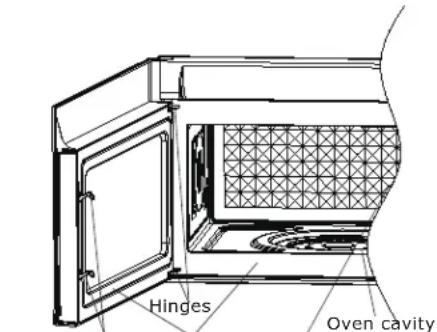
Safety door Door seals and Waveguide latches sealing surfaces cover
GROUNDING INSTRUCTIONS
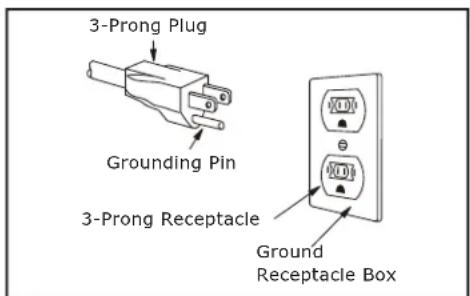
This appliance must be grounded. This microwave oven is equipped with a cord having a grounding wire with a grounding plug. It must be plugged into a wall receptacle that is properly installed and grounded in accordance with the National Electrical Code and local codes and ordinances. In the event of an electrical short circuit, grounding reduces risk of electric shock by providing an escape wire for the electric current.
WARNING
Improper use of the grounding plug can result in a risk of electric shock.
Consult a qualified electrician or serviceman if the grounding instructions are not completely understood, or if doubt exists as to whether the appliance is properly grounded.
Electrical Requirements
Check Assembly Instructions for proper location for the power supply.
The electrical requirements are a 120 volt 60 Hz, AC only, 15 amp. or more protected electrical supply. It is recommended that a separate circuit serving only the microwave oven be provided.
The microwave oven is equipped with a 3-prong grounding plug. It must be plugged into a wall receptacle that is properly installed and grounded. DO NOT UNDER ANY CIRCUMSTANCES CUT OR REMOVE THE GROUNDING PIN FROM THE PLUG. DO NOT USE AN EXTENSION CORD.
A short power supply cord is provided to reduce the risks resulting from becoming entangled in or tripping over a longer cord.
IMPORTANT SAFETY INSTRUCTIONS
EN
If the power supply cord is too short, have a qualified electrician or serviceman install an outlet near the appliance.
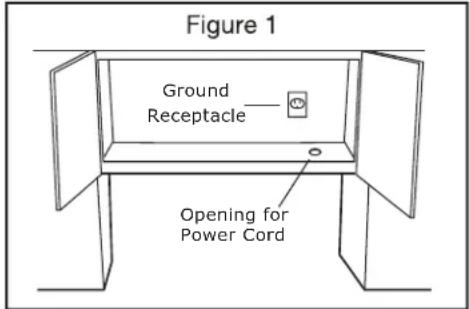
The Power Supply Cord and plug must be connected to a separate 120 Volt AC, 60 Hz, 15 Amp, or more branch circuit, single grounded receptacle. The receptacle should be located inside the cabinet directly above the Microwave Oven mounting location as shown in Figure 1.

NOTES
- If you have any questions about the grounding or electrical Instructions, consult a qualified electrician or service person.
- Neither IKEA nor the dealer can accept any liability for damage to the microwave oven or personal injury resulting from failure to observe the correct electrical connection procedures.
This User Manual is valuable: read it carefully and always save it for reference.
A good microwave cookbook is a valuable asset. Check it for microwave cooking principles, techniques, hints and recipes.
NEVER use the microwave oven without the turntable and support nor turn the turntable over so that a large dish could be placed in the microwave oven.
ALWAYS have food in the microwave oven when it is on to absorb the microwave energy.
When using the microwave oven at power levels below 100%, you may hear the magnetron cycling on and off. It is normal for the exterior of the microwave oven to be warm to the touch when cooking or reheating.
Condensation is a normal part of microwave cooking. Room humidity and the moisture in food will influence the amount of moisture that condenses in the microwave oven. Generally, covered foods will not cause as much condensation as uncovered ones. Ventilation openings must not be blocked.
The microwave oven is for food preparation only. It should not be used to dry clothes or newspapers.
Your microwave oven is rated 1000 watts by using the IEC Test Procedure. In using recipes or package directions, check food a minute or two before the minimum time and add time accordingly.
ABOUT MICROWAVE COOKING
- Arrange food carefully. Place thickest areas towards outside of dish.
- Watch cooking time. Cook for the shortest amount of time indicated and add more as needed. Food severely overcooked can smoke or ignite.
- Cover foods while cooking. Check recipe or cookbook for suggestions: paper towels, wax paper, microwave plastic wrap or a lid. Covers prevent spattering and help foods to cook evenly.
- Shield with small flat pieces of aluminum foil any thin areas of meat or poultry to prevent overcooking before dense, thick areas are cooked thoroughly.
- Stir foods from outside to center of dish once or twice during cooking, if possible.
- Turn foods over once during microwaving to speed cooking of such foods as chicken and hamburgers. Large items like roasts must be turned over at least once.
- Rearrange foods such as meatballs halfway through cooking both from top to bottom and from the center of the dish to the outside.
- Add standing time. Remove food from microwave oven and stir, if possible. Cover for standing time which allows the food to finish cooking without overcooking.
- Check for doneness. Look for signs indicating that cooking temperatures have been reached.
Doneness signs include:
- Food steams throughout, not just at edge.
- Center bottom of dish is very hot to the touch.
- Poultry thigh joints move easily.
- Meat and poultry show no pinkness.
- Fish is opaque and flakes easily with a fork.
ABOUT FOOD
| FOOD DO | DON'T | |
| Eggs, sausages, nuts, seeds, fruits & vegetables | · Puncture egg yolks before cooking to prevent “explosion”. · Pierce skins of potatoes, apples, squash, hot dogs and sausages so that steam escapes. | · Cook eggs in shells. · Reheat whole eggs. · Dry nuts or seeds in shells. |
| Popcorn · Use | specially bagged popcorn for microwave cooking. · Listen while popping corn for the popping to slow to 1 or 2 seconds or use special popcorn pad. | · Pop popcorn in regular brown bags or glass bowls. · Exceed maximum time on popcorn package. |
| Baby food • Transfer baby food to small dish and heat carefully, stirring often. Check temperature before serving.• Put nipples on bottles after heating and shake thoroughly. “Wrist” test before feeding. | • Heat disposable bottles.• Heat bottles with nipples on.• Heat baby food in original jars. | |
| General • Cut baked goods with fllling after heating to release steam and avoid burns.• Stir liquids briskly before and after heating to avoid “eruption”.• Use deep bowl, when cooking liquids or cereals, to prevent boilovers. | • Heat or cook in closed glass jars or air tight containers.• Can in the microwave as harmful bacteria may not be destroyed.• Deep fat fry.• Dry wood, gourds, herbs or wet papers. | |
ABOUT UTENSILS AND COVERINGS
It is not necessary to buy all new cookware. Many pieces already in your kitchen can be used successfully in your new microwave oven. Make sure the utensil does not touch the interior walls during cooking.
Use these utensils for safe microwave cooking and reheating:
- glass ceramic (Pyroceram®), such as Corningware®.
- heat-resistant glass (Pyrex®)
- microwave-safe plastics
- paper plates
- microwave-safe pottery, stoneware and porcelain
- browning dish (Do not exceed recommended preheating time. Follow manufacturer's directions.)
These items can be used for short time reheating of foods that have little fat or sugar in them:
- wood, straw, wicker
DO NOT USE
• metal pans and bakeware
• dishes with metallic trim
• non-heat-resistant glass
• non-microwave-safe plastics (margarine tubs)
• recycled paper products
- brown paper bags
- food storage bags
- metal twist-ties
Should you wish to check if a dish is safe for microwaving, place the empty dish in the microwave oven and microwave on HIGH for 30 seconds. A dish which becomes very hot should not be used.
The following coverings are ideal:
- Paper towels are good for covering foods for reheating and absorbing fat while cooking bacon.
-
Wax paper can be used for cooking and reheating.
-
Plastic wrap that is specially marked for microwave use can be used for cooking and reheating. DO NOT allow plastic wrap to touch food. Vent so steam can escape.
- Lids that are microwave-safe are a good choice because heat is kept near the food to hasten cooking.
- Microwave oven cooking bags are good for large meats or foods that need tenderizing. DO NOT use metal twist ties. Remember to slit bag so steam can escape.
How to use aluminum foil in your microwave oven:
- Small flat pieces of aluminum foil placed smoothly on the food can be used to shield areas that are either defrosting or cooking too quickly.
- Foil should not come closer than one inch to any surface of the microwave oven.
Should you have questions about utensils or coverings, check a good microwave cookbook or follow recipe suggestions.
ACCESSORIES There are many microwave accessories available for purchase. Evaluate carefully before you purchase so that they meet your needs. A microwave-safe thermometer will assist you in determining correct doneness and assure you that foods have been cooked to safe temperatures. IKEA is not responsible for any damage to the microwave oven when accessories are used.
ABOUT CHILDREN AND THE MICROWAVE
Children below the age of 7 should use the microwave oven with a supervising person very near to them. Between the ages of 7 and 12, the supervising person should be in the same room.
As with any appliance, close supervision by an adult is necessary when used by children.
At no time should anyone be allowed to lean or swing on the microwave oven door.
Children should be taught all safety precautions: use potholders, remove coverings carefully, pay special attention to packages that crisp food because they may be extra hot.
Don't assume that because a child has mastered one cooking skill he/she can cook everything.
Children need to learn that the microwave oven is not a toy. See page 20 for Child Lock feature.
ABOUT SAFETY
- Check foods to see that they are cooked to the United States Department of Agriculture's recommended temperatures.
| TEMP FOOD | |
| 145°F (63°C) | - For beef, lamb or veal cut into steaks, chops or roasts, fi sh |
| 160°F (71°C) | - For fresh pork, ground meat, seafood, egg dishes, frozen prepared food and beef, lamb or veal cut into steaks, chops or roasts |
| 165°F (74°C) | - For leftover, ready-to-reheat refrigerated, deli and carry out "fresh" food, whole chicken or turkey, chicken or turkey breasts and ground poultry used in chicken or turkey burgers |

NOTE
Do not cook whole, stuffed poultry. Cook stuffing separately to 165°F.
To test for doneness, insert a meat thermometer in a thick or dense area away from fat or bone. NEVER leave the thermometer in the food during cooking, unless it is approved for microwave oven use.
- ALWAYS use potholders to prevent burns when handling utensils that are in contact with hot food. Enough heat from the food can transfer through utensils to cause skin burns.
- Avoid steam burns by directing steam away from the face and hands. Slowly lift the farthest edge of a
dish's covering and carefully open popcorn and oven cooking bags away from the face.
- Stay near the microwave oven while it's in use and check cooking progress frequently so that there is no chance of overcooking food.
- NEVER use the cavity for storing cookbooks or other items.
- Select, store and handle food carefully to preserve its high quality and minimize the spread of foodborne bacteria.
- Keep waveguide cover clean. Food residue can cause arcing and/or fires.
- Use care when removing items from the microwave oven so that the utensil, your clothes or accessories do not touch the safety door latches.
- Keep aluminum foil used for shielding at least 1 inch away from walls, ceiling and door.
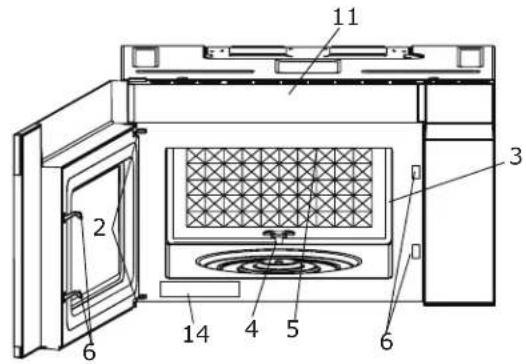
PART NAMES
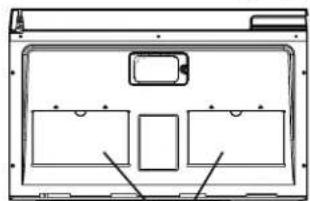
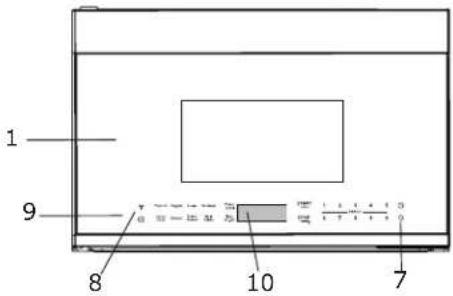
FRONT VIEW BOTTOM VIEW
12
13
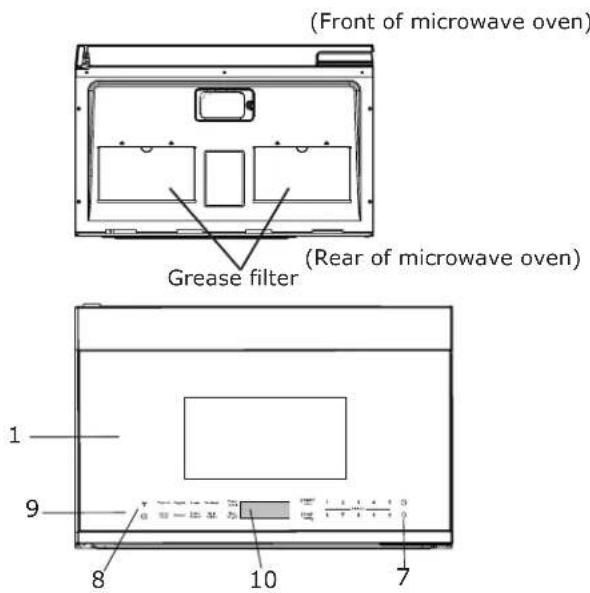
1 Microwave oven door with see-through window
2 Door hinges
3 Waveguide cover: DO NOT REMOVE.
4 Turntable motor shaft
5 Microwave oven light
It will light when microwave oven is operating or door is open.
6 Safety door latches
The microwave oven will not operate unless the door is securely closed.
7 Light hi/lo/off pad ☐
Press light once for high, twice for low,
three times for light off.
8 Vent hi/lo/off pad 🌿
Press fan once for high, twice for low, three times for off.
9 Auto-Touch control panel
10 Time display: Digital display, 99 minutes, 99 seconds
11 Ventilation openings
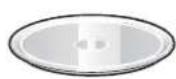
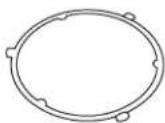
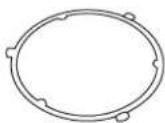
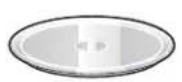
12 Removable turntable glass
Position glass tray on turntable motor shaft coupling.
13 Removable turntable support
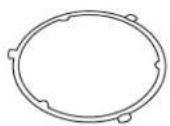
Install the turntable support on the microwave oven bottom, centering the turntable support around the turntable coupling. Then place the turntable glass tray unto the turntable motor coupling.
14 Rating label (model and serial number)
Words in the lower portion of the display will light to indicate what function is in progress.
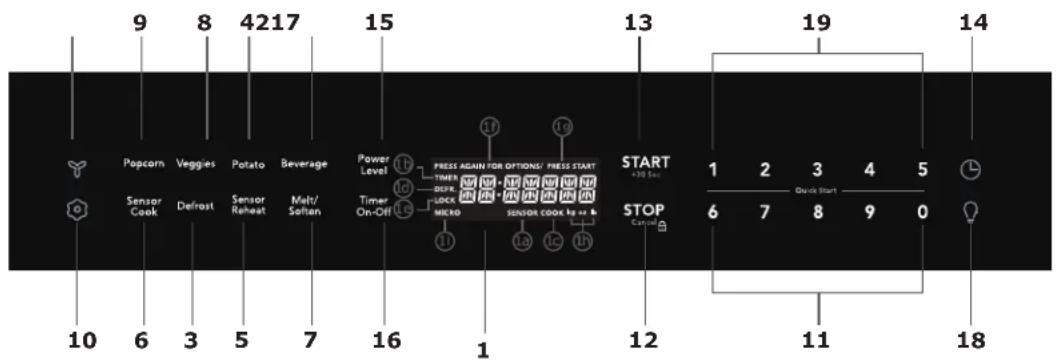
(1) Display:
The display includes a clock and indicators that show the time of day, cooking time settings, cook powers, sensor, quantities, weights and cooking functions selected.
1a. SENSOR:
Icon displayed when using sensor cook.
1b. TIMER:
Icon displayed when timer is being set or running.
1c. COOK:
Icon displayed when starting microwave cooking.
1d. DEFR:
Icon displayed when defrosting food.
1e. LOCK:
Icon displayed in control lock.
1f. PRESS AGAIN FOR OPTIONS:
Icon displayed when additional options are available.
1g. PRESS START:
Icon displayed when a valid function can be started.
1h. kg, oz, lb:
Icon displayed when choosing the weight.
1i. MICRO:
Icon displayed when starting microwave cooking.
(2) Beverage (page 16)
(3) Defrost (page 13)
(4) Potato (page 11
(5) Sensor Reheat (5 different settings) (page 18)
(6) Sensor Cook (page 18)
(7) Melt Soften (page 17)
(8) Veggies(page 16)
(9) Popcorn (page 16)
(10) Ⓞ(page 20)
(11) Numeric pads (0 thru 9)
(12) Stop/Cancel (page 10)
(13) START +30 sec (page 11)
(14) L(page 10)
(15) Power Level (11 power levels available) (page 11)
(16) Timer (On-Off)(page 10)
(17) Exhaust (High/Low/Off) \~ Use to turn the exhaust fan off, or to adjust fan speed. (page 22)
(18) Surface Light (High/Low/Off)
Press this pad to adjust the brightness of surface lights. (page 22)
(19) Quick Start (9 instant key settings) (page 11)
BEFORE OPERATING
- Before operating your new oven make sure you read and understand this User Manual completely.
-
Before the Over the Range Microwave Oven can be used, follow these procedures:
-
Plug in the oven. Close the door. The oven display will show 12:00.
- If no operation after 1 minute, the oven will show 12:01.
- Set clock. See below.
TO SET THE CLOCK
- Suppose you want to enter the correct time of day 12:30 (A.M or P.M.).
TO SET THE TIMER
- Set the timer for 3 minutes.
| Display Shows:Touch | ||
| 1. | Timer | ENTER |
| On-Off | TIME | |
| 2. | 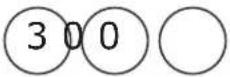 | 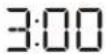 |
Display Shows:Touch
| 1. | L | 12:00 |
| 2. | 1 2 3 0 | 12:30 |
| 3. | START+30 Sec | 12:30 |
- Timer On-Off
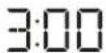
Then time will count down
NOTE
- Opening the door during timer countdown will not pause the running timer.
- To cancel the active timer, press the Timer On/Off key once.
STOP/CANCEL
STOP/CANCEL STOP/CANCEL to:
- Erase if you make a mistake during programming.
- Cancel timer and the signal after cooking.
- Stop the oven temporarily during cooking.
- Return the time of day to the display.
- Cancel a program during cooking, press twice.
USING ONE TOUCH START SETTING TIMED COOKING WITH POWER
This is a time saving pad that will automatically start cooking 2 seconds after selected. Numeric key 1 to 9 can be touched for a 1 minute to 9 minutes automatic start cooking feature.
- Suppose you want to cook 3 minutes at 100% power.
LEVEL
This feature lets you program a specific cook time and power. For best results, there are 10 power level settings in addition to HIGH (100%) power. Refer to the "Microwave Power Levels" table.
- Suppose you want to cook for five minutes at 80% power.
Display Shows:Touch
| Display Shows:Touch | ||||
| 2. | 3 | 3:00 | 1. 500 | 5:00 |
| Time counting down automatically after 2 seconds | 2. POWER LEVEL | PL-HI | ||

NOTE
"Food" will be displayed if a quick start cooking cycle or +30 sec key is not selected within 5 minutes of placing food in the microwave. You must open then close the door again to clear "Food" from the display.
USING ADD 30 SEC.
This is a time-saving pad. It is a simplified feature that lets you quickly set and start microwave cooking at 100% power.
- Suppose you want to set and start microwave cooking at 100% for 30 SEC.
| 1. | 5 | 0 | 0 |
Then time will count down

NOTE
If you do not select a power level, the oven will automatically cook at HIGH (100%) power.
Display Shows:TouchPotato
| 1. START+30 Sec | :30Then time will count down | Suppose you want to cook 1-4 baked potato. |
| Display Shows:Touch |

NOTE
- The cooking time can be extended for 30 seconds by pressing add 30 sec key (only in manual cooking). The cooking time is extended to a maximum of 99 minutes 99 seconds.
-
"Food" will be displayed if a quick start cooking cycle or +30 sec key is not selected within 5 minutes of placing food in the microwave. You must open then close the door again to clear "Food" from the display.
-
Potato
POTATO
- START +30 Sec
POTATO
Then time will count down
SETTING TWO-STAGE COOKING
For best results, some recipes call for different power levels during a cook cycle. You can program your oven for two power level stages during the cooking cycle.
- To set a 2-stage cook cycle. The first stage is a 2 minutes cook time at 30 % cook power then a 4 minutes cook time at 70 % cook power.
Display Shows:Touch
| 1. 200○ | 2:00 |
| 2. POWER LEVEL × 8 | PL-30 |
| 3. 400 | 4:00 |
| 4. POWER LEVEL × 4 | PL-70 |
| 5. START +30 Sec | 2:00Then time will count down |
For best results, some recipes call for different cook powers. The lower the cook power, the slower the cooking. Each number from 1 to 9 stands for a different percentage of full cook power.
The following table gives the percentage of cook power each number pad stands for, and the cook power name usually used.
The table also tells you when to use each cook power. Follow recipe or food package instructions if available.
NOTE: Refer to a reliable cookbook for cooking times based on the 1000 Watt cook power of your microwave oven.
| COOK POWER | LEVEL WHEN TO USE IT |
| 100% of full power | High Quickly heating convenience foods and foods with high water content, such as soup and beverages.Cooking tender cuts of meat, ground meat or chicken. |
| 9 = 90% of full power | •Heating cream soups. | |
| 8 = 80% of full power | •Heating rice, pasta, or casseroles. | |
| 7 = 70% of full power | Medium-High | •Cooking and heating foods that need a Cook Power lower than High (for example, whole fish and meat loaf) or when food is cooking too fast.•Reheating a single serving of food. |
| 6 = 60% of full power | •Cooking that requires special care, such as cheese and egg dishes, pudding, and custards.•Finishing cooking casseroles. | |
| 5 = 50% of full power | Medium | •Cooking ham, whole poultry, and pot roasts.•Simmering stews. |
| 4 = 40% of full power | •Melting chocolate.•Heating pastries. | |
| 3 = 30% of full power | Medium-Low, Defrost | •Manually defrosting pre-cooked and other foods, such as bread, fish, meats and poultry. |
| 2 = 20% of full power | •Softening butter, cheese, and ice cream. | |
| 1 = 10% of full power | Low Keeping | food warm.•Taking chill out of fruit. |
| 0 = 0% of full power | None Standing time in oven. | |
USING AUTO DEFROST
Three defrost sequences are preset in the oven. The auto defrost feature provides you with the best defrosting method for frozen foods.
The cooking guide will show you which defrost sequence is recommended for the food you are defrosting.
For added convenience, the Auto Defrost includes a built-in beep mechanism that reminds you to check, turn over, separate, or rearrange the food in order to get the best defrost results. Three different defrosting levels are provided:
- MEAT
- POULTRY
- FISH
Available weight is 0.1-6.0 lbs.
- Suppose you want to defrost 1.2 lbs of fish.
| Display Shows:Touch | |
| 1.DEFROST | PRESS AGAIN FOR OPTIONS/ PRESS STARTMEAT |
| 2.DEFROST | PRESS AGAIN FOR OPTIONS/ PRESS STARTPOULTRY |
| 3.DEFROST | PRESS AGAIN FOR OPTIONS/ PRESS STARTFISH |
| 4. START+30 Sec | ENTER WEIGHTlb |
| 5. 1and 2To enter weight | 1.2PRESS STARTlb |
| 6. START+30 Sec | DEFFL FISHThen time will count down |
NOTE
The oven will beep during the DEFROST cycle. At this time, open the door and turn, separate, or rearrange the food. Remove any portions that have thawed. Return frozen portions to the oven and touch START to resume the defrost cycle.
OPERATING TIPS
- For best results, remove fish, shellfish, meat, and poultry from its original closed paper or plastic package (wrapper). Otherwise, the wrap will hold steam and juice close to the foods, which can cause the outer surface of the foods to cook.
- For best results, roll your ground meat into a ball before freezing. During the DEFROST cycle, the microwave will signal when it is time to turn the meat over. Scrape off any excess frost from the meat and continue defrosting.
- Place foods in a shallow containers or on a microwave roasting rack to catch drippings. This table shows food type selections and the weights you can set for each type. For best results, loosen or remove covering on food.
| KEY PRESS PRESS WEIGHTS YOU CAN SET(tenths of a pound) | |
| Defrost Meat 0.1 to 6.0 | |
| Defrost Poultry 0.1 to 6.0 | |
| Defrost Fish 0.1 to 6.0 | |
Weight conversion table
You are probably used to measuring food in pounds and ounces that are fractions of a pound (for example, 4 ounces equals 1/4 pound). However, in order to enter food weight in Auto Defrost, you must specify pounds and tenths of a pound.
If the weight on the food package is in fractions of a pound, you can use the following table to convert the weight to decimals.
| Equivalent Weight | |
| OUNCES DECIMAL WEIGHT | |
| 1.6 | .10 |
| 3.2 | .20 |
| 4.0 | .25 One-Quarter Pound |
| 4.8 | .30 |
| 6.4 | .40 |
| 8.0 | .50 One-Half Pound |
| 9.6 | .60 |
| 11.2 | .70 |
| 12.0 | .75 Three-Quarters Pound |
| 12.8 | .80 |
| 14.4 | .90 |
| 16.0 | 1.0 One Pound |
NOTE
If between two decimal weights, choose the lower weight for the best defrosting results.
AUTO DEFROST TABLE
NOTE: Meat of irregular shape and large, fatty cuts of meat should have the narrow or fatty areas shielded with foil at the beginning of the defrost sequence.
MEAT SETTINGS
| FOOD SETTING AT BEEP | SPECIAL INSTRUCTIONS | ||
| BEEF | |||
| Ground Beef, Bulk | MEAT | Remove thawed portions with fork. Turn over. Return remainder to oven. | Do not defrost less than 1/4 lb. Freeze in ball shape. |
| Ground Beef, Patties | MEAT Separate and rearrange. | Do not defrost less than 2 oz. patties. Depress center when freezing. | |
| Round Steak MEAT | Turn over. Cover warm areas with aluminum foil. | Place in a microwave safe dish. | |
| Tenderloin Steak MEAT | Turn over. Cover warm areas with aluminum foil. | Place in a microwave safe dish. | |
| Stew Beef MEAT | Remove thawed portions with fork. Separate remainder. | Place in a microwave safe dish. | |
| Pot Roast, Chuck Roast | MEAT Return remainder to oven. Place in a microwave safe dish. | ||
| Rib Roast MEAT | Turn over. Cover warm areas with aluminum foil. | Place in a microwave safe dish. | |
| Rolled Rump Roast | MEAT | Turn over. Cover warm areas with aluminum foil. | Place in a microwave safe dish. |
| LAMB Cubes for Stew MEAT | Turn over. Cover warm areas with aluminum foil. | Place in a microwave safe dish. | |
| Chops (1 inch thick) | MEAT | Remove thawed portions with fork. Return remainder to oven. | Place in a microwave safe dish. |
| PORK Chops (1/2 inch thick) | MEAT Separate and rearrange. Place in a microwave safe dish. | ||
| Hot Dogs | MEAT | Separate and rearrange. | Place in a microwave safe dish. |
| Spareribs Coun-try-style Ribs | MEAT | Turn over. Cover warm areas with aluminum foil. | Place in a microwave safe dish. |
| Sausage, Links | MEAT | Separate and rearrange. | Place in a microwave safe dish. |
| Sausage, Bulk | MEAT | Remove thawed portions with fork. Turn over. Return remainder to oven. | Place in a microwave safe dish. |
| Loin Roast, Bone-less | MEAT | Turn over. Cover warm areas with aluminum foil. | Place in a microwave safe dish. |
AUTO DEFROST TABLE (CONTINUED)
POULTRY SETTINGS
| FOOD SETTING AT BEEP SPECIAL INSTRUCTIONS | |||
| CHICKEN Whole (up to 6 lbs)Cut-up Separate pieces and rearrange. Place in a microwave safe dish.Turn over. Cover warm areas with aluminum foil. | Turn over breast side down.Cover warm areas with aluminum foil. | Place chicken breast-side up in a microwave safe dish. Finish defrosting by immersing in cold water. Remove giblets when chicken is partially defrosted.Finish defrosting by immersing in cold water. | |
| CORNISH HENS Whole | POULTRY | Turn over. Cover warm areas with aluminum foil. | Place in a microwave safe dish.Finish defrosting by immersing in cold water. |
| TURKEY Breast (up to 6 lbs) | POULTRY | Turn over. Cover warm areas with aluminum foil. | Place in a microwave safe dish.Finish defrosting by immersing in cold water. |
FISH SETTINGS
| FOOD SETTING AT BEEP SPECIAL INSTRUCTIONS | |||
| FISH Fillets | FISH | Turn over. Separate fillets when partially thawed, if possible. | Place in a microwave safe dish. Carefully separate fillets under cold water. |
| Steaks FISH Separate and rearrange. | Place in a microwave safe dish. Run cold water over to finish defrosting. | ||
| Whole FISH Turn over | Place in a microwave safe dish.Cover head and tail with foil; do not let foil touch sides of microwave. Finish defrosting by immersing in cold water. | ||
| SHELLFISH | |||
| Crab meat FISH Break apart. Turn over. Place in a microwave safe dish. | |||
| Lobster tails FISH Turn over and rearrange. Place in a microwave safe dish. | |||
| Shrimp FISH Separate and rearrange. Place in a microwave safe dish. | |||
| Scallops | FISH | Separate and rearrange. | Place in a microwave safe dish. |
DEFROSTING TIPS
- When using Auto Defrost, the weight to be entered is the net weight in pounds and tenths of pounds (the weight of the food minus the container).
- Before starting, make sure to remove any and all metal twist-ties that often come with frozen food bags, and replace them with strings or elastic bands.
- Open containers, such as cartons, before placing in the oven.
• Always slit or pierce plastic pouches or packaging. - If food is foil wrapped, remove foil and place food in a suitable container.
- Slit the skin of skinned food, such as sausage.
-
Bend plastic pouches of food to ensure even defrosting.
-
Always underestimate defrosting time. If defrosted food is still icy in the center, return it to the microwave oven for more defrosting.
- The length of defrosting time varies according to how solidly the food is frozen.
- The shape of the package affects how quickly food will defrost. Shallow packages will defrost more quickly than a deep block.
- As food begins to defrost, separate the pieces. Separated pieces defrost more easily.
- Use small pieces of aluminum foil to shield parts of food such as chicken wings, leg tips, fish tails, or areas that start to get warm. Make sure the foil does not touch the sides, top, or bottom of the oven. The foil can damage the oven lining.
- For better results, let food stand after defrosting.
- Turn over food during defrosting or standing time.
Break apart and remove food as required.
SETTING POPCORN
The Popcorn quick touch pad lets you pop 3.3, 3.0, 1.75 ounce bags of commercially packaged microwave popcorn. Pop only one package at a time.
If you are using a microwave popcorn popper, follow manufacturer's instructions.
- Suppose you want to pop a 3.3 oz. popcorn
SETTING VEGGIES
The Veggies quick touch pad lets you cook fresh and frozen vegetables.
- Suppose you want to cook frozen veggies.
| Display Shows:Touch | 1. VEGGIES | FRESH | |
| 1. POPCORN | 3.3 | VEGGIES | |
| 2. START +30 Sec | POPCORN | 2. VEGGIES | FROZEN |
| VEGGIES | |||
| Then time will count down | FROZEN | ||
| Key press | Selection | Amount |
| Popcorn | 3.3 | 3.3 oz (94g) |
| Popcorn | 3.0 | 3.0 oz (85g) |
| Popcorn | 1.75 | 1.75 oz (50g) |
| 3. | START +30 Sec |
| FROZEN |
| VEGGIES |
Then time will count down
| Key | Food |
| Veggies x1 | Fresh Veggies |
| Veggies x2 | Frozen Veggies |
SETTING BEVERAGE
- Suppose you want to reheat 1 cup beverage
Touch Veggie key repeatedly to switch between Fresh and Frozen selections.
Display Shows:Touch
- BEVERAGE
1 CUP
- START +30 Sec
BEVERAGE
Then time will count down
| Key press | Selection |
| Beverage | 1 Cup |
| Beverage | 2 Cup |
SETTING MELT/SOFTEN MELT/SOFTEN TABLE
The oven uses low power to melt and soften items. See the following table.
- Suppose you want to melt 4 oz. of Chocolate.
| Display Shows:Touch | |
| 1. MELT/SOFTEN | MELTBUTTER |
| 2. MELT/SOFTEN | MELTCHOCOLATE |
| 3. START+30 Sec | ENTER2-4-8 |

Then time will count down
| CATEGORY | DIRECTION AMOUNT | |
| BUTTER 1 or 2 | Unwrap and place in microwavable container. No need to cover butter. Stir at the end of cooking to complete melting. | |
| CHOCOLATE 2 | Chocolate chips or squares of baking chocolate may be used. Unwrap squares and place in microwavable container. Stir at the end of cycle to complete melting. | |
| ICE CREAM 1 | Place container in oven. Ice cream will be soft enough to make scooping easier. | 1.5 Quart. |
| CREAM CHEESE | Unwrap and place in microwavable container.Cream cheese will be at room temperature and ready for use in recipe. | 3 or 8 oz. |
| Key | Food | Amount | Key |
| Melt / Soften x1 | Melt Butter | 1 stick | 1 |
| 2 sticks 2 | |||
| Melt / Soften x2 | Melt Chocolate 2 oz. | 2 | |
| 4 oz. 4 | |||
| 8 oz. 8 | |||
| Melt / Soften x3 | often Ice Cream 1 Pint | 1 | |
| 1.5 Quart 2 | |||
| Melt / Soften x4 | often Cream Cheese 3 | oz. | 3 |
| 8 oz. 8 | |||
SENSOR OPERATING INSTRUCTIONS
Sensor Cook allows you to cook most of your favorite foods without selecting cooking times and power levels.
The display will indicate Sensing during the initial sensing period.
The oven automatically determines required cooking time for each food item. When the internal sensor detects a certain amount of humidity coming from the food, it will tell the oven how much longer to heat. The display will show the remaining heating time. For best results for cooking by Sensor, follow these recommendations.
- Food cooked with the sensor system should be at normal storage temperature.
- Always use microwavable containers.
- Match the amount to the size of the container. Fill containers at least half full for best results.
- Be sure the outside of the cooking container and the inside of the microwave oven are dry before placing food in the oven. Beads of moisture turning into steam can mislead the sensor.
- Foods should always be covered with microwavable plastic wrap, waxed paper, or a lid. Never use tight-sealing plastic covers. They can prevent steam from escaping and cause food to overcook.
- Do not open the door or touch the STOP key during the sensing time. When sensing time is over, the oven beeps and the remaining cooking time will appear in the display window. At this time you can open the door to stir, turn, or rearrange the food.
USING SENSOR COOK
Using SENSOR COOK lets you cook common microwave-prepared foods without needing to program times and cook powers.
- Suppose you want to cook frozen pizza with sensor.
| Display Shows:T | |
| 1. SENSOR COOK | BACON |
| 2. SENSOR COOK | FROZEN DINNER |
| 3. SENSOR COOK | RICE |
| 4. | SENSOR COOK | FROZEN BREAKFAST |
| 5. | SENSOR COOK | FROZEN PIZZA |
| 6. | START +30 Sec | FROZEN PIZZA |
Sensor Cook selections are made by touching the Sensor Cook key multiple times.
USING SENSOR REHEAT
Using SENSOR REHEAT lets you reheat reheat microwave-prepared foods without selecting cooking times and power levels.
- Suppose you want to reheat rolls.
| Display Shows:Touch | |
| SENSOR1. REHEAT | DINNERPLATE |
| SENSOR2. REHEAT | SOUPSAUCE |
| SENSOR3. REHEAT | CASSEROLE |
| SENSOR4. REHEATH | ROLLS |
| START+30 Sec | ROLLS |
Sensor Reheat selections are made by touching the reheat Sensor Reheat key multiple times.
SENSOR COOK TABLE
| CATEGORY | DIRECTION | AMOUNT |
| Bacon | Place bacon strips on a microwave bacon rack for best results. (Use dinner plate lined with paper towels if rack is not available). | 1-3 slices |
| Frozen Dinner 10 oz./ | 20 oz. Place in an appropriately sized microwave container. Cover with plastic wrap. After cooking, stir and allow to stand for 3 minutes. | |
| Rice 1-2 cups Use med | Place rice and twice as much liquid (water, chicken or vegetable stock) in a 2 quart microwave dish. Cover with plastic wrap and vent. After cooking, allow to stand for 10 minutes. Stir for fluffier rice. | or long grain rice.Cook instant rice according to directions on the package. |
| Frozen Breakfast 8-12 | oz. Place in a appropriately sized microwave container. Cover with plastic wrap. After cooking, stir and allow to stand for 3 minutes. | |
| Frozen Pizza 8-12 oz.R | remove from package. Place on an appropriately sized microwavable plate. For prepackaged microwavable pizza follow the instructions on the package. |
SENSOR REHEAT TABLE
| CATEGORY | DIRECTION | AMOUNT |
| Dinner Plate | Place on a low plate. Cover with vented plastic wrap. Let stand 3 minutes after cooking. | 1-2 plate |
| Soup/Sauce 1 cupPlace | in shallow microwavable casserole. Cover with vented plastic wrap. minutes. After cooking, stir and let stand 3 minutes. | |
| Casserole/Lasagna 10. | 5 OzPlace in a microwavable bowl or casserole. Cover with vented plastic wrap. After cooking, stir and let stand 3 minutes. | |
| Roll/Fish 1-3 pieces |
USER REFERENCE
This section gives instructions for operating each function. Please read this section carefully.
USER PREF
The microwave oven has settings that allow you to customize the operation for your convience. Below is the table showing the various settings. Touch T ouch the User Pref key multiple times to scroll to the desired setting function.
| Key press | Option |
| User Pref x 1 | Volume Low/Med/High/Off |
| User Pref x 2 | Turntable ON/OFF |
| User Pref x 3 | Weight Ib/kg |
| User Pref x 4 Language En/Fr | |
| User Pref x 5 | Clock Display Off/On |
| User Pref x 6 Demo Mode | |
SETTING VOLUME LOW/MED/HIGH/OFF
- Suppose you want to turn on the Volume Off.
| Display Shows:Touch | |
1.  |  |
 +30 Sec +30 Sec |  |
LOCK-OUT FUNCTION FOR CHILDREN
Lock: In waiting state, press STOP, there will be "beep" twice denoting entering into the children-lock state and lock indicator will light, screen will display current time. Un-lock: In lock state, press STOP, there will be "beep" twice denoting that the lock is released, and the lock indicator will disappear.
SETTING TURNTABLE ON/OFF
- Suppose you want to turn on the Turntable. The turntable cannot be turned off in Convection modes.
| Display Shows:Touch | ||
| 1. |  | VOLUME LOW |
| TURN | ||
| 2. |  | TABLE OFF |
| ON | ||
| 3. |  +30 Sec +30 Sec | TT OFF |
Display for 2 seconds then clear.
SETTING WEIGHT LB/KG
- Suppose you want to toggle weight between pounds & kilograms.
| Display Shows:Touch | ||
| 1. |  | VOLUME ON |
| 2. |  | TURN TABLE OFF ON |
| 3. |  | Lb/1:G |
| 4. |  +30 Sec +30 Sec | 1:G |
Display for 2 seconds then clear.
SETTING LANGUAGE ENGLISH/FRANCAIS
- Suppose you want to set the language.
| Touch: | Display Shows: | |
| 1. |  | VOLUME ON |
| 2. |  | TURN TABLE OFF ON |
| 3. |  | Lb/KG |
| 4. |  | LANGUAGE FRENCH |
| 5. |  | FRANCAIS |
SETTING CLOCK DISPLAY ON/OFF
- Suppose you want to set clock display on/off.
| Display Shows:Touch | ||
| 1. |  | VOLUME ON |
| TURN TABLE OFF ON | ||
| 2. |  | |
| 3. |  | L6/11G |
| 4. |  | LANGUAGE FRENCH |
| 5. |  | CLOCK ON/OFF |
| 6. | START +30 Sec | ON |
Display for 2 seconds then clear.
SETTING DEMO MODE USING VENT FAN
- Suppose you want to enter Demo ode.
- Suppose you want to set the vent fan speed to HIGH from the OFF position.
| Display Shows:Touch | Touch: | Display Shows: | ||
| 1. |  |  | 1.  |  |
2.  |  | |||
| 2. |  | 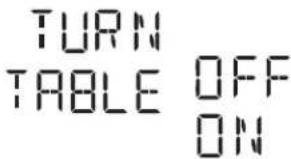 | 3. [Z4GS] | 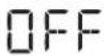 |
| Turn off fan when desired | ||||
| 3. |  | 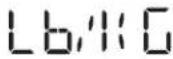 | NOTE | |
| If the temperature from the range or cooktop below the oven gets too hot, the vent fan will automatically turn on to protect the oven.It may stay on up to an hour to cool the oven.When this occurs, the Vent pad will not turn the fan off. | ||||
| 4. |  |  | ||
| 5. |  |  | USING COOKTOP LIGHTThe pad controls the cooktop light. If the light is OFF the first touch of the light pad will turn the light HIGH, second touch LOW and third touch OFF. | |
| • Suppose you want to set the light for HIGH from the OFF position. | ||||
| 6. |  | 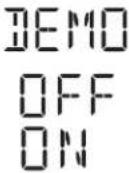 | Touch: Display Shows: | |
| 1. [IMAGE] | HIGH | |||
| 2. [IMAGE] | LOW | |||
| 7. | START+30 Sec |  | 3. [IMAGE] | OFF |
NOTE
USING COOKTOP LIGHT
| 6. | DEMO | |
| OFF | ||
| ON |
Touch: Display Shows:
| 1. | [IMAGE] | HIGH |
| 2. | [DW48] | [1974] |
| 3. | [1270] | [CO23] |
| 7. | START+30 Sec |
Display for 2 seconds then clear.
Disconnect the power cord or leave the door open to deactivate the oven during cleaning. Disconnect the power cord before replacing filters and lights.
EXTERIOR
The outside surface is precoated steel and plastic. Clean the outside with mild soap and water; rinse and dry with a soft cloth. Do not use any type of household or abrasive cleaner.
DOOR
Disconnect the power cord or deactivate the oven with setting Child Lock before cleaning to prevent unexpected manipulation.
Wipe the window on both sides with a soft cloth to remove any spills or spatters. Metal parts will be easier to maintain if wiped frequently with a soft cloth.
Avoid the use of spray and other harsh cleaners as they may stain, streak or dull the door surface.
INTERIOR
Cleaning is easy because little heat is generated to the interior surfaces; therefore, there is no baking and setting of spills or spattering. To clean the interior surfaces, wipe with a soft cloth and warm water. DO NOT USE ABRASIVE OR HARSH CLEANERS OR SCOURING PADS. For heavier soil, use baking soda or a mild soap; rinse thoroughly with hot water. The rack can be cleaned with hot soapy water, rinsed and dried.
WAVEGUIDE COVER
The waveguide cover is located on the ceiling in the microwave oven cavity. It is made from mica so requires special care. Keep the waveguide cover clean to assure good microwave oven performance. Carefully wipe with a damp cloth any food spatters from the surface of the cover immediately after they occur. Built-up splashes may overheat and cause smoke or possibly catch fire. DO NOT REMOVE THE WAVEGUIDE COVER.
ODOR REMOVAL
Occasionally, a cooking odor may remain in the microwave oven. To remove, combine 1 cup water, grated peel and juice of 1 lemon and several whole cloves in a 2-cup glass measuring cup. Boil for several minutes using 100% power. Allow to set in microwave oven until cool. Wipe interior with a soft cloth.
TURNTABLE/TURNTABLE SUPPORT
The turntable and turntable support can be removed for easy cleaning. Wash them in mild, sudsy water; for stubborn stains use a mild cleanser and non-abrasive scouring sponge. They are also dishwasher-proof. Use upper rack of dishwasher. The turntable motor shaft is not sealed, so excess water or spills should be wiped up immediately.
GREASE FILTER
Filter should be cleaned at least once a month. Never operate the fan or microwave oven without the filter in place.
- Pull down slightly on the tab toward the front of the microwave oven and remove the filter.
- Soak the filter in a sink or dish pan filled with hot water and detergent. DO NOT use ammonia or other alkali; they will react with the filter material and darken it.
- Agitate and scrub with a brush to remove embedded dirt.
- Rinse thoroughly and shake dry.
- Replace by fitting the filter back into the opening.
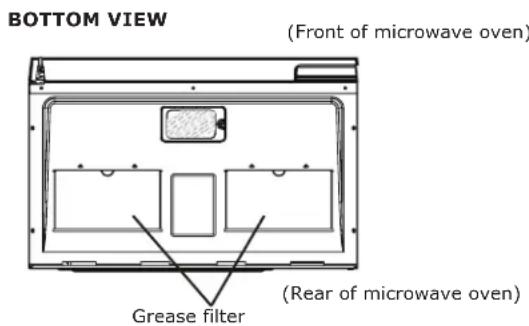
Disconnect the power cord or leave the door open to deactivate the oven during cleaning. Disconnect the power cord before replacing filters and lights.
Cleaning the exhaust filters
The oven ventilation exhaust filters should be removed and cleaned often; generally at least once every month.
Vent exhaust filter part number 5304478913 To order parts call 833-337-4006

CAUTION
To avoid risk of personal injury or property damage, do not operate oven hood without filters properly in place.
BOTTOM VIEW
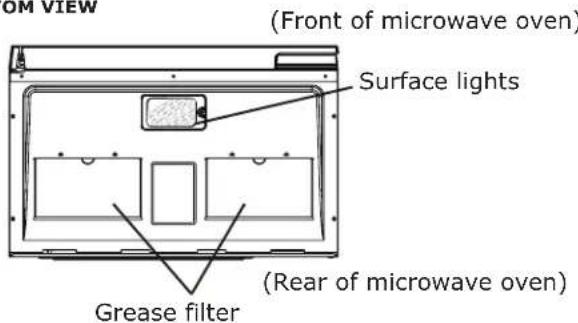
- To remove the exhaust ventilation filters, slide the filter to the rear. Then pull filter downward and push to the other side. The filter will drop out.
natural_image
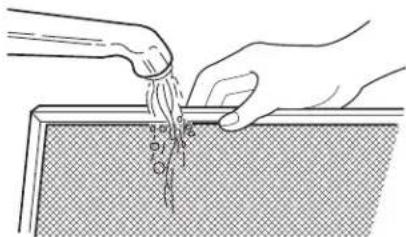
Illustration of hands pouring liquid from a container onto a textured surface (no text or symbols)- Soak the ventilation filters in hot water using a mild detergent. Rinse well and shake to dry or wash in a dishwasher. Do not use ammonia. The aluminum on the filter will corrode and darken.
natural_image
Simple line drawing of a container with a lid and an arrow pointing to it (no text or symbols)- To reinstall the exhaust ventilation filter, slide it into the side slot, then push up and toward oven to lock. Reinstall the 2nd filter using the same procedure.
Surface light replacement

CAUTION
To avoid risk of personal injury or property damage, wear gloves when replacing the light bulbs.
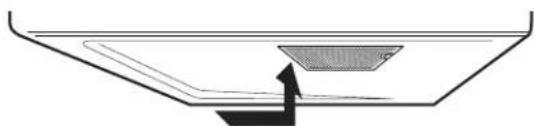
- Unplug the microwave oven or turn off power at the main circuit breaker.
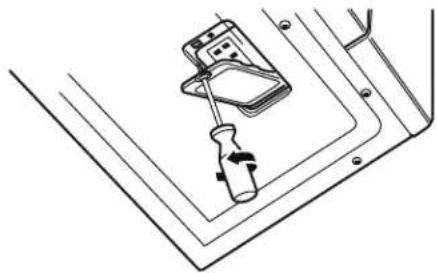
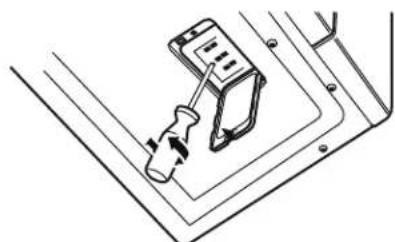
- Remove the LED light cover mounting screws at both light positions under the microwave.
natural_image
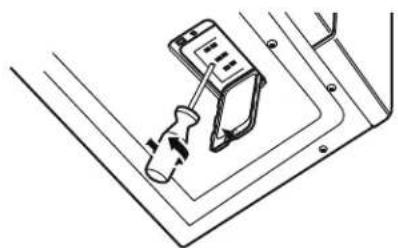
Technical line drawing of a mechanical device with a screwdriver inserted, no text or symbols present- Remove the LED light mounting screw.
natural_image
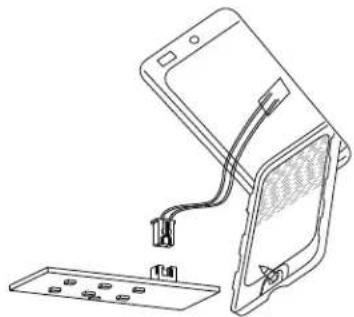
Technical line drawing of a screwdriver inserted into a component, no text or symbols present- Unplug the LED light from the harness, replace with LED light of part# 5304499540. To order parts call 833-337-4006. Then reconnect the harness.
natural_image
Line drawing of a device with an open lid and cable, showing internal components (no text or symbols)- Re-install LED light and mounting screw. When re-installing mounting screw be careful not to damage the LED light.
- Re-install LED light cover and mounting screw.
- Plug the microwave back into the power supply or turn the power back on at the main circuit breaker.
Disconnect the power cord or leave the door open to deactivate the oven during cleaning. Disconnect the power cord before replacing filters and lights.
CHARCOAL FILTER REPLACEMENT
Charcoal Filter installed in your microwave oven, is used for non vented, recirculated installation. The filter should be changed every 6 to 12 months depending on use.
- Disconnect power to the microwave oven at the circuit breaker panel or by unplugging.
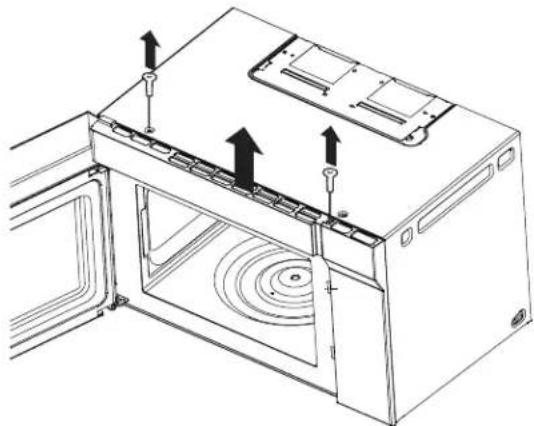
- Remove the vent grill mounting screws.
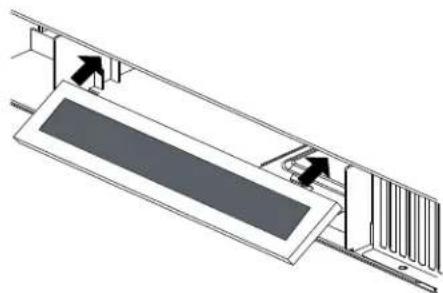
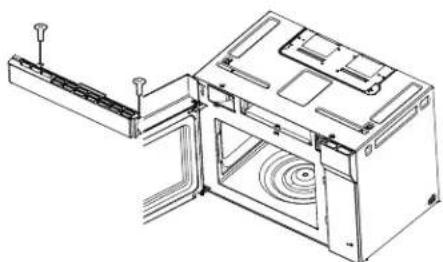
- Pull the vent grill away from the unit.
natural_image
Line drawing of a microwave oven with mounting hardware and ventilation system (no text or symbols)- Remove the charcoal filter and replace with part number.
natural_image
Technical diagram of a mechanical assembly with directional arrows indicating motion or force (no text or symbols present)- Put the vent grill back on unit.
natural_image
Technical line drawing of a mechanical device with internal components and mounting brackets (no text or symbols)OVEN LIGHT REPLACEMENT
Remove the vent grill per charcoal filter replacement instructions.
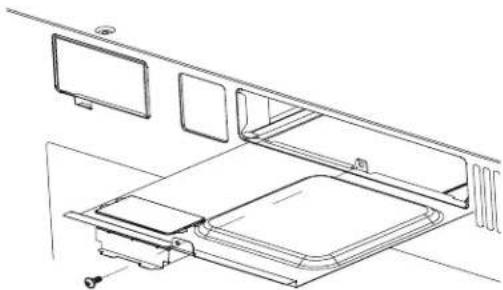
- Remove the light cover mounting screw, open light light cover by carefully pulling up on the front edge.
natural_image
Technical line drawing of a mechanical assembly with no visible text or symbols- Remove the LED bracket and light assembly. Remove the LED light from the bracket by removing the mounting screw and replace only with part 5304499540. To order parts call 833-337-4006.
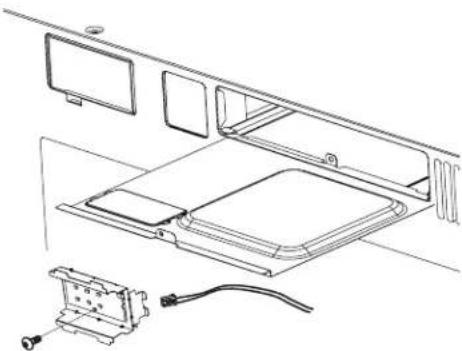
natural_image
Technical line drawing of a mechanical assembly with components and wiring (no text or symbols)- Re-install LED light to the bracket with mounting screw. When re-installing mounting screw be careful not to damage the LED light.
- Reconnect LED light to the harness and place the LED light assembly back into the light cover.
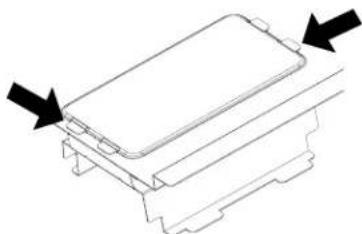
natural_image
Technical line drawing of a mechanical component with arrows indicating direction (no text or symbols)-
Replace the microwave oven light cover by carefully pushing into place and mounting the screw.
-
Put the vent grill back on unit.
Please check the following before calling for service: Place one cup of water in a glass measuring cup in the microwave oven and close the door securely. Operate the microwave oven for one minute at HIGH 100%.
A Does the microwave oven light come on?
B Does the cooling fan work? (Put your hand on the louver above the Control Panel.)
C Does the turntable rotate? (It is normal for the turntable to turn in either direction.)
D Is the water in the microwave oven warm?
| YES | NO | |
| YES | NO | |
| YES | NO | |
| YES | NO |
If "NO" is the answer to any of the above questions, please check electrical outlet, fuse and/or circuit breaker. If they are functioning properly, CONTACT (833)337-4006.
A microwave oven should never be serviced by a "do-it-yourself" repair person.
NOTE
- If time appearing in the display is counting down very rapidly, check Demonstration Mode in the CONVENIENT FEATURES section to make sure DEMO Mode is OFF.
- If the oven is set for more than 30 minutes at, 100 percent power level, after the first 30 minutes the power level will automatically adjust itself to 80 percent power to avoid overcooking.
SPECIFICATIONS
| AC Line Voltage: Single phase 120V, 60Hz, AC only | |
| AC Power Required: 1500 W 13.5 A | |
| Output Power*: 1000 W | |
| Frequency: 2450 MHz | (Class B/Group2)** |
| Outside Dimensions (including handle): | 23 55/64(W) X 16 21/32(H) X 16 3/16(D) |
| Cavity Dimensions: 15 | 25/64(W) x 10 45/64(H) X 15 9/32(D) |
| Microwave oven Capacity***: | 1.4 Cu.Ft. |
| Cooking Uniformity: Turntable | |
| Weight: Approx. (net) | 52.76lbs, (gross) 61.42lbs |
| Work/Night Light: 1*1.2W LED | |
| Oven Light: 1*1.2W LED | |
* The International Electrotechnical Commission's standardized method for measuring output wattage. This test method is widely recognized.
** This is the classification of ISM (Industrial, Scientific and Medical) equipment described in the International Standard CISPR11.
*** Internal capacity is calculated by measuring maximum width, depth and height. Actual capacity for holding food is less.
In compliance with standards set by:
FCC - Federal Communications Commission Authorized.
DHHS - Complies with Department of Health and Human Services (DHHS) rule, CFR, Title 21, Chapter I, Subchapter J.
- This symbol on the nameplate means the product is listed by Underwriters Laboratories, Inc.
- This symbol on the nameplate means the product is listed by Underwriters Laboratories, Inc. for use in USA or Canada.
How long is the IKEA guarantee valid?
This guarantee is valid for five (5) years from the original date of purchase of Your appliance at IKEA, unless the appliance is named LAGAN or TILLREDA in which case two (2) years of guarantee apply. The original sales receipt is required as proof of purchase. If service work is carried out under guarantee, this will not extend the guarantee period for the appliance.
Who will execute the service?
IKEA "Service Provider" will provide the service through its own service operations or authorized service partner network.
What does this guarantee cover?
The guarantee covers faults of the appliance which have been caused by faulty construction or material faults from the date of purchase from IKEA. This guarantee applies to domestic use only. Some exceptions not guaranteed are specified under the headline "What is not covered under this guarantee?" Within the guarantee period, the costs to remedy the fault (e.g., repairs, parts, labour and travel) will be covered, provided that the appliance is accessible for repair without special expenditure. On these conditions the local regulations are applicable. Replaced parts become the property of IKEA.
What will IKEA do to correct the problem?
IKEA appointed Service Provider will examine the product and decide, at its sole discretion, if it is covered under this guarantee. If considered covered, IKEA Service Provider or its authorized service partner through its own service operations, will then, at its sole discretion, either repair the defective product or replace it with the same or a comparable product.
What is not covered under this guarantee?
- Normal wear and tear.
- Deliberate or negligent damage, damage caused by failure to observe operating instructions, incorrect installation or by connection to the wrong voltage, damage caused by chemical or electrochemical reaction, rust, corrosion or water damage including but not limited to damage caused by excessive lime in the water supply, damage caused by abnormal environmental conditions.
- Consumable parts including batteries and lamps.
- Non-functional and decorative parts which do not affect normal use of the appliance, including any scratches and possible colour differences.
- Accidental damage caused by foreign objects or substances and cleaning or unblocking of filters, drainage systems or soap drawers.
- Damage to the following parts: ceramic glass, accessories, crockery and cutlery baskets, feed and drainage pipes, seals, lamps and lamp covers, screens, knobs, casings and parts of casings. Unless such damages can be proved to have been caused by production faults.
- Cases where no fault could be found during a technician's visit.
- Repairs not carried out by our appointed service providers and/or an authorized service contractual partner or where non-original parts have been used.
- Repairs caused by installation which is faulty or not according to specification.
- The use of the appliance in a non-domestic environment i.e. professional use.
- Transportation damages. If a customer transports the product to his home or another address, IKEA is not liable for any damage that may occur during transport. However, if IKEA delivers the product to the customer's delivery address, then damage to the product that occurs during this delivery will be covered by IKEA.
- Cost for carrying out the initial installation of the IKEA appliance. However, if an IKEA appointed Service Provider or its authorized service partner repairs or replaces the appliance under the terms of this guarantee, the appointed Service Provider or its authorized service partner will reinstall the repaired appliance or install the replacement, if necessary.
How country law applies
The IKEA guarantee gives you specific legal rights, and you may also have other rights which vary from state to state or jurisdiction to jurisdiction. However these conditions do not limit in any way consumer rights described in the local legislation.
Area of validity
For appliances which are purchased in United States or Canada, or moved to one of the mentioned countries, the services will be provided in the framework of the guarantee conditions normal in the specified country.
An obligation to carry out services in the framework of the guarantee exists only if the appliance complies and is installed in accordance with:
- the technical specifications of the country in which the guarantee claim is made;
- the Assembly Instructions and User Manual Safety Information.
The dedicated AFTER SALES for IKEA appliances
Please don't hesitate to contact IKEA appointed After Sales Service Provider to:
• make a service request under this guarantee;
- ask for clarifications on installation of the IKEA appliance in the dedicated IKEA kitchen furniture;
- ask for clarification on functions of IKEA appliances.
Phone number:
(833) 337-4006
Opening hours:
Monday - Friday
8:30 am - 8:00 pm EST
To ensure that we provide you with the best assistance, please read carefully the Assembly Instructions and/or the User Manual before contacting us.
How to reach us if you need our service
In order to provide you a quicker service, we recommend to use the specific phone
numbers listed on this manual. Always refer to the numbers listed in the booklet of the specific appliance you need an assistance for.
Please also always refer to the IKEA article number (8 digit code) placed on the rating plate of your appliance.
SAVE THE SALES RECEIPT!
It is your proof of purchase and required for the guarantee to apply. The sales receipt also reports the IKEA name and article number (8 digit code) for each of the appliances you have purchased.
Do you need extra help?
For any additional questions not related to After Sales of your appliances please contact your nearest IKEA store call centre. We recommend you read the appliancedocumentation carefully before contacting us.
ES
TABLA DE CONTENIDO
12
13
(Frente del horno microondas)
natural_image
Top-down schematic of a laptop front panel with three compartments and a door (no text or symbols)(Posterior del horno microondas)
Filtros de grasa
1f. PRESS AGAIN FOR OPTIONS:
| 1. | SENSOR COOK | BACON |
| 2. | SENSOR COOK | FROZEN BINNER |
| 3. | SENSOR COOK | RICE |
| 4. | SENSOR COOK | FROZEN BREAKFAST |
| 5. | SENSOR COOK | FROZEN PIZZA |
| 6. | START +30 Sec | FROZEN PIZZA |
natural_image
Illustration of hands pouring liquid from a container onto a surface (no text or symbols)natural_image
Simple line drawing of a container with a lid and an arrow pointing to it (no text or symbols)natural_image
Line drawing of a mechanical device with a screwdriver inserted, no text or symbols presentnatural_image
Technical line drawing of a screwdriver inserted into a socket on a base panel (no text or symbols)natural_image
Line drawing of a device with an attached cable and connector, showing no text or symbolsnatural_image
Line drawing of a microwave oven with mounting hardware and ventilation system (no text or symbols)natural_image
Pure technical diagram of a mechanical assembly with no text, numbers, or symbolsnatural_image
Technical line drawing of an internal device with ventilation duct and mounting bracket (no text or symbols)REEMPLAZO DE LA LUZ
natural_image
Technical line drawing of a mechanical assembly with no visible text or symbolsnatural_image
Technical line drawing of a mechanical assembly with no visible text or symbolsnatural_image
Pure technical line drawing of a mechanical component with arrows indicating direction (no text or symbols)GARANTIE LIMITÉE IKEA 0
IMPORTANTES CONSIGNES DE
PRÉCAUTIONS POUR ÉVITER L'EXPOSITION POSSIBLE À UNE ÉNERGIE MICRO-ONDES EXCESSIVE
12
13
natural_image
Diagram of a laptop front panel with three compartments and a door, no text or symbols present1f. PRESS AGAIN FOR OPTIONS:
natural_image
Diagram of a laptop front panel with three compartments and a display (no text or symbols)natural_image
Illustration of hands pouring liquid from a container onto a textured surface (no text or symbols)natural_image
Simple line drawing of a container with a lid and an arrow pointing to it (no text or symbols)natural_image
Technical line drawing of a mechanical device with a screwdriver inserted, no text or symbols present- Retirez la vis de montage de la lampe LED.
natural_image
Technical line drawing of a mechanical component with a tool inserted, no visible text or symbolsnatural_image
Line drawing of a device with an open panel and cable, showing internal components (no text or symbols)natural_image
Line drawing of a microwave oven with mounting hardware and ventilation system (no text or symbols)natural_image
Technical diagram of a mechanical assembly with directional arrows indicating motion or force (no text or symbols present)natural_image
Technical line drawing of a mechanical device with internal components and mounting brackets (no text or symbols)REPLACEMENT DE LA LUMIÈRE DU FOUR
natural_image
Technical line drawing of a mechanical assembly with no visible text or symbolsnatural_image
Technical line drawing of a mechanical assembly with housing, panel, and electrical connector (no text or symbols)natural_image
Technical line drawing of a mechanical component with arrows indicating direction (no text or symbols)| OUI | NON |
| OUI | NON |
| OUI | NON |
| OUI | NON |