304523 - Welding machine Brandson - Free user manual and instructions
Find the device manual for free 304523 Brandson in PDF.


| Brand | Brandson |
| Model | 304523 |
| Category | Soldering machine (soldering station) |
| Power supply | 230 V DC, 50 Hz |
| Power consumption | 75 W |
| Temperature range | 200 °C - 480 °C |
| Temperature accuracy | ± 2% |
| Display type | LED |
| Weight | Approx. 2.1 kg |
| Operating temperature | 0 °C - 40 °C |
| Storage temperature | -20 °C - 80 °C |
| Storage humidity | 35% - 45% |
| Package contents | Soldering station, soldering iron, soldering iron holder, sponge, soldering tip |
| Main functions | Heating, temperature regulation, calibration, tip change |
| Safety | Child protection, safety instructions, automatic shutdown not specified |
| Maintenance and cleaning | Clean with a dry lint-free cloth; clean the tip on a damp sponge and a brass brush |
| Spare parts and repairability | Replaceable soldering tip; repairs by a professional |
| Number of manual pages | 60 pages |
| Warranty | Warranty void in case of unauthorized repair |
Frequently Asked Questions - 304523 Brandson
User questions about 304523 Brandson
0 question about this device. Answer the ones you know or ask your own.
Ask a new question about this device
Download the instructions for your Welding machine in PDF format for free! Find your manual 304523 - Brandson and take your electronic device back in hand. On this page are published all the documents necessary for the use of your device. 304523 by Brandson.
USER MANUAL 304523 Brandson
natural_image
Line drawing of a soldering machine with attached probe and base (no text or symbols)Table of contents
- Deutsch .... 3
- English 15
- Français 25
- Italiano 37
- Español....49

Safety guidelines for this device
- This device can be operated by children from 8 years of age and above, as well as by people with reduced physical, sensory or mental capacities or who lack knowledge or experience, if they have been supervised or instructed regarding safe use of the device, and understand the resultant dangers.
- Children and youngsters under 16 and people who are not familiar with this user manual should not use the device. Children should be supervised to ensure that they do not play with the device.
- Children should not play with the device.
- Cleaning and user maintenance should not be carried out by children without
supervision.
- Keep others away from your work-place. Do not allow others to touch the soldering iron or cable.
- Do not use the device in wet or humid surroundings.
- Do not bring flammable objects near the hot soldering iron.
- If you are not using the device, store it in a dry, elevated and locked place, out of reach of children. Make sure that the unused device is disconnected from mains.
- Operate the device only with the voltage described on the specification label.
-
Wear suitable working clothes when using the device.
-
Always wear safety glasses when using the device.
- Use a fume extractor for extracting the solder fumes.
- Do not use the cable and the device for unintended purposes.
- Do not carry the device using the cable.
- Use clamping fixtures to fix the workpiece adequately.
- Caution! The device becomes very hot during operation! Ensure that you do not burn yourself!
- Make sure that your workplace is ergonomically set up and your working posture is correct.
- Always use the device carefully and please maintain it appropriately. Always follow the instructions in this
user manual. Repairs should be carried out only by acknowledged technicians.
- Make sure that the device is always turned off when you plug it into the socket.
- Check the device for any damage before using it for the first time. If you notice any damage, do not continue using the device!
- Follow the safety regulations applicable for the workplace.
- Never use the device if the parts to be soldered are carrying current! Always make sure that the workpieces are disconnected!
Intended use:
- The soldering station is used to carry out electrical and electronic soldering.
Thank you for choosing a Brandon product. Please read the following user manual carefully so as to get the most from the product you have purchased.
1. Scope of delivery
- Soldering station
- Soldering iron
- Soldering iron holder
- Pad
- Soldering tip
2. Technical data
| Power supply 230V DC 50 Hz | |
| Temperature range 200°C to 480°C | |
| Temperature accuracy ± 2% | |
| Display type LED | |
| Weight approx. 2.1 kg | |
| Power consumption 75 W | |
| Operating temperature 0°C to 40°C | |
| Storage temperature -20°C to 80°C | |
| Humidity for storage 35% - 45% |
- Product details
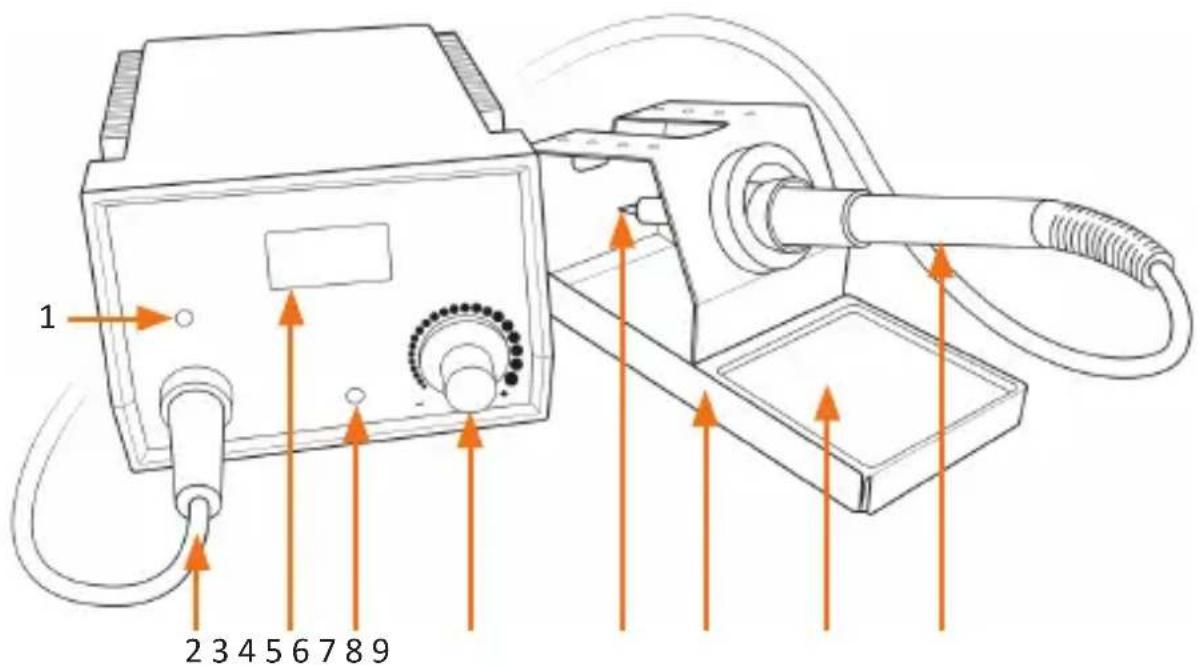
| No. Description | |
| 1 "HEATING" LED | |
| 2 Soldering iron connection | |
| 3 Display | |
| 4 "CAL" potentiometer (calibration) | |
| 5 Temperature potentiometer | |
| 6 Soldering iron | |
| 7 Soldering iron holder | |
| 8 Pad | |
| 9 Soldering iron |
4. Initial use
Take the device and all the accessories out of the package and remove the packaging material.
- Place the soldering iron in the soldering iron holder. Connect the soldering iron plug to the soldering iron socket.
- Please ensure that the On/Off switch is switched off.
- Select the soldering tip appropriate for your work and fix it to the soldering iron (see Chapter 5 in this user manual).
- Check if the mains voltage matches the mains voltage indicated on the specification plate. If so, insert the plug of the soldering station into a properly installed socket.
- Moisten the pad and place it in the pad holder of the soldering iron holder.
- Switch on the device using the On/Off switch located at the back of the device.
- Set the desired temperature using the "Temperature potentiometer (5)". The display shows the set temperature and then the actual temperature when adjusting.
- During the heating process, the "HEATING" LED glows continuously. Once the actual temperature reaches the set temperature, the "HEATING" LED starts flashing. You can now start the soldering.
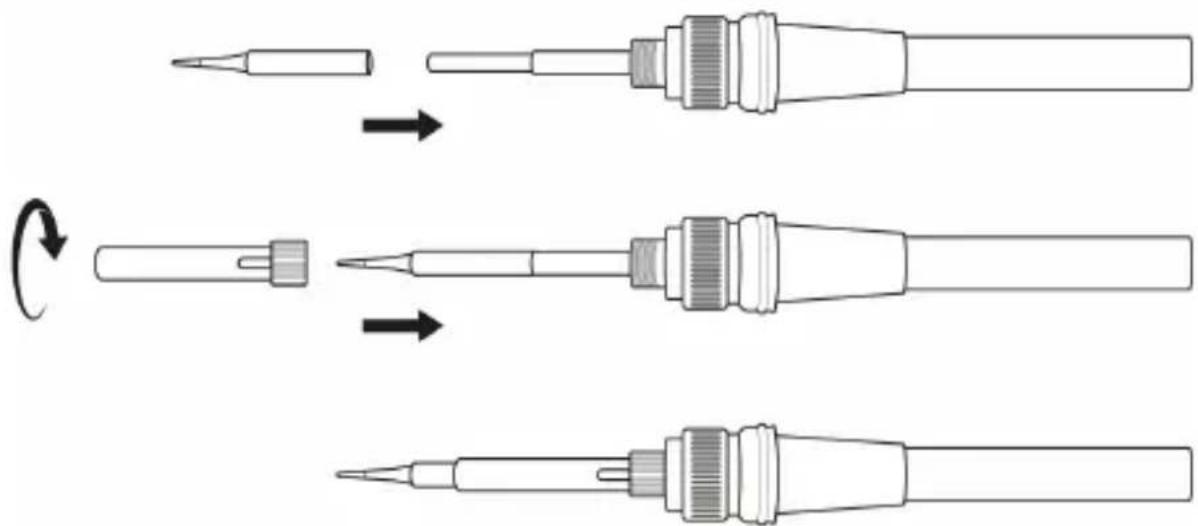
5. Changing the soldering tip
Make sure that the soldering station is switched off and the soldering iron has completely cooled down before changing the soldering tip.
- Remove the soldering tip holder (1) from the soldering iron.
- Remove the soldering tip (2) from the soldering iron (3).

- Select a suitable soldering tip and insert it into the soldering iron (3).
- Now tighten the soldering tip holder (1) onto the soldering iron.

Caution! When replacing or inserting the soldering tip, make sure that it is secure and fixed properly!
6. Cleaning, care and maintenance
Follow the safety instructions strictly while cleaning.
- In doing so, make sure that the soldering tip is always wet with solder.
- Before soldering, always wipe the soldering tip on the damp pad to remove any flux and solder residues.
- Occasionally clean the soldering tip using a brass brush to remove oxide and flux residues.
- The soldering tip can wear out after some time. This wear increases the soldering time, since the heat conduction deteriorates. Replace the soldering tip in due time if you experience increase in wear.
Use a dry, lint-free cloth to clean the soldering station. Do not use any aggressive cleaning agents, alcohol or other chemical solvents, as they may cause the device to malfunction or damage the housing.
7. Calibration
Attention! Use at your own risk! Please calibrate it only by qualified personnel! There is a risk of fire if the wrong procedure is used! It is essential to use a sufficient thermometer in order to calibrate the corresponding temperature.
You can recalibrate the temperature with the "CAL" potentiometer (calibration). To do this, remove the rubber cap and turn the "CAL" potentiometer carefully.

8. Safety instructions and disclaimer
Please do not try to open the device to carry out repairs or modifications. Avoid contact with the mains voltage. Do not short-circuit the product. The device is not waterproof. Please use it only in dry surroundings. Protect it from high humidity, water and snow. Do not expose the device to high temperatures. Do not expose the device to sudden changes in temperature or strong vibrations, as this could damage the electronic components. Check the device for any damage before using it. The device should not be used if it was subject to impact or has been damaged
in some other manner. Please comply with the local regulations and restrictions. Do not use the device for purposes other than those described in the user manual.
This product is not a toy. Keep it out of the reach of children or mentally disabled persons. Any repair or modification to the device, which is not carried out by the original supplier, will void any warranty and guarantee claims. The device should only be used by those who have read and understood this user manual. The specifications of the device may be changed without any special prior notification.

9. Disposal instructions
In line with the European WEEE directive, electrical and electronic devices should not be disposed of along with domestic waste. Their components have to be separately sent for recycling or disposal, because improper disposal of toxic and dangerous components may permanently damage the environment. According to the electrical and electronic equipment act (ElektroG), you are obliged (as a consumer) to return (free of charge) electrical and electronic devices to the manufacturer, the point of sale or public collection points at the end of their service life. The relevant local laws regulate the details in this regard. The symbol displayed on the product, in the user manual or/and on the packaging refers to these regulations. With this manner of sorting, recycling and disposal of used devices, you make an important contribution towards protecting our environment.

WEEE directive: 2012/19/EU WEEE Register no.: DE 67896761
The company WD Plus GmbH hereby certifies that the device 304523/20200415SZ272 complies with the fundamental requirements and all other relevant stipulations. A complete conformity statement can be obtained from: WD Plus GmbH, Wohlenbergstraße 16, 30179 Hannover


Brand : Brandson
Model : 304523
Category : Welding machine