303575 - Cooker Arendo - Free user manual and instructions
Find the device manual for free 303575 Arendo in PDF.


| Product type | Induction cooktop |
| Brand | Arendo |
| Model | 303575 |
| Dimensions (L x W x H) | 35 x 28 x 6.8 cm |
| Weight | 2.525 kg |
| Power supply | 220-240 V AC, 50/60 Hz |
| Maximum power | 2000 W |
| Temperature range | 60°C to 200°C (in 20°C increments) |
| Timer | 1 minute to 3 hours |
| Main functions | Timer, keep warm, key lock, automatic pan detection, audible signal |
| Surface material | Glass ceramic |
| Pan compatibility | Cast iron and magnetic stainless steel (diameter 10-26 cm, optimal 15-20 cm) |
| Energy consumption | 194.5 Wh/kg (standard EN 60350-2) |
| Care and cleaning | Clean with a soft, damp cloth after complete cooling. Do not immerse in water. |
| Safety | Automatic shut-off, overheating protection, child lock, pan detection |
| Spare parts and repairability | Contact after-sales service for any repairs. Do not open the casing. |
| General information | For domestic use only. Do not use with an external timer. Recommended maximum usage duration: 3 hours, with a 30-minute cooling period. |
Frequently Asked Questions - 303575 Arendo
User questions about 303575 Arendo
0 question about this device. Answer the ones you know or ask your own.
Ask a new question about this device
Download the instructions for your Cooker in PDF format for free! Find your manual 303575 - Arendo and take your electronic device back in hand. On this page are published all the documents necessary for the use of your device. 303575 by Arendo.
USER MANUAL 303575 Arendo
ENG: Latest information, drivers, user manuals and data sheets can be found at www.ganzeinfach.de in our download area.
IMPORTANT SAFETY INSTRUCTIONS
- Before connecting the appliance, ensure that the mains voltage matches the specification on the nameplate of the appliance!
- This product should not be operated if the cable or plug is damaged or defective!
- When disconnecting from the mains, please hold the plug instead of pulling the power cord.
- The product should not be used if it has fallen down or has been damaged!
- Do not touch any hot surfaces! Always use the knobs or handles provided!
- Never immerse the appliance, plug or cable in water or any other liquid! The product should not be rinsed in water!
- Turn off the appliance after use. Disconnect the mains plug before cleaning it.
- Do not allow the cable and the plug to protrude over an edge or over hot surfaces!
- Use only accessories recommended by the appliance manufacturer! There is a risk of injury!
- Monitor the product constantly, especially if children or invalid persons are nearby.
- Do not place the product near other hot appliances such as gas, electric or backing ovens.
- The product should not be placed on an unstable, moist surface or on surfaces that are not heat-resistant during use.
- Any damage or malfunction should be avoided.
- Cleaning and maintenance of the appliance should not be carried out by children without supervision. Cleaning may be carried out only by children who are older than 8 years and under supervision.
- Do not cover the appliance during use! Heat and steam should be able to escape. A fire can occur if it is covered with flammable material.
- Use the appliance only for intended purpose described in this user manual!
- Do not use the appliance outdoors!
- The inserted socket must be provided with an earthing protection. The plug must be firmly in place, otherwise the loose connection may cause a fire. Multifunctional sockets should not be used simultaneously with other appliances.
- This appliance is not intended to be used by individuals (including children) with reduced physical, sensory, or mental capabilities or lack of experience and knowledge unless they are supervised by a person responsible for their safety or have been instructed.
- Do not use water as an extinguishing agent if the product catches fire. Please cover the burning food items quickly with a damp cloth.
- This appliance can be used by children above the age of 8 years and persons with reduced physical, sensory or mental capabilities or lack of experience and knowledge if they are supervised or have been instructed concerning the safe use of the appliance and understand the hazards involved.
- Place the product out of the reach of children.
- Keep the appliance and cable out of the reach of children under the age of 8 years.
- Children should always be supervised to ensure that they do not play with the appliance!
- If the power cable is damaged, it should be replaced by the manufacturer, his customer service personnel or an equally qualified person.
- This appliance should not be operated with an external timer or a separate remote control system!
- Never open the housing of the appliance. There is a risk of electric shock!
- The appliance is intended for household use or similar uses, e.g., small kitchens in shops, offices or other workplaces, farms, for use by guests in hotels, motels or other lodging establishments, in private boarding houses or holiday homes. The company is not liable for any malfunction or damage caused by commercial use of the product, improper use or unspecified use. Such damage will void the warranty.
Do not use the product if one of the following situation occurs:
- The product or the power cable is damaged.
- The product falls down accidentally, leading to the product being in a non-standard condition.
If any of the above happens, please contact our customer service department.

CAUTION: This appliance becomes very hot during use! There is a risk of burns! Use the device up to maximum of 3 hours at a time and allow it to cool for at least 30 minutes after use.
- To avoid risks, do not place any paper, aluminium foil, cloth or other unsuitable materials on the induction cooker.
- People with pacemakers, especially the older types of devices, should consult their doctor before initial use, and ask if they are allowed to use the appliance, since the pacemaker's function may be negatively affected.
- To avoid risks, do not insert any foreign objects such as iron wire into the air vent and do not block it.
- Keep it at a safe distance from objects that react to magnets, such as radio, television, cash cards, etc.
- The appliance should not be permanently installed.
-
Use only induction-safe dishes.
-
Never leave any metal objects, such as knives, forks or spoons on the induction plate, as they can become very hot.
- Do not heat any closed cans.
- The glass plate can become hot due to the radiating heat. Do not touch the surface immediately after cooking. Wait until the appliance cools down.
- Do not overload the induction plate. This could lead to damage. Make sure that you do not exceed the total capacity of 4kg.
Thank you for choosing an Arendo product. Please read the following user manual carefully so that you can get the most from the product you have purchased. Before using the product, first check that the delivered item is complete, accurate and undamaged.
1. Scope of delivery
- Induction plate
- User manual
2. Technical data
| Power supply 220-240 V AC 50/60 Hz | |
| Power consumption max. | 2000 W |
| Temperature 60°C - 200°C (can be adjusted in 20°C increments) | |
| Power consumption 194.5 Wh/kg | |
| Dimensions (H x W x D) approx. 6.8cm x 28cm x 35cm | |
| Weight 2525 g | |
| Product features • Timer functionAudible signalAutomatic pan detectionNon-slip base | |
The energy consumption of an electric household cooking hob (EC hob) is measured in watt hours per kg of water that was heated during standardised measurement (Wh / kg) considering all parts of the cookware under standardised test conditions, measured and rounded off to the first decimal. The standard EN 60350-2: 2013 was used as a reference for measurement and calculation.
3. Before first use
- Check that the accessories and all parts are complete as per the scope of supply and are not damaged.
-
Clean all the parts as described in the chapter "Cleaning and care" of this user manual.
-
Product details
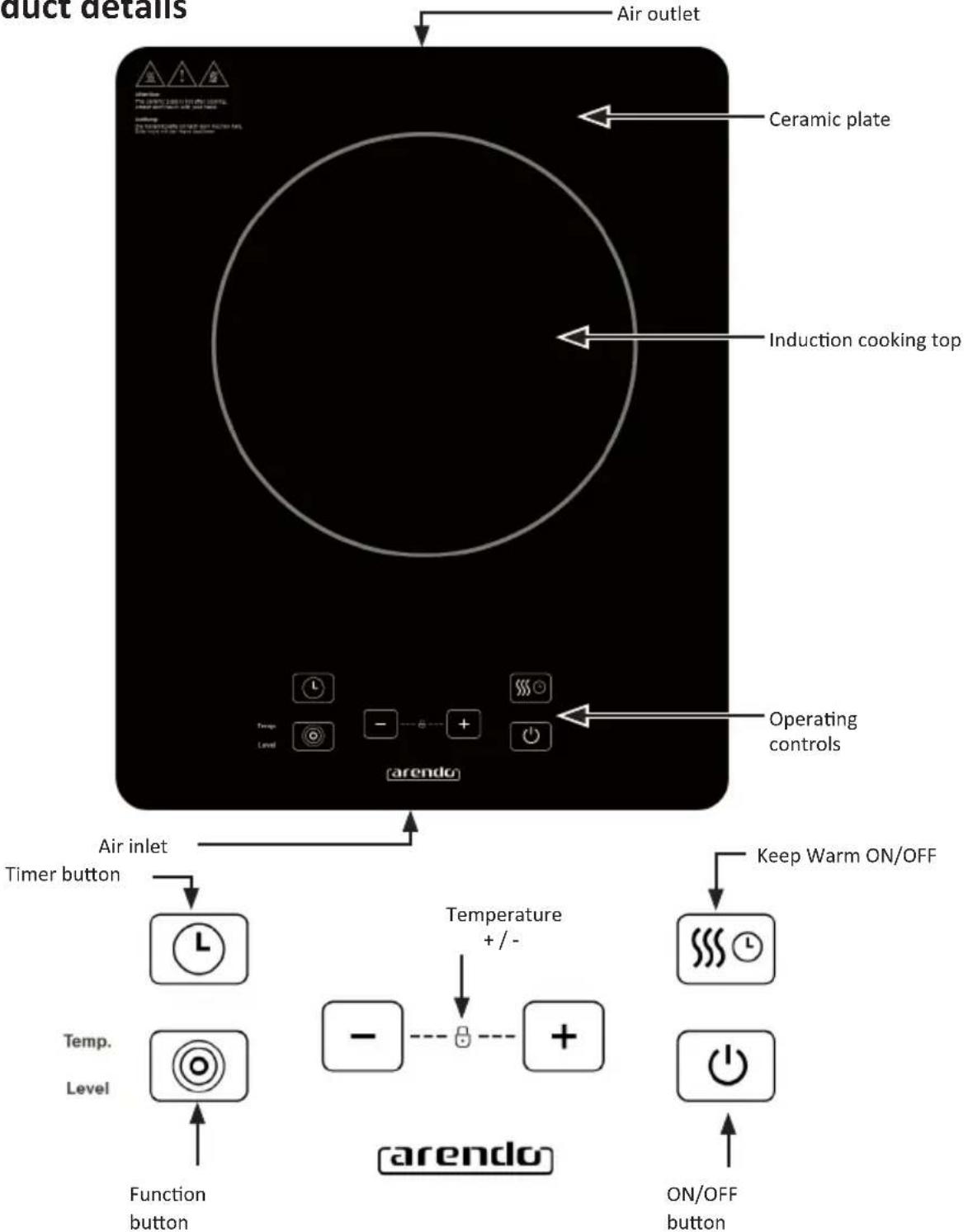
flowchart
graph TD
    A["Air outlet"] --> B[" Ceramic plate "]
    B --> C[" Induction cooking top "]
    C --> D[" Operating controls "]
    D --> E[" Air inlet "]
    E --> F[" Timer button "]
    F --> G[" Temperature +/- /- "]
    G --> H[" function button "]
    G --> I[" ON/OFF button "]
    G --> J[" Keep Warm ON/OFF "]
5. Control elements (touch)
The control elements respond to touch, so that you do not have to apply any pressure. Use the finger pad and not the fingertip. You will hear a beep every time a touch is registered.
Make sure that the control elements are clean and dry and that they are not covered by any objects (e.g., a utensil or cloth). Even a thin film of water can make the operation difficult.
6. Initial use
- Make sure the air vents are not blocked and keep the dishes away from the ceramic plate.
- Make sure that the pot or pan in which the food or liquid is present is placed in the centre of the ceramic plate.
- You will hear a beep after the power supply is connected. "L" is shown on the display. The appliance is now in standby mode.
- Press the "ON/OFF" button. The inductor cooker switches on. Press the "Function" button to change the induction cooker to heating mode.
- After pressing the "ON/OFF" button, the induction cooker switches off automatically if a "Function" button is not pressed for 10 seconds.
- If a suitable pot is not present on the ceramic plate after pressing the "Function" button, the induction cooker does not heat up. An audible alarm indicates that a pot is needed. A minute later, it switches off automatically.
7. Temperature setting
- After switching on the induction cooker, press the "Function" button to access the "Temperature" or "Power levels" mode.
- You can adjust the power level by pressing the "+" or "-" buttons.
- You can adjust the temperature by pressing the "+" or "-" buttons.
8. Keep-warm function
Press the "Keep warm ON/OFF" button. In this mode, the induction cooker keeps the food warm.
Note: The power cannot be adjusted in this mode!
9. Timer function
- Press the "Timer" button to access the Timer mode. When the timer display turns on and the numbers on the screen start flashing, press the "+" or "-" button to adjust the time. You can adjust the timer from 1 minute up to 3 hours.
- Once the settings are complete, the number flashes for a few seconds on the display and the induction cooker starts counting down. After the countdown time, the induction cooker automatically stops heating and switches off.
- The induction cooker switches off once the standard timer, or the time set by the user, is reached.
10. Button lock
Press the "+" and "-" buttons simultaneously to activate the button lock. The LED below the lock icon glows as long as the button lock is activated. Only the "ON/OFF" button works during this time. Press and hold the "+" and "-" buttons for about 3 seconds to deactivate the button lock.
11. Switching off the device
The induction cooker switches off automatically after the operating time.
Press the "ON/OFF" button to switch the appliance off.
If the pot is removed, the induction cooker stops heating immediately. After the buzzer sounds for approximately 1 minute, the appliance automatically switches to standby mode. The fan may continue running for up to 60 seconds.

Note: Do not touch the ceramic surface while "H" is displayed. The temperature is high. The temperature is low if "L" is displayed.
12. Pot material
Compatible pot material: Iron and magnetic stainless steel with a diameter of about 10-26 cm; optimum: 15 - 20 cm To keep energy losses at a minimum, thin bases are preferable.
Incompatible pot materials: Glass, ceramic, aluminium, copper and other non-magnetic materials.

Note: If you are not sure whether your pan is suitable for this appliance, please contact the pot manufacturer or check that the following symbol is present on the pot:

Alternatively, you can check the suitability of your cookware for the induction cooker by holding a magnet to the bottom of the pot. If the magnet sticks, the pot is suitable.
13. Cleaning and Care
Switch off the appliance before cleaning it. Then disconnect the power cord from the mains outlet. Wait until the plate of the induction cooker has cooled down completely. The air inlet/outlet becomes dusty after the induction cooker has been used for a long time. Please wipe it with a soft and dry cloth. Dust in the air inlet or outlet can be cleaned using a soft brush or a mini vacuum cleaner.
Wipe off oil stains from the plate. Remove them with a soft, damp cloth using a suitable cleaning agent.
Then wipe it with a soft damp cloth until the appliance is completely dry. Disconnect the power cord from the mains socket when not using the appliance for extended periods of time. Protect the induction plate from dust and insects.
14. Troubleshooting
| Error Error reason Troubleshooting | ||
| After inserting the power cord and pressing the "ON/OFF" button, the display does not light up. | Is the power cord connected properly? | Connect the power cord properly. |
| Is the mains socket, the fuse or the power cord faulty? | Check the mains socket, the fuse and power cord for any defect. Do not use the appliance if it is faulty! | |
| The "ON/STANDBY" display is lighting up and working properly, but the heating process does not start. | Is the pot material correct? | Use a pot with the proper material. |
| Technical fault | In this case, contact our customer service department. | |
| Error code | E3 E6 | Wait for a few moments and press the "ON/OFF" button once the temperature of the induction plate has returned to normal. The induction plate works as normal afterwards. |
| E7 E8 | Switch off the hot plate, until the power supply returns to normal. Then switch on the hot plate, which then works normally. | |
| E1 E2 E4E5 Eb | In this case, contact our customer service department. | |

Caution! If unusual situations arise during use, remove the power cord immediately and disconnect the power supply. Please contact our customer service department if the product malfunctions.
15. Safety instructions and disclaimer
Please do not try to open the appliance to carry out repairs or modifications. Avoid contact with the mains voltage. Do not short-circuit the product. The appliance is not waterproof, therefore please use it only in dry surroundings. Protect it from high humidity, water and snow. Do not expose the appliance to high temperatures.
Do not expose the appliance to sudden changes in temperature or strong vibrations, as this could damage the electronic components. Check the appliance for damage before using it. The appliance should not be used if it has been subject to impact or has been damaged in any other manner. Please comply with the local regulations and restrictions. Do not use the appliance for purposes other than those described in the user manual. This product is not a toy.
Keep it out of the reach of children or mentally disabled persons.
Any repair or modifications to the appliance, which are not carried out by the original supplier, will void any warranty and guarantee claims. The appliance should be used only by persons who have read and understood this user manual. The specifications of the appliance may be changed without special prior notice.
16. Disposal instructions
In line with the European WEEE directive, electrical and electronic devices should not be disposed of along with domestic waste. Their components must be separately sent for recycling or disposal, as improper disposal of toxic and dangerous components may permanently damage the environment.
According to the electrical and electronic equipment act (ElektroG), you are obliged (as a consumer) to return (free of charge) all electrical and electronic devices to the manufacturer, the point of sale, or public collection points at the end of their service life. The relevant local laws regulate the details in this regard. The symbol displayed on the product, in the user manual or/and on the packaging refers to these regulations. With this manner of sorting, recycling and disposal of used devices, you make an important contribution towards protecting our environment.

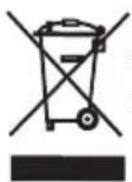
WEEE directive 2012/19/EU
WEEE Register no.: DE 67896761
WD Plus GmbH hereby certifies that the appliance 303575/20181220FS027 complies with the fundamental requirements and all other relevant stipulations. A complete conformity statement can be obtained from: WD Plus GmbH, Wohlenbergstraße 16, 30179 Hanover

CONSIGNES DE SÉCURITÉ IMPORTANTES
- IMPORTANT SAFETY INSTRUCTIONS
- Scope of delivery
- Technical data
- Before first use
- Control elements (touch)
- Initial use
- Temperature setting
- Keep-warm function
- Timer function
- Button lock
- Switching off the device
- Pot material
- Cleaning and Care
- Troubleshooting
- Safety instructions and disclaimer
- Disposal instructions
- CONSIGNES DE SÉCURITÉ IMPORTANTES
Brand : Arendo
Model : 303575
Category : Cooker