302646 - Speaker CSL - Free user manual and instructions
Find the device manual for free 302646 CSL in PDF.


| Product Type | Ergonomic Vertical Mouse |
| Brand | CSL |
| Model | 302646 |
| Dimensions | approx. 115 x 58 x 87 mm |
| Power Supply | 2 AAA batteries (1.5 V) |
| Connection | Wireless 2.4 GHz via USB receiver |
| Sensor | Optical |
| Resolution (DPI) | 800 / 1200 / 1600 (selectable) |
| Number of Buttons | 5 (left click, right click, scroll wheel + middle button, forward/backward navigation) |
| Scroll Wheel | Vertical |
| Range | Up to 10 m (estimated) |
| Weight | Approx. 100 g (estimated) |
| Compatibility | Windows, Mac, Linux (Plug-and-Play) |
| Ergonomics | Designed for left-handed users |
| Maintenance | Clean with a soft, dry cloth. Do not use harsh chemicals. |
| Safety | Do not open, avoid moisture, do not expose to high temperatures. |
| Package Contents | Mouse, USB receiver, user manual |
Frequently Asked Questions - 302646 CSL
User questions about 302646 CSL
0 question about this device. Answer the ones you know or ask your own.
Ask a new question about this device
Download the instructions for your Speaker in PDF format for free! Find your manual 302646 - CSL and take your electronic device back in hand. On this page are published all the documents necessary for the use of your device. 302646 by CSL.
USER MANUAL 302646 CSL
Ergonomic Vertical Mouse, Left-hander
Mod.-Nr.: 302646
Table of contents
- Deutsch .... 3
- English 9
- Français 15
- Italiano 22
- Español....28
ENG: Current drivers, user manuals and other relevant documents for this product can be found on our homepage.
Thank you for having chosen this product from CSL and for placing your trust in our company. Before using the ergonomic vertical mouse for the first time, please read this manual carefully to ensure your long-term enjoyment of this product. For future reference, please keep this manual.
1. Scope of delivery
• Ergonomic vertical mouse
• 2,4GHz USB receiver
- User manual
2. Technical specifications
| Polling rate | 800 / 1200 / 1600 dpi (selectable) |
| Sensor | Optical |
| Frequency range | 2402 - 2480 MHz |
| Transmitting capacity | -2,80 dBm |
| Connection | USB via 2,4GHz receiver |
| Features | 5 buttonsscroll wheel |
| Power supply | 2 AAA batteries |
| Product dimensions | Approx. 115 x 58 x 87 mm |
3. Product details
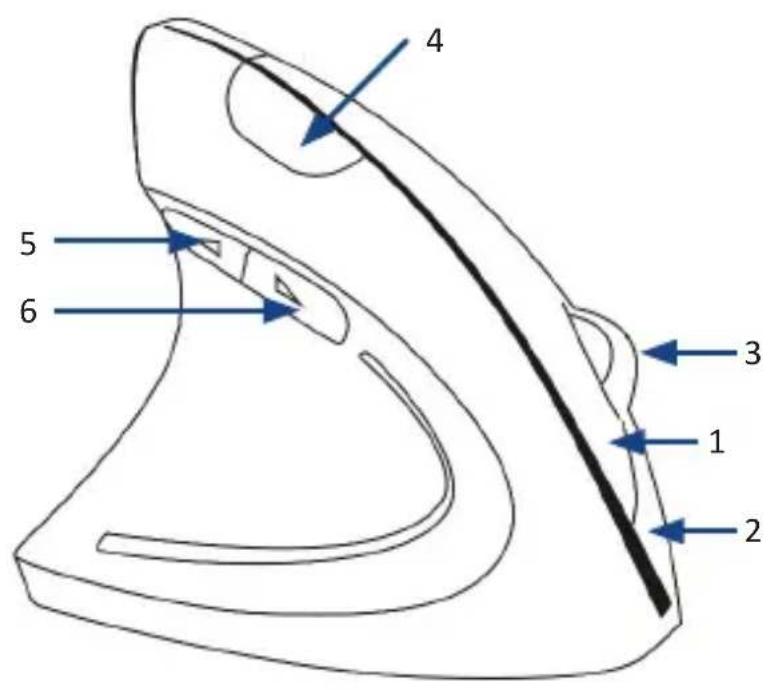
| 1 | Left mouse button |
| 2 | Right mouse button |
| 3 | Vertical scroll wheel/ middle mouse button |
| 4 | Dpi select button |
| 5 | High navigation button „next page“ |
| 6 | High navigation button „previous page“ |
Rear view:
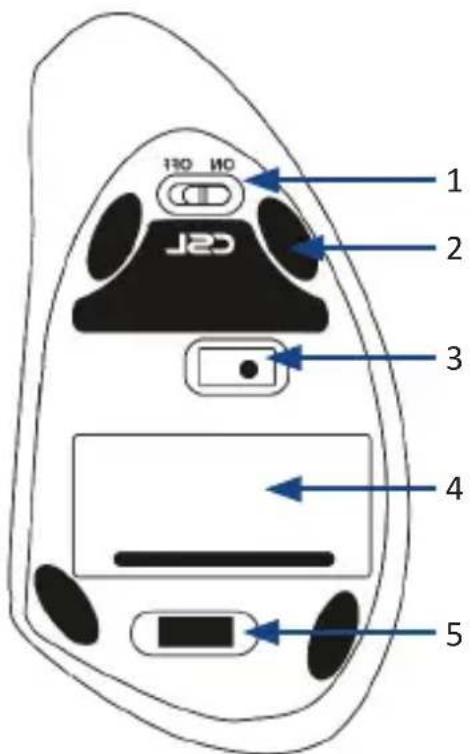
| 1 | On/ Off switch |
| 2 | Glide pads |
| 3 | Optical sensor |
| 4 | Battery compartment |
| 5 | position for 2,4GHz USB receiver |
4. Getting started
Remove the mouse and the 2,4 GHz USB receiver from the packing and connect the USB receiver stick to your computer. The USB 2,4GHz dongle is situated on the bottom side of the mouse in the small transport slot as described in the 3. section of the manual. Put it into a free USB port of your computer.
A manual driver installation is not required.
Now take the mouse and open the battery compartment on the bottom side and insert 2 new 1,5V AAA batteries into the provided holder. Please be sure to observe the correct polarity when inserting the batteries (illustrated on the bottom of the compartment).
Information concerning the use of batteries:
Due to the lower battery- voltage of 1,2V, the function of the mouse cannot be guaranteed for each type of battery. Moreover, it is possible that malfunctions like mouse pointer jumps or reduced battery life can occur. For that reason, we recommend the use of 1,5V alkaline batteries.
Close the battery compartment and switch the slider to position „ON“.
The vertical mouse is now ready to operate.
5. Functions
Because of the ergonomic shape, this mouse is exclusively suited for left-handed use.
By using the dpi-button on the upper side of the device, you can select one of the following 3 sampling rates of 800, 1200 and 1600dpi.
Additionally, this device offers high-navigation buttons („Previous Page“ and „Next Page“), which are thumb operated and can easily be reached.
In order to reverse the primary and secondary buttons of the mouse, go forward in the following way:
- Open the system control of your computer
- Select the menu point "Mouse"
- Then check the box "Switch primary and secondary buttons"
- Apply the settings by clicking "Accept" and "OK"

6. Safety instructions and disclaimer
Do not attempt to service this product by yourself as opening or removing covers may result in fire, electric shock or equipment damage. Please avoid any contact to the electric current. This product is only licensed for indoor use and dry areas. Please protect it from water, rain, snow or high humidity and keep it away from high temperatures and direct sunlight.
Do not expose this product to extreme and sudden changes of temperature or heavy vibrations; this may lead to damage of the internal electronic part of this unit. Check this product for signs of damage before putting it in operation. In case the device received any damage, it should not be used. Please contact our customer support. Please observe the relevant national provisions and legal restrictions. Do not use this product for anything other than intended and as described in the manual.
Any attempt of repairs or alterations by someone other than the original supplier will invalidate the guarantee and result in refusal of warranty claims. Persons who are familiar with the operating manual and the applicable regulations concerning working safety and accident prevention may only use the mouse. This unit is not intended to be used by persons (including children) with limited physical, sensory or mental aptitude or lack of experience and/or knowledge unless they are supervised by a person responsible for their safety or have received instructions as to how the device is used properly. The technical specifications of this product may change without prior notice.

7. Disposal Instructions
The European Directive (WEEE) requires that old electrical and electronic appliances shall be disposed of separately from normal household garbage for optimal recycling. The component parts must be separated, collected and sent for recycling or disposal in an environment-friendly manner. Otherwise, toxic and dangerous substances could cause enduring damage to the environment if disposed of incorrectly. As a consumer you are legally obligated (Electrical and Electronic Equipment Act-ElektroG) to return electronic equipment at the end of its lifetime to their manufacturer, point of sale, public collection points or importer free of charge. The relevant local laws apply here.
The symbol on the product, in the instructions or on its packing indicates these regulations. The reuse or recycling of materials and old units makes an important contribution towards protecting the environment. For information on authorised collection points in your area, please contact your local city or municipal administration.

8. Disposal of batteries
In connection with the distribution of batteries or with the delivery of the devices which contain batteries the supplier is obliged to point out the customer to the following: The customer is obliged to return used batteries legally. He is able to return old batteries which the supplier leads as new batteries in the assortment or has led free of charge to the delivery camp (delivery address) of the supplier.
The symbols illustrated on the batteries have the following meaning:
Pb = battery includes more than 0,004 mass percent of lead,
CD = battery contains more than 0,002 mass percent of cadmium,
Hg = battery includes more than 0.0005 mass percent of mercury.

The symbol of the crossed garbage can means that the battery must not be given in the domestic waste.



WEEE guideline: 2012/19/EU WEEE register number: DE 67896761
WD Plus GmbH, herewith declares that this product 302646 conforms to the principle requirements and other relevant stipulations of Directive 2014/53/EU. The complete Declaration of Conformity can be obtained from: WD Plus GmbH, Wohlenbergstraße 16, 30179 Hanover, https://model.ganzeinfach.de/302646
MO-FR 9:30am - 18pm CET


Brand : CSL
Model : 302646
Category : Speaker