303207 - Speaker CSL - Free user manual and instructions
Find the device manual for free 303207 CSL in PDF.


| Product type | Wireless presenter with laser pointer |
| Brand | CSL |
| Model | 303207 |
| Power supply | 1 AAA 1.5V battery (not included) |
| Connection | 2.4 GHz USB receiver (Plug & Play) |
| Range | Up to 15 meters |
| Laser type | Class II, 650 nm, < 1 mW |
| Main functions | Forward/Backward, Tab, Enter, laser pointer, sleep mode (3s) |
| System compatibility | Windows, Mac OS, Linux (Plug & Play) |
| Dimensions (approx.) | 12 x 3 x 2 cm |
| Weight (approx.) | 50 g (with battery) |
| Material | Plastic |
| Operating temperature | 0 °C to 40 °C |
| Maintenance | Clean with a soft dry cloth. Do not immerse. |
| Safety | Do not point the laser at eyes. Indoor use only. |
| Warranty | Statutory warranty of conformity |
| Package contents | Presenter, USB receiver, user manual |
Frequently Asked Questions - 303207 CSL
User questions about 303207 CSL
0 question about this device. Answer the ones you know or ask your own.
Ask a new question about this device
Download the instructions for your Speaker in PDF format for free! Find your manual 303207 - CSL and take your electronic device back in hand. On this page are published all the documents necessary for the use of your device. 303207 by CSL.
USER MANUAL 303207 CSL
Thank you for choosing an Aplic product. Please read the following user manual carefully so that you can enjoy your purchased product for a long time.
1. Scope of delivery
- Presenter
2.4 GHz USB receiver - User manual
2. Technical data
| Power supply | 1x AAA type battery (not included in the scope of delivery) |
| Connection USB, via 2.4GHz receiver | |
| Laser details | ·Wavelength: 650nM ·Class II |
| Range Up to 15m | |
| Functions | ·4 function keys ·ON/OFF button ·Laser pointer |
3. Functions
Thanks to the 2.4 GHz wireless technology, you can now move freely around the room during your presentations.
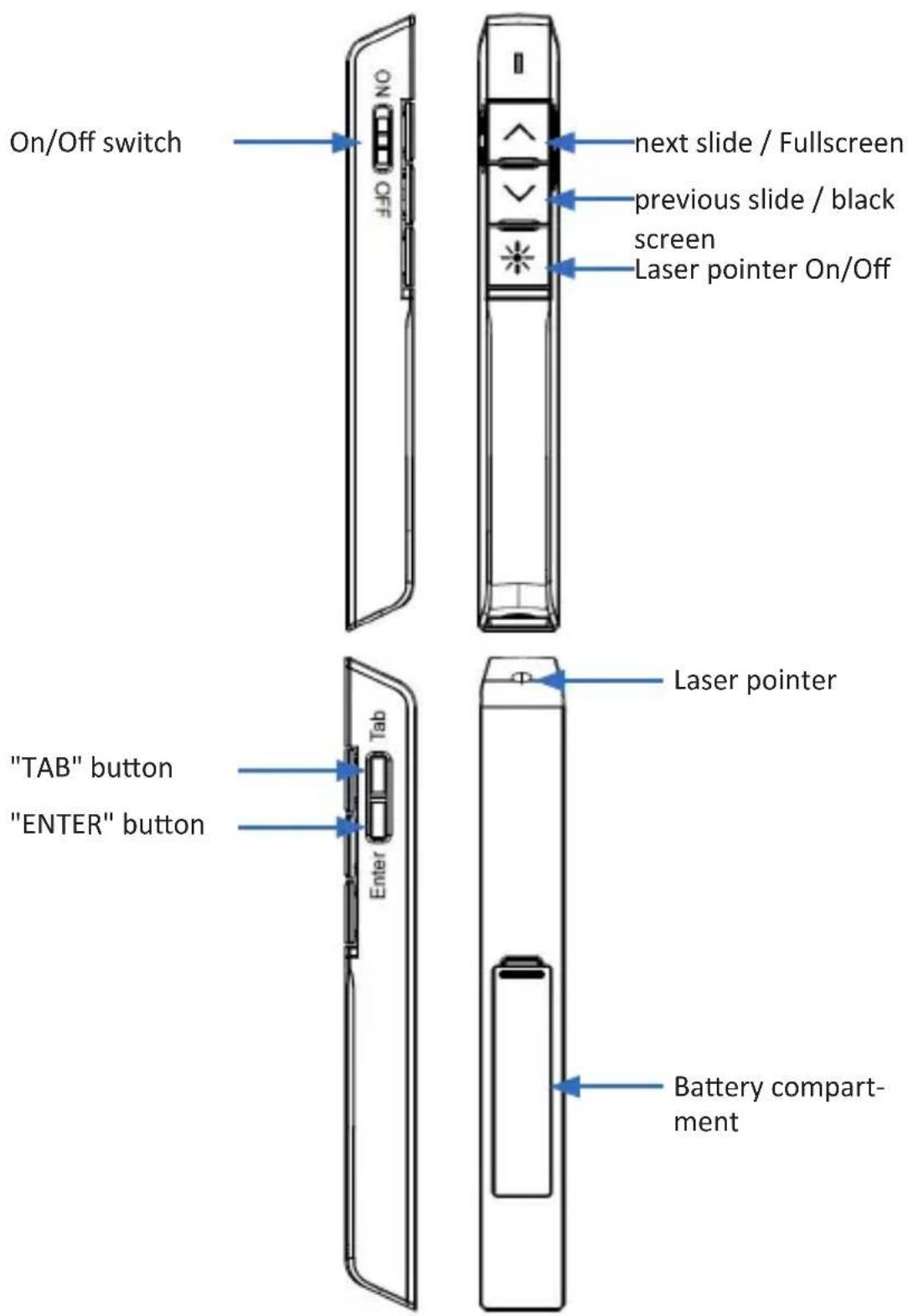
The presenter can not only scroll forward and backward, but also use the TAB and ENTER function keys. The presenter also has an integrated laser pointer. To use the functions like Fullscreen or black screen, press the respective button for about 3 seconds.
4. Product details
5. Commissioning
Remove the Presenter from the packaging and remove all the packaging material. The 2.4GHz receiver is located in the receiver holder at the bottom of the Presenter.
First connect the receiver stick to your computer. The device is plug & play ready. The device driver is installed automatically. Manual installation from a driver CD is not required. Take the Presenter and open the battery compartment at the bottom. Then insert a new 1.5V AAA battery into the holders provided. Ensure that the polarity of the contacts is correct when inserting.
Note on using batteries:
Due to the low battery voltage of only 1.2V, the functioning of the Presenter cannot be guaranteed with all types of batteries. Malfunctions such as jumping of the cursor or shortened battery life are also possible. We recommend using 1.5V alkaline batteries.
Then close the battery compartment and switch on the Presenter. Slide the on/off switch upwards. The device is now ready for use.
If the connection between your Presenter and the receiver stick is not established automatically, remove the USB receiver from the USB port and plug it in again.
6. Laser pointer
This device contains an integrated laser pointer, which can be activated by pressing the laser pointer button.
Note: Never point the laser at the eyes to ensure your own safety and the safety of others. Do not point it at people, animals or reflective objects!
This class 2 laser device corresponds to the international standard IEC / EN 60825-1 ED 2-2007, except for deviations mentioned in "Laser Notice" no. 50 dated 24 June 2007.
Maximum total power < 1mWatt . Emitted wavelength 640-660nm.
Caution: Using operating elements, settings or procedures other than those specified here may result in the emission of harmful radiation. Do not immerse the device in liquids and do not expose it to moisture or heat. This optical device does not contain any parts that require maintenance. It is approved for use at a temperature of 0 to 40^ . The device is only suitable for use with the provided receiver.
7. Safety instructions and liability disclaimer
Never try to open the device to carry out repairs or conversions. Avoid contact with mains voltages. Do not short-circuit the product. The device is not certified for use in the open air; only use it in dry conditions. Protect it from high humidity, water and snow. Keep it away from high temperatures. Do not subject the device to sudden changes in temperature or heavy vibration as this might damage electronic components. Examine the device for damage before using it. The unit should not be used if it has received an impact or has been damaged in any other way. Please observe national regulations and restrictions. Do not use the device for purposes other than those described in the instructions. This product is not a toy. Keep it out of the reach of children or mentally impaired persons. Any repair or alteration to the device not carried out by the original supplier, will invalidate the warranty or guarantee. The product may only be used by persons who have read and understood these instructions. The device specifications may change without any separate prior notice to this effect.
8. Disposal instructions
Electrical and electronic devices may only be disposed of in accordance with the European WEEE Directive and not with household rubbish. Components must be
disposed of or recycled separately as dangerous, toxic elements can inflict sustained damage on the environment if they are disposed of incorrectly. As a consumer, you are bound by the Electrical and Electronic Devices Act (ElektroG) to return electrical and electronic goods free of charge at the end of their useful life to the manufacturer, the place of purchase or to specially set up, public collection points. The details in each case are governed by national law. The symbol on the product, the operating instructions and/or the packaging refers to these regulations. By separating materials in this way, recycling and disposing of old devices, you are making an important contribution towards protecting our environment.
9. Instructions on the disposal of batteries
With regard to the sale of batteries or the supply of devices containing batteries, the supplier is obliged to draw the customer's attention to the following:
As the end user, the customer has a statutory obligation to return used batteries. He can return old batteries stocked or previously stocked by the supplier in the form of new batteries to the supplier's despatch warehouse (despatch address) free of charge. The symbols shown on the batteries have the following meanings: Pb = battery contains more than 0.004 percent by mass of lead, Cd = battery contains more than 0.002 percent by mass of cadmium, Hg = battery contains more than 0.0005 percent by mass of quicksilver.

The symbol of the rubbish bin with a cross through it indicates that the battery may not be put in household waste.

WEEE guideline: 2012/19/EU
WEEE register number: DE 67896761
WD Plus GmbH, herewith declares that this product 303207/20180131SZ225 conforms to the principle requirements and other relevant stipulations. The complete Declaration of Conformity can be obtained from: WD Plus GmbH, Wohlenbergstraße 16, 30179 Hanover

Brand : CSL
Model : 303207
Category : Speaker