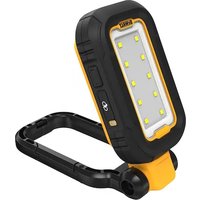
DCL182 - Lighting DEWALT - Free user manual and instructions
Find the device manual for free DCL182 DEWALT in PDF.


| Product type | Rechargeable LED projector |
| Brand | DeWalt |
| Model | DCL182 |
| Voltage | 4 V DC |
| Battery type | Lithium-ion 18650 |
| Lumens (articulated head) | Low: 250 lm, Medium: 500 lm, High: 1000 lm |
| Beam angle | 120° |
| Runtime (full charge) | Low: 12 h, Medium: 8 h, High: 3.5 h |
| Charging time | 1 to 4 h (depending on power source) |
| Charge indicator | Red, yellow, green LED |
| Main functions | Multifunction button (3 brightness levels + off), 360° swiveling articulated head, rotating carabiner, built-in magnets |
| Intended use | Professional lighting |
| Protection | Do not use in wet environments, do not immerse, do not expose to rain |
| Cleaning | Damp cloth with mild soap, no solvents |
| Repairability | Not user-serviceable, no spare parts (battery and LED non-replaceable) |
| Warranty | See DeWalt website (www.dewalt.com/support/warranty) |
| Included accessories | USB charging cable |
| Excessive temperature protection | Yes, with flashing red and green LED indicator |
Frequently Asked Questions - DCL182 DEWALT
User questions about DCL182 DEWALT
0 question about this device. Answer the ones you know or ask your own.
Ask a new question about this device
Download the instructions for your Lighting in PDF format for free! Find your manual DCL182 - DEWALT and take your electronic device back in hand. On this page are published all the documents necessary for the use of your device. DCL182 by DEWALT.
USER MANUAL DCL182 DEWALT
English (original instructions) 3
1 Multi function button
2 LED light housing
3 Articulating head LED
4 Pivoting carabiner
5 Magnets
6 USB charging cable
7 USB charger plug
8 USB charging plug
9 USB charging port cover
10 Charge indicator LED
WARNING: Read all safety warnings and all instructions. Failure to follow the warnings and instructions may result in electric shock, fire and/or serious injury.

WARNING: To reduce the risk of injury, read the instruction manual.
Intended Use
Your DFWALT DCL182 has been designed for professional lighting applications.
DO NOT use under wet conditions or in presence of flammable liquids or gases.
DO NOT let children come into contact with the tool. Supervision is required when inexperienced operators use this tool.
Definitions: Safety Alert Symbols and Words
This instruction manual uses the following safety alert symbols and words to alert you to hazardous situations and your risk of personal injury or property damage.
DANGER: Indicates an imminently hazardous condition which, if not avoided, will result in death or serious injury.
WARNING: Indicates a potentially hazardous situation when, if not avoided, could result in death or serious injury.
CAUTION: Indicates a potentially hazardous situation when, if not avoided, may result in minor or moderate injury.
(Used without word) Indicates a safety related message.
NOTICE: Indicates a practice not related to personal injury which, if not avoided, may result in property damage.
If you have any questions or comments about this or any DEWALT tool, call us toll free at: 1-800-4-DEWALT (1-800-433-9258).
SAFETY INSTRUCTIONS
When using an electrical light, basic precautions should always be followed, including the following:
WARNING: Do not attempt to modify or repair the light.
WARNING: Do not charge the battery at ambient temperatures below 40^ (4^) or above 104^
(40°C). Follow all charging instructions and do not charge the battery outside of the temperature range specified in the instructions. Charging improperly or at temperatures outside of the specified range may damage the battery and increase risk of fire.
- Shock Hazard. To protect against risk of electrical shock, do not put charging base in water or other liquid.
- Do not allow to be used as a toy. Close attention is necessary when used near children.
- Do not use if damaged. If light is not working as it should, has been dropped, damaged, left outdoors, or dropped into water, return it to a service center.
-
Do not incinerate the light even if it is severely damaged. The batteries can explode in a fire.
-
Do not pull or carry by charging cord, use charging cord as a handle, close a door on charging cord, or pull charging cord around sharp edges or corners.
- Keep charging cord away from heated surfaces.
- Do not allow the cord to hang over the edge of a table or counter or touch hot surfaces. The unit should be placed or mounted away from sinks and hot surfaces.
- Do not unplug by pulling on charging cord. To unplag, grasp the plug, not the cord.
- Do not handle charging cord, including charging plug with wet hands.
- Do not charge the unit outdoors.
Leaks from battery cells can occur under extreme conditions. If the liquid, which is a 20 - 35% solution of potassium hydroxide, gets on the skin (1) wash quickly with soap and water or (2) neutralize with a mild acid such as lemon juice or vinegar. If the liquid gets into the eyes, flush them immediately with clean water for a minimum of 10 minutes. Seek medical attention.
Additional SafetyWarnings
a) This light is intended for professional, commercial or industrial use.
b) Do not use a battery or light that is damaged or modified. Damaged or modified batteries may exhibit unpredictable behavior resulting in fire, explosion or risk of injury.
c) Do not expose a battery to fire or excessive temperature. Exposure to fire or temperature above 266^ (130^) may cause explosion.
d) Do not use magnet for overhead mounting.
e) Do not touch hot parts.
SAVE THESE INSTRUCTIONS
Specific Safety Rules for Lights
WARNING: Do not place the light in a position may cause anyone to intentionally or unintentionally stare into the light. Serious eye injury could result.
WARNING: Fire hazard. Do not operate light or near flammable liquids or in gaseous or explosive atmospheres. Internal sparks may ignite fumes causing personal injury.
IMPORTANT SAFETY INSTRUCTIONS
WARNING: When using the light, basic precautions should always be followed, including the following:
a) To reduce the risk of injury, close supervision is necessary when a light is used near children.
b) To reduce the risk of electrical shock, do not put light in water or other liquid. Do not place or store light where it can fall or be pulled into a tub or sink.
c) Turn the light off when not in use.
d) Do not operate any light after it malfunctions or is dropped or damaged in any manner.
e) This light is intended for indoor use only.
English
Additional Safety Rules for Hand Held Lights
- Do not submerge hand held light in any liquid.
- Do not wash light or battery with water or allow water to get inside light or battery.
- Do not operate without lens cover assembly attached.
The label on your tool may include the following symbols. The symbols and their definitions are as follows:
V.....volts
..class III luminaire
Hz.....hertz
...visibleradiation
- or DC....direct current
do not stare into the light
A. amperes
Ah.....amp hours
or AC......alternating current
readall
documentation
A .safety alert symbol
do not expose to rain
BATTERIES
The product is not fully charged out of the carton. Before using the product, read the safety instructions below and then follow the charging procedures outlined.
NOTE: If the product is unused for approximately 90 days,
fully charge the battery to help prolong the life of the battery.
Important Safety Instructions for All Integral Battery Charging
WARNING: Read all safety warnings, instructions, cautionary markings for the battery, charging cable and product. Failure to follow the warnings and instructions may result in electric shock, fire and/or serious injury.
WARNING: Only charge product using a Listed 2 USB power adapter that is compliant with applicable country regulations and international/ regional safety standards. Using adapters that do not meet applicable safety standards could result in injury.
WARNING: Observe the safety instructions of the charger being used to charge your device.
- Only use the charging cable supplied by the manufacturer for charging.
- The provided charging cable is not intended for any uses other than charging DEWALT rechargeable tools with charging ports. Charging other types of tools may cause their batteries to overheat and burst, resulting in personal injury, property damage, fire, electric shock or electrocution.
DO NOT expose charging cable to water, rain or snow. - Pull by the plugs rather than the cord when disconnecting the charging cable. This will reduce the risk of damage to the plugs and cord.
- Make sure that the cord is located so that it will not be stepped on, tripped over or otherwise subjected to damage or stress.
- DO NOT use a charging cable with a damaged cord or plugs. Have them replaced immediately.
Foreign materials of a conductive nature, such as, but not limited to, grinding dust, metal chips, steel wool,
aluminum foil or any buildup of metallic particles should be kept away from the charging plugs and port.
- Always unplug the charging cable from the power supply when there is no tool attached to it.
Charging Procedure (Fig. A, B)
WARNING: Do not use light while it is connected to the charging cable.
- Pull the USB charging port cover 9 away from the light.
- Insert the USB charging plug 8 into the charging port 11.
- Plug the USB charger plug 7 into any USB charging port (such as on a computer or wall adapter). NOTE: Charging takes 1 to 4 hours depending on power supply rating.
- The color of the charge indicator LED 10 will be either red, yellow or green and remain continuously ON while charging.
- Charging is complete when the color of the charge indicator LED 10 is green or turns off.
- The battery can be left charging or the charging cable can be disconnected.
Hot/Cold Delay
When the light detects that the battery is too hot or too cold, it automatically starts a hot/cold delay, suspending charging until the battery has reached an appropriate temperature. The light then automatically switches to charging mode. This feature ensures maximum battery life.
- A cold battery may charge at a slower rate than a warm battery.
- The hot/cold delay will be indicated by the charge indicator LED 10 will flash red and yellow.
- Once the battery has reached an appropriate temperature, the charge indicator LED 10 will show the color of the current battery capacity, indicating that the light has resumed the charging procedure.
Important Charging Notes
- The light may become warm to the touch while charging. This is a normal condition, and does not indicate a problem. To facilitate the cooling of the light after use, avoid placing the light in a warm environment such as in a metal shed or an uninsulated trailer.
- If the light does not charge properly, take the light and charging cable to your local service center.
- You may charge a partially used battery whenever you desire with no adverse effect on the light.
Over Temperature Protection (Fig. A)
When over temperature protection is activated, the charge indicator LED 10 will flash red and green. The unit cannot be used during the over temperature protection cycle.
State of Charge Indicator (Fig. A)
The DCL182 is equipped with a state of charge indicator. The charge indicator LED 10 is used to display the current level of charge in the battery during use and during charging. It does not indicate tool functionality and is subject to variation
based on product components, temperature and end-user application.
Checking State of Charge (Fig. C)
- When the LED light is ON, the charge indicator LED 10 will illuminate green, yellow or red indicating the percent of charge in the battery:
-GREEN: ≥50%
- YELLOW: >25% to >50%
-RED: ≤25%
If less than 3% light and indicator will flash two times every 45 seconds until out of power.
- If the color of the charge indicator LED 10 is red or does not illuminate, charge the battery.
SPECIFICATIONS
| DCL182 | ||
| Voltage V | DC | 4 |
| Battery type 18650 Li-Ion | ||
| Lumens | ||
| Low - 250 | ||
| Articulating head LED Im | Mid - 500 | |
| High - 1000 | ||
| Light Beam Angle | ||
| Articulating head LED degrees 120 | ||
| Run Time When Fully Charged | ||
| Low - 12 | ||
| Articulating head LED hours | Mid - 8 | |
| High - 3.5 | ||
OPERATION
CAITION: Do not stare into the LEDs. Serious eye
Pivoting Carabiner (Fig. A, D)
CAUTION: When the LED light hangs by the pivoting center, do not shake the LED light or the object from which it hangs. Do not hang the LED light overhead or from any electrical wires or anything that is not secure. Personal injury or property damage may occur.
CAUTION: Only use the pivoting carabiner for hanging LED light. The pivoting carabiner is not intended to support additional weight. Do not attach or hang anything additional to the LED light or risk of breakage may occur.
CAUTION: Do not use the pivoting carabiner to reach water or to support your weight in any situation. The pivoting carabiner is not intended for fall protection.
The built in pivoting carabiner 4 can be attached to anchored hoses, pipes, tubes or cables in the space you are working in.
- To access the pivoting carabiner 4, rotate the pivoting carabiner 4 away from the LED light housing 2.
-
Press down the spring loaded gate 12 on the pivoting carabiner 4 and slip the hose, pipe, tube or cable in your work space into the pivoting carabiner 4.
-
Ensure the spring loaded gate 12 returns to it locked position and locks the pivoting carabiner 4 to the anchored anchored hose, pipe, tube or cable inside of it. NOTE: Ensure the pivoting carabiner 4 is fully secured and will not slide off or along the anchored hose, pipe, tube or cable before proceeding.
- To remove the pivoting carabiner 4 from the anchored hose, pipe, tube or cable, open the spring loaded gate 12, then grasp the pivoting carabiner 4 and slide the anchored hose, pipe, tube or cable from the pivoting carabiner opening.
- Return and secure the pivoting carabiner 4 into place onto the LED light housing 2.
Articulating Head LED (Fig. A, D, E)
The articulating head LED 3 swivels from 0^ - 360^
- To move the articulating head LED 3 first pull the pivoting carabiner 4 upwards and away from the LED light housing 3 .
- To adjust the beam of the articulating head LED 3, swivel and rotate the articulating head LED 3 by twisting it into the desired position.
- You can use the pivoting carabiner 4 to prop up the articulating head LED 3 on a flat surface.
Multi Function Button (Fig. A)
The articulating head LED 3 has three brightness settings, low, medium and high.
Low battery indication. If less than 3% , the activated LED and charge indicator LED will flash two times every 45 seconds until out of power.
- Press the multi function button 1 once to activate the articulating head LED 3 high setting.
- Press the multi function button 1 a second time to activate the articulating head LED 3 medium setting.
- Press the multi function button 1 a third time to activate the articulating head LED 3 low setting.
- Press the multi function button 1 a fourth time to turn the off the LED 5.
NOTE: If the light remains on for more than five seconds, pressing the multi function button 1 again will result in turning off the light.
NOTE: With the light activated, a long press of the multi function button 1 will result in turning off the light.
Magnets (Fig. A)
CAUTION: When the LED light hangs by the magnets, shake the LED light or the object from which it hangs. Do not hang the work LED light overhead or from anything that is not secure. Personal injury or property damage may occur.
CAUTION: Only use the magnets for hanging the LED light. The magnets are not intended to support additional weight. Do not attach or hang anything additional to the LED light or risk of breakage may occur.
- The DCL182 has magnets 5 built into the bottom of the pivoting carabiner 4.
ENGLISH
- The magnets 5 are intended for catching small metal parts such as screws and bolts or hold the light in place on solid metal surfaces.
MAINTENANCE
Your DEWALT product has been designed to operate over a long period of time with a minimum of maintenance.
Continuous satisfactory operation depends upon proper care and regular cleaning.
Cleaning
WARNING: Never use solvents or other harsh chemicals for cleaning the non-metallic parts of the tool. These chemicals may weaken the plastic materials used in these parts. Use a cloth dampened only with water and mild soap. Never let any liquid get inside the tool; never immerse any part of the tool into a liquid.
Accessories
WARNING: Since accessories, other than those offered by WALT, have not been tested with this product, use of such accessories with this product could be hazardous. To reduce the risk of injury, only DEWALT recommended accessories should be used with this product.
There are no accessories for this product.
Repairs
The charger and battery pack are not serviceable. There are no serviceable parts inside the charger or battery pack.
The work light is not serviceable. The LED light bulbs and battery cannot be replaced by the user.
The RBRC Seal
Please take your DEWALT with a spent battery to an authorized DEWALT service center or to your local retailer for recycling. In some areas, it is illegal to place spent

battery packs in the trash. You may also contact your local recycling center for information on where to drop off the spent battery pack. Do not place in curbside recycling. For more information visit www.call2recycle.org or call the toll free number in the RBRC Seal.
RBRC® is a registered trademark of Call 2 Recycle, Inc.
Register Online
Thank you for your purchase. Register your product now for:
WARRANTY SERVICE: Registering your product will help you obtain more efficient warranty service in case there is a problem with your product.
- CONFIRMATION OF OWNERSHIP: In case of an insurance loss, such as fire, flood or theft, your registration of ownership will serve as your proof of purchase.
FOR YOUR SAFETY: Registering your product will allow us to contact you in the unlikely event a safety notification is required under the Federal Consumer Safety Act.
- Register online at www.dewalt.com.
Limited Warranty
For warranty terms, go to https://www.dewalt.com/support/warranty.
To request a written copy of the warranty terms, contact: Customer Service at DEWALT Industrial Tool Co., 701 East Joppa Road, Towson, MD 21286 or call 1-800-4-DEWALT (1-800-433-9258).
LATIN AMERICA: This warranty does not apply to products sold in Latin America. For products sold in Latin America, see country specific warranty information contained in the packaging, call the local company or see website for warranty information.
FREE WARNING LABEL REPLACEMENT: If your warning labels become illegible or are missing, call 1-800-4-DEWALT (1-800-433-9258) for a free replacement