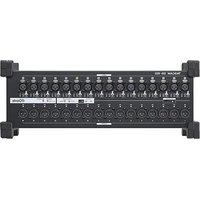
SB-16D - Hand blender TASCAM - Free user manual and instructions
Find the device manual for free SB-16D TASCAM in PDF.


User questions about SB-16D TASCAM
0 question about this device. Answer the ones you know or ask your own.
Ask a new question about this device
Download the instructions for your Hand blender in PDF format for free! Find your manual SB-16D - TASCAM and take your electronic device back in hand. On this page are published all the documents necessary for the use of your device. SB-16D by TASCAM.
USER MANUAL SB-16D TASCAM
16in/16out Dante Stage Box
SB-16D
AD/DA Converter
OWNER'S MANUAL
MODE D'EMPLOI
MANUAL DEL USUARIO
BEDIENUNGSANLEITUNG
- TASCAM is a registered trademark of TEAC Corporation.
- Audinate®, the Audinate logo and Dante are trademarks of Audinate Pty Ltd.
www.audinate.com/patents
- Other company names, product names and logos in this document are the trademarks or registered trademarks of their respective owners.
OWNER'S MANUAL
IMPORTANT SAFETY INSTRUCTIONS
 | CAUTIONRISK OF ELECTRIC SHOCKDO NOT OPEN |  | CAUTION: TO REDUCE THE RISK OF ELECTRIC SHOCK, DO NOT REMOVE COVER (OR BACK).NO USER-SERVICEABLE PARTS INSIDE. REFER SERVICING TO QUALIFIED SERVICE PERSONNEL. |
 | The lightning flash with arrowhead symbol, within equilateral triangle, is intended to alert the user to the presence of uninsulated “dangerous voltage” within the product’s enclosure that may be of sufficient magnitude to constitute a risk of electric shock to persons. | ||
 | The exclamation point within an equilateral triangle is intended to alert the user to the presence of important operating and maintenance (servicing) instructions in the literature accompanying the appliance. | ||
 | CAUTION: Risk of electric shock. To completely cut off the power supply to the unit, always disconnect all power sources.ATTENTION: Risque d’électrocution. Pour couper complètement l’alimentation de l’unité, débranchez toujours toutes les sources d’alimentation. | ||
WARNING: TO PREVENT FIRE OR SHOCK HAZARD, DO NOT EXPOSE THIS APPLIANCE TO RAIN OR MOISTURE.
For U.S.A.
Supplier's Declaration of Conformity
Model Number: SB-16D
Trade Name: TASCAM
Responsible party: TEAC AMERICA, INC.
Address: 10410 Pioneer Blvd., Unit #1, Santa Fe Springs, California 90670, U.S.A
Telephone number: 1-323-726-0303

This device complies with Part 15 of the FCC Rules. Operation is subject to the following two conditions: (1) this device may not cause harmful interference, and (2) this device must accept any interference received, including interference that may cause undesired operation.
INFORMATION TO THE USER
This equipment has been tested and found to comply with the limits for a Class B digital device, pursuant to Part 15 of the FCC Rules. These limits are designed to provide reasonable protection against harmful interference in a residential installation. This equipment generates, uses, and can radiate radio frequency energy and, if not installed and used in accordance with the instructions, may cause harmful interference to radio communications. However, there is no guarantee that interference will not occur in a particular installation. If this equipment does cause harmful interference to radio or television reception, which can be determined by turning the equipment off and on, the user is encouraged to try to correct the interference by one or more of the following measures.
a) Reorient or relocate the receiving antenna.
b) Increase the separation between the equipment and receiver.
c) Connect the equipment into an outlet on a circuit different from that to which the receiver is connected.
d) Consult the dealer or an experienced radio/TV technician for help.
CAUTION
Changes or modifications to this equipment not expressly approved by TEAC CORPORATION for compliance could void the user's authority to operate this equipment.
IN USA/CANADA, USE ONLY ON 120 V SUPPLY.
For Canada
THIS CLASS B DIGITAL APPARATUS COMPLIES WITH CANADIAN ICES-003.
CET APPAREIL NUMERIQUE DE LA CLASSE B EST CONFORME A LA NORME NMB-003 DU CANADA.

This product complies with the European Directives request and the other Commission Regulations.

This product complies with applicable UK regulations.
- Read these instructions.
- Keep these instructions.
- Heed all warnings.
- Follow all instructions.
- Do not use this apparatus near water.
- Clean only with dry cloth.
- Do not block any ventilation openings. Install in accordance with the manufacturer's instructions.
- Do not install near any heat sources such as radiators, heat registers, stoves, or other apparatus (including amplifiers) that produce heat.
- Do not defeat the safety purpose of the polarized or grounding-type plug. A polarized plug has two blades with one wider than the other. A grounding type plug has two blades and a third grounding prong. The wide blade or the third prong are provided for your safety. If the provided plug does not fit into your outlet, consult an electrician for replacement of the obsolete outlet.
-
Protect the power cord from being walked on or pinched particularly at plugs, convenience receptacles, and the point where they exit from the apparatus.
-
Only use attachments/accessories specified by the manufacturer.
-
Use only with the cart, stand, tripod, bracket, or table specified by the manufacturer, or sold with the apparatus. When a cart is used, use caution when moving the cart/ apparatus combination to avoid injury from tip-over.

-
Unplug this apparatus during lightning storms or when unused for long periods of time.
-
Refer all servicing to qualified service personnel. Servicing is required when the apparatus has been damaged in any way, such as power-supply cord or plug is damaged, liquid has been spilled or objects have fallen into the apparatus, the apparatus has been exposed to rain or moisture, does not operate normally, or has been dropped.
- The apparatus draws nominal non-operating power from the AC outlet with its POWER or STANDBY/ON switch not in the ON position.
- The mains plug is used as the disconnect device, the disconnect device shall remain readily operable.
- If you are experiencing problems with this product, contact TEAC for a service referral. Do not use the product until it has been repaired.
WARNING
- Products with Class 1 construction are equipped with a power supply cord that has a grounding plug. The cord of such a product must be plugged into an AC outlet that has a protective grounding connection.
CAUTION
- Do not expose this apparatus to drips or splashes.
- Do not place any objects filled with liquids, such as vases, on the apparatus.
- Do not install this apparatus in a confined space such as a book case or similar unit.
- The apparatus should be located close enough to the AC outlet so that you can easily grasp the power cord plug at any time.
- If the product uses batteries (including a battery pack or installed batteries), they should not be exposed to sunshine, fire or excessive heat.
- CAUTION for products that use replaceable lithium batteries: there is danger of explosion if a battery is replaced with an incorrect type of battery. Replace only with the same or equivalent type.
CAUTION
- DO NOT REMOVE THE EXTERNAL CASES OR CABINETS TO EXPOSE THE ELECTRONICS. NO USER SERVICEABLE PARTS ARE INSIDE.
- IF YOU ARE EXPERIENCING PROBLEMS WITH THIS PRODUCT, CONTACT THE STORE WHERE YOU PURCHASED THE UNIT FOR A SERVICE REFERRAL. DO NOT USE THE PRODUCT UNTIL IT HAS BEEN REPAIRED.
- USE OF CONTROLS OR ADJUSTMENTS OR PERFORMANCE OF PROCEDURES OTHER THAN THOSE SPECIFIED HEREIN MAY RESULT IN HAZARDOUS RADIATION EXPOSURE.
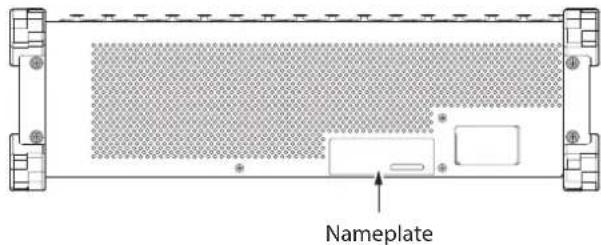
The nameplate is located on the top of the unit as shown below.
Front side
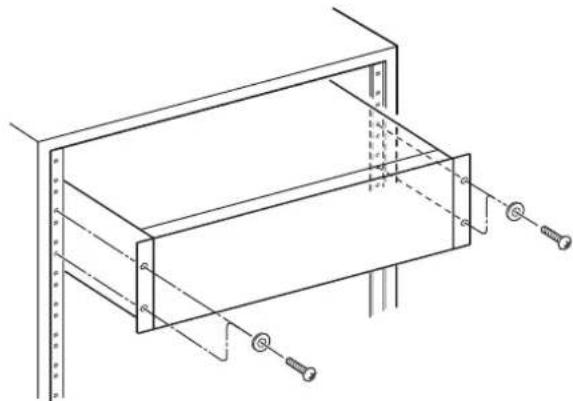
RACK-MOUNTING THE UNIT
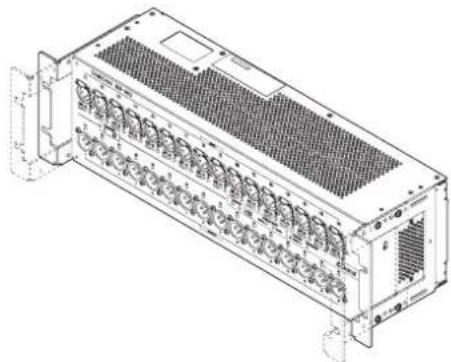
Use the supplied rack-mounting kit to mount the unit in a standard 19-inch rack, as shown below.
Remove the feet of the unit before mounting.
natural_image
Technical line drawing of a mechanical assembly with mounting holes and structural supports (no text or symbols)ATTENTION
- Leave 1U of space above the unit for ventilation.
- Allow at least 10 cm (4 in) at the rear of the unit for ventilation.
For European Customers
Disposal of electrical and electronic equipment and batteries and/or accumulators
(a) All electrical/electronic equipment and waste batteries/accumulators should be disposed of separately from the municipal waste stream via collection facilities designated by the government or local authorities.
(b) By disposing of electrical/electronic equipment and waste batteries/accumulators correctly, you will help save valuable resources and prevent any potential negative effects on human health and the environment.
(c) Improper disposal of waste electrical/electronic equipment and batteries/accumulators can have serious effects on the environment and human health because of the presence of hazardous substances in the equipment.
(d) The Waste Electrical and Electronic Equipment (WEEE) symbols, which show wheeled bins that have been crossed out, indicate that electrical/electronic equipment and batteries/accumulators must be collected and disposed of separately from household waste.
If a battery or accumulator contains more than the specified values of lead (Pb), mercury (Hg), and/or cadmium (Cd) as defined in the Battery Directive (2006/66/EC, 2013/56/EU), then the chemical symbols for those elements will be indicated beneath the WEEE symbol.
(e) Return and collection systems are available to end users. For more detailed information about the disposal of old electrical/electronic equipment and waste batteries/accumulators, please contact your city office, waste disposal service or the shop where you purchased the equipment.
For China
IMPORTANT SAFETY INSTRUCTIONS .... 3
Introduction......6
Features......6
Included items 7
Conventions used in this manual 7
Precautions for placement and use....7
Notes about power supplies....7
Beware of condensation 7
Cleaning the unit 7
About TASCAM customer support service....7
Names and functions of parts 8
Front panel 8
Rear panel 9
Left side panel....9
Attaching the rackmount ears....10
Connecting the power....11
Starting up when operating with only DC power supply..... 11
Notes about the DC POWER indicator....11
Application overview 11
Overview of settings 11
Setting mic/line inputs.... 11
Setting phantom power 11
Setting the reference level....11
Device ID settings....12
Checking the device ID 12
Changing the device ID 12
Restoring factory default settings 13
Using as a Sonicview extension....13
Notes about Dante 13
Connecting to a Dante network ....13
Switched (daisy chain) connection....13
Redundant connection....14
Using Dante Controller 14
Dante Controller overview....14
Audio routing settings 14
Changing sampling frequencies and bit depths with Dante
Controller 15
Control parameters 16
Parameter list....16
GPIO connector overview 16
Specifications and rated values....17
Audio performance 17
Inputs and outputs....17
Other....17
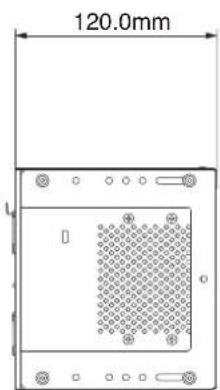
Dimensional drawings 98
Software Licensing 99
Introduction
Thank you very much for purchasing the TASCAM SB-16D 16in/16out Dante Stage Box.
Before using this unit, read this Owner's Manual carefully so that you will be able to use it correctly and enjoy working with it for many years. After you have finished reading this manual, please keep it in a safe place for future reference.
You can also download this Owner's Manual from the TASCAM website.
SB-16D
https://tascam.jp/int/product/sb-16d/docs
Features
● Supports 16 channels of analog line/mic inputs
● Supports 16 channels of analog line/mic outputs
● Supports remote control using the dedicated TASCAM IO CONTROL application
- Gain control
- Phantom power on/off
- PAD on/off
-
Other functions
-
Dante included as a standard feature with support for redundancy
- AES67 is also supported, so connection is possible with Ravenna and other compatible network audio technologies
- Flexible routing is possible using Dante Controller
● Support for sampling frequencies and bit lengths up to 96kHz and 32-bit - Inputs have phantom power, signal and overload LEDs
• Outputs have signal LEDs
● Supports redundant power input with AC and DC power supplies - Reference level can be set
- 3U rackmount size
Included items
This product includes the following items.
Take care when opening the package to avoid damaging the items. Keep the packing materials for transportation in the future.
Please contact the store where you purchased this unit if any of these items are missing or have been damaged during transportation.
- Main unit ....x 1
● Power cords (for Japan/USA, Europe and Oceania)....x 3 - Rackmount ear (with installation screws) set ....x 1
- Rackmount screw kit....x 1
- TASCAM ID registration guide....x 1
- Owner's Manual (this document) including warranty....x 1
Conventions used in this manual
In this manual, we use the following conventions:
- Additional information is introduced in the styles below when needed:
TIP
These are tips about how to use the unit.
NOTE
These provide additional explanations and describe special cases.
ATTENTION
Failure to follow these instructions could result in damage to equipment or lost data, for example.
CAUTION
Failure to follow these instructions could result in injury.
Precautions for placement and use
- The operating temperature range of this unit is 0 - 40 °C.
- Do not install this unit in the following types of locations. Doing so could make the sound quality worse or cause malfunction.
Places with significant vibrations
Next to a window or in another location exposed to direct sunlight
Near heaters or other extremely hot places
Extremely cold places
Very humid or poorly ventilated places
Very dusty places
- Do not block the ventilation ports, which dissipate heat, on the back and sides of the unit.
- To enable good heat dissipation, do not place anything on top of the unit.
- Do not place the unit on top of a power amplifier or other device that generates heat.
Notes about power supplies
- Insert the included power cord all the way into the AC IN connector.
- Only connect a power supply that is AC100-240V (50/60Hz) to the AC IN connector.
- Only connect a power supply that is DC 11V–27V to the EXT DC IN connector. Use a power supply that has a 11V–27V Limited Power Source (LPS) rating for output voltage with the EXT DC IN connector.
- Hold the power cord by its plug when connecting or disconnecting it.
ATTENTION
If you want to completely cut off the power supply to the stagebox, always remember to disconnect it from both power sources.
NOTE
This product includes 3 types of power cords. Use the power cord that matches the type of power outlet being used.
Beware of condensation
Condensation could occur if the unit is moved from a cold place to a warm place, it is used immediately after a cold room has been heated or it is otherwise exposed to a sudden temperature change.
To prevent this, or if this occurs, let the unit sit for one or two hours at the new room temperature before using it.
Cleaning the unit
Use a dry soft cloth to wipe the unit clean. Do not wipe with chemical cleaning cloths, thinner, alcohol or other chemical agents. Doing so could damage the surface or cause discoloration.
About TASCAM customer support service
TASCAM products are supported and warranted only in their country/region of purchase.
To receive support after purchase, on the TASCAM Distributors list page of the TEAC Global Site (https://teac-global.com/), search for the local company or representative for the region where you purchased the product and contact that organization.
When making inquiries, the address (URL) of the shop or web shop where it was purchased and the purchase date are required.
Moreover, the warranty card and proof of purchase might also be necessary.
Front panel
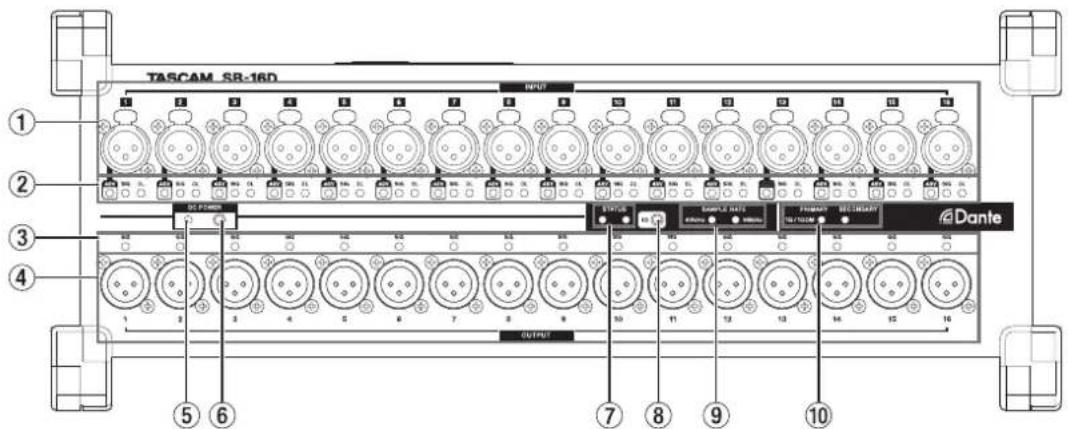
① Analog input connectors
These analog inputs are balanced XLR jacks.
• XLR (1: GND, 2: HOT, 3: COLD)
② INPUT SIG indicators
48V Indicators
These light when phantom power is on.
INPUT SIG indicators
These light when sound is being input through the analog inputs.
Input is judged to have occurred when the signal level exceeds -40 dBFS.
OL indicators
These light when analog input signals overload.
③ OUTPUT SIG indicators
These light when sound is being output through the analog outputs.
Output is judged to have occurred when the signal level exceeds -40 dBFS.
④ Analog output connectors
These analog outputs are XLR jacks.
• XLR (1: GND, 2: HOT, 3: COLD)
⑤ DC POWER indicator
- This indicator will light when a DC power supply is connected.
- This will blink to show that voltage is low when it approaches the threshold voltage value set in advance on the Sonicview 16/24 or using the TASCAM IO CONTROL app.
See "Connecting the power" on page 11 for details.
⑥ DC POWER button
- When operating only with DC power, press and hold this button to turn the power on/off. - Using this button is unnecessary when operating with AC power because it will start up automatically.
See "Connecting the power" on page 11 for details.
⑦ STATUS indicator
The STATUS indicator shows the state of the unit by lighting blue or red or staying unlit.
See "STATUS indicator lighting status details" on page 8 for details.
⑧ ID button
The device ID setting of this unit can be checked and changed. See "Device ID settings" on page 12 for setting procedures.
⑨ SAMPLE RATE indicators
The lighting of the two SAMPLE RATE indicators (48 kHz/96 kHz) shows the sampling frequency state of the unit.
⑩ PRIMARY/SECONDARY indicators
These light to show the Dante network status. Communication is at 1 Gbps when lit and at 100 Mbps when blinking.
STATUS indicator lighting status details
| STATUS indicator Note | ||
| Ordinary operation Lit blue | The unit is operating normally. | |
| Malfunctioning (Dante) Rapidly flashing red (four times per second) The Dante module is malfunctioning. | ||
| Muted Lit red | The indicator lights red when the clock is stabilizing after the unit starts up and when the sampling frequency or other Dante setting has been changed, for example. | |
| Dante network error Flashing red (twice per second) The Dante network is not connected. | ||
| Dante redundancy error Blinking blue (once per second) | The Dante PRIMARY connector is disconnected or another error with redundant connection has occurred. | |
| Update mode Blinking blue | e/red (once per second) The unit firmware is being updated. | |
| Checking device ID | STATUS/SAMPLE RATE indicators and, according to device ID number, OUTPUT channel LEDs blink (once per second) | This is the state when the device ID set in the unit is being shown. |
| Changing device ID | STATUS/SAMPLE RATE indicators and, according to device ID number, OUTPUT channel LEDs blink (twice per second) | This is the state when the device ID set in the unit is being changed. |
| Safe mode | STATUS/SAMPLE RATE/PRIMARY/SECONDARY LEDs blink (once per second) | The unit is in safe mode. |
Rear panel
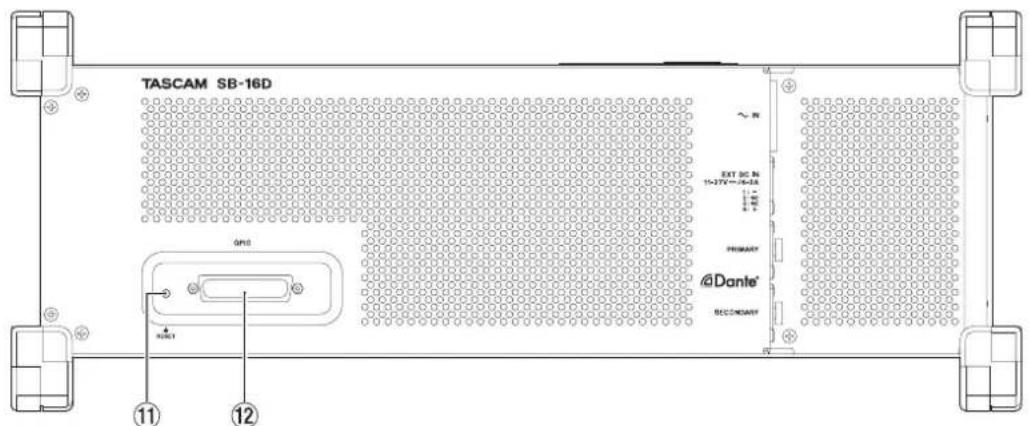
⑪ RESET button
Pressing the RESET button while the unit is powered and operating will restore network address settings and all other unit settings to their factory defaults. (see "Restoring factory default settings" on page 13)
⑫ GPIO connector
This is a 25-pin D-sub Parallel control input/output connector. Use this to connect an external controller. (see "Dante Controller overview" on page 14)
Left side panel
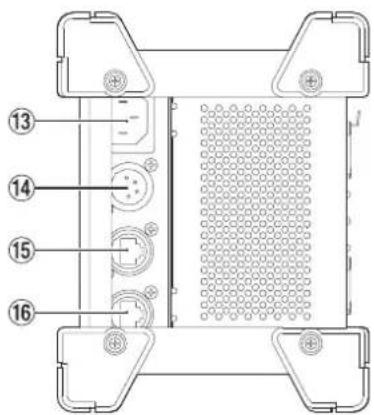
⑬ AC IN connector
Connect the included power cord here.
⑭ EXT DC IN connector
Connect external DC power here.
Use a power supply that has a 11V -27V Limited Power Source (LPS) rating for output voltage with the EXT DC IN connector.
The connector is XLR-4-32 equivalent (1: -, 2: NC, 3: NC, 4: +).
⑮ PRIMARY connector
This is the main etherCON Cat5e-compatible Dante transmission connector. Use this to connect to a Dante network all the time.
⑯ SECONDARY connector
This is the secondary etherCON Cat5e-compatible Dante transmission connector. The use changes depending on the mode.
When in redundant mode, this connects to the secondary Dante network.
When in switched (daisy chain) mode, use to connect another Dante device in the chain.
Attaching the rackmount ears
Before mounting this unit in a 19 inch rack, you must replace the feet with the included rackmount ears. Follow these procedures to attach the rackmount ears. (Prepare a Phillips screwdriver in advance.)
- Remove the 4 attached screws as shown in the illustration below, and remove the 4 feet from the ends of the unit.
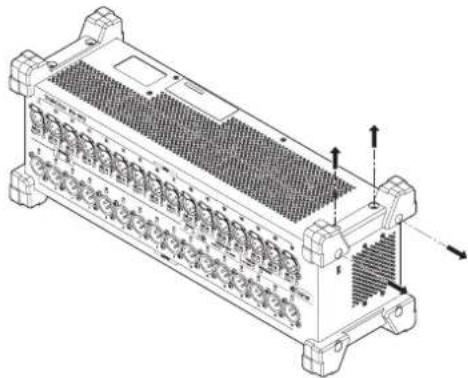
natural_image
Technical line drawing of a multi-chamber electronic device with cooling fins and mounting feet (no text or symbols)- Attach the included rackmount ears to the unit using the included rackmount ear installation screws.
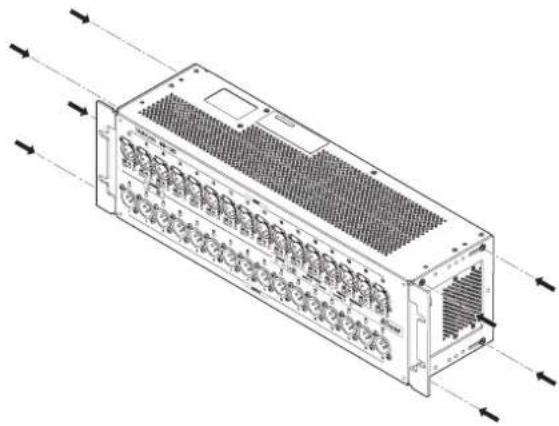
natural_image
Technical line drawing of a multi-chamber electronic device with ventilation grilles and input/output arrows (no text or symbols)NOTE
- Reverse these procedures to reinstall the feet that were originally attached to the unit.
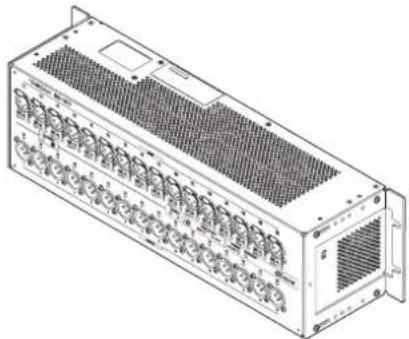
- By changing the attachment positions of the rackmount ears, the unit can be mounted in a rack with its front panel recessed by 20, 40 or 60 mm.
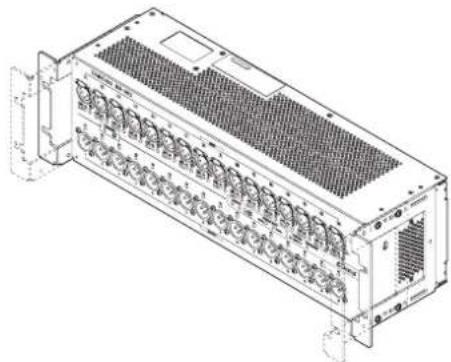
natural_image
Technical line drawing of a multi-chamber industrial device with cooling fins and mounting brackets (no text or symbols)Furthermore, the rackmount ears can be attached backwards.
natural_image
Technical line drawing of a multi-chamber industrial or server unit with cooling fins and ventilation slots (no text or symbols)Connecting the power
This unit has AC IN and EXT DC IN connectors, enabling redundant power connection.
When both AC and DC power supplies are connected, the unit will switch to the DC power supply if the AC power supply is cut, preventing sound from being interrupted.
To use power supplies, connect them to the AC IN and EXT DC IN jacks.
The unit can be used with power supplied to just one connector or to both connectors simultaneously.
Starting up when operating with only DC power supply
When operating with only DC power supply, the unit will not start up just by supplying the power.
Press and hold the DC POWER (⑥) button for 5 seconds to start the unit. To turn the unit off, press and hold the DC POWER (⑥) button for 5 seconds.
NOTE
The unit will stay on when AC power is supplied. Moreover, pressing and holding the DC POWER (⑥) button for 5 seconds will not shut down the unit.
Notes about the DC POWER indicator
- The DC POWER indicator (⑤) lights when the unit is on and DC power is being supplied.
- This will become unlit when the DC power supply is less than the set stop voltage. This will also be unlit when the unit is off.
- This will blink when below the set alert voltage.
- The stop voltage can be set between 11.0 V and 27 V in 0.1V intervals. Set the stop voltage to the specifications of the battery that is supplying DC power. Set the stop voltage to 11.0 V when the stop voltage specification is unknown or when using power supplies other than batteries (including AC adapters).
- The alert voltage is set by default to a value that is 0.5 V higher than the stop voltage. Adjust this setting as necessary if the alert is shown too quickly or too late. The alert can also be turned off.
- The stop voltage and alert voltage settings can be made using external control by remote protocol, from the Sonicview unit or from the TASCAM IO CONTROL app. Refer to the following documents for details.
• SB-16D remote control specifications
- Sonicview Series Reference Manual
• TASCAM IO CONTROL app operation manual
Application overview
Using the TASCAM IO CONTROL application, the unit can be operated and its functions can be set remotely.
For details about the application, please see its Owner's Manual.
The TASCAM IO CONTROL application and its operation manual can be downloaded from the TEAC Global Site (https://teac-global.com/).
For details about function that can be set, see "Parameter list" on page 16.
Overview of settings
Make various settings as necessary according to the connected equipment.
The following settings can all be made using the TASCAM IO CONTROL application. In addition, when used together with a Sonicview, various settings can be made from the Sonicview. See "Using as a Sonicview extension" on page 13 for details.
Setting mic/line inputs
Mic and line input settings can be made.
Gain, pad and trim settings can also be made in these input settings.
Setting phantom power
Phantom power can be turned on when an external mic that requires it is connected to the unit.
This can be turned on/off independently for each channel.
ATTENTION
- Before connecting condenser mics, turn this unit and all equipment to be connected off (standby).
- Do not connect or disconnect mics while phantom power is on. Doing so could cause a loud noise and might damage this unit and connected equipment.
- Turn phantom power ON only when using a condenser microphone that requires phantom power. Turning phantom power on when a dynamic mic or other mic that does not require it is connected could damage this unit and connected equipment.
- Supplying phantom power to some ribbon mics could break them. If unsure about a ribbon mic, confirm with the mic manufacturer or do not supply phantom power to it.
Setting the reference level
You can set the analog input and output headroom (difference between the maximum and reference levels).
Device ID settings
When using an SB-16D with a Sonicview 16/24, the device ID must be set to enable identification of the unit. Follow the procedures below to check or change the device ID.
Checking the device ID
Press the ID (⑧) button.
The unit will enter device ID checking mode, and the STATUS and SAMPLE RATE indicators will blink.
INPUT SIG indicators and OUTPUT SIG indicators will light at the same time according to the device ID number.
The device ID is assigned by pairing the numbers of the input and output channel indicators.
For example, indicators will light for the following ID numbers as shown in the tables.
Device ID: #3-4
| Channel number 1 2 3 4 5 6 7 8 9 10 11 12 13 14 15 16 | ||||||||||||||||
| INPUT SIG indicators | ● | |||||||||||||||
| OUTPUT SIG indicators | ● | |||||||||||||||
Device ID: #15-8
| Channel number 1 2 3 4 5 6 7 8 9 10 11 12 13 14 15 16 | ||||||||||||||
| INPUT SIG indicators | ● | |||||||||||||
| OUTPUT SIG indicators | ● |
- Indicators that light when in device ID confirmation mode
Changing the device ID
Follow the procedures below to change the device ID.
ATTENTION
Be careful to set the device ID for this unit so that it is not the same as another SB-16D connected to the same network.
- Press and hold the ID (⑧) button for 10 seconds.
The STATUS and SAMPLE RATE indicators will light simultaneously along with OUTPUT SIG indicators according to the device ID number (twice per second).
- When in device ID changing mode, press the ID (⑧) button to change the device ID.
The blinking OUTPUT SIG indicator will change.
- Press and hold the ID (⑧) button for 2 seconds to confirm.
After entering device ID changing mode, each time the ID (⑧) button is pressed, the device ID will be increased by one (+1). The blinking OUTPUT SIG indicator will also change in order according to the device ID number.
After the OUTPUT SIG indicator reaches 16, pressing the ID (⑧) button again will return to OUTPUT SIG indicator 1.
ATTENTION
When changing the device ID with this unit, changes with OUTPUT SIG indicators 1–16 are possible.
To change INPUT SIG indicators, do so from a Sonicview 16/24 or using the TASCAM IO CONTROL application.
Restoring factory default settings
Pressing the RESET (⑪) button while the unit is powered and operating will reset network address settings and all other unit settings to their factory defaults.
Resetting Dante settings
Press and hold the RESET (⑪) button for 5 seconds.
The STATUS indicator will blink 2 times and the network address and other settings for Dante will be restored to their default values.
Resetting all settings made in the unit
Press and hold the RESET (⑪) button for 10 seconds.
The STATUS indicator will blink 3 times and all settings made in the unit will be restored to their default values.
Launching the unit in safe mode
Connect a power supply while pressing the RESET (⑪) button. This will start the unit in safe mode. The STATUS, SAMPLE RATE, PRIMARY and SECONDARY indicators will blink twice per second.
Using as a Sonicview extension
By connecting this unit to the LAN of a Dante port in a TASCAM Sonicview Series unit, this unit can be controlled from that Sonicview. Moreover, mounting this unit on the TASCAM Sonicview Series unit enables its analog inputs to be operated in the same way as the analog inputs of the Sonicview. Use the following procedures to mount it.
NOTE
- These procedures assume that the Dante Control network settings of this unit and the TASCAM Sonicview Series unit are set to their defaults (Addressing is AUTO).
-
A Sonicview can mount a maximum of 4 units.
-
Connect mics, speakers and other equipment with analog connectors.
- Connect the Dante ports of this unit and the Sonicview Series unit with a LAN cable.
If the Dante setting for both devices is redundant mode, connect the corresponding PRIMARY and SECONDARY connectors of both units together.
See "Switched (daisy chain) connection" on page 13 and "Redundant connection" on page 14 for connection instructions.
- Turn off the power of equipment connected to this unit.
- Make the Dante routing setting.
By mounting this unit from the Sonicview unit, the Dante routing between them will be set automatically. Moreover, sampling rate, reference level, Dante latency and other settings will automatically be set to suitable values.
For details, see the Reference Manual of the Sonicview Series unit.
- Make the Sonicview Series unit input and output routing settings.
For details, see "5 – Routing" in the Reference Manual of the Sonicview Series unit.
Notes about Dante
Dante is a transmission protocol developed by Audinate.
Using networks based on gigabit Ethernet standards, it enables multichannel (512 IN/512 OUT) transmission and high precision, for example.
Check the Audinate website for details about Dante.
https://www.audinate.com/
Connecting to a Dante network
In order to set up and use this card, you must also set up the Ethernet network that it is connected to, a computer that runs Dante Controller and other devices that support Dante.
LAN cables used for connections
Use STP cables that are category 5e or higher. Both crossover and straight cables can be used.
ATTENTION
This unit is not compatible with 100Mbps Ethernet switching hubs. Always use switching hubs that support Gigabit Ethernet.
NOTE
- When the Dante Network Addressing setting is AUTO (DHCP), set the computer to set the IP address automatically.
- When the Dante Network Addressing setting is STATIC, set the computer to match the Dante and network address.
Switched (daisy chain) connection
Dante devices can be daisy-chained when there are few connected devices and when not using a switching hub. Connect them as shown below.
Switched (daisy chain) connection example

flowchart
graph LR
    A["Mixer"] <--> B["SB-16DSB-16D"]
    B --> C[" "]
NOTE
- When using a switched (daisy chain) connection, connect to either the PRIMARY or SECONDARY connector.
- If the number of connected devices increases, raising the latency setting will be necessary.
Redundant connection
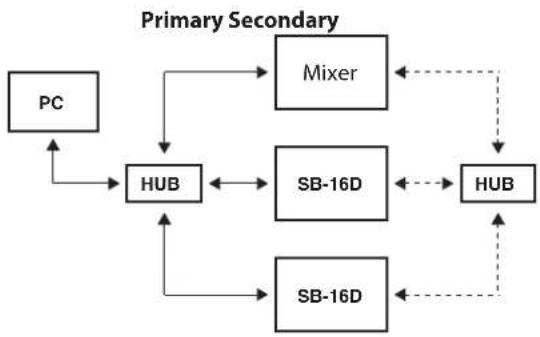
For recording situations where retakes are not possible, including live performances, a connection set up like the following uses two completely independent primary and secondary networks.
Redundant connection example
flowchart
graph TD
    PC --> HUB
    HUB <--> Mixer
    HUB <--> SB-16D
    HUB <--> SB-16D
    Mixer <--> HUB
    SB-16D <--> HUB
    SB-16D <--> HUB
    HUB <--> HUB
    style PC fill:#f9f,stroke:#333
    style HUB fill:#ccf,stroke:#333
    style Mixer fill:#cfc,stroke:#333
    style SB-16D fill:#fcc,stroke:#333
    style HUB fill:#cff,stroke:#333
NOTE
Settings for switched (daisy chain) and redundant connections do not change automatically. Change the settings on the Dante Controller Network Config screen.
ATTENTION
The primary and secondary networks can never be connected to each other by the same LAN (VLAN).

Using Dante Controller
Dante Controller overview
This unit uses the Dante Controller application, which is available at the Audinate website, to connect with other devices that support Dante.
Download the latest version of the Dante Controller application and an operation manual from the Audinate website.
Audinate download page
https://www.audinate.com/products/software/dante-controller
Make at least the following settings using a computer that has Dante Controller installed.
- Set the audio routing.
- Adjust the sampling frequency and bit depth of each Dante device.
NOTE
Settings made using Dante Controller are stored in the built-in memory of each Dante device.
Unless settings are modified, connections will not change even if Dante Controller is quit or the computer is disconnected from the Dante network.
Audio routing settings
When Dante Controller is launched, the Network View screen shown below will open.
On this screen, you can set and monitor conditions related to the Dante network.
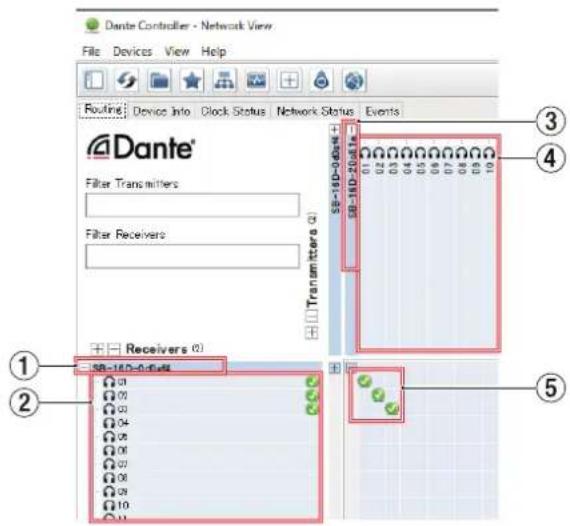
① Receiving device name
This is the name of a receiving device on the Dante network.
② Receiving device channels
These are the names of the channels of the receiving device on the Dante network.
③ Transmitting device name
This is the name of a transmitting device on the Dante network.
④ Transmitting device channels
These are the names of the channels of the transmitting device on the Dante network.
⑤ Audio routing
Route the audio channels of the transmitting and receiving devices that you want to connect here.
Click the intersection of the channels you want to connect on the matrix to connect them.
NOTE
While pressing the computer keyboard Ctrl key, click the "-" at the intersection of device names to connect all connectable channels at once.
Changing sampling frequencies and bit depths with Dante Controller
Double-click a device name on the Network View screen to open the Device View screen.
On this screen, you can set and monitor conditions related to devices on the Dante network.
Click the Device Config tab to open the page where you can change the sampling frequency, bit rate and other settings of the device selected in ① shown in the illustration below.
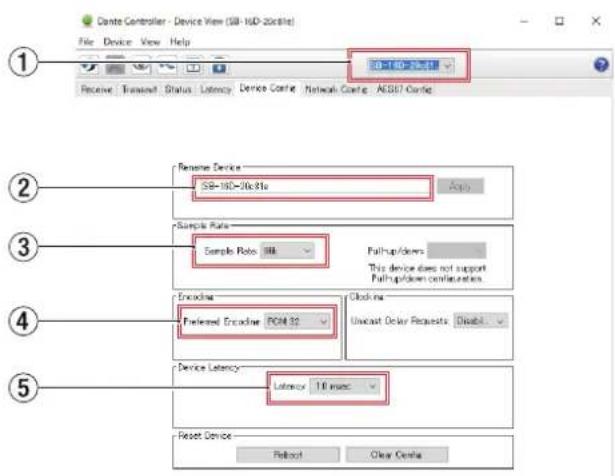
① Device name
This is the name of the device that can have its settings changed in the current Device View.
② Change device name
Edit the device name.
③ Sampling frequency
Set the sampling frequency.
④ Bit depth
Set the bit depth.
⑤ Latency setting
Set the latency.
ATTENTION
Changing the name of a device will clear audio routing settings. For this reason, we recommend changing device names to names that are easy to identify before setting audio routings.
Parameter list
This unit has the following parameters.
They can all be controlled using a dedicated app and from a TASCAM Sonicview Series unit.
| Function Notes | ||
| Head Amp GAIN adjustment | When Analog Reference Level = +6 dBuWhen PAD OFF: +12 dB - +66 dBWhen PAD ON: -8 dB - +46 dBWhen Analog Reference Level = +4 dBuWhen PAD OFF: +3 dB - +57 dBWhen PAD ON: -17 dB - +37 dBWhen Analog Reference Level = 0 dBuWhen PAD OFF: +8 dB - +62 dBWhen PAD ON: -12 dB - +42 dB | |
| PAD ON/OFF -20 dB when on | ||
| PHANTOM ON/OFF +48V when on | ||
| Sampling rate setting 96 kHz (default)/48 kHz | ||
| Device name setting Set/change the device name as desired | ||
| Channel label settings Set/change channel names as desired | ||
| Switching the reference level | Digital reference level settings -9 dBFs/-14 dBFs/-16 dBFs/-18 dBFs/-20dBFs (default) | |
| Analog reference level settings +6 dBu (when -9dBFs)/+4dBu (default)/+0dBu | ||
| Indicator brightness adjustment Setting range: 0-3 (default) (in 1 ms steps) | ||
| Identify Makes all SIG and STATUS indicators on the unit blink | ||
| Network settings(Dante Primary/Dante Secondary/SB-16D unit) | Static/Auto (DHCP) Automatic acquisition/manual setting for IP address | |
| IP Address IP address can be set/c changed when “Static” | ||
| Subnet Mask | Subnet Mask can be set/changed when “Static” | |
| Password setting | Set/change password as desired (no password by default) | |
| GPIO setting | Set/change function assigned to GPIO connector | |
| Preset setting | Set presets | |
GPIO connector overview
The GPIO connector on the back is a parallel control connector for conducting external control of this unit.
In addition to external control of the SB-16D, GPIO connector functions can also be set for use as extensions of the TASCAM digital mixer GPIO connector. These can be set using the TASCAM IO CONTROL app or a TASCAM digital mixer that supports connection with this unit.
To use this unit by itself, see "GPIO settings" in the TASCAM IO CONTROL reference manual.
When connected to a TASCAM Sonicview Series unit, this can be done on the GPIO-IN and GPIO-OUT pages of the USER DEFINED CONTROLS screen. For details, see "GPIO-IN page" and "GPIO-OUT page" in "4 – Mixer configuration and other settings" of the Reference Manual for the Sonicview Series unit.
The pin assignments are as follows.
| Pin No. | Function | IN/OUT |
| 1 | GND | - |
| 2 | GPIO IN 2 | IN |
| 3 | GPIO IN 4 | IN |
| 4 | GPIO IN 6 | IN |
| 5 | GPIO IN 8 | IN |
| 6 | NC | - |
| 7 | NC | - |
| 8 | NC | - |
| 9 | GPIO OUT 2 | OUT |
| 10 | GPIO OUT 4 | OUT |
| Pin No. | Function | IN/OUT |
| 11 | GPIO OUT 6 | OUT |
| 12 | GPIO OUT 8 | OUT |
| 13 | NC | - |
| 14 | GPIO IN 1 | IN |
| 15 | GPIO IN 3 | IN |
| 16 | GPIO IN 5 | IN |
| 17 | GPIO IN 7 | IN |
| 18 | NC | - |
| 19 | NC | - |
| 20 | GND | - |
| 21 | GPIO OUT 1 | OUT |
| 22 | GPIO OUT 3 | OUT |
| 23 | GPIO OUT 5 | OUT |
| 24 | GPIO OUT 7 | OUT |
| 25 | +5V | - |
IN: For command input
• Internal circuit with +5V pull-up
- Operates with low signal input of 50 msec or longer OUT: For command and tally output
- Internal circuit is open collector (10Ω output impedance)
- 20V dielectric strength, 35mA maximum current +5V: 50mA maximum supplied current
Specifications and rated values
Audio performance
0 dBu = 0.775 Vrms
Mic amp EIN (equivalent input noise)
-128 dBu or less
Frequency response
MIC/LINE IN to DANTE OUT
20 Hz - 20 kHz: +0 dB, -0.5 dB (48 kHz) (JEITA)
20 Hz - 40 kHz: +0 dB, -1.0 dB (96 kHz) (JEITA)
DANTE IN to LINE OUT
20 Hz - 20 kHz: +0 dB, -0.5 dB (48 kHz) (JEITA)
20 Hz - 40 kHz: +0 dB, -1.0 dB (96 kHz) (JEITA)
Dynamic range
110 dB or more (MIC/LINE to DANTE, PAD = OFF, A.Ref = +4 dBu, GAIN = 12, JEITA)
111 dB or more ( DANTE to LINE OUT, 48 kHz sampling frequency)
112 dB or more (DANTE to LINE OUT, 96 kHz sampling frequency)
Distortion
0.002% or less (MIC/LINE IN to DANTE, Input at +4 dBu, PAD = OFF, A.Ref = +4 dBu, GAIN = 12, JEITA)
0.002 % or less (DANTE to LINE OUT, Output at 0 dBFS, JEITA)
Crosstalk
100 dB or more (MIC/LINE to LINE OUT, 1 kHz sine wave, JEITA)
A.Ref: Analog Reference Level setting
Inputs and outputs
INPUT 1–16 jacks
Connectors: XLR-3-31 equivalent (1: GND, 2: HOT, 3: COLD)
Input levels:
Pad off
Maximum input level: +12 dBu (TRIM at minimum)
Minimum input level: -62 dBu (TRIM at maximum)
Pad on
Maximum input level: +32 dBu (TRIM at minimum)
Minimum input level: -42 dBu (TRIM at maximum)
Input impedance: 5.0 kΩ or higher
NOTE
+48V phantom power can be supplied to each MIC/ LINE input jack separately.
OUTPUT 1-16 jacks
Connectors: XLR-3-32 equivalent (1: GND, 2: HOT, 3: COLD)
Output impedance: 100 Ω
Nominal output level:
+6 dBu (D.Ref: -9 dBFS, A.Ref: +6 dBu)
+4 dBu (D.Ref: -14/-16/-18/-20 dBFS, A.Ref: +4 dBu)
0 dBu (D.Ref: -18/-20 dBFS, A.Ref: 0 dBu)
Maximum output level:
+15 dBu (D.Ref: -9 dBFS, A.Ref: +6 dBu)
+18 dBu (D.Ref: -18 dBFS, A.Ref: 0 dBu)
+20 dBu (D.Ref: -20 dBFS, A.Ref: 0 dBu)
+18 dBu (D.Ref: -14 dBFS, A.Ref: +4 dBu)
+20 dBu (D.Ref: -16 dBFS, A.Ref: +4 dBu)
+22 dBu (D.Ref: -18 dBFS, A.Ref: +4 dBu)
+24 dBu (D.Ref: -20 dBFS, A.Ref: +4 dBu)
D.Ref: Digital Reference Level setting
A.Ref: Analog Reference Level setting
Dante PRIMARY/SECONDARY connectors
Connector: etherCON Cat5e compatible connector*
Transmission protocol: Dante
Gigabit Ethernet standard: 1000BASE-T (IEEE 802.3ab)
Cables: category 5e or faster STP cables
* etherCON is a registered trademark of Neutrik AG.
GPIO connector
Connector: 25-pin D-sub (8-in/8-out, female, inch-standard)
- See "GPIO connector overview" on page 16 for details about GPIO connector and assignments.
Other
Power
AC 100-240V, 50/60Hz
External power supply (DC 11-27V/4-2A)
- DC voltage/current range: 11V/4A – 27V/2A
Power consumption
44W
Dimensions
With standard feet attached
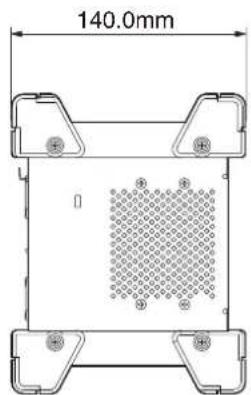
- × 179.6 × 140.0mm (W × H × D)
With rackmount ears attached
482.8 × 132.0 × 120.0mm (W × H × D)
Weight
4.5 kg
Operating temperature range
0 - 40°C (32 - 104°F)
- Illustrations in this manual might differ in part from the actual product.
- Specifications and external appearance might be changed without notification to improve the product.
INSTRUCTIONS DE SÉCURITÉ IMPORTANTES
natural_image
Technical diagram of a rectangular device with internal grid pattern and labeled ports (no text or symbols)Plaque signalétique
MONTAGE EN RACK DE L'UNITÉ
natural_image
Technical line drawing of a mechanical assembly with bolts and a rectangular housing (no text or symbols)ATTENTION
⑩ Voyants PRIMARY/SECONDARY
⑬ Connecteur AC IN
natural_image
Technical line drawing of a rectangular electronic component with internal fins and mounting feet (no text or symbols)natural_image
Technical line drawing of a multi-chamber electronic device with ventilation grilles and input/output arrows (no text or symbols)NOTE
natural_image
Technical line drawing of a server rack unit with multiple ports and ventilation grilles (no text or symbols)natural_image
Isometric line drawing of a server rack unit with multiple ports and ventilation grilles (no text or labels)https://www.audinate.com/products/software/dante-controller
① Nom d'appareil
454,0 x 179,6 x 140,0 mm (L x H x P)
Responsible: TEAC AMERICA, INC.

Dirección: 10410 Pioneer Blvd., Unit #1, Santa Fe Springs, California 90670, U.S.A
natural_image
Technical diagram of a rectangular electronic device with mounting flanges and a mesh pattern (no text or symbols)Placa del nombre
MONTAJE EN RACK DE LA UNIDAD
natural_image
Technical line drawing of a mechanical assembly with mounting holes and structural supports (no text or symbols)ATENCIÓN
① Conectores de entrada analógicos
⑪ Botón RESET
⑬ Conector AC IN
⑭ Conector EXT DC IN
⑯ Conector SECONDARY
natural_image
Technical line drawing of a multi-chamber electronic device with cooling fins and mounting feet (no text or symbols)natural_image
Technical line drawing of a multi-chamber electronic device with ventilation grilles and input/output arrows (no text or symbols)NOTA
natural_image
Technical line drawing of a multi-chamber industrial device with cooling fins and mounting brackets (no text or symbols)natural_image
Isometric line drawing of a server rack unit with ventilation grilles and ports (no text or labels)https://www.audinate.com/products/software/dante-controller
110 dB o superior ( MIC/LINE IN a OUTPUT (Analógica), PAD = OFF, A.Ref = +4 dBu, GAIN = 12, Clock master = INT, JEITA)
+24 dBu (D.Ref: -20dBFS, A.Ref: +4dBu)
454.0 x 179.6 x 140.0 mm (L x A x P)
482.8 x 132.0 x 120.0 mm (L x A x P)
Peso
4.5 kg
natural_image
Technical line drawing of a mechanical assembly with bolts and a rectangular housing (no text or symbols)(1: Masse, 2: heiß (+), 3: kalt (−))
natural_image
Technical line drawing of a multi-chamber electronic component with heat sinks and mounting feet (no text or symbols)natural_image
Technical line drawing of a multi-chamber electronic device with ventilation grilles and input/output arrows (no text or symbols)Anmerkung
- Reverse these procedures to reinstall the feet that were originally attached to the unit.
- By changing the attachment positions of the rackmount ears, the unit can be mounted in a rack with its front panel recessed by 20, 40 or 60 mm.
natural_image
Technical line drawing of a multi-chamber industrial device with cooling fins and mounting brackets (no text or symbols)natural_image
Technical line drawing of a multi-chamber electronic device with ventilation grilles and ports (no text or symbols)Stromversorgung
Audinate-Downloadseite: https://www.audinate.com/products/software/dante-controller
① Gerätebezeichnung
(1: Masse, 2: Heiß (+), 3: Kalt (−))
(1: Masse, 2: Heiß (+), 3: Kalt (−))
Dante-Anschlüsse PRIMARY, SECONDARY
natural_image
Technical diagram of a rectangular device with grid pattern and labeled ports (no text or symbols)natural_image
Technical line drawing of a mechanical assembly with bolts and a frame (no text or symbols)ATTENZIONE
• XLR (1: GND, 2: HOT, 3: COLD)
② Indicatori INPUT SIG
Indicatori 48V
• XLR (1: GND, 2: HOT, 3: COLD)
⑤ Indicatore DC POWER
⑬ Connettore AC IN
natural_image
Technical line drawing of a rectangular electronic component with internal fins and mounting feet (no text or symbols)natural_image
Technical line drawing of a rectangular electronic device with internal grid structure and directional arrows indicating flow (no text or symbols)NOTA
natural_image
Technical line drawing of a multi-chamber industrial device with cooling fins and mounting brackets (no text or symbols)natural_image
Technical line drawing of a multi-chamber industrial control unit with cooling fins and ventilation slots (no text or labels)https://www.audinate.com/products/software/dante-controller
XLR-3-31 equivalente (1: GND, 2: HOT, 3: COLD)
454.0 x 179.6 x 140.0 mm (L x A x P)
482.8 x 132.0 x 120.0 mm (L x A x P)
Peso
4.5 kg
natural_image
Technical line drawing of a mechanical assembly with bolts and a rectangular housing (no text or symbols)- XLR (1: GND, 2: HOT, 3: COLD)
②INPUT SIGインジケーター
48Vインジケーター
- XLR (1: GND, 2: HOT, 3: COLD)
⑤DC POWERインジケーター
⑪ RESETボタン
⑬ AC IN端子
付属の電源コードを接続します。
⑭EXT DC IN端子
natural_image
Technical line drawing of a rectangular electronic component with internal fins and mounting feet (no text or symbols)natural_image
Technical line drawing of a multi-chamber electronic device with ventilation ducts and fan array (no text or symbols)メモ
natural_image
Technical line drawing of a multi-chamber industrial or server unit with cooling fins and ventilation slots (no text or symbols)natural_image
Technical line drawing of a server rack unit with multiple ports and ventilation grilles (no text or labels)電源を接続する
https://www.audinate.com/
Danteネットワークとの接続方法
https://www.audinate.com/products/software/dante-controller
① デバイス名
natural_image
Top-down schematic of a server rack with mesh partition and door indicators (no text or labels)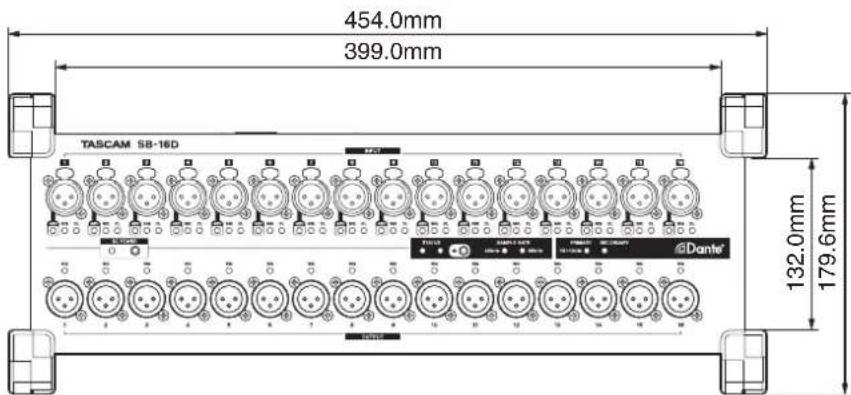
Rack Mount
natural_image
Front view of a server rack with hexagonal mesh partition and a small rectangular component on top (no text or symbols)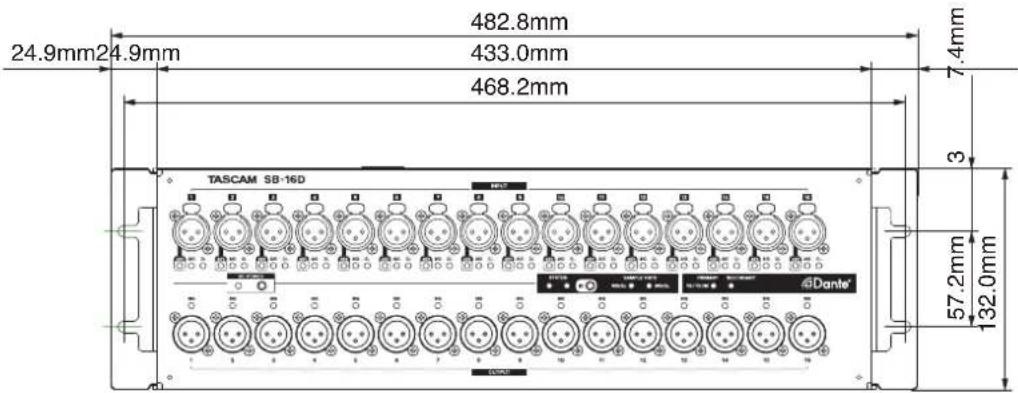
ソフトウェアに関する重要なお知らせ
http://teac-global.com/support/opensource/form/
https://raw.githubusercontent.com/jedisct1/libsodium/1.0.18/LICENSE
/*
ISC License
Copyright (c) 2013-2019
Frank Denis
Permission to use, copy, modify, and/or distribute this software for any purpose with or without fee is hereby granted, provided that the above copyright notice and this permission notice appear in all copies.
THE SOFTWARE IS PROVIDED "AS IS" AND THE AUTHOR DISCLAIMS ALL WARRANTIES WITH REGARD TO THIS SOFTWARE INCLUDING ALL IMPLIED WARRANTIES OF MERCHANTABILITY AND FITNESS. IN NO EVENT SHALL THE AUTHOR BE LIABLE FOR ANY SPECIAL, DIRECT, INDIRECT, OR CONSEQUENTIAL DAMAGES OR ANY DAMAGES WHATSOEVER RESULTING FROM LOSS OF USE, DATA OR PROFITS, WHETHER IN AN ACTION OF CONTRACT, NEGLIGENCE OR OTHER TORTIOUS ACTION, ARISING OUT OF OR IN CONNECTION WITH THE USE OR PERFORMANCE OF THIS SOFTWARE.
*/
zlib
https://raw.githubusercontent.com/madler/zlib/master/zlib.h
/* zlib.h -- interface of the 'zlib' general purpose compression library version 1.2.12, March 11th, 2022
Copyright (C) 1995-2022 Jean-loup Gailly and Mark Adler
This software is provided 'as-is', without any express or implied warranty. In no event will the authors be held liable for any damages arising from the use of this software.
Permission is granted to anyone to use this software for any purpose, including commercial applications, and to alter it and redistribute it freely, subject to the following restrictions:
-
The origin of this software must not be misrepresented; you must not claim that you wrote the original software. If you use this software in a product, an acknowledgment in the product documentation would be appreciated but is not required.
-
Altered source versions must be plainly marked as such, and must not be misrepresented as being the original software.
-
This notice may not be removed or altered from any source distribution.
Jean-loup Gailly Mark Adler
jloup@gzip.org madler@alumni.caltech.edu
The data format used by the zlib library is described by RFCs (Request for Comments) 1950 to 1952 in the files http://tools.ietf.org/html/rfc1950(zlib format), rfc1951 (deflate format) and rfc1952 (gzip format).
*/
mDNSResponder
https://raw.githubusercontent.com/krestenkrab/mdns-responder/master/LICENSE
The majority of the source code in the mDNSResponder project is licensed under the terms of the Apache License, Version 2.0, available from:
To accommodate license compatibility with the widest possible range of client code licenses, the shared library code, which is linked at runtime into the same address space as the client using it, is licensed under the terms of the "Three-Clause BSD License".
The Linux Name Service Switch code, contributed by National ICT Australia Ltd (NICTA) is licensed under the terms of the NICTA Public Software Licence (which is substantially similar to the "Three-Clause BSD License", with some additional language pertaining to Australian law).
glibc
https://raw.githubusercontent.com/lattera/glibc/master/LICENSES
This file contains the copying permission notices for various files in the GNU C Library distribution that have copyright owners other than the Free Software Foundation. These notices all require that a copy of the notice be included in the accompanying documentation and be distributed with binary distributions of the code, so be sure to include this file along with any binary distributions derived from the GNU C Library.
All code incorporated from 4.4 BSD is distributed under the following license:
Copyright (C) 1991 Regents of the University of California.
All rights reserved.
Redistribution and use in source and binary forms, with or without modification, are permitted provided that the following conditions are met:
- Redistributions of source code must retain the above copyright notice, this list of conditions and the following disclaimer.
- Redistributions in binary form must reproduce the above copyright notice, this list of conditions and the following disclaimer in the documentation and/or other materials provided with the distribution.
- [This condition was removed.]
- Neither the name of the University nor the names of its contributors may be used to endorse or promote products derived from this software without specific prior written permission.
THIS SOFTWARE IS PROVIDED BY THE REGENTS AND CONTRIBUTORS "AS IS" AND ANY EXPRESS OR IMPLIED WARRANTIES, INCLUDING, BUT NOT LIMITED TO, THE IMPLIED WARRANTIES OF MERCHANTABILITY AND FITNESS FOR A PARTICULAR PURPOSE ARE DISCLAIMED. IN NO EVENT SHALL THE REGENTS OR CONTRIBUTORS BE LIABLE FOR ANY DIRECT, INDIRECT, INCIDENTAL, SPECIAL, EXEMPLARY, OR CONSEQUENTIAL DAMAGES (INCLUDING, BUT NOT LIMITED TO, PROCUREMENT OF SUBSTITUTE GOODS OR SERVICES; LOSS OF USE, DATA, OR PROFITS; OR BUSINESS INTERRUPTION) HOWEVER CAUSED AND ON ANY THEORY OF LIABILITY, WHETHER IN CONTRACT, STRICT LIABILITY, OR TORT (INCLUDING NEGLIGENCE OR OTHERWISE) ARISING IN ANY WAY OUT OF THE USE OF THIS SOFTWARE, EVEN IF ADVISED OF THE POSSIBILITY OF SUCH DAMAGE.
The DNS resolver code, taken from BIND 4.9.5, is copyrighted by UC Berkeley, by Digital Equipment Corporation and by Internet Software Consortium. The DEC portions are under the following license:
Portions Copyright (C) 1993 by Digital Equipment Corporation.
Permission to use, copy, modify, and distribute this software for any purpose with or without fee is hereby granted, provided that the above copyright notice and this permission notice appear in all copies, and that the name of Digital Equipment Corporation not be used in advertising or publicity pertaining to distribution of the document or software without specific, written prior permission.
THE SOFTWARE IS PROVIDED "AS IS" AND DIGITAL EQUIPMENT CORP. DISCLAIMS ALL WARRANTIES WITH REGARD TO THIS SOFTWARE, INCLUDING ALL IMPLIED WARRANTIES OF MERCHANTABILITY AND FITNESS. IN NO EVENT SHALL DIGITAL EQUIPMENT CORPORATION BE LIABLE FOR ANY SPECIAL, DIRECT, INDIRECT, OR CONSEQUENTIAL DAMAGES OR ANY DAMAGES WHATSOEVER RESULTING FROM LOSS OF USE, DATA OR PROFITS, WHETHER IN AN ACTION OF CONTRACT, NEGLIGENCE OR OTHER TORTIOUS ACTION, ARISING OUT OF OR IN CONNECTION WITH THE USE OR PERFORMANCE OF THIS SOFTWARE.
The ISC portions are under the following license:
Portions Copyright (c) 1996-1999 by Internet Software Consortium.
Permission to use, copy, modify, and distribute this software for any purpose with or without fee is hereby granted, provided that the above copyright notice and this permission notice appear in all copies.
THE SOFTWARE IS PROVIDED "AS IS" AND INTERNET SOFTWARE CONSORTIUM DISCLAIMS ALL WARRANTIES WITH REGARD TO THIS SOFTWARE INCLUDING ALL IMPLIED WARRANTIES OF MERCHANTABILITY AND FITNESS. IN NO EVENT SHALL INTERNET SOFTWARE CONSORTIUM BE LIABLE FOR ANY SPECIAL, DIRECT, INDIRECT, OR CONSEQUENTIAL DAMAGES OR ANY DAMAGES WHATSOEVER RESULTING FROM LOSS OF USE, DATA OR PROFITS, WHETHER IN AN ACTION OF CONTRACT, NEGLIGENCE OR OTHER TORTIOUS ACTION, ARISING OUT OF OR IN CONNECTION WITH THE USE OR PERFORMANCE OF THIS SOFTWARE.
The Sun RPC support (from rpcsrc-4.0) is covered by the following license:
Copyright (c) 2010, Oracle America, Inc.
Redistribution and use in source and binary forms, with or without modification, are permitted provided that the following conditions are met:
* Redistributions of source code must retain the above copyright notice, this list of conditions and the following disclaimer.
* Redistributions in binary form must reproduce the above copyright notice, this list of conditions and the following disclaimer in the documentation and/or other materials provided with the distribution.
* Neither the name of the "Oracle America, Inc." nor the names of its contributors may be used to endorse or promote products derived from this software without specific prior written permission.
THIS SOFTWARE IS PROVIDED BY THE COPYRIGHT HOLDERS AND CONTRIBUTORS "AS IS" AND ANY EXPRESS OR IMPLIED WARRANTIES, INCLUDING, BUT NOT LIMITED TO, THE IMPLIED WARRANTIES OF MERCHANTABILITY AND FITNESS FOR A PARTICULAR PURPOSE ARE DISCLAIMED. IN NO EVENT SHALL THE COPYRIGHT HOLDER OR CONTRIBUTORS BE LIABLE FOR ANY DIRECT, INDIRECT, INCIDENTAL, SPECIAL, EXEMPLARY, OR CONSEQUENTIAL DAMAGES (INCLUDING, BUT NOT LIMITED TO, PROCUREMENT OF SUBSTITUTE GOODS OR SERVICES; LOSS OF USE, DATA, OR PROFITS; OR BUSINESS INTERRUPTION) HOWEVER CAUSED AND ON ANY THEORY OF LIABILITY, WHETHER IN CONTRACT, STRICT LIABILITY, OR TORT (INCLUDING NEGLIGENCE OR OTHERWISE) ARISING IN ANY WAY OUT OF THE USE OF THIS SOFTWARE, EVEN IF ADVISED OF THE POSSIBILITY OF SUCH DAMAGE.
The following CMU license covers some of the support code for Mach, derived from Mach 3.0:
Mach Operating System
Copyright (C) 1991,1990,1989 Carnegie Mellon University All Rights Reserved.
Permission to use, copy, modify and distribute this software and its documentation is hereby granted, provided that both the copyright notice and this permission notice appear in all copies of the software, derivative works or modified versions, and any portions thereof, and that both notices appear in supporting documentation.
CARNEGIE MELLON ALLOWS FREE USE OF THIS SOFTWARE IN ITS "AS IS" CONDITION. CARNEGIE MELLON DISCLAIMS ANY LIABILITY OF ANY KIND FOR ANY DAMAGES WHATSOEVER RESULTING FROM THE USE OF THIS SOFTWARE.
Carnegie Mellon requests users of this software to return to
Software Distribution Coordinator
School of Computer Science
Carnegie Mellon University
Pittsburgh PA 15213-3890
or Software.Distribution@CS.CMU.EDU any improvements or extensions that they make and grant Carnegie Mellon the rights to redistribute these changes.
The file if_ppp.h is under the following CMU license:
Redistribution and use in source and binary forms, with or without modification, are permitted provided that the following conditions are met:
- Redistributions of source code must retain the above copyright notice, this list of conditions and the following disclaimer.
- Redistributions in binary form must reproduce the above copyright notice, this list of conditions and the following disclaimer in the documentation and/or other materials provided with the distribution.
- Neither the name of the University nor the names of its contributors may be used to endorse or promote products derived from this software without specific prior written permission.
THIS SOFTWARE IS PROVIDED BY CARNEGIE MELLON UNIVERSITY AND CONTRIBUTORS ``AS IS'' AND ANY EXPRESS OR IMPLIED WARRANTIES, INCLUDING, BUT NOT LIMITED TO, THE IMPLIED WARRANTIES OF MERCHANTABILITY AND FITNESS FOR A PARTICULAR PURPOSE ARE DISCLAIMED.
IN NO EVENT SHALL THE UNIVERSITY OR CONTRIBUTORS BE LIABLE FOR ANY DIRECT, INDIRECT, INCIDENTAL, SPECIAL, EXEMPLARY, OR CONSEQUENTIAL DAMAGES (INCLUDING, BUT NOT LIMITED TO, PROCUREMENT OF SUBSTITUTE GOODS OR SERVICES; LOSS OF USE, DATA, OR PROFITS; OR BUSINESS INTERRUPTION) HOWEVER CAUSED AND ON ANY THEORY OF LIABILITY, WHETHER IN CONTRACT, STRICT LIABILITY, OR TORT (INCLUDING NEGLIGENCE OR OTHERWISE) ARISING IN ANY WAY OUT OF THE USE OF THIS SOFTWARE, EVEN IF ADVISED OF THE POSSIBILITY OF SUCH DAMAGE.
The following license covers the files from Intel's "Highly Optimized Mathematical Functions for Itanium" collection:
Intel License Agreement
Copyright (c) 2000, Intel Corporation
All rights reserved.
Redistribution and use in source and binary forms, with or without modification, are permitted provided that the following conditions are met:
* Redistributions of source code must retain the above copyright notice, this list of conditions and the following disclaimer.
* Redistributions in binary form must reproduce the above copyright notice, this list of conditions and the following disclaimer in the documentation and/or other materials provided with the distribution.
* The name of Intel Corporation may not be used to endorse or promote products derived from this software without specific prior written permission.
THIS SOFTWARE IS PROVIDED BY THE COPYRIGHT HOLDERS AND CONTRIBUTORS "AS IS" AND ANY EXPRESS OR IMPLIED WARRANTIES, INCLUDING, BUT NOT LIMITED TO, THE IMPLIED WARRANTIES OF MERCHANTABILITY AND FITNESS FOR A PARTICULAR PURPOSE ARE DISCLAIMED. IN NO EVENT SHALL INTEL OR CONTRIBUTORS BE LIABLE
FOR ANY DIRECT, INDIRECT, INCIDENTAL, SPECIAL, EXEMPLARY, OR CONSEQUENTIAL DAMAGES (INCLUDING, BUT NOT LIMITED TO, PROCUREMENT OF SUBSTITUTE GOODS OR SERVICES; LOSS OF USE, DATA, OR PROFITS; OR BUSINESS INTERRUPTION) HOWEVER CAUSED AND ON ANY THEORY OF LIABILITY, WHETHER IN CONTRACT, STRICT LIABILITY, OR TORT (INCLUDING NEGLIGENCE OR OTHERWISE) ARISING IN ANY WAY OUT OF THE USE OF THIS SOFTWARE, EVEN IF ADVISED OF THE POSSIBILITY OF SUCH DAMAGE.
The files inet/getnameinfo.c and sysdeps/posix/getaddrinfo.c are copyright
(C) by Craig Metz and are distributed under the following license:
/* The Inner Net License, Version 2.00
The author(s) grant permission for redistribution and use in source and binary forms, with or without modification, of the software and documentation provided that the following conditions are met:
- If you receive a version of the software that is specifically labelled as not being for redistribution (check the version message and/or README), you are not permitted to redistribute that version of the software in any way or form.
- All terms of the all other applicable copyrights and licenses must be followed.
- Redistributions of source code must retain the authors' copyright notice(s), this list of conditions, and the following disclaimer.
- Redistributions in binary form must reproduce the authors' copyright notice(s), this list of conditions, and the following disclaimer in the documentation and/or other materials provided with the distribution.
- [The copyright holder has authorized the removal of this clause.]
- Neither the name(s) of the author(s) nor the names of its contributors may be used to endorse or promote products derived from this software without specific prior written permission.
THIS SOFTWARE IS PROVIDED BY ITS AUTHORS AND CONTRIBUTORS "AS IS" AND ANY EXPRESS OR IMPLIED WARRANTIES, INCLUDING, BUT NOT LIMITED TO, THE IMPLIED WARRANTIES OF MERCHANTABILITY AND FITNESS FOR A PARTICULAR PURPOSE ARE DISCLAIMED. IN NO EVENT SHALL THE AUTHORS OR CONTRIBUTORS BE LIABLE FOR ANY DIRECT, INDIRECT, INCIDENTAL, SPECIAL, EXEMPLARY, OR CONSEQUENTIAL DAMAGES (INCLUDING, BUT NOT LIMITED TO, PROCUREMENT OF SUBSTITUTE GOODS OR SERVICES; LOSS OF USE, DATA, OR PROFITS; OR BUSINESS INTERRUPTION) HOWEVER CAUSED AND ON ANY THEORY OF LIABILITY, WHETHER IN CONTRACT, STRICT LIABILITY, OR TORT (INCLUDING NEGLIGENCE OR OTHERWISE) ARISING IN ANY WAY OUT OF THE USE OF THIS SOFTWARE, EVEN IF ADVISED OF THE POSSIBILITY OF SUCH DAMAGE.
If these license terms cause you a real problem, contact the author. */
The file sunrpc/des_impl.c is copyright Eric Young:
Copyright (C) 1992 Eric Young
Collected from libdes and modified for SECURE RPC by Martin Kuck 1994 This file is distributed under the terms of the GNU Lesser General Public License, version 2.1 or later - see the file COPYING.LIB for details.
If you did not receive a copy of the license with this program, please see to obtain a copy.
The file inet/rcmd.c is under a UCB copyright and the following:
Copyright (C) 1998 WIDE Project.
All rights reserved.
Redistribution and use in source and binary forms, with or without modification, are permitted provided that the following conditions are met:
- Redistributions of source code must retain the above copyright notice, this list of conditions and the following disclaimer.
- Redistributions in binary form must reproduce the above copyright notice, this list of conditions and the following disclaimer in the documentation and/or other materials provided with the distribution.
- Neither the name of the project nor the names of its contributors may be used to endorse or promote products derived from this software without specific prior written permission.
THIS SOFTWARE IS PROVIDED BY THE PROJECT AND CONTRIBUTORS "AS IS" AND ANY EXPRESS OR IMPLIED WARRANTIES, INCLUDING, BUT NOT LIMITED TO, THE IMPLIED WARRANTIES OF MERCHANTABILITY AND FITNESS FOR A PARTICULAR PURPOSE ARE DISCLAIMED. IN NO EVENT SHALL THE PROJECT OR CONTRIBUTORS BE LIABLE FOR ANY DIRECT,
INDIRECT, INCIDENTAL, SPECIAL, EXEMPLARY, OR CONSEQUENTIAL DAMAGES (INCLUDING, BUT NOT LIMITED TO, PROCUREMENT OF SUBSTITUTE GOODS OR SERVICES; LOSS OF USE, DATA, OR PROFITS; OR BUSINESS INTERRUPTION) HOWEVER CAUSED AND ON ANY THEORY OF LIABILITY, WHETHER IN CONTRACT, STRICT LIABILITY, OR TORT (INCLUDING NEGLIGENCE OR OTHERWISE) ARISING IN ANY WAY OUT OF THE USE OF THIS SOFTWARE, EVEN IF ADVISED OF THE POSSIBILITY OF SUCH DAMAGE.
The file posix/runtests.c is copyright Tom Lord:
Copyright 1995 by Tom Lord
All Rights Reserved
Permission to use, copy, modify, and distribute this software and its documentation for any purpose and without fee is hereby granted, provided that the above copyright notice appear in all copies and that both that copyright notice and this permission notice appear in supporting documentation, and that the name of the copyright holder not be used in advertising or publicity pertaining to distribution of the software without specific, written prior permission.
Tom Lord DISCLAIMS ALL WARRANTIES WITH REGARD TO THIS SOFTWARE, INCLUDING ALL IMPLIED WARRANTIES OF MERCHANTABILITY AND FITNESS, IN NO EVENT SHALL TOM LORD BE LIABLE FOR ANY SPECIAL, INDIRECT OR CONSEQUENTIAL DAMAGES OR ANY DAMAGES WHATSOEVER RESULTING FROM LOSS OF USE, DATA OR PROFITS, WHETHER IN AN ACTION OF CONTRACT, NEGLIGENCE OR OTHER TORTIOUS ACTION, ARISING OUT OF OR IN CONNECTION WITH THE USE OR PERFORMANCE OF THIS SOFTWARE.
The posix/rxspencer tests are copyright Henry Spencer:
Copyright 1992, 1993, 1994, 1997 Henry Spencer. All rights reserved. This software is not subject to any license of the American Telephone and Telegraph Company or of the Regents of the University of California.
Permission is granted to anyone to use this software for any purpose on any computer system, and to alter it and redistribute it, subject to the following restrictions:
-
The author is not responsible for the consequences of use of this software, no matter how awful, even if they arise from flaws in it.
-
The origin of this software must not be misrepresented, either by explicit claim or by omission. Since few users ever read sources, credits must appear in the documentation.
-
Altered versions must be plainly marked as such, and must not be misrepresented as being the original software. Since few users ever read sources, credits must appear in the documentation.
-
This notice may not be removed or altered.
The file posix/PCRE.tests is copyright University of Cambridge:
Copyright (c) 1997-2003 University of Cambridge
Permission is granted to anyone to use this software for any purpose on any computer system, and to redistribute it freely, subject to the following restrictions:
-
This software is distributed in the hope that it will be useful, but WITHOUT ANY WARRANTY; without even the implied warranty of MERCHANTABILITY or FITNESS FOR A PARTICULAR PURPOSE.
-
The origin of this software must not be misrepresented, either by explicit claim or by omission. In practice, this means that if you use PCRE in software that you distribute to others, commercially or otherwise, you must put a sentence like this
Regular expression support is provided by the PCRE library package, which is open source software, written by Philip Hazel, and copyright by the University of Cambridge, England.
somewhere reasonably visible in your documentation and in any relevant files or online help data or similar. A reference to the ftp site for the source, that is, to
ftp://ftp.csx.cam.ac.uk/pub/software/programming/pcre/
should also be given in the documentation. However, this condition is not intended to apply to whole chains of software. If package A includes PCRE, it must acknowledge it, but if package B is software that includes package A, the condition is not imposed on package B (unless it uses PCRE independently).
- Altered versions must be plainly marked as such, and must not be misrepresented as being the original software.
- If PCRE is embedded in any software that is released under the GNU General Purpose Licence (GPL), or Lesser General Purpose Licence (LGPL), then the terms of that licence shall supersede any condition above with which it is incompatible.
Files from Sun fdlibm are copyright Sun Microsystems, Inc.:
Copyright (C) 1993 by Sun Microsystems, Inc. All rights reserved.
Developed at SunPro, a Sun Microsystems, Inc. business. Permission to use, copy, modify, and distribute this software is freely granted, provided that this notice is preserved.
Various long double libm functions are copyright Stephen L. Moshier:
Copyright 2001 by Stephen L. Moshier [moshier@na-net.ornl.gov]
This library is free software; you can redistribute it and/or modify it under the terms of the GNU Lesser General Public License as published by the Free Software Foundation; either version 2.1 of the License, or (at your option) any later version.
This library is distributed in the hope that it will be useful, but WITHOUT ANY WARRANTY; without even the implied warranty of MERCHANTABILITY or FITNESS FOR A PARTICULAR PURPOSE. See the GNU Lesser General Public License for more details.
You should have received a copy of the GNU Lesser General Public License along with this library; if not, see . */
ptp
https://raw.githubusercontent.com/ptpd/ptpd/master/COPYRIGHT
/*-
Copyright (c) 2015 Wojciech Owczarek.
Copyright (c) 2014 Perseus Telecom.
Copyright (c) 2013-2014 Harlan Stenn,
George N. Neville-Neil,
Wojciech Owczarek,
Jan Breuer.
Copyright (c) 2011-2012 George V. Neville-Neil,
Steven Kreuzer,
Martin Burnicki,
Jan Breuer,
Wojciech Owczarek,
Gael Mace,
Alexandre Van Kempen,
Inaqui Delgado,
Rick Ratzel,
National Instruments.
Copyright (c) 2009-2010 George V. Neville-Neil,
Steven Kreuzer,
Martin Burnicki,
Jan Breuer,
Gael Mace,
Alexandre Van Kempen.
Copyright (c) 2005-2008 Kendall Correll, Aidan Williams
All Rights Reserved
Redistribution and use in source and binary forms, with or without modification, are permitted provided that the following conditions are met:
- Redistributions of source code must retain the above copyright notice,
this list of conditions and the following disclaimer.
- Redistributions in binary form must reproduce the above copyright notice, this list of conditions and the following disclaimer in the documentation and/or other materials provided with the distribution.
THIS SOFTWARE IS PROVIDED BY THE AUTHORS ``AS IS'' AND ANY EXPRESS OR IMPLIED WARRANTIES, INCLUDING, BUT NOT LIMITED TO, THE IMPLIED WARRANTIES OF MERCHANTABILITY AND FITNESS FOR A PARTICULAR PURPOSE ARE DISCLAIMED. IN NO EVENT SHALL THE AUTHORS OR CONTRIBUTORS BE LIABLE FOR ANY DIRECT, INDIRECT, INCIDENTAL, SPECIAL, EXEMPLARY, OR CONSEQUENTIAL DAMAGES (INCLUDING, BUT NOT LIMITED TO, PROCUREMENT OF SUBSTITUTE GOODS OR SERVICES; LOSS OF USE, DATA, OR PROFITS; OR BUSINESS INTERRUPTION) HOWEVER CAUSED AND ON ANY THEORY OF LIABILITY, WHETHER IN CONTRACT, STRICT LIABILITY, OR TORT (INCLUDING NEGLIGENCE OR OTHERWISE) ARISING IN ANY WAY OUT OF THE USE OF THIS SOFTWARE, EVEN IF ADVISED OF THE POSSIBILITY OF SUCH DAMAGE.
*/
u-boot, busybox, Linux kernel, PetaLinux
https://www.gnu.org/licenses/old-licenses/gpl-2.0.txt
GNU GENERAL PUBLIC LICENSE
Version 2, June 1991
Copyright (C) 1989, 1991 Free Software Foundation, Inc., 51 Franklin Street, Fifth Floor, Boston, MA 02110-1301 USA Everyone is permitted to copy and distribute verbatim copies of this license document, but changing it is not allowed.
Preamble
The licenses for most software are designed to take away your freedom to share and change it. By contrast, the GNU General Public License is intended to guarantee your freedom to share and change free software-to make sure the software is free for all its users. This General Public License applies to most of the Free Software Foundation's software and to any other program whose authors commit to using it. (Some other Free Software Foundation software is covered by the GNU Lesser General Public License instead.) You can apply it to your programs, too.
When we speak of free software, we are referring to freedom, not price. Our General Public Licenses are designed to make sure that you have the freedom to distribute copies of free software (and charge for this service if you wish), that you receive source code or can get it if you want it, that you can change the software or use pieces of it in new free programs; and that you know you can do these things.
To protect your rights, we need to make restrictions that forbid anyone to deny you these rights or to ask you to surrender the rights.
These restrictions translate to certain responsibilities for you if you distribute copies of the software, or if you modify it.
For example, if you distribute copies of such a program, whether gratis or for a fee, you must give the recipients all the rights that you have. You must make sure that they, too, receive or can get the source code. And you must show them these terms so they know their rights.
We protect your rights with two steps: (1) copyright the software, and (2) offer you this license which gives you legal permission to copy, distribute and/or modify the software.
Also, for each author's protection and ours, we want to make certain that everyone understands that there is no warranty for this free software. If the software is modified by someone else and passed on, we want its recipients to know that what they have is not the original, so that any problems introduced by others will not reflect on the original authors' reputations.
Finally, any free program is threatened constantly by software patents. We wish to avoid the danger that redistributors of a free program will individually obtain patent licenses, in effect making the program proprietary. To prevent this, we have made it clear that any patent must be licensed for everyone's free use or not licensed at all.
The precise terms and conditions for copying, distribution and modification follow.
GNU GENERAL PUBLIC LICENSE
TERMS AND CONDITIONS FOR COPYING, DISTRIBUTION AND MODIFICATION
- This License applies to any program or other work which contains a notice placed by the copyright holder saying it may be distributed under the terms of this General Public License. The "Program", below, refers to any such program or work, and a "work based on the Program" means either the Program or any derivative work under copyright law: that is to say, a work containing the Program or a portion of it, either verbatim or with modifications and/or translated into another language. (Hereinafter, translation is included without limitation in the term "modification".) Each licensee is addressed as "you".
Activities other than copying, distribution and modification are not covered by this License; they are outside its scope. The act of running the Program is not restricted, and the output from the Program is covered only if its contents constitute a work based on the Program (independent of having been made by running the Program). Whether that is true depends on what the Program does.
- You may copy and distribute verbatim copies of the Program's source code as you receive it, in any medium, provided that you conspicuously and appropriately publish on each copy an appropriate copyright notice and disclaimer of warranty; keep intact all the notices that refer to this License and to the absence of any warranty; and give any other recipients of the Program a copy of this License along with the Program.
You may charge a fee for the physical act of transferring a copy, and you may at your option offer warranty protection in exchange for a fee.
- You may modify your copy or copies of the Program or any portion of it, thus forming a work based on the Program, and copy and distribute such modifications or work under the terms of Section 1 above, provided that you also meet all of these conditions:
a) You must cause the modified files to carry prominent notices stating that you changed the files and the date of any change.
b) You must cause any work that you distribute or publish, that in whole or in part contains or is derived from the Program or any part thereof, to be licensed as a whole at no charge to all third parties under the terms of this License.
c) If the modified program normally reads commands interactively when run, you must cause it, when started running for such interactive use in the most ordinary way, to print or display an announcement including an appropriate copyright notice and a notice that there is no warranty (or else, saying that you provide a warranty) and that users may redistribute the program under these conditions, and telling the user how to view a copy of this License. (Exception: if the Program itself is interactive but does not normally print such an announcement, your work based on the Program is not required to print an announcement.)
These requirements apply to the modified work as a whole. If identifiable sections of that work are not derived from the Program, and can be reasonably considered independent and separate works in themselves, then this License, and its terms, do not apply to those sections when you distribute them as separate works. But when you distribute the same sections as part of a whole which is a work based on the Program, the distribution of the whole must be on the terms of this License, whose permissions for other licensees extend to the entire whole, and thus to each and every part regardless of who wrote it.
Thus, it is not the intent of this section to claim rights or contest your rights to work written entirely by you; rather, the intent is to exercise the right to control the distribution of derivative or collective works based on the Program.
In addition, mere aggregation of another work not based on the Program
with the Program (or with a work based on the Program) on a volume of a storage or distribution medium does not bring the other work under the scope of this License.
- You may copy and distribute the Program (or a work based on it, under Section 2) in object code or executable form under the terms of Sections 1 and 2 above provided that you also do one of the following:
a) Accompany it with the complete corresponding machine-readable source code, which must be distributed under the terms of Sections 1 and 2 above on a medium customarily used for software interchange; or,
b) Accompany it with a written offer, valid for at least three years, to give any third party, for a charge no more than your cost of physically performing source distribution, a complete machine-readable copy of the corresponding source code, to be distributed under the terms of Sections 1 and 2 above on a medium customarily used for software
interchange; or,
c) Accompany it with the information you received as to the offer to distribute corresponding source code. (This alternative is allowed only for noncommercial distribution and only if you received the program in object code or executable form with such an offer, in accord with Subsection b above.)
The source code for a work means the preferred form of the work for making modifications to it. For an executable work, complete source code means all the source code for all modules it contains, plus any associated interface definition files, plus the scripts used to control compilation and installation of the executable. However, as a special exception, the source code distributed need not include anything that is normally distributed (in either source or binary form) with the major components (compiler, kernel, and so on) of the operating system on which the executable runs, unless that component itself accompanies the executable.
If distribution of executable or object code is made by offering access to copy from a designated place, then offering equivalent access to copy the source code from the same place counts as distribution of the source code, even though third parties are not compelled to copy the source along with the object code.
-
You may not copy, modify, sublicense, or distribute the Program except as expressly provided under this License. Any attempt otherwise to copy, modify, sublicense or distribute the Program is void, and will automatically terminate your rights under this License. However, parties who have received copies, or rights, from you under this License will not have their licenses terminated so long as such parties remain in full compliance.
-
You are not required to accept this License, since you have not signed it. However, nothing else grants you permission to modify or distribute the Program or its derivative works. These actions are prohibited by law if you do not accept this License. Therefore, by modifying or distributing the Program (or any work based on the Program), you indicate your acceptance of this License to do so, and all its terms and conditions for copying, distributing or modifying the Program or works based on it.
-
Each time you redistribute the Program (or any work based on the Program), the recipient automatically receives a license from the original licensor to copy, distribute or modify the Program subject to these terms and conditions. You may not impose any further restrictions on the recipients' exercise of the rights granted herein. You are not responsible for enforcing compliance by third parties to this License.
-
If, as a consequence of a court judgment or allegation of patent infringement or for any other reason (not limited to patent issues), conditions are imposed on you (whether by court order, agreement or otherwise) that contradict the conditions of this License, they do not excuse you from the conditions of this License. If you cannot distribute so as to satisfy simultaneously your obligations under this License and any other pertinent obligations, then as a consequence you may not distribute the Program at all. For example, if a patent license would not permit royalty-free redistribution of the Program by all those who receive copies directly or indirectly through you, then the only way you could satisfy both it and this License would be to refrain entirely from distribution of the Program.
If any portion of this section is held invalid or unenforceable under any particular circumstance, the balance of the section is intended to apply and the section as a whole is intended to apply in other circumstances.
It is not the purpose of this section to induce you to infringe any patents or other property right claims or to contest validity of any such claims; this section has the sole purpose of protecting the integrity of the free software distribution system, which is implemented by public license practices. Many people have made generous contributions to the wide range of software distributed through that system in reliance on consistent application of that system; it is up to the author/donor to decide if he or she is willing to distribute software through any other system and a licensee cannot impose that choice.
This section is intended to make thoroughly clear what is believed to be a consequence of the rest of this License.
- If the distribution and/or use of the Program is restricted in certain countries either by patents or by copyrighted interfaces, the original copyright holder who places the Program under this License may add an explicit geographical distribution limitation excluding those countries, so that distribution is permitted only in or among countries not thus excluded. In such case, this License incorporates the limitation as if
written in the body of this License.
- The Free Software Foundation may publish revised and/or new versions of the General Public License from time to time. Such new versions will be similar in spirit to the present version, but may differ in detail to address new problems or concerns.
Each version is given a distinguishing version number. If the Program specifies a version number of this License which applies to it and "any later version", you have the option of following the terms and conditions either of that version or of any later version published by the Free Software Foundation. If the Program does not specify a version number of this License, you may choose any version ever published by the Free Software Foundation.
- If you wish to incorporate parts of the Program into other free programs whose distribution conditions are different, write to the author to ask for permission. For software which is copyrighted by the Free Software Foundation, write to the Free Software Foundation; we sometimes make exceptions for this. Our decision will be guided by the two goals of preserving the free status of all derivatives of our free software and of promoting the sharing and reuse of software generally.
NO WARRANTY
-
BECAUSE THE PROGRAM IS LICENSED FREE OF CHARGE, THERE IS NO WARRANTY FOR THE PROGRAM, TO THE EXTENT PERMITTED BY APPLICABLE LAW. EXCEPT WHEN OTHERWISE STATED IN WRITING THE COPYRIGHT HOLDERS AND/OR OTHER PARTIES PROVIDE THE PROGRAM "AS IS" WITHOUT WARRANTY OF ANY KIND, EITHER EXPRESSED OR IMPLIED, INCLUDING, BUT NOT LIMITED TO, THE IMPLIED WARRANTIES OF MERCHANTABILITY AND FITNESS FOR A PARTICULAR PURPOSE. THE ENTIRE RISK AS TO THE QUALITY AND PERFORMANCE OF THE PROGRAM IS WITH YOU. SHOULD THE PROGRAM PROVE DEFECTIVE, YOU ASSUME THE COST OF ALL NECESSARY SERVICING, REPAIR OR CORRECTION.
-
IN NO EVENT UNLESS REQUIRED BY APPLICABLE LAW OR AGREED TO IN WRITING WILL ANY COPYRIGHT HOLDER, OR ANY OTHER PARTY WHO MAY MODIFY AND/OR REDISTRIBUTE THE PROGRAM AS PERMITTED ABOVE, BE LIABLE TO YOU FOR DAMAGES, INCLUDING ANY GENERAL, SPECIAL, INCIDENTAL OR CONSEQUENTIAL DAMAGES ARISING OUT OF THE USE OR INABILITY TO USE THE PROGRAM (INCLUDING BUT NOT LIMITED TO LOSS OF DATA OR DATA BEING RENDERED INACCURATE OR LOSSES SUSTAINED BY YOU OR THIRD PARTIES OR A FAILURE OF THE PROGRAM TO OPERATE WITH ANY OTHER PROGRAMS), EVEN IF SUCH HOLDER OR OTHER PARTY HAS BEEN ADVISED OF THE POSSIBILITY OF SUCH DAMAGES.
END OF TERMS AND CONDITIONS
How to Apply These Terms to Your New Programs
If you develop a new program, and you want it to be of the greatest possible use to the public, the best way to achieve this is to make it free software which everyone can redistribute and change under these terms.
To do so, attach the following notices to the program. It is safest to attach them to the start of each source file to most effectively convey the exclusion of warranty; and each file should have at least the "copyright" line and a pointer to where the full notice is found.
Copyright (C)
This program is free software; you can redistribute it and/or modify it under the terms of the GNU General Public License as published by the Free Software Foundation; either version 2 of the License, or (at your option) any later version.
This program is distributed in the hope that it will be useful, but WITHOUT ANY WARRANTY; without even the implied warranty of MERCHANTABILITY or FITNESS FOR A PARTICULAR PURPOSE. See the GNU General Public License for more details.
You should have received a copy of the GNU General Public License along with this program; if not, write to the Free Software Foundation, Inc., 51 Franklin Street, Fifth Floor, Boston, MA 02110-1301 USA.
Also add information on how to contact you by electronic and paper mail.
If the program is interactive, make it output a short notice like this when
it starts in an interactive mode:
Gnomovision version 69, Copyright (C) year name of author Gnomovision comes with ABSOLUTELY NO WARRANTY; for details type 'show w'.
This is free software, and you are welcome to redistribute it under certain conditions; type `show c' for details.
The hypothetical commands `show w' and `show c' should show the appropriate parts of the General Public License. Of course, the commands you use may be called something other than `show w' and `show c'; they could even be mouse-clicks or menu items--whatever suits your program.
You should also get your employer (if you work as a programmer) or your school, if any, to sign a "copyright disclaimer" for the program, if necessary. Here is a sample; alter the names:
Yoyodyne, Inc., hereby disclaims all copyright interest in the program 'Gnomovision' (which makes passes at compilers) written by James Hacker.
, 1 April 1989
Ty Coon, President of Vice
This General Public License does not permit incorporating your program into proprietary programs. If your program is a subroutine library, you may consider it more useful to permit linking proprietary applications with the library. If this is what you want to do, use the GNU Lesser General Public License instead of this License.
Boost
https://www.boost.org/LICENSE_1_0.txt
Boost Software License - Version 1.0 - August 17th, 2003
Permission is hereby granted, free of charge, to any person or organization obtaining a copy of the software and accompanying documentation covered by this license (the "Software") to use, reproduce, display, distribute, execute, and transmit the Software, and to prepare derivative works of the Software, and to permit third-parties to whom the Software is furnished to do so, all subject to the following:
The copyright notices in the Software and this entire statement, including the above license grant, this restriction and the following disclaimer, must be included in all copies of the Software, in whole or in part, and all derivative works of the Software, unless such copies or derivative works are solely in the form of machine-executable object code generated by a source language processor.
THE SOFTWARE IS PROVIDED "AS IS", WITHOUT WARRANTY OF ANY KIND, EXPRESS OR IMPLIED, INCLUDING BUT NOT LIMITED TO THE WARRANTIES OF MERCHANTABILITY, FITNESS FOR A PARTICULAR PURPOSE, TITLE AND NON-INFRINGEMENT. IN NO EVENT SHALL THE COPYRIGHT HOLDERS OR ANYONE DISTRIBUTING THE SOFTWARE BE LIABLE FOR ANY DAMAGES OR OTHER LIABILITY, WHETHER IN CONTRACT, TORT OR OTHERWISE, ARISING FROM, OUT OF OR IN CONNECTION WITH THE SOFTWARE OR THE USE OR OTHER DEALINGS IN THE SOFTWARE.
OpenSSL
https://raw.githubusercontent.com/openssl/openssl/OpenSSL_1_1_1p/LICENSE
LICENSE ISSUES
The OpenSSL toolkit stays under a double license, i.e. both the conditions of the OpenSSL License and the original SSLeay license apply to the toolkit. See below for the actual license texts.
OpenSSL License
/*
Copyright (c) 1998-2019 The OpenSSL Project. All rights reserved.
Redistribution and use in source and binary forms, with or without modification, are permitted provided that the following conditions are met:
- Redistributions of source code must retain the above copyright notice, this list of conditions and the following disclaimer.
- Redistributions in binary form must reproduce the above copyright notice, this list of conditions and the following disclaimer in the documentation and/or other materials provided with the distribution.
- All advertising materials mentioning features or use of this software must display the following acknowledgment: "This product includes software developed by the OpenSSL Project for use in the OpenSSL Toolkit. (http://www.openssl.org/)"
- The names "OpenSSL Toolkit" and "OpenSSL Project" must not be used to endorse or promote products derived from this software without prior written permission. For written permission, please contact openssl-core@openssl.org.
- Products derived from this software may not be called "OpenSSL" nor may "OpenSSL" appear in their names without prior written permission of the OpenSSL Project.
- Redistributions of any form whatsoever must retain the following acknowledgment: "This product includes software developed by the OpenSSL Project for use in the OpenSSL Toolkit (http://www.openssl.org/)"
THIS SOFTWARE IS PROVIDED BY THE OpenSSL PROJECT ``AS IS'' AND ANY EXPRESSED OR IMPLIED WARRANTIES, INCLUDING, BUT NOT LIMITED TO, THE IMPLIED WARRANTIES OF MERCHANTABILITY AND FITNESS FOR A PARTICULAR PURPOSE ARE DISCLAIMED. IN NO EVENT SHALL THE OpenSSL PROJECT OR ITS CONTRIBUTORS BE LIABLE FOR ANY DIRECT, INDIRECT, INCIDENTAL, SPECIAL, EXEMPLARY, OR CONSEQUENTIAL DAMAGES (INCLUDING, BUT NOT LIMITED TO, PROCUREMENT OF SUBSTITUTE GOODS OR SERVICES; LOSS OF USE, DATA, OR PROFITS; OR BUSINESS INTERRUPTION) HOWEVER CAUSED AND ON ANY THEORY OF LIABILITY, WHETHER IN CONTRACT, STRICT LIABILITY, OR TORT (INCLUDING NEGLIGENCE OR OTHERWISE) ARISING IN ANY WAY OUT OF THE USE OF THIS SOFTWARE, EVEN IF ADVISED OF THE POSSIBILITY OF SUCH DAMAGE.
This product includes cryptographic software written by Eric Young (eay@cryptsoft.com). This product includes software written by Tim Hudson (tjh@cryptsoft.com).
*/
Original SSLeay License
/* Copyright (C) 1995-1998 Eric Young (eay@cryptsoft.com) All rights reserved.
This package is an SSL implementation written by Eric Young (eay@cryptsoft.com). The implementation was written so as to conform with Netscapes SSL.
This library is free for commercial and non-commercial use as long as
the following conditions are aheared to. The following conditions apply to all code found in this distribution, be it the RC4, RSA, lhash, DES, etc., code; not just the SSL code. The SSL documentation included with this distribution is covered by the same copyright terms except that the holder is Tim Hudson (tjh@cryptsoft.com).
Copyright remains Eric Young's, and as such any Copyright notices in the code are not to be removed.
If this package is used in a product, Eric Young should be given attribution as the author of the parts of the library used.
This can be in the form of a textual message at program startup or in documentation (online or textual) provided with the package.
Redistribution and use in source and binary forms, with or without modification, are permitted provided that the following conditions are met:
- Redistributions of source code must retain the copyright notice, this list of conditions and the following disclaimer.
- Redistributions in binary form must reproduce the above copyright notice, this list of conditions and the following disclaimer in the documentation and/or other materials provided with the distribution.
- All advertising materials mentioning features or use of this software must display the following acknowledgement: "This product includes cryptographic software written by Eric Young (eay@cryptsoft.com)" The word 'cryptographic' can be left out if the routines from the library being used are not cryptographic related :-)
- If you include any Windows specific code (or a derivative thereof) from the apps directory (application code) you must include an acknowledgement: "This product includes software written by Tim Hudson (tjh@cryptsoft.com)"
THIS SOFTWARE IS PROVIDED BY ERIC YOUNG "AS IS" AND ANY EXPRESS OR IMPLIED WARRANTIES, INCLUDING, BUT NOT LIMITED TO, THE IMPLIED WARRANTIES OF MERCHANTABILITY AND FITNESS FOR A PARTICULAR PURPOSE ARE DISCLAIMED. IN NO EVENT SHALL THE AUTHOR OR CONTRIBUTORS BE LIABLE FOR ANY DIRECT, INDIRECT, INCIDENTAL, SPECIAL, EXEMPLARY, OR CONSEQUENTIAL DAMAGES (INCLUDING, BUT NOT LIMITED TO, PROCUREMENT OF SUBSTITUTE GOODS OR SERVICES; LOSS OF USE, DATA, OR PROFITS; OR BUSINESS INTERRUPTION) HOWEVER CAUSED AND ON ANY THEORY OF LIABILITY, WHETHER IN CONTRACT, STRICT LIABILITY, OR TORT (INCLUDING NEGLIGENCE OR OTHERWISE) ARISING IN ANY WAY OUT OF THE USE OF THIS SOFTWARE, EVEN IF ADVISED OF THE POSSIBILITY OF SUCH DAMAGE.
The licence and distribution terms for any publicly available version or derivative of this code cannot be changed. i.e. this code cannot simply be copied and put under another distribution licence [including the GNU Public Licence.]
*/
jsoncpp
https://raw.githubusercontent.com/open-source-parsers/jsoncpp/1.9.5/LICENSE
The JsonCpp library's source code, including accompanying documentation, tests and demonstration applications, are licensed under the following conditions...
Baptiste Lepilleur and The JsonCpp Authors explicitly disclaim copyright in all jurisdictions which recognize such a disclaimer. In such jurisdictions, this software is released into the Public Domain.
In jurisdictions which do not recognize Public Domain property (e.g. Germany as of 2010), this software is Copyright (c) 2007-2010 by Baptiste Lepilleur and The JsonCpp Authors, and is released under the terms of the MIT License (see below).
In jurisdictions which recognize Public Domain property, the user of this software may choose to accept it either as 1) Public Domain, 2) under the conditions of the MIT License (see below), or 3) under the terms of dual Public Domain/MIT License conditions described here, as they choose.
The MIT License is about as close to Public Domain as a license can get, and is described in clear, concise terms at:
http://en.wikipedia.org/wiki/MIT_License
The full text of the MIT License follows:
Copyright (c) 2007-2010 Baptiste Lepilleur and The JsonCpp Authors
Permission is hereby granted, free of charge, to any person obtaining a copy of this software and associated documentation files (the "Software"), to deal in the Software without restriction, including without limitation the rights to use, copy, modify, merge, publish, distribute, sublicense, and/or sell copies of the Software, and to permit persons to whom the Software is furnished to do so, subject to the following conditions:
The above copyright notice and this permission notice shall be included in all copies or substantial portions of the Software.
THE SOFTWARE IS PROVIDED "AS IS", WITHOUT WARRANTY OF ANY KIND, EXPRESS OR IMPLIED, INCLUDING BUT NOT LIMITED TO THE WARRANTIES OF MERCHANTABILITY, FITNESS FOR A PARTICULAR PURPOSE AND NONINFRINGEMENT. IN NO EVENT SHALL THE AUTHORS OR COPYRIGHT HOLDERS BE LIABLE FOR ANY CLAIM, DAMAGES OR OTHER LIABILITY, WHETHER IN AN ACTION OF CONTRACT, TORT OR OTHERWISE, ARISING FROM, OUT OF OR IN CONNECTION WITH THE SOFTWARE OR THE USE OR OTHER DEALINGS IN THE SOFTWARE.
(END LICENSE TEXT)
The MIT license is compatible with both the GPL and commercial software, affording one all of the rights of Public Domain with the minor nuisance of being required to keep the above copyright notice and license text in the source code. Note also that by accepting the Public Domain “license” you can re-license your copy using whatever license you like.
WARRANTY / 保証書
This warranty gives you specific legal rights and you may also have other rights which vary from state to state. This warranty is only valid within the country the unit was originally purchased.
WHAT IS COVERED AND WHAT IS NOT COVERED
Except as specified below, this warranty covers all defects in materials and workmanship in this product. The following are not covered by the warranty:
- Damage to or deterioration of the external cabinet.
- Damage resulting from accident, misuse, abuse or neglect.
- Damage resulting from failure to perform basic daily maintenance and/or calibration or otherwise resulting from failure to follow instructions contained in your owner's manual.
- Damage occurring during shipment of the product. (Claims must be presented to the carrier)
- Damage resulting from repair or attempted repair by anyone other than TEAC or an authorized TASCAM service station.
- Damage resulting from causes other than product defects, including lack of technical skill, competence, or experience of the user.
- Damage to any unit which has been altered or on which the serial number has been defaced, modified or is missing.
WHO IS COVERED UNDER THE WARRANTY
This warranty may be enforced only by the original purchaser. This warranty is not valid if the product was purchased through an unauthorized dealer.
LENGTH OF WARRANTY
All parts except heads and disk drives are warranted for one (1) year from the date of original purchase. Heads and disk drives are warranted for ninety (90) days from date of original purchase. Labor is warranted for ninety (90) days from date of original purchase.
WHAT WE WILL PAY FOR
We will pay all labor and material expenses for items covered by the warranty. Payment of shipping charges is discussed in the next section of this warranty.
HOW YOU CAN GET WARRANTY SERVICE
Your unit must be serviced by an authorized TASCAM service station in the United States. (This warranty is not enforceable outside the U.S.) If you are unable to locate an authorized TASCAM service station in your area, please contact us. We either will refer you to an authorized service station or instruct you to return the unit to the factory. Whenever warranty service is required, you must present a copy of the original dated sales receipt from an Authorized TASCAM Dealer. You must pay any shipping charges if it is necessary to ship the product to service. However, if the necessary repairs are covered by the warranty, we will pay return surface shipping charges to any destination within
the United States.
LIMITATION OF IMPLIED WARRANTIES
Any implied warranties, INCLUDING WARRANTIES OF MERCHANTABILITY AND FITNESS FOR A PARTICULAR PURPOSE, are limited in duration to the length of this warranty.
EXCLUSION OF DAMAGES
TEAC's liability for any defective product is limited to repair or replacement of the product, at TEAC's option. TEAC shall not be liable for:
-
Damages based upon inconvenience, loss of use of the product, loss of time interrupted operation or commercial loss; or
-
Any other damages, whether incidental, consequential or otherwise.
Some states do not allow limitations on how long an implied warranty lasts and/or do not allow the exclusion or limitation of incidental or consequential damages, so the above limitations and exclusions may not apply to you.
To locate an Authorized Service Center in Your Area
CALL 1-323-726-0303
This product is subject to the legal warranty regulations of the country of purchase. In case of a defect or a problem, please contact the dealer where you bought the product.
< In other countries/areas >
This warranty gives you specific legal rights, and you may also have other rights that vary by country, state or province.
If you have a warranty claim or request, please contact the dealer where you bought the product.
If you require repair services for your TASCAM equipment, please contact the dealer where the product was purchased from or the TASCAM Distributor in your country. A list of TASCAM Distributors can be found on our website at: https://teac-global.com/
TASCAM
TEAC CORPORATION https://tascam.jp/jp/
Phone: +81-42-356-9143
1-47 Ochiai, Tama-shi, Tokyo 206-8530 Japan
TEAC AMERICA, INC. https://tascam.com/us/
Phone: +1-323-726-0303
10410 Pioneer Blvd., Unit #1, Santa Fe Springs, California 90670, U.S.A
TEAC UK Ltd. https://www.tascam.eu/en/
Phone: +44-1923-797205
Luminous House, 300 South Row, Milton Keynes, Buckinghamshire, MK9 2FR, UK
TEAC EUROPE GmbH https://www.tascam.eu/de/
Phone: +49-611-71580
Room 817, Xinian Center A, Tairan Nine Road West, Shennan Road, Futian District, Shenzhen, Guangdong Province 518040, China
Printed in China 0223. MA-3520C
WARRANTY / 保証書
Model / Modèle / Modell / Modello / Modelo / 型名
SB-16D
Serial No. / No de série / Seriennummer / Numero di serie / Número de serie / 機番
Sample
Date of purchase / Date de l'achat
Datum des Kaufs
ata l'ac isto
echa e com a /
目C上日
Owner's name / Nom du propriétaire / Name des Eigentümers / Nome del proprietario / Nombre del proprietario / お名前
Address / Adresse / Adresse / Indirizzo / Dirección / ご住所
Dealer's name / Nom du revendeur / Name des Händlers / Nome del commerciante / Nombre del establecimiento / 贩売店
https://teac-global.com/