Rainforest - Humidifier Smartmi - Free user manual and instructions
Find the device manual for free Rainforest Smartmi in PDF.


User questions about Rainforest Smartmi
0 question about this device. Answer the ones you know or ask your own.
Ask a new question about this device
Download the instructions for your Humidifier in PDF format for free! Find your manual Rainforest - Smartmi and take your electronic device back in hand. On this page are published all the documents necessary for the use of your device. Rainforest by Smartmi.
USER MANUAL Rainforest Smartmi
Maintenance and Care 09
Notes 11
Basic Specifications 12
Inhaltsverzeichnis
- This appliance is not intended for use by persons (including children) with reduced physical, sensory or mental capabilities, or lack of experience and knowledge, unless they have been given supervision or instruction concerning use of the appliance by a person responsible for their safety.
Children shall not play with the appliance. - Cleaning and user maintenance shall not be made by children without supervision.
- Keep the appliance out of the reach of children. Steam and boiling water may cause burns.
- Be aware that high humidity levels may encourage the growth of biological organisms in the environment.
- Do not permit the area around the humidifier to become damp or wet. If dampness occurs, turn the output of the humidifier down. If the humidifier output volume cannot be turned down, use the humidifier intermittently. Do not allow absorbent materials, such as carpeting, curtains, drapes, or tablecloths, to become damp.
- Unplug the appliance during filling and cleaning.
-
Never leave water in the reservoir when the appliance is not in use.
-
Empty and clean the humidifier before storage. Clean the humidifier before next use.
-
To prevent electric shocks, fire, personal injury and other damage, do not use the humidifier when:
-
The main body of the humidifier is tilted. Tilting the humidifier may cause the water level to be reported incorrectly or the water to overflow. The humidifier should be placed on a flat and stable surface while in use.
-
There are nearby objects that may fall or are unstable.
-In hot, humid or wet places such as bathrooms. -
Power the humidifier using the standard adapter supplied with the humidifier. Due to safety considerations, damaged adapters or power cords must be replaced by the manufacturer or a professional from a designated repair service provider.
- For Use Only With Zhongshan Baolijin Electronic Co.,Ltd.
BLJ9W120075P-VA Charger.
- Do not disassemble the product yourself unless disassembly is required for maintenance. For repair information, contact Smartmi Customer Service.
Product Description
Package List: Unit, Water Tank, Adapter, User Manual Read this manual carefully before use, and retain it for future reference.
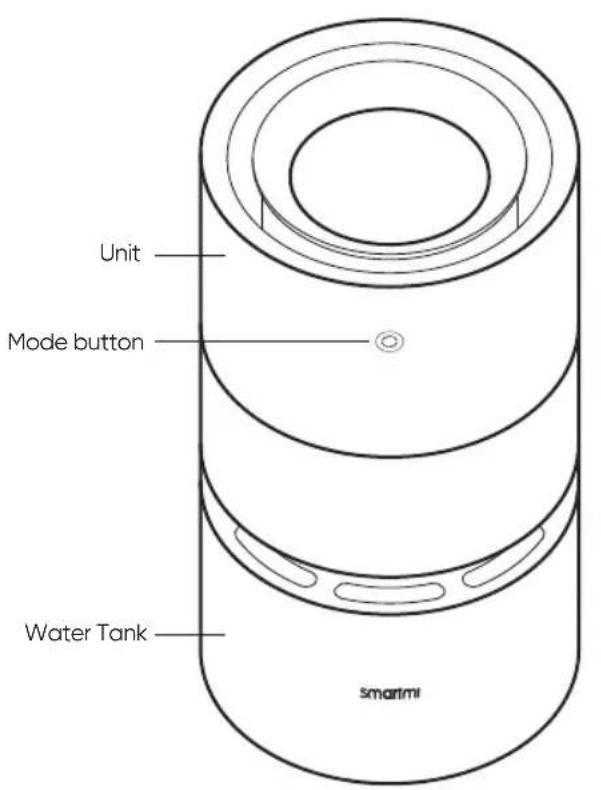
Front Rear
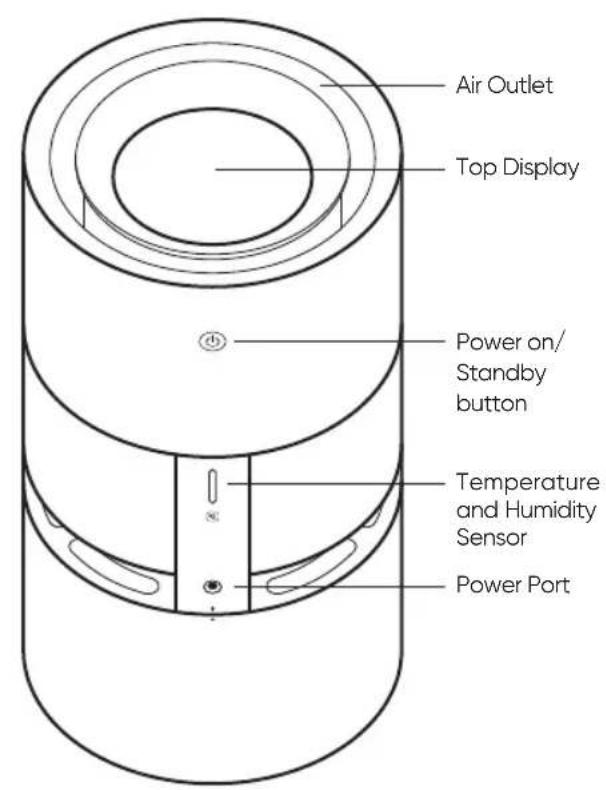
Note: In this manual, the illustrations of the product and its accessories and the user interface are schematic diagrams for reference only. The actual product may vary from that shown in the schematic diagrams due to product updates and upgrades. Please refer to the actual product.
Display Description
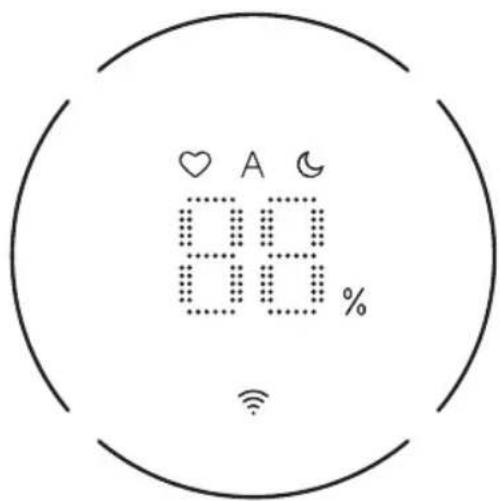
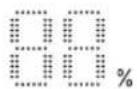
Ambient Humidity Display
Wi-Fi Indicator


Gear Mode
Max: The device is operating in maximum humidification mode.
Automatic: the rotation speed is automatically set based on the current humidity
Sleep: Ultra-low noise operation

Water Level Ring Indicator
Low Water Level
When the device detects a low water level (tank water level <15%), the Water Level Ring Indicator blinks red.
Display of Real-time Water Level
When the humidification page is displayed, the ring indicator indicates the real-time water level.

15%-25%
50%-75%

25%-50%

75%-100%
Use
Installation
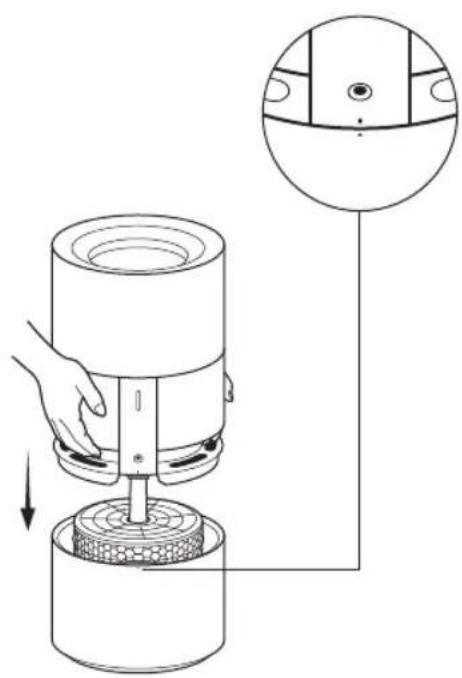
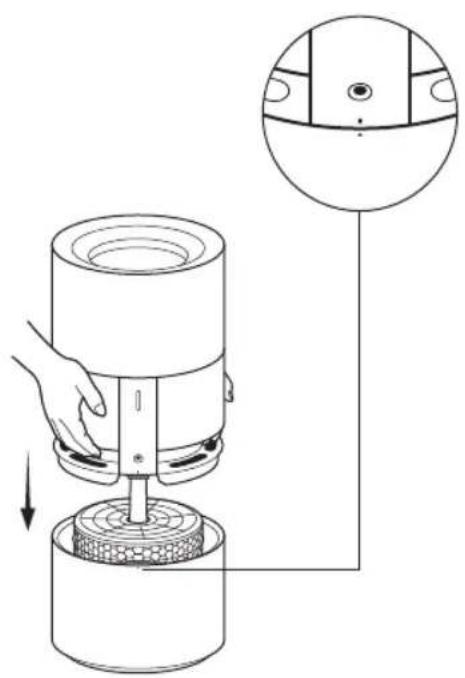
Bring the unit and water tank points into alignment and install the unit as shown in the picture. Plug in the power adapter to power on the device.
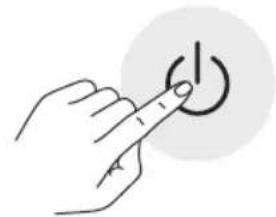
Power on/Standby
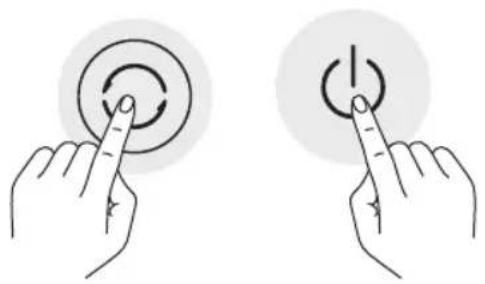
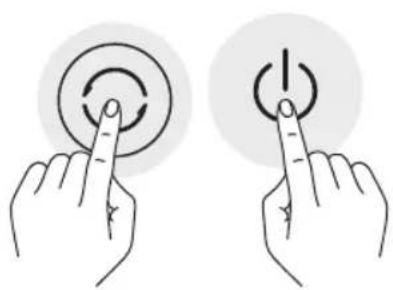
Press the Power on/Standby button on the back of the unit to power the device on/switch to Standby mode.
Filling the Device
Pure water is recommended to avoid scaling.
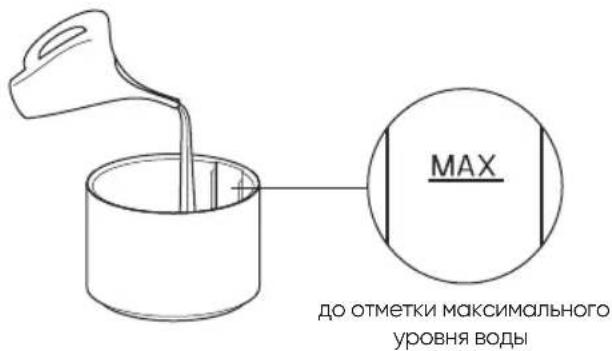
Fill the water tank up to the high water level (the MAX line) as shown in the picture on the right.
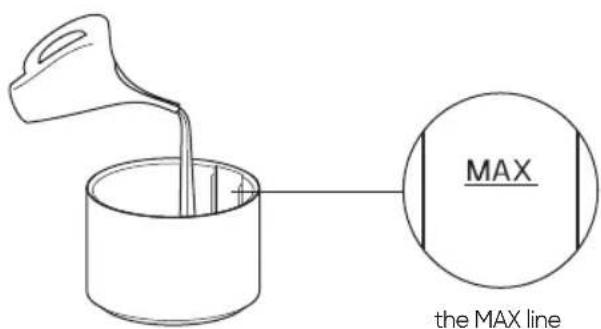
Tip: Keep the unit upright.
Use
Linking the Device to Smartmi Link
This product has been linked to the Smartmi Link and can be controlled using the app. Scan the QR code or search for "Smartmi Link" on the app store to download and install the app. Go to the app's homepage, click "+" in the middle of the page, then add the device as prompted.

Note:
- Please ensure that your Wi-Fi network is both available and has Internet access. Place your phone as close to this product as possible. (This product does not support 5G networks)
- This product will be listed as "Smartmi Humidifier Rainforest" in the app's device listing.
When the device reaches the set target humidity, it will continue to humidify until reaching 3% above the designated target value and activating the standby mode. In standby mode, it will resume when the humidity drops to 3% below the target value.
Intelligent Control with Apple HomeKit
01 Open the Home app on your iPhone/iPad.
02 Tap "Add Accessory" and then scan the HomeKit setup code on the product sticker (two stickers on the device unit, see illustration), or enter the eight-digit setup code above the HomeKit Setup Code. The device will then be linked to the Apple Home app.
The device can be linked to Smartmi Link after linking to HomeKit. Go to the Personal Info page on Smartmi Link. Tap "HomeKit Info" and then link the HomeKit device as prompted. Devices linked to Smartmi Link can also be added to HomeKit. Go to the Device Control page on Smartmi Link. Tap "Add to HomeKit" in "Settings" and then link the device to HomeKit as prompted.
Note:
-
Please ensure that your Wi-Fi network is both available and has Internet access. Place your phone as close to this product as possible. (This product does not support 5G networks).
-
To control this accessory which is compatible with HomeKit, it is recommended to use iOS 13.0 or a later version.
-
Please keep the HomeKit setup code, as you will need to scan the code to link the device to HomeKit after a factory reset.
-
iPad and iPhone are trademarks of Apple Inc., registered in the U.S. and other countries.
-Controlling this HomeKit-enabled accessory automatically and away from home requires a HomePod, Apple TV, or iPad set up as a home hub. It is recommended that you update to the latest software and operating system.
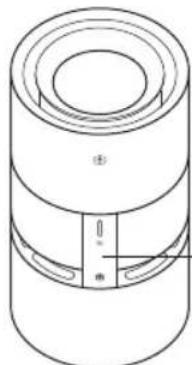
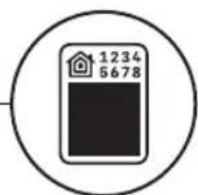
HomeKit Setup Code
- If you need more detailed instruction, please visit: https://www.smartmiglobal.com/pages/helpcenter
Use
Switching Between Modes
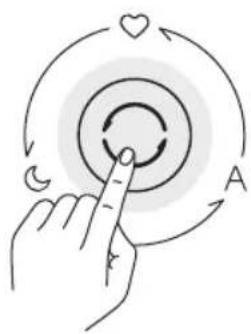
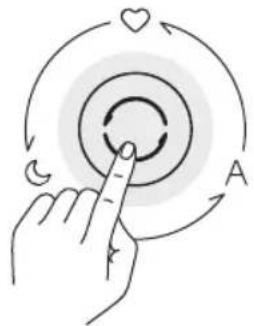
While the device is turned on, press the Mode button on the front of the device to switch between three modes in sequence (Max - Automatic - Sleep).
Wi-Fi Resetting
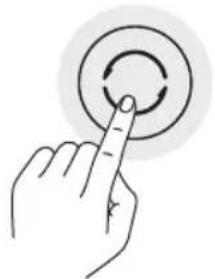
When you connect the App for the first time or fail to connect, press and hold the Mode button for seven seconds. The Wi-Fi icon will blink and the device will issue a notification tone signifying that the device is ready to be connected and the Wi-Fi has been reset.
Enabling/Disabling Wi-Fi
Tap and hold the power on/standby button and mode button for 7 seconds. The humidifier will make a notification sound and the Wi-Fi will be disabled. While the Wi-Fi is disabled, tap and hold the power on/standby button and mode button for 7 seconds. The humidifier will make a notification sound and the Wi-Fi will be enabled.
Self-cleaning Mode
Use the app to enable or disable self-cleaning mode. After the self-cleaning task is completed, the device will issue a notification tone, switch to Standby mode, and darken the screen.
Filter Replacement
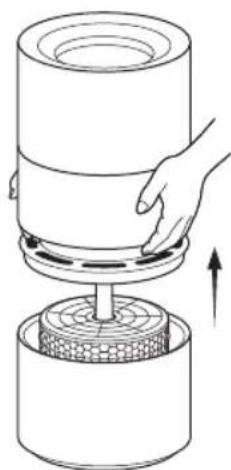
Warning: Before replacing the filter, ensure that the device has been turned off and unplugged. Note: To avoid injury, avoid placing your fingers in between the unit and the water tank when replacing the filter. Keep the unit upright.
01 Remove the unit
Remove the unit by pulling it up. Bring the
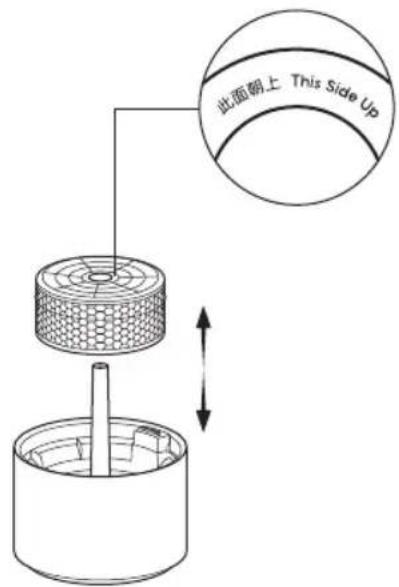
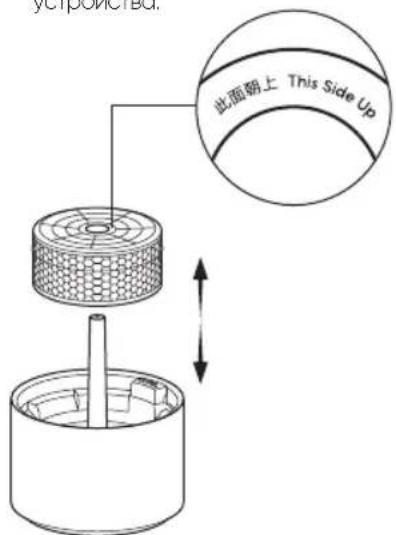
Take out the used filter and install a new one.
Take out the used filter, install a new one face up.
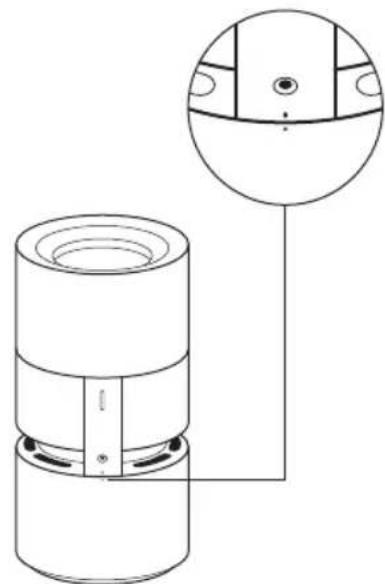
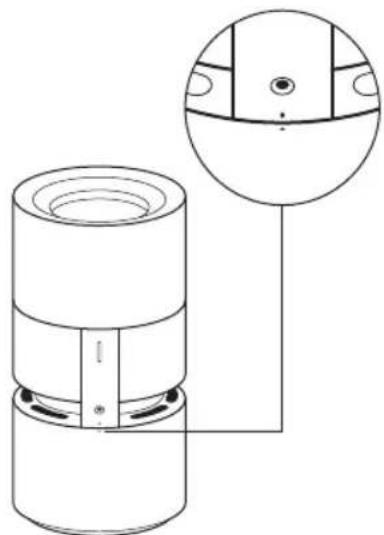
03 Install the Unit
points into alignment and install the unit.
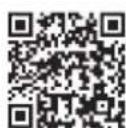
Where can I buy a filter
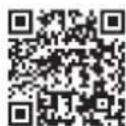
Scan the QR code or visit Smartmi's official shopping mall https://smartmiglobal.com/products/smartmi-humidifierrainforest-filter for more information.
Tips:
It is recommended that the filter be replaced every six months to a year.
- Please buy genuine compatible filters from official channels only.
Maintenance and Care
Warning: Be sure to turn off and unplug the device before performing the following operations. Keep the unit upright when cleaning the device.
Cleaning the Device
A reasonable amount of food-grade citric acid detergent is recommended for cleaning and removing sediment from the water tank, the transparent winder, and the filter. In general, it is recommended that you allow the max mode to run for approximately 15 minutes (though this can be shortened or lengthened depending on the actual conditions). Rinse the water tank, water collector, and filter with clean water once you have finished.
Notes:
- To avoid damaging the device during the cleaning process, ensure that the temperature of the water used to clean the device does not exceed 35^ .
To avoid damaging the device, do not use detergents that are highly acidic or alkali-based or other highly corrosive cleaning solutions.
Cleaning the Transparent Window
Remove the unit and place it on a horizontal table. While holding the device with one hand, use your other hand to wipe the inner wall of the transparent window gently with a soft cloth.
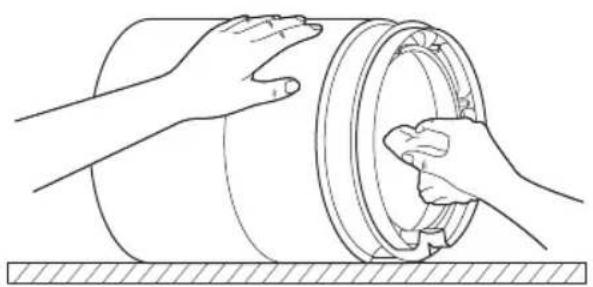
Note: Rinsing the unit is prohibited. Before wiping the unit, wring out the soft cloth thoroughly to avoid damaging from excess water.
Cleaning the Pump
After removing the unit and the filter, take out the water collector from the water tank and turn it over. Brush the pump gently with a soft brush.
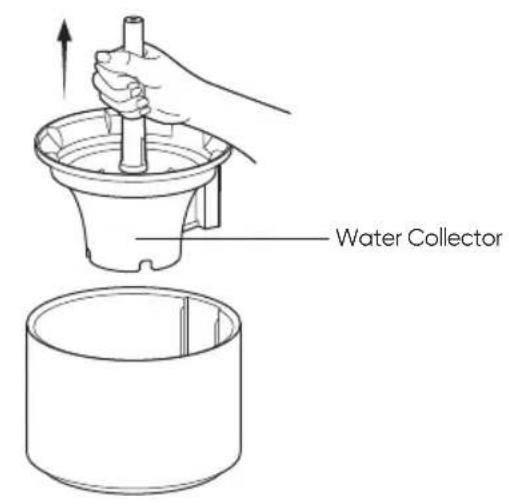
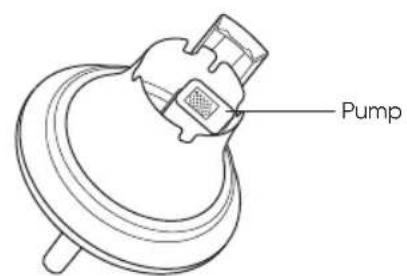
Maintenance and Care
Cleaning the Water Tank
To prevent the water tank from becoming contaminated and producing an unpleasant odor, rinse the water tank with clean water or wipe it with a soft cloth to keep it clean.
There are drainage holes at the bottom of the water tank. Do not use the water tank straight away after it has been fully rinsed or after adding too much water by accident. Instead, place the water tank on the ground with the drainage holes facing down to drain the water from inside the tank.
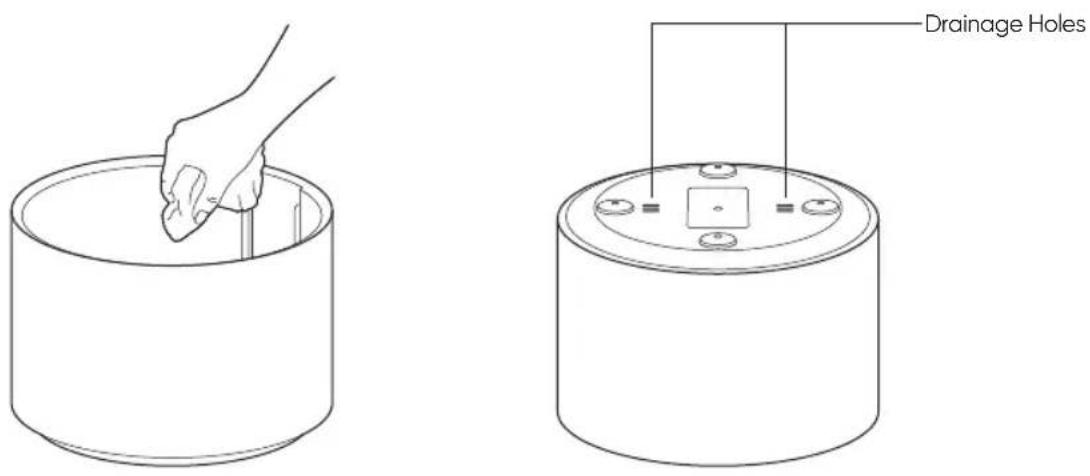
Note: It is recommended that the water tank be cleaned once a week or as required by the frequency of use.
Notes
Moving
Always turn the humidifier off and unplug it before moving it.
Before handling or moving the humidifier, drain any remaining water from the water tank.
Assembling
- Follow the instructions to install the humidifier correctly to prevent electric shocks, fire, personal injury, and other damage.
- Do not turn the humidifier on before it is fully assembled.
Adapter
Follow the instructions below when using the adapter to prevent electric shocks, fire, or damage:
- Connect the adapter plug to an appropriate outlet.
Do not pinch, bend, or twist the adapter cord excessively. Otherwise, the wire inside may be broken or exposed. - Unplug the humidifier before servicing or moving the humidifier.
- Use the standard adapter supplied to power the humidifier. Due to safety considerations, damaged adapters or power cords must be replaced by the manufacturer or a professional from a designated repair service provider.
In Use
If the humidifier generates abnormal noises, produces odors or becomes hot, turn it off immediately.
- Do not put fingers or foreign objects into safety parts, movable parts, air inlets or outlets.
Do not let objects such as hair or fabric come near the main unit, as these objects may get caught in or block the air inlets and outlets.
Do not lean on or tilt the humidifier while in use.
- Ensure sufficient ventilation when using the humidifier at the same time as household gas appliances (such as gas stoves and gas water heaters) to prevent carbon monoxide poisoning. Pure water is recommended for the humidifier.
Depending on the water quality, tap water may cause scale buildup on the pump, filter, inner wall of the water tank, and the transparent window. Scale buildup will affect the normal operation of the humidifier, in which case the humidifier will need to be cleaned as per the instructions in the Maintenance and Care section.
Storage and transportation
Before long-term storage, make sure that
the water tank and the evaporative tank of the humidifier are completely dry, then put the humidifier assembled for storage in a cool dry place.
The device should be placed away from heat sources and out of direct sunlight.
Do not transport at extreme temperatures.
Warnings
To avoid damaging the humidifier, do not add water of more than 35^ to the water tank.
- Unplug the humidifier before adding water or cleaning.
The water tank MAX indicates the level beyond which no more water should be added.
Basic Specifications
Product Name Smartmi Humidifier Rainforest
Model CJJSQ06ZM
Operating Principle
Flow-through Spray-style Evaporation
Dimensions 220× 422mm
Net Weight Approx. 3.3 kg
Rated Input of Adapter 100-240V\~,50/60Hz,0.3A
Rated Voltage 12V
Rated Power 7W
Noise ≤ 50dB(A)
Rated Humidifying Capacity 200mL/h
Rated Water Tank Capacity 3L
Wireless Connection Wi-Fi IEEE802.11b/g/n 2.4GHz
Operating Temperature: 10 40^ Humidity: relative humidity no greater than 80% (at 25^
RF Specification:
Wi-Fi 2.4G (2400 - 2483.5 MHz), Max. RF Output Power: <20 dBm
Under normal use of condition, this equipment should be kept a separation distance of at least 20cm between the antenna and the body of the user.
Note:
- Noise is measured in a laboratory environment.
The date of manufacture is indicated on the equipment.
Power Adapter
| Information Published Value and Precision Unit | ||
| Manufacturer | Zhongshan Baolijn Electronic Co.Ltd. | - |
| Model Identifier BLJ9W120075P-VA - | ||
| Input Voltage 100-240 V~ | ||
| Input AC Frequency 50/60 | Hz | |
| Output Volatage | 12.0 | V= |
| Output Current 0.75 | A | |
| Output Power | 9.0 | W |
| Average Active Efficiency 83.81 | % | |
| Efficiency at Low Load(10%) | 75.21 | % |
| No-load Power Consumption | 0.072 | W |
Regulatory Compliance Information
Europe - EU declaration of conformity

Hereby, Beijing Smartmi Electronic Technology Co., Ltd. declares that the radio equipment - Smartmi Humidifier Rainforest, type CJJSG06ZM is in compliance with Directive 2014/53/EU. The full text of the EU declaration of conformity is available at the following internet address: https://www.smartmiglobal.com/doc.html
Disposal and recycling information

All products bearing this symbol are waste electrical and electronic equipment (WEEE as in directive 2012/19/EU) which should not be mixed with unsorted household waste. Instead, you should protect human health and the environment by handling over your waste equipment to a designated collection point for the recycling of waste electrical and electronic equipment, appointed by the government or local authorities. Correct disposal and recycling will help prevent potential negative consequences to the environment and human health. Please contact the installer or local authorities for more information about the location as well as terms and conditions of such collection points.
EAC
Warning
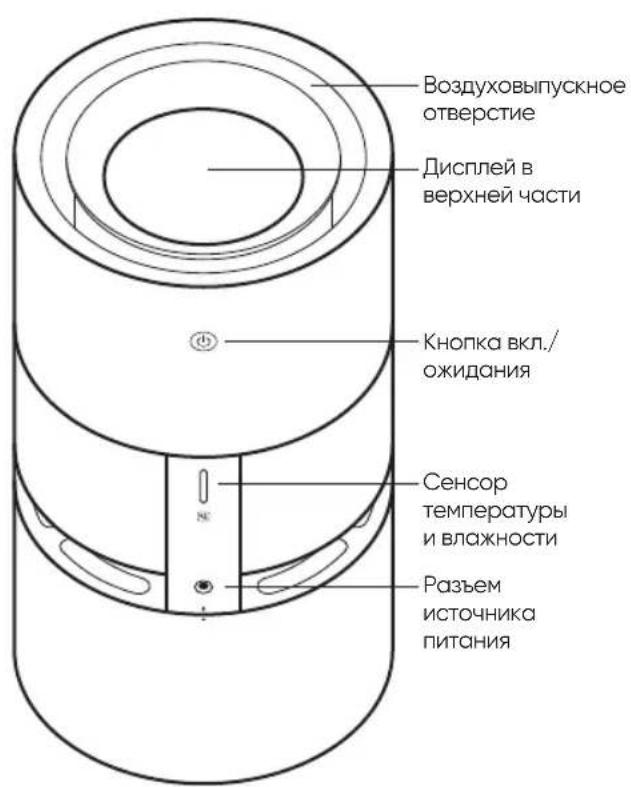
JIInCeBaTCTOpOHa TbInhAaCTOpOHa
PpmeHHe: B HactoIeM pykoBcTBe N3obpaKeHn I3dEInn Iero akceccyapos, a TaKne Nl3bOaTeIbckoro INhtepeHaC RAJIHTOTcToNkO cxemTuHecKmnn CnyKAT DnA CnpabKn. FaktnHeckoe H3dEInne MOxET OTINHObTaC O T N3obpaKeHn 13-3a 06HOBHeHn YCOBepueHCTBOBaHN H3dEInn. CM. FaktnHeckoe H3dEInne.
Данные диспег
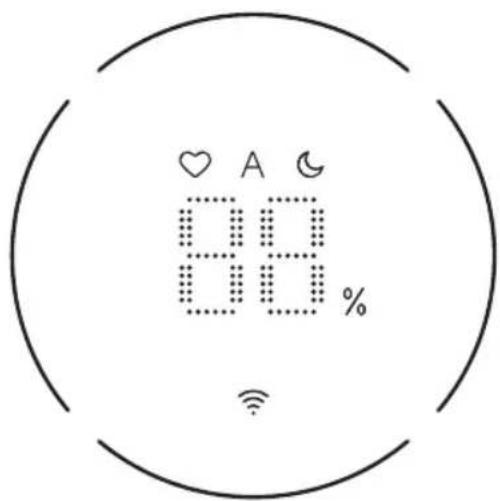
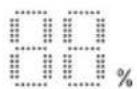
INHnKATOPBnXHOCTN OKpyKaIOUeroBO3dyxa

CBeTOBOH INHnKATOP Wi-Fi


PeximФyHKUHOHPOBaHnnoLoXeHnnepeaH:

MaKcMnabha nepea:pa6oee coctOHe nnoxHnnaeepaunnpMAKcMnabHom yBnaxHeHN

ABTOMATUNeCKn:ABTOMATUNeCKn Bb6Op CKopOCTn BpaUeHnB 3ABNCIMOCTN OT EKUTIe CTENH BNTXHOCTN.

CpIePekM:pa6Oee COCToHHe Co CBepXn3KmIMUyMOBIMNIOMEXAMN

KolbocnHdkaTopa ypOBBa BObl
PnHexBaTke BDoB

Пи OБИОЧУKEHIM YCTPОДСТВОМ HEXBAТКВ БОДы (урбЕнБ BОДы B BOДАНOM 6aKte <15%) KOBla q INДИКATOPO yPOBHA BODI 3AMITAKT KPACHIM LEBOTM.
OTo6paXeHHe yPoBnBaDbI BpeXmpePeaJbHoro BpeMeHH
OTo6paXeHn DaHHbIX O CoCToHn YBnaxHeHn YcTpoCTBa B INTepeFce MoXeT OcyIeCTaIyTBcB PexNMe peAInHo R BPemHn C NMOUbIO KOLbUa INdIKaTOpa

15%-25%

25%-50%

50%-75%

75%-100%
ИспOLTбОВАне
YCTAHOBKA
CoBmctte ToKb BbipabHBHbAHn KOpnyca yCTpoiCTBa n BoaHoro 6aUka, KAK NOKa3aHO Ha pncyHke, YCTAOHOBITE Kopnyc yCTpoiCTBa B NOLOKeHN BXOJa. POnkJIIOChTe K ICTOCHNYIHTAHN, BKJIOHTe NITAHne.
BKn./OxuaHne
Hakatne KhoNk BkL./OxNdaHn Ha 3aDHe CTOpHe
rIaBHO YCTPOCTBa, YTObI BKIOUHTb ERO NIN
NOJOXDAtB.
3aINBc BOdbi
PekomeHnyETcNcNoJIb3OBAHHe OHHeHHoBdI, NcNoJIb3OBAHHe BOdI CdpYmMΦn3uYeCKMn CBOJCTBAMn PnIBoNDK O6pQa3OBAHnIO HAKINN.
Kak noka3aHO Ha pncyHke cnpaba,OTdienbHO HaneiTe BOyB BOJraHO 6aOK, PpeKpATNTe HANONHeHne BOdoI npnIOCTNXeHHM MAKCIMAlbHorO yPOBHr BObl (IO OTMETKN MAKCIMAlbHorO yPOBHr BObl).
YkaaHHe: noXaIyIcTa, He nepeBaOpAHHBaIIte KcpNyc yCtpoCTBa.
ИспOLTбОВАне
noJoxeHH nepeaH
Bo BKJIOUeHHOM COCTOHN
yCTpOINCTBA DnI NOcNEIOBATENBHO
nepeKNIouEHN TpEX NIOJOKeHNI
nepeDau (MAKCIMAlbHa
nepeJa4a -ABTOMATuueCKNI
peXIM-CnA pEXIM) HAKIMaHTe
KHONKY nepeKNIouEHN peXIMOB
HAJIUEBOI CTOpOHE IaBHO
yCTpOINCTBa.
BkIOueHne/BbIKIOueHne coeHHnWi-Fi
Hakmte u depknaite KhONky BKIOUeHn/peKMA OxuDAHn IN KHONky pexima B TeueHne 7 cekyH. yBIAKHNTEJN3dact 3BYKOBOI CnHn, n Wi-Fi 6yDet OTKIOUeH. PpiOntOKJIIOUeHHOM Wi-fi HAKMITE u ydepXNBaTe KhoNky BkIOUeHn/ peKIMOA OxuDAHn IN KHOKNy peKIMAB TeueHne 7 cekyH, yBIAKHNTEJn 3dact 3BYKOBOI CnHn, n Wi-Fi 6yDet BKIOUeH.
C6poc Hactpoek Wi-FiIpekeKIIeepem6martmi Link APP
Pn nepBOM COeINHENN INI npnHEBO3MOXHOCTN NOCDOEINHENK PnpINOJxHIO,3aXMITE KHOJKypeKJIIOUHNE pEXIMOB NydepXINBAIte ee B HAXATOMcoTOnN 7 cekyn,3hauokWi-Fi 3amiraeT,flABHOe yCTPOICTBOn3dact 3BYKOBo CNIHAN BOiDeTBCOCTOHN EOKUHNI COeINHENN,ToTaC6poc Wi-Fi ycneuHOBblNOJHeN.
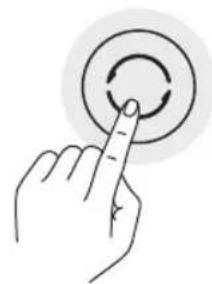
JaHbI npOyKT yKe noKJIouCe
K npINOxHeNIO Smartmi Link APP.
IM MoXHO ynpABTb C NOMOUsbIO
npINOxHeNIA Smartmi Link APP.
OTcKaHpyTe QR-KoD nINn HauDIne
npINOxHeNIE Smartmi Link B
Mara3Ine npINOxHeN, 3arpy3Ine
UYCTaHOBtte Smartmi Link APP.
OTkpoTe DOMaUHIO CTpaHnCy
Smartmi Link APP nHaxMITE 十 ^ 一 B
CTpaHnCe, YTObI B COOTBETCBNI
C NOJCKA3KAMN B npINOxHeNII
DO6ABNTb yCTPOINCTBA.

BHHMaHHe:
y6eHNTecbBDOCTyHNOCTnCeTnWi-Fi INBO3MOXHOCTN HOPMAnbHOrO DOCTyNA B INHTpeHET. PO BO3MOXHOCTN CTapaIteCb, 4TO6bIMoHbHbTeJIeFOH paCnOlaIaICK KAK MOxHO 6NIKe K DAHHOMy IPOdyKTy (DAHHbI pOyKT He NOpdepkXBAeT cTeB cTAHApTa SCl).
BcnickeyctpOCTB APPdHnnI npOpyKT HaaBaTeCg YbLnXHTeNb Smartmi Rainforest
ИспOLTбОВАне
IHTeJIeKTuJIbHoe ynpaBJeHne Apple HomeKit
01 OtkpoIte domaHHe npInIOxHeH e iPhone nn iPad;
02 TTo6bI NpOKnIIOUHTbcra K DOMaUIHEmy npInoXeHHIO Apple APP, HaxMnTe IOnobAHTb akCEccCyap, nocJe cero cornacho
NockaKAM B npInoXeHHN OTcKaHpyuTe paCNOIOXeHHB Ha HAKNeKe Ha npOdykTe HomeKit setup code
(pacnoJARaeTcBA B DByx MeCTax HA Kopnyce, NOpO6Hoe ONICAHe pPBODITcRa Cxeme), INI BBeJNTe 8-3HOHyB
KoYCTAHOBKN, paCNOIOXeHHB HAD HomeKit setup code.
Pocne npdknueHn 3TOro npdykTa K yctpoiCTBy n3 HomeKit erO moxno npBra3aB K npunoXeHnO Smartmi Link APP. Dna 3TOro HuxHo OTKpbItb cTpaHcy Iunhbx daHHbx Smartmi Link APP, HaxaTb Ha paCNoLoXeHHyo Ha cTpaHnIe KhoNky UHfOpMaunr oHomeKit' u corlaCho nocka3kam B npunoXeHn NOKJIIOuHTbcR K yctpoiCTBy HomeKit; Kpome 3TOrO, yctpoiCTBa, npdknoueHNbE K Smartmi Link APP, TaKxe MoXHO do6abTb B HomeKit. Dna 3TOro HuxHo OTKpbITb cTpaHnUy npabLeHn yctpoiCTBAMn Smartmi Link APP, B pa3dene Hactpoek HaxaTb Ha KhoNky IdoabTb B HomeKit' u corlaCho nocka3kam B npunoXeHn NOKJIIOuHTbcR K HomeKit.
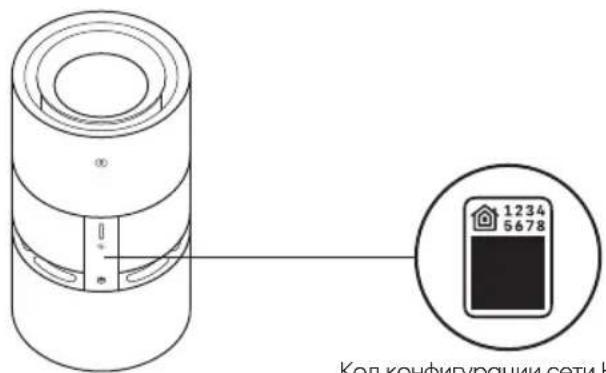
KoI KOHpyaun cetu HomeKit
Bollee noopobnyu nHCTpykunmo cM. Ha caTte: https://www.smartmiglobal.com/pages/helpcenter
Pexm CAMOounCTkn
BHIMOHHE:
Y6eHNTecbB DocTyHnOCTn Cetn Wi-Fi BO3MOXHOCTn HOPMaJIbHOrO DOCTyNA B INTEpHT. IIO BO3MOXHOCTn CTapaiTecb,
TTO6bMoBnHbTeNepoHpaccnonarac
KAKMOXHO6NIXEKAHOMYPOOQTY(aHbIPOQyKTHeNOAepKXBnAEtCtBCTAHAPr5G);
-ДИУПВАБЕНИЗТПМДСКЕССУСРОМ, COBMECTNIMbIcHomeKit, ekOMeHДуTeTcY INONN3OBaTB BepCINO IOS 13.0 HIN BILSE;
He TepaKe KOKoHPhypaun Cetn HoneKit! Nocle BocCTaHOBNEH3AzoDcXHAcTPOeK dnoNokIOHEnH KHomeKit Notpe6yeTeC CHOBA OTCKaHNPoBaTB HomeKit setup code;
KOMNAHrAApple raBnreTc BAneJIbCem
TobApHBx3AKnOB iPdN iPhone, KOTOpBie
3aepnCTpnpoABHb CLLA nDpynx CtpaHXO
YTObI NOnyHTB BO3MOXHOCTb ABtOMAtuNECK
ynpABnTB 3mN Akceccyapom C noDpekXo
HomeKit uNCnOb3oBaT bE OBe Doma,
HyXHO HAcTpoNTb HomePod, Apple TV nn
iPad B KaHeCTBe DOMaIIHero ueHTpa. TaKke
peKomeHnyETc O6HOBITn IporpAMMHOe
06ecneHHe H OepaIOOHyO CnTeMYo Do
NoocJeHne Bercn.
Pn yctahOBke 3aahnHO CTeneHH BnAUXHOCTN NOCE JNOCTXHEH NAOAHHO CTENEHH BnAIXHOCTN YCPOCTBO PNODOJNNT YBNAHXHEHNE DO 3aahnHO CTENEHH BnAIXHOCTN +3%. Nocne nepexOa B pexm OxuaHH YCPOCTBO BO3O6HOHT PABOTY NOCE naehn CTENEHH BnAIXHOCTN DO 3aahnHO CTENEHH BnAIXHOCTN -3%.
Pekim cmoochnk moKet BkIooatbca nIi BbIKIOOHTBCaYepe3 npINOxHne, NOcne 3aBepueHnra camooohCTKN yct poNCTBO n3dact CnHAN, kpaH noTyXHeT, yCTpoNCTBO nepeNd T peKIM OxuaHn.
3aMeHaΦnIbTpYIOUeRo 3JIeMeHTo
IpeynpcknHne: neep 3ameho fniltpyooero 3eMeNTa y6eNTecb, YTO yCTPOCTBO BIKIOHO, n aantte PITAHN BHTAueH. BHIMAHNE: B cienx H6exAHNA TpABM npri 3aeme He pInltpyooero 3eMeNTa, NOXAYCTa, He npocobBaTe naBbM MeKdy KOpTycOM yCTPOCTBA IN BOdHBM 6aHcM. Ioxkaynta, He nepeboapnaBaTe Kopnyc yCTPOCTBa.
012HIMTe KOpnyc yCTPOINCTBa.
CHIMMTE KOPnyc yCTpOYCTBa DINXeHnEM BBepx.
N3BNEKTe CTapbI fNbtpyUOuN 3JemeHT, yCTAHOBnTE HOBBi fNbtpyUoN 3JemeHT.
N3BNEKNTE CTAPbI ΦINbTPyIOUπI ΘIEMENT, YCTAHOBITE HOBbI ΦINbTPyIOUπI ΘIeMENT, NOBepHyB ERO JIuceBOI CTOpOH BBePx, YCTAHOBITE KOpNyC yCTpOINCTBa.
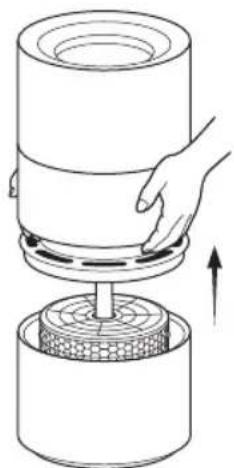
03 yctaHOBka KOpnyca yctpoiCTBa
CoBmectteTOckn BbipabHbAHnKOpnyCa yCTpOINCTBaNBOJHOro6aHaKa, BepHtHeHaMeToKOpNyC yCTpOINCTBa.
Kak npno6pectn nIbtpyouuun 3JIeMeH
Длгплгченябболгплдрбнйиформсп OTСКАнИРУТЕ QR-кOD ИПИ NBОБРТЕСВ ВОФИЗАЛБНИ МARAЗИN Smartmi no сьынke https://smartmiglobal.com/ products/smartmi-humidifier-rainforest-filter
Yka3aHne:
BnpoeceNcIOnb3OBAHNA
B Cny40e BO3HKNKHOBeHHN
HexapakTepeh63yKOB, HexapakTepeHOro 3aXa, npn3HOKO HARpeBa n npYnx OTKHOENB B paoTe npOdyKTa CneJeYET He3MeDnITeBHO npEkpATnB erO NCIOJIb3OBAHIE.
He pasewaetc Tporatb naIbamn nnKACTb NOCTOPOHNE IpeMeTb Hg 3aunTb,IOBxHbYeAcTH, BO3yoxo3oBOpHN KBO3yOxOBytCyckHO CTBepCTHEPOdykTA.
He Cnnyet pachonarab BoJocbl KnaTb TEKNTBHe MATEpnaJIb PdOM CTTABHm YCTPOINCTCB MoI36eKaHMe IN B7RnBCHN HIN 3ACOPCHN MM BO3yXo3aOpHnKn IBO3yXoBbIyCkHO T0EBCPHTN.
He CnEpyET OINPCATbCA HpN6Op HcneTtHaknHbtpn6Op BO Bpemaero pa6Oybl
PnNCIOJIb3OBAHIN BMeCTe C rA3OBbIM
OBOpYIOBAHNIEM (HApNIMep, rA3OBbIMN
NEcOM NIN BOHOARpeBaTeIaM)
06ecneyte DOCTaTOHyIO BEHTINRAUIO,
4TO6BI 136EkaTb OTPaBHeHr yapHbIM
TcAOM.
ⅡIaHHOYCTBOEPEKOMEHyETCA
NCB3OBAHNEOHNBOBIPINCIOJI3OBAHNBODQNPOBOHOBOBIB3AUCIMOCTOTpA3NIHbIXΦnHECKHX
CB0CTBBOB,MOKETPnBECTNCKONIEHNOHAKINNABOJHOMHACOCE,
ΦNtpyoJEMNIEMENTe,BHYtpENHHX
TcHexKOBDOHAOKNIIPO3pOHCMOTPOBOMOKOLKE.CKONIEHNO
OPedeJIeHHOKONIECTBAHAKINM
MOKETHERATINBHOBNHHOHPMaNBHyQ
paobTy yALKaKNHTELK.Kok TOnbKO6yET
O6HOpyKeHO3NHKOBHeHTEKON
CITayuIN,POKAyNTaO,OcyUeCTBVte
OCHKTy cOrnACHO METoDM,ONCCAHBIM
Brrabe《O6CNyKBAHNEuXoD]
XpaHeHnE HtpaHcNopTpnoBbKa
IpeepdnttebHbIMxpanehnEM y6eNTecbBTOM,yTO6aK DnBBObln MCnpapTeBHLpE3epByap yANXHTenr B03dyxANONHOCTbO CYHX,NcCNE 3TOrO NOCTABtBEYAXHTENB03dyxA B CO6PAHOM BIDJe HA xpaHHeHBe CxyOe IPOXIAHDOE MECTO.
YCTPOCTBO CNEUYET PO3MELOTB BDOIOT MTOHKOBTENHBI HBE 3OHB NOAADAHINPRAIMXCONHEHBYH
IpeDynpexJeHne
-BoN36ExAHNE NONOMOK HN B KOEM CNYAe HeJIb3HANHOBATB 6a0K TROPHyKO BDOY TEMIepaTyPOGone 35^
PnHAnONHeHHBDOHN OHCTKe BbHbTeBNIKY 3NEKTPONTCHIN.
OTMeTcMAO3HOaETnHIMMCKOMJIbHOyPOBHBBOBIIPIHNOHIOHEHOBOJ
Ponck uyctpaehne HeHcnpabBHOCTe
Pon yCTpaHEH HeVCnpaBHOCTe C6NIOAHTe MepbBeoRACHOCTn, H3NOXeHHB HAcTOJIe HHTpyKHN B TOM HcNE, B pa3dene "IpeDynpexJeHne"
YBnaxHntEnHe BknoqaeTcBo3MOxHbI pHHbI:
-OTcyTCTBNE HINPRAXEHN B
3nEeTPOecTe,PiOepebTe HApPaeHne B 3nEeTPOecTe;
O6pbKabEnPiTaHnPiOpBePbTe 电IOCTHOCTKa6eNPiTAnHnPi
HEo6xOIMOCnHeNCnPaBnHKn6eBn
3AmEHNTe.Ⅱ3aMeHb Ka6eNPiTaHn
O6paTntecB CnELnNtINPOBaHHIe cepBMCHIE LHTpB.
- Dpynme npinyHb.1y BbBbIeHnnpynH n pmoHTo o6pntTeB CNEUINNInpoBOHhBe cpeCNhBcEHTbO.
BHMANHHe NbTaNTecb
cMOCTOETIHO OTOPEMOHTNPOBAtb
npi6op.O6paTnteck K
KBAHNIUMOBAHOMCNEUANMCTY.
OCHOBHeI npaMeTpbl
| Ha3BaHne YbIaxHnTeb Smartmi Rainforest | |
| Modél nb ppondykta CJJSG06ZM | |
| Приицпр pa60Ты | Проточhoe opocHTelhoe Испаренье |
| Размеры Φ220×422mm | |
| Вес нетю Okоло 3,3 кг | |
| HominaHbHbI BxOД aadAnTepa 100-240V~, 50/60Hz, 0.3A | |
| HominaHbHoe NaPpJExeHne 12V | = |
| HominaHbHae MoUHocTh 7W | |
| ШуMHocTh ≤50dB(A) | |
| HominaHbHbI O6bem YbIaxHneHn 200mL/h | |
| HominaHbHae EMKoCTb BODaHOro 6aHka 3L | |
| БecIpobOvHoe noIcklIoueHne Wi-Fi IEEE802.11b/g/n 2.4GHz | |
| ToproBaMapka Smartmi | |
| ТIN nbpoDyKta YbIaxHnTeb Bo3dYxa | |
| HaznaChenHe | YbIaxHneHn 6O3dYxa B nomeшени |
| Tempepatypa xpaHelen 0r -10°C do 40 °C | |
| BlaJXHoCTb prn XpaHelen 5%-90% RH | |
| Датa n3rotoblenya CM. Ha yNakOBke | |
| СtrPana n3rotoblenya KHTaI | |
| Tempepatypa ekCnIpyaTauioHHoN cpeDb: 10-40°C; BlnaxHoCTb: OTHocHTeHbA BlaJXHoCTb He 60nee 80% (prn Tempepatype 25 °C) | |
| РадиочactOTHbIe XapKTePrcNTNIk: Wi-Fi 2,4 ПTu (2400-2483,5 MTu), Мбс. ВьнОДаня радиочactOTHa moUHocTh: <20 dBM | |
| В НорMaHbHx yCIOBmX ИСпьЗOBANHЯ 3TO yctPoIcTBо ДлЖнО pacnOJIarOTbToTak, YtObSb MeKdY OHTeHON I NOLsBОВteMe coXpaHAnOcB paccSTOAHme He MeHee 20 cm. | |
| ПрииMuHAnHe: ЗИЧЕМЕУ SHIMOCTHn PpeIcTABIeT c6ObДanHbIe ИЗМeperEHn B ycIOBmX JIabopatOpHOn cpeDb | |
| Датa m3rotoblenya yka3aHa Na Hb O6OpudOBaHm CBeDEHn 6bIMNpOtepe yka3aHb Na YNakOBVe. | |
3apnHoe yctpOHTBO
100-240V\~,50/60Hz,0.3A
Uppskattad ström 12V
Zhongshan Baolijin Electronic Co.Ltd.
-
Modellidentifier BLJ9W120075P-VA -
Ingende spanning 100-240 V~
Ingende AC-frekvens
50/60
Hz
Utgående spanning 12.0
Utgande ström
0.75
A
Utgande kraft
90
W
Medel aktiv effekt
83.81
%
When the device reaches the set target humidity, it will continue to humidify until reaching 3% above the designated target value and activating the standby mode. In standby mode, it will resume when the humidity drops to 3% below the target value.
Smart kontroll med Apple HomeKit
Nominal spending 12V

Nominal effekt 7W
Lyd≤50dB(A)
Manufactured by: Beijing Smartmi Electronic Technology Co., Ltd.
Address: Room 6111, 1st Floor, Building 6, No.18 Xueqing Road, Haidan District, Beijing, China
For detailed e-manual, please go to https://www.smartmiglobal.com/pages/manual For more information, please visit: https://www.smartmiglobal.com/ Need support? Please contact smartmi customer service: onlinesupport@smartmiglobal.com
Hersteller: Beijing Smartmi Electronic Technology Co., Ltd.
Adresse: Room 6111, 1st Floor, Building 6, No.18 Xueqing Road, Haidian District, Beijing, China
Isiotavens: Beijing Smarttri Electronic Technology Co., Ltd.
Aqpec: Room 611, 1st Floor, Building 6, No.18 Xueqing Road, Haidian District, Beijing, China
No006Hoe 3neKTOHoe pykoBcTbC mo. no apcye https://www.smartmiglobal.com/pages/manual
InnoIIOyueHoe IIOIOHIEHOBn HnFopmaun Cm: https://www.smartmiglobal.com/
Hykno noepKKa? O6oRtTeB cLxSyE noepKKnIeHOB Smartmi no apcye: onlinesupport@smartmiglobal.com
Fabricado por: Beijing Smartri Electronic Technology Co., Ltd.
Direcction: Room 611, 1st Floor, Building 6, No.18 Xueqing Road, Haidian District, Beijing, China
Para Obtener un manual electronico detallado, vaya a https://www.smartmiglobal.com/pages/manual Para Obtener mas informacion, visite: https://www.smartmiglobal.com/ /Necestoyada?Contacte el service al cliente de smartmitonlinesupport@smartmiglobal.com
Fabbricato da: Beijing Smarti Electronic Technology Co., Ltd. Indirizzo: Room 6111, 1st Floor, Building 6, No.18 Xuejing Road, Haidian District, Beijing, China
Proucent:BeijingSmartmiElectronicTechnologyCo.,Ltd. Adres:Room611,1stFloor,Building6,No18XueqingRoad,HaidianDistrict,Beijing,China
Szegedowg instrukcje elektronizcno这其中e podonzsym adreem: https://www.smartmiglobal.com/pages/manual
Wiocj informaci nozna zolez na stronie: https://www.smartmiglobal.com/
Potrzebujes pormcy? Skontakut sie zdiazlem obligi Smartm online support@smartmiglobal.com
Tilverkad for:Beijing Smartmi Electronic Technology Co., Ltd. Adress:Room 61TT, 1st Floor, Building 6, No.18 Xuejing Road, Haidian District, Peking, Kina
For en detailerad e-manual, gà til: https://www.smartmiglobal.com/pages/manual Forytterligare information, gà til: https://www.smartmiglobal.com/ Behover du hjol? Vanilgen kontaktia smartmi's kunajnst: onlinesupport@smartmiglobal.com
Fabricant: Beijing Smartmi Electronic Technology Co., Ltd.
Adresse: Room 6111, 1st Floor, Building 6, No.18 Xueqing Road, Haidian District, Beijing, China
Uretic: Beijing Smartmi Electronic Technology Co., Ltd.
Adres: Room 611, 1st Floor, Building 6, No.18 Xueqing Road, Haidian District, Beijing, China
Daha detayil bir klavuz icin lutfen asagidaki adresi ziaryet edm: https://www.smartmiglobal.com/pages/manual Daha fazla biligi icin lutfen asagidaki adresi ziaryet ean: https://www.smartmiglobal.com/ Destege mi intiyaciniz var' Lutfen smtmi musteri hizmetleri ile letisime gezin onlinesupport@smartmiglobal.com
Loget av: Beijing Smartmi Electronic Technology Co., Ltd.
Adresse: Room 6111, 1st Floor, Building 6, No.18 Xueqing Road, Haidian District, Beijing, China
For detailjert brukerhänbok, besek https://www.smartmiglobal.com/cages/manual For more information, please visit https://www.smartmiglobal.com/ Trenger du hjelp? Konaikt:SMART customer service: onlinesupport@smartmiglobal.com
Produceret af: Beijing Smartmi Electronic Technology Co., Ltd.
Addresse: Room 611, 1st Floor, Building 6, No.18 Xueqing Road, Hoidian District, Beijing, China
For detaileret e-handbog, gà til https://www.smartmiglobal.com/pages/manual For yderlgere oplynser, se vinglist:https://www.smartmiglobal.com/ Har du brug for hjoep? Kontakt vilingstSMARTi kundeservice: onlinesupport@smartmigbai.com
Valmistaja: Beijing Smartni Electronic Technology Co., Ltd.
Osoite: Room 611, 1st Floor, Building 6, No.18 Xueqing Road, Haidian District, Beijing, China